 MANSOQ
 Clinical care · VERSION 3dfb7c9f
Create a coded demonstration prescription for a reported-medication exercise
Use the Medication tab to create one fictional coded prescription, keep its row and shared notes distinct, and verify the saved card after reload before the Nurse reconciliation lesson.
Doctor
 12345
12345Saved coded prescription
Capture details
Observed committed 3dfb software on 20 October 2026. One Doctor prescription and one Nurse reported statement; software-only values, no dispensing or administration. Original pixels and capture times preserved.
Image SHA-256 0f904563539f3b47f2b795caaaf5dfd191175fbb117b3550a5c88aff54ed011a
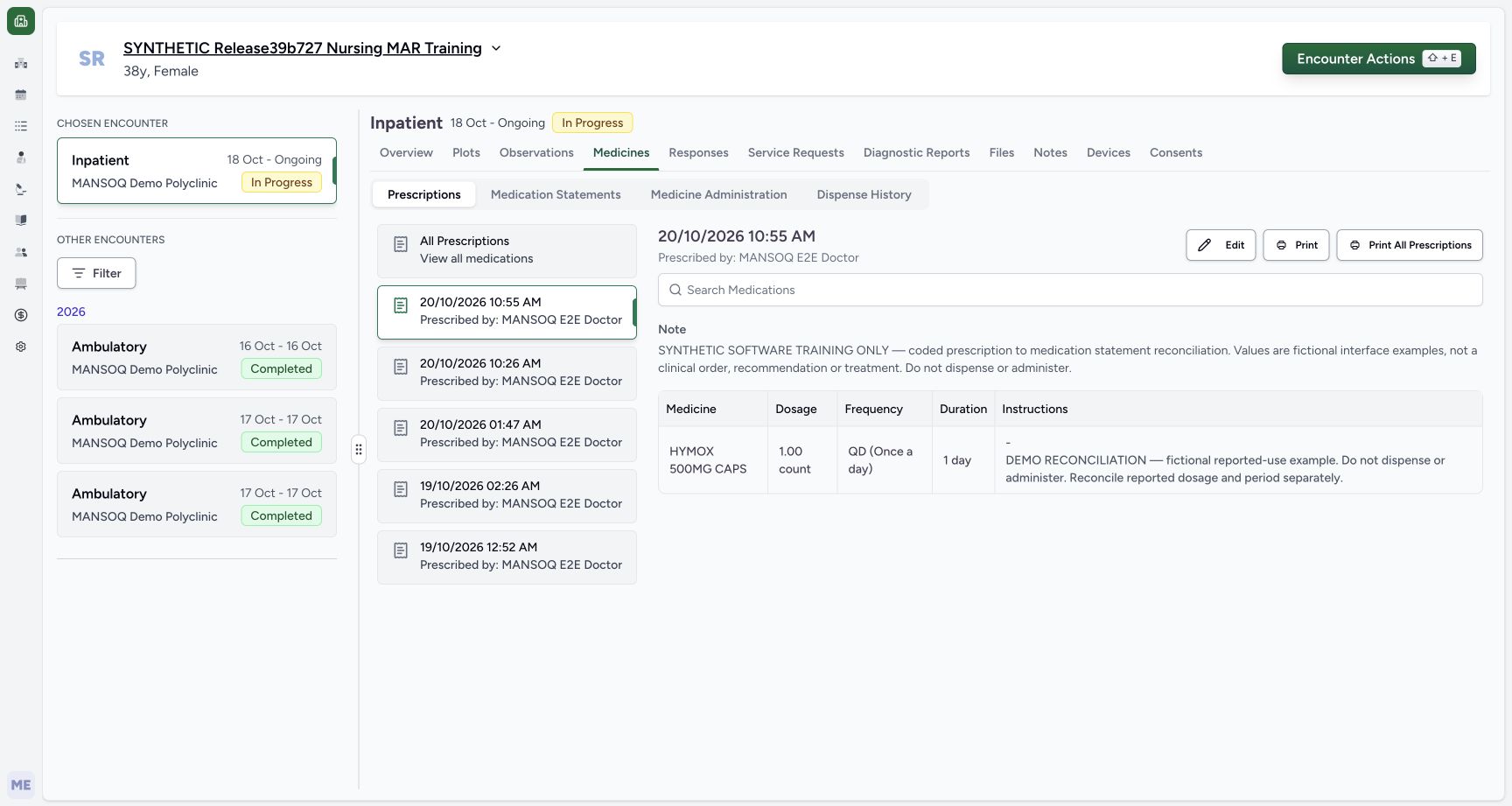
- Verify the selected new card: The selected prescription is 20/10/2026 10:55 AM.
- Read the Doctor prescriber: The header identifies MANSOQ E2E Doctor.
- Read the shared prescription Note: This complete Note is the prescription-level training text.
- Review 1.00 count, QD and 1 day: The selected prescription’s dosage controls remain separate.
- Read the complete row-specific note: The row note appears in the Instructions cell below the dash; this is the note copied into the later statement.
12 of 12 content blocks have reviewed image alignment.
Before you begin
- Use an authorised Doctor account and verify the assigned fictional patient and intended ongoing encounter. This example uses the synthetic Inpatient encounter shown.
 123
123Recorded release 3dfb7c9f · 2026-10-20T07:50:28.689Z · 1728 × 921 Doctor overview
Capture details
Observed committed 3dfb software on 20 October 2026. One Doctor prescription and one Nurse reported statement; software-only values, no dispensing or administration. Original pixels and capture times preserved.
Image SHA-256
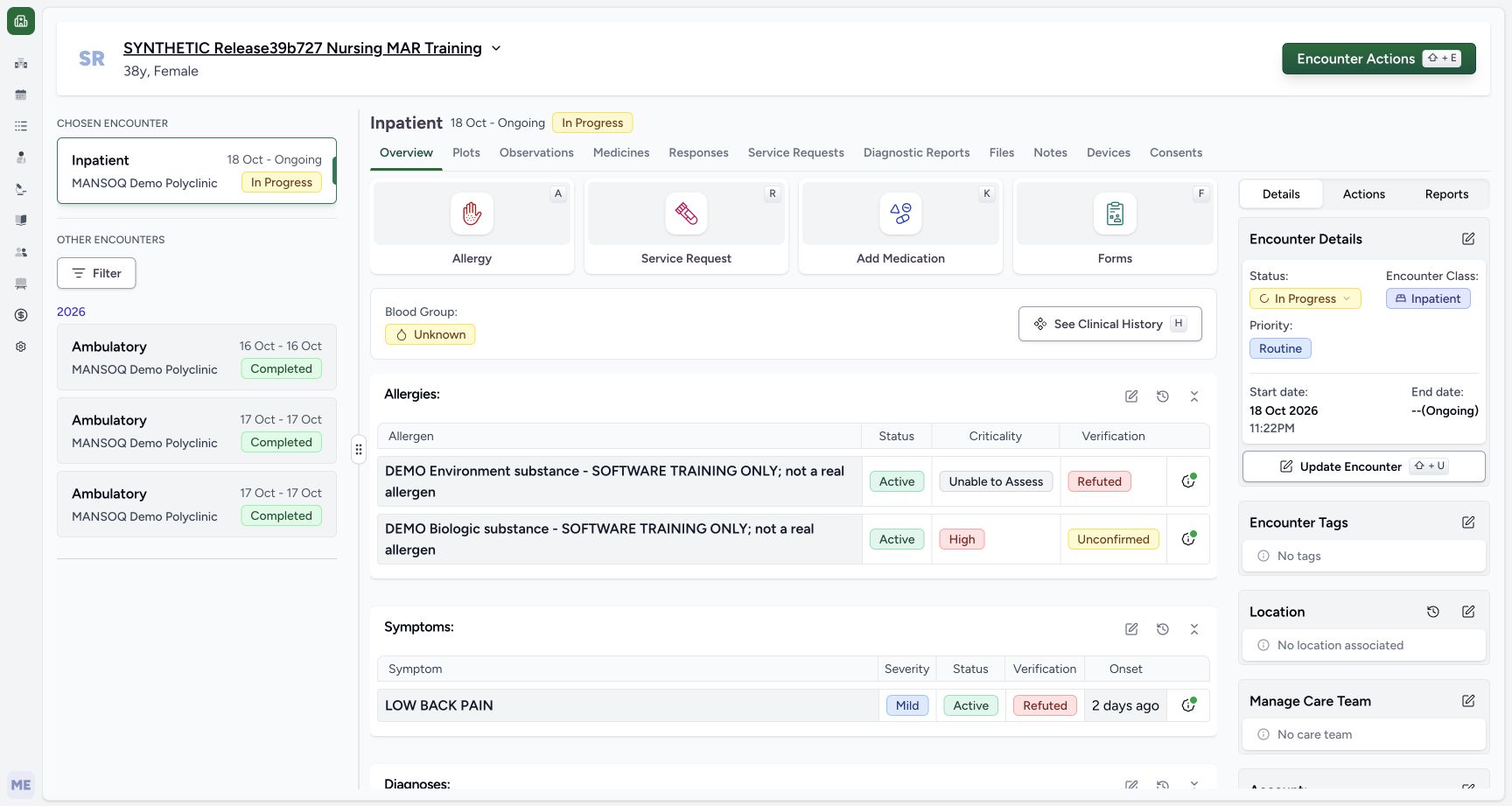
692c8c158e8c23dbb79cd6ceded9cf49ab8a4e1cc92b0aae6444cc4a0986ccef- Verify the fictional patient: Check the synthetic patient banner.
- Verify the selected ongoing encounter: The selected Inpatient encounter is In Progress.
- Open Add Medication: The Doctor opens the prescribing form for this software-only example.
- All quantities, frequency, duration and notes are software-training examples. They are not a clinical order, recommendation or treatment. Do not dispense or administer them.
 123456
Recorded release 3dfb7c9f · 2026-10-20T07:55:12.709Z · 1728 × 921 Draft code note review
Capture details
Observed committed 3dfb software on 20 October 2026. One Doctor prescription and one Nurse reported statement; software-only values, no dispensing or administration. Original pixels and capture times preserved.
Image SHA-256
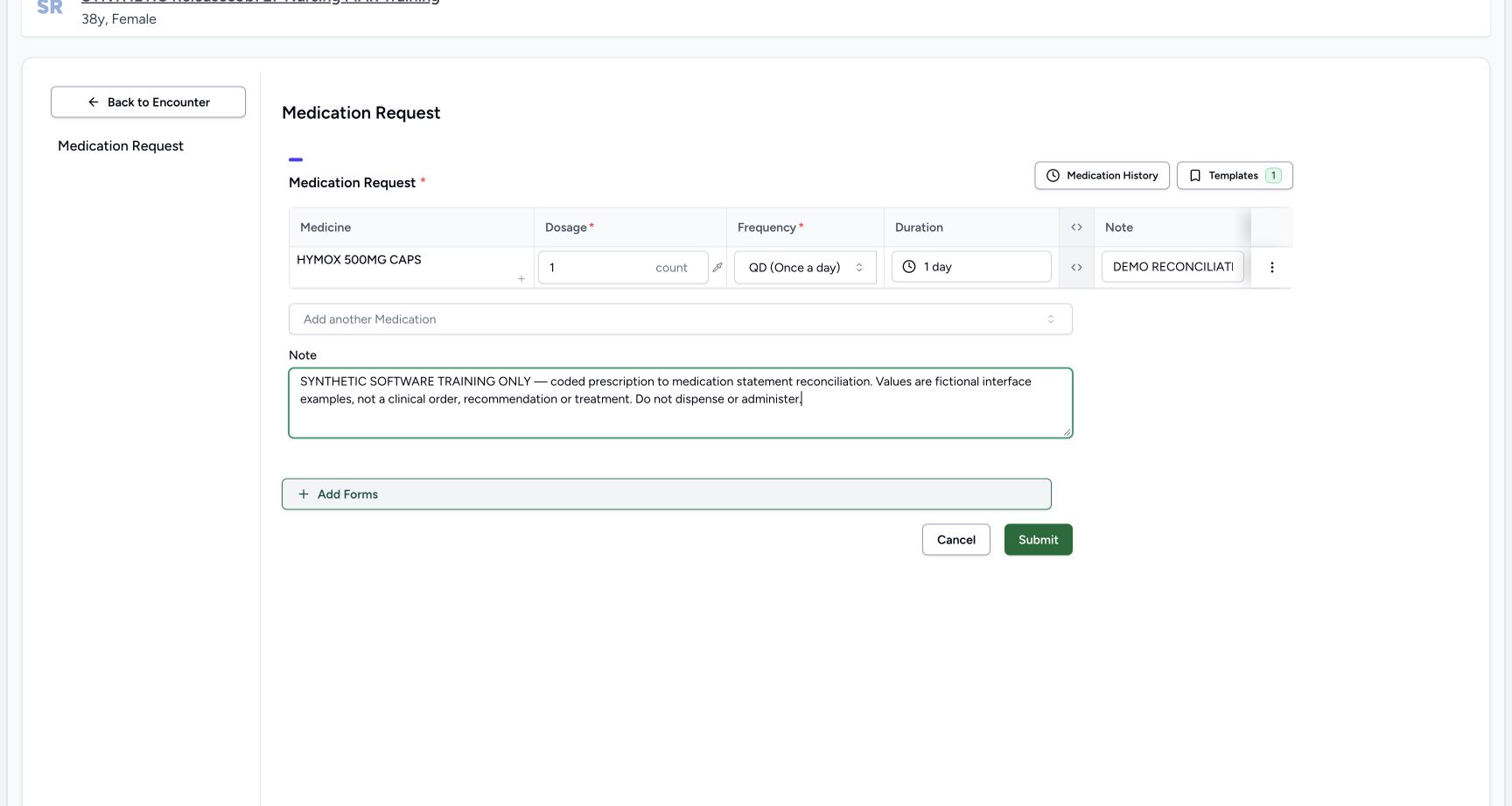
6ce22a103b1f31b55c07022ffa70893e29a76749fd6eec663636bc6288d74df4- Review 1 count: The code-backed draft uses the explicitly chosen count unit.
- Review QD (Once a day): QD is selected in the current HYMOX draft.
- Review the automatic 1 day bound: The QD preset supplied this initial duration; review it as a separate field.
- Enter the row-specific Note: This short input clips its long text. The saved prescription later shows the complete row note.
- Enter the shared prescription Note: The complete shared software-only note is separate from the row Note.
- Choose Submit once after review: Submit saves this Doctor prescription; it is not the Nurse statement save.
12345Recorded release 3dfb7c9f · 2026-10-20T07:56:16.584Z · 1728 × 921 Saved coded prescription
Capture details
Observed committed 3dfb software on 20 October 2026. One Doctor prescription and one Nurse reported statement; software-only values, no dispensing or administration. Original pixels and capture times preserved.
Image SHA-256
0f904563539f3b47f2b795caaaf5dfd191175fbb117b3550a5c88aff54ed011a- Verify the selected new card: The selected prescription is 20/10/2026 10:55 AM.
- Read the Doctor prescriber: The header identifies MANSOQ E2E Doctor.
- Read the shared prescription Note: This complete Note is the prescription-level training text.
- Review 1.00 count, QD and 1 day: The selected prescription’s dosage controls remain separate.
- Read the complete row-specific note: The row note appears in the Instructions cell below the dash; this is the note copied into the later statement.
- This lesson creates one demonstration prescription as the source for the separate Nurse reported-medication lesson. Do not copy or alter the earlier inventory-product prescriptions.
 12
12Recorded release 3dfb7c9f · 2026-10-20T07:56:04.038Z · 1728 × 921 New prescription list
Capture details
Observed committed 3dfb software on 20 October 2026. One Doctor prescription and one Nurse reported statement; software-only values, no dispensing or administration. Original pixels and capture times preserved.
Image SHA-256
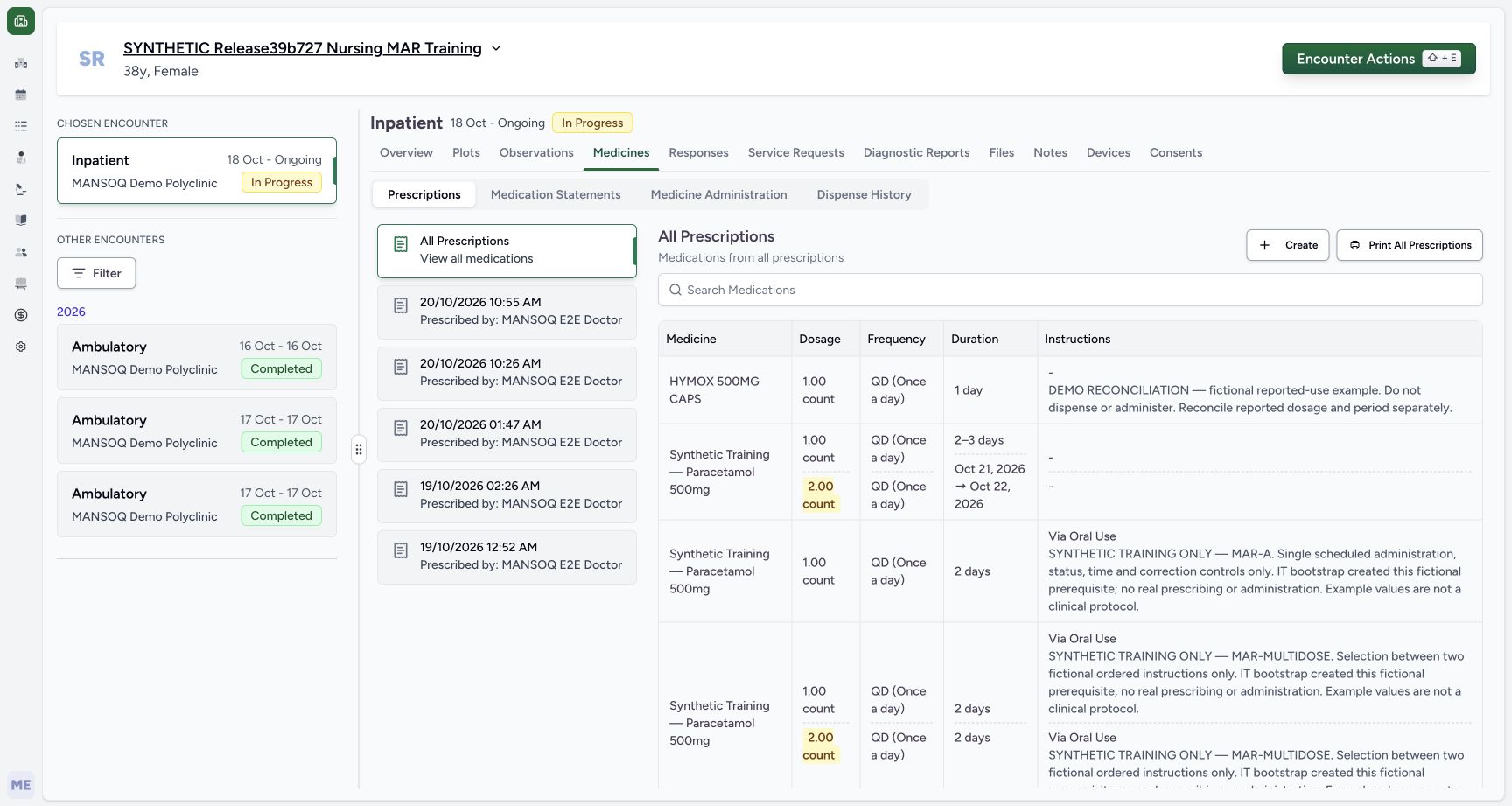
03df32e5f50fa03ab1ea1a27d0fcc15d5f69e192c620393d7486dc0e0a2b0c8a- Keep Prescriptions selected: This tab contains the Doctor’s saved prescriptions.
- Select 20/10/2026 10:55 AM: Choose the new HYMOX prescription card rather than the earlier product examples.
12345Recorded release 3dfb7c9f · 2026-10-20T07:56:16.584Z · 1728 × 921 Saved coded prescription
Capture details
Observed committed 3dfb software on 20 October 2026. One Doctor prescription and one Nurse reported statement; software-only values, no dispensing or administration. Original pixels and capture times preserved.
Image SHA-256
0f904563539f3b47f2b795caaaf5dfd191175fbb117b3550a5c88aff54ed011a- Verify the selected new card: The selected prescription is 20/10/2026 10:55 AM.
- Read the Doctor prescriber: The header identifies MANSOQ E2E Doctor.
- Read the shared prescription Note: This complete Note is the prescription-level training text.
- Review 1.00 count, QD and 1 day: The selected prescription’s dosage controls remain separate.
- Read the complete row-specific note: The row note appears in the Instructions cell below the dash; this is the note copied into the later statement.
1. Open Add Medication for the selected encounter
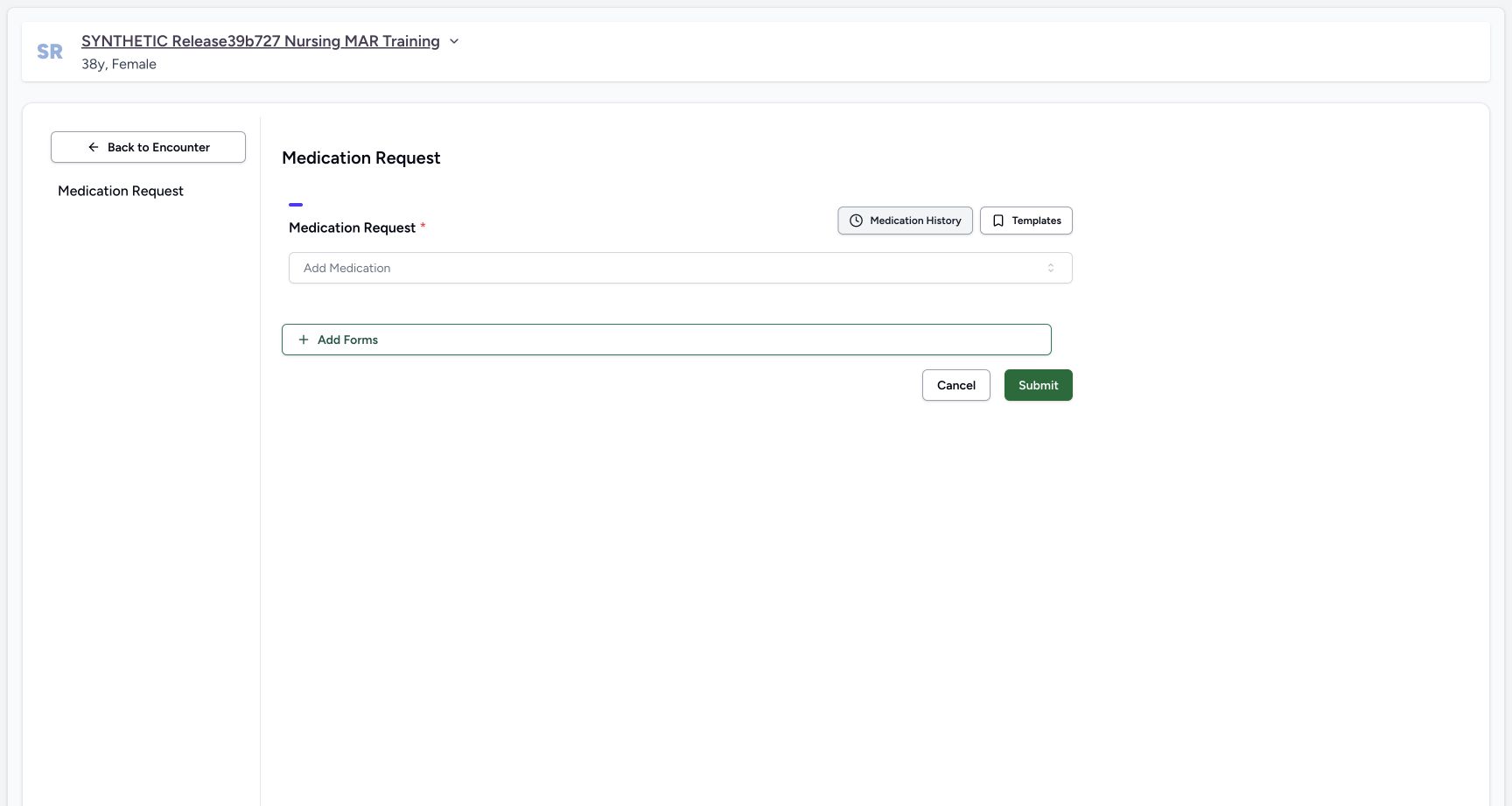
Check the patient banner and selected In Progress encounter, select Add Medication, and open the empty request form’s Add Medication selector.
123Doctor overview
Capture details
Observed committed 3dfb software on 20 October 2026. One Doctor prescription and one Nurse reported statement; software-only values, no dispensing or administration. Original pixels and capture times preserved.
Image SHA-256 692c8c158e8c23dbb79cd6ceded9cf49ab8a4e1cc92b0aae6444cc4a0986ccef
- Verify the fictional patient: Check the synthetic patient banner.
- Verify the selected ongoing encounter: The selected Inpatient encounter is In Progress.
- Open Add Medication: The Doctor opens the prescribing form for this software-only example.
 1
1Empty request
Capture details
Observed committed 3dfb software on 20 October 2026. One Doctor prescription and one Nurse reported statement; software-only values, no dispensing or administration. Original pixels and capture times preserved.
Image SHA-256 dbec120f1f3e0c1a7f7d0daee43c3c1d17f8de469be7f746f79dfe682ebd8ea8
- Open the medication selector: Open Add Medication in the empty request form.
2. Switch to Medication and choose the illustrated training source
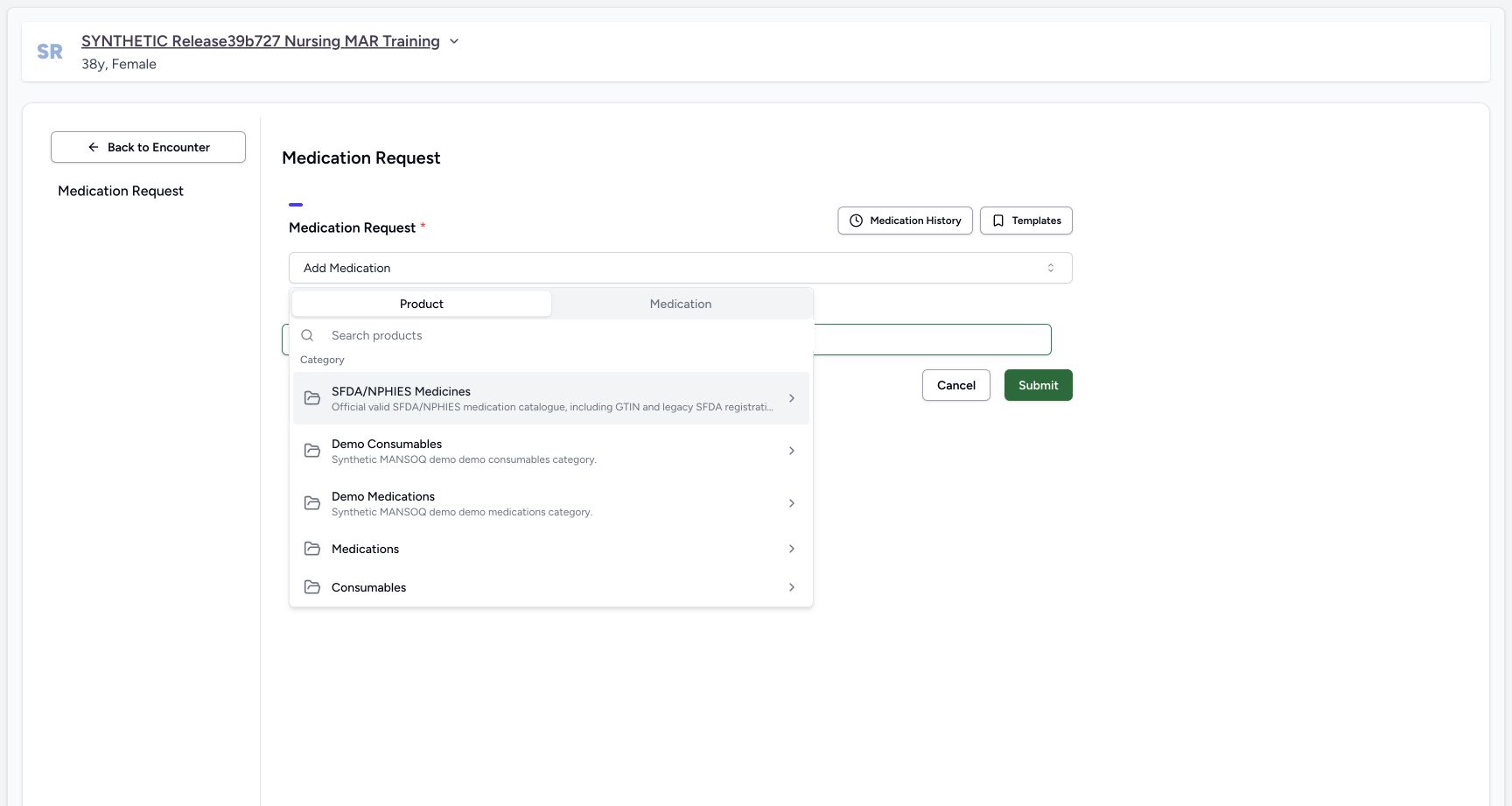
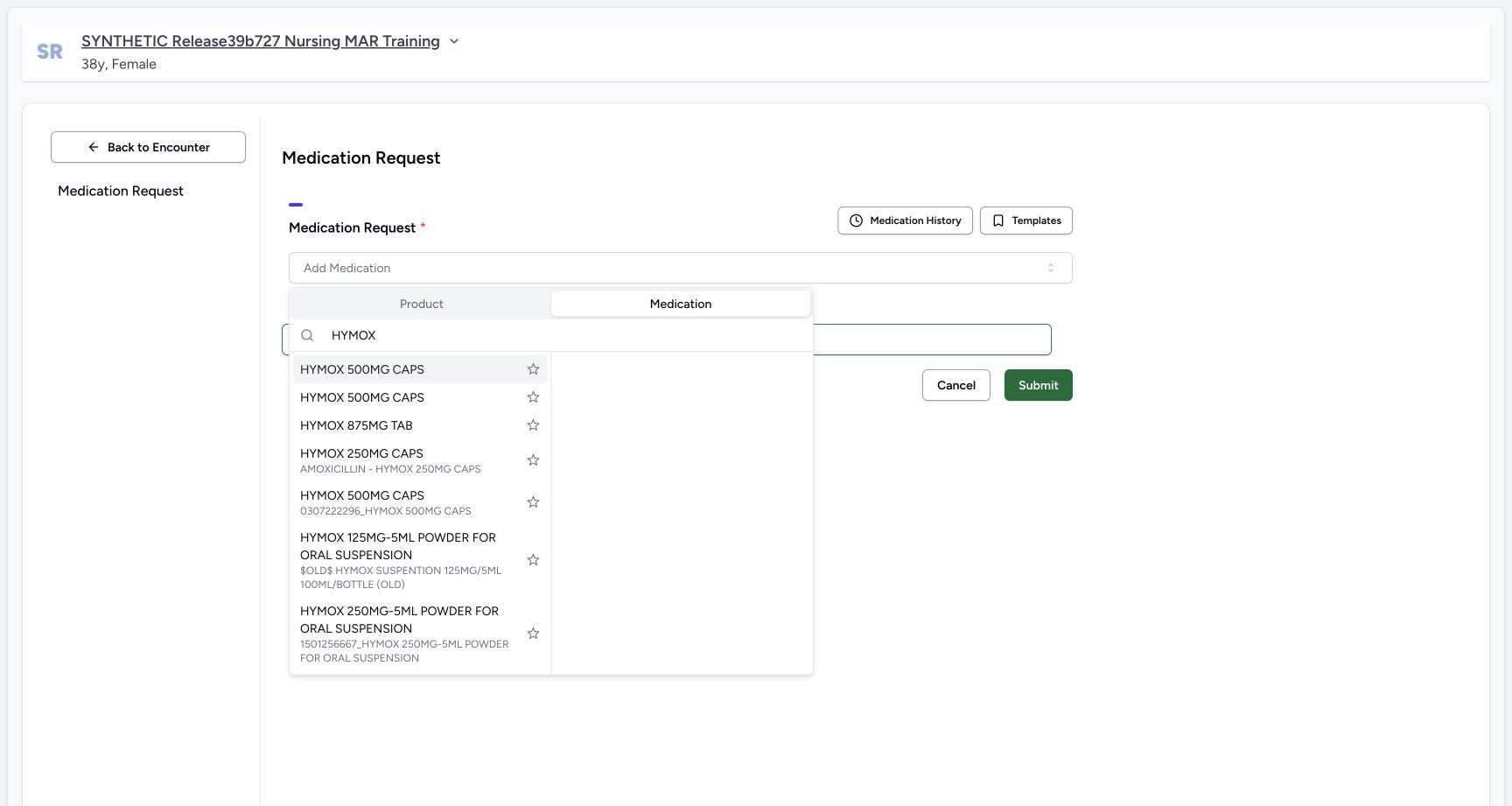
Select the Medication tab, separate from Product. Search HYMOX. For this configured software exercise choose the first illustrated HYMOX 500MG CAPS result. The results include repeated display names; the selected first row does not print its terminology code here. Keep this demonstrated Medication-tab source distinct from the earlier Product-tab inventory example.
 1
1Selector tabs
Capture details
Observed committed 3dfb software on 20 October 2026. One Doctor prescription and one Nurse reported statement; software-only values, no dispensing or administration. Original pixels and capture times preserved.
Image SHA-256 67b52e3cbcfb518a3dfc21489fc00f52cb68153c4825aec3f249478461dcbf07
- Choose the Medication tab: Use the terminology-backed Medication tab, distinct from Product.
 123
123Code search results
Capture details
Observed committed 3dfb software on 20 October 2026. One Doctor prescription and one Nurse reported statement; software-only values, no dispensing or administration. Original pixels and capture times preserved.
Image SHA-256 acfa4c6d423ebd19173ac5074bc614aace5f349d6833f3fd8a0cd5d0b4c1e776
- Check that Medication is selected: The search is in the Medication tab.
- Search HYMOX: The search field is already populated in this view.
- Choose the first illustrated HYMOX 500MG CAPS result: For this software exercise use this first result. Several entries share display text; no code is printed beside this selected result.
3. Enter the quantity and choose QD
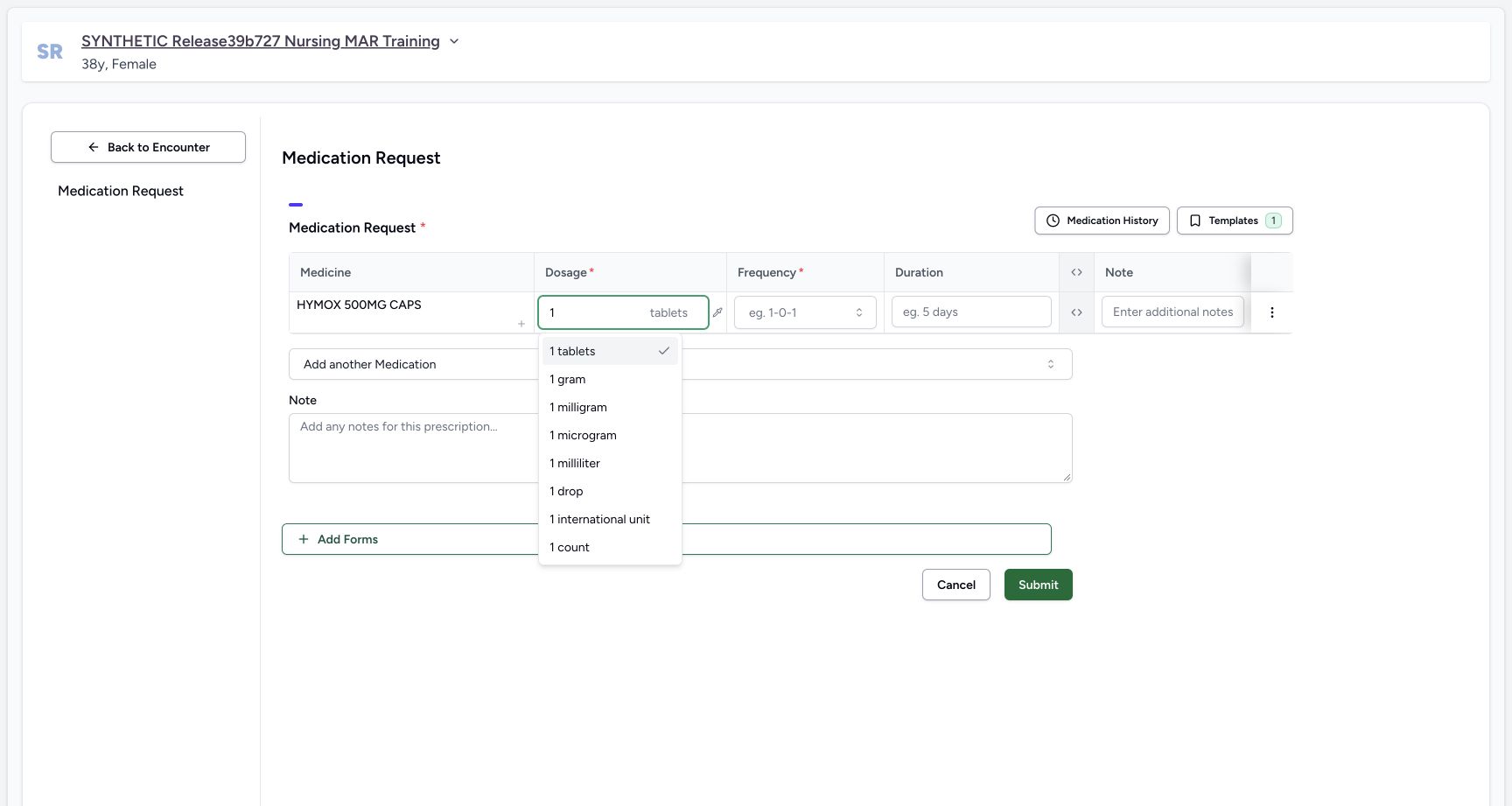
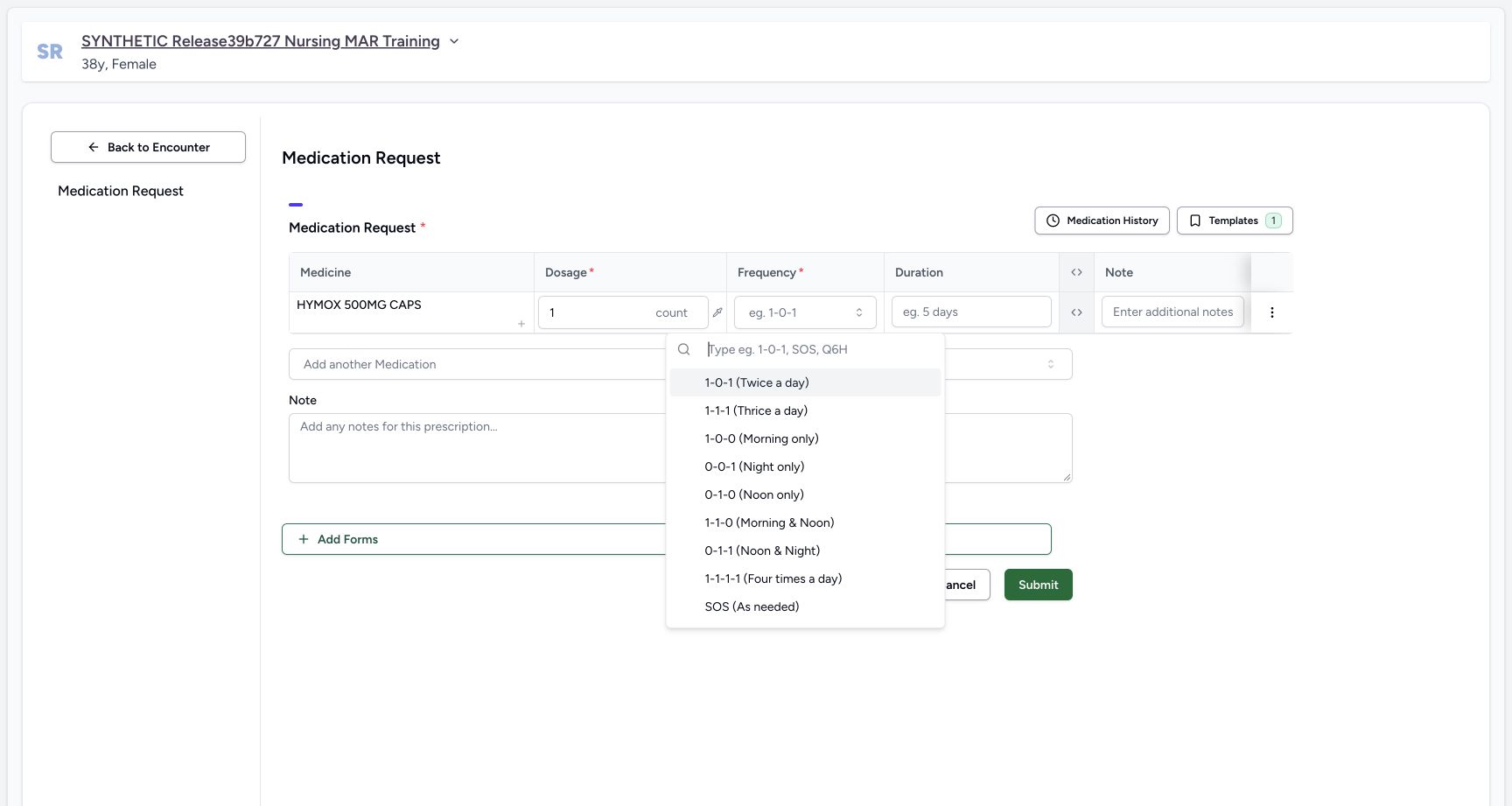
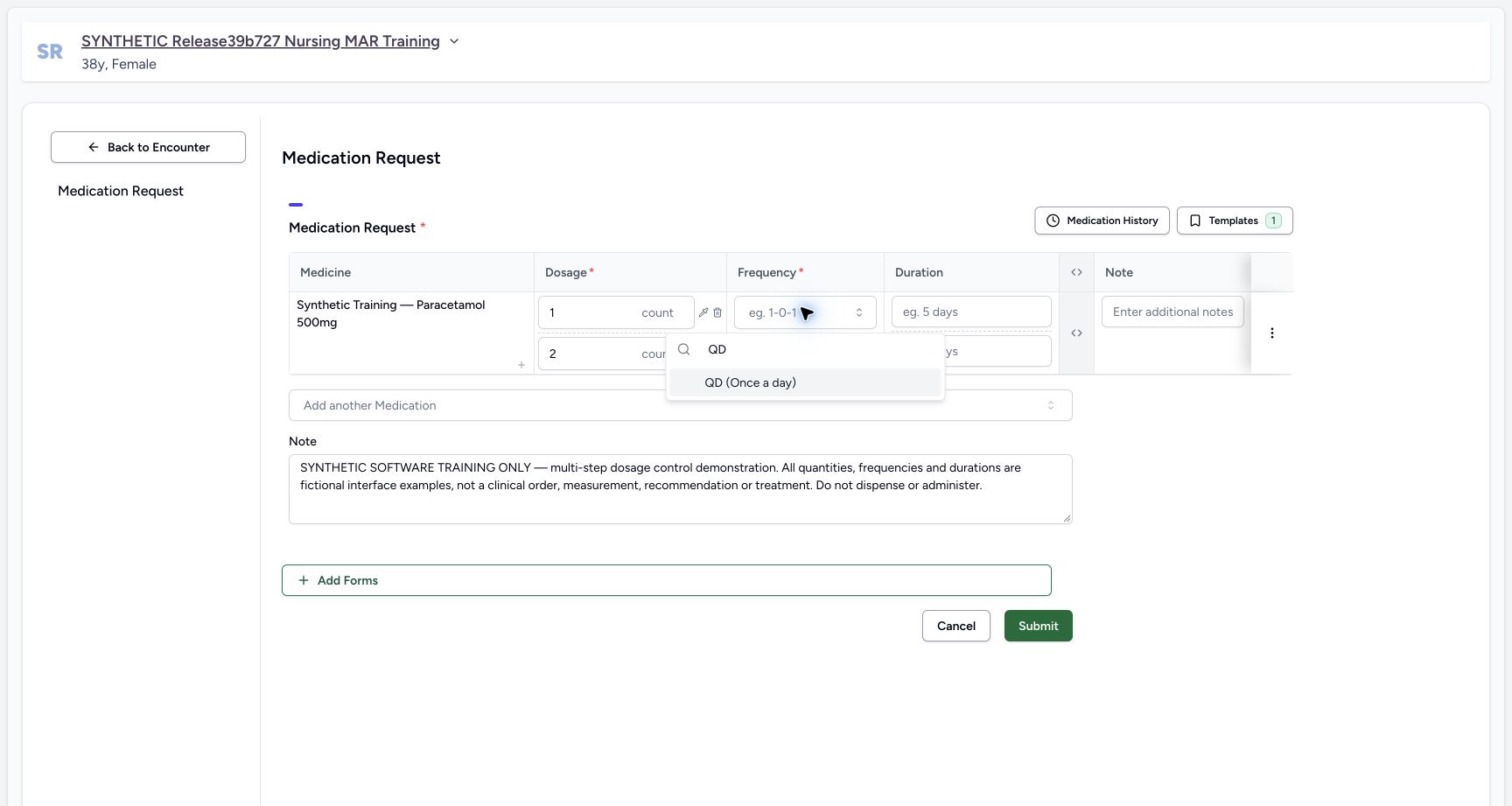
Enter 1 in Dosage and explicitly select 1 count from the unit choices. Open Frequency and search QD, then choose QD (Once a day). The earlier Doctor control illustration shows the Frequency search and QD result on a different synthetic product; use it only to locate that unchanged control. In the current HYMOX draft verify 1 count, QD and the preset 1 day duration. These are fictional interface values.
 12
12Explicit count unit
Capture details
Observed committed 3dfb software on 20 October 2026. One Doctor prescription and one Nurse reported statement; software-only values, no dispensing or administration. Original pixels and capture times preserved.
Image SHA-256 b4a44616ebbef8dc1263907d4eb15ef57e4884271346d3d000fb292d4800fbf5
- Enter the fictional quantity 1: The number initially appears with a suggested unit; select the intended unit explicitly.
- Choose 1 count: Use count for this fictional interface exercise, not the initially suggested tablets.
 12
12Frequency options
Capture details
Observed committed 3dfb software on 20 October 2026. One Doctor prescription and one Nurse reported statement; software-only values, no dispensing or administration. Original pixels and capture times preserved.
Image SHA-256 090f937e6066378c24e30b7fa1e7332b2245cf47bd5e4d5c956538fc13a0fc44
- Open Frequency: This current HYMOX draft has its Frequency menu open.
- Search for QD: Use the frequency search field. The earlier separate-product reference shows the resulting QD choice.
 123
123Earlier Doctor Frequency search and QD choice — separate training product
Capture details
Earlier Doctor image from the same release and patient. It illustrates the Frequency search and QD choice only; its separate synthetic product is not the coded HYMOX prescription.
Image SHA-256 80f9a90b724013a224e2c26d7c698bc2587a1a4cdda332c74e32912b78c94967
- Open first-step Frequency: Choose the first dosage line’s frequency control.
- Search QD: Type QD in this open frequency search.
- Choose QD (Once a day): Select the result for this fictional interface example.
123456Draft code note review
Capture details
Observed committed 3dfb software on 20 October 2026. One Doctor prescription and one Nurse reported statement; software-only values, no dispensing or administration. Original pixels and capture times preserved.
Image SHA-256 6ce22a103b1f31b55c07022ffa70893e29a76749fd6eec663636bc6288d74df4
- Review 1 count: The code-backed draft uses the explicitly chosen count unit.
- Review QD (Once a day): QD is selected in the current HYMOX draft.
- Review the automatic 1 day bound: The QD preset supplied this initial duration; review it as a separate field.
- Enter the row-specific Note: This short input clips its long text. The saved prescription later shows the complete row note.
- Enter the shared prescription Note: The complete shared software-only note is separate from the row Note.
- Choose Submit once after review: Submit saves this Doctor prescription; it is not the Nurse statement save.
4. Enter the row note and separate shared note
In the product row’s Note enter: DEMO RECONCILIATION — fictional reported-use example. Do not dispense or administer. Reconcile reported dosage and period separately. The narrow input shows only the beginning; the saved detail later shows the complete text. In the shared Note below the table enter: SYNTHETIC SOFTWARE TRAINING ONLY — coded prescription to medication statement reconciliation. Values are fictional interface examples, not a clinical order, recommendation or treatment. Do not dispense or administer. The two notes have different scopes; do not treat the shared prescription Note as the source row note.
123456Draft code note review
Capture details
Observed committed 3dfb software on 20 October 2026. One Doctor prescription and one Nurse reported statement; software-only values, no dispensing or administration. Original pixels and capture times preserved.
Image SHA-256 6ce22a103b1f31b55c07022ffa70893e29a76749fd6eec663636bc6288d74df4
- Review 1 count: The code-backed draft uses the explicitly chosen count unit.
- Review QD (Once a day): QD is selected in the current HYMOX draft.
- Review the automatic 1 day bound: The QD preset supplied this initial duration; review it as a separate field.
- Enter the row-specific Note: This short input clips its long text. The saved prescription later shows the complete row note.
- Enter the shared prescription Note: The complete shared software-only note is separate from the row Note.
- Choose Submit once after review: Submit saves this Doctor prescription; it is not the Nurse statement save.
5. Review and submit the Doctor prescription once
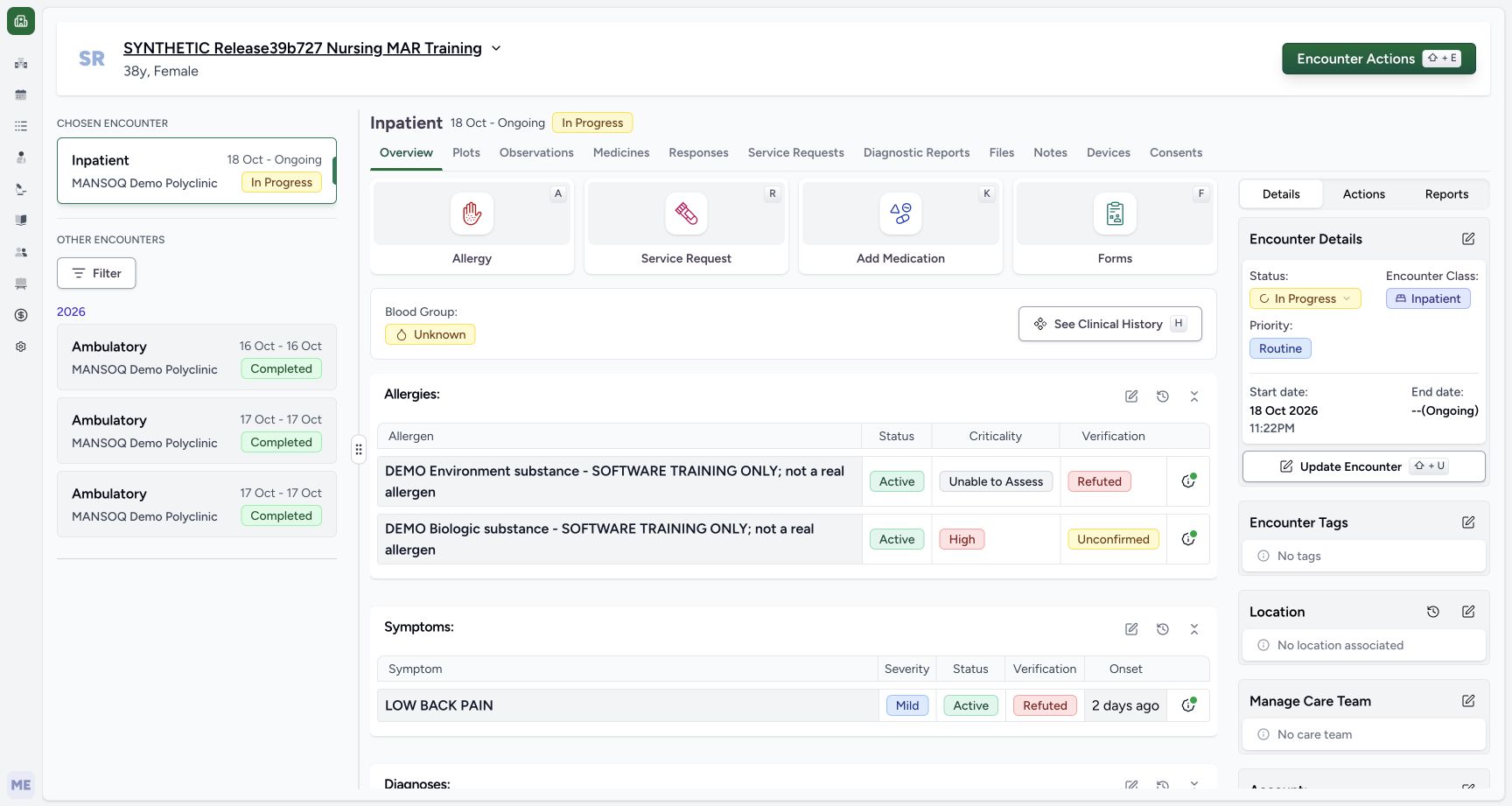
Review the selected HYMOX 500MG CAPS, explicit 1 count, QD, 1 day and both training notes. Choose Submit once and wait for the return to Overview. Open Medicines, keep Prescriptions selected, then select the new 20/10/2026 10:55 AM card prescribed by MANSOQ E2E Doctor.
123456Draft code note review
Capture details
Observed committed 3dfb software on 20 October 2026. One Doctor prescription and one Nurse reported statement; software-only values, no dispensing or administration. Original pixels and capture times preserved.
Image SHA-256 6ce22a103b1f31b55c07022ffa70893e29a76749fd6eec663636bc6288d74df4
- Review 1 count: The code-backed draft uses the explicitly chosen count unit.
- Review QD (Once a day): QD is selected in the current HYMOX draft.
- Review the automatic 1 day bound: The QD preset supplied this initial duration; review it as a separate field.
- Enter the row-specific Note: This short input clips its long text. The saved prescription later shows the complete row note.
- Enter the shared prescription Note: The complete shared software-only note is separate from the row Note.
- Choose Submit once after review: Submit saves this Doctor prescription; it is not the Nurse statement save.
 1
1Returned overview
Capture details
Observed committed 3dfb software on 20 October 2026. One Doctor prescription and one Nurse reported statement; software-only values, no dispensing or administration. Original pixels and capture times preserved.
Image SHA-256 f8d1d02947ee77977f85771111338357df053f539006fef569dfe5b3b7567964
- Open Medicines after the return: Wait for Overview, then inspect the newly saved prescription under Medicines.
12New prescription list
Capture details
Observed committed 3dfb software on 20 October 2026. One Doctor prescription and one Nurse reported statement; software-only values, no dispensing or administration. Original pixels and capture times preserved.
Image SHA-256 03df32e5f50fa03ab1ea1a27d0fcc15d5f69e192c620393d7486dc0e0a2b0c8a
- Keep Prescriptions selected: This tab contains the Doctor’s saved prescriptions.
- Select 20/10/2026 10:55 AM: Choose the new HYMOX prescription card rather than the earlier product examples.
6. Read the saved card, reload and verify it again
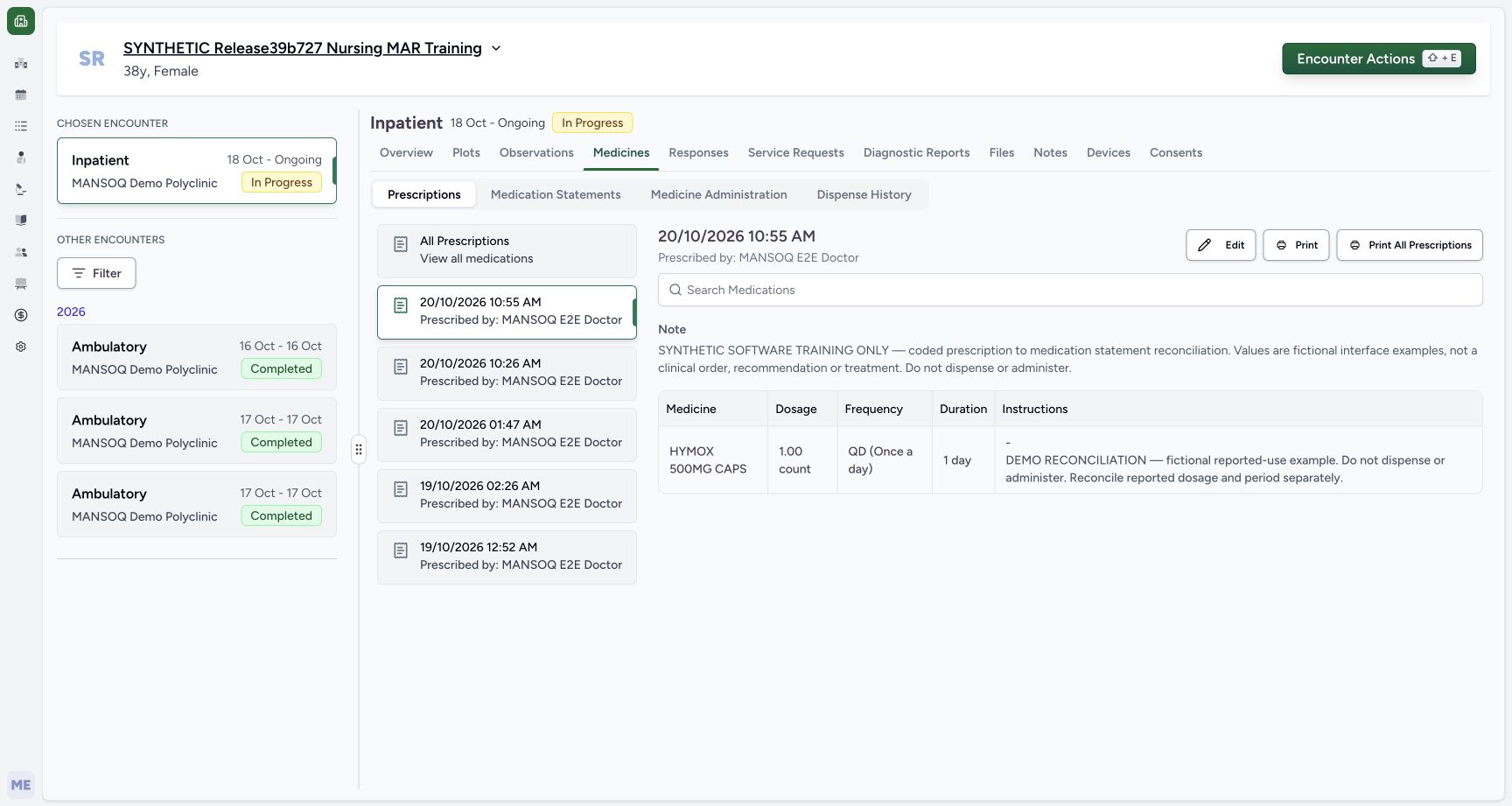
On the selected card check HYMOX 500MG CAPS, 1.00 count, QD and 1 day. Read the shared Note above the table and the different row note displayed in the Instructions cell. Use the browser’s Reload command once, wait for Medicines, and reselect the same 10:55 AM card. Verify the same values and notes without another Submit. This saved code-backed source is used in the next Nurse lesson.
12345Saved coded prescription
Capture details
Observed committed 3dfb software on 20 October 2026. One Doctor prescription and one Nurse reported statement; software-only values, no dispensing or administration. Original pixels and capture times preserved.
Image SHA-256 0f904563539f3b47f2b795caaaf5dfd191175fbb117b3550a5c88aff54ed011a
- Verify the selected new card: The selected prescription is 20/10/2026 10:55 AM.
- Read the Doctor prescriber: The header identifies MANSOQ E2E Doctor.
- Read the shared prescription Note: This complete Note is the prescription-level training text.
- Review 1.00 count, QD and 1 day: The selected prescription’s dosage controls remain separate.
- Read the complete row-specific note: The row note appears in the Instructions cell below the dash; this is the note copied into the later statement.
 12
12Prescription after reload
Capture details
Observed committed 3dfb software on 20 October 2026. One Doctor prescription and one Nurse reported statement; software-only values, no dispensing or administration. Original pixels and capture times preserved.
Image SHA-256 0f904563539f3b47f2b795caaaf5dfd191175fbb117b3550a5c88aff54ed011a
- Reselect the same prescription after Reload: The same 10:55 AM card and contents remain after ordinary browser Reload.
- Recheck the retained row note: The saved notes and dosage are unchanged in this readback.
Keep the two notes separate
The shared prescription Note begins SYNTHETIC SOFTWARE TRAINING ONLY. The request row Note begins DEMO RECONCILIATION and appears with that row’s instructions after saving. The later statement-copy action carries the request row Note, not the shared prescription Note.
123456Draft code note review
Capture details
Observed committed 3dfb software on 20 October 2026. One Doctor prescription and one Nurse reported statement; software-only values, no dispensing or administration. Original pixels and capture times preserved.
Image SHA-256 6ce22a103b1f31b55c07022ffa70893e29a76749fd6eec663636bc6288d74df4
- Review 1 count: The code-backed draft uses the explicitly chosen count unit.
- Review QD (Once a day): QD is selected in the current HYMOX draft.
- Review the automatic 1 day bound: The QD preset supplied this initial duration; review it as a separate field.
- Enter the row-specific Note: This short input clips its long text. The saved prescription later shows the complete row note.
- Enter the shared prescription Note: The complete shared software-only note is separate from the row Note.
- Choose Submit once after review: Submit saves this Doctor prescription; it is not the Nurse statement save.
12345Saved coded prescription
Capture details
Observed committed 3dfb software on 20 October 2026. One Doctor prescription and one Nurse reported statement; software-only values, no dispensing or administration. Original pixels and capture times preserved.
Image SHA-256 0f904563539f3b47f2b795caaaf5dfd191175fbb117b3550a5c88aff54ed011a
- Verify the selected new card: The selected prescription is 20/10/2026 10:55 AM.
- Read the Doctor prescriber: The header identifies MANSOQ E2E Doctor.
- Read the shared prescription Note: This complete Note is the prescription-level training text.
- Review 1.00 count, QD and 1 day: The selected prescription’s dosage controls remain separate.
- Read the complete row-specific note: The row note appears in the Instructions cell below the dash; this is the note copied into the later statement.
Read the Medication-tab example in context
The shown medicine is a terminology-backed source for this software exercise. The selected result and saved card show its display name, not the underlying code number. Choosing a result with the same name from Product would be a different source path. This demonstration does not establish medication use, dispensing, administration or an external exchange.
1Selector tabs
Capture details
Observed committed 3dfb software on 20 October 2026. One Doctor prescription and one Nurse reported statement; software-only values, no dispensing or administration. Original pixels and capture times preserved.
Image SHA-256 67b52e3cbcfb518a3dfc21489fc00f52cb68153c4825aec3f249478461dcbf07
- Choose the Medication tab: Use the terminology-backed Medication tab, distinct from Product.
123Code search results
Capture details
Observed committed 3dfb software on 20 October 2026. One Doctor prescription and one Nurse reported statement; software-only values, no dispensing or administration. Original pixels and capture times preserved.
Image SHA-256 acfa4c6d423ebd19173ac5074bc614aace5f349d6833f3fd8a0cd5d0b4c1e776
- Check that Medication is selected: The search is in the Medication tab.
- Search HYMOX: The search field is already populated in this view.
- Choose the first illustrated HYMOX 500MG CAPS result: For this software exercise use this first result. Several entries share display text; no code is printed beside this selected result.
12345Saved coded prescription
Capture details
Observed committed 3dfb software on 20 October 2026. One Doctor prescription and one Nurse reported statement; software-only values, no dispensing or administration. Original pixels and capture times preserved.
Image SHA-256 0f904563539f3b47f2b795caaaf5dfd191175fbb117b3550a5c88aff54ed011a
- Verify the selected new card: The selected prescription is 20/10/2026 10:55 AM.
- Read the Doctor prescriber: The header identifies MANSOQ E2E Doctor.
- Read the shared prescription Note: This complete Note is the prescription-level training text.
- Review 1.00 count, QD and 1 day: The selected prescription’s dosage controls remain separate.
- Read the complete row-specific note: The row note appears in the Instructions cell below the dash; this is the note copied into the later statement.
Source evidence
Every citation uses this exact committed version. The private source repository requires access.
- repositories/platform/mansoq-core/mansoq/emr/resources/medication/statement/spec.py:25 ·
3dfb7c9f519fb5b4cd4452439f3c12346bf58319Source file checksum
542258fe317d93cd03fc4b0efe7fe5704069be9e99e172a63ece6d39f6f2920e - repositories/platform/mansoq-web/src/components/HistoricalRecordSelector/index.tsx:119 ·
3dfb7c9f519fb5b4cd4452439f3c12346bf58319Source file checksum
0ab03afa6a5954112061e0bf07b15cd3f4c901444f3c3de8a8e194524ef1f0c2 - repositories/platform/mansoq-web/src/components/Patient/MedicationStatementList.tsx:39 ·
3dfb7c9f519fb5b4cd4452439f3c12346bf58319Source file checksum
4dd254b2d7ab8c46c4178ec9962ed631b863a602450378050dc329bbac82a1e5 - repositories/platform/mansoq-web/src/components/Patient/MedicationStatementTable.tsx:61 ·
3dfb7c9f519fb5b4cd4452439f3c12346bf58319Source file checksum
24093db90d546211a702299533d012a8c28883c7ac936971c6fde01a1b8bce21 - repositories/platform/mansoq-web/src/components/Questionnaire/MedicationValueSetSelect.tsx:318 ·
3dfb7c9f519fb5b4cd4452439f3c12346bf58319Source file checksum
bb8d5d5f1595778be9e9ad260296e8f43e5696fe9d19fb608e27a33a6a739610 - repositories/platform/mansoq-web/src/components/Questionnaire/QuestionTypes/MedicationRequestQuestion.tsx:421 ·
3dfb7c9f519fb5b4cd4452439f3c12346bf58319Source file checksum
561259e73b1752c9844e31b798ad676878af5f4caf6be5fbd130cd31fcfc89cc - repositories/platform/mansoq-web/src/components/Questionnaire/QuestionTypes/MedicationStatementQuestion.tsx:91 ·
3dfb7c9f519fb5b4cd4452439f3c12346bf58319Source file checksum
aa6bfad3dcb6e4315c58908fe9fffdc4ea47cb84f8c2596cb3db30fe640c19d7 - repositories/platform/mansoq-web/src/components/Questionnaire/QuestionnaireForm.tsx:421 ·
3dfb7c9f519fb5b4cd4452439f3c12346bf58319Source file checksum
ee6c2195f13e48f0896a2d3da566c2f2a67910adad08894df6b77862f9cfdeec - repositories/platform/mansoq-web/src/components/Questionnaire/ValueSetSearchContent.tsx:118 ·
3dfb7c9f519fb5b4cd4452439f3c12346bf58319Source file checksum
d6adc1b84f5956cd554042aa8579a0a83b9a13c5337c64bd0ee6b7f9af5b8019 - repositories/platform/mansoq-web/src/components/Questionnaire/structured/handlers.ts:65 ·
3dfb7c9f519fb5b4cd4452439f3c12346bf58319Source file checksum
459ade48f77316279ab2978dc7b4466cb96acb8223c61b9a1f87ca9973be7c7f - repositories/platform/mansoq-web/src/types/emr/medicationRequest/medicationRequest.ts:661 ·
3dfb7c9f519fb5b4cd4452439f3c12346bf58319Source file checksum
a39df63f9b7f2d976d4379511d7a2d4c8e3e284fd1e9b67c28e59392e8545b2b - repositories/platform/mansoq-web/src/types/emr/medicationStatement.ts:7 ·
3dfb7c9f519fb5b4cd4452439f3c12346bf58319Source file checksum
5784010754caa19b544f2db2f1a374d7739d76518159a239b73a3a8c9fb5a091