 MANSOQ
 Clinical care · VERSION 3dfb7c9f
Put a reported medication statement On Hold, then return it to Active
Change only the status of an existing reported-medication entry, verify each save after reload, and inspect the retained note and current patient-history entry.
Nurse
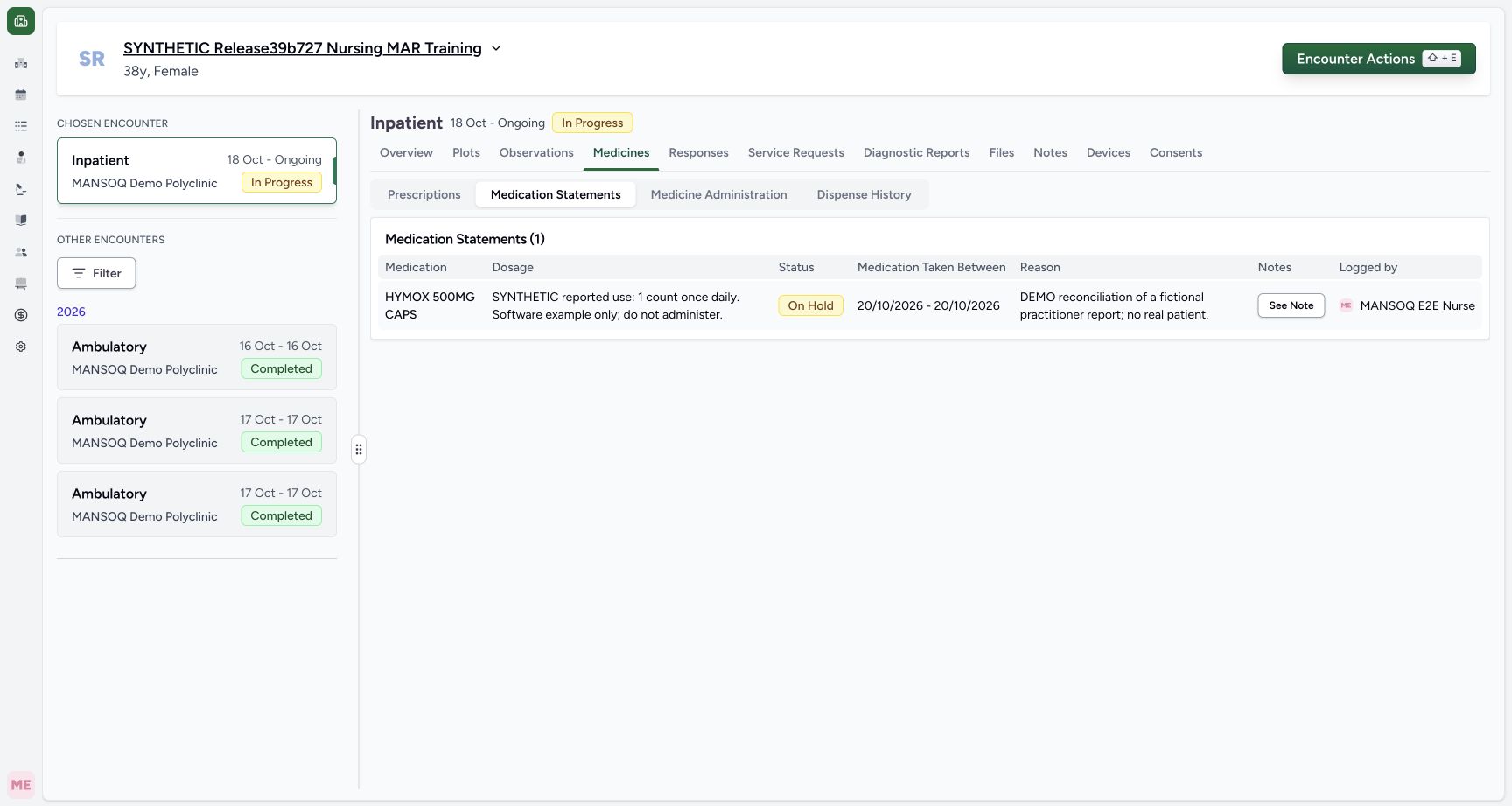 1234
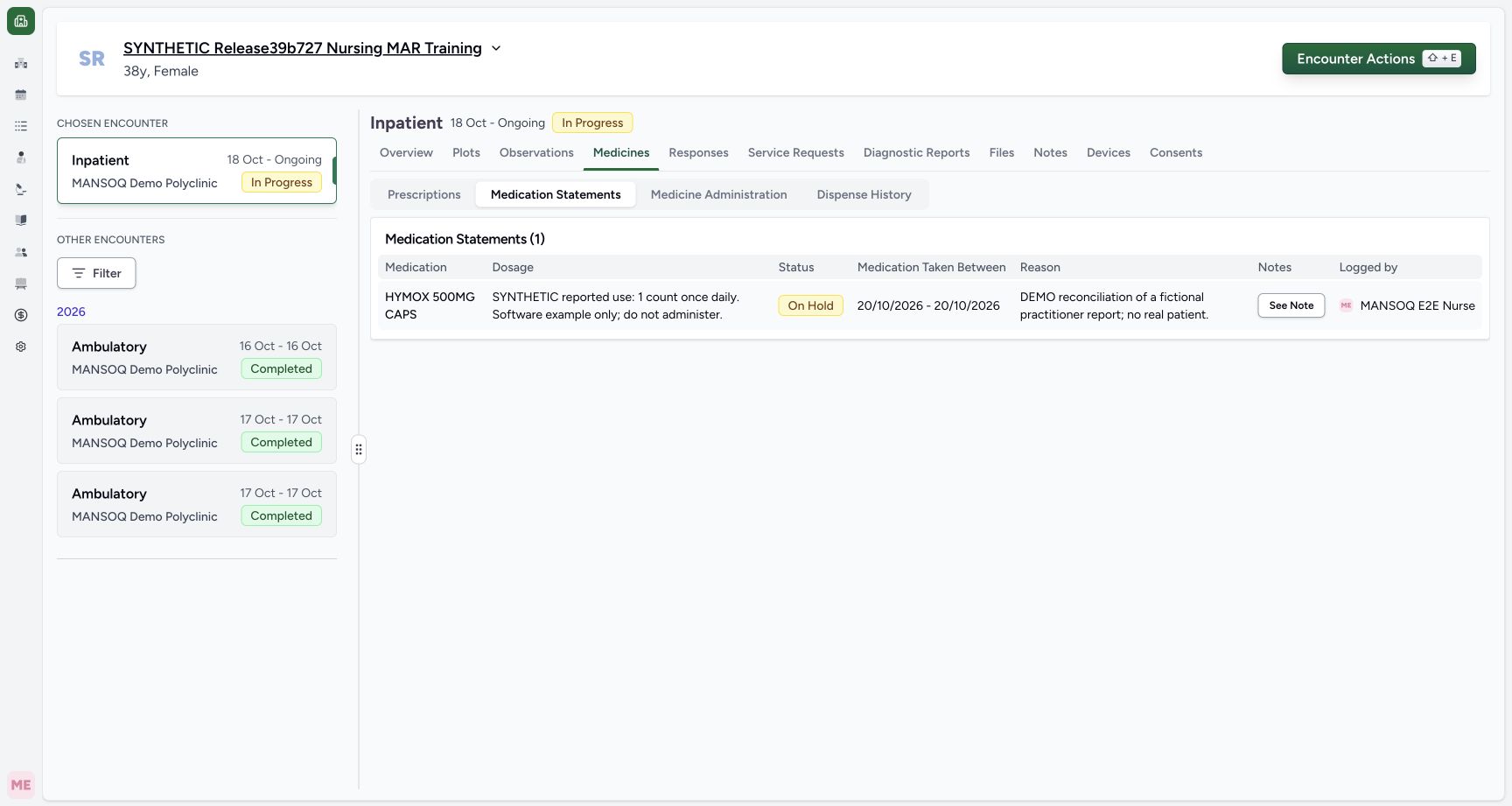
1234Saved on hold table
Capture details
Natural duplicate pixels at distinct actual times, preserved without retiming. Two status-only updates on the same fictional reported statement; no prescription, dispensing or administration action.
Image SHA-256 2dd518dee274bdafde769d62d2a68a8a664629de18ff06adc180a6acabf4bf0d
- Select Medication Statements: After the save, choose the statement subtab rather than Prescriptions.
- Verify saved On Hold: The current statement table displays the persisted status.
- Check the original reported dates: The original local period remains 20/10/2026 – 20/10/2026.
- Check the original Reason: The fictional practitioner-report reason is unchanged.
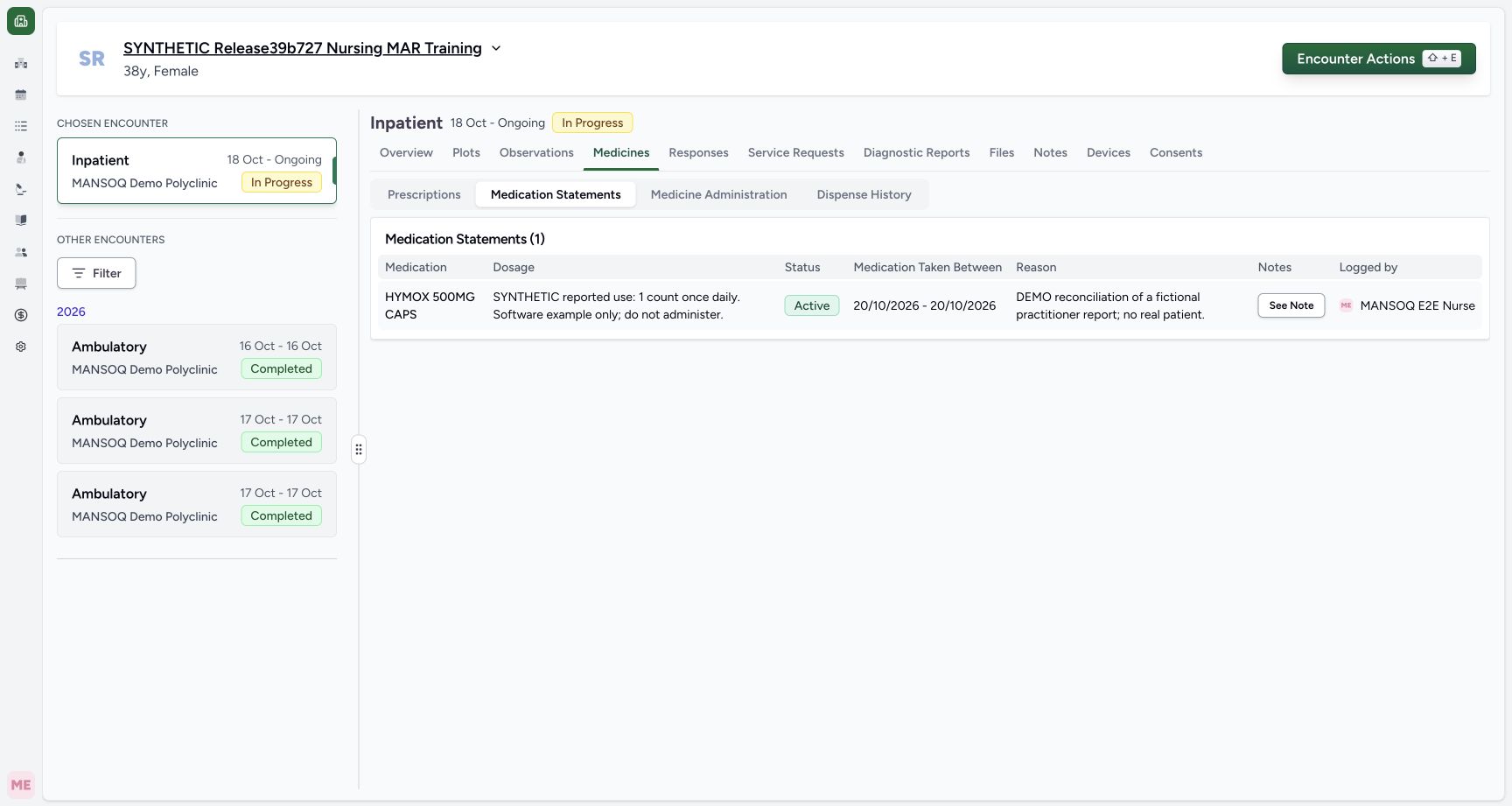 1234
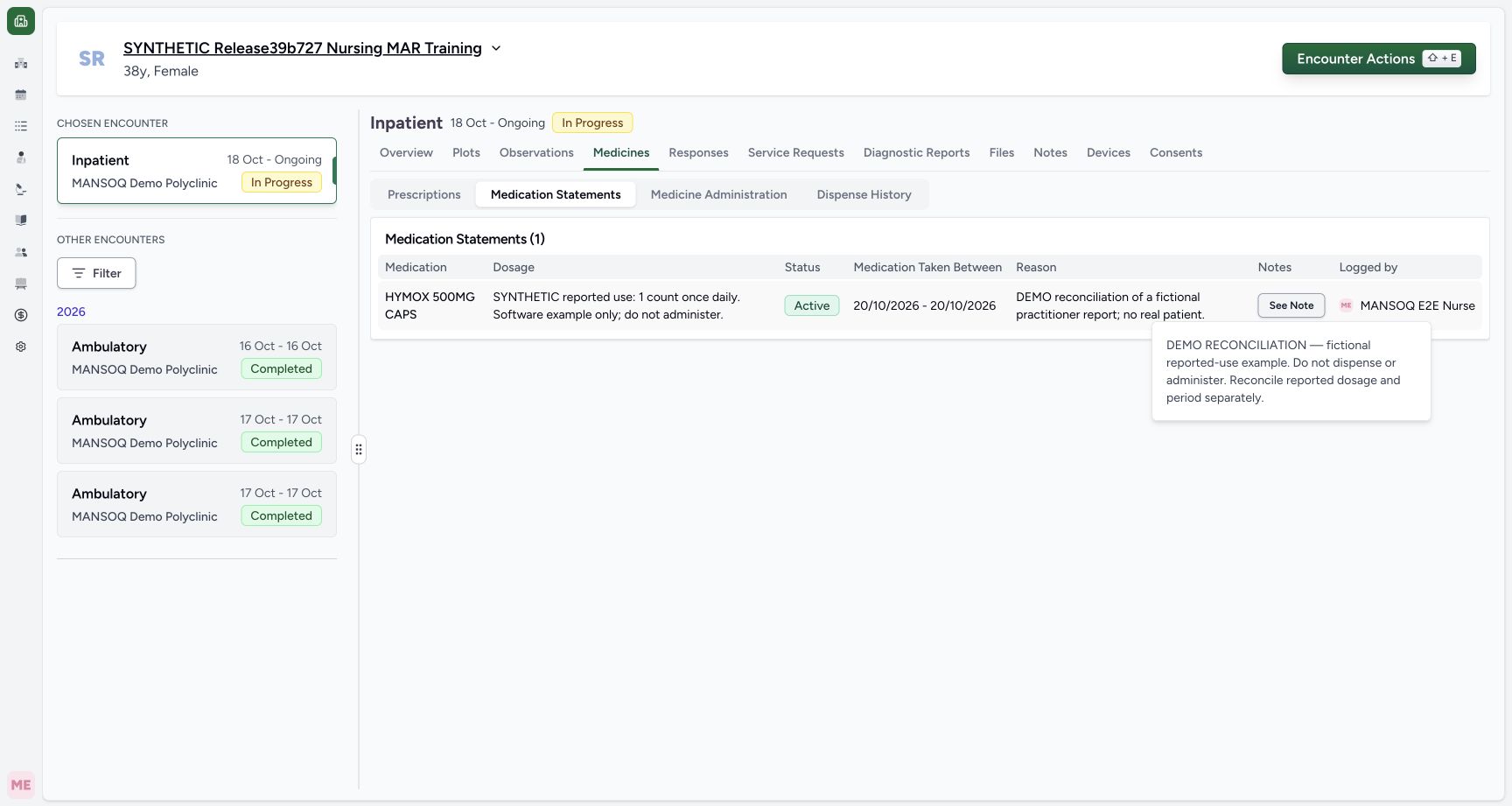
1234Reloaded return active
Capture details
Natural duplicate pixels at distinct actual times, preserved without retiming. Two status-only updates on the same fictional reported statement; no prescription, dispensing or administration action.
Image SHA-256 7b81b836f3510d8bb67a30e0d315f6096ba1423c2663ccd487eb26d44a904da7
- Reselect the statement tab after Reload: Use the same subtab after the second normal browser Reload.
- Verify Active after Reload: The same saved row remains Active.
- Read the complete original dosage text: The reported text is retained; this exercise has not changed it.
- Open the retained Note: Use See Note for complete readback.
19 of 19 content blocks have reviewed image alignment.
Before you begin
- Use an authorised Nurse account and check the assigned fictional patient and intended ongoing encounter. The captured account is MANSOQ E2E Nurse, and the selected Inpatient encounter is In Progress.
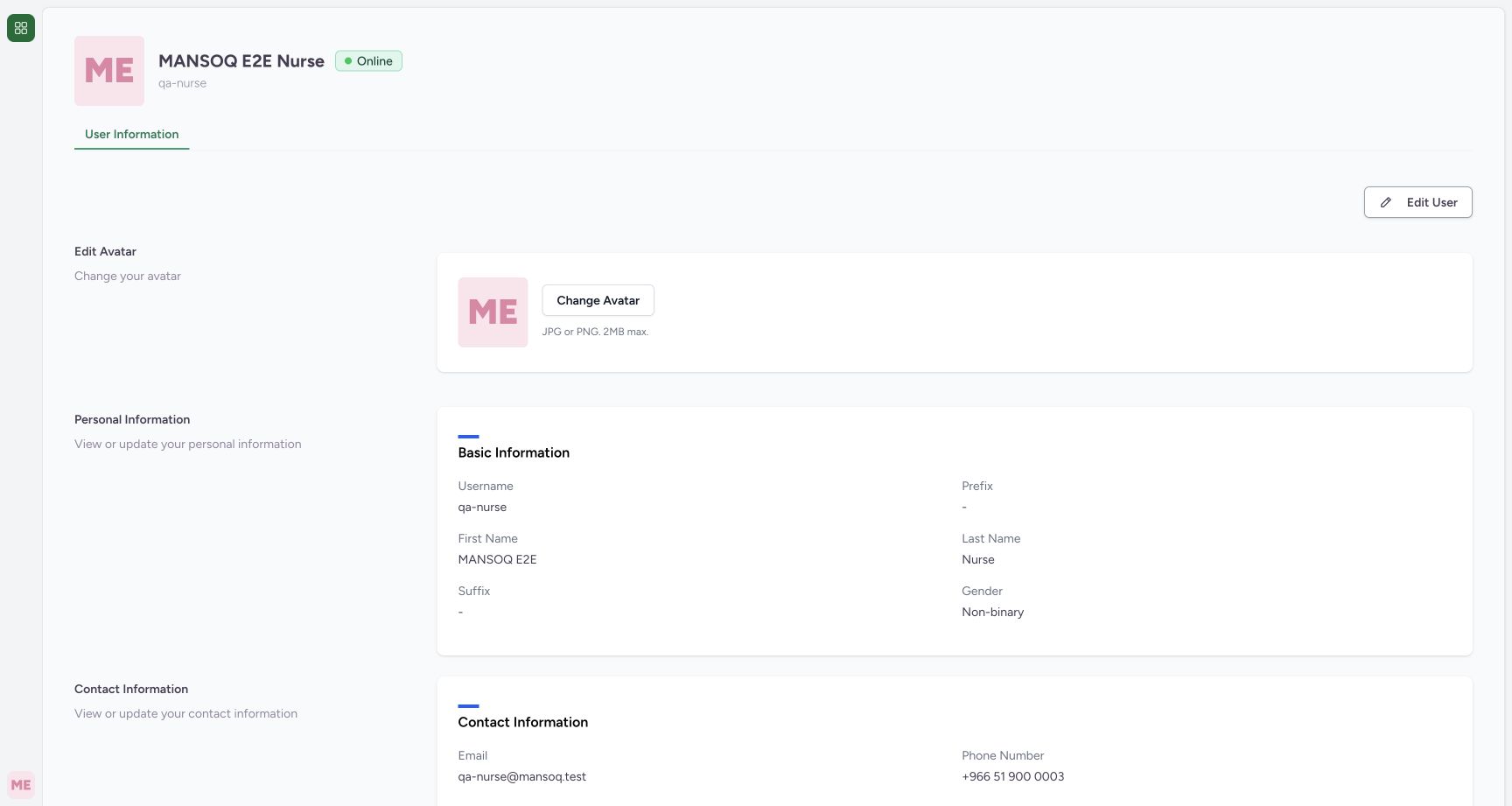 1
1Recorded release 3dfb7c9f · 2026-10-20T09:35:33.237Z · 1728 × 921 Nurse identity
Capture details
Individually viewed natural original; no crop, resize, reconstruction or extra write. Two status-only updates on the same fictional reported statement; no prescription, dispensing or administration action.
Image SHA-256
94d36c43b9211f61a9804060a8b5f108d1baaccd5ea6fc8dd56d39fdd43c023b- Verify the Nurse account: The profile identifies MANSOQ E2E Nurse and qa-nurse. This is an ordinary existing Nurse session.
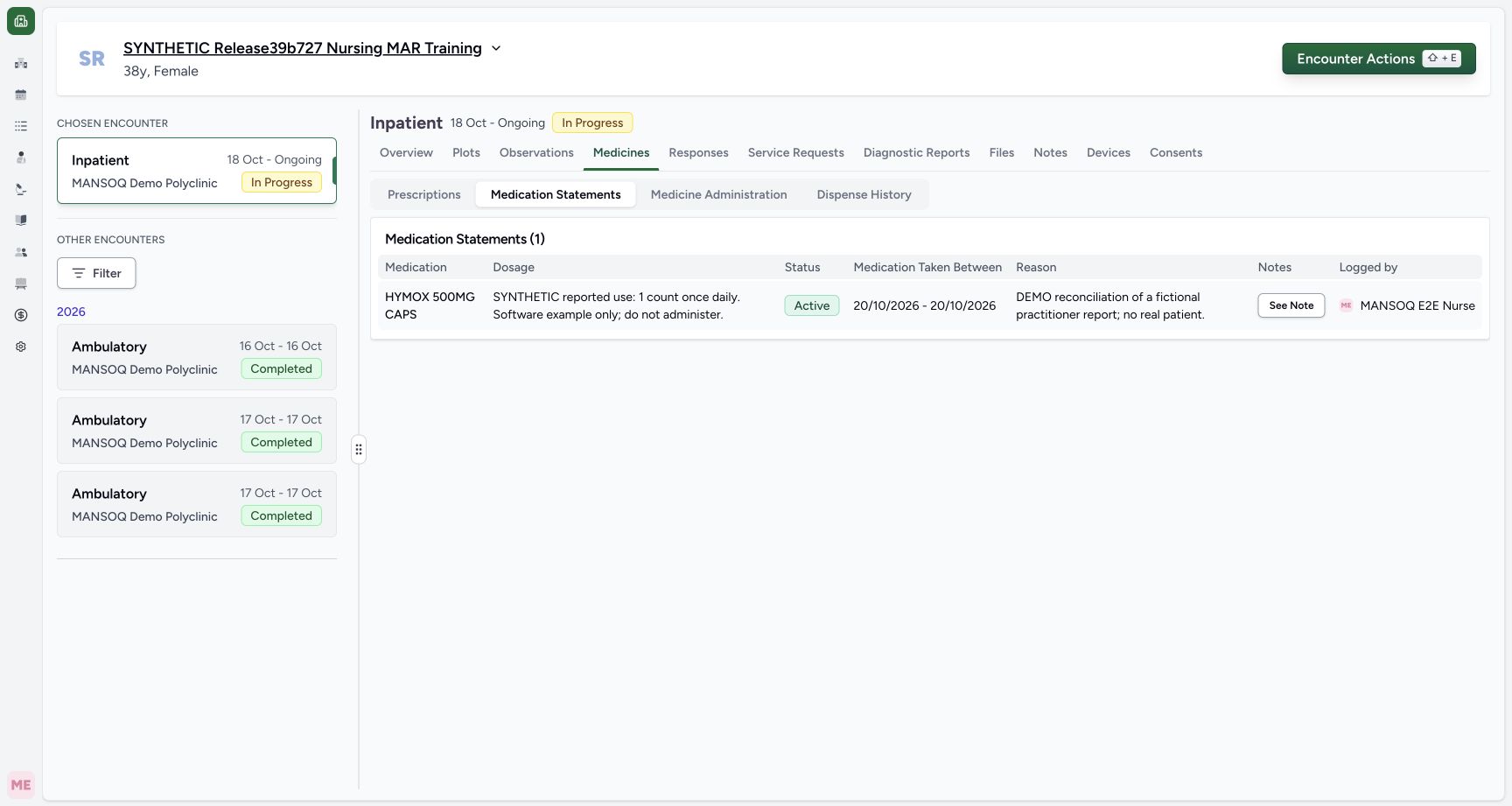 1234567
Recorded release 3dfb7c9f · 2026-10-20T09:35:59.693Z · 1728 × 921 Original active statement
Capture details
Natural duplicate pixels at distinct actual times, preserved without retiming. Two status-only updates on the same fictional reported statement; no prescription, dispensing or administration action.
Image SHA-256
7b81b836f3510d8bb67a30e0d315f6096ba1423c2663ccd487eb26d44a904da7- Check the fictional patient: Use the assigned synthetic patient, not another record.
- Check the selected encounter: The chosen Inpatient encounter is In Progress.
- Open Medicines: Medication Statements is a separate subtab here.
- Select Medication Statements: The saved reported-use statement is separate from Prescriptions.
- Identify the existing HYMOX statement: Keep the existing reported-use row; do not add another medication.
- Read the starting Active status: This is the saved starting status for the exercise.
- Open See Note: Read the original saved note before changing status.
- An existing HYMOX 500MG CAPS reported statement is already saved as Active, with Practitioner source and fictional dosage, same-day period, Reason and Note. This lesson changes that row rather than importing or creating another one.1234567
Recorded release 3dfb7c9f · 2026-10-20T09:35:59.693Z · 1728 × 921 Original active statement
Capture details
Natural duplicate pixels at distinct actual times, preserved without retiming. Two status-only updates on the same fictional reported statement; no prescription, dispensing or administration action.
Image SHA-256
7b81b836f3510d8bb67a30e0d315f6096ba1423c2663ccd487eb26d44a904da7- Check the fictional patient: Use the assigned synthetic patient, not another record.
- Check the selected encounter: The chosen Inpatient encounter is In Progress.
- Open Medicines: Medication Statements is a separate subtab here.
- Select Medication Statements: The saved reported-use statement is separate from Prescriptions.
- Identify the existing HYMOX statement: Keep the existing reported-use row; do not add another medication.
- Read the starting Active status: This is the saved starting status for the exercise.
- Open See Note: Read the original saved note before changing status.
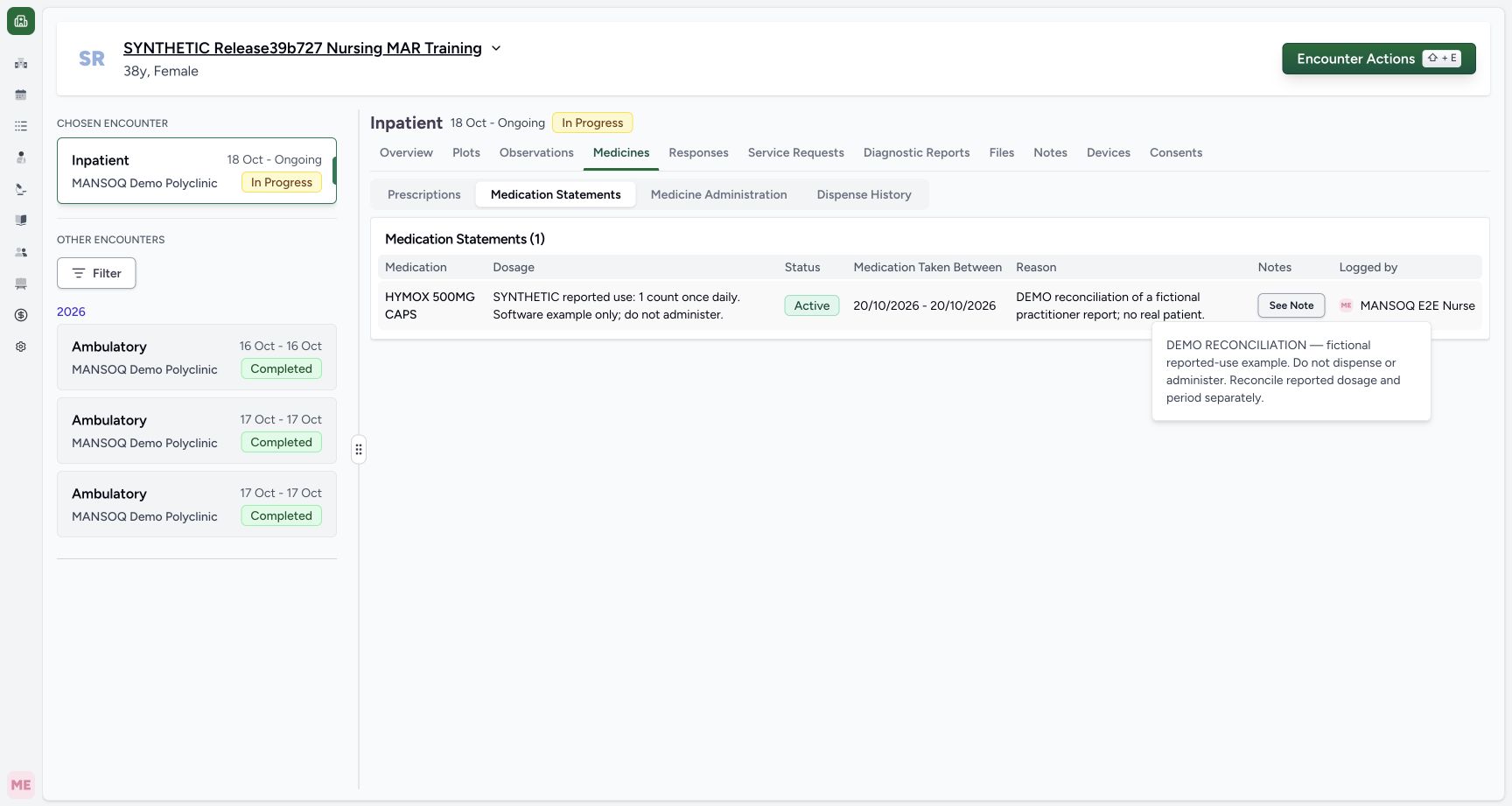 12
12Recorded release 3dfb7c9f · 2026-10-20T09:36:04.471Z · 1728 × 921 Original note
Capture details
Natural duplicate pixels at distinct actual times, preserved without retiming. Two status-only updates on the same fictional reported statement; no prescription, dispensing or administration action.
Image SHA-256
21901776e2e07473514814b0accfab0cbb47ccdceb36ed3a71db17ac3631d833- Locate the statement Note: This popover belongs to the saved statement.
- Read and retain the original Note: The complete fictional reported-use note is preserved throughout this status exercise.
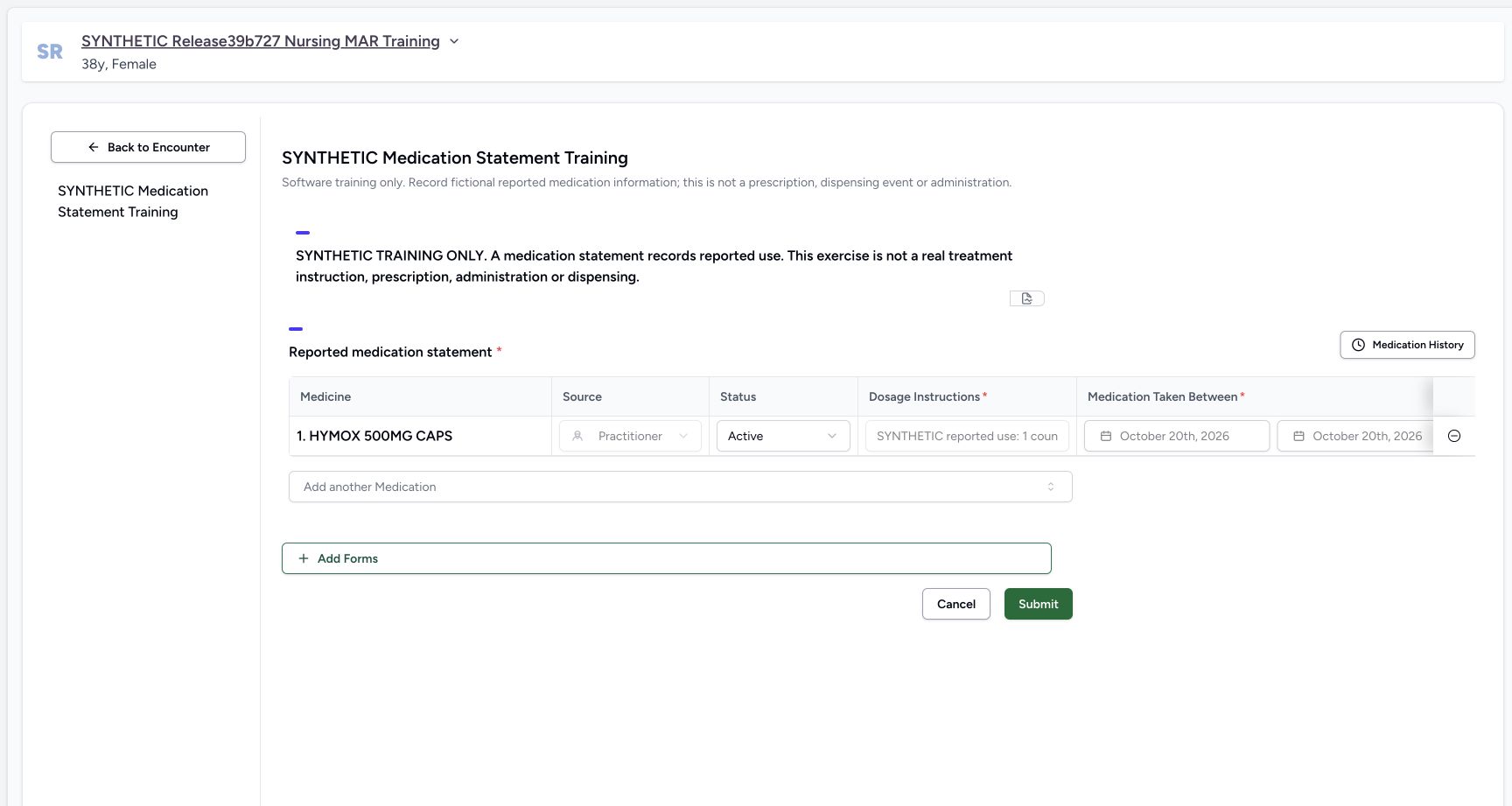 1234567
Recorded release 3dfb7c9f · 2026-10-20T09:36:29.410Z · 1728 × 921 Untouched existing row
Capture details
Individually viewed natural original; no crop, resize, reconstruction or extra write. Two status-only updates on the same fictional reported statement; no prescription, dispensing or administration action.
Image SHA-256
6c91b2b3cc62694920aa0e73031c4a8e94e69845d5db6985f6847f909157956a- Check the loaded existing medication: The saved HYMOX row is already present.
- Read the locked Practitioner source: Source is disabled on this existing row.
- Locate editable Status: Status is editable while the original reported details remain locked.
- Retain the locked dosage text: This narrow field clips the text; the complete saved table is shown separately.
- Retain the original start date: The saved start remains October 20th, 2026.
- Retain the original end date: The saved end remains October 20th, 2026.
- Cancel the untouched form: Leave without Submit when no value has changed.
- This is a software-only exercise in reported-medication records. Active and On Hold are record statuses; this lesson does not recommend a treatment change or document prescribing, dispensing or administration.1234567
Recorded release 3dfb7c9f · 2026-10-20T09:36:29.410Z · 1728 × 921 Untouched existing row
Capture details
Individually viewed natural original; no crop, resize, reconstruction or extra write. Two status-only updates on the same fictional reported statement; no prescription, dispensing or administration action.
Image SHA-256
6c91b2b3cc62694920aa0e73031c4a8e94e69845d5db6985f6847f909157956a- Check the loaded existing medication: The saved HYMOX row is already present.
- Read the locked Practitioner source: Source is disabled on this existing row.
- Locate editable Status: Status is editable while the original reported details remain locked.
- Retain the locked dosage text: This narrow field clips the text; the complete saved table is shown separately.
- Retain the original start date: The saved start remains October 20th, 2026.
- Retain the original end date: The saved end remains October 20th, 2026.
- Cancel the untouched form: Leave without Submit when no value has changed.
1. Locate and read the existing statement
In the selected encounter open Medicines, then Medication Statements. Check the existing HYMOX 500MG CAPS row, starting Active status, original reported dosage, local dates, Reason and Logged by author. Select See Note and read the complete original Note before editing.
1234567Original active statement
Capture details
Natural duplicate pixels at distinct actual times, preserved without retiming. Two status-only updates on the same fictional reported statement; no prescription, dispensing or administration action.
Image SHA-256 7b81b836f3510d8bb67a30e0d315f6096ba1423c2663ccd487eb26d44a904da7
- Check the fictional patient: Use the assigned synthetic patient, not another record.
- Check the selected encounter: The chosen Inpatient encounter is In Progress.
- Open Medicines: Medication Statements is a separate subtab here.
- Select Medication Statements: The saved reported-use statement is separate from Prescriptions.
- Identify the existing HYMOX statement: Keep the existing reported-use row; do not add another medication.
- Read the starting Active status: This is the saved starting status for the exercise.
- Open See Note: Read the original saved note before changing status.
12Original note
Capture details
Natural duplicate pixels at distinct actual times, preserved without retiming. Two status-only updates on the same fictional reported statement; no prescription, dispensing or administration action.
Image SHA-256 21901776e2e07473514814b0accfab0cbb47ccdceb36ed3a71db17ac3631d833
- Locate the statement Note: This popover belongs to the saved statement.
- Read and retain the original Note: The complete fictional reported-use note is preserved throughout this status exercise.
2. Open the installed reported-medication form
Return to Overview, choose Forms, and select SYNTHETIC Medication Statement Training. Choose the form name rather than the separate favourite star. Check that the existing HYMOX row is already loaded.
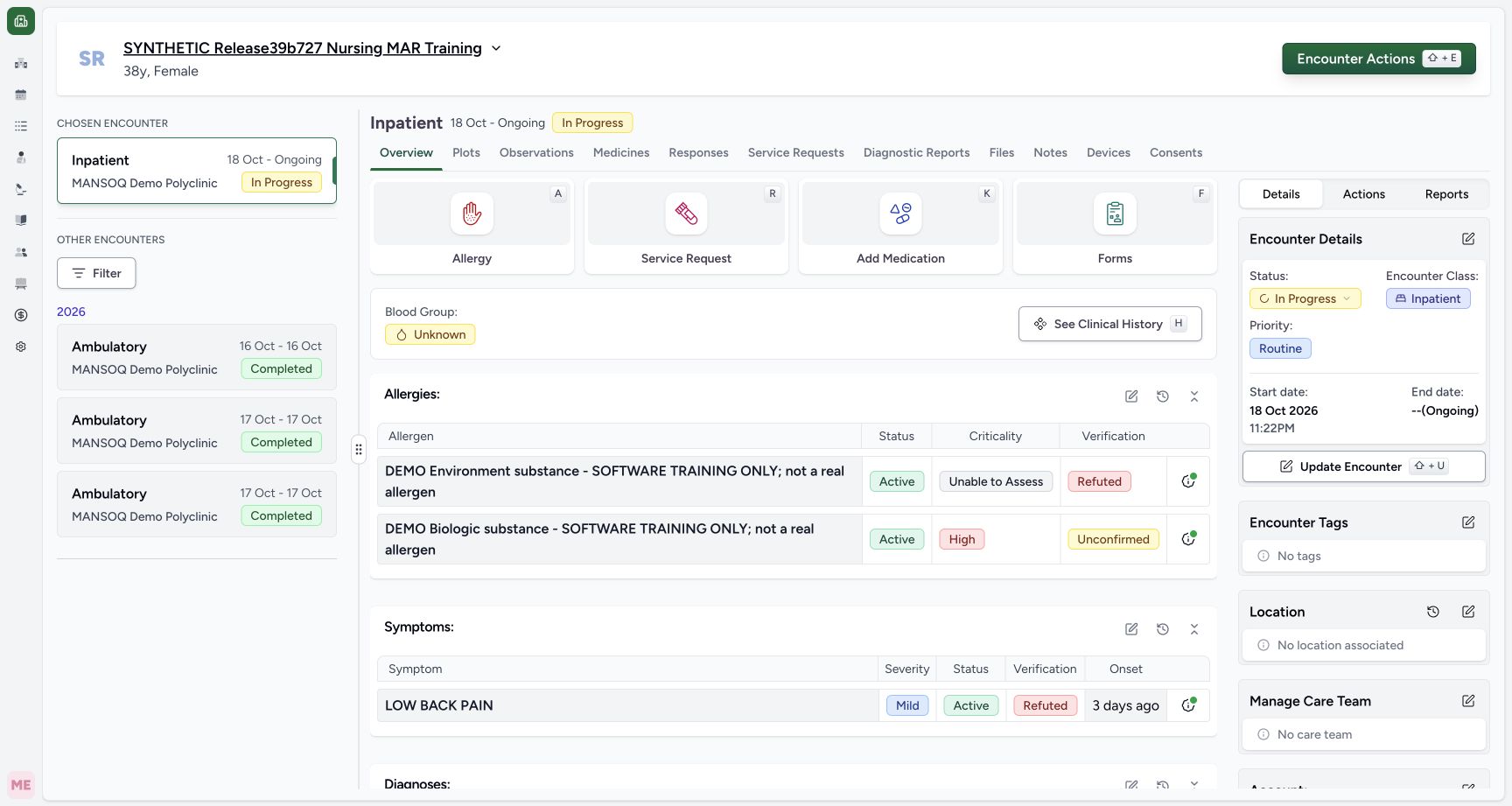 123
123Overview forms
Capture details
Natural duplicate pixels at distinct actual times, preserved without retiming. Two status-only updates on the same fictional reported statement; no prescription, dispensing or administration action.
Image SHA-256 f140553a00aaecc64fb84cb7cee6b5fcb46326f4faf5ba8cd65a7363e537bfb8
- Open Overview: Return to the selected encounter Overview to open its forms.
- Open Forms: Use the Forms tile to locate the installed reported-medication form.
- Open See Clinical History later: After the final verification this opens the patient history; it is separate from editing the statement.
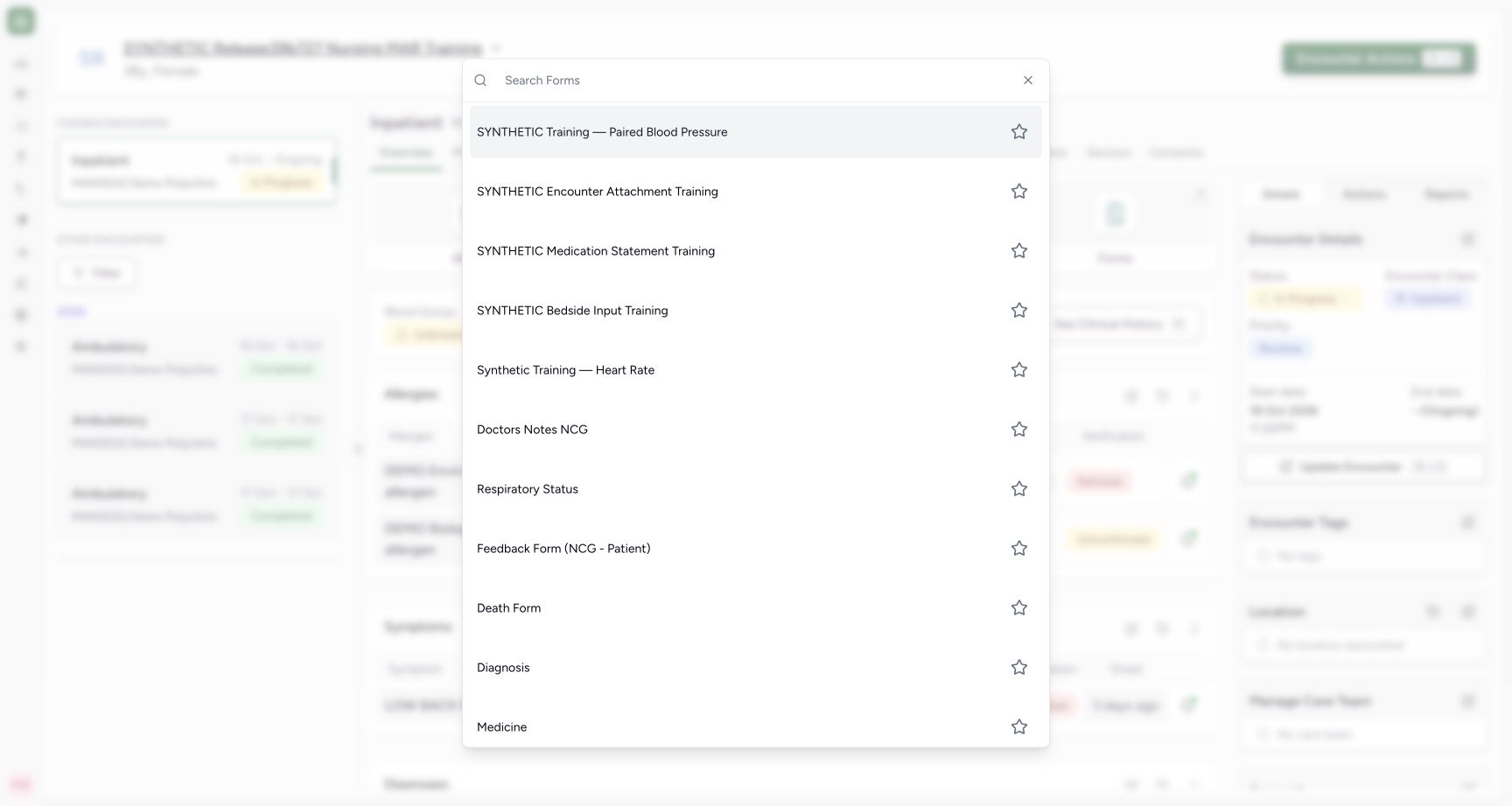 1
1Select statement form
Capture details
Individually viewed natural original; no crop, resize, reconstruction or extra write. Two status-only updates on the same fictional reported statement; no prescription, dispensing or administration action.
Image SHA-256 7c614b16aed2e2dbc051b3f9f734c8cd0b7a5c2c668aa282779262c8241fda4c
- Choose SYNTHETIC Medication Statement Training: Choose the form name, leaving its favourite star untouched.
1234567Untouched existing row
Capture details
Individually viewed natural original; no crop, resize, reconstruction or extra write. Two status-only updates on the same fictional reported statement; no prescription, dispensing or administration action.
Image SHA-256 6c91b2b3cc62694920aa0e73031c4a8e94e69845d5db6985f6847f909157956a
- Check the loaded existing medication: The saved HYMOX row is already present.
- Read the locked Practitioner source: Source is disabled on this existing row.
- Locate editable Status: Status is editable while the original reported details remain locked.
- Retain the locked dosage text: This narrow field clips the text; the complete saved table is shown separately.
- Retain the original start date: The saved start remains October 20th, 2026.
- Retain the original end date: The saved end remains October 20th, 2026.
- Cancel the untouched form: Leave without Submit when no value has changed.
3. Inspect the saved fields and try an untouched Cancel
Status is editable on the saved row. Source Practitioner, Dosage Instructions, both dates and Reason are disabled. The narrow dosage field clips its text; use the complete saved table for readback. Leave every value untouched and choose Cancel. The demonstrated untouched form returns to Overview without a confirmation dialog or Submit.
1234567Untouched existing row
Capture details
Individually viewed natural original; no crop, resize, reconstruction or extra write. Two status-only updates on the same fictional reported statement; no prescription, dispensing or administration action.
Image SHA-256 6c91b2b3cc62694920aa0e73031c4a8e94e69845d5db6985f6847f909157956a
- Check the loaded existing medication: The saved HYMOX row is already present.
- Read the locked Practitioner source: Source is disabled on this existing row.
- Locate editable Status: Status is editable while the original reported details remain locked.
- Retain the locked dosage text: This narrow field clips the text; the complete saved table is shown separately.
- Retain the original start date: The saved start remains October 20th, 2026.
- Retain the original end date: The saved end remains October 20th, 2026.
- Cancel the untouched form: Leave without Submit when no value has changed.
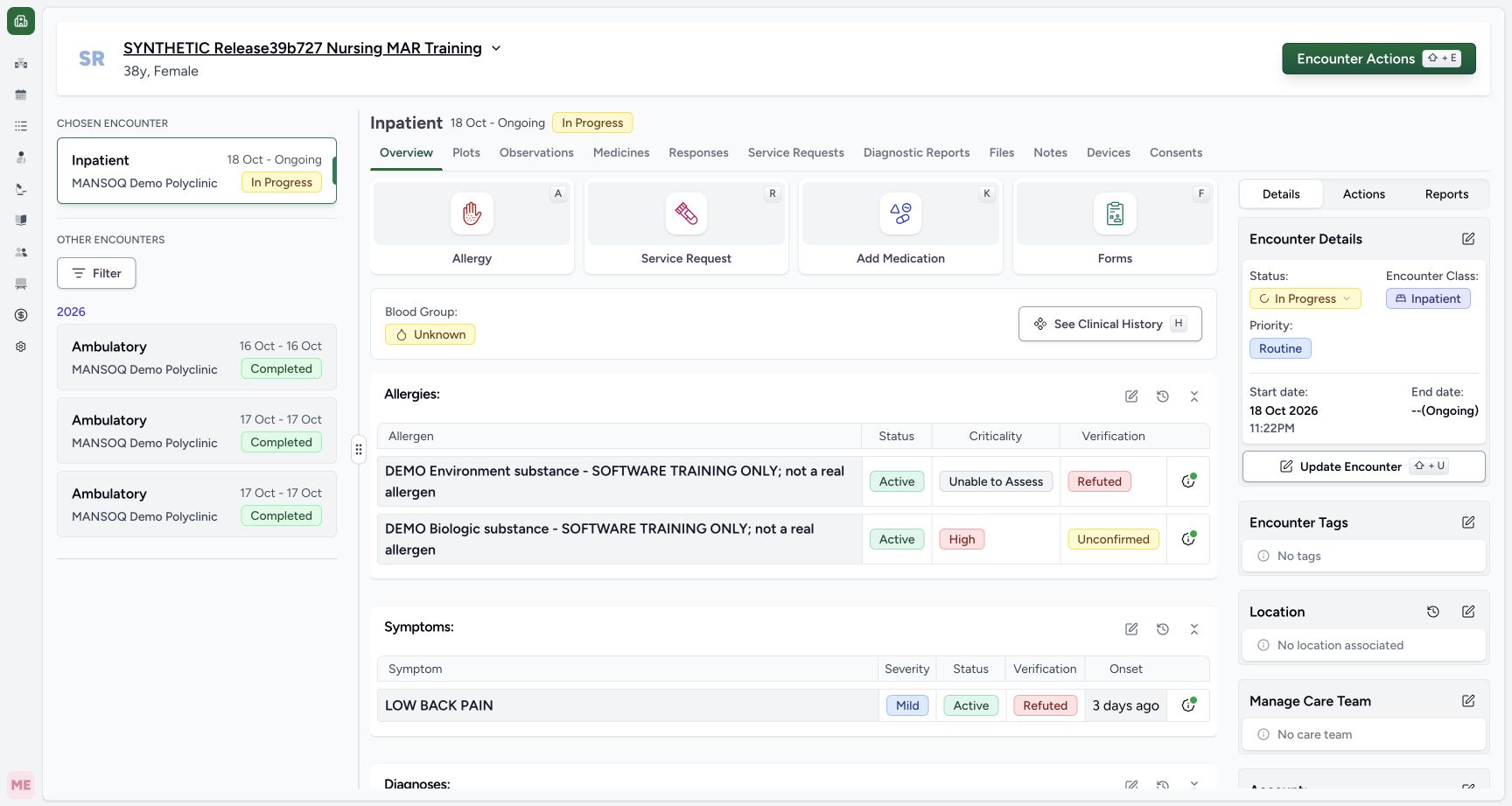 1
1Untouched cancel overview
Capture details
Natural duplicate pixels at distinct actual times, preserved without retiming. Two status-only updates on the same fictional reported statement; no prescription, dispensing or administration action.
Image SHA-256 f140553a00aaecc64fb84cb7cee6b5fcb46326f4faf5ba8cd65a7363e537bfb8
- Reopen Forms after Cancel: Untouched Cancel returned to Overview without a confirmation dialog. Use Forms to open the same installed form again.
4. Reopen the same row and select On Hold
Use Forms and the same installed form again. Open the existing row’s Status selector and choose On Hold. Do not use Add another Medication, Medication History or the remove control for this change.
123Overview forms
Capture details
Natural duplicate pixels at distinct actual times, preserved without retiming. Two status-only updates on the same fictional reported statement; no prescription, dispensing or administration action.
Image SHA-256 f140553a00aaecc64fb84cb7cee6b5fcb46326f4faf5ba8cd65a7363e537bfb8
- Open Overview: Return to the selected encounter Overview to open its forms.
- Open Forms: Use the Forms tile to locate the installed reported-medication form.
- Open See Clinical History later: After the final verification this opens the patient history; it is separate from editing the statement.
1Select statement form
Capture details
Individually viewed natural original; no crop, resize, reconstruction or extra write. Two status-only updates on the same fictional reported statement; no prescription, dispensing or administration action.
Image SHA-256 7c614b16aed2e2dbc051b3f9f734c8cd0b7a5c2c668aa282779262c8241fda4c
- Choose SYNTHETIC Medication Statement Training: Choose the form name, leaving its favourite star untouched.
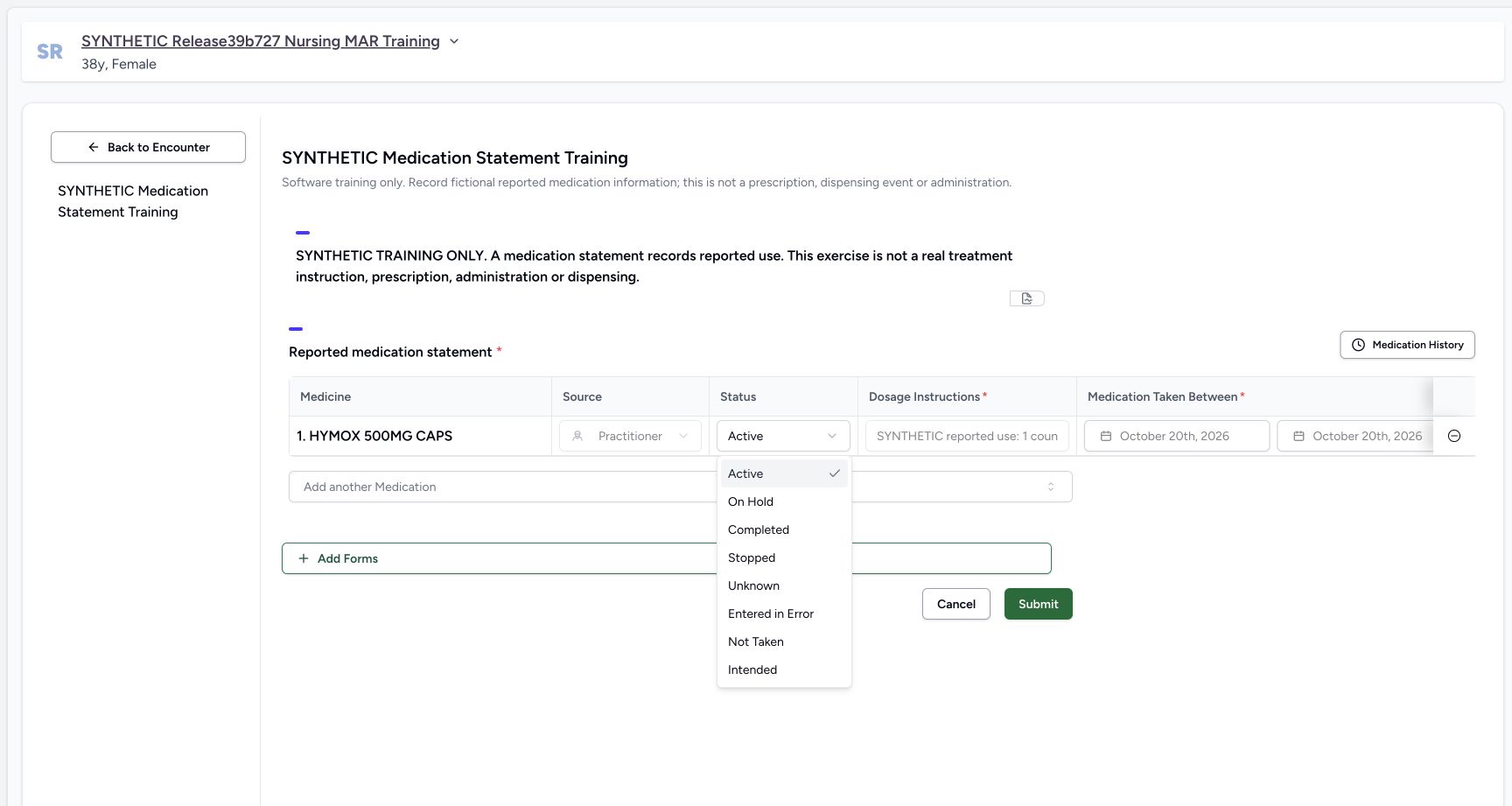 123
123Status options
Capture details
Earlier status menu reused explicitly to locate Active for the later return; no retiming. Two status-only updates on the same fictional reported statement; no prescription, dispensing or administration action.
Image SHA-256 221b490170252c0d1cb3c8b8ef5edcbd5cba0d5ac1eb5fbd49ffead06cc5a326
- Open the Status selector: The menu belongs to the existing statement.
- Locate Active: This same menu option is used later for the separate return to Active.
- Choose On Hold: Choose On Hold for the first intentional status update.
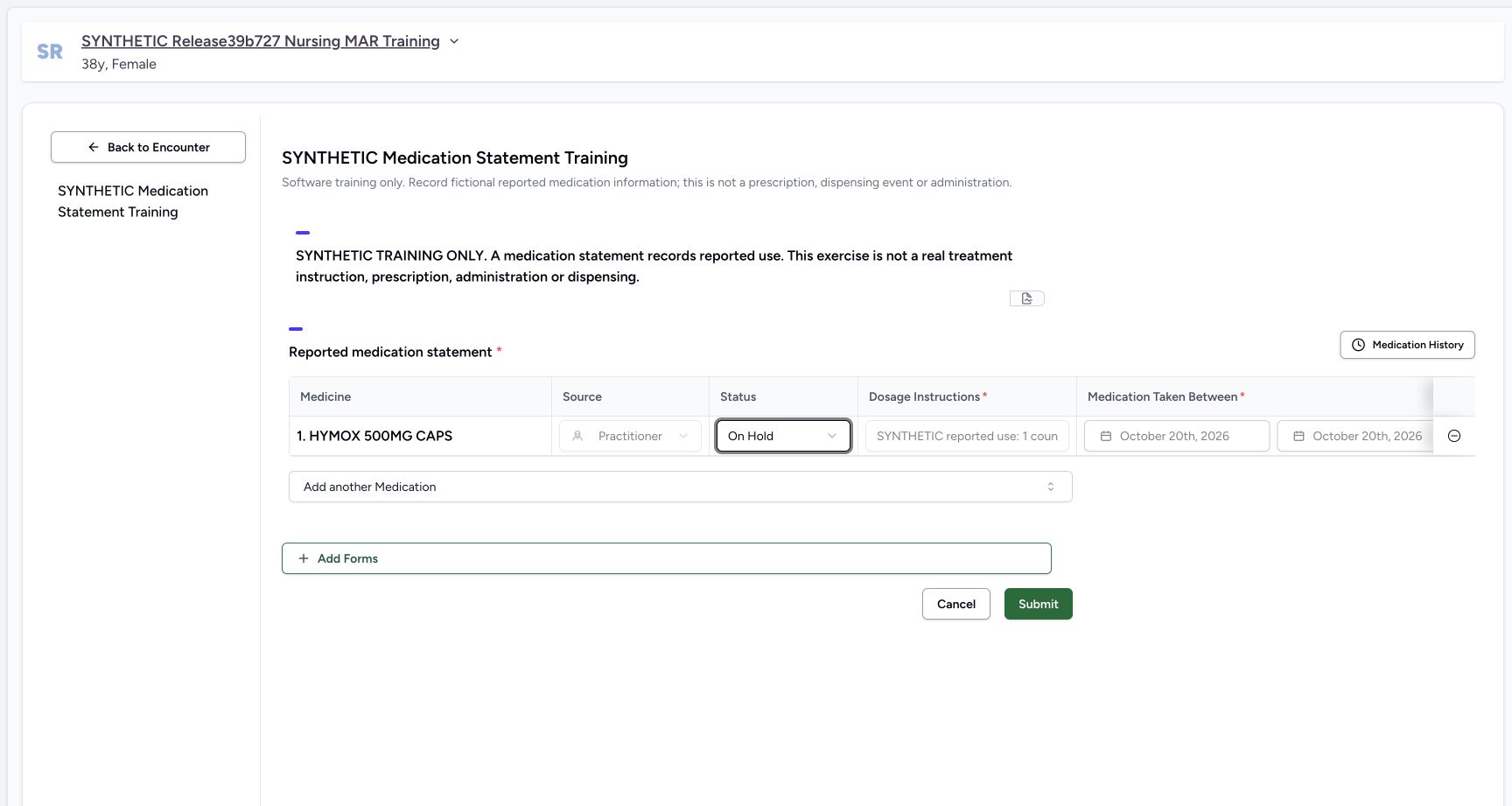 12
12On hold draft review
Capture details
Individually viewed natural original; no crop, resize, reconstruction or extra write. Two status-only updates on the same fictional reported statement; no prescription, dispensing or administration action.
Image SHA-256 fd32b8210f81afe5ee8d8eb6b3fa6a663b27e0af9bbb81b392fa40829258940d
- Review On Hold in the draft: The selected status is still an unsaved change until Submit.
- Choose Submit once: Save the one reviewed status change. Leave the other statement fields unchanged.
5. Review the status-only draft and submit once
Confirm that Status now reads On Hold. Keep the original Source, dosage, dates, Reason and Note unchanged. The Note and Reason are separate fields; this exercise does not replace either. Choose Submit once, then wait for the return to Overview.
12On hold draft review
Capture details
Individually viewed natural original; no crop, resize, reconstruction or extra write. Two status-only updates on the same fictional reported statement; no prescription, dispensing or administration action.
Image SHA-256 fd32b8210f81afe5ee8d8eb6b3fa6a663b27e0af9bbb81b392fa40829258940d
- Review On Hold in the draft: The selected status is still an unsaved change until Submit.
- Choose Submit once: Save the one reviewed status change. Leave the other statement fields unchanged.
6. Verify the saved On Hold result
From the returned Overview open Medicines and select Medication Statements. Verify that the same existing row is On Hold and that the original dosage, local 20/10/2026 – 20/10/2026 period, Reason and Nurse author are retained. The Overview illustration is a settled return screen; it does not picture a success toast.
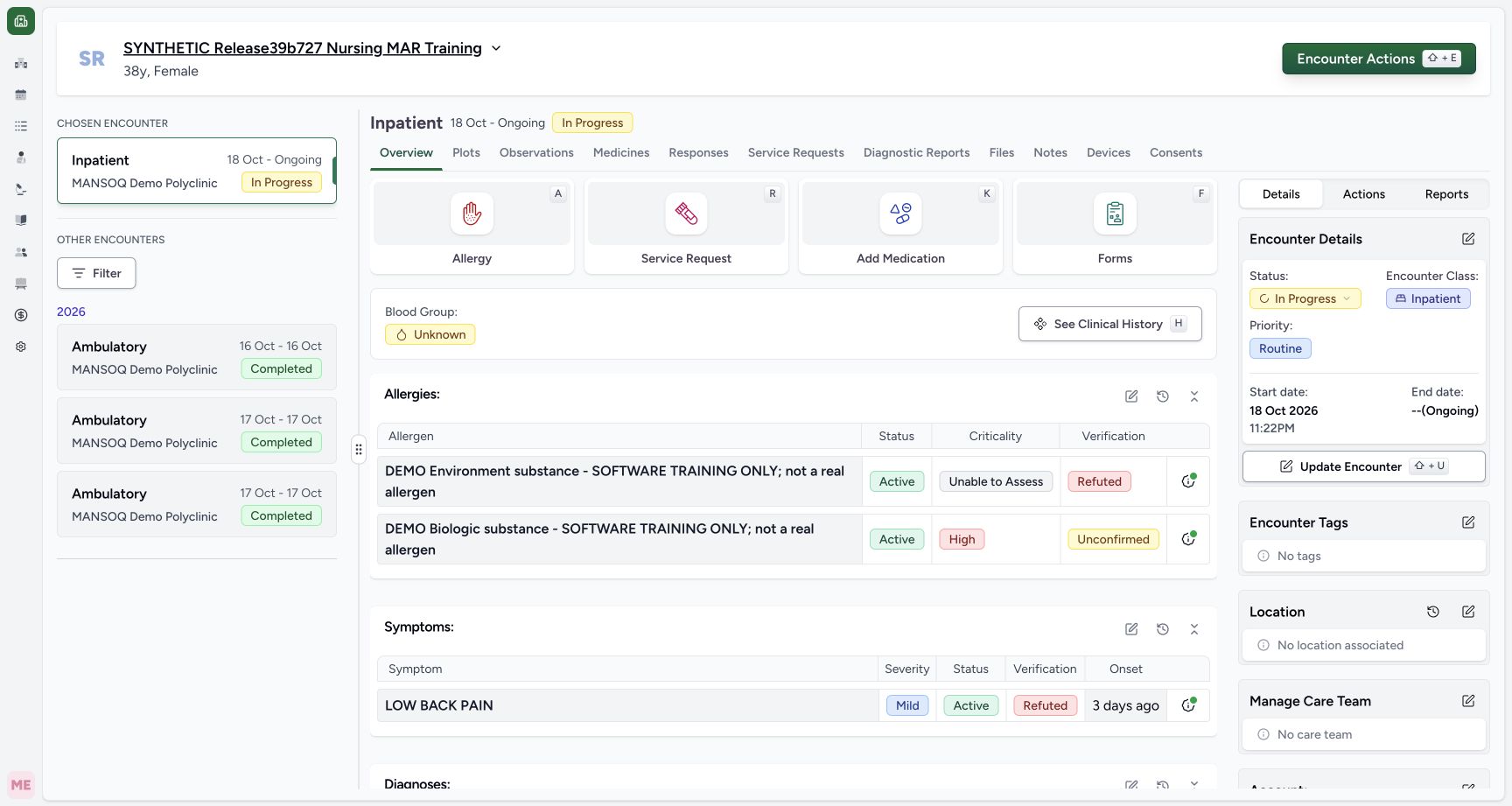 1
1On hold submit success
Capture details
Settled Overview only. Immediate post-click AX had success toast, but retained screenshot and AX no longer picture the toast; no pictured-toast claim. Two status-only updates on the same fictional reported statement; no prescription, dispensing or administration action.
Image SHA-256 f140553a00aaecc64fb84cb7cee6b5fcb46326f4faf5ba8cd65a7363e537bfb8
- Open Medicines after the return: This settled Overview image shows the next navigation control. The earlier immediate success toast is not pictured here.
1234Saved on hold table
Capture details
Natural duplicate pixels at distinct actual times, preserved without retiming. Two status-only updates on the same fictional reported statement; no prescription, dispensing or administration action.
Image SHA-256 2dd518dee274bdafde769d62d2a68a8a664629de18ff06adc180a6acabf4bf0d
- Select Medication Statements: After the save, choose the statement subtab rather than Prescriptions.
- Verify saved On Hold: The current statement table displays the persisted status.
- Check the original reported dates: The original local period remains 20/10/2026 – 20/10/2026.
- Check the original Reason: The fictional practitioner-report reason is unchanged.
7. Reload and check On Hold again
Use the browser’s normal Reload command. Medicines initially opens Prescriptions; select Medication Statements again. Check the same row and saved On Hold status. Do not repeat Submit to refresh the table.
1234Saved on hold table
Capture details
Natural duplicate pixels at distinct actual times, preserved without retiming. Two status-only updates on the same fictional reported statement; no prescription, dispensing or administration action.
Image SHA-256 2dd518dee274bdafde769d62d2a68a8a664629de18ff06adc180a6acabf4bf0d
- Select Medication Statements: After the save, choose the statement subtab rather than Prescriptions.
- Verify saved On Hold: The current statement table displays the persisted status.
- Check the original reported dates: The original local period remains 20/10/2026 – 20/10/2026.
- Check the original Reason: The fictional practitioner-report reason is unchanged.
 12
12Reloaded on hold
Capture details
Natural duplicate pixels at distinct actual times, preserved without retiming. Two status-only updates on the same fictional reported statement; no prescription, dispensing or administration action.
Image SHA-256 2dd518dee274bdafde769d62d2a68a8a664629de18ff06adc180a6acabf4bf0d
- Reselect Medication Statements after Reload: The normal browser Reload initially returns to Prescriptions; choose this subtab again.
- Verify On Hold after Reload: The same statement remains On Hold after a normal reload.
8. Reopen the saved On Hold row
Return to Overview, open Forms and select the same installed statement form. Confirm that the existing row loads On Hold. This is the saved statement, not a new reported-medication entry.
123Overview forms
Capture details
Natural duplicate pixels at distinct actual times, preserved without retiming. Two status-only updates on the same fictional reported statement; no prescription, dispensing or administration action.
Image SHA-256 f140553a00aaecc64fb84cb7cee6b5fcb46326f4faf5ba8cd65a7363e537bfb8
- Open Overview: Return to the selected encounter Overview to open its forms.
- Open Forms: Use the Forms tile to locate the installed reported-medication form.
- Open See Clinical History later: After the final verification this opens the patient history; it is separate from editing the statement.
1Select statement form
Capture details
Individually viewed natural original; no crop, resize, reconstruction or extra write. Two status-only updates on the same fictional reported statement; no prescription, dispensing or administration action.
Image SHA-256 7c614b16aed2e2dbc051b3f9f734c8cd0b7a5c2c668aa282779262c8241fda4c
- Choose SYNTHETIC Medication Statement Training: Choose the form name, leaving its favourite star untouched.
 12
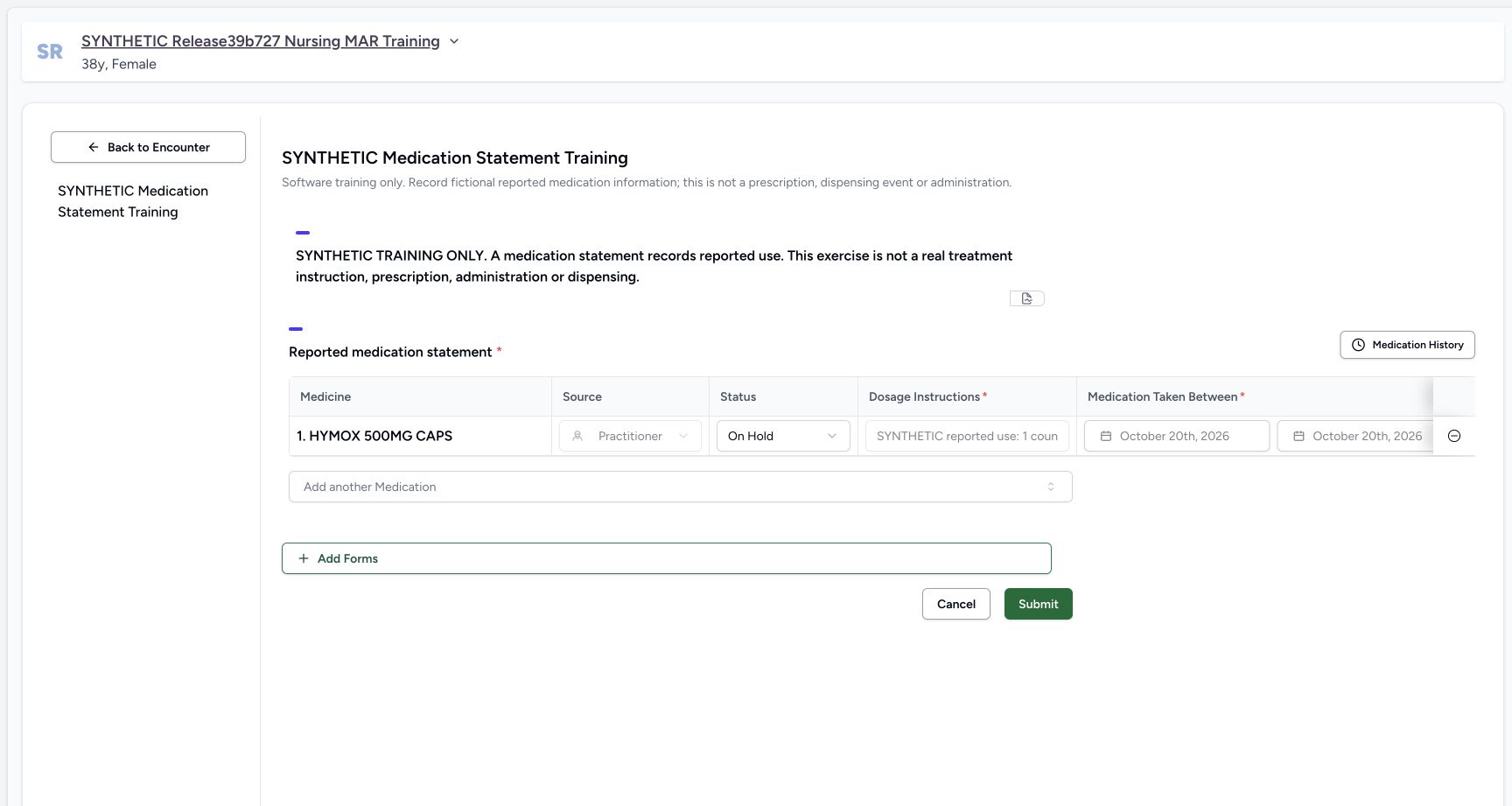
12Reopened saved on hold
Capture details
Individually viewed natural original; no crop, resize, reconstruction or extra write. Two status-only updates on the same fictional reported statement; no prescription, dispensing or administration action.
Image SHA-256 9c1030a34df76b0a24b9ed2d04fcd4cde8a28d491516abcc524342fa4e8c58ad
- Confirm saved On Hold is loaded: The reopened form loads the saved status, rather than a new statement.
- Locate Submit for the later reviewed change: Do not submit until the separate Active return has been chosen and reviewed.
9. Choose the separate return to Active
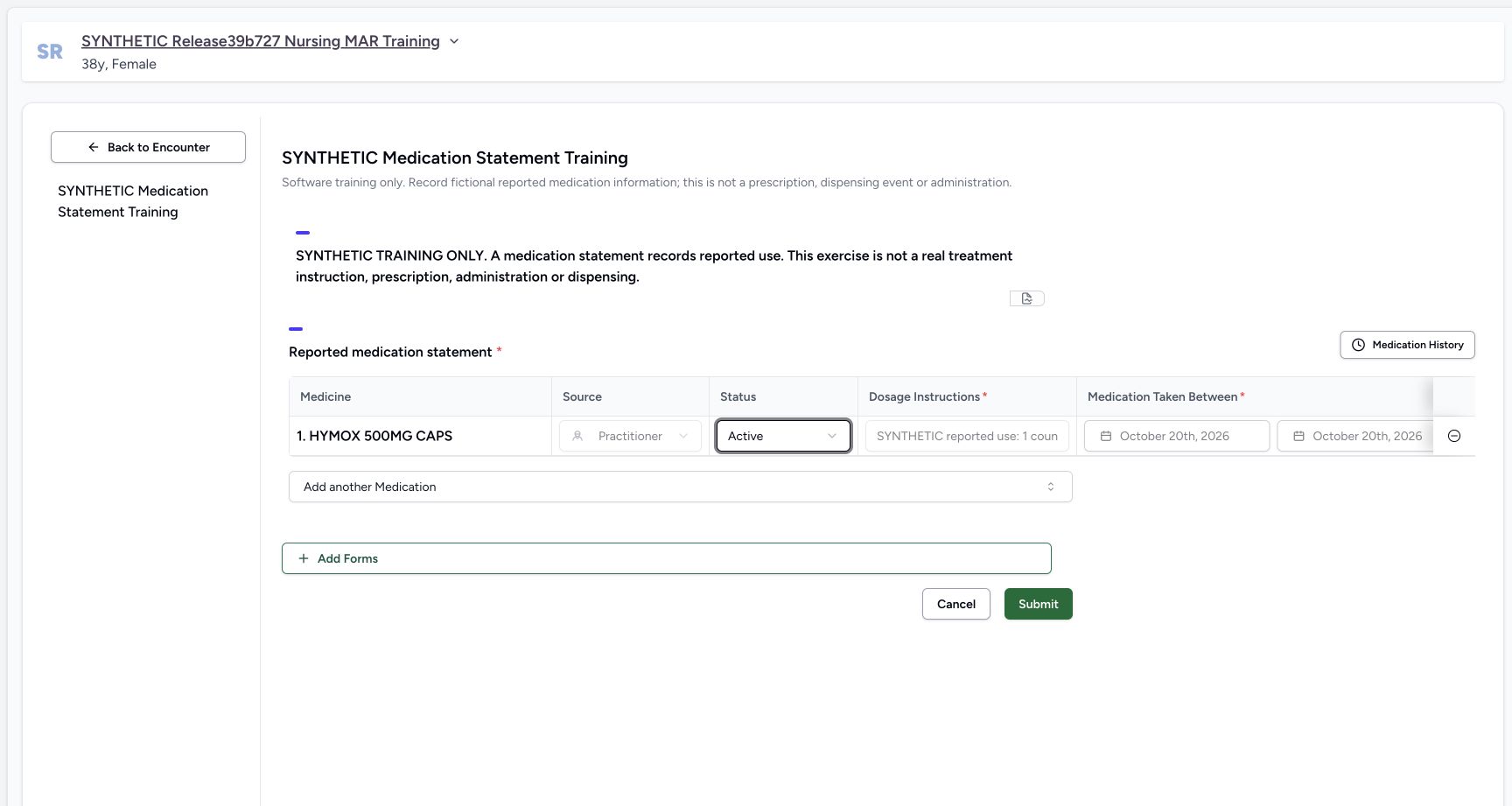
Open Status and choose Active. The earlier status-menu illustration locates the Active option; the reopened form illustration shows the saved starting On Hold value, and the next draft shows Active selected. Preserve the original Note and all other fields. This is a second intentional change.
123Status options
Capture details
Earlier status menu reused explicitly to locate Active for the later return; no retiming. Two status-only updates on the same fictional reported statement; no prescription, dispensing or administration action.
Image SHA-256 221b490170252c0d1cb3c8b8ef5edcbd5cba0d5ac1eb5fbd49ffead06cc5a326
- Open the Status selector: The menu belongs to the existing statement.
- Locate Active: This same menu option is used later for the separate return to Active.
- Choose On Hold: Choose On Hold for the first intentional status update.
12Reopened saved on hold
Capture details
Individually viewed natural original; no crop, resize, reconstruction or extra write. Two status-only updates on the same fictional reported statement; no prescription, dispensing or administration action.
Image SHA-256 9c1030a34df76b0a24b9ed2d04fcd4cde8a28d491516abcc524342fa4e8c58ad
- Confirm saved On Hold is loaded: The reopened form loads the saved status, rather than a new statement.
- Locate Submit for the later reviewed change: Do not submit until the separate Active return has been chosen and reviewed.
 12
12Return active draft
Capture details
Individually viewed natural original; no crop, resize, reconstruction or extra write. Two status-only updates on the same fictional reported statement; no prescription, dispensing or administration action.
Image SHA-256 518468502e903f167c0b07bff0c4a56060ee65f3d7edb7ea6249cb50396b683e
- Review the separate Active return: Only Status has been changed back; the saved details and original Note remain.
- Choose Submit once for the return: This records another intentional change; it does not erase the earlier On Hold update.
10. Submit and verify the Active return
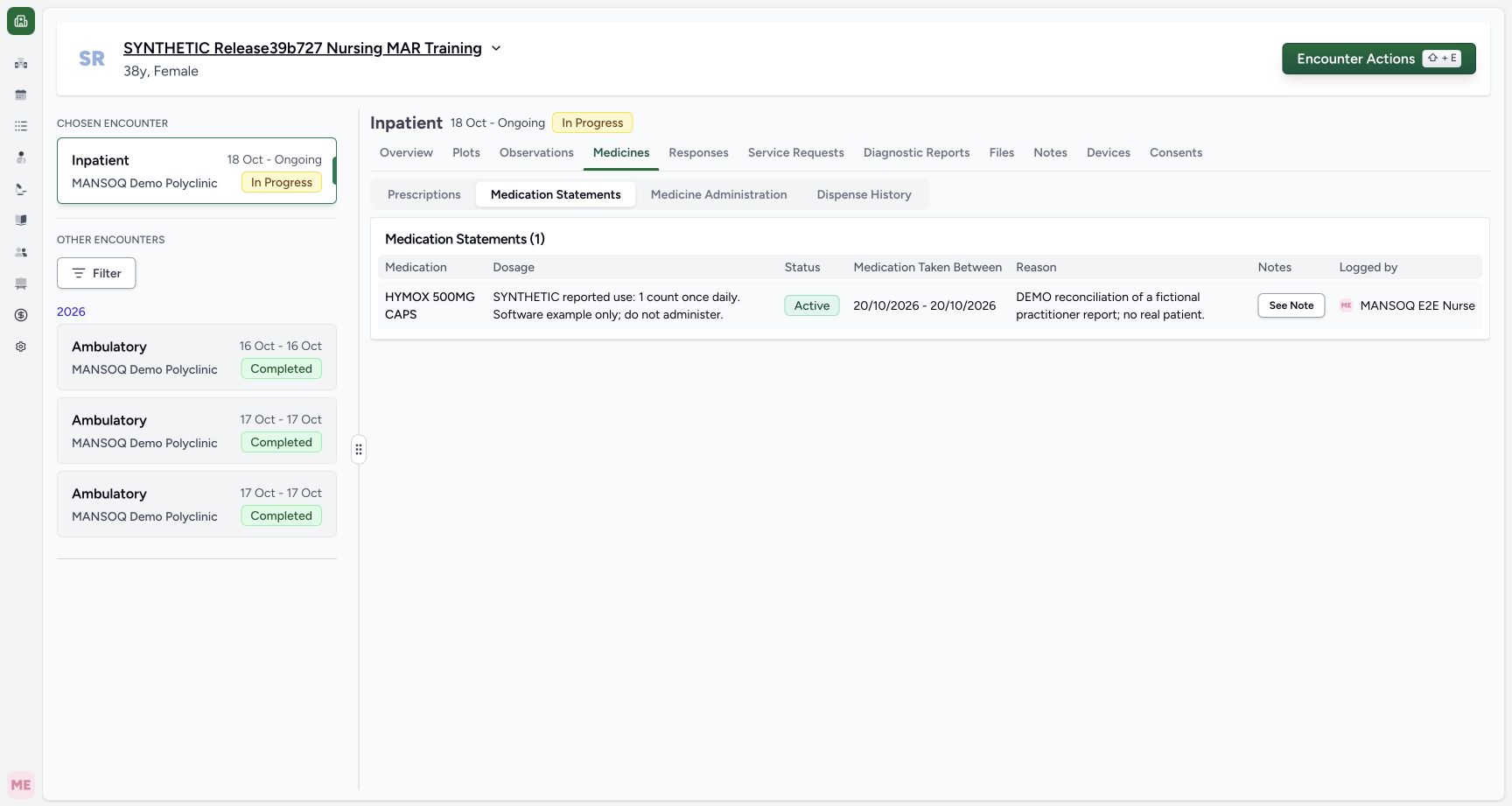
Review Active in the one existing row, then choose Submit once. After the return to Overview, open Medicines and Medication Statements. Check that the saved row is Active. The return is another recorded update; it does not erase the earlier On Hold update.
12Return active draft
Capture details
Individually viewed natural original; no crop, resize, reconstruction or extra write. Two status-only updates on the same fictional reported statement; no prescription, dispensing or administration action.
Image SHA-256 518468502e903f167c0b07bff0c4a56060ee65f3d7edb7ea6249cb50396b683e
- Review the separate Active return: Only Status has been changed back; the saved details and original Note remain.
- Choose Submit once for the return: This records another intentional change; it does not erase the earlier On Hold update.
 12
12Saved return active
Capture details
Natural duplicate pixels at distinct actual times, preserved without retiming. Two status-only updates on the same fictional reported statement; no prescription, dispensing or administration action.
Image SHA-256 7b81b836f3510d8bb67a30e0d315f6096ba1423c2663ccd487eb26d44a904da7
- Keep Medication Statements selected: The saved return is checked in the statement tab.
- Verify saved Active: The same existing statement is now Active.
11. Reload and recheck the original details
Use the browser’s normal Reload command again and reselect Medication Statements. Verify the same Active statement, complete original dosage text, local period and Reason. Select See Note and confirm the original fictional reported-use Note remains. Logged by still identifies the statement’s original Nurse author.
1234Reloaded return active
Capture details
Natural duplicate pixels at distinct actual times, preserved without retiming. Two status-only updates on the same fictional reported statement; no prescription, dispensing or administration action.
Image SHA-256 7b81b836f3510d8bb67a30e0d315f6096ba1423c2663ccd487eb26d44a904da7
- Reselect the statement tab after Reload: Use the same subtab after the second normal browser Reload.
- Verify Active after Reload: The same saved row remains Active.
- Read the complete original dosage text: The reported text is retained; this exercise has not changed it.
- Open the retained Note: Use See Note for complete readback.
 1
1Final note retained
Capture details
Natural duplicate pixels at distinct actual times, preserved without retiming. Two status-only updates on the same fictional reported statement; no prescription, dispensing or administration action.
Image SHA-256 21901776e2e07473514814b0accfab0cbb47ccdceb36ed3a71db17ac3631d833
- Verify the original Note is unchanged: The final saved Note matches the one inspected before either status change.
12. Inspect the current entry in patient history
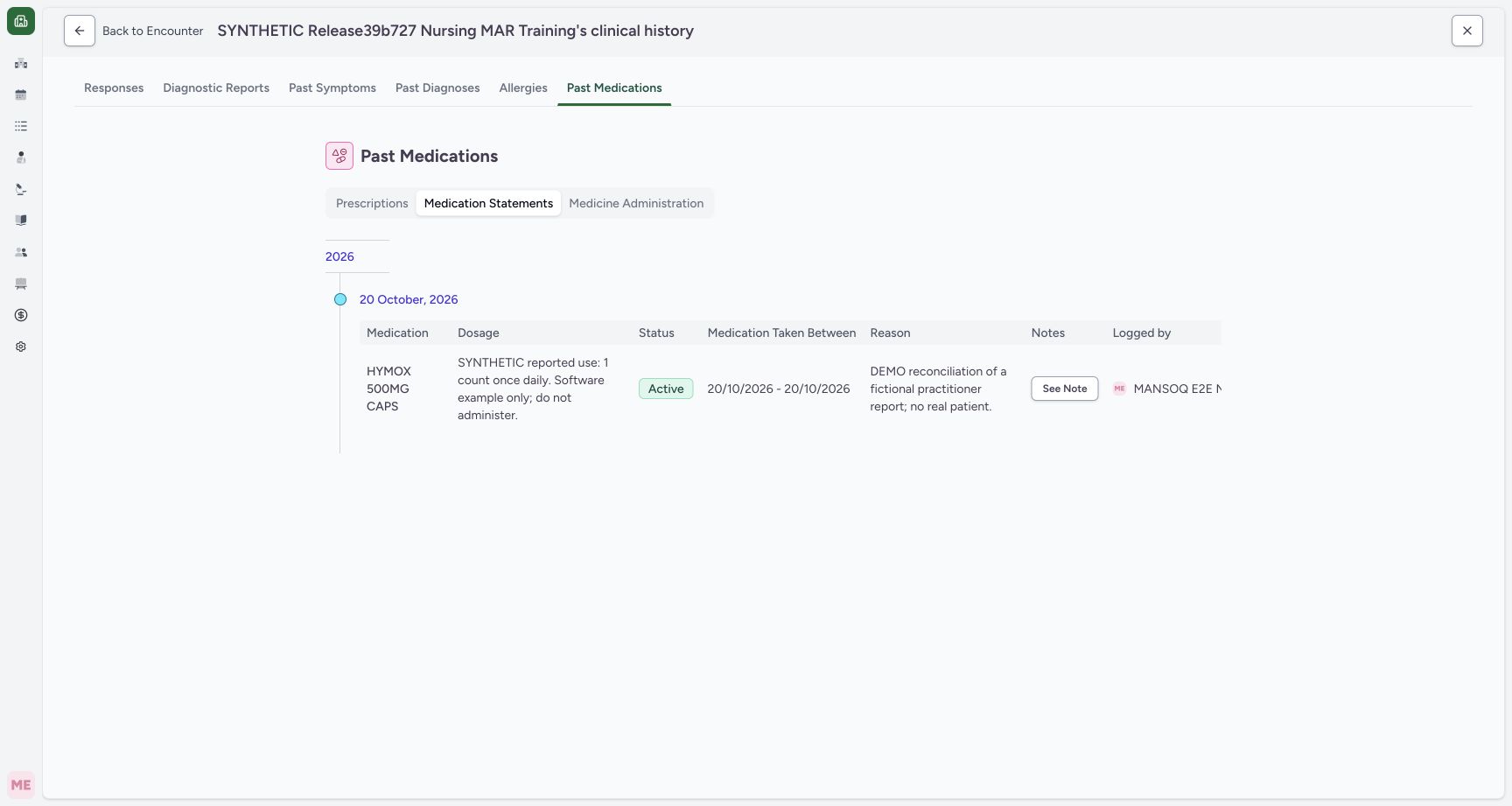
From Overview select See Clinical History, then Past Medications and Medication Statements. Read the current Active entry under 20 October, 2026. The earlier Overview illustration locates the history entry control. This history groups the current statement by creation date; it is not a visible list of each status change. Choose Back to Encounter and leave the record clean.
123Overview forms
Capture details
Natural duplicate pixels at distinct actual times, preserved without retiming. Two status-only updates on the same fictional reported statement; no prescription, dispensing or administration action.
Image SHA-256 f140553a00aaecc64fb84cb7cee6b5fcb46326f4faf5ba8cd65a7363e537bfb8
- Open Overview: Return to the selected encounter Overview to open its forms.
- Open Forms: Use the Forms tile to locate the installed reported-medication form.
- Open See Clinical History later: After the final verification this opens the patient history; it is separate from editing the statement.
 12345
12345Patient history current entry
Capture details
Current history entry grouped by creation date; not a status-change audit timeline. Two status-only updates on the same fictional reported statement; no prescription, dispensing or administration action.
Image SHA-256 b50b78a0558542ecc37eec389462a91a5a3db0a8926b6c8762497e3eaf100275
- Select Past Medications: This is the patient clinical-history view, not a prescribing form.
- Select Medication Statements: Use the statement subtab within Past Medications.
- Read the creation-day group: This date groups the existing statement by its creation date.
- Read the current Active status: The history displays the current statement; it is not a visible list of each status change.
- Return to the encounter: Leave the read-only history with Back to Encounter.
Keep reported details and status separate
This saved-row editor permits Status and Note changes, while its original source, dosage, dates and Reason remain locked. The demonstrated operation changes only Status and retains the original Note. The complete saved table and Note popover provide readback where the editor’s short fields clip long text.
1234567Untouched existing row
Capture details
Individually viewed natural original; no crop, resize, reconstruction or extra write. Two status-only updates on the same fictional reported statement; no prescription, dispensing or administration action.
Image SHA-256 6c91b2b3cc62694920aa0e73031c4a8e94e69845d5db6985f6847f909157956a
- Check the loaded existing medication: The saved HYMOX row is already present.
- Read the locked Practitioner source: Source is disabled on this existing row.
- Locate editable Status: Status is editable while the original reported details remain locked.
- Retain the locked dosage text: This narrow field clips the text; the complete saved table is shown separately.
- Retain the original start date: The saved start remains October 20th, 2026.
- Retain the original end date: The saved end remains October 20th, 2026.
- Cancel the untouched form: Leave without Submit when no value has changed.
12Original note
Capture details
Natural duplicate pixels at distinct actual times, preserved without retiming. Two status-only updates on the same fictional reported statement; no prescription, dispensing or administration action.
Image SHA-256 21901776e2e07473514814b0accfab0cbb47ccdceb36ed3a71db17ac3631d833
- Locate the statement Note: This popover belongs to the saved statement.
- Read and retain the original Note: The complete fictional reported-use note is preserved throughout this status exercise.
1Final note retained
Capture details
Natural duplicate pixels at distinct actual times, preserved without retiming. Two status-only updates on the same fictional reported statement; no prescription, dispensing or administration action.
Image SHA-256 21901776e2e07473514814b0accfab0cbb47ccdceb36ed3a71db17ac3631d833
- Verify the original Note is unchanged: The final saved Note matches the one inspected before either status change.
A return to Active is another saved update
The same statement was saved On Hold and checked after reload before a separate Active save. The final table shows its current Active status. Returning to the earlier status does not mean the first save never occurred.
1234Saved on hold table
Capture details
Natural duplicate pixels at distinct actual times, preserved without retiming. Two status-only updates on the same fictional reported statement; no prescription, dispensing or administration action.
Image SHA-256 2dd518dee274bdafde769d62d2a68a8a664629de18ff06adc180a6acabf4bf0d
- Select Medication Statements: After the save, choose the statement subtab rather than Prescriptions.
- Verify saved On Hold: The current statement table displays the persisted status.
- Check the original reported dates: The original local period remains 20/10/2026 – 20/10/2026.
- Check the original Reason: The fictional practitioner-report reason is unchanged.
12Reloaded on hold
Capture details
Natural duplicate pixels at distinct actual times, preserved without retiming. Two status-only updates on the same fictional reported statement; no prescription, dispensing or administration action.
Image SHA-256 2dd518dee274bdafde769d62d2a68a8a664629de18ff06adc180a6acabf4bf0d
- Reselect Medication Statements after Reload: The normal browser Reload initially returns to Prescriptions; choose this subtab again.
- Verify On Hold after Reload: The same statement remains On Hold after a normal reload.
12Return active draft
Capture details
Individually viewed natural original; no crop, resize, reconstruction or extra write. Two status-only updates on the same fictional reported statement; no prescription, dispensing or administration action.
Image SHA-256 518468502e903f167c0b07bff0c4a56060ee65f3d7edb7ea6249cb50396b683e
- Review the separate Active return: Only Status has been changed back; the saved details and original Note remain.
- Choose Submit once for the return: This records another intentional change; it does not erase the earlier On Hold update.
1234Reloaded return active
Capture details
Natural duplicate pixels at distinct actual times, preserved without retiming. Two status-only updates on the same fictional reported statement; no prescription, dispensing or administration action.
Image SHA-256 7b81b836f3510d8bb67a30e0d315f6096ba1423c2663ccd487eb26d44a904da7
- Reselect the statement tab after Reload: Use the same subtab after the second normal browser Reload.
- Verify Active after Reload: The same saved row remains Active.
- Read the complete original dosage text: The reported text is retained; this exercise has not changed it.
- Open the retained Note: Use See Note for complete readback.
Interpret the patient-history date correctly
Past Medications shows the current statement grouped by its creation day. The Medication Taken Between dates are the separately recorded reported-use period. Neither that grouping nor Active status establishes actual medication taking or supplies a treatment instruction.
12345Patient history current entry
Capture details
Current history entry grouped by creation date; not a status-change audit timeline. Two status-only updates on the same fictional reported statement; no prescription, dispensing or administration action.
Image SHA-256 b50b78a0558542ecc37eec389462a91a5a3db0a8926b6c8762497e3eaf100275
- Select Past Medications: This is the patient clinical-history view, not a prescribing form.
- Select Medication Statements: Use the statement subtab within Past Medications.
- Read the creation-day group: This date groups the existing statement by its creation date.
- Read the current Active status: The history displays the current statement; it is not a visible list of each status change.
- Return to the encounter: Leave the read-only history with Back to Encounter.
1234567Original active statement
Capture details
Natural duplicate pixels at distinct actual times, preserved without retiming. Two status-only updates on the same fictional reported statement; no prescription, dispensing or administration action.
Image SHA-256 7b81b836f3510d8bb67a30e0d315f6096ba1423c2663ccd487eb26d44a904da7
- Check the fictional patient: Use the assigned synthetic patient, not another record.
- Check the selected encounter: The chosen Inpatient encounter is In Progress.
- Open Medicines: Medication Statements is a separate subtab here.
- Select Medication Statements: The saved reported-use statement is separate from Prescriptions.
- Identify the existing HYMOX statement: Keep the existing reported-use row; do not add another medication.
- Read the starting Active status: This is the saved starting status for the exercise.
- Open See Note: Read the original saved note before changing status.
Source evidence
Every citation uses this exact committed version. The private source repository requires access.
- repositories/platform/mansoq-web/src/components/Questionnaire/QuestionTypes/MedicationStatementQuestion.tsx:195 ·
3dfb7c9f519fb5b4cd4452439f3c12346bf58319Source file checksum
aa6bfad3dcb6e4315c58908fe9fffdc4ea47cb84f8c2596cb3db30fe640c19d7 - repositories/platform/mansoq-web/src/types/emr/medicationStatement.ts:7 ·
3dfb7c9f519fb5b4cd4452439f3c12346bf58319Source file checksum
5784010754caa19b544f2db2f1a374d7739d76518159a239b73a3a8c9fb5a091 - repositories/platform/mansoq-web/src/components/Questionnaire/structured/handlers.ts:101 ·
3dfb7c9f519fb5b4cd4452439f3c12346bf58319Source file checksum
459ade48f77316279ab2978dc7b4466cb96acb8223c61b9a1f87ca9973be7c7f - repositories/platform/mansoq-web/src/components/Questionnaire/QuestionnaireForm.tsx:421 ·
3dfb7c9f519fb5b4cd4452439f3c12346bf58319Source file checksum
ee6c2195f13e48f0896a2d3da566c2f2a67910adad08894df6b77862f9cfdeec - repositories/platform/mansoq-web/src/components/Patient/MedicationStatementList.tsx:39 ·
3dfb7c9f519fb5b4cd4452439f3c12346bf58319Source file checksum
4dd254b2d7ab8c46c4178ec9962ed631b863a602450378050dc329bbac82a1e5 - repositories/platform/mansoq-web/src/components/Patient/MedicationStatementTable.tsx:61 ·
3dfb7c9f519fb5b4cd4452439f3c12346bf58319Source file checksum
24093db90d546211a702299533d012a8c28883c7ac936971c6fde01a1b8bce21 - repositories/platform/mansoq-web/src/pages/Patient/History/MedicationHistory.tsx:21 ·
3dfb7c9f519fb5b4cd4452439f3c12346bf58319Source file checksum
0b248dc1b9a1de5f21ad62700bd1e948020ca0488e942745fa684c67dfd286ca - repositories/platform/mansoq-core/mansoq/emr/resources/medication/statement/spec.py:14 ·
3dfb7c9f519fb5b4cd4452439f3c12346bf58319Source file checksum
542258fe317d93cd03fc4b0efe7fe5704069be9e99e172a63ece6d39f6f2920e