 MANSOQ
 Pharmacy · VERSION 3dfb7c9f
Find the pharmacy queue and review an unsaved billing draft
Use the ordinary Pharmacist account to find the correct service, identify a fictional patient and inspect the exact original prescription. Recognise the patient-home permission boundary, then practise lot, quantity and independent completion controls before cancelling the unsaved draft.
Pharmacist
 12345
12345Existing prescription preview
Capture details
Observed committed 3dfb software on 20 October 2026 by ordinary Pharmacist. Root captured this genuine natural browser viewport; author inspected the original individually. No pixel editing, crop, resize, stitching or generated content.
Image SHA-256 7688124e452f4a27ff3560204972bc0a5a025ddf7f4e8f6c5e4328c211a4e301
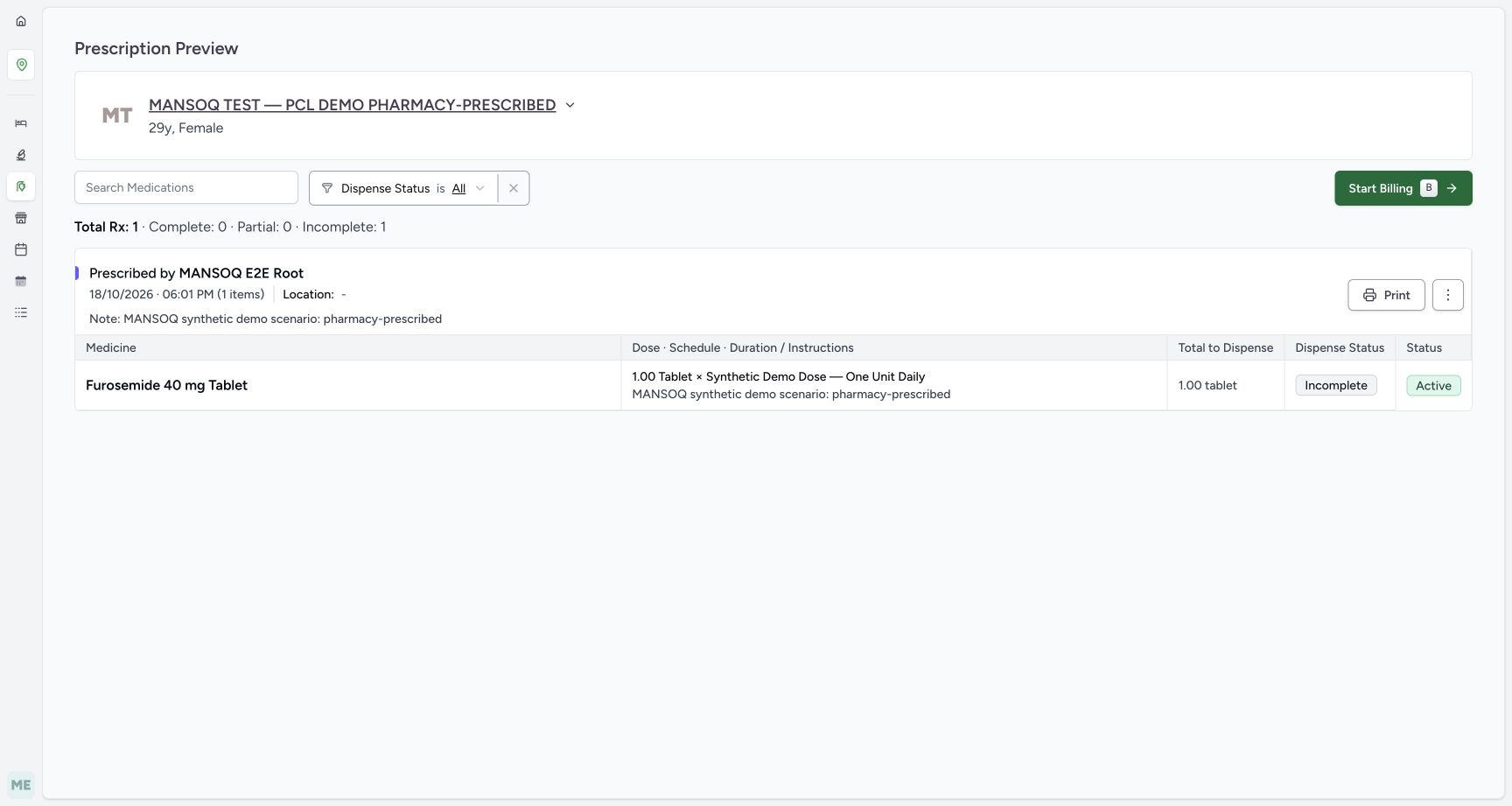
- Original prescriber and card date: The original card is MANSOQ E2E Root, 18 October at 06:01 PM.
- Incomplete dispense status: Incomplete is the dispensing progress of this request.
- Active request status: Active is the medication request status, a separate field.
- Start Billing: Open this original prescription only for the unsaved controls exercise.
- Print: Print is a separate prescription action and is not performed in this lesson.
 1234
1234Cancel original draft preview
Capture details
Observed committed 3dfb software on 20 October 2026 by ordinary Pharmacist. Root captured this genuine natural browser viewport; author inspected the original individually. No pixel editing, crop, resize, stitching or generated content.
Image SHA-256 71c43869cdeb5db9c2585b6cb261cca1487b844ea216c2d8b83f66b989fcaa8b
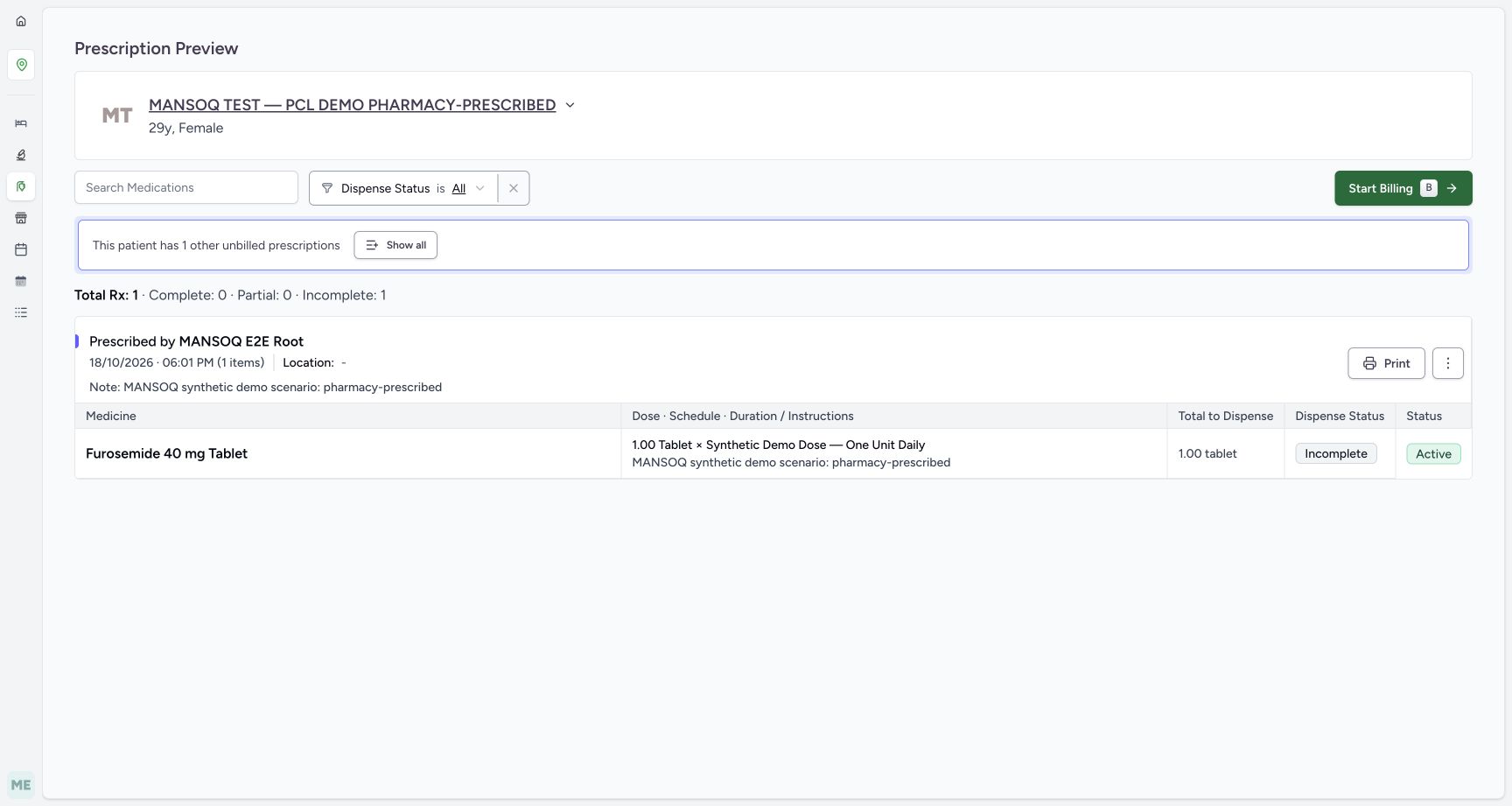
- Original still Incomplete: After Cancel the original Furosemide preview still shows Incomplete.
- Original still Active: The original request remains Active.
- Another unbilled prescription: A separately created Doctor prescription appeared during the exercise. Cancel did not create that prescription.
- Show all: Show all is a separate option for other unbilled prescriptions; this lesson next returns to the filtered queue to inspect exact selection.
20 of 20 content blocks have reviewed image alignment.
Before you begin
- Use an authorised Pharmacist account with access to the assigned pharmacy service and location. The observed identity is MANSOQ E2E Pharmacist (qa-pharmacist). Existing access is a prerequisite; this guide does not grant roles or permissions.
 12
12Recorded release 3dfb7c9f · 2026-10-20T09:38:59.836Z · 1728 × 921 Pharmacist identity
Capture details
Observed committed 3dfb software on 20 October 2026 by ordinary Pharmacist. Root captured this genuine natural browser viewport; author inspected the original individually. No pixel editing, crop, resize, stitching or generated content.
Image SHA-256
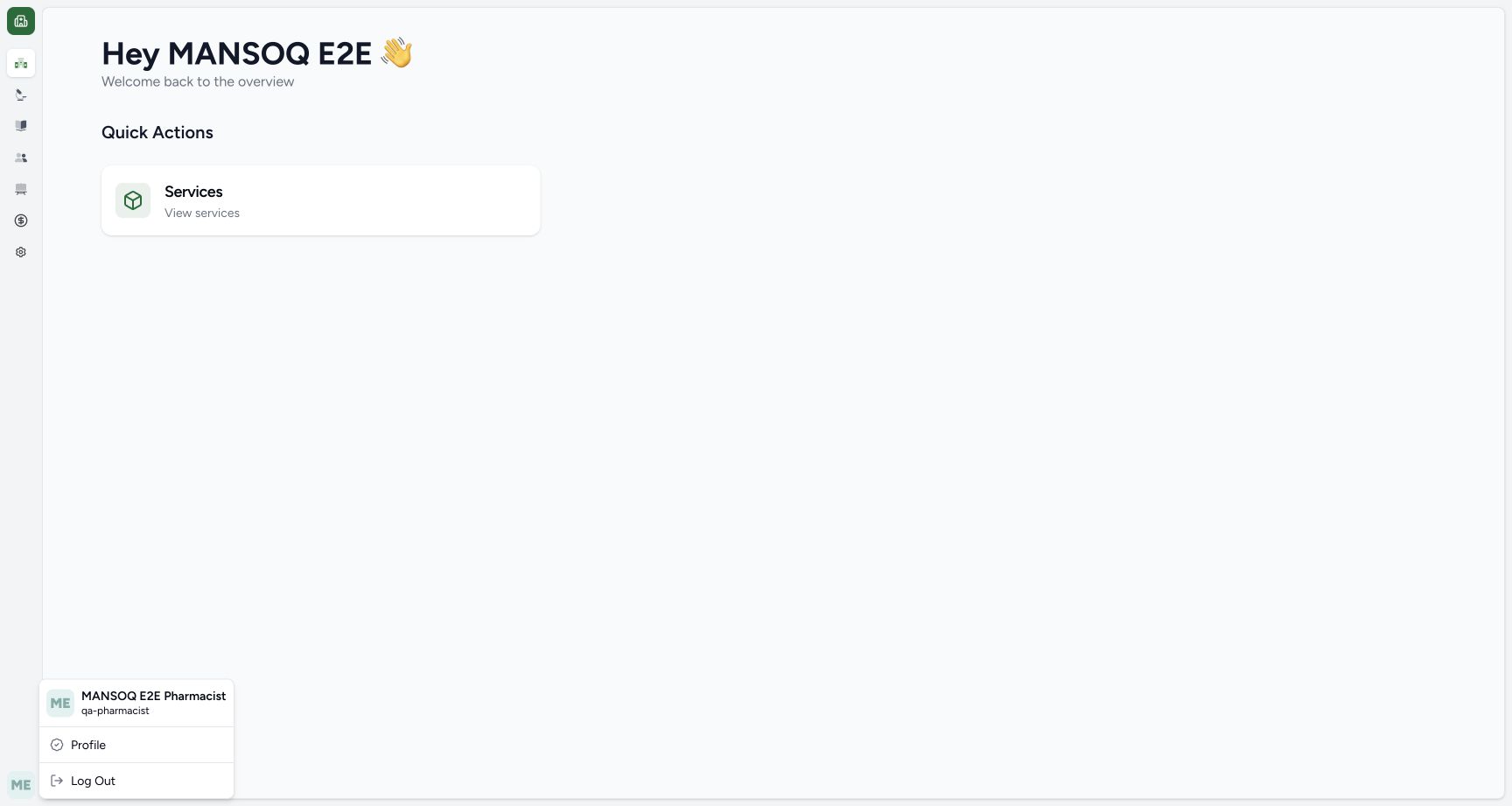
4f21b4d45cd183cc9e588f6b1c5b513194add3ef14a6062a792089c094ab5726- Ordinary Pharmacist identity: The observed profile is MANSOQ E2E Pharmacist, qa-pharmacist.
- Services entry: Close the profile menu and open Services from this facility overview.
 123
123Recorded release 3dfb7c9f · 2026-10-20T09:39:56.709Z · 1728 × 921 Pharmacy location
Capture details
Observed committed 3dfb software on 20 October 2026 by ordinary Pharmacist. Root captured this genuine natural browser viewport; author inspected the original individually. No pixel editing, crop, resize, stitching or generated content.
Image SHA-256
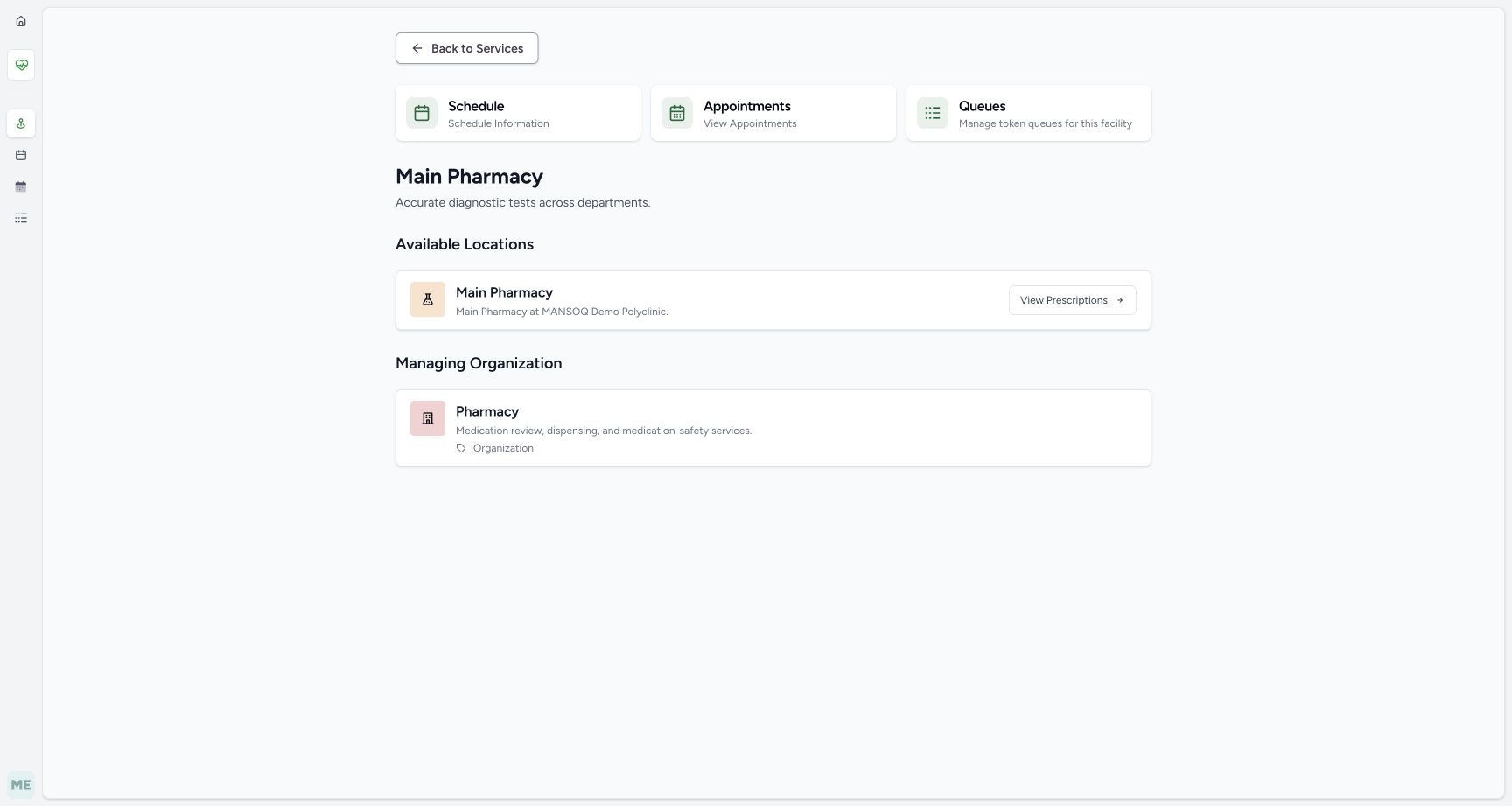
4a6e8361469c8be9041d217871e93d7c5bef11705301f54cbae3d948d94099e2- Assigned location: Confirm the Main Pharmacy location under this service.
- View Prescriptions: Open the prescription queue for this location.
- Managing organization: The displayed managing organization is Pharmacy.
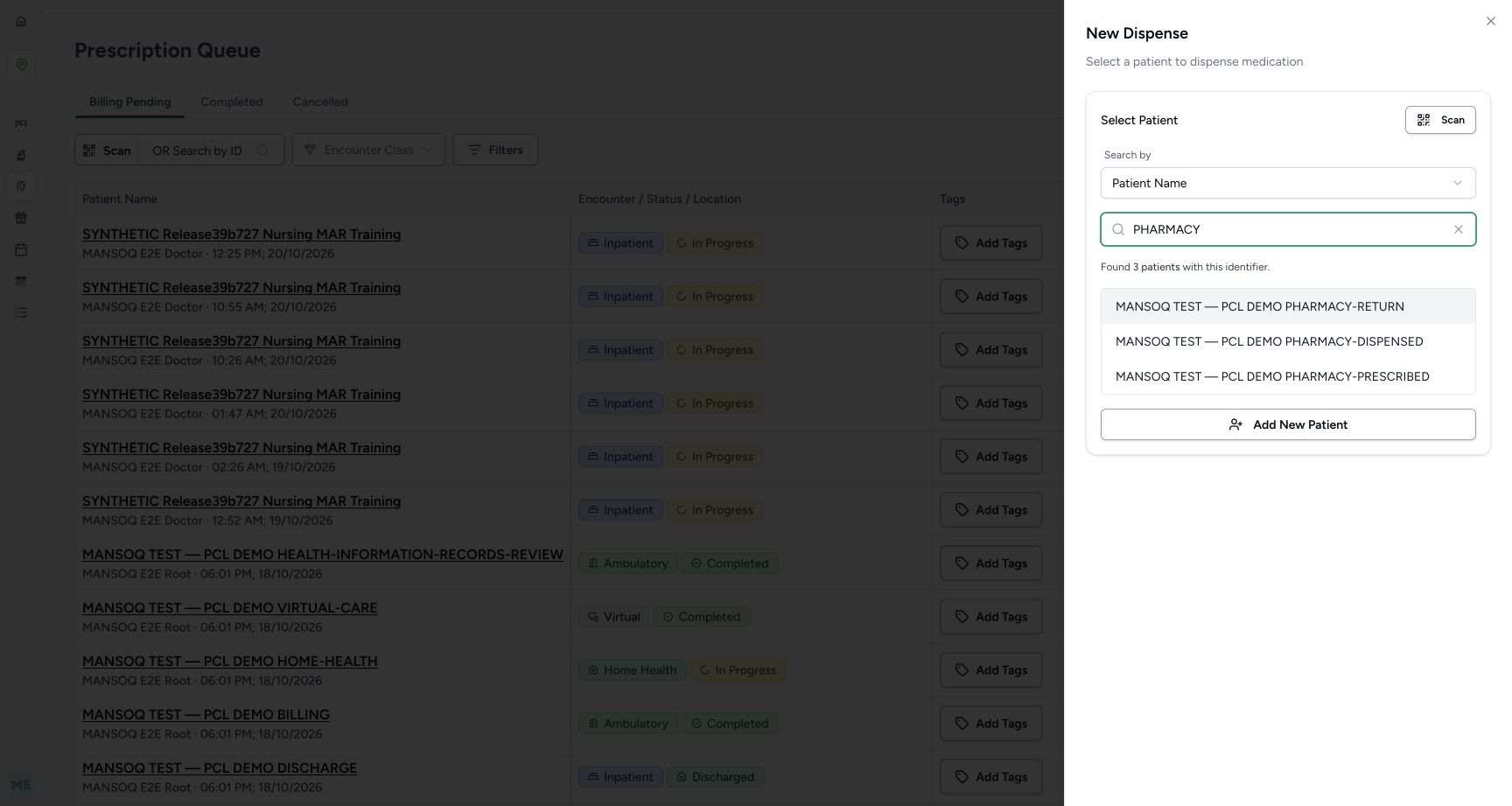
- Use only the assigned synthetic PHARMACY-PRESCRIBED case in MANSOQ Demo Polyclinic. The similarly named RETURN and DISPENSED examples are different patients. Check the entire selected patient name.
 12
12Recorded release 3dfb7c9f · 2026-10-20T09:41:13.817Z · 1728 × 921 Name search results
Capture details
Observed committed 3dfb software on 20 October 2026 by ordinary Pharmacist. Root captured this genuine natural browser viewport; author inspected the original individually. No pixel editing, crop, resize, stitching or generated content.
Image SHA-256
0f44094410f6563cfa6e4779ca1813b412d073a15ed0dfbd3f1ee99c2eb7380f- Name query: The fictional search term is PHARMACY.
- Exact assigned patient: Choose MANSOQ TEST — PCL DEMO PHARMACY-PRESCRIBED, rather than the RETURN or DISPENSED examples above.
 1234
1234Recorded release 3dfb7c9f · 2026-10-20T09:41:19.348Z · 1728 × 921 Patient selection review
Capture details
Observed committed 3dfb software on 20 October 2026 by ordinary Pharmacist. Root captured this genuine natural browser viewport; author inspected the original individually. No pixel editing, crop, resize, stitching or generated content.
Image SHA-256
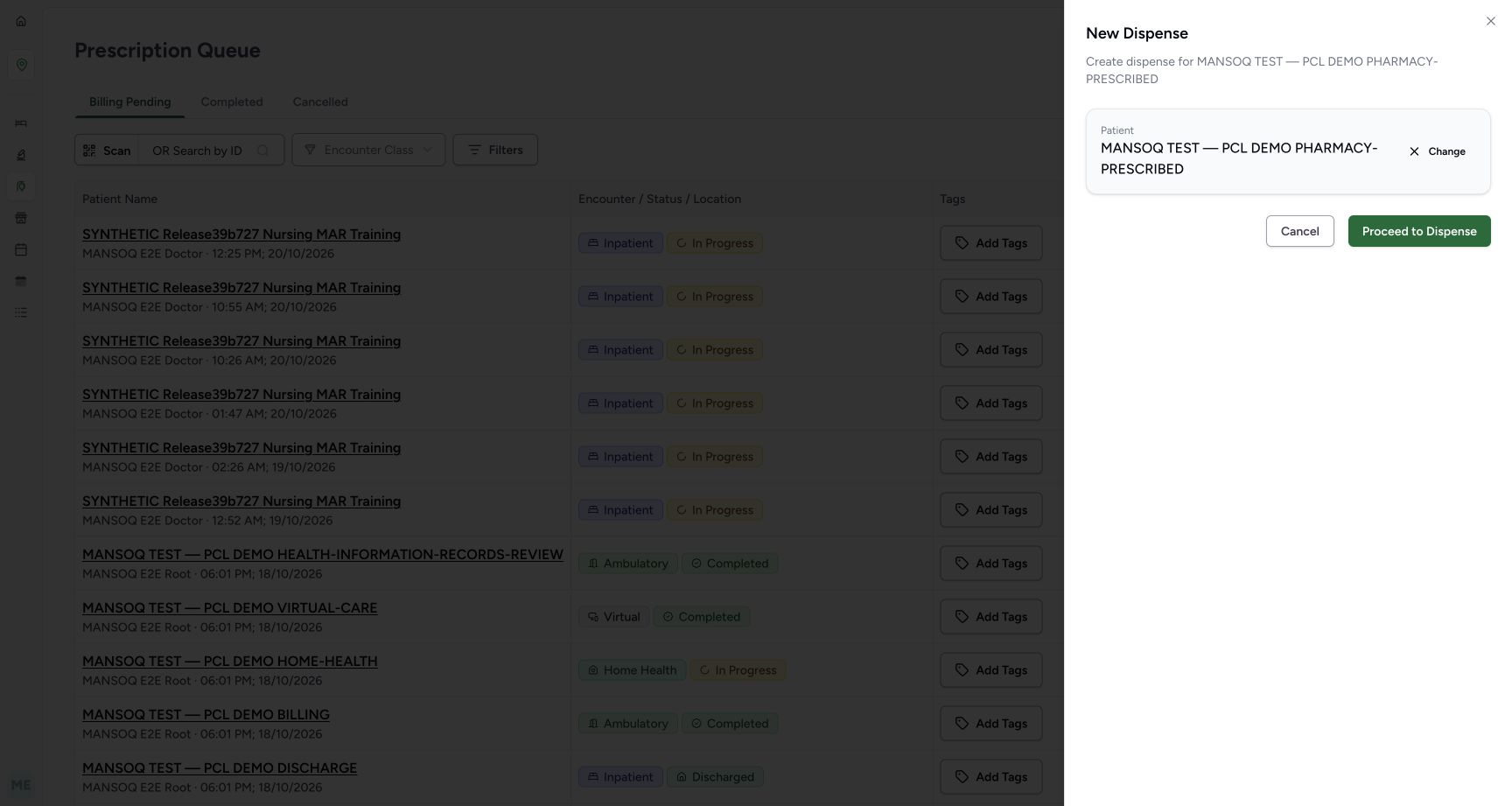
675ccb9dff724e8d209e8e134021e51a229dcb4614b67103595dc87df4697732- Selected patient: Verify the full PHARMACY-PRESCRIBED name before proceeding.
- Change: Change clears the selected patient so a different one can be chosen.
- Cancel: Cancel closes this selector without proceeding.
- Proceed to Dispense: This navigates to patient verification; it has not yet billed or saved an order.
- The original Furosemide request is fictional software data. Reviewing its dose, stock and status does not recommend treatment or medicine use. This first lesson cancels its draft without billing, changing stock, collecting money or completing a dispense.12345
Recorded release 3dfb7c9f · 2026-10-20T09:45:49.945Z · 1728 × 921 Existing prescription preview
Capture details
Observed committed 3dfb software on 20 October 2026 by ordinary Pharmacist. Root captured this genuine natural browser viewport; author inspected the original individually. No pixel editing, crop, resize, stitching or generated content.
Image SHA-256
7688124e452f4a27ff3560204972bc0a5a025ddf7f4e8f6c5e4328c211a4e301- Original prescriber and card date: The original card is MANSOQ E2E Root, 18 October at 06:01 PM.
- Incomplete dispense status: Incomplete is the dispensing progress of this request.
- Active request status: Active is the medication request status, a separate field.
- Start Billing: Open this original prescription only for the unsaved controls exercise.
- Print: Print is a separate prescription action and is not performed in this lesson.
1234Recorded release 3dfb7c9f · 2026-10-20T09:54:14.488Z · 1728 × 921 Cancel original draft preview
Capture details
Observed committed 3dfb software on 20 October 2026 by ordinary Pharmacist. Root captured this genuine natural browser viewport; author inspected the original individually. No pixel editing, crop, resize, stitching or generated content.
Image SHA-256
71c43869cdeb5db9c2585b6cb261cca1487b844ea216c2d8b83f66b989fcaa8b- Original still Incomplete: After Cancel the original Furosemide preview still shows Incomplete.
- Original still Active: The original request remains Active.
- Another unbilled prescription: A separately created Doctor prescription appeared during the exercise. Cancel did not create that prescription.
- Show all: Show all is a separate option for other unbilled prescriptions; this lesson next returns to the filtered queue to inspect exact selection.
1. Check the ordinary identity and open Services
Check the profile menu for MANSOQ E2E Pharmacist and qa-pharmacist, then close it. From this facility overview open Services. Stay in the assigned facility and location context.
12Pharmacist identity
Capture details
Observed committed 3dfb software on 20 October 2026 by ordinary Pharmacist. Root captured this genuine natural browser viewport; author inspected the original individually. No pixel editing, crop, resize, stitching or generated content.
Image SHA-256 4f21b4d45cd183cc9e588f6b1c5b513194add3ef14a6062a792089c094ab5726
- Ordinary Pharmacist identity: The observed profile is MANSOQ E2E Pharmacist, qa-pharmacist.
- Services entry: Close the profile menu and open Services from this facility overview.
2. Find and open the Main Pharmacy service
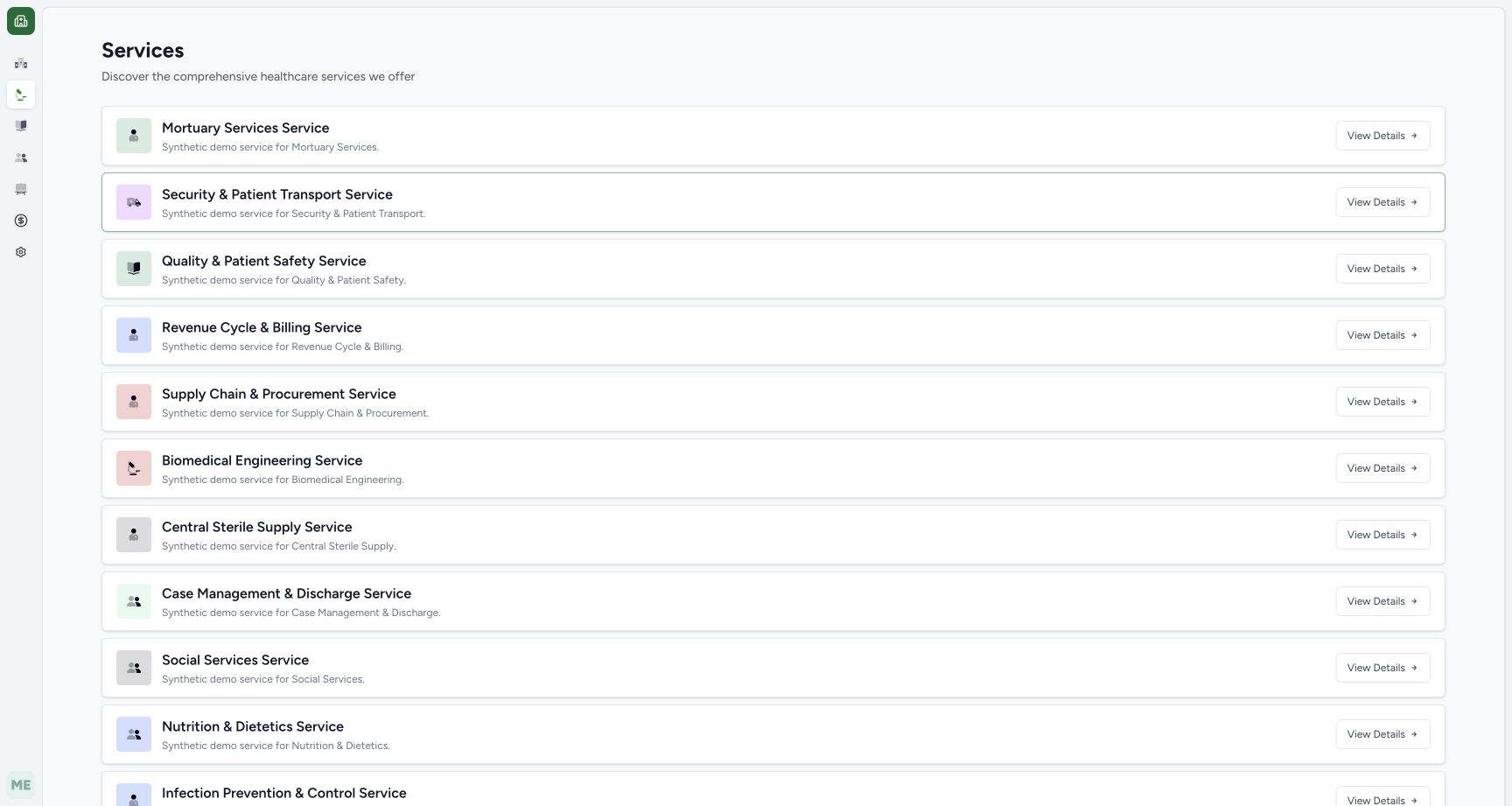
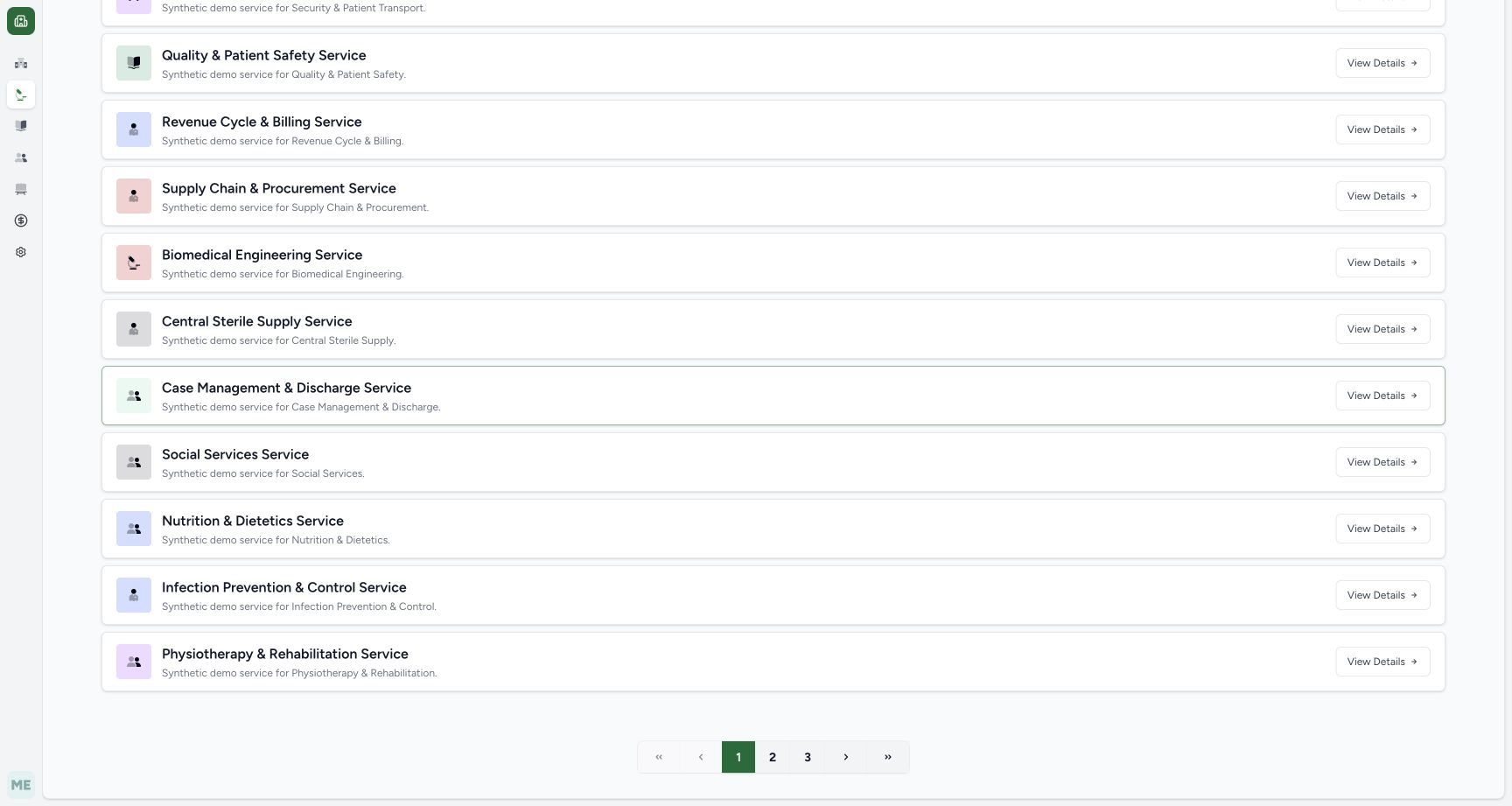
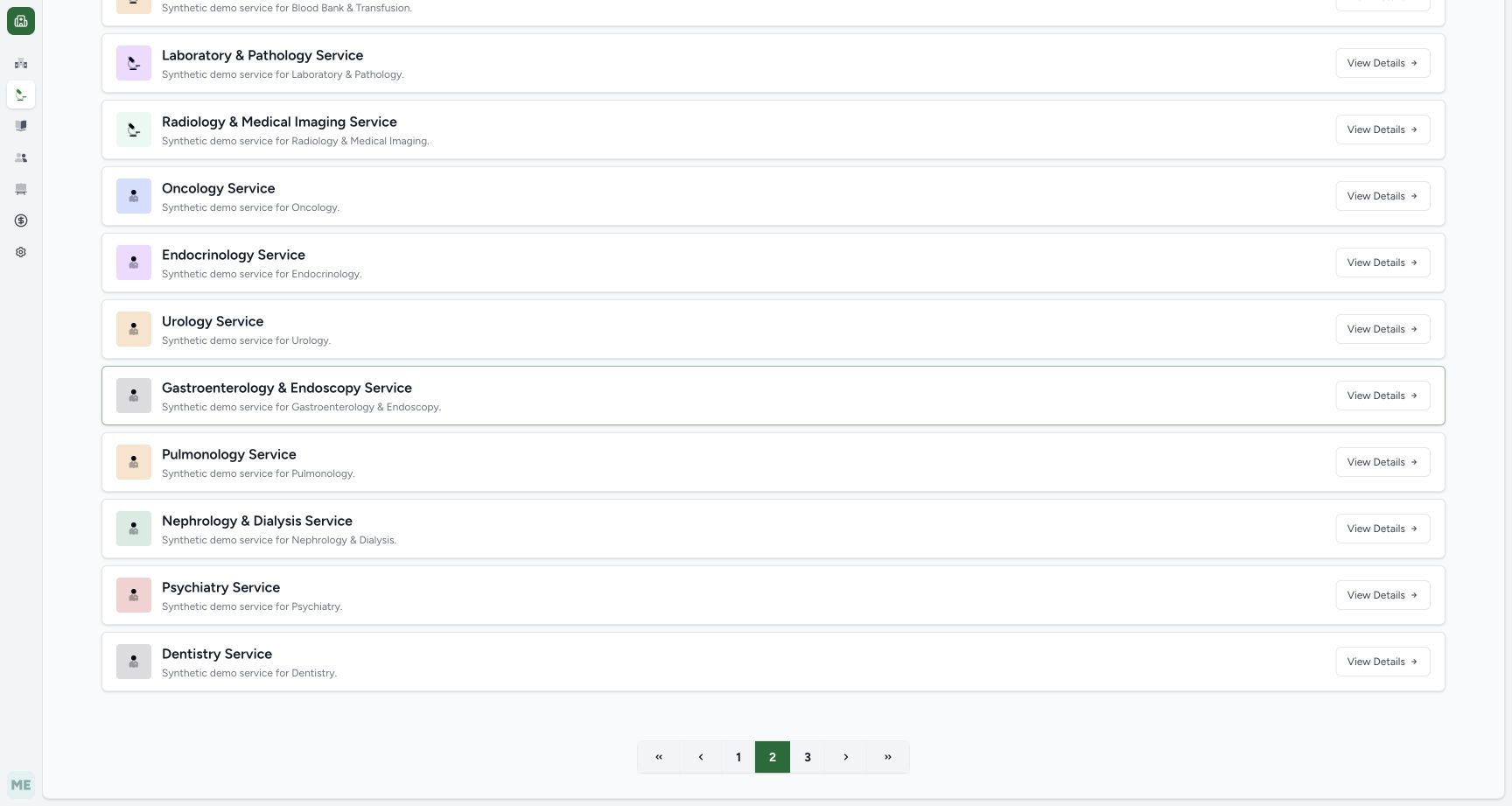
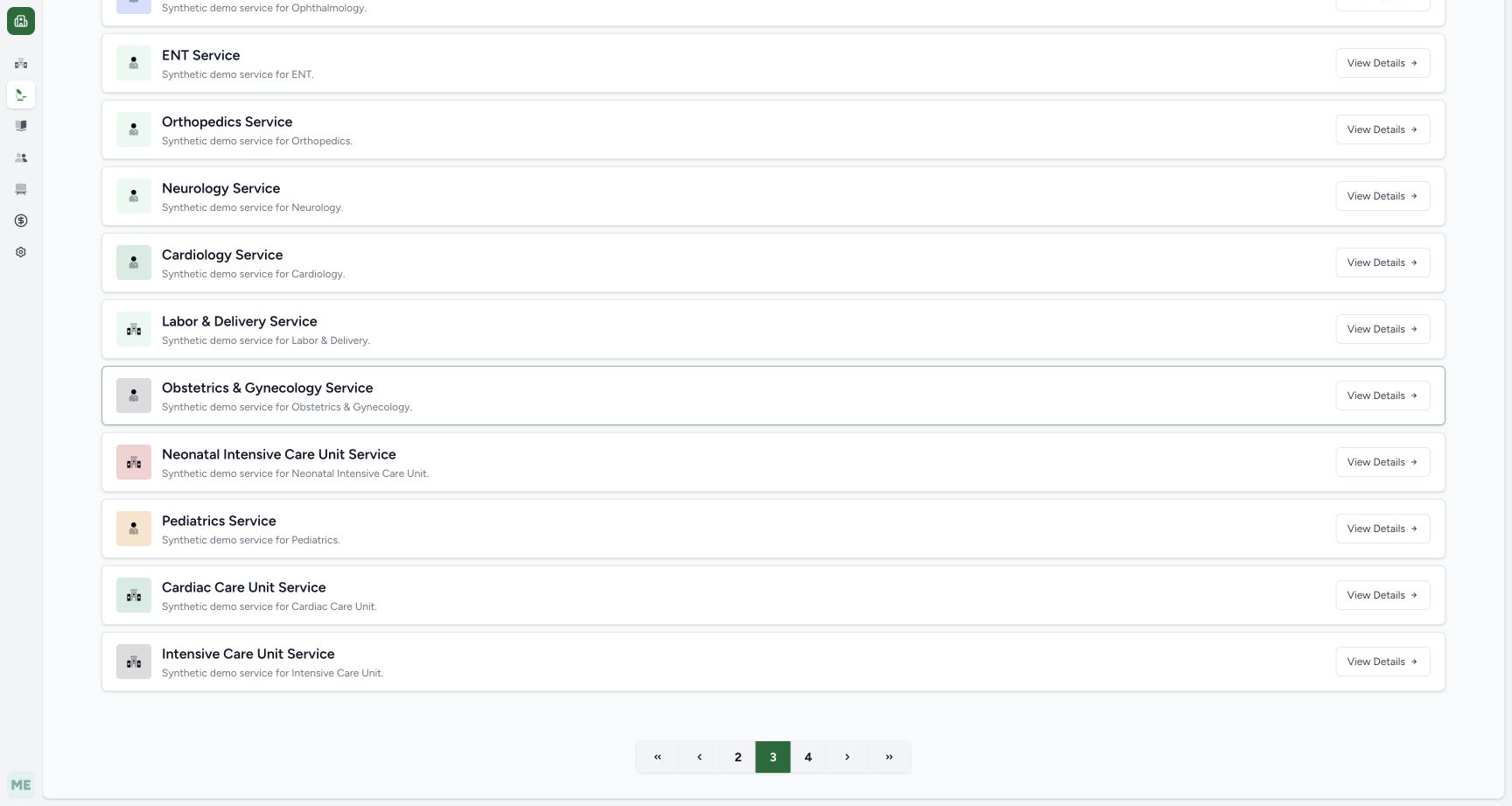
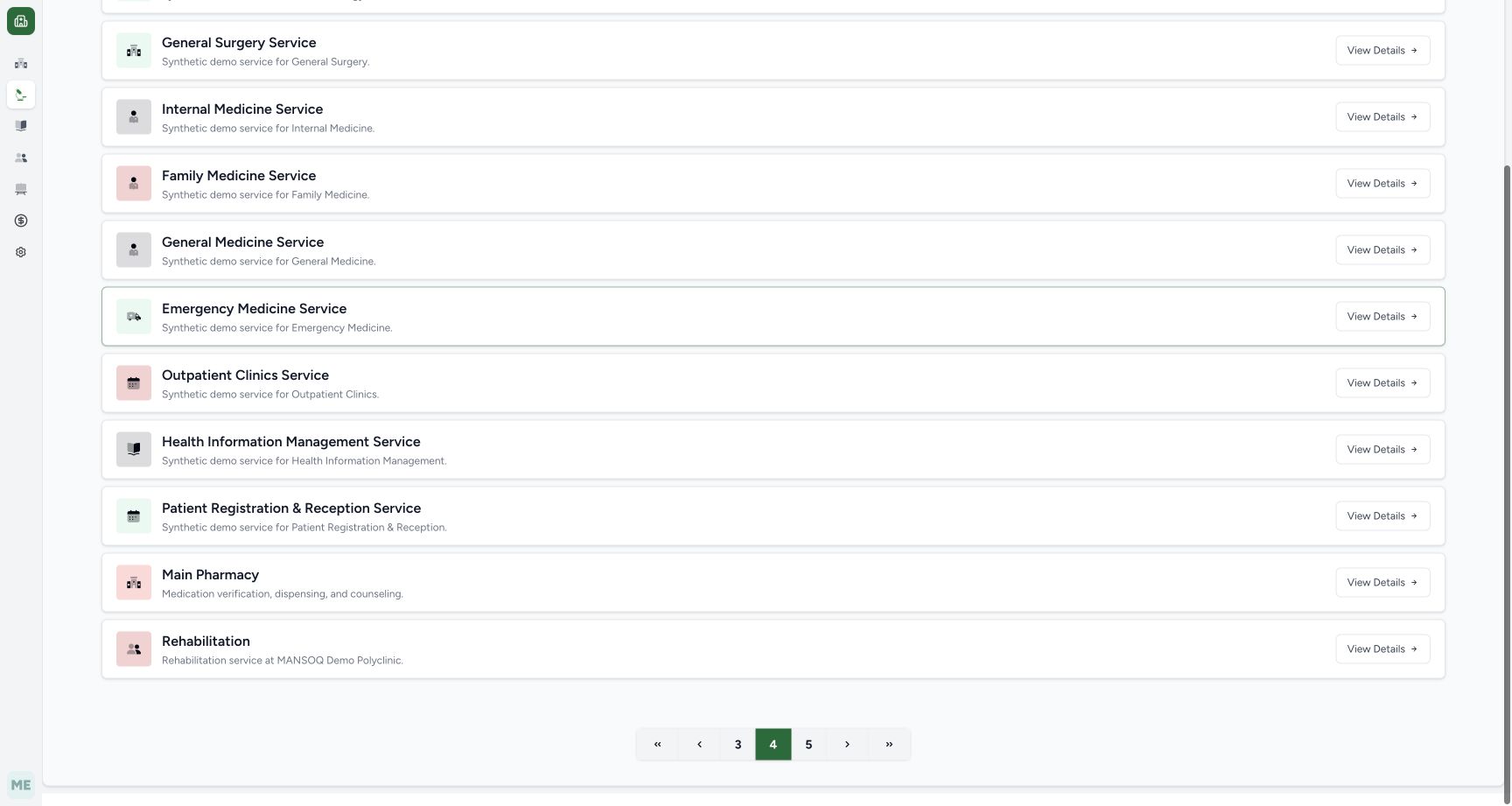
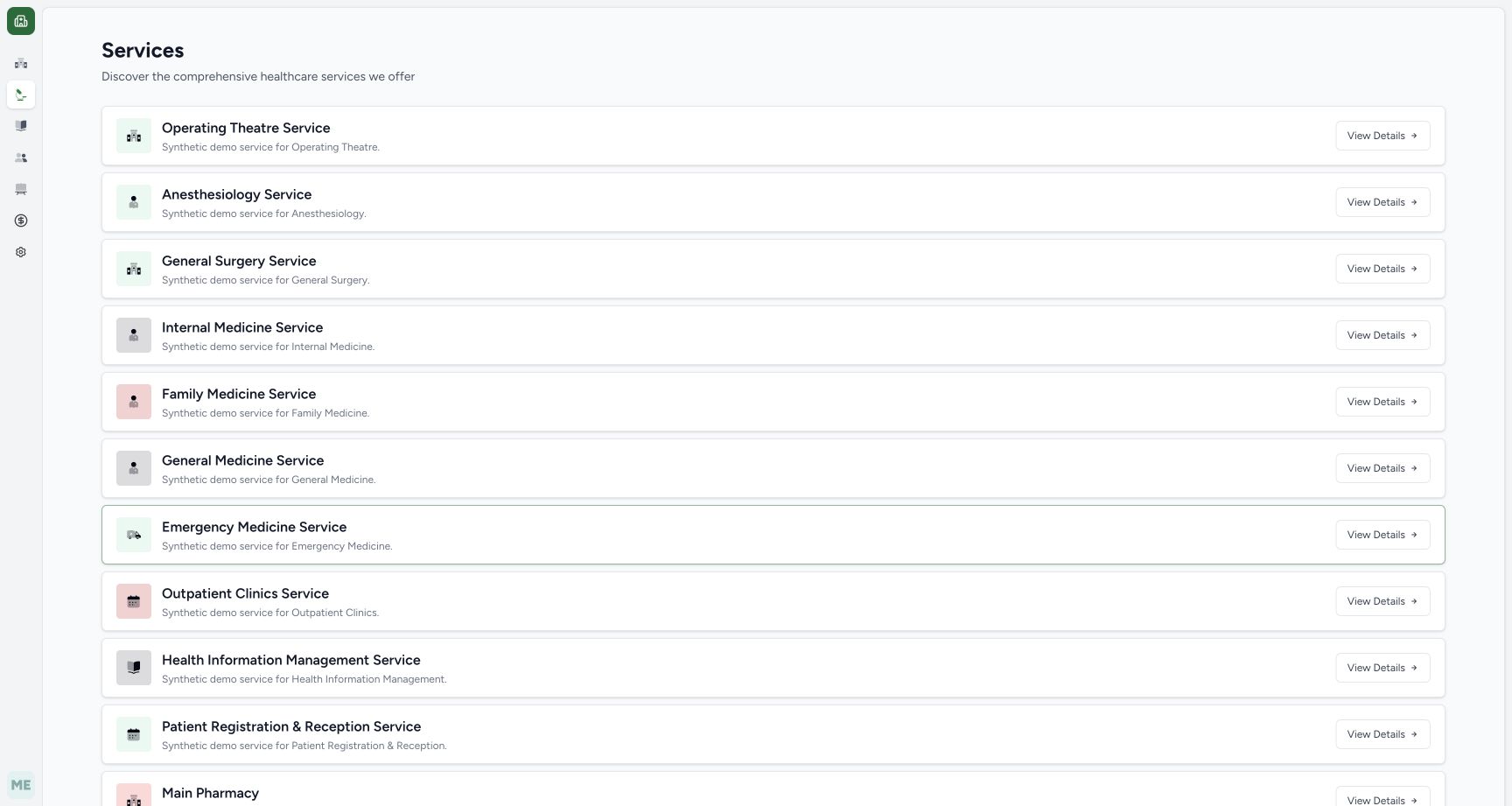
The opening picture retains the earlier Services list. The next four pictures are separate later navigation views on the same committed version, arranged by visible page numbers 1–4 for teaching; they are not one uninterrupted forward capture pass. Scroll to the footer. On pictured page 1, select the single right arrow after the numbered buttons to reach page 2. On page 2, select the visible 3 button. On page 3, select the visible 4 button. After each page change, scroll back to the footer again if necessary before selecting the next numbered page. The green button shows the current page in each view. On page 4, the full Main Pharmacy card is visible: open its title/card to reach its locations. This recorded service is on page 4; other installations may order services differently. The final retained picture shows the earlier partially visible Main Pharmacy card, rather than a further step in this later navigation illustration.
 1
1Services first page
Capture details
Observed committed 3dfb software on 20 October 2026 by ordinary Pharmacist. Root captured this genuine natural browser viewport; author inspected the original individually. No pixel editing, crop, resize, stitching or generated content.
Image SHA-256 51b5d401af1af7176c200f9874603daa20044ae8f3f153c157aa4dfefe39d096
- Services list: Scroll through the service list and its pagination to locate the assigned service. Pagination controls are outside this retained viewport.
 12
12Services page 1: later footer navigation view
Capture details
Genuine natural 1728 × 921 original, individually inspected and copied without pixel edits. These four later navigation views are arranged by visible page number 1–4 for teaching, not by capture time and not as one uninterrupted forward capture pass. Original captures 35 and 36 were made while returning from page 4 to 3 and then 2. The earlier clinical and financial chronology is separate.
Image SHA-256 33d2b90324388ec6269489293c0e1ec3f65c8fed6f6e640c3d08162da9429f82
- Current page 1: The green 1 identifies the current Services page.
- Next page: Select the single right arrow after the numbered buttons to advance from page 1 to page 2.
 12
12Services page 2: later footer navigation view
Capture details
Genuine natural 1728 × 921 original, individually inspected and copied without pixel edits. These four later navigation views are arranged by visible page number 1–4 for teaching, not by capture time and not as one uninterrupted forward capture pass. Original captures 35 and 36 were made while returning from page 4 to 3 and then 2. The earlier clinical and financial chronology is separate.
Image SHA-256 ecabe8514ebbf6ade3f62832f642fed1a757c2c1d40716d66702e6340f666cf0
- Current page 2: The green 2 identifies this later view of Services page 2.
- Select page 3: Select the visible 3 button to continue to page 3.
 12
12Services page 3: later footer navigation view
Capture details
Genuine natural 1728 × 921 original, individually inspected and copied without pixel edits. These four later navigation views are arranged by visible page number 1–4 for teaching, not by capture time and not as one uninterrupted forward capture pass. Original captures 35 and 36 were made while returning from page 4 to 3 and then 2. The earlier clinical and financial chronology is separate.
Image SHA-256 e9635bf3dde8a5438370599864c43e136dc297144febb841f575f801ec051800
- Current page 3: The green 3 identifies this later view of Services page 3.
- Select page 4: The visible 4 button is the next target; it was not displayed on the earlier page-1 footer.
 12
12Services page 4: later footer navigation view
Capture details
Genuine natural 1728 × 921 original, individually inspected and copied without pixel edits. These four later navigation views are arranged by visible page number 1–4 for teaching, not by capture time and not as one uninterrupted forward capture pass. Original captures 35 and 36 were made while returning from page 4 to 3 and then 2. The earlier clinical and financial chronology is separate.
Image SHA-256 dd8572f3fd29c0011100b42cd11bc2d8f7e40f4e05672697e9879f3d59ecad67
- Current page 4: The green 4 and its 3/5 neighbours identify this as page 4.
- Open Main Pharmacy card: The full Main Pharmacy card is visible. Select its title/card to open the assigned service locations.
 1
1Main pharmacy service
Capture details
Observed committed 3dfb software on 20 October 2026 by ordinary Pharmacist. Root captured this genuine natural browser viewport; author inspected the original individually. No pixel editing, crop, resize, stitching or generated content.
Image SHA-256 778baeec60d8efed11effa7eb7cedc20688bf8105f60148312a8bb92402a8f49
- Main Pharmacy card: The Main Pharmacy title is visible at the bottom. Its entire service card is a link; open that card. This recorded search reached page 4, which is not a universal page number.
3. Open prescriptions for the assigned location
On the service page check the Main Pharmacy location and the displayed Pharmacy managing organization. Select View Prescriptions for that location. The Prescription Queue opens on Billing Pending. Do not act on unrelated patient rows.
123Pharmacy location
Capture details
Observed committed 3dfb software on 20 October 2026 by ordinary Pharmacist. Root captured this genuine natural browser viewport; author inspected the original individually. No pixel editing, crop, resize, stitching or generated content.
Image SHA-256 4a6e8361469c8be9041d217871e93d7c5bef11705301f54cbae3d948d94099e2
- Assigned location: Confirm the Main Pharmacy location under this service.
- View Prescriptions: Open the prescription queue for this location.
- Managing organization: The displayed managing organization is Pharmacy.
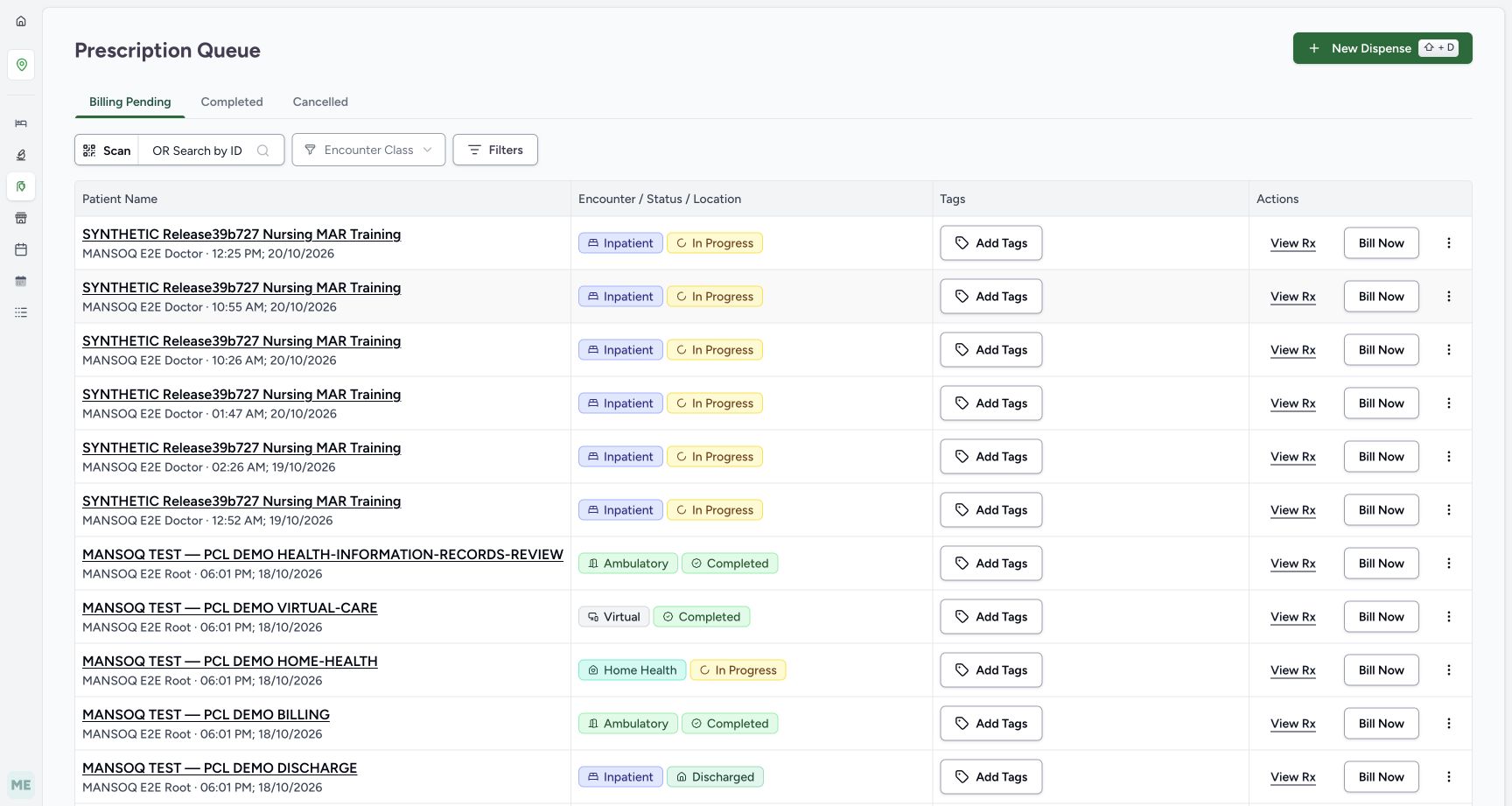 12
12Billing pending queue
Capture details
Observed committed 3dfb software on 20 October 2026 by ordinary Pharmacist. Root captured this genuine natural browser viewport; author inspected the original individually. No pixel editing, crop, resize, stitching or generated content.
Image SHA-256 adf4be696f3d4119d9d669befa697eff61224c881549cd4897dae55fd8bb09d4
- Billing Pending queue: This is the Billing Pending tab; existing other-patient rows are not selected for this exercise.
- New Dispense: Open the patient selector. Opening it does not create a dispense order.
4. Open the New Dispense patient selector
Select New Dispense. The sheet asks you to select a patient and initially shows Patient Phone Number in this capture. Opening the sheet has not created a saved dispense order.
12Billing pending queue
Capture details
Observed committed 3dfb software on 20 October 2026 by ordinary Pharmacist. Root captured this genuine natural browser viewport; author inspected the original individually. No pixel editing, crop, resize, stitching or generated content.
Image SHA-256 adf4be696f3d4119d9d669befa697eff61224c881549cd4897dae55fd8bb09d4
- Billing Pending queue: This is the Billing Pending tab; existing other-patient rows are not selected for this exercise.
- New Dispense: Open the patient selector. Opening it does not create a dispense order.
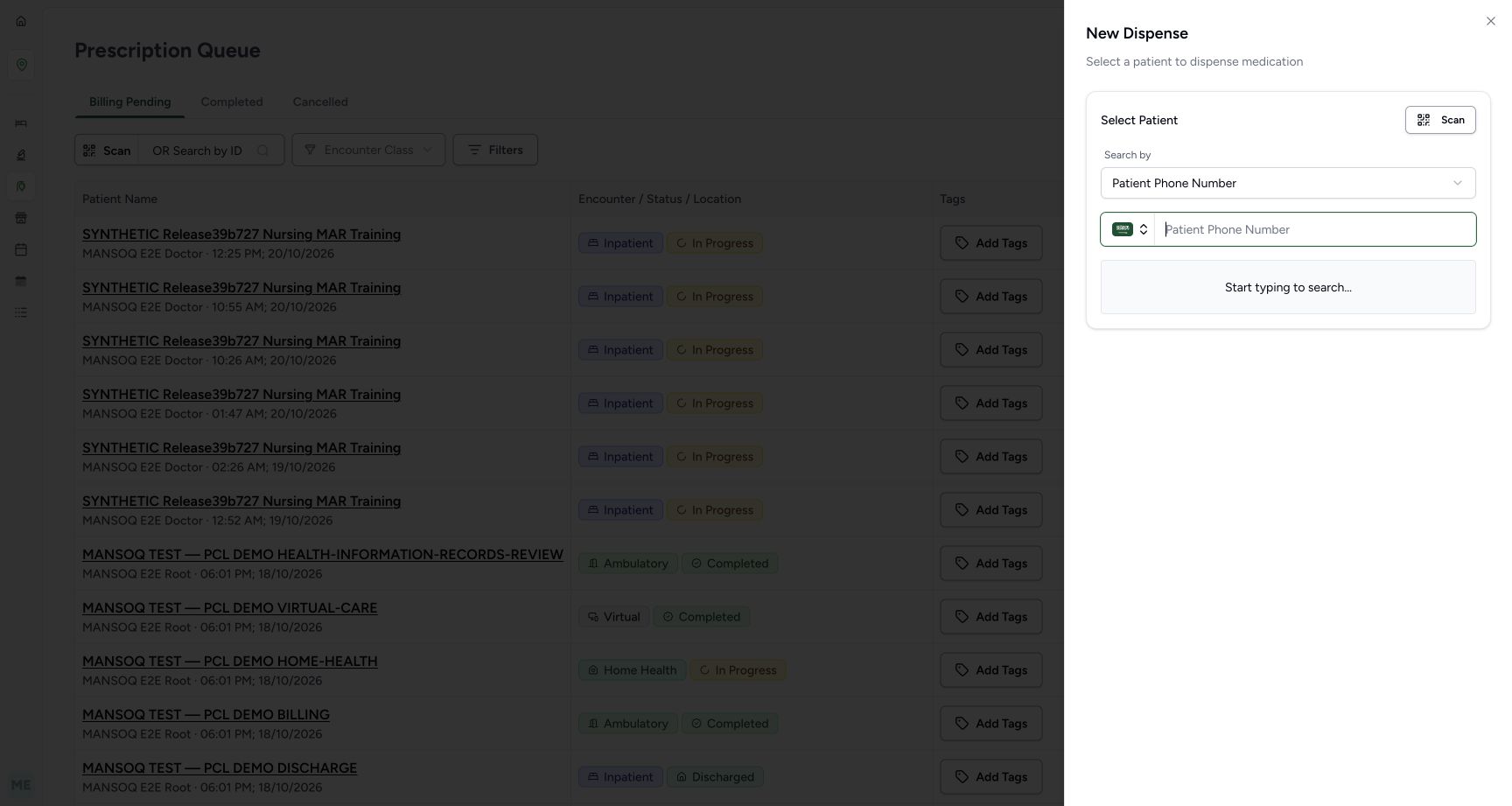 12
12New dispense patient search
Capture details
Observed committed 3dfb software on 20 October 2026 by ordinary Pharmacist. Root captured this genuine natural browser viewport; author inspected the original individually. No pixel editing, crop, resize, stitching or generated content.
Image SHA-256 b8f34fd68d4866f8221bd6d1ef81387a32148564d58698b0b3648c9646bafe43
- Search by: The captured selector initially uses Patient Phone Number. Open Search by to choose the intended identifier.
- Identifier input: Enter a value only after checking the selected search type.
5. Choose Patient Name and the exact fictional patient
Open Search by and select Patient Name. PCL Medical Record Number is a separate configured search option. Enter PHARMACY. Three similarly named results appear; select MANSOQ TEST — PCL DEMO PHARMACY-PRESCRIBED rather than the RETURN or DISPENSED case.
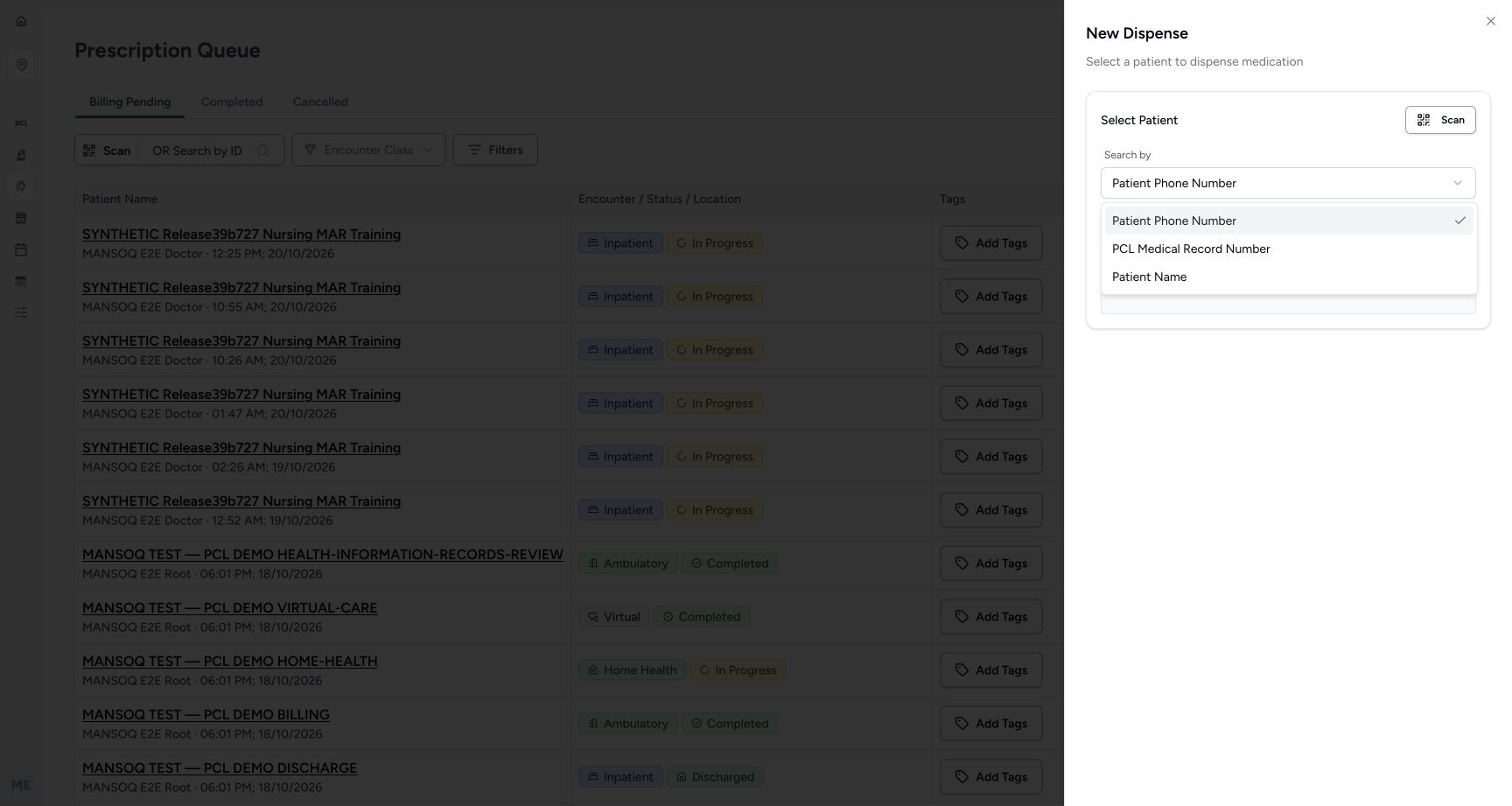 12
12Patient search options
Capture details
Observed committed 3dfb software on 20 October 2026 by ordinary Pharmacist. Root captured this genuine natural browser viewport; author inspected the original individually. No pixel editing, crop, resize, stitching or generated content.
Image SHA-256 c9b2580d0adac94331cbb91fd877eca3a86d1184bdc7ea55de6f76712a4ac23d
- Patient Name: Choose Patient Name for this captured search.
- Facility medical record number: PCL Medical Record Number is a separate configured identifier option, not the same as Patient Name.
12Name search results
Capture details
Observed committed 3dfb software on 20 October 2026 by ordinary Pharmacist. Root captured this genuine natural browser viewport; author inspected the original individually. No pixel editing, crop, resize, stitching or generated content.
Image SHA-256 0f44094410f6563cfa6e4779ca1813b412d073a15ed0dfbd3f1ee99c2eb7380f
- Name query: The fictional search term is PHARMACY.
- Exact assigned patient: Choose MANSOQ TEST — PCL DEMO PHARMACY-PRESCRIBED, rather than the RETURN or DISPENSED examples above.
6. Review the selected name before proceeding
Read the full selected name. Change clears the choice, while Cancel closes the sheet. For the recorded navigation, Proceed to Dispense verifies this patient and opens patient home. It does not itself bill medicines or save a dispense order.
1234Patient selection review
Capture details
Observed committed 3dfb software on 20 October 2026 by ordinary Pharmacist. Root captured this genuine natural browser viewport; author inspected the original individually. No pixel editing, crop, resize, stitching or generated content.
Image SHA-256 675ccb9dff724e8d209e8e134021e51a229dcb4614b67103595dc87df4697732
- Selected patient: Verify the full PHARMACY-PRESCRIBED name before proceeding.
- Change: Change clears the selected patient so a different one can be chosen.
- Cancel: Cancel closes this selector without proceeding.
- Proceed to Dispense: This navigates to patient verification; it has not yet billed or saved an order.
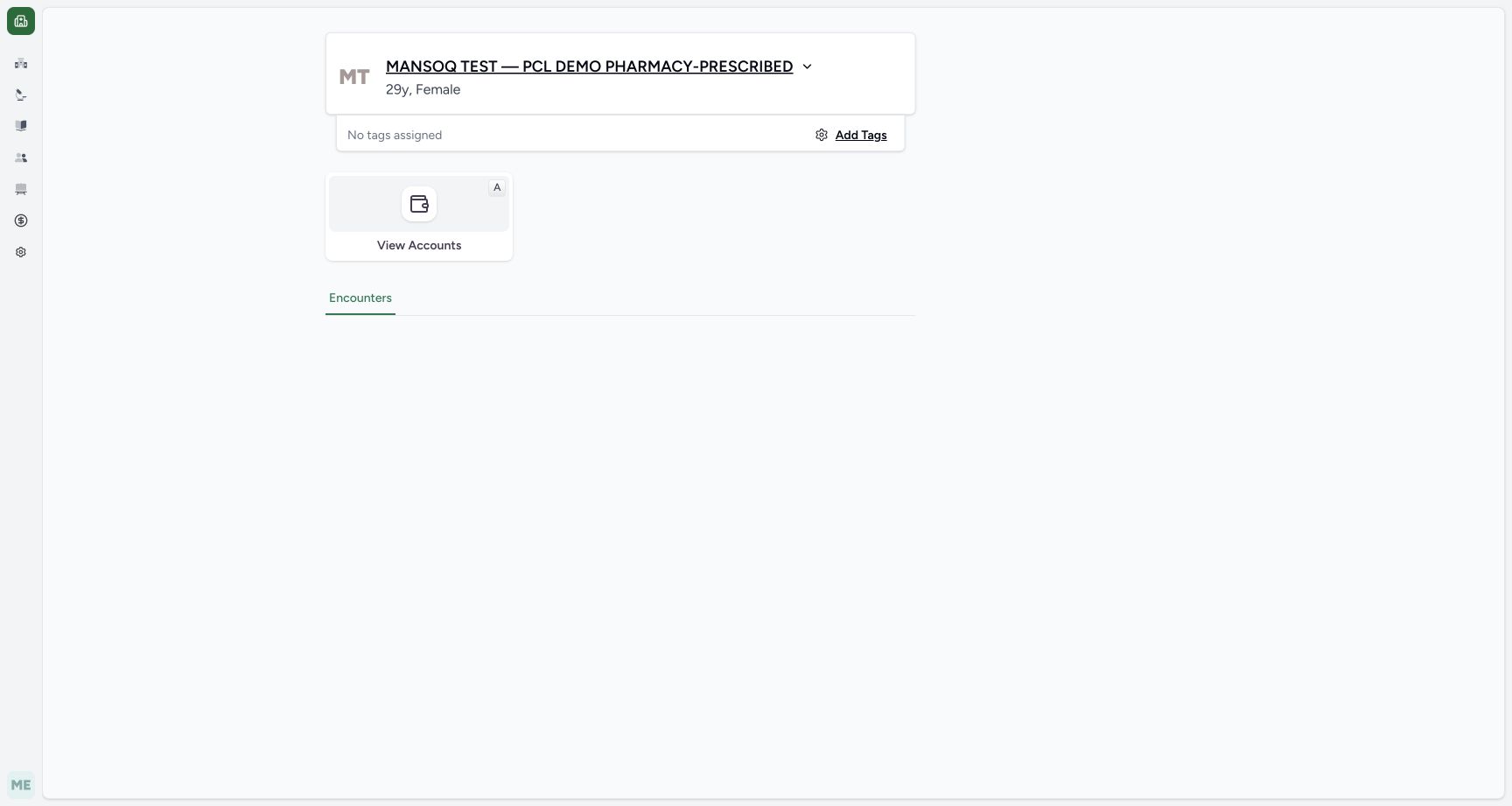 123
123No encounter actions in current role
Capture details
Observed committed 3dfb software on 20 October 2026 by ordinary Pharmacist. Root captured this genuine natural browser viewport; author inspected the original individually. No pixel editing, crop, resize, stitching or generated content.
Image SHA-256 80161fcb0c57611756ec755dcaae66937f6f1644d7cd4f59e20dd63d5a085330
- Verified patient: The intended patient has been verified.
- Encounters heading only: This view has no encounter cards or Dispense Medicine action. The original component hides its list when this account lacks encounter-list permission; absence here does not prove that the patient has no encounters.
- View Accounts: An available View Accounts tile does not supply the missing encounter action.
7. Recognise the encounter-list access boundary
The verified patient home shows an Encounters heading, but this ordinary Pharmacist view has no encounter cards or Dispense Medicine action. The committed component does not query or display encounters when encounter-list permission is unavailable. A separate read-only check confirmed that this synthetic patient does have an encounter; the blank area does not mean none exists. Stop this patient-home path and return to the same Main Pharmacy queue using the earlier service/location route. Do not change roles or create an encounter to force the action.
123No encounter actions in current role
Capture details
Observed committed 3dfb software on 20 October 2026 by ordinary Pharmacist. Root captured this genuine natural browser viewport; author inspected the original individually. No pixel editing, crop, resize, stitching or generated content.
Image SHA-256 80161fcb0c57611756ec755dcaae66937f6f1644d7cd4f59e20dd63d5a085330
- Verified patient: The intended patient has been verified.
- Encounters heading only: This view has no encounter cards or Dispense Medicine action. The original component hides its list when this account lacks encounter-list permission; absence here does not prove that the patient has no encounters.
- View Accounts: An available View Accounts tile does not supply the missing encounter action.
123Pharmacy location
Capture details
Observed committed 3dfb software on 20 October 2026 by ordinary Pharmacist. Root captured this genuine natural browser viewport; author inspected the original individually. No pixel editing, crop, resize, stitching or generated content.
Image SHA-256 4a6e8361469c8be9041d217871e93d7c5bef11705301f54cbae3d948d94099e2
- Assigned location: Confirm the Main Pharmacy location under this service.
- View Prescriptions: Open the prescription queue for this location.
- Managing organization: The displayed managing organization is Pharmacy.
12Billing pending queue
Capture details
Observed committed 3dfb software on 20 October 2026 by ordinary Pharmacist. Root captured this genuine natural browser viewport; author inspected the original individually. No pixel editing, crop, resize, stitching or generated content.
Image SHA-256 adf4be696f3d4119d9d669befa697eff61224c881549cd4897dae55fd8bb09d4
- Billing Pending queue: This is the Billing Pending tab; existing other-patient rows are not selected for this exercise.
- New Dispense: Open the patient selector. Opening it does not create a dispense order.
8. Filter the queue to the same patient
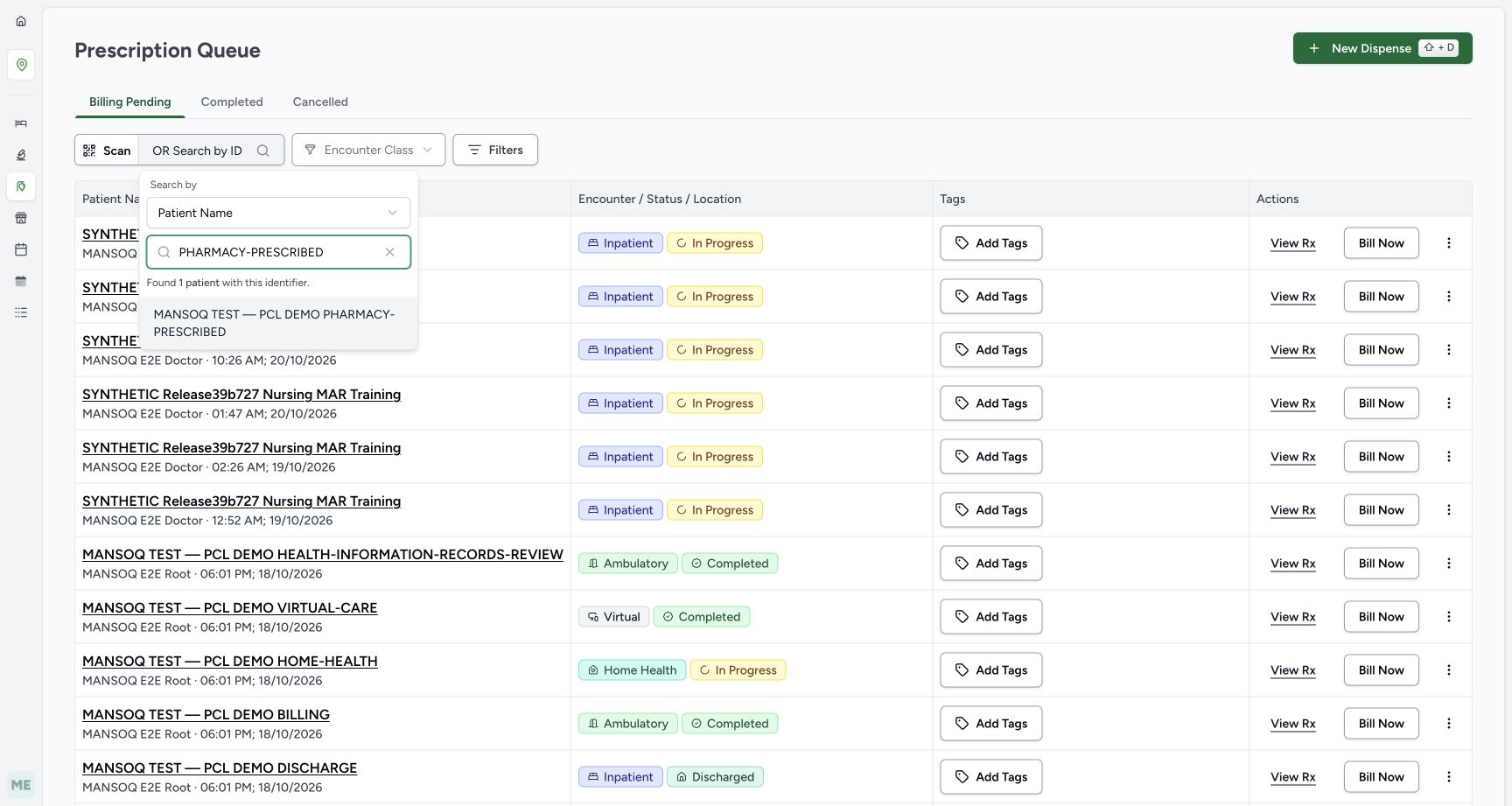
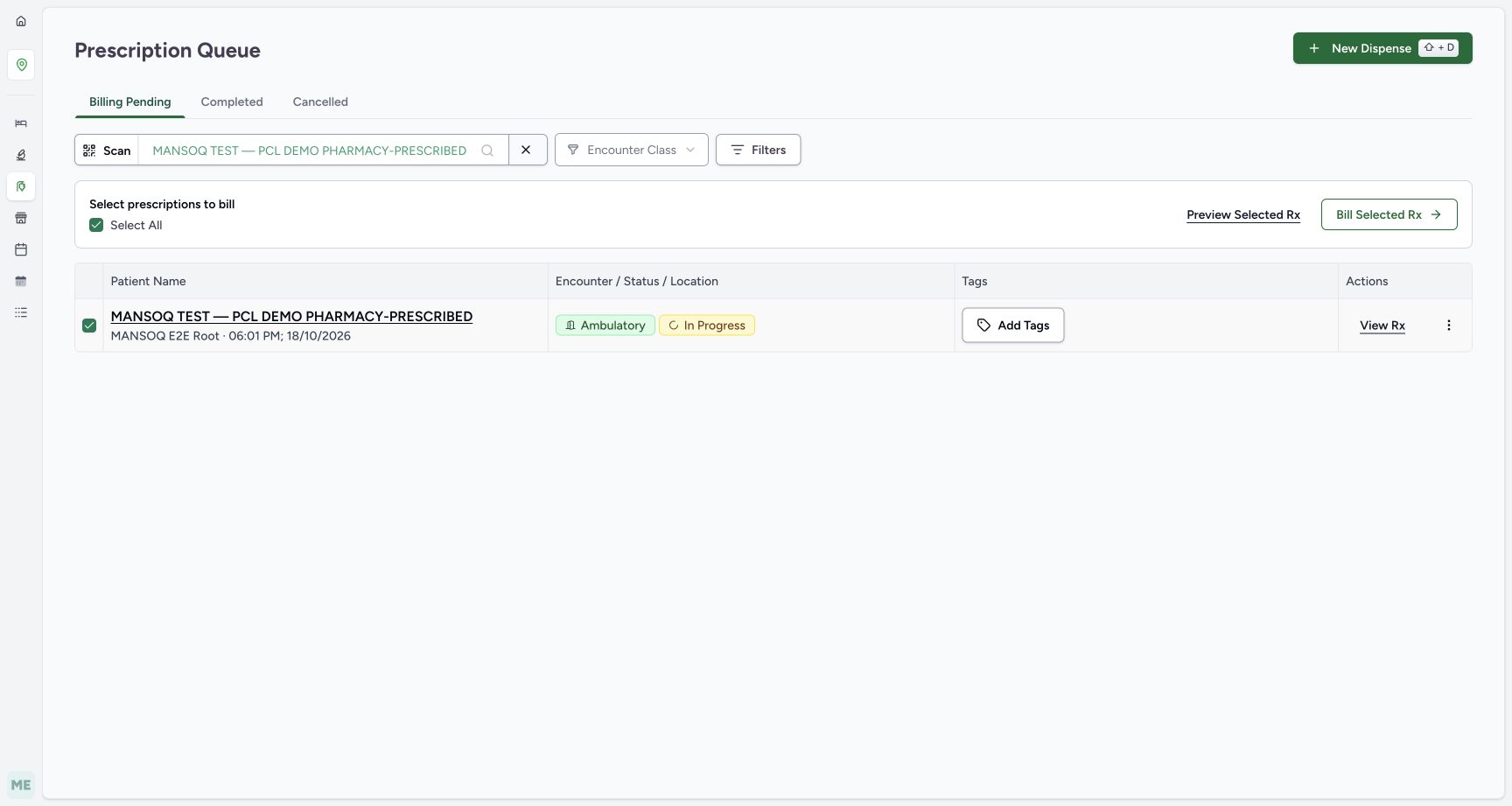
In the queue open the patient search control beside Scan. Choose Patient Name and search PHARMACY-PRESCRIBED. Select the exact patient result and wait for the settled filtered queue. At this earlier checkpoint one original Root prescription is present and already selected, and Select All is checked. An earlier transient Not Found observation is not represented by this settled result.
 123
123Queue patient filter result
Capture details
Observed committed 3dfb software on 20 October 2026 by ordinary Pharmacist. Root captured this genuine natural browser viewport; author inspected the original individually. No pixel editing, crop, resize, stitching or generated content.
Image SHA-256 c528dd9aaa255e0345e9eadbdfe68f69800e7e41cfdc21c1386bbb73599970d2
- Queue patient control: Back in the same location queue, open the patient search control.
- Exact name query: Choose Patient Name and search PHARMACY-PRESCRIBED.
- Matching patient result: Select the exact fictional patient result to filter the queue.
 12345
12345Filtered prescription selected
Capture details
Observed committed 3dfb software on 20 October 2026 by ordinary Pharmacist. Root captured this genuine natural browser viewport; author inspected the original individually. No pixel editing, crop, resize, stitching or generated content.
Image SHA-256 ea7f36bf64929fbb6257de0f7031bc96d6b6b3060a21c02fcfd0204f8b2188d6
- Patient filter applied: The queue is filtered to the intended PHARMACY-PRESCRIBED patient.
- Selected original prescription: At this earlier point only the original Root prescription is present and selected.
- Preview Selected Rx: Preview the selected prescription before billing.
- View Rx: The individual row also has a View Rx action.
- Bill Selected Rx: This separate action opens billing for the selected prescriptions; it is not the preview action.
9. Preview the original prescription before billing
Select Preview Selected Rx, or use the row’s View Rx to inspect that prescription. Match the patient, MANSOQ E2E Root, 18 October at 06:01 PM and the fictional Furosemide row. Its dispense progress is Incomplete while the request status is Active; these fields have different meanings. Print is a separate prescription action and is not performed here.
12345Filtered prescription selected
Capture details
Observed committed 3dfb software on 20 October 2026 by ordinary Pharmacist. Root captured this genuine natural browser viewport; author inspected the original individually. No pixel editing, crop, resize, stitching or generated content.
Image SHA-256 ea7f36bf64929fbb6257de0f7031bc96d6b6b3060a21c02fcfd0204f8b2188d6
- Patient filter applied: The queue is filtered to the intended PHARMACY-PRESCRIBED patient.
- Selected original prescription: At this earlier point only the original Root prescription is present and selected.
- Preview Selected Rx: Preview the selected prescription before billing.
- View Rx: The individual row also has a View Rx action.
- Bill Selected Rx: This separate action opens billing for the selected prescriptions; it is not the preview action.
12345Existing prescription preview
Capture details
Observed committed 3dfb software on 20 October 2026 by ordinary Pharmacist. Root captured this genuine natural browser viewport; author inspected the original individually. No pixel editing, crop, resize, stitching or generated content.
Image SHA-256 7688124e452f4a27ff3560204972bc0a5a025ddf7f4e8f6c5e4328c211a4e301
- Original prescriber and card date: The original card is MANSOQ E2E Root, 18 October at 06:01 PM.
- Incomplete dispense status: Incomplete is the dispensing progress of this request.
- Active request status: Active is the medication request status, a separate field.
- Start Billing: Open this original prescription only for the unsaved controls exercise.
- Print: Print is a separate prescription action and is not performed in this lesson.
10. Open the original billing draft without submitting it
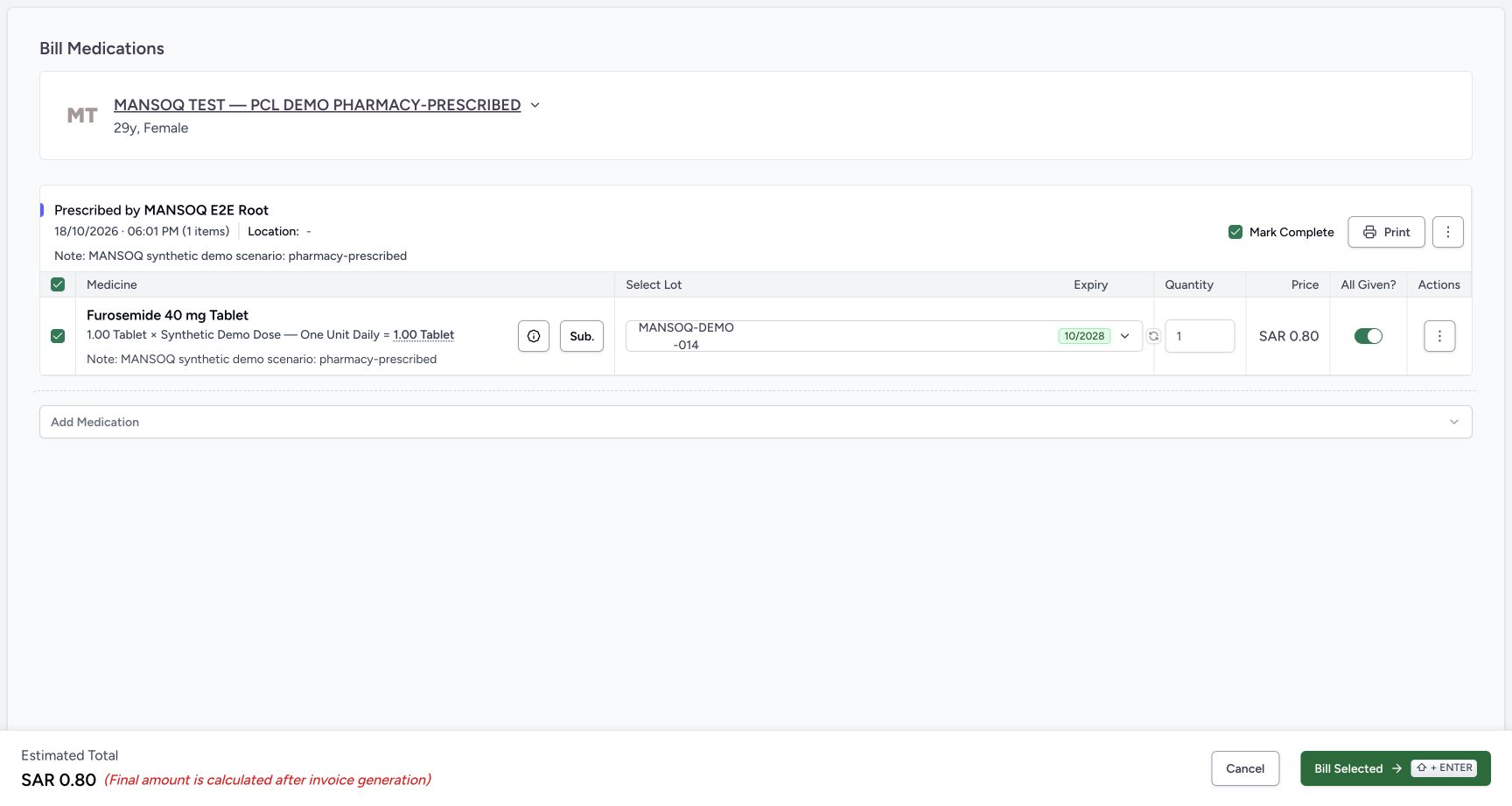
Select Start Billing for this original prescription. The recorded draft selects stock lot MANSOQ-DEMO-014, quantity 1, All Given on and Mark Complete checked. The footer estimate is SAR 0.80 and explicitly says the final amount is calculated after invoice generation. Do not select Bill Selected during this original-prescription practice.
12345Existing prescription preview
Capture details
Observed committed 3dfb software on 20 October 2026 by ordinary Pharmacist. Root captured this genuine natural browser viewport; author inspected the original individually. No pixel editing, crop, resize, stitching or generated content.
Image SHA-256 7688124e452f4a27ff3560204972bc0a5a025ddf7f4e8f6c5e4328c211a4e301
- Original prescriber and card date: The original card is MANSOQ E2E Root, 18 October at 06:01 PM.
- Incomplete dispense status: Incomplete is the dispensing progress of this request.
- Active request status: Active is the medication request status, a separate field.
- Start Billing: Open this original prescription only for the unsaved controls exercise.
- Print: Print is a separate prescription action and is not performed in this lesson.
 123456
Stock backed billing draft
Capture details
Observed committed 3dfb software on 20 October 2026 by ordinary Pharmacist. Root captured this genuine natural browser viewport; author inspected the original individually. No pixel editing, crop, resize, stitching or generated content.
Image SHA-256 469a3850f09c823f24da7549c9f45b645bac78cfe7b92fe72d8b736546b81339
- Selected stock lot: The original Furosemide draft has lot MANSOQ-DEMO-014 selected.
- Draft quantity 1: The quantity editor starts at one whole tablet.
- All Given on: All Given is initially on for this medication row.
- Mark Complete checked: Mark Complete is initially checked at prescription level; inspect it separately from All Given.
- Estimated total: The current unsaved estimate is SAR 0.80. The footer says the final amount is calculated after invoice generation.
- Cancel draft: Cancel leaves this original billing draft without selecting Bill Selected.
11. Inspect the selected lot details
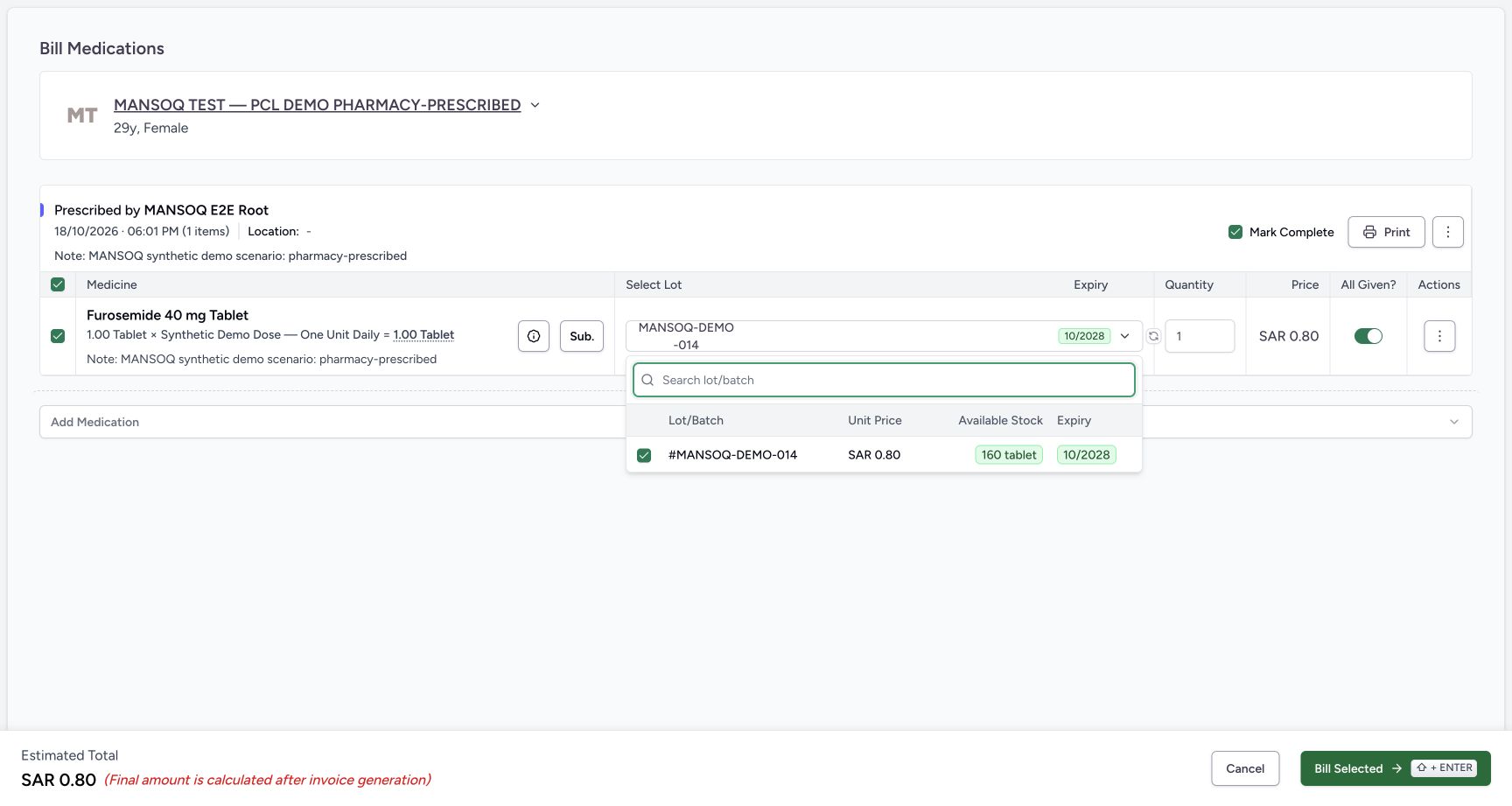
Open the Select Lot control. The menu shows the selected MANSOQ-DEMO-014 batch, unit price SAR 0.80, 160 tablet available and expiry 10/2028 at this captured time. Lot/batch search is separate from the earlier patient search. Press Escape to close the menu without selecting another lot. These recorded stock facts do not establish clinical suitability.
123456Stock backed billing draft
Capture details
Observed committed 3dfb software on 20 October 2026 by ordinary Pharmacist. Root captured this genuine natural browser viewport; author inspected the original individually. No pixel editing, crop, resize, stitching or generated content.
Image SHA-256 469a3850f09c823f24da7549c9f45b645bac78cfe7b92fe72d8b736546b81339
- Selected stock lot: The original Furosemide draft has lot MANSOQ-DEMO-014 selected.
- Draft quantity 1: The quantity editor starts at one whole tablet.
- All Given on: All Given is initially on for this medication row.
- Mark Complete checked: Mark Complete is initially checked at prescription level; inspect it separately from All Given.
- Estimated total: The current unsaved estimate is SAR 0.80. The footer says the final amount is calculated after invoice generation.
- Cancel draft: Cancel leaves this original billing draft without selecting Bill Selected.
 12345
12345Lot availability details
Capture details
Observed committed 3dfb software on 20 October 2026 by ordinary Pharmacist. Root captured this genuine natural browser viewport; author inspected the original individually. No pixel editing, crop, resize, stitching or generated content.
Image SHA-256 dad4f1c8fd5337da8fbcbbd2da5481bb8d693547bc2e4af67bd2f6174a7078d9
- Search lot or batch: The lot menu has its own lot/batch search.
- Selected batch: The selected batch is MANSOQ-DEMO-014.
- Unit price: This captured lot has unit price SAR 0.80.
- Available stock: The menu shows 160 tablet available at this time.
- Expiry: The captured expiry is 10/2028; this is recorded software data, not a clinical suitability decision.
12. Observe zero feedback and restore the whole quantity
In the unsaved quantity editor enter 0. The page shows Quantity must be greater than 0 and changes the estimate to SAR 0.00. Bill Selected was not clicked for this zero-quantity exercise, so this is inline feedback, not a demonstrated server refusal. Restore the displayed quantity to 1. This captured editor rounds entered quantities to whole units; do not infer fractional dispensing support from it.
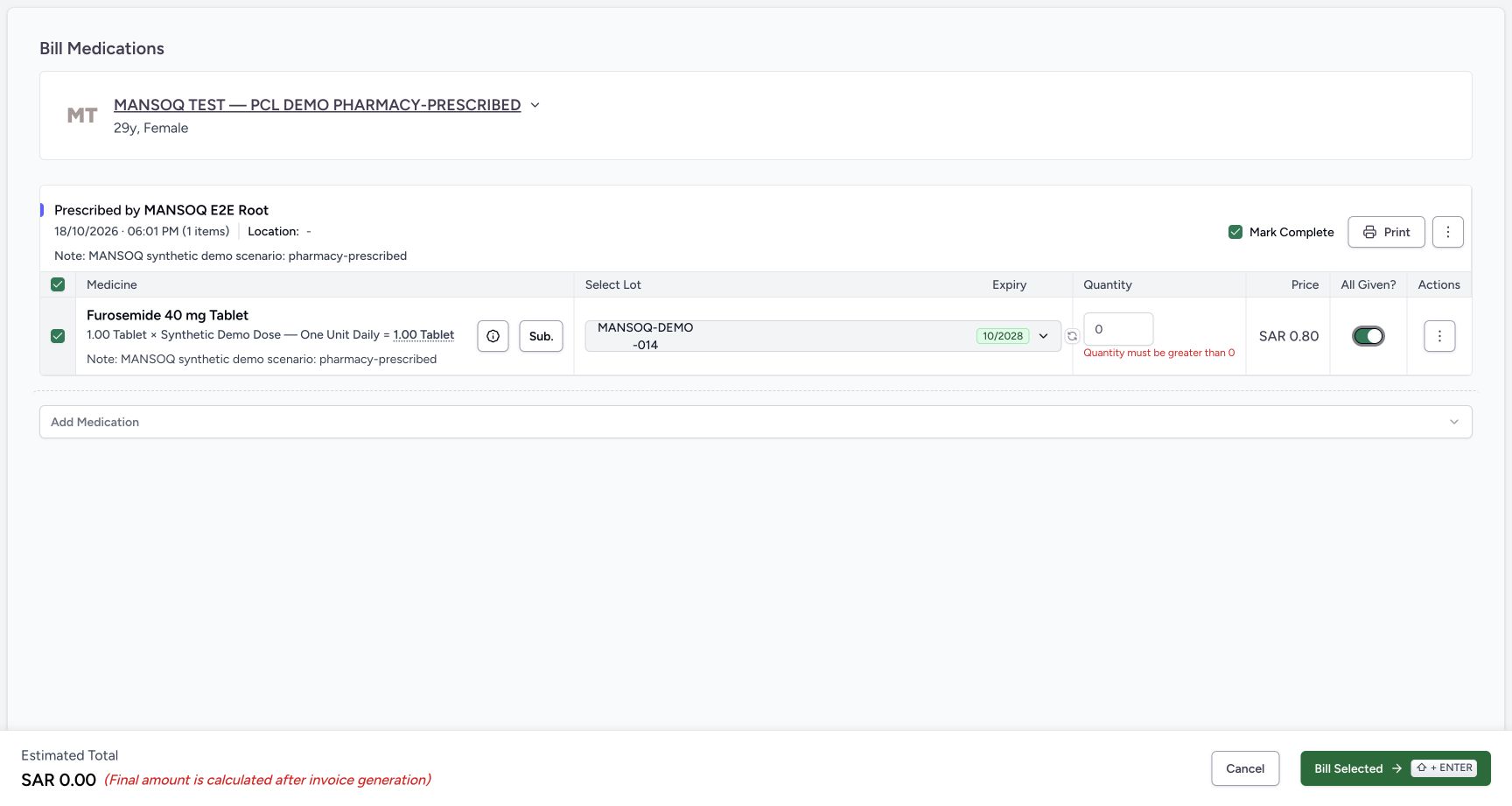 123
123Zero quantity inline feedback
Capture details
Observed committed 3dfb software on 20 October 2026 by ordinary Pharmacist. Root captured this genuine natural browser viewport; author inspected the original individually. No pixel editing, crop, resize, stitching or generated content.
Image SHA-256 210f285f0ba889d6d4240c919e9ece02e9971d8413aeaf7dd5bfdb118aa50b8d
- Zero draft quantity: Entering zero leaves zero in this unsaved editor.
- Inline quantity feedback: The page displays Quantity must be greater than 0. Bill Selected was not clicked for this zero-quantity exercise.
- Zero estimate: The estimate changes to SAR 0.00 while the draft quantity is zero.
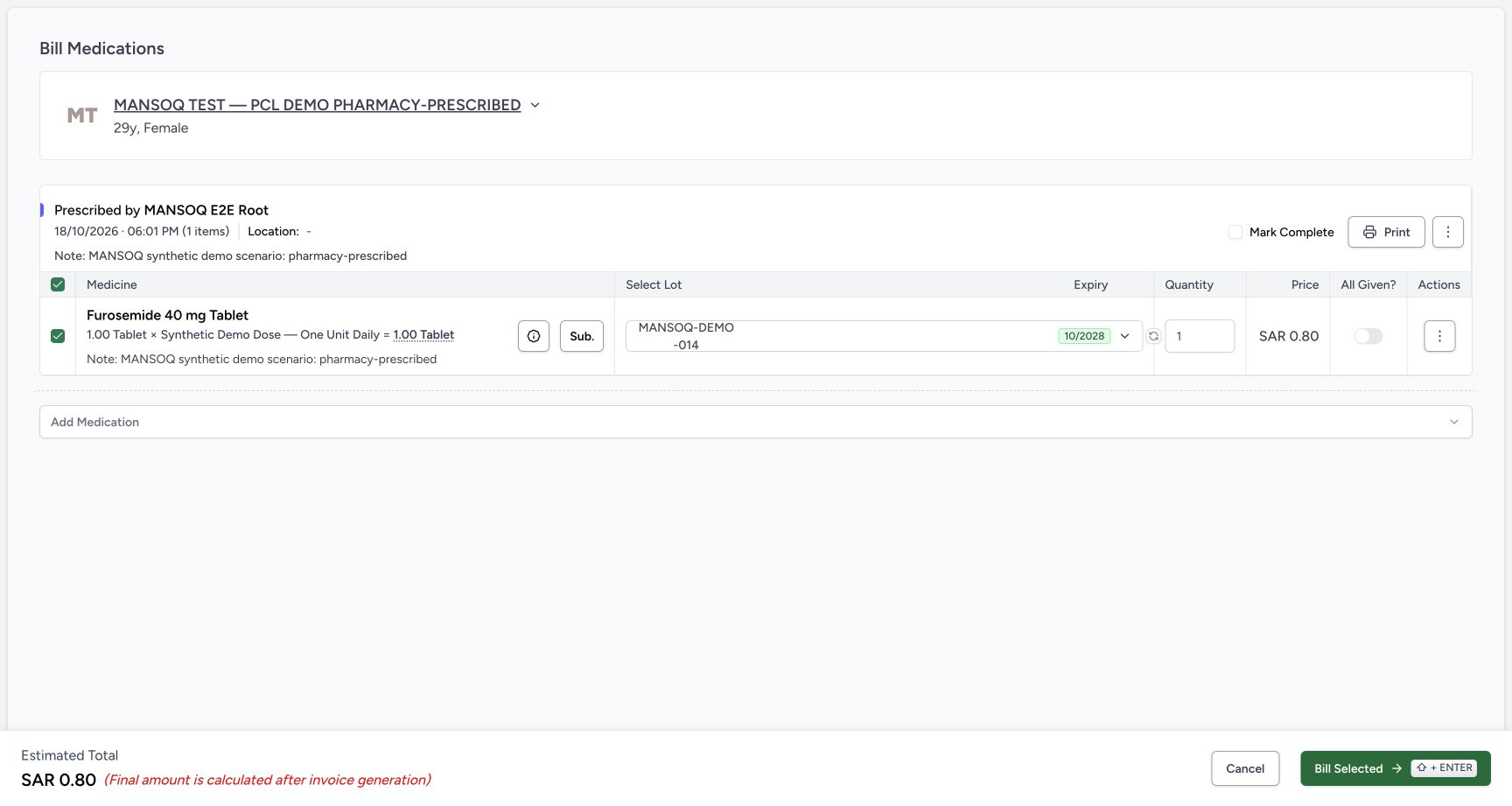 1234
1234Unsaved independent completion flags
Capture details
Observed committed 3dfb software on 20 October 2026 by ordinary Pharmacist. Root captured this genuine natural browser viewport; author inspected the original individually. No pixel editing, crop, resize, stitching or generated content.
Image SHA-256 1d8a8557cb74285352e325d682a76c094c8d99a24cc7e7133c1749c8aadb64ae
- Restored whole quantity: The displayed draft quantity is restored to 1. This editor rounds quantity input to whole units.
- All Given off: Turn All Given off for this unsaved demonstration.
- Mark Complete unchecked separately: Explicitly uncheck Mark Complete too. Changing All Given did not uncheck it automatically.
- Cancel without billing: Select Cancel. Do not select Bill Selected for this original prescription.
13. Review both flags separately and cancel
Turn All Given off, then explicitly uncheck Mark Complete. They are independent controls: changing All Given did not uncheck Mark Complete automatically. Select Cancel without selecting Bill Selected. The original preview returns with Furosemide still Incomplete and Active. During this exercise a Doctor separately created another prescription, so the returned preview advertises one other unbilled prescription; Cancel did not create it.
1234Unsaved independent completion flags
Capture details
Observed committed 3dfb software on 20 October 2026 by ordinary Pharmacist. Root captured this genuine natural browser viewport; author inspected the original individually. No pixel editing, crop, resize, stitching or generated content.
Image SHA-256 1d8a8557cb74285352e325d682a76c094c8d99a24cc7e7133c1749c8aadb64ae
- Restored whole quantity: The displayed draft quantity is restored to 1. This editor rounds quantity input to whole units.
- All Given off: Turn All Given off for this unsaved demonstration.
- Mark Complete unchecked separately: Explicitly uncheck Mark Complete too. Changing All Given did not uncheck it automatically.
- Cancel without billing: Select Cancel. Do not select Bill Selected for this original prescription.
1234Cancel original draft preview
Capture details
Observed committed 3dfb software on 20 October 2026 by ordinary Pharmacist. Root captured this genuine natural browser viewport; author inspected the original individually. No pixel editing, crop, resize, stitching or generated content.
Image SHA-256 71c43869cdeb5db9c2585b6cb261cca1487b844ea216c2d8b83f66b989fcaa8b
- Original still Incomplete: After Cancel the original Furosemide preview still shows Incomplete.
- Original still Active: The original request remains Active.
- Another unbilled prescription: A separately created Doctor prescription appeared during the exercise. Cancel did not create that prescription.
- Show all: Show all is a separate option for other unbilled prescriptions; this lesson next returns to the filtered queue to inspect exact selection.
Keep selection, quantity and completion separate
A row checkbox chooses whether that medicine participates in a billing save. Quantity is the amount from the selected lot. All Given records whether that medicine request is fully supplied in the software operation. Mark Complete is a prescription-level completion choice. This exercise demonstrates inspecting and cancelling those controls; it does not make a clinical decision, issue an invoice or complete physical dispensing.
123456Stock backed billing draft
Capture details
Observed committed 3dfb software on 20 October 2026 by ordinary Pharmacist. Root captured this genuine natural browser viewport; author inspected the original individually. No pixel editing, crop, resize, stitching or generated content.
Image SHA-256 469a3850f09c823f24da7549c9f45b645bac78cfe7b92fe72d8b736546b81339
- Selected stock lot: The original Furosemide draft has lot MANSOQ-DEMO-014 selected.
- Draft quantity 1: The quantity editor starts at one whole tablet.
- All Given on: All Given is initially on for this medication row.
- Mark Complete checked: Mark Complete is initially checked at prescription level; inspect it separately from All Given.
- Estimated total: The current unsaved estimate is SAR 0.80. The footer says the final amount is calculated after invoice generation.
- Cancel draft: Cancel leaves this original billing draft without selecting Bill Selected.
1234Unsaved independent completion flags
Capture details
Observed committed 3dfb software on 20 October 2026 by ordinary Pharmacist. Root captured this genuine natural browser viewport; author inspected the original individually. No pixel editing, crop, resize, stitching or generated content.
Image SHA-256 1d8a8557cb74285352e325d682a76c094c8d99a24cc7e7133c1749c8aadb64ae
- Restored whole quantity: The displayed draft quantity is restored to 1. This editor rounds quantity input to whole units.
- All Given off: Turn All Given off for this unsaved demonstration.
- Mark Complete unchecked separately: Explicitly uncheck Mark Complete too. Changing All Given did not uncheck it automatically.
- Cancel without billing: Select Cancel. Do not select Bill Selected for this original prescription.
1234Cancel original draft preview
Capture details
Observed committed 3dfb software on 20 October 2026 by ordinary Pharmacist. Root captured this genuine natural browser viewport; author inspected the original individually. No pixel editing, crop, resize, stitching or generated content.
Image SHA-256 71c43869cdeb5db9c2585b6cb261cca1487b844ea216c2d8b83f66b989fcaa8b
- Original still Incomplete: After Cancel the original Furosemide preview still shows Incomplete.
- Original still Active: The original request remains Active.
- Another unbilled prescription: A separately created Doctor prescription appeared during the exercise. Cancel did not create that prescription.
- Show all: Show all is a separate option for other unbilled prescriptions; this lesson next returns to the filtered queue to inspect exact selection.
Use the access and search boundary correctly
If the exact assigned patient or location is unavailable, use your normal support process. An unavailable encounter list is an access boundary and is not evidence that the patient lacks clinical encounters. Do not select a similar patient, change permissions or use a different account to bypass it.
12Name search results
Capture details
Observed committed 3dfb software on 20 October 2026 by ordinary Pharmacist. Root captured this genuine natural browser viewport; author inspected the original individually. No pixel editing, crop, resize, stitching or generated content.
Image SHA-256 0f44094410f6563cfa6e4779ca1813b412d073a15ed0dfbd3f1ee99c2eb7380f
- Name query: The fictional search term is PHARMACY.
- Exact assigned patient: Choose MANSOQ TEST — PCL DEMO PHARMACY-PRESCRIBED, rather than the RETURN or DISPENSED examples above.
123No encounter actions in current role
Capture details
Observed committed 3dfb software on 20 October 2026 by ordinary Pharmacist. Root captured this genuine natural browser viewport; author inspected the original individually. No pixel editing, crop, resize, stitching or generated content.
Image SHA-256 80161fcb0c57611756ec755dcaae66937f6f1644d7cd4f59e20dd63d5a085330
- Verified patient: The intended patient has been verified.
- Encounters heading only: This view has no encounter cards or Dispense Medicine action. The original component hides its list when this account lacks encounter-list permission; absence here does not prove that the patient has no encounters.
- View Accounts: An available View Accounts tile does not supply the missing encounter action.
Continue only after reviewing the new prescription selection
The later queue contains both the old Root prescription and a new Doctor prescription. The next lesson inspects their dates and selection before opening the new one. Do not infer that this cancelled original draft billed either prescription.
1234Cancel original draft preview
Capture details
Observed committed 3dfb software on 20 October 2026 by ordinary Pharmacist. Root captured this genuine natural browser viewport; author inspected the original individually. No pixel editing, crop, resize, stitching or generated content.
Image SHA-256 71c43869cdeb5db9c2585b6cb261cca1487b844ea216c2d8b83f66b989fcaa8b
- Original still Incomplete: After Cancel the original Furosemide preview still shows Incomplete.
- Original still Active: The original request remains Active.
- Another unbilled prescription: A separately created Doctor prescription appeared during the exercise. Cancel did not create that prescription.
- Show all: Show all is a separate option for other unbilled prescriptions; this lesson next returns to the filtered queue to inspect exact selection.
Source evidence
Every citation uses this exact committed version. The private source repository requires access.
- repositories/platform/mansoq-web/src/pages/Facility/settings/healthcareService/ServiceCard.tsx:25 ·
3dfb7c9f519fb5b4cd4452439f3c12346bf58319Source file checksum
3071dac4b09ad3b13be8ed2426d7082bd74552dfa48c774ae6ac8ee33ebfe3f8 - repositories/platform/mansoq-web/src/pages/Facility/services/FacilityServices.tsx:64 ·
3dfb7c9f519fb5b4cd4452439f3c12346bf58319Source file checksum
81938a877311725f375328c2e8bd33813e406fd2692a1894acf11d70b887a535 - repositories/platform/mansoq-web/src/pages/Facility/services/pharmacy/CreateDispenseSheet.tsx:94 ·
3dfb7c9f519fb5b4cd4452439f3c12346bf58319Source file checksum
3c6a077ba883d9fde4979284c9dae84bd8f81cc629700d5d75e2b78da0d26a3d - repositories/platform/mansoq-web/src/components/Patient/PatientIdentifierSelector.tsx:117 ·
3dfb7c9f519fb5b4cd4452439f3c12346bf58319Source file checksum
285cb0ed78d92cabc7e614d5c15b5a5f719edb8a1dd77e263398d772dbea6ef5 - repositories/platform/mansoq-web/src/common/Permissions.tsx:13 ·
3dfb7c9f519fb5b4cd4452439f3c12346bf58319Source file checksum
4b85506ece137dd8d361795440c8c69403b8805bf69aabaaa0f876017fc30e07 - repositories/platform/mansoq-web/src/pages/Patient/PatientHome.tsx:74 ·
3dfb7c9f519fb5b4cd4452439f3c12346bf58319Source file checksum
c89e83e3e910337d0df6445d984f41d331f79ea5962212fff64709dec6809b7d - repositories/platform/mansoq-web/src/pages/Patient/home/PatientHomeEncounters.tsx:49 ·
3dfb7c9f519fb5b4cd4452439f3c12346bf58319Source file checksum
f4f1fd98dea402a515f179d36aacdae46a1aab6fe29aa94d6c4609217c588444 - repositories/platform/mansoq-web/src/pages/Facility/services/pharmacy/PrescriptionQueue.tsx:159 ·
3dfb7c9f519fb5b4cd4452439f3c12346bf58319Source file checksum
20c2f3e573ae315ec5ff79b19575c1a6e3b2f7ca76b5e98bad319ef595b11d04 - repositories/platform/mansoq-web/src/pages/Facility/services/pharmacy/PrescriptionsPreviewPage.tsx:115 ·
3dfb7c9f519fb5b4cd4452439f3c12346bf58319Source file checksum
2a76a064861548bc2d0c5e036bbc9a2ec448582cb8bcb3e970c05a8362498a2e - repositories/platform/mansoq-web/src/pages/Facility/services/pharmacy/billMedications/modes/usePrescriptionsMode.ts:58 ·
3dfb7c9f519fb5b4cd4452439f3c12346bf58319Source file checksum
a1f6bfb990ce68bf774a2c1208d914287710742fdb8c891031a38d09636daf1e - repositories/platform/mansoq-web/src/pages/Facility/services/pharmacy/billMedications/formSchema.ts:26 ·
3dfb7c9f519fb5b4cd4452439f3c12346bf58319Source file checksum
654a1d61d9eea0ed21dbbda6fcc0f127eb9cc1631bd178f3023bb334258571e2 - repositories/platform/mansoq-web/src/pages/Facility/services/pharmacy/billMedications/BillMedicationsPrescriptionCard.tsx:694 ·
3dfb7c9f519fb5b4cd4452439f3c12346bf58319Source file checksum
e64b9b9ffbc8388dba86070d36c8acef28639ac6166f650ca3586b43e9ac3134 - repositories/platform/mansoq-web/src/pages/Facility/services/pharmacy/billMedications/utils/useInventoryItemsAutoSelect.ts:38 ·
3dfb7c9f519fb5b4cd4452439f3c12346bf58319Source file checksum
689be89ed73722f369100ad448b2ceb37e559bb86a354edbd63393cc8d61af9b - repositories/platform/mansoq-web/src/pages/Facility/services/pharmacy/billMedications/BillMedicationsFooter.tsx:24 ·
3dfb7c9f519fb5b4cd4452439f3c12346bf58319Source file checksum
5a2167f3e4ae3c332f8da9b7076d6339c891543cb41fa43534256c826300c048 - repositories/platform/mansoq-web/src/pages/Facility/services/pharmacy/billMedications/utils/useBillMedications.ts:109 ·
3dfb7c9f519fb5b4cd4452439f3c12346bf58319Source file checksum
ac95fb2bf082bbb0e911754db978a5c4be73078def98c944d634db2713810b8d - repositories/platform/mansoq-web/src/pages/Facility/services/pharmacy/DispenseOrderView.tsx:285 ·
3dfb7c9f519fb5b4cd4452439f3c12346bf58319Source file checksum
59bebd01a2422d3b62d5e57b0f3a9211d5eb03ddd94f81704e3dbecd47cd197d - repositories/platform/mansoq-web/src/pages/Facility/services/pharmacy/components/DispenseOrderViewFooter.tsx:112 ·
3dfb7c9f519fb5b4cd4452439f3c12346bf58319Source file checksum
9ddc555df83d78afd04ed0e339630d6e67ccd52a1545d5103a835d8633d0acd6 - repositories/platform/mansoq-web/src/pages/Facility/services/pharmacy/components/DispenseInfoPopover.tsx:154 ·
3dfb7c9f519fb5b4cd4452439f3c12346bf58319Source file checksum
334e120116701ff616b319b2235e6793e56d3bd43fd21ab5f399616a75eeb34d - repositories/platform/mansoq-web/src/pages/Facility/billing/invoice/InvoiceShow.tsx:451 ·
3dfb7c9f519fb5b4cd4452439f3c12346bf58319Source file checksum
1b350ccc4aef289b8e4ba2527180edaf4b3cffdf1bc4e92fda920779f2ef4989 - repositories/platform/mansoq-web/src/pages/Facility/billing/rcm/InvoiceClaimPanel.tsx:390 ·
3dfb7c9f519fb5b4cd4452439f3c12346bf58319Source file checksum
4227d0e31d531c15fa2f296ea468b39a124c88091ddd6d2348c2c53128ef2696 - repositories/platform/mansoq-web/src/pages/Facility/billing/rcm/FiscalInvoicePanel.tsx:1 ·
3dfb7c9f519fb5b4cd4452439f3c12346bf58319Source file checksum
5b23cfb02356b431521423bb1a572908a7b7925a65d96bf752c484ed6f51a75c - repositories/platform/mansoq-core/mansoq/emr/resources/invoice/sync_items.py:47 ·
3dfb7c9f519fb5b4cd4452439f3c12346bf58319Source file checksum
e232d244e2f09171c7cf76ffebd6da04bd62a6f9353de709224a08c0fde8cff3 - repositories/platform/mansoq-core/config/settings/config.py:279 ·
3dfb7c9f519fb5b4cd4452439f3c12346bf58319Source file checksum
80e2bd16a124b5b9e80eefab7a9d5b2f20a874a8fe645b223f26cad04e6cd60a - repositories/platform/mansoq-core/mansoq/emr/api/viewsets/invoice.py:281 ·
3dfb7c9f519fb5b4cd4452439f3c12346bf58319Source file checksum
03e73113c89d4be24b4f7ae6f0bf3d4538d8129774ce6dedd0272219530bb88e