 MANSOQ
 Pharmacy · VERSION 3dfb7c9f
Save one partial preparation and verify its Draft invoice
Select one exact demonstration prescription, recognise a coded medicine without a stock-product link, and review the captured client refusal. Then save only one selected stock-backed unit with both completion flags off, verify Preparation and Draft invoice readbacks, and stop at the retained insurance-readiness boundary.
Pharmacist
 1234567
Reviewed partial stock item only
Capture details
Observed committed 3dfb software on 20 October 2026 by ordinary Pharmacist. Root captured this genuine natural browser viewport; author inspected the original individually. No pixel editing, crop, resize, stitching or generated content.
Image SHA-256 aa15b1c187b3869eeb2673ded25ac04ac9b6013ac6207a495080530e04447e6c
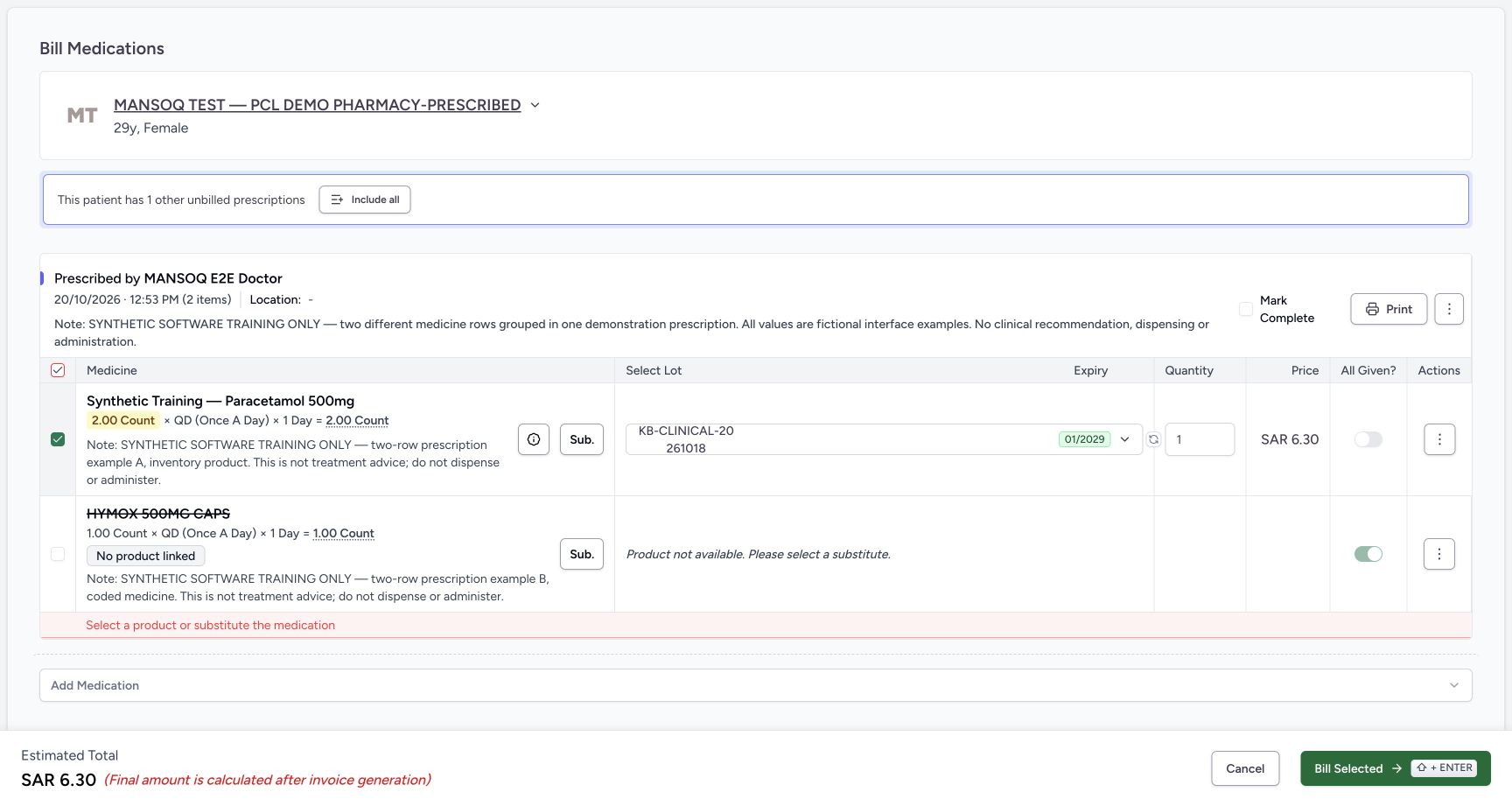
- Stock-backed row selected: Only the Paracetamol row remains selected.
- HYMOX excluded: The unlinked HYMOX row is explicitly unchecked and crossed out; it will not be included in this save.
- Partial quantity 1: The selected lot quantity is 1 against the fictional requested total of 2.
- All Given off: All Given is off for the selected partial row.
- Mark Complete unchecked: Mark Complete is unchecked. In this two-row form it cleared when HYMOX was deselected, separately from All Given.
- Reviewed estimate SAR 6.30: The estimate is SAR 6.30 for the one selected whole unit.
- One valid Bill Selected: After reviewing patient, prescription, selected row, lot, quantity and both flags, the recorded operator selected Bill Selected once.
 12345678
Saved partial order draft invoice
Capture details
Observed committed 3dfb software on 20 October 2026 by ordinary Pharmacist. Root captured this genuine natural browser viewport; author inspected the original individually. No pixel editing, crop, resize, stitching or generated content. Captures 24 and 26 have identical original JPEG bytes at distinct genuine capture times; 26 follows the recorded normal browser reload.
Image SHA-256 2e77a21d56fa76b03e0a865c569af1b72e0d35fd2f58ea5e2417b5f1bcb5f486
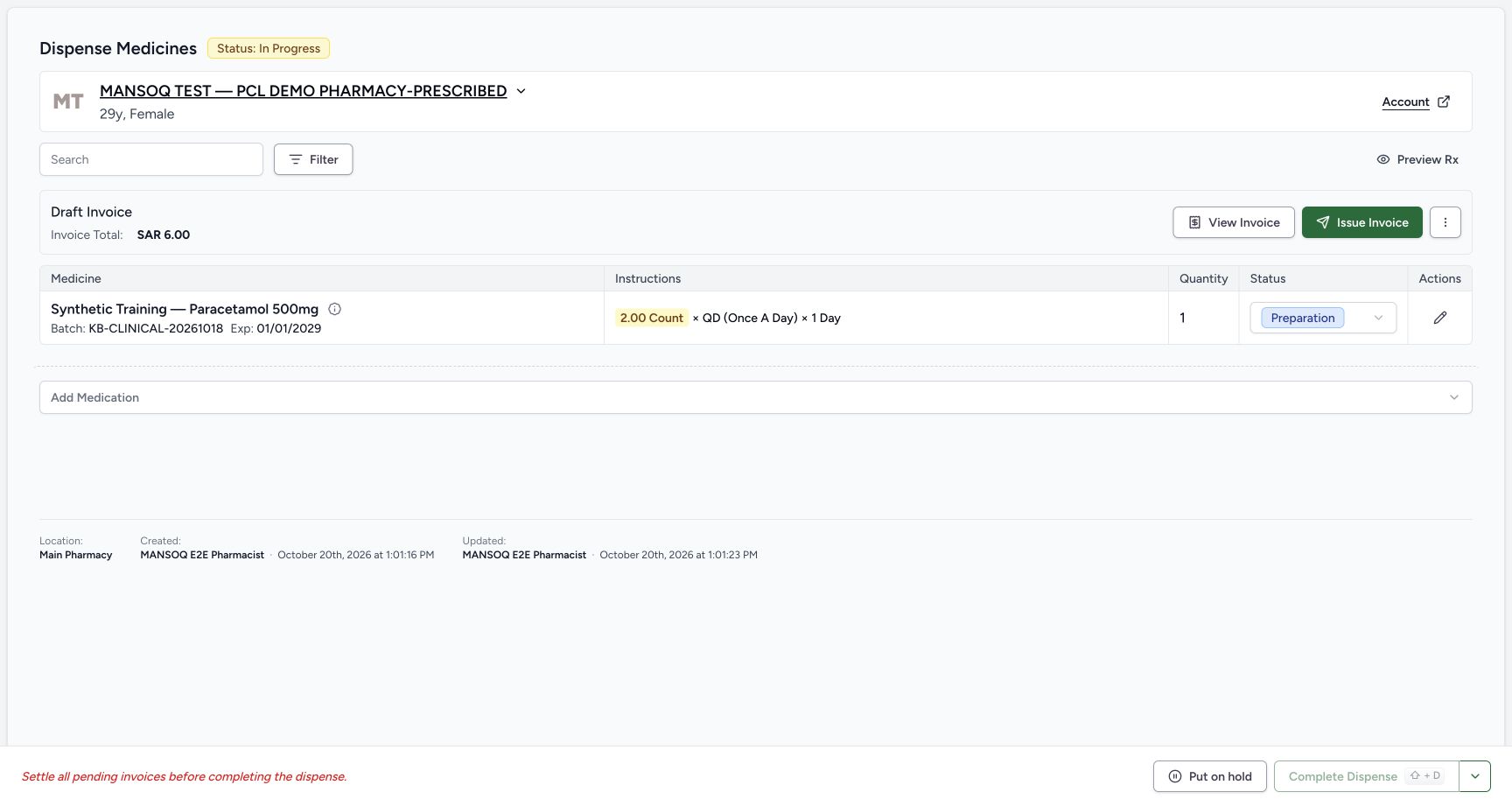
- Open saved medicine details: Select the information control beside the saved medicine name to inspect request and billing details.
- Order In Progress: The saved software order is In Progress, not completed.
- Saved quantity 1: Only one unit is in this saved row.
- Preparation status: The saved dispense row is Preparation, not a record of physical handover.
- Draft Invoice SAR 6.00: A Draft invoice was created. Its total is SAR 6.00, distinct from the earlier estimate.
- View Invoice: Open View Invoice to inspect the saved invoice separately.
- Complete Dispense disabled: Complete Dispense is disabled while its billable item has an unsettled invoice.
- Settlement prerequisite: The page says to settle pending invoices before completing the dispense. No payment or completion is performed here.
 123456
Invoice still draft after restart
Capture details
Observed committed 3dfb software on 20 October 2026 by ordinary Pharmacist. Root captured this genuine natural browser viewport; author inspected the original individually. No pixel editing, crop, resize, stitching or generated content. After restart and ordinary same-user sign-in, this separate natural original is 1728 × 977; it shows retained Draft state, no Issue retry or error toast.
Image SHA-256 b47db8b56c8c510d3306576ab42b26869cc0d9473fbdaf6c9cc7fb6630bf7441
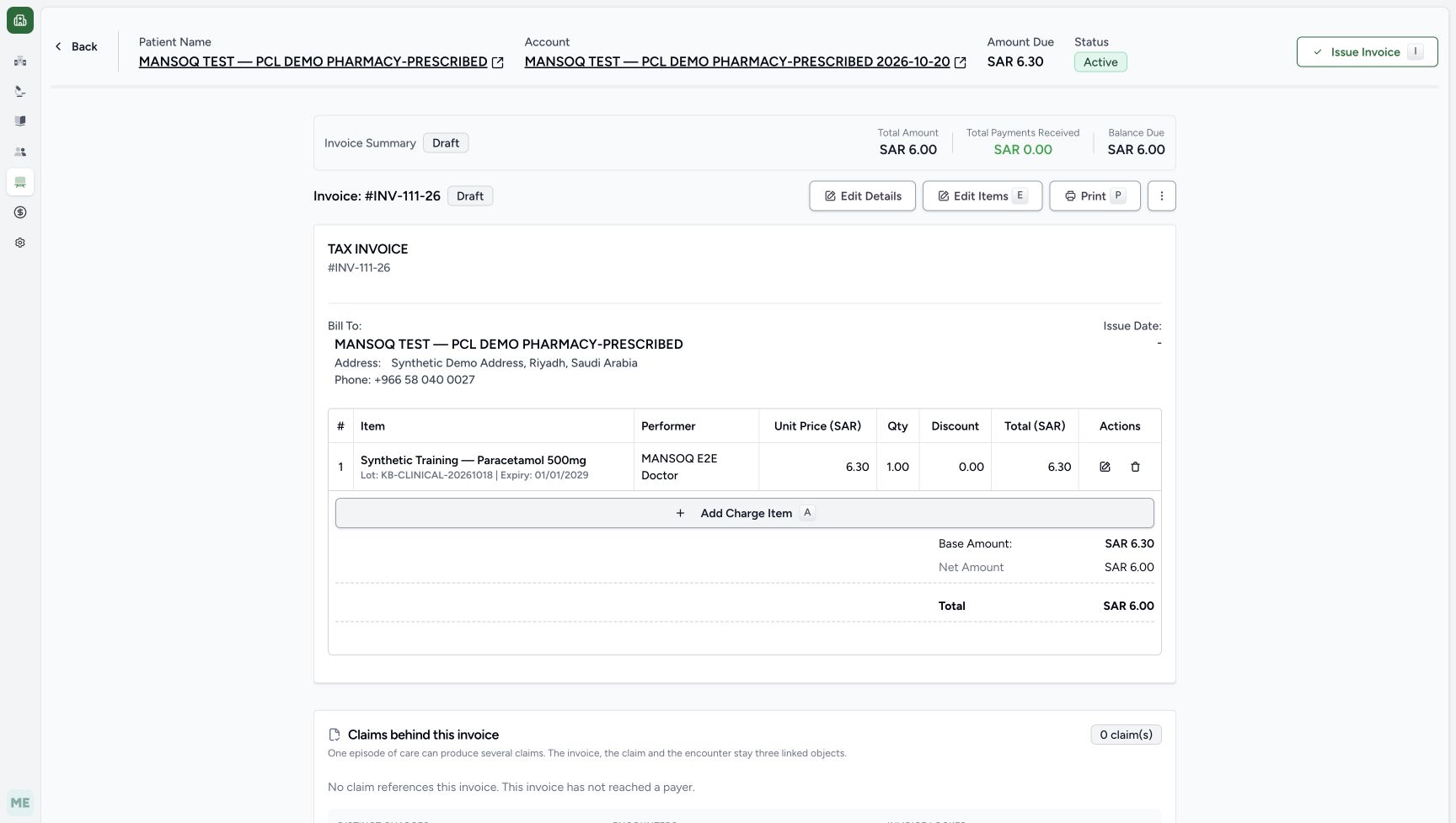
- Same retained invoice after restart: The resumed ordinary Pharmacist session reads INV-111-26 again. The saved identity and Draft status remain available to read.
- Still Draft: The invoice remains Draft after the earlier single refused Issue action.
- Same total SAR 6.00: The saved total remains SAR 6.00.
- Payments remain SAR 0.00: No payment has appeared in this readback.
- Balance remains SAR 6.00: The invoice balance is still SAR 6.00.
- Issue remains available; no retry: Issue Invoice remains available. This image pictures neither an error toast nor successful issuance; the operator did not retry Issue.
18 of 18 content blocks have reviewed image alignment.
Before you begin
- Use the same authorised ordinary Pharmacist account and Main Pharmacy location as the preceding queue lesson. Confirm the assigned synthetic PHARMACY-PRESCRIBED patient and inspect prescription selection before billing.
 123
123Recorded release 3dfb7c9f · 2026-10-20T09:57:37.217Z · 1728 × 921 Two prescriptions default selected
Capture details
Observed committed 3dfb software on 20 October 2026 by ordinary Pharmacist. Root captured this genuine natural browser viewport; author inspected the original individually. No pixel editing, crop, resize, stitching or generated content.
Image SHA-256
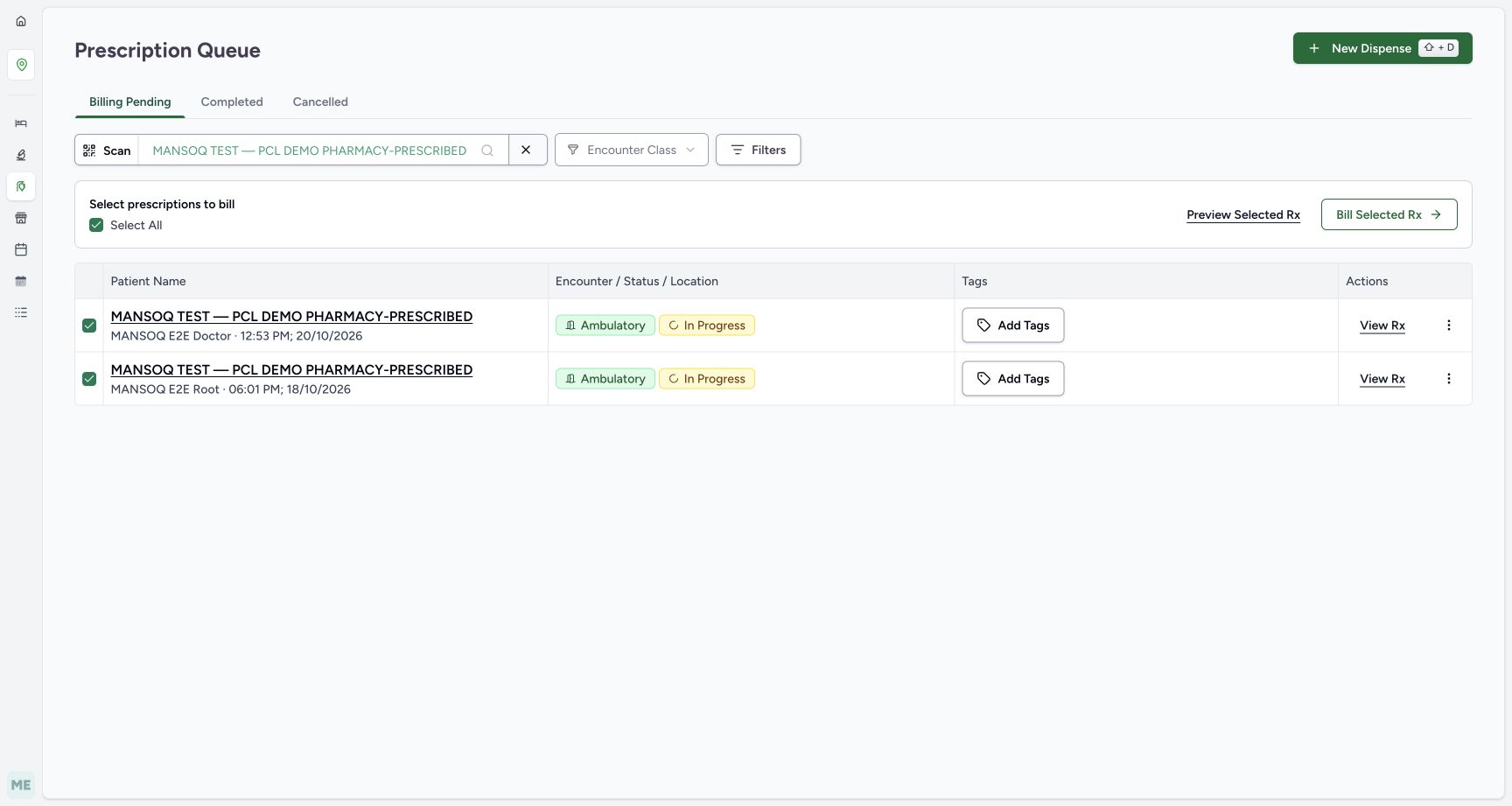
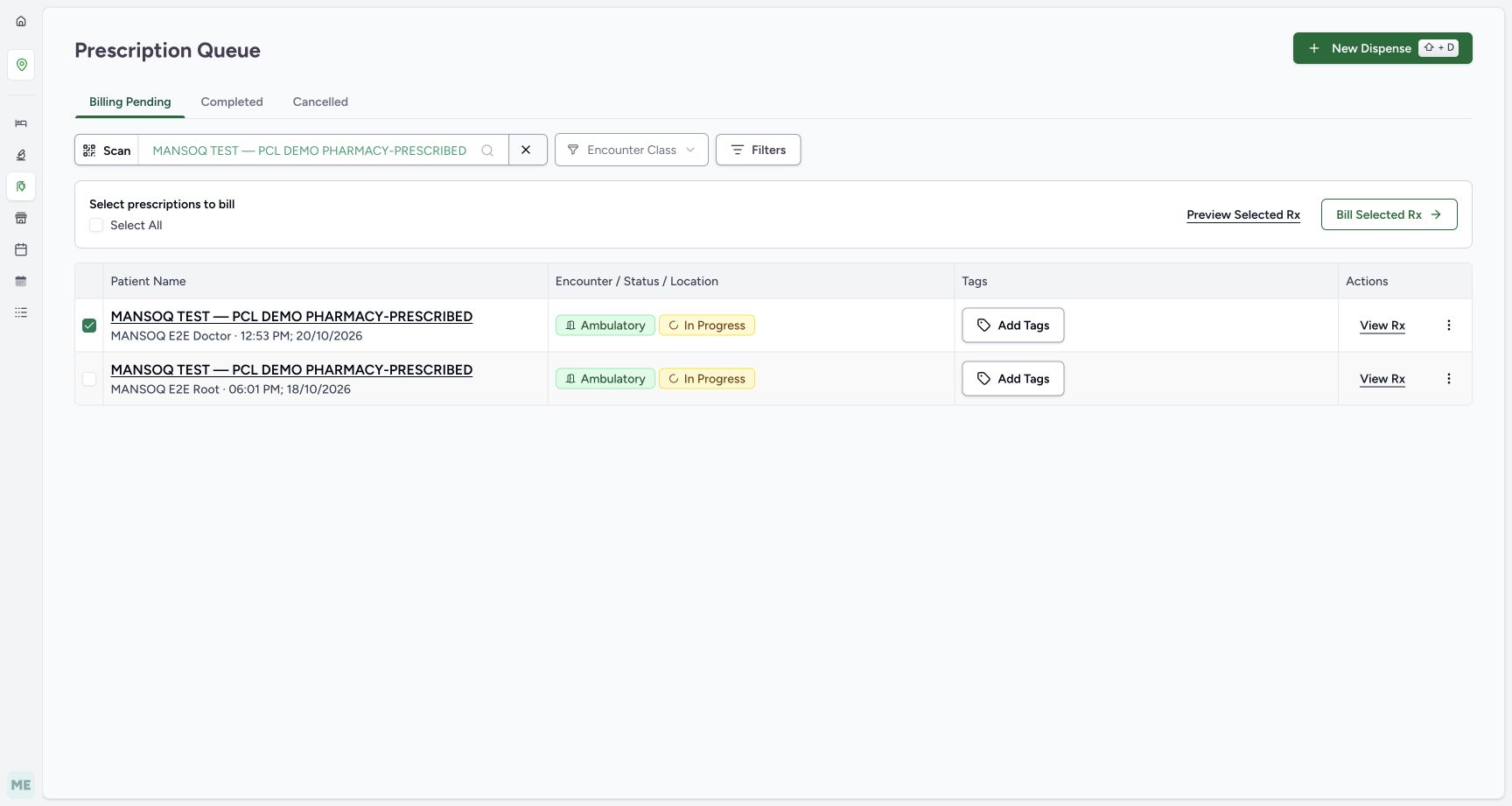
895ff208d9b4e518ace134e6dc2f965feb0084d927a68daee35d5f7f746c2a33- New Doctor prescription selected: The newer Doctor prescription is checked: 20 October, 12:53 PM.
- Older Root prescription also selected: The old Root prescription is checked too; do not assume the default selection is the intended single prescription.
- Select All checked: Select All currently represents both rows. Review each row before billing.
 1234
1234Recorded release 3dfb7c9f · 2026-10-20T09:57:55.873Z · 1728 × 921 Only new prescription selected
Capture details
Observed committed 3dfb software on 20 October 2026 by ordinary Pharmacist. Root captured this genuine natural browser viewport; author inspected the original individually. No pixel editing, crop, resize, stitching or generated content.
Image SHA-256
044d3c8379c0147a8c45e98c9f783e135160970797f951a0a633ee4ee201ace0- Keep only new Doctor prescription: The newer Doctor row remains checked.
- Old Root prescription unchecked: The older Root row has been explicitly unchecked.
- Bill Selected Rx: With only the intended new prescription selected, open Bill Selected Rx.
- Select All no longer checked: The unchecked Select All reflects the narrower selection; it does not unselect the new row.
- The new MANSOQ E2E Doctor prescription is dated 20 October at 12:53 PM and has two fictional medicine rows. The older Root prescription is a separate record. The example below uses only the new prescription and only its Paracetamol stock-backed row.123
Recorded release 3dfb7c9f · 2026-10-20T09:57:37.217Z · 1728 × 921 Two prescriptions default selected
Capture details
Observed committed 3dfb software on 20 October 2026 by ordinary Pharmacist. Root captured this genuine natural browser viewport; author inspected the original individually. No pixel editing, crop, resize, stitching or generated content.
Image SHA-256
895ff208d9b4e518ace134e6dc2f965feb0084d927a68daee35d5f7f746c2a33- New Doctor prescription selected: The newer Doctor prescription is checked: 20 October, 12:53 PM.
- Older Root prescription also selected: The old Root prescription is checked too; do not assume the default selection is the intended single prescription.
- Select All checked: Select All currently represents both rows. Review each row before billing.
 1234567
Recorded release 3dfb7c9f · 2026-10-20T09:59:19.349Z · 1728 × 921 New prescription product link boundary
Capture details
Observed committed 3dfb software on 20 October 2026 by ordinary Pharmacist. Root captured this genuine natural browser viewport; author inspected the original individually. No pixel editing, crop, resize, stitching or generated content.
Image SHA-256
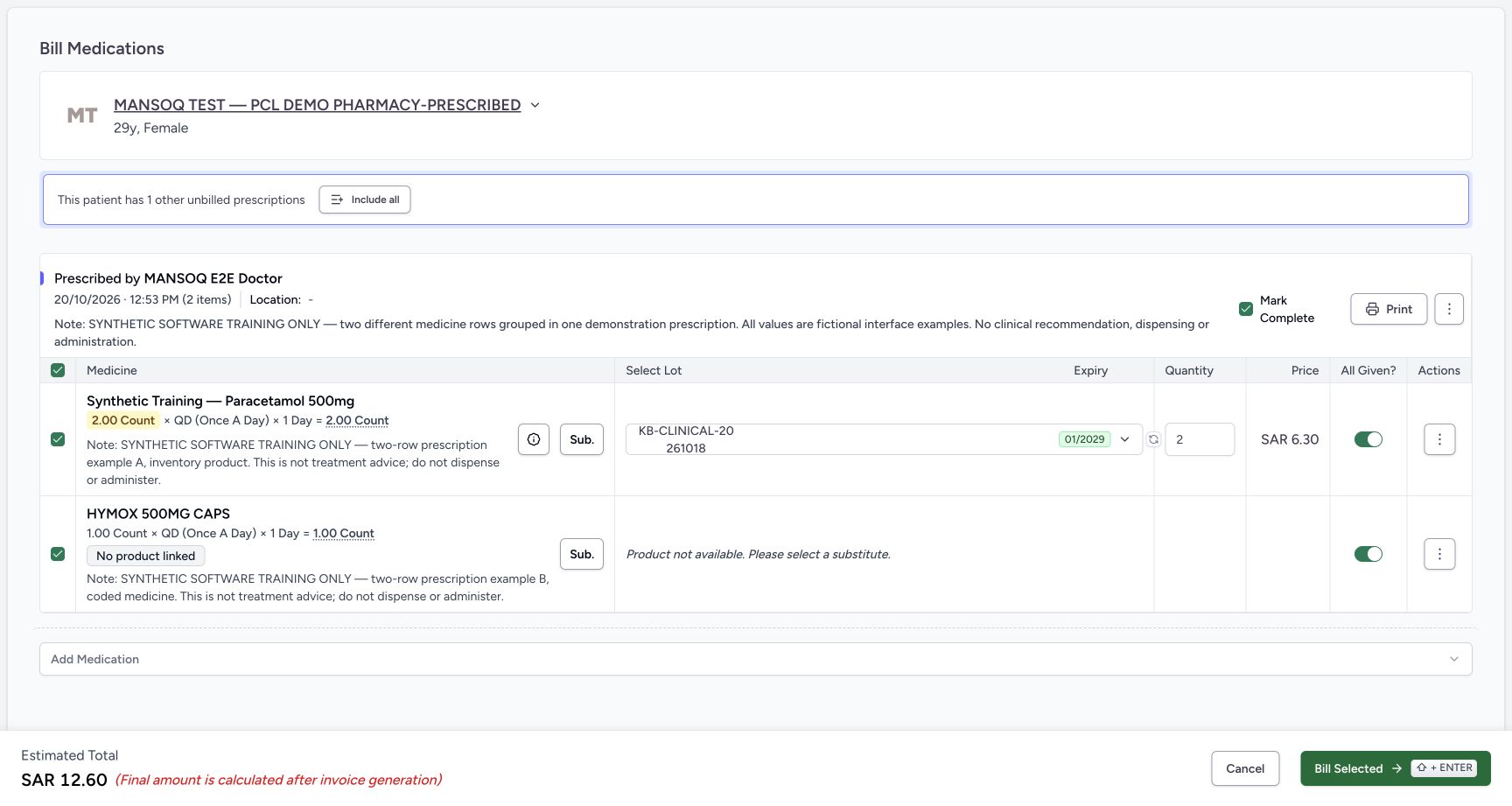
e2ac4526bfc5e4a9f10d33459360e09b80f8321f842ac59b5de2032ae5f881c7- Requested quantity 2: The first fictional prescription row requests 2.00 Count.
- Stock batch for first row: Paracetamol has an actual selected stock lot, KB-CLINICAL-20261018, with expiry 01/2029.
- Initial quantity 2: The first row initially has quantity 2 before this lesson changes it to 1.
- No product linked: The coded HYMOX request has no inventory Product Knowledge link in this captured prescription.
- Product unavailable: The page says Product not available. Please select a substitute. A medicine name or code alone does not select a stock batch.
- Substitution control: Sub. is available, but no substitution is selected or clinically recommended in this exercise.
- Unlinked row selected: HYMOX is still selected at this initial point; its missing link will block the captured submit attempt.
- All dose, quantity and money values in this demonstration are fictional software data. The lesson saves software preparation and billing records, including a recorded stock decrement; it does not document physical medicine handover, administration, payment or successful invoice issuance.1234567
Recorded release 3dfb7c9f · 2026-10-20T10:01:09.584Z · 1728 × 921 Reviewed partial stock item only
Capture details
Observed committed 3dfb software on 20 October 2026 by ordinary Pharmacist. Root captured this genuine natural browser viewport; author inspected the original individually. No pixel editing, crop, resize, stitching or generated content.
Image SHA-256
aa15b1c187b3869eeb2673ded25ac04ac9b6013ac6207a495080530e04447e6c- Stock-backed row selected: Only the Paracetamol row remains selected.
- HYMOX excluded: The unlinked HYMOX row is explicitly unchecked and crossed out; it will not be included in this save.
- Partial quantity 1: The selected lot quantity is 1 against the fictional requested total of 2.
- All Given off: All Given is off for the selected partial row.
- Mark Complete unchecked: Mark Complete is unchecked. In this two-row form it cleared when HYMOX was deselected, separately from All Given.
- Reviewed estimate SAR 6.30: The estimate is SAR 6.30 for the one selected whole unit.
- One valid Bill Selected: After reviewing patient, prescription, selected row, lot, quantity and both flags, the recorded operator selected Bill Selected once.
12345678Recorded release 3dfb7c9f · 2026-10-20T10:01:47.197Z · 1728 × 921 Saved partial order draft invoice
Capture details
Observed committed 3dfb software on 20 October 2026 by ordinary Pharmacist. Root captured this genuine natural browser viewport; author inspected the original individually. No pixel editing, crop, resize, stitching or generated content. Captures 24 and 26 have identical original JPEG bytes at distinct genuine capture times; 26 follows the recorded normal browser reload.
Image SHA-256
2e77a21d56fa76b03e0a865c569af1b72e0d35fd2f58ea5e2417b5f1bcb5f486- Open saved medicine details: Select the information control beside the saved medicine name to inspect request and billing details.
- Order In Progress: The saved software order is In Progress, not completed.
- Saved quantity 1: Only one unit is in this saved row.
- Preparation status: The saved dispense row is Preparation, not a record of physical handover.
- Draft Invoice SAR 6.00: A Draft invoice was created. Its total is SAR 6.00, distinct from the earlier estimate.
- View Invoice: Open View Invoice to inspect the saved invoice separately.
- Complete Dispense disabled: Complete Dispense is disabled while its billable item has an unsettled invoice.
- Settlement prerequisite: The page says to settle pending invoices before completing the dispense. No payment or completion is performed here.
123456Recorded release 3dfb7c9f · 2026-10-20T11:41:51.394Z · 1728 × 977 Invoice still draft after restart
Capture details
Observed committed 3dfb software on 20 October 2026 by ordinary Pharmacist. Root captured this genuine natural browser viewport; author inspected the original individually. No pixel editing, crop, resize, stitching or generated content. After restart and ordinary same-user sign-in, this separate natural original is 1728 × 977; it shows retained Draft state, no Issue retry or error toast.
Image SHA-256
b47db8b56c8c510d3306576ab42b26869cc0d9473fbdaf6c9cc7fb6630bf7441- Same retained invoice after restart: The resumed ordinary Pharmacist session reads INV-111-26 again. The saved identity and Draft status remain available to read.
- Still Draft: The invoice remains Draft after the earlier single refused Issue action.
- Same total SAR 6.00: The saved total remains SAR 6.00.
- Payments remain SAR 0.00: No payment has appeared in this readback.
- Balance remains SAR 6.00: The invoice balance is still SAR 6.00.
- Issue remains available; no retry: Issue Invoice remains available. This image pictures neither an error toast nor successful issuance; the operator did not retry Issue.
1. Check the two default-selected prescriptions
In the settled patient-filtered queue, inspect both rows. The newer Doctor prescription is 20 October at 12:53 PM; the older Root prescription is 18 October at 06:01 PM. Both are initially checked and Select All is checked. A filtered patient does not imply that only the intended prescription is selected.
123Two prescriptions default selected
Capture details
Observed committed 3dfb software on 20 October 2026 by ordinary Pharmacist. Root captured this genuine natural browser viewport; author inspected the original individually. No pixel editing, crop, resize, stitching or generated content.
Image SHA-256 895ff208d9b4e518ace134e6dc2f965feb0084d927a68daee35d5f7f746c2a33
- New Doctor prescription selected: The newer Doctor prescription is checked: 20 October, 12:53 PM.
- Older Root prescription also selected: The old Root prescription is checked too; do not assume the default selection is the intended single prescription.
- Select All checked: Select All currently represents both rows. Review each row before billing.
2. Keep only the new Doctor prescription selected
Explicitly uncheck the old Root row while keeping the new Doctor row checked. Verify the dates and prescriber again. Select All is now unchecked, but the new row remains selected. Select Bill Selected Rx to open billing for that exact one prescription.
1234Only new prescription selected
Capture details
Observed committed 3dfb software on 20 October 2026 by ordinary Pharmacist. Root captured this genuine natural browser viewport; author inspected the original individually. No pixel editing, crop, resize, stitching or generated content.
Image SHA-256 044d3c8379c0147a8c45e98c9f783e135160970797f951a0a633ee4ee201ace0
- Keep only new Doctor prescription: The newer Doctor row remains checked.
- Old Root prescription unchecked: The older Root row has been explicitly unchecked.
- Bill Selected Rx: With only the intended new prescription selected, open Bill Selected Rx.
- Select All no longer checked: The unchecked Select All reflects the narrower selection; it does not unselect the new row.
3. Distinguish the medicine identity, product link and stock lot
The first row, Synthetic Training — Paracetamol 500mg, has a stock-product link and selected lot KB-CLINICAL-20261018. Its initial quantity is 2. The separate coded HYMOX 500MG CAPS row shows No product linked and Product not available. Please select a substitute. A coded medicine is not automatically an inventory Product Knowledge link, and an inventory product is not itself a selected lot/batch. No substitute is chosen in this exercise.
1234567New prescription product link boundary
Capture details
Observed committed 3dfb software on 20 October 2026 by ordinary Pharmacist. Root captured this genuine natural browser viewport; author inspected the original individually. No pixel editing, crop, resize, stitching or generated content.
Image SHA-256 e2ac4526bfc5e4a9f10d33459360e09b80f8321f842ac59b5de2032ae5f881c7
- Requested quantity 2: The first fictional prescription row requests 2.00 Count.
- Stock batch for first row: Paracetamol has an actual selected stock lot, KB-CLINICAL-20261018, with expiry 01/2029.
- Initial quantity 2: The first row initially has quantity 2 before this lesson changes it to 1.
- No product linked: The coded HYMOX request has no inventory Product Knowledge link in this captured prescription.
- Product unavailable: The page says Product not available. Please select a substitute. A medicine name or code alone does not select a stock batch.
- Substitution control: Sub. is available, but no substitution is selected or clinically recommended in this exercise.
- Unlinked row selected: HYMOX is still selected at this initial point; its missing link will block the captured submit attempt.
4. Recognise the one captured client refusal
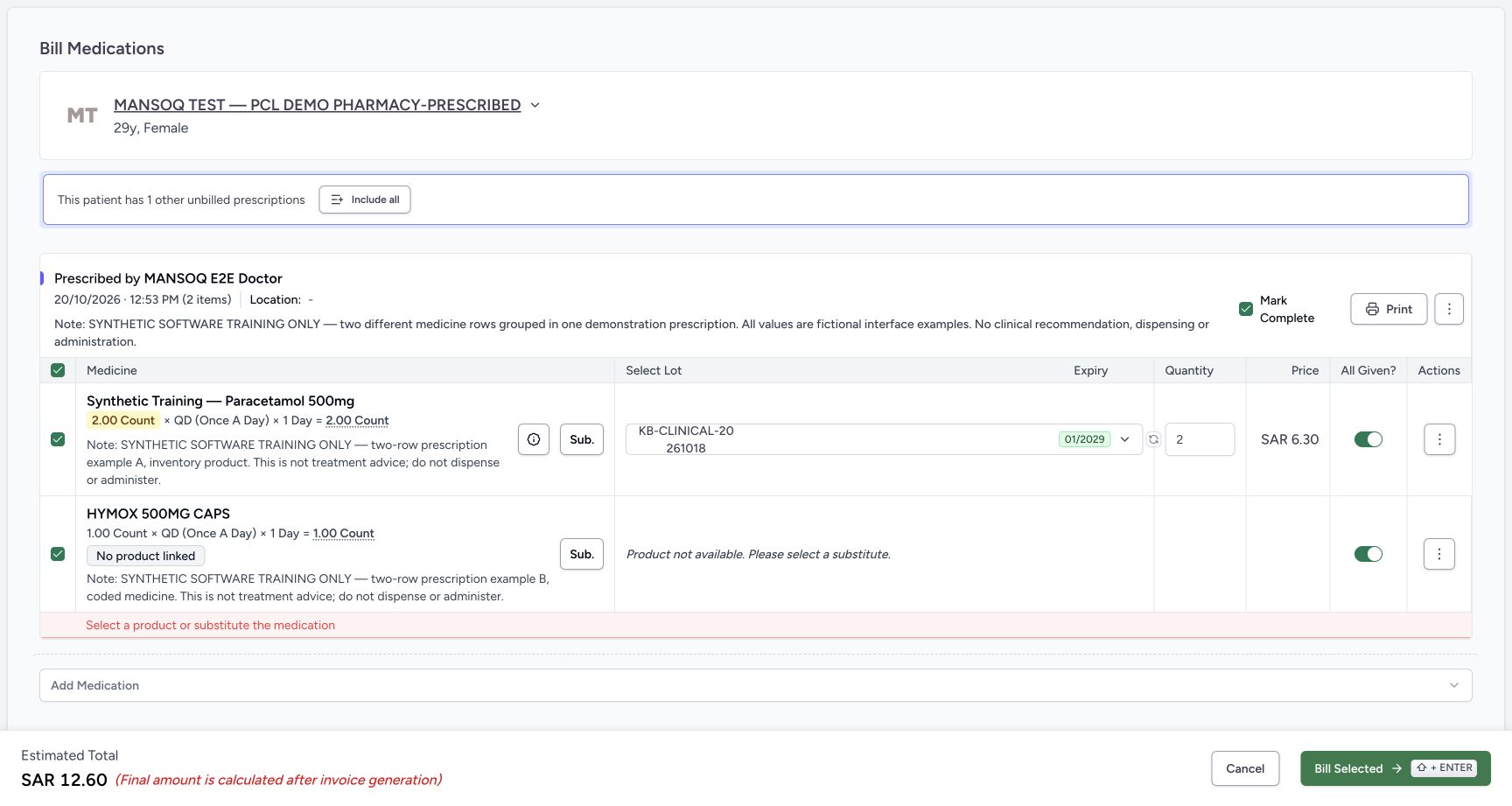
With both rows still selected, the recorded operator selected Bill Selected once. The form remained open and displayed Select a product or substitute the medication for the unlinked selected row. No software order or invoice was created by this refused attempt. This is client validation; it does not demonstrate a backend billing refusal. Do not repeatedly submit the unchanged invalid form.
 123
123Unlinked product client refusal
Capture details
Observed committed 3dfb software on 20 October 2026 by ordinary Pharmacist. Root captured this genuine natural browser viewport; author inspected the original individually. No pixel editing, crop, resize, stitching or generated content.
Image SHA-256 12d4c37b914887c6efcd2db3adf2a7f74cac3c91cd1b6348dc8c8a65e2e040ae
- Client validation message: One Bill Selected attempt displays Select a product or substitute the medication, and the form remains open.
- Selected unlinked row: The refusal concerns the still-selected HYMOX row without a linked product.
- Bill Selected attempt boundary: The retained example made this one refused attempt. Do not keep submitting the unchanged invalid form.
5. Review the one selected partial stock row
For this bounded software exercise, uncheck the unlinked HYMOX row. Keep only Paracetamol selected with the same lot, change its quantity from 2 to 1, turn All Given off, and verify that Mark Complete is unchecked. In this two-row form, deselecting HYMOX also cleared Mark Complete; that change is separate from All Given. Recheck patient, Doctor prescription, requested total 2, selected quantity 1, excluded HYMOX and both flags off. The estimate is now SAR 6.30. The unselected row is excluded from this save. The prior red client-validation message is still visible in this reviewed image; do not describe it as cleared before the valid submit. No clinical substitution or treatment change is recommended.
1234567Reviewed partial stock item only
Capture details
Observed committed 3dfb software on 20 October 2026 by ordinary Pharmacist. Root captured this genuine natural browser viewport; author inspected the original individually. No pixel editing, crop, resize, stitching or generated content.
Image SHA-256 aa15b1c187b3869eeb2673ded25ac04ac9b6013ac6207a495080530e04447e6c
- Stock-backed row selected: Only the Paracetamol row remains selected.
- HYMOX excluded: The unlinked HYMOX row is explicitly unchecked and crossed out; it will not be included in this save.
- Partial quantity 1: The selected lot quantity is 1 against the fictional requested total of 2.
- All Given off: All Given is off for the selected partial row.
- Mark Complete unchecked: Mark Complete is unchecked. In this two-row form it cleared when HYMOX was deselected, separately from All Given.
- Reviewed estimate SAR 6.30: The estimate is SAR 6.30 for the one selected whole unit.
- One valid Bill Selected: After reviewing patient, prescription, selected row, lot, quantity and both flags, the recorded operator selected Bill Selected once.
6. Save that reviewed selection once
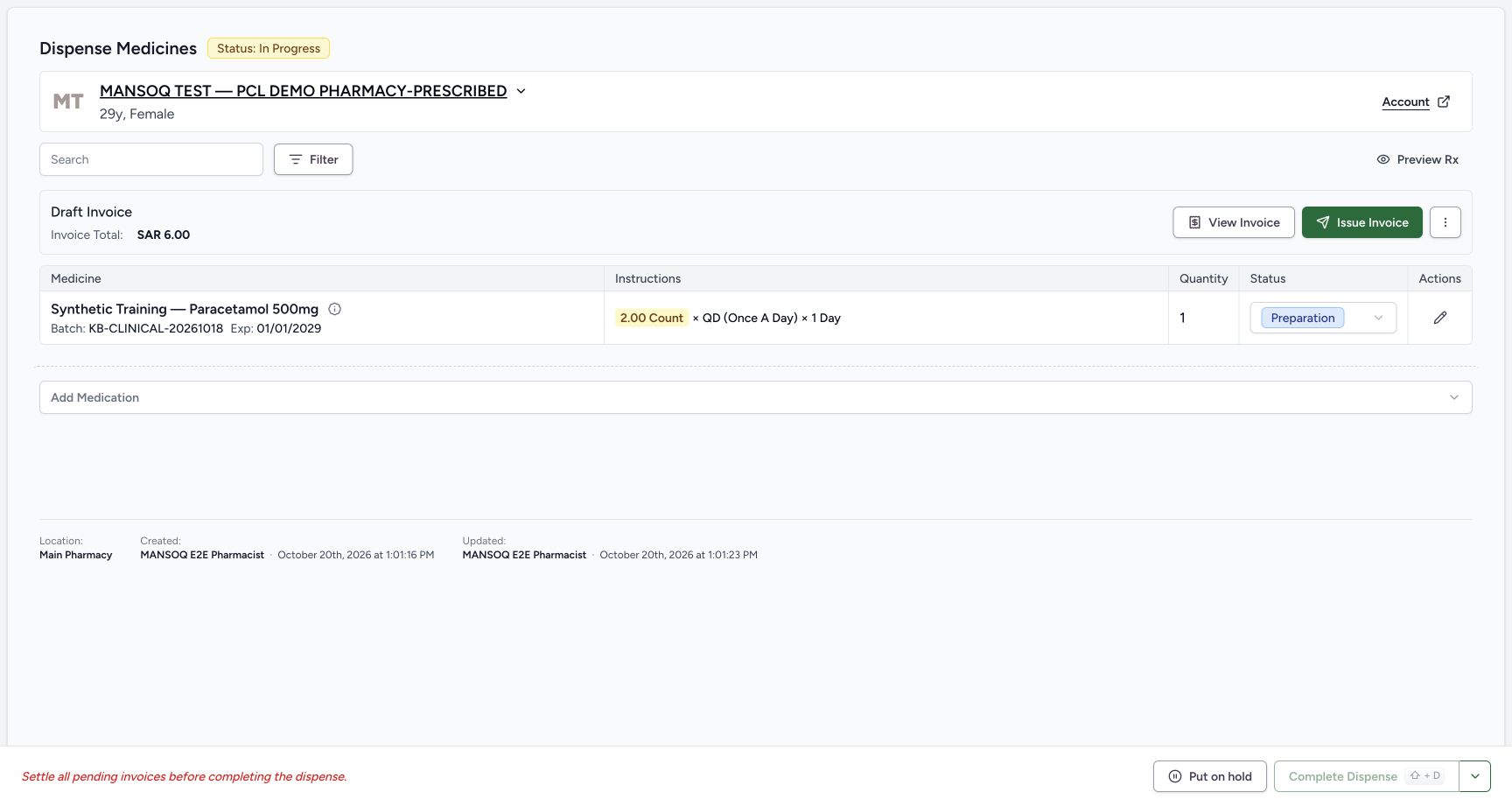
After those checks, the recorded operator selected Bill Selected once and waited. The saved page shows an In Progress order containing one Paracetamol row, quantity 1, with status Preparation. A Draft invoice is created with total SAR 6.00. The recorded local lot balance decreased by one and the selected request became Partial; the older Furosemide and unselected HYMOX requests were retained. This is a software preparation/billing save, not completion or evidence of physical handover.
1234567Reviewed partial stock item only
Capture details
Observed committed 3dfb software on 20 October 2026 by ordinary Pharmacist. Root captured this genuine natural browser viewport; author inspected the original individually. No pixel editing, crop, resize, stitching or generated content.
Image SHA-256 aa15b1c187b3869eeb2673ded25ac04ac9b6013ac6207a495080530e04447e6c
- Stock-backed row selected: Only the Paracetamol row remains selected.
- HYMOX excluded: The unlinked HYMOX row is explicitly unchecked and crossed out; it will not be included in this save.
- Partial quantity 1: The selected lot quantity is 1 against the fictional requested total of 2.
- All Given off: All Given is off for the selected partial row.
- Mark Complete unchecked: Mark Complete is unchecked. In this two-row form it cleared when HYMOX was deselected, separately from All Given.
- Reviewed estimate SAR 6.30: The estimate is SAR 6.30 for the one selected whole unit.
- One valid Bill Selected: After reviewing patient, prescription, selected row, lot, quantity and both flags, the recorded operator selected Bill Selected once.
12345678Saved partial order draft invoice
Capture details
Observed committed 3dfb software on 20 October 2026 by ordinary Pharmacist. Root captured this genuine natural browser viewport; author inspected the original individually. No pixel editing, crop, resize, stitching or generated content. Captures 24 and 26 have identical original JPEG bytes at distinct genuine capture times; 26 follows the recorded normal browser reload.
Image SHA-256 2e77a21d56fa76b03e0a865c569af1b72e0d35fd2f58ea5e2417b5f1bcb5f486
- Open saved medicine details: Select the information control beside the saved medicine name to inspect request and billing details.
- Order In Progress: The saved software order is In Progress, not completed.
- Saved quantity 1: Only one unit is in this saved row.
- Preparation status: The saved dispense row is Preparation, not a record of physical handover.
- Draft Invoice SAR 6.00: A Draft invoice was created. Its total is SAR 6.00, distinct from the earlier estimate.
- View Invoice: Open View Invoice to inspect the saved invoice separately.
- Complete Dispense disabled: Complete Dispense is disabled while its billable item has an unsettled invoice.
- Settlement prerequisite: The page says to settle pending invoices before completing the dispense. No payment or completion is performed here.
7. Read the saved request and charge details
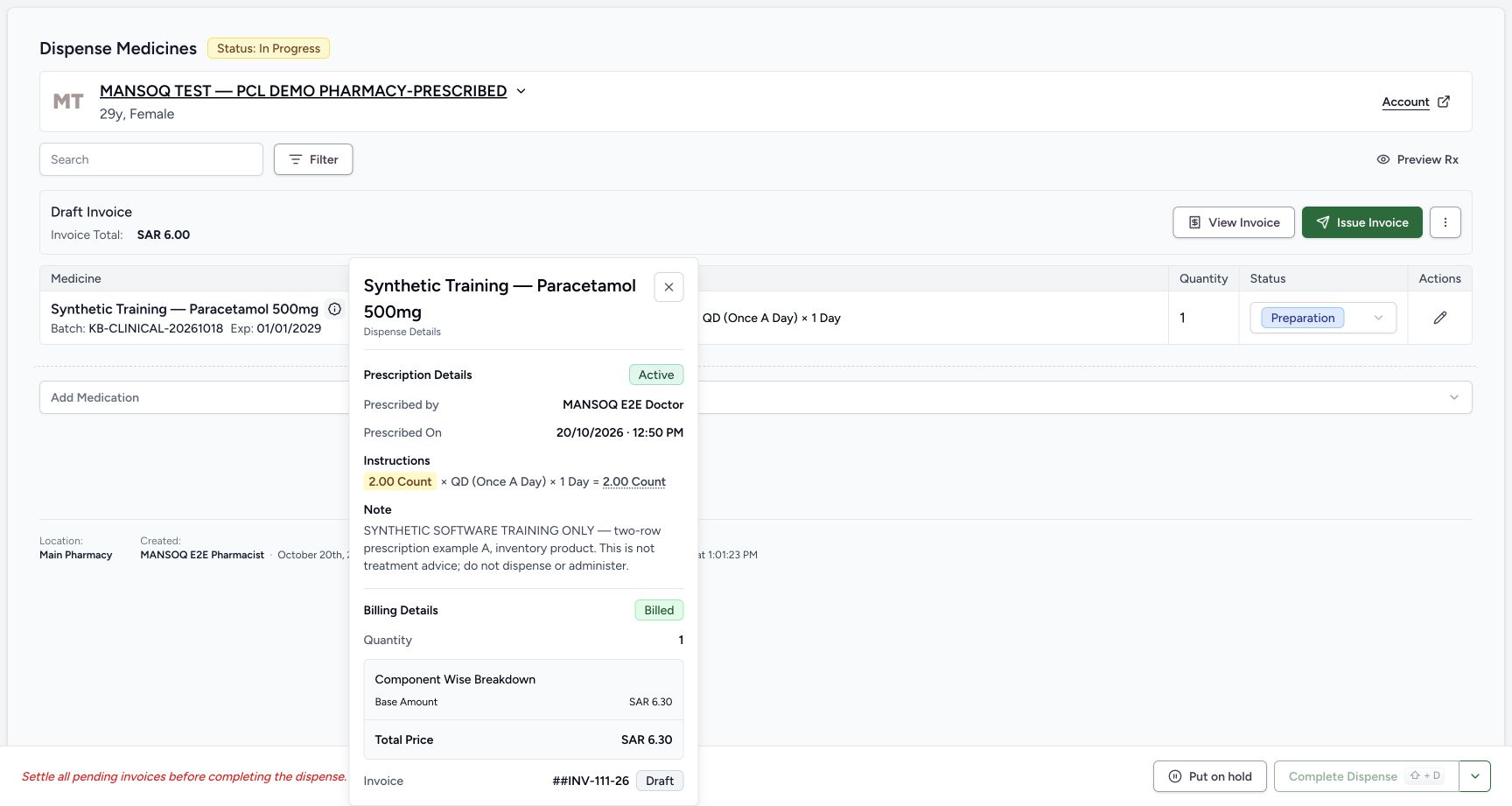
Open the information control beside the saved medicine name. Read the fictional requested total of 2.00 Count separately from Billing Details quantity 1. The Doctor and Prescribed On time of 12:50 PM come from the request’s Authored On field; the prescription card creation time was 12:53 PM. The charge is Billed, its component total is SAR 6.30, and it references INV-111-26 as Draft. Billed is not a payment or an issued-invoice status. Close the popover after reading it.
12345678Saved partial order draft invoice
Capture details
Observed committed 3dfb software on 20 October 2026 by ordinary Pharmacist. Root captured this genuine natural browser viewport; author inspected the original individually. No pixel editing, crop, resize, stitching or generated content. Captures 24 and 26 have identical original JPEG bytes at distinct genuine capture times; 26 follows the recorded normal browser reload.
Image SHA-256 2e77a21d56fa76b03e0a865c569af1b72e0d35fd2f58ea5e2417b5f1bcb5f486
- Open saved medicine details: Select the information control beside the saved medicine name to inspect request and billing details.
- Order In Progress: The saved software order is In Progress, not completed.
- Saved quantity 1: Only one unit is in this saved row.
- Preparation status: The saved dispense row is Preparation, not a record of physical handover.
- Draft Invoice SAR 6.00: A Draft invoice was created. Its total is SAR 6.00, distinct from the earlier estimate.
- View Invoice: Open View Invoice to inspect the saved invoice separately.
- Complete Dispense disabled: Complete Dispense is disabled while its billable item has an unsettled invoice.
- Settlement prerequisite: The page says to settle pending invoices before completing the dispense. No payment or completion is performed here.
 1234567
Saved dispense details
Capture details
Observed committed 3dfb software on 20 October 2026 by ordinary Pharmacist. Root captured this genuine natural browser viewport; author inspected the original individually. No pixel editing, crop, resize, stitching or generated content.
Image SHA-256 be327207a845af8044c7b714acf9129200a1d29dfbbac1b94301409ac38f611b
- Close details: Use the popover Close control after reading its request and billing details.
- Prescribed On: The detail popover uses the request Authored On time, 20 October at 12:50 PM, separately from the prescription card creation time of 12:53 PM.
- Requested total 2: The fictional prescription instruction remains 2.00 Count.
- Billed quantity 1: Billing Details records only quantity 1.
- Billed charge status: Billed is the charge state; it does not prove physical dispensing, payment or successful invoice issuance.
- Component total SAR 6.30: The line component total remains SAR 6.30.
- Draft invoice reference: The charge points to INV-111-26 with Draft status.
8. Reload once and verify the incomplete saved order
Use normal browser Reload once and wait for the saved order to settle. The same In Progress order, quantity 1, Preparation row and Draft invoice SAR 6.00 remain. Complete Dispense remains disabled because its billable item is not settled in a balanced invoice. Do not change a status, collect payment or select Complete Dispense in this lesson. Reload is a browser action outside the page.
12345678Saved partial order draft invoice
Capture details
Observed committed 3dfb software on 20 October 2026 by ordinary Pharmacist. Root captured this genuine natural browser viewport; author inspected the original individually. No pixel editing, crop, resize, stitching or generated content. Captures 24 and 26 have identical original JPEG bytes at distinct genuine capture times; 26 follows the recorded normal browser reload.
Image SHA-256 2e77a21d56fa76b03e0a865c569af1b72e0d35fd2f58ea5e2417b5f1bcb5f486
- Open saved medicine details: Select the information control beside the saved medicine name to inspect request and billing details.
- Order In Progress: The saved software order is In Progress, not completed.
- Saved quantity 1: Only one unit is in this saved row.
- Preparation status: The saved dispense row is Preparation, not a record of physical handover.
- Draft Invoice SAR 6.00: A Draft invoice was created. Its total is SAR 6.00, distinct from the earlier estimate.
- View Invoice: Open View Invoice to inspect the saved invoice separately.
- Complete Dispense disabled: Complete Dispense is disabled while its billable item has an unsettled invoice.
- Settlement prerequisite: The page says to settle pending invoices before completing the dispense. No payment or completion is performed here.
 123456
Reloaded partial order
Capture details
Observed committed 3dfb software on 20 October 2026 by ordinary Pharmacist. Root captured this genuine natural browser viewport; author inspected the original individually. No pixel editing, crop, resize, stitching or generated content. Captures 24 and 26 have identical original JPEG bytes at distinct genuine capture times; 26 follows the recorded normal browser reload.
Image SHA-256 2e77a21d56fa76b03e0a865c569af1b72e0d35fd2f58ea5e2417b5f1bcb5f486
- Same saved order after reload: A normal browser reload retains the In Progress software order.
- Quantity 1 retained: The saved quantity remains 1.
- Preparation retained: The row remains Preparation after reload.
- Draft total retained: The Draft invoice still shows SAR 6.00.
- Completion remains disabled: Reload has not settled the invoice or completed the dispense.
- View saved invoice: Select View Invoice for the invoice readback. Browser Reload is an external browser action.
9. Open the invoice and compare its different amounts
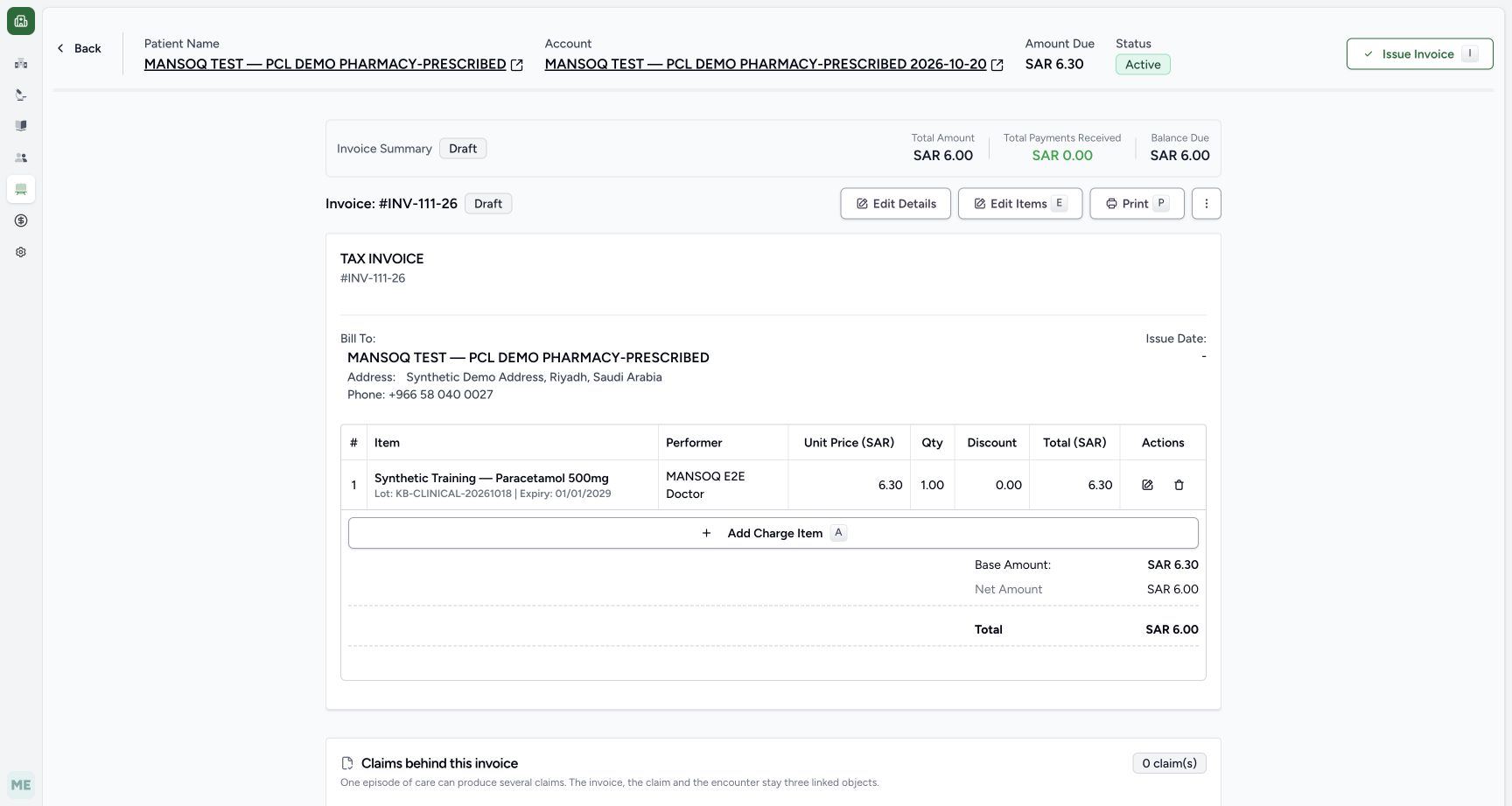
Select View Invoice. Match INV-111-26 and Draft. Its one quantity-1 line and Base Amount are SAR 6.30, while Net Amount, invoice Total and Balance Due are SAR 6.00. Total Payments Received is SAR 0.00. The account header’s Amount Due SAR 6.30 is separate from this invoice’s balance. The committed invoice calculation rounds final net/gross totals using configured invoice precision and method; that explains this captured 6.30-to-6.00 result. Do not treat it as a tax deduction or assume every installation uses the same final rounding configuration.
123456Reloaded partial order
Capture details
Observed committed 3dfb software on 20 October 2026 by ordinary Pharmacist. Root captured this genuine natural browser viewport; author inspected the original individually. No pixel editing, crop, resize, stitching or generated content. Captures 24 and 26 have identical original JPEG bytes at distinct genuine capture times; 26 follows the recorded normal browser reload.
Image SHA-256 2e77a21d56fa76b03e0a865c569af1b72e0d35fd2f58ea5e2417b5f1bcb5f486
- Same saved order after reload: A normal browser reload retains the In Progress software order.
- Quantity 1 retained: The saved quantity remains 1.
- Preparation retained: The row remains Preparation after reload.
- Draft total retained: The Draft invoice still shows SAR 6.00.
- Completion remains disabled: Reload has not settled the invoice or completed the dispense.
- View saved invoice: Select View Invoice for the invoice readback. Browser Reload is an external browser action.
 123456789
Draft invoice review
Capture details
Observed committed 3dfb software on 20 October 2026 by ordinary Pharmacist. Root captured this genuine natural browser viewport; author inspected the original individually. No pixel editing, crop, resize, stitching or generated content.
Image SHA-256 8a1b0a0dcf13007a6e6c247f4c8c6c3833ac0e980db610face4618fa6957983b
- Saved invoice identity: The invoice is INV-111-26, still Draft.
- Invoice total SAR 6.00: The saved invoice total is SAR 6.00.
- Payments SAR 0.00: No payment is recorded in this captured invoice.
- Balance due SAR 6.00: The unpaid invoice balance is SAR 6.00.
- Line total SAR 6.30: The one quantity-1 invoice line retains SAR 6.30.
- Base amount SAR 6.30: Base Amount remains SAR 6.30 before configured final invoice rounding.
- Final total SAR 6.00: The rounded invoice total is shown separately from the line/base amount.
- Account amount due SAR 6.30: The header account Amount Due is another amount; do not substitute it for this invoice’s balance.
- Issue Invoice is separate: Issue Invoice is a separate action. Its presence does not establish that this Draft was issued.
10. Read the invoice’s unresolved warnings
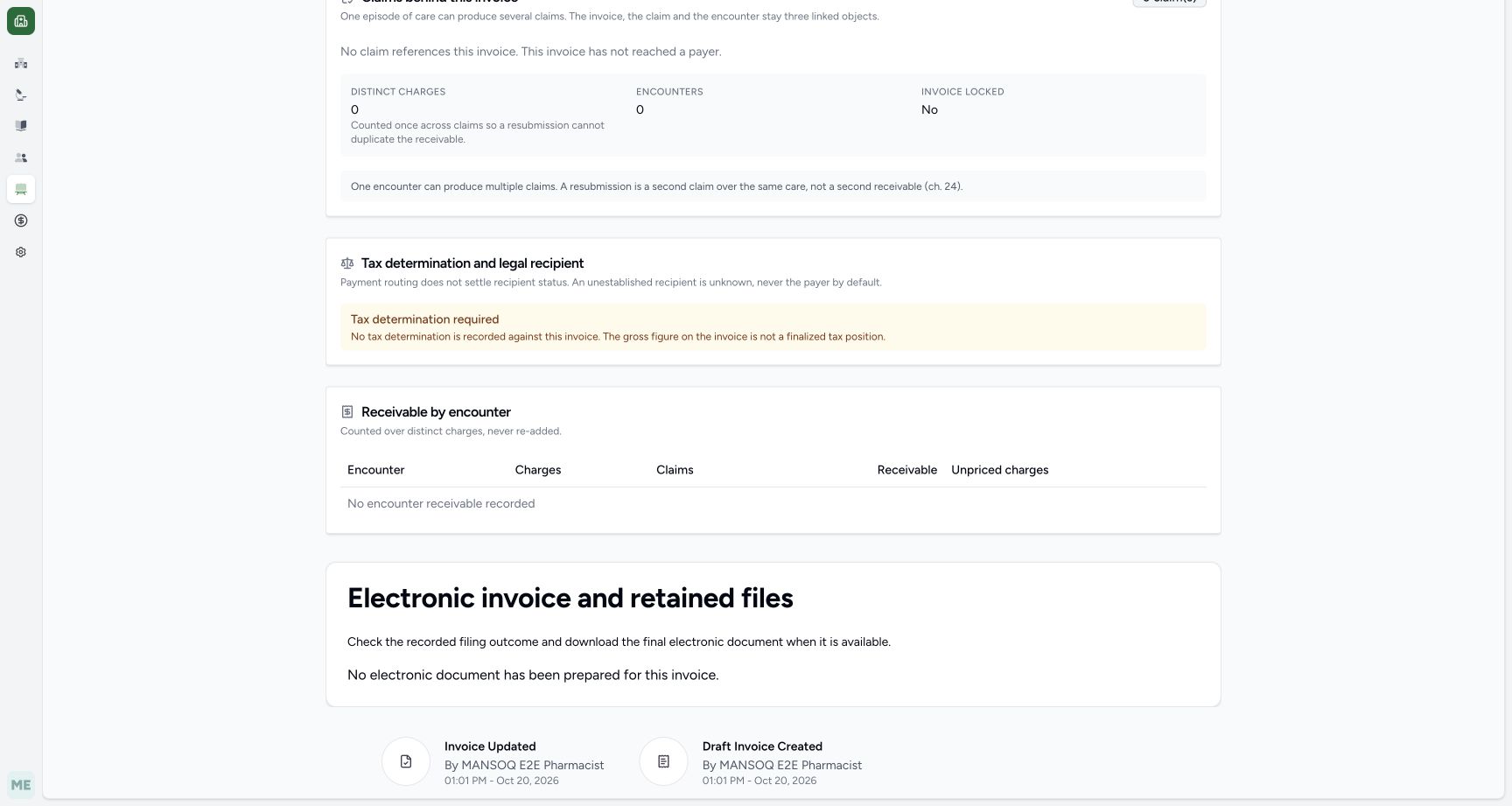
Scroll down the invoice. The page says tax determination is required, no encounter receivable is recorded and no electronic document has been prepared. It also shows the Pharmacist’s draft creation/update history. These readbacks do not establish a finalized tax position, payer acceptance, encounter absence or electronic-invoice clearance. Leave the draft and its amounts intact.
 1234
1234Tax and electronic status
Capture details
Observed committed 3dfb software on 20 October 2026 by ordinary Pharmacist. Root captured this genuine natural browser viewport; author inspected the original individually. No pixel editing, crop, resize, stitching or generated content.
Image SHA-256 a6d0614ba9061e021e87d4ca8fc90b7fd1af44426858b27fea5113a3d426ba84
- Tax determination required: No tax determination is recorded; the displayed gross figure is not a finalized tax position.
- No encounter receivable: No encounter receivable is recorded for this invoice. This is not proof that the patient lacks an encounter.
- No electronic document: No electronic document has been prepared for this invoice.
- Recorded Pharmacist author: The draft creation and update history shows MANSOQ E2E Pharmacist at 01:01 PM. No payer or tax clearance is asserted.
11. Stop at the retained Draft after the refused Issue attempt
One later Issue Invoice action was refused, with a retained server-log observation of status 400. The original response body and on-screen error toast were not retained, so no exact error text is claimed here. After restart and ordinary sign-in with the same Pharmacist, the saved INV-111-26 still reads Draft, total SAR 6.00, payments SAR 0.00 and balance SAR 6.00. Issue Invoice is still available, but it was not retried. Stop at this saved Draft.
123456Invoice still draft after restart
Capture details
Observed committed 3dfb software on 20 October 2026 by ordinary Pharmacist. Root captured this genuine natural browser viewport; author inspected the original individually. No pixel editing, crop, resize, stitching or generated content. After restart and ordinary same-user sign-in, this separate natural original is 1728 × 977; it shows retained Draft state, no Issue retry or error toast.
Image SHA-256 b47db8b56c8c510d3306576ab42b26869cc0d9473fbdaf6c9cc7fb6630bf7441
- Same retained invoice after restart: The resumed ordinary Pharmacist session reads INV-111-26 again. The saved identity and Draft status remain available to read.
- Still Draft: The invoice remains Draft after the earlier single refused Issue action.
- Same total SAR 6.00: The saved total remains SAR 6.00.
- Payments remain SAR 0.00: No payment has appeared in this readback.
- Balance remains SAR 6.00: The invoice balance is still SAR 6.00.
- Issue remains available; no retry: Issue Invoice remains available. This image pictures neither an error toast nor successful issuance; the operator did not retry Issue.
Understand the independent completion controls
All Given feeds the individual request’s fully-supplied flag. Mark Complete independently requests prescription completion, while Complete Dispense is a later order action with its own settlement prerequisite. Both first-stage flags were off for this partial save, and the later Complete Dispense control remained disabled. None of these statuses should be read as a recommendation to dispense, administer or change treatment.
1234567Reviewed partial stock item only
Capture details
Observed committed 3dfb software on 20 October 2026 by ordinary Pharmacist. Root captured this genuine natural browser viewport; author inspected the original individually. No pixel editing, crop, resize, stitching or generated content.
Image SHA-256 aa15b1c187b3869eeb2673ded25ac04ac9b6013ac6207a495080530e04447e6c
- Stock-backed row selected: Only the Paracetamol row remains selected.
- HYMOX excluded: The unlinked HYMOX row is explicitly unchecked and crossed out; it will not be included in this save.
- Partial quantity 1: The selected lot quantity is 1 against the fictional requested total of 2.
- All Given off: All Given is off for the selected partial row.
- Mark Complete unchecked: Mark Complete is unchecked. In this two-row form it cleared when HYMOX was deselected, separately from All Given.
- Reviewed estimate SAR 6.30: The estimate is SAR 6.30 for the one selected whole unit.
- One valid Bill Selected: After reviewing patient, prescription, selected row, lot, quantity and both flags, the recorded operator selected Bill Selected once.
12345678Saved partial order draft invoice
Capture details
Observed committed 3dfb software on 20 October 2026 by ordinary Pharmacist. Root captured this genuine natural browser viewport; author inspected the original individually. No pixel editing, crop, resize, stitching or generated content. Captures 24 and 26 have identical original JPEG bytes at distinct genuine capture times; 26 follows the recorded normal browser reload.
Image SHA-256 2e77a21d56fa76b03e0a865c569af1b72e0d35fd2f58ea5e2417b5f1bcb5f486
- Open saved medicine details: Select the information control beside the saved medicine name to inspect request and billing details.
- Order In Progress: The saved software order is In Progress, not completed.
- Saved quantity 1: Only one unit is in this saved row.
- Preparation status: The saved dispense row is Preparation, not a record of physical handover.
- Draft Invoice SAR 6.00: A Draft invoice was created. Its total is SAR 6.00, distinct from the earlier estimate.
- View Invoice: Open View Invoice to inspect the saved invoice separately.
- Complete Dispense disabled: Complete Dispense is disabled while its billable item has an unsettled invoice.
- Settlement prerequisite: The page says to settle pending invoices before completing the dispense. No payment or completion is performed here.
123456Reloaded partial order
Capture details
Observed committed 3dfb software on 20 October 2026 by ordinary Pharmacist. Root captured this genuine natural browser viewport; author inspected the original individually. No pixel editing, crop, resize, stitching or generated content. Captures 24 and 26 have identical original JPEG bytes at distinct genuine capture times; 26 follows the recorded normal browser reload.
Image SHA-256 2e77a21d56fa76b03e0a865c569af1b72e0d35fd2f58ea5e2417b5f1bcb5f486
- Same saved order after reload: A normal browser reload retains the In Progress software order.
- Quantity 1 retained: The saved quantity remains 1.
- Preparation retained: The row remains Preparation after reload.
- Draft total retained: The Draft invoice still shows SAR 6.00.
- Completion remains disabled: Reload has not settled the invoice or completed the dispense.
- View saved invoice: Select View Invoice for the invoice readback. Browser Reload is an external browser action.
Interpret the insurance-readiness gap as an evidence-based explanation
A later scoped read-only check found active PatientCoverage for this patient. The existing insured revenue-cycle case belongs to the earlier account with the existing encounter; this new invoice’s account has no primary encounter and no insured revenue-cycle case with coverage. The pinned source refuses issuance in that state. This source-and-state explanation fits the retained 400 observation, but it is not a transcription of an observed response body or toast. Refer the unresolved account/coverage prerequisite through the responsible billing process; this lesson does not relink the existing encounter, change coverage or retry Issue.
1234Tax and electronic status
Capture details
Observed committed 3dfb software on 20 October 2026 by ordinary Pharmacist. Root captured this genuine natural browser viewport; author inspected the original individually. No pixel editing, crop, resize, stitching or generated content.
Image SHA-256 a6d0614ba9061e021e87d4ca8fc90b7fd1af44426858b27fea5113a3d426ba84
- Tax determination required: No tax determination is recorded; the displayed gross figure is not a finalized tax position.
- No encounter receivable: No encounter receivable is recorded for this invoice. This is not proof that the patient lacks an encounter.
- No electronic document: No electronic document has been prepared for this invoice.
- Recorded Pharmacist author: The draft creation and update history shows MANSOQ E2E Pharmacist at 01:01 PM. No payer or tax clearance is asserted.
123456Invoice still draft after restart
Capture details
Observed committed 3dfb software on 20 October 2026 by ordinary Pharmacist. Root captured this genuine natural browser viewport; author inspected the original individually. No pixel editing, crop, resize, stitching or generated content. After restart and ordinary same-user sign-in, this separate natural original is 1728 × 977; it shows retained Draft state, no Issue retry or error toast.
Image SHA-256 b47db8b56c8c510d3306576ab42b26869cc0d9473fbdaf6c9cc7fb6630bf7441
- Same retained invoice after restart: The resumed ordinary Pharmacist session reads INV-111-26 again. The saved identity and Draft status remain available to read.
- Still Draft: The invoice remains Draft after the earlier single refused Issue action.
- Same total SAR 6.00: The saved total remains SAR 6.00.
- Payments remain SAR 0.00: No payment has appeared in this readback.
- Balance remains SAR 6.00: The invoice balance is still SAR 6.00.
- Issue remains available; no retry: Issue Invoice remains available. This image pictures neither an error toast nor successful issuance; the operator did not retry Issue.
Keep the outcome within the measured software scope
The retained checks cover this synthetic patient, encounter, relevant medication/order/billing rows and the selected location’s stock. They are not a whole-database audit. One selected partial preparation and one Draft invoice were saved, then retained after reload and restart. There was no payment, successful issuance, completed dispensing, administration, substitution, payer submission or electronic document in this bounded outcome.
123456Reloaded partial order
Capture details
Observed committed 3dfb software on 20 October 2026 by ordinary Pharmacist. Root captured this genuine natural browser viewport; author inspected the original individually. No pixel editing, crop, resize, stitching or generated content. Captures 24 and 26 have identical original JPEG bytes at distinct genuine capture times; 26 follows the recorded normal browser reload.
Image SHA-256 2e77a21d56fa76b03e0a865c569af1b72e0d35fd2f58ea5e2417b5f1bcb5f486
- Same saved order after reload: A normal browser reload retains the In Progress software order.
- Quantity 1 retained: The saved quantity remains 1.
- Preparation retained: The row remains Preparation after reload.
- Draft total retained: The Draft invoice still shows SAR 6.00.
- Completion remains disabled: Reload has not settled the invoice or completed the dispense.
- View saved invoice: Select View Invoice for the invoice readback. Browser Reload is an external browser action.
1234Tax and electronic status
Capture details
Observed committed 3dfb software on 20 October 2026 by ordinary Pharmacist. Root captured this genuine natural browser viewport; author inspected the original individually. No pixel editing, crop, resize, stitching or generated content.
Image SHA-256 a6d0614ba9061e021e87d4ca8fc90b7fd1af44426858b27fea5113a3d426ba84
- Tax determination required: No tax determination is recorded; the displayed gross figure is not a finalized tax position.
- No encounter receivable: No encounter receivable is recorded for this invoice. This is not proof that the patient lacks an encounter.
- No electronic document: No electronic document has been prepared for this invoice.
- Recorded Pharmacist author: The draft creation and update history shows MANSOQ E2E Pharmacist at 01:01 PM. No payer or tax clearance is asserted.
123456Invoice still draft after restart
Capture details
Observed committed 3dfb software on 20 October 2026 by ordinary Pharmacist. Root captured this genuine natural browser viewport; author inspected the original individually. No pixel editing, crop, resize, stitching or generated content. After restart and ordinary same-user sign-in, this separate natural original is 1728 × 977; it shows retained Draft state, no Issue retry or error toast.
Image SHA-256 b47db8b56c8c510d3306576ab42b26869cc0d9473fbdaf6c9cc7fb6630bf7441
- Same retained invoice after restart: The resumed ordinary Pharmacist session reads INV-111-26 again. The saved identity and Draft status remain available to read.
- Still Draft: The invoice remains Draft after the earlier single refused Issue action.
- Same total SAR 6.00: The saved total remains SAR 6.00.
- Payments remain SAR 0.00: No payment has appeared in this readback.
- Balance remains SAR 6.00: The invoice balance is still SAR 6.00.
- Issue remains available; no retry: Issue Invoice remains available. This image pictures neither an error toast nor successful issuance; the operator did not retry Issue.
Source evidence
Every citation uses this exact committed version. The private source repository requires access.
- repositories/platform/mansoq-web/src/pages/Facility/settings/healthcareService/ServiceCard.tsx:25 ·
3dfb7c9f519fb5b4cd4452439f3c12346bf58319Source file checksum
3071dac4b09ad3b13be8ed2426d7082bd74552dfa48c774ae6ac8ee33ebfe3f8 - repositories/platform/mansoq-web/src/pages/Facility/services/FacilityServices.tsx:64 ·
3dfb7c9f519fb5b4cd4452439f3c12346bf58319Source file checksum
81938a877311725f375328c2e8bd33813e406fd2692a1894acf11d70b887a535 - repositories/platform/mansoq-web/src/pages/Facility/services/pharmacy/CreateDispenseSheet.tsx:94 ·
3dfb7c9f519fb5b4cd4452439f3c12346bf58319Source file checksum
3c6a077ba883d9fde4979284c9dae84bd8f81cc629700d5d75e2b78da0d26a3d - repositories/platform/mansoq-web/src/components/Patient/PatientIdentifierSelector.tsx:117 ·
3dfb7c9f519fb5b4cd4452439f3c12346bf58319Source file checksum
285cb0ed78d92cabc7e614d5c15b5a5f719edb8a1dd77e263398d772dbea6ef5 - repositories/platform/mansoq-web/src/common/Permissions.tsx:13 ·
3dfb7c9f519fb5b4cd4452439f3c12346bf58319Source file checksum
4b85506ece137dd8d361795440c8c69403b8805bf69aabaaa0f876017fc30e07 - repositories/platform/mansoq-web/src/pages/Patient/PatientHome.tsx:74 ·
3dfb7c9f519fb5b4cd4452439f3c12346bf58319Source file checksum
c89e83e3e910337d0df6445d984f41d331f79ea5962212fff64709dec6809b7d - repositories/platform/mansoq-web/src/pages/Patient/home/PatientHomeEncounters.tsx:49 ·
3dfb7c9f519fb5b4cd4452439f3c12346bf58319Source file checksum
f4f1fd98dea402a515f179d36aacdae46a1aab6fe29aa94d6c4609217c588444 - repositories/platform/mansoq-web/src/pages/Facility/services/pharmacy/PrescriptionQueue.tsx:159 ·
3dfb7c9f519fb5b4cd4452439f3c12346bf58319Source file checksum
20c2f3e573ae315ec5ff79b19575c1a6e3b2f7ca76b5e98bad319ef595b11d04 - repositories/platform/mansoq-web/src/pages/Facility/services/pharmacy/PrescriptionsPreviewPage.tsx:115 ·
3dfb7c9f519fb5b4cd4452439f3c12346bf58319Source file checksum
2a76a064861548bc2d0c5e036bbc9a2ec448582cb8bcb3e970c05a8362498a2e - repositories/platform/mansoq-web/src/pages/Facility/services/pharmacy/billMedications/modes/usePrescriptionsMode.ts:58 ·
3dfb7c9f519fb5b4cd4452439f3c12346bf58319Source file checksum
a1f6bfb990ce68bf774a2c1208d914287710742fdb8c891031a38d09636daf1e - repositories/platform/mansoq-web/src/pages/Facility/services/pharmacy/billMedications/formSchema.ts:26 ·
3dfb7c9f519fb5b4cd4452439f3c12346bf58319Source file checksum
654a1d61d9eea0ed21dbbda6fcc0f127eb9cc1631bd178f3023bb334258571e2 - repositories/platform/mansoq-web/src/pages/Facility/services/pharmacy/billMedications/BillMedicationsPrescriptionCard.tsx:694 ·
3dfb7c9f519fb5b4cd4452439f3c12346bf58319Source file checksum
e64b9b9ffbc8388dba86070d36c8acef28639ac6166f650ca3586b43e9ac3134 - repositories/platform/mansoq-web/src/pages/Facility/services/pharmacy/billMedications/utils/useInventoryItemsAutoSelect.ts:38 ·
3dfb7c9f519fb5b4cd4452439f3c12346bf58319Source file checksum
689be89ed73722f369100ad448b2ceb37e559bb86a354edbd63393cc8d61af9b - repositories/platform/mansoq-web/src/pages/Facility/services/pharmacy/billMedications/BillMedicationsFooter.tsx:24 ·
3dfb7c9f519fb5b4cd4452439f3c12346bf58319Source file checksum
5a2167f3e4ae3c332f8da9b7076d6339c891543cb41fa43534256c826300c048 - repositories/platform/mansoq-web/src/pages/Facility/services/pharmacy/billMedications/utils/useBillMedications.ts:109 ·
3dfb7c9f519fb5b4cd4452439f3c12346bf58319Source file checksum
ac95fb2bf082bbb0e911754db978a5c4be73078def98c944d634db2713810b8d - repositories/platform/mansoq-web/src/pages/Facility/services/pharmacy/DispenseOrderView.tsx:285 ·
3dfb7c9f519fb5b4cd4452439f3c12346bf58319Source file checksum
59bebd01a2422d3b62d5e57b0f3a9211d5eb03ddd94f81704e3dbecd47cd197d - repositories/platform/mansoq-web/src/pages/Facility/services/pharmacy/components/DispenseOrderViewFooter.tsx:112 ·
3dfb7c9f519fb5b4cd4452439f3c12346bf58319Source file checksum
9ddc555df83d78afd04ed0e339630d6e67ccd52a1545d5103a835d8633d0acd6 - repositories/platform/mansoq-web/src/pages/Facility/services/pharmacy/components/DispenseInfoPopover.tsx:154 ·
3dfb7c9f519fb5b4cd4452439f3c12346bf58319Source file checksum
334e120116701ff616b319b2235e6793e56d3bd43fd21ab5f399616a75eeb34d - repositories/platform/mansoq-web/src/pages/Facility/billing/invoice/InvoiceShow.tsx:451 ·
3dfb7c9f519fb5b4cd4452439f3c12346bf58319Source file checksum
1b350ccc4aef289b8e4ba2527180edaf4b3cffdf1bc4e92fda920779f2ef4989 - repositories/platform/mansoq-web/src/pages/Facility/billing/rcm/InvoiceClaimPanel.tsx:390 ·
3dfb7c9f519fb5b4cd4452439f3c12346bf58319Source file checksum
4227d0e31d531c15fa2f296ea468b39a124c88091ddd6d2348c2c53128ef2696 - repositories/platform/mansoq-web/src/pages/Facility/billing/rcm/FiscalInvoicePanel.tsx:1 ·
3dfb7c9f519fb5b4cd4452439f3c12346bf58319Source file checksum
5b23cfb02356b431521423bb1a572908a7b7925a65d96bf752c484ed6f51a75c - repositories/platform/mansoq-core/mansoq/emr/resources/invoice/sync_items.py:47 ·
3dfb7c9f519fb5b4cd4452439f3c12346bf58319Source file checksum
e232d244e2f09171c7cf76ffebd6da04bd62a6f9353de709224a08c0fde8cff3 - repositories/platform/mansoq-core/config/settings/config.py:279 ·
3dfb7c9f519fb5b4cd4452439f3c12346bf58319Source file checksum
80e2bd16a124b5b9e80eefab7a9d5b2f20a874a8fe645b223f26cad04e6cd60a - repositories/platform/mansoq-core/mansoq/emr/api/viewsets/invoice.py:281 ·
3dfb7c9f519fb5b4cd4452439f3c12346bf58319Source file checksum
03e73113c89d4be24b4f7ae6f0bf3d4538d8129774ce6dedd0272219530bb88e