 MANSOQ
 Clinical care · VERSION 3dfb7c9f
Create two different medicine rows in one demonstration prescription
Choose an inventory product and a coded medicine through their separate selector tabs, review each row independently, then save both together and verify the single prescription after reload.
Doctor
 1234567891011
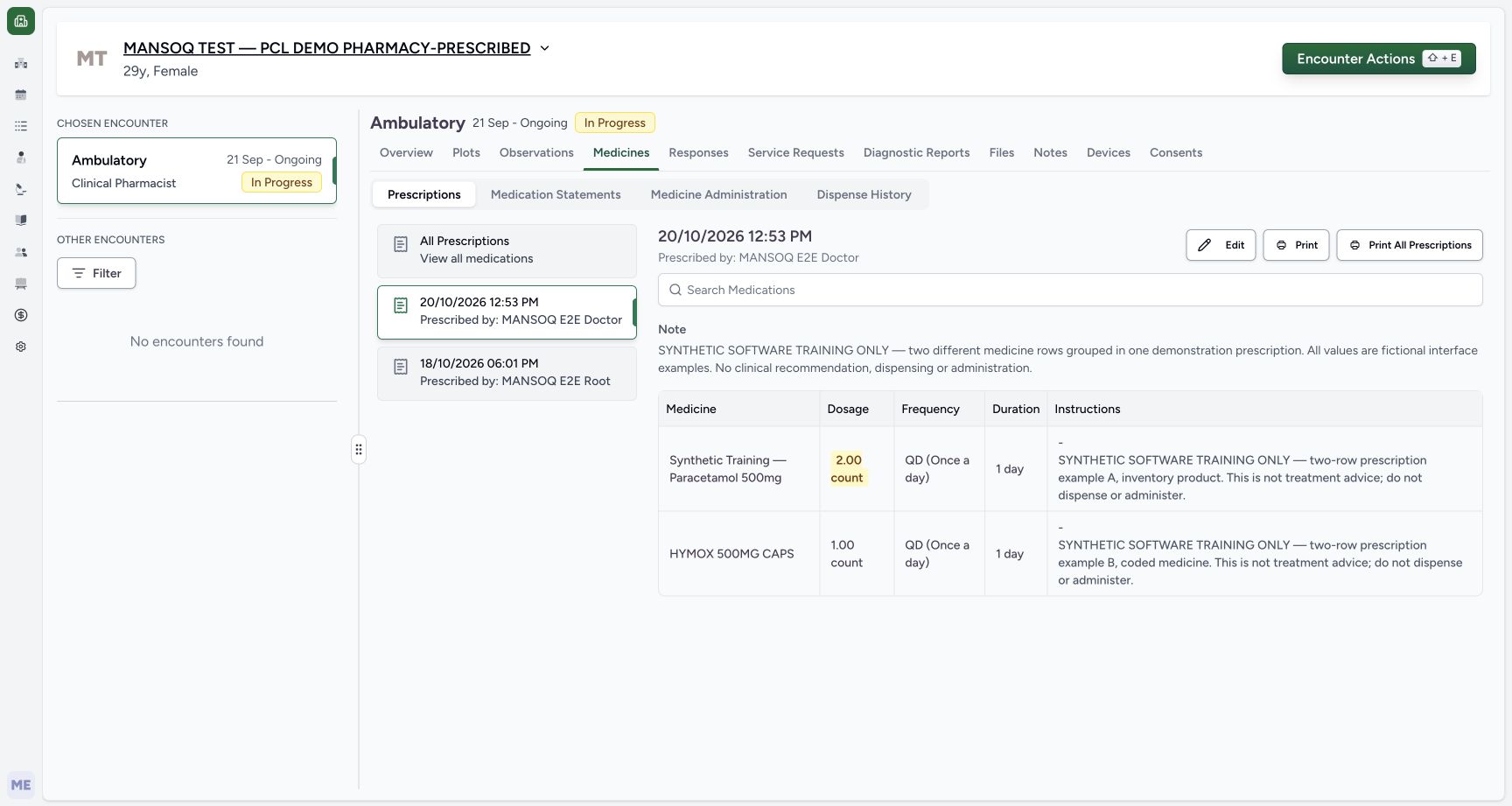
Saved one prescription two rows
Capture details
Observed 3dfb software on 20 October 2026. Two different new medicine requests grouped in one fictional demonstration prescription. Earlier draft1count each is explicitly revised before the sole Submit to product2count/codedmedicine1count. Original pixels/times preserved; no physical dispensing or administration.
Image SHA-256 9ba1629a4643a98c8f5d02ee9d4d5e03a9d67e7d086e75b530731f5fe94a85dc
- Select the new 20/10/2026 12:53 PM card: The older 18/10/2026 06:01 PM Furosemide card remains separate below.
- Read the Doctor prescriber: The selected new card identifies MANSOQ E2E Doctor.
- Read the one shared Note: The full shared prescription Note appears above both rows.
- Read the first medicine row: The selected card contains Synthetic Training — Paracetamol 500mg.
- Read saved 2.00 count: Its first structured dose is 2 count.
- Read first QD and 1 day: Frequency and duration are separate saved fields.
- Read complete row Note A: The Instructions cell shows the inventory-product software example note.
- Read the second HYMOX row: This same selected prescription also contains HYMOX 500MG CAPS.
- Read saved 1.00 count: The second medicine retains its separate 1 count dose.
- Read second QD and 1 day: Read this row’s own frequency and duration.
- Read complete row Note B: The second Instructions cell contains the coded-medicine software example note.
19 of 19 content blocks have reviewed image alignment.
Before you begin
- Use an authorised Doctor account and the assigned fictional Pharmacy-Prescribed patient. Verify the selected Ambulatory encounter is In Progress before opening a new request.
 1234
1234Recorded release 3dfb7c9f · 2026-10-20T09:49:44.564Z · 1728 × 921 Doctor case identity
Capture details
Observed 3dfb software on 20 October 2026. Two different new medicine requests grouped in one fictional demonstration prescription. Earlier draft1count each is explicitly revised before the sole Submit to product2count/codedmedicine1count. Original pixels/times preserved; no physical dispensing or administration.
Image SHA-256
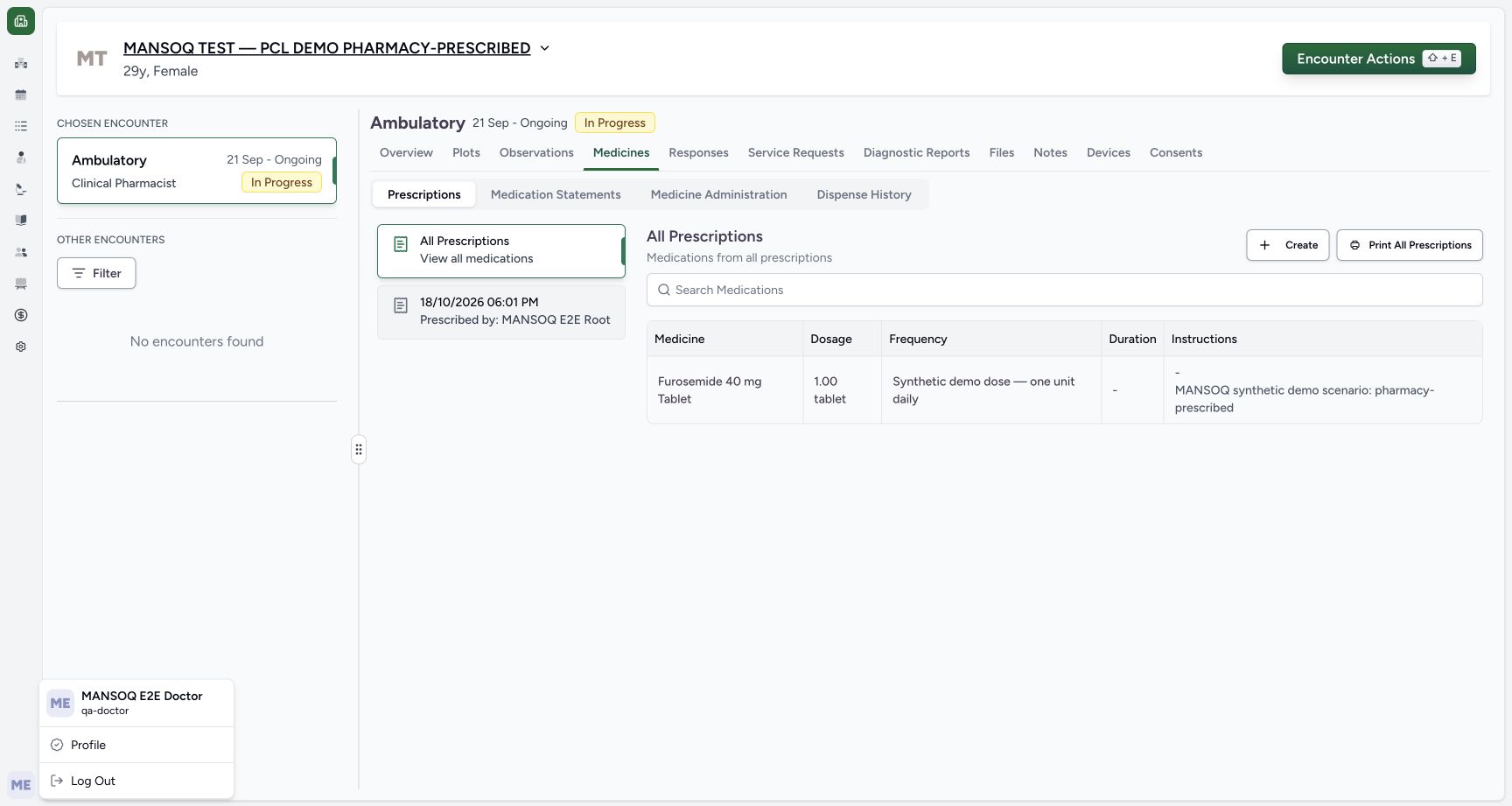
f9d6911d772ebc6044b62b38d280542c0253d18b68e16ca7c9f9e22a37131e41- Check the Doctor account: The open account menu identifies MANSOQ E2E Doctor and qa-doctor.
- Check the fictional Pharmacy-Prescribed patient: Use the assigned synthetic patient shown in the banner.
- Check the selected ongoing Ambulatory encounter: The selected encounter is In Progress.
- Open Medicines: Use the prescribing tab for this Doctor exercise.
 12
12Recorded release 3dfb7c9f · 2026-10-20T09:50:04.204Z · 1728 × 921 Fresh create entry
Capture details
Observed 3dfb software on 20 October 2026. Two different new medicine requests grouped in one fictional demonstration prescription. Earlier draft1count each is explicitly revised before the sole Submit to product2count/codedmedicine1count. Original pixels/times preserved; no physical dispensing or administration.
Image SHA-256
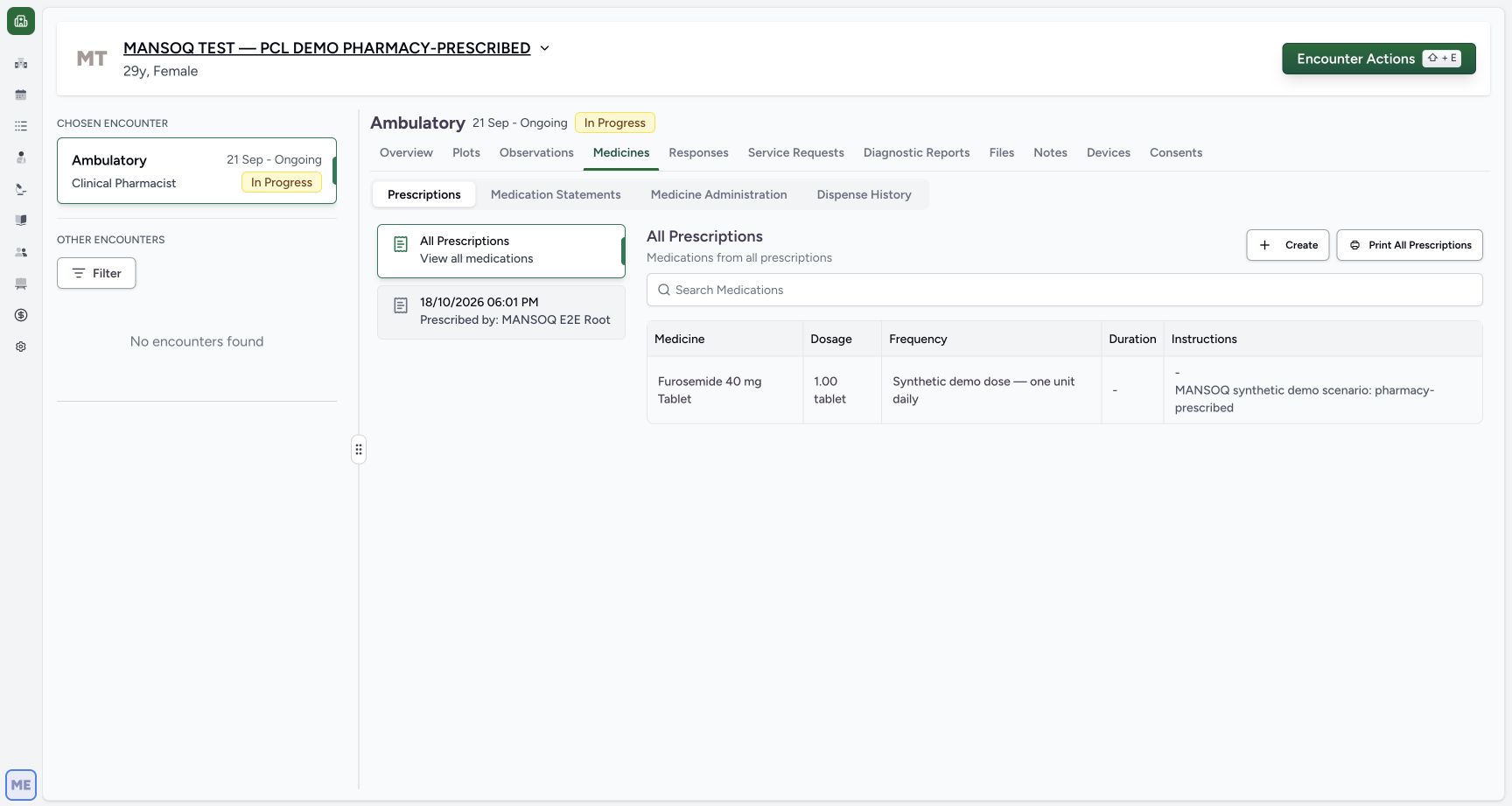
af6a41f753a8d976d54fd1db378146cf310c665261d06f868198068587d1d5c6- Keep Prescriptions selected: The earlier Furosemide prescription is a separate existing card.
- Choose Create: Start a fresh request rather than editing the original prescription.
- This exercise uses two existing configured sources: the illustrated Synthetic Training — Paracetamol 500mg inventory product and the illustrated HYMOX 500MG CAPS Medication-tab result. Do not edit the older Furosemide prescription.
 12
12Recorded release 3dfb7c9f · 2026-10-20T09:50:52.964Z · 1728 × 921 Synthetic product search result
Capture details
Observed 3dfb software on 20 October 2026. Two different new medicine requests grouped in one fictional demonstration prescription. Earlier draft1count each is explicitly revised before the sole Submit to product2count/codedmedicine1count. Original pixels/times preserved; no physical dispensing or administration.
Image SHA-256
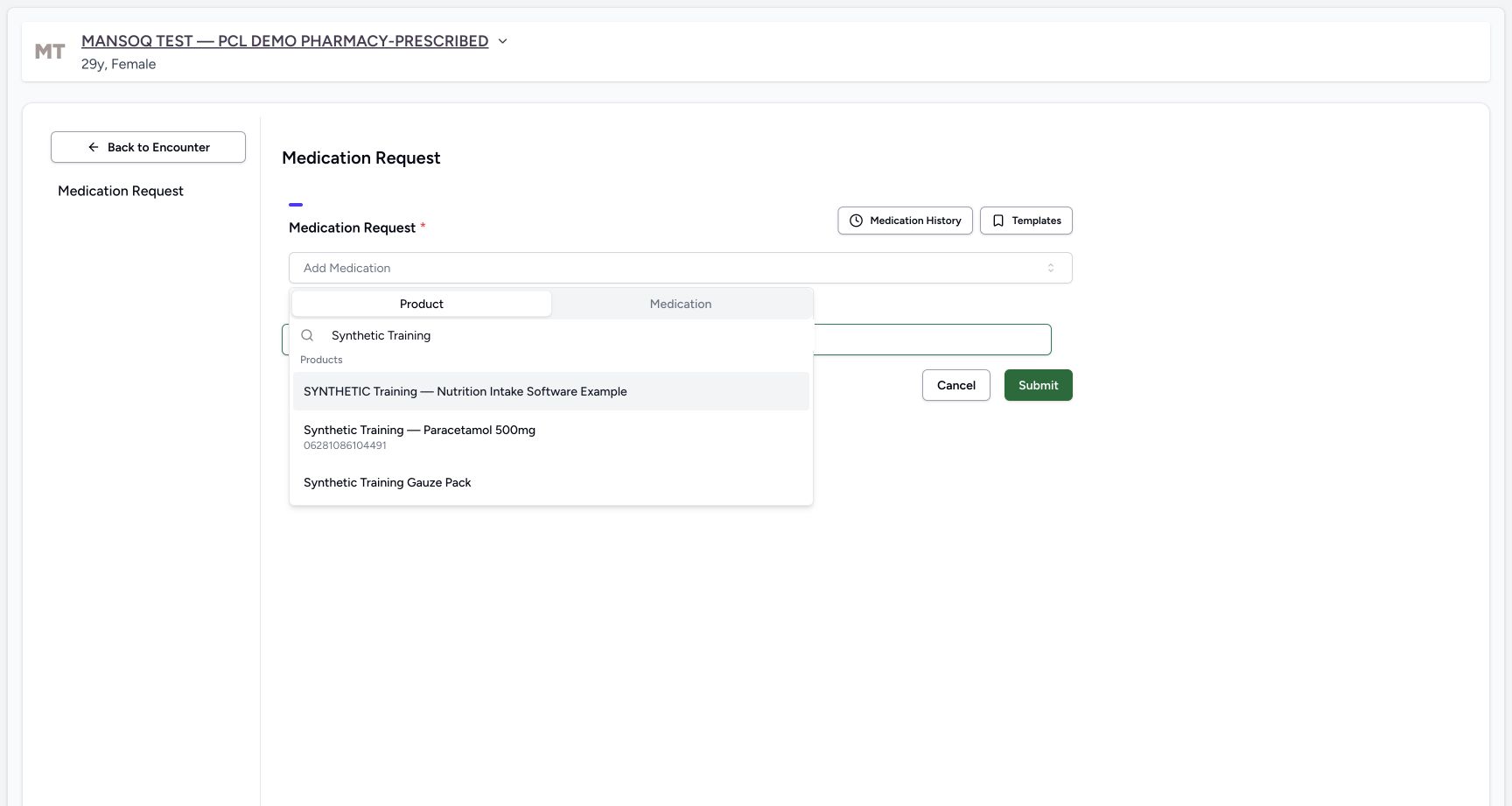
264a0546b13221c2e7603e27b6f07d348b31a86d87fefb4d6894e5af606e0e4c- Search Synthetic Training: The Product search is populated with this text.
- Choose Synthetic Training — Paracetamol 500mg: Select this illustrated product, with 06281086104491 displayed below its name, rather than the other synthetic results.
 123
123Recorded release 3dfb7c9f · 2026-10-20T09:51:53.956Z · 1728 × 921 Medication hymox search result
Capture details
Observed 3dfb software on 20 October 2026. Two different new medicine requests grouped in one fictional demonstration prescription. Earlier draft1count each is explicitly revised before the sole Submit to product2count/codedmedicine1count. Original pixels/times preserved; no physical dispensing or administration.
Image SHA-256
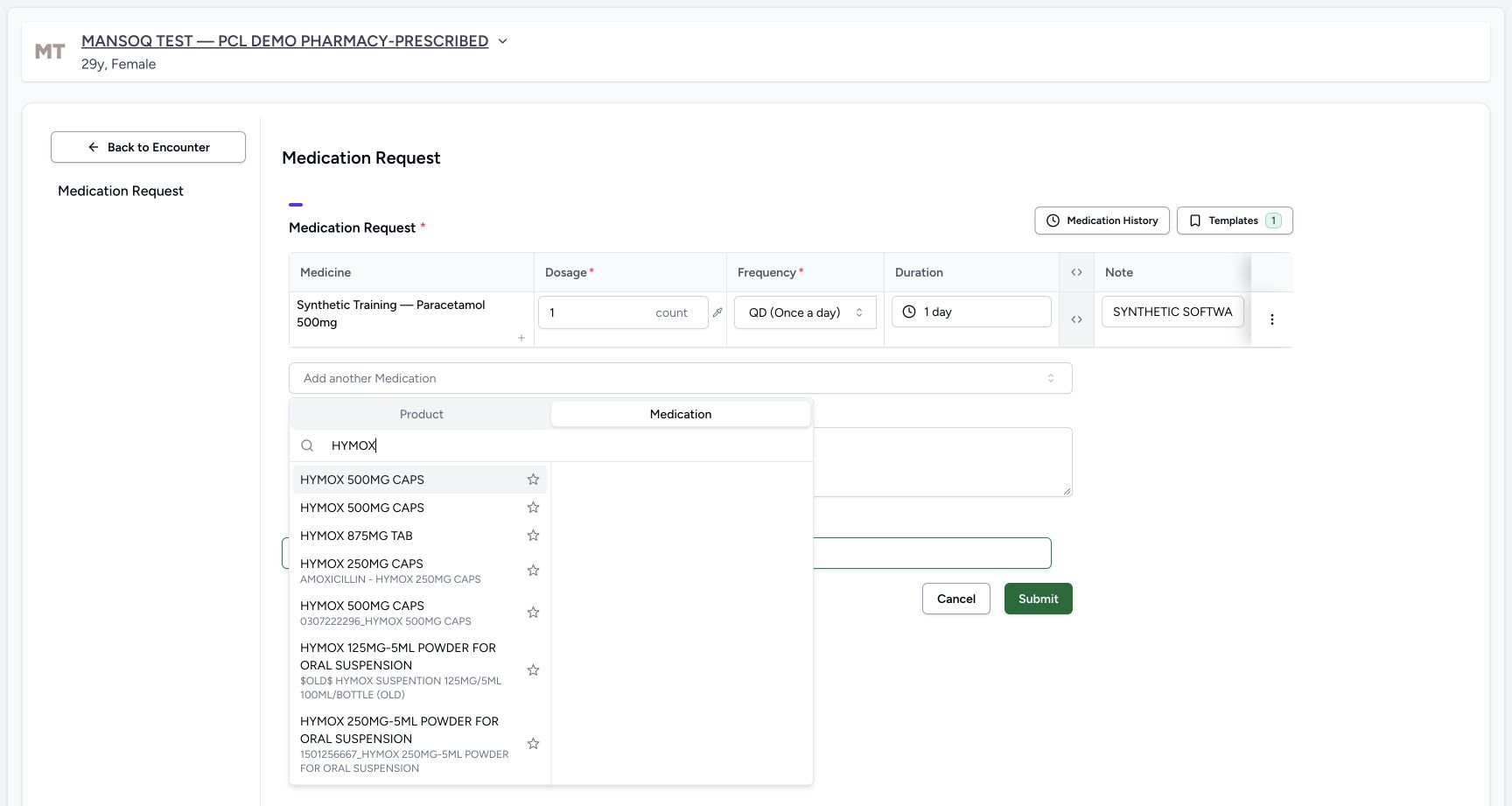
ea44faf7e39bc1fed9cd8fb6ec611f65a4e2d2a820d148d13eab8549fdf3b55c- Check Medication is selected: This is separate from the Product source used for the first row.
- Search HYMOX: The current medication search is populated with HYMOX.
- Choose the first illustrated HYMOX 500MG CAPS result: Several display names repeat. Use the illustrated same configured source; its first result does not print a terminology code alongside the name. Do not choose a star button.
- Every dose, frequency, duration and note here is a fictional software example, not a clinical recommendation. Do not dispense or administer these values. This lesson creates one new demonstration prescription only.
 123456
Recorded release 3dfb7c9f · 2026-10-20T09:53:11.323Z · 1728 × 921 Final two count one count review
Capture details
Observed 3dfb software on 20 October 2026. Two different new medicine requests grouped in one fictional demonstration prescription. Earlier draft1count each is explicitly revised before the sole Submit to product2count/codedmedicine1count. Original pixels/times preserved; no physical dispensing or administration.
Image SHA-256
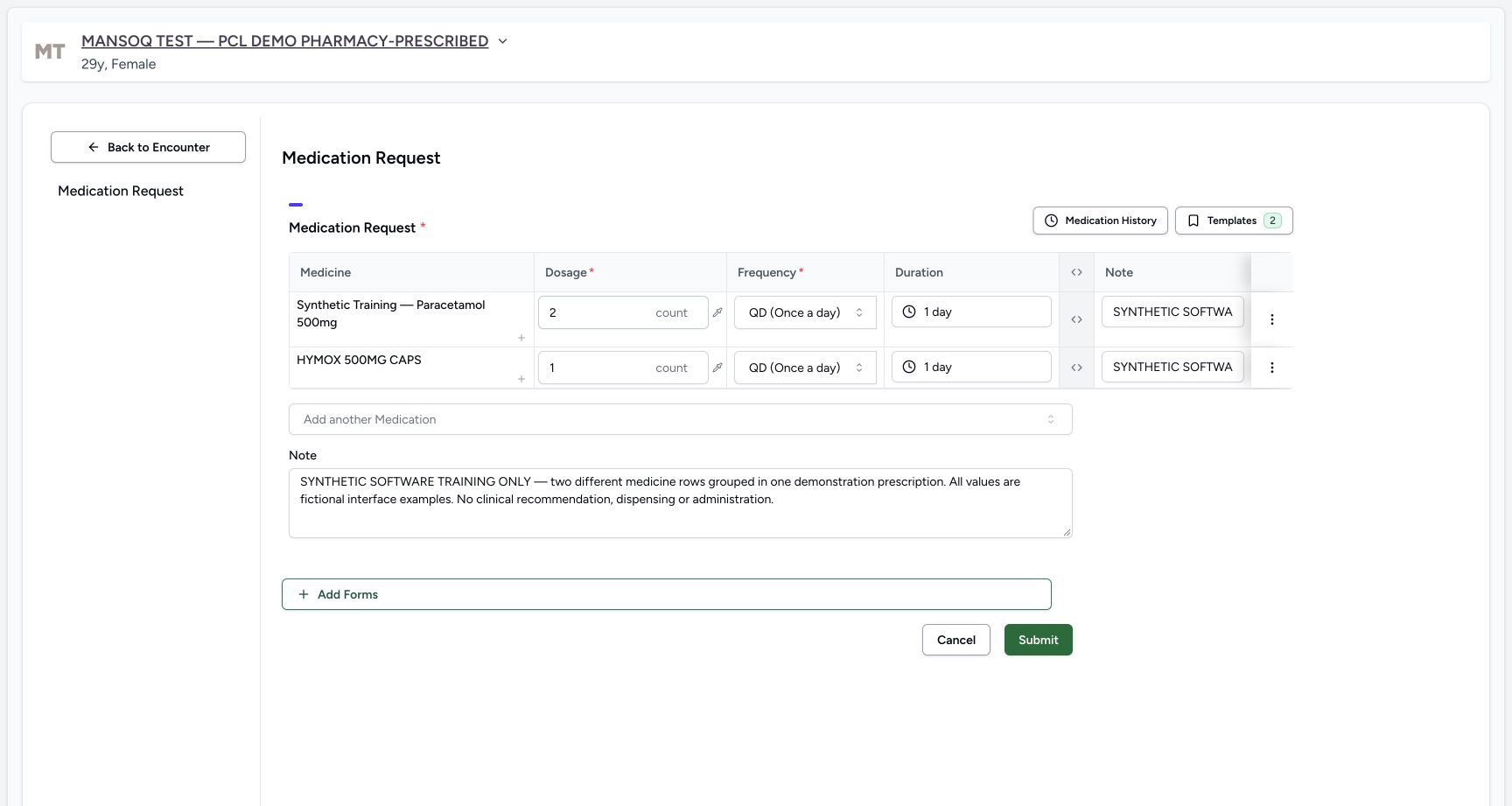
37b64600e7cdf02f35f5b6dfbe824a8263c0e669293c4475d8a7522c3e67c1fd- Review the revised first 2 count: The first row is now 2 count, separately from its QD and 1 day.
- Review the second 1 count: HYMOX remains 1 count, QD and 1 day.
- Check distinct row Note A: Its narrow input shows the start; use the saved Instructions cell for full readback.
- Check distinct row Note B: The second row keeps its own software-only note.
- Read the complete shared Note: This remains one prescription-level note for both rows.
- Choose Submit once after review: One Submit saves both new medicine rows into one prescription. Do not submit the rows separately.
1234567891011Recorded release 3dfb7c9f · 2026-10-20T09:53:32.587Z · 1728 × 921 Saved one prescription two rows
Capture details
Observed 3dfb software on 20 October 2026. Two different new medicine requests grouped in one fictional demonstration prescription. Earlier draft1count each is explicitly revised before the sole Submit to product2count/codedmedicine1count. Original pixels/times preserved; no physical dispensing or administration.
Image SHA-256
9ba1629a4643a98c8f5d02ee9d4d5e03a9d67e7d086e75b530731f5fe94a85dc- Select the new 20/10/2026 12:53 PM card: The older 18/10/2026 06:01 PM Furosemide card remains separate below.
- Read the Doctor prescriber: The selected new card identifies MANSOQ E2E Doctor.
- Read the one shared Note: The full shared prescription Note appears above both rows.
- Read the first medicine row: The selected card contains Synthetic Training — Paracetamol 500mg.
- Read saved 2.00 count: Its first structured dose is 2 count.
- Read first QD and 1 day: Frequency and duration are separate saved fields.
- Read complete row Note A: The Instructions cell shows the inventory-product software example note.
- Read the second HYMOX row: This same selected prescription also contains HYMOX 500MG CAPS.
- Read saved 1.00 count: The second medicine retains its separate 1 count dose.
- Read second QD and 1 day: Read this row’s own frequency and duration.
- Read complete row Note B: The second Instructions cell contains the coded-medicine software example note.
1. Verify the case and create a fresh request
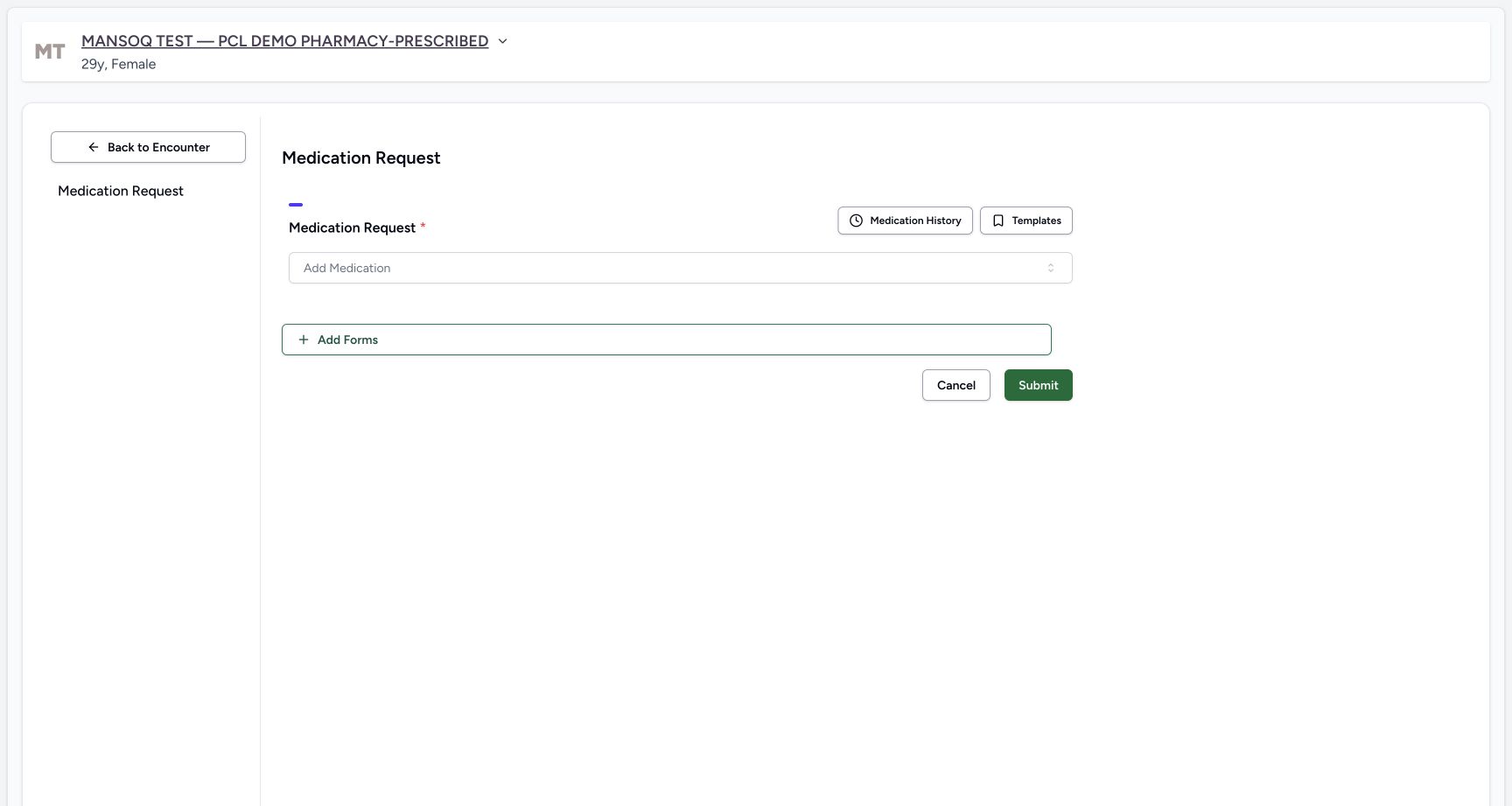
Check the Doctor account, fictional patient banner and selected ongoing Ambulatory encounter. Under Medicines keep Prescriptions selected and choose Create. Do not select Edit on the older Furosemide card. The new request should initially have no medicine rows.
1234Doctor case identity
Capture details
Observed 3dfb software on 20 October 2026. Two different new medicine requests grouped in one fictional demonstration prescription. Earlier draft1count each is explicitly revised before the sole Submit to product2count/codedmedicine1count. Original pixels/times preserved; no physical dispensing or administration.
Image SHA-256 f9d6911d772ebc6044b62b38d280542c0253d18b68e16ca7c9f9e22a37131e41
- Check the Doctor account: The open account menu identifies MANSOQ E2E Doctor and qa-doctor.
- Check the fictional Pharmacy-Prescribed patient: Use the assigned synthetic patient shown in the banner.
- Check the selected ongoing Ambulatory encounter: The selected encounter is In Progress.
- Open Medicines: Use the prescribing tab for this Doctor exercise.
12Fresh create entry
Capture details
Observed 3dfb software on 20 October 2026. Two different new medicine requests grouped in one fictional demonstration prescription. Earlier draft1count each is explicitly revised before the sole Submit to product2count/codedmedicine1count. Original pixels/times preserved; no physical dispensing or administration.
Image SHA-256 af6a41f753a8d976d54fd1db378146cf310c665261d06f868198068587d1d5c6
- Keep Prescriptions selected: The earlier Furosemide prescription is a separate existing card.
- Choose Create: Start a fresh request rather than editing the original prescription.
 1
1Empty new medication request
Capture details
Observed 3dfb software on 20 October 2026. Two different new medicine requests grouped in one fictional demonstration prescription. Earlier draft1count each is explicitly revised before the sole Submit to product2count/codedmedicine1count. Original pixels/times preserved; no physical dispensing or administration.
Image SHA-256 30b455c7486243fac713ab04f82b12241c5206550cd34046bffd4765f668e245
- Open Add Medication: The new request initially has no medicine rows.
2. Choose the first inventory product
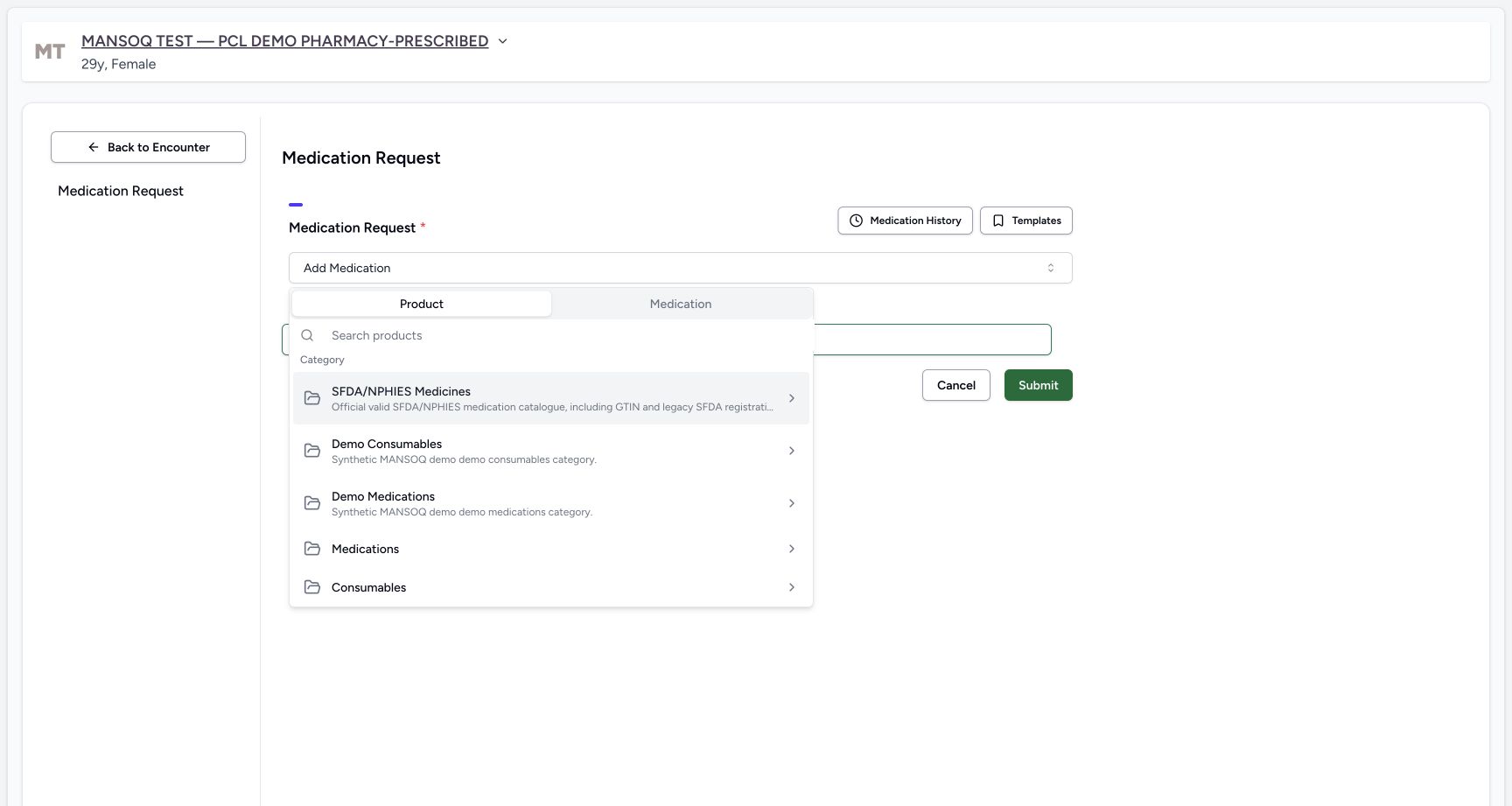
Open Add Medication. Keep Product selected and choose the illustrated Demo Medications category. Search Synthetic Training, then select Synthetic Training — Paracetamol 500mg, with 06281086104491 displayed below its name in this picker. Leave the other synthetic search results alone.
1Empty new medication request
Capture details
Observed 3dfb software on 20 October 2026. Two different new medicine requests grouped in one fictional demonstration prescription. Earlier draft1count each is explicitly revised before the sole Submit to product2count/codedmedicine1count. Original pixels/times preserved; no physical dispensing or administration.
Image SHA-256 30b455c7486243fac713ab04f82b12241c5206550cd34046bffd4765f668e245
- Open Add Medication: The new request initially has no medicine rows.
 123
123Product demo category
Capture details
Observed 3dfb software on 20 October 2026. Two different new medicine requests grouped in one fictional demonstration prescription. Earlier draft1count each is explicitly revised before the sole Submit to product2count/codedmedicine1count. Original pixels/times preserved; no physical dispensing or administration.
Image SHA-256 cebed08870f610bd421084530b939b3f11f0fb2014280814f489c723b9a154fb
- Choose Product for the first medicine: This tab searches configured inventory products, separate from the Medication terminology tab.
- Locate product search: Enter the synthetic product search here.
- Choose Demo Medications: This category was opened before the illustrated search.
12Synthetic product search result
Capture details
Observed 3dfb software on 20 October 2026. Two different new medicine requests grouped in one fictional demonstration prescription. Earlier draft1count each is explicitly revised before the sole Submit to product2count/codedmedicine1count. Original pixels/times preserved; no physical dispensing or administration.
Image SHA-256 264a0546b13221c2e7603e27b6f07d348b31a86d87fefb4d6894e5af606e0e4c
- Search Synthetic Training: The Product search is populated with this text.
- Choose Synthetic Training — Paracetamol 500mg: Select this illustrated product, with 06281086104491 displayed below its name, rather than the other synthetic results.
3. Review the first row’s starting quantity and frequency
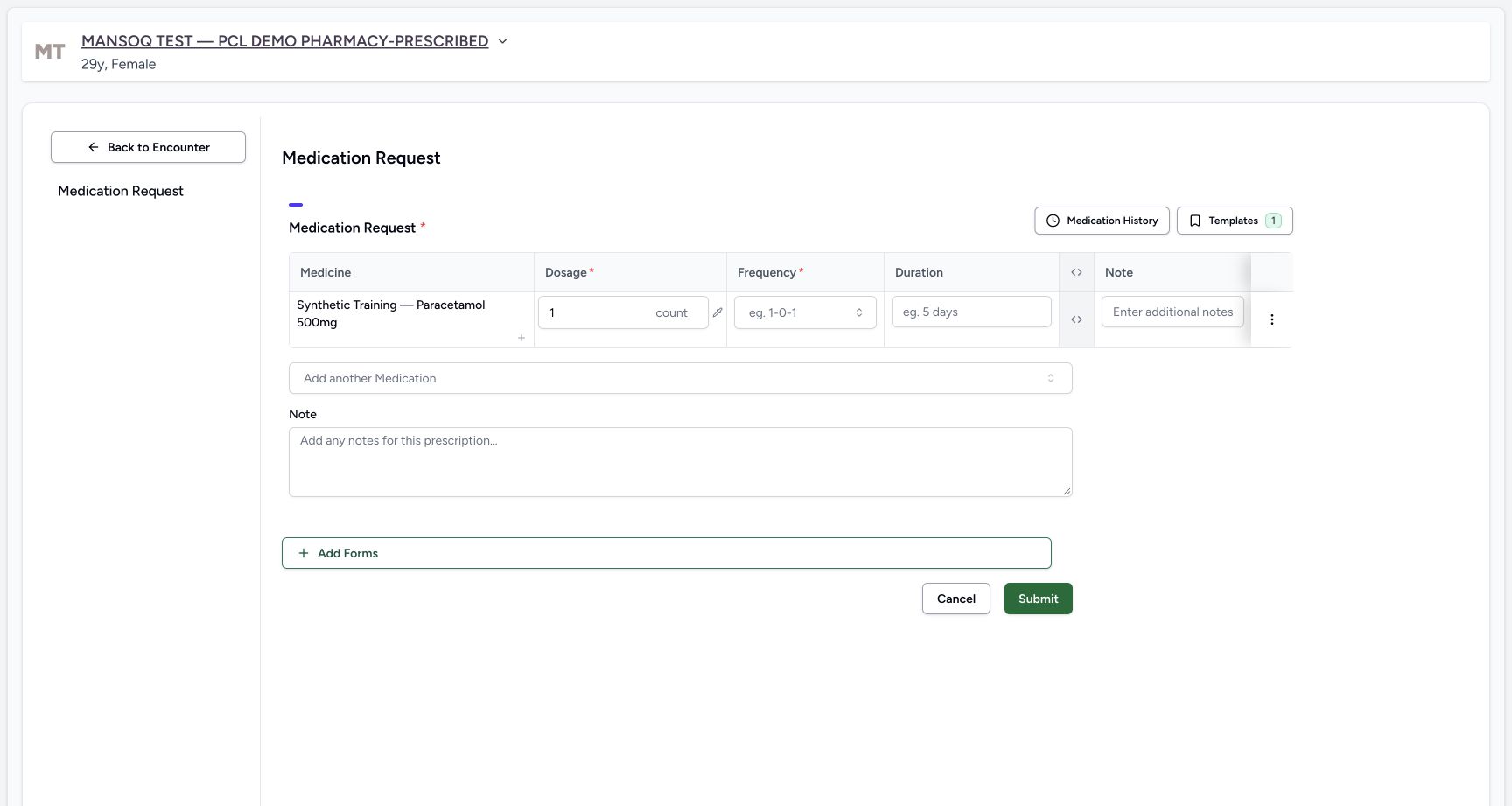
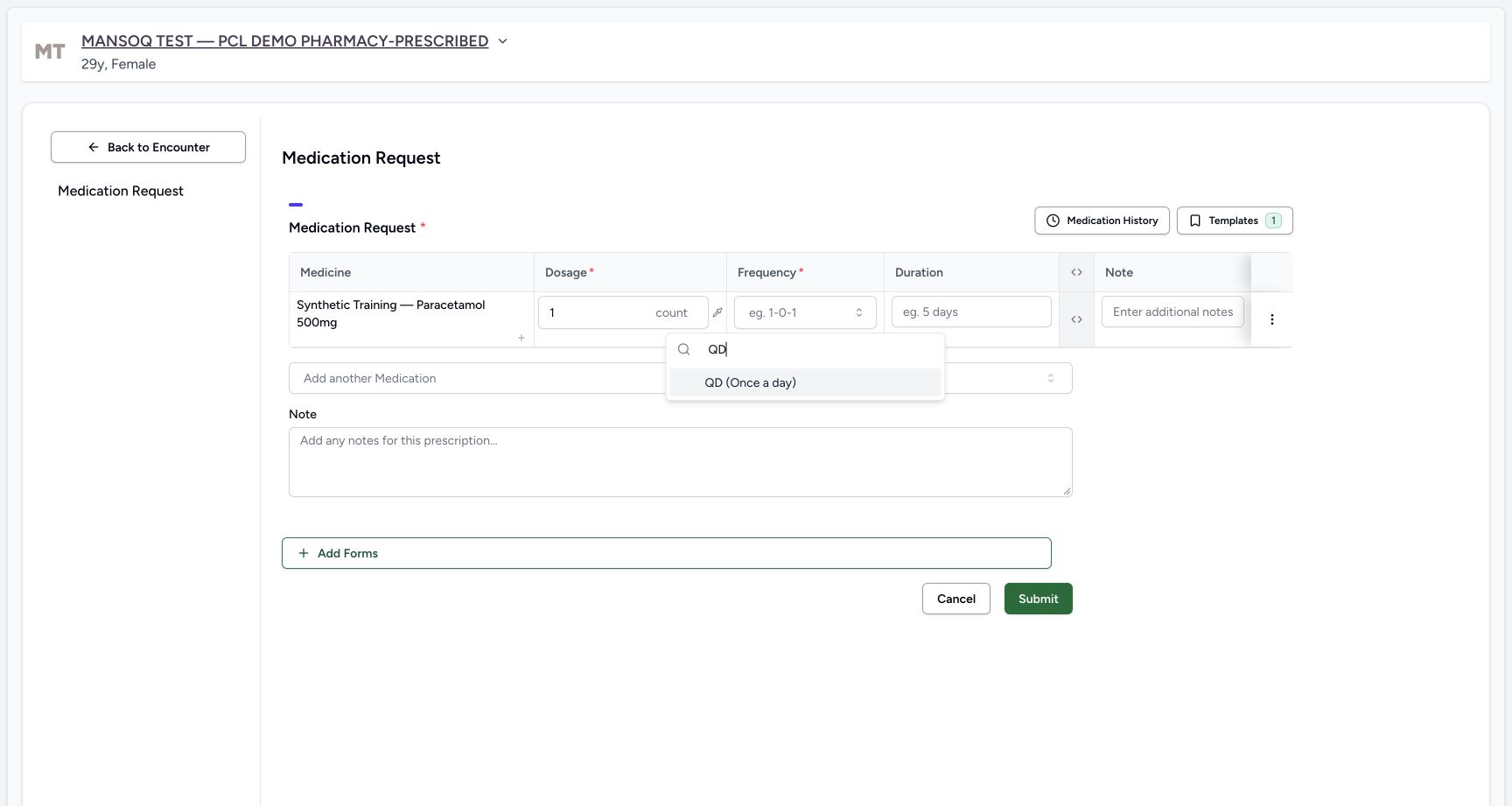
The configured inventory product starts with 1 count. Review that unit explicitly; Frequency and Duration are still blank. Open its Frequency, search QD and choose QD (Once a day). Review the resulting QD and preset 1 day as separate fields. This is an initial draft; the first quantity will be revised before the final submission.
 12345
12345First product defaults
Capture details
Observed 3dfb software on 20 October 2026. Two different new medicine requests grouped in one fictional demonstration prescription. Earlier draft1count each is explicitly revised before the sole Submit to product2count/codedmedicine1count. Original pixels/times preserved; no physical dispensing or administration.
Image SHA-256 b3c611b3f74ceeaccb21434bf98c332ecd16a8736c2f8da9ba002e2f858b2b0c
- Read the first product row: This is the selected Synthetic Training — Paracetamol 500mg product.
- Review the initial 1 count: The configured product supplies this starting quantity and count unit.
- Open the first row’s Frequency: Frequency starts blank and must be selected separately.
- Read the initially blank Duration: Duration has not yet been selected.
- Locate the first row Note: This narrow field belongs only to the first medicine.
 12
12First row qd choice
Capture details
Observed 3dfb software on 20 October 2026. Two different new medicine requests grouped in one fictional demonstration prescription. Earlier draft1count each is explicitly revised before the sole Submit to product2count/codedmedicine1count. Original pixels/times preserved; no physical dispensing or administration.
Image SHA-256 30ef21f5b0b83f5c91f0d399a9265db641be762e4bc4b9df5b1592900f9cd341
- Search QD for the first row: The actual Frequency search contains QD.
- Choose QD (Once a day): This is the first row’s frequency choice for the fictional software exercise.
 1234
1234First row complete before second
Capture details
Observed 3dfb software on 20 October 2026. Two different new medicine requests grouped in one fictional demonstration prescription. Earlier draft1count each is explicitly revised before the sole Submit to product2count/codedmedicine1count. Original pixels/times preserved; no physical dispensing or administration.
Image SHA-256 8b2d16364da01b5177fd3e72dcea6ee9e9cc972cb16c6572c901ecca6d832e12
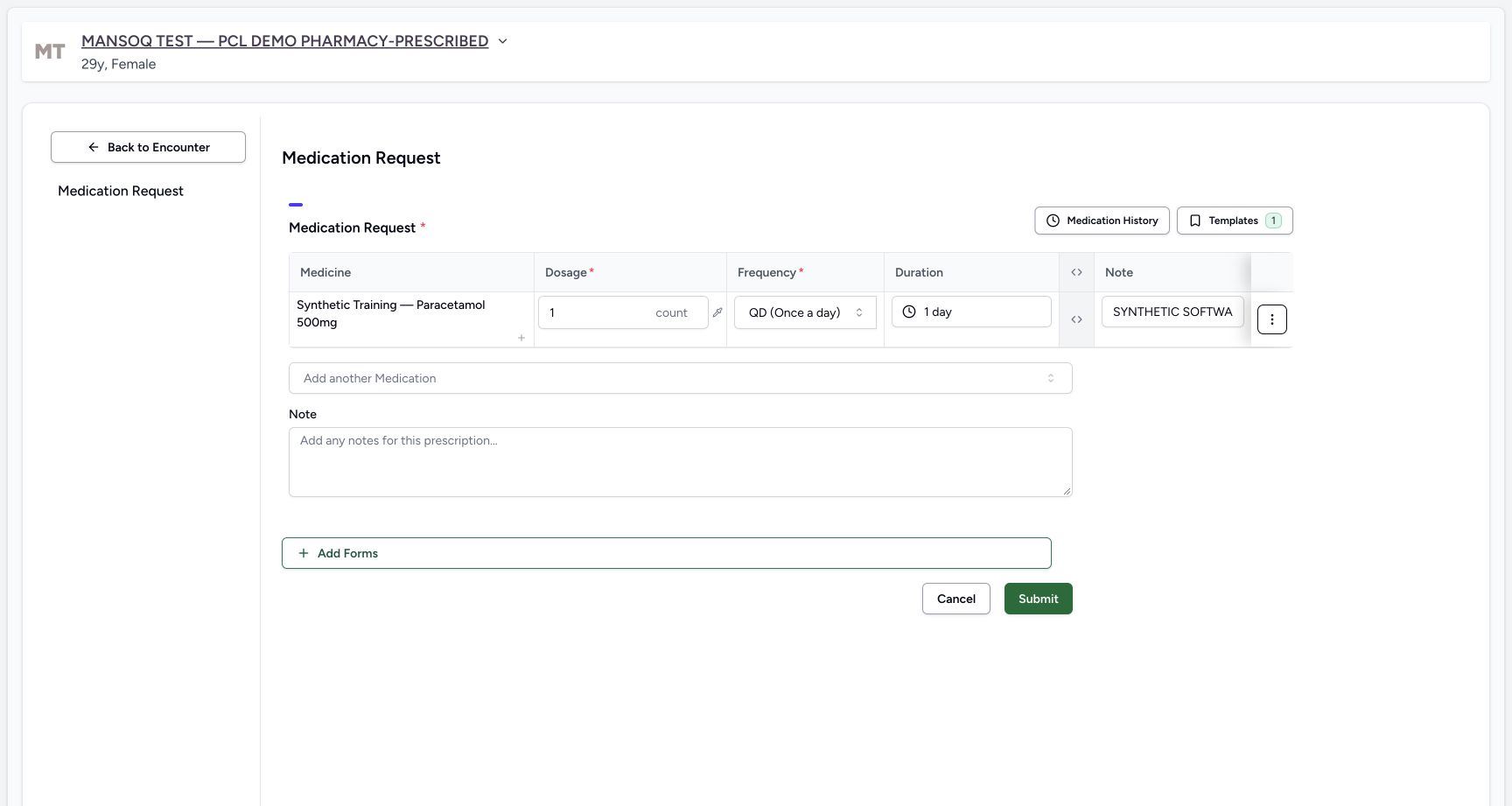
- Review the first row QD: The selected frequency remains separate from dose.
- Review the preset 1 day: The QD preset supplied this initial duration.
- Enter row Note A: This narrow input clips its longer software-only text; the saved card later shows the complete note.
- Choose Add another Medication: Use this selector for a second different medicine, rather than the small dosage-step plus inside the first row.
4. Enter a note for the first medicine
In the first row’s Note enter: SYNTHETIC SOFTWARE TRAINING ONLY — two-row prescription example A, inventory product. This is not treatment advice; do not dispense or administer. The input shows only its beginning; the complete saved Instructions cell will provide readback. Keep this row note separate from the shared prescription Note below the table.
12345First product defaults
Capture details
Observed 3dfb software on 20 October 2026. Two different new medicine requests grouped in one fictional demonstration prescription. Earlier draft1count each is explicitly revised before the sole Submit to product2count/codedmedicine1count. Original pixels/times preserved; no physical dispensing or administration.
Image SHA-256 b3c611b3f74ceeaccb21434bf98c332ecd16a8736c2f8da9ba002e2f858b2b0c
- Read the first product row: This is the selected Synthetic Training — Paracetamol 500mg product.
- Review the initial 1 count: The configured product supplies this starting quantity and count unit.
- Open the first row’s Frequency: Frequency starts blank and must be selected separately.
- Read the initially blank Duration: Duration has not yet been selected.
- Locate the first row Note: This narrow field belongs only to the first medicine.
1234First row complete before second
Capture details
Observed 3dfb software on 20 October 2026. Two different new medicine requests grouped in one fictional demonstration prescription. Earlier draft1count each is explicitly revised before the sole Submit to product2count/codedmedicine1count. Original pixels/times preserved; no physical dispensing or administration.
Image SHA-256 8b2d16364da01b5177fd3e72dcea6ee9e9cc972cb16c6572c901ecca6d832e12
- Review the first row QD: The selected frequency remains separate from dose.
- Review the preset 1 day: The QD preset supplied this initial duration.
- Enter row Note A: This narrow input clips its longer software-only text; the saved card later shows the complete note.
- Choose Add another Medication: Use this selector for a second different medicine, rather than the small dosage-step plus inside the first row.
5. Add a second different medicine
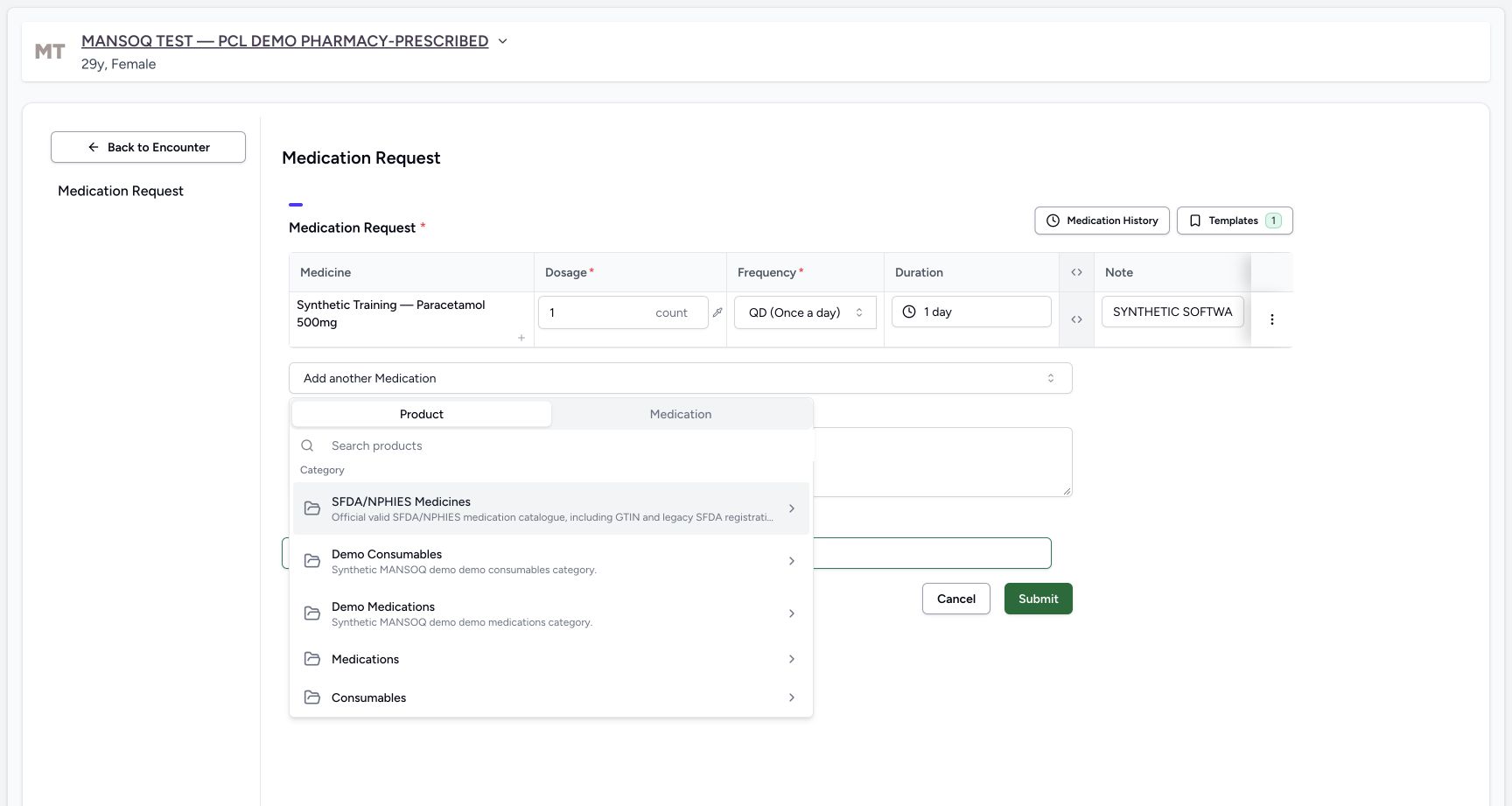
Select Add another Medication below the first row. This adds another medicine; the small plus inside an existing medicine adds a dosage step instead. In the new selector switch from Product to Medication, search HYMOX and choose the first illustrated HYMOX 500MG CAPS result. Several names repeat and the first result does not print its terminology code here. Do not select the star control.
1234First row complete before second
Capture details
Observed 3dfb software on 20 October 2026. Two different new medicine requests grouped in one fictional demonstration prescription. Earlier draft1count each is explicitly revised before the sole Submit to product2count/codedmedicine1count. Original pixels/times preserved; no physical dispensing or administration.
Image SHA-256 8b2d16364da01b5177fd3e72dcea6ee9e9cc972cb16c6572c901ecca6d832e12
- Review the first row QD: The selected frequency remains separate from dose.
- Review the preset 1 day: The QD preset supplied this initial duration.
- Enter row Note A: This narrow input clips its longer software-only text; the saved card later shows the complete note.
- Choose Add another Medication: Use this selector for a second different medicine, rather than the small dosage-step plus inside the first row.
 12
12Add another medication tabs
Capture details
Observed 3dfb software on 20 October 2026. Two different new medicine requests grouped in one fictional demonstration prescription. Earlier draft1count each is explicitly revised before the sole Submit to product2count/codedmedicine1count. Original pixels/times preserved; no physical dispensing or administration.
Image SHA-256 3102e237092e95650bef059f6147fdc6537cf6c0f134e7db5ff5e8d3b5a0df11
- Locate Add another Medication: The selector opens beneath the completed first row.
- Switch the new selection to Medication: Use the terminology-backed tab for the second source; the first product row remains above.
123Medication hymox search result
Capture details
Observed 3dfb software on 20 October 2026. Two different new medicine requests grouped in one fictional demonstration prescription. Earlier draft1count each is explicitly revised before the sole Submit to product2count/codedmedicine1count. Original pixels/times preserved; no physical dispensing or administration.
Image SHA-256 ea44faf7e39bc1fed9cd8fb6ec611f65a4e2d2a820d148d13eab8549fdf3b55c
- Check Medication is selected: This is separate from the Product source used for the first row.
- Search HYMOX: The current medication search is populated with HYMOX.
- Choose the first illustrated HYMOX 500MG CAPS result: Several display names repeat. Use the illustrated same configured source; its first result does not print a terminology code alongside the name. Do not choose a star button.
6. Inspect the independent second row
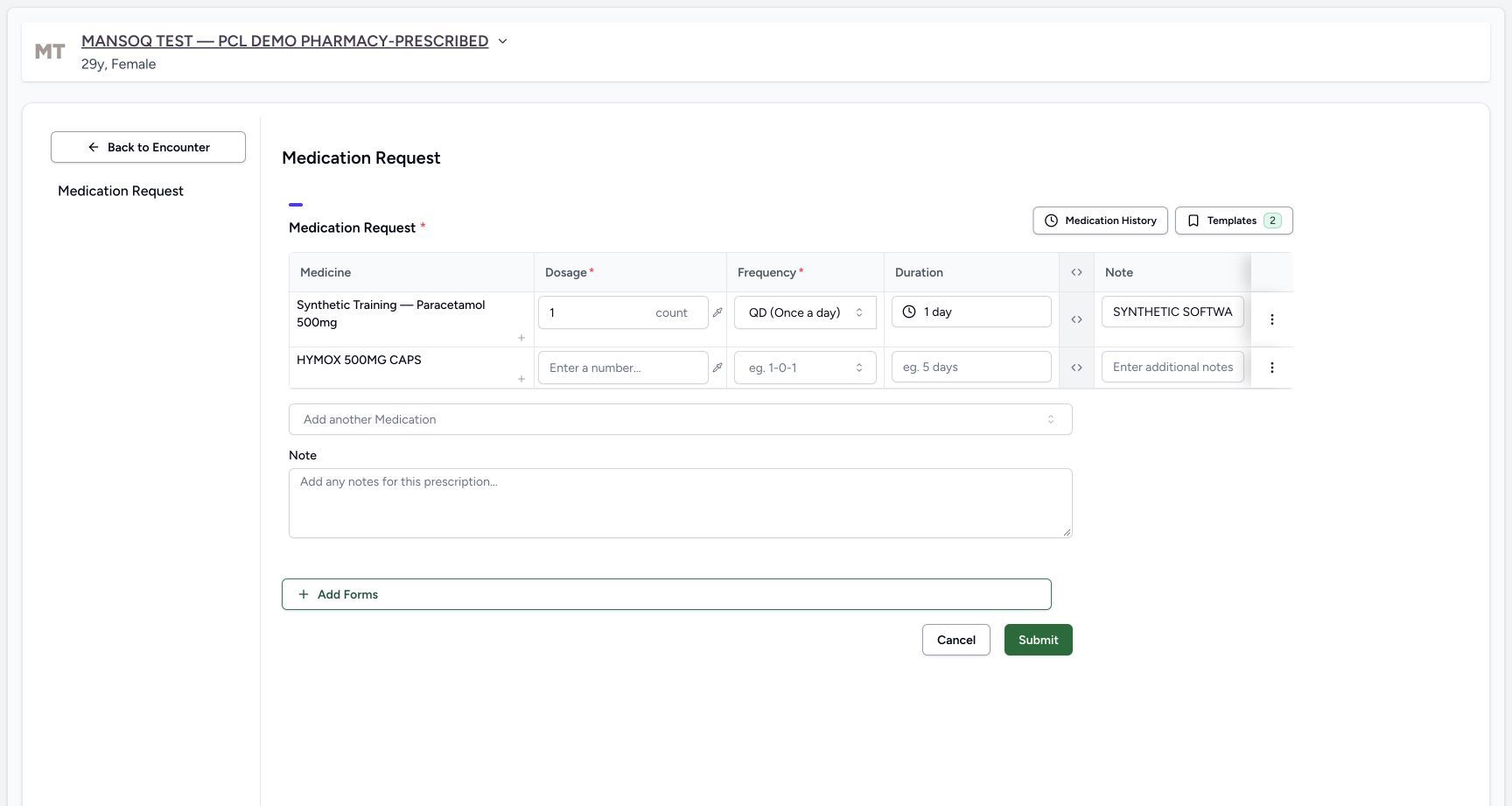
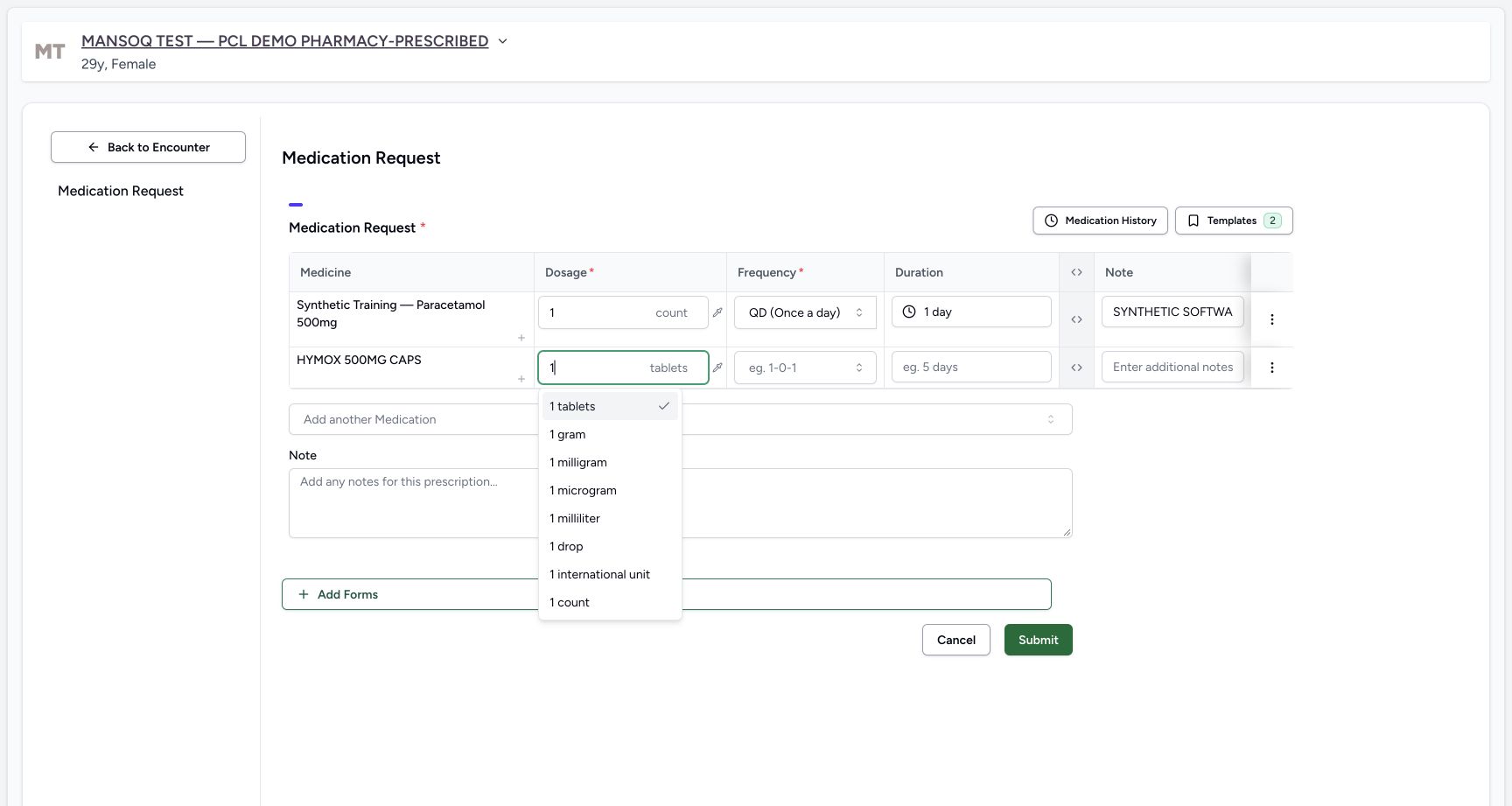
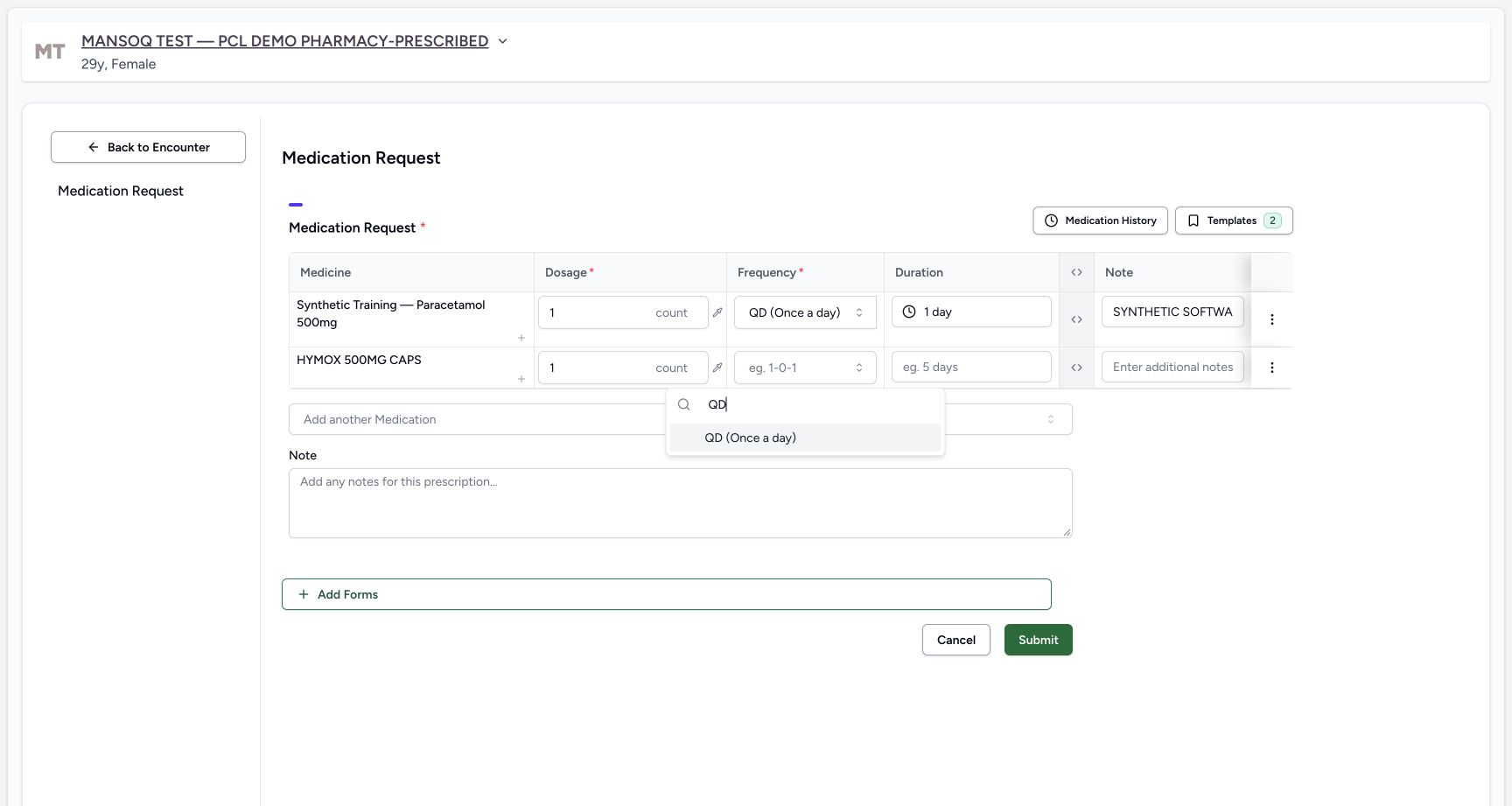
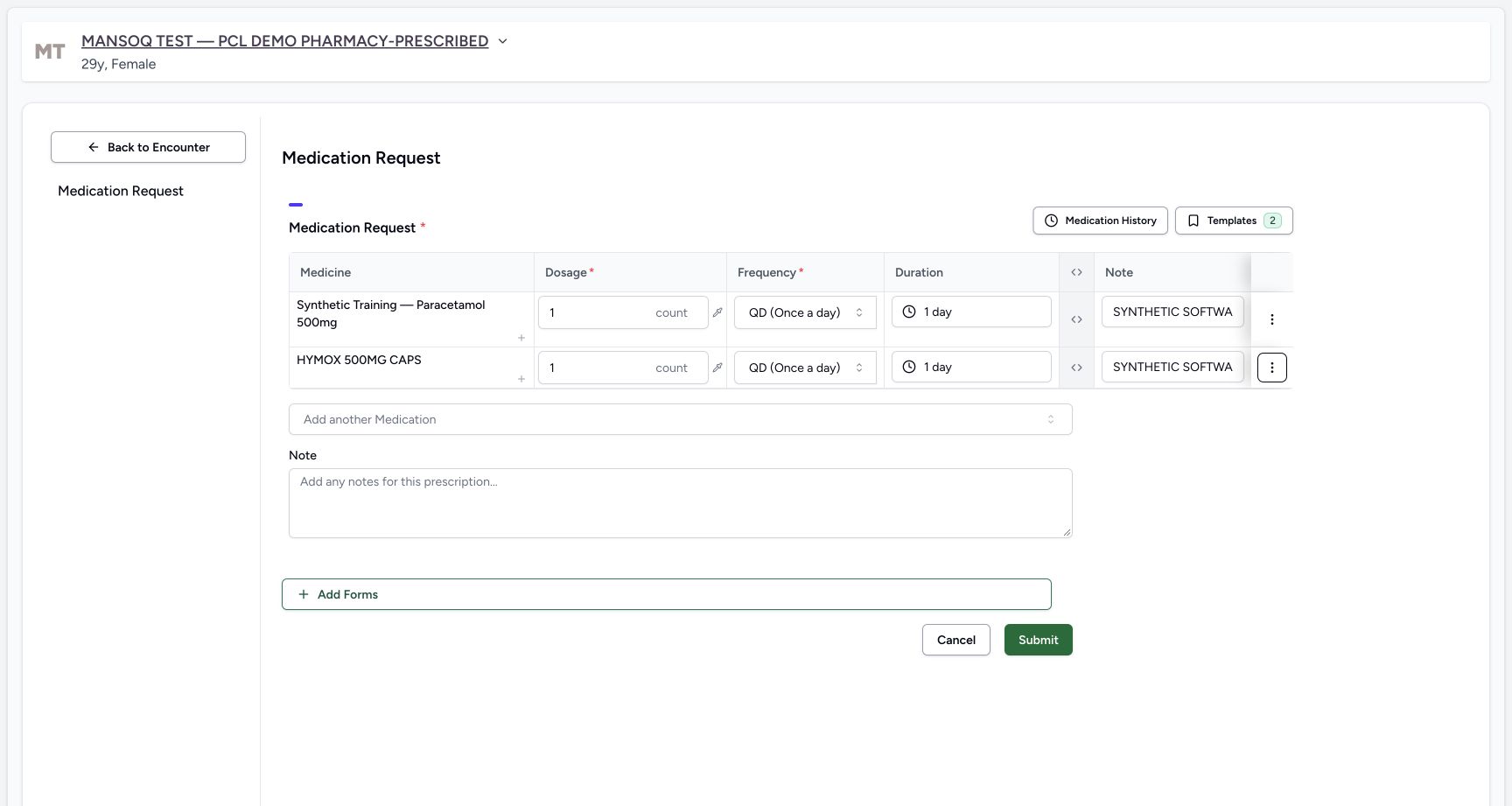
The first product row retains its quantity, QD, 1 day and note. The new HYMOX row has separate blank Dosage, Frequency, Duration and Note fields. Enter 1 in this second Dosage and explicitly choose 1 count rather than the initially suggested tablets. Open its Frequency, search QD and choose QD (Once a day), then review the preset 1 day.
 12345
12345Two distinct rows second empty
Capture details
Observed 3dfb software on 20 October 2026. Two different new medicine requests grouped in one fictional demonstration prescription. Earlier draft1count each is explicitly revised before the sole Submit to product2count/codedmedicine1count. Original pixels/times preserved; no physical dispensing or administration.
Image SHA-256 bcfa66bb71e21dcb7e197dba85ba694be629797177aeb22644d23e542636cb6d
- Check the first row is retained: Its 1 count, QD, 1 day and Note A remain while adding the second medicine.
- Read the second HYMOX row: This is a different medicine row, not an additional dosage instruction under Paracetamol.
- Enter the second row’s quantity: The code-backed medicine’s prescribing dose starts blank.
- Locate the blank second Frequency: The first row’s QD has not been copied into this row.
- Locate the blank second Duration: The first row’s duration has not been copied here.
 12
12Second row count choice
Capture details
Observed 3dfb software on 20 October 2026. Two different new medicine requests grouped in one fictional demonstration prescription. Earlier draft1count each is explicitly revised before the sole Submit to product2count/codedmedicine1count. Original pixels/times preserved; no physical dispensing or administration.
Image SHA-256 d6117abb1f8c5b3291c3e9eace5e3313a6a01f2116c58054e8b5ea32917167c1
- Enter 1 for the second row: The unit suggestions initially offer tablets.
- Choose 1 count explicitly: Select count for this fictional software example rather than accepting tablets.
 12
12Second row qd choice
Capture details
Observed 3dfb software on 20 October 2026. Two different new medicine requests grouped in one fictional demonstration prescription. Earlier draft1count each is explicitly revised before the sole Submit to product2count/codedmedicine1count. Original pixels/times preserved; no physical dispensing or administration.
Image SHA-256 731d5ed66f794a80cd0f83cef9876ffcf8de1c27dd84afd956399f836083f959
- Search QD for the second row: This open selector belongs to HYMOX.
- Choose QD (Once a day): Choose frequency separately for this medicine; the first row remains unchanged.
 123
123Both rows independent values
Capture details
Observed 3dfb software on 20 October 2026. Two different new medicine requests grouped in one fictional demonstration prescription. Earlier draft1count each is explicitly revised before the sole Submit to product2count/codedmedicine1count. Original pixels/times preserved; no physical dispensing or administration.
Image SHA-256 dbe8eb3766010997d445eccbe5b9932a9c1e99d060ed44cb740df8f0f6828269
- Review second-row 1 day: Review the preset duration separately from its 1 count dose and QD frequency.
- Enter row Note B: This is a separate row-specific software note from Note A above.
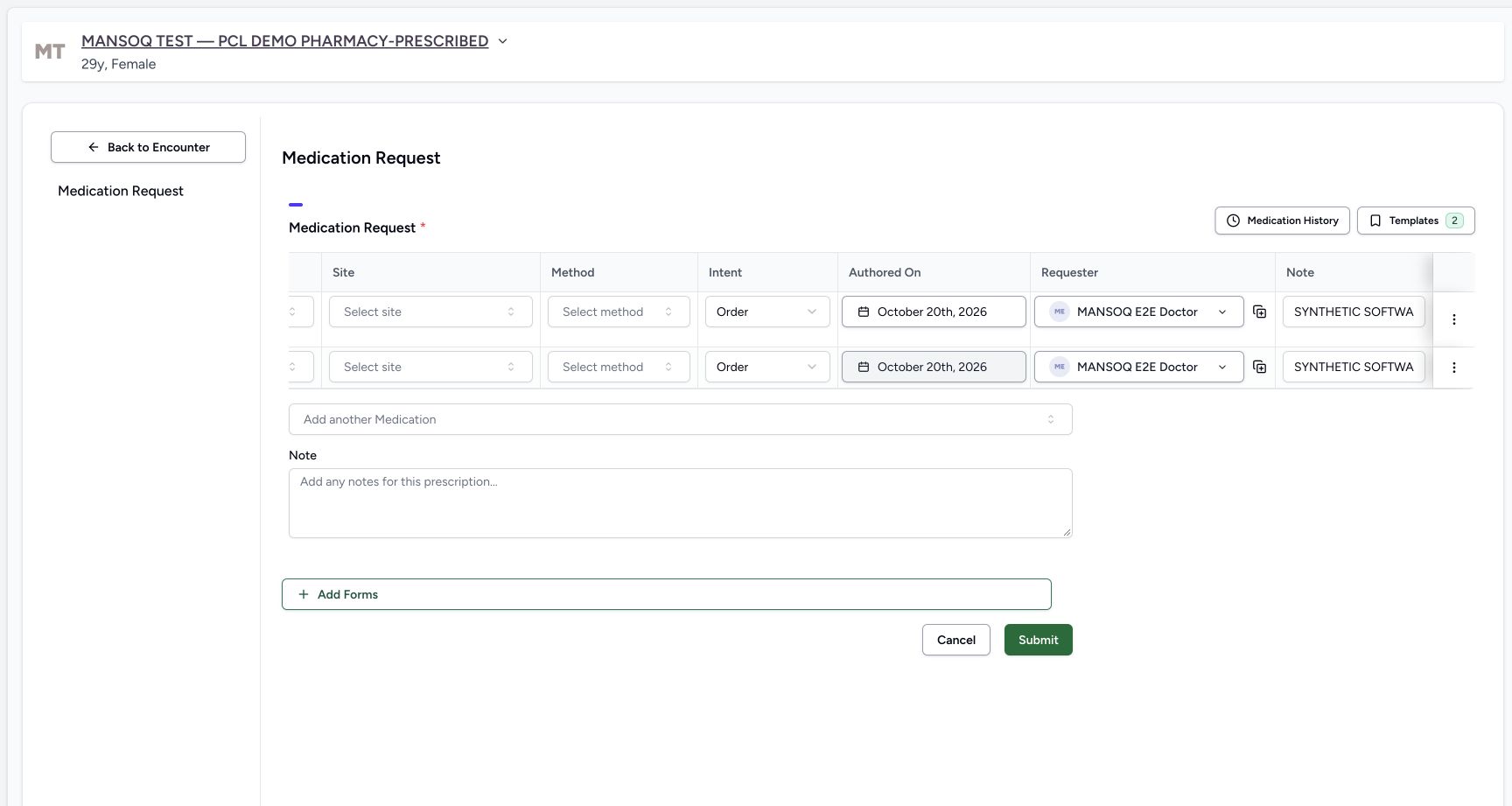
- Expand the advanced columns: Use the header control, then scroll the medicine table horizontally right to inspect both requesters and authored dates.
7. Enter the second row note and check requesters
In the second Note enter: SYNTHETIC SOFTWARE TRAINING ONLY — two-row prescription example B, coded medicine. This is not treatment advice; do not dispense or administer. Expand the advanced columns using the header control and scroll the table right. Check Order, October 20th, 2026 and requester MANSOQ E2E Doctor for each row. Scroll left and collapse the advanced columns using the same header control shown before expansion. The notes and requesters belong to each medicine separately.
123Both rows independent values
Capture details
Observed 3dfb software on 20 October 2026. Two different new medicine requests grouped in one fictional demonstration prescription. Earlier draft1count each is explicitly revised before the sole Submit to product2count/codedmedicine1count. Original pixels/times preserved; no physical dispensing or administration.
Image SHA-256 dbe8eb3766010997d445eccbe5b9932a9c1e99d060ed44cb740df8f0f6828269
- Review second-row 1 day: Review the preset duration separately from its 1 count dose and QD frequency.
- Enter row Note B: This is a separate row-specific software note from Note A above.
- Expand the advanced columns: Use the header control, then scroll the medicine table horizontally right to inspect both requesters and authored dates.
 1234567
Both rows doctor authored date
Capture details
Observed 3dfb software on 20 October 2026. Two different new medicine requests grouped in one fictional demonstration prescription. Earlier draft1count each is explicitly revised before the sole Submit to product2count/codedmedicine1count. Original pixels/times preserved; no physical dispensing or administration.
Image SHA-256 120beae010852cd46284ad32b01c8783578d854b06594fe853684e745f170f01
- Read first-row Order intent: This belongs to the first new request.
- Read the first authored date: The draft shows October 20th, 2026.
- Read the first Doctor requester: The first request is assigned to MANSOQ E2E Doctor.
- Read second-row Order intent: The second medicine has its own request metadata.
- Read the second authored date: The second draft also shows October 20th, 2026.
- Read the second Doctor requester: The second request also identifies MANSOQ E2E Doctor.
- Scroll the table horizontally left: This is a horizontal scrolling gesture within the table. Return to the earlier illustrated header control and collapse the advanced columns.
8. Enter one shared prescription note
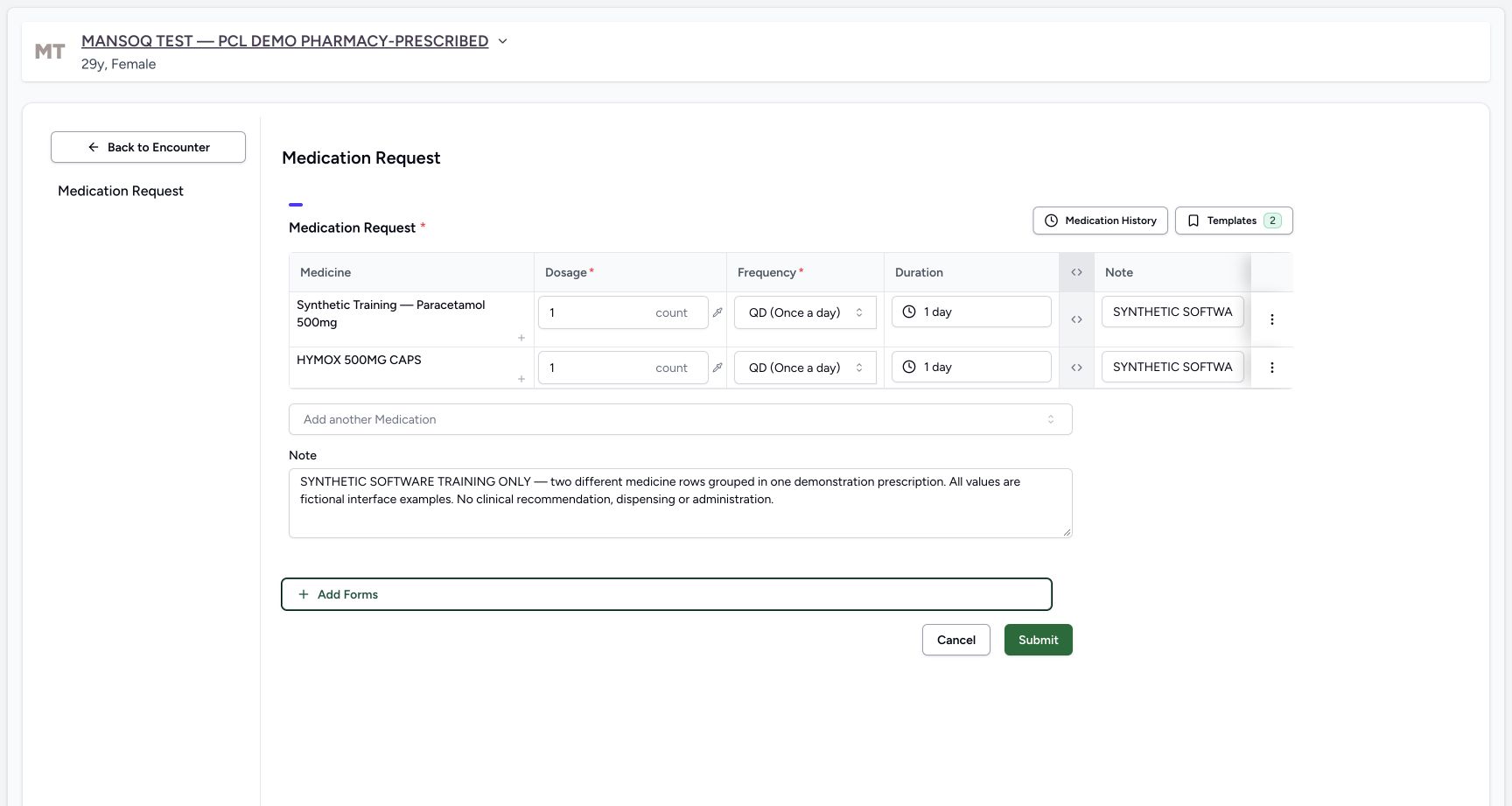
In the Note below the table enter: SYNTHETIC SOFTWARE TRAINING ONLY — two different medicine rows grouped in one demonstration prescription. All values are fictional interface examples. No clinical recommendation, dispensing or administration. This is one shared note for the grouped prescription, in addition to the separate row Notes A and B. The illustrated draft at this stage still has 1 count in each row; do not submit it yet. The next step makes the deliberate final quantity revision.
 123
123Review two rows shared note before submit
Capture details
Observed 3dfb software on 20 October 2026. Two different new medicine requests grouped in one fictional demonstration prescription. Earlier draft1count each is explicitly revised before the sole Submit to product2count/codedmedicine1count. Original pixels/times preserved; no physical dispensing or administration.
Image SHA-256 fb1c58232da397227b971cc2a91d0f1543d478bc564ba1e9b959c72b12d98742
- Enter one shared prescription Note: This full software-only Note applies to the grouped prescription, separately from row Notes A and B.
- Read the earlier first-row quantity: This earlier draft still has 1 count in the first row; the next step deliberately revises it before submission.
- Check second-row quantity remains 1 count: The second row stays at 1 count through the final review.
9. Revise and review the final quantities
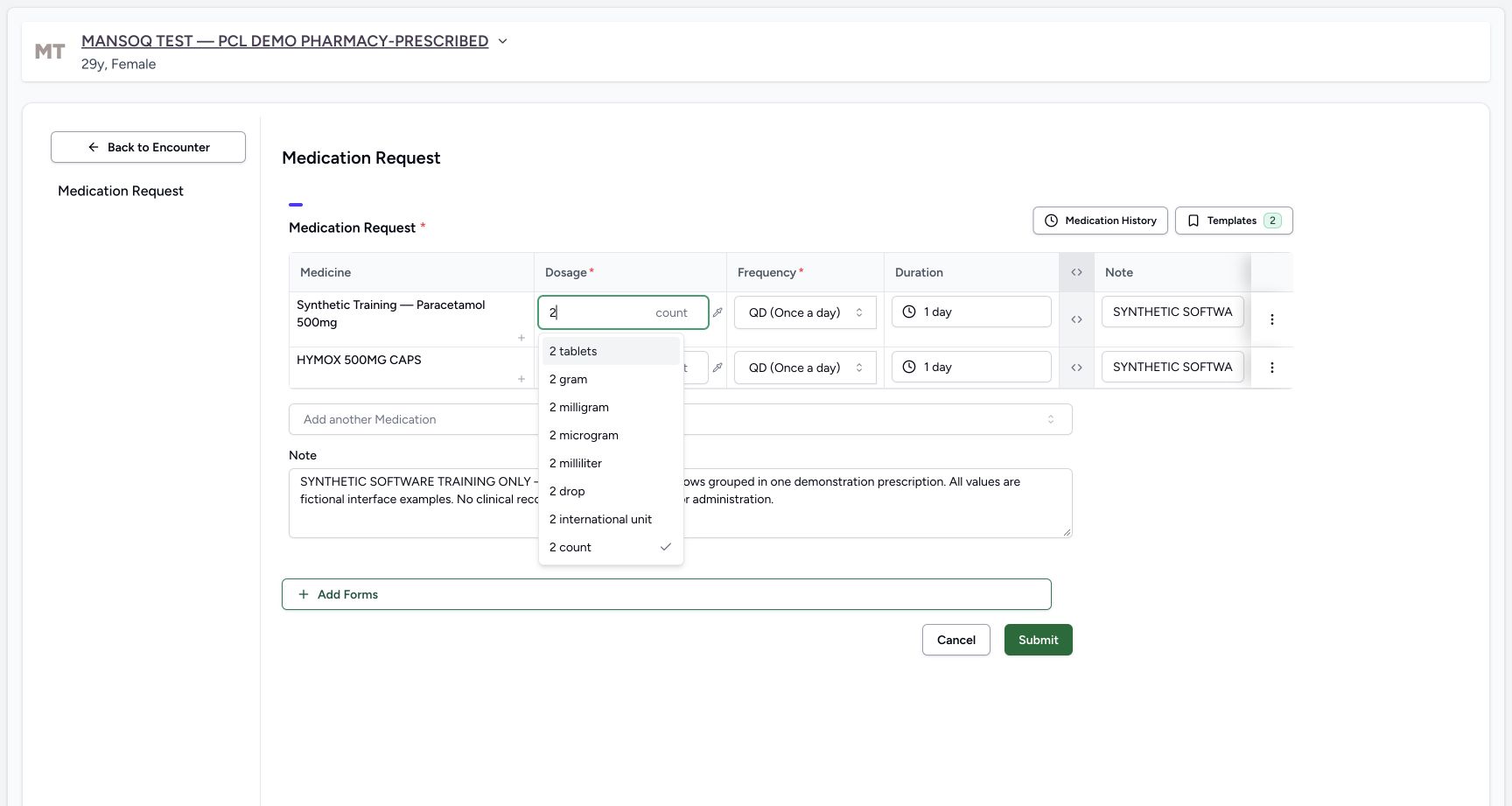
In the unsaved first product row change the quantity from 1 to 2 and explicitly choose 2 count. Keep the second HYMOX row at 1 count. Review the final first 2 count and second 1 count, each with its own QD and 1 day. Recheck both distinct row notes and the complete shared software-only Note. This revision occurs before the only Submit.
 12
12First row unsaved correction two count
Capture details
Observed 3dfb software on 20 October 2026. Two different new medicine requests grouped in one fictional demonstration prescription. Earlier draft1count each is explicitly revised before the sole Submit to product2count/codedmedicine1count. Original pixels/times preserved; no physical dispensing or administration.
Image SHA-256 aafe1e494738c3f0b047d1c77be0c93952b401dcfbf0f188954c0922fb336b70
- Revise the unsaved first quantity to 2: This changes only the first row before any Submit.
- Choose 2 count explicitly: Keep count as the unit; the suggestion list also contains 2 tablets, which is not the illustrated selection.
123456Final two count one count review
Capture details
Observed 3dfb software on 20 October 2026. Two different new medicine requests grouped in one fictional demonstration prescription. Earlier draft1count each is explicitly revised before the sole Submit to product2count/codedmedicine1count. Original pixels/times preserved; no physical dispensing or administration.
Image SHA-256 37b64600e7cdf02f35f5b6dfbe824a8263c0e669293c4475d8a7522c3e67c1fd
- Review the revised first 2 count: The first row is now 2 count, separately from its QD and 1 day.
- Review the second 1 count: HYMOX remains 1 count, QD and 1 day.
- Check distinct row Note A: Its narrow input shows the start; use the saved Instructions cell for full readback.
- Check distinct row Note B: The second row keeps its own software-only note.
- Read the complete shared Note: This remains one prescription-level note for both rows.
- Choose Submit once after review: One Submit saves both new medicine rows into one prescription. Do not submit the rows separately.
10. Submit both rows together once
After reviewing both different medicine rows and their note scopes, choose Submit once. Wait for the form to return to Overview. Open Medicines, keep Prescriptions selected and choose the new 20/10/2026 12:53 PM Doctor card. Do not submit the two rows separately or edit the older Furosemide prescription.
123456Final two count one count review
Capture details
Observed 3dfb software on 20 October 2026. Two different new medicine requests grouped in one fictional demonstration prescription. Earlier draft1count each is explicitly revised before the sole Submit to product2count/codedmedicine1count. Original pixels/times preserved; no physical dispensing or administration.
Image SHA-256 37b64600e7cdf02f35f5b6dfbe824a8263c0e669293c4475d8a7522c3e67c1fd
- Review the revised first 2 count: The first row is now 2 count, separately from its QD and 1 day.
- Review the second 1 count: HYMOX remains 1 count, QD and 1 day.
- Check distinct row Note A: Its narrow input shows the start; use the saved Instructions cell for full readback.
- Check distinct row Note B: The second row keeps its own software-only note.
- Read the complete shared Note: This remains one prescription-level note for both rows.
- Choose Submit once after review: One Submit saves both new medicine rows into one prescription. Do not submit the rows separately.
 1
1Return overview after single submit
Capture details
Observed 3dfb software on 20 October 2026. Two different new medicine requests grouped in one fictional demonstration prescription. Earlier draft1count each is explicitly revised before the sole Submit to product2count/codedmedicine1count. Original pixels/times preserved; no physical dispensing or administration.
Image SHA-256 5d1e1cdbb1df37531baaa50c184095ff1fa7ad55c5ca8e4a6c1d05f6e89b08b6
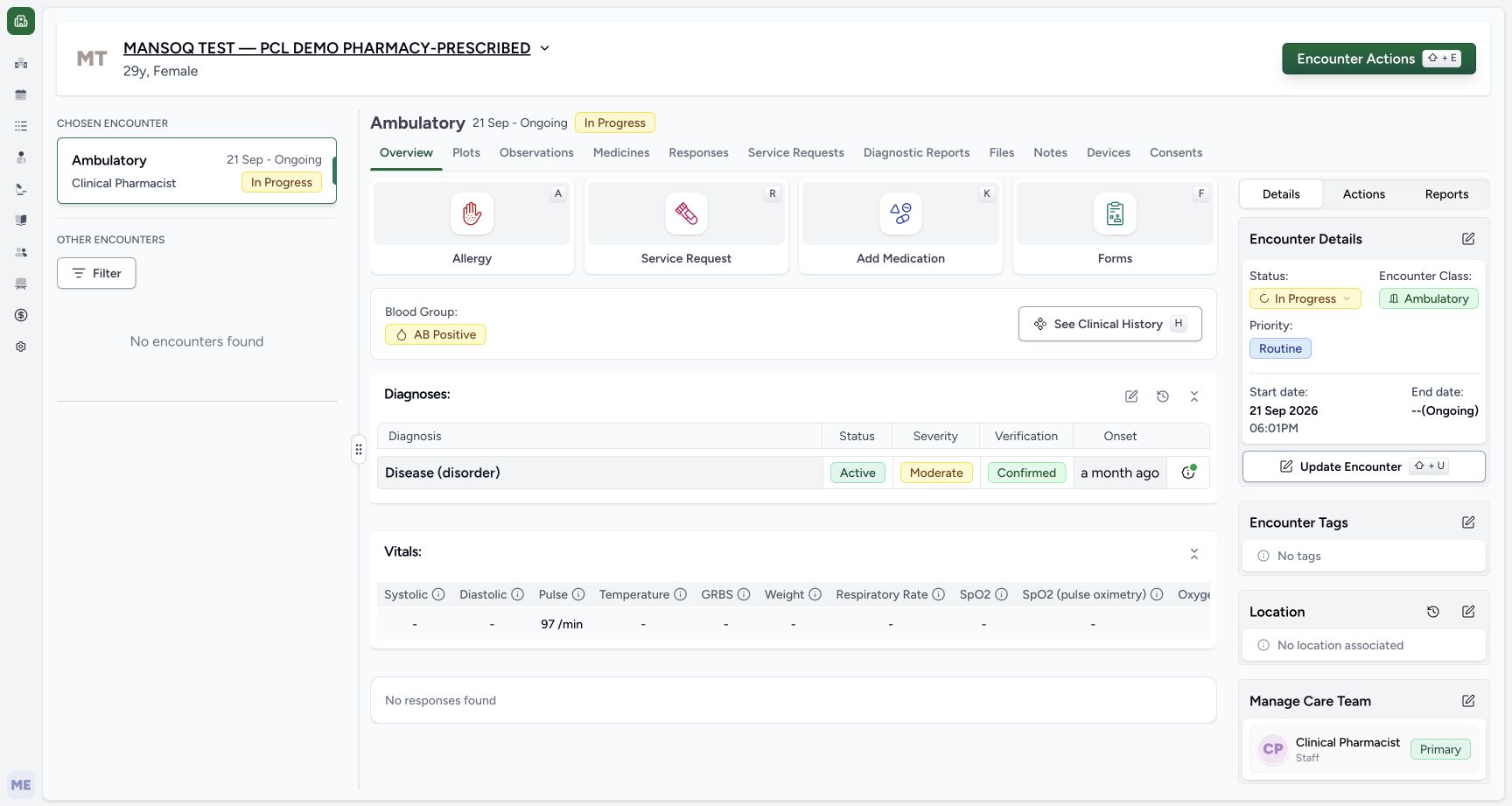
- Open Medicines after the return: Wait for Overview before opening the saved result. This picture does not contain a success toast.
1234567891011Saved one prescription two rows
Capture details
Observed 3dfb software on 20 October 2026. Two different new medicine requests grouped in one fictional demonstration prescription. Earlier draft1count each is explicitly revised before the sole Submit to product2count/codedmedicine1count. Original pixels/times preserved; no physical dispensing or administration.
Image SHA-256 9ba1629a4643a98c8f5d02ee9d4d5e03a9d67e7d086e75b530731f5fe94a85dc
- Select the new 20/10/2026 12:53 PM card: The older 18/10/2026 06:01 PM Furosemide card remains separate below.
- Read the Doctor prescriber: The selected new card identifies MANSOQ E2E Doctor.
- Read the one shared Note: The full shared prescription Note appears above both rows.
- Read the first medicine row: The selected card contains Synthetic Training — Paracetamol 500mg.
- Read saved 2.00 count: Its first structured dose is 2 count.
- Read first QD and 1 day: Frequency and duration are separate saved fields.
- Read complete row Note A: The Instructions cell shows the inventory-product software example note.
- Read the second HYMOX row: This same selected prescription also contains HYMOX 500MG CAPS.
- Read saved 1.00 count: The second medicine retains its separate 1 count dose.
- Read second QD and 1 day: Read this row’s own frequency and duration.
- Read complete row Note B: The second Instructions cell contains the coded-medicine software example note.
11. Read the single saved prescription
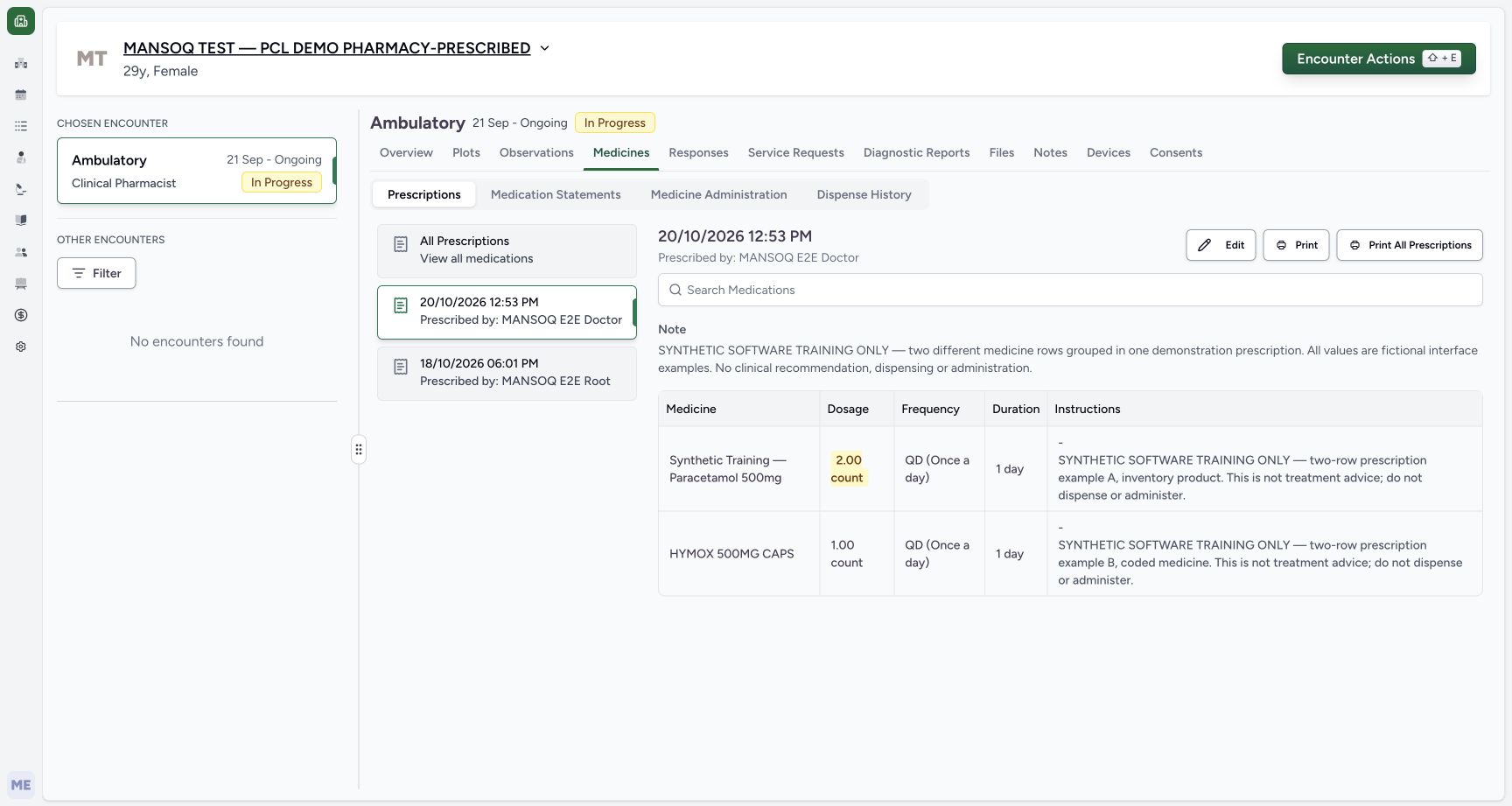
The selected 12:53 PM card identifies MANSOQ E2E Doctor and shows one shared Note above two medicine rows. Read Synthetic Training — Paracetamol 500mg with 2.00 count, QD and 1 day, then HYMOX 500MG CAPS with 1.00 count, QD and 1 day. Read the complete separate Instructions notes A and B. Both rows belong to this selected prescription, while the older Furosemide card remains separate.
1234567891011Saved one prescription two rows
Capture details
Observed 3dfb software on 20 October 2026. Two different new medicine requests grouped in one fictional demonstration prescription. Earlier draft1count each is explicitly revised before the sole Submit to product2count/codedmedicine1count. Original pixels/times preserved; no physical dispensing or administration.
Image SHA-256 9ba1629a4643a98c8f5d02ee9d4d5e03a9d67e7d086e75b530731f5fe94a85dc
- Select the new 20/10/2026 12:53 PM card: The older 18/10/2026 06:01 PM Furosemide card remains separate below.
- Read the Doctor prescriber: The selected new card identifies MANSOQ E2E Doctor.
- Read the one shared Note: The full shared prescription Note appears above both rows.
- Read the first medicine row: The selected card contains Synthetic Training — Paracetamol 500mg.
- Read saved 2.00 count: Its first structured dose is 2 count.
- Read first QD and 1 day: Frequency and duration are separate saved fields.
- Read complete row Note A: The Instructions cell shows the inventory-product software example note.
- Read the second HYMOX row: This same selected prescription also contains HYMOX 500MG CAPS.
- Read saved 1.00 count: The second medicine retains its separate 1 count dose.
- Read second QD and 1 day: Read this row’s own frequency and duration.
- Read complete row Note B: The second Instructions cell contains the coded-medicine software example note.
12. Reload and verify the same grouped result
Use the browser’s Reload command once, wait for Medicines to load and select the same 12:53 PM Doctor card again. Verify both medicine rows, their different saved quantities, separate QD and 1 day fields, the shared Note and both complete row notes. Do not repeat Submit to refresh the display.
1234567891011Saved one prescription two rows
Capture details
Observed 3dfb software on 20 October 2026. Two different new medicine requests grouped in one fictional demonstration prescription. Earlier draft1count each is explicitly revised before the sole Submit to product2count/codedmedicine1count. Original pixels/times preserved; no physical dispensing or administration.
Image SHA-256 9ba1629a4643a98c8f5d02ee9d4d5e03a9d67e7d086e75b530731f5fe94a85dc
- Select the new 20/10/2026 12:53 PM card: The older 18/10/2026 06:01 PM Furosemide card remains separate below.
- Read the Doctor prescriber: The selected new card identifies MANSOQ E2E Doctor.
- Read the one shared Note: The full shared prescription Note appears above both rows.
- Read the first medicine row: The selected card contains Synthetic Training — Paracetamol 500mg.
- Read saved 2.00 count: Its first structured dose is 2 count.
- Read first QD and 1 day: Frequency and duration are separate saved fields.
- Read complete row Note A: The Instructions cell shows the inventory-product software example note.
- Read the second HYMOX row: This same selected prescription also contains HYMOX 500MG CAPS.
- Read saved 1.00 count: The second medicine retains its separate 1 count dose.
- Read second QD and 1 day: Read this row’s own frequency and duration.
- Read complete row Note B: The second Instructions cell contains the coded-medicine software example note.
 1234
1234Reloaded same two row prescription
Capture details
Observed 3dfb software on 20 October 2026. Two different new medicine requests grouped in one fictional demonstration prescription. Earlier draft1count each is explicitly revised before the sole Submit to product2count/codedmedicine1count. Original pixels/times preserved; no physical dispensing or administration.
Image SHA-256 9ba1629a4643a98c8f5d02ee9d4d5e03a9d67e7d086e75b530731f5fe94a85dc
- Reselect the same card after browser Reload: The same 12:53 PM prescription still contains both rows after one normal reload.
- Recheck the first 2.00 count: The revised first quantity persists.
- Recheck the second 1.00 count: The separate second quantity persists.
- Recheck both distinct row notes: The shared Note and both complete Instructions cells remain visible; no second Submit is needed.
A second medicine differs from a second dosage step
Add another Medication produces a new row with a different medicine name and independent prescribing fields. A dosage-step plus inside a row instead adds an instruction for that same medicine. In this exercise the final prescription contains two different medicine rows, each with one instruction.
1234First row complete before second
Capture details
Observed 3dfb software on 20 October 2026. Two different new medicine requests grouped in one fictional demonstration prescription. Earlier draft1count each is explicitly revised before the sole Submit to product2count/codedmedicine1count. Original pixels/times preserved; no physical dispensing or administration.
Image SHA-256 8b2d16364da01b5177fd3e72dcea6ee9e9cc972cb16c6572c901ecca6d832e12
- Review the first row QD: The selected frequency remains separate from dose.
- Review the preset 1 day: The QD preset supplied this initial duration.
- Enter row Note A: This narrow input clips its longer software-only text; the saved card later shows the complete note.
- Choose Add another Medication: Use this selector for a second different medicine, rather than the small dosage-step plus inside the first row.
12Add another medication tabs
Capture details
Observed 3dfb software on 20 October 2026. Two different new medicine requests grouped in one fictional demonstration prescription. Earlier draft1count each is explicitly revised before the sole Submit to product2count/codedmedicine1count. Original pixels/times preserved; no physical dispensing or administration.
Image SHA-256 3102e237092e95650bef059f6147fdc6537cf6c0f134e7db5ff5e8d3b5a0df11
- Locate Add another Medication: The selector opens beneath the completed first row.
- Switch the new selection to Medication: Use the terminology-backed tab for the second source; the first product row remains above.
12345Two distinct rows second empty
Capture details
Observed 3dfb software on 20 October 2026. Two different new medicine requests grouped in one fictional demonstration prescription. Earlier draft1count each is explicitly revised before the sole Submit to product2count/codedmedicine1count. Original pixels/times preserved; no physical dispensing or administration.
Image SHA-256 bcfa66bb71e21dcb7e197dba85ba694be629797177aeb22644d23e542636cb6d
- Check the first row is retained: Its 1 count, QD, 1 day and Note A remain while adding the second medicine.
- Read the second HYMOX row: This is a different medicine row, not an additional dosage instruction under Paracetamol.
- Enter the second row’s quantity: The code-backed medicine’s prescribing dose starts blank.
- Locate the blank second Frequency: The first row’s QD has not been copied into this row.
- Locate the blank second Duration: The first row’s duration has not been copied here.
123456Final two count one count review
Capture details
Observed 3dfb software on 20 October 2026. Two different new medicine requests grouped in one fictional demonstration prescription. Earlier draft1count each is explicitly revised before the sole Submit to product2count/codedmedicine1count. Original pixels/times preserved; no physical dispensing or administration.
Image SHA-256 37b64600e7cdf02f35f5b6dfbe824a8263c0e669293c4475d8a7522c3e67c1fd
- Review the revised first 2 count: The first row is now 2 count, separately from its QD and 1 day.
- Review the second 1 count: HYMOX remains 1 count, QD and 1 day.
- Check distinct row Note A: Its narrow input shows the start; use the saved Instructions cell for full readback.
- Check distinct row Note B: The second row keeps its own software-only note.
- Read the complete shared Note: This remains one prescription-level note for both rows.
- Choose Submit once after review: One Submit saves both new medicine rows into one prescription. Do not submit the rows separately.
1234567891011Saved one prescription two rows
Capture details
Observed 3dfb software on 20 October 2026. Two different new medicine requests grouped in one fictional demonstration prescription. Earlier draft1count each is explicitly revised before the sole Submit to product2count/codedmedicine1count. Original pixels/times preserved; no physical dispensing or administration.
Image SHA-256 9ba1629a4643a98c8f5d02ee9d4d5e03a9d67e7d086e75b530731f5fe94a85dc
- Select the new 20/10/2026 12:53 PM card: The older 18/10/2026 06:01 PM Furosemide card remains separate below.
- Read the Doctor prescriber: The selected new card identifies MANSOQ E2E Doctor.
- Read the one shared Note: The full shared prescription Note appears above both rows.
- Read the first medicine row: The selected card contains Synthetic Training — Paracetamol 500mg.
- Read saved 2.00 count: Its first structured dose is 2 count.
- Read first QD and 1 day: Frequency and duration are separate saved fields.
- Read complete row Note A: The Instructions cell shows the inventory-product software example note.
- Read the second HYMOX row: This same selected prescription also contains HYMOX 500MG CAPS.
- Read saved 1.00 count: The second medicine retains its separate 1 count dose.
- Read second QD and 1 day: Read this row’s own frequency and duration.
- Read complete row Note B: The second Instructions cell contains the coded-medicine software example note.
Review product defaults and coded-medicine blanks separately
The configured inventory product supplies an initial 1 count. The Medication-tab HYMOX row instead starts with a blank dose and separate blank frequency and duration. Neither starting state is a prescribing recommendation. Review each row independently and choose explicit units rather than carrying assumptions from the neighbouring medicine.
12345First product defaults
Capture details
Observed 3dfb software on 20 October 2026. Two different new medicine requests grouped in one fictional demonstration prescription. Earlier draft1count each is explicitly revised before the sole Submit to product2count/codedmedicine1count. Original pixels/times preserved; no physical dispensing or administration.
Image SHA-256 b3c611b3f74ceeaccb21434bf98c332ecd16a8736c2f8da9ba002e2f858b2b0c
- Read the first product row: This is the selected Synthetic Training — Paracetamol 500mg product.
- Review the initial 1 count: The configured product supplies this starting quantity and count unit.
- Open the first row’s Frequency: Frequency starts blank and must be selected separately.
- Read the initially blank Duration: Duration has not yet been selected.
- Locate the first row Note: This narrow field belongs only to the first medicine.
12345Two distinct rows second empty
Capture details
Observed 3dfb software on 20 October 2026. Two different new medicine requests grouped in one fictional demonstration prescription. Earlier draft1count each is explicitly revised before the sole Submit to product2count/codedmedicine1count. Original pixels/times preserved; no physical dispensing or administration.
Image SHA-256 bcfa66bb71e21dcb7e197dba85ba694be629797177aeb22644d23e542636cb6d
- Check the first row is retained: Its 1 count, QD, 1 day and Note A remain while adding the second medicine.
- Read the second HYMOX row: This is a different medicine row, not an additional dosage instruction under Paracetamol.
- Enter the second row’s quantity: The code-backed medicine’s prescribing dose starts blank.
- Locate the blank second Frequency: The first row’s QD has not been copied into this row.
- Locate the blank second Duration: The first row’s duration has not been copied here.
12Second row count choice
Capture details
Observed 3dfb software on 20 October 2026. Two different new medicine requests grouped in one fictional demonstration prescription. Earlier draft1count each is explicitly revised before the sole Submit to product2count/codedmedicine1count. Original pixels/times preserved; no physical dispensing or administration.
Image SHA-256 d6117abb1f8c5b3291c3e9eace5e3313a6a01f2116c58054e8b5ea32917167c1
- Enter 1 for the second row: The unit suggestions initially offer tablets.
- Choose 1 count explicitly: Select count for this fictional software example rather than accepting tablets.
123Both rows independent values
Capture details
Observed 3dfb software on 20 October 2026. Two different new medicine requests grouped in one fictional demonstration prescription. Earlier draft1count each is explicitly revised before the sole Submit to product2count/codedmedicine1count. Original pixels/times preserved; no physical dispensing or administration.
Image SHA-256 dbe8eb3766010997d445eccbe5b9932a9c1e99d060ed44cb740df8f0f6828269
- Review second-row 1 day: Review the preset duration separately from its 1 count dose and QD frequency.
- Enter row Note B: This is a separate row-specific software note from Note A above.
- Expand the advanced columns: Use the header control, then scroll the medicine table horizontally right to inspect both requesters and authored dates.
123456Final two count one count review
Capture details
Observed 3dfb software on 20 October 2026. Two different new medicine requests grouped in one fictional demonstration prescription. Earlier draft1count each is explicitly revised before the sole Submit to product2count/codedmedicine1count. Original pixels/times preserved; no physical dispensing or administration.
Image SHA-256 37b64600e7cdf02f35f5b6dfbe824a8263c0e669293c4475d8a7522c3e67c1fd
- Review the revised first 2 count: The first row is now 2 count, separately from its QD and 1 day.
- Review the second 1 count: HYMOX remains 1 count, QD and 1 day.
- Check distinct row Note A: Its narrow input shows the start; use the saved Instructions cell for full readback.
- Check distinct row Note B: The second row keeps its own software-only note.
- Read the complete shared Note: This remains one prescription-level note for both rows.
- Choose Submit once after review: One Submit saves both new medicine rows into one prescription. Do not submit the rows separately.
Notes and saved grouping have separate scopes
Each medicine has its own row Note, shown in its saved Instructions cell. The shared Note appears once above the selected prescription’s medicine table. One final Submit groups the two new rows into the one new card. This lesson does not demonstrate billing, physical stock issue, dispensing, administration or a care decision.
1234567Both rows doctor authored date
Capture details
Observed 3dfb software on 20 October 2026. Two different new medicine requests grouped in one fictional demonstration prescription. Earlier draft1count each is explicitly revised before the sole Submit to product2count/codedmedicine1count. Original pixels/times preserved; no physical dispensing or administration.
Image SHA-256 120beae010852cd46284ad32b01c8783578d854b06594fe853684e745f170f01
- Read first-row Order intent: This belongs to the first new request.
- Read the first authored date: The draft shows October 20th, 2026.
- Read the first Doctor requester: The first request is assigned to MANSOQ E2E Doctor.
- Read second-row Order intent: The second medicine has its own request metadata.
- Read the second authored date: The second draft also shows October 20th, 2026.
- Read the second Doctor requester: The second request also identifies MANSOQ E2E Doctor.
- Scroll the table horizontally left: This is a horizontal scrolling gesture within the table. Return to the earlier illustrated header control and collapse the advanced columns.
123Review two rows shared note before submit
Capture details
Observed 3dfb software on 20 October 2026. Two different new medicine requests grouped in one fictional demonstration prescription. Earlier draft1count each is explicitly revised before the sole Submit to product2count/codedmedicine1count. Original pixels/times preserved; no physical dispensing or administration.
Image SHA-256 fb1c58232da397227b971cc2a91d0f1543d478bc564ba1e9b959c72b12d98742
- Enter one shared prescription Note: This full software-only Note applies to the grouped prescription, separately from row Notes A and B.
- Read the earlier first-row quantity: This earlier draft still has 1 count in the first row; the next step deliberately revises it before submission.
- Check second-row quantity remains 1 count: The second row stays at 1 count through the final review.
123456Final two count one count review
Capture details
Observed 3dfb software on 20 October 2026. Two different new medicine requests grouped in one fictional demonstration prescription. Earlier draft1count each is explicitly revised before the sole Submit to product2count/codedmedicine1count. Original pixels/times preserved; no physical dispensing or administration.
Image SHA-256 37b64600e7cdf02f35f5b6dfbe824a8263c0e669293c4475d8a7522c3e67c1fd
- Review the revised first 2 count: The first row is now 2 count, separately from its QD and 1 day.
- Review the second 1 count: HYMOX remains 1 count, QD and 1 day.
- Check distinct row Note A: Its narrow input shows the start; use the saved Instructions cell for full readback.
- Check distinct row Note B: The second row keeps its own software-only note.
- Read the complete shared Note: This remains one prescription-level note for both rows.
- Choose Submit once after review: One Submit saves both new medicine rows into one prescription. Do not submit the rows separately.
1234567891011Saved one prescription two rows
Capture details
Observed 3dfb software on 20 October 2026. Two different new medicine requests grouped in one fictional demonstration prescription. Earlier draft1count each is explicitly revised before the sole Submit to product2count/codedmedicine1count. Original pixels/times preserved; no physical dispensing or administration.
Image SHA-256 9ba1629a4643a98c8f5d02ee9d4d5e03a9d67e7d086e75b530731f5fe94a85dc
- Select the new 20/10/2026 12:53 PM card: The older 18/10/2026 06:01 PM Furosemide card remains separate below.
- Read the Doctor prescriber: The selected new card identifies MANSOQ E2E Doctor.
- Read the one shared Note: The full shared prescription Note appears above both rows.
- Read the first medicine row: The selected card contains Synthetic Training — Paracetamol 500mg.
- Read saved 2.00 count: Its first structured dose is 2 count.
- Read first QD and 1 day: Frequency and duration are separate saved fields.
- Read complete row Note A: The Instructions cell shows the inventory-product software example note.
- Read the second HYMOX row: This same selected prescription also contains HYMOX 500MG CAPS.
- Read saved 1.00 count: The second medicine retains its separate 1 count dose.
- Read second QD and 1 day: Read this row’s own frequency and duration.
- Read complete row Note B: The second Instructions cell contains the coded-medicine software example note.
1234Reloaded same two row prescription
Capture details
Observed 3dfb software on 20 October 2026. Two different new medicine requests grouped in one fictional demonstration prescription. Earlier draft1count each is explicitly revised before the sole Submit to product2count/codedmedicine1count. Original pixels/times preserved; no physical dispensing or administration.
Image SHA-256 9ba1629a4643a98c8f5d02ee9d4d5e03a9d67e7d086e75b530731f5fe94a85dc
- Reselect the same card after browser Reload: The same 12:53 PM prescription still contains both rows after one normal reload.
- Recheck the first 2.00 count: The revised first quantity persists.
- Recheck the second 1.00 count: The separate second quantity persists.
- Recheck both distinct row notes: The shared Note and both complete Instructions cells remain visible; no second Submit is needed.
Source evidence
Every citation uses this exact committed version. The private source repository requires access.
- repositories/platform/mansoq-core/mansoq/emr/api/viewsets/base.py:98 ·
3dfb7c9f519fb5b4cd4452439f3c12346bf58319Source file checksum
6a287dd315b8a4957b29c58e4bbc1bef7b8d9d257f9149f93045ff0adbdcae6c - repositories/platform/mansoq-core/mansoq/emr/api/viewsets/medication_request.py:39 ·
3dfb7c9f519fb5b4cd4452439f3c12346bf58319Source file checksum
a3f3ae8042fb8134112c5d04fe8b060e68bce11dae682d138aafaae64119c215 - repositories/platform/mansoq-core/mansoq/emr/resources/medication/request/spec.py:281 ·
3dfb7c9f519fb5b4cd4452439f3c12346bf58319Source file checksum
9f9e929369e186f88af131f2a1ccc3a773d9bfe9648f92a98f6a4935c09a7ade - repositories/platform/mansoq-web/src/components/Common/BackButton.tsx:18 ·
3dfb7c9f519fb5b4cd4452439f3c12346bf58319Source file checksum
56a741eff730a7b18a5fae594374068bab2d5413993c32dbbaf3625e14743ca3 - repositories/platform/mansoq-web/src/components/Common/ComboboxQuantityInput.tsx:33 ·
3dfb7c9f519fb5b4cd4452439f3c12346bf58319Source file checksum
dc2b42f282136e2c1f71318d93aa69af3935286de87176a4c1c8c093127f97a3 - repositories/platform/mansoq-web/src/components/Medicine/DosageFrequencyInput.tsx:88 ·
3dfb7c9f519fb5b4cd4452439f3c12346bf58319Source file checksum
25dd21fd48a38c46bc40f2fb8b8586e89ed72eb97451fadd29c3d54591a5e420 - repositories/platform/mansoq-web/src/components/Medicine/DurationInput.tsx:129 ·
3dfb7c9f519fb5b4cd4452439f3c12346bf58319Source file checksum
c271b7c60fd93d91bb97ce8ab38644b1999b0a1115db3db9d5c0626557eb0c11 - repositories/platform/mansoq-web/src/components/Medicine/MedicationsTable.tsx:96 ·
3dfb7c9f519fb5b4cd4452439f3c12346bf58319Source file checksum
8bdf0ac1770dc1423e4534f9ed0f75f51bda5be717ef7bd0aa345edc79244830 - repositories/platform/mansoq-web/src/components/Medicine/PrescriptionListSelector.tsx:62 ·
3dfb7c9f519fb5b4cd4452439f3c12346bf58319Source file checksum
d440785347dcc3045dea0d4d5c81052a9e3c7de074405fc4de87dea79cd4b083 - repositories/platform/mansoq-web/src/components/Medicine/PrescriptionView.tsx:37 ·
3dfb7c9f519fb5b4cd4452439f3c12346bf58319Source file checksum
af1781d51d3dd511231a79e034a7f98412434dfa4603b91dce6676c4474fad96 - repositories/platform/mansoq-web/src/components/Medicine/utils.ts:20 ·
3dfb7c9f519fb5b4cd4452439f3c12346bf58319Source file checksum
3cd9c9563e68a8ff18ac581c422477ddab664733f4c85a4b596403bf9cf87aa8 - repositories/platform/mansoq-web/src/components/Questionnaire/MedicationValueSetSelect.tsx:98 ·
3dfb7c9f519fb5b4cd4452439f3c12346bf58319Source file checksum
bb8d5d5f1595778be9e9ad260296e8f43e5696fe9d19fb608e27a33a6a739610 - repositories/platform/mansoq-web/src/components/Questionnaire/QuestionTypes/MedicationRequestQuestion.tsx:598 ·
3dfb7c9f519fb5b4cd4452439f3c12346bf58319Source file checksum
561259e73b1752c9844e31b798ad676878af5f4caf6be5fbd130cd31fcfc89cc - repositories/platform/mansoq-web/src/components/Questionnaire/QuestionnaireForm.tsx:380 ·
3dfb7c9f519fb5b4cd4452439f3c12346bf58319Source file checksum
ee6c2195f13e48f0896a2d3da566c2f2a67910adad08894df6b77862f9cfdeec - repositories/platform/mansoq-web/src/components/Questionnaire/structured/handlers.ts:65 ·
3dfb7c9f519fb5b4cd4452439f3c12346bf58319Source file checksum
459ade48f77316279ab2978dc7b4466cb96acb8223c61b9a1f87ca9973be7c7f - repositories/platform/mansoq-web/src/types/emr/medicationRequest/medicationRequest.ts:23 ·
3dfb7c9f519fb5b4cd4452439f3c12346bf58319Source file checksum
a39df63f9b7f2d976d4379511d7a2d4c8e3e284fd1e9b67c28e59392e8545b2b