 MANSOQ
 Pharmacy · VERSION 5d8c4629
Abandon an unreceived return item and keep the parent Draft
Mark one saved, unreceived return item Abandoned without receiving stock or creating a refund. Keep its parent as an unfinished Draft and verify the saved result, original sale and account after reload.
Facility Admin
 123456
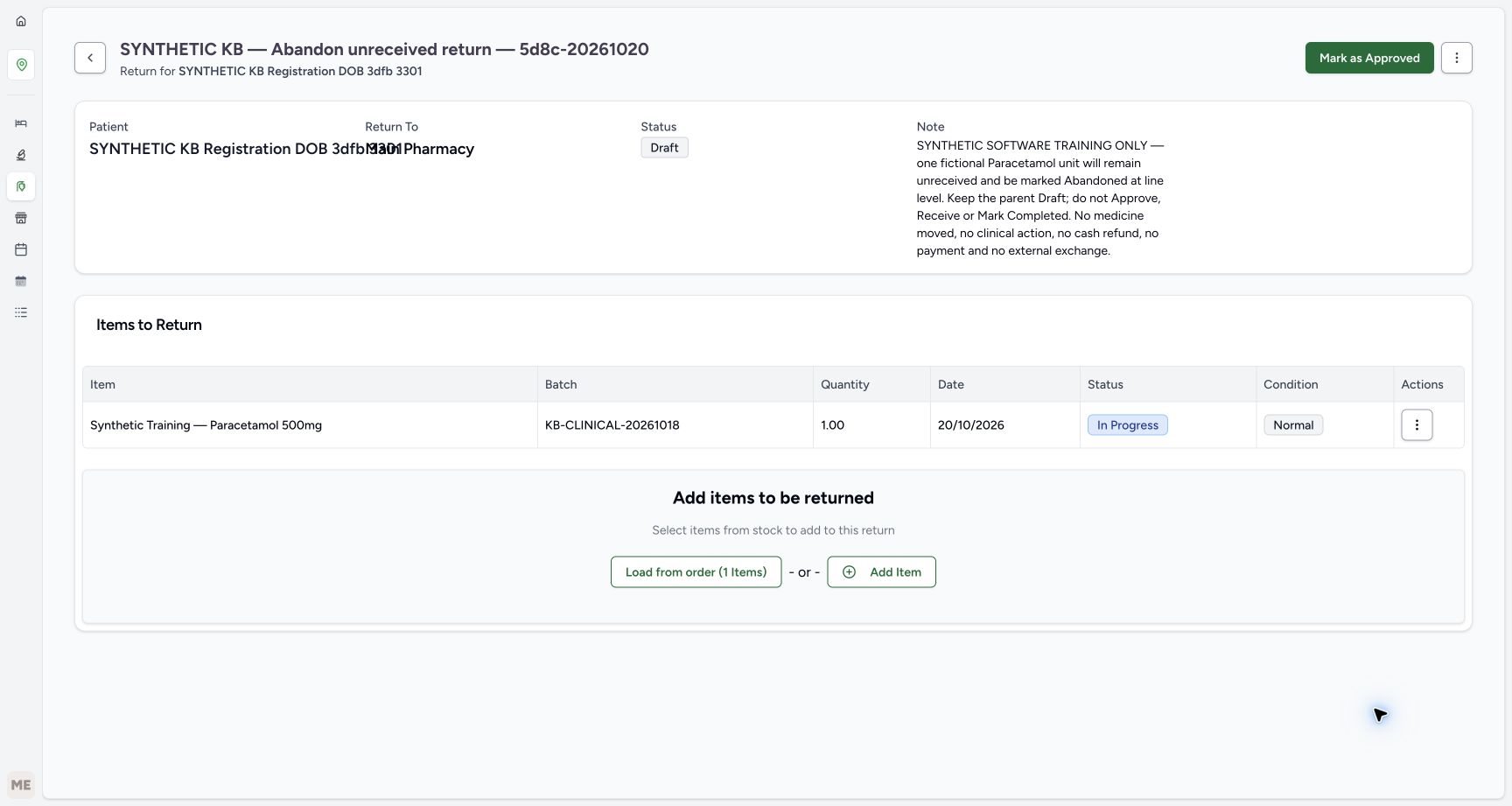
Saved unreceived item under Draft
Capture details
Genuine current-version synthetic software exercise. No physical return, clinical action, cash refund or external exchange is involved.
Image SHA-256 9d81daeae94b7bc358d7de9077729d98beaf63d8e8f903f121d81b037977cc30
- Verify Draft parent: Leave Mark as Approved unused.
- Match the saved batch: The full batch remains KB-CLINICAL-20261018.
- Verify saved quantity one: The original ten has been reduced before saving.
- Verify In Progress: This item has not been received.
- Read the initial Normal label: Normal is initial metadata here, not proof of receipt.
- Open the item Actions menu: Use the row ellipsis, not the parent menu.
 12
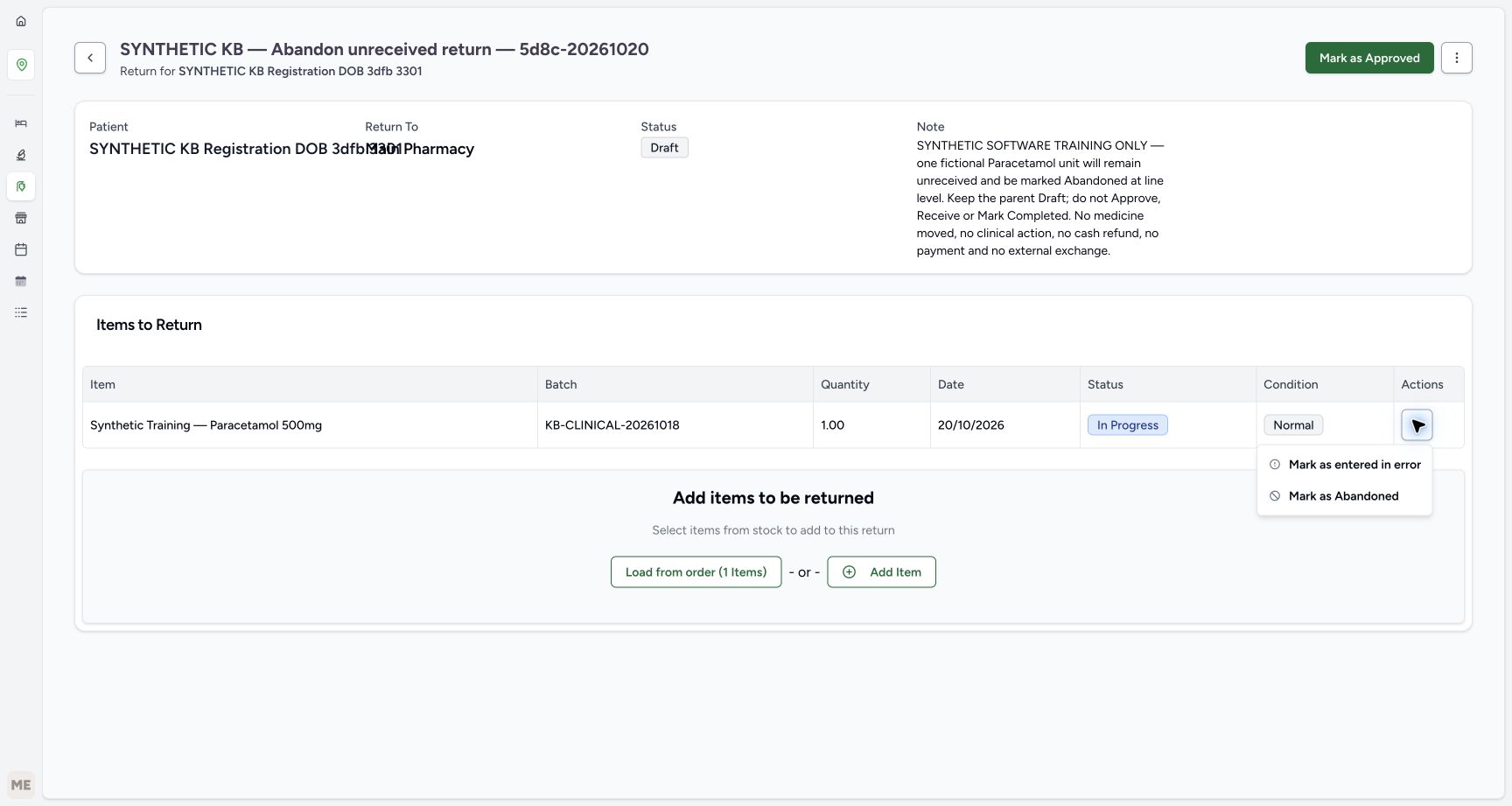
12Choose the child Abandoned action
Capture details
Genuine current-version synthetic software exercise. No physical return, clinical action, cash refund or external exchange is involved.
Image SHA-256 af816a73a660ee3ccc2c3d43c48928f7ace4c8052f6cde158e81dfa41955975b
- Identify the child row menu: This is the saved item’s action menu.
- Choose Mark as Abandoned once: Apply the child abandonment directly; this route has no confirmation dialog.
 1234
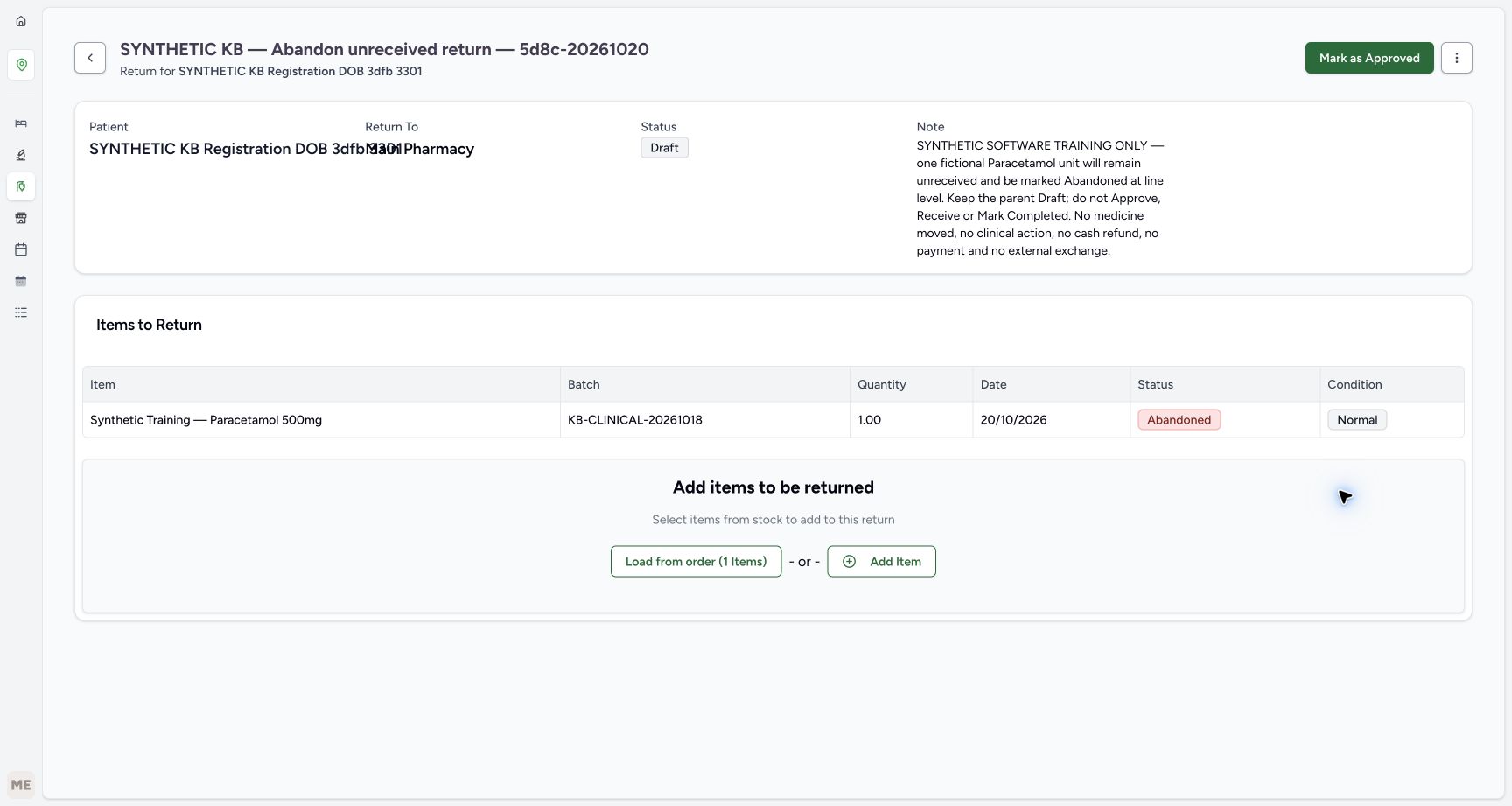
1234Saved child Abandoned, parent Draft
Capture details
Genuine current-version synthetic software exercise. No physical return, clinical action, cash refund or external exchange is involved.
Image SHA-256 6fdf7390c0d40b5588a8a4680e77f98f1d8086db38b55f2b59d7784d4f6ccea9
- Verify the parent remains Draft: This parent is still an unfinished Draft.
- Verify child Abandoned: The unreceived item is now terminal.
- Verify one unit retained: The saved history keeps the intended quantity.
- Read Normal without inferring receipt: The condition label remains; no receipt took place.
 1234
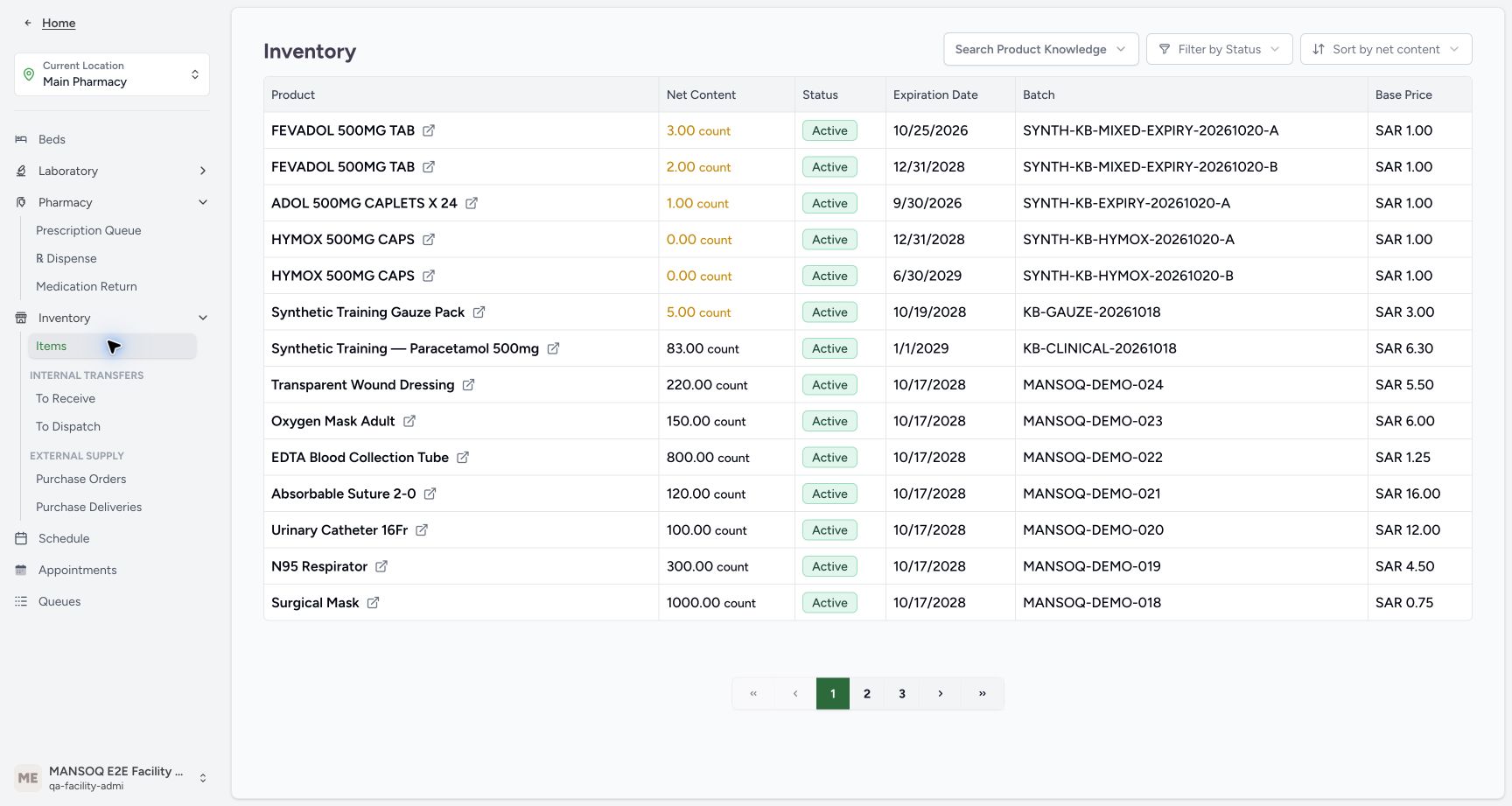
1234Original usable stock remains eighty-three
Capture details
Genuine current-version synthetic software exercise. No physical return, clinical action, cash refund or external exchange is involved.
Image SHA-256 f58c0c4f33601d74393ddb4f52ad7aed5f29fdd7722abe55e671f7a8f73a0f23
- Read usable stock eighty-three: Abandoning an unreceived unit adds no usable stock.
- Match the original batch: Use KB-CLINICAL-20261018.
- Check the original expiry: The lot still expires January 1, 2029.
- Check the inventory location: This is Main Pharmacy.
14 of 14 content blocks have reviewed image alignment.
Before you begin
- Use the existing authorised Facility Admin at MANSOQ Demo Polyclinic/Main Pharmacy. This isolated synthetic exercise changes no permissions and involves no real medicine, patient treatment or money.
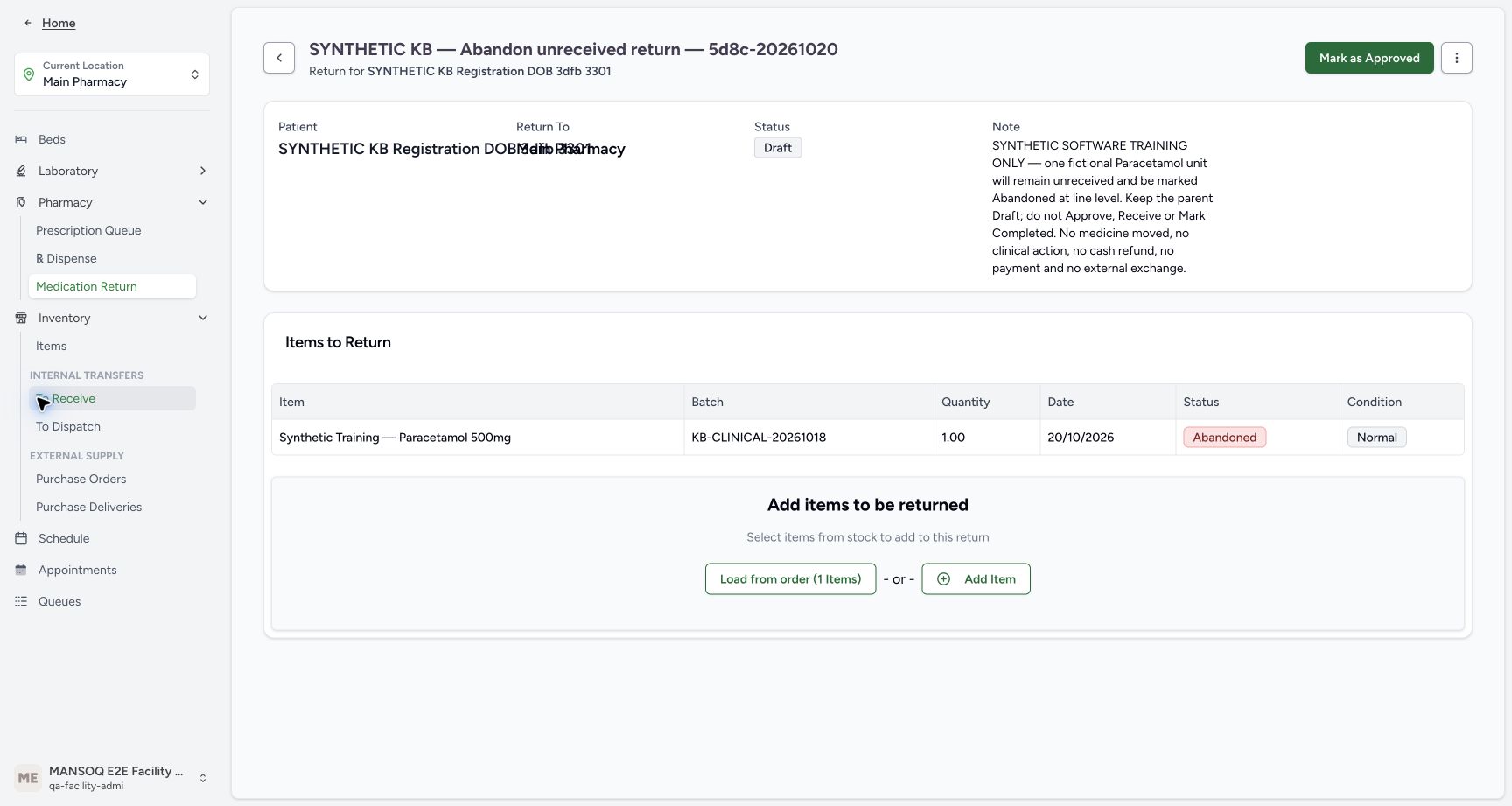 12345
12345Recorded release 5d8c4629 · 2026-10-20T17:31:06.758806+00:00 · 1728 × 921 Open inventory for the readback
Capture details
Genuine current-version synthetic software exercise. No physical return, clinical action, cash refund or external exchange is involved.
Image SHA-256
f6117cfffd93d70c43e7ce24dcef94b0cbb617970b344214096fd45a77bddecd- Verify Main Pharmacy: Keep the assigned training location.
- Open Inventory Items: Read the original lot without receiving another unit.
- Read the retained Draft parent: The child action did not close the whole return.
- Read the retained Abandoned item: Keep this terminal row as history.
- Verify the existing Facility Admin: The exercise uses the already authorised account.
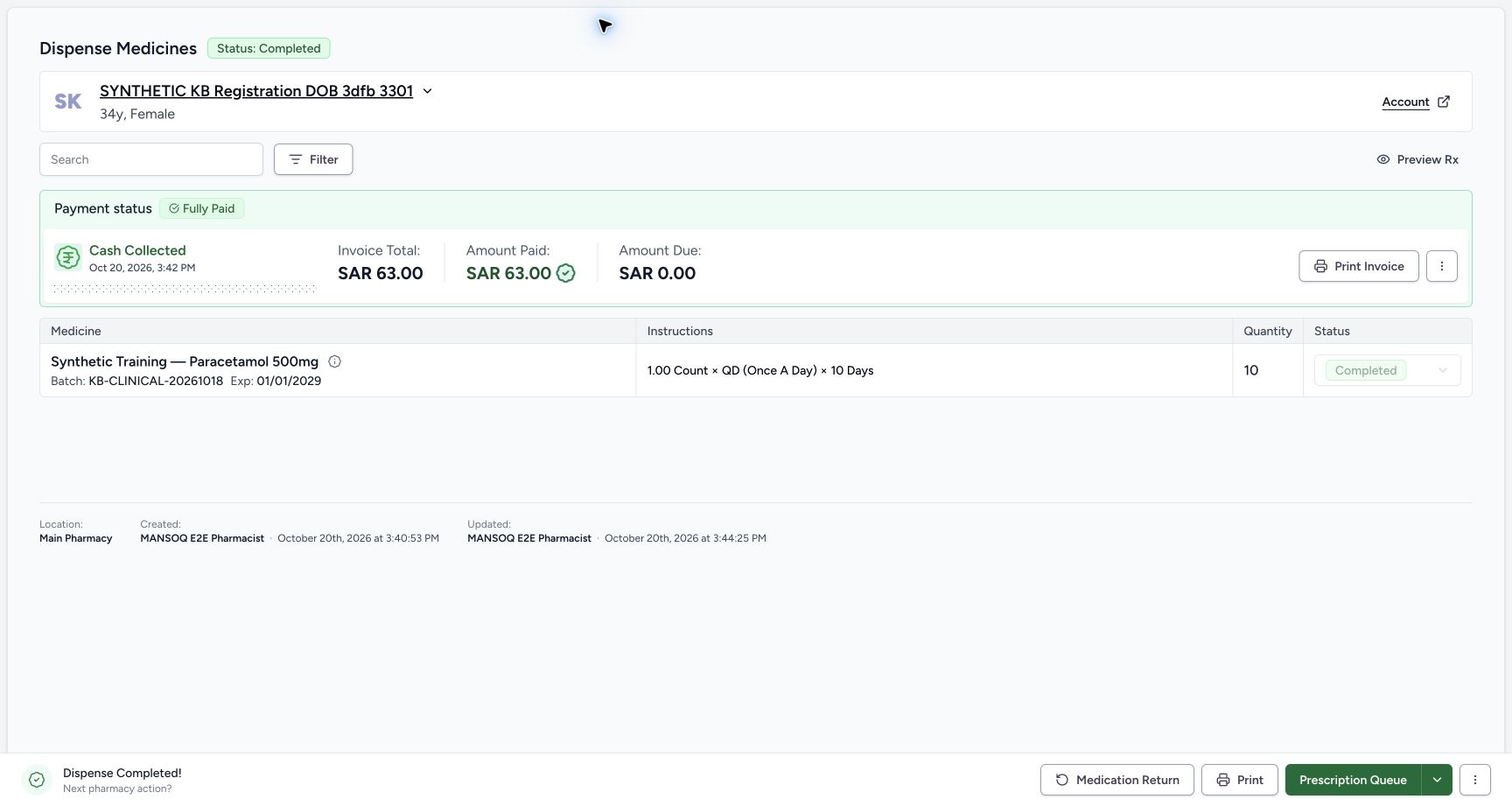
- Start from the verified original ten-unit Paracetamol sale for SYNTHETIC KB Registration DOB 3dfb 3301: batch KB-CLINICAL-20261018, SAR 63.00 paid and zero due. The new exercise uses only one fictional unreceived unit, not another sale.
 1234567
Recorded release 5d8c4629 · 2026-10-20T17:28:41.151402+00:00 · 1728 × 921 Verify the original completed sale
Capture details
Genuine current-version synthetic software exercise. No physical return, clinical action, cash refund or external exchange is involved.
Image SHA-256
325fc56e717337fa994ca760b0b37713a3ef8ca9d1be1fc2d124d4fcb69431f7- Match the synthetic patient: Use SYNTHETIC KB Registration DOB 3dfb 3301.
- Verify Completed: Start from the existing completed sale.
- Read original quantity ten: This is the original sale quantity, not the intended return quantity.
- Verify SAR 63.00 paid: Keep the original payment intact.
- Verify zero amount due: The completed sale has no amount due.
- Match the original batch: Use KB-CLINICAL-20261018, expiring January 1, 2029.
- Open Medication Return: Open the direct return sheet from this verified order.
1. Use the shared direct entry and create a distinct Draft
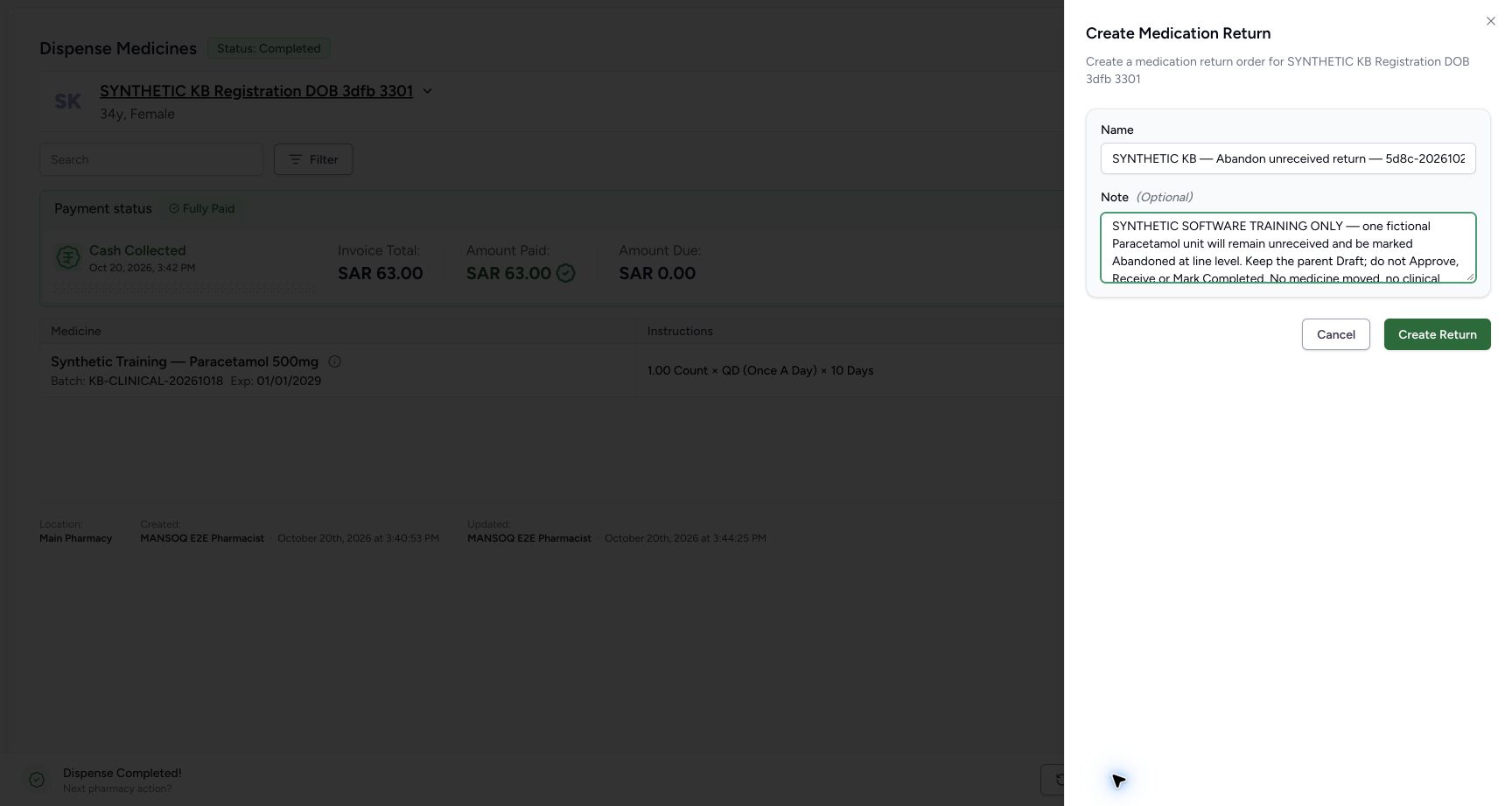
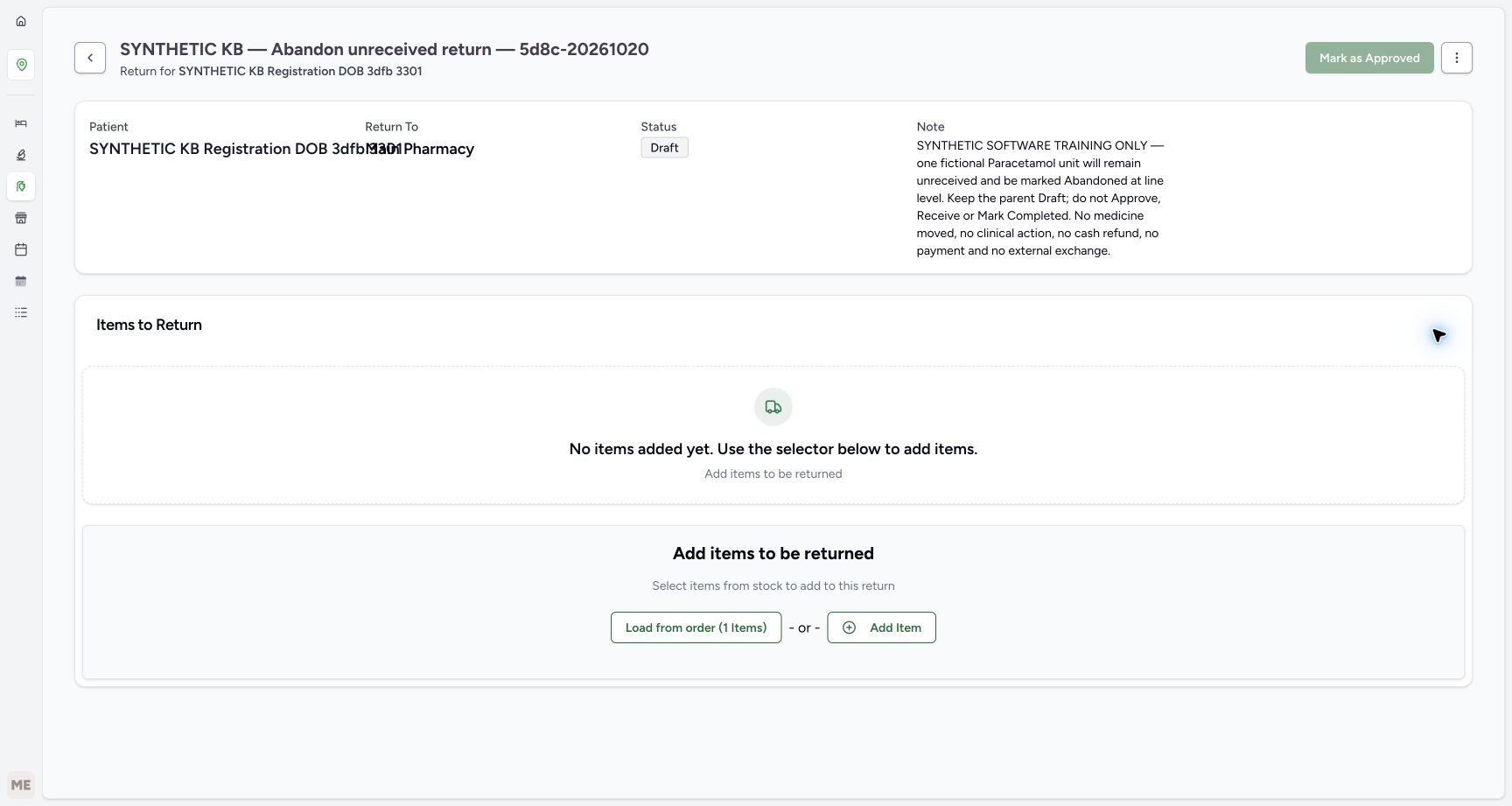
Use the original-order verification and direct Medication Return entry in the shared return lesson. From the verified Completed ten-unit sale, choose Medication Return. Name this separate exercise “SYNTHETIC KB — Abandon unreceived return — 5d8c-20261020”. Add the note shown: the unit remains unreceived, the parent stays Draft, and no medicine, clinical action, payment or refund is involved. Choose Create Return once. Verify the saved empty Draft. Use the readable patient subtitle beneath the title; the Patient and Return To fields overlap in this layout.
1234567Verify the original completed sale
Capture details
Genuine current-version synthetic software exercise. No physical return, clinical action, cash refund or external exchange is involved.
Image SHA-256 325fc56e717337fa994ca760b0b37713a3ef8ca9d1be1fc2d124d4fcb69431f7
- Match the synthetic patient: Use SYNTHETIC KB Registration DOB 3dfb 3301.
- Verify Completed: Start from the existing completed sale.
- Read original quantity ten: This is the original sale quantity, not the intended return quantity.
- Verify SAR 63.00 paid: Keep the original payment intact.
- Verify zero amount due: The completed sale has no amount due.
- Match the original batch: Use KB-CLINICAL-20261018, expiring January 1, 2029.
- Open Medication Return: Open the direct return sheet from this verified order.
 1234
1234Name the unreceived-item exercise
Capture details
Genuine current-version synthetic software exercise. No physical return, clinical action, cash refund or external exchange is involved.
Image SHA-256 a14970b1a12edec352ca3bc66afda36bdaaad627ddd3739329e2443d4c826bdd
- Check the patient in the sheet: Use the same verified synthetic patient.
- Enter the distinct exercise name: Use SYNTHETIC KB — Abandon unreceived return — 5d8c-20261020.
- Enter the no-receipt note: Identify the one fictional unit, child abandonment and Draft parent; no medicine, clinical action, payment or refund is involved.
- Create Return once: Save one new Draft; opening the sheet alone does not create it.
 123
123Empty Draft ready to load
Capture details
Genuine current-version synthetic software exercise. No physical return, clinical action, cash refund or external exchange is involved.
Image SHA-256 c11cfa7ba2756d1bee7a104e977c5dfd5c8ed77617c23329aa5b1455fb397249
- Verify the parent is Draft: Keep this parent unapproved throughout the exercise.
- Verify no items are saved yet: The item must still be loaded and saved.
- Load from order: Open the original order item chooser.
2. Save exactly one unreceived item, then stop before approval
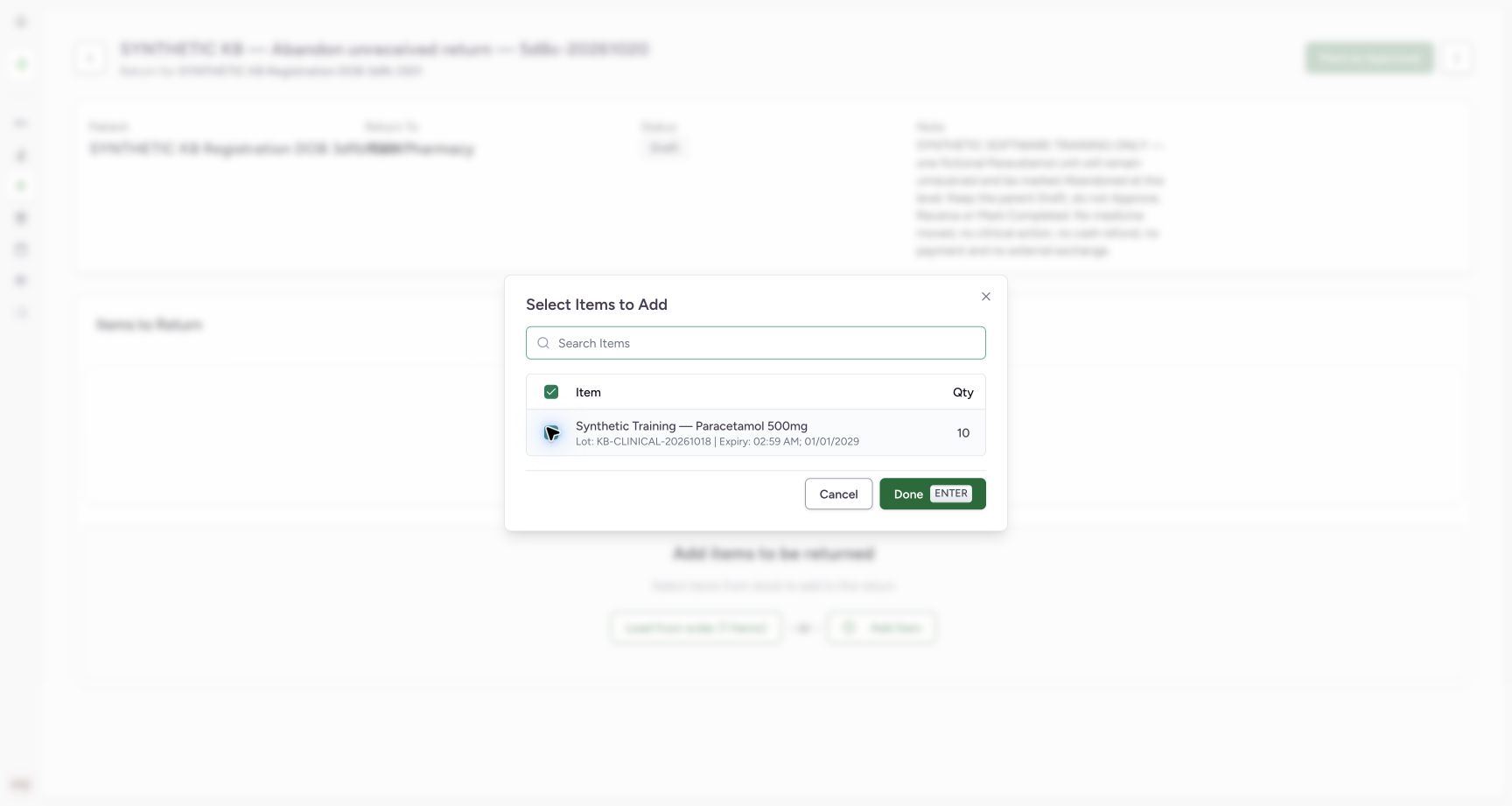
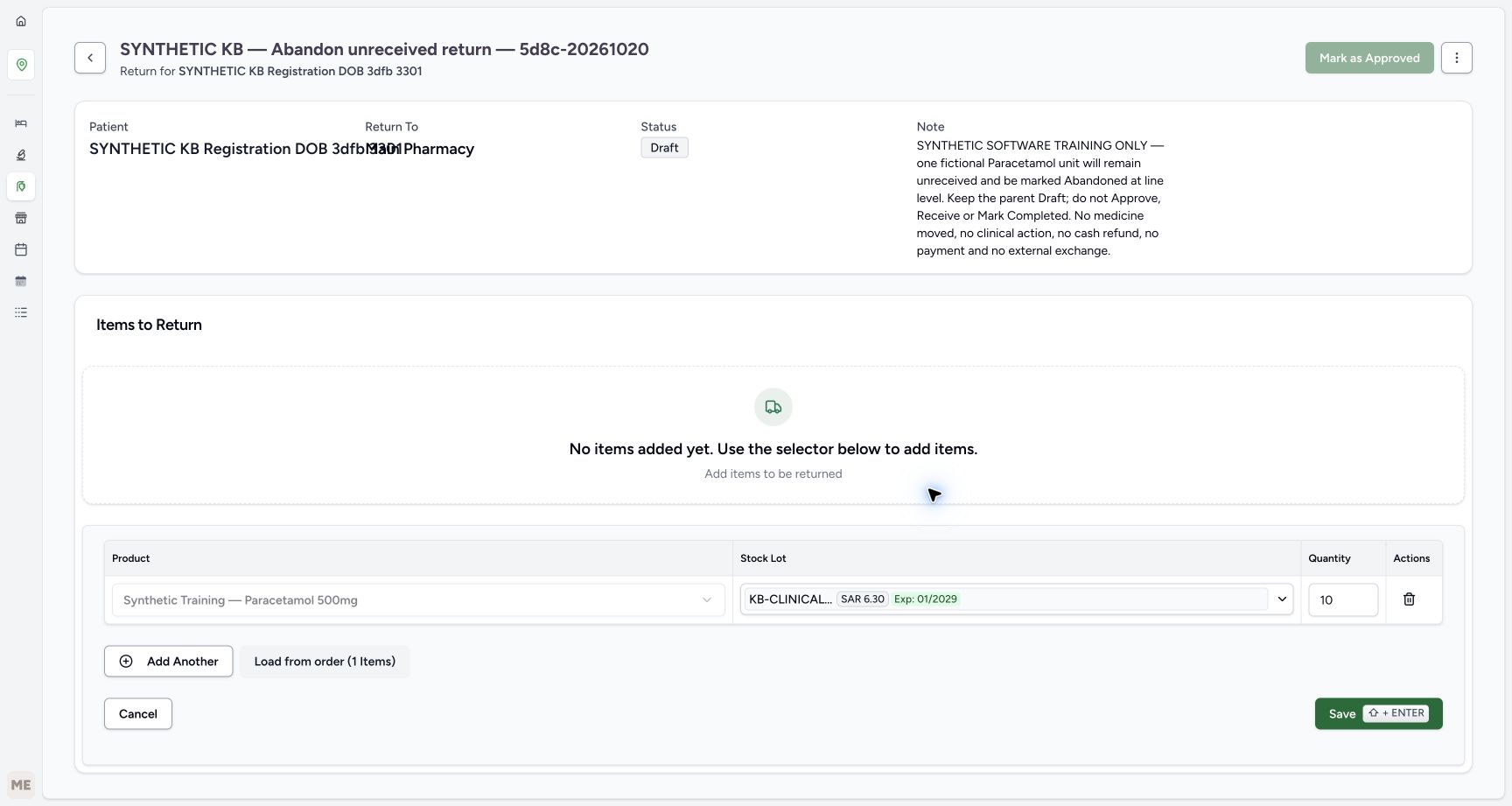
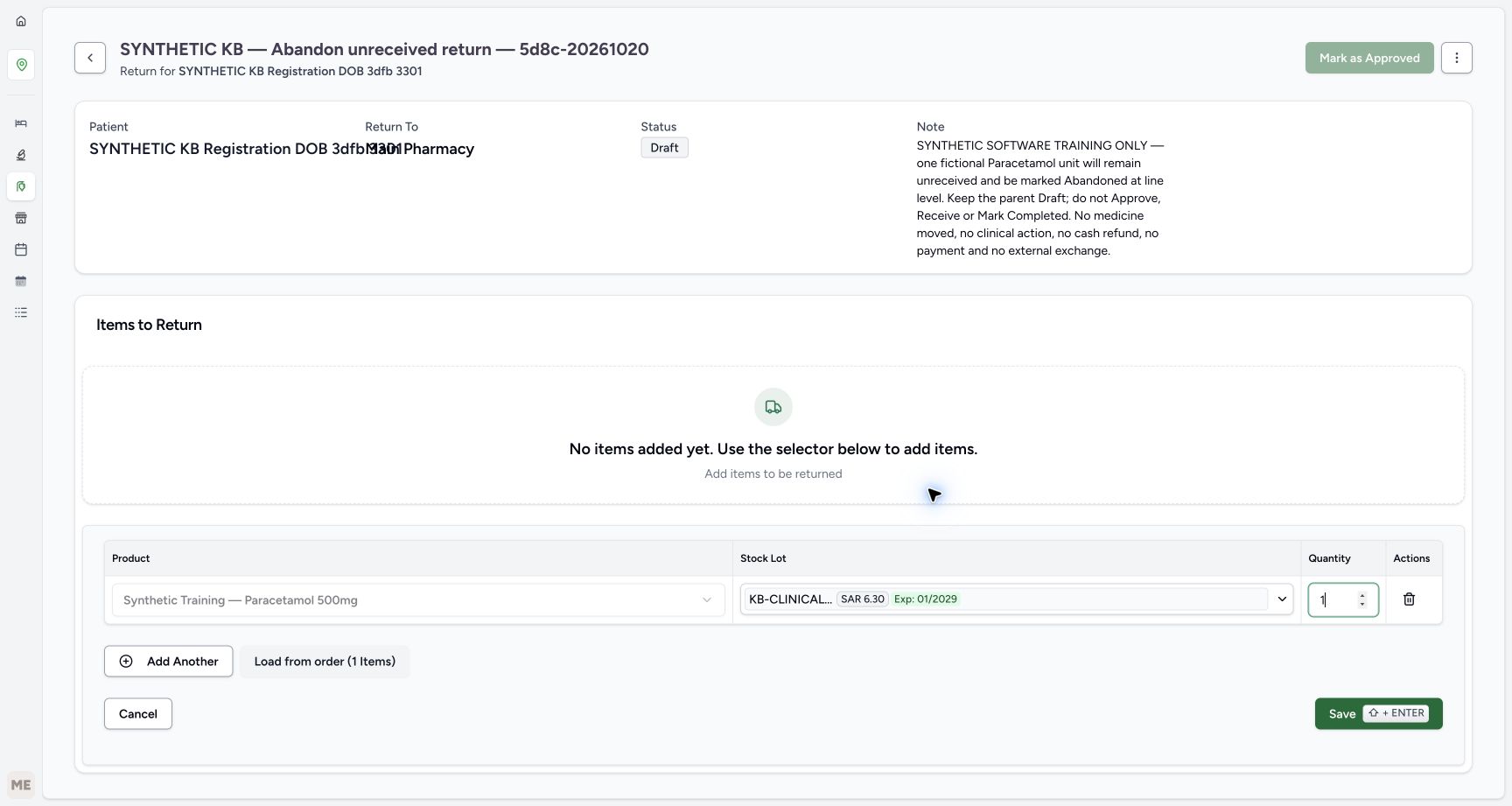
Choose Load from order, match and select the original Paracetamol row with its full batch and expiry, then choose Done. The lower editor copies the original quantity ten; replace it with one and verify before Save. The closed lot label is shortened, so use the full batch from the chooser and saved row. Choose Save once. Verify one saved In Progress/Normal item under the Draft parent. Stop before the shared lesson’s Mark as Approved action. Normal is initial item metadata here; the unit has not been received.
123Empty Draft ready to load
Capture details
Genuine current-version synthetic software exercise. No physical return, clinical action, cash refund or external exchange is involved.
Image SHA-256 c11cfa7ba2756d1bee7a104e977c5dfd5c8ed77617c23329aa5b1455fb397249
- Verify the parent is Draft: Keep this parent unapproved throughout the exercise.
- Verify no items are saved yet: The item must still be loaded and saved.
- Load from order: Open the original order item chooser.
 1234
1234Select the original item
Capture details
Genuine current-version synthetic software exercise. No physical return, clinical action, cash refund or external exchange is involved.
Image SHA-256 6d636019d4b8571559f45e9e243a166d90c6acad11ccf6bc5cddb5bc8c7a93a1
- Select the original row: Choose only the intended synthetic Paracetamol item.
- Match the full batch and expiry: Verify KB-CLINICAL-20261018 and January 1, 2029.
- Read original quantity ten: The chooser copies the original sale quantity.
- Choose Done: Load this one row into the unsaved editor.
 12
12Original ten is still unsaved
Capture details
Genuine current-version synthetic software exercise. No physical return, clinical action, cash refund or external exchange is involved.
Image SHA-256 ac0a5eaf56c85a3b27b57dafbba8c1807e9c1e5afd137f380243e9371cd025eb
- Change the unsaved quantity: Replace ten with one before saving.
- Check the saved area is empty: Loading an editor row has not saved a return item.
 123
123One unit ready for Save
Capture details
Genuine current-version synthetic software exercise. No physical return, clinical action, cash refund or external exchange is involved.
Image SHA-256 73c8738af748ad35e616de4d04eb7cade7180e5c49799d12af4f2f077a85b611
- Verify quantity one: Save only one fictional unreceived unit.
- Check the selected lot: The closed label is shortened; use the full batch already verified in the chooser.
- Save once: Create the one In Progress return item under the Draft parent.
123456Saved unreceived item under Draft
Capture details
Genuine current-version synthetic software exercise. No physical return, clinical action, cash refund or external exchange is involved.
Image SHA-256 9d81daeae94b7bc358d7de9077729d98beaf63d8e8f903f121d81b037977cc30
- Verify Draft parent: Leave Mark as Approved unused.
- Match the saved batch: The full batch remains KB-CLINICAL-20261018.
- Verify saved quantity one: The original ten has been reduced before saving.
- Verify In Progress: This item has not been received.
- Read the initial Normal label: Normal is initial metadata here, not proof of receipt.
- Open the item Actions menu: Use the row ellipsis, not the parent menu.
3. Choose Mark as Abandoned on the item row
Open the saved In Progress item’s row Actions menu. Choose Mark as Abandoned once. The separate Mark as entered in error action is a different correction. This row route applies directly with no confirmation dialog. Do not use the parent menu, approve the parent or open receiving.
123456Saved unreceived item under Draft
Capture details
Genuine current-version synthetic software exercise. No physical return, clinical action, cash refund or external exchange is involved.
Image SHA-256 9d81daeae94b7bc358d7de9077729d98beaf63d8e8f903f121d81b037977cc30
- Verify Draft parent: Leave Mark as Approved unused.
- Match the saved batch: The full batch remains KB-CLINICAL-20261018.
- Verify saved quantity one: The original ten has been reduced before saving.
- Verify In Progress: This item has not been received.
- Read the initial Normal label: Normal is initial metadata here, not proof of receipt.
- Open the item Actions menu: Use the row ellipsis, not the parent menu.
12Choose the child Abandoned action
Capture details
Genuine current-version synthetic software exercise. No physical return, clinical action, cash refund or external exchange is involved.
Image SHA-256 af816a73a660ee3ccc2c3d43c48928f7ace4c8052f6cde158e81dfa41955975b
- Identify the child row menu: This is the saved item’s action menu.
- Choose Mark as Abandoned once: Apply the child abandonment directly; this route has no confirmation dialog.
4. Verify the terminal item and unfinished parent
Wait for the saved row to show Abandoned, quantity one and the retained Normal label. The parent remains Draft. The row Actions menu disappears. This item cannot be resumed through the ordinary status-change controls; keep its history rather than trying another receipt or retry. Parent approval and add-item controls remain available, but leave them unused. The whole return is deliberately still an unfinished Draft.
1234Saved child Abandoned, parent Draft
Capture details
Genuine current-version synthetic software exercise. No physical return, clinical action, cash refund or external exchange is involved.
Image SHA-256 6fdf7390c0d40b5588a8a4680e77f98f1d8086db38b55f2b59d7784d4f6ccea9
- Verify the parent remains Draft: This parent is still an unfinished Draft.
- Verify child Abandoned: The unreceived item is now terminal.
- Verify one unit retained: The saved history keeps the intended quantity.
- Read Normal without inferring receipt: The condition label remains; no receipt took place.
5. Reload and verify the same saved result
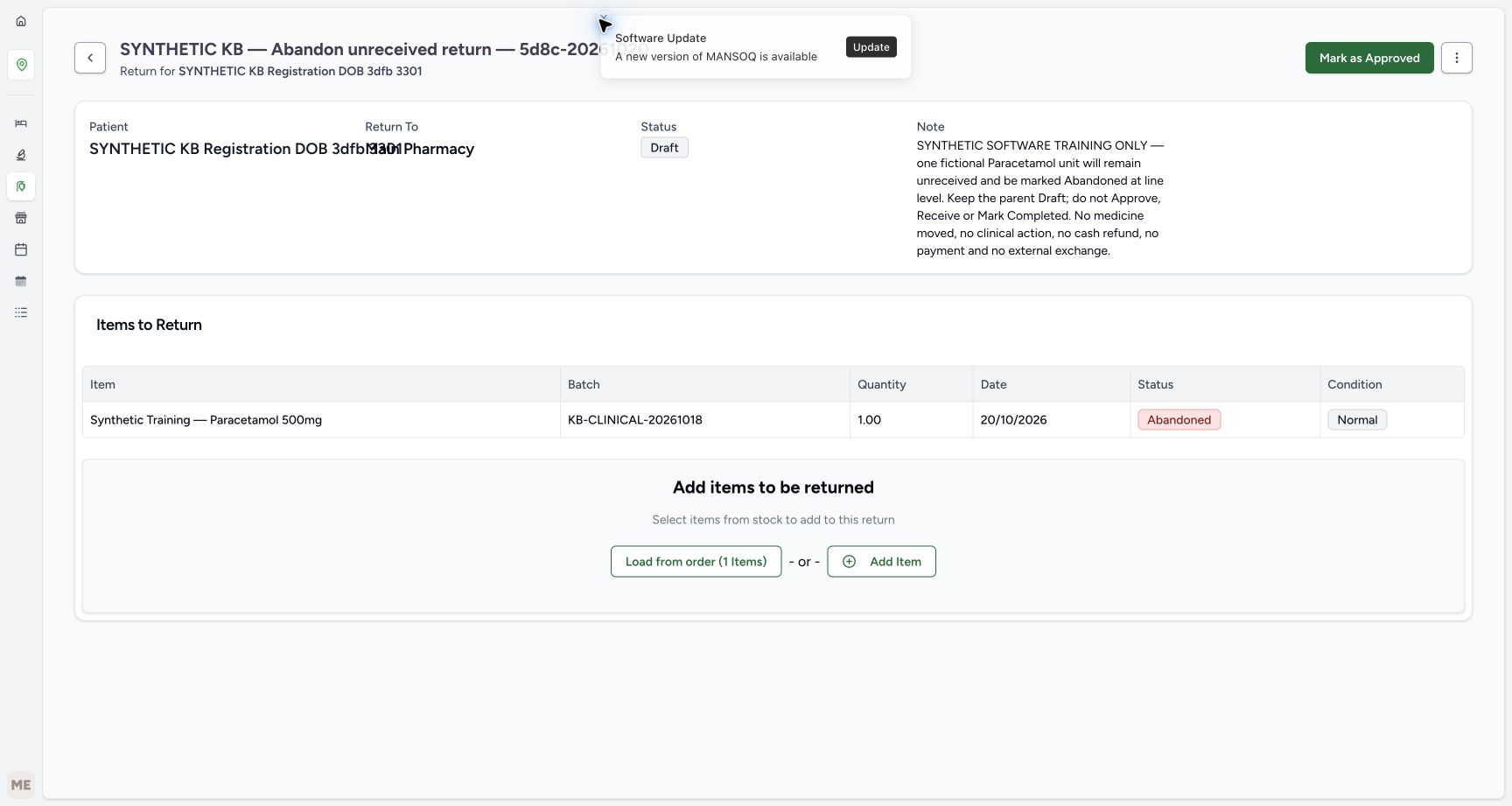
Reload normally and wait for the settled page. Confirm the same Draft parent and one Abandoned item with its batch, quantity and condition retained. Reloading does not approve or complete the parent. No invoice is linked to this return. Leave the parent Draft rather than attempting to close it as part of this lesson.
 123
123Reloaded result persists
Capture details
Genuine current-version synthetic software exercise. No physical return, clinical action, cash refund or external exchange is involved.
Image SHA-256 ddc20f03e9a433e277d286335495d82523304af326d68d5b47daf5fc3a48e8b4
- Check Draft after reload: Reload did not complete or approve this parent.
- Check Abandoned after reload: The terminal child status persists.
- Check the saved quantity: The history still records one unit.
12345Open inventory for the readback
Capture details
Genuine current-version synthetic software exercise. No physical return, clinical action, cash refund or external exchange is involved.
Image SHA-256 f6117cfffd93d70c43e7ce24dcef94b0cbb617970b344214096fd45a77bddecd
- Verify Main Pharmacy: Keep the assigned training location.
- Open Inventory Items: Read the original lot without receiving another unit.
- Read the retained Draft parent: The child action did not close the whole return.
- Read the retained Abandoned item: Keep this terminal row as history.
- Verify the existing Facility Admin: The exercise uses the already authorised account.
6. Read back the original usable stock
In the expanded Inventory menu, choose Items. Match the original Paracetamol batch KB-CLINICAL-20261018 and January 1, 2029 expiry. Usable stock remains 83 count. Abandoning this unreceived unit adds no usable unit and does not change the original stock lot.
12345Open inventory for the readback
Capture details
Genuine current-version synthetic software exercise. No physical return, clinical action, cash refund or external exchange is involved.
Image SHA-256 f6117cfffd93d70c43e7ce24dcef94b0cbb617970b344214096fd45a77bddecd
- Verify Main Pharmacy: Keep the assigned training location.
- Open Inventory Items: Read the original lot without receiving another unit.
- Read the retained Draft parent: The child action did not close the whole return.
- Read the retained Abandoned item: Keep this terminal row as history.
- Verify the existing Facility Admin: The exercise uses the already authorised account.
1234Original usable stock remains eighty-three
Capture details
Genuine current-version synthetic software exercise. No physical return, clinical action, cash refund or external exchange is involved.
Image SHA-256 f58c0c4f33601d74393ddb4f52ad7aed5f29fdd7722abe55e671f7a8f73a0f23
- Read usable stock eighty-three: Abandoning an unreceived unit adds no usable stock.
- Match the original batch: Use KB-CLINICAL-20261018.
- Check the original expiry: The lot still expires January 1, 2029.
- Check the inventory location: This is Main Pharmacy.
7. Read back the original sale, account and final return state
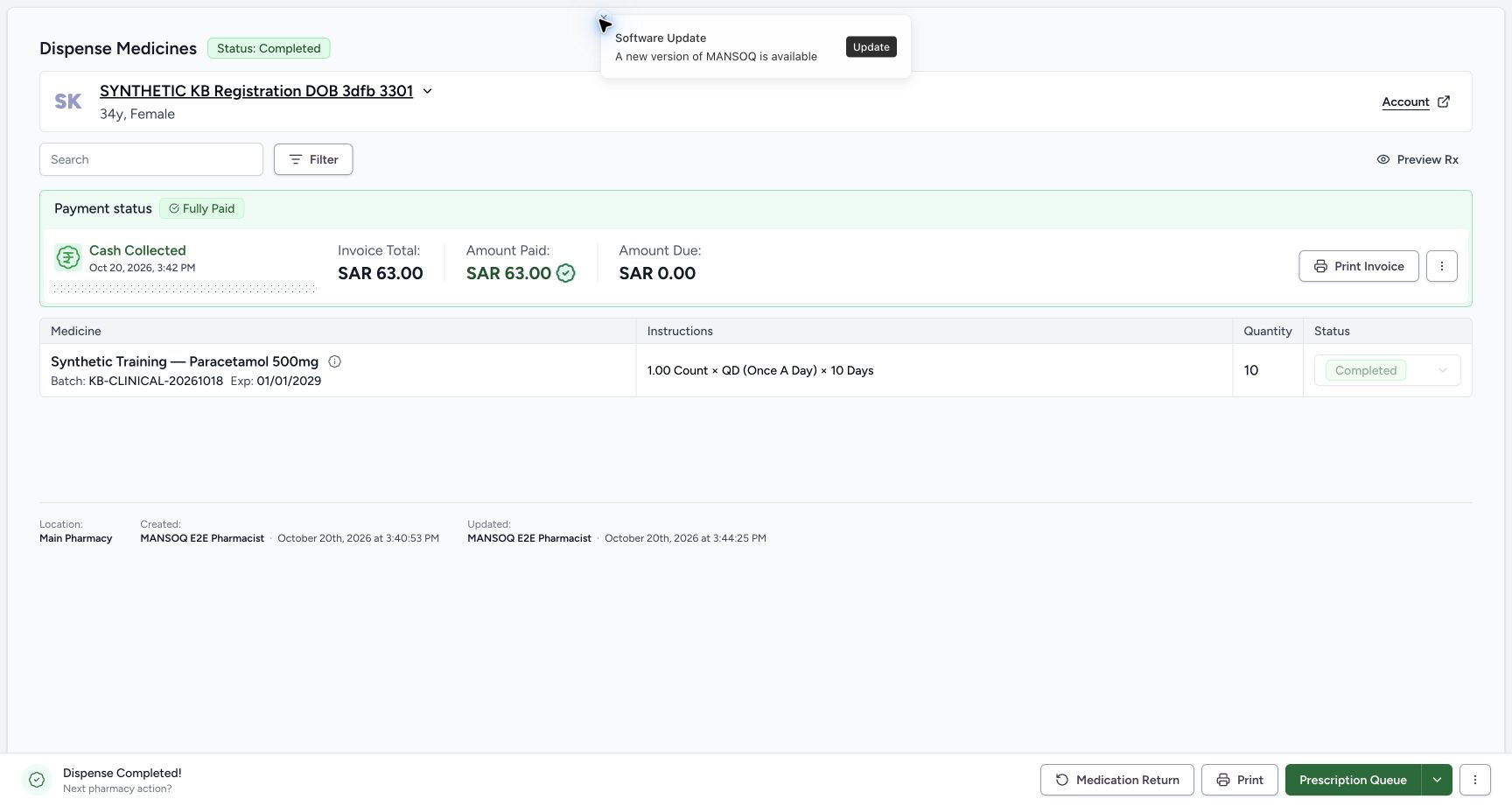
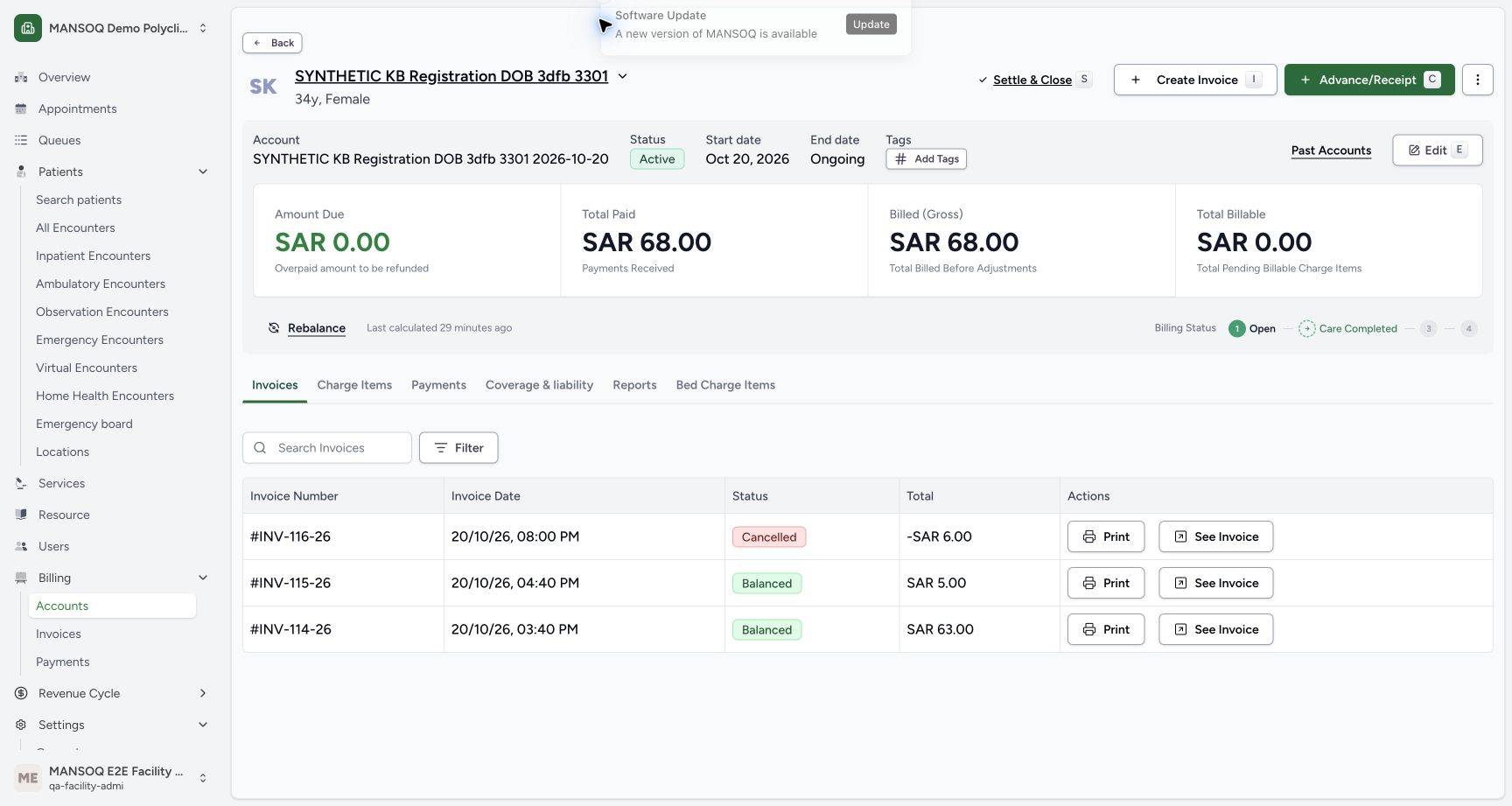
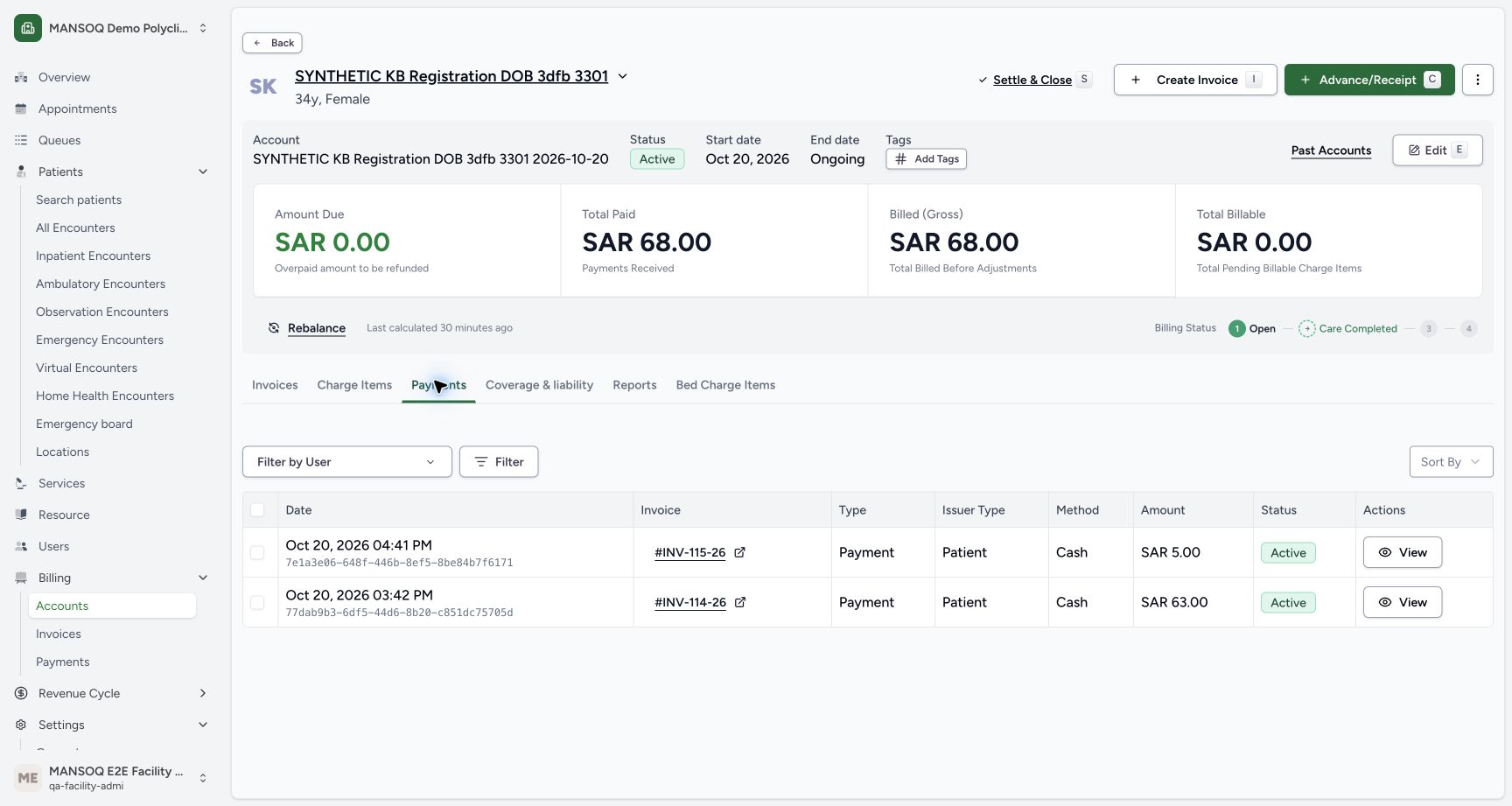
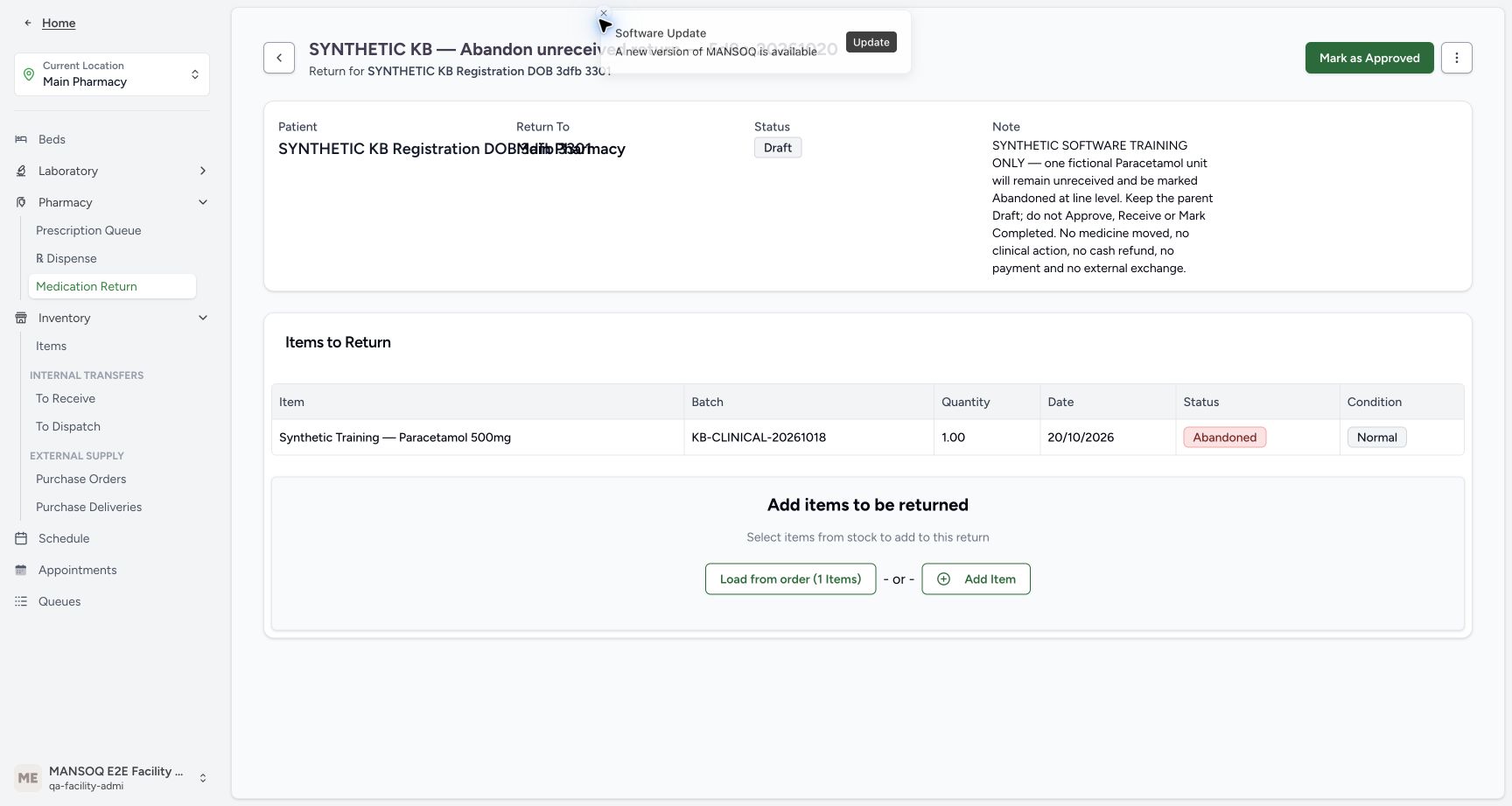
Use the shared History and patient-filter instructions to reopen the original completed sale. It still shows ten units, SAR 63.00 paid and zero due. Choose its Account link and review Invoices: the account still has zero due, SAR 68.00 paid and the three earlier invoices. Cancelled INV-116-26 belongs to the previous Damaged correction exercise; it was not created by this Abandoned item. Choose Payments to read the same two existing active cash payments of SAR 5.00 and SAR 63.00. Create no financial transaction. The final return readback remains the same Draft parent and Abandoned one-unit history.
 123456
Original paid sale is unchanged
Capture details
Genuine current-version synthetic software exercise. No physical return, clinical action, cash refund or external exchange is involved.
Image SHA-256 ea48f5196e74537022d7f8e89e484ea80260904b1f86eae9d701e2097363c05f
- Verify the original remains Completed: The new child action does not reverse the sale.
- Verify original quantity ten: Keep the original sale distinct from the one-unit return history.
- Verify original paid SAR 63.00: No replacement payment was recorded.
- Verify original amount due zero: The original sale remains fully paid.
- Match the original batch: The sale still uses KB-CLINICAL-20261018.
- Open the existing Account: Read the same patient account without creating a transaction.
 123456
Read the existing account and invoices
Capture details
Genuine current-version synthetic software exercise. No physical return, clinical action, cash refund or external exchange is involved.
Image SHA-256 c0cae8a289c1bc9c16a7623a03f8d7c6c6ed62b4d0789383c40911d8004abe3e
- Read account amount due zero: There is no new account credit or balance from this child action.
- Read total paid SAR 68.00: This is the existing account total across the earlier sales.
- Identify the earlier Cancelled refund: INV-116-26 belongs to the earlier Damaged correction exercise.
- Read existing Balanced SAR 5.00 sale: INV-115-26 is the earlier HYMOX sale.
- Read existing Balanced SAR 63.00 sale: INV-114-26 is the original Paracetamol sale.
- Open Payments: Review existing payments; do not create another.
 1234
1234Two existing payments remain
Capture details
Genuine current-version synthetic software exercise. No physical return, clinical action, cash refund or external exchange is involved.
Image SHA-256 7d88fd240ab764a00a87007560ea48a830846bfbd7b628007c2cc4841d1ae478
- Read existing SAR 5.00 payment: This active cash payment belongs to the earlier HYMOX sale.
- Read existing SAR 63.00 payment: This active cash payment belongs to the original Paracetamol sale.
- Verify total paid is unchanged: The two earlier payments total SAR 68.00.
- Verify account amount due zero: No new payment or refund is needed for the abandoned unreceived item.
 12345
12345Final saved Draft and Abandoned history
Capture details
Genuine current-version synthetic software exercise. No physical return, clinical action, cash refund or external exchange is involved.
Image SHA-256 9cd6448ed5dde35bb4adadb57bfec6cfcf6ba0362d281eded0c478712a6e9096
- Finish with parent Draft: The whole return has deliberately not been completed.
- Finish with child Abandoned: Keep the unreceived terminal row as history.
- Verify final quantity one: No extra item was added.
- Read the retained condition: Normal does not mean this unit was received.
- Match the final batch: The item still references KB-CLINICAL-20261018.
Keep child abandonment separate from parent completion
Abandoned is the outcome of this one unreceived item. The parent remains an open Draft, and the retained Normal label does not establish receipt. No approval, receipt, parent completion, Entered in Error correction, invoice creation or payment forms part of this branch. A valid received return needs its own authorised workflow; this exercise does not qualify every return state or facility.
123456Saved unreceived item under Draft
Capture details
Genuine current-version synthetic software exercise. No physical return, clinical action, cash refund or external exchange is involved.
Image SHA-256 9d81daeae94b7bc358d7de9077729d98beaf63d8e8f903f121d81b037977cc30
- Verify Draft parent: Leave Mark as Approved unused.
- Match the saved batch: The full batch remains KB-CLINICAL-20261018.
- Verify saved quantity one: The original ten has been reduced before saving.
- Verify In Progress: This item has not been received.
- Read the initial Normal label: Normal is initial metadata here, not proof of receipt.
- Open the item Actions menu: Use the row ellipsis, not the parent menu.
1234Saved child Abandoned, parent Draft
Capture details
Genuine current-version synthetic software exercise. No physical return, clinical action, cash refund or external exchange is involved.
Image SHA-256 6fdf7390c0d40b5588a8a4680e77f98f1d8086db38b55f2b59d7784d4f6ccea9
- Verify the parent remains Draft: This parent is still an unfinished Draft.
- Verify child Abandoned: The unreceived item is now terminal.
- Verify one unit retained: The saved history keeps the intended quantity.
- Read Normal without inferring receipt: The condition label remains; no receipt took place.
12345Open inventory for the readback
Capture details
Genuine current-version synthetic software exercise. No physical return, clinical action, cash refund or external exchange is involved.
Image SHA-256 f6117cfffd93d70c43e7ce24dcef94b0cbb617970b344214096fd45a77bddecd
- Verify Main Pharmacy: Keep the assigned training location.
- Open Inventory Items: Read the original lot without receiving another unit.
- Read the retained Draft parent: The child action did not close the whole return.
- Read the retained Abandoned item: Keep this terminal row as history.
- Verify the existing Facility Admin: The exercise uses the already authorised account.
12345Final saved Draft and Abandoned history
Capture details
Genuine current-version synthetic software exercise. No physical return, clinical action, cash refund or external exchange is involved.
Image SHA-256 9cd6448ed5dde35bb4adadb57bfec6cfcf6ba0362d281eded0c478712a6e9096
- Finish with parent Draft: The whole return has deliberately not been completed.
- Finish with child Abandoned: Keep the unreceived terminal row as history.
- Verify final quantity one: No extra item was added.
- Read the retained condition: Normal does not mean this unit was received.
- Match the final batch: The item still references KB-CLINICAL-20261018.
Reuse shared setup without repeating the receiving workflow
Record a Damaged return and correct its Draft refund shows the common patient/order verification, direct sheet, load and Save controls in this same version. Reuse those controls only through the one-item Save. This lesson takes the separate unreceived-item branch before approval; its endpoint is Draft/Abandoned rather than the shared lesson’s receiving or optional error correction.
1234567Verify the original completed sale
Capture details
Genuine current-version synthetic software exercise. No physical return, clinical action, cash refund or external exchange is involved.
Image SHA-256 325fc56e717337fa994ca760b0b37713a3ef8ca9d1be1fc2d124d4fcb69431f7
- Match the synthetic patient: Use SYNTHETIC KB Registration DOB 3dfb 3301.
- Verify Completed: Start from the existing completed sale.
- Read original quantity ten: This is the original sale quantity, not the intended return quantity.
- Verify SAR 63.00 paid: Keep the original payment intact.
- Verify zero amount due: The completed sale has no amount due.
- Match the original batch: Use KB-CLINICAL-20261018, expiring January 1, 2029.
- Open Medication Return: Open the direct return sheet from this verified order.
123Empty Draft ready to load
Capture details
Genuine current-version synthetic software exercise. No physical return, clinical action, cash refund or external exchange is involved.
Image SHA-256 c11cfa7ba2756d1bee7a104e977c5dfd5c8ed77617c23329aa5b1455fb397249
- Verify the parent is Draft: Keep this parent unapproved throughout the exercise.
- Verify no items are saved yet: The item must still be loaded and saved.
- Load from order: Open the original order item chooser.
123456Saved unreceived item under Draft
Capture details
Genuine current-version synthetic software exercise. No physical return, clinical action, cash refund or external exchange is involved.
Image SHA-256 9d81daeae94b7bc358d7de9077729d98beaf63d8e8f903f121d81b037977cc30
- Verify Draft parent: Leave Mark as Approved unused.
- Match the saved batch: The full batch remains KB-CLINICAL-20261018.
- Verify saved quantity one: The original ten has been reduced before saving.
- Verify In Progress: This item has not been received.
- Read the initial Normal label: Normal is initial metadata here, not proof of receipt.
- Open the item Actions menu: Use the row ellipsis, not the parent menu.
12Choose the child Abandoned action
Capture details
Genuine current-version synthetic software exercise. No physical return, clinical action, cash refund or external exchange is involved.
Image SHA-256 af816a73a660ee3ccc2c3d43c48928f7ace4c8052f6cde158e81dfa41955975b
- Identify the child row menu: This is the saved item’s action menu.
- Choose Mark as Abandoned once: Apply the child abandonment directly; this route has no confirmation dialog.
1234Saved child Abandoned, parent Draft
Capture details
Genuine current-version synthetic software exercise. No physical return, clinical action, cash refund or external exchange is involved.
Image SHA-256 6fdf7390c0d40b5588a8a4680e77f98f1d8086db38b55f2b59d7784d4f6ccea9
- Verify the parent remains Draft: This parent is still an unfinished Draft.
- Verify child Abandoned: The unreceived item is now terminal.
- Verify one unit retained: The saved history keeps the intended quantity.
- Read Normal without inferring receipt: The condition label remains; no receipt took place.
Troubleshooting
The row menu is absent after abandonment
An Abandoned item is terminal in this path, so the In Progress row Actions are no longer offered. Check the saved status and same quantity after reload. Do not try to resume it by completing the parent, using receiving or creating a replacement line as a retry.
123456Saved unreceived item under Draft
Capture details
Genuine current-version synthetic software exercise. No physical return, clinical action, cash refund or external exchange is involved.
Image SHA-256 9d81daeae94b7bc358d7de9077729d98beaf63d8e8f903f121d81b037977cc30
- Verify Draft parent: Leave Mark as Approved unused.
- Match the saved batch: The full batch remains KB-CLINICAL-20261018.
- Verify saved quantity one: The original ten has been reduced before saving.
- Verify In Progress: This item has not been received.
- Read the initial Normal label: Normal is initial metadata here, not proof of receipt.
- Open the item Actions menu: Use the row ellipsis, not the parent menu.
12Choose the child Abandoned action
Capture details
Genuine current-version synthetic software exercise. No physical return, clinical action, cash refund or external exchange is involved.
Image SHA-256 af816a73a660ee3ccc2c3d43c48928f7ace4c8052f6cde158e81dfa41955975b
- Identify the child row menu: This is the saved item’s action menu.
- Choose Mark as Abandoned once: Apply the child abandonment directly; this route has no confirmation dialog.
1234Saved child Abandoned, parent Draft
Capture details
Genuine current-version synthetic software exercise. No physical return, clinical action, cash refund or external exchange is involved.
Image SHA-256 6fdf7390c0d40b5588a8a4680e77f98f1d8086db38b55f2b59d7784d4f6ccea9
- Verify the parent remains Draft: This parent is still an unfinished Draft.
- Verify child Abandoned: The unreceived item is now terminal.
- Verify one unit retained: The saved history keeps the intended quantity.
- Read Normal without inferring receipt: The condition label remains; no receipt took place.
12345Open inventory for the readback
Capture details
Genuine current-version synthetic software exercise. No physical return, clinical action, cash refund or external exchange is involved.
Image SHA-256 f6117cfffd93d70c43e7ce24dcef94b0cbb617970b344214096fd45a77bddecd
- Verify Main Pharmacy: Keep the assigned training location.
- Open Inventory Items: Read the original lot without receiving another unit.
- Read the retained Draft parent: The child action did not close the whole return.
- Read the retained Abandoned item: Keep this terminal row as history.
- Verify the existing Facility Admin: The exercise uses the already authorised account.
A Cancelled refund is already listed on the account
Match the invoice number and its earlier exercise. INV-116-26 is the existing Cancelled Damaged-return refund, alongside the Balanced SAR 5.00 and SAR 63.00 sales. This unreceived-item branch adds no invoice or payment; the account remains zero due with the same two existing cash payments.
123456Read the existing account and invoices
Capture details
Genuine current-version synthetic software exercise. No physical return, clinical action, cash refund or external exchange is involved.
Image SHA-256 c0cae8a289c1bc9c16a7623a03f8d7c6c6ed62b4d0789383c40911d8004abe3e
- Read account amount due zero: There is no new account credit or balance from this child action.
- Read total paid SAR 68.00: This is the existing account total across the earlier sales.
- Identify the earlier Cancelled refund: INV-116-26 belongs to the earlier Damaged correction exercise.
- Read existing Balanced SAR 5.00 sale: INV-115-26 is the earlier HYMOX sale.
- Read existing Balanced SAR 63.00 sale: INV-114-26 is the original Paracetamol sale.
- Open Payments: Review existing payments; do not create another.
1234Two existing payments remain
Capture details
Genuine current-version synthetic software exercise. No physical return, clinical action, cash refund or external exchange is involved.
Image SHA-256 7d88fd240ab764a00a87007560ea48a830846bfbd7b628007c2cc4841d1ae478
- Read existing SAR 5.00 payment: This active cash payment belongs to the earlier HYMOX sale.
- Read existing SAR 63.00 payment: This active cash payment belongs to the original Paracetamol sale.
- Verify total paid is unchanged: The two earlier payments total SAR 68.00.
- Verify account amount due zero: No new payment or refund is needed for the abandoned unreceived item.
12345Final saved Draft and Abandoned history
Capture details
Genuine current-version synthetic software exercise. No physical return, clinical action, cash refund or external exchange is involved.
Image SHA-256 9cd6448ed5dde35bb4adadb57bfec6cfcf6ba0362d281eded0c478712a6e9096
- Finish with parent Draft: The whole return has deliberately not been completed.
- Finish with child Abandoned: Keep the unreceived terminal row as history.
- Verify final quantity one: No extra item was added.
- Read the retained condition: Normal does not mean this unit was received.
- Match the final batch: The item still references KB-CLINICAL-20261018.
Source evidence
Every citation uses this exact committed version. The private source repository requires access.
- repositories/platform/mansoq-web/src/pages/Facility/services/pharmacy/MedicationDispenseHistory.tsx:190 ·
5d8c4629e5ccc09618b68f370bc8b304789e8318Source file checksum
84c433d3613c4b3b2fdc2980d21f4fcdad7fc1bf81b8d8b2efddc6ec7e2085c6 - repositories/platform/mansoq-web/src/pages/Facility/services/pharmacy/MedicationReturnSheet.tsx:100 ·
5d8c4629e5ccc09618b68f370bc8b304789e8318Source file checksum
9604617c375666f4db55238676070d443d8c19351ac33622879ef970cacd7764 - repositories/platform/mansoq-web/src/pages/Facility/services/pharmacy/MedicationReturnShow.tsx:248 ·
5d8c4629e5ccc09618b68f370bc8b304789e8318Source file checksum
8efb9ddff49741bf6ed0baf0fbc46e7d7fd59a5e9d988c4b484404cc8d4c8131 - repositories/platform/mansoq-web/src/pages/Facility/services/pharmacy/components/AddMedicationReturnItemForm.tsx:166 ·
5d8c4629e5ccc09618b68f370bc8b304789e8318Source file checksum
6b9fd8a41fdbbacee538c541940bf8e49968e2481340caa06d9b050a6663106f - repositories/platform/mansoq-web/src/pages/Facility/services/pharmacy/components/MedicationReturnItemsTable.tsx:81 ·
5d8c4629e5ccc09618b68f370bc8b304789e8318Source file checksum
7fc8409f101c0d1584f88c889ff85351dc15680a81babc4c7dea2dd6b4a196eb - repositories/platform/mansoq-web/src/pages/Facility/billing/invoice/InvoiceShow.tsx:295 ·
5d8c4629e5ccc09618b68f370bc8b304789e8318Source file checksum
9068995fbe413fe3e14031d9c832943cc14d9188a5f72be91d3c16baa53fc6ff - repositories/platform/mansoq-core/mansoq/emr/api/viewsets/inventory/delivery_order.py:116 ·
5d8c4629e5ccc09618b68f370bc8b304789e8318Source file checksum
d18ed0813750bf23a1da2a7553880bb340724b8c63396e0a2e045c0b66843063 - repositories/platform/mansoq-core/mansoq/emr/api/viewsets/inventory/supply_delivery.py:130 ·
5d8c4629e5ccc09618b68f370bc8b304789e8318Source file checksum
f9cbb60413017b4a822ac5c5a233181d96e88088d52e70a76dbc0782d0637220 - repositories/platform/mansoq-core/mansoq/emr/resources/inventory/inventory_item/sync_inventory_item.py:47 ·
5d8c4629e5ccc09618b68f370bc8b304789e8318Source file checksum
a6f8395ab8059b937700d212bbbcce46c1fc633848c38026c4c8ee9bc2e4c573 - repositories/platform/mansoq-core/mansoq/emr/resources/invoice/return_items_invoice.py:35 ·
5d8c4629e5ccc09618b68f370bc8b304789e8318Source file checksum
32755dbee779b854bfbb997176d7fe0d7c36b4225c5da75d975a7ad2c81c12c7 - repositories/platform/mansoq-core/mansoq/emr/resources/charge_item/apply_charge_item_definition.py:13 ·
5d8c4629e5ccc09618b68f370bc8b304789e8318Source file checksum
f0e436da014c81006a40a5449126439c94a70b0da84953fec62018de5d8203db - repositories/platform/mansoq-core/mansoq/emr/resources/invoice/sync_items.py:47 ·
5d8c4629e5ccc09618b68f370bc8b304789e8318Source file checksum
e232d244e2f09171c7cf76ffebd6da04bd62a6f9353de709224a08c0fde8cff3 - repositories/platform/mansoq-core/mansoq/emr/resources/inventory/supply_delivery/spec.py:37 ·
5d8c4629e5ccc09618b68f370bc8b304789e8318Source file checksum
53fcab738ac254b418fc8e9e373d50803217079902b8d640d820aeb12c478406 - repositories/platform/mansoq-core/mansoq/security/authorization/supply_delivery.py:27 ·
5d8c4629e5ccc09618b68f370bc8b304789e8318Source file checksum
934acb2a4580c391a692d0af4a0b1fbd39955bbc2e98c84fbe4acf1bd6922fcc - repositories/platform/mansoq-core/mansoq/security/permissions/supply_delivery.py:23 ·
5d8c4629e5ccc09618b68f370bc8b304789e8318Source file checksum
5bab550ead04c1b8dde1cbbf0b7db7ce9b76fa2db3b9909d0c0dadc4cb43b012 - repositories/platform/mansoq-web/src/pages/Facility/services/pharmacy/DispenseOrderView.tsx:242 ·
5d8c4629e5ccc09618b68f370bc8b304789e8318Source file checksum
59bebd01a2422d3b62d5e57b0f3a9211d5eb03ddd94f81704e3dbecd47cd197d - repositories/platform/mansoq-web/src/pages/Facility/services/pharmacy/components/DispenseOrderViewFooter.tsx:92 ·
5d8c4629e5ccc09618b68f370bc8b304789e8318Source file checksum
9ddc555df83d78afd04ed0e339630d6e67ccd52a1545d5103a835d8633d0acd6