 MANSOQ
 Pharmacy · VERSION 5d8c4629
Record a Damaged return and correct its Draft refund
Record one fictional Completed/Damaged return without adding usable stock, review its Draft refund, and learn the separate optional correction for an entry made in error. Verify the retained audit record, cancelled Draft and unchanged original sale.
Facility Admin
 12345
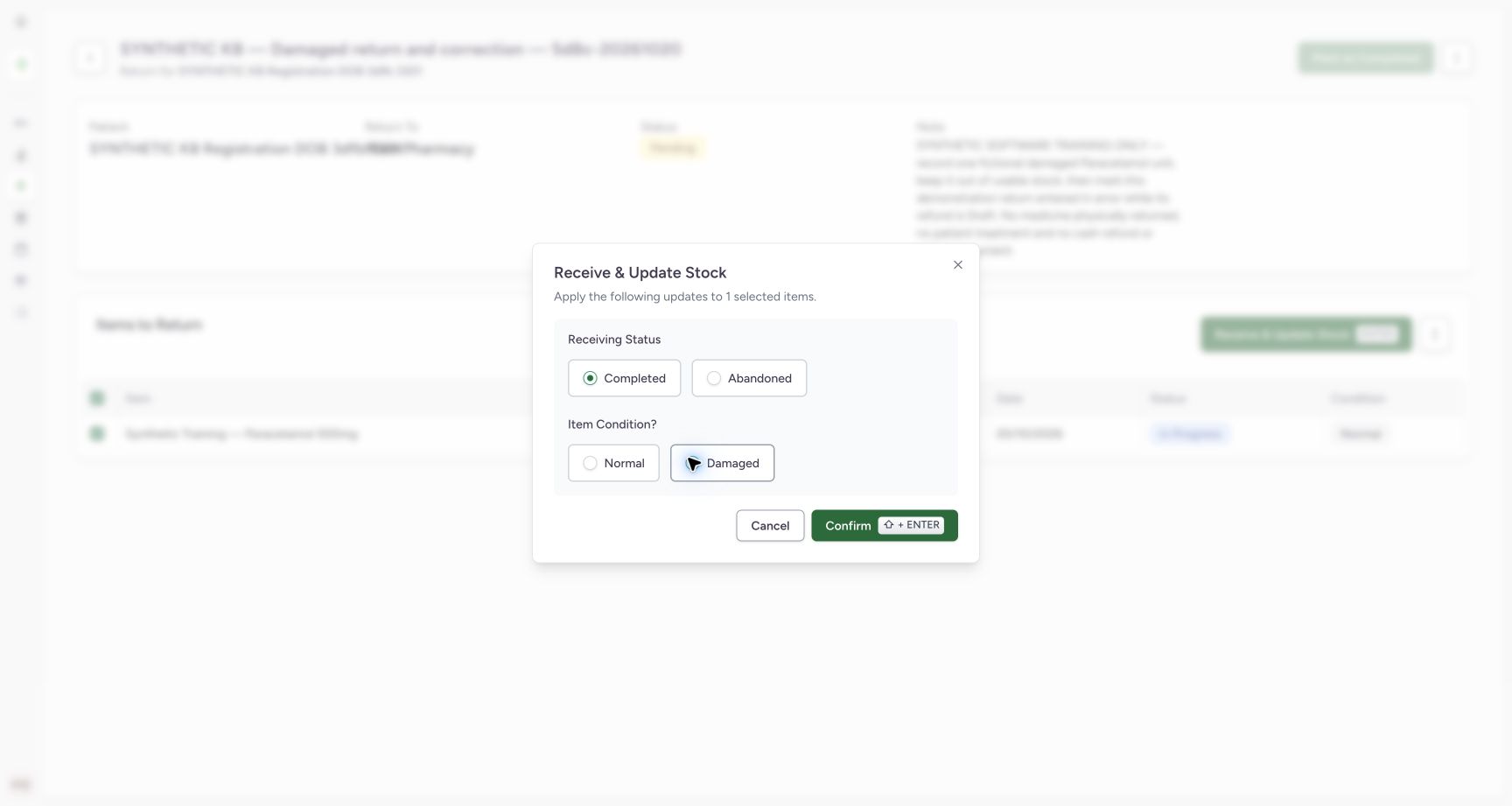
12345Completed and Damaged ready to confirm
Capture details
Genuine current-version software exercise with the existing authorised Facility Admin. No physical medicine, clinical care, cash refund or external exchange is involved.
Image SHA-256 ee25f6cf8eedfa341d2c577444bd7cd9e00a1f6c752e2ca5e5101639aca5720f
- Verify exactly one selected item: This dialog applies to the one saved return unit.
- Verify Completed: Receiving status and item condition are separate controls.
- Verify Damaged selected: The completed return must retain its Damaged condition.
- Confirm once: Apply this one Completed/Damaged receipt.
- Cancel if the scope is wrong: Cancel is available before applying the receipt.
 123
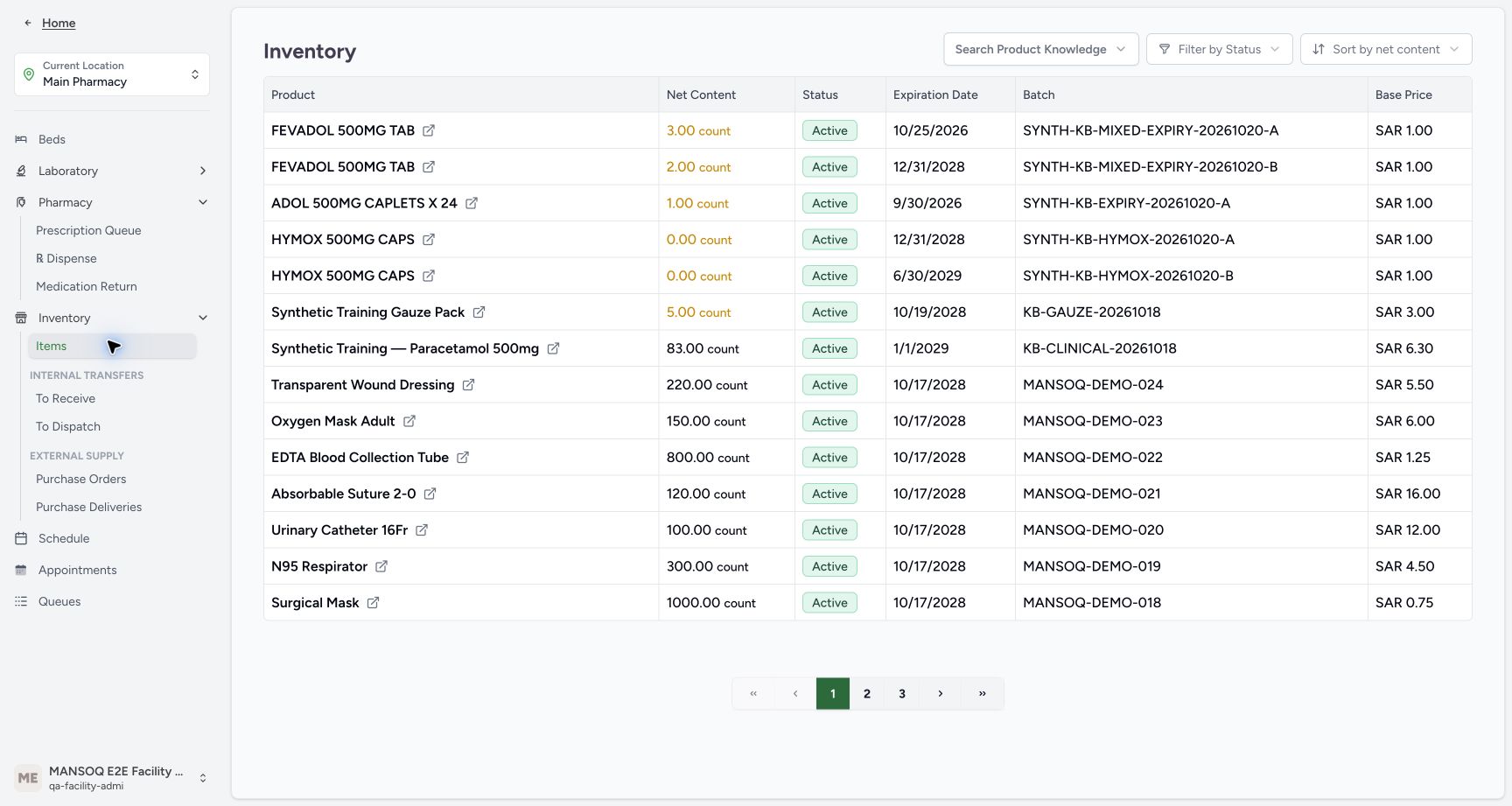
123Usable stock after receipt and correction
Capture details
Genuine current-version software exercise with the existing authorised Facility Admin. No physical medicine, clinical care, cash refund or external exchange is involved.
Image SHA-256 f58c0c4f33601d74393ddb4f52ad7aed5f29fdd7722abe55e671f7a8f73a0f23
- Verify usable stock remains eighty-three: Completed/Damaged receipt has not added a usable unit.
- Match the original batch: Check KB-CLINICAL-20261018.
- Match the unchanged expiry: The original lot still expires January 1, 2029.
 12345
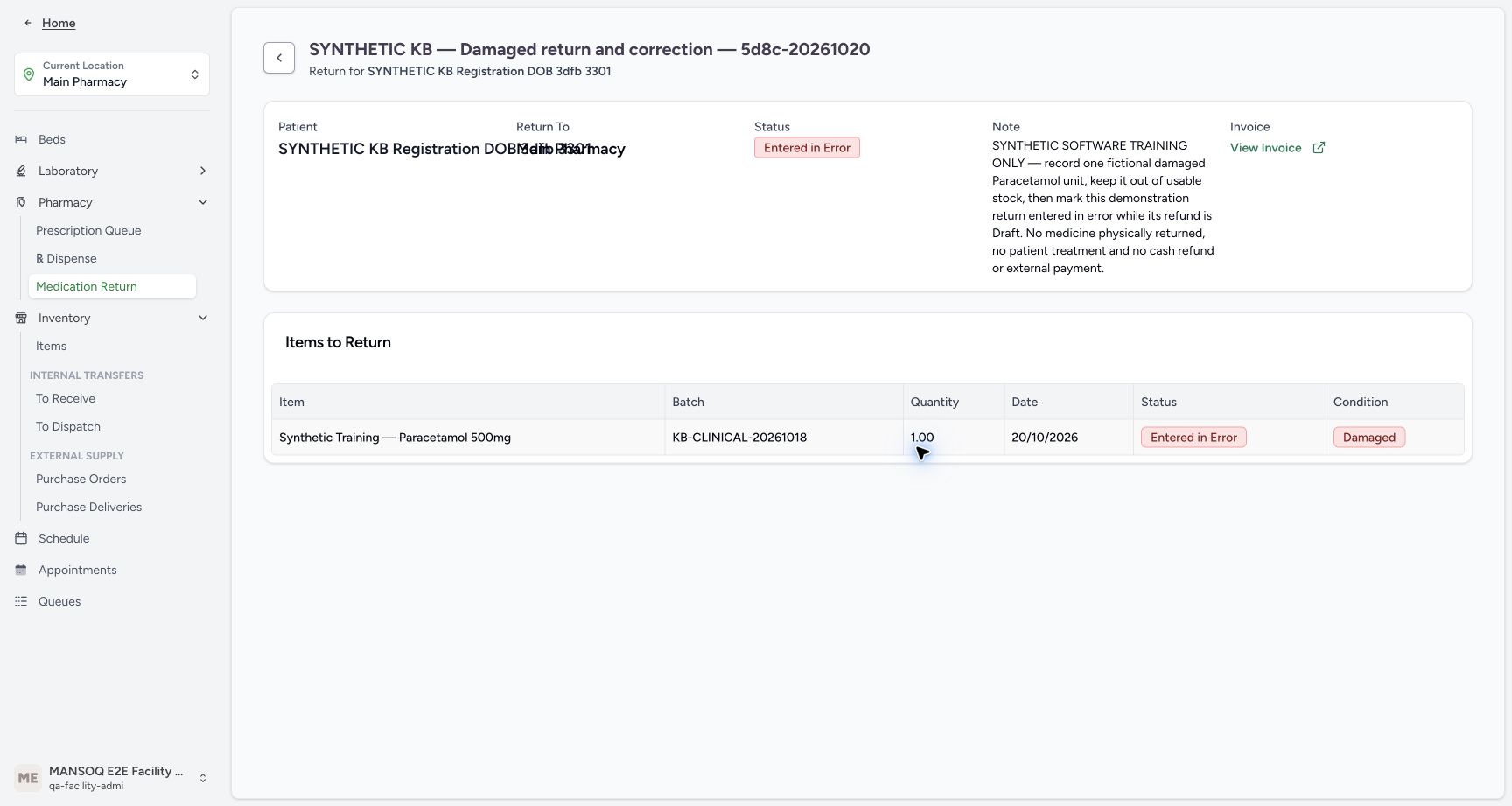
12345Parent and child corrected
Capture details
Genuine current-version software exercise with the existing authorised Facility Admin. No physical medicine, clinical care, cash refund or external exchange is involved.
Image SHA-256 288580b056b6c8c92387a762754b793b537149367d83bd33d68e235b73931235
- Verify parent Entered in Error: The correction retains an audit record.
- Verify child Entered in Error: The saved child is corrected with its parent.
- Verify Damaged remains visible: The condition history has not been rewritten to Normal.
- Verify quantity one retained: The historical one-unit entry remains readable.
- Open the linked invoice again: Verify cancellation of this same Draft refund.
 12345
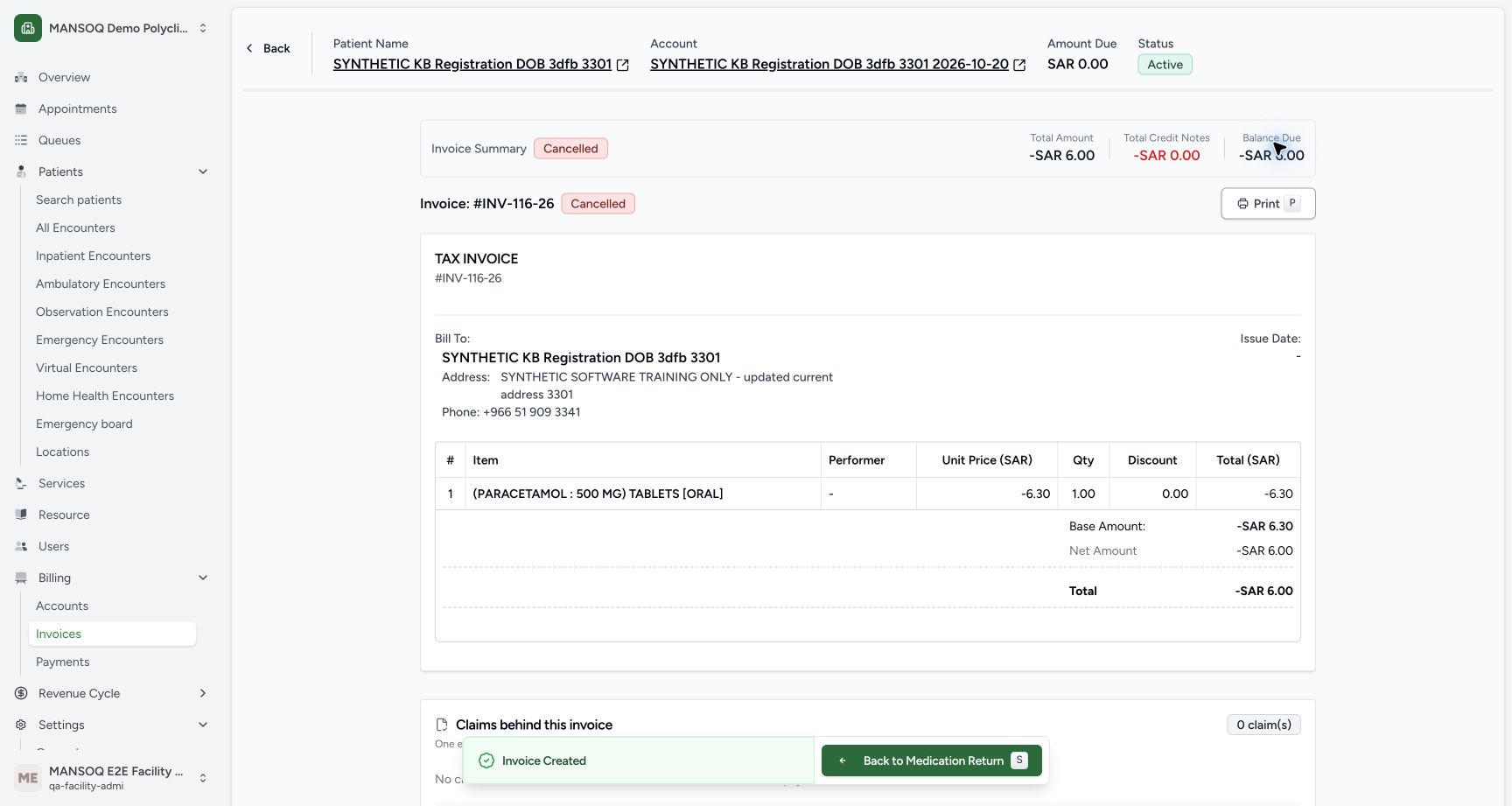
12345Cancelled refund and restored account
Capture details
Genuine current-version software exercise with the existing authorised Facility Admin. No physical medicine, clinical care, cash refund or external exchange is involved.
Image SHA-256 f6846378bbaf721c7e97ae3697911985cef75b26e813f528a77693f2e0782004
- Verify refund Cancelled: Read the authoritative document status.
- Verify account Amount Due zero: The account credit from the erroneous return has been reversed.
- Keep retained negative total separate: The cancelled document still displays its historical minus SAR 6.00 total.
- Verify Issue Date remains blank: No issued document is established.
- Back to Medication Return: Return to the corrected order for normal reload readback.
21 of 21 content blocks have reviewed image alignment.
Before you begin
- Use an existing Facility Admin account already authorised for return writes at the assigned Main Pharmacy. Opening a return sheet does not grant permission or save an order. This lesson changes no accounts, credentials or permissions.
 1234567
Recorded release 5d8c4629 · 2026-10-20T16:53:28.501655+00:00 · 1728 × 921 Usable stock before the return
Capture details
Genuine current-version software exercise with the existing authorised Facility Admin. No physical medicine, clinical care, cash refund or external exchange is involved.
Image SHA-256
7b135a63b9339f0ac5ec68864e433f908d29bcaebaf414174d693daeb0e1ff36- Verify Main Pharmacy: Keep the assigned training location.
- Verify the existing Facility Admin: Use the authorised qa-facility-admi account.
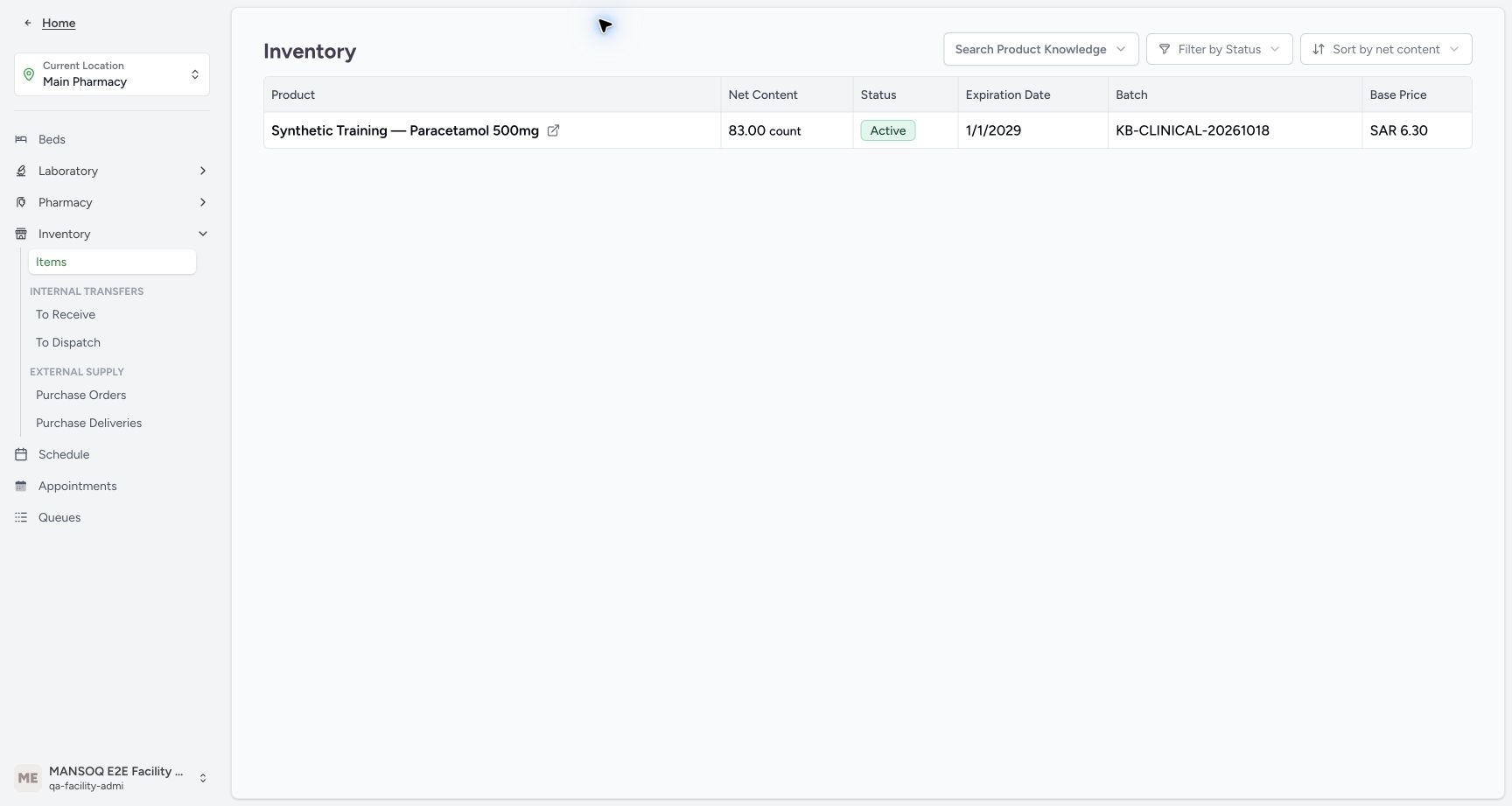
- Read usable stock eighty-three: The original synthetic Paracetamol lot has 83.00 count.
- Match the original batch: Match KB-CLINICAL-20261018.
- Check the original expiry: The lot expires January 1, 2029.
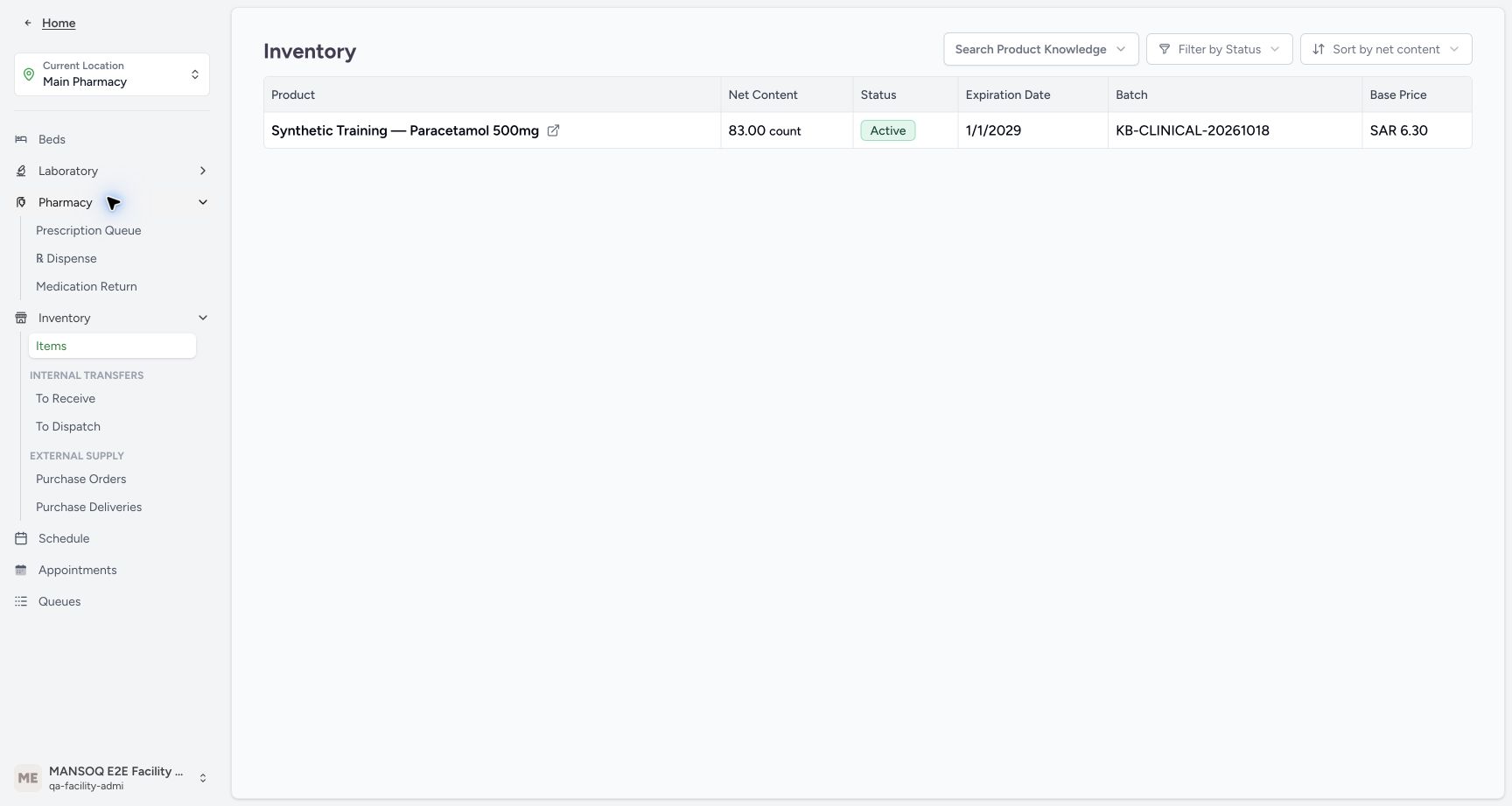
- Expand Pharmacy: Use the ordinary location navigation.
- Open Inventory Items: Start the stock check on the assigned pharmacy inventory page.
 1
1Recorded release 5d8c4629 · 2026-10-20T16:53:46.786537+00:00 · 1728 × 921 Pharmacy navigation to Dispense
Capture details
Genuine current-version software exercise with the existing authorised Facility Admin. No physical medicine, clinical care, cash refund or external exchange is involved.
Image SHA-256
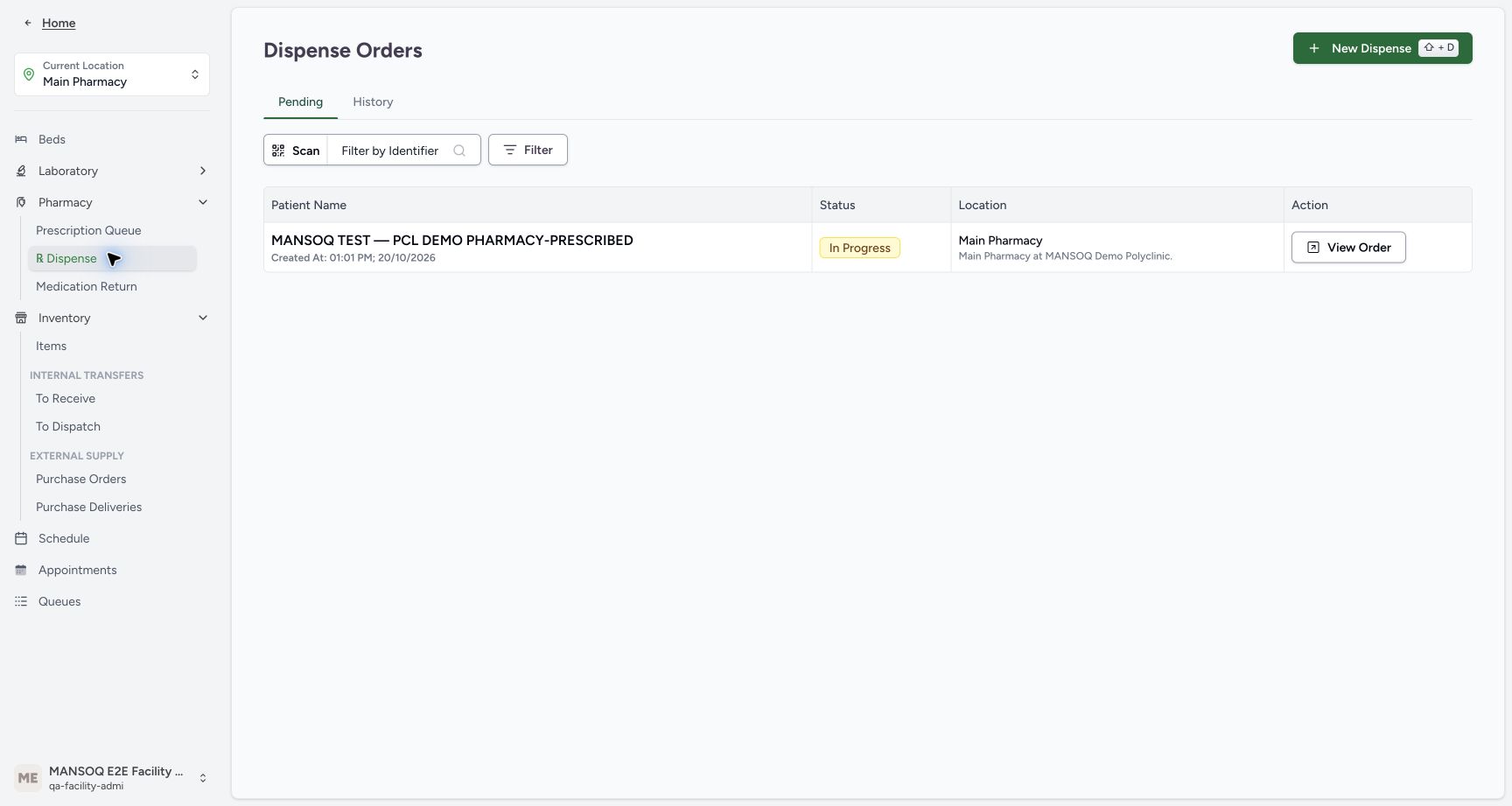
9b7566fec8d093313d4533e35d62e7c1c683f3800018bf1126ac1ad0822c72ca- Choose Dispense: Open the existing dispense-order list.
- Use only the isolated synthetic exercise and its existing completed ten-unit Paracetamol sale for SYNTHETIC KB Registration DOB 3dfb 3301. The original batch is KB-CLINICAL-20261018 and the paid sale is SAR 63.00. The intended return is one fictional Damaged unit; no medicine, patient treatment or real money is involved.
 1234567
Recorded release 5d8c4629 · 2026-10-20T16:55:24.574219+00:00 · 1728 × 921 Verified completed ten-unit original
Capture details
Genuine current-version software exercise with the existing authorised Facility Admin. No physical medicine, clinical care, cash refund or external exchange is involved.
Image SHA-256
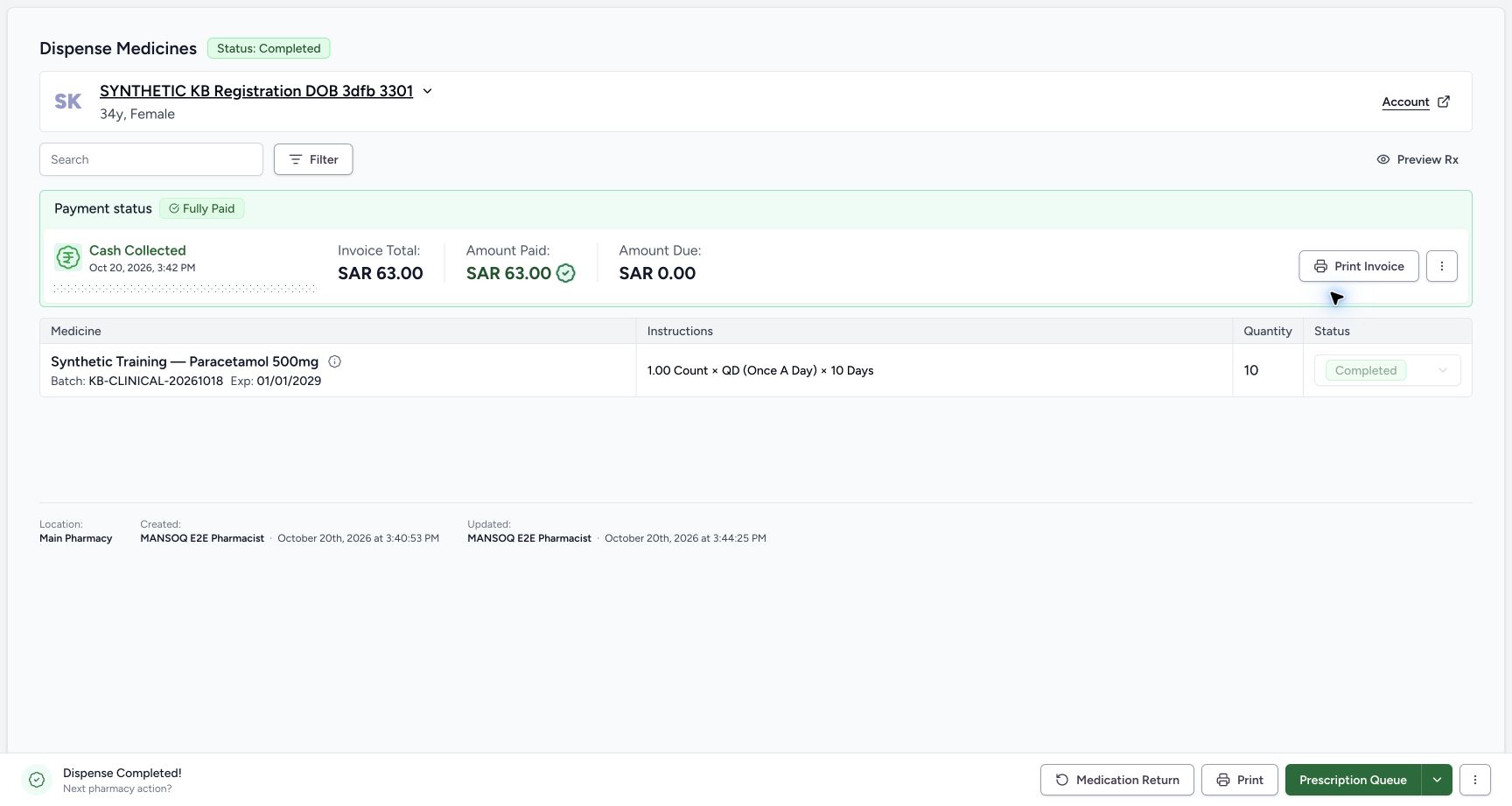
ae85e9ccc076bd643f0cb619be3483cd686a96db4d47ddddc58c74a55bc0bc96- Verify the same patient: Read the original order patient before proceeding.
- Read original quantity ten: This is the completed supply quantity, not the intended return quantity.
- Verify the medicine is Completed: Use the saved completed original.
- Match original batch and expiry: KB-CLINICAL-20261018 expires January 1, 2029.
- Read the existing paid amount: The original sale has SAR 63.00 paid.
- Read original amount due zero: Do not create another payment.
- Open Medication Return: Use the direct action on this verified completed order.
 123
123Recorded release 5d8c4629 · 2026-10-20T16:56:07.824078+00:00 · 1728 × 921 Named synthetic return ready to create
Capture details
Genuine current-version software exercise with the existing authorised Facility Admin. No physical medicine, clinical care, cash refund or external exchange is involved.
Image SHA-256
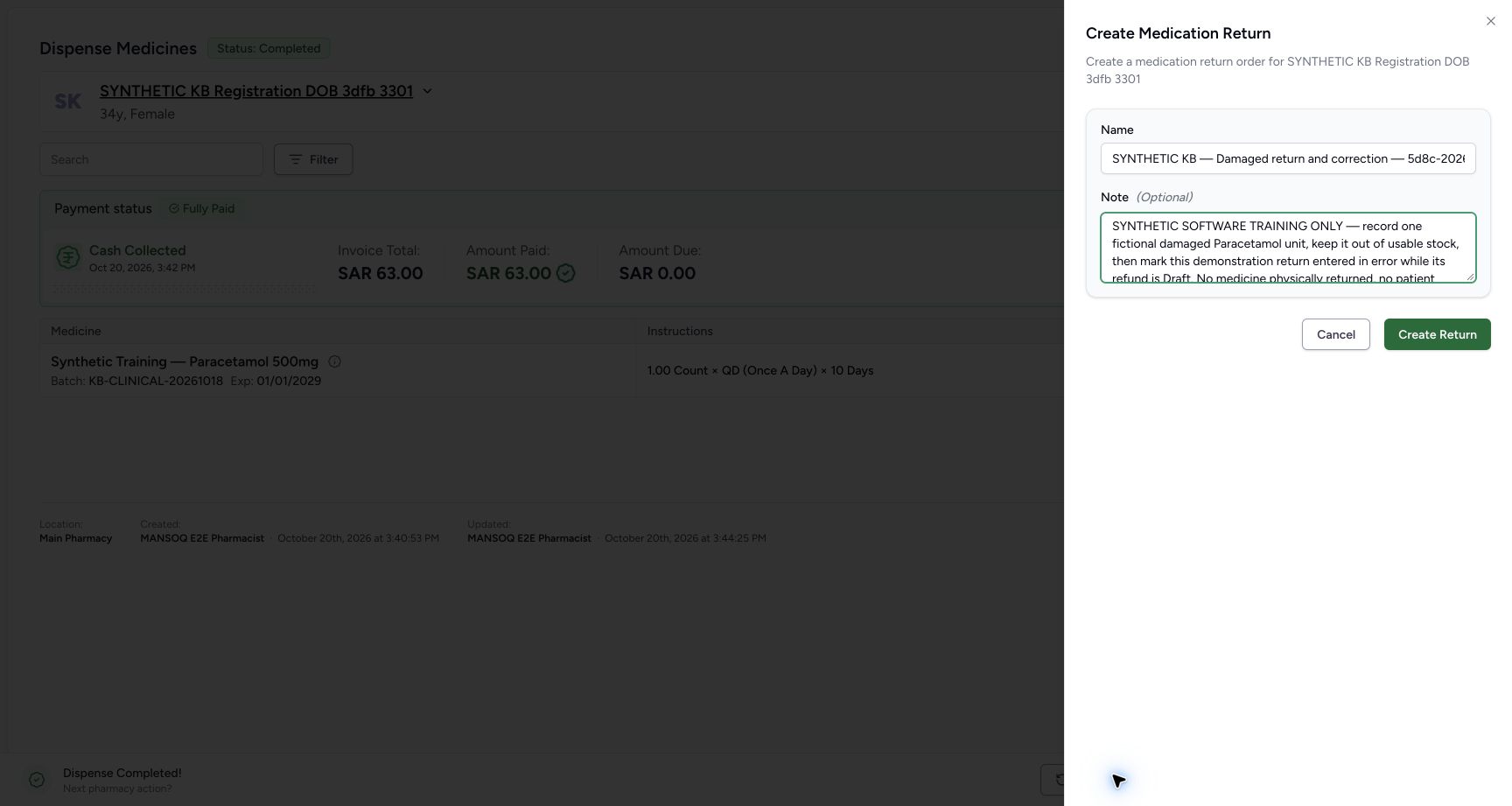
81ad4b01b79def2a895928c7a65d58a10414bd8c49a9e874ffe048640c09835d- Verify the named synthetic return: The distinctive name identifies this one demonstration.
- Verify the explicit training note: No physical medicine, patient treatment, cash refund or external payment is involved.
- Choose Create Return once: Save the named Draft for this patient and original order.
- The later Entered in Error action is optional and applies only when a return was recorded by mistake under the authorised correction process. This example deliberately stages that mistake and keeps its refund Draft and unpaid. A valid Damaged return does not require that correction; an issued document or payout needs a separate authorised workflow.
 1234567
Recorded release 5d8c4629 · 2026-10-20T17:01:15.464165+00:00 · 1728 × 921 Draft refund with separate financial amounts
Capture details
Genuine current-version software exercise with the existing authorised Facility Admin. No physical medicine, clinical care, cash refund or external exchange is involved.
Image SHA-256
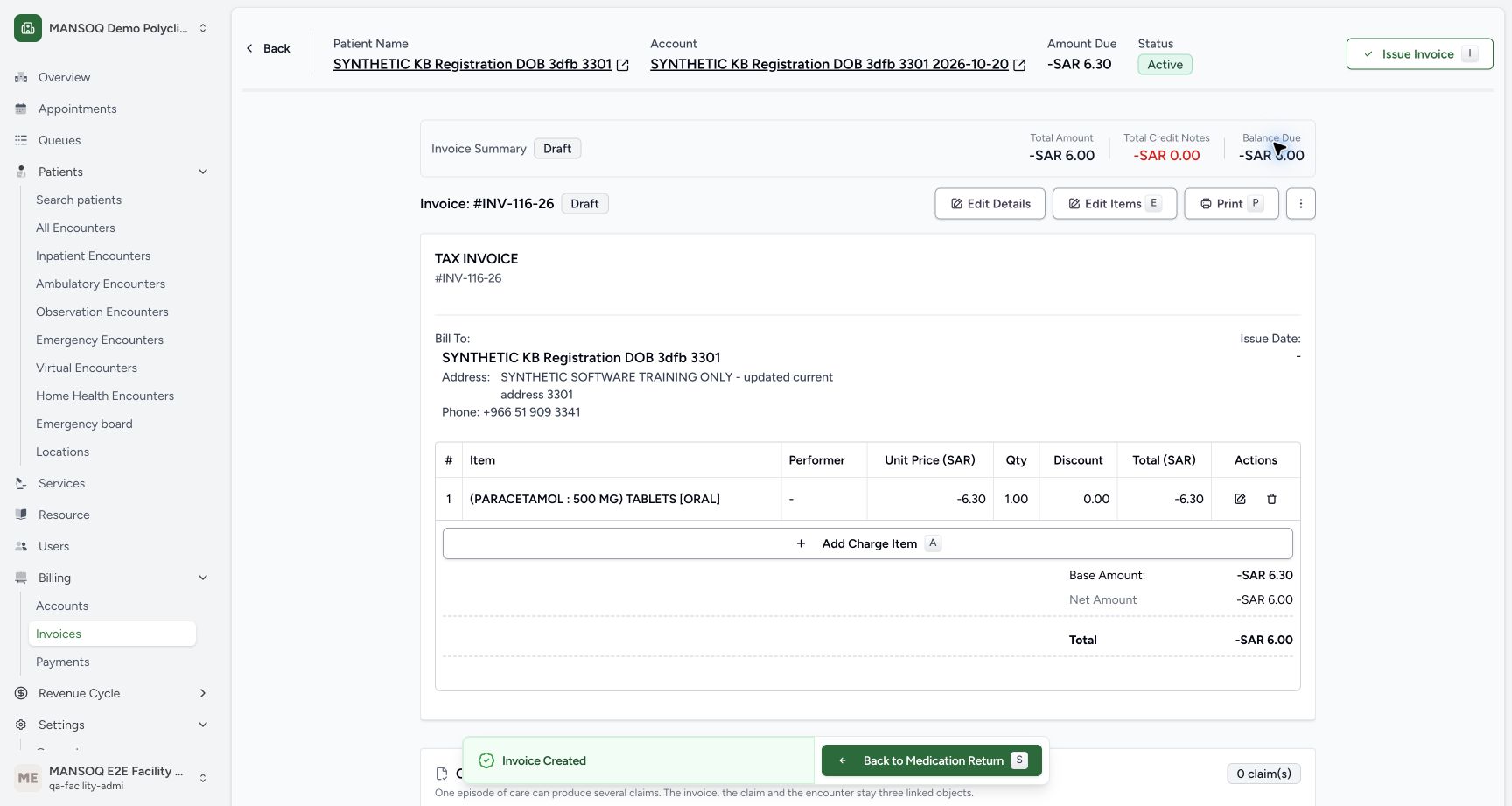
3a917ac30ac880b3921c1264910b829321c6c1d60e644c72bc1b6ece833256a5- Match INV-116-26: Use the newly linked refund document.
- Verify Draft: Do not treat this as an issued correction document.
- Read account credit separately: Account Amount Due is minus SAR 6.30.
- Read reverse base amount: The base amount is minus SAR 6.30.
- Read rounded invoice total: Configured invoice rounding displays minus SAR 6.00.
- Verify no issue date: The Issue Date is a dash.
- Back to Medication Return: Return to this same saved return before any optional correction.
 12
12Recorded release 5d8c4629 · 2026-10-20T17:02:16.095772+00:00 · 1728 × 921 Optional error-correction menu
Capture details
Genuine current-version software exercise with the existing authorised Facility Admin. No physical medicine, clinical care, cash refund or external exchange is involved.
Image SHA-256
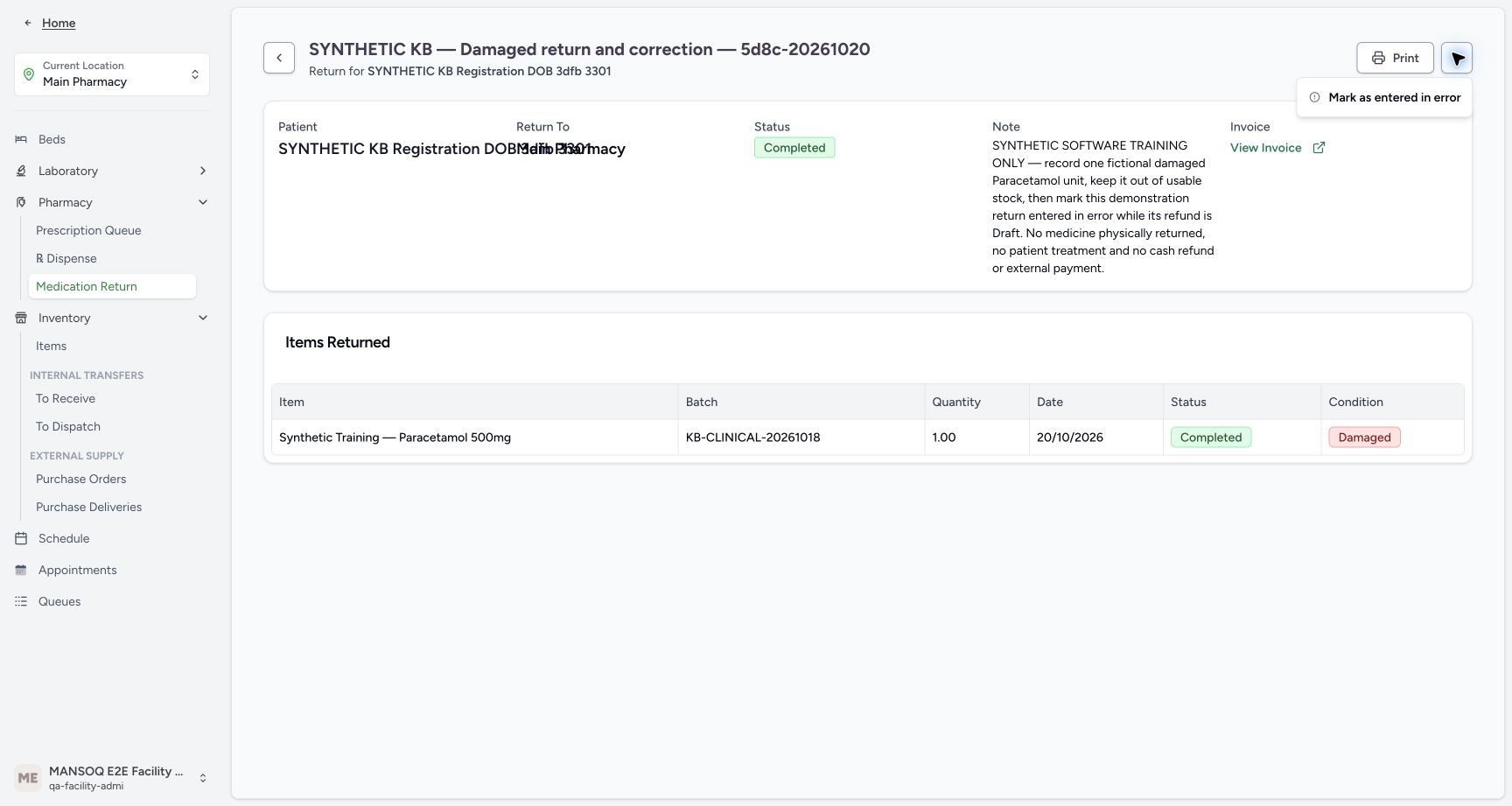
382e15b96a6b6748513b7ae289bca0f567cb4924bd1747ef22ab4c0c8cbb5dbd- Open the completed return menu: Use the menu of the correct return.
- Choose Mark as entered in error only for a mistake: This optional correction is not the normal next step for a valid Damaged return.
 123
123Recorded release 5d8c4629 · 2026-10-20T17:02:27.215338+00:00 · 1728 × 921 Irreversible entered-in-error confirmation
Capture details
Genuine current-version software exercise with the existing authorised Facility Admin. No physical medicine, clinical care, cash refund or external exchange is involved.
Image SHA-256
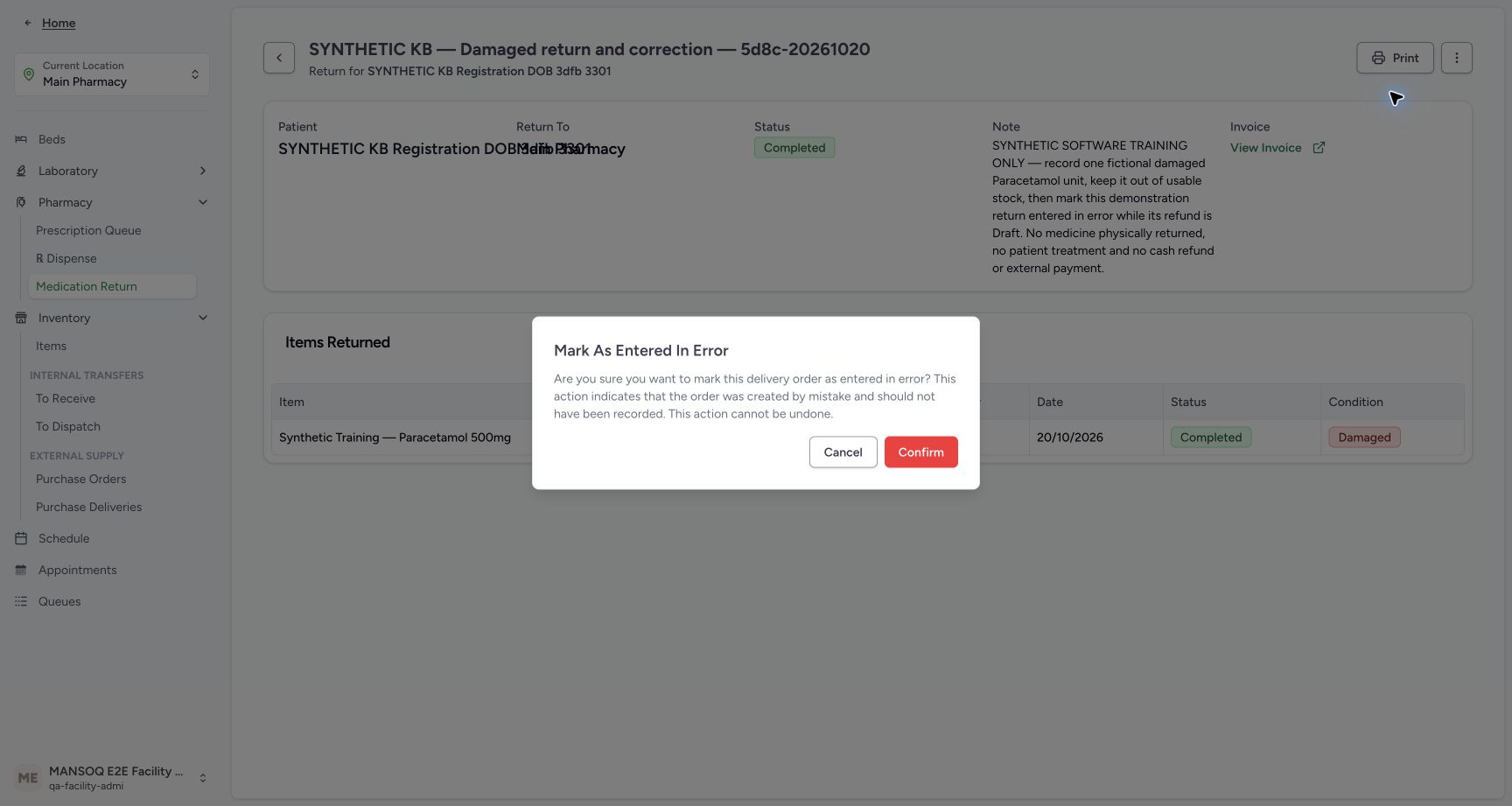
1ae11ee675dac77c4ccace7f552ec38ff6effc39b55e3e35a4806df255b13756- Read the irreversible-error warning: The dialog states the order was created by mistake and cannot be undone.
- Cancel when the return is valid or uncertain: Leave a valid return unchanged.
- Confirm the staged erroneous entry once: Only this authorised synthetic correction continues.
1. Check the usable-stock baseline and open dispense history
In the assigned Main Pharmacy, use Inventory → Items to match the synthetic Paracetamol batch and its 83 usable count. Open Pharmacy → Dispense, then choose History. Use the existing Facility Admin account; do not create another dispense or repeat the original sale.
1234567Usable stock before the return
Capture details
Genuine current-version software exercise with the existing authorised Facility Admin. No physical medicine, clinical care, cash refund or external exchange is involved.
Image SHA-256 7b135a63b9339f0ac5ec68864e433f908d29bcaebaf414174d693daeb0e1ff36
- Verify Main Pharmacy: Keep the assigned training location.
- Verify the existing Facility Admin: Use the authorised qa-facility-admi account.
- Read usable stock eighty-three: The original synthetic Paracetamol lot has 83.00 count.
- Match the original batch: Match KB-CLINICAL-20261018.
- Check the original expiry: The lot expires January 1, 2029.
- Expand Pharmacy: Use the ordinary location navigation.
- Open Inventory Items: Start the stock check on the assigned pharmacy inventory page.
1Pharmacy navigation to Dispense
Capture details
Genuine current-version software exercise with the existing authorised Facility Admin. No physical medicine, clinical care, cash refund or external exchange is involved.
Image SHA-256 9b7566fec8d093313d4533e35d62e7c1c683f3800018bf1126ac1ad0822c72ca
- Choose Dispense: Open the existing dispense-order list.
 12
12History and patient lookup
Capture details
Genuine current-version software exercise with the existing authorised Facility Admin. No physical medicine, clinical care, cash refund or external exchange is involved.
Image SHA-256 202014e5f6b6641f90413624f549b29141e701703505bf60929762a57d3d524b
- Choose History: Review completed orders rather than creating a new dispense.
- Open Filter by Identifier: Use the patient lookup to find the intended original order.
2. Find the intended patient and original completed order
Open Filter by Identifier and use Patient Name to search for SYNTHETIC KB Registration DOB 3dfb 3301. Select the matching result. Two completed orders appear: choose View Order for 03:40 PM on October 20, 2026. The 04:40 PM partial HYMOX order is different. Verify the opened order has Paracetamol ten, batch KB-CLINICAL-20261018, Completed, SAR 63.00 paid and zero amount due.
12History and patient lookup
Capture details
Genuine current-version software exercise with the existing authorised Facility Admin. No physical medicine, clinical care, cash refund or external exchange is involved.
Image SHA-256 202014e5f6b6641f90413624f549b29141e701703505bf60929762a57d3d524b
- Choose History: Review completed orders rather than creating a new dispense.
- Open Filter by Identifier: Use the patient lookup to find the intended original order.
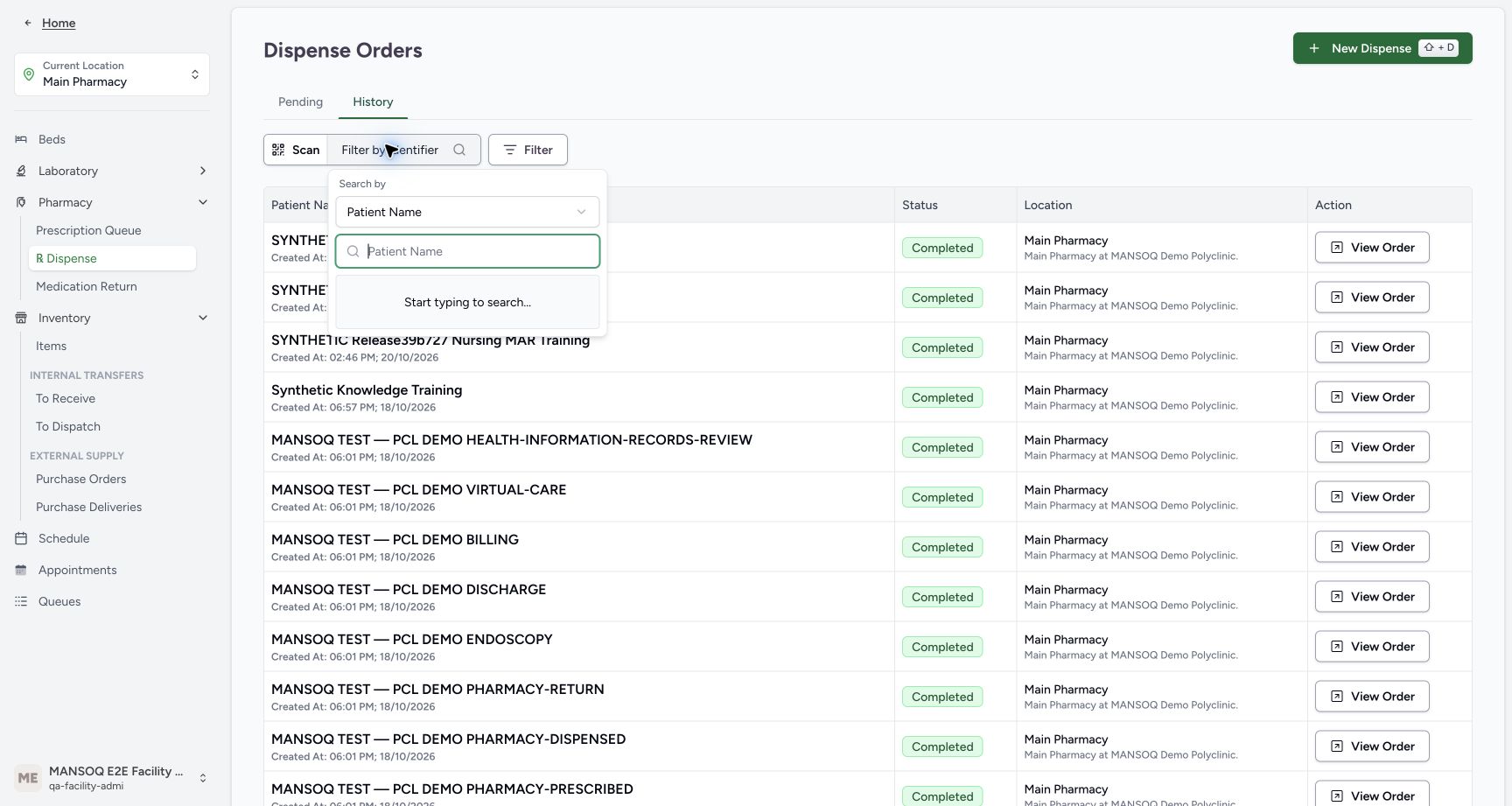 12
12Patient Name lookup
Capture details
Genuine current-version software exercise with the existing authorised Facility Admin. No physical medicine, clinical care, cash refund or external exchange is involved.
Image SHA-256 653b75642863e50675e0a12021bff845284a43b872c9eddbcef394d77d1890dc
- Use Patient Name search: Verify the lookup search mode.
- Enter the fictional patient name: Search for SYNTHETIC KB Registration DOB 3dfb 3301.
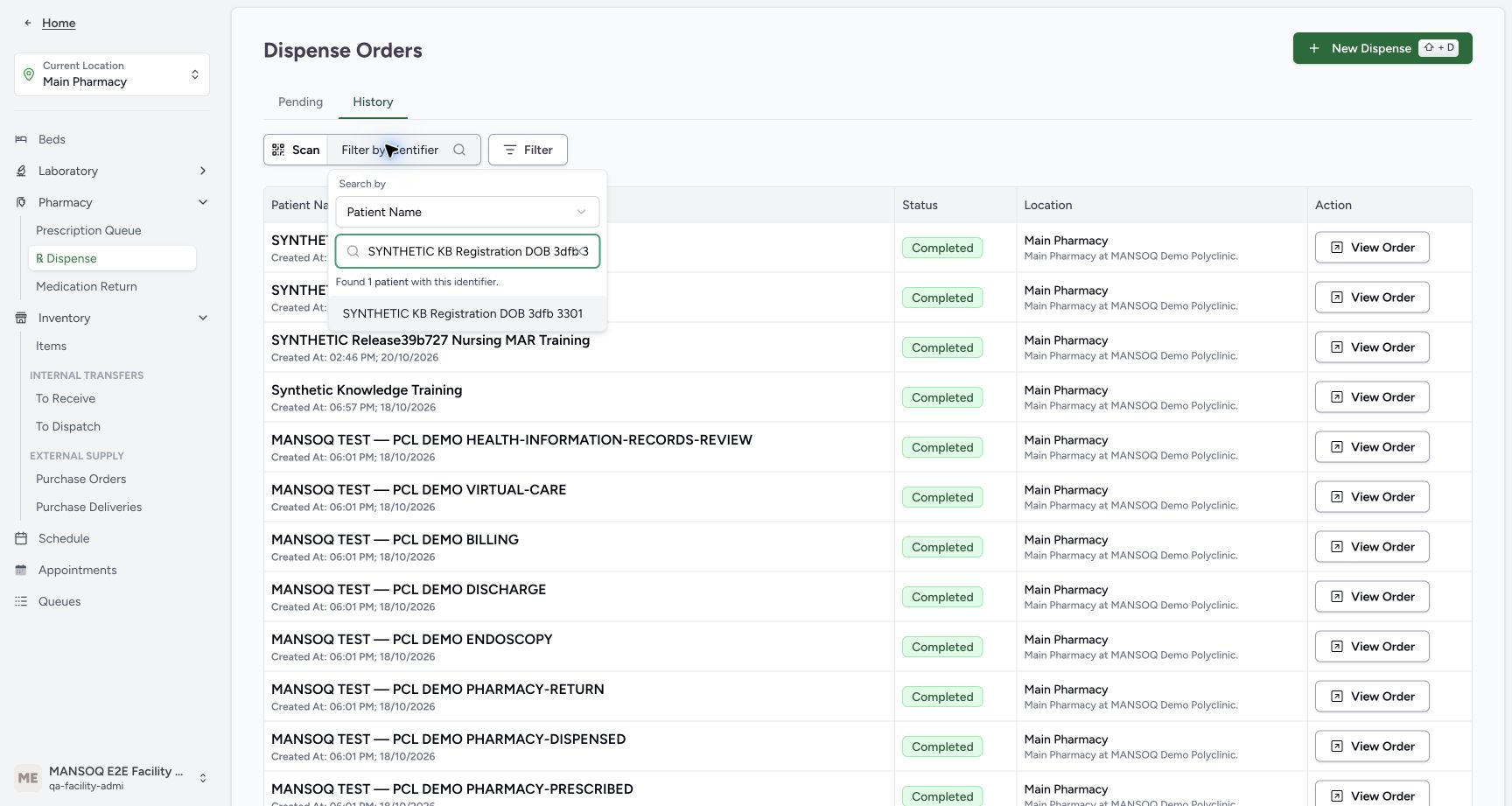 12
12One matching synthetic patient
Capture details
Genuine current-version software exercise with the existing authorised Facility Admin. No physical medicine, clinical care, cash refund or external exchange is involved.
Image SHA-256 58f24b0e789256c7e52c4558a85d87dd3953cc5407f6e0d6d69e3b51081f2575
- Verify the search text: Keep the exact synthetic patient name.
- Select the matching result: Choose SYNTHETIC KB Registration DOB 3dfb 3301.
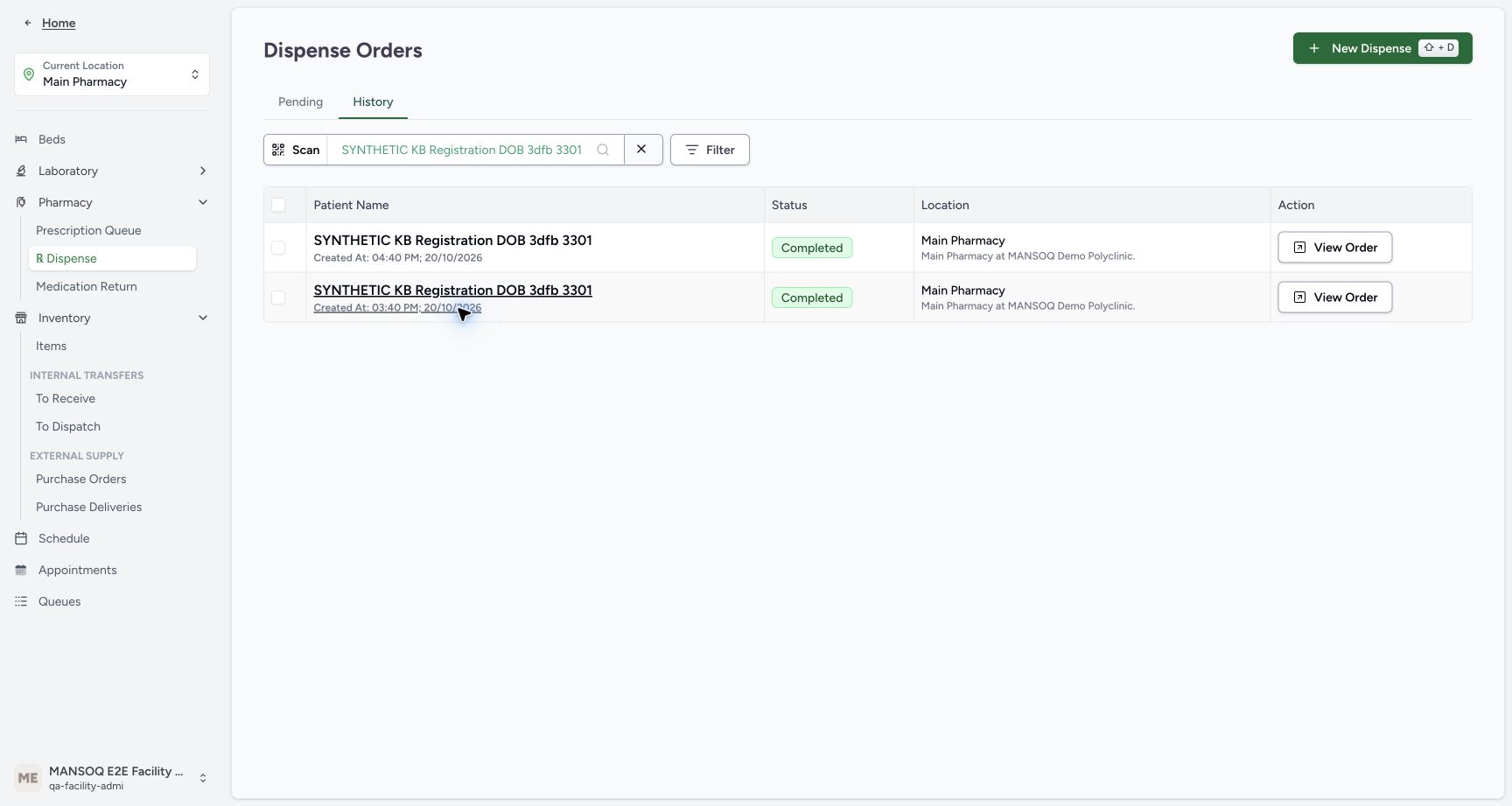 123
123Two completed orders with different times
Capture details
Genuine current-version software exercise with the existing authorised Facility Admin. No physical medicine, clinical care, cash refund or external exchange is involved.
Image SHA-256 4bceac718aff63e9601fac9129ce314da8192a8780e3aab6ec791c7ff4d28514
- Match the 03:40 PM original order: Choose the October 20 Paracetamol sale.
- Open View Order for 03:40 PM: Verify its medicine, quantity and paid state before a return.
- Keep the 04:40 PM order separate: The later partial HYMOX order is a different source.
1234567Verified completed ten-unit original
Capture details
Genuine current-version software exercise with the existing authorised Facility Admin. No physical medicine, clinical care, cash refund or external exchange is involved.
Image SHA-256 ae85e9ccc076bd643f0cb619be3483cd686a96db4d47ddddc58c74a55bc0bc96
- Verify the same patient: Read the original order patient before proceeding.
- Read original quantity ten: This is the completed supply quantity, not the intended return quantity.
- Verify the medicine is Completed: Use the saved completed original.
- Match original batch and expiry: KB-CLINICAL-20261018 expires January 1, 2029.
- Read the existing paid amount: The original sale has SAR 63.00 paid.
- Read original amount due zero: Do not create another payment.
- Open Medication Return: Use the direct action on this verified completed order.
3. Create one clearly named synthetic Draft return
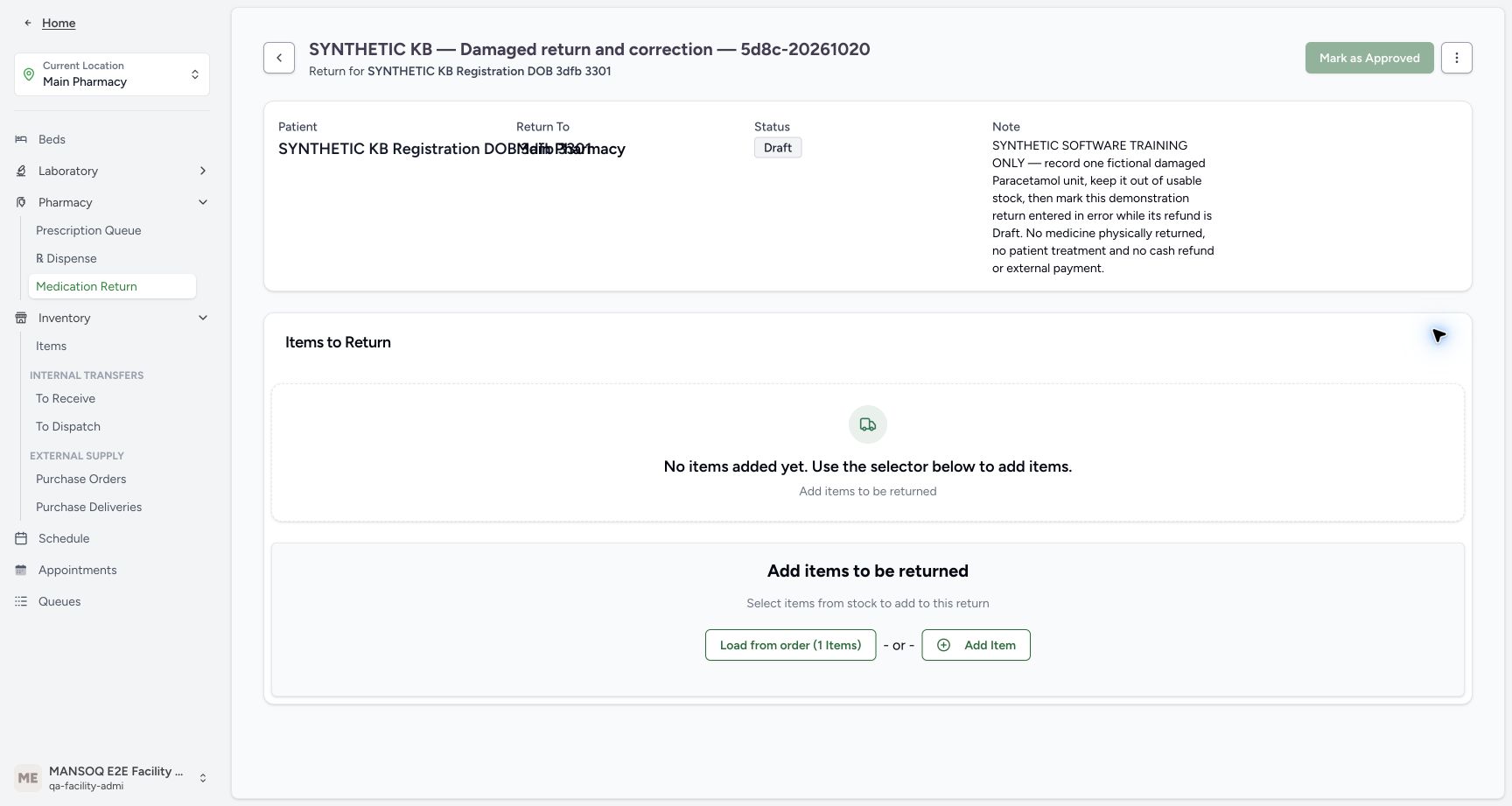
From that verified Completed order, choose Medication Return. Check the patient in the sheet. Enter the distinctive training name “SYNTHETIC KB — Damaged return and correction — 5d8c-20261020” and a note identifying one fictional Damaged Paracetamol unit, no physical medicine or cash movement, and the separately staged erroneous-entry correction. Choose Create Return once. Wait for the saved Draft with no items. Opening the sheet alone is not Draft creation. Use the readable patient subtitle beneath the title to check identity; the Patient and Return To fields below overlap in this layout.
1234567Verified completed ten-unit original
Capture details
Genuine current-version software exercise with the existing authorised Facility Admin. No physical medicine, clinical care, cash refund or external exchange is involved.
Image SHA-256 ae85e9ccc076bd643f0cb619be3483cd686a96db4d47ddddc58c74a55bc0bc96
- Verify the same patient: Read the original order patient before proceeding.
- Read original quantity ten: This is the completed supply quantity, not the intended return quantity.
- Verify the medicine is Completed: Use the saved completed original.
- Match original batch and expiry: KB-CLINICAL-20261018 expires January 1, 2029.
- Read the existing paid amount: The original sale has SAR 63.00 paid.
- Read original amount due zero: Do not create another payment.
- Open Medication Return: Use the direct action on this verified completed order.
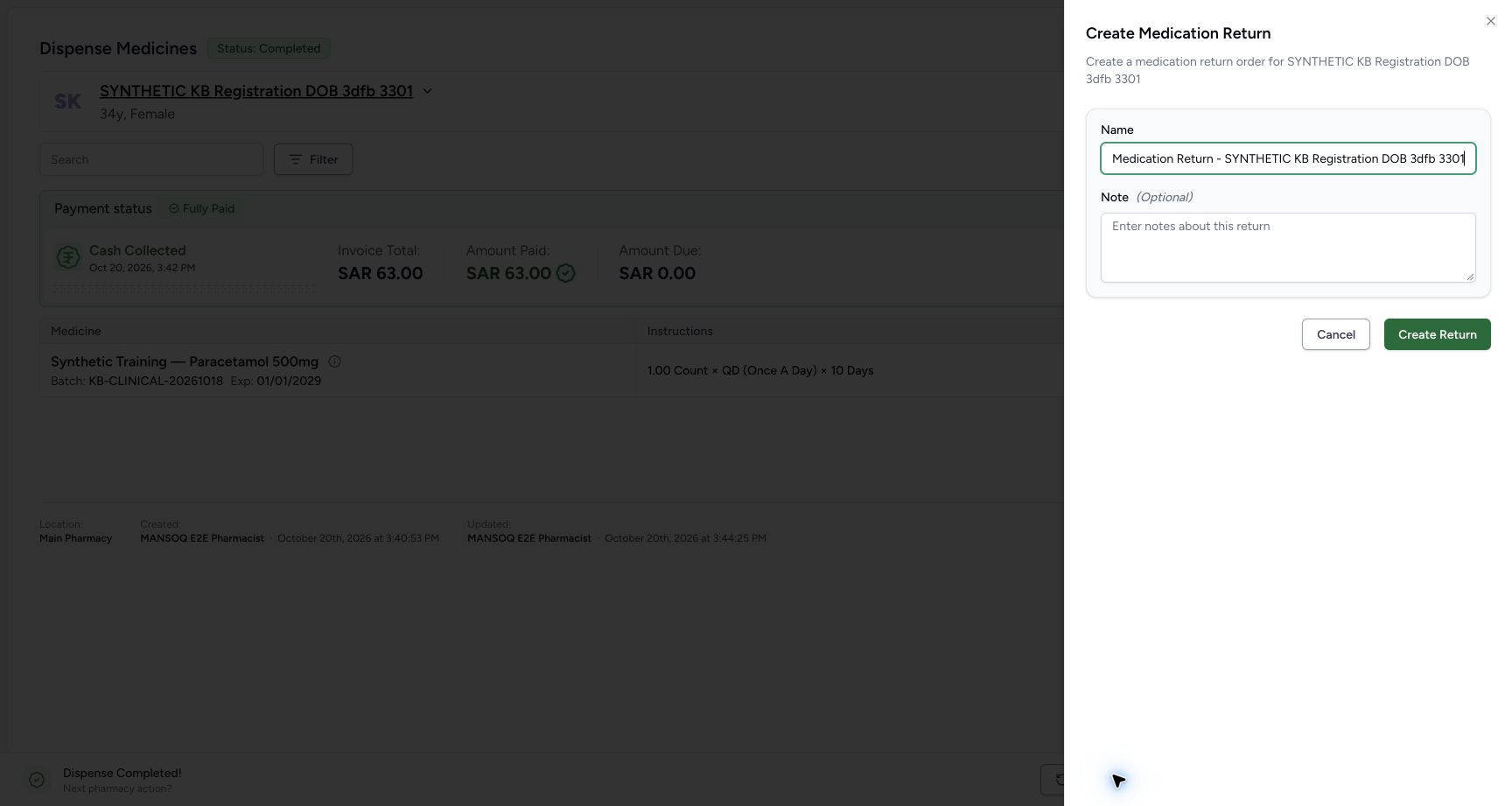 1234
1234Unsaved return sheet
Capture details
Genuine current-version software exercise with the existing authorised Facility Admin. No physical medicine, clinical care, cash refund or external exchange is involved.
Image SHA-256 7063721fb595a6ca21fbaa432fe47d8f0496427aceb65079bdb091dfc6d1bac3
- Verify the prefilled patient: The sheet belongs to the verified synthetic patient.
- Set a distinctive Name: Use a recognisable synthetic return name.
- Add the software-only Note: Record the one-unit Damaged intention and optional staged correction.
- Locate Create Return: Opening the sheet alone has not saved a Draft.
123Named synthetic return ready to create
Capture details
Genuine current-version software exercise with the existing authorised Facility Admin. No physical medicine, clinical care, cash refund or external exchange is involved.
Image SHA-256 81ad4b01b79def2a895928c7a65d58a10414bd8c49a9e874ffe048640c09835d
- Verify the named synthetic return: The distinctive name identifies this one demonstration.
- Verify the explicit training note: No physical medicine, patient treatment, cash refund or external payment is involved.
- Choose Create Return once: Save the named Draft for this patient and original order.
 123
123Saved empty Draft return
Capture details
Genuine current-version software exercise with the existing authorised Facility Admin. No physical medicine, clinical care, cash refund or external exchange is involved.
Image SHA-256 90a3553346eeeac61dd753ca4f65fa86e6c4946d76ea286f416132163f69089a
- Verify saved Draft: The parent exists but has not received an item.
- Verify no saved items yet: The empty saved table is separate from the editor.
- Choose Load from order: Load the one original dispense item.
4. Load the original item and reduce ten to one before saving
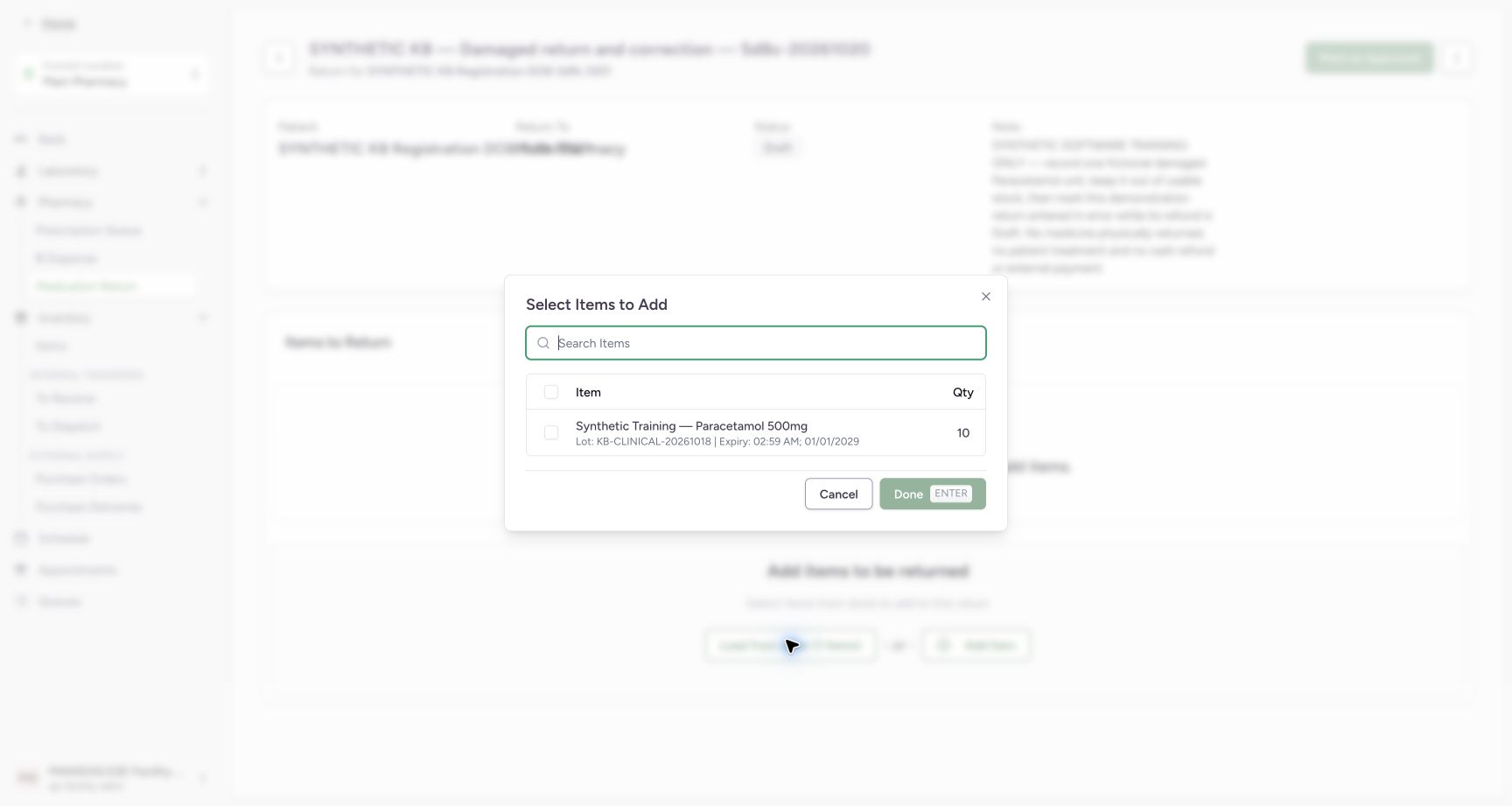
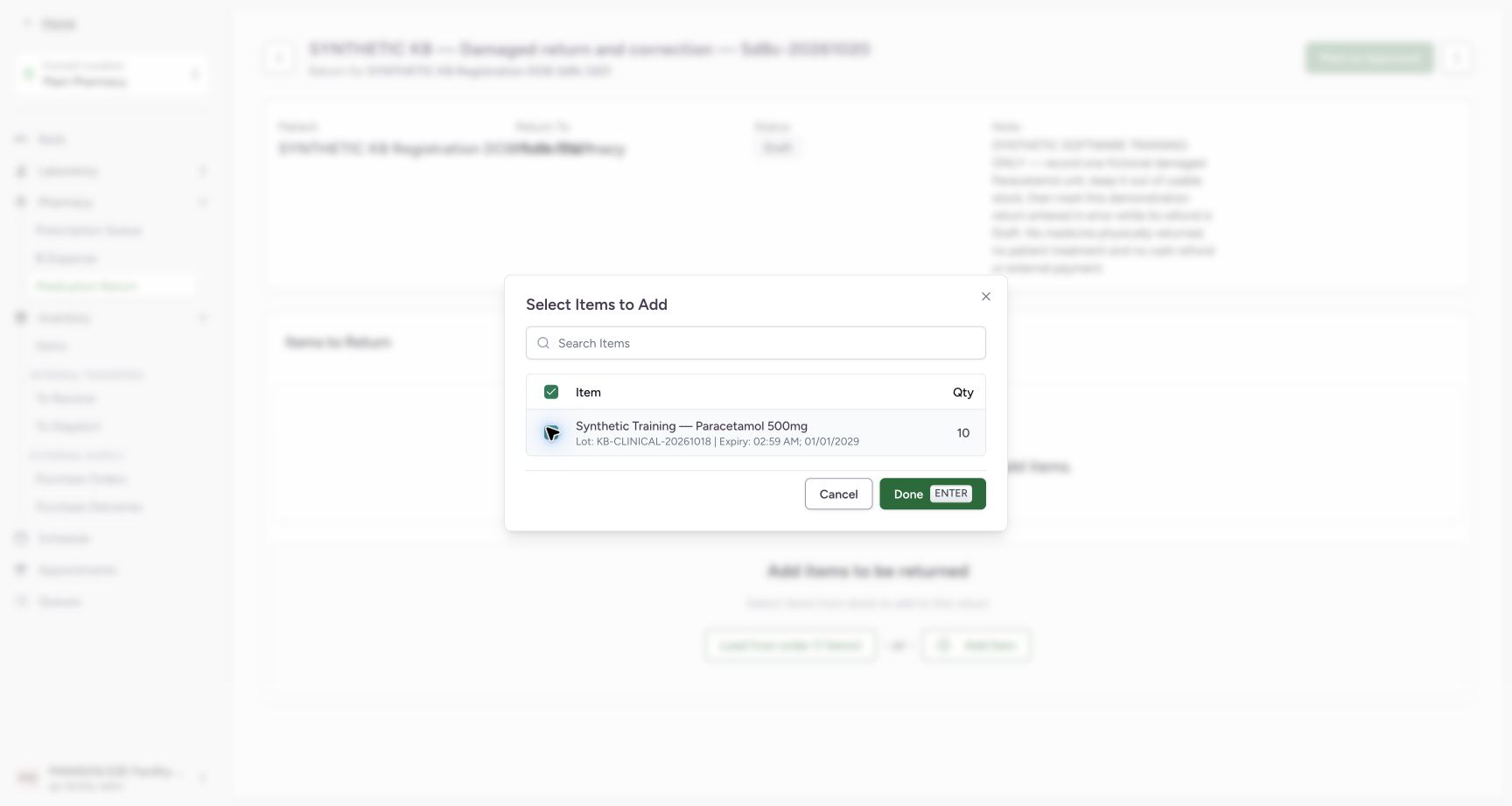
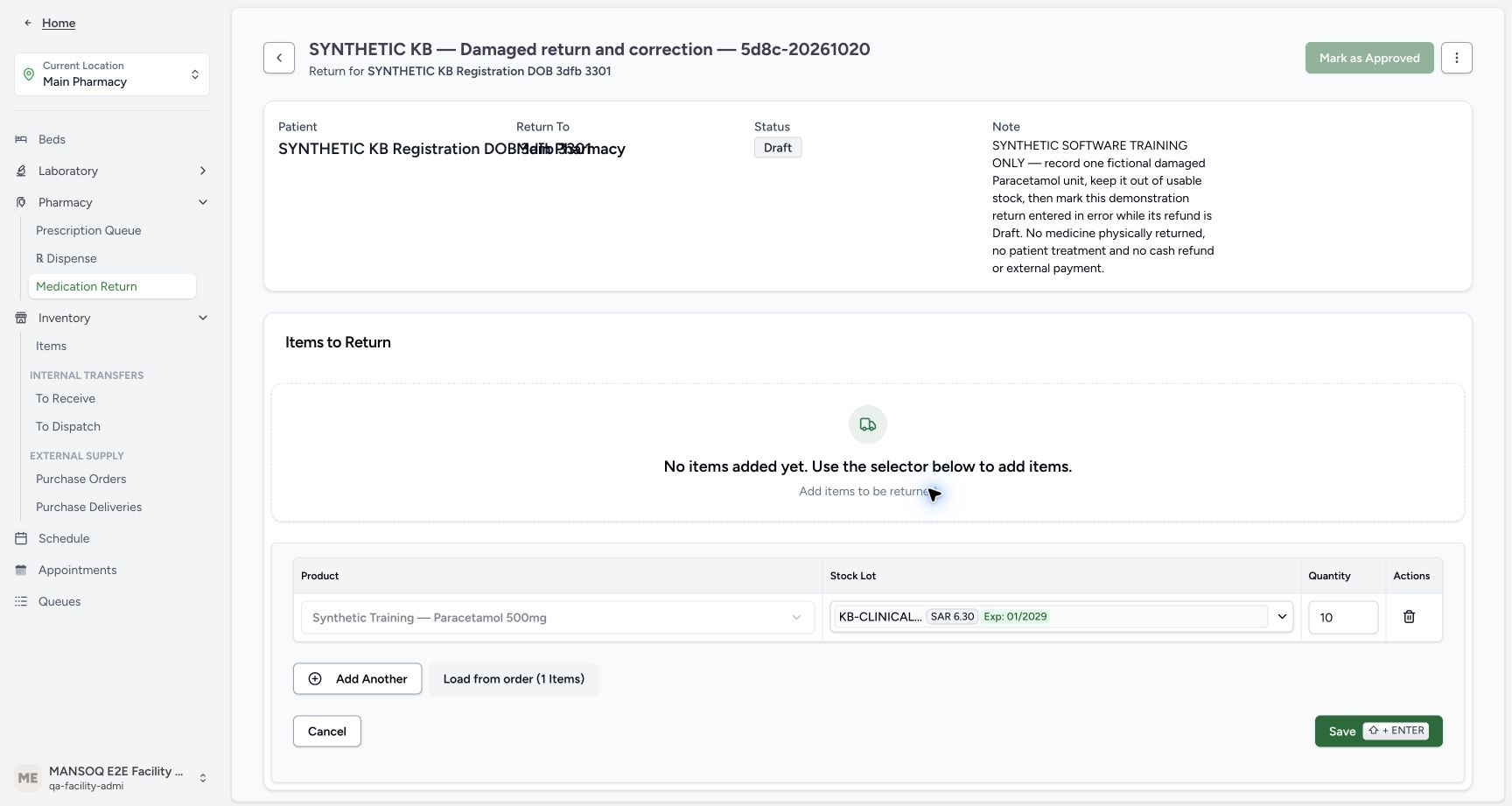
Choose Load from order (1 Items). In Select Items to Add, match the original Paracetamol row, complete batch and expiry. Check that one row, then choose Done. The lower editor copies the original quantity ten while the upper saved-items area remains empty. Change Quantity to one and verify it before Save. The closed batch label is shortened; confirm its full identity in the chooser and later saved row. Loading ten does not establish a cumulative return allowance.
123Saved empty Draft return
Capture details
Genuine current-version software exercise with the existing authorised Facility Admin. No physical medicine, clinical care, cash refund or external exchange is involved.
Image SHA-256 90a3553346eeeac61dd753ca4f65fa86e6c4946d76ea286f416132163f69089a
- Verify saved Draft: The parent exists but has not received an item.
- Verify no saved items yet: The empty saved table is separate from the editor.
- Choose Load from order: Load the one original dispense item.
 123
123Original item and full batch
Capture details
Genuine current-version software exercise with the existing authorised Facility Admin. No physical medicine, clinical care, cash refund or external exchange is involved.
Image SHA-256 6cf93543404c401d21b2eac32269b8acbc7194fd216fa9f5edf3336360d4b381
- Select the original item row: Tick the Paracetamol row, not a different batch.
- Read original quantity ten: Loading copies the original quantity into the editor.
- Read the complete batch and expiry: The full KB-CLINICAL-20261018 label is readable in this chooser.
 12
12One selected item ready for Done
Capture details
Genuine current-version software exercise with the existing authorised Facility Admin. No physical medicine, clinical care, cash refund or external exchange is involved.
Image SHA-256 21d5b7a4f3f350eb4c2e3f036171a0990205afb6fc0cbcfbeae70e55f4bf8aca
- Verify the one selected source row: Only this original item is selected.
- Choose Done: Copy the selection into the unsaved return editor.
 12
12Original ten copied into an unsaved editor
Capture details
Genuine current-version software exercise with the existing authorised Facility Admin. No physical medicine, clinical care, cash refund or external exchange is involved.
Image SHA-256 4b2529e5ae60390b5fca30c6ae24c32943013da43b512ac78fdb1f5837904aa8
- Review the copied quantity ten: Change this unsaved original quantity to the intended return amount.
- Keep saved items separate: No return item is saved until Save succeeds.
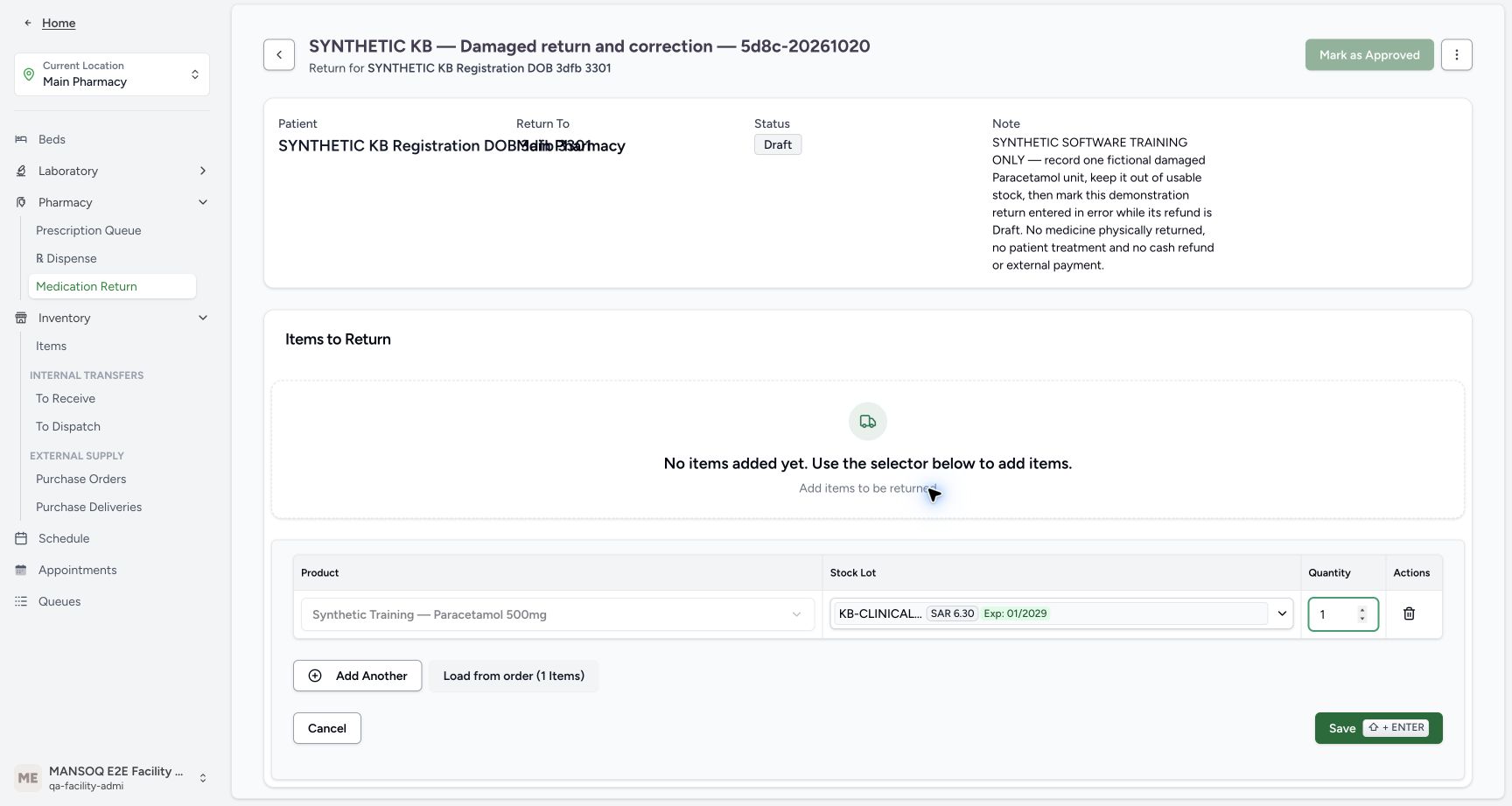 123
123One return unit ready to save
Capture details
Genuine current-version software exercise with the existing authorised Facility Admin. No physical medicine, clinical care, cash refund or external exchange is involved.
Image SHA-256 bcab0aea1fc33cc0068711a980529429e82fb28f2f7f9b9a3dd88c6a8c467279
- Verify return quantity one: The fictional Damaged return is exactly one unit.
- Verify the original stock lot: The closed label is shortened; the source chooser and saved table show the full batch.
- Choose Save once: Save this one return line; condition is selected later during receipt.
5. Save the one-unit line and approve the return
Choose Save once for the one-unit editor. Verify the saved table shows quantity 1.00, In Progress and the initial Normal label; the parent remains Draft. Damaged has not yet been recorded. Choose Mark as Approved once. The parent becomes Pending and the saved item remains In Progress. Verify the one intended row is selected for receiving.
123One return unit ready to save
Capture details
Genuine current-version software exercise with the existing authorised Facility Admin. No physical medicine, clinical care, cash refund or external exchange is involved.
Image SHA-256 bcab0aea1fc33cc0068711a980529429e82fb28f2f7f9b9a3dd88c6a8c467279
- Verify return quantity one: The fictional Damaged return is exactly one unit.
- Verify the original stock lot: The closed label is shortened; the source chooser and saved table show the full batch.
- Choose Save once: Save this one return line; condition is selected later during receipt.
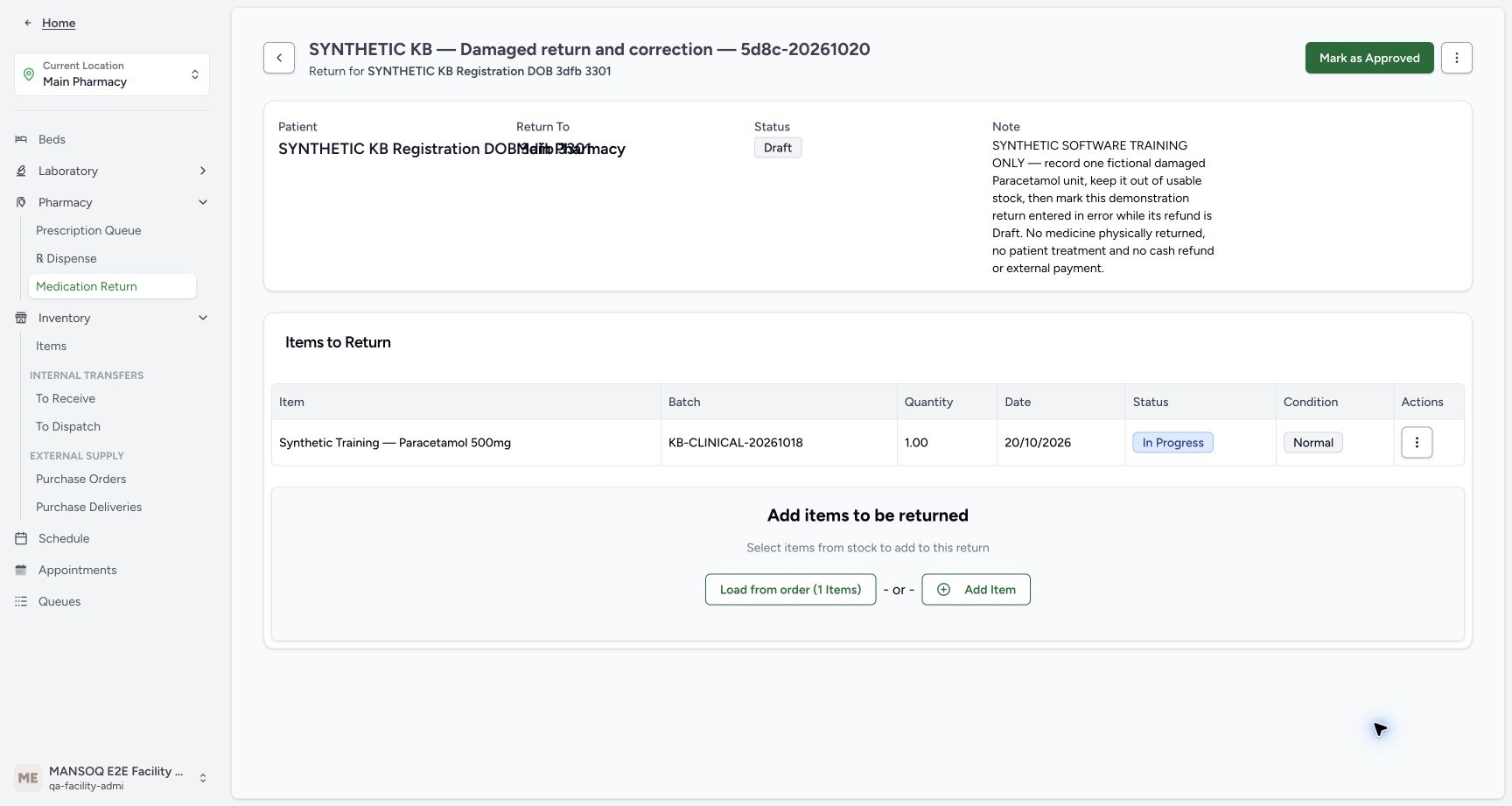 12345
12345Saved line before approval
Capture details
Genuine current-version software exercise with the existing authorised Facility Admin. No physical medicine, clinical care, cash refund or external exchange is involved.
Image SHA-256 4bfad007dd75180aab1da63f3b3b4d0572685dc301048fd112e4e7048face94d
- Verify saved quantity one: The saved return line is 1.00.
- Read In Progress: The item has not been received yet.
- Read the initial Normal label: This initial label must not be mistaken for the later Damaged receipt.
- Verify the parent is Draft: Saving the line has not approved the return.
- Choose Mark as Approved: Advance the prepared return once.
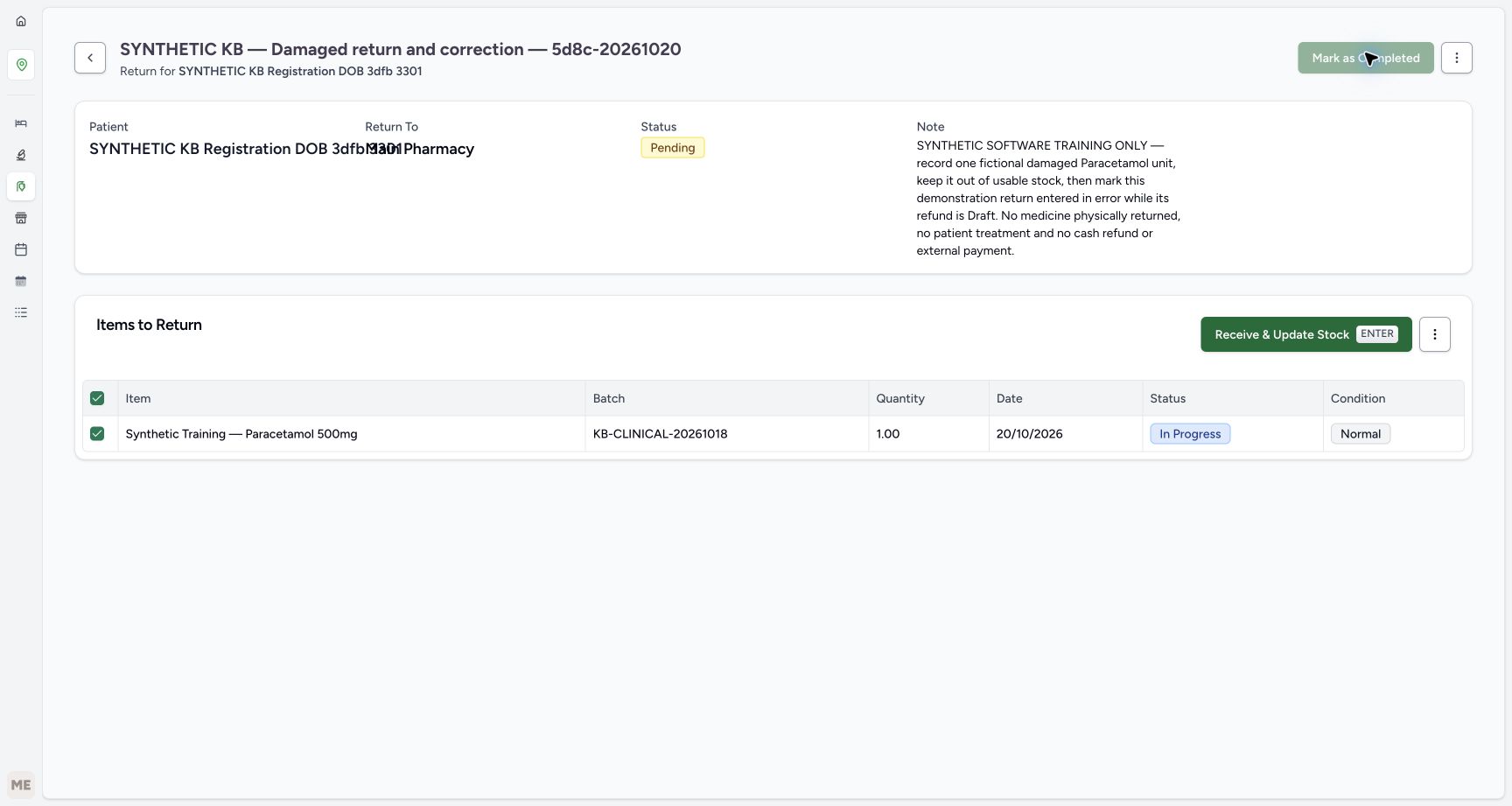 123456
Pending return ready to receive
Capture details
Genuine current-version software exercise with the existing authorised Facility Admin. No physical medicine, clinical care, cash refund or external exchange is involved.
Image SHA-256 3d6afdacd3f4621629059878e19c98d94e930c4e7d89c21459adbc63533712fb
- Verify Pending parent: Approval is separate from receipt.
- Verify the saved row is selected: Receive only the intended one-unit row.
- Verify quantity one: Keep the saved amount unchanged.
- Verify the item is still In Progress: Receipt has not yet been applied.
- Review the Normal starting condition: Choose Damaged explicitly in the receipt dialog.
- Open Receive & Update Stock: Review the receiving status and condition before confirming.
6. Select Completed and Damaged explicitly, then receive once
Open Receive & Update Stock. The dialog defaults to Completed and Normal. For this one fictional damaged unit, choose Damaged and verify both Completed and Damaged before confirming. Check that the dialog applies to one selected item. Cancel is available if the item or scope is wrong. Confirm once. Do not accept the Normal default for this exercise.
123456Pending return ready to receive
Capture details
Genuine current-version software exercise with the existing authorised Facility Admin. No physical medicine, clinical care, cash refund or external exchange is involved.
Image SHA-256 3d6afdacd3f4621629059878e19c98d94e930c4e7d89c21459adbc63533712fb
- Verify Pending parent: Approval is separate from receipt.
- Verify the saved row is selected: Receive only the intended one-unit row.
- Verify quantity one: Keep the saved amount unchanged.
- Verify the item is still In Progress: Receipt has not yet been applied.
- Review the Normal starting condition: Choose Damaged explicitly in the receipt dialog.
- Open Receive & Update Stock: Review the receiving status and condition before confirming.
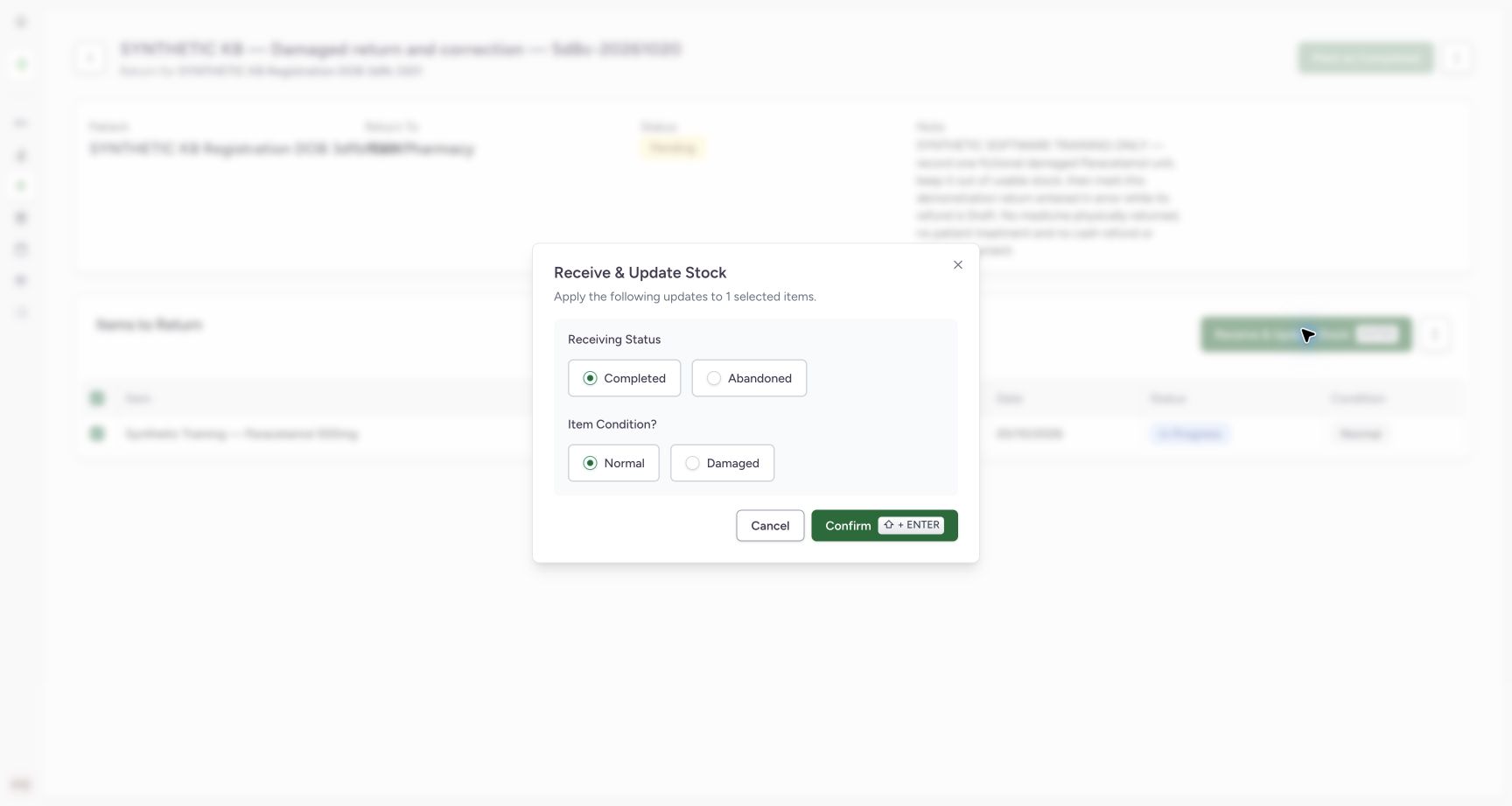 123
123Receipt defaults before changing condition
Capture details
Genuine current-version software exercise with the existing authorised Facility Admin. No physical medicine, clinical care, cash refund or external exchange is involved.
Image SHA-256 384f16f3c2ea233b6a6e9ac9ca83bd9a1880a2da15fc897d94f5104f6ccac032
- Review Completed receiving status: Keep Completed for this actual receipt.
- Review the default Normal condition: Do not accept the default for this Damaged example.
- Choose Damaged: Explicitly set the correct condition before submission.
12345Completed and Damaged ready to confirm
Capture details
Genuine current-version software exercise with the existing authorised Facility Admin. No physical medicine, clinical care, cash refund or external exchange is involved.
Image SHA-256 ee25f6cf8eedfa341d2c577444bd7cd9e00a1f6c752e2ca5e5101639aca5720f
- Verify exactly one selected item: This dialog applies to the one saved return unit.
- Verify Completed: Receiving status and item condition are separate controls.
- Verify Damaged selected: The completed return must retain its Damaged condition.
- Confirm once: Apply this one Completed/Damaged receipt.
- Cancel if the scope is wrong: Cancel is available before applying the receipt.
7. Verify the Damaged receipt and unchanged usable stock
The saved line now shows quantity one, Completed and Damaged, while its parent remains Pending. Receive & Update Stock is disabled. Do not receive the same item again or try to change its completed condition. Open Inventory → Items and match the same Paracetamol batch: usable stock remains 83. The Damaged unit is recorded without becoming a new usable unit.
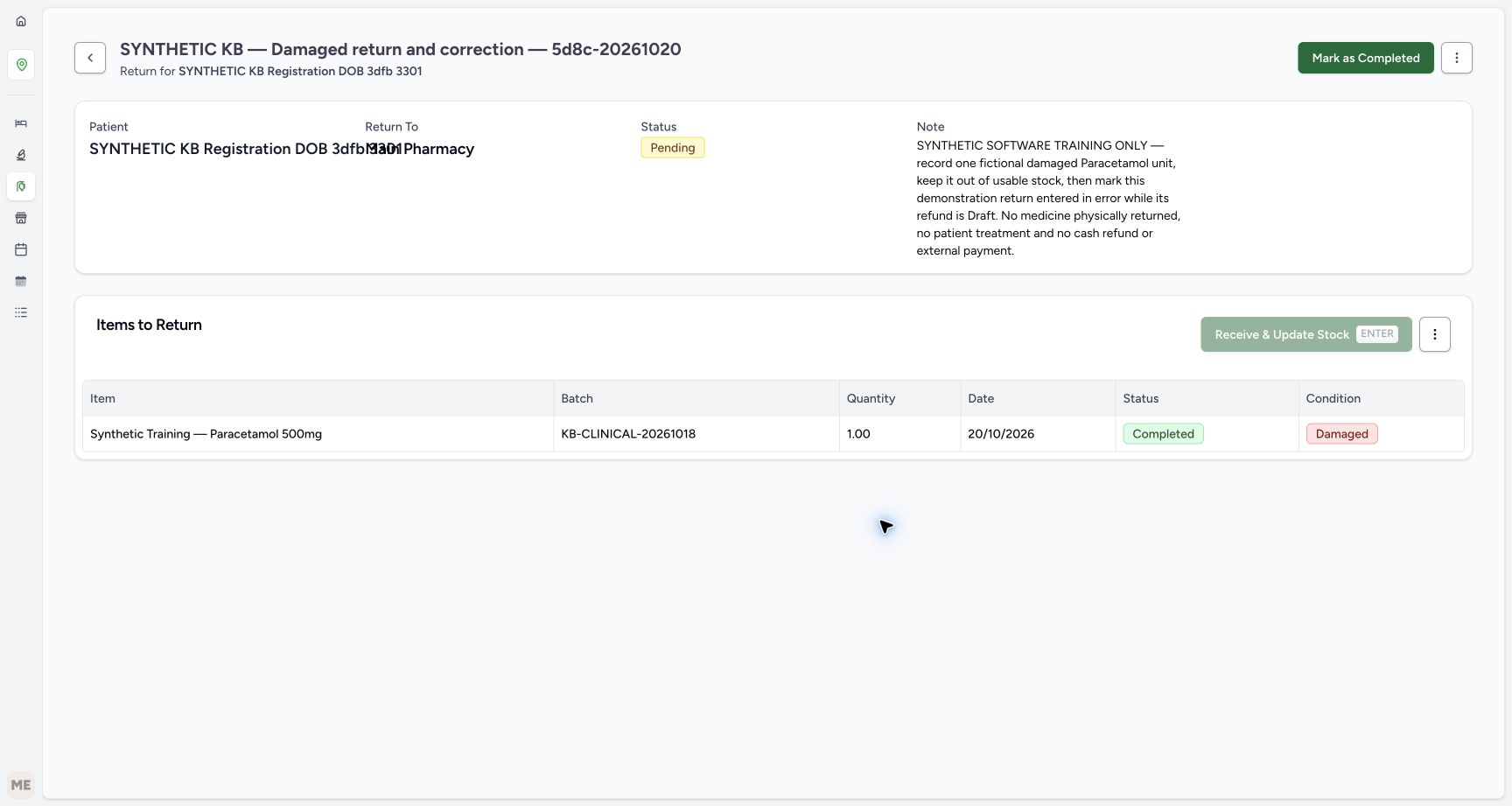 12345
12345Saved Damaged receipt with Pending parent
Capture details
Genuine current-version software exercise with the existing authorised Facility Admin. No physical medicine, clinical care, cash refund or external exchange is involved.
Image SHA-256 f260c92bae99517322c0a8edc6e950ebada65d9aecde2ee92efa348f3a95d514
- Read parent Pending: Receiving an item has not completed the parent order.
- Verify received quantity one: The saved quantity remains 1.00.
- Read child Completed: This item receipt is saved.
- Read Damaged: The saved condition is Damaged, not Normal.
- Recognise Receive is disabled: Do not receive the completed item again.
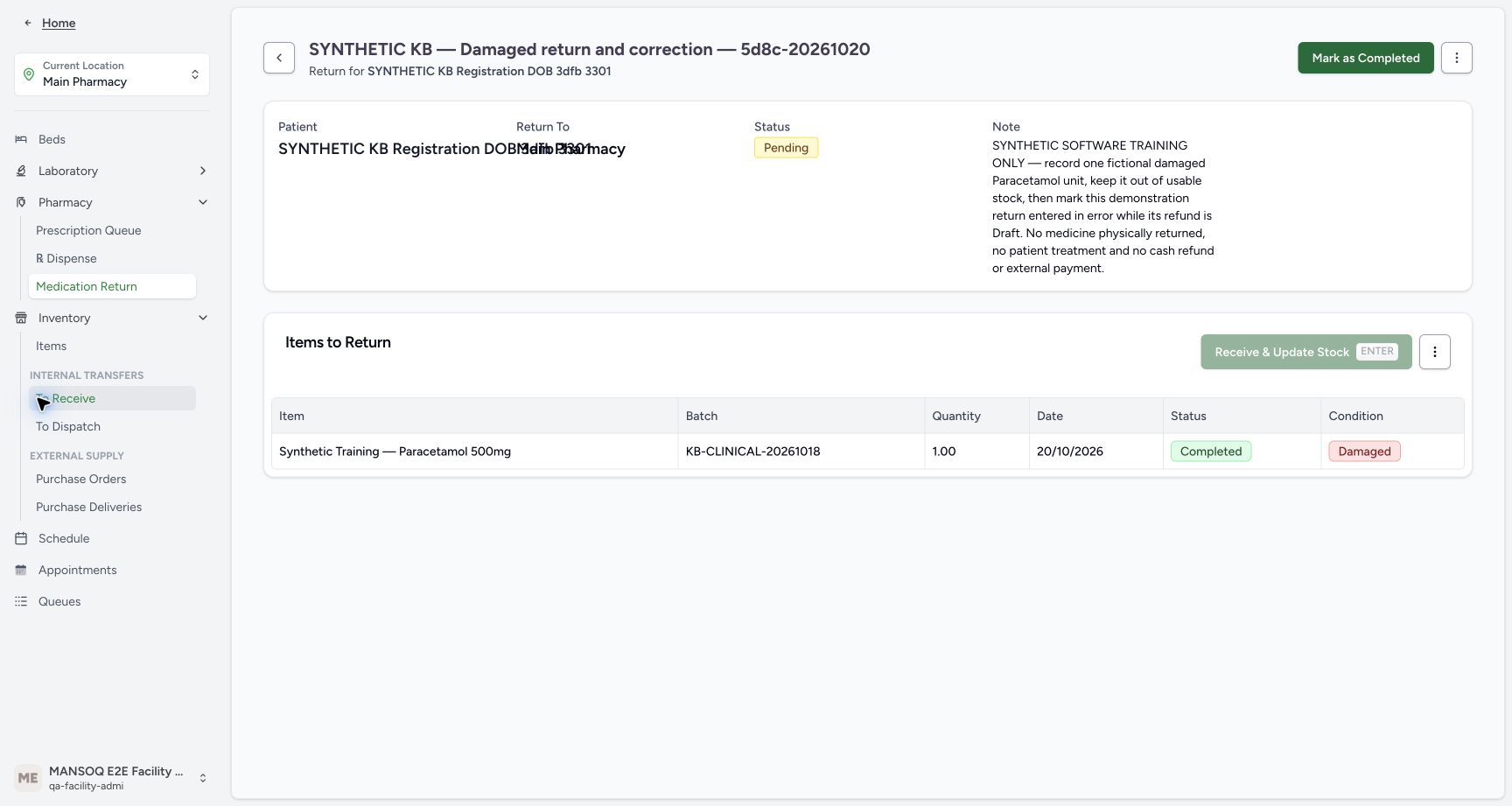 1
1Inventory navigation after receipt
Capture details
Genuine current-version software exercise with the existing authorised Facility Admin. No physical medicine, clinical care, cash refund or external exchange is involved.
Image SHA-256 e32e4d649b7a29fca07bb10a377baf178e6d4157e6d85a50cf182a49cb51734c
- Open Inventory Items: Inspect usable stock for the original product and batch.
123Usable stock after receipt and correction
Capture details
Genuine current-version software exercise with the existing authorised Facility Admin. No physical medicine, clinical care, cash refund or external exchange is involved.
Image SHA-256 f58c0c4f33601d74393ddb4f52ad7aed5f29fdd7722abe55e671f7a8f73a0f23
- Verify usable stock remains eighty-three: Completed/Damaged receipt has not added a usable unit.
- Match the original batch: Check KB-CLINICAL-20261018.
- Match the unchanged expiry: The original lot still expires January 1, 2029.
8. Complete the parent after reviewing its finalized line
Return to the same medication return through normal browser Back navigation. Verify Pending parent and the saved Completed/Damaged one-unit line. Choose Mark as Completed once. The parent becomes Completed, the child remains Completed/Damaged and View Invoice appears. Parent completion and item receipt are separate actions.
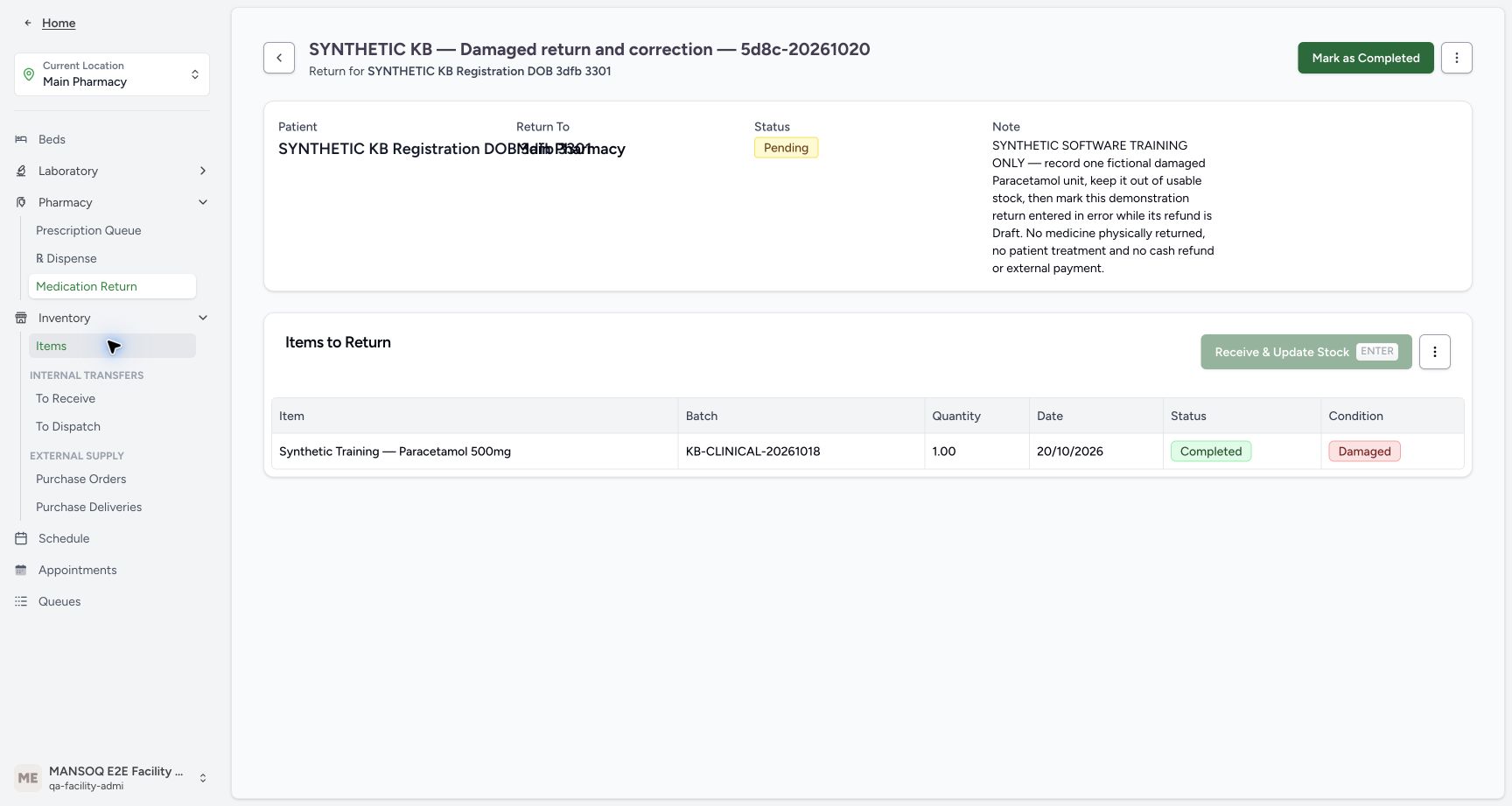 1234
1234Parent completion after finalized line
Capture details
Genuine current-version software exercise with the existing authorised Facility Admin. No physical medicine, clinical care, cash refund or external exchange is involved.
Image SHA-256 def9c293d1f0fd02190f6573181ae0ed19bf3c2efb72ff2ca9ccd058a964b54b
- Verify parent still Pending: The one item is finalized, but the order is not.
- Verify child Completed: Do not repeat receipt.
- Verify Damaged retained: Completing the parent does not make this a Normal unit.
- Choose Mark as Completed once: Complete the parent after reviewing the finalized line.
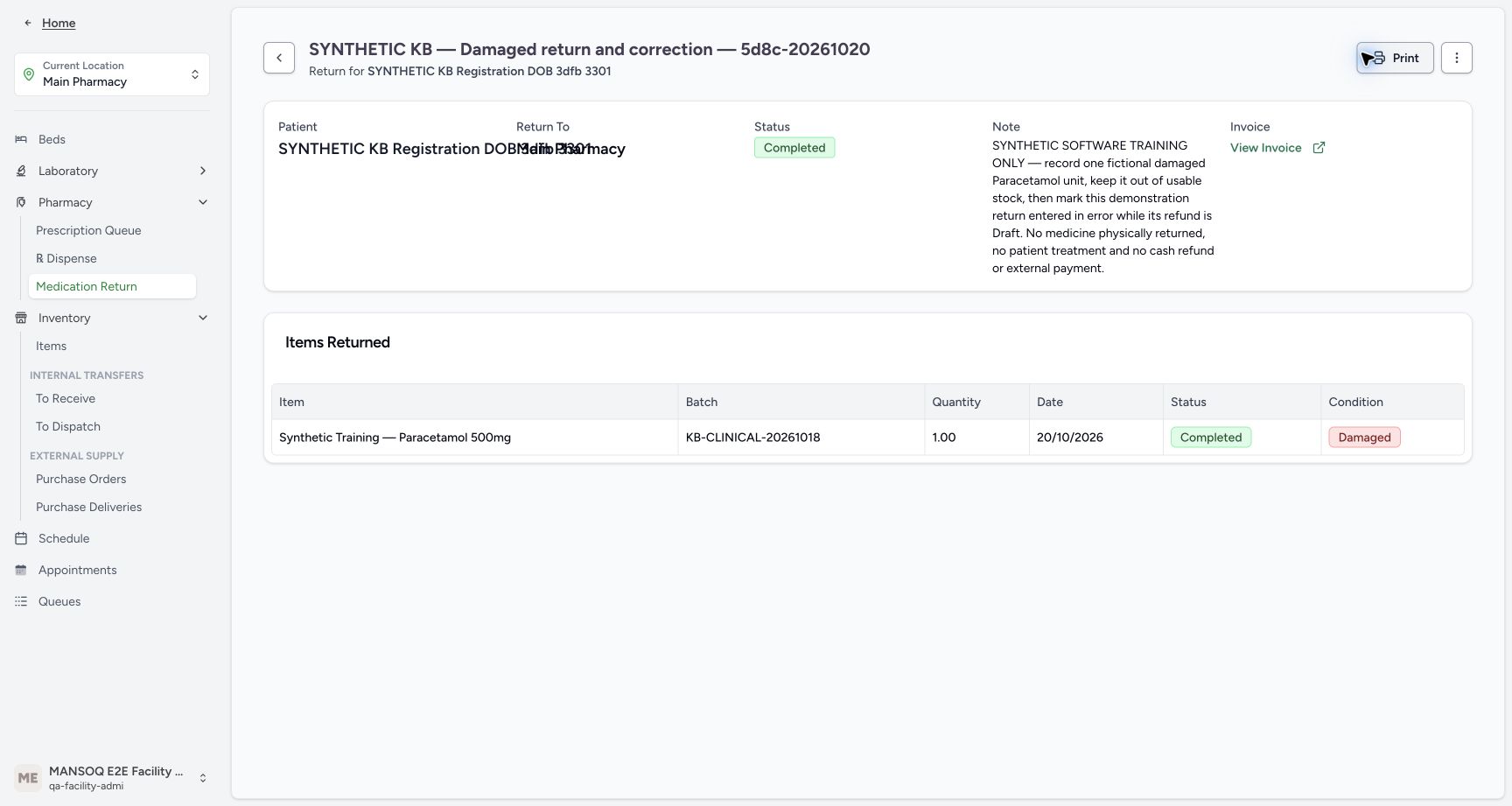 12345
12345Completed return with linked invoice
Capture details
Genuine current-version software exercise with the existing authorised Facility Admin. No physical medicine, clinical care, cash refund or external exchange is involved.
Image SHA-256 893883db542f7c10007ddc82cf4404c3ecb8f56f43c7f22092480c6a3f685276
- Verify parent Completed: The return order has completed.
- Verify quantity one retained: This is the same received line.
- Verify child Completed: The item receipt stays completed.
- Verify Damaged retained: Condition remains separate from parent completion.
- Open View Invoice: Inspect the generated Draft refund without issuing it.
9. Review the linked Draft refund and return to the order
Choose View Invoice. Match INV-116-26, Draft status and the blank Issue Date. The one-unit reverse charge has base minus SAR 6.30; configured invoice rounding displays total minus SAR 6.00. The account Amount Due is separately minus SAR 6.30. None of these negative values records a cash payout. Leave Issue Invoice, editing, printing and payment actions unused. Choose Back to Medication Return to return to the same order.
12345Completed return with linked invoice
Capture details
Genuine current-version software exercise with the existing authorised Facility Admin. No physical medicine, clinical care, cash refund or external exchange is involved.
Image SHA-256 893883db542f7c10007ddc82cf4404c3ecb8f56f43c7f22092480c6a3f685276
- Verify parent Completed: The return order has completed.
- Verify quantity one retained: This is the same received line.
- Verify child Completed: The item receipt stays completed.
- Verify Damaged retained: Condition remains separate from parent completion.
- Open View Invoice: Inspect the generated Draft refund without issuing it.
1234567Draft refund with separate financial amounts
Capture details
Genuine current-version software exercise with the existing authorised Facility Admin. No physical medicine, clinical care, cash refund or external exchange is involved.
Image SHA-256 3a917ac30ac880b3921c1264910b829321c6c1d60e644c72bc1b6ece833256a5
- Match INV-116-26: Use the newly linked refund document.
- Verify Draft: Do not treat this as an issued correction document.
- Read account credit separately: Account Amount Due is minus SAR 6.30.
- Read reverse base amount: The base amount is minus SAR 6.30.
- Read rounded invoice total: Configured invoice rounding displays minus SAR 6.00.
- Verify no issue date: The Issue Date is a dash.
- Back to Medication Return: Return to this same saved return before any optional correction.
10. Optional: correct an entry made in error while its refund is Draft
Stop here for a valid Damaged return. Only for an authorised erroneous-entry correction, verify the exact return and its still-Draft, unpaid refund. In this staged synthetic example, open the completed return menu and choose Mark as entered in error. Read the confirmation: the order was created by mistake and the action cannot be undone. Cancel if the return is valid or you are unsure. Confirm once only for the intended erroneous entry. Damaged condition alone is not a reason to invalidate a correct return.
1234567Draft refund with separate financial amounts
Capture details
Genuine current-version software exercise with the existing authorised Facility Admin. No physical medicine, clinical care, cash refund or external exchange is involved.
Image SHA-256 3a917ac30ac880b3921c1264910b829321c6c1d60e644c72bc1b6ece833256a5
- Match INV-116-26: Use the newly linked refund document.
- Verify Draft: Do not treat this as an issued correction document.
- Read account credit separately: Account Amount Due is minus SAR 6.30.
- Read reverse base amount: The base amount is minus SAR 6.30.
- Read rounded invoice total: Configured invoice rounding displays minus SAR 6.00.
- Verify no issue date: The Issue Date is a dash.
- Back to Medication Return: Return to this same saved return before any optional correction.
12Optional error-correction menu
Capture details
Genuine current-version software exercise with the existing authorised Facility Admin. No physical medicine, clinical care, cash refund or external exchange is involved.
Image SHA-256 382e15b96a6b6748513b7ae289bca0f567cb4924bd1747ef22ab4c0c8cbb5dbd
- Open the completed return menu: Use the menu of the correct return.
- Choose Mark as entered in error only for a mistake: This optional correction is not the normal next step for a valid Damaged return.
123Irreversible entered-in-error confirmation
Capture details
Genuine current-version software exercise with the existing authorised Facility Admin. No physical medicine, clinical care, cash refund or external exchange is involved.
Image SHA-256 1ae11ee675dac77c4ccace7f552ec38ff6effc39b55e3e35a4806df255b13756
- Read the irreversible-error warning: The dialog states the order was created by mistake and cannot be undone.
- Cancel when the return is valid or uncertain: Leave a valid return unchanged.
- Confirm the staged erroneous entry once: Only this authorised synthetic correction continues.
11. Verify the retained error record and cancelled refund
The return parent and its one-unit child now both show Entered in Error; the Damaged condition remains visible. Choose View Invoice again. The same INV-116-26 is Cancelled, its Issue Date is still blank and account Amount Due is SAR 0.00. The cancelled document retains its historical negative line and rounded minus SAR 6.00 total; those values are not a new payment or active account credit. Read the status and account rather than the navigation toast. Choose Back to Medication Return.
12345Parent and child corrected
Capture details
Genuine current-version software exercise with the existing authorised Facility Admin. No physical medicine, clinical care, cash refund or external exchange is involved.
Image SHA-256 288580b056b6c8c92387a762754b793b537149367d83bd33d68e235b73931235
- Verify parent Entered in Error: The correction retains an audit record.
- Verify child Entered in Error: The saved child is corrected with its parent.
- Verify Damaged remains visible: The condition history has not been rewritten to Normal.
- Verify quantity one retained: The historical one-unit entry remains readable.
- Open the linked invoice again: Verify cancellation of this same Draft refund.
12345Cancelled refund and restored account
Capture details
Genuine current-version software exercise with the existing authorised Facility Admin. No physical medicine, clinical care, cash refund or external exchange is involved.
Image SHA-256 f6846378bbaf721c7e97ae3697911985cef75b26e813f528a77693f2e0782004
- Verify refund Cancelled: Read the authoritative document status.
- Verify account Amount Due zero: The account credit from the erroneous return has been reversed.
- Keep retained negative total separate: The cancelled document still displays its historical minus SAR 6.00 total.
- Verify Issue Date remains blank: No issued document is established.
- Back to Medication Return: Return to the corrected order for normal reload readback.
12. Reload, recheck stock and confirm the original sale is intact
Reload the corrected return normally and wait for the settled page. Confirm the same parent and child remain Entered in Error, quantity one, with Damaged retained. Open Inventory → Items and check the original batch still has 83 usable count. Reopen the original 03:40 PM order through Dispense → History and the same patient filter. It remains Completed for ten Paracetamol units, with the same batch, SAR 63.00 paid and zero amount due. No replacement payment or return retry is needed.
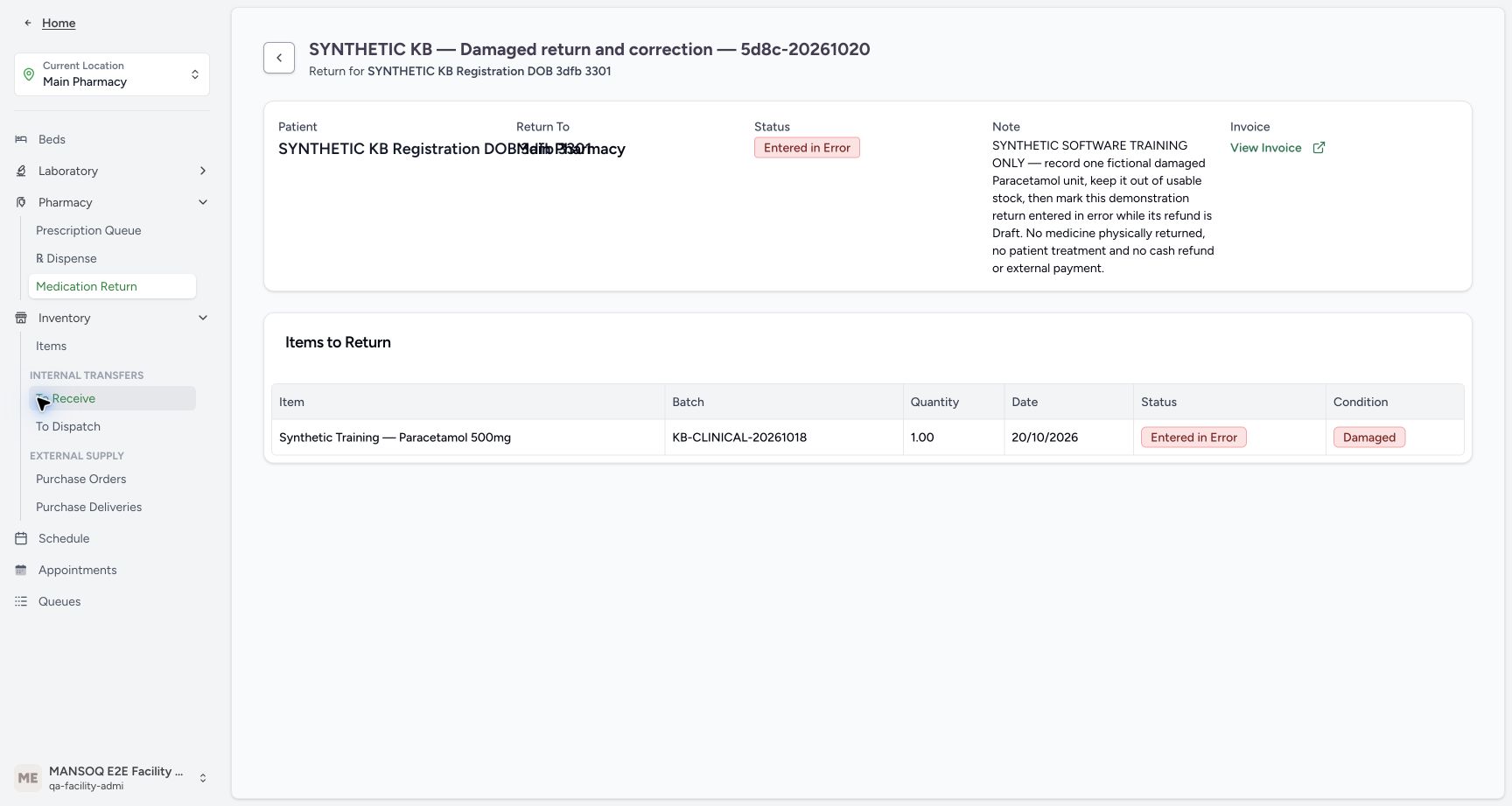 1234
1234Correction retained after reload
Capture details
Genuine current-version software exercise with the existing authorised Facility Admin. No physical medicine, clinical care, cash refund or external exchange is involved.
Image SHA-256 75b3a5e6b20189c554773b7f3c2853196d36a80a44b6b0ca6ca3ba909b2526d1
- Verify parent after reload: Entered in Error persists after normal reload.
- Verify child after reload: The same child remains Entered in Error.
- Verify Damaged history retained: The correction keeps the original condition visible.
- Open Inventory Items for final readback: Recheck the same usable stock after correction.
123Usable stock after receipt and correction
Capture details
Genuine current-version software exercise with the existing authorised Facility Admin. No physical medicine, clinical care, cash refund or external exchange is involved.
Image SHA-256 f58c0c4f33601d74393ddb4f52ad7aed5f29fdd7722abe55e671f7a8f73a0f23
- Verify usable stock remains eighty-three: Completed/Damaged receipt has not added a usable unit.
- Match the original batch: Check KB-CLINICAL-20261018.
- Match the unchanged expiry: The original lot still expires January 1, 2029.
1Pharmacy navigation to Dispense
Capture details
Genuine current-version software exercise with the existing authorised Facility Admin. No physical medicine, clinical care, cash refund or external exchange is involved.
Image SHA-256 9b7566fec8d093313d4533e35d62e7c1c683f3800018bf1126ac1ad0822c72ca
- Choose Dispense: Open the existing dispense-order list.
12History and patient lookup
Capture details
Genuine current-version software exercise with the existing authorised Facility Admin. No physical medicine, clinical care, cash refund or external exchange is involved.
Image SHA-256 202014e5f6b6641f90413624f549b29141e701703505bf60929762a57d3d524b
- Choose History: Review completed orders rather than creating a new dispense.
- Open Filter by Identifier: Use the patient lookup to find the intended original order.
12Patient Name lookup
Capture details
Genuine current-version software exercise with the existing authorised Facility Admin. No physical medicine, clinical care, cash refund or external exchange is involved.
Image SHA-256 653b75642863e50675e0a12021bff845284a43b872c9eddbcef394d77d1890dc
- Use Patient Name search: Verify the lookup search mode.
- Enter the fictional patient name: Search for SYNTHETIC KB Registration DOB 3dfb 3301.
12One matching synthetic patient
Capture details
Genuine current-version software exercise with the existing authorised Facility Admin. No physical medicine, clinical care, cash refund or external exchange is involved.
Image SHA-256 58f24b0e789256c7e52c4558a85d87dd3953cc5407f6e0d6d69e3b51081f2575
- Verify the search text: Keep the exact synthetic patient name.
- Select the matching result: Choose SYNTHETIC KB Registration DOB 3dfb 3301.
123Two completed orders with different times
Capture details
Genuine current-version software exercise with the existing authorised Facility Admin. No physical medicine, clinical care, cash refund or external exchange is involved.
Image SHA-256 4bceac718aff63e9601fac9129ce314da8192a8780e3aab6ec791c7ff4d28514
- Match the 03:40 PM original order: Choose the October 20 Paracetamol sale.
- Open View Order for 03:40 PM: Verify its medicine, quantity and paid state before a return.
- Keep the 04:40 PM order separate: The later partial HYMOX order is a different source.
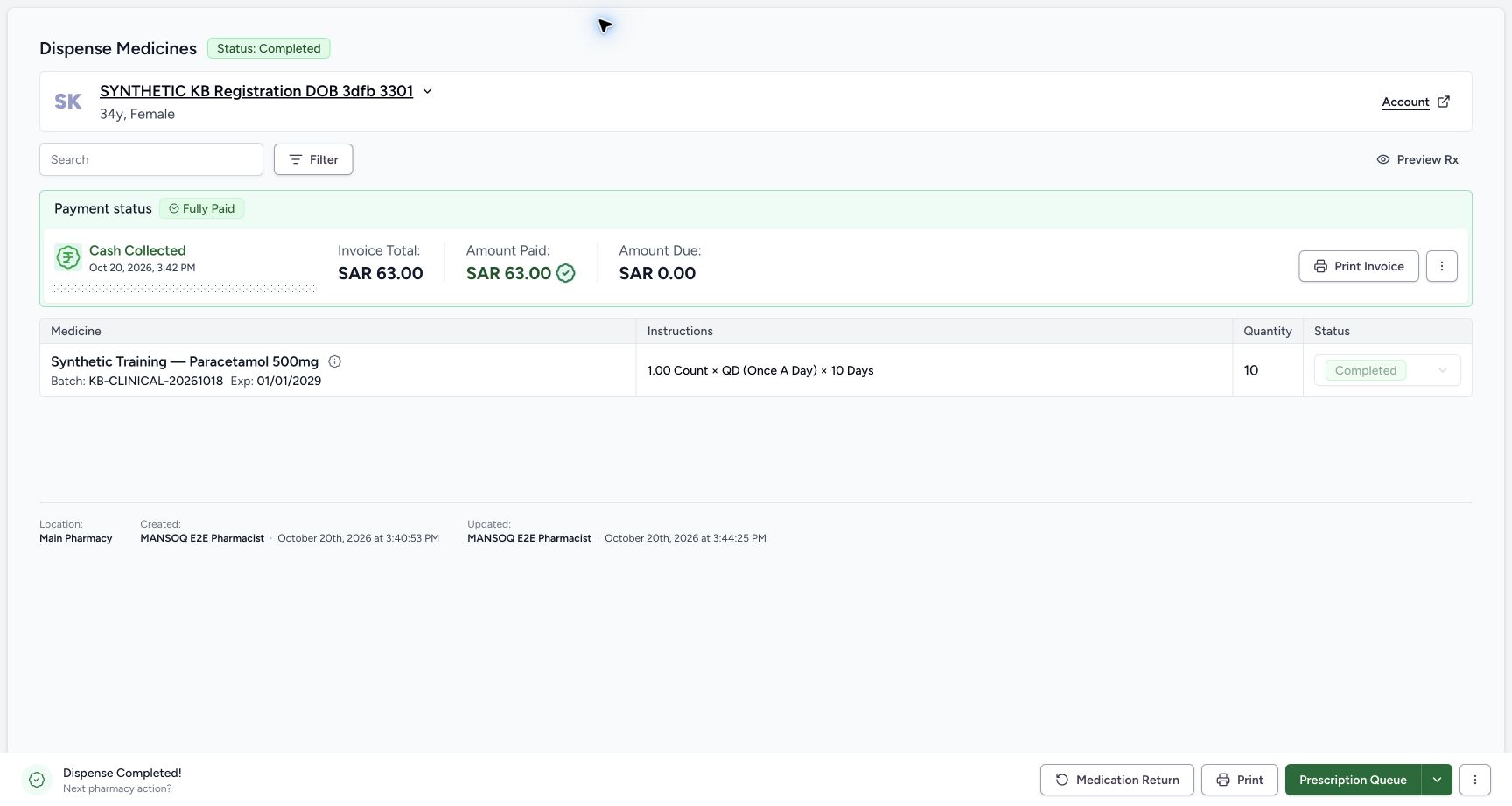 123456
Original sale retained after correction
Capture details
Genuine current-version software exercise with the existing authorised Facility Admin. No physical medicine, clinical care, cash refund or external exchange is involved.
Image SHA-256 325fc56e717337fa994ca760b0b37713a3ef8ca9d1be1fc2d124d4fcb69431f7
- Verify original order Completed: The original sale has not been cancelled by the return correction.
- Verify original quantity ten: The original supply quantity remains ten.
- Verify original medicine Completed: The original saved dispense remains completed.
- Verify the same paid sixty-three: The original SAR 63.00 cash summary remains.
- Verify original amount due zero: No replacement payment is required.
- Verify the original batch and expiry: The original order still shows KB-CLINICAL-20261018 and January 1, 2029.
Keep receipt, usable stock and financial credit separate
Completed/Damaged records the receipt outcome; it does not make that unit available for another supply. This example keeps usable stock at 83 after receipt, parent completion and the optional correction. It demonstrates no quarantine location or separate damaged-stock bucket.
Parent completion generates a Draft refund under the existing financial workflow even though the item is Damaged. That is separate from stock eligibility and from any refund approval or payout policy. The reverse base amount is minus SAR 6.30, the displayed rounded invoice total is minus SAR 6.00 and the account credit before correction is minus SAR 6.30. This lesson makes no new clinical, return-eligibility or refund-policy decision.
12345Completed and Damaged ready to confirm
Capture details
Genuine current-version software exercise with the existing authorised Facility Admin. No physical medicine, clinical care, cash refund or external exchange is involved.
Image SHA-256 ee25f6cf8eedfa341d2c577444bd7cd9e00a1f6c752e2ca5e5101639aca5720f
- Verify exactly one selected item: This dialog applies to the one saved return unit.
- Verify Completed: Receiving status and item condition are separate controls.
- Verify Damaged selected: The completed return must retain its Damaged condition.
- Confirm once: Apply this one Completed/Damaged receipt.
- Cancel if the scope is wrong: Cancel is available before applying the receipt.
12345Saved Damaged receipt with Pending parent
Capture details
Genuine current-version software exercise with the existing authorised Facility Admin. No physical medicine, clinical care, cash refund or external exchange is involved.
Image SHA-256 f260c92bae99517322c0a8edc6e950ebada65d9aecde2ee92efa348f3a95d514
- Read parent Pending: Receiving an item has not completed the parent order.
- Verify received quantity one: The saved quantity remains 1.00.
- Read child Completed: This item receipt is saved.
- Read Damaged: The saved condition is Damaged, not Normal.
- Recognise Receive is disabled: Do not receive the completed item again.
123Usable stock after receipt and correction
Capture details
Genuine current-version software exercise with the existing authorised Facility Admin. No physical medicine, clinical care, cash refund or external exchange is involved.
Image SHA-256 f58c0c4f33601d74393ddb4f52ad7aed5f29fdd7722abe55e671f7a8f73a0f23
- Verify usable stock remains eighty-three: Completed/Damaged receipt has not added a usable unit.
- Match the original batch: Check KB-CLINICAL-20261018.
- Match the unchanged expiry: The original lot still expires January 1, 2029.
12345Completed return with linked invoice
Capture details
Genuine current-version software exercise with the existing authorised Facility Admin. No physical medicine, clinical care, cash refund or external exchange is involved.
Image SHA-256 893883db542f7c10007ddc82cf4404c3ecb8f56f43c7f22092480c6a3f685276
- Verify parent Completed: The return order has completed.
- Verify quantity one retained: This is the same received line.
- Verify child Completed: The item receipt stays completed.
- Verify Damaged retained: Condition remains separate from parent completion.
- Open View Invoice: Inspect the generated Draft refund without issuing it.
1234567Draft refund with separate financial amounts
Capture details
Genuine current-version software exercise with the existing authorised Facility Admin. No physical medicine, clinical care, cash refund or external exchange is involved.
Image SHA-256 3a917ac30ac880b3921c1264910b829321c6c1d60e644c72bc1b6ece833256a5
- Match INV-116-26: Use the newly linked refund document.
- Verify Draft: Do not treat this as an issued correction document.
- Read account credit separately: Account Amount Due is minus SAR 6.30.
- Read reverse base amount: The base amount is minus SAR 6.30.
- Read rounded invoice total: Configured invoice rounding displays minus SAR 6.00.
- Verify no issue date: The Issue Date is a dash.
- Back to Medication Return: Return to this same saved return before any optional correction.
12345Cancelled refund and restored account
Capture details
Genuine current-version software exercise with the existing authorised Facility Admin. No physical medicine, clinical care, cash refund or external exchange is involved.
Image SHA-256 f6846378bbaf721c7e97ae3697911985cef75b26e813f528a77693f2e0782004
- Verify refund Cancelled: Read the authoritative document status.
- Verify account Amount Due zero: The account credit from the erroneous return has been reversed.
- Keep retained negative total separate: The cancelled document still displays its historical minus SAR 6.00 total.
- Verify Issue Date remains blank: No issued document is established.
- Back to Medication Return: Return to the corrected order for normal reload readback.
Use correction for a mistake, not for every Damaged return
A valid Damaged return can remain Completed/Damaged. Entered in Error is a separate authorised correction when the entry should not have been recorded. In this deliberately staged example, correction retains the one-unit Damaged history, cancels the linked Draft refund and removes that erroneous account credit. The original completed sale and its existing payments remain intact. This does not demonstrate correction of an issued document, a paid refund, mixed Normal/Damaged items or a Damaged-only zero-stock fixture.
12345Completed return with linked invoice
Capture details
Genuine current-version software exercise with the existing authorised Facility Admin. No physical medicine, clinical care, cash refund or external exchange is involved.
Image SHA-256 893883db542f7c10007ddc82cf4404c3ecb8f56f43c7f22092480c6a3f685276
- Verify parent Completed: The return order has completed.
- Verify quantity one retained: This is the same received line.
- Verify child Completed: The item receipt stays completed.
- Verify Damaged retained: Condition remains separate from parent completion.
- Open View Invoice: Inspect the generated Draft refund without issuing it.
12Optional error-correction menu
Capture details
Genuine current-version software exercise with the existing authorised Facility Admin. No physical medicine, clinical care, cash refund or external exchange is involved.
Image SHA-256 382e15b96a6b6748513b7ae289bca0f567cb4924bd1747ef22ab4c0c8cbb5dbd
- Open the completed return menu: Use the menu of the correct return.
- Choose Mark as entered in error only for a mistake: This optional correction is not the normal next step for a valid Damaged return.
123Irreversible entered-in-error confirmation
Capture details
Genuine current-version software exercise with the existing authorised Facility Admin. No physical medicine, clinical care, cash refund or external exchange is involved.
Image SHA-256 1ae11ee675dac77c4ccace7f552ec38ff6effc39b55e3e35a4806df255b13756
- Read the irreversible-error warning: The dialog states the order was created by mistake and cannot be undone.
- Cancel when the return is valid or uncertain: Leave a valid return unchanged.
- Confirm the staged erroneous entry once: Only this authorised synthetic correction continues.
12345Parent and child corrected
Capture details
Genuine current-version software exercise with the existing authorised Facility Admin. No physical medicine, clinical care, cash refund or external exchange is involved.
Image SHA-256 288580b056b6c8c92387a762754b793b537149367d83bd33d68e235b73931235
- Verify parent Entered in Error: The correction retains an audit record.
- Verify child Entered in Error: The saved child is corrected with its parent.
- Verify Damaged remains visible: The condition history has not been rewritten to Normal.
- Verify quantity one retained: The historical one-unit entry remains readable.
- Open the linked invoice again: Verify cancellation of this same Draft refund.
12345Cancelled refund and restored account
Capture details
Genuine current-version software exercise with the existing authorised Facility Admin. No physical medicine, clinical care, cash refund or external exchange is involved.
Image SHA-256 f6846378bbaf721c7e97ae3697911985cef75b26e813f528a77693f2e0782004
- Verify refund Cancelled: Read the authoritative document status.
- Verify account Amount Due zero: The account credit from the erroneous return has been reversed.
- Keep retained negative total separate: The cancelled document still displays its historical minus SAR 6.00 total.
- Verify Issue Date remains blank: No issued document is established.
- Back to Medication Return: Return to the corrected order for normal reload readback.
123456Original sale retained after correction
Capture details
Genuine current-version software exercise with the existing authorised Facility Admin. No physical medicine, clinical care, cash refund or external exchange is involved.
Image SHA-256 325fc56e717337fa994ca760b0b37713a3ef8ca9d1be1fc2d124d4fcb69431f7
- Verify original order Completed: The original sale has not been cancelled by the return correction.
- Verify original quantity ten: The original supply quantity remains ten.
- Verify original medicine Completed: The original saved dispense remains completed.
- Verify the same paid sixty-three: The original SAR 63.00 cash summary remains.
- Verify original amount due zero: No replacement payment is required.
- Verify the original batch and expiry: The original order still shows KB-CLINICAL-20261018 and January 1, 2029.
Reuse the shared workflows in their recorded versions
The shared lessons below cover Normal return controls, the ordinary Pharmacist write-permission boundary and the original self-pay payment/completion workflow. They retain their own older source versions and do not imply that those versions contain this Damaged-stock correction. Use the current lesson for the Damaged receipt and Draft correction, rather than repeating those complete workflows.
Record a Normal single-unit return with an authorized role (026fdf3e)
Record one fictional cash payment, balance and complete (d20e68ed)
1234567Verified completed ten-unit original
Capture details
Genuine current-version software exercise with the existing authorised Facility Admin. No physical medicine, clinical care, cash refund or external exchange is involved.
Image SHA-256 ae85e9ccc076bd643f0cb619be3483cd686a96db4d47ddddc58c74a55bc0bc96
- Verify the same patient: Read the original order patient before proceeding.
- Read original quantity ten: This is the completed supply quantity, not the intended return quantity.
- Verify the medicine is Completed: Use the saved completed original.
- Match original batch and expiry: KB-CLINICAL-20261018 expires January 1, 2029.
- Read the existing paid amount: The original sale has SAR 63.00 paid.
- Read original amount due zero: Do not create another payment.
- Open Medication Return: Use the direct action on this verified completed order.
123Saved empty Draft return
Capture details
Genuine current-version software exercise with the existing authorised Facility Admin. No physical medicine, clinical care, cash refund or external exchange is involved.
Image SHA-256 90a3553346eeeac61dd753ca4f65fa86e6c4946d76ea286f416132163f69089a
- Verify saved Draft: The parent exists but has not received an item.
- Verify no saved items yet: The empty saved table is separate from the editor.
- Choose Load from order: Load the one original dispense item.
12345Saved line before approval
Capture details
Genuine current-version software exercise with the existing authorised Facility Admin. No physical medicine, clinical care, cash refund or external exchange is involved.
Image SHA-256 4bfad007dd75180aab1da63f3b3b4d0572685dc301048fd112e4e7048face94d
- Verify saved quantity one: The saved return line is 1.00.
- Read In Progress: The item has not been received yet.
- Read the initial Normal label: This initial label must not be mistaken for the later Damaged receipt.
- Verify the parent is Draft: Saving the line has not approved the return.
- Choose Mark as Approved: Advance the prepared return once.
123456Original sale retained after correction
Capture details
Genuine current-version software exercise with the existing authorised Facility Admin. No physical medicine, clinical care, cash refund or external exchange is involved.
Image SHA-256 325fc56e717337fa994ca760b0b37713a3ef8ca9d1be1fc2d124d4fcb69431f7
- Verify original order Completed: The original sale has not been cancelled by the return correction.
- Verify original quantity ten: The original supply quantity remains ten.
- Verify original medicine Completed: The original saved dispense remains completed.
- Verify the same paid sixty-three: The original SAR 63.00 cash summary remains.
- Verify original amount due zero: No replacement payment is required.
- Verify the original batch and expiry: The original order still shows KB-CLINICAL-20261018 and January 1, 2029.
Troubleshooting
The saved item is still Normal before receipt
The initial saved return line is In Progress/Normal. Open the receipt dialog and explicitly select Damaged before confirming Completed. After the completed receipt, review its saved condition; do not try to reclassify that completed row. If the entry itself is wrong, use the authorised correction process for its exact financial state rather than repeating receipt.
12345Saved line before approval
Capture details
Genuine current-version software exercise with the existing authorised Facility Admin. No physical medicine, clinical care, cash refund or external exchange is involved.
Image SHA-256 4bfad007dd75180aab1da63f3b3b4d0572685dc301048fd112e4e7048face94d
- Verify saved quantity one: The saved return line is 1.00.
- Read In Progress: The item has not been received yet.
- Read the initial Normal label: This initial label must not be mistaken for the later Damaged receipt.
- Verify the parent is Draft: Saving the line has not approved the return.
- Choose Mark as Approved: Advance the prepared return once.
123456Pending return ready to receive
Capture details
Genuine current-version software exercise with the existing authorised Facility Admin. No physical medicine, clinical care, cash refund or external exchange is involved.
Image SHA-256 3d6afdacd3f4621629059878e19c98d94e930c4e7d89c21459adbc63533712fb
- Verify Pending parent: Approval is separate from receipt.
- Verify the saved row is selected: Receive only the intended one-unit row.
- Verify quantity one: Keep the saved amount unchanged.
- Verify the item is still In Progress: Receipt has not yet been applied.
- Review the Normal starting condition: Choose Damaged explicitly in the receipt dialog.
- Open Receive & Update Stock: Review the receiving status and condition before confirming.
123Receipt defaults before changing condition
Capture details
Genuine current-version software exercise with the existing authorised Facility Admin. No physical medicine, clinical care, cash refund or external exchange is involved.
Image SHA-256 384f16f3c2ea233b6a6e9ac9ca83bd9a1880a2da15fc897d94f5104f6ccac032
- Review Completed receiving status: Keep Completed for this actual receipt.
- Review the default Normal condition: Do not accept the default for this Damaged example.
- Choose Damaged: Explicitly set the correct condition before submission.
12345Completed and Damaged ready to confirm
Capture details
Genuine current-version software exercise with the existing authorised Facility Admin. No physical medicine, clinical care, cash refund or external exchange is involved.
Image SHA-256 ee25f6cf8eedfa341d2c577444bd7cd9e00a1f6c752e2ca5e5101639aca5720f
- Verify exactly one selected item: This dialog applies to the one saved return unit.
- Verify Completed: Receiving status and item condition are separate controls.
- Verify Damaged selected: The completed return must retain its Damaged condition.
- Confirm once: Apply this one Completed/Damaged receipt.
- Cancel if the scope is wrong: Cancel is available before applying the receipt.
12345Saved Damaged receipt with Pending parent
Capture details
Genuine current-version software exercise with the existing authorised Facility Admin. No physical medicine, clinical care, cash refund or external exchange is involved.
Image SHA-256 f260c92bae99517322c0a8edc6e950ebada65d9aecde2ee92efa348f3a95d514
- Read parent Pending: Receiving an item has not completed the parent order.
- Verify received quantity one: The saved quantity remains 1.00.
- Read child Completed: This item receipt is saved.
- Read Damaged: The saved condition is Damaged, not Normal.
- Recognise Receive is disabled: Do not receive the completed item again.
The refund is Cancelled but its negative total is still displayed
A cancelled document retains historical line amounts. Check Cancelled status, blank Issue Date and the account Amount Due of zero. The visible Invoice Created navigation notice is not evidence of another invoice or payment. Return to the error-marked order and verify stock and the original sale; do not repeat a payment or issue the cancelled Draft.
12345Parent and child corrected
Capture details
Genuine current-version software exercise with the existing authorised Facility Admin. No physical medicine, clinical care, cash refund or external exchange is involved.
Image SHA-256 288580b056b6c8c92387a762754b793b537149367d83bd33d68e235b73931235
- Verify parent Entered in Error: The correction retains an audit record.
- Verify child Entered in Error: The saved child is corrected with its parent.
- Verify Damaged remains visible: The condition history has not been rewritten to Normal.
- Verify quantity one retained: The historical one-unit entry remains readable.
- Open the linked invoice again: Verify cancellation of this same Draft refund.
12345Cancelled refund and restored account
Capture details
Genuine current-version software exercise with the existing authorised Facility Admin. No physical medicine, clinical care, cash refund or external exchange is involved.
Image SHA-256 f6846378bbaf721c7e97ae3697911985cef75b26e813f528a77693f2e0782004
- Verify refund Cancelled: Read the authoritative document status.
- Verify account Amount Due zero: The account credit from the erroneous return has been reversed.
- Keep retained negative total separate: The cancelled document still displays its historical minus SAR 6.00 total.
- Verify Issue Date remains blank: No issued document is established.
- Back to Medication Return: Return to the corrected order for normal reload readback.
1234Correction retained after reload
Capture details
Genuine current-version software exercise with the existing authorised Facility Admin. No physical medicine, clinical care, cash refund or external exchange is involved.
Image SHA-256 75b3a5e6b20189c554773b7f3c2853196d36a80a44b6b0ca6ca3ba909b2526d1
- Verify parent after reload: Entered in Error persists after normal reload.
- Verify child after reload: The same child remains Entered in Error.
- Verify Damaged history retained: The correction keeps the original condition visible.
- Open Inventory Items for final readback: Recheck the same usable stock after correction.
123Usable stock after receipt and correction
Capture details
Genuine current-version software exercise with the existing authorised Facility Admin. No physical medicine, clinical care, cash refund or external exchange is involved.
Image SHA-256 f58c0c4f33601d74393ddb4f52ad7aed5f29fdd7722abe55e671f7a8f73a0f23
- Verify usable stock remains eighty-three: Completed/Damaged receipt has not added a usable unit.
- Match the original batch: Check KB-CLINICAL-20261018.
- Match the unchanged expiry: The original lot still expires January 1, 2029.
123456Original sale retained after correction
Capture details
Genuine current-version software exercise with the existing authorised Facility Admin. No physical medicine, clinical care, cash refund or external exchange is involved.
Image SHA-256 325fc56e717337fa994ca760b0b37713a3ef8ca9d1be1fc2d124d4fcb69431f7
- Verify original order Completed: The original sale has not been cancelled by the return correction.
- Verify original quantity ten: The original supply quantity remains ten.
- Verify original medicine Completed: The original saved dispense remains completed.
- Verify the same paid sixty-three: The original SAR 63.00 cash summary remains.
- Verify original amount due zero: No replacement payment is required.
- Verify the original batch and expiry: The original order still shows KB-CLINICAL-20261018 and January 1, 2029.
Source evidence
Every citation uses this exact committed version. The private source repository requires access.
- repositories/platform/mansoq-web/src/pages/Facility/services/pharmacy/MedicationDispenseHistory.tsx:190 ·
5d8c4629e5ccc09618b68f370bc8b304789e8318Source file checksum
84c433d3613c4b3b2fdc2980d21f4fcdad7fc1bf81b8d8b2efddc6ec7e2085c6 - repositories/platform/mansoq-web/src/pages/Facility/services/pharmacy/MedicationReturnSheet.tsx:100 ·
5d8c4629e5ccc09618b68f370bc8b304789e8318Source file checksum
9604617c375666f4db55238676070d443d8c19351ac33622879ef970cacd7764 - repositories/platform/mansoq-web/src/pages/Facility/services/pharmacy/MedicationReturnShow.tsx:248 ·
5d8c4629e5ccc09618b68f370bc8b304789e8318Source file checksum
8efb9ddff49741bf6ed0baf0fbc46e7d7fd59a5e9d988c4b484404cc8d4c8131 - repositories/platform/mansoq-web/src/pages/Facility/services/pharmacy/components/AddMedicationReturnItemForm.tsx:166 ·
5d8c4629e5ccc09618b68f370bc8b304789e8318Source file checksum
6b9fd8a41fdbbacee538c541940bf8e49968e2481340caa06d9b050a6663106f - repositories/platform/mansoq-web/src/pages/Facility/services/pharmacy/components/MedicationReturnItemsTable.tsx:81 ·
5d8c4629e5ccc09618b68f370bc8b304789e8318Source file checksum
7fc8409f101c0d1584f88c889ff85351dc15680a81babc4c7dea2dd6b4a196eb - repositories/platform/mansoq-web/src/pages/Facility/billing/invoice/InvoiceShow.tsx:295 ·
5d8c4629e5ccc09618b68f370bc8b304789e8318Source file checksum
9068995fbe413fe3e14031d9c832943cc14d9188a5f72be91d3c16baa53fc6ff - repositories/platform/mansoq-core/mansoq/emr/api/viewsets/inventory/delivery_order.py:116 ·
5d8c4629e5ccc09618b68f370bc8b304789e8318Source file checksum
d18ed0813750bf23a1da2a7553880bb340724b8c63396e0a2e045c0b66843063 - repositories/platform/mansoq-core/mansoq/emr/api/viewsets/inventory/supply_delivery.py:130 ·
5d8c4629e5ccc09618b68f370bc8b304789e8318Source file checksum
f9cbb60413017b4a822ac5c5a233181d96e88088d52e70a76dbc0782d0637220 - repositories/platform/mansoq-core/mansoq/emr/resources/inventory/inventory_item/sync_inventory_item.py:47 ·
5d8c4629e5ccc09618b68f370bc8b304789e8318Source file checksum
a6f8395ab8059b937700d212bbbcce46c1fc633848c38026c4c8ee9bc2e4c573 - repositories/platform/mansoq-core/mansoq/emr/resources/invoice/return_items_invoice.py:35 ·
5d8c4629e5ccc09618b68f370bc8b304789e8318Source file checksum
32755dbee779b854bfbb997176d7fe0d7c36b4225c5da75d975a7ad2c81c12c7 - repositories/platform/mansoq-core/mansoq/emr/resources/charge_item/apply_charge_item_definition.py:13 ·
5d8c4629e5ccc09618b68f370bc8b304789e8318Source file checksum
f0e436da014c81006a40a5449126439c94a70b0da84953fec62018de5d8203db - repositories/platform/mansoq-core/mansoq/emr/resources/invoice/sync_items.py:47 ·
5d8c4629e5ccc09618b68f370bc8b304789e8318Source file checksum
e232d244e2f09171c7cf76ffebd6da04bd62a6f9353de709224a08c0fde8cff3 - repositories/platform/mansoq-core/mansoq/emr/resources/inventory/supply_delivery/spec.py:37 ·
5d8c4629e5ccc09618b68f370bc8b304789e8318Source file checksum
53fcab738ac254b418fc8e9e373d50803217079902b8d640d820aeb12c478406 - repositories/platform/mansoq-core/mansoq/security/authorization/supply_delivery.py:27 ·
5d8c4629e5ccc09618b68f370bc8b304789e8318Source file checksum
934acb2a4580c391a692d0af4a0b1fbd39955bbc2e98c84fbe4acf1bd6922fcc - repositories/platform/mansoq-core/mansoq/security/permissions/supply_delivery.py:23 ·
5d8c4629e5ccc09618b68f370bc8b304789e8318Source file checksum
5bab550ead04c1b8dde1cbbf0b7db7ce9b76fa2db3b9909d0c0dadc4cb43b012 - repositories/platform/mansoq-web/src/pages/Facility/services/pharmacy/DispenseOrderView.tsx:242 ·
5d8c4629e5ccc09618b68f370bc8b304789e8318Source file checksum
59bebd01a2422d3b62d5e57b0f3a9211d5eb03ddd94f81704e3dbecd47cd197d - repositories/platform/mansoq-web/src/pages/Facility/services/pharmacy/components/DispenseOrderViewFooter.tsx:92 ·
5d8c4629e5ccc09618b68f370bc8b304789e8318Source file checksum
9ddc555df83d78afd04ed0e339630d6e67ccd52a1545d5103a835d8633d0acd6