 MANSOQ
 Pharmacy · VERSION d20e68ed
Record one fictional cash payment, balance and complete
Continue the saved synthetic SAR 63.00 order: issue its invoice from the order banner, record one fictional Cash ledger payment with tender and change, mark the invoice Balanced, complete the dispense once and verify the saved invoice, payment and order after reload.
Pharmacist
 123456
Saved Completed dispense
Capture details
Genuine natural native capture of exact local d20e build; source publication LOCAL_UNPUSHED. Original pixels are unchanged. This fictional self-pay software recording establishes only the illustrated ledger and dispense states; no actual medicine, money, provider movement, payer exchange or external tax clearance is qualified.
Image SHA-256 17d40acb6e1cb01ee0d5769b0ae8de7000926202068820c38eb8edddffea4ec1
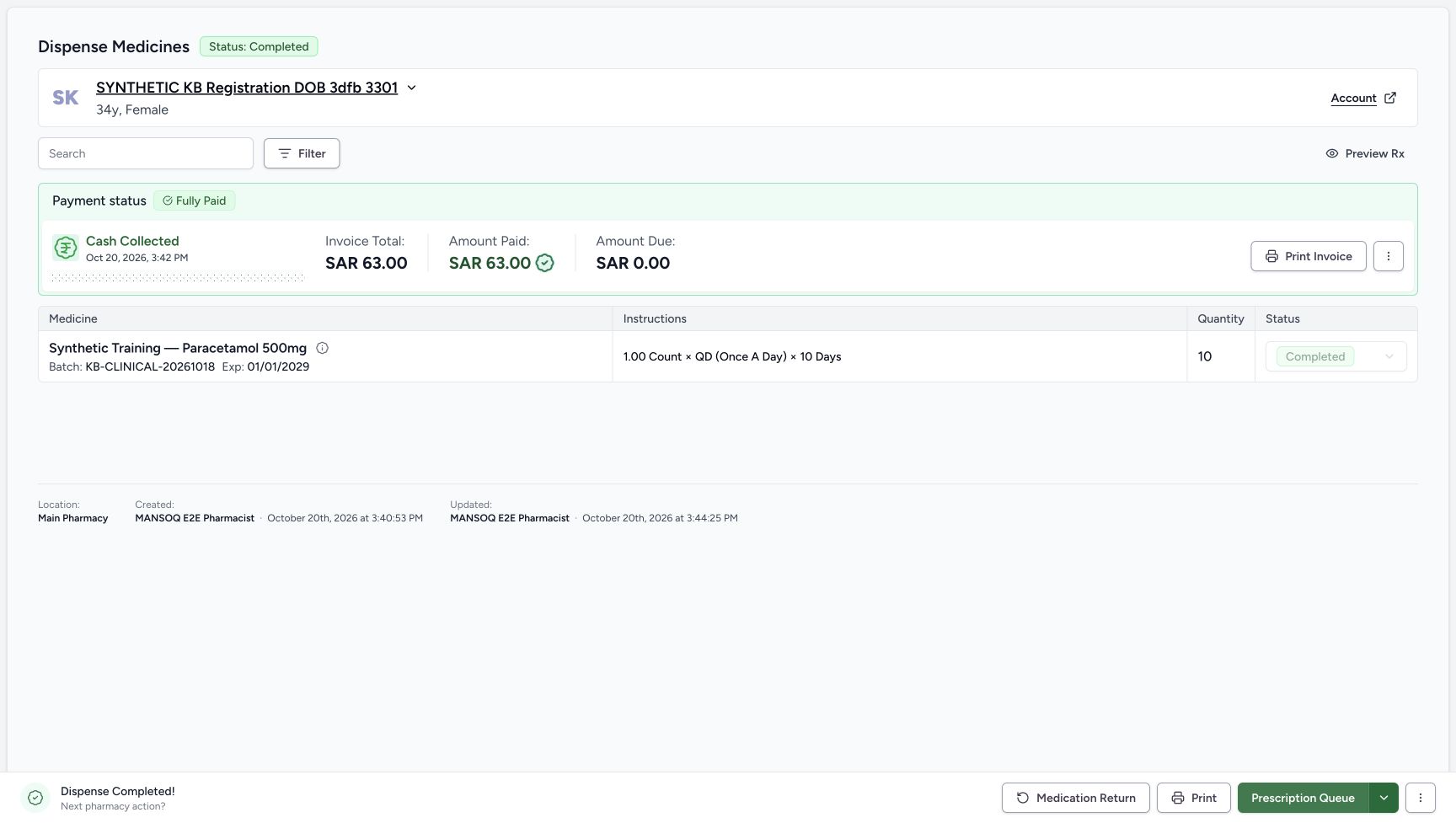
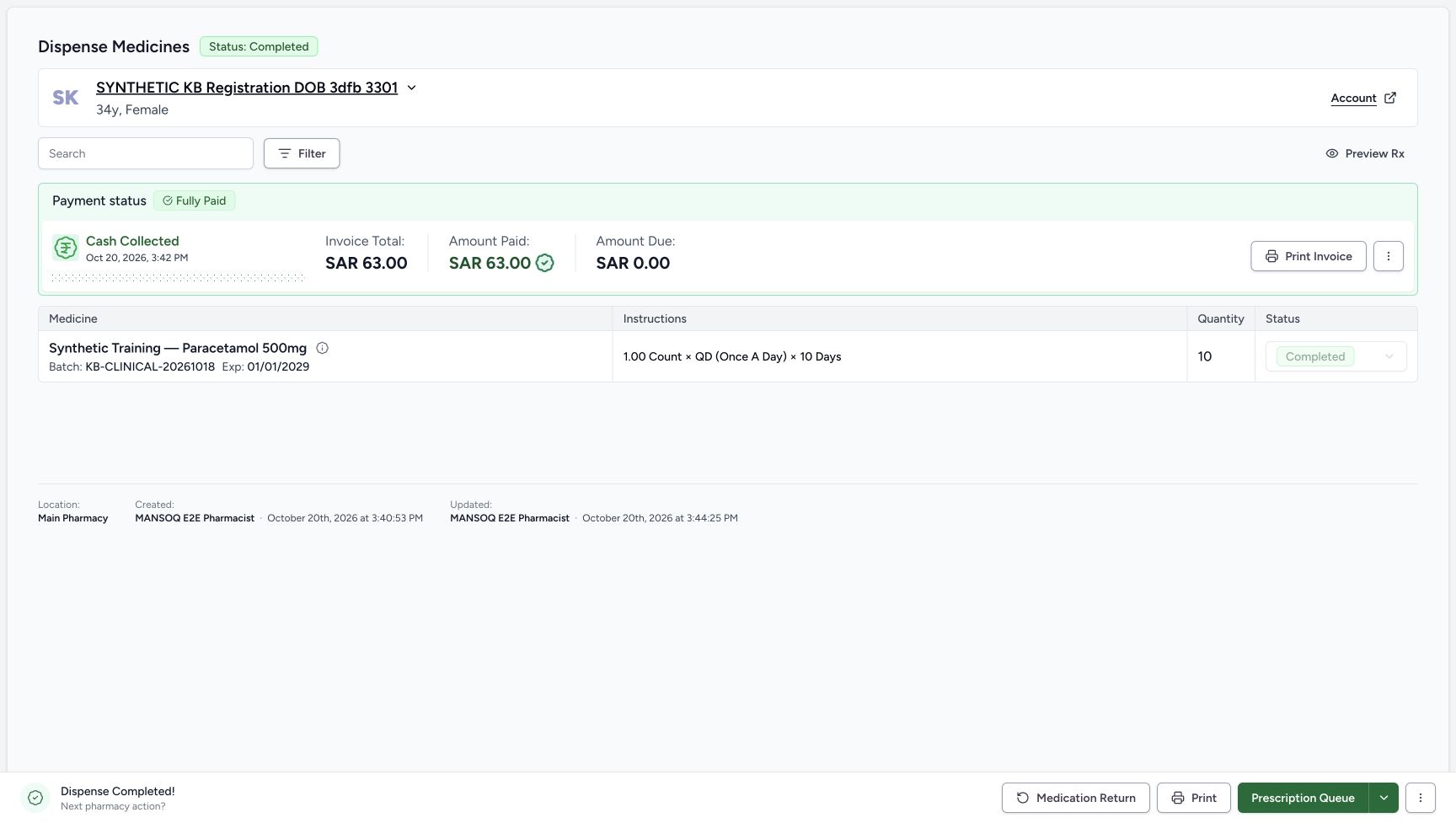
- Read the saved order Completed: The parent order has reached Completed.
- Verify ten units retained: The completed layout still shows quantity 10; this column moved after the status transition.
- Read the medicine Completed: The same medicine row is now Completed.
- Verify the one payment remains 63.00: Completion has not recorded another cash payment.
- Verify zero amount due: The settled invoice banner still shows zero due.
- Read Dispense Completed: The footer records software completion and offers separate later actions, not proof of physical handover.
 1234567
Balanced invoice retained after reload
Capture details
Genuine natural native capture of exact local d20e build; source publication LOCAL_UNPUSHED. Original pixels are unchanged. This fictional self-pay software recording establishes only the illustrated ledger and dispense states; no actual medicine, money, provider movement, payer exchange or external tax clearance is qualified.
Image SHA-256 84f542a3ae110c4c65cf18fe3959dddb75d61db86b505b867673ec415bf60a0d
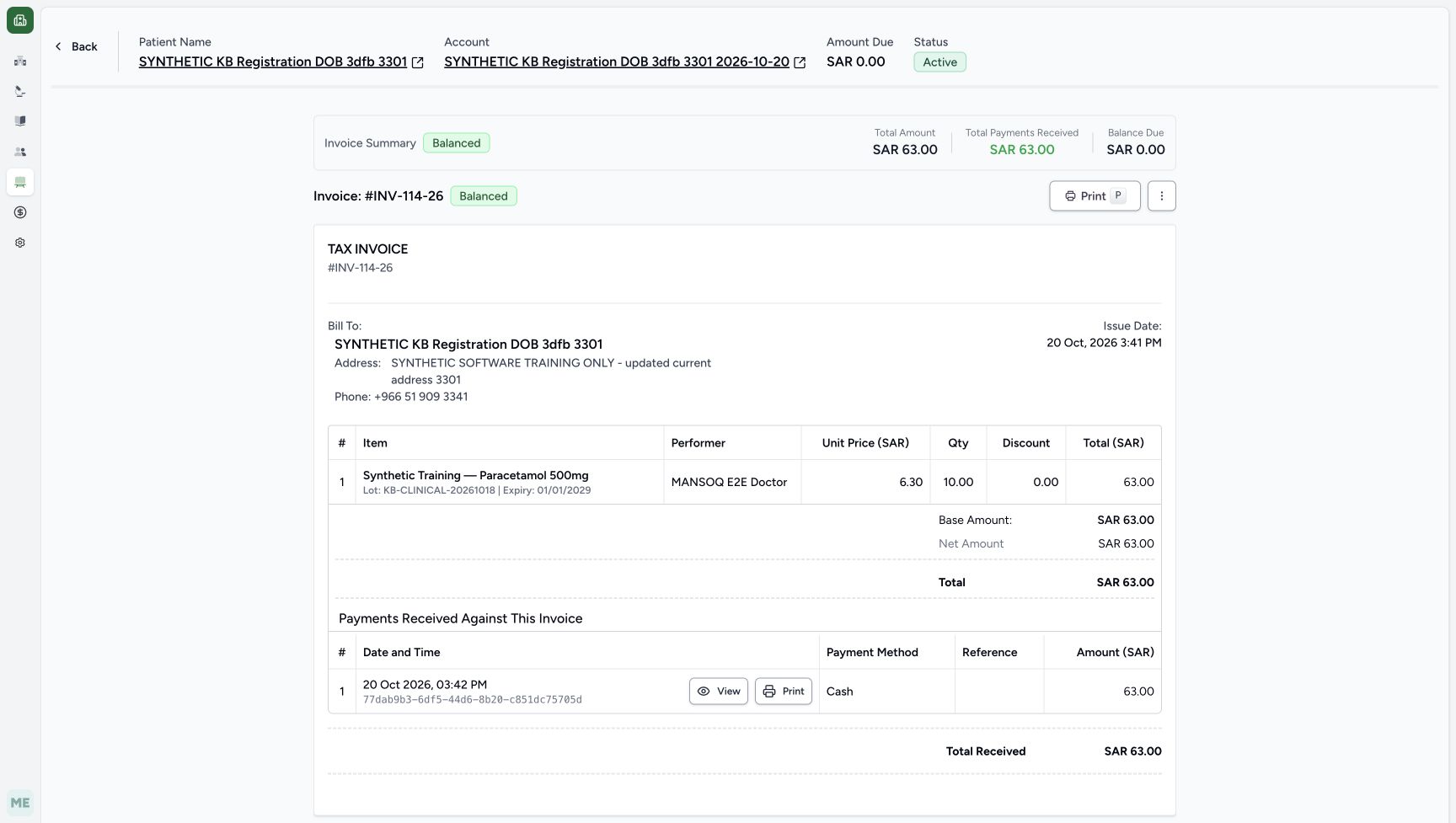
- Verify Balanced after reload: A normal invoice reload retains Balanced.
- Verify invoice total 63.00: The generated total remains unchanged.
- Verify one payment received 63.00: No second payment was created by balancing or completing.
- Verify zero invoice balance: The invoice remains at zero due.
- Verify the retained Cash row: The same single Cash payment is listed after reload.
- Verify the account stays Active: The account remains Active at the end of this recording.
- Verify the separate account amount: The account header remains at SAR 0.00 due.
22 of 22 content blocks have reviewed image alignment.
Before you begin
- Use the same authorised ordinary Pharmacist session and assigned synthetic registration patient. Start from the previously saved ten-count Preparation row on an In Progress order, with Draft Invoice INV-114-26 totaling SAR 63.00. Reuse that existing order and invoice rather than creating another.
 1
1Recorded release d20e68ed · 2026-10-20T12:33:44.207Z · 1728 × 977 Ordinary Pharmacist identity reused from earlier same-session capture
Capture details
Genuine natural native capture of exact local d20e build; source publication LOCAL_UNPUSHED. Original pixels are unchanged. This fictional self-pay software recording establishes only the illustrated ledger and dispense states; no actual medicine, money, provider movement, payer exchange or external tax clearance is qualified. This identity original was captured earlier in the same unchanged ordinary Pharmacist session and is reused with its original timestamp; it is not an additional Patient74 capture.
Image SHA-256
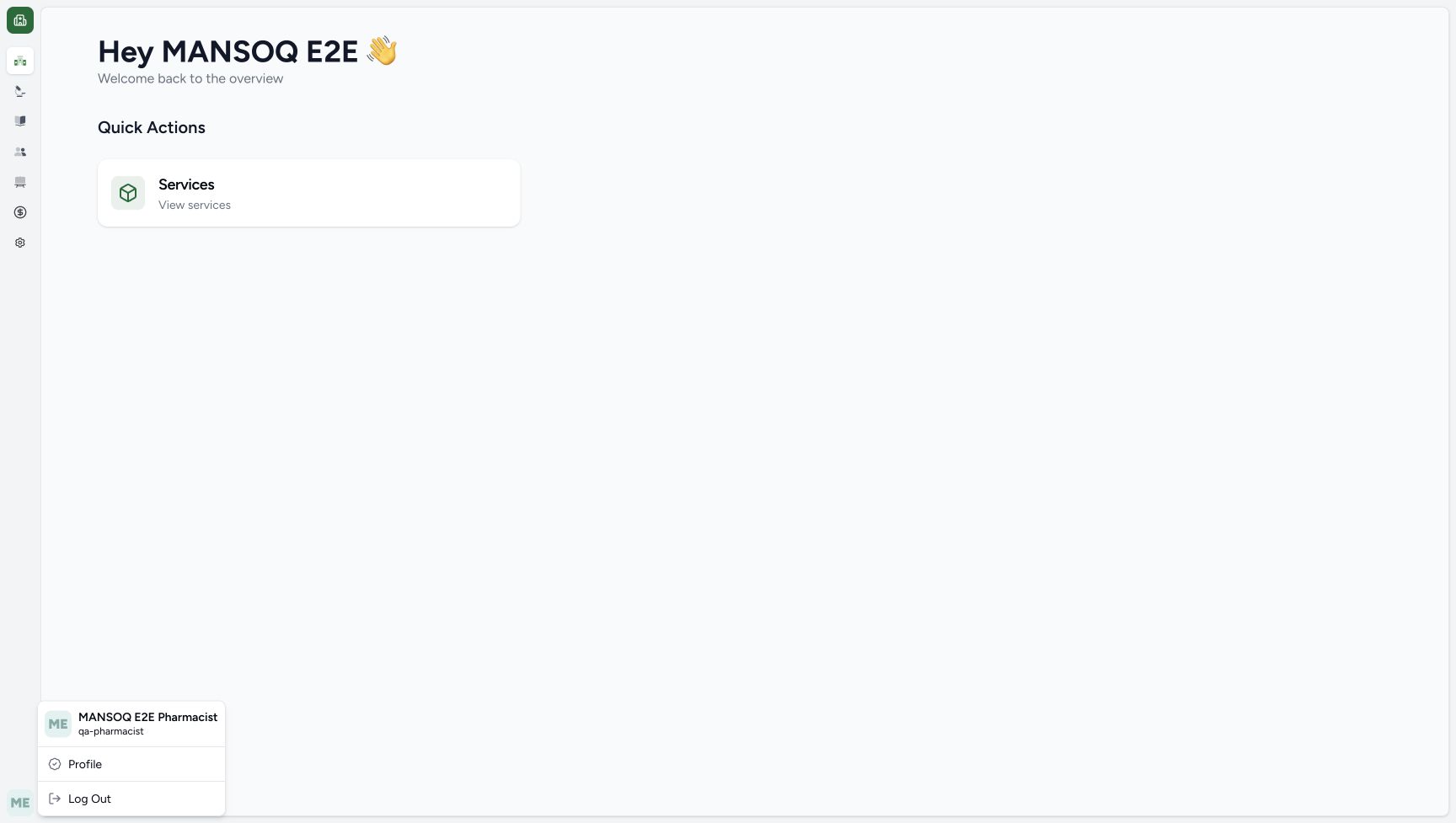
5f6856667f0483e0d31a026722c37541e2ed64c6a9b2b539350fa7eb1dd944c1- Check the ordinary Pharmacist: This earlier genuine identity capture shows MANSOQ E2E Pharmacist and qa-pharmacist in the same unchanged session; it is reused, not a new Patient74 capture.
 12
12Recorded release d20e68ed · 2026-10-20T12:41:48.445Z · 1728 × 977 Order-banner Issue Invoice entry
Capture details
Genuine natural native capture of exact local d20e build; source publication LOCAL_UNPUSHED. Original pixels are unchanged. This fictional self-pay software recording establishes only the illustrated ledger and dispense states; no actual medicine, money, provider movement, payer exchange or external tax clearance is qualified.
Image SHA-256
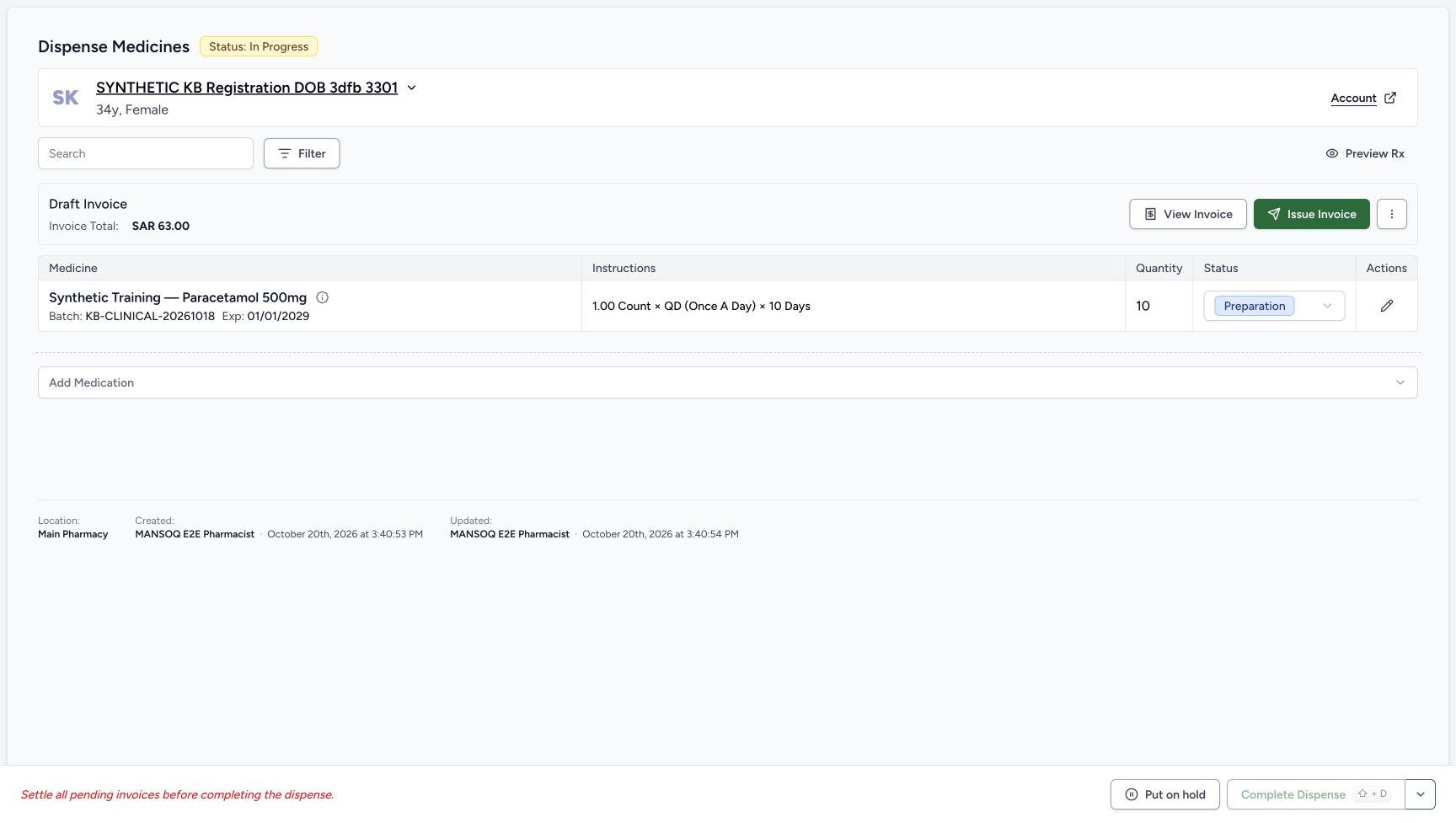
7a2d0515952bd0efac0a4b0171c947d606892242c940971e8422d4654ba8d612- Issue from the order banner: The recorded issue action used this Issue Invoice control, after returning from invoice review.
- Check the same Draft amount before issue: The order still shows Draft SAR 63.00 at this checkpoint.
- This bounded self-pay case has no patient insurance coverage. Use the illustrated Cash, Payment, Patient, Main Pharmacy ledger choices. Insurer receipts, external payment providers, tax clearance and bank settlement are not demonstrated. The displayed Deposit kind on the final cash record is not evidence of bank credit.
 12345
12345Recorded release d20e68ed · 2026-10-20T12:42:13.966Z · 1728 × 977 Collect Payment defaults
Capture details
Genuine natural native capture of exact local d20e build; source publication LOCAL_UNPUSHED. Original pixels are unchanged. This fictional self-pay software recording establishes only the illustrated ledger and dispense states; no actual medicine, money, provider movement, payer exchange or external tax clearance is qualified.
Image SHA-256
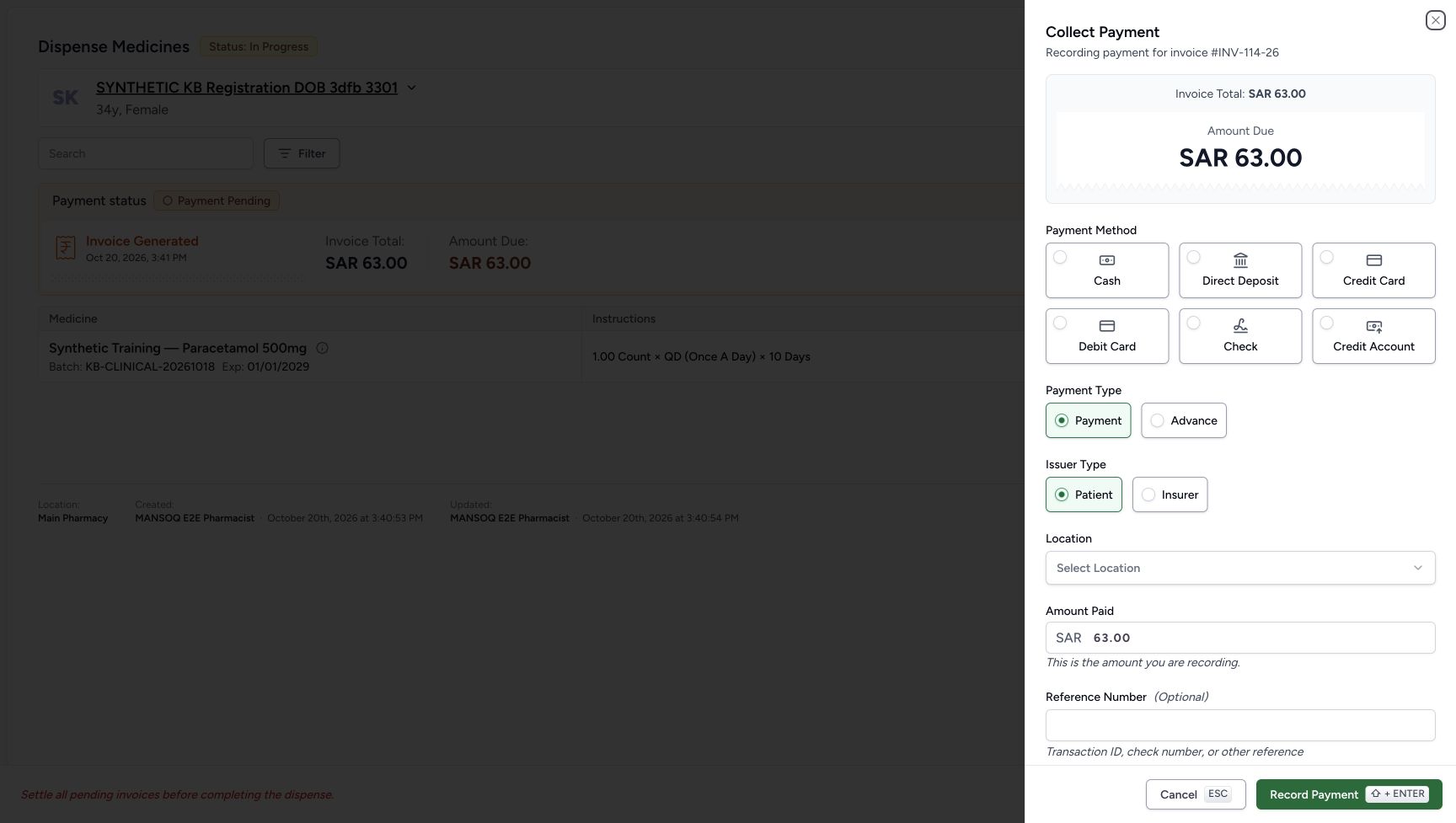
8dd41be66dab5eee0d5f120784f71df0080dadb2cf6738616ec2f82cfcbb9138- Match invoice INV-114-26: The payment sheet records which invoice will receive the payment.
- Choose Cash: Cash is the payment method used in this software recording.
- Keep Payment selected: Payment is the invoice allocation type; Advance is a different option.
- Keep Patient selected: The recorded issuer is Patient, not Insurer.
- Choose the payment location: The initial location is unselected; use the illustrated Main Pharmacy choice later.
 1234567
Recorded release d20e68ed · 2026-10-20T12:42:44.011Z · 1728 × 977 Reviewed one fictional cash payment
Capture details
Genuine natural native capture of exact local d20e build; source publication LOCAL_UNPUSHED. Original pixels are unchanged. This fictional self-pay software recording establishes only the illustrated ledger and dispense states; no actual medicine, money, provider movement, payer exchange or external tax clearance is qualified.
Image SHA-256
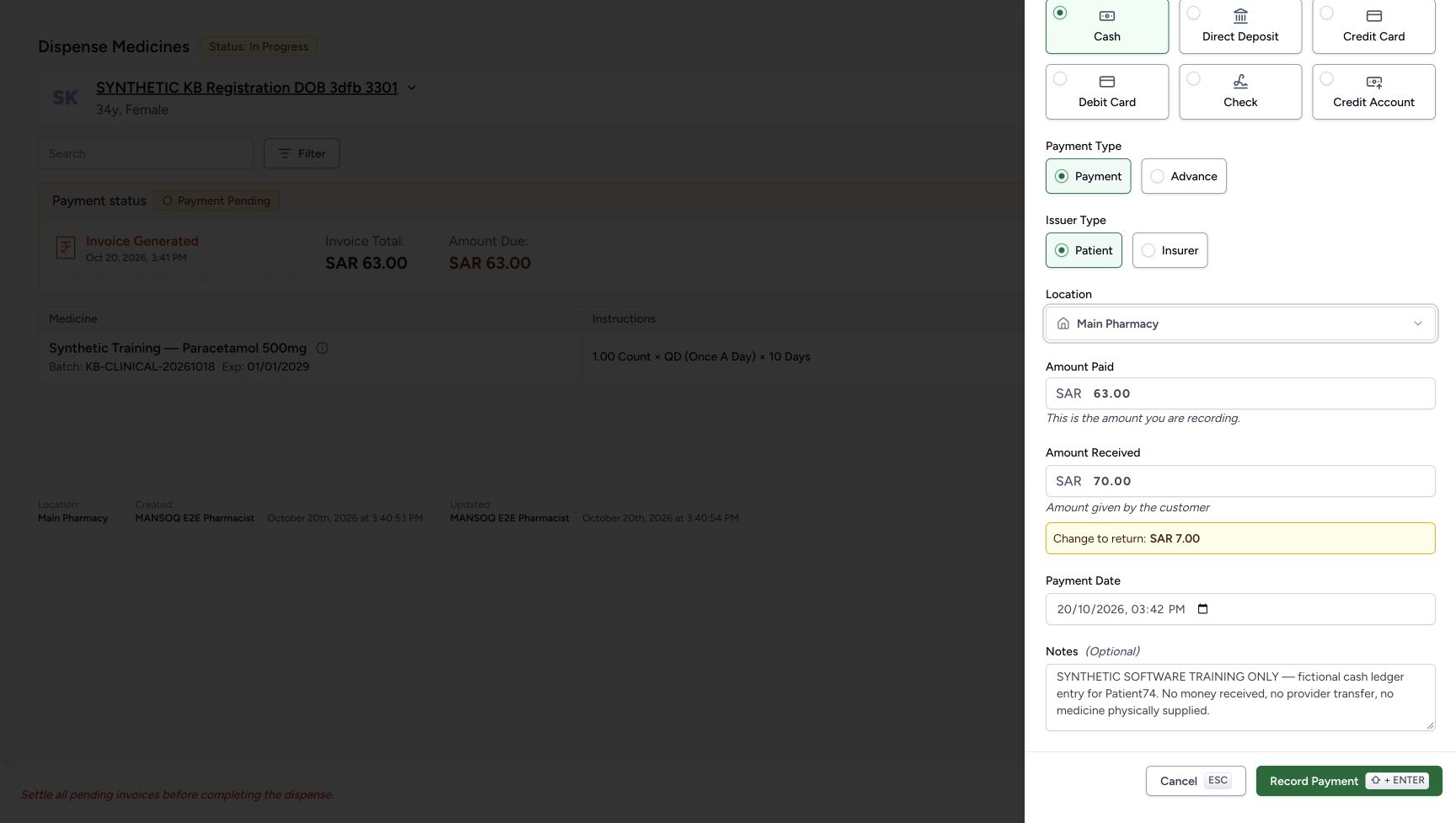
b81e046d05c4e8672a1bf1886a745d2c3b31380e8a18f245c8f44edf671200fe- Verify Main Pharmacy: The payment location is selected.
- Keep Amount Paid 63.00: The net amount to allocate is SAR 63.00.
- Review Amount Received 70.00: The fictional tendered cash amount is SAR 70.00.
- Review change 7.00: The form calculates change to return as SAR 7.00.
- Review the actual date 03:42 PM: Do not substitute the later submission time for the form date.
- Retain the exact software-only note: The ledger note explicitly states the demonstration did not receive money or supply physical medicine.
- Record Payment once: Submit the reviewed single fictional cash ledger payment once.
 12345678910
Recorded release d20e68ed · 2026-10-20T12:46:55.849Z · 1728 × 977 Saved Cash payment details
Capture details
Genuine natural native capture of exact local d20e build; source publication LOCAL_UNPUSHED. Original pixels are unchanged. This fictional self-pay software recording establishes only the illustrated ledger and dispense states; no actual medicine, money, provider movement, payer exchange or external tax clearance is qualified.
Image SHA-256
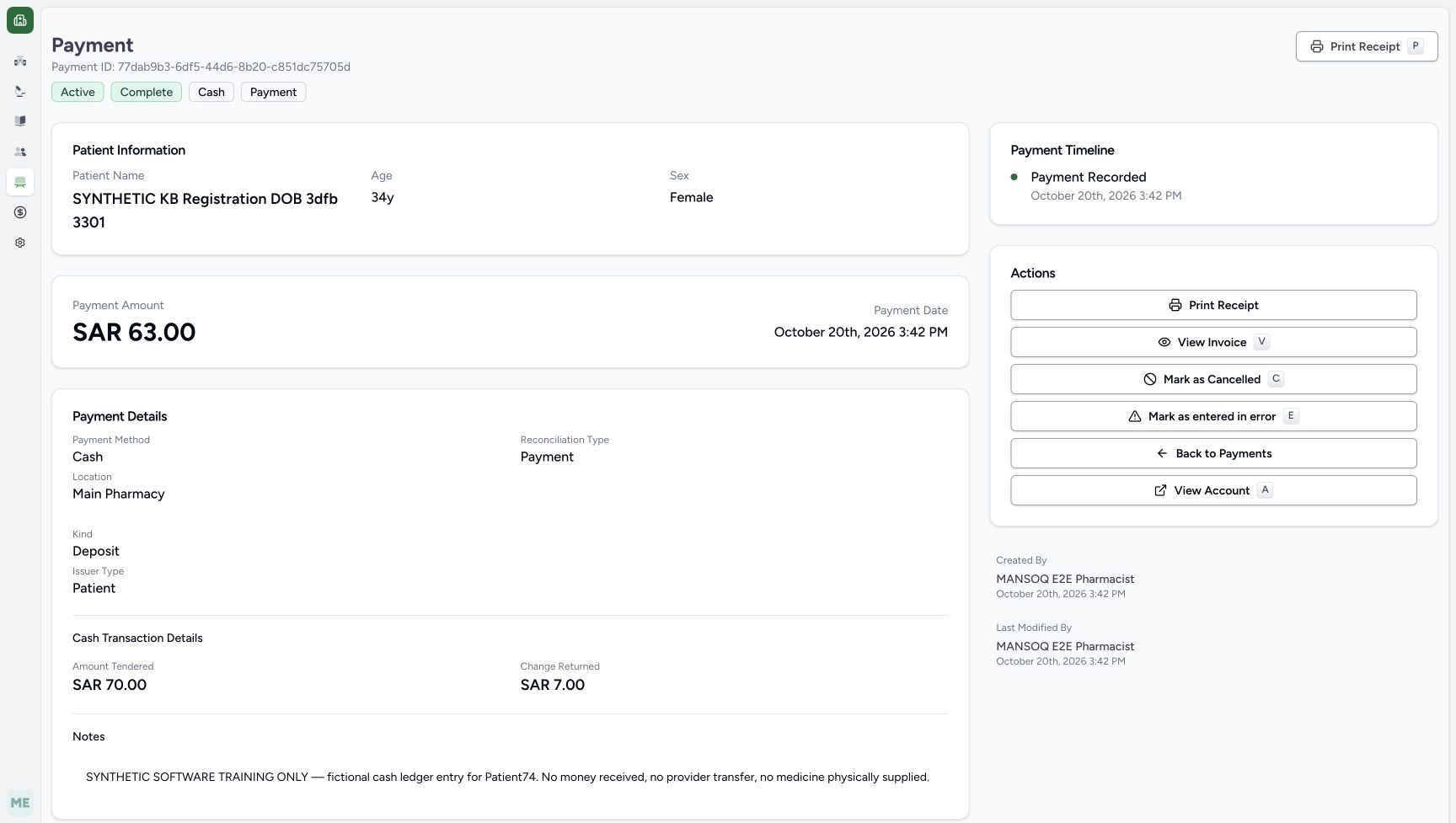
b564d3b35748d3addcd5950b389e5d5602dbd7a1327c4b1c653f1be79a39e6ed- Match the payment patient: The saved payment belongs to the assigned synthetic patient.
- Read the saved ledger labels: The record is Active, Complete, Cash, Payment.
- Read the net payment 63.00: The saved payment amount is the net amount applied to the invoice.
- Read Amount Tendered 70.00: The existing cash record preserves the fictional tendered amount.
- Read Change Returned 7.00: The same existing record preserves the fictional change amount.
- Read the actual payment date: The saved date remains October 20 at 03:42 PM.
- Read the exact fictional note: The note states no money received, no provider transfer and no medicine physically supplied.
- Check Main Pharmacy: The saved cash ledger record retains the selected location.
- Interpret Kind Deposit narrowly: Deposit is the displayed ledger kind; this label is not proof of bank credit or an external transfer.
- Return through View Invoice: This is the read-only link used to inspect the same balanced invoice again.
- This is fictional software training only. Record no real money or physical medicine movement. Preserve the explicit ledger note, net payment 63.00, tender 70.00 and change 7.00; perform one payment, one balance action and one completion action only.1234567
Recorded release d20e68ed · 2026-10-20T12:42:44.011Z · 1728 × 977 Reviewed one fictional cash payment
Capture details
Genuine natural native capture of exact local d20e build; source publication LOCAL_UNPUSHED. Original pixels are unchanged. This fictional self-pay software recording establishes only the illustrated ledger and dispense states; no actual medicine, money, provider movement, payer exchange or external tax clearance is qualified.
Image SHA-256
b81e046d05c4e8672a1bf1886a745d2c3b31380e8a18f245c8f44edf671200fe- Verify Main Pharmacy: The payment location is selected.
- Keep Amount Paid 63.00: The net amount to allocate is SAR 63.00.
- Review Amount Received 70.00: The fictional tendered cash amount is SAR 70.00.
- Review change 7.00: The form calculates change to return as SAR 7.00.
- Review the actual date 03:42 PM: Do not substitute the later submission time for the form date.
- Retain the exact software-only note: The ledger note explicitly states the demonstration did not receive money or supply physical medicine.
- Record Payment once: Submit the reviewed single fictional cash ledger payment once.
12345678910Recorded release d20e68ed · 2026-10-20T12:46:55.849Z · 1728 × 977 Saved Cash payment details
Capture details
Genuine natural native capture of exact local d20e build; source publication LOCAL_UNPUSHED. Original pixels are unchanged. This fictional self-pay software recording establishes only the illustrated ledger and dispense states; no actual medicine, money, provider movement, payer exchange or external tax clearance is qualified.
Image SHA-256
b564d3b35748d3addcd5950b389e5d5602dbd7a1327c4b1c653f1be79a39e6ed- Match the payment patient: The saved payment belongs to the assigned synthetic patient.
- Read the saved ledger labels: The record is Active, Complete, Cash, Payment.
- Read the net payment 63.00: The saved payment amount is the net amount applied to the invoice.
- Read Amount Tendered 70.00: The existing cash record preserves the fictional tendered amount.
- Read Change Returned 7.00: The same existing record preserves the fictional change amount.
- Read the actual payment date: The saved date remains October 20 at 03:42 PM.
- Read the exact fictional note: The note states no money received, no provider transfer and no medicine physically supplied.
- Check Main Pharmacy: The saved cash ledger record retains the selected location.
- Interpret Kind Deposit narrowly: Deposit is the displayed ledger kind; this label is not proof of bank credit or an external transfer.
- Return through View Invoice: This is the read-only link used to inspect the same balanced invoice again.
1. Issue the existing invoice from the order banner
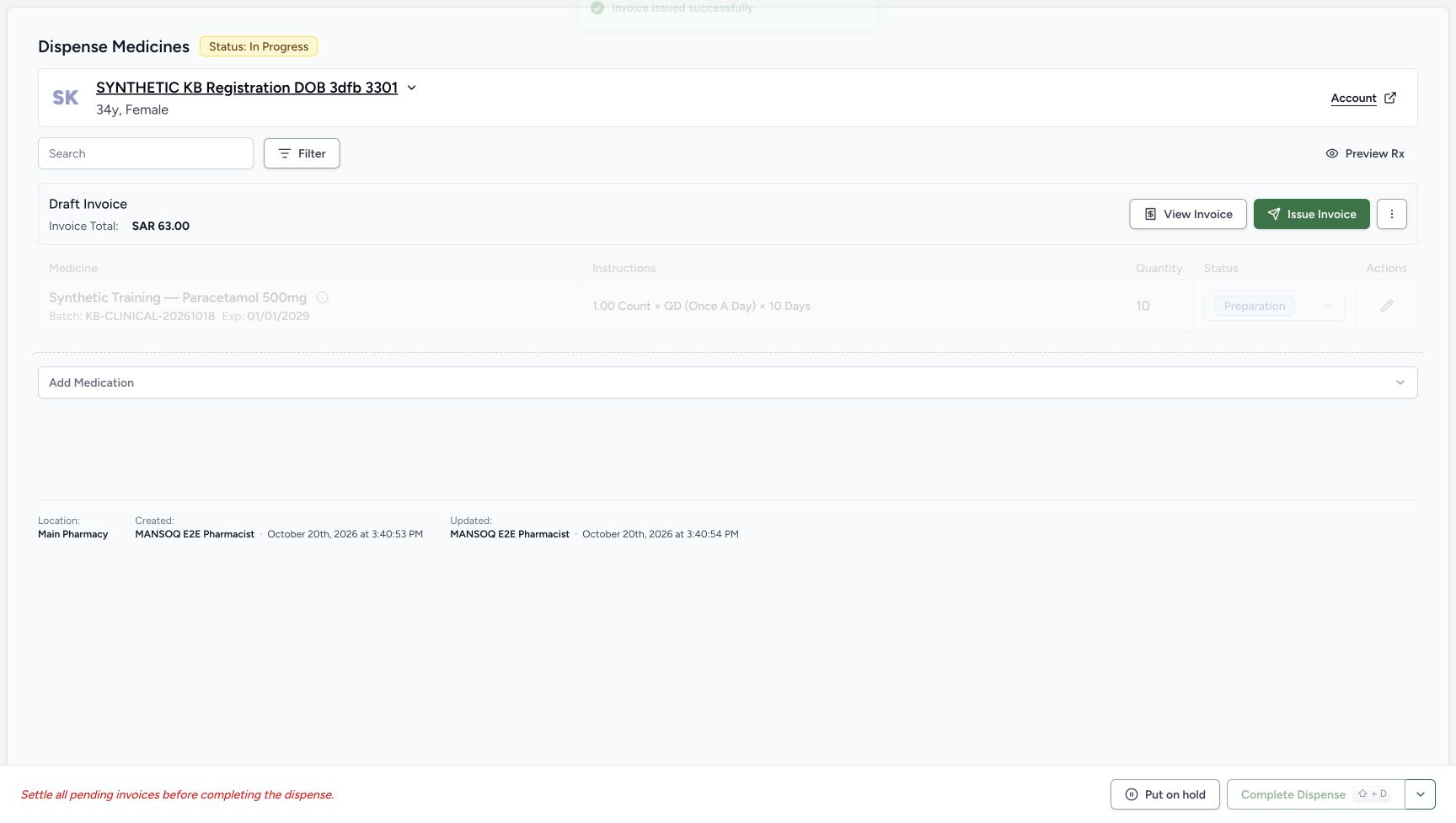
Check the same synthetic patient, quantity 10 Preparation row and Draft Invoice SAR 63.00. Choose Issue Invoice on the order banner. The immediate image still shows the old Draft banner while the issue result refreshes. Wait for the settled Payment Pending banner, Invoice Generated at 03:41 PM, total SAR 63.00 and amount due SAR 63.00. This is the recorded issue route; no separate issue-confirmation dialog is pictured.
12Order-banner Issue Invoice entry
Capture details
Genuine natural native capture of exact local d20e build; source publication LOCAL_UNPUSHED. Original pixels are unchanged. This fictional self-pay software recording establishes only the illustrated ledger and dispense states; no actual medicine, money, provider movement, payer exchange or external tax clearance is qualified.
Image SHA-256 7a2d0515952bd0efac0a4b0171c947d606892242c940971e8422d4654ba8d612
- Issue from the order banner: The recorded issue action used this Issue Invoice control, after returning from invoice review.
- Check the same Draft amount before issue: The order still shows Draft SAR 63.00 at this checkpoint.
 1
1Immediate issue-refresh view
Capture details
Genuine natural native capture of exact local d20e build; source publication LOCAL_UNPUSHED. Original pixels are unchanged. This fictional self-pay software recording establishes only the illustrated ledger and dispense states; no actual medicine, money, provider movement, payer exchange or external tax clearance is qualified.
Image SHA-256 05e0a7cbba737c82263ae27061896d019f20360ad4e0934ba5f301fbd37c4c63
- Treat this as the immediate issue view: The prior Draft banner remains while the issue result refreshes; use the settled Payment Pending view next.
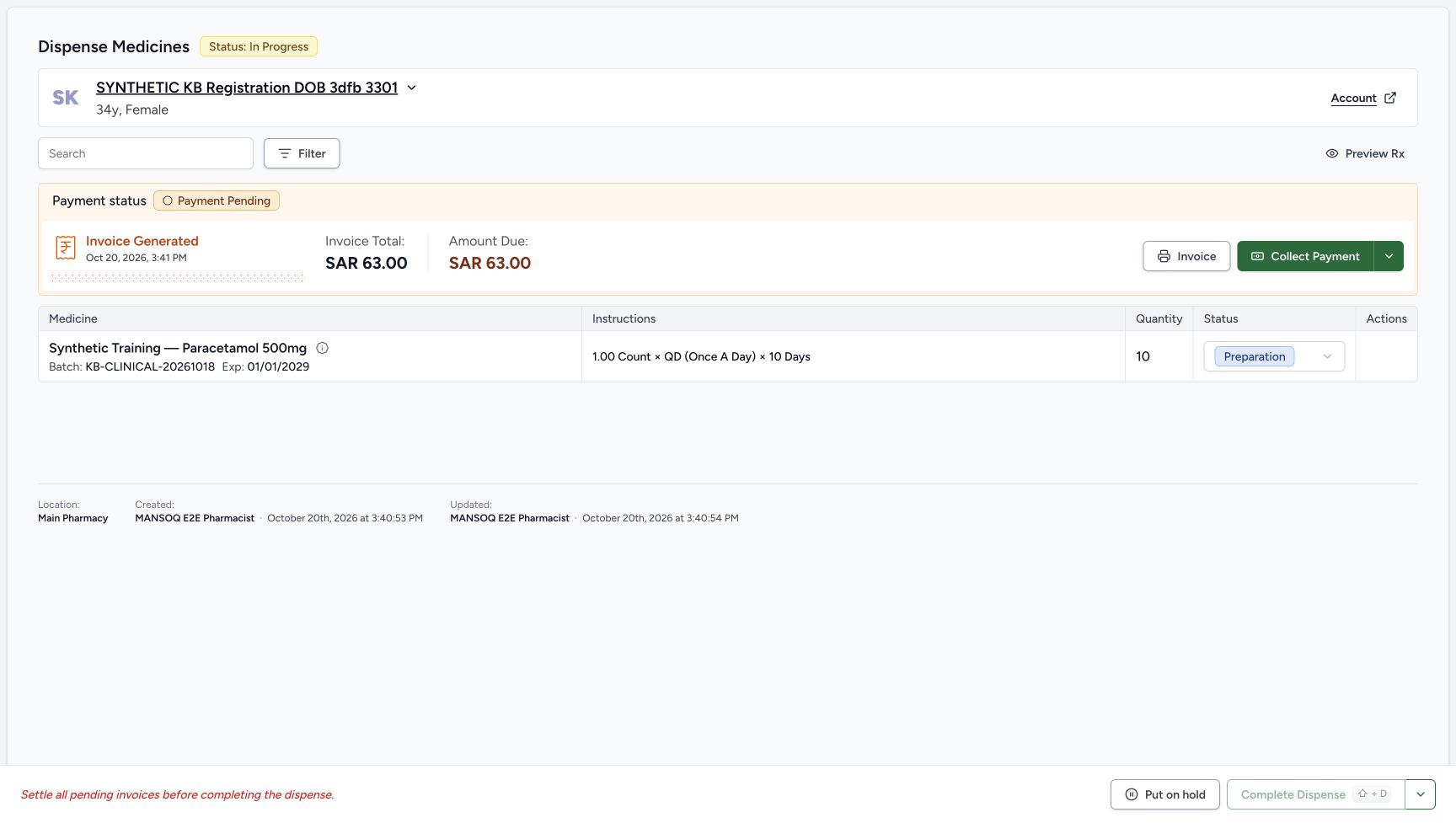 12345
12345Payment Pending and Collect Payment entry
Capture details
Genuine natural native capture of exact local d20e build; source publication LOCAL_UNPUSHED. Original pixels are unchanged. This fictional self-pay software recording establishes only the illustrated ledger and dispense states; no actual medicine, money, provider movement, payer exchange or external tax clearance is qualified.
Image SHA-256 a676596b1fdccecbbbce1995e5234addcf3c0aa97339d0e3586ac44a1d25565a
- Read Invoice Generated: The settled order banner records invoice generation at 03:41 PM.
- Read invoice total 63.00: The issued invoice still totals SAR 63.00.
- Read amount due 63.00: No cash has been recorded yet.
- Open Collect Payment: Collect the single fictional ledger payment for this invoice.
- Keep completion separate: Complete Dispense is still disabled before settlement.
2. Open Collect Payment for the same invoice
Choose Collect Payment on that order. The sheet identifies INV-114-26 and SAR 63.00 due. Initially no payment method or location is selected. Payment and Patient are the illustrated defaults; keep them for this fictional self-pay ledger entry.
12345Payment Pending and Collect Payment entry
Capture details
Genuine natural native capture of exact local d20e build; source publication LOCAL_UNPUSHED. Original pixels are unchanged. This fictional self-pay software recording establishes only the illustrated ledger and dispense states; no actual medicine, money, provider movement, payer exchange or external tax clearance is qualified.
Image SHA-256 a676596b1fdccecbbbce1995e5234addcf3c0aa97339d0e3586ac44a1d25565a
- Read Invoice Generated: The settled order banner records invoice generation at 03:41 PM.
- Read invoice total 63.00: The issued invoice still totals SAR 63.00.
- Read amount due 63.00: No cash has been recorded yet.
- Open Collect Payment: Collect the single fictional ledger payment for this invoice.
- Keep completion separate: Complete Dispense is still disabled before settlement.
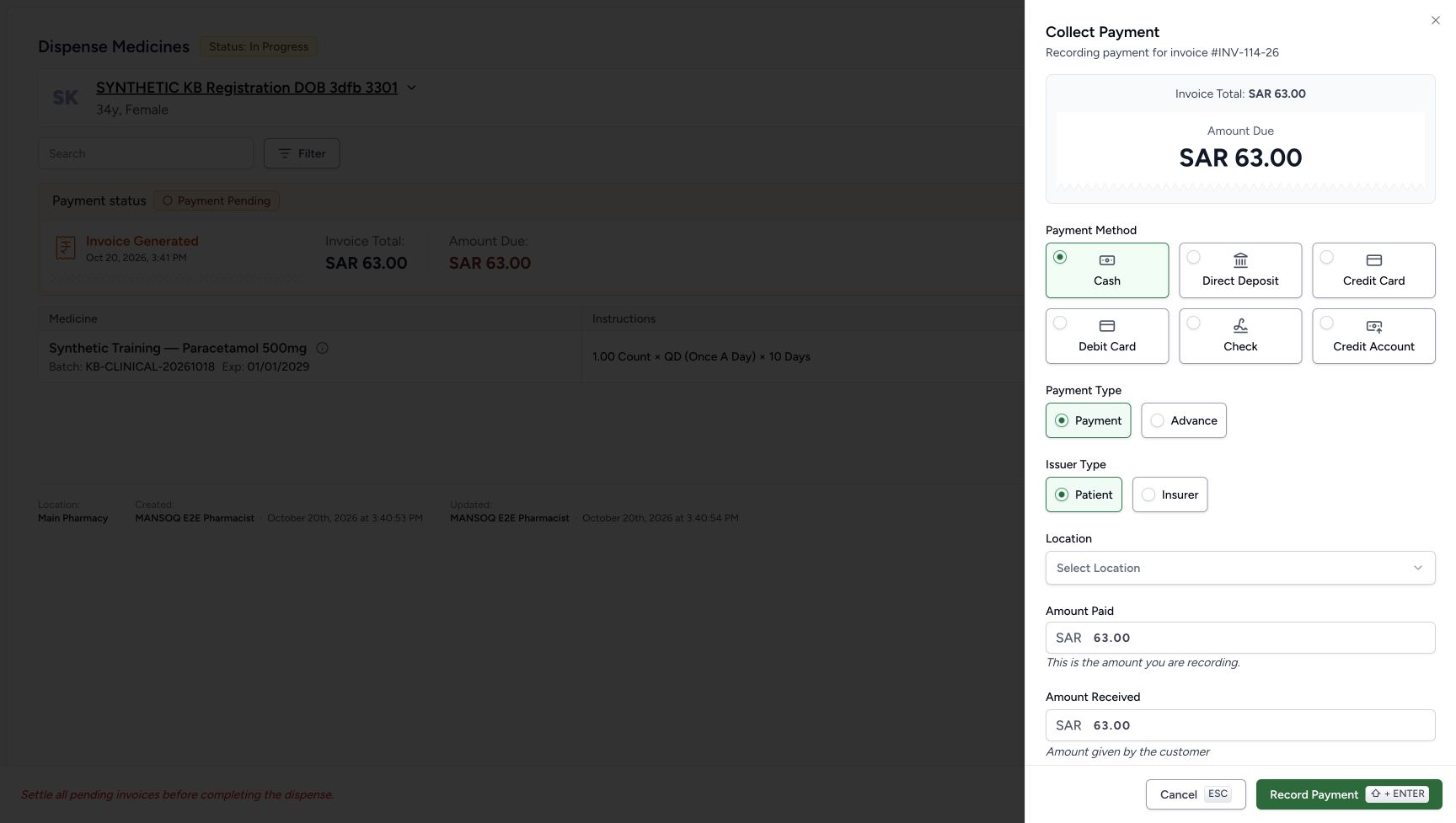
12345Collect Payment defaults
Capture details
Genuine natural native capture of exact local d20e build; source publication LOCAL_UNPUSHED. Original pixels are unchanged. This fictional self-pay software recording establishes only the illustrated ledger and dispense states; no actual medicine, money, provider movement, payer exchange or external tax clearance is qualified.
Image SHA-256 8dd41be66dab5eee0d5f120784f71df0080dadb2cf6738616ec2f82cfcbb9138
- Match invoice INV-114-26: The payment sheet records which invoice will receive the payment.
- Choose Cash: Cash is the payment method used in this software recording.
- Keep Payment selected: Payment is the invoice allocation type; Advance is a different option.
- Keep Patient selected: The recorded issuer is Patient, not Insurer.
- Choose the payment location: The initial location is unselected; use the illustrated Main Pharmacy choice later.
3. Choose Cash and review its separate amount fields
Choose Cash. The form now has Amount Paid and a separate Amount Received field. Amount Paid is the net amount being recorded for the invoice and remains 63.00. Amount Received starts 63.00 and represents the fictional tendered amount in this cash form. Cash also removes the earlier optional Reference Number field; no external transaction reference was entered.
12345Collect Payment defaults
Capture details
Genuine natural native capture of exact local d20e build; source publication LOCAL_UNPUSHED. Original pixels are unchanged. This fictional self-pay software recording establishes only the illustrated ledger and dispense states; no actual medicine, money, provider movement, payer exchange or external tax clearance is qualified.
Image SHA-256 8dd41be66dab5eee0d5f120784f71df0080dadb2cf6738616ec2f82cfcbb9138
- Match invoice INV-114-26: The payment sheet records which invoice will receive the payment.
- Choose Cash: Cash is the payment method used in this software recording.
- Keep Payment selected: Payment is the invoice allocation type; Advance is a different option.
- Keep Patient selected: The recorded issuer is Patient, not Insurer.
- Choose the payment location: The initial location is unselected; use the illustrated Main Pharmacy choice later.
 123
123Cash fields before entering tender
Capture details
Genuine natural native capture of exact local d20e build; source publication LOCAL_UNPUSHED. Original pixels are unchanged. This fictional self-pay software recording establishes only the illustrated ledger and dispense states; no actual medicine, money, provider movement, payer exchange or external tax clearance is qualified.
Image SHA-256 bf0d7de7bda340f6c171f762c4c3f2e50149a77086784ae216b1257a76bf47ca
- Verify Cash selected: Selecting Cash reveals a separate tendered-amount field.
- Read Amount Paid 63.00: This is the net amount being recorded for the invoice.
- Locate Amount Received: The cash form has a separate amount received from the customer; the initial value is 63.00.
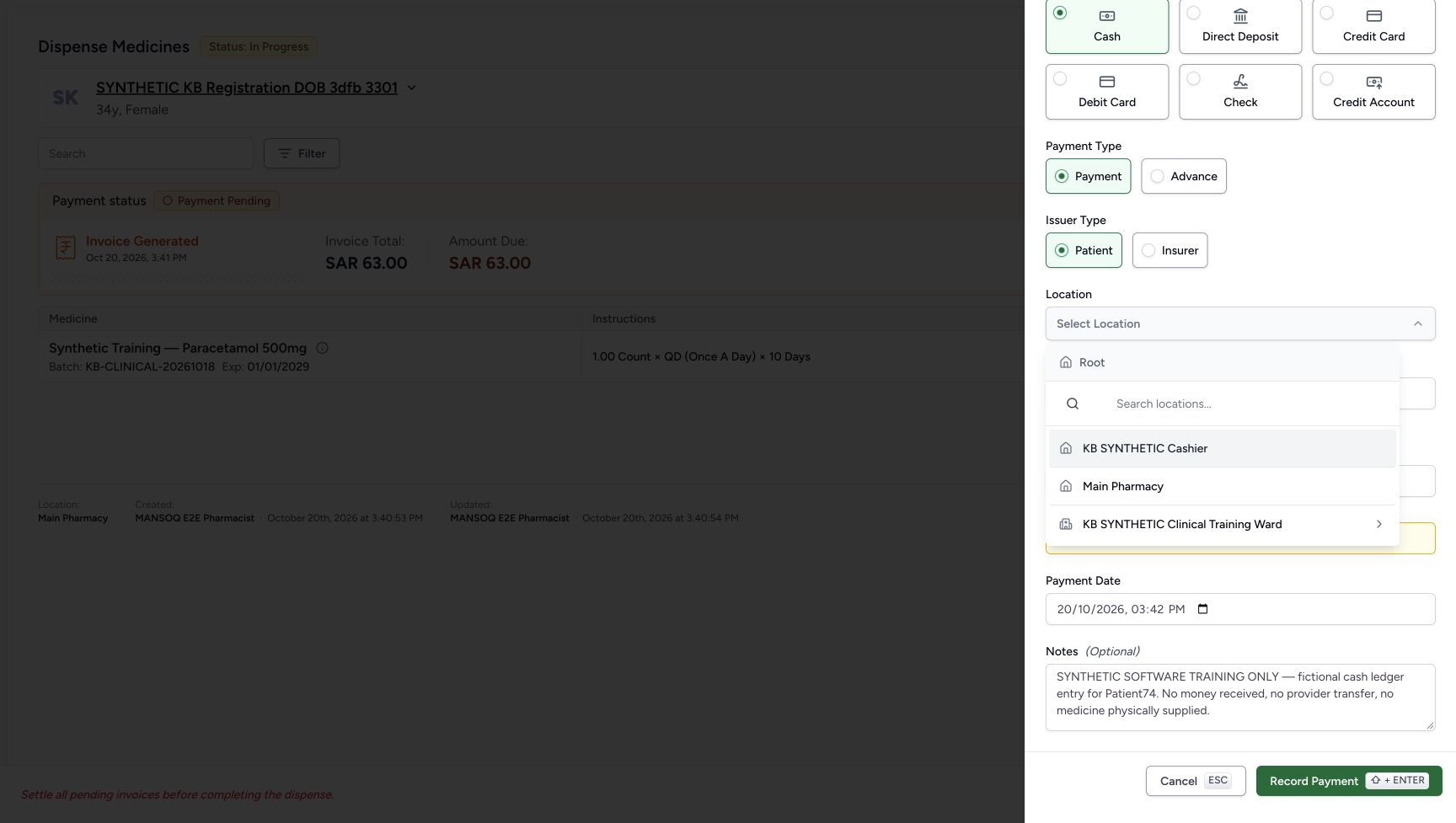
4. Enter tender and select Main Pharmacy
Set Amount Received to 70.00 while keeping Amount Paid 63.00. The form calculates Change to return SAR 7.00. Open Location and choose Main Pharmacy from the visible choices. Do not substitute the Cashier or Clinical Training Ward option. Review the selected location and all three cash figures before saving.
123Cash fields before entering tender
Capture details
Genuine natural native capture of exact local d20e build; source publication LOCAL_UNPUSHED. Original pixels are unchanged. This fictional self-pay software recording establishes only the illustrated ledger and dispense states; no actual medicine, money, provider movement, payer exchange or external tax clearance is qualified.
Image SHA-256 bf0d7de7bda340f6c171f762c4c3f2e50149a77086784ae216b1257a76bf47ca
- Verify Cash selected: Selecting Cash reveals a separate tendered-amount field.
- Read Amount Paid 63.00: This is the net amount being recorded for the invoice.
- Locate Amount Received: The cash form has a separate amount received from the customer; the initial value is 63.00.
 123
123Payment location choices
Capture details
Genuine natural native capture of exact local d20e build; source publication LOCAL_UNPUSHED. Original pixels are unchanged. This fictional self-pay software recording establishes only the illustrated ledger and dispense states; no actual medicine, money, provider movement, payer exchange or external tax clearance is qualified.
Image SHA-256 63824ffdbfcf3170810594946d548d4526ad1c0ee199794fd5d6082ef9551c79
- Choose Main Pharmacy: Select the actual Main Pharmacy option from the location list.
- Retain the actual payment date: The recorded default is October 20, 2026 at 03:42 PM.
- Read the fictional ledger note: The note says no money received, no provider transfer and no medicine physically supplied.
1234567Reviewed one fictional cash payment
Capture details
Genuine natural native capture of exact local d20e build; source publication LOCAL_UNPUSHED. Original pixels are unchanged. This fictional self-pay software recording establishes only the illustrated ledger and dispense states; no actual medicine, money, provider movement, payer exchange or external tax clearance is qualified.
Image SHA-256 b81e046d05c4e8672a1bf1886a745d2c3b31380e8a18f245c8f44edf671200fe
- Verify Main Pharmacy: The payment location is selected.
- Keep Amount Paid 63.00: The net amount to allocate is SAR 63.00.
- Review Amount Received 70.00: The fictional tendered cash amount is SAR 70.00.
- Review change 7.00: The form calculates change to return as SAR 7.00.
- Review the actual date 03:42 PM: Do not substitute the later submission time for the form date.
- Retain the exact software-only note: The ledger note explicitly states the demonstration did not receive money or supply physical medicine.
- Record Payment once: Submit the reviewed single fictional cash ledger payment once.
5. Retain the actual date and exact fictional note
The form date in this recording is October 20, 2026 at 03:42 PM; it was left as supplied, not replaced by the later submission time. Retain the exact note: SYNTHETIC SOFTWARE TRAINING ONLY — fictional cash ledger entry for Patient74. No money received, no provider transfer, no medicine physically supplied. Review Cash, Payment, Patient, Main Pharmacy, Amount Paid 63.00, Amount Received 70.00 and Change to return 7.00.
1234567Reviewed one fictional cash payment
Capture details
Genuine natural native capture of exact local d20e build; source publication LOCAL_UNPUSHED. Original pixels are unchanged. This fictional self-pay software recording establishes only the illustrated ledger and dispense states; no actual medicine, money, provider movement, payer exchange or external tax clearance is qualified.
Image SHA-256 b81e046d05c4e8672a1bf1886a745d2c3b31380e8a18f245c8f44edf671200fe
- Verify Main Pharmacy: The payment location is selected.
- Keep Amount Paid 63.00: The net amount to allocate is SAR 63.00.
- Review Amount Received 70.00: The fictional tendered cash amount is SAR 70.00.
- Review change 7.00: The form calculates change to return as SAR 7.00.
- Review the actual date 03:42 PM: Do not substitute the later submission time for the form date.
- Retain the exact software-only note: The ledger note explicitly states the demonstration did not receive money or supply physical medicine.
- Record Payment once: Submit the reviewed single fictional cash ledger payment once.
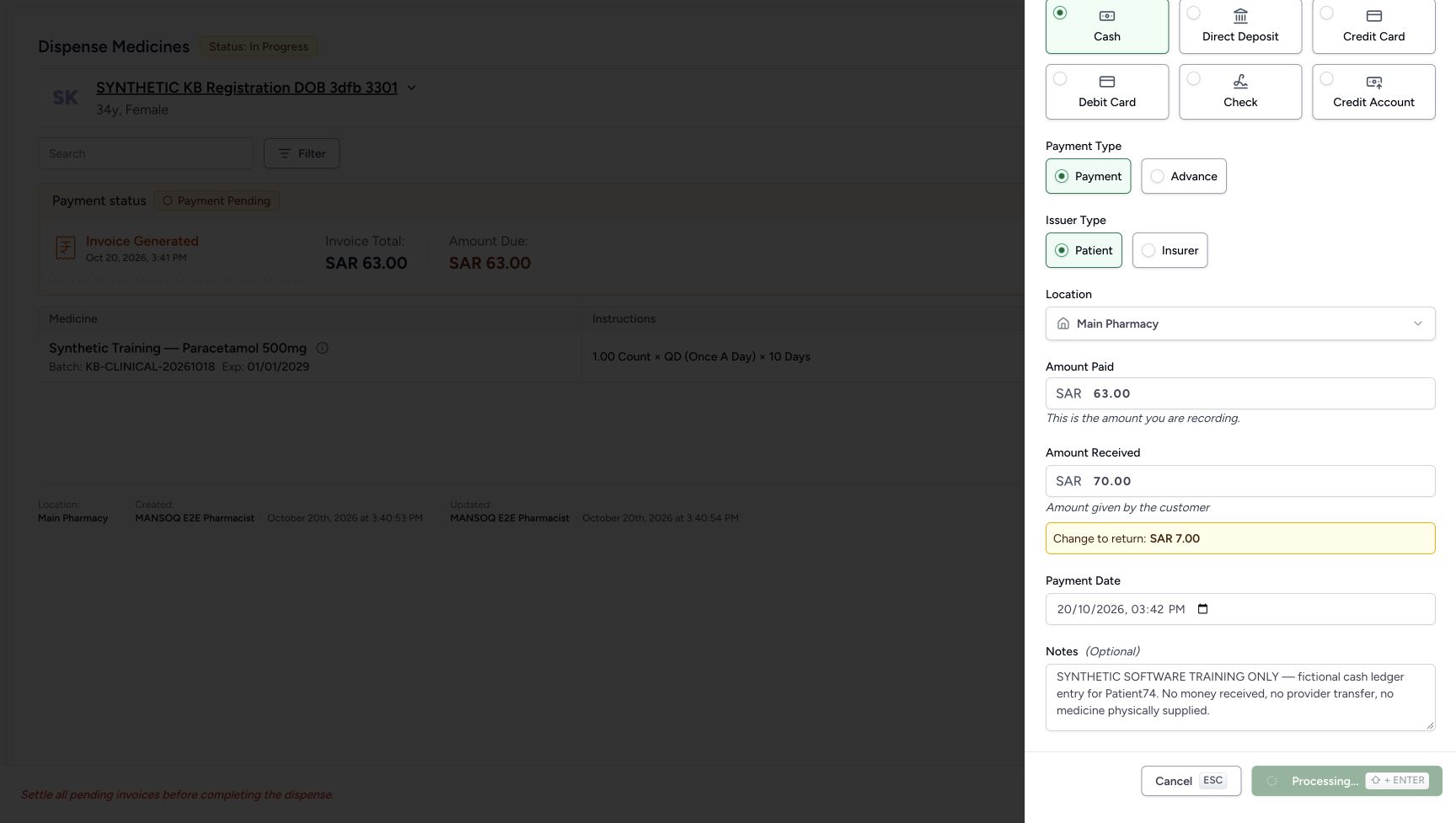
6. Record the one fictional payment and wait for success
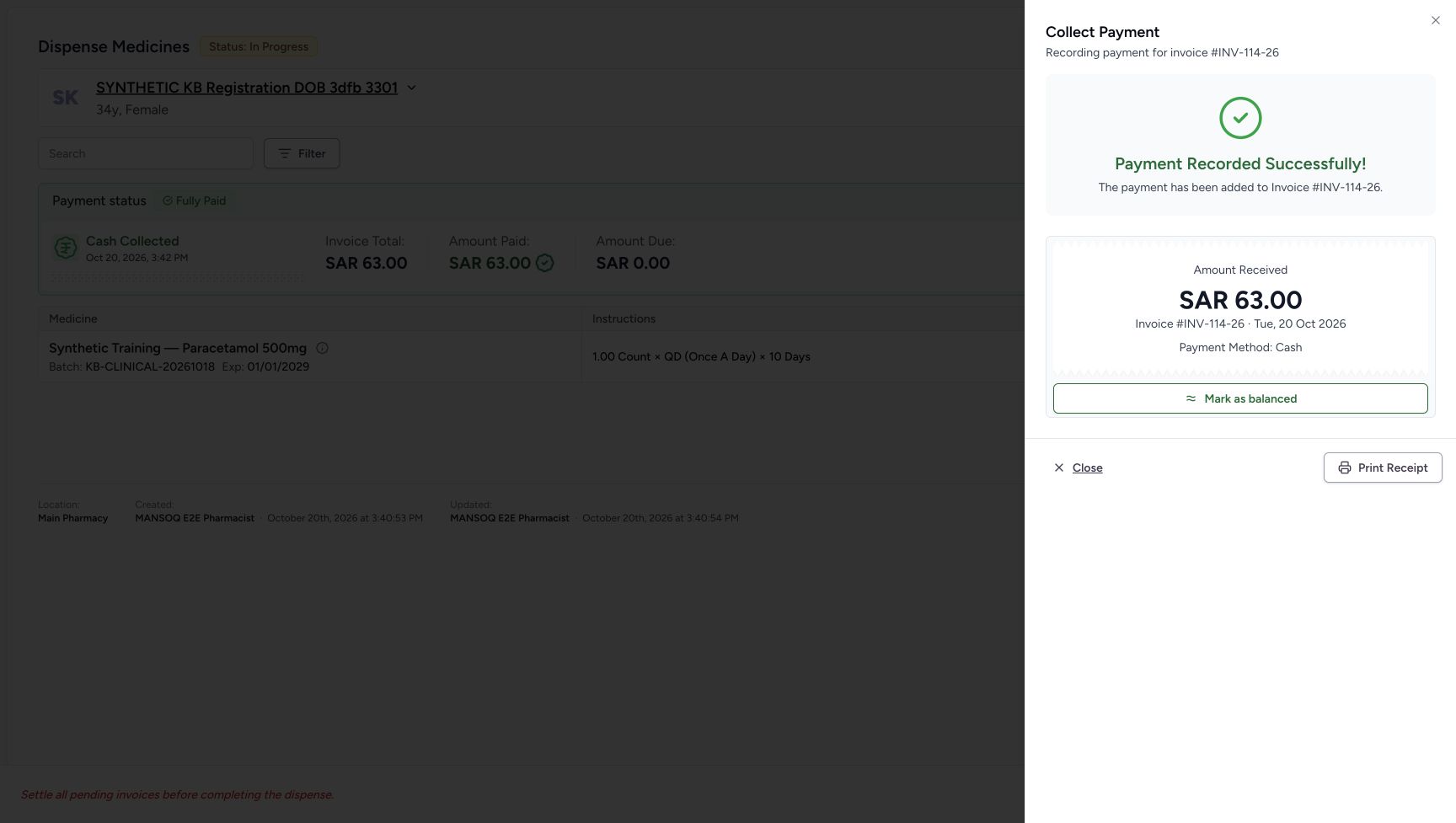
Choose Record Payment once. The immediate form shows Processing with the action disabled. Wait for Payment Recorded Successfully for INV-114-26 and Cash. The success panel’s Amount Received label displays the net recorded SAR 63.00. It does not replace the earlier form’s fictional tender 70.00 and change 7.00, which remain in the saved payment details. Do not record another payment to make the success label show 70.00.
1234567Reviewed one fictional cash payment
Capture details
Genuine natural native capture of exact local d20e build; source publication LOCAL_UNPUSHED. Original pixels are unchanged. This fictional self-pay software recording establishes only the illustrated ledger and dispense states; no actual medicine, money, provider movement, payer exchange or external tax clearance is qualified.
Image SHA-256 b81e046d05c4e8672a1bf1886a745d2c3b31380e8a18f245c8f44edf671200fe
- Verify Main Pharmacy: The payment location is selected.
- Keep Amount Paid 63.00: The net amount to allocate is SAR 63.00.
- Review Amount Received 70.00: The fictional tendered cash amount is SAR 70.00.
- Review change 7.00: The form calculates change to return as SAR 7.00.
- Review the actual date 03:42 PM: Do not substitute the later submission time for the form date.
- Retain the exact software-only note: The ledger note explicitly states the demonstration did not receive money or supply physical medicine.
- Record Payment once: Submit the reviewed single fictional cash ledger payment once.
 1
1Record Payment processing
Capture details
Genuine natural native capture of exact local d20e build; source publication LOCAL_UNPUSHED. Original pixels are unchanged. This fictional self-pay software recording establishes only the illustrated ledger and dispense states; no actual medicine, money, provider movement, payer exchange or external tax clearance is qualified.
Image SHA-256 f4ad423e97d6dc84042c97129dfa426f5d387ae08098bd01a7d2ff42d14beea9
- Wait during Processing: The action is pending and disabled; do not submit another payment.
 12345
12345One payment saved before balancing
Capture details
Genuine natural native capture of exact local d20e build; source publication LOCAL_UNPUSHED. Original pixels are unchanged. This fictional self-pay software recording establishes only the illustrated ledger and dispense states; no actual medicine, money, provider movement, payer exchange or external tax clearance is qualified.
Image SHA-256 0fe80e9673d913488d44da3a785e2079e00af86e8ec41417004dca92807402bf
- Read Payment Recorded Successfully: The success panel confirms one saved payment for INV-114-26.
- Read the net recorded amount 63.00: The success panel label Amount Received shows the net recorded 63.00, not the earlier 70.00 tender.
- Mark as balanced separately: This is a separate invoice status action after the one payment; it does not record another cash receipt.
- Locate Close: Close returns from this success sheet after reviewing the saved outcome.
- Distinguish Print Receipt: Printing is a separate action and was not used in this recording.
7. Mark the existing paid invoice Balanced
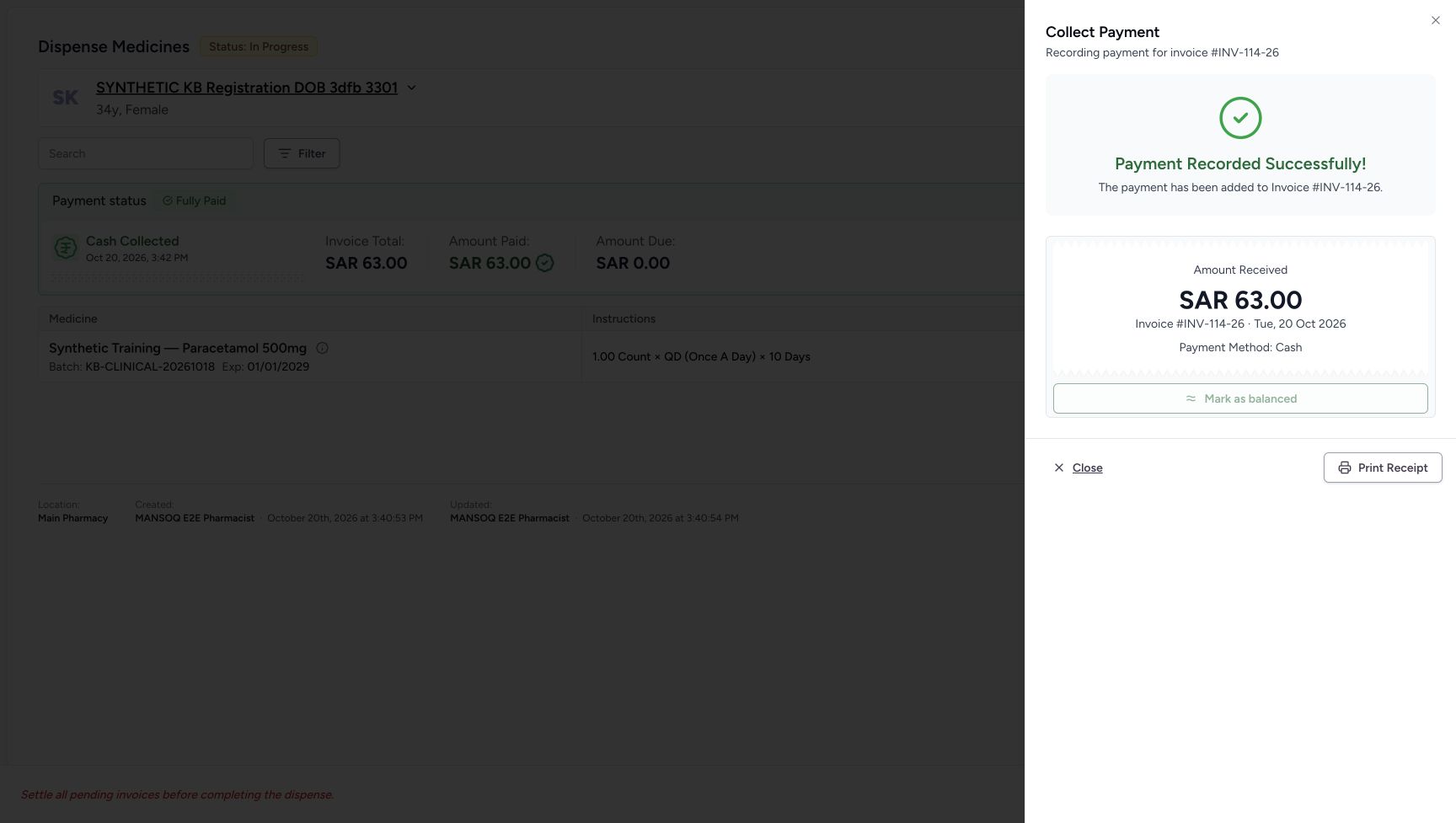
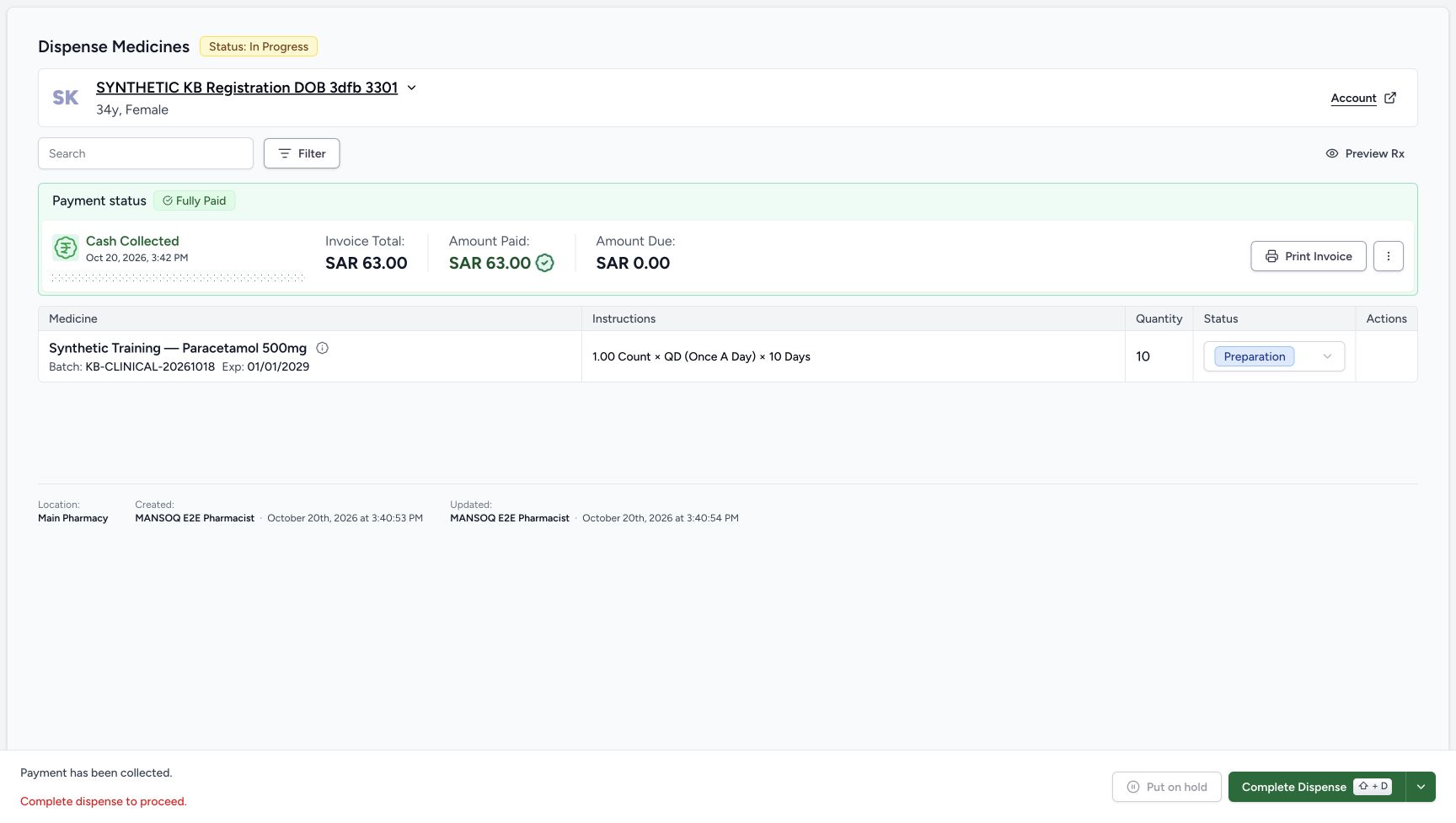
Choose Mark as balanced once on the payment success sheet. That is a separate invoice status action, not another payment. The immediate image shows the button disabled while the request is pending. After the sheet closes, the order still shows In Progress and the ten-count row Preparation, but its banner is Fully Paid with SAR 63.00 paid and zero due. Complete Dispense is now enabled. This route submits the balance action directly; no additional confirmation dialog was used. The saved Balanced invoice is inspected below.
12345One payment saved before balancing
Capture details
Genuine natural native capture of exact local d20e build; source publication LOCAL_UNPUSHED. Original pixels are unchanged. This fictional self-pay software recording establishes only the illustrated ledger and dispense states; no actual medicine, money, provider movement, payer exchange or external tax clearance is qualified.
Image SHA-256 0fe80e9673d913488d44da3a785e2079e00af86e8ec41417004dca92807402bf
- Read Payment Recorded Successfully: The success panel confirms one saved payment for INV-114-26.
- Read the net recorded amount 63.00: The success panel label Amount Received shows the net recorded 63.00, not the earlier 70.00 tender.
- Mark as balanced separately: This is a separate invoice status action after the one payment; it does not record another cash receipt.
- Locate Close: Close returns from this success sheet after reviewing the saved outcome.
- Distinguish Print Receipt: Printing is a separate action and was not used in this recording.
 1
1Balance request pending
Capture details
Genuine natural native capture of exact local d20e build; source publication LOCAL_UNPUSHED. Original pixels are unchanged. This fictional self-pay software recording establishes only the illustrated ledger and dispense states; no actual medicine, money, provider movement, payer exchange or external tax clearance is qualified.
Image SHA-256 bd33db43c5db816abc88bbe967f6608abbdf8668299789518d0764a20453a7fc
- Wait for the balance action: Mark as balanced is disabled during the pending action; the old success panel alone does not prove the invoice is Balanced.
 1234567
Fully paid Preparation ready for completion
Capture details
Genuine natural native capture of exact local d20e build; source publication LOCAL_UNPUSHED. Original pixels are unchanged. This fictional self-pay software recording establishes only the illustrated ledger and dispense states; no actual medicine, money, provider movement, payer exchange or external tax clearance is qualified.
Image SHA-256 0394e8a41b2b9e8ab3d29290afdfc35c66c34adfdaaea944e9ae876eda9bd3ec
- Keep the paid order selected: The order is still In Progress before the completion action.
- Read Fully Paid: The settled banner shows the existing one payment has paid this invoice.
- Read Amount Paid 63.00: The recorded net cash payment is SAR 63.00.
- Read Amount Due 0.00: No additional payment is due on this invoice.
- Read Preparation before completion: The ten-count medicine row is still Preparation.
- Complete Dispense once: This enabled button performed the single recorded completion action.
- Recognise disabled hold: Put on hold is disabled in this paid and balanced state.
8. Complete the software dispense once
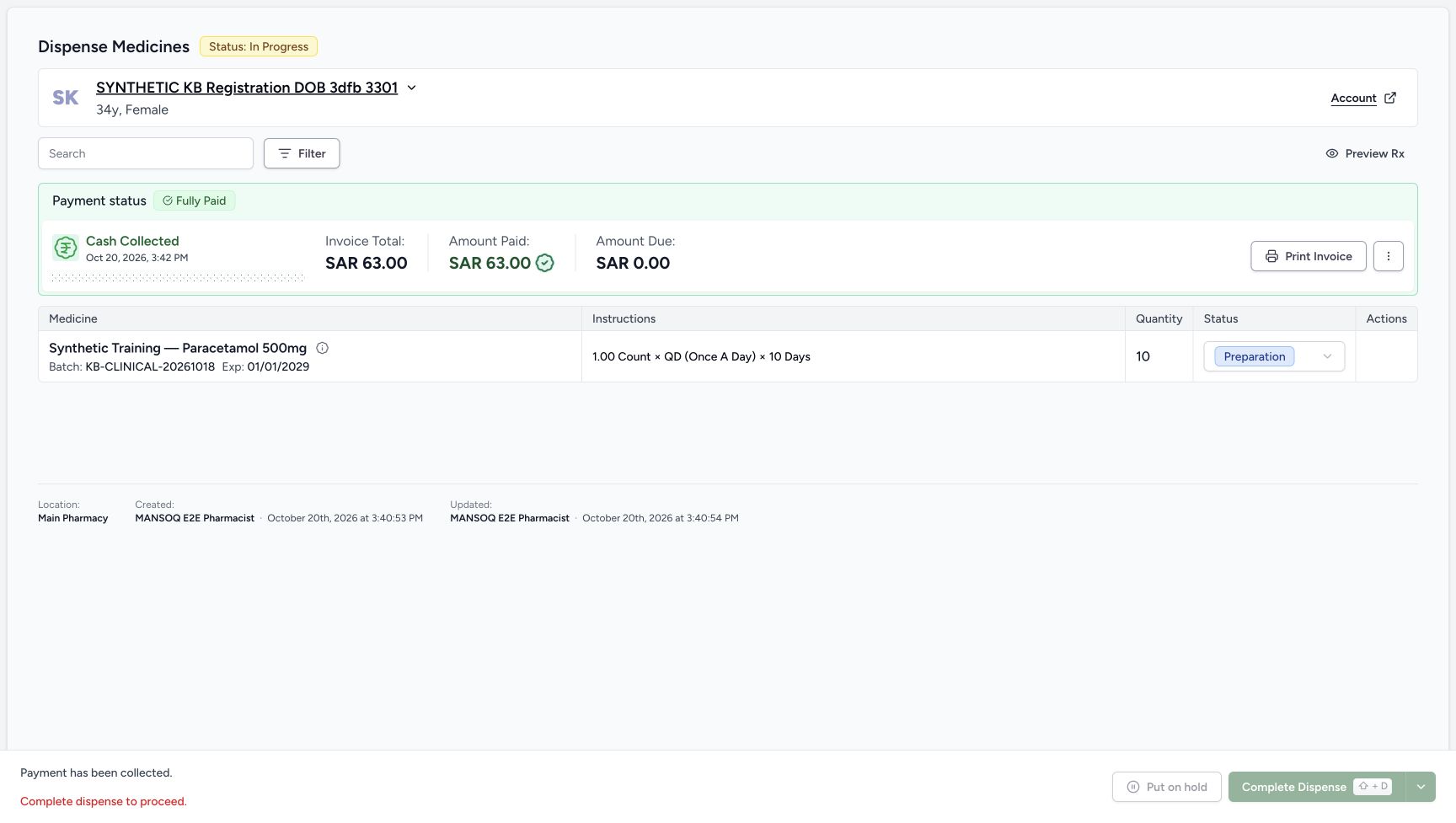
Review the same order, quantity 10 Preparation row, Fully Paid SAR 63.00 and zero due. Put on hold is disabled in this state. Choose the enabled Complete Dispense once. The immediate pending view still has the earlier labels; wait for the settled order and medicine row to show Completed. This is recorded software completion, not physical medicine handover.
1234567Fully paid Preparation ready for completion
Capture details
Genuine natural native capture of exact local d20e build; source publication LOCAL_UNPUSHED. Original pixels are unchanged. This fictional self-pay software recording establishes only the illustrated ledger and dispense states; no actual medicine, money, provider movement, payer exchange or external tax clearance is qualified.
Image SHA-256 0394e8a41b2b9e8ab3d29290afdfc35c66c34adfdaaea944e9ae876eda9bd3ec
- Keep the paid order selected: The order is still In Progress before the completion action.
- Read Fully Paid: The settled banner shows the existing one payment has paid this invoice.
- Read Amount Paid 63.00: The recorded net cash payment is SAR 63.00.
- Read Amount Due 0.00: No additional payment is due on this invoice.
- Read Preparation before completion: The ten-count medicine row is still Preparation.
- Complete Dispense once: This enabled button performed the single recorded completion action.
- Recognise disabled hold: Put on hold is disabled in this paid and balanced state.
 123
123Completion request pending
Capture details
Genuine natural native capture of exact local d20e build; source publication LOCAL_UNPUSHED. Original pixels are unchanged. This fictional self-pay software recording establishes only the illustrated ledger and dispense states; no actual medicine, money, provider movement, payer exchange or external tax clearance is qualified.
Image SHA-256 94ebadf2dac38240a21e1d30e4c57c6de9187f93e66e856889f437ae796a8109
- Wait while completion is pending: Complete Dispense is disabled during the pending action; do not repeat it.
- Do not treat the old order label as final: The immediate capture still shows In Progress.
- Wait for the settled medicine label: Preparation is still pictured before the completed result refreshes.
123456Saved Completed dispense
Capture details
Genuine natural native capture of exact local d20e build; source publication LOCAL_UNPUSHED. Original pixels are unchanged. This fictional self-pay software recording establishes only the illustrated ledger and dispense states; no actual medicine, money, provider movement, payer exchange or external tax clearance is qualified.
Image SHA-256 17d40acb6e1cb01ee0d5769b0ae8de7000926202068820c38eb8edddffea4ec1
- Read the saved order Completed: The parent order has reached Completed.
- Verify ten units retained: The completed layout still shows quantity 10; this column moved after the status transition.
- Read the medicine Completed: The same medicine row is now Completed.
- Verify the one payment remains 63.00: Completion has not recorded another cash payment.
- Verify zero amount due: The settled invoice banner still shows zero due.
- Read Dispense Completed: The footer records software completion and offers separate later actions, not proof of physical handover.
9. Reload the completed order
Use a normal browser reload. Verify Completed on the same order and ten-count medicine row, with Fully Paid SAR 63.00 and zero due. In the Completed layout the quantity column moves; read the actual quantity-ten cell rather than reusing its earlier screen position. Returns, printing and another prescription queue action are separate branches and were not exercised here.
 12345
12345Completed order retained after reload
Capture details
Genuine natural native capture of exact local d20e build; source publication LOCAL_UNPUSHED. Original pixels are unchanged. This fictional self-pay software recording establishes only the illustrated ledger and dispense states; no actual medicine, money, provider movement, payer exchange or external tax clearance is qualified.
Image SHA-256 445fa0634ea018af1a0620c25e11c30e27dd6f9f6a829f156b89c284531a7558
- Verify Completed after reload: The normal browser reload retains the parent order state.
- Verify the child after reload: The same medicine row remains Completed.
- Verify quantity ten after reload: The existing prepared quantity remains 10.
- Verify the retained payment: The banner retains SAR 63.00 paid and zero due.
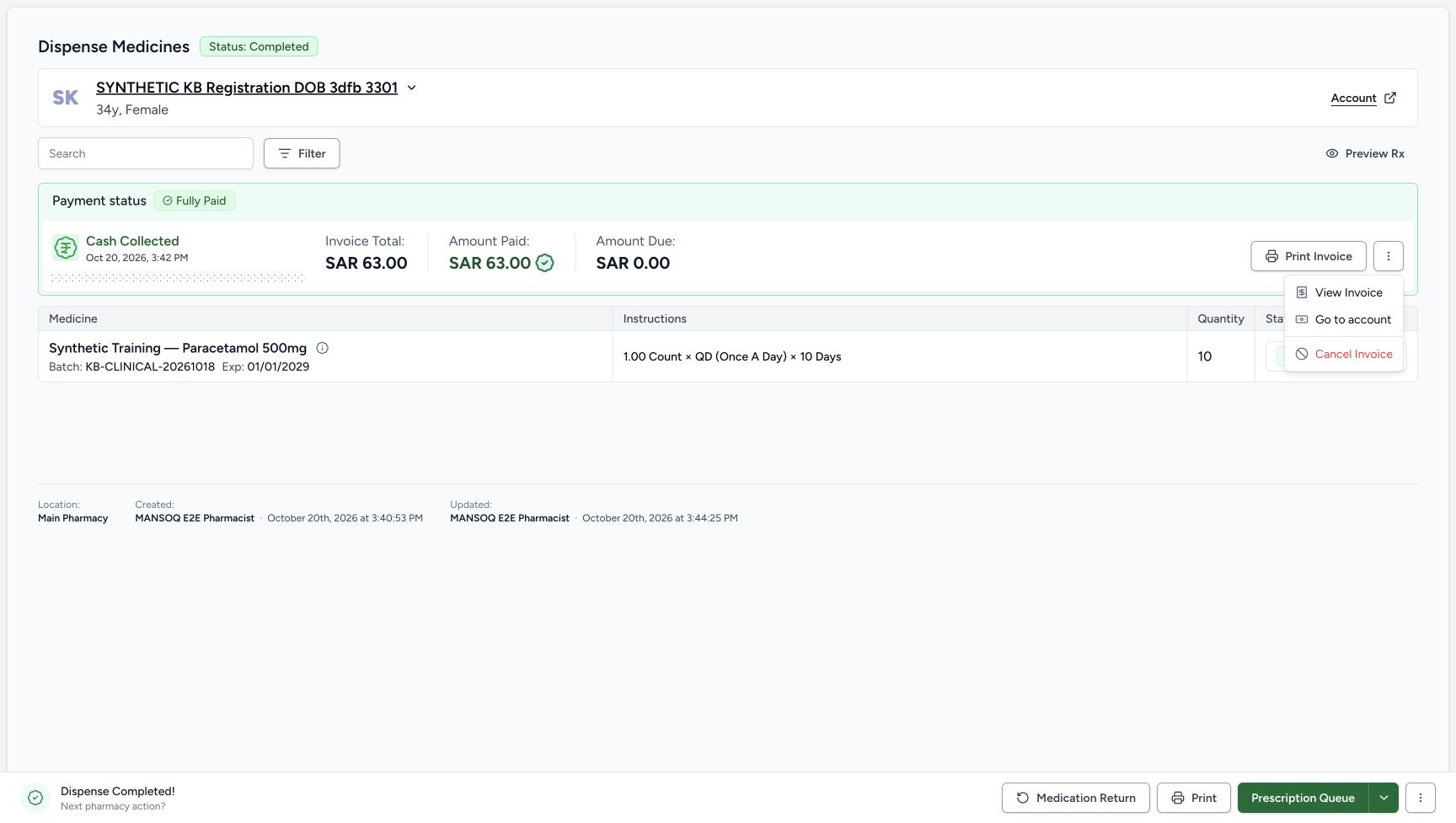
- Open the payment banner menu: This menu contains View Invoice for reviewing the final saved invoice.
10. Open the final invoice through the payment menu
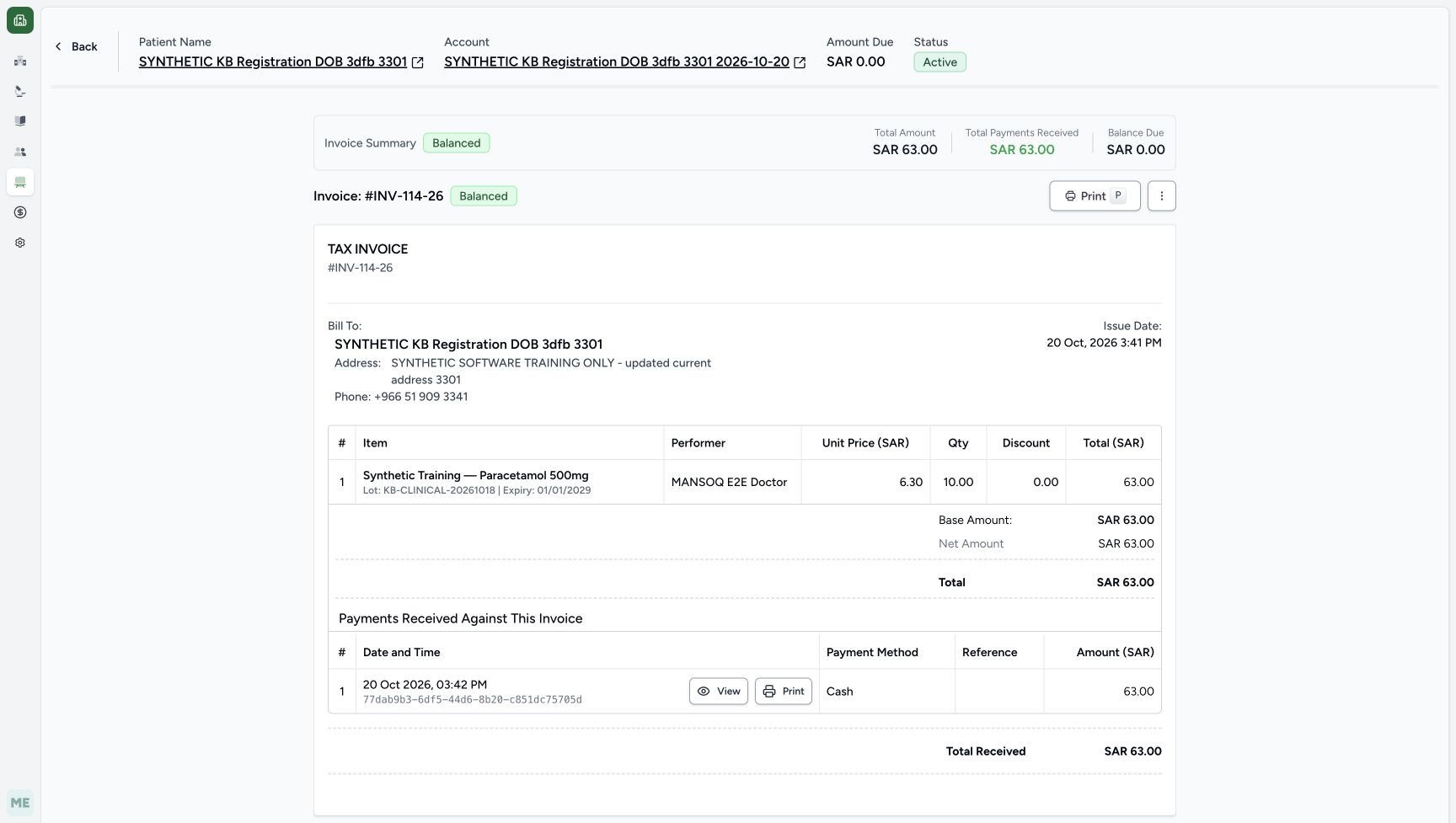
Open the payment banner ellipsis and choose View Invoice. Do not select Cancel Invoice or make a financial correction. Match INV-114-26. It shows Balanced, total SAR 63.00, total payments received SAR 63.00, balance due SAR 0.00 and one Cash receipt. The separate account header shows SAR 0.00 due and still Active; zero due has not closed the account.
12345Completed order retained after reload
Capture details
Genuine natural native capture of exact local d20e build; source publication LOCAL_UNPUSHED. Original pixels are unchanged. This fictional self-pay software recording establishes only the illustrated ledger and dispense states; no actual medicine, money, provider movement, payer exchange or external tax clearance is qualified.
Image SHA-256 445fa0634ea018af1a0620c25e11c30e27dd6f9f6a829f156b89c284531a7558
- Verify Completed after reload: The normal browser reload retains the parent order state.
- Verify the child after reload: The same medicine row remains Completed.
- Verify quantity ten after reload: The existing prepared quantity remains 10.
- Verify the retained payment: The banner retains SAR 63.00 paid and zero due.
- Open the payment banner menu: This menu contains View Invoice for reviewing the final saved invoice.
 123
123Payment menu with View Invoice
Capture details
Genuine natural native capture of exact local d20e build; source publication LOCAL_UNPUSHED. Original pixels are unchanged. This fictional self-pay software recording establishes only the illustrated ledger and dispense states; no actual medicine, money, provider movement, payer exchange or external tax clearance is qualified.
Image SHA-256 dc7c7fa64bbaadd911953ed6b30a25aa94efdc9630646d81b4c62ca9e6460746
- Use the payment banner ellipsis: This is the opened payment menu on the completed order.
- Choose View Invoice: The recorded workflow inspected the saved invoice from this menu.
- Distinguish Cancel Invoice: Cancel Invoice is a separate financial correction and was not selected.
 12345678910
Balanced invoice and single Cash receipt
Capture details
Genuine natural native capture of exact local d20e build; source publication LOCAL_UNPUSHED. Original pixels are unchanged. This fictional self-pay software recording establishes only the illustrated ledger and dispense states; no actual medicine, money, provider movement, payer exchange or external tax clearance is qualified.
Image SHA-256 84f542a3ae110c4c65cf18fe3959dddb75d61db86b505b867673ec415bf60a0d
- Read Balanced: The invoice summary now shows its saved Balanced status.
- Match INV-114-26: This is the same invoice created from the ten-unit preparation.
- Read total received 63.00: The invoice includes the one saved net cash payment.
- Read balance due 0.00: The invoice balance is zero.
- Read the separate account amount: The account amount due is also SAR 0.00 in this particular case.
- Read account Active: A zero amount due has not closed the account.
- Identify the single Cash receipt: There is one Cash payment row for SAR 63.00.
- Open the receipt View: View inspects the existing payment; Print is separate and unused.
- Keep the actual issue date: The invoice issue time is 03:41 PM, separate from its payment date.
- Keep the actual payment date: The receipt uses October 20 at 03:42 PM.
11. View the existing Cash payment details
Choose View on the single Cash receipt row. The saved record is Active, Complete, Cash, Payment at Main Pharmacy. Its net amount is SAR 63.00, Amount Tendered SAR 70.00 and Change Returned SAR 7.00. The payment date remains October 20 at 03:42 PM and the exact fictional note is retained. Kind Deposit is a ledger label here; it does not prove a bank deposit or provider movement. Print Receipt and correction actions are separate and were not used.
12345678910Balanced invoice and single Cash receipt
Capture details
Genuine natural native capture of exact local d20e build; source publication LOCAL_UNPUSHED. Original pixels are unchanged. This fictional self-pay software recording establishes only the illustrated ledger and dispense states; no actual medicine, money, provider movement, payer exchange or external tax clearance is qualified.
Image SHA-256 84f542a3ae110c4c65cf18fe3959dddb75d61db86b505b867673ec415bf60a0d
- Read Balanced: The invoice summary now shows its saved Balanced status.
- Match INV-114-26: This is the same invoice created from the ten-unit preparation.
- Read total received 63.00: The invoice includes the one saved net cash payment.
- Read balance due 0.00: The invoice balance is zero.
- Read the separate account amount: The account amount due is also SAR 0.00 in this particular case.
- Read account Active: A zero amount due has not closed the account.
- Identify the single Cash receipt: There is one Cash payment row for SAR 63.00.
- Open the receipt View: View inspects the existing payment; Print is separate and unused.
- Keep the actual issue date: The invoice issue time is 03:41 PM, separate from its payment date.
- Keep the actual payment date: The receipt uses October 20 at 03:42 PM.
12345678910Saved Cash payment details
Capture details
Genuine natural native capture of exact local d20e build; source publication LOCAL_UNPUSHED. Original pixels are unchanged. This fictional self-pay software recording establishes only the illustrated ledger and dispense states; no actual medicine, money, provider movement, payer exchange or external tax clearance is qualified.
Image SHA-256 b564d3b35748d3addcd5950b389e5d5602dbd7a1327c4b1c653f1be79a39e6ed
- Match the payment patient: The saved payment belongs to the assigned synthetic patient.
- Read the saved ledger labels: The record is Active, Complete, Cash, Payment.
- Read the net payment 63.00: The saved payment amount is the net amount applied to the invoice.
- Read Amount Tendered 70.00: The existing cash record preserves the fictional tendered amount.
- Read Change Returned 7.00: The same existing record preserves the fictional change amount.
- Read the actual payment date: The saved date remains October 20 at 03:42 PM.
- Read the exact fictional note: The note states no money received, no provider transfer and no medicine physically supplied.
- Check Main Pharmacy: The saved cash ledger record retains the selected location.
- Interpret Kind Deposit narrowly: Deposit is the displayed ledger kind; this label is not proof of bank credit or an external transfer.
- Return through View Invoice: This is the read-only link used to inspect the same balanced invoice again.
12. Return to the invoice and reload its final state
Use View Invoice from the existing payment details, then a normal browser reload. The same INV-114-26 remains Balanced for SAR 63.00, with SAR 63.00 received, zero balance and the same single Cash receipt. The separate account remains Active at zero due. The receipt inspection and reload did not create another payment or modify the completed order.
12345678910Saved Cash payment details
Capture details
Genuine natural native capture of exact local d20e build; source publication LOCAL_UNPUSHED. Original pixels are unchanged. This fictional self-pay software recording establishes only the illustrated ledger and dispense states; no actual medicine, money, provider movement, payer exchange or external tax clearance is qualified.
Image SHA-256 b564d3b35748d3addcd5950b389e5d5602dbd7a1327c4b1c653f1be79a39e6ed
- Match the payment patient: The saved payment belongs to the assigned synthetic patient.
- Read the saved ledger labels: The record is Active, Complete, Cash, Payment.
- Read the net payment 63.00: The saved payment amount is the net amount applied to the invoice.
- Read Amount Tendered 70.00: The existing cash record preserves the fictional tendered amount.
- Read Change Returned 7.00: The same existing record preserves the fictional change amount.
- Read the actual payment date: The saved date remains October 20 at 03:42 PM.
- Read the exact fictional note: The note states no money received, no provider transfer and no medicine physically supplied.
- Check Main Pharmacy: The saved cash ledger record retains the selected location.
- Interpret Kind Deposit narrowly: Deposit is the displayed ledger kind; this label is not proof of bank credit or an external transfer.
- Return through View Invoice: This is the read-only link used to inspect the same balanced invoice again.
1234567Balanced invoice retained after reload
Capture details
Genuine natural native capture of exact local d20e build; source publication LOCAL_UNPUSHED. Original pixels are unchanged. This fictional self-pay software recording establishes only the illustrated ledger and dispense states; no actual medicine, money, provider movement, payer exchange or external tax clearance is qualified.
Image SHA-256 84f542a3ae110c4c65cf18fe3959dddb75d61db86b505b867673ec415bf60a0d
- Verify Balanced after reload: A normal invoice reload retains Balanced.
- Verify invoice total 63.00: The generated total remains unchanged.
- Verify one payment received 63.00: No second payment was created by balancing or completing.
- Verify zero invoice balance: The invoice remains at zero due.
- Verify the retained Cash row: The same single Cash payment is listed after reload.
- Verify the account stays Active: The account remains Active at the end of this recording.
- Verify the separate account amount: The account header remains at SAR 0.00 due.
Keep net payment, tender and change distinct
The form recorded net Amount Paid 63.00 against fictional tender 70.00 and calculated change 7.00. The success panel’s Amount Received 63.00 is its net ledger figure. The saved payment detail preserves all three original amounts, so use those labels and figures together. Its Complete badge is the payment record’s outcome; it is distinct from the dispense order’s Completed badge.
1234567Reviewed one fictional cash payment
Capture details
Genuine natural native capture of exact local d20e build; source publication LOCAL_UNPUSHED. Original pixels are unchanged. This fictional self-pay software recording establishes only the illustrated ledger and dispense states; no actual medicine, money, provider movement, payer exchange or external tax clearance is qualified.
Image SHA-256 b81e046d05c4e8672a1bf1886a745d2c3b31380e8a18f245c8f44edf671200fe
- Verify Main Pharmacy: The payment location is selected.
- Keep Amount Paid 63.00: The net amount to allocate is SAR 63.00.
- Review Amount Received 70.00: The fictional tendered cash amount is SAR 70.00.
- Review change 7.00: The form calculates change to return as SAR 7.00.
- Review the actual date 03:42 PM: Do not substitute the later submission time for the form date.
- Retain the exact software-only note: The ledger note explicitly states the demonstration did not receive money or supply physical medicine.
- Record Payment once: Submit the reviewed single fictional cash ledger payment once.
12345One payment saved before balancing
Capture details
Genuine natural native capture of exact local d20e build; source publication LOCAL_UNPUSHED. Original pixels are unchanged. This fictional self-pay software recording establishes only the illustrated ledger and dispense states; no actual medicine, money, provider movement, payer exchange or external tax clearance is qualified.
Image SHA-256 0fe80e9673d913488d44da3a785e2079e00af86e8ec41417004dca92807402bf
- Read Payment Recorded Successfully: The success panel confirms one saved payment for INV-114-26.
- Read the net recorded amount 63.00: The success panel label Amount Received shows the net recorded 63.00, not the earlier 70.00 tender.
- Mark as balanced separately: This is a separate invoice status action after the one payment; it does not record another cash receipt.
- Locate Close: Close returns from this success sheet after reviewing the saved outcome.
- Distinguish Print Receipt: Printing is a separate action and was not used in this recording.
123456Saved Completed dispense
Capture details
Genuine natural native capture of exact local d20e build; source publication LOCAL_UNPUSHED. Original pixels are unchanged. This fictional self-pay software recording establishes only the illustrated ledger and dispense states; no actual medicine, money, provider movement, payer exchange or external tax clearance is qualified.
Image SHA-256 17d40acb6e1cb01ee0d5769b0ae8de7000926202068820c38eb8edddffea4ec1
- Read the saved order Completed: The parent order has reached Completed.
- Verify ten units retained: The completed layout still shows quantity 10; this column moved after the status transition.
- Read the medicine Completed: The same medicine row is now Completed.
- Verify the one payment remains 63.00: Completion has not recorded another cash payment.
- Verify zero amount due: The settled invoice banner still shows zero due.
- Read Dispense Completed: The footer records software completion and offers separate later actions, not proof of physical handover.
12345678910Saved Cash payment details
Capture details
Genuine natural native capture of exact local d20e build; source publication LOCAL_UNPUSHED. Original pixels are unchanged. This fictional self-pay software recording establishes only the illustrated ledger and dispense states; no actual medicine, money, provider movement, payer exchange or external tax clearance is qualified.
Image SHA-256 b564d3b35748d3addcd5950b389e5d5602dbd7a1327c4b1c653f1be79a39e6ed
- Match the payment patient: The saved payment belongs to the assigned synthetic patient.
- Read the saved ledger labels: The record is Active, Complete, Cash, Payment.
- Read the net payment 63.00: The saved payment amount is the net amount applied to the invoice.
- Read Amount Tendered 70.00: The existing cash record preserves the fictional tendered amount.
- Read Change Returned 7.00: The same existing record preserves the fictional change amount.
- Read the actual payment date: The saved date remains October 20 at 03:42 PM.
- Read the exact fictional note: The note states no money received, no provider transfer and no medicine physically supplied.
- Check Main Pharmacy: The saved cash ledger record retains the selected location.
- Interpret Kind Deposit narrowly: Deposit is the displayed ledger kind; this label is not proof of bank credit or an external transfer.
- Return through View Invoice: This is the read-only link used to inspect the same balanced invoice again.
Keep paid invoice, balanced invoice and active account distinct
One cash payment made the invoice Fully Paid. Mark as balanced changed the issued invoice to Balanced and its billed charge to paid. Complete Dispense later changed the order and medicine status. The invoice total stayed 63.00 and the same one payment remained unchanged. The account also reached zero due in this case but remained Active. These software labels do not establish payer settlement, bank credit, tax filing or electronic clearance.
12345One payment saved before balancing
Capture details
Genuine natural native capture of exact local d20e build; source publication LOCAL_UNPUSHED. Original pixels are unchanged. This fictional self-pay software recording establishes only the illustrated ledger and dispense states; no actual medicine, money, provider movement, payer exchange or external tax clearance is qualified.
Image SHA-256 0fe80e9673d913488d44da3a785e2079e00af86e8ec41417004dca92807402bf
- Read Payment Recorded Successfully: The success panel confirms one saved payment for INV-114-26.
- Read the net recorded amount 63.00: The success panel label Amount Received shows the net recorded 63.00, not the earlier 70.00 tender.
- Mark as balanced separately: This is a separate invoice status action after the one payment; it does not record another cash receipt.
- Locate Close: Close returns from this success sheet after reviewing the saved outcome.
- Distinguish Print Receipt: Printing is a separate action and was not used in this recording.
1234567Fully paid Preparation ready for completion
Capture details
Genuine natural native capture of exact local d20e build; source publication LOCAL_UNPUSHED. Original pixels are unchanged. This fictional self-pay software recording establishes only the illustrated ledger and dispense states; no actual medicine, money, provider movement, payer exchange or external tax clearance is qualified.
Image SHA-256 0394e8a41b2b9e8ab3d29290afdfc35c66c34adfdaaea944e9ae876eda9bd3ec
- Keep the paid order selected: The order is still In Progress before the completion action.
- Read Fully Paid: The settled banner shows the existing one payment has paid this invoice.
- Read Amount Paid 63.00: The recorded net cash payment is SAR 63.00.
- Read Amount Due 0.00: No additional payment is due on this invoice.
- Read Preparation before completion: The ten-count medicine row is still Preparation.
- Complete Dispense once: This enabled button performed the single recorded completion action.
- Recognise disabled hold: Put on hold is disabled in this paid and balanced state.
123456Saved Completed dispense
Capture details
Genuine natural native capture of exact local d20e build; source publication LOCAL_UNPUSHED. Original pixels are unchanged. This fictional self-pay software recording establishes only the illustrated ledger and dispense states; no actual medicine, money, provider movement, payer exchange or external tax clearance is qualified.
Image SHA-256 17d40acb6e1cb01ee0d5769b0ae8de7000926202068820c38eb8edddffea4ec1
- Read the saved order Completed: The parent order has reached Completed.
- Verify ten units retained: The completed layout still shows quantity 10; this column moved after the status transition.
- Read the medicine Completed: The same medicine row is now Completed.
- Verify the one payment remains 63.00: Completion has not recorded another cash payment.
- Verify zero amount due: The settled invoice banner still shows zero due.
- Read Dispense Completed: The footer records software completion and offers separate later actions, not proof of physical handover.
12345678910Balanced invoice and single Cash receipt
Capture details
Genuine natural native capture of exact local d20e build; source publication LOCAL_UNPUSHED. Original pixels are unchanged. This fictional self-pay software recording establishes only the illustrated ledger and dispense states; no actual medicine, money, provider movement, payer exchange or external tax clearance is qualified.
Image SHA-256 84f542a3ae110c4c65cf18fe3959dddb75d61db86b505b867673ec415bf60a0d
- Read Balanced: The invoice summary now shows its saved Balanced status.
- Match INV-114-26: This is the same invoice created from the ten-unit preparation.
- Read total received 63.00: The invoice includes the one saved net cash payment.
- Read balance due 0.00: The invoice balance is zero.
- Read the separate account amount: The account amount due is also SAR 0.00 in this particular case.
- Read account Active: A zero amount due has not closed the account.
- Identify the single Cash receipt: There is one Cash payment row for SAR 63.00.
- Open the receipt View: View inspects the existing payment; Print is separate and unused.
- Keep the actual issue date: The invoice issue time is 03:41 PM, separate from its payment date.
- Keep the actual payment date: The receipt uses October 20 at 03:42 PM.
12345678910Saved Cash payment details
Capture details
Genuine natural native capture of exact local d20e build; source publication LOCAL_UNPUSHED. Original pixels are unchanged. This fictional self-pay software recording establishes only the illustrated ledger and dispense states; no actual medicine, money, provider movement, payer exchange or external tax clearance is qualified.
Image SHA-256 b564d3b35748d3addcd5950b389e5d5602dbd7a1327c4b1c653f1be79a39e6ed
- Match the payment patient: The saved payment belongs to the assigned synthetic patient.
- Read the saved ledger labels: The record is Active, Complete, Cash, Payment.
- Read the net payment 63.00: The saved payment amount is the net amount applied to the invoice.
- Read Amount Tendered 70.00: The existing cash record preserves the fictional tendered amount.
- Read Change Returned 7.00: The same existing record preserves the fictional change amount.
- Read the actual payment date: The saved date remains October 20 at 03:42 PM.
- Read the exact fictional note: The note states no money received, no provider transfer and no medicine physically supplied.
- Check Main Pharmacy: The saved cash ledger record retains the selected location.
- Interpret Kind Deposit narrowly: Deposit is the displayed ledger kind; this label is not proof of bank credit or an external transfer.
- Return through View Invoice: This is the read-only link used to inspect the same balanced invoice again.
1234567Balanced invoice retained after reload
Capture details
Genuine natural native capture of exact local d20e build; source publication LOCAL_UNPUSHED. Original pixels are unchanged. This fictional self-pay software recording establishes only the illustrated ledger and dispense states; no actual medicine, money, provider movement, payer exchange or external tax clearance is qualified.
Image SHA-256 84f542a3ae110c4c65cf18fe3959dddb75d61db86b505b867673ec415bf60a0d
- Verify Balanced after reload: A normal invoice reload retains Balanced.
- Verify invoice total 63.00: The generated total remains unchanged.
- Verify one payment received 63.00: No second payment was created by balancing or completing.
- Verify zero invoice balance: The invoice remains at zero due.
- Verify the retained Cash row: The same single Cash payment is listed after reload.
- Verify the account stays Active: The account remains Active at the end of this recording.
- Verify the separate account amount: The account header remains at SAR 0.00 due.
Read the bounded completion and category result
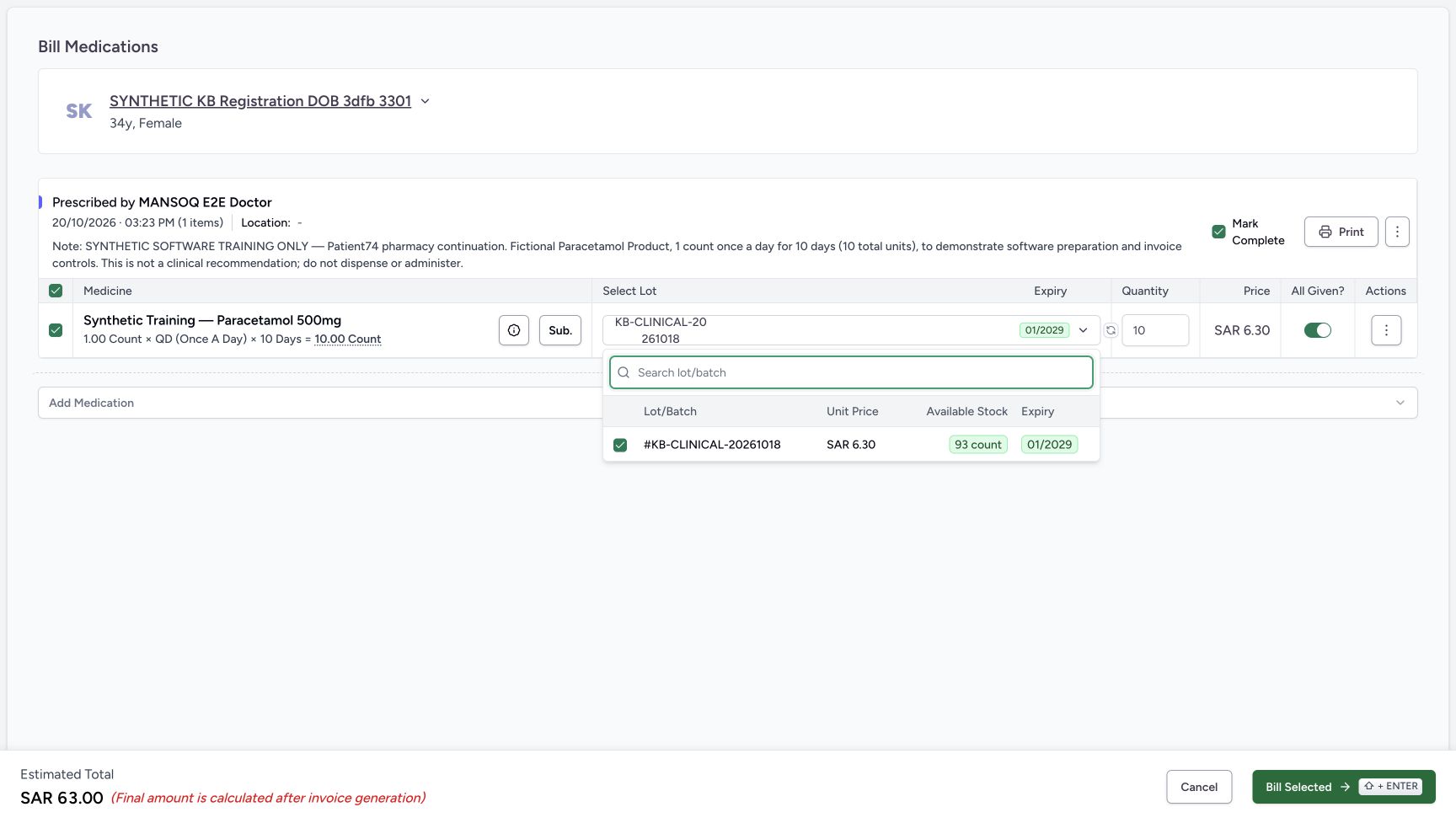
Saved-record checks confirmed that the medicine retained its existing inpatient category through Completed. The table’s status badge does not display that category, and the category does not establish an encounter admission. The one billing save changed checked stock from 93 to 83; completing did not deduct another ten. Reloading the completed order and later inspecting the invoice and receipt retained the saved result. This lesson demonstrates the illustrated fictional self-pay software path; other Pharmacy roles, returns, corrections, insurance and tax workflows require their own checks.
 1234
1234Selected lot with 93 count available
Capture details
Genuine natural native capture of exact local d20e build; source publication LOCAL_UNPUSHED. Original pixels are unchanged. This fictional self-pay software recording establishes only the illustrated ledger and dispense states; no actual medicine, money, provider movement, payer exchange or external tax clearance is qualified.
Image SHA-256 b932770a05ee94757b859428e8315d738cdcef38da658eaacc324dfe1429523d
- Read the selected lot: The checked lot is KB-CLINICAL-20261018; no different lot was selected.
- Read the lot unit price: The lot list shows SAR 6.30.
- Read available stock 93: Available Stock shows 93 count before the one billing save.
- Read expiry 01/2029: The selected lot expiry is January 2029.
 12345
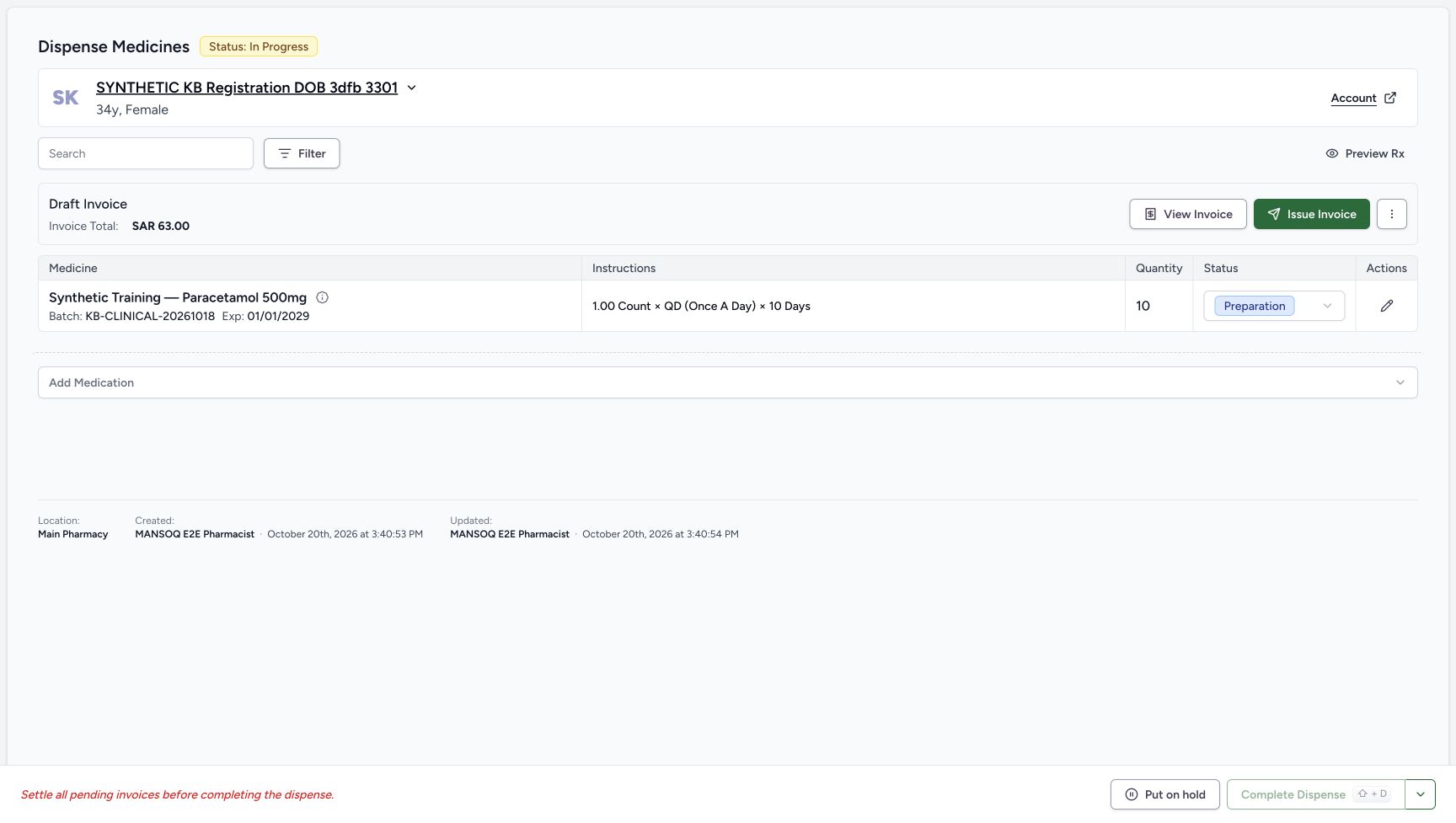
12345Saved ten-count Preparation and Draft invoice for 63.00
Capture details
Genuine natural native capture of exact local d20e build; source publication LOCAL_UNPUSHED. Original pixels are unchanged. This fictional self-pay software recording establishes only the illustrated ledger and dispense states; no actual medicine, money, provider movement, payer exchange or external tax clearance is qualified.
Image SHA-256 7a2d0515952bd0efac0a4b0171c947d606892242c940971e8422d4654ba8d612
- Read the new order In Progress: One billing save created the order; its status is In Progress.
- Read Preparation on the medicine: The ten-count row is still Preparation, not Completed.
- Verify quantity ten: The saved prepared quantity is 10.
- Read the saved Draft invoice: The order shows a Draft Invoice totaling SAR 63.00.
- Open View Invoice: Review the generated invoice before any issue or payment action.
123456Saved Completed dispense
Capture details
Genuine natural native capture of exact local d20e build; source publication LOCAL_UNPUSHED. Original pixels are unchanged. This fictional self-pay software recording establishes only the illustrated ledger and dispense states; no actual medicine, money, provider movement, payer exchange or external tax clearance is qualified.
Image SHA-256 17d40acb6e1cb01ee0d5769b0ae8de7000926202068820c38eb8edddffea4ec1
- Read the saved order Completed: The parent order has reached Completed.
- Verify ten units retained: The completed layout still shows quantity 10; this column moved after the status transition.
- Read the medicine Completed: The same medicine row is now Completed.
- Verify the one payment remains 63.00: Completion has not recorded another cash payment.
- Verify zero amount due: The settled invoice banner still shows zero due.
- Read Dispense Completed: The footer records software completion and offers separate later actions, not proof of physical handover.
12345Completed order retained after reload
Capture details
Genuine natural native capture of exact local d20e build; source publication LOCAL_UNPUSHED. Original pixels are unchanged. This fictional self-pay software recording establishes only the illustrated ledger and dispense states; no actual medicine, money, provider movement, payer exchange or external tax clearance is qualified.
Image SHA-256 445fa0634ea018af1a0620c25e11c30e27dd6f9f6a829f156b89c284531a7558
- Verify Completed after reload: The normal browser reload retains the parent order state.
- Verify the child after reload: The same medicine row remains Completed.
- Verify quantity ten after reload: The existing prepared quantity remains 10.
- Verify the retained payment: The banner retains SAR 63.00 paid and zero due.
- Open the payment banner menu: This menu contains View Invoice for reviewing the final saved invoice.
12345678910Balanced invoice and single Cash receipt
Capture details
Genuine natural native capture of exact local d20e build; source publication LOCAL_UNPUSHED. Original pixels are unchanged. This fictional self-pay software recording establishes only the illustrated ledger and dispense states; no actual medicine, money, provider movement, payer exchange or external tax clearance is qualified.
Image SHA-256 84f542a3ae110c4c65cf18fe3959dddb75d61db86b505b867673ec415bf60a0d
- Read Balanced: The invoice summary now shows its saved Balanced status.
- Match INV-114-26: This is the same invoice created from the ten-unit preparation.
- Read total received 63.00: The invoice includes the one saved net cash payment.
- Read balance due 0.00: The invoice balance is zero.
- Read the separate account amount: The account amount due is also SAR 0.00 in this particular case.
- Read account Active: A zero amount due has not closed the account.
- Identify the single Cash receipt: There is one Cash payment row for SAR 63.00.
- Open the receipt View: View inspects the existing payment; Print is separate and unused.
- Keep the actual issue date: The invoice issue time is 03:41 PM, separate from its payment date.
- Keep the actual payment date: The receipt uses October 20 at 03:42 PM.
12345678910Saved Cash payment details
Capture details
Genuine natural native capture of exact local d20e build; source publication LOCAL_UNPUSHED. Original pixels are unchanged. This fictional self-pay software recording establishes only the illustrated ledger and dispense states; no actual medicine, money, provider movement, payer exchange or external tax clearance is qualified.
Image SHA-256 b564d3b35748d3addcd5950b389e5d5602dbd7a1327c4b1c653f1be79a39e6ed
- Match the payment patient: The saved payment belongs to the assigned synthetic patient.
- Read the saved ledger labels: The record is Active, Complete, Cash, Payment.
- Read the net payment 63.00: The saved payment amount is the net amount applied to the invoice.
- Read Amount Tendered 70.00: The existing cash record preserves the fictional tendered amount.
- Read Change Returned 7.00: The same existing record preserves the fictional change amount.
- Read the actual payment date: The saved date remains October 20 at 03:42 PM.
- Read the exact fictional note: The note states no money received, no provider transfer and no medicine physically supplied.
- Check Main Pharmacy: The saved cash ledger record retains the selected location.
- Interpret Kind Deposit narrowly: Deposit is the displayed ledger kind; this label is not proof of bank credit or an external transfer.
- Return through View Invoice: This is the read-only link used to inspect the same balanced invoice again.
1234567Balanced invoice retained after reload
Capture details
Genuine natural native capture of exact local d20e build; source publication LOCAL_UNPUSHED. Original pixels are unchanged. This fictional self-pay software recording establishes only the illustrated ledger and dispense states; no actual medicine, money, provider movement, payer exchange or external tax clearance is qualified.
Image SHA-256 84f542a3ae110c4c65cf18fe3959dddb75d61db86b505b867673ec415bf60a0d
- Verify Balanced after reload: A normal invoice reload retains Balanced.
- Verify invoice total 63.00: The generated total remains unchanged.
- Verify one payment received 63.00: No second payment was created by balancing or completing.
- Verify zero invoice balance: The invoice remains at zero due.
- Verify the retained Cash row: The same single Cash payment is listed after reload.
- Verify the account stays Active: The account remains Active at the end of this recording.
- Verify the separate account amount: The account header remains at SAR 0.00 due.
Troubleshooting
A request still shows the earlier labels or Processing
The immediate billing, issue, payment, balance and completion pictures are pending views. Do not repeat the action while its control is disabled. Read the corresponding settled order, payment success or invoice result, then reload when shown. If the saved result differs, stop and ask the responsible local support team to inspect that existing record before retrying.
 1
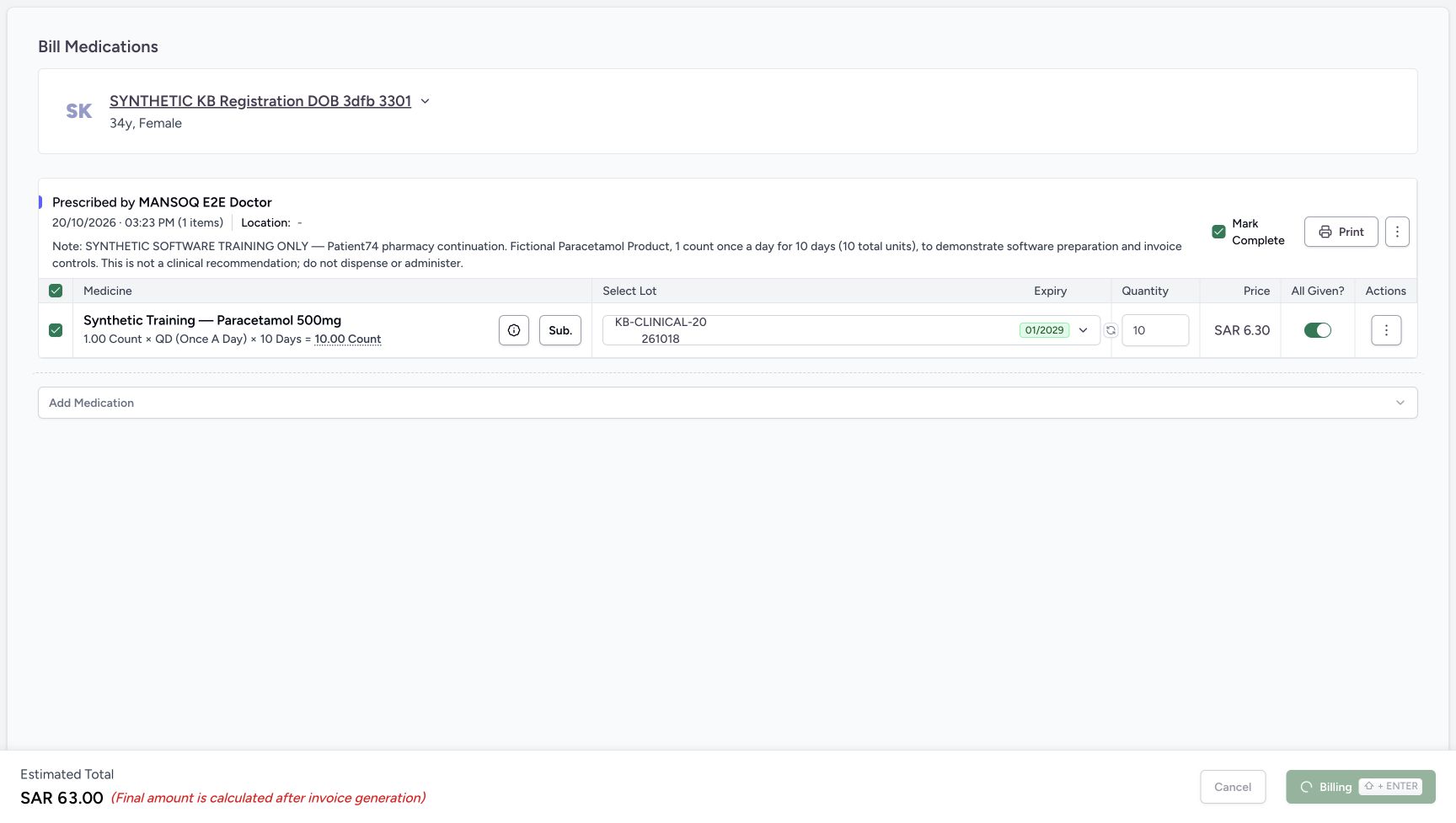
1Billing request pending
Capture details
Genuine natural native capture of exact local d20e build; source publication LOCAL_UNPUSHED. Original pixels are unchanged. This fictional self-pay software recording establishes only the illustrated ledger and dispense states; no actual medicine, money, provider movement, payer exchange or external tax clearance is qualified.
Image SHA-256 36a9453e0ee70661ac532d5a9b6bcdfe4f347f1d2b061f7cb2c5cb2433cc0175
- Wait while billing is pending: The footer shows Billing with a disabled action; this is not yet the settled saved order.
12345Saved ten-count Preparation and Draft invoice for 63.00
Capture details
Genuine natural native capture of exact local d20e build; source publication LOCAL_UNPUSHED. Original pixels are unchanged. This fictional self-pay software recording establishes only the illustrated ledger and dispense states; no actual medicine, money, provider movement, payer exchange or external tax clearance is qualified.
Image SHA-256 7a2d0515952bd0efac0a4b0171c947d606892242c940971e8422d4654ba8d612
- Read the new order In Progress: One billing save created the order; its status is In Progress.
- Read Preparation on the medicine: The ten-count row is still Preparation, not Completed.
- Verify quantity ten: The saved prepared quantity is 10.
- Read the saved Draft invoice: The order shows a Draft Invoice totaling SAR 63.00.
- Open View Invoice: Review the generated invoice before any issue or payment action.
1Immediate issue-refresh view
Capture details
Genuine natural native capture of exact local d20e build; source publication LOCAL_UNPUSHED. Original pixels are unchanged. This fictional self-pay software recording establishes only the illustrated ledger and dispense states; no actual medicine, money, provider movement, payer exchange or external tax clearance is qualified.
Image SHA-256 05e0a7cbba737c82263ae27061896d019f20360ad4e0934ba5f301fbd37c4c63
- Treat this as the immediate issue view: The prior Draft banner remains while the issue result refreshes; use the settled Payment Pending view next.
12345Payment Pending and Collect Payment entry
Capture details
Genuine natural native capture of exact local d20e build; source publication LOCAL_UNPUSHED. Original pixels are unchanged. This fictional self-pay software recording establishes only the illustrated ledger and dispense states; no actual medicine, money, provider movement, payer exchange or external tax clearance is qualified.
Image SHA-256 a676596b1fdccecbbbce1995e5234addcf3c0aa97339d0e3586ac44a1d25565a
- Read Invoice Generated: The settled order banner records invoice generation at 03:41 PM.
- Read invoice total 63.00: The issued invoice still totals SAR 63.00.
- Read amount due 63.00: No cash has been recorded yet.
- Open Collect Payment: Collect the single fictional ledger payment for this invoice.
- Keep completion separate: Complete Dispense is still disabled before settlement.
1Record Payment processing
Capture details
Genuine natural native capture of exact local d20e build; source publication LOCAL_UNPUSHED. Original pixels are unchanged. This fictional self-pay software recording establishes only the illustrated ledger and dispense states; no actual medicine, money, provider movement, payer exchange or external tax clearance is qualified.
Image SHA-256 f4ad423e97d6dc84042c97129dfa426f5d387ae08098bd01a7d2ff42d14beea9
- Wait during Processing: The action is pending and disabled; do not submit another payment.
12345One payment saved before balancing
Capture details
Genuine natural native capture of exact local d20e build; source publication LOCAL_UNPUSHED. Original pixels are unchanged. This fictional self-pay software recording establishes only the illustrated ledger and dispense states; no actual medicine, money, provider movement, payer exchange or external tax clearance is qualified.
Image SHA-256 0fe80e9673d913488d44da3a785e2079e00af86e8ec41417004dca92807402bf
- Read Payment Recorded Successfully: The success panel confirms one saved payment for INV-114-26.
- Read the net recorded amount 63.00: The success panel label Amount Received shows the net recorded 63.00, not the earlier 70.00 tender.
- Mark as balanced separately: This is a separate invoice status action after the one payment; it does not record another cash receipt.
- Locate Close: Close returns from this success sheet after reviewing the saved outcome.
- Distinguish Print Receipt: Printing is a separate action and was not used in this recording.
1Balance request pending
Capture details
Genuine natural native capture of exact local d20e build; source publication LOCAL_UNPUSHED. Original pixels are unchanged. This fictional self-pay software recording establishes only the illustrated ledger and dispense states; no actual medicine, money, provider movement, payer exchange or external tax clearance is qualified.
Image SHA-256 bd33db43c5db816abc88bbe967f6608abbdf8668299789518d0764a20453a7fc
- Wait for the balance action: Mark as balanced is disabled during the pending action; the old success panel alone does not prove the invoice is Balanced.
1234567Fully paid Preparation ready for completion
Capture details
Genuine natural native capture of exact local d20e build; source publication LOCAL_UNPUSHED. Original pixels are unchanged. This fictional self-pay software recording establishes only the illustrated ledger and dispense states; no actual medicine, money, provider movement, payer exchange or external tax clearance is qualified.
Image SHA-256 0394e8a41b2b9e8ab3d29290afdfc35c66c34adfdaaea944e9ae876eda9bd3ec
- Keep the paid order selected: The order is still In Progress before the completion action.
- Read Fully Paid: The settled banner shows the existing one payment has paid this invoice.
- Read Amount Paid 63.00: The recorded net cash payment is SAR 63.00.
- Read Amount Due 0.00: No additional payment is due on this invoice.
- Read Preparation before completion: The ten-count medicine row is still Preparation.
- Complete Dispense once: This enabled button performed the single recorded completion action.
- Recognise disabled hold: Put on hold is disabled in this paid and balanced state.
123Completion request pending
Capture details
Genuine natural native capture of exact local d20e build; source publication LOCAL_UNPUSHED. Original pixels are unchanged. This fictional self-pay software recording establishes only the illustrated ledger and dispense states; no actual medicine, money, provider movement, payer exchange or external tax clearance is qualified.
Image SHA-256 94ebadf2dac38240a21e1d30e4c57c6de9187f93e66e856889f437ae796a8109
- Wait while completion is pending: Complete Dispense is disabled during the pending action; do not repeat it.
- Do not treat the old order label as final: The immediate capture still shows In Progress.
- Wait for the settled medicine label: Preparation is still pictured before the completed result refreshes.
123456Saved Completed dispense
Capture details
Genuine natural native capture of exact local d20e build; source publication LOCAL_UNPUSHED. Original pixels are unchanged. This fictional self-pay software recording establishes only the illustrated ledger and dispense states; no actual medicine, money, provider movement, payer exchange or external tax clearance is qualified.
Image SHA-256 17d40acb6e1cb01ee0d5769b0ae8de7000926202068820c38eb8edddffea4ec1
- Read the saved order Completed: The parent order has reached Completed.
- Verify ten units retained: The completed layout still shows quantity 10; this column moved after the status transition.
- Read the medicine Completed: The same medicine row is now Completed.
- Verify the one payment remains 63.00: Completion has not recorded another cash payment.
- Verify zero amount due: The settled invoice banner still shows zero due.
- Read Dispense Completed: The footer records software completion and offers separate later actions, not proof of physical handover.
The success panel shows 63.00 instead of the fictional 70.00 tender
That success panel reports the net recorded amount. Check the original form and existing payment detail: 63.00 net, 70.00 tendered and 7.00 change. Do not enter another payment to reproduce the tendered amount on the success panel.
1234567Reviewed one fictional cash payment
Capture details
Genuine natural native capture of exact local d20e build; source publication LOCAL_UNPUSHED. Original pixels are unchanged. This fictional self-pay software recording establishes only the illustrated ledger and dispense states; no actual medicine, money, provider movement, payer exchange or external tax clearance is qualified.
Image SHA-256 b81e046d05c4e8672a1bf1886a745d2c3b31380e8a18f245c8f44edf671200fe
- Verify Main Pharmacy: The payment location is selected.
- Keep Amount Paid 63.00: The net amount to allocate is SAR 63.00.
- Review Amount Received 70.00: The fictional tendered cash amount is SAR 70.00.
- Review change 7.00: The form calculates change to return as SAR 7.00.
- Review the actual date 03:42 PM: Do not substitute the later submission time for the form date.
- Retain the exact software-only note: The ledger note explicitly states the demonstration did not receive money or supply physical medicine.
- Record Payment once: Submit the reviewed single fictional cash ledger payment once.
12345One payment saved before balancing
Capture details
Genuine natural native capture of exact local d20e build; source publication LOCAL_UNPUSHED. Original pixels are unchanged. This fictional self-pay software recording establishes only the illustrated ledger and dispense states; no actual medicine, money, provider movement, payer exchange or external tax clearance is qualified.
Image SHA-256 0fe80e9673d913488d44da3a785e2079e00af86e8ec41417004dca92807402bf
- Read Payment Recorded Successfully: The success panel confirms one saved payment for INV-114-26.
- Read the net recorded amount 63.00: The success panel label Amount Received shows the net recorded 63.00, not the earlier 70.00 tender.
- Mark as balanced separately: This is a separate invoice status action after the one payment; it does not record another cash receipt.
- Locate Close: Close returns from this success sheet after reviewing the saved outcome.
- Distinguish Print Receipt: Printing is a separate action and was not used in this recording.
12345678910Saved Cash payment details
Capture details
Genuine natural native capture of exact local d20e build; source publication LOCAL_UNPUSHED. Original pixels are unchanged. This fictional self-pay software recording establishes only the illustrated ledger and dispense states; no actual medicine, money, provider movement, payer exchange or external tax clearance is qualified.
Image SHA-256 b564d3b35748d3addcd5950b389e5d5602dbd7a1327c4b1c653f1be79a39e6ed
- Match the payment patient: The saved payment belongs to the assigned synthetic patient.
- Read the saved ledger labels: The record is Active, Complete, Cash, Payment.
- Read the net payment 63.00: The saved payment amount is the net amount applied to the invoice.
- Read Amount Tendered 70.00: The existing cash record preserves the fictional tendered amount.
- Read Change Returned 7.00: The same existing record preserves the fictional change amount.
- Read the actual payment date: The saved date remains October 20 at 03:42 PM.
- Read the exact fictional note: The note states no money received, no provider transfer and no medicine physically supplied.
- Check Main Pharmacy: The saved cash ledger record retains the selected location.
- Interpret Kind Deposit narrowly: Deposit is the displayed ledger kind; this label is not proof of bank credit or an external transfer.
- Return through View Invoice: This is the read-only link used to inspect the same balanced invoice again.
Complete Dispense was disabled before settlement
Before payment and balance, the order remained In Progress and the medicine Preparation with a pending invoice. After the one payment and balance action, the recorded Complete Dispense control became enabled. This recording follows that observed route; it does not bypass a disabled control or qualify a different outstanding-balance case.
12345Saved ten-count Preparation and Draft invoice for 63.00
Capture details
Genuine natural native capture of exact local d20e build; source publication LOCAL_UNPUSHED. Original pixels are unchanged. This fictional self-pay software recording establishes only the illustrated ledger and dispense states; no actual medicine, money, provider movement, payer exchange or external tax clearance is qualified.
Image SHA-256 7a2d0515952bd0efac0a4b0171c947d606892242c940971e8422d4654ba8d612
- Read the new order In Progress: One billing save created the order; its status is In Progress.
- Read Preparation on the medicine: The ten-count row is still Preparation, not Completed.
- Verify quantity ten: The saved prepared quantity is 10.
- Read the saved Draft invoice: The order shows a Draft Invoice totaling SAR 63.00.
- Open View Invoice: Review the generated invoice before any issue or payment action.
12345Payment Pending and Collect Payment entry
Capture details
Genuine natural native capture of exact local d20e build; source publication LOCAL_UNPUSHED. Original pixels are unchanged. This fictional self-pay software recording establishes only the illustrated ledger and dispense states; no actual medicine, money, provider movement, payer exchange or external tax clearance is qualified.
Image SHA-256 a676596b1fdccecbbbce1995e5234addcf3c0aa97339d0e3586ac44a1d25565a
- Read Invoice Generated: The settled order banner records invoice generation at 03:41 PM.
- Read invoice total 63.00: The issued invoice still totals SAR 63.00.
- Read amount due 63.00: No cash has been recorded yet.
- Open Collect Payment: Collect the single fictional ledger payment for this invoice.
- Keep completion separate: Complete Dispense is still disabled before settlement.
12345One payment saved before balancing
Capture details
Genuine natural native capture of exact local d20e build; source publication LOCAL_UNPUSHED. Original pixels are unchanged. This fictional self-pay software recording establishes only the illustrated ledger and dispense states; no actual medicine, money, provider movement, payer exchange or external tax clearance is qualified.
Image SHA-256 0fe80e9673d913488d44da3a785e2079e00af86e8ec41417004dca92807402bf
- Read Payment Recorded Successfully: The success panel confirms one saved payment for INV-114-26.
- Read the net recorded amount 63.00: The success panel label Amount Received shows the net recorded 63.00, not the earlier 70.00 tender.
- Mark as balanced separately: This is a separate invoice status action after the one payment; it does not record another cash receipt.
- Locate Close: Close returns from this success sheet after reviewing the saved outcome.
- Distinguish Print Receipt: Printing is a separate action and was not used in this recording.
1234567Fully paid Preparation ready for completion
Capture details
Genuine natural native capture of exact local d20e build; source publication LOCAL_UNPUSHED. Original pixels are unchanged. This fictional self-pay software recording establishes only the illustrated ledger and dispense states; no actual medicine, money, provider movement, payer exchange or external tax clearance is qualified.
Image SHA-256 0394e8a41b2b9e8ab3d29290afdfc35c66c34adfdaaea944e9ae876eda9bd3ec
- Keep the paid order selected: The order is still In Progress before the completion action.
- Read Fully Paid: The settled banner shows the existing one payment has paid this invoice.
- Read Amount Paid 63.00: The recorded net cash payment is SAR 63.00.
- Read Amount Due 0.00: No additional payment is due on this invoice.
- Read Preparation before completion: The ten-count medicine row is still Preparation.
- Complete Dispense once: This enabled button performed the single recorded completion action.
- Recognise disabled hold: Put on hold is disabled in this paid and balanced state.
123456Saved Completed dispense
Capture details
Genuine natural native capture of exact local d20e build; source publication LOCAL_UNPUSHED. Original pixels are unchanged. This fictional self-pay software recording establishes only the illustrated ledger and dispense states; no actual medicine, money, provider movement, payer exchange or external tax clearance is qualified.
Image SHA-256 17d40acb6e1cb01ee0d5769b0ae8de7000926202068820c38eb8edddffea4ec1
- Read the saved order Completed: The parent order has reached Completed.
- Verify ten units retained: The completed layout still shows quantity 10; this column moved after the status transition.
- Read the medicine Completed: The same medicine row is now Completed.
- Verify the one payment remains 63.00: Completion has not recorded another cash payment.
- Verify zero amount due: The settled invoice banner still shows zero due.
- Read Dispense Completed: The footer records software completion and offers separate later actions, not proof of physical handover.
Source evidence
Every citation uses this exact committed version. The private source repository requires access.
- repositories/platform/mansoq-web/src/pages/Facility/services/pharmacy/DispenseOrderView.tsx:268 ·
d20e68ed4a9e0b005aa54f218f84172160974b02Source file checksum
59bebd01a2422d3b62d5e57b0f3a9211d5eb03ddd94f81704e3dbecd47cd197d - repositories/platform/mansoq-web/src/pages/Facility/billing/invoice/InvoiceShow.tsx:498 ·
d20e68ed4a9e0b005aa54f218f84172160974b02Source file checksum
9068995fbe413fe3e14031d9c832943cc14d9188a5f72be91d3c16baa53fc6ff - repositories/platform/mansoq-core/mansoq/emr/api/viewsets/medication_dispense.py:90 ·
d20e68ed4a9e0b005aa54f218f84172160974b02Source file checksum
c1db5d5c78472ce05b7bf736c4563e0e4a29706c1f4d6b074304c112e89dd206 - repositories/platform/mansoq-core/mansoq/emr/resources/inventory/inventory_item/sync_inventory_item.py:71 ·
d20e68ed4a9e0b005aa54f218f84172160974b02Source file checksum
46256e24c4ef53004e128a1d73b58e994369b24bd2dbd74b717fa1c08f4b844e - repositories/platform/mansoq-web/src/pages/Facility/services/pharmacy/components/PaymentStatusBanner.tsx:241 ·
d20e68ed4a9e0b005aa54f218f84172160974b02Source file checksum
6944de9cc4af2719c11551df04c6900471f88c3e66e64266855236e9119aff82 - repositories/platform/mansoq-web/src/pages/Facility/billing/PaymentReconciliationSheet.tsx:822 ·
d20e68ed4a9e0b005aa54f218f84172160974b02Source file checksum
319652a7ff999e8cbb461435b7b5dc7ad1641768fe89db72c5260a0992248968 - repositories/platform/mansoq-web/src/pages/Facility/billing/paymentReconciliation/PaymentReconciliationShow.tsx:298 ·
d20e68ed4a9e0b005aa54f218f84172160974b02Source file checksum
2f3923ad6ef932fe66346aa5ff6753f8ab51af42e595ffc468b208a79d8036a5 - repositories/platform/mansoq-core/mansoq/emr/resources/payment_reconciliation/spec.py:105 ·
d20e68ed4a9e0b005aa54f218f84172160974b02Source file checksum
318887ff3c7699c920de6eeb9a278c0b0d2450fe2e50fb4724e22f84bde53197 - repositories/platform/mansoq-core/mansoq/emr/api/viewsets/payment_reconciliation.py:114 ·
d20e68ed4a9e0b005aa54f218f84172160974b02Source file checksum
e4c6dfe2386ce4da7e12c595a67def571b82b755ee3599f64ac04f4d30ffccd9 - repositories/platform/mansoq-core/mansoq/emr/api/viewsets/invoice.py:590 ·
d20e68ed4a9e0b005aa54f218f84172160974b02Source file checksum
03e73113c89d4be24b4f7ae6f0bf3d4538d8129774ce6dedd0272219530bb88e - repositories/platform/mansoq-web/src/pages/Facility/services/pharmacy/hooks/useUpdateDispenseOrderStatus.ts:73 ·
d20e68ed4a9e0b005aa54f218f84172160974b02Source file checksum
21f899b3779d6d59f10fcfff9ccf3f9a866fac07a720faa02040a1b2988b4d7e - repositories/platform/mansoq-web/src/pages/Facility/services/pharmacy/components/DispenseOrderViewFooter.tsx:115 ·
d20e68ed4a9e0b005aa54f218f84172160974b02Source file checksum
9ddc555df83d78afd04ed0e339630d6e67ccd52a1545d5103a835d8633d0acd6 - repositories/platform/mansoq-core/mansoq/emr/resources/base.py:95 ·
d20e68ed4a9e0b005aa54f218f84172160974b02Source file checksum
bc406c723888997dd99fc408cb3c5dec51fb0b54d10272ca31bfd8c98c893229 - repositories/platform/mansoq-core/mansoq/emr/resources/medication/dispense/spec.py:104 ·
d20e68ed4a9e0b005aa54f218f84172160974b02Source file checksum
e52a9ae743c750dd1a32ec8678ffc986406a42fa7d25940877af63de1a6862c7