 MANSOQ
 Pharmacy · VERSION d20e68ed
Prepare ten fictional units and review the Draft invoice
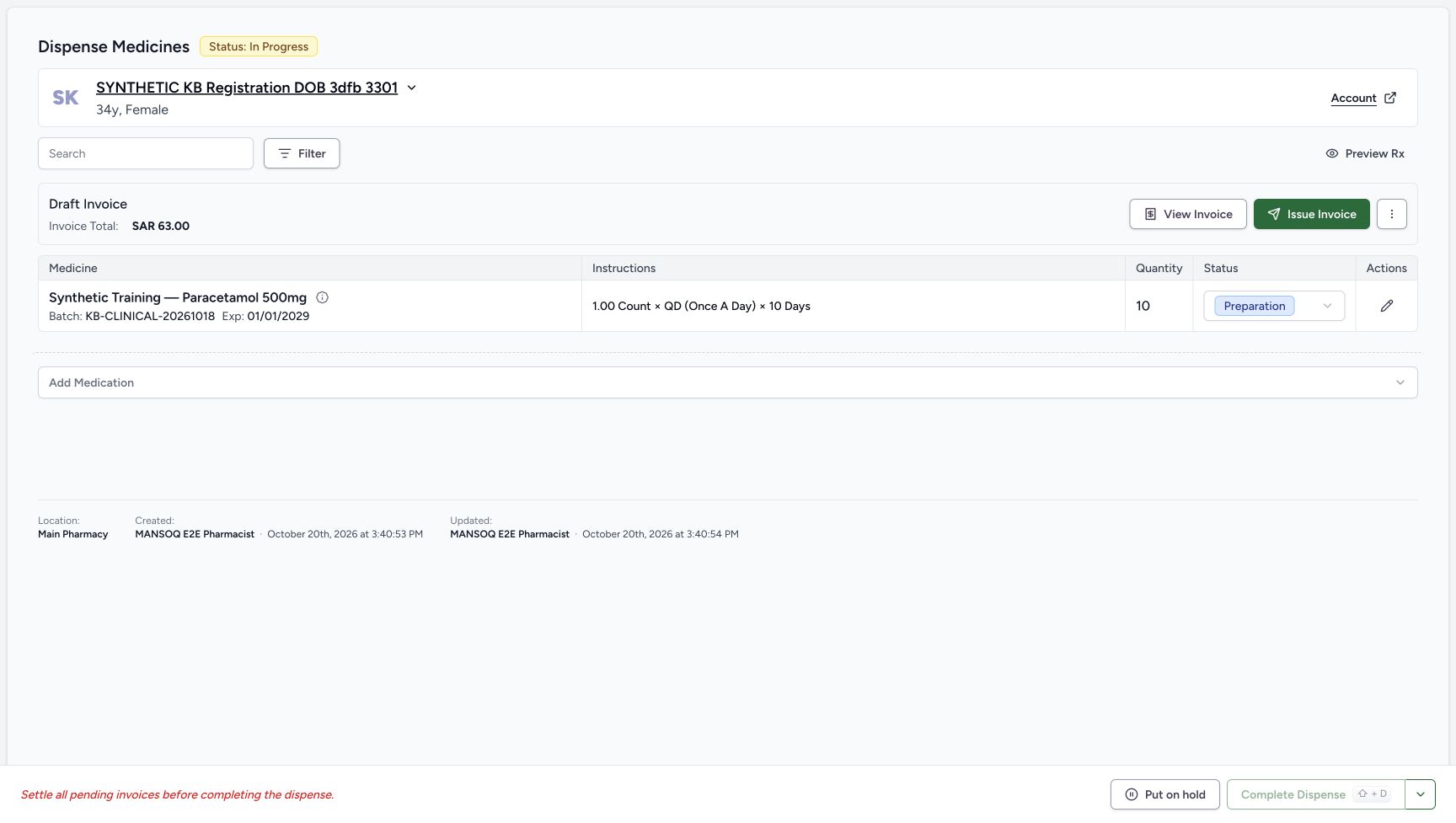
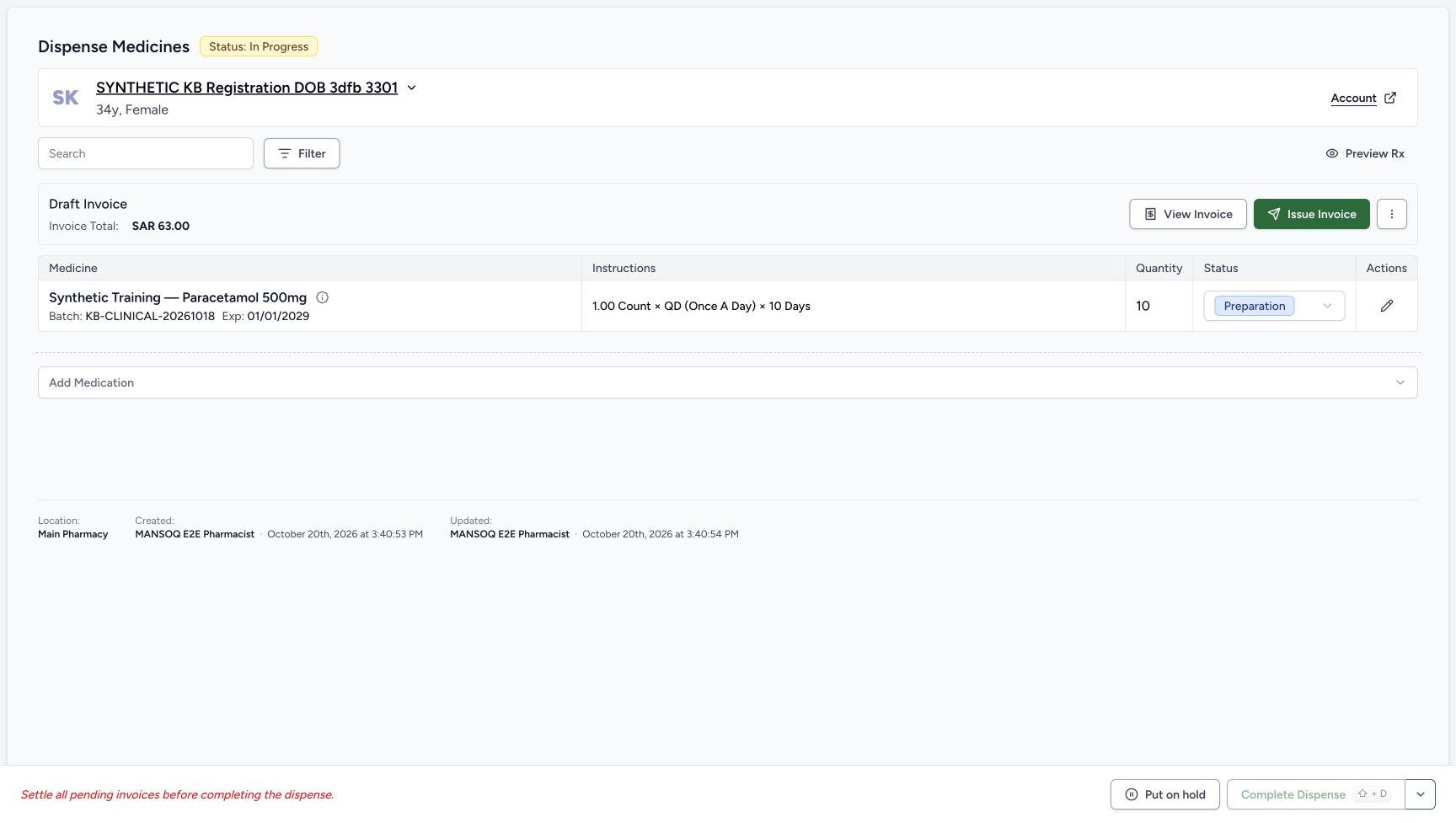
Preview the assigned Doctor prescription, review its full ten-count Product row and selected stock lot, submit Bill Selected once, then inspect the saved Preparation row and generated Draft invoice for SAR 63.00.
Pharmacist
 12345
12345Saved ten-count Preparation and Draft invoice for 63.00
Capture details
Genuine natural native capture of exact local d20e build; source publication LOCAL_UNPUSHED. Original pixels are unchanged. This fictional self-pay software recording establishes only the illustrated ledger and dispense states; no actual medicine, money, provider movement, payer exchange or external tax clearance is qualified.
Image SHA-256 7a2d0515952bd0efac0a4b0171c947d606892242c940971e8422d4654ba8d612
- Read the new order In Progress: One billing save created the order; its status is In Progress.
- Read Preparation on the medicine: The ten-count row is still Preparation, not Completed.
- Verify quantity ten: The saved prepared quantity is 10.
- Read the saved Draft invoice: The order shows a Draft Invoice totaling SAR 63.00.
- Open View Invoice: Review the generated invoice before any issue or payment action.
 123456
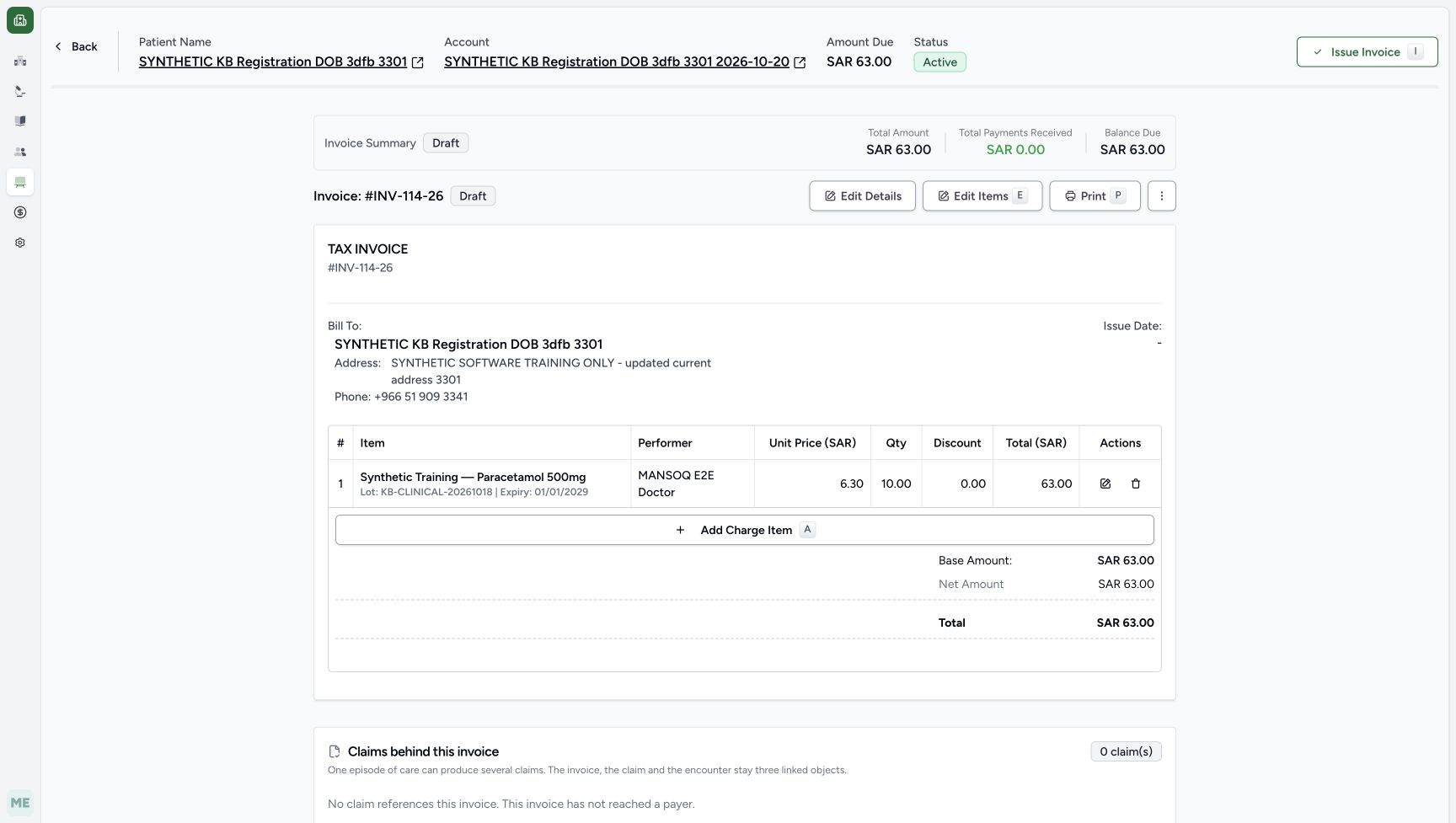
Generated Draft invoice before issue
Capture details
Genuine natural native capture of exact local d20e build; source publication LOCAL_UNPUSHED. Original pixels are unchanged. This fictional self-pay software recording establishes only the illustrated ledger and dispense states; no actual medicine, money, provider movement, payer exchange or external tax clearance is qualified.
Image SHA-256 3a2fd225abf450a03d4147107f1d93573fedf9f0caec1a41e4724724b271eff4
- Match INV-114-26 and Draft: This is the generated Draft invoice for the assigned patient.
- Read invoice total 63.00: The final generated invoice total is SAR 63.00.
- Read zero received: No payment has yet been recorded.
- Read balance due 63.00: The invoice still has its full balance due.
- Check the one invoice line: The line shows unit price 6.30, quantity 10.00 and total 63.00.
- Use Back to the order: The recorded workflow returned to the same order; invoice viewing did not create another bill.
16 of 16 content blocks have reviewed image alignment.
Before you begin
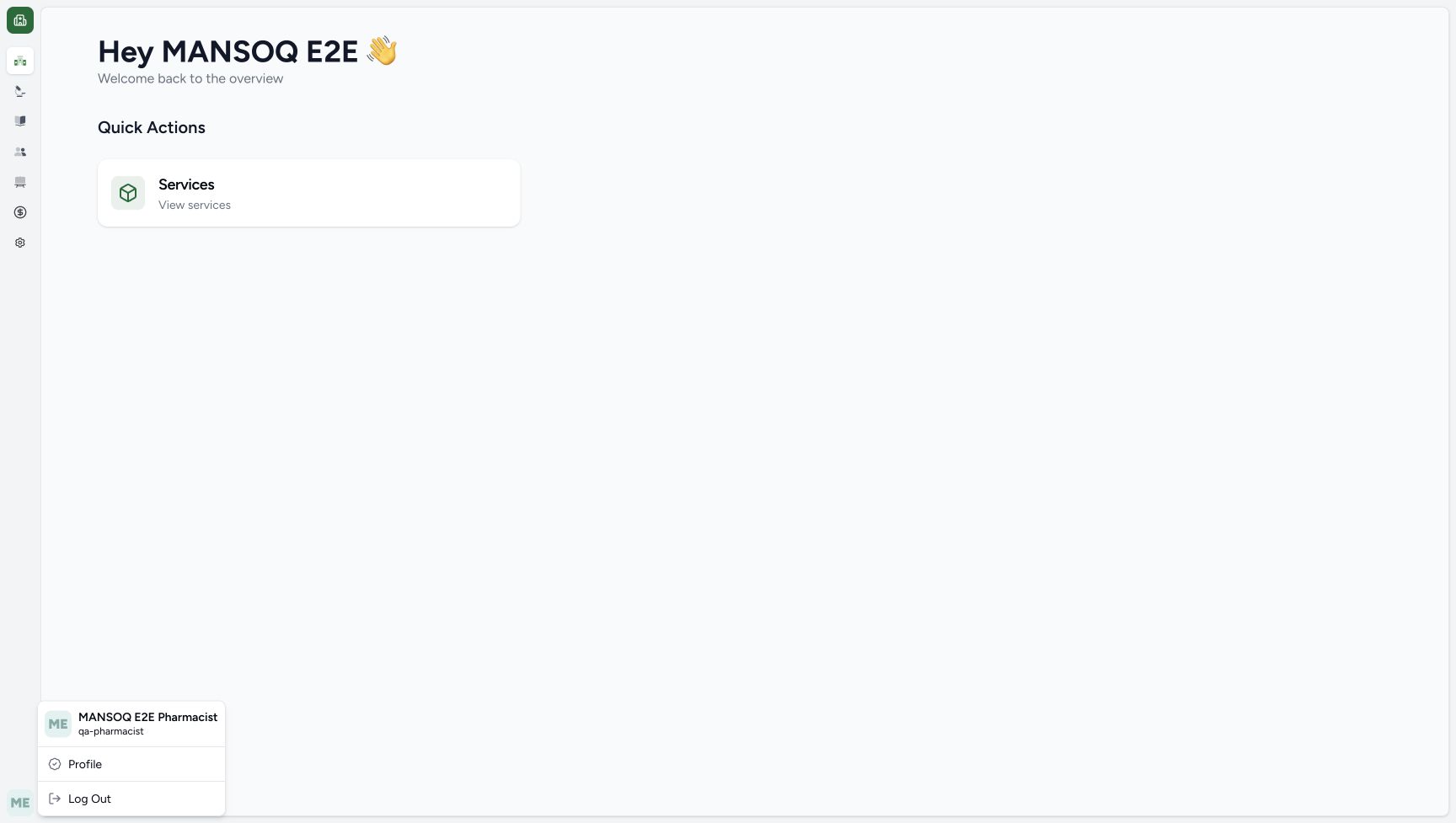
- Use the authorised ordinary Pharmacist account and the assigned synthetic patient SYNTHETIC KB Registration DOB 3dfb 3301. Match the existing Doctor prescription dated October 20 at 03:23 PM. The separate identity image is an earlier genuine capture from this same unchanged Pharmacist session.
 1
1Recorded release d20e68ed · 2026-10-20T12:33:44.207Z · 1728 × 977 Ordinary Pharmacist identity reused from earlier same-session capture
Capture details
Genuine natural native capture of exact local d20e build; source publication LOCAL_UNPUSHED. Original pixels are unchanged. This fictional self-pay software recording establishes only the illustrated ledger and dispense states; no actual medicine, money, provider movement, payer exchange or external tax clearance is qualified. This identity original was captured earlier in the same unchanged ordinary Pharmacist session and is reused with its original timestamp; it is not an additional Patient74 capture.
Image SHA-256
5f6856667f0483e0d31a026722c37541e2ed64c6a9b2b539350fa7eb1dd944c1- Check the ordinary Pharmacist: This earlier genuine identity capture shows MANSOQ E2E Pharmacist and qa-pharmacist in the same unchanged session; it is reused, not a new Patient74 capture.
 123
123Recorded release d20e68ed · 2026-10-20T12:40:03.785Z · 1728 × 977 Assigned patient and existing prescription queue row
Capture details
Genuine natural native capture of exact local d20e build; source publication LOCAL_UNPUSHED. Original pixels are unchanged. This fictional self-pay software recording establishes only the illustrated ledger and dispense states; no actual medicine, money, provider movement, payer exchange or external tax clearance is qualified.
Image SHA-256
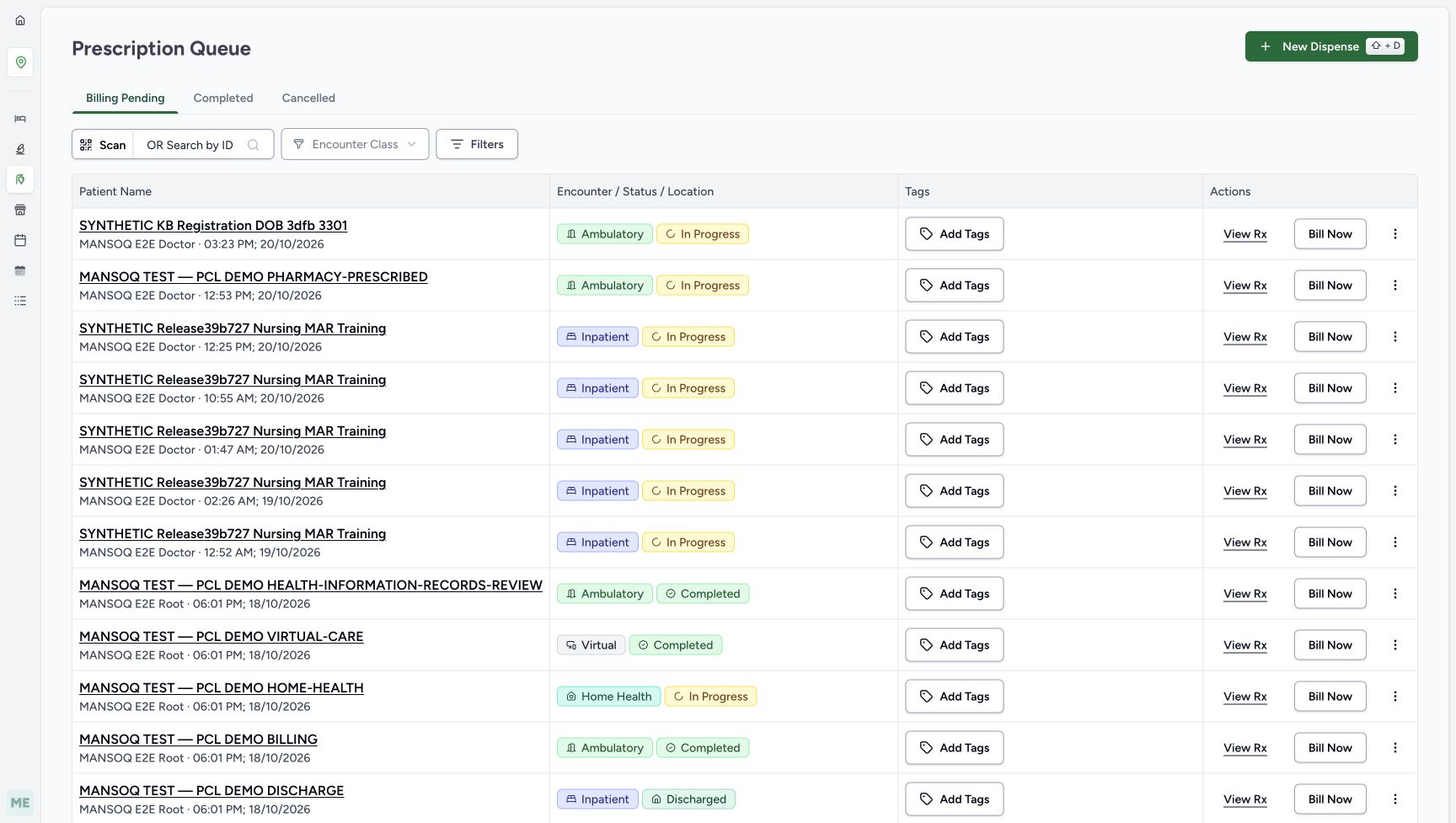
2c5c6ef824d2d6e862672d9d1283a7ee14c0ac4d69861d0faf9f823ae74b9634- Match the assigned synthetic patient: Choose the existing SYNTHETIC KB Registration DOB 3dfb 3301 row.
- Match the Doctor prescription time: The assigned row is attributed to MANSOQ E2E Doctor at 03:23 PM on October 20.
- Open View Rx: Preview the existing prescription rather than starting a separate New Dispense.
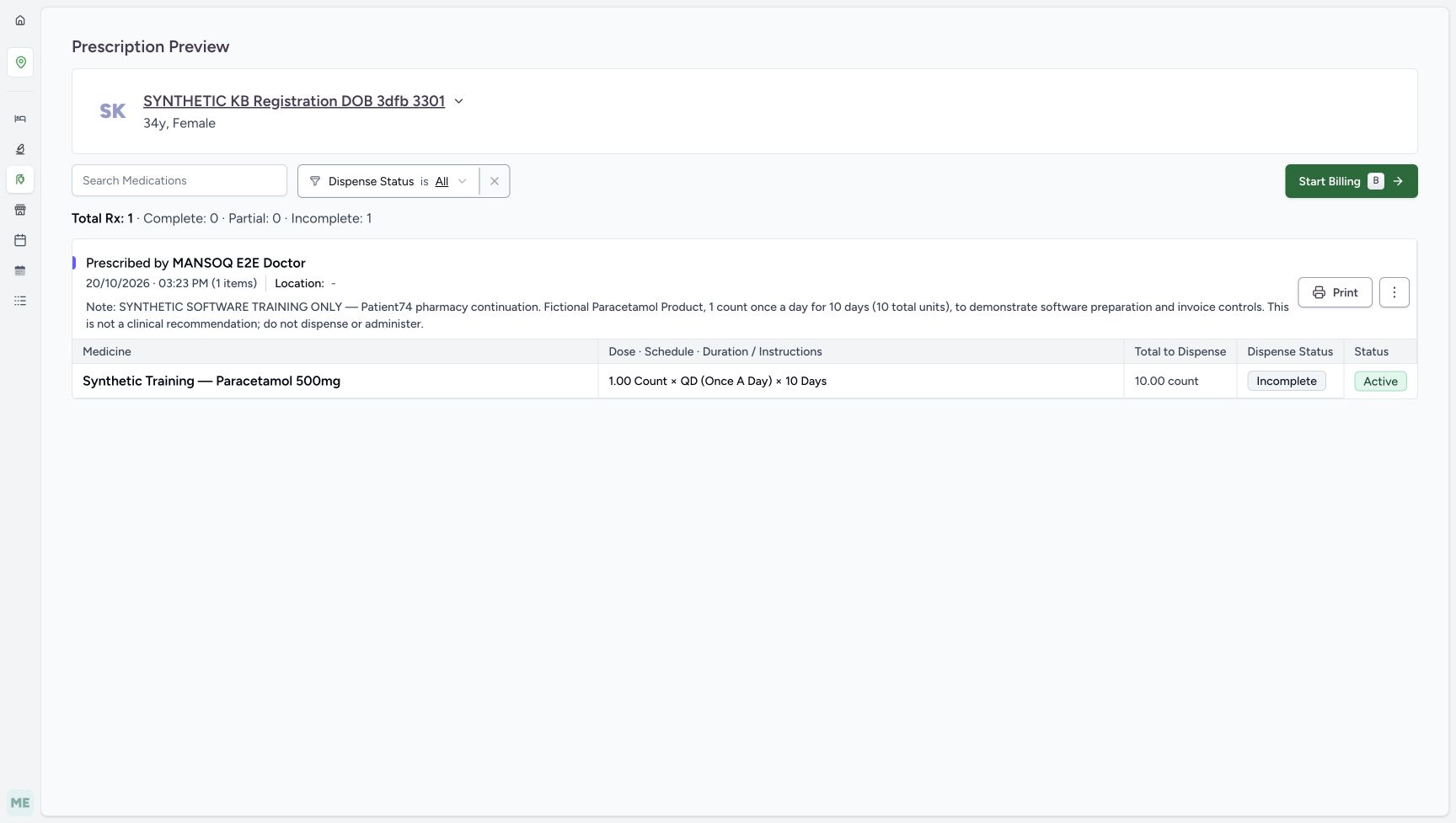
- Start from the existing one-row Synthetic Training — Paracetamol 500mg prescription: 1 count, QD, 10 days and total 10 count. Its saved note explicitly states fictional software training only and says not to dispense or administer. The illustrated patient has no insurance coverage in this bounded self-pay case.
 12345
12345Recorded release d20e68ed · 2026-10-20T12:40:19.544Z · 1728 × 977 Ten-count prescription preview
Capture details
Genuine natural native capture of exact local d20e build; source publication LOCAL_UNPUSHED. Original pixels are unchanged. This fictional self-pay software recording establishes only the illustrated ledger and dispense states; no actual medicine, money, provider movement, payer exchange or external tax clearance is qualified.
Image SHA-256
49a4e205ff5ff7fa8b29892f419b28b382a8669b4bcd7da27e70095282559aeb- Check patient identity again: The preview belongs to the same assigned synthetic patient.
- Read the fictional schedule: The existing prescription is 1.00 count, QD, 10 days.
- Read total to dispense 10: The preview calculates 10.00 count for this software example.
- Read the explicit software-only note: The saved Doctor note states this is fictional software training and says not to dispense or administer.
- Choose Start Billing: This begins the billing form for the existing prescription; Print is a separate unused action.
- This is a synthetic software exercise. No actual medicine or money is supplied. This first lesson ends with an unpaid Draft invoice and a medicine row in Preparation. Invoice issuance, payment, balancing and order completion are separate later actions.12345
Recorded release d20e68ed · 2026-10-20T12:41:31.778Z · 1728 × 977 Saved ten-count Preparation and Draft invoice for 63.00
Capture details
Genuine natural native capture of exact local d20e build; source publication LOCAL_UNPUSHED. Original pixels are unchanged. This fictional self-pay software recording establishes only the illustrated ledger and dispense states; no actual medicine, money, provider movement, payer exchange or external tax clearance is qualified.
Image SHA-256
7a2d0515952bd0efac0a4b0171c947d606892242c940971e8422d4654ba8d612- Read the new order In Progress: One billing save created the order; its status is In Progress.
- Read Preparation on the medicine: The ten-count row is still Preparation, not Completed.
- Verify quantity ten: The saved prepared quantity is 10.
- Read the saved Draft invoice: The order shows a Draft Invoice totaling SAR 63.00.
- Open View Invoice: Review the generated invoice before any issue or payment action.
123456Recorded release d20e68ed · 2026-10-20T12:41:43.525Z · 1728 × 977 Generated Draft invoice before issue
Capture details
Genuine natural native capture of exact local d20e build; source publication LOCAL_UNPUSHED. Original pixels are unchanged. This fictional self-pay software recording establishes only the illustrated ledger and dispense states; no actual medicine, money, provider movement, payer exchange or external tax clearance is qualified.
Image SHA-256
3a2fd225abf450a03d4147107f1d93573fedf9f0caec1a41e4724724b271eff4- Match INV-114-26 and Draft: This is the generated Draft invoice for the assigned patient.
- Read invoice total 63.00: The final generated invoice total is SAR 63.00.
- Read zero received: No payment has yet been recorded.
- Read balance due 63.00: The invoice still has its full balance due.
- Check the one invoice line: The line shows unit price 6.30, quantity 10.00 and total 63.00.
- Use Back to the order: The recorded workflow returned to the same order; invoice viewing did not create another bill.
1. Match the patient and open View Rx
In Prescription Queue, match SYNTHETIC KB Registration DOB 3dfb 3301 and MANSOQ E2E Doctor’s October 20, 03:23 PM prescription. Choose View Rx on that row. View Rx, Bill Now and New Dispense are separate entries; the recorded workflow begins by reviewing the existing prescription.
123Assigned patient and existing prescription queue row
Capture details
Genuine natural native capture of exact local d20e build; source publication LOCAL_UNPUSHED. Original pixels are unchanged. This fictional self-pay software recording establishes only the illustrated ledger and dispense states; no actual medicine, money, provider movement, payer exchange or external tax clearance is qualified.
Image SHA-256 2c5c6ef824d2d6e862672d9d1283a7ee14c0ac4d69861d0faf9f823ae74b9634
- Match the assigned synthetic patient: Choose the existing SYNTHETIC KB Registration DOB 3dfb 3301 row.
- Match the Doctor prescription time: The assigned row is attributed to MANSOQ E2E Doctor at 03:23 PM on October 20.
- Open View Rx: Preview the existing prescription rather than starting a separate New Dispense.
2. Review the existing prescription before billing
Read the patient banner, the exact software-only Doctor note and the single Synthetic Training — Paracetamol 500mg row. The preview shows 1.00 Count, QD (Once A Day), 10 Days and Total to Dispense 10.00 count, with Incomplete dispense status and Active medication status at this starting point. Choose Start Billing; Print is a separate unperformed action.
12345Ten-count prescription preview
Capture details
Genuine natural native capture of exact local d20e build; source publication LOCAL_UNPUSHED. Original pixels are unchanged. This fictional self-pay software recording establishes only the illustrated ledger and dispense states; no actual medicine, money, provider movement, payer exchange or external tax clearance is qualified.
Image SHA-256 49a4e205ff5ff7fa8b29892f419b28b382a8669b4bcd7da27e70095282559aeb
- Check patient identity again: The preview belongs to the same assigned synthetic patient.
- Read the fictional schedule: The existing prescription is 1.00 count, QD, 10 days.
- Read total to dispense 10: The preview calculates 10.00 count for this software example.
- Read the explicit software-only note: The saved Doctor note states this is fictional software training and says not to dispense or administer.
- Choose Start Billing: This begins the billing form for the existing prescription; Print is a separate unused action.
 12345678
Reviewed full-quantity billing defaults
Capture details
Genuine natural native capture of exact local d20e build; source publication LOCAL_UNPUSHED. Original pixels are unchanged. This fictional self-pay software recording establishes only the illustrated ledger and dispense states; no actual medicine, money, provider movement, payer exchange or external tax clearance is qualified.
Image SHA-256 2dfc4c6bbc6918d1fb05bfa43ea385bb2d6085620c20072232f4b25ddfb97fcb
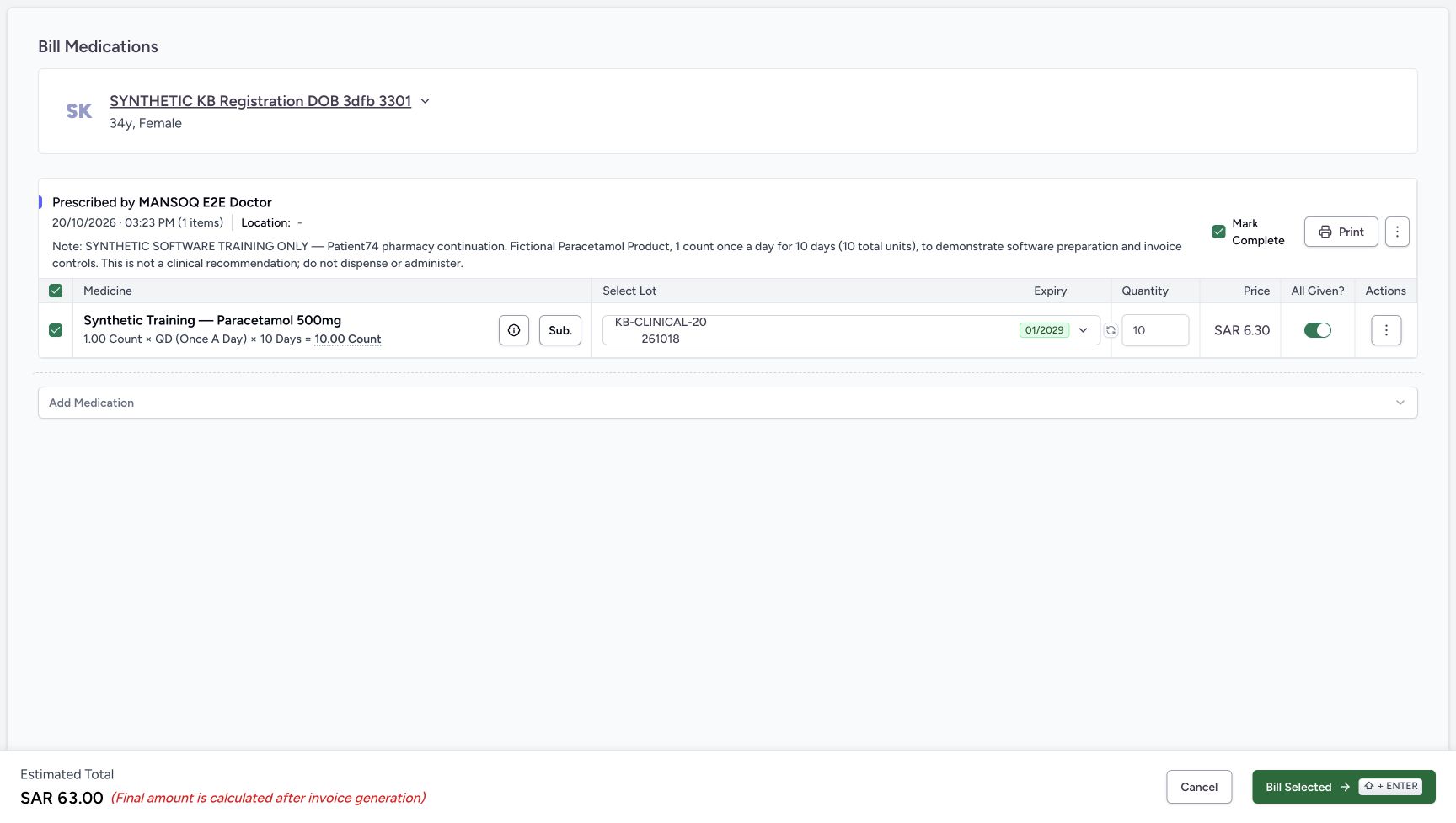
- Keep the single intended row selected: Only the illustrated synthetic Product row is selected.
- Review quantity ten: The form supplies the full 10 count quantity for the fictional course.
- Open Select Lot: Review the selected stock lot rather than replacing the Product.
- Read unit price 6.30: The selected lot has a unit price of SAR 6.30.
- Review All Given: All Given is on for the full supplied quantity; it is distinct from the prescription-level checkbox.
- Review Mark Complete: The prescription-level Mark Complete is checked; it is separate from completing the dispense order later.
- Read estimated total 63.00: The footer says the final amount is calculated after invoice generation.
- Bill Selected once: After reviewing the exact patient, row, lot and quantity, the recorded Pharmacist submitted one selected row.
3. Review the full-quantity defaults and separate controls
The single intended Product row is selected. Quantity is 10, All Given is on and the prescription-level Mark Complete checkbox is checked. All Given records the supplied-quantity decision for the medicine request; Mark Complete controls the prescription’s status when billing is saved. They do not complete the dispense order. Keep the illustrated fictional values and do not add another medicine.
12345678Reviewed full-quantity billing defaults
Capture details
Genuine natural native capture of exact local d20e build; source publication LOCAL_UNPUSHED. Original pixels are unchanged. This fictional self-pay software recording establishes only the illustrated ledger and dispense states; no actual medicine, money, provider movement, payer exchange or external tax clearance is qualified.
Image SHA-256 2dfc4c6bbc6918d1fb05bfa43ea385bb2d6085620c20072232f4b25ddfb97fcb
- Keep the single intended row selected: Only the illustrated synthetic Product row is selected.
- Review quantity ten: The form supplies the full 10 count quantity for the fictional course.
- Open Select Lot: Review the selected stock lot rather than replacing the Product.
- Read unit price 6.30: The selected lot has a unit price of SAR 6.30.
- Review All Given: All Given is on for the full supplied quantity; it is distinct from the prescription-level checkbox.
- Review Mark Complete: The prescription-level Mark Complete is checked; it is separate from completing the dispense order later.
- Read estimated total 63.00: The footer says the final amount is calculated after invoice generation.
- Bill Selected once: After reviewing the exact patient, row, lot and quantity, the recorded Pharmacist submitted one selected row.
4. Review the selected stock lot and estimate
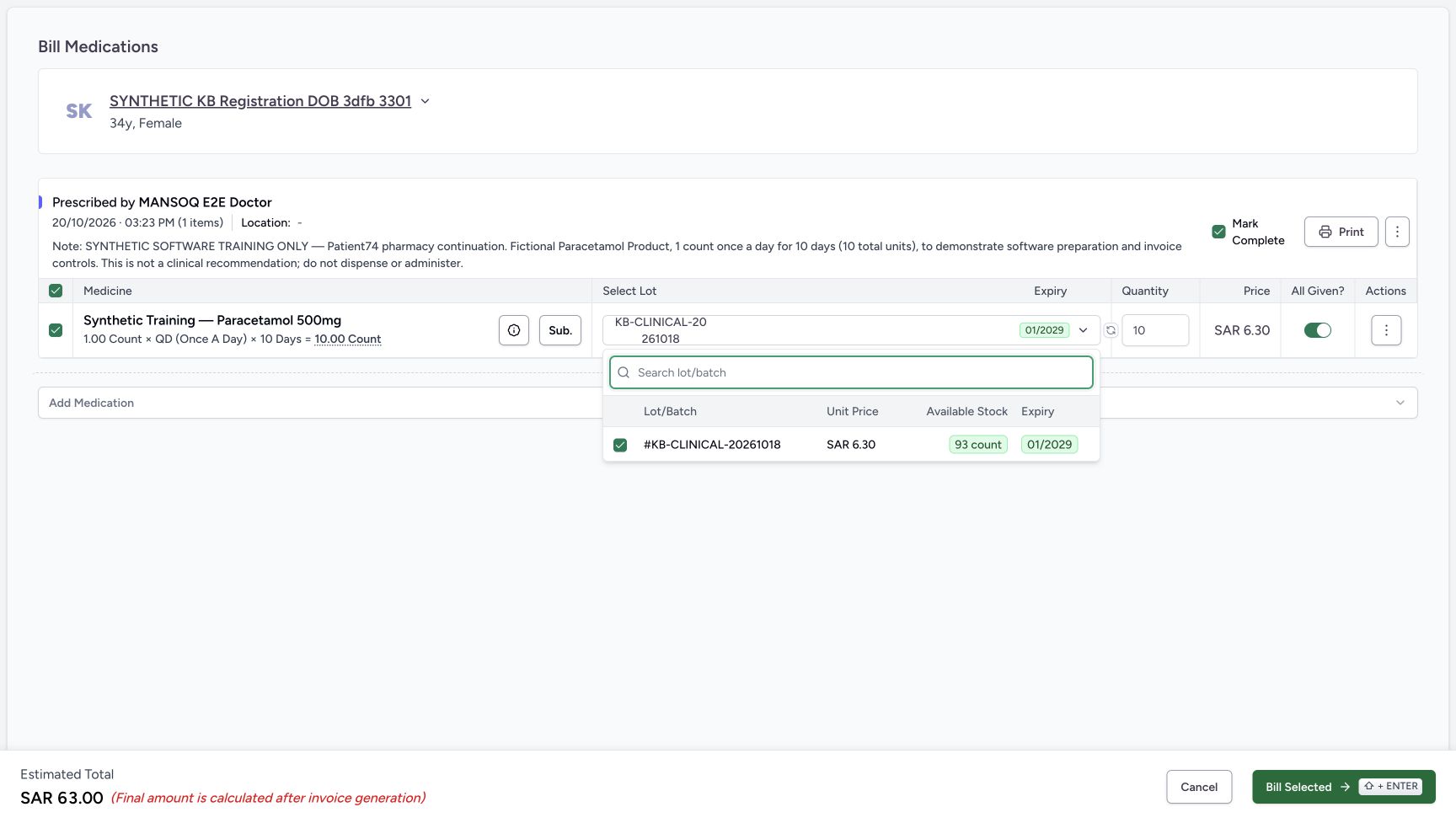
Open Select Lot and inspect the already selected KB-CLINICAL-20261018 lot. It shows SAR 6.30 unit price, 93 count available and expiry 01/2029. No different lot or Product was selected. Press Escape to close the lot list and return to the same billing form, retaining the selected batch and quantity. The footer estimate is SAR 63.00 and explicitly says the final amount is calculated after invoice generation.
12345678Reviewed full-quantity billing defaults
Capture details
Genuine natural native capture of exact local d20e build; source publication LOCAL_UNPUSHED. Original pixels are unchanged. This fictional self-pay software recording establishes only the illustrated ledger and dispense states; no actual medicine, money, provider movement, payer exchange or external tax clearance is qualified.
Image SHA-256 2dfc4c6bbc6918d1fb05bfa43ea385bb2d6085620c20072232f4b25ddfb97fcb
- Keep the single intended row selected: Only the illustrated synthetic Product row is selected.
- Review quantity ten: The form supplies the full 10 count quantity for the fictional course.
- Open Select Lot: Review the selected stock lot rather than replacing the Product.
- Read unit price 6.30: The selected lot has a unit price of SAR 6.30.
- Review All Given: All Given is on for the full supplied quantity; it is distinct from the prescription-level checkbox.
- Review Mark Complete: The prescription-level Mark Complete is checked; it is separate from completing the dispense order later.
- Read estimated total 63.00: The footer says the final amount is calculated after invoice generation.
- Bill Selected once: After reviewing the exact patient, row, lot and quantity, the recorded Pharmacist submitted one selected row.
 1234
1234Selected lot with 93 count available
Capture details
Genuine natural native capture of exact local d20e build; source publication LOCAL_UNPUSHED. Original pixels are unchanged. This fictional self-pay software recording establishes only the illustrated ledger and dispense states; no actual medicine, money, provider movement, payer exchange or external tax clearance is qualified.
Image SHA-256 b932770a05ee94757b859428e8315d738cdcef38da658eaacc324dfe1429523d
- Read the selected lot: The checked lot is KB-CLINICAL-20261018; no different lot was selected.
- Read the lot unit price: The lot list shows SAR 6.30.
- Read available stock 93: Available Stock shows 93 count before the one billing save.
- Read expiry 01/2029: The selected lot expiry is January 2029.
5. Bill the selected row once
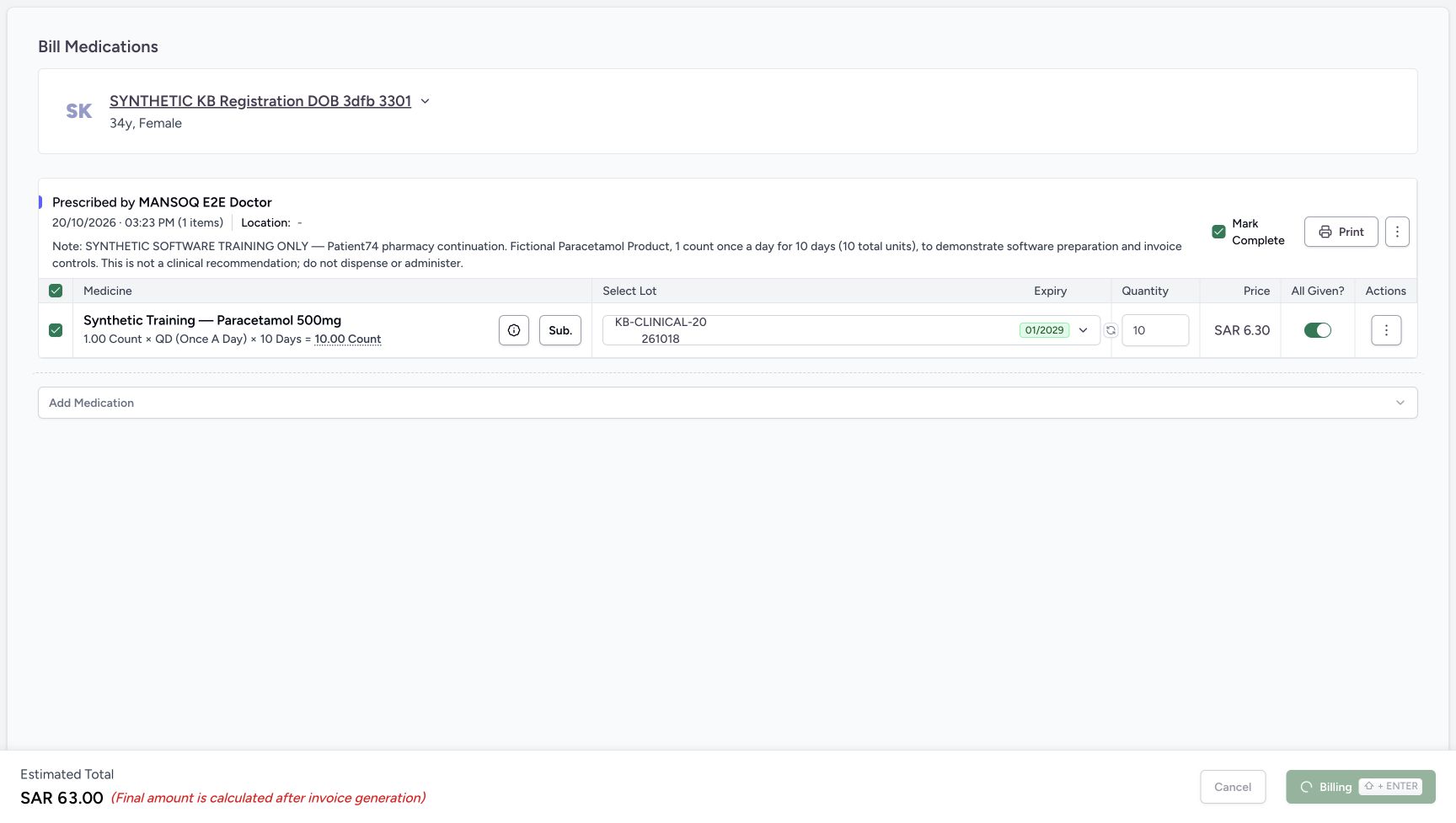
Review the patient, selected Product row, quantity 10, chosen lot, All Given and Mark Complete once more. Choose Bill Selected once. The immediate view shows Billing with the action disabled; wait for the settled order rather than submitting again.
12345678Reviewed full-quantity billing defaults
Capture details
Genuine natural native capture of exact local d20e build; source publication LOCAL_UNPUSHED. Original pixels are unchanged. This fictional self-pay software recording establishes only the illustrated ledger and dispense states; no actual medicine, money, provider movement, payer exchange or external tax clearance is qualified.
Image SHA-256 2dfc4c6bbc6918d1fb05bfa43ea385bb2d6085620c20072232f4b25ddfb97fcb
- Keep the single intended row selected: Only the illustrated synthetic Product row is selected.
- Review quantity ten: The form supplies the full 10 count quantity for the fictional course.
- Open Select Lot: Review the selected stock lot rather than replacing the Product.
- Read unit price 6.30: The selected lot has a unit price of SAR 6.30.
- Review All Given: All Given is on for the full supplied quantity; it is distinct from the prescription-level checkbox.
- Review Mark Complete: The prescription-level Mark Complete is checked; it is separate from completing the dispense order later.
- Read estimated total 63.00: The footer says the final amount is calculated after invoice generation.
- Bill Selected once: After reviewing the exact patient, row, lot and quantity, the recorded Pharmacist submitted one selected row.
 1
1Billing request pending
Capture details
Genuine natural native capture of exact local d20e build; source publication LOCAL_UNPUSHED. Original pixels are unchanged. This fictional self-pay software recording establishes only the illustrated ledger and dispense states; no actual medicine, money, provider movement, payer exchange or external tax clearance is qualified.
Image SHA-256 36a9453e0ee70661ac532d5a9b6bcdfe4f347f1d2b061f7cb2c5cb2433cc0175
- Wait while billing is pending: The footer shows Billing with a disabled action; this is not yet the settled saved order.
6. Inspect the saved ten-count Preparation row
The saved order opens In Progress. Its existing synthetic Product row has quantity 10 and medicine status Preparation. A Draft Invoice totals SAR 63.00. Complete Dispense is disabled and the footer says to settle pending invoices before completion. A prescription marked complete during billing is therefore still distinct from this unfinished dispense order.
12345Saved ten-count Preparation and Draft invoice for 63.00
Capture details
Genuine natural native capture of exact local d20e build; source publication LOCAL_UNPUSHED. Original pixels are unchanged. This fictional self-pay software recording establishes only the illustrated ledger and dispense states; no actual medicine, money, provider movement, payer exchange or external tax clearance is qualified.
Image SHA-256 7a2d0515952bd0efac0a4b0171c947d606892242c940971e8422d4654ba8d612
- Read the new order In Progress: One billing save created the order; its status is In Progress.
- Read Preparation on the medicine: The ten-count row is still Preparation, not Completed.
- Verify quantity ten: The saved prepared quantity is 10.
- Read the saved Draft invoice: The order shows a Draft Invoice totaling SAR 63.00.
- Open View Invoice: Review the generated invoice before any issue or payment action.
7. Open the generated Draft invoice
Choose View Invoice. Match INV-114-26 and Draft. The one line shows unit price SAR 6.30, quantity 10.00 and total SAR 63.00; the invoice summary shows SAR 63.00 total, SAR 0.00 received and SAR 63.00 balance due. This confirms the generated total rather than relying solely on the earlier estimate. The account header separately shows Active and SAR 63.00 due.
12345Saved ten-count Preparation and Draft invoice for 63.00
Capture details
Genuine natural native capture of exact local d20e build; source publication LOCAL_UNPUSHED. Original pixels are unchanged. This fictional self-pay software recording establishes only the illustrated ledger and dispense states; no actual medicine, money, provider movement, payer exchange or external tax clearance is qualified.
Image SHA-256 7a2d0515952bd0efac0a4b0171c947d606892242c940971e8422d4654ba8d612
- Read the new order In Progress: One billing save created the order; its status is In Progress.
- Read Preparation on the medicine: The ten-count row is still Preparation, not Completed.
- Verify quantity ten: The saved prepared quantity is 10.
- Read the saved Draft invoice: The order shows a Draft Invoice totaling SAR 63.00.
- Open View Invoice: Review the generated invoice before any issue or payment action.
123456Generated Draft invoice before issue
Capture details
Genuine natural native capture of exact local d20e build; source publication LOCAL_UNPUSHED. Original pixels are unchanged. This fictional self-pay software recording establishes only the illustrated ledger and dispense states; no actual medicine, money, provider movement, payer exchange or external tax clearance is qualified.
Image SHA-256 3a2fd225abf450a03d4147107f1d93573fedf9f0caec1a41e4724724b271eff4
- Match INV-114-26 and Draft: This is the generated Draft invoice for the assigned patient.
- Read invoice total 63.00: The final generated invoice total is SAR 63.00.
- Read zero received: No payment has yet been recorded.
- Read balance due 63.00: The invoice still has its full balance due.
- Check the one invoice line: The line shows unit price 6.30, quantity 10.00 and total 63.00.
- Use Back to the order: The recorded workflow returned to the same order; invoice viewing did not create another bill.
8. Return to the same unpaid order
Use Back from the invoice view. The same order still shows In Progress, quantity 10 in Preparation and the Draft Invoice for SAR 63.00. Viewing the invoice and returning did not create another bill. Stop here for the preparation lesson; the next lesson starts with Issue Invoice on this order’s banner.
123456Generated Draft invoice before issue
Capture details
Genuine natural native capture of exact local d20e build; source publication LOCAL_UNPUSHED. Original pixels are unchanged. This fictional self-pay software recording establishes only the illustrated ledger and dispense states; no actual medicine, money, provider movement, payer exchange or external tax clearance is qualified.
Image SHA-256 3a2fd225abf450a03d4147107f1d93573fedf9f0caec1a41e4724724b271eff4
- Match INV-114-26 and Draft: This is the generated Draft invoice for the assigned patient.
- Read invoice total 63.00: The final generated invoice total is SAR 63.00.
- Read zero received: No payment has yet been recorded.
- Read balance due 63.00: The invoice still has its full balance due.
- Check the one invoice line: The line shows unit price 6.30, quantity 10.00 and total 63.00.
- Use Back to the order: The recorded workflow returned to the same order; invoice viewing did not create another bill.
 12
12Order-banner Issue Invoice entry
Capture details
Genuine natural native capture of exact local d20e build; source publication LOCAL_UNPUSHED. Original pixels are unchanged. This fictional self-pay software recording establishes only the illustrated ledger and dispense states; no actual medicine, money, provider movement, payer exchange or external tax clearance is qualified.
Image SHA-256 7a2d0515952bd0efac0a4b0171c947d606892242c940971e8422d4654ba8d612
- Issue from the order banner: The recorded issue action used this Issue Invoice control, after returning from invoice review.
- Check the same Draft amount before issue: The order still shows Draft SAR 63.00 at this checkpoint.
Keep prescription, preparation and order completion distinct
The full-quantity billing form had All Given on and Mark Complete checked. The saved result still showed a Preparation medicine row and an In Progress dispense order. Those statuses belong to different software records. Use their actual saved labels; a full quantity or completed prescription does not prove physical handover or a completed dispense order.
12345678Reviewed full-quantity billing defaults
Capture details
Genuine natural native capture of exact local d20e build; source publication LOCAL_UNPUSHED. Original pixels are unchanged. This fictional self-pay software recording establishes only the illustrated ledger and dispense states; no actual medicine, money, provider movement, payer exchange or external tax clearance is qualified.
Image SHA-256 2dfc4c6bbc6918d1fb05bfa43ea385bb2d6085620c20072232f4b25ddfb97fcb
- Keep the single intended row selected: Only the illustrated synthetic Product row is selected.
- Review quantity ten: The form supplies the full 10 count quantity for the fictional course.
- Open Select Lot: Review the selected stock lot rather than replacing the Product.
- Read unit price 6.30: The selected lot has a unit price of SAR 6.30.
- Review All Given: All Given is on for the full supplied quantity; it is distinct from the prescription-level checkbox.
- Review Mark Complete: The prescription-level Mark Complete is checked; it is separate from completing the dispense order later.
- Read estimated total 63.00: The footer says the final amount is calculated after invoice generation.
- Bill Selected once: After reviewing the exact patient, row, lot and quantity, the recorded Pharmacist submitted one selected row.
12345Saved ten-count Preparation and Draft invoice for 63.00
Capture details
Genuine natural native capture of exact local d20e build; source publication LOCAL_UNPUSHED. Original pixels are unchanged. This fictional self-pay software recording establishes only the illustrated ledger and dispense states; no actual medicine, money, provider movement, payer exchange or external tax clearance is qualified.
Image SHA-256 7a2d0515952bd0efac0a4b0171c947d606892242c940971e8422d4654ba8d612
- Read the new order In Progress: One billing save created the order; its status is In Progress.
- Read Preparation on the medicine: The ten-count row is still Preparation, not Completed.
- Verify quantity ten: The saved prepared quantity is 10.
- Read the saved Draft invoice: The order shows a Draft Invoice totaling SAR 63.00.
- Open View Invoice: Review the generated invoice before any issue or payment action.
12Order-banner Issue Invoice entry
Capture details
Genuine natural native capture of exact local d20e build; source publication LOCAL_UNPUSHED. Original pixels are unchanged. This fictional self-pay software recording establishes only the illustrated ledger and dispense states; no actual medicine, money, provider movement, payer exchange or external tax clearance is qualified.
Image SHA-256 7a2d0515952bd0efac0a4b0171c947d606892242c940971e8422d4654ba8d612
- Issue from the order banner: The recorded issue action used this Issue Invoice control, after returning from invoice review.
- Check the same Draft amount before issue: The order still shows Draft SAR 63.00 at this checkpoint.
Read the recorded stock and invoice result
The selected lot showed 93 count before Bill Selected. The saved-record check established that this one ten-count preparation changed the checked available stock from 93 to 83 and created one order, one medicine row, one account, one charge and one Draft invoice. No payment existed at this point. The generated invoice was exactly SAR 63.00 in this case. The displayed invoice layout does not by itself establish external tax clearance, payer processing or real collection.
1234Selected lot with 93 count available
Capture details
Genuine natural native capture of exact local d20e build; source publication LOCAL_UNPUSHED. Original pixels are unchanged. This fictional self-pay software recording establishes only the illustrated ledger and dispense states; no actual medicine, money, provider movement, payer exchange or external tax clearance is qualified.
Image SHA-256 b932770a05ee94757b859428e8315d738cdcef38da658eaacc324dfe1429523d
- Read the selected lot: The checked lot is KB-CLINICAL-20261018; no different lot was selected.
- Read the lot unit price: The lot list shows SAR 6.30.
- Read available stock 93: Available Stock shows 93 count before the one billing save.
- Read expiry 01/2029: The selected lot expiry is January 2029.
12345Saved ten-count Preparation and Draft invoice for 63.00
Capture details
Genuine natural native capture of exact local d20e build; source publication LOCAL_UNPUSHED. Original pixels are unchanged. This fictional self-pay software recording establishes only the illustrated ledger and dispense states; no actual medicine, money, provider movement, payer exchange or external tax clearance is qualified.
Image SHA-256 7a2d0515952bd0efac0a4b0171c947d606892242c940971e8422d4654ba8d612
- Read the new order In Progress: One billing save created the order; its status is In Progress.
- Read Preparation on the medicine: The ten-count row is still Preparation, not Completed.
- Verify quantity ten: The saved prepared quantity is 10.
- Read the saved Draft invoice: The order shows a Draft Invoice totaling SAR 63.00.
- Open View Invoice: Review the generated invoice before any issue or payment action.
123456Generated Draft invoice before issue
Capture details
Genuine natural native capture of exact local d20e build; source publication LOCAL_UNPUSHED. Original pixels are unchanged. This fictional self-pay software recording establishes only the illustrated ledger and dispense states; no actual medicine, money, provider movement, payer exchange or external tax clearance is qualified.
Image SHA-256 3a2fd225abf450a03d4147107f1d93573fedf9f0caec1a41e4724724b271eff4
- Match INV-114-26 and Draft: This is the generated Draft invoice for the assigned patient.
- Read invoice total 63.00: The final generated invoice total is SAR 63.00.
- Read zero received: No payment has yet been recorded.
- Read balance due 63.00: The invoice still has its full balance due.
- Check the one invoice line: The line shows unit price 6.30, quantity 10.00 and total 63.00.
- Use Back to the order: The recorded workflow returned to the same order; invoice viewing did not create another bill.
Troubleshooting
Billing is still displayed on the action button
The immediate capture is a pending state with the action disabled. Do not repeat Bill Selected while it is pending. Inspect the settled order, patient, quantity, medicine status and invoice before continuing.
1Billing request pending
Capture details
Genuine natural native capture of exact local d20e build; source publication LOCAL_UNPUSHED. Original pixels are unchanged. This fictional self-pay software recording establishes only the illustrated ledger and dispense states; no actual medicine, money, provider movement, payer exchange or external tax clearance is qualified.
Image SHA-256 36a9453e0ee70661ac532d5a9b6bcdfe4f347f1d2b061f7cb2c5cb2433cc0175
- Wait while billing is pending: The footer shows Billing with a disabled action; this is not yet the settled saved order.
12345Saved ten-count Preparation and Draft invoice for 63.00
Capture details
Genuine natural native capture of exact local d20e build; source publication LOCAL_UNPUSHED. Original pixels are unchanged. This fictional self-pay software recording establishes only the illustrated ledger and dispense states; no actual medicine, money, provider movement, payer exchange or external tax clearance is qualified.
Image SHA-256 7a2d0515952bd0efac0a4b0171c947d606892242c940971e8422d4654ba8d612
- Read the new order In Progress: One billing save created the order; its status is In Progress.
- Read Preparation on the medicine: The ten-count row is still Preparation, not Completed.
- Verify quantity ten: The saved prepared quantity is 10.
- Read the saved Draft invoice: The order shows a Draft Invoice totaling SAR 63.00.
- Open View Invoice: Review the generated invoice before any issue or payment action.
Mark Complete was checked but Complete Dispense is disabled
The checkbox belongs to the prescription at billing time. Complete Dispense belongs to the saved order and is gated separately by its billable items and invoice settlement. In this unpaid Draft state, the medicine remains Preparation and order completion is disabled.
12345678Reviewed full-quantity billing defaults
Capture details
Genuine natural native capture of exact local d20e build; source publication LOCAL_UNPUSHED. Original pixels are unchanged. This fictional self-pay software recording establishes only the illustrated ledger and dispense states; no actual medicine, money, provider movement, payer exchange or external tax clearance is qualified.
Image SHA-256 2dfc4c6bbc6918d1fb05bfa43ea385bb2d6085620c20072232f4b25ddfb97fcb
- Keep the single intended row selected: Only the illustrated synthetic Product row is selected.
- Review quantity ten: The form supplies the full 10 count quantity for the fictional course.
- Open Select Lot: Review the selected stock lot rather than replacing the Product.
- Read unit price 6.30: The selected lot has a unit price of SAR 6.30.
- Review All Given: All Given is on for the full supplied quantity; it is distinct from the prescription-level checkbox.
- Review Mark Complete: The prescription-level Mark Complete is checked; it is separate from completing the dispense order later.
- Read estimated total 63.00: The footer says the final amount is calculated after invoice generation.
- Bill Selected once: After reviewing the exact patient, row, lot and quantity, the recorded Pharmacist submitted one selected row.
12345Saved ten-count Preparation and Draft invoice for 63.00
Capture details
Genuine natural native capture of exact local d20e build; source publication LOCAL_UNPUSHED. Original pixels are unchanged. This fictional self-pay software recording establishes only the illustrated ledger and dispense states; no actual medicine, money, provider movement, payer exchange or external tax clearance is qualified.
Image SHA-256 7a2d0515952bd0efac0a4b0171c947d606892242c940971e8422d4654ba8d612
- Read the new order In Progress: One billing save created the order; its status is In Progress.
- Read Preparation on the medicine: The ten-count row is still Preparation, not Completed.
- Verify quantity ten: The saved prepared quantity is 10.
- Read the saved Draft invoice: The order shows a Draft Invoice totaling SAR 63.00.
- Open View Invoice: Review the generated invoice before any issue or payment action.
12Order-banner Issue Invoice entry
Capture details
Genuine natural native capture of exact local d20e build; source publication LOCAL_UNPUSHED. Original pixels are unchanged. This fictional self-pay software recording establishes only the illustrated ledger and dispense states; no actual medicine, money, provider movement, payer exchange or external tax clearance is qualified.
Image SHA-256 7a2d0515952bd0efac0a4b0171c947d606892242c940971e8422d4654ba8d612
- Issue from the order banner: The recorded issue action used this Issue Invoice control, after returning from invoice review.
- Check the same Draft amount before issue: The order still shows Draft SAR 63.00 at this checkpoint.
Source evidence
Every citation uses this exact committed version. The private source repository requires access.
- repositories/platform/mansoq-web/src/pages/Facility/services/pharmacy/PrescriptionQueue.tsx:250 ·
d20e68ed4a9e0b005aa54f218f84172160974b02Source file checksum
20c2f3e573ae315ec5ff79b19575c1a6e3b2f7ca76b5e98bad319ef595b11d04 - repositories/platform/mansoq-web/src/pages/Facility/services/pharmacy/PrescriptionsPreviewPage.tsx:117 ·
d20e68ed4a9e0b005aa54f218f84172160974b02Source file checksum
2a76a064861548bc2d0c5e036bbc9a2ec448582cb8bcb3e970c05a8362498a2e - repositories/platform/mansoq-web/src/pages/Facility/services/pharmacy/billMedications/BillMedicationsPrescriptionCard.tsx:291 ·
d20e68ed4a9e0b005aa54f218f84172160974b02Source file checksum
e64b9b9ffbc8388dba86070d36c8acef28639ac6166f650ca3586b43e9ac3134 - repositories/platform/mansoq-web/src/pages/Facility/services/pharmacy/billMedications/modes/usePrescriptionsMode.ts:123 ·
d20e68ed4a9e0b005aa54f218f84172160974b02Source file checksum
a1f6bfb990ce68bf774a2c1208d914287710742fdb8c891031a38d09636daf1e - repositories/platform/mansoq-web/src/pages/Facility/services/pharmacy/billMedications/utils/useInventoryItemsAutoSelect.ts:28 ·
d20e68ed4a9e0b005aa54f218f84172160974b02Source file checksum
689be89ed73722f369100ad448b2ceb37e559bb86a354edbd63393cc8d61af9b - repositories/platform/mansoq-web/src/pages/Facility/services/pharmacy/billMedications/utils/useBillMedications.ts:139 ·
d20e68ed4a9e0b005aa54f218f84172160974b02Source file checksum
ac95fb2bf082bbb0e911754db978a5c4be73078def98c944d634db2713810b8d - repositories/platform/mansoq-web/src/pages/Facility/services/pharmacy/billMedications/BillMedicationsFooter.tsx:26 ·
d20e68ed4a9e0b005aa54f218f84172160974b02Source file checksum
5a2167f3e4ae3c332f8da9b7076d6339c891543cb41fa43534256c826300c048 - repositories/platform/mansoq-web/src/pages/Facility/services/pharmacy/DispenseOrderView.tsx:268 ·
d20e68ed4a9e0b005aa54f218f84172160974b02Source file checksum
59bebd01a2422d3b62d5e57b0f3a9211d5eb03ddd94f81704e3dbecd47cd197d - repositories/platform/mansoq-web/src/pages/Facility/billing/invoice/InvoiceShow.tsx:498 ·
d20e68ed4a9e0b005aa54f218f84172160974b02Source file checksum
9068995fbe413fe3e14031d9c832943cc14d9188a5f72be91d3c16baa53fc6ff - repositories/platform/mansoq-core/mansoq/emr/api/viewsets/medication_dispense.py:90 ·
d20e68ed4a9e0b005aa54f218f84172160974b02Source file checksum
c1db5d5c78472ce05b7bf736c4563e0e4a29706c1f4d6b074304c112e89dd206 - repositories/platform/mansoq-core/mansoq/emr/resources/inventory/inventory_item/sync_inventory_item.py:71 ·
d20e68ed4a9e0b005aa54f218f84172160974b02Source file checksum
46256e24c4ef53004e128a1d73b58e994369b24bd2dbd74b717fa1c08f4b844e - repositories/platform/mansoq-core/mansoq/emr/api/viewsets/invoice.py:590 ·
d20e68ed4a9e0b005aa54f218f84172160974b02Source file checksum
03e73113c89d4be24b4f7ae6f0bf3d4538d8129774ce6dedd0272219530bb88e - repositories/platform/mansoq-core/mansoq/emr/resources/medication/dispense/spec.py:104 ·
d20e68ed4a9e0b005aa54f218f84172160974b02Source file checksum
e52a9ae743c750dd1a32ec8678ffc986406a42fa7d25940877af63de1a6862c7 - repositories/platform/mansoq-web/src/pages/Facility/services/inventory/DispenseLotSelector.tsx:146 ·
d20e68ed4a9e0b005aa54f218f84172160974b02Source file checksum
4153614e75921f3325472744644989be488f49762c6b694d777538969664b6dc - repositories/platform/mansoq-web/src/components/ui/popover.tsx:26 ·
d20e68ed4a9e0b005aa54f218f84172160974b02Source file checksum
b635874f5b605e1a82127de2e9d2207d319d5e7587fd12852a38fd5f8a64ab78