 MANSOQ
 Pharmacy · VERSION 6cdc3676
Cancel and reactivate a prescription with authorized access
Use an existing authorized Facility Admin account to reach Main Pharmacy normally, cancel one fictional prescription, verify its saved parent status separately from medicine fulfilment, and optionally reactivate the same record.
Facility Admin
 12
12Use the existing assigned account
Capture details
Actual6cdc existing authorized Facility Admin cancellation and optional reactivation of the same fictional B prescription. No Start Billing, Bill Selected, goods, invoice/payment or access change.
Image SHA-256 19c948c54f649e31836922ead9e7e0972444c6140d2c7ac019883c5d93f99f4f
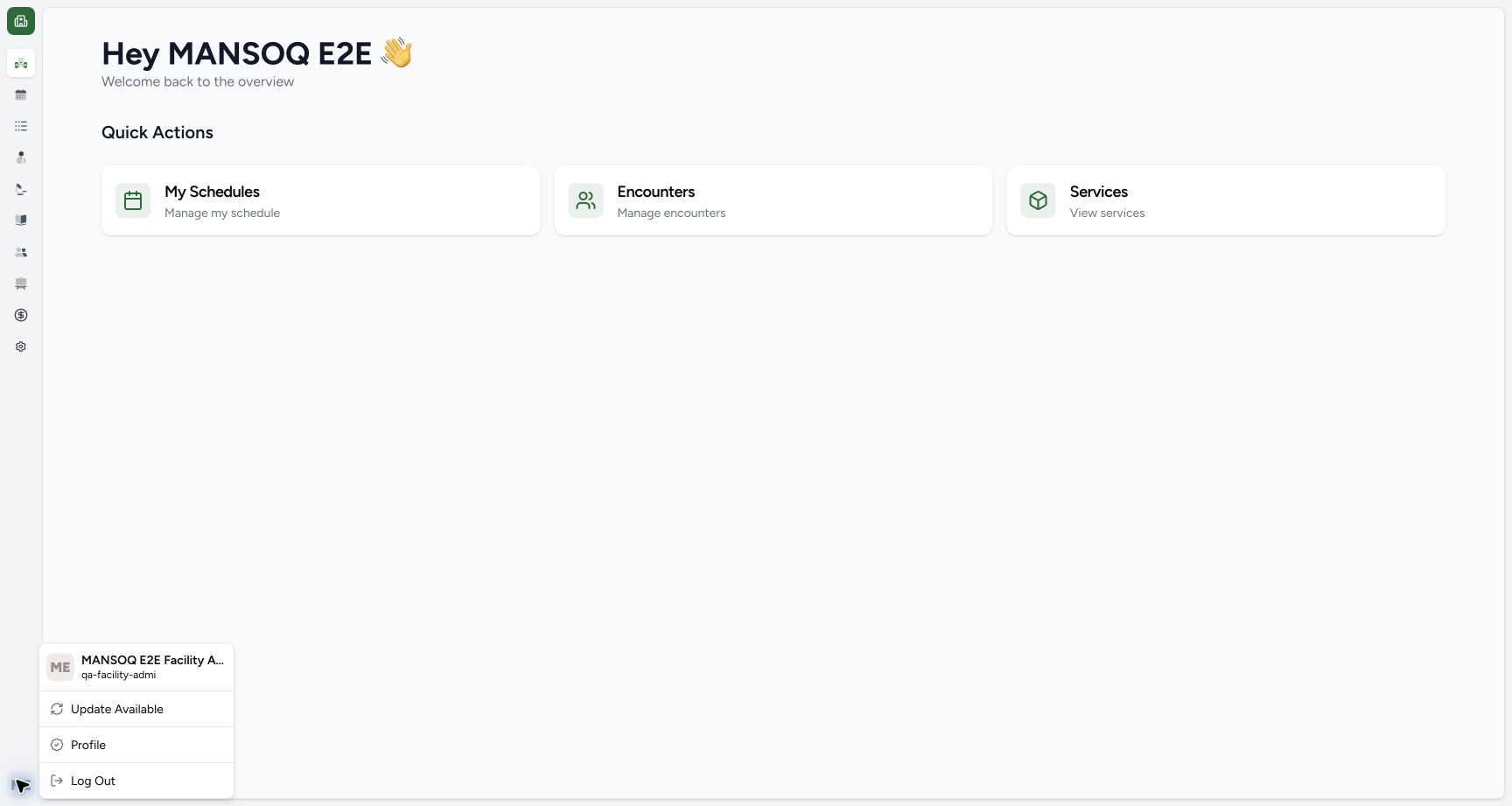
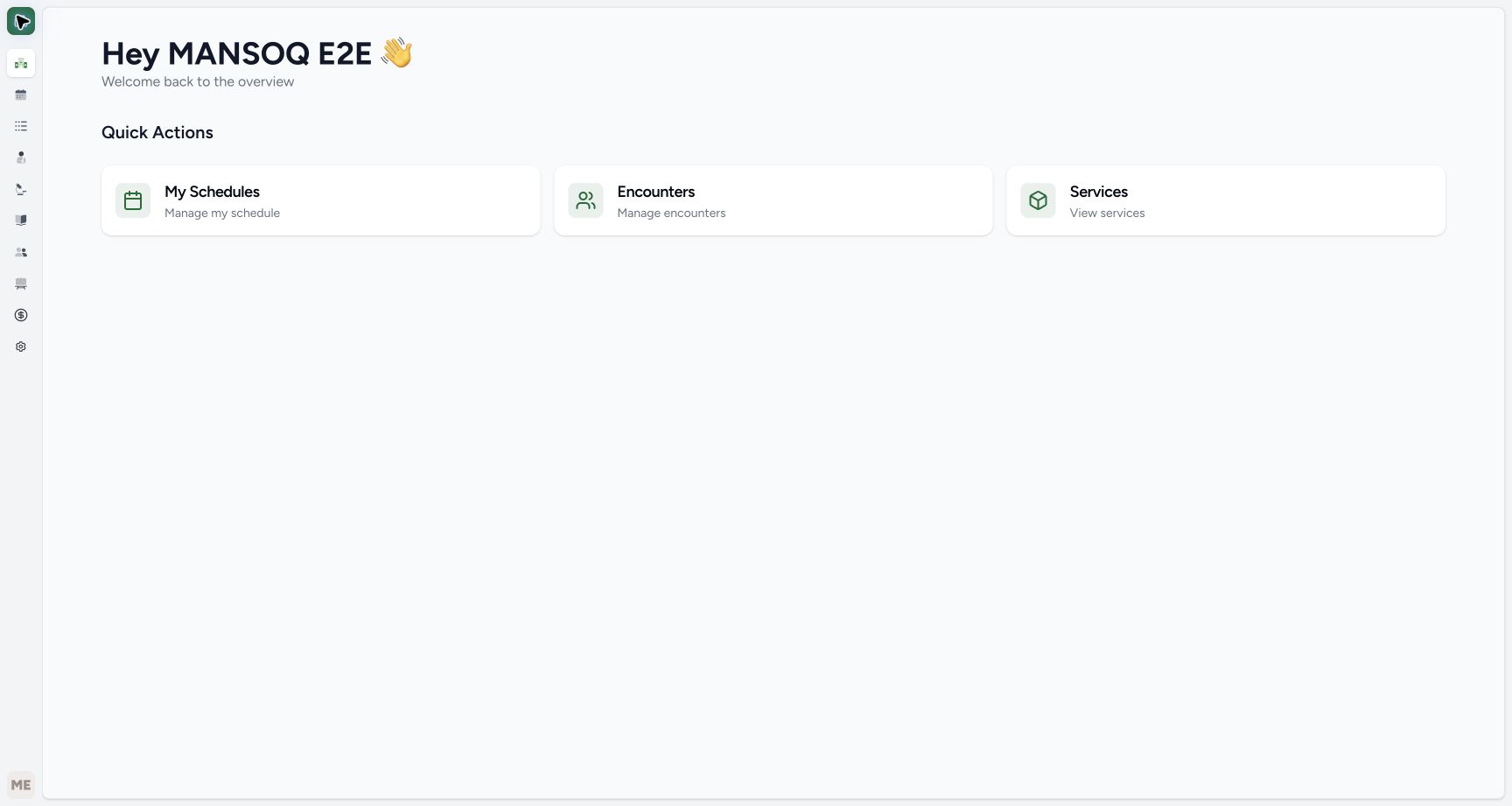
- Verify the assigned username: Use the existing qa-facility-admi account for this authorized example.
- Locate Services behind the account menu: Press Escape to close the account menu, then use Services on the clean overview shown next.
 1234
1234Read the settled Cancelled parent badge
Capture details
Actual6cdc existing authorized Facility Admin cancellation and optional reactivation of the same fictional B prescription. No Start Billing, Bill Selected, goods, invoice/payment or access change.
Image SHA-256 2a4494a3c72e772d6798d71c1cceb4a7913ead2ba0ef5b4ba8b4f4691a684c7c
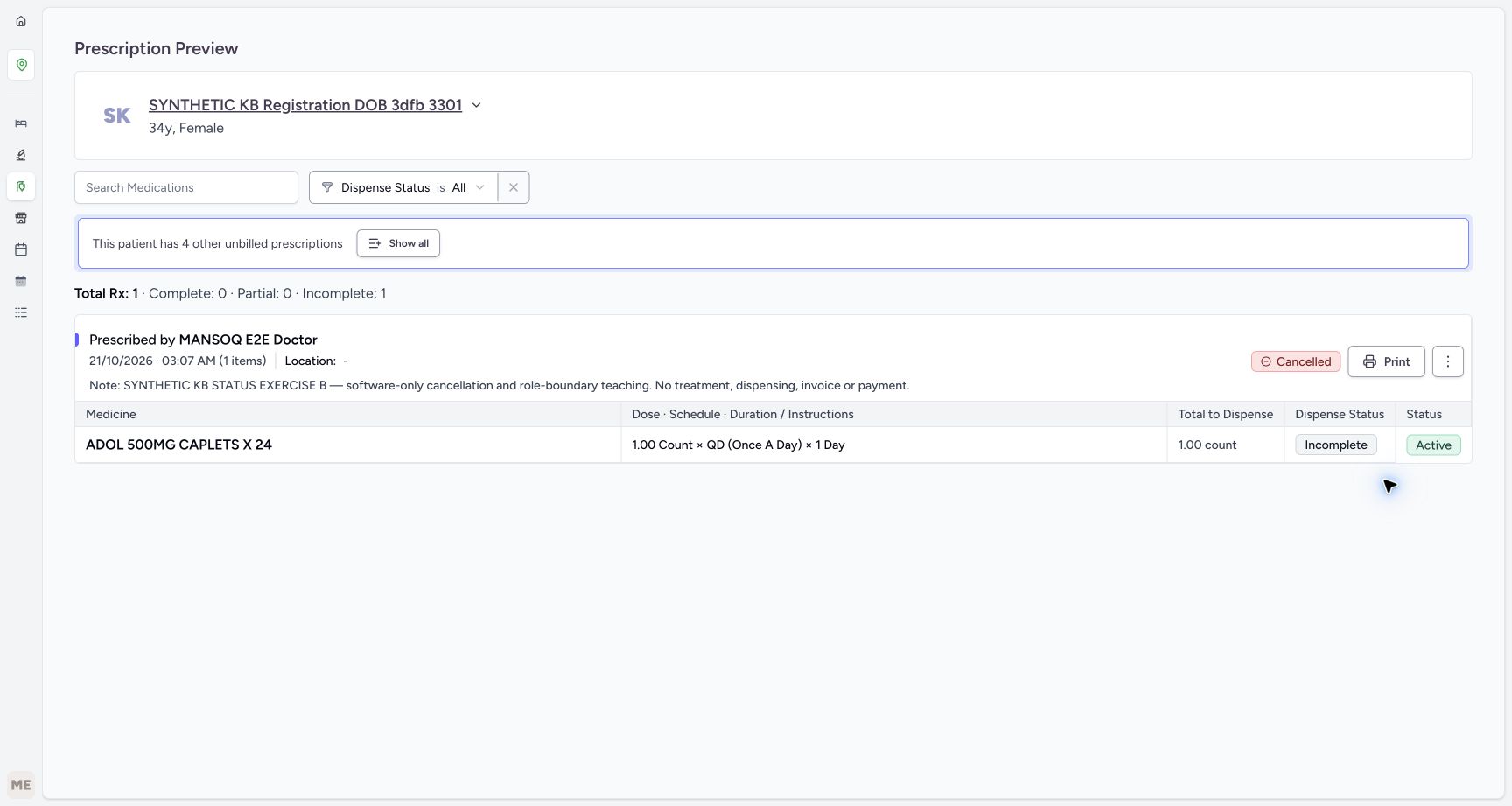
- Read parent Cancelled: This is the saved prescription lifecycle outcome.
- Read medicine still Incomplete: The status action did not fulfil the medicine.
- Read medicine still Active: The medicine request itself was not changed to Cancelled.
- Read unchanged fulfilment counters: Total Rx 1 has Complete 0, Partial 0 and Incomplete 1.
 123
123Locate optional Reactivate Prescription on cancelled B
Capture details
Actual6cdc existing authorized Facility Admin cancellation and optional reactivation of the same fictional B prescription. No Start Billing, Bill Selected, goods, invoice/payment or access change.
Image SHA-256 bccc809e41e137c04216a3d5743e32564bc20545c0f6b861d65ad9e1556f8796
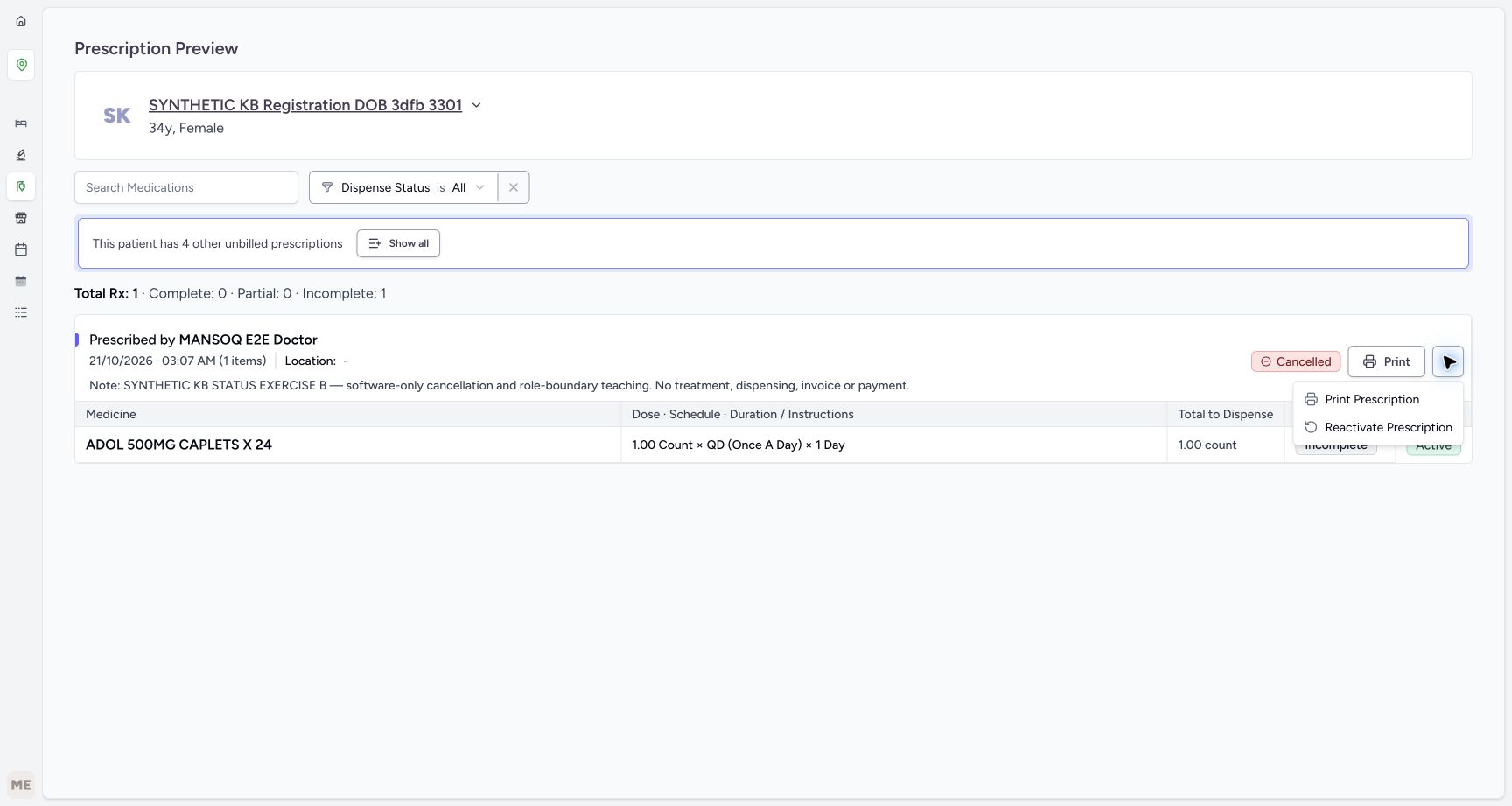
- Verify the current Cancelled parent: Reactivation starts from this same B outcome.
- Choose Reactivate Prescription once: Only perform the optional approved correction; it is immediate without a separate confirmation.
- Recheck B before correction: Do not act on A or an older prescription.
 12345
12345Verify final active B from the fresh queue
Capture details
Actual6cdc existing authorized Facility Admin cancellation and optional reactivation of the same fictional B prescription. No Start Billing, Bill Selected, goods, invoice/payment or access change.
Image SHA-256 cfd3f2566603199ffaa62af07f48523511a5fdc161050f60da026b9f48fc3821
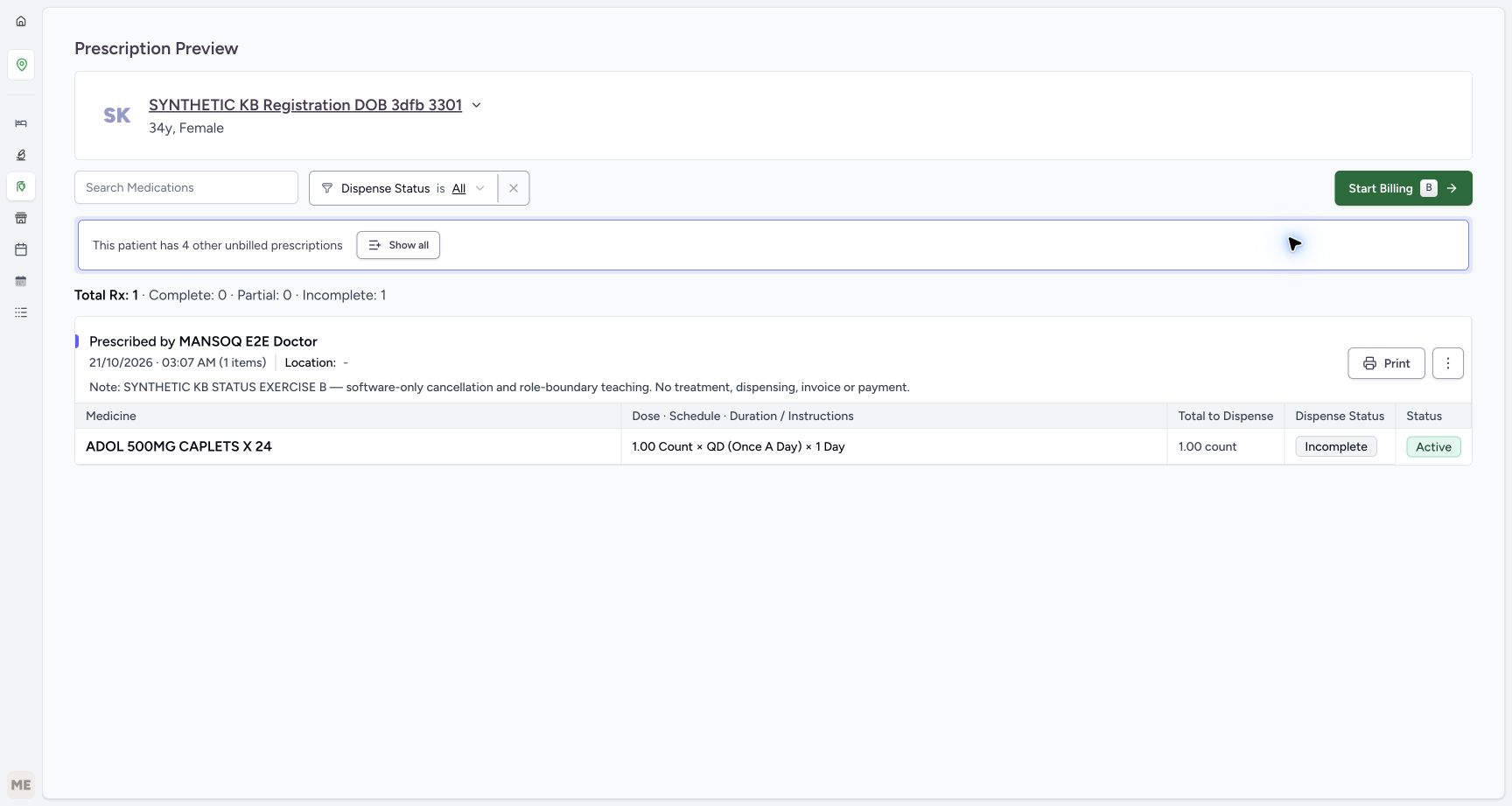
- Verify exact B at the final readback: The purpose note remains unchanged.
- Read unchanged fulfilment counters: Total Rx 1 still has Complete 0, Partial 0 and Incomplete 1.
- Read medicine Incomplete: The lifecycle correction did not supply the medicine.
- Read medicine Active: The medicine request remains unchanged.
- Leave Start Billing unused: End the status-only exercise here.
15 of 15 content blocks have reviewed image alignment.
Before you begin
- Use the existing assigned Facility Admin account qa-facility-admi with authorized access to this patient’s open encounter at MANSOQ Demo Polyclinic. The illustrated account already has that access; no role, grant or account is created here. A real cancellation or correction must have an approved clinical decision and the required encounter-scoped permission. A role label, visible menu item or fictional note alone is not authorization.12
Recorded release 6cdc3676 · 2026-10-21T00:29:53.839888+00:00 · 1728 × 921 Use the existing assigned account
Capture details
Actual6cdc existing authorized Facility Admin cancellation and optional reactivation of the same fictional B prescription. No Start Billing, Bill Selected, goods, invoice/payment or access change.
Image SHA-256
19c948c54f649e31836922ead9e7e0972444c6140d2c7ac019883c5d93f99f4f- Verify the assigned username: Use the existing qa-facility-admi account for this authorized example.
- Locate Services behind the account menu: Press Escape to close the account menu, then use Services on the clean overview shown next.
 123
123Recorded release 6cdc3676 · 2026-10-21T00:31:07.999404+00:00 · 1728 × 921 Enter Main Pharmacy through View Prescriptions
Capture details
Actual6cdc existing authorized Facility Admin cancellation and optional reactivation of the same fictional B prescription. No Start Billing, Bill Selected, goods, invoice/payment or access change.
Image SHA-256
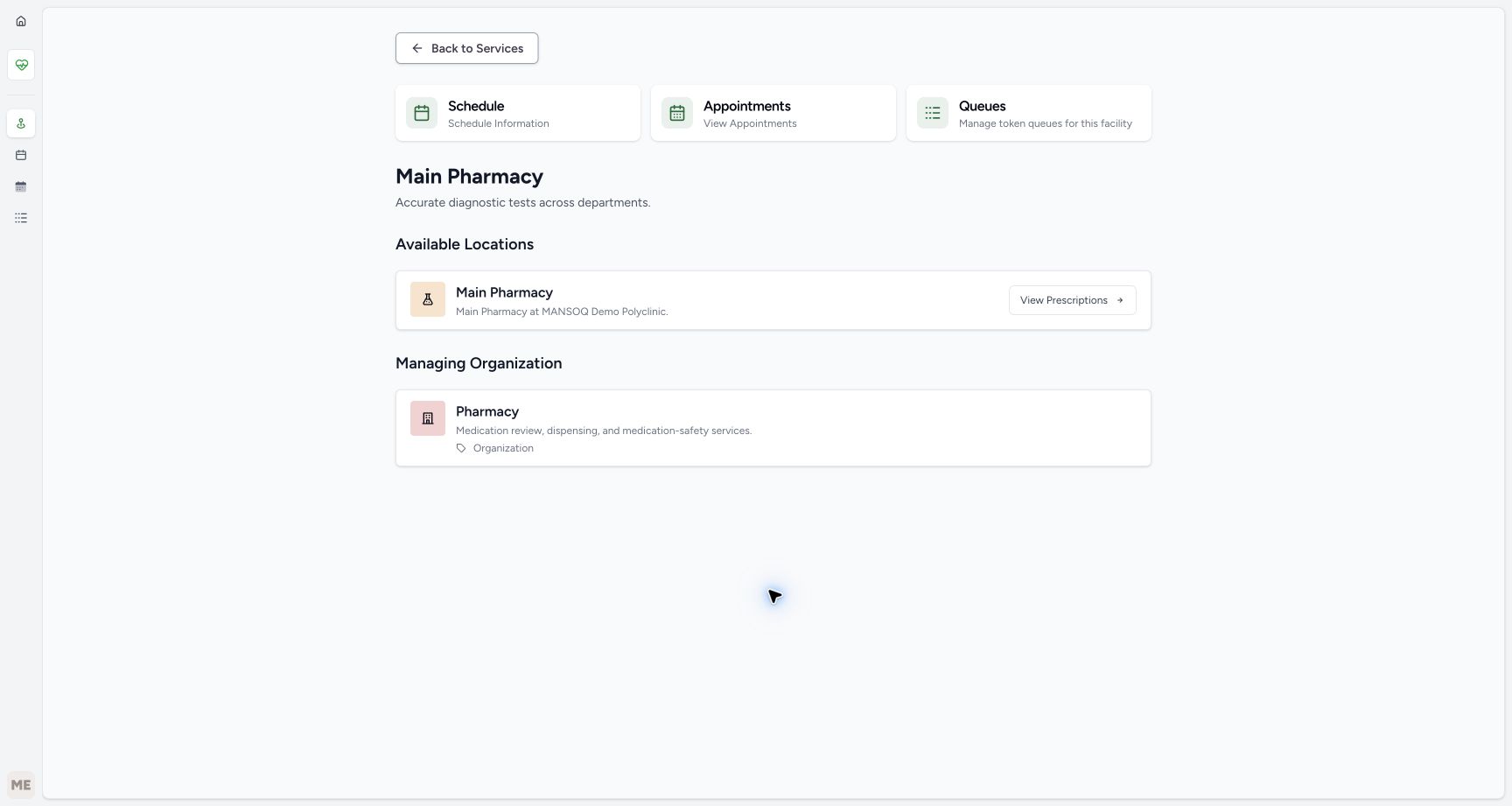
844f7359486f93ea04b7b6d5fbb3348e42dcaf8d4c3d1015749377134c3176cf- Verify the Main Pharmacy service: This is the observed service, not an inventory store.
- Verify the Main Pharmacy location: The location description identifies MANSOQ Demo Polyclinic.
- Choose View Prescriptions: This opens the ordinary Prescription Queue for this location.
 12345
12345Recorded release 6cdc3676 · 2026-10-21T00:31:28.683863+00:00 · 1728 × 921 Verify B’s purpose and unfulfilled medicine
Capture details
Actual6cdc existing authorized Facility Admin cancellation and optional reactivation of the same fictional B prescription. No Start Billing, Bill Selected, goods, invoice/payment or access change.
Image SHA-256
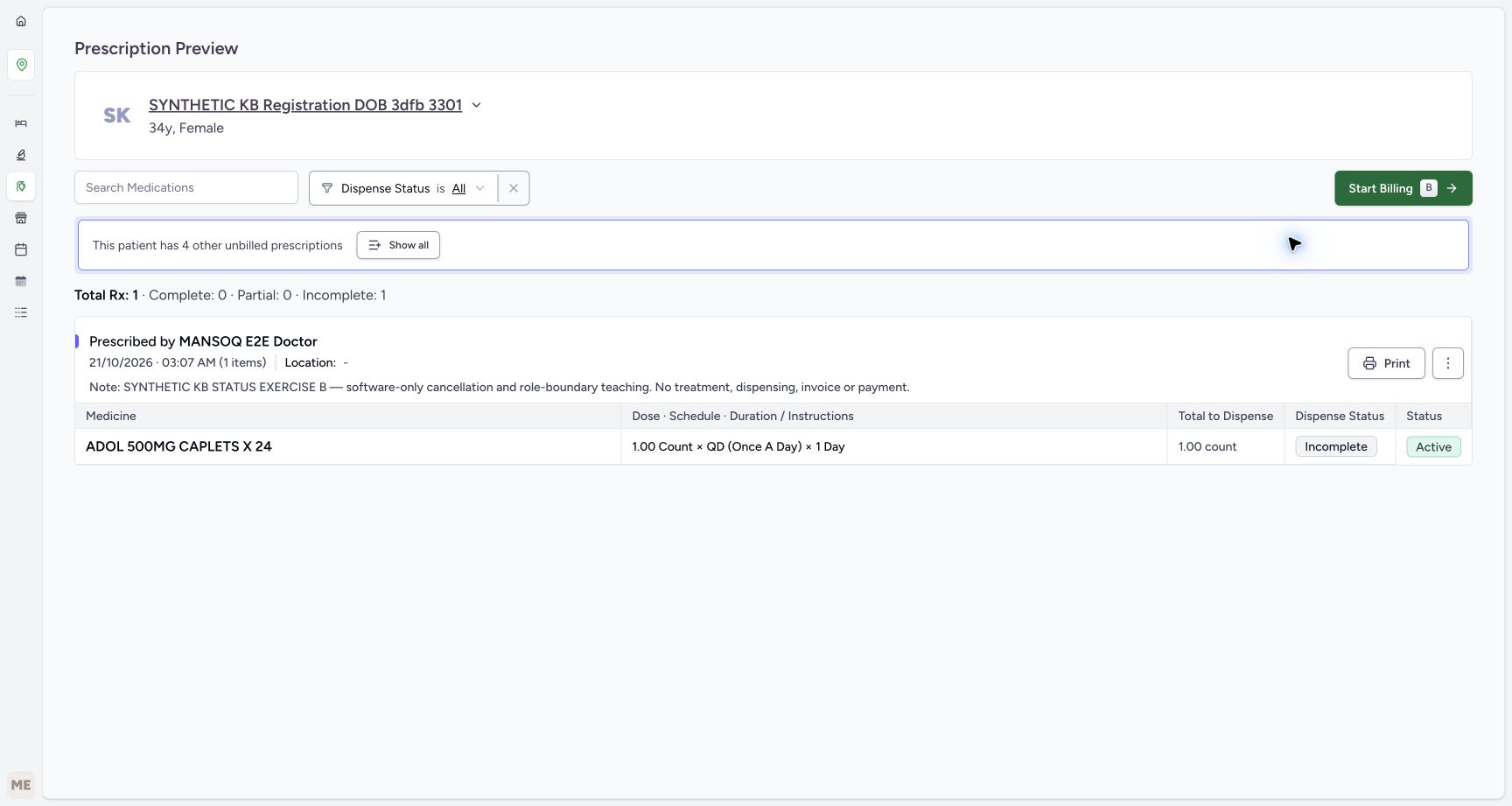
c18d85760d8a272ef29ed7af62cb890d4d31c44188d09c08f465890dae3240e9- Verify the full B note: Match the cancellation and role-boundary exercise, not A or an older request.
- Read Complete 0 and Incomplete 1: The counters show no medicine fulfilment.
- Open the upper prescription menu: Use the three-dot button beside Print directly in Prescription Preview.
- Read medicine Incomplete: The medicine has not been supplied.
- Read medicine Active: This row status is separate from the parent prescription lifecycle.
- Use only the existing fictional B prescription for SYNTHETIC KB Registration DOB 3dfb 3301. Its full note begins SYNTHETIC KB STATUS EXERCISE B and identifies software-only cancellation and role-boundary teaching. A is a separate prescription with the same 21/10/2026 03:07 AM time. The displayed ADOL schedule is test data, not clinical advice. Do not physically supply or administer medicine, open Start Billing, choose Bill Selected, create an invoice, record payment, alter access or change A or the older prescriptions.
 1234
1234Recorded release 6cdc3676 · 2026-10-21T00:31:28.036254+00:00 · 1728 × 921 Identify the separate B example in Billing Pending
Capture details
Actual6cdc existing authorized Facility Admin cancellation and optional reactivation of the same fictional B prescription. No Start Billing, Bill Selected, goods, invoice/payment or access change.
Image SHA-256
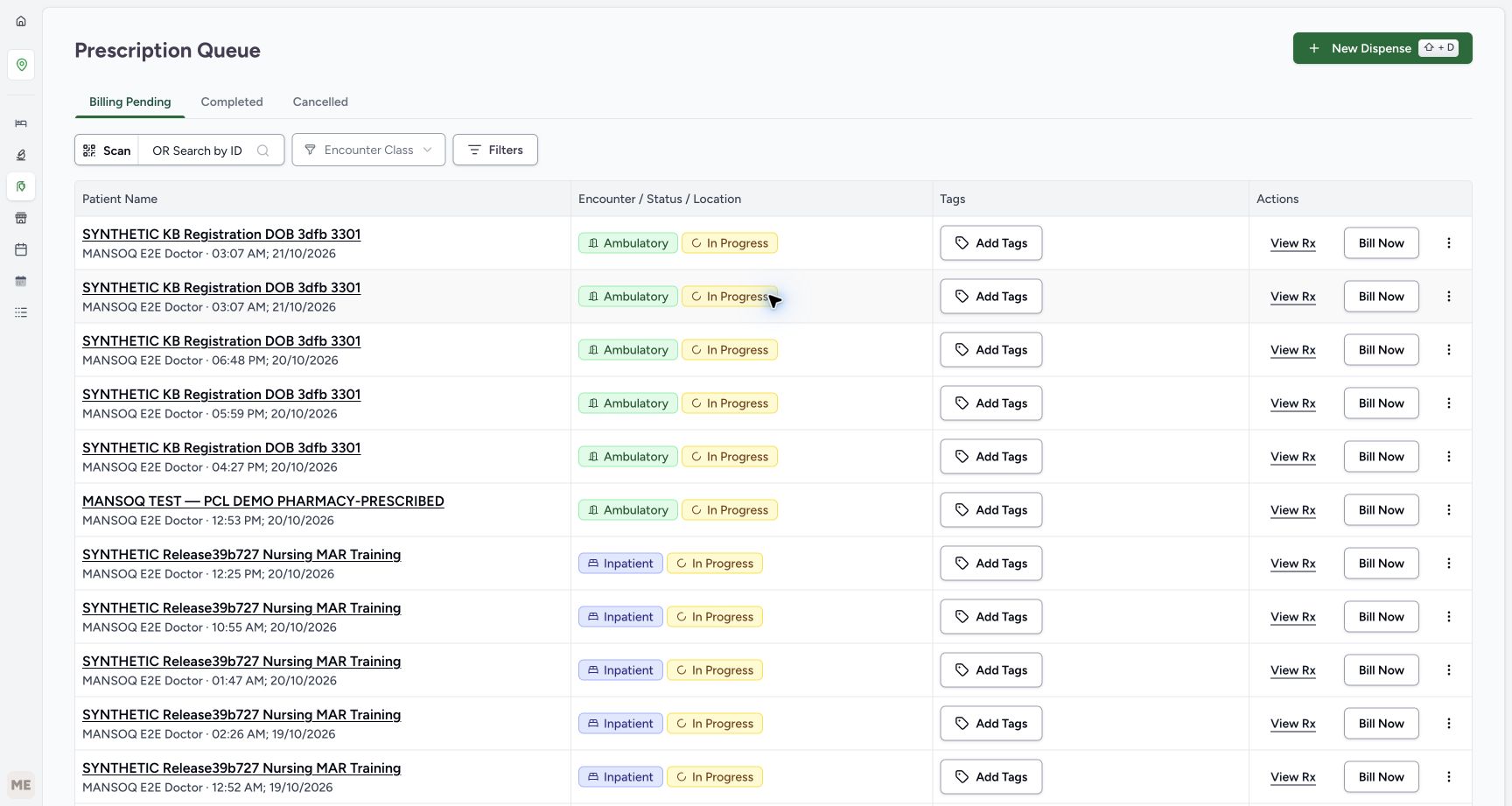
77e49f5775685d5bda4844a597b4909776bad1999c172bb2bd845d49dfaf400f- Read Billing Pending: The active-prescription queue is the starting point.
- Notice the first 03:07 AM entry: B is first in this captured ordering; confirm its note next.
- Notice A has the same minute: Do not identify B from the time alone.
- Choose View Rx for B: Open the first entry and verify the full B note before any immediate action.
12345Recorded release 6cdc3676 · 2026-10-21T00:31:28.683863+00:00 · 1728 × 921 Verify B’s purpose and unfulfilled medicine
Capture details
Actual6cdc existing authorized Facility Admin cancellation and optional reactivation of the same fictional B prescription. No Start Billing, Bill Selected, goods, invoice/payment or access change.
Image SHA-256
c18d85760d8a272ef29ed7af62cb890d4d31c44188d09c08f465890dae3240e9- Verify the full B note: Match the cancellation and role-boundary exercise, not A or an older request.
- Read Complete 0 and Incomplete 1: The counters show no medicine fulfilment.
- Open the upper prescription menu: Use the three-dot button beside Print directly in Prescription Preview.
- Read medicine Incomplete: The medicine has not been supplied.
- Read medicine Active: This row status is separate from the parent prescription lifecycle.
1. Reach the existing Main Pharmacy service normally
Verify the assigned username in the account menu, then press Escape to close it. From the clean facility overview choose Services, then scroll to the bottom of the service list to use its visible page controls. In the observed list, select page 3 and then page 4. Find the full Main Pharmacy card and choose its View Details. Service ordering and page counts can differ elsewhere; identify the actual Main Pharmacy card rather than entering a guessed URL. The lower list screenshots illustrate the same ordinary navigation with the controls fully in view.
12Use the existing assigned account
Capture details
Actual6cdc existing authorized Facility Admin cancellation and optional reactivation of the same fictional B prescription. No Start Billing, Bill Selected, goods, invoice/payment or access change.
Image SHA-256 19c948c54f649e31836922ead9e7e0972444c6140d2c7ac019883c5d93f99f4f
- Verify the assigned username: Use the existing qa-facility-admi account for this authorized example.
- Locate Services behind the account menu: Press Escape to close the account menu, then use Services on the clean overview shown next.
 1
1Choose Services from the clean facility overview
Capture details
Actual6cdc existing authorized Facility Admin cancellation and optional reactivation of the same fictional B prescription. No Start Billing, Bill Selected, goods, invoice/payment or access change.
Image SHA-256 71803f6f80c1668014e5eeb22f105475a64ef67b4ab61a35d058d1d0b4e98b90
- Choose Services from the overview: Open the ordinary service list before using its page controls.
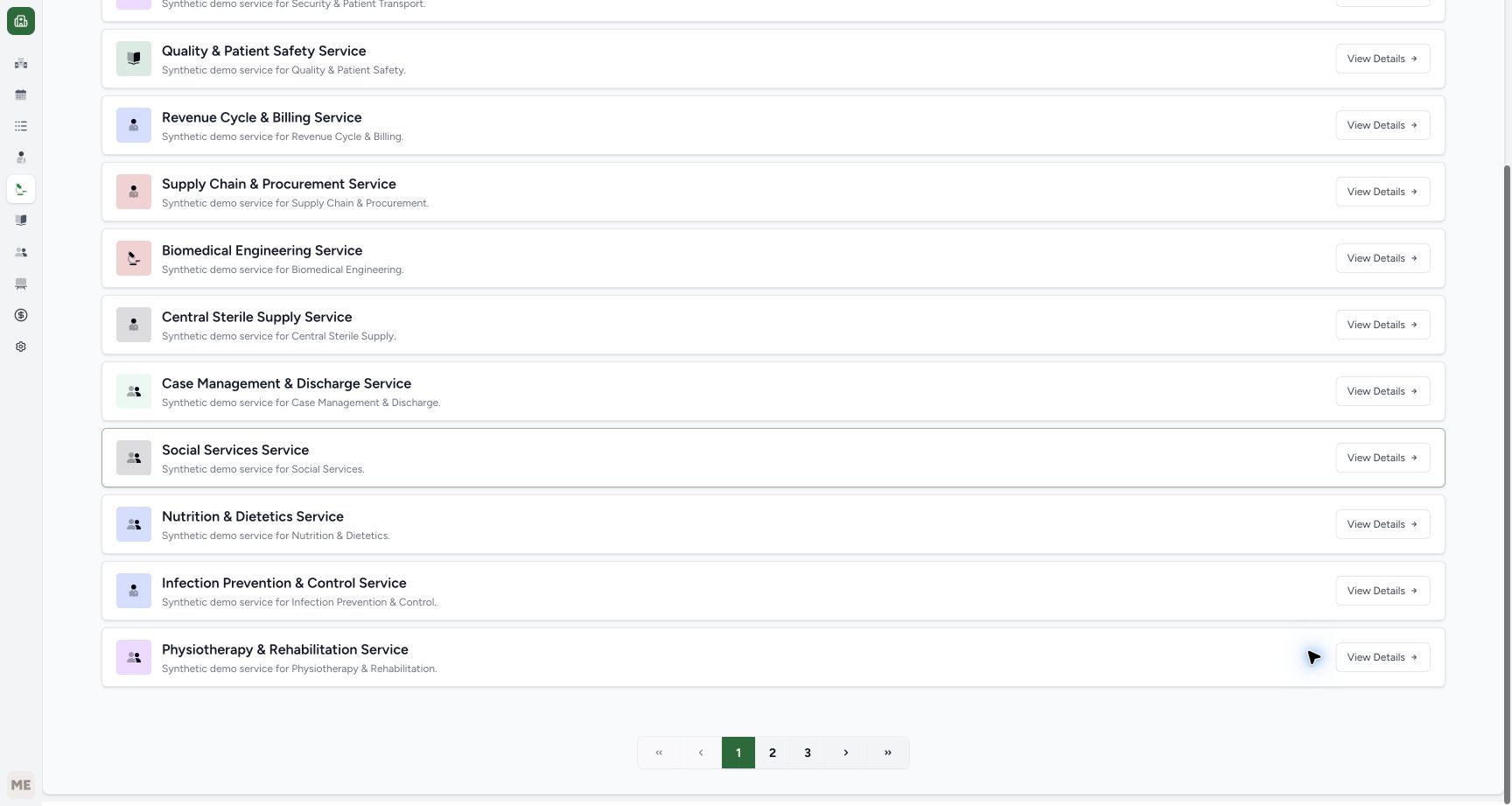 12
12Use visible Services pagination
Capture details
Actual6cdc existing authorized Facility Admin cancellation and optional reactivation of the same fictional B prescription. No Start Billing, Bill Selected, goods, invoice/payment or access change.
Image SHA-256 d061de55d880c6151f264c2d48def455e0c949cc53a7e334ef139dbc82cff605
- Read the selected page 1: Service discovery is paginated in this observed list.
- Choose page 3: Use the visible numbered page control rather than a guessed URL.
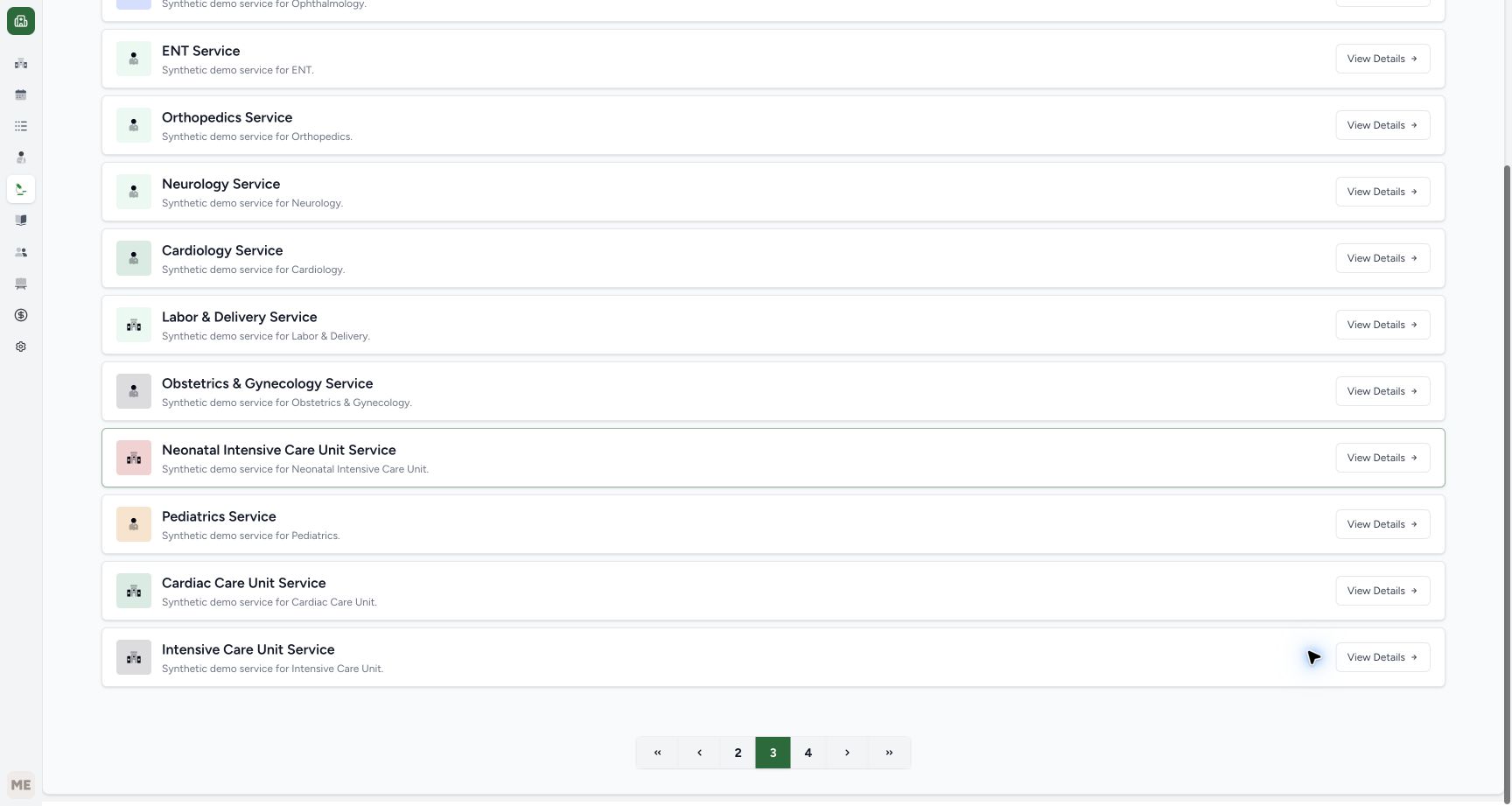 1
1Continue from Services page 3 to page 4
Capture details
Actual6cdc existing authorized Facility Admin cancellation and optional reactivation of the same fictional B prescription. No Start Billing, Bill Selected, goods, invoice/payment or access change.
Image SHA-256 cbd457ff33526dd843db2c65742c424dff644bd037980ef7cc2a201dedc1668b
- Choose page 4: Continue to the page containing the pictured Main Pharmacy card; service ordering can differ elsewhere.
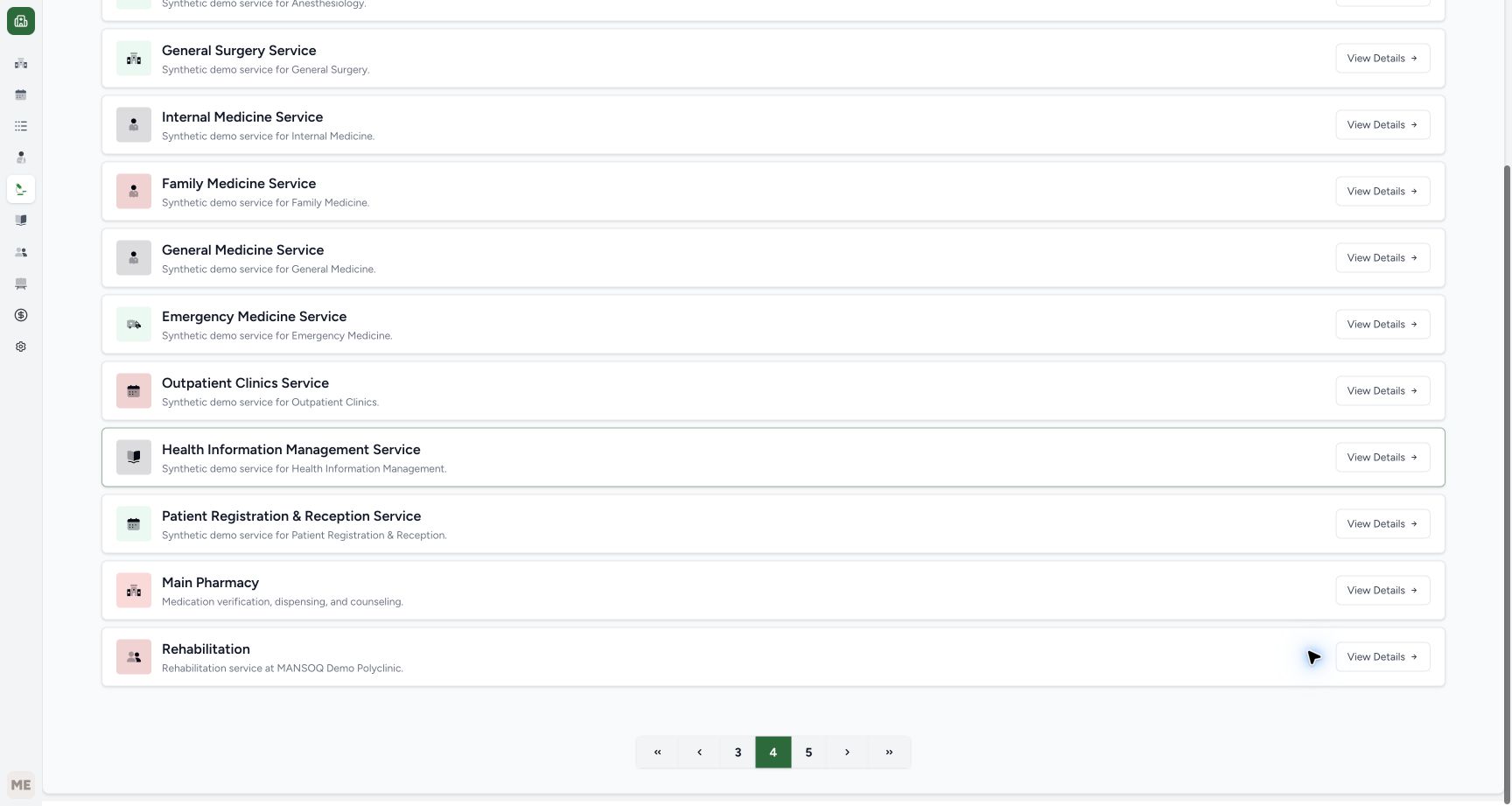 123
123Open the full Main Pharmacy service card
Capture details
Actual6cdc existing authorized Facility Admin cancellation and optional reactivation of the same fictional B prescription. No Start Billing, Bill Selected, goods, invoice/payment or access change.
Image SHA-256 dc4b99c4027905aee7b97afffb83c64ad838cc8125a73b63c609418278c3fac9
- Match the Main Pharmacy service: Do not choose a neighboring service with a similar location.
- Choose Main Pharmacy View Details: This opens the service’s available locations.
- Read the observed page 4 selection: The page number is context for this recorded list, not a universal location for Pharmacy.
2. Open Main Pharmacy prescriptions and verify B
On the Main Pharmacy service page, verify the available Main Pharmacy location at MANSOQ Demo Polyclinic and choose View Prescriptions. In Billing Pending the two new examples share 03:07 AM. In this captured ordering B is first and A second. Use B’s View Rx and read the full cancellation and role-boundary exercise note before acting. Confirm the medicine is Active and Incomplete, with Total Rx 1, Complete 0, Partial 0 and Incomplete 1. Leave Start Billing and the other prescriptions untouched.
123Enter Main Pharmacy through View Prescriptions
Capture details
Actual6cdc existing authorized Facility Admin cancellation and optional reactivation of the same fictional B prescription. No Start Billing, Bill Selected, goods, invoice/payment or access change.
Image SHA-256 844f7359486f93ea04b7b6d5fbb3348e42dcaf8d4c3d1015749377134c3176cf
- Verify the Main Pharmacy service: This is the observed service, not an inventory store.
- Verify the Main Pharmacy location: The location description identifies MANSOQ Demo Polyclinic.
- Choose View Prescriptions: This opens the ordinary Prescription Queue for this location.
1234Identify the separate B example in Billing Pending
Capture details
Actual6cdc existing authorized Facility Admin cancellation and optional reactivation of the same fictional B prescription. No Start Billing, Bill Selected, goods, invoice/payment or access change.
Image SHA-256 77e49f5775685d5bda4844a597b4909776bad1999c172bb2bd845d49dfaf400f
- Read Billing Pending: The active-prescription queue is the starting point.
- Notice the first 03:07 AM entry: B is first in this captured ordering; confirm its note next.
- Notice A has the same minute: Do not identify B from the time alone.
- Choose View Rx for B: Open the first entry and verify the full B note before any immediate action.
12345Verify B’s purpose and unfulfilled medicine
Capture details
Actual6cdc existing authorized Facility Admin cancellation and optional reactivation of the same fictional B prescription. No Start Billing, Bill Selected, goods, invoice/payment or access change.
Image SHA-256 c18d85760d8a272ef29ed7af62cb890d4d31c44188d09c08f465890dae3240e9
- Verify the full B note: Match the cancellation and role-boundary exercise, not A or an older request.
- Read Complete 0 and Incomplete 1: The counters show no medicine fulfilment.
- Open the upper prescription menu: Use the three-dot button beside Print directly in Prescription Preview.
- Read medicine Incomplete: The medicine has not been supplied.
- Read medicine Active: This row status is separate from the parent prescription lifecycle.
3. Cancel only B with existing authorized access
Only after confirming the approved status decision and B’s exact note, open the upper three-dot prescription menu beside Print directly in Prescription Preview. Select Cancel Prescription once. This action is immediate without a separate confirmation, and no billing form needs to be opened. Do not select Bill Prescription, Mark as Completed, another prescription or a medicine action. If access is refused, stop and contact the facility’s authorized clinical or support staff rather than changing accounts or bypassing the boundary.
12345Verify B’s purpose and unfulfilled medicine
Capture details
Actual6cdc existing authorized Facility Admin cancellation and optional reactivation of the same fictional B prescription. No Start Billing, Bill Selected, goods, invoice/payment or access change.
Image SHA-256 c18d85760d8a272ef29ed7af62cb890d4d31c44188d09c08f465890dae3240e9
- Verify the full B note: Match the cancellation and role-boundary exercise, not A or an older request.
- Read Complete 0 and Incomplete 1: The counters show no medicine fulfilment.
- Open the upper prescription menu: Use the three-dot button beside Print directly in Prescription Preview.
- Read medicine Incomplete: The medicine has not been supplied.
- Read medicine Active: This row status is separate from the parent prescription lifecycle.
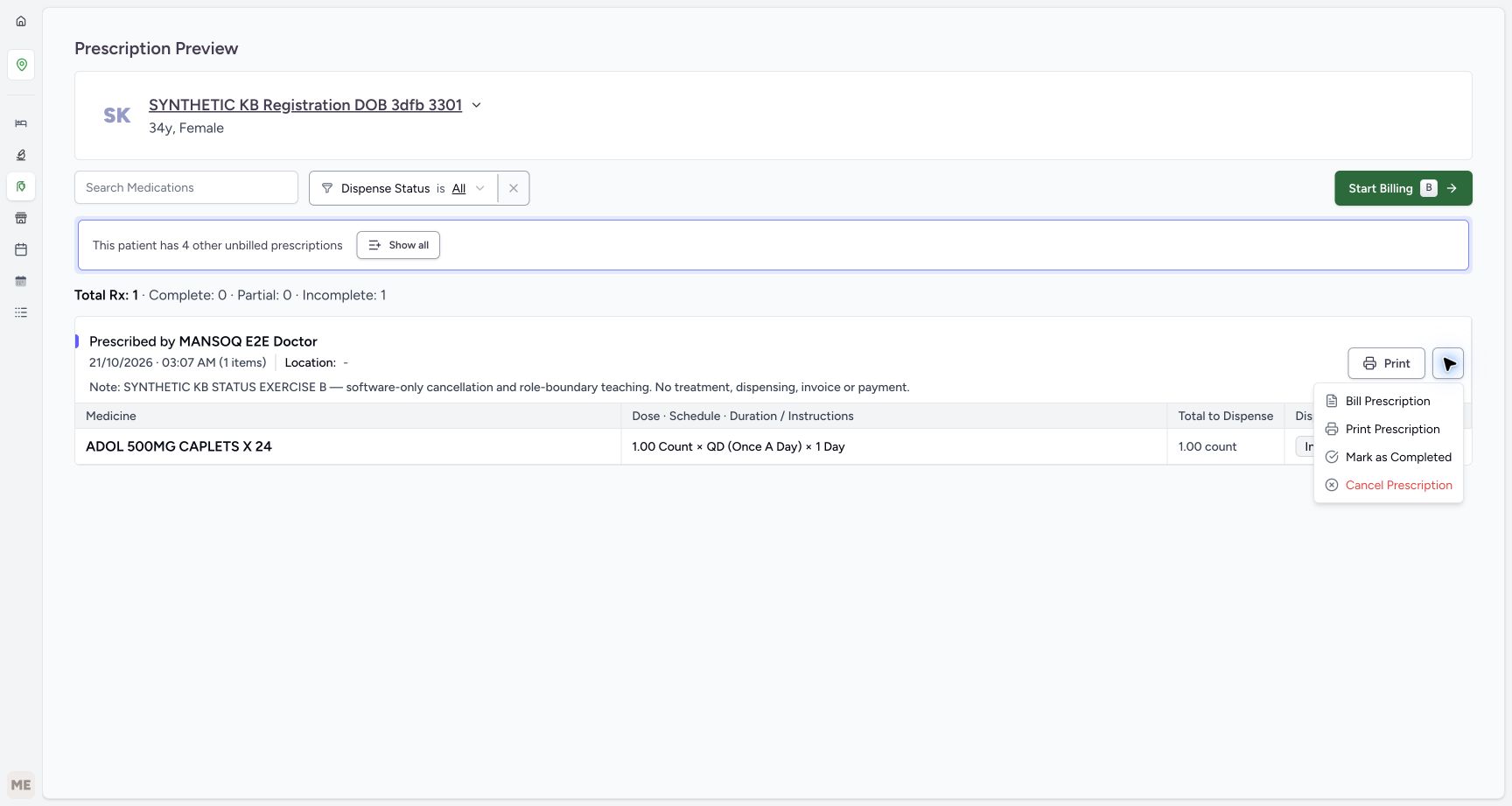 12
12Choose the immediate Cancel Prescription action
Capture details
Actual6cdc existing authorized Facility Admin cancellation and optional reactivation of the same fictional B prescription. No Start Billing, Bill Selected, goods, invoice/payment or access change.
Image SHA-256 1661d0796d8a6aa78705d0159f1612fc86ebab715da4bd32ba41516ae45b47c7
- Choose Cancel Prescription once: Use only the approved B decision with existing authorized access; no separate confirmation appears.
- Recheck B before the action: The full note identifies the intended fictional prescription.
4. Verify Cancelled and reload the same prescription
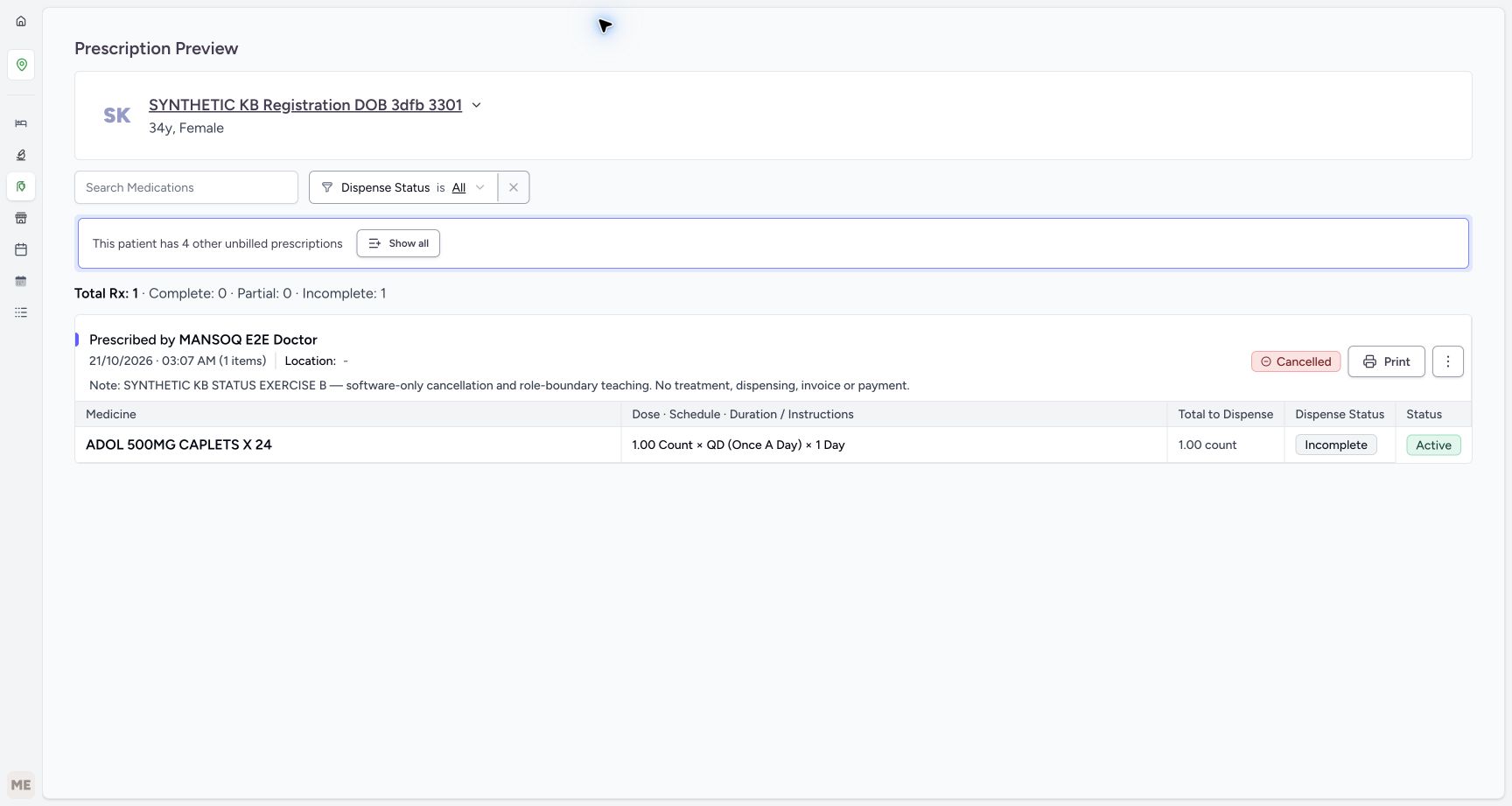
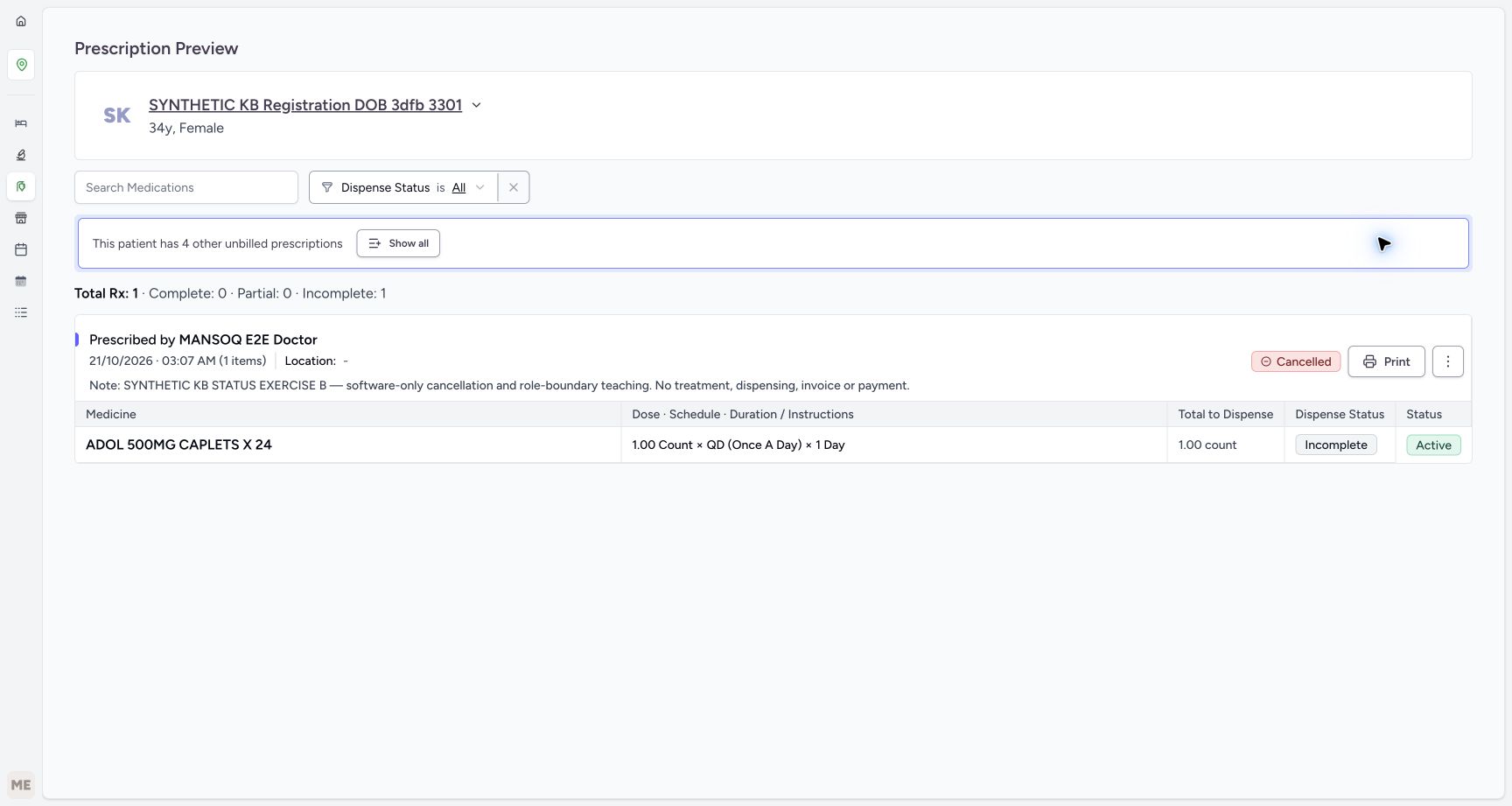
Read the settled Cancelled badge on B’s prescription, then reload normally and wait for the clean preview. Verify B’s full note and the retained Cancelled badge. The ADOL medicine remains Active and Incomplete and the counters still have Complete 0; Start Billing is absent. This saved parent cancellation is separate from medicine fulfilment and from the medicine-row status. No medicine, invoice or payment action is demonstrated.
1234Read the settled Cancelled parent badge
Capture details
Actual6cdc existing authorized Facility Admin cancellation and optional reactivation of the same fictional B prescription. No Start Billing, Bill Selected, goods, invoice/payment or access change.
Image SHA-256 2a4494a3c72e772d6798d71c1cceb4a7913ead2ba0ef5b4ba8b4f4691a684c7c
- Read parent Cancelled: This is the saved prescription lifecycle outcome.
- Read medicine still Incomplete: The status action did not fulfil the medicine.
- Read medicine still Active: The medicine request itself was not changed to Cancelled.
- Read unchanged fulfilment counters: Total Rx 1 has Complete 0, Partial 0 and Incomplete 1.
 1234
1234Reload and verify B’s cancellation persisted
Capture details
Actual6cdc existing authorized Facility Admin cancellation and optional reactivation of the same fictional B prescription. No Start Billing, Bill Selected, goods, invoice/payment or access change.
Image SHA-256 2e59c32def0bb02bc9fcd24cdfef4434d8f6d3162e78ddd9499a03e1cd094055
- Verify Cancelled after reload: Use a settled readback rather than a fading notification.
- Verify the retained B note: This is the same cancellation exercise.
- Read retained Incomplete: The medicine remains unfulfilled.
- Read retained Active medicine: Parent cancellation did not change this medicine-row value.
5. Check the fresh queue and reopen cancelled B
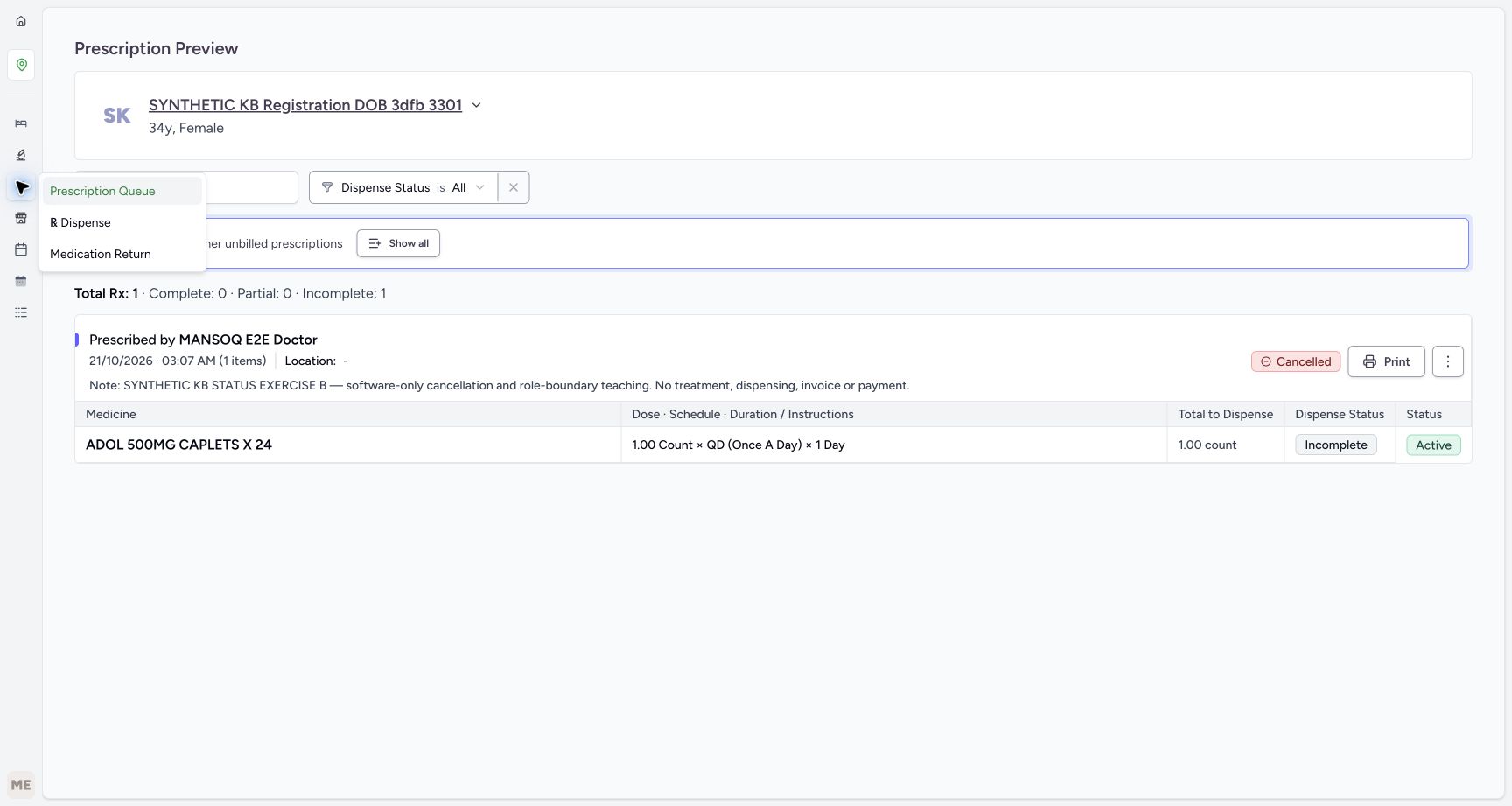
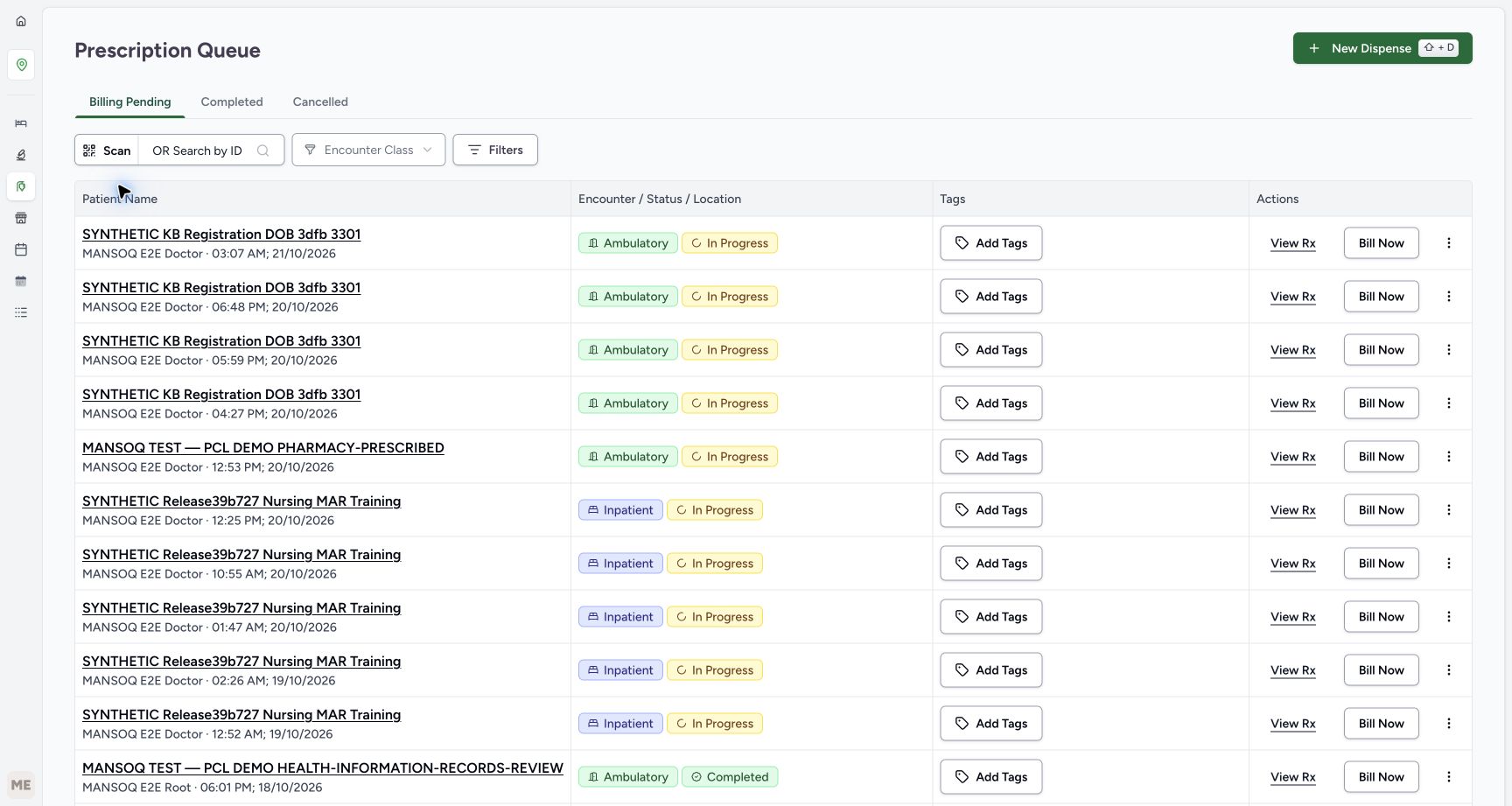
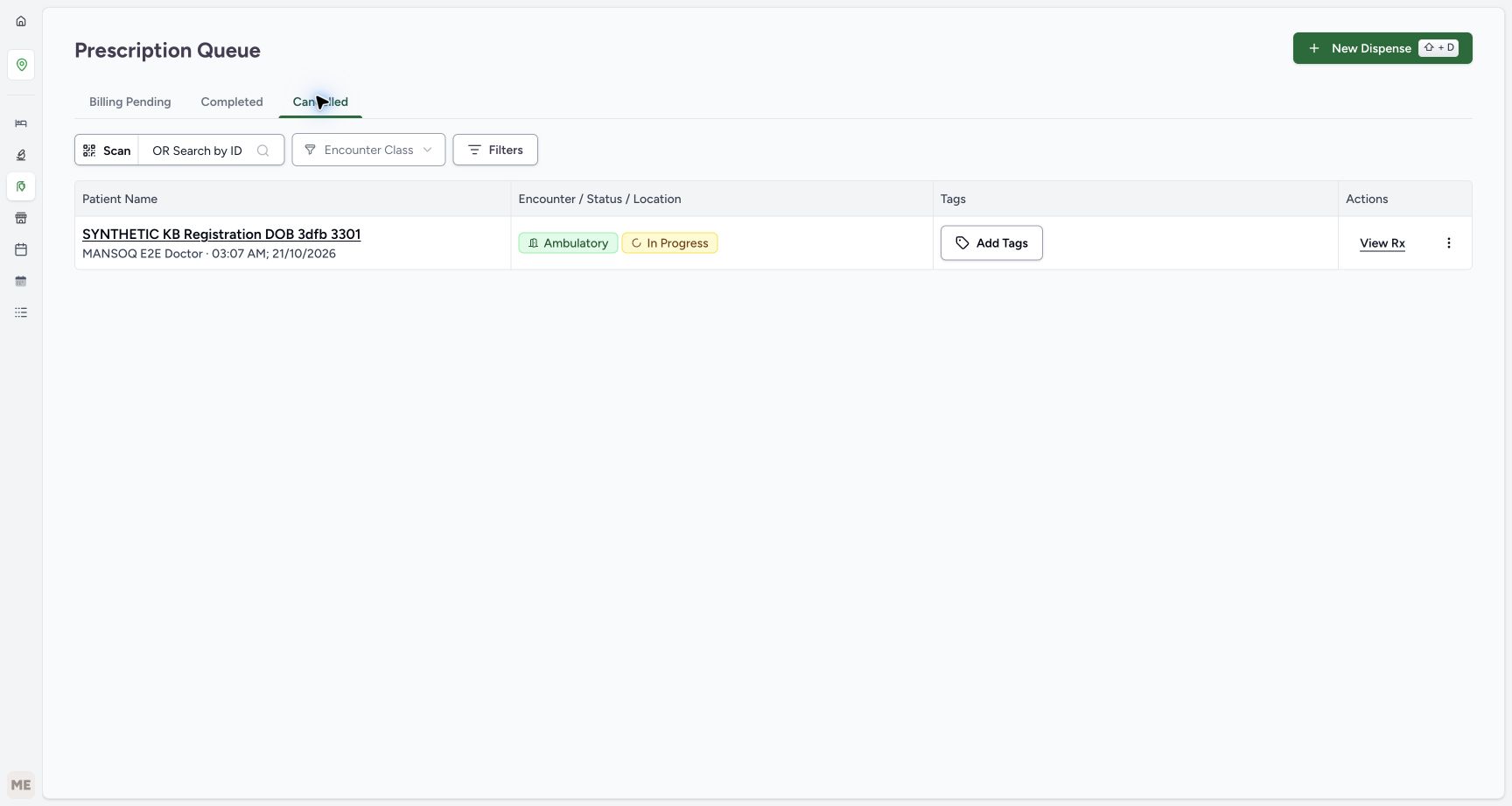
Use the Pharmacy navigation flyout and choose Prescription Queue. Read the fresh Billing Pending list: A remains at 03:07 AM with the three older active prescriptions, while B is absent. Choose the Cancelled tab, open the new 03:07 AM entry with View Rx, and verify the full B note and parent Cancelled badge again. The medicine still reads Active and Incomplete. Match the note rather than assuming the shared time uniquely identifies B.
 12
12Return through ordinary Prescription Queue navigation
Capture details
Actual6cdc existing authorized Facility Admin cancellation and optional reactivation of the same fictional B prescription. No Start Billing, Bill Selected, goods, invoice/payment or access change.
Image SHA-256 5460b7cb0804a7cf98b19e23d8d0f168d93058976805094dd5067772e111b7e7
- Open the Pharmacy navigation: Use the established location navigation.
- Choose Prescription Queue: Return to the queue without opening a billing form.
 123
123Read fresh Billing Pending after cancellation
Capture details
Actual6cdc existing authorized Facility Admin cancellation and optional reactivation of the same fictional B prescription. No Start Billing, Bill Selected, goods, invoice/payment or access change.
Image SHA-256 a3ab09eaf8555dc3ef87039376ec3e28ea991c09cf9a4e67472fc01000594cd9
- Read the fresh Billing Pending tab: This list is loaded after the cancellation readback.
- Notice only A remains at 03:07 AM: B is checked separately in Cancelled; a time label alone still does not identify a request.
- Choose Cancelled for B: Use the lifecycle tab to locate the cancelled example.
 123
123Open B from the fresh Cancelled queue
Capture details
Actual6cdc existing authorized Facility Admin cancellation and optional reactivation of the same fictional B prescription. No Start Billing, Bill Selected, goods, invoice/payment or access change.
Image SHA-256 587df67ccfa185df5f6646df51ce88d37f8925c77dff99a369c87ec552f72705
- Read the selected Cancelled tab: This tab describes parent prescription status.
- Identify the new cancelled entry: Match the patient and date, then verify B’s note in preview.
- Choose View Rx from Cancelled: Check the actual saved B record rather than inferring from the queue alone.
 1234
1234Verify exact B from the Cancelled queue
Capture details
Actual6cdc existing authorized Facility Admin cancellation and optional reactivation of the same fictional B prescription. No Start Billing, Bill Selected, goods, invoice/payment or access change.
Image SHA-256 b110712f2351cbf4e289c48e0510d1a574aebfec2e4c4bf24c7172dbf2b9e045
- Verify B parent Cancelled: The queue has opened the saved cancelled prescription.
- Match the full B purpose note: This confirms the intended example despite the shared minute.
- Read medicine Incomplete: The medicine remains unfulfilled.
- Read medicine Active: The parent and medicine statuses remain distinct.
6. Optionally reactivate the same cancelled B
Only when the correction is approved, remain on this same B preview and recheck its note and Cancelled badge. Open the upper prescription menu and choose Reactivate Prescription once. It acts immediately without a separate confirmation. Read Prescription reactivated successfully; the Cancelled badge disappears and Start Billing returns. Reload normally to verify the correction persisted while the medicine remains Active and Incomplete. Leave Start Billing unused. This optional branch changes only this existing B from Cancelled back to Active.
1234Verify exact B from the Cancelled queue
Capture details
Actual6cdc existing authorized Facility Admin cancellation and optional reactivation of the same fictional B prescription. No Start Billing, Bill Selected, goods, invoice/payment or access change.
Image SHA-256 b110712f2351cbf4e289c48e0510d1a574aebfec2e4c4bf24c7172dbf2b9e045
- Verify B parent Cancelled: The queue has opened the saved cancelled prescription.
- Match the full B purpose note: This confirms the intended example despite the shared minute.
- Read medicine Incomplete: The medicine remains unfulfilled.
- Read medicine Active: The parent and medicine statuses remain distinct.
123Locate optional Reactivate Prescription on cancelled B
Capture details
Actual6cdc existing authorized Facility Admin cancellation and optional reactivation of the same fictional B prescription. No Start Billing, Bill Selected, goods, invoice/payment or access change.
Image SHA-256 bccc809e41e137c04216a3d5743e32564bc20545c0f6b861d65ad9e1556f8796
- Verify the current Cancelled parent: Reactivation starts from this same B outcome.
- Choose Reactivate Prescription once: Only perform the optional approved correction; it is immediate without a separate confirmation.
- Recheck B before correction: Do not act on A or an older prescription.
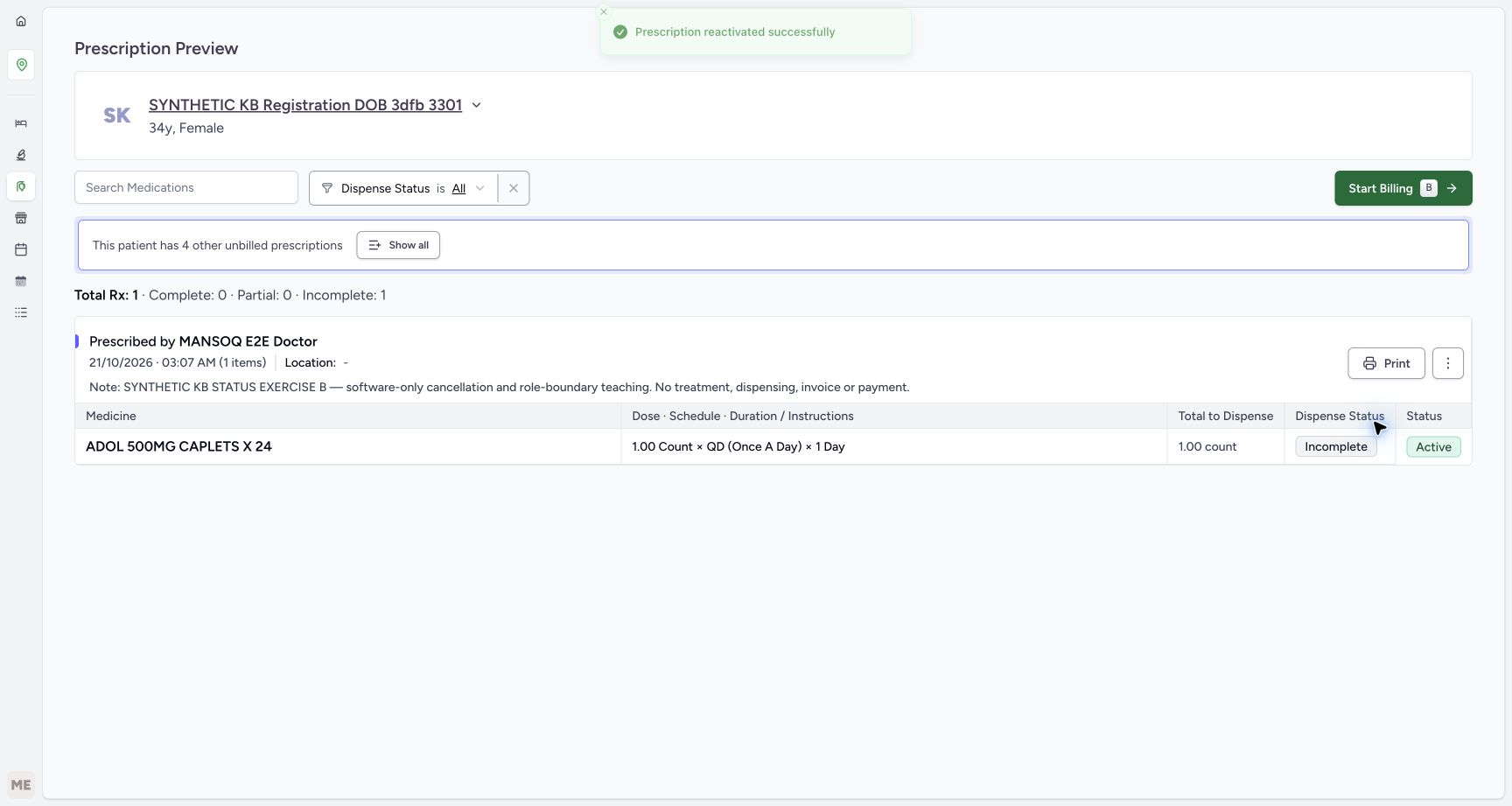 12345
12345Read successful reactivation without opening billing
Capture details
Actual6cdc existing authorized Facility Admin cancellation and optional reactivation of the same fictional B prescription. No Start Billing, Bill Selected, goods, invoice/payment or access change.
Image SHA-256 a3ebbe02af0f88be6eae4cfcecc6f90864ed644ce1ec70376c41a68e1bfea454
- Read the reactivation success: One Reactivate Prescription action succeeded.
- Notice Start Billing has returned: Its availability is not a created bill; leave it unused.
- Verify the same B note: The correction retains the prescription identity and purpose.
- Read medicine still Incomplete: No medicine fulfilment was added.
- Read medicine still Active: The medicine-row value remains unchanged.
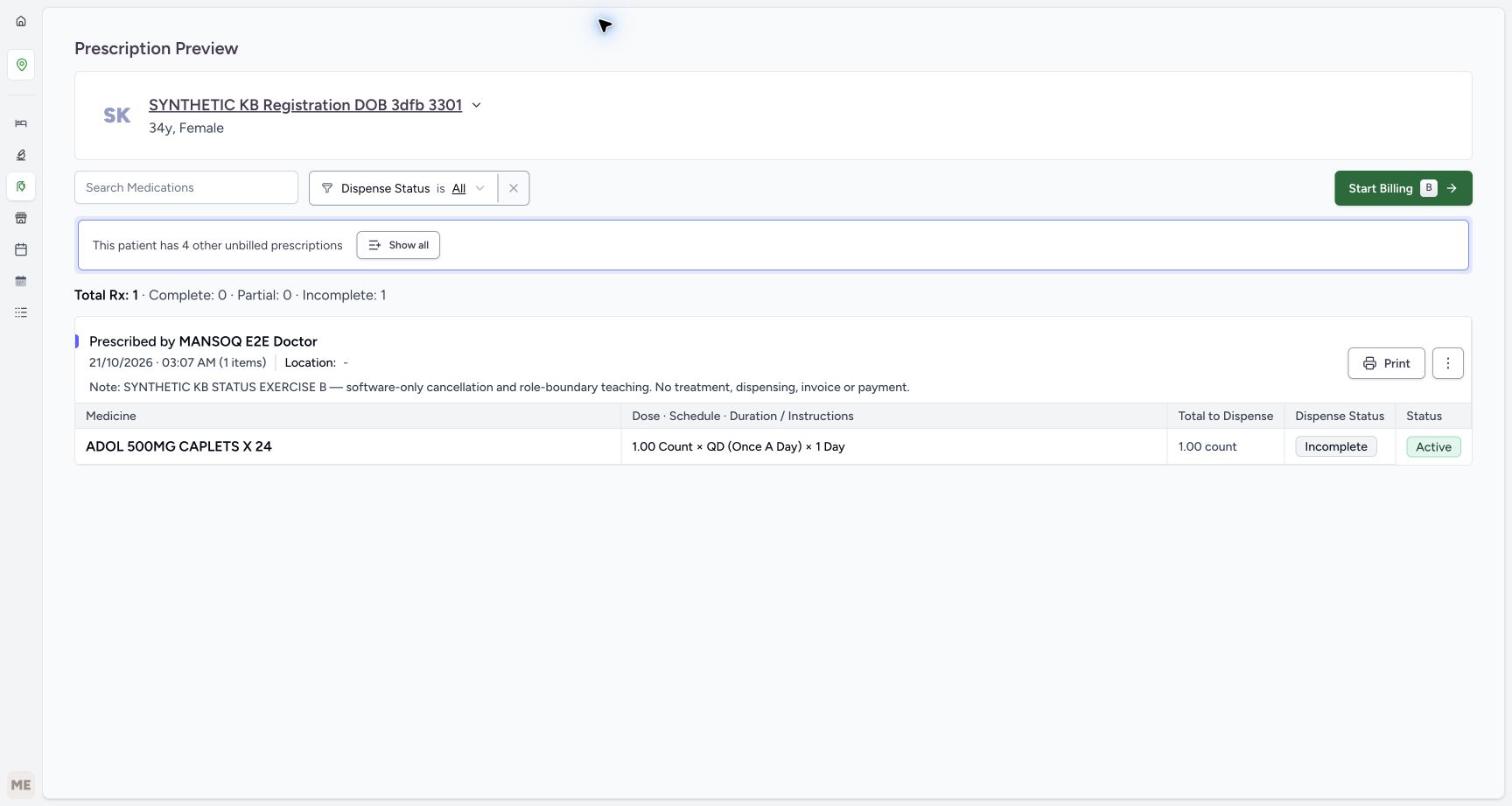 1234
1234Reload the reactivated B preview
Capture details
Actual6cdc existing authorized Facility Admin cancellation and optional reactivation of the same fictional B prescription. No Start Billing, Bill Selected, goods, invoice/payment or access change.
Image SHA-256 294e0d72edfbe8d5ab9486d21fd452872378a0e8a3c8e14a7a7893640438c30e
- Verify B after reload: This is the same prescription, now Active again.
- Read restored Start Billing availability: Stop at readback without opening the billing form.
- Read retained medicine Incomplete: Reactivation did not supply the medicine.
- Read retained medicine Active: The child request is unchanged.
7. Verify fresh active and cancelled queues after correction
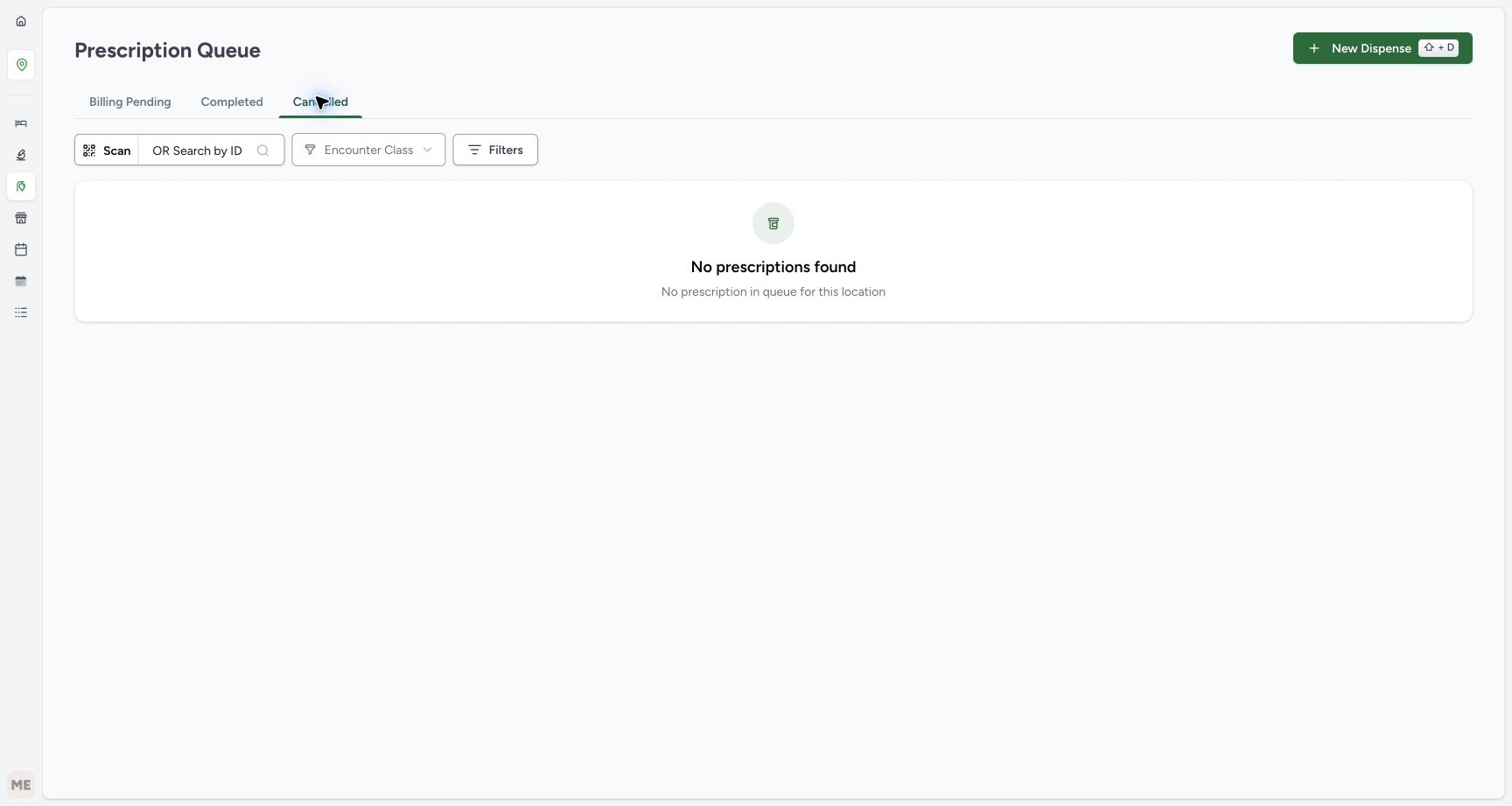
Return through Prescription Queue navigation and read the freshly loaded Billing Pending tab. B is again the first 03:07 AM example and A remains second, alongside the three older active prescriptions. Check Cancelled: the pictured location queue now shows No prescriptions found. Return to Billing Pending and use B’s View Rx for the final full-note check. B’s preview has Start Billing available, no Cancelled parent badge, and medicine Active/Incomplete with Complete 0. End here without opening or submitting a bill.
12Return through ordinary Prescription Queue navigation
Capture details
Actual6cdc existing authorized Facility Admin cancellation and optional reactivation of the same fictional B prescription. No Start Billing, Bill Selected, goods, invoice/payment or access change.
Image SHA-256 5460b7cb0804a7cf98b19e23d8d0f168d93058976805094dd5067772e111b7e7
- Open the Pharmacy navigation: Use the established location navigation.
- Choose Prescription Queue: Return to the queue without opening a billing form.
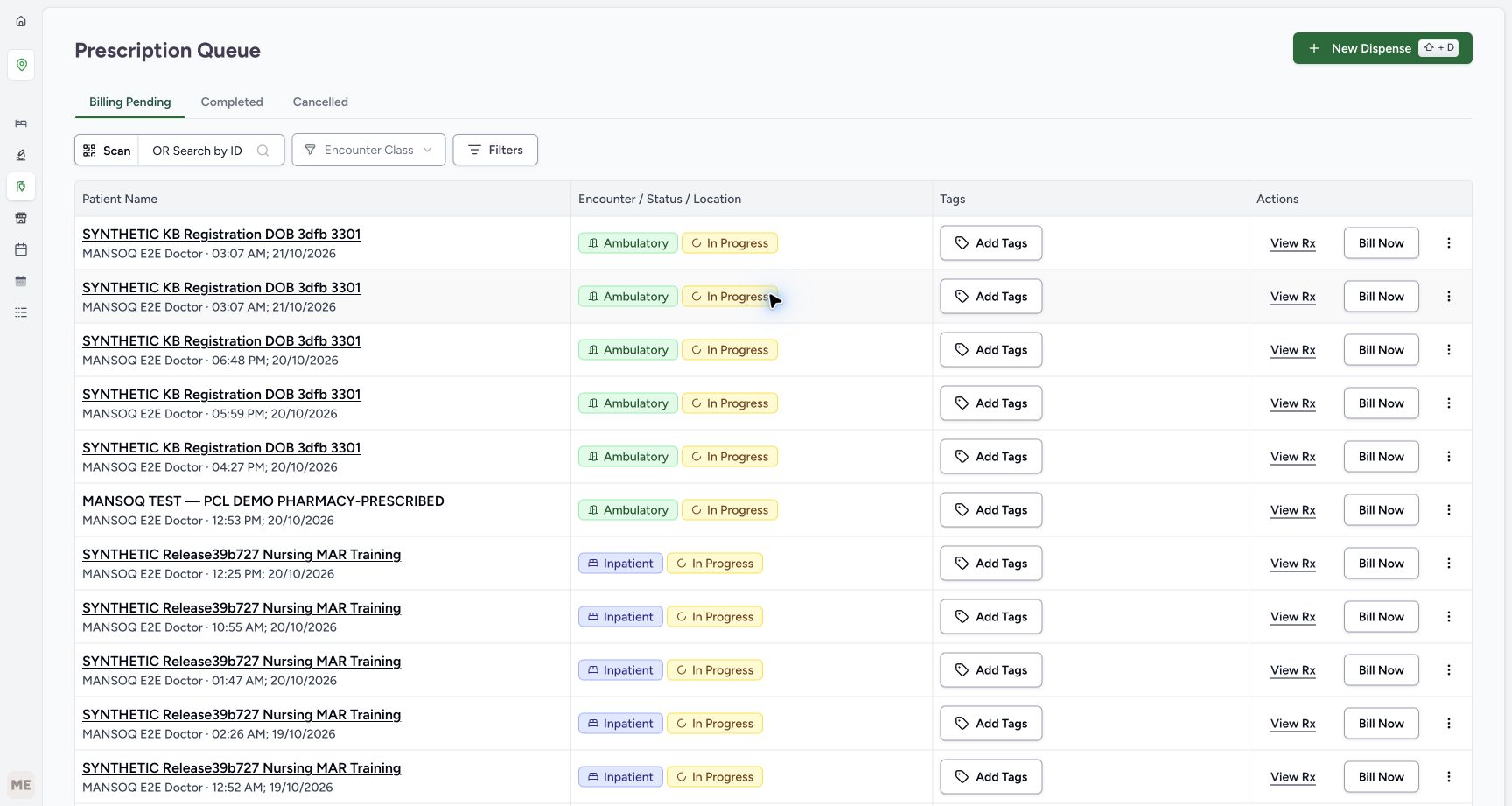 1234
1234Read fresh Billing Pending after reactivation
Capture details
Actual6cdc existing authorized Facility Admin cancellation and optional reactivation of the same fictional B prescription. No Start Billing, Bill Selected, goods, invoice/payment or access change.
Image SHA-256 55b6fcb4af4c4ad2b51a683fc684b088aeb2caa3ed58164f57a80f8db2429d87
- Read Billing Pending after correction: The active-prescription list has been refreshed.
- Notice B has returned to the active list: Verify its full note through View Rx next.
- Keep A separate and unchanged: A still shares the same minute.
- Locate B’s View Rx: Use this first row for the final exact-note readback.
 123
123Read the fresh empty Cancelled tab
Capture details
Actual6cdc existing authorized Facility Admin cancellation and optional reactivation of the same fictional B prescription. No Start Billing, Bill Selected, goods, invoice/payment or access change.
Image SHA-256 3339b6459e22c09f013b22dff159212522967fcc66748507de9c1f59bb8f095d
- Read the selected Cancelled tab: Verify the lifecycle queue after the correction.
- Read No prescriptions found: The visible location queue no longer lists B in Cancelled.
- Return to Billing Pending: After checking the empty Cancelled tab, return to the active queue for the final B note check.
12345Verify final active B from the fresh queue
Capture details
Actual6cdc existing authorized Facility Admin cancellation and optional reactivation of the same fictional B prescription. No Start Billing, Bill Selected, goods, invoice/payment or access change.
Image SHA-256 cfd3f2566603199ffaa62af07f48523511a5fdc161050f60da026b9f48fc3821
- Verify exact B at the final readback: The purpose note remains unchanged.
- Read unchanged fulfilment counters: Total Rx 1 still has Complete 0, Partial 0 and Incomplete 1.
- Read medicine Incomplete: The lifecycle correction did not supply the medicine.
- Read medicine Active: The medicine request remains unchanged.
- Leave Start Billing unused: End the status-only exercise here.
Existing scoped authorization makes this a different role outcome
This lesson records successful cancellation using the existing Facility Admin account’s authorized access to the observed open encounter. It does not establish that every account called admin can cancel, and it does not grant permission from a note or menu label. The separate Complete a prescription and handle cancellation refusal lesson records the ordinary Pharmacist refusal and its own Completed-to-Active correction. That refusal is a permission boundary, not an instruction to switch accounts to get past it. Use only the assigned role and approved facility process.
12Use the existing assigned account
Capture details
Actual6cdc existing authorized Facility Admin cancellation and optional reactivation of the same fictional B prescription. No Start Billing, Bill Selected, goods, invoice/payment or access change.
Image SHA-256 19c948c54f649e31836922ead9e7e0972444c6140d2c7ac019883c5d93f99f4f
- Verify the assigned username: Use the existing qa-facility-admi account for this authorized example.
- Locate Services behind the account menu: Press Escape to close the account menu, then use Services on the clean overview shown next.
12345Verify B’s purpose and unfulfilled medicine
Capture details
Actual6cdc existing authorized Facility Admin cancellation and optional reactivation of the same fictional B prescription. No Start Billing, Bill Selected, goods, invoice/payment or access change.
Image SHA-256 c18d85760d8a272ef29ed7af62cb890d4d31c44188d09c08f465890dae3240e9
- Verify the full B note: Match the cancellation and role-boundary exercise, not A or an older request.
- Read Complete 0 and Incomplete 1: The counters show no medicine fulfilment.
- Open the upper prescription menu: Use the three-dot button beside Print directly in Prescription Preview.
- Read medicine Incomplete: The medicine has not been supplied.
- Read medicine Active: This row status is separate from the parent prescription lifecycle.
12Choose the immediate Cancel Prescription action
Capture details
Actual6cdc existing authorized Facility Admin cancellation and optional reactivation of the same fictional B prescription. No Start Billing, Bill Selected, goods, invoice/payment or access change.
Image SHA-256 1661d0796d8a6aa78705d0159f1612fc86ebab715da4bd32ba41516ae45b47c7
- Choose Cancel Prescription once: Use only the approved B decision with existing authorized access; no separate confirmation appears.
- Recheck B before the action: The full note identifies the intended fictional prescription.
1234Read the settled Cancelled parent badge
Capture details
Actual6cdc existing authorized Facility Admin cancellation and optional reactivation of the same fictional B prescription. No Start Billing, Bill Selected, goods, invoice/payment or access change.
Image SHA-256 2a4494a3c72e772d6798d71c1cceb4a7913ead2ba0ef5b4ba8b4f4691a684c7c
- Read parent Cancelled: This is the saved prescription lifecycle outcome.
- Read medicine still Incomplete: The status action did not fulfil the medicine.
- Read medicine still Active: The medicine request itself was not changed to Cancelled.
- Read unchanged fulfilment counters: Total Rx 1 has Complete 0, Partial 0 and Incomplete 1.
123Locate optional Reactivate Prescription on cancelled B
Capture details
Actual6cdc existing authorized Facility Admin cancellation and optional reactivation of the same fictional B prescription. No Start Billing, Bill Selected, goods, invoice/payment or access change.
Image SHA-256 bccc809e41e137c04216a3d5743e32564bc20545c0f6b861d65ad9e1556f8796
- Verify the current Cancelled parent: Reactivation starts from this same B outcome.
- Choose Reactivate Prescription once: Only perform the optional approved correction; it is immediate without a separate confirmation.
- Recheck B before correction: Do not act on A or an older prescription.
Parent lifecycle, medicine status and fulfilment stay separate
B’s parent prescription changes Active to Cancelled and, only in the optional approved correction, back to Active. In the illustrated saved views its medicine remains Active and Incomplete and Complete stays 0 throughout. The visible fictional dose is not a treatment instruction. Restored Start Billing means the action is available again; it does not mean a dispensing preparation, invoice, payment or physical handover occurred. A and the older prescriptions are outside the status changes.
12345Verify B’s purpose and unfulfilled medicine
Capture details
Actual6cdc existing authorized Facility Admin cancellation and optional reactivation of the same fictional B prescription. No Start Billing, Bill Selected, goods, invoice/payment or access change.
Image SHA-256 c18d85760d8a272ef29ed7af62cb890d4d31c44188d09c08f465890dae3240e9
- Verify the full B note: Match the cancellation and role-boundary exercise, not A or an older request.
- Read Complete 0 and Incomplete 1: The counters show no medicine fulfilment.
- Open the upper prescription menu: Use the three-dot button beside Print directly in Prescription Preview.
- Read medicine Incomplete: The medicine has not been supplied.
- Read medicine Active: This row status is separate from the parent prescription lifecycle.
1234Read the settled Cancelled parent badge
Capture details
Actual6cdc existing authorized Facility Admin cancellation and optional reactivation of the same fictional B prescription. No Start Billing, Bill Selected, goods, invoice/payment or access change.
Image SHA-256 2a4494a3c72e772d6798d71c1cceb4a7913ead2ba0ef5b4ba8b4f4691a684c7c
- Read parent Cancelled: This is the saved prescription lifecycle outcome.
- Read medicine still Incomplete: The status action did not fulfil the medicine.
- Read medicine still Active: The medicine request itself was not changed to Cancelled.
- Read unchanged fulfilment counters: Total Rx 1 has Complete 0, Partial 0 and Incomplete 1.
1234Reload and verify B’s cancellation persisted
Capture details
Actual6cdc existing authorized Facility Admin cancellation and optional reactivation of the same fictional B prescription. No Start Billing, Bill Selected, goods, invoice/payment or access change.
Image SHA-256 2e59c32def0bb02bc9fcd24cdfef4434d8f6d3162e78ddd9499a03e1cd094055
- Verify Cancelled after reload: Use a settled readback rather than a fading notification.
- Verify the retained B note: This is the same cancellation exercise.
- Read retained Incomplete: The medicine remains unfulfilled.
- Read retained Active medicine: Parent cancellation did not change this medicine-row value.
12345Read successful reactivation without opening billing
Capture details
Actual6cdc existing authorized Facility Admin cancellation and optional reactivation of the same fictional B prescription. No Start Billing, Bill Selected, goods, invoice/payment or access change.
Image SHA-256 a3ebbe02af0f88be6eae4cfcecc6f90864ed644ce1ec70376c41a68e1bfea454
- Read the reactivation success: One Reactivate Prescription action succeeded.
- Notice Start Billing has returned: Its availability is not a created bill; leave it unused.
- Verify the same B note: The correction retains the prescription identity and purpose.
- Read medicine still Incomplete: No medicine fulfilment was added.
- Read medicine still Active: The medicine-row value remains unchanged.
1234Reload the reactivated B preview
Capture details
Actual6cdc existing authorized Facility Admin cancellation and optional reactivation of the same fictional B prescription. No Start Billing, Bill Selected, goods, invoice/payment or access change.
Image SHA-256 294e0d72edfbe8d5ab9486d21fd452872378a0e8a3c8e14a7a7893640438c30e
- Verify B after reload: This is the same prescription, now Active again.
- Read restored Start Billing availability: Stop at readback without opening the billing form.
- Read retained medicine Incomplete: Reactivation did not supply the medicine.
- Read retained medicine Active: The child request is unchanged.
12345Verify final active B from the fresh queue
Capture details
Actual6cdc existing authorized Facility Admin cancellation and optional reactivation of the same fictional B prescription. No Start Billing, Bill Selected, goods, invoice/payment or access change.
Image SHA-256 cfd3f2566603199ffaa62af07f48523511a5fdc161050f60da026b9f48fc3821
- Verify exact B at the final readback: The purpose note remains unchanged.
- Read unchanged fulfilment counters: Total Rx 1 still has Complete 0, Partial 0 and Incomplete 1.
- Read medicine Incomplete: The lifecycle correction did not supply the medicine.
- Read medicine Active: The medicine request remains unchanged.
- Leave Start Billing unused: End the status-only exercise here.
Verify persistent states and current queue results
Use settled parent badges, exact-note readback and freshly loaded lifecycle tabs to verify each decision. B appears in Cancelled after cancellation, then in Billing Pending after the optional reactivation. The later empty Cancelled queue is the result for this observed location and list, not proof that historical records were erased. This bounded example covers one fresh single-item B in an open encounter with existing authorized access; it does not establish behavior for other facilities, roles, closed encounters or other prescription states.
1234Read the settled Cancelled parent badge
Capture details
Actual6cdc existing authorized Facility Admin cancellation and optional reactivation of the same fictional B prescription. No Start Billing, Bill Selected, goods, invoice/payment or access change.
Image SHA-256 2a4494a3c72e772d6798d71c1cceb4a7913ead2ba0ef5b4ba8b4f4691a684c7c
- Read parent Cancelled: This is the saved prescription lifecycle outcome.
- Read medicine still Incomplete: The status action did not fulfil the medicine.
- Read medicine still Active: The medicine request itself was not changed to Cancelled.
- Read unchanged fulfilment counters: Total Rx 1 has Complete 0, Partial 0 and Incomplete 1.
1234Reload and verify B’s cancellation persisted
Capture details
Actual6cdc existing authorized Facility Admin cancellation and optional reactivation of the same fictional B prescription. No Start Billing, Bill Selected, goods, invoice/payment or access change.
Image SHA-256 2e59c32def0bb02bc9fcd24cdfef4434d8f6d3162e78ddd9499a03e1cd094055
- Verify Cancelled after reload: Use a settled readback rather than a fading notification.
- Verify the retained B note: This is the same cancellation exercise.
- Read retained Incomplete: The medicine remains unfulfilled.
- Read retained Active medicine: Parent cancellation did not change this medicine-row value.
123Read fresh Billing Pending after cancellation
Capture details
Actual6cdc existing authorized Facility Admin cancellation and optional reactivation of the same fictional B prescription. No Start Billing, Bill Selected, goods, invoice/payment or access change.
Image SHA-256 a3ab09eaf8555dc3ef87039376ec3e28ea991c09cf9a4e67472fc01000594cd9
- Read the fresh Billing Pending tab: This list is loaded after the cancellation readback.
- Notice only A remains at 03:07 AM: B is checked separately in Cancelled; a time label alone still does not identify a request.
- Choose Cancelled for B: Use the lifecycle tab to locate the cancelled example.
123Open B from the fresh Cancelled queue
Capture details
Actual6cdc existing authorized Facility Admin cancellation and optional reactivation of the same fictional B prescription. No Start Billing, Bill Selected, goods, invoice/payment or access change.
Image SHA-256 587df67ccfa185df5f6646df51ce88d37f8925c77dff99a369c87ec552f72705
- Read the selected Cancelled tab: This tab describes parent prescription status.
- Identify the new cancelled entry: Match the patient and date, then verify B’s note in preview.
- Choose View Rx from Cancelled: Check the actual saved B record rather than inferring from the queue alone.
1234Verify exact B from the Cancelled queue
Capture details
Actual6cdc existing authorized Facility Admin cancellation and optional reactivation of the same fictional B prescription. No Start Billing, Bill Selected, goods, invoice/payment or access change.
Image SHA-256 b110712f2351cbf4e289c48e0510d1a574aebfec2e4c4bf24c7172dbf2b9e045
- Verify B parent Cancelled: The queue has opened the saved cancelled prescription.
- Match the full B purpose note: This confirms the intended example despite the shared minute.
- Read medicine Incomplete: The medicine remains unfulfilled.
- Read medicine Active: The parent and medicine statuses remain distinct.
1234Reload the reactivated B preview
Capture details
Actual6cdc existing authorized Facility Admin cancellation and optional reactivation of the same fictional B prescription. No Start Billing, Bill Selected, goods, invoice/payment or access change.
Image SHA-256 294e0d72edfbe8d5ab9486d21fd452872378a0e8a3c8e14a7a7893640438c30e
- Verify B after reload: This is the same prescription, now Active again.
- Read restored Start Billing availability: Stop at readback without opening the billing form.
- Read retained medicine Incomplete: Reactivation did not supply the medicine.
- Read retained medicine Active: The child request is unchanged.
1234Read fresh Billing Pending after reactivation
Capture details
Actual6cdc existing authorized Facility Admin cancellation and optional reactivation of the same fictional B prescription. No Start Billing, Bill Selected, goods, invoice/payment or access change.
Image SHA-256 55b6fcb4af4c4ad2b51a683fc684b088aeb2caa3ed58164f57a80f8db2429d87
- Read Billing Pending after correction: The active-prescription list has been refreshed.
- Notice B has returned to the active list: Verify its full note through View Rx next.
- Keep A separate and unchanged: A still shares the same minute.
- Locate B’s View Rx: Use this first row for the final exact-note readback.
123Read the fresh empty Cancelled tab
Capture details
Actual6cdc existing authorized Facility Admin cancellation and optional reactivation of the same fictional B prescription. No Start Billing, Bill Selected, goods, invoice/payment or access change.
Image SHA-256 3339b6459e22c09f013b22dff159212522967fcc66748507de9c1f59bb8f095d
- Read the selected Cancelled tab: Verify the lifecycle queue after the correction.
- Read No prescriptions found: The visible location queue no longer lists B in Cancelled.
- Return to Billing Pending: After checking the empty Cancelled tab, return to the active queue for the final B note check.
12345Verify final active B from the fresh queue
Capture details
Actual6cdc existing authorized Facility Admin cancellation and optional reactivation of the same fictional B prescription. No Start Billing, Bill Selected, goods, invoice/payment or access change.
Image SHA-256 cfd3f2566603199ffaa62af07f48523511a5fdc161050f60da026b9f48fc3821
- Verify exact B at the final readback: The purpose note remains unchanged.
- Read unchanged fulfilment counters: Total Rx 1 still has Complete 0, Partial 0 and Incomplete 1.
- Read medicine Incomplete: The lifecycle correction did not supply the medicine.
- Read medicine Active: The medicine request remains unchanged.
- Leave Start Billing unused: End the status-only exercise here.
Troubleshooting
I cannot tell A and B apart because both show 03:07 AM
Open View Rx and read the whole purpose note before any status action. B identifies SYNTHETIC KB STATUS EXERCISE B and cancellation and role-boundary teaching; A has a different completion-exercise note. Do not rely on the row position, time, patient or medicine name alone. If the intended record is not clear, stop instead of changing a different prescription.
1234Identify the separate B example in Billing Pending
Capture details
Actual6cdc existing authorized Facility Admin cancellation and optional reactivation of the same fictional B prescription. No Start Billing, Bill Selected, goods, invoice/payment or access change.
Image SHA-256 77e49f5775685d5bda4844a597b4909776bad1999c172bb2bd845d49dfaf400f
- Read Billing Pending: The active-prescription queue is the starting point.
- Notice the first 03:07 AM entry: B is first in this captured ordering; confirm its note next.
- Notice A has the same minute: Do not identify B from the time alone.
- Choose View Rx for B: Open the first entry and verify the full B note before any immediate action.
12345Verify B’s purpose and unfulfilled medicine
Capture details
Actual6cdc existing authorized Facility Admin cancellation and optional reactivation of the same fictional B prescription. No Start Billing, Bill Selected, goods, invoice/payment or access change.
Image SHA-256 c18d85760d8a272ef29ed7af62cb890d4d31c44188d09c08f465890dae3240e9
- Verify the full B note: Match the cancellation and role-boundary exercise, not A or an older request.
- Read Complete 0 and Incomplete 1: The counters show no medicine fulfilment.
- Open the upper prescription menu: Use the three-dot button beside Print directly in Prescription Preview.
- Read medicine Incomplete: The medicine has not been supplied.
- Read medicine Active: This row status is separate from the parent prescription lifecycle.
1234Verify exact B from the Cancelled queue
Capture details
Actual6cdc existing authorized Facility Admin cancellation and optional reactivation of the same fictional B prescription. No Start Billing, Bill Selected, goods, invoice/payment or access change.
Image SHA-256 b110712f2351cbf4e289c48e0510d1a574aebfec2e4c4bf24c7172dbf2b9e045
- Verify B parent Cancelled: The queue has opened the saved cancelled prescription.
- Match the full B purpose note: This confirms the intended example despite the shared minute.
- Read medicine Incomplete: The medicine remains unfulfilled.
- Read medicine Active: The parent and medicine statuses remain distinct.
1234Read fresh Billing Pending after reactivation
Capture details
Actual6cdc existing authorized Facility Admin cancellation and optional reactivation of the same fictional B prescription. No Start Billing, Bill Selected, goods, invoice/payment or access change.
Image SHA-256 55b6fcb4af4c4ad2b51a683fc684b088aeb2caa3ed58164f57a80f8db2429d87
- Read Billing Pending after correction: The active-prescription list has been refreshed.
- Notice B has returned to the active list: Verify its full note through View Rx next.
- Keep A separate and unchanged: A still shares the same minute.
- Locate B’s View Rx: Use this first row for the final exact-note readback.
12345Verify final active B from the fresh queue
Capture details
Actual6cdc existing authorized Facility Admin cancellation and optional reactivation of the same fictional B prescription. No Start Billing, Bill Selected, goods, invoice/payment or access change.
Image SHA-256 cfd3f2566603199ffaa62af07f48523511a5fdc161050f60da026b9f48fc3821
- Verify exact B at the final readback: The purpose note remains unchanged.
- Read unchanged fulfilment counters: Total Rx 1 still has Complete 0, Partial 0 and Incomplete 1.
- Read medicine Incomplete: The lifecycle correction did not supply the medicine.
- Read medicine Active: The medicine request remains unchanged.
- Leave Start Billing unused: End the status-only exercise here.
Cancel Prescription is visible but the action is refused
A visible item does not establish encounter-scoped authorization. Stop, retain the current record and ask the facility’s authorized clinical or support staff to review the intended decision and assigned access. Do not retry with another account, request an unapproved grant, use billing or medicine removal as a substitute, or call a direct endpoint. The successful branch here uses an already authorized assigned Facility Admin; the linked Pharmacist lesson separately shows its actual refusal.
12Use the existing assigned account
Capture details
Actual6cdc existing authorized Facility Admin cancellation and optional reactivation of the same fictional B prescription. No Start Billing, Bill Selected, goods, invoice/payment or access change.
Image SHA-256 19c948c54f649e31836922ead9e7e0972444c6140d2c7ac019883c5d93f99f4f
- Verify the assigned username: Use the existing qa-facility-admi account for this authorized example.
- Locate Services behind the account menu: Press Escape to close the account menu, then use Services on the clean overview shown next.
12345Verify B’s purpose and unfulfilled medicine
Capture details
Actual6cdc existing authorized Facility Admin cancellation and optional reactivation of the same fictional B prescription. No Start Billing, Bill Selected, goods, invoice/payment or access change.
Image SHA-256 c18d85760d8a272ef29ed7af62cb890d4d31c44188d09c08f465890dae3240e9
- Verify the full B note: Match the cancellation and role-boundary exercise, not A or an older request.
- Read Complete 0 and Incomplete 1: The counters show no medicine fulfilment.
- Open the upper prescription menu: Use the three-dot button beside Print directly in Prescription Preview.
- Read medicine Incomplete: The medicine has not been supplied.
- Read medicine Active: This row status is separate from the parent prescription lifecycle.
12Choose the immediate Cancel Prescription action
Capture details
Actual6cdc existing authorized Facility Admin cancellation and optional reactivation of the same fictional B prescription. No Start Billing, Bill Selected, goods, invoice/payment or access change.
Image SHA-256 1661d0796d8a6aa78705d0159f1612fc86ebab715da4bd32ba41516ae45b47c7
- Choose Cancel Prescription once: Use only the approved B decision with existing authorized access; no separate confirmation appears.
- Recheck B before the action: The full note identifies the intended fictional prescription.
1234Read the settled Cancelled parent badge
Capture details
Actual6cdc existing authorized Facility Admin cancellation and optional reactivation of the same fictional B prescription. No Start Billing, Bill Selected, goods, invoice/payment or access change.
Image SHA-256 2a4494a3c72e772d6798d71c1cceb4a7913ead2ba0ef5b4ba8b4f4691a684c7c
- Read parent Cancelled: This is the saved prescription lifecycle outcome.
- Read medicine still Incomplete: The status action did not fulfil the medicine.
- Read medicine still Active: The medicine request itself was not changed to Cancelled.
- Read unchanged fulfilment counters: Total Rx 1 has Complete 0, Partial 0 and Incomplete 1.
Source evidence
Every citation uses this exact committed version. The private source repository requires access.
- repositories/platform/mansoq-core/mansoq/emr/api/viewsets/base.py:179 ·
6cdc3676e144f09d4a6a4b16e2b7ec57e75c56feSource file checksum
6a287dd315b8a4957b29c58e4bbc1bef7b8d9d257f9149f93045ff0adbdcae6c - repositories/platform/mansoq-core/mansoq/emr/api/viewsets/encounter_authz_base.py:46 ·
6cdc3676e144f09d4a6a4b16e2b7ec57e75c56feSource file checksum
852c308f990e192a1003e286be7dd57ddcc78840d218da1b90c1fab2eebec4f7 - repositories/platform/mansoq-core/mansoq/emr/api/viewsets/medication_request_prescription.py:68 ·
6cdc3676e144f09d4a6a4b16e2b7ec57e75c56feSource file checksum
dcdfc280892db246723468be3498b5ff080764b7270b5428cef828b293a384ec - repositories/platform/mansoq-core/mansoq/emr/models/medication_request.py:9 ·
6cdc3676e144f09d4a6a4b16e2b7ec57e75c56feSource file checksum
6d0148f12528d99718544a54fd6ccaee3f931d58ff7b6796b8aac66533555f2f - repositories/platform/mansoq-core/mansoq/emr/resources/medication/request_prescription/spec.py:18 ·
6cdc3676e144f09d4a6a4b16e2b7ec57e75c56feSource file checksum
5c4d3b8deeeb4fed124f4e789999fac83b2d64b788a2d74a0cf1c989d241ee10 - repositories/platform/mansoq-core/mansoq/security/authorization/encounter.py:64 ·
6cdc3676e144f09d4a6a4b16e2b7ec57e75c56feSource file checksum
0e7ff8afcfb57b2371201e16ee6fac26125d6e686af66ed7edd95e49bc07de78 - repositories/platform/mansoq-core/mansoq/security/permissions/encounter.py:24 ·
6cdc3676e144f09d4a6a4b16e2b7ec57e75c56feSource file checksum
06b74efb763810e425de8529660f748ebd56509c729ebc532c8d115102b29218 - repositories/platform/mansoq-core/mansoq/security/permissions/medication.py:14 ·
6cdc3676e144f09d4a6a4b16e2b7ec57e75c56feSource file checksum
ab72f0d802fe40238bdfc05e73c61d8238495aa644244bf296dbdc5fb482c0db - repositories/platform/mansoq-web/src/pages/Facility/locations/LocationLayout.tsx:46 ·
6cdc3676e144f09d4a6a4b16e2b7ec57e75c56feSource file checksum
9df47e84f488e3982b7684b08e5aab8124a51444094140f17d4583001a1de20f - repositories/platform/mansoq-web/src/pages/Facility/services/FacilityServices.tsx:16 ·
6cdc3676e144f09d4a6a4b16e2b7ec57e75c56feSource file checksum
81938a877311725f375328c2e8bd33813e406fd2692a1894acf11d70b887a535 - repositories/platform/mansoq-web/src/pages/Facility/services/HealthcareServiceShow.tsx:51 ·
6cdc3676e144f09d4a6a4b16e2b7ec57e75c56feSource file checksum
4d7356b19adcc37d5f521e343ce7b35cafe1f5f04e1ec05683b5f84915e27d19 - repositories/platform/mansoq-web/src/pages/Facility/services/pharmacy/PrescriptionQueue.tsx:89 ·
6cdc3676e144f09d4a6a4b16e2b7ec57e75c56feSource file checksum
20c2f3e573ae315ec5ff79b19575c1a6e3b2f7ca76b5e98bad319ef595b11d04 - repositories/platform/mansoq-web/src/pages/Facility/services/pharmacy/PrescriptionsPreviewPage.tsx:45 ·
6cdc3676e144f09d4a6a4b16e2b7ec57e75c56feSource file checksum
2a76a064861548bc2d0c5e036bbc9a2ec448582cb8bcb3e970c05a8362498a2e - repositories/platform/mansoq-web/src/pages/Facility/services/pharmacy/components/PrescriptionsPreviewTable.tsx:94 ·
6cdc3676e144f09d4a6a4b16e2b7ec57e75c56feSource file checksum
0e57013b34eb10f479600ecf182cc77c4cf896062d69aab5dd2f4c04f7fde701