 MANSOQ
 Pharmacy · VERSION 6cdc3676
Complete a prescription and handle cancellation refusal
Use the immediate prescription menu on a fictional example, verify that parent completion leaves the medicine unfulfilled, recognize an ordinary Pharmacist cancellation refusal, and optionally reactivate the same completed prescription without billing.
Pharmacist
 123
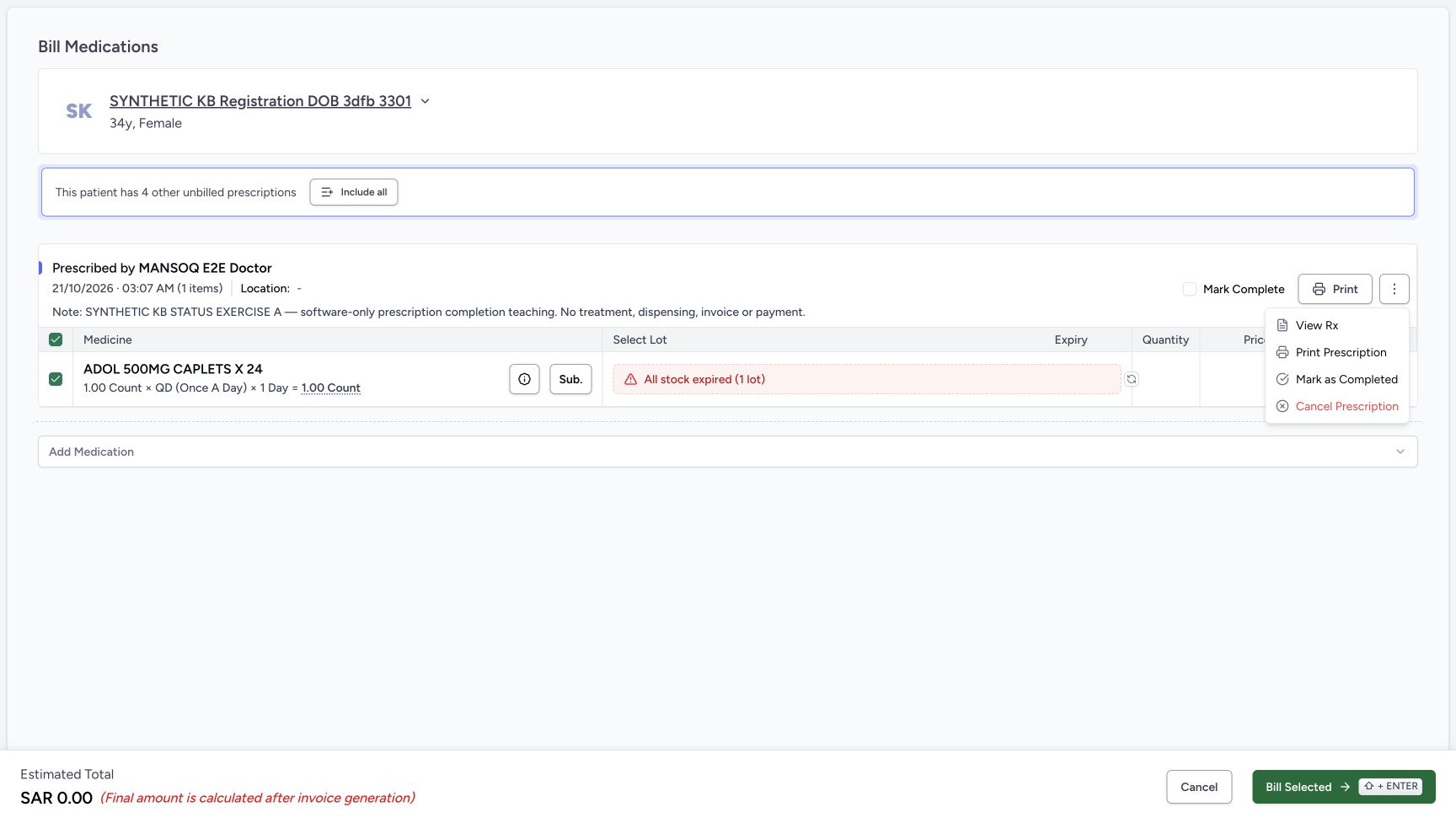
123Choose the immediate Mark as Completed action
Capture details
Actual6cdc prescription lifecycle completion and ordinary Pharmacist cancellation refusal. Doctor-created A/B are separate fictional prerequisites; no Bill Selected, medicine handover, invoice or payment.
Image SHA-256 d5f581c341bfd08283e528dc9f1c465ee112b59e34be2475c3c8a1bf017b7191
- Choose Mark as Completed once: This immediate action changes the selected prescription lifecycle; no separate confirmation appears.
- Distinguish the Mark Complete checkbox: The unchecked billing checkbox is not the action being used.
- Recheck A before the immediate action: Read the A completion-exercise note before selecting the menu item.
 12345
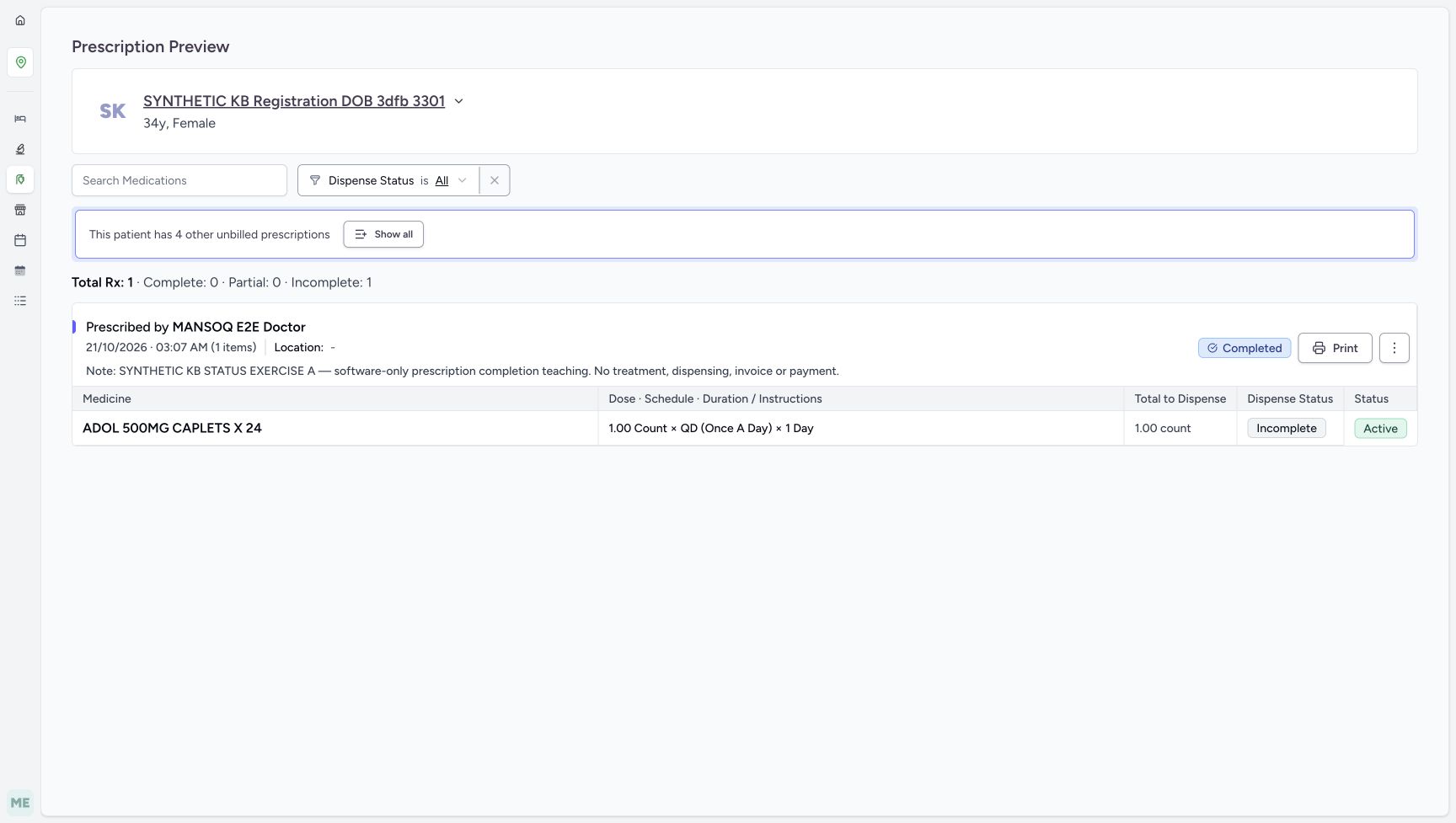
12345Separate completed prescription from incomplete medicine
Capture details
Actual6cdc prescription lifecycle completion and ordinary Pharmacist cancellation refusal. Doctor-created A/B are separate fictional prerequisites; no Bill Selected, medicine handover, invoice or payment.
Image SHA-256 7c3bf185c79e81a29b7f77f7862817bf1e98919a3d560d81def8c2c3df3f9e20
- Read the parent Completed badge: This is the saved prescription lifecycle outcome.
- Read the unchanged medicine Incomplete: Completing the parent did not fulfil this medicine.
- Read the unchanged medicine Active: The medicine request was not cancelled or completed.
- Read Complete 0 and Incomplete 1: These counters describe medicine fulfilment and remain separate from the parent badge.
- Verify A’s note is retained: This is still the software-only completion example.
 1234
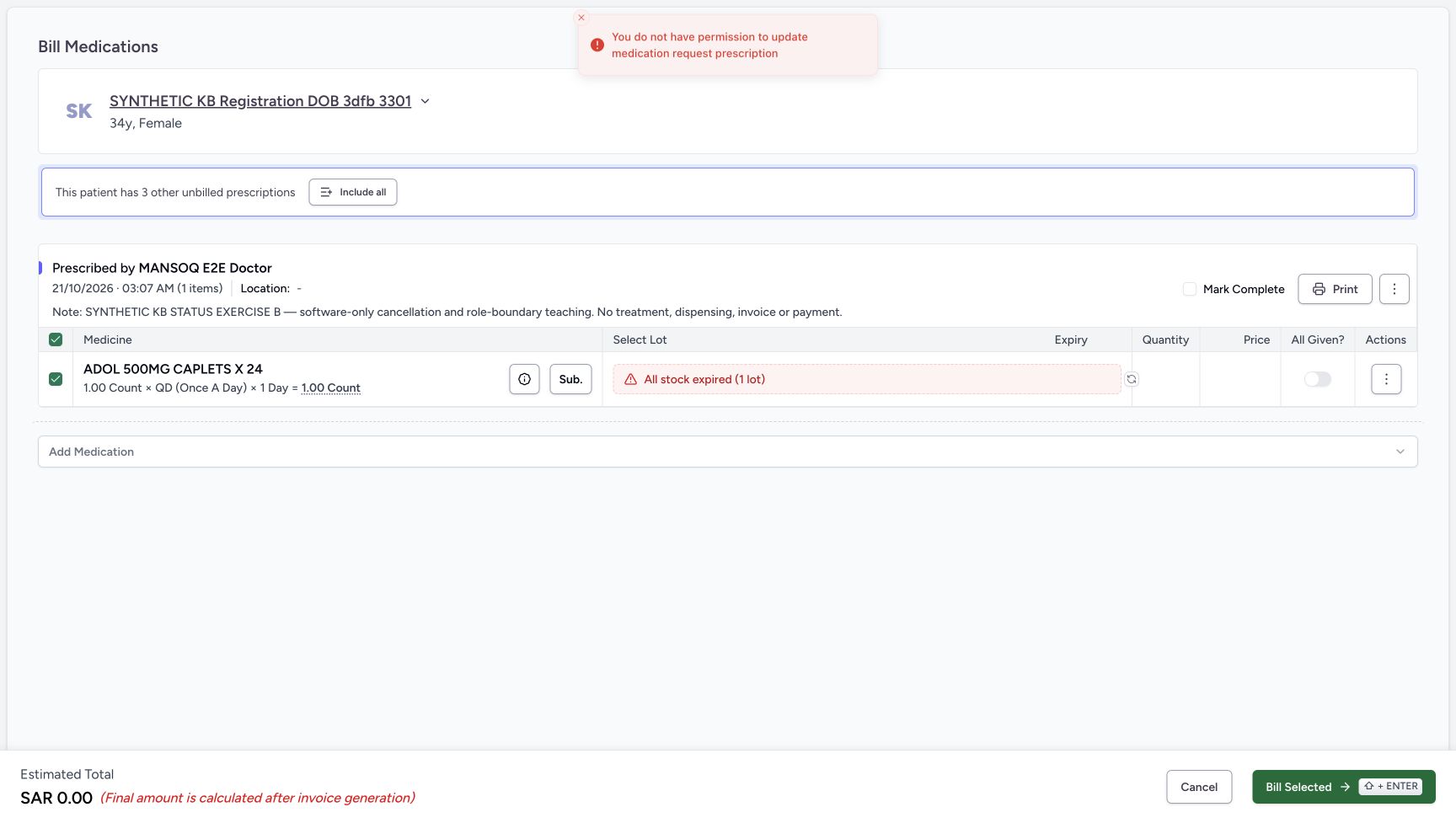
1234Read the permission refusal and leave the form
Capture details
Actual6cdc prescription lifecycle completion and ordinary Pharmacist cancellation refusal. Doctor-created A/B are separate fictional prerequisites; no Bill Selected, medicine handover, invoice or payment.
Image SHA-256 3c7201fa2dbc0630dc112271fc6422627d5c870a3cbf0680860a4dcc8398473c
- Read the exact permission refusal: The action was refused; there is no successful cancellation outcome.
- Choose the outer Cancel to leave: This exits the billing form without cancelling the prescription.
- Keep All Given OFF: Do not mark the medicine given to get past a permission refusal.
- Keep Mark Complete OFF: Do not complete B as a substitute for authorization.
 12345
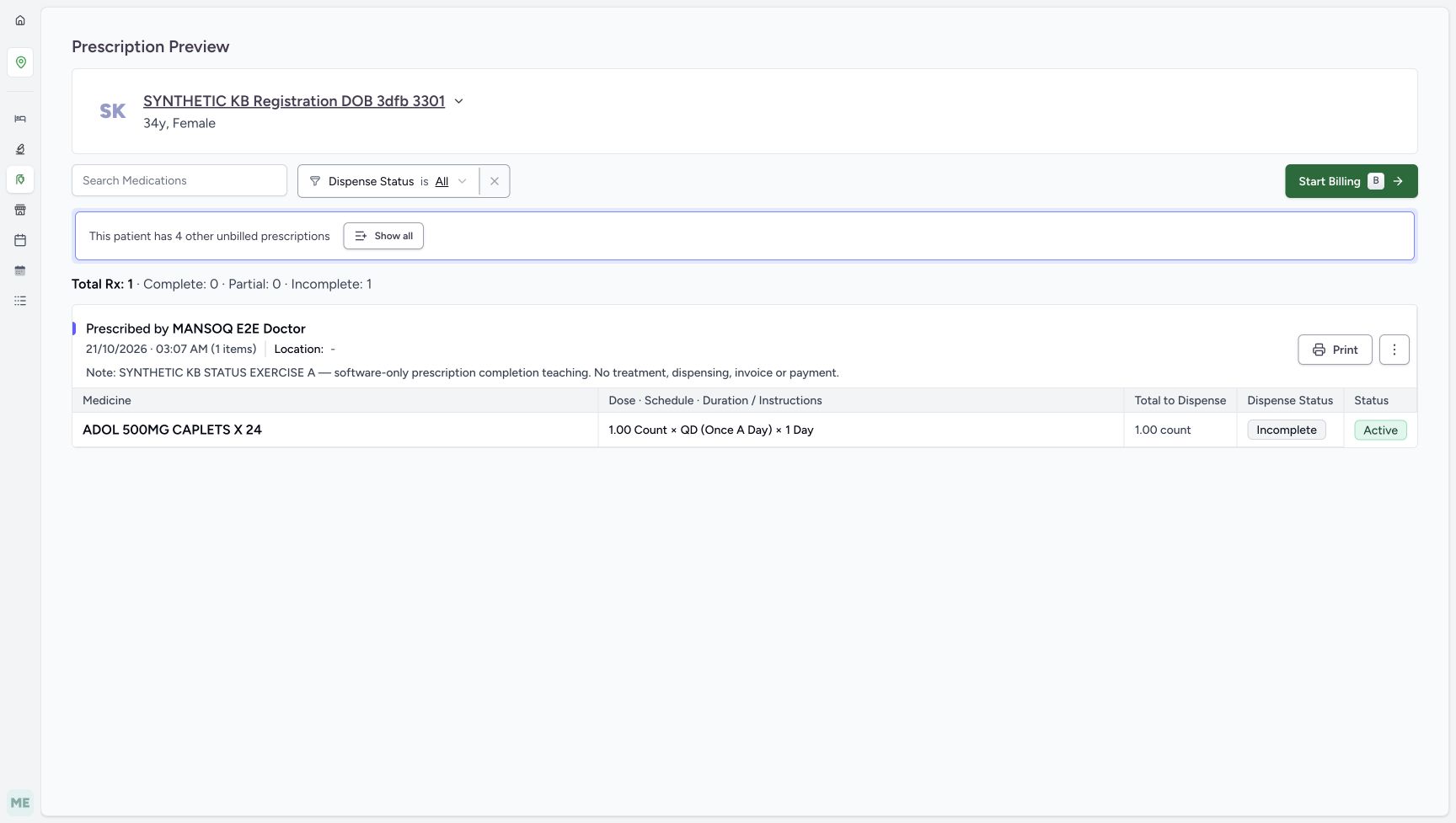
12345Reload and verify the optional correction persisted
Capture details
Actual6cdc prescription lifecycle completion and ordinary Pharmacist cancellation refusal. Doctor-created A/B are separate fictional prerequisites; no Bill Selected, medicine handover, invoice or payment.
Image SHA-256 7ab877102e533a850a86405c8ed18184e41492e7598d91cc7fa6eb03bba3f718
- Verify A’s note after reload: This is the same A prescription, now Active again.
- Read restored Start Billing availability: Stop at readback without opening or submitting another bill.
- Read retained medicine Incomplete: No medicine fulfilment was added by reactivation.
- Read retained medicine Active: The child medicine remains unchanged.
- Verify Complete 0 and Incomplete 1: Prescription lifecycle correction did not change fulfilment counters.
16 of 16 content blocks have reviewed image alignment.
Before you begin
- Use the assigned Pharmacist in the established Main Pharmacy Prescription Queue at MANSOQ Demo Polyclinic. An existing Doctor has prepared two separate fictional ADOL 500MG CAPLETS X 24 prescriptions for SYNTHETIC KB Registration DOB 3dfb 3301, using product code 06285094000103. A’s note begins SYNTHETIC KB STATUS EXERCISE A and identifies completion teaching; B’s begins SYNTHETIC KB STATUS EXERCISE B and identifies cancellation and role-boundary teaching. Both display 21/10/2026 03:07 AM, so read the full note before acting. The Doctor screenshots document these prerequisites, not a Pharmacist prescribing task.
 123
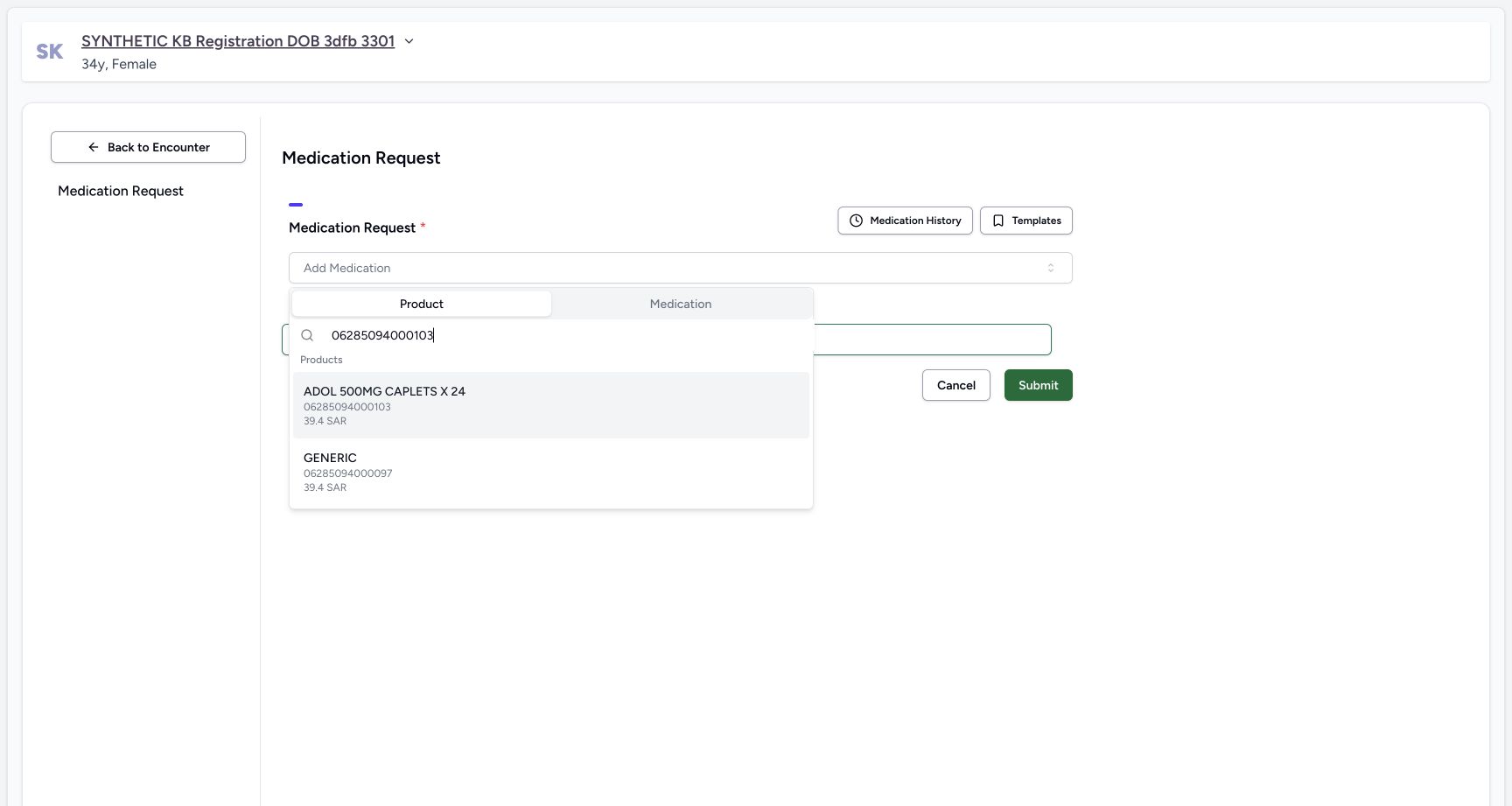
123Recorded release 6cdc3676 · 2026-10-21T00:06:40.635082+00:00 · 1728 × 921 Recognize the Doctor-prepared fictional product
Capture details
Actual6cdc prescription lifecycle completion and ordinary Pharmacist cancellation refusal. Doctor-created A/B are separate fictional prerequisites; no Bill Selected, medicine handover, invoice or payment.
Image SHA-256
4d21be85f9a690cea149acd27f28d4e2b5390f3e5264672d64cc42a03e503b42- Read the Product tab: The setup uses the catalogue Product choice.
- Match the exact code: The search is 06285094000103; do not substitute a similar result.
- Identify the ADOL result: ADOL 500MG CAPLETS X 24 is the fictional exercise product, not clinical advice.
 123456
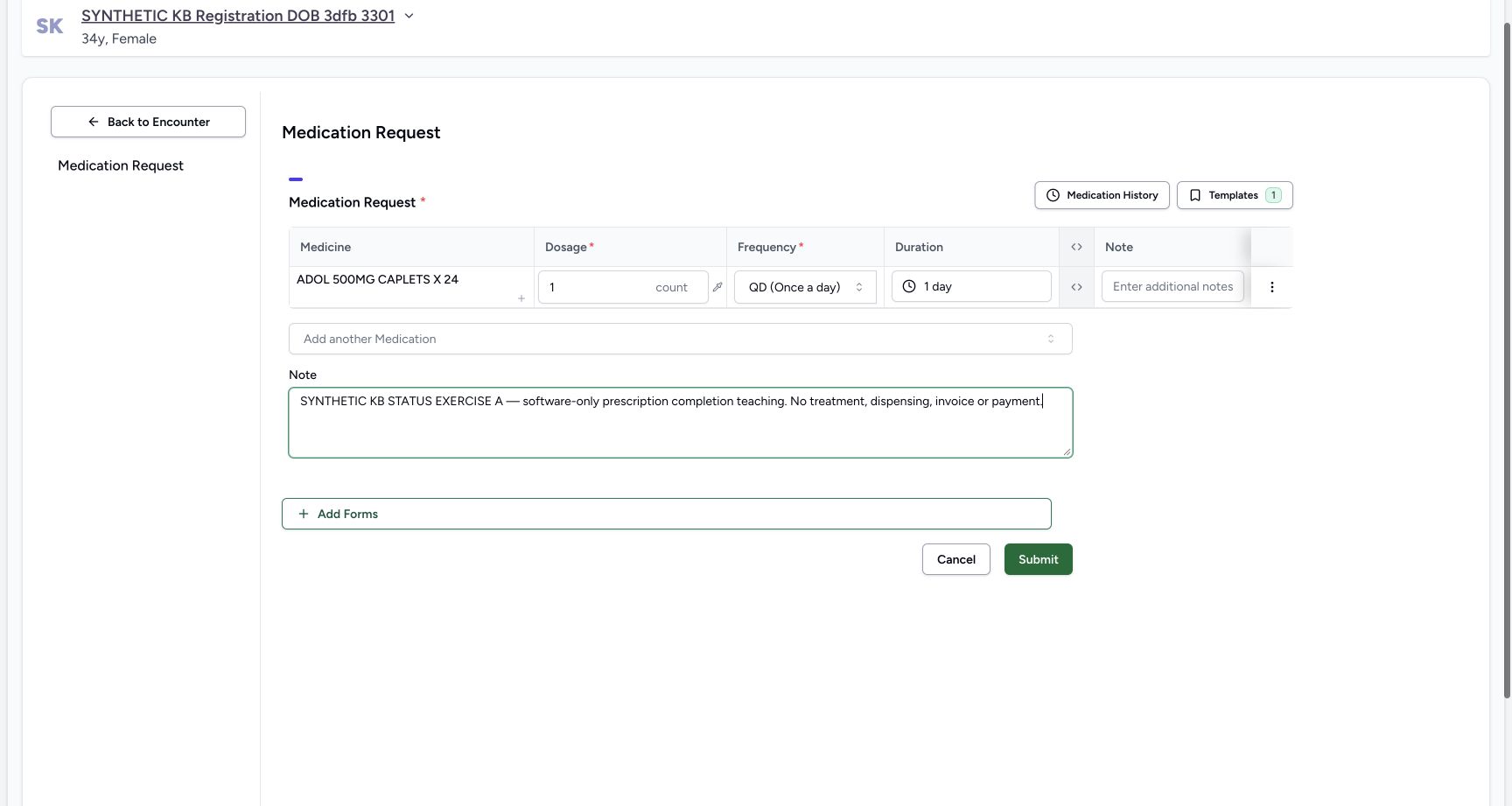
Recorded release 6cdc3676 · 2026-10-21T00:06:56.799627+00:00 · 1728 × 921 Read fictional exercise A before Doctor submission
Capture details
Actual6cdc prescription lifecycle completion and ordinary Pharmacist cancellation refusal. Doctor-created A/B are separate fictional prerequisites; no Bill Selected, medicine handover, invoice or payment.
Image SHA-256
f0586464fca37b0652fda33837b98cd4958fcd1a1dbb36776357330fd953508a- Verify the exercise medicine: The example uses ADOL 500MG CAPLETS X 24.
- Read the fictional dosage: The displayed 1 count is test data, not a recommended dose.
- Read the fictional frequency: QD (Once a day) belongs to this software example only.
- Read the fictional duration: The displayed duration is 1 day.
- Read the A purpose note: SYNTHETIC KB STATUS EXERCISE A identifies completion teaching and excludes treatment, dispensing, invoice and payment.
- Locate Doctor Submit: The prerequisite was saved once by the existing Doctor; the Pharmacist does not repeat this setup.
 1234
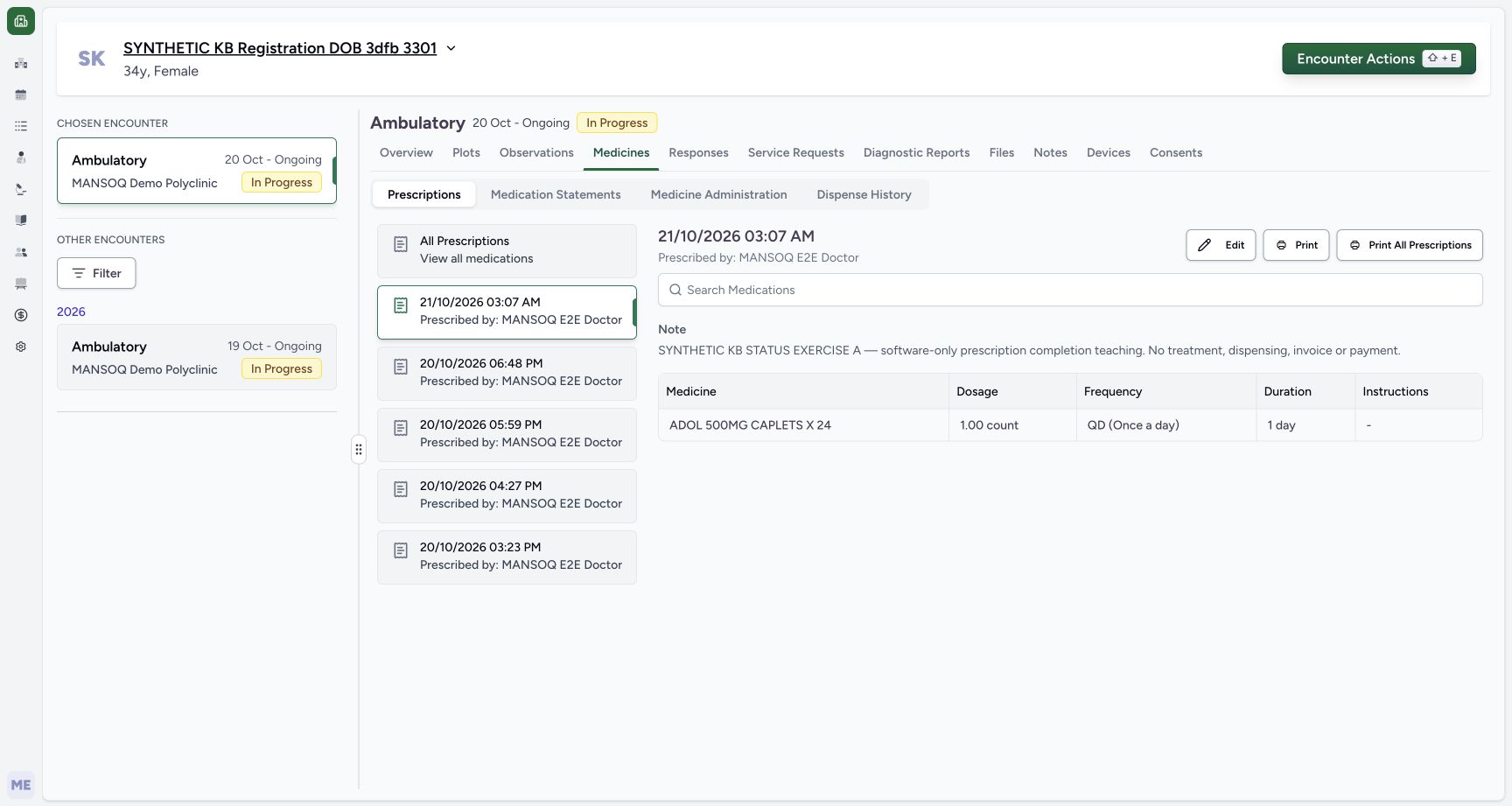
1234Recorded release 6cdc3676 · 2026-10-21T00:07:29.316719+00:00 · 1728 × 921 Verify saved example A by its note
Capture details
Actual6cdc prescription lifecycle completion and ordinary Pharmacist cancellation refusal. Doctor-created A/B are separate fictional prerequisites; no Bill Selected, medicine handover, invoice or payment.
Image SHA-256
bb6dd8cd470f12a8039090d6084872cc5c930a161e34f8fc7e942f0714284f7e- Identify saved A: This selected prescription is A at 03:07 AM; use its full note to distinguish it.
- Read the saved A note: The note says software-only prescription completion teaching.
- Read the saved fictional schedule: The saved row retains 1.00 count, QD (Once a day), and 1 day.
- Verify the prescriber: MANSOQ E2E Doctor prepared the prerequisite.
 123
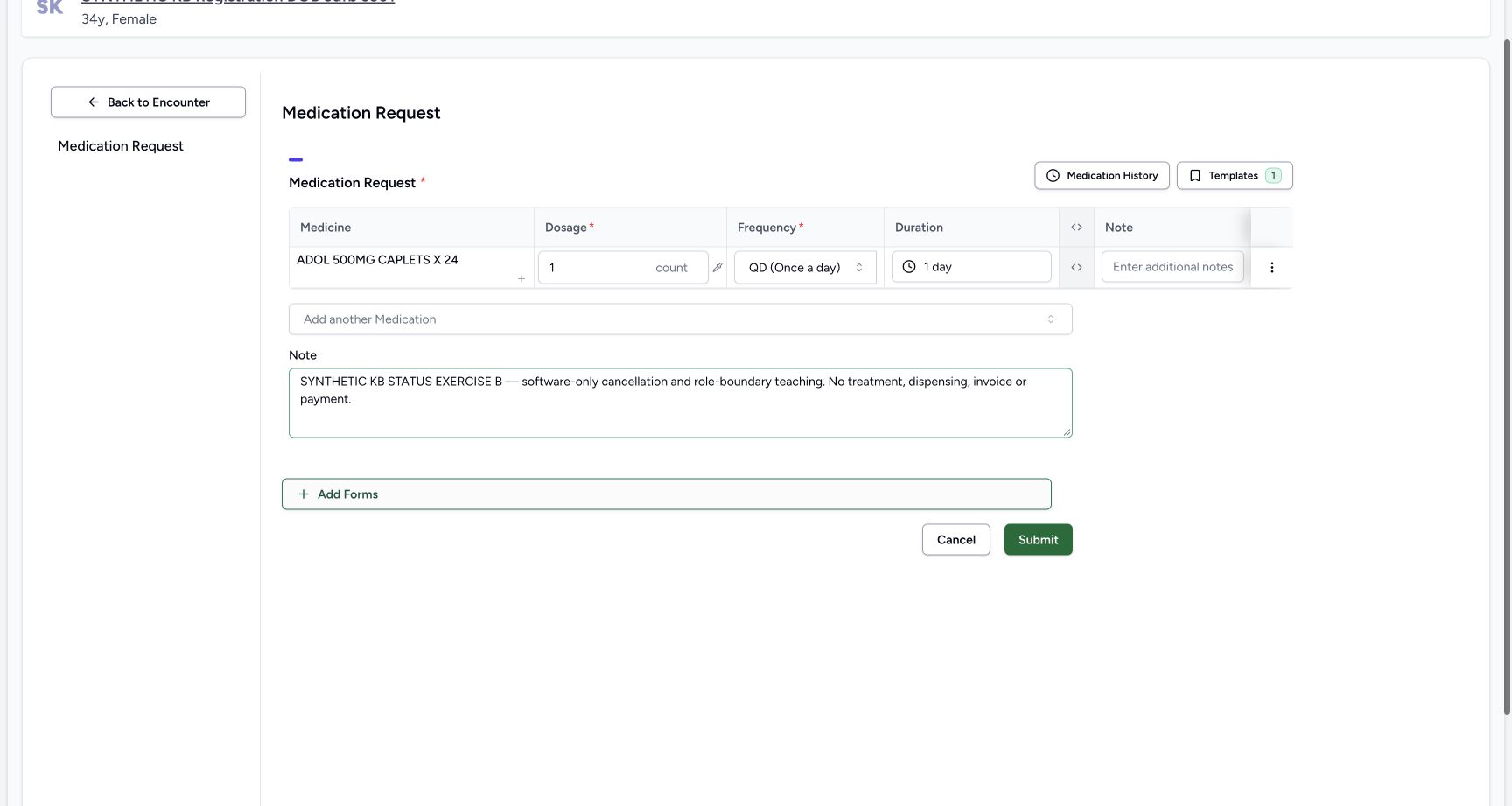
123Recorded release 6cdc3676 · 2026-10-21T00:07:50.666341+00:00 · 1728 × 921 Read separate fictional exercise B before submission
Capture details
Actual6cdc prescription lifecycle completion and ordinary Pharmacist cancellation refusal. Doctor-created A/B are separate fictional prerequisites; no Bill Selected, medicine handover, invoice or payment.
Image SHA-256
61be34a3ae4a9f443763988b4fd13557cd062048f0bfee68a0ef673c409b4c4c- Read the separate fictional B schedule: This second request also uses 1 count, QD and 1 day as test data.
- Read the B purpose note: SYNTHETIC KB STATUS EXERCISE B distinguishes the cancellation and role-boundary example.
- Locate the separate Doctor Submit: The Doctor saved B once as a distinct prescription; do not reuse A for the refusal branch.
 123
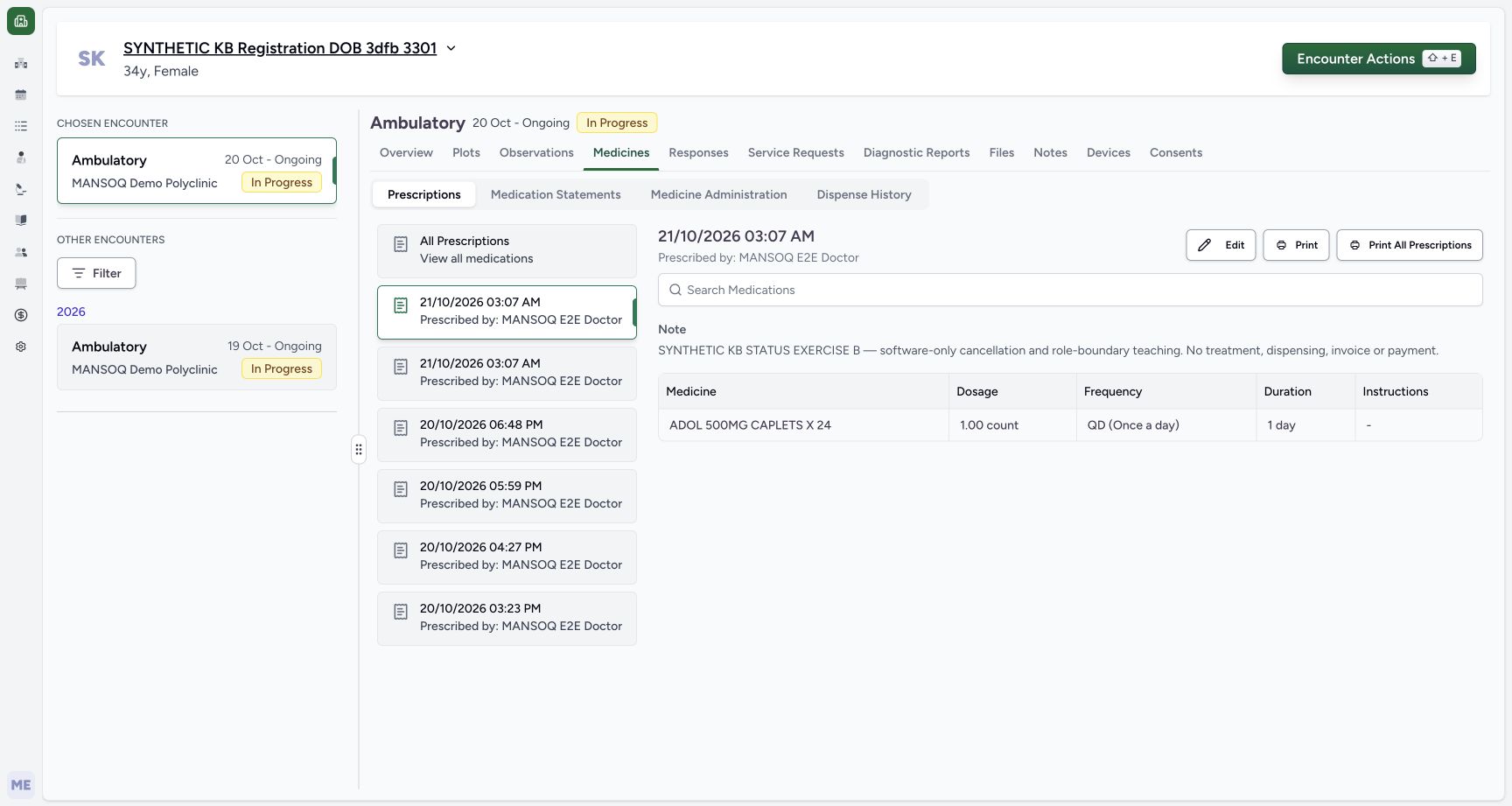
123Recorded release 6cdc3676 · 2026-10-21T00:07:57.845280+00:00 · 1728 × 921 Distinguish the saved B and A entries
Capture details
Actual6cdc prescription lifecycle completion and ordinary Pharmacist cancellation refusal. Doctor-created A/B are separate fictional prerequisites; no Bill Selected, medicine handover, invoice or payment.
Image SHA-256
228af9dd769c6bc1b8655b1a9c75e5b2e2c18f28d5e15aa85943a21055853629- Read the selected B entry: This is the newly saved B prescription.
- Notice A has the same minute: The adjacent A entry also shows 03:07 AM; a time label alone is insufficient.
- Verify the saved B purpose note: Confirm cancellation and role-boundary teaching before continuing.
 1234
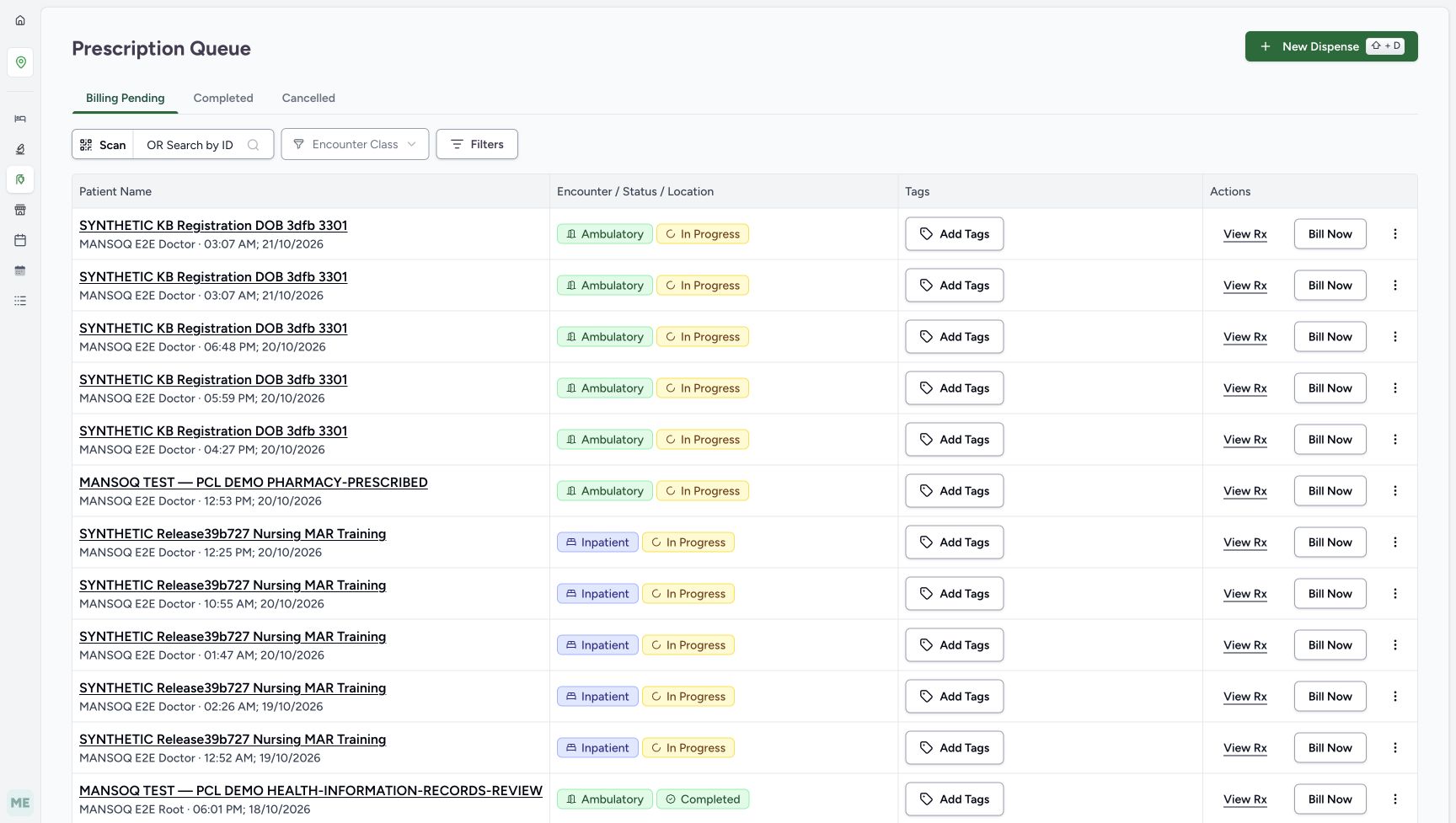
1234Recorded release 6cdc3676 · 2026-10-21T00:08:32.413159+00:00 · 1728 × 977 Open A from Billing Pending and verify its note
Capture details
Actual6cdc prescription lifecycle completion and ordinary Pharmacist cancellation refusal. Doctor-created A/B are separate fictional prerequisites; no Bill Selected, medicine handover, invoice or payment.
Image SHA-256
d5c9a306f5d7a96b162ed9acbaa789c2075fdb195ca8bdf01dc71433c022a4b3- Begin in Billing Pending: Use the established Pharmacy Prescription Queue.
- Notice the first same-minute entry: The first entry is B in this captured ordering; do not identify it by time alone.
- Identify the second same-minute entry: A is the second entry in this captured ordering.
- Open A with View Rx: Verify the full A note in the preview before any status action.
- Make a real prescription-status change only when the assigned role is authorized and the underlying decision has been approved through the facility’s normal process. Here the two explicit software-only notes identify the fictional demonstration records. The shown dose 1 count, QD and 1 day are test data, not clinical advice. No medicine is physically issued or administered. Do not choose Bill Selected, alter stock, use substitution, create an invoice, collect payment or change access permissions.123456
Recorded release 6cdc3676 · 2026-10-21T00:06:56.799627+00:00 · 1728 × 921 Read fictional exercise A before Doctor submission
Capture details
Actual6cdc prescription lifecycle completion and ordinary Pharmacist cancellation refusal. Doctor-created A/B are separate fictional prerequisites; no Bill Selected, medicine handover, invoice or payment.
Image SHA-256
f0586464fca37b0652fda33837b98cd4958fcd1a1dbb36776357330fd953508a- Verify the exercise medicine: The example uses ADOL 500MG CAPLETS X 24.
- Read the fictional dosage: The displayed 1 count is test data, not a recommended dose.
- Read the fictional frequency: QD (Once a day) belongs to this software example only.
- Read the fictional duration: The displayed duration is 1 day.
- Read the A purpose note: SYNTHETIC KB STATUS EXERCISE A identifies completion teaching and excludes treatment, dispensing, invoice and payment.
- Locate Doctor Submit: The prerequisite was saved once by the existing Doctor; the Pharmacist does not repeat this setup.
123Recorded release 6cdc3676 · 2026-10-21T00:07:50.666341+00:00 · 1728 × 921 Read separate fictional exercise B before submission
Capture details
Actual6cdc prescription lifecycle completion and ordinary Pharmacist cancellation refusal. Doctor-created A/B are separate fictional prerequisites; no Bill Selected, medicine handover, invoice or payment.
Image SHA-256
61be34a3ae4a9f443763988b4fd13557cd062048f0bfee68a0ef673c409b4c4c- Read the separate fictional B schedule: This second request also uses 1 count, QD and 1 day as test data.
- Read the B purpose note: SYNTHETIC KB STATUS EXERCISE B distinguishes the cancellation and role-boundary example.
- Locate the separate Doctor Submit: The Doctor saved B once as a distinct prescription; do not reuse A for the refusal branch.
 12345
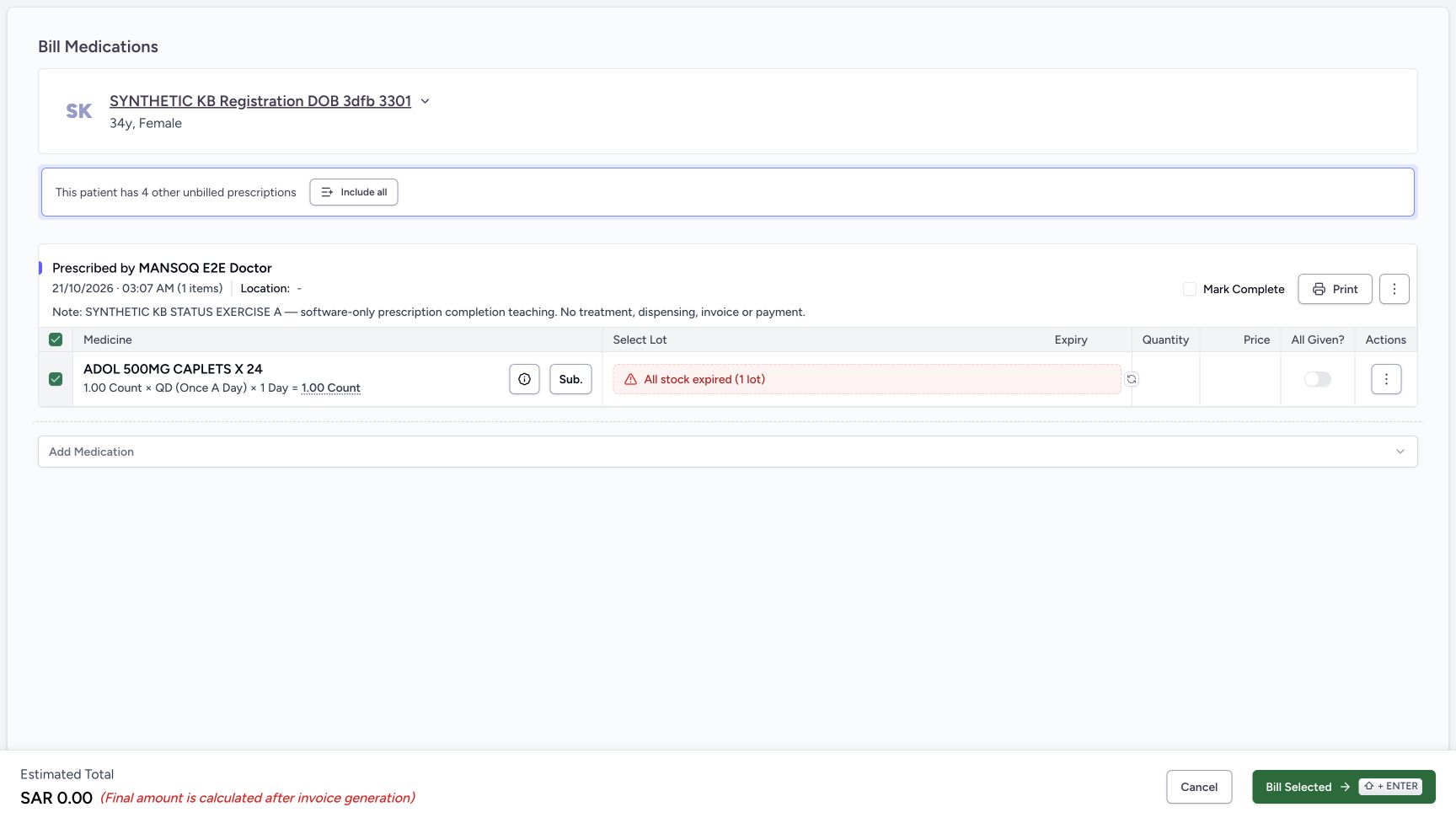
12345Recorded release 6cdc3676 · 2026-10-21T00:08:48.292194+00:00 · 1728 × 977 Keep billing controls OFF and locate the prescription menu
Capture details
Actual6cdc prescription lifecycle completion and ordinary Pharmacist cancellation refusal. Doctor-created A/B are separate fictional prerequisites; no Bill Selected, medicine handover, invoice or payment.
Image SHA-256
88516704cb0fac79db3e57c59f8c7978e284d7a3b0aa70145ad82d1c5b62815f- Verify Mark Complete OFF: This checkbox is a billing choice, not the immediate status-menu action.
- Verify All Given OFF: No medicine-fulfilment claim is being submitted.
- Open the prescription-level menu: Use the upper three-dot button beside Print, not the lower medicine-row Actions button.
- Leave the expired-stock result unchanged: No lot, quantity or substitute is selected for this status-only exercise.
- Leave Bill Selected unused: This lesson does not create a preparation or invoice.
1234Recorded release 6cdc3676 · 2026-10-21T00:09:33.120157+00:00 · 1728 × 977 Read the permission refusal and leave the form
Capture details
Actual6cdc prescription lifecycle completion and ordinary Pharmacist cancellation refusal. Doctor-created A/B are separate fictional prerequisites; no Bill Selected, medicine handover, invoice or payment.
Image SHA-256
3c7201fa2dbc0630dc112271fc6422627d5c870a3cbf0680860a4dcc8398473c- Read the exact permission refusal: The action was refused; there is no successful cancellation outcome.
- Choose the outer Cancel to leave: This exits the billing form without cancelling the prescription.
- Keep All Given OFF: Do not mark the medicine given to get past a permission refusal.
- Keep Mark Complete OFF: Do not complete B as a substitute for authorization.
1. Open A and verify its exact purpose
In Billing Pending, find the two new entries for the synthetic patient at 03:07 AM. In the pictured ordering B is first and A second. Choose View Rx for A and read its full completion-exercise note before continuing. Confirm one ADOL item with medicine Incomplete and Active, and Total Rx 1, Complete 0, Partial 0 and Incomplete 1. Do not include the other prescriptions.
1234Open A from Billing Pending and verify its note
Capture details
Actual6cdc prescription lifecycle completion and ordinary Pharmacist cancellation refusal. Doctor-created A/B are separate fictional prerequisites; no Bill Selected, medicine handover, invoice or payment.
Image SHA-256 d5c9a306f5d7a96b162ed9acbaa789c2075fdb195ca8bdf01dc71433c022a4b3
- Begin in Billing Pending: Use the established Pharmacy Prescription Queue.
- Notice the first same-minute entry: The first entry is B in this captured ordering; do not identify it by time alone.
- Identify the second same-minute entry: A is the second entry in this captured ordering.
- Open A with View Rx: Verify the full A note in the preview before any status action.
 12345
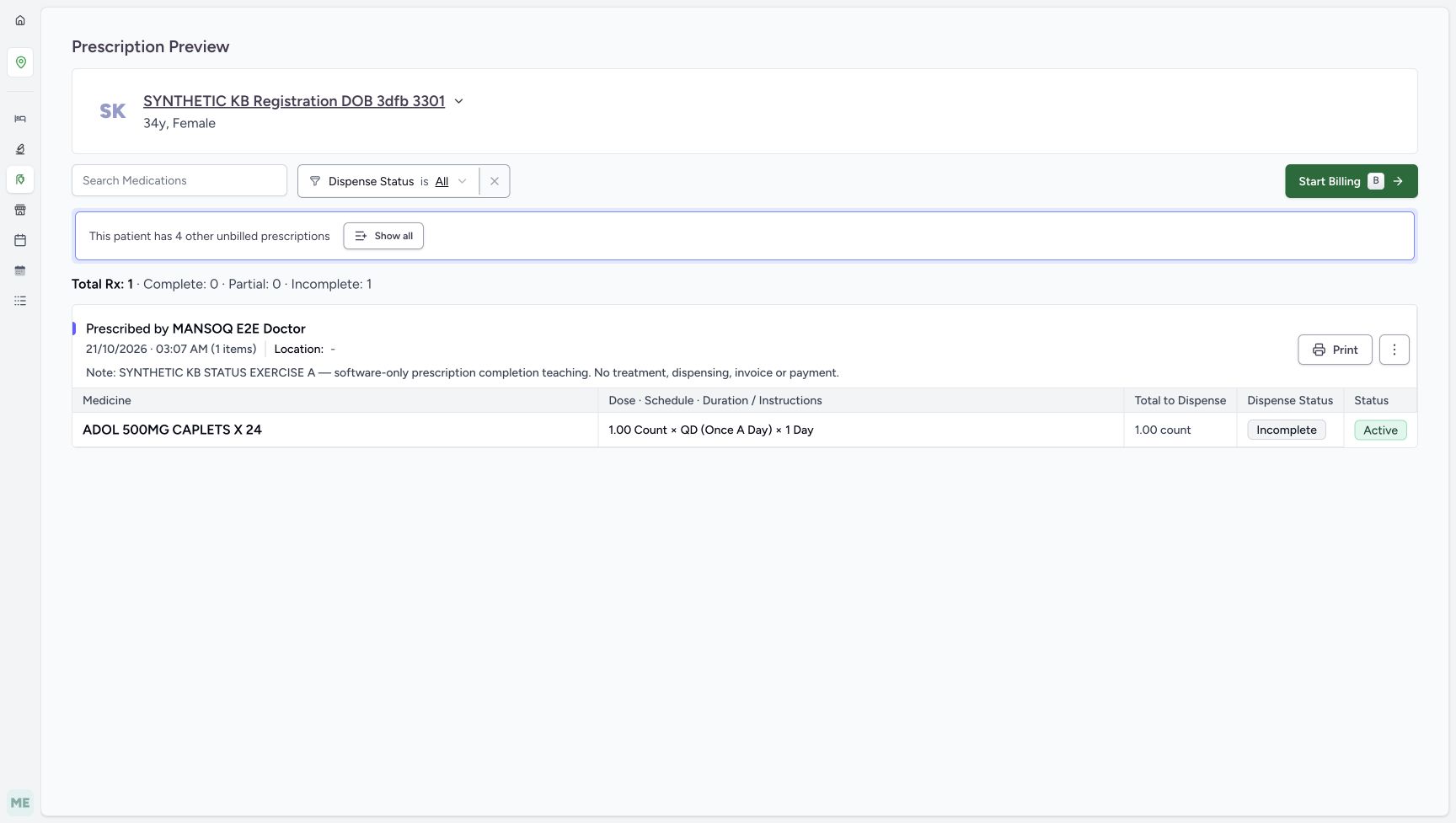
12345Verify A before entering its single-prescription bill
Capture details
Actual6cdc prescription lifecycle completion and ordinary Pharmacist cancellation refusal. Doctor-created A/B are separate fictional prerequisites; no Bill Selected, medicine handover, invoice or payment.
Image SHA-256 7ab877102e533a850a86405c8ed18184e41492e7598d91cc7fa6eb03bba3f718
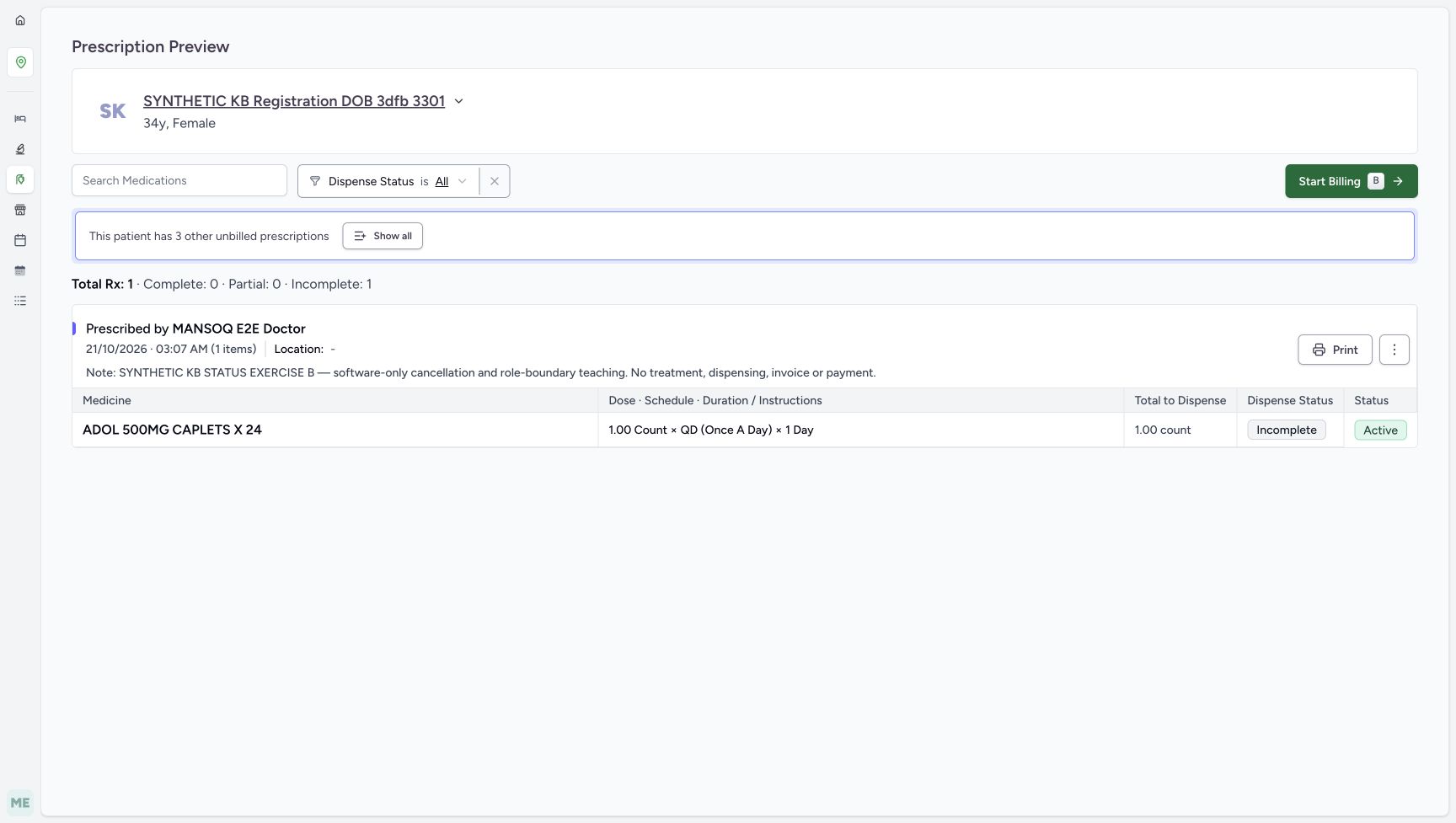
- Verify the full A note: It must say SYNTHETIC KB STATUS EXERCISE A and completion teaching.
- Choose Start Billing for A: Keep this as one prescription; do not use Show all or Include all.
- Read medicine Incomplete: No medicine fulfilment has occurred.
- Read medicine Active: This medicine-row status is separate from the prescription lifecycle.
- Read the initial counters: Total Rx 1 has Complete 0 and Incomplete 1.
2. Open A’s preparation screen and distinguish the immediate menu
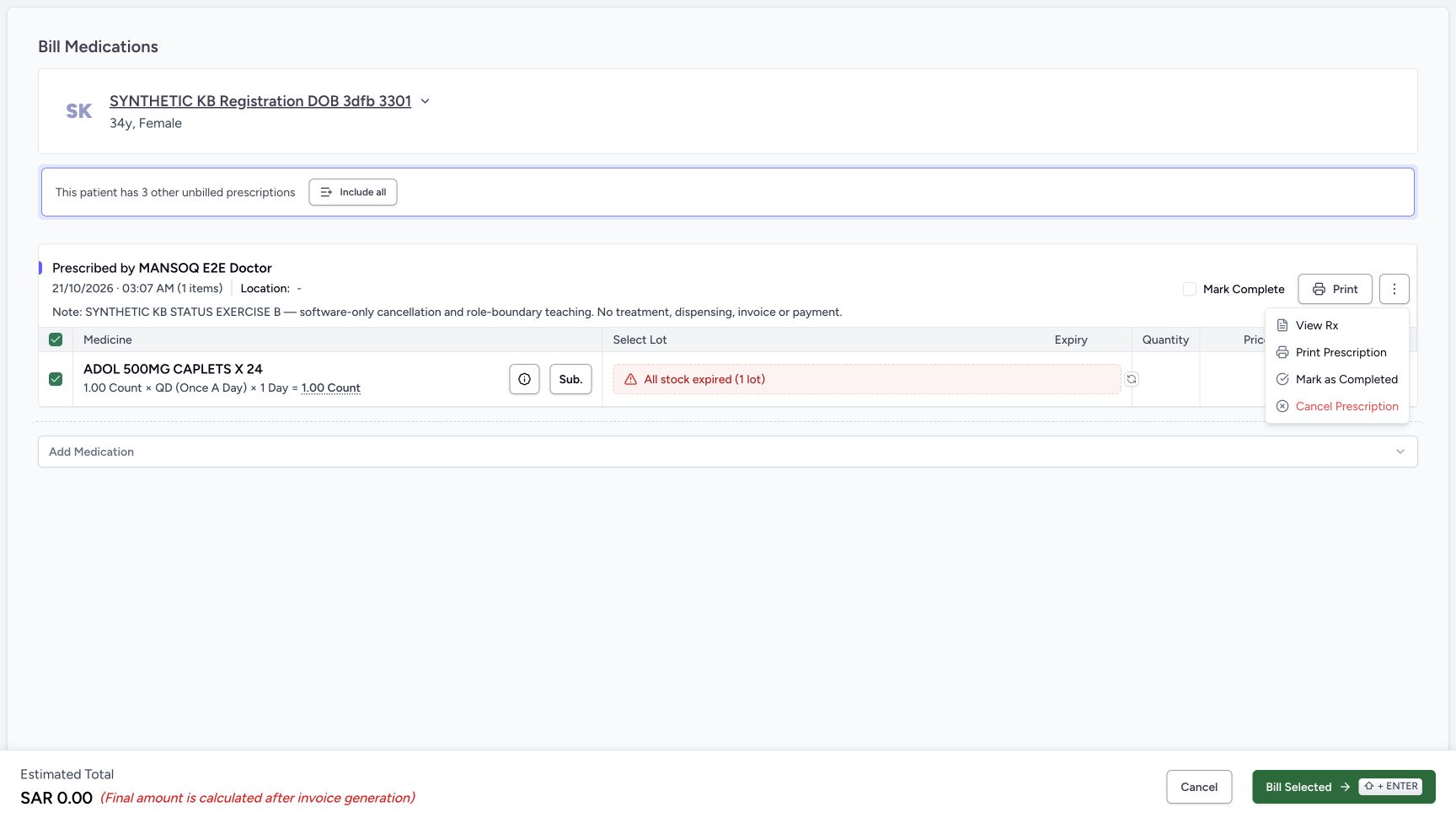
Choose Start Billing for this single A prescription. Turn the local Mark Complete checkbox and medicine All Given switch OFF, and verify the pictured OFF states. Leave the existing All stock expired (1 lot) result unchanged. Open the upper three-dot prescription menu beside Print. Its Mark as Completed action is separate from the Mark Complete billing checkbox and from the medicine-row Actions menu. Leave Bill Selected unused.
12345Verify A before entering its single-prescription bill
Capture details
Actual6cdc prescription lifecycle completion and ordinary Pharmacist cancellation refusal. Doctor-created A/B are separate fictional prerequisites; no Bill Selected, medicine handover, invoice or payment.
Image SHA-256 7ab877102e533a850a86405c8ed18184e41492e7598d91cc7fa6eb03bba3f718
- Verify the full A note: It must say SYNTHETIC KB STATUS EXERCISE A and completion teaching.
- Choose Start Billing for A: Keep this as one prescription; do not use Show all or Include all.
- Read medicine Incomplete: No medicine fulfilment has occurred.
- Read medicine Active: This medicine-row status is separate from the prescription lifecycle.
- Read the initial counters: Total Rx 1 has Complete 0 and Incomplete 1.
12345Keep billing controls OFF and locate the prescription menu
Capture details
Actual6cdc prescription lifecycle completion and ordinary Pharmacist cancellation refusal. Doctor-created A/B are separate fictional prerequisites; no Bill Selected, medicine handover, invoice or payment.
Image SHA-256 88516704cb0fac79db3e57c59f8c7978e284d7a3b0aa70145ad82d1c5b62815f
- Verify Mark Complete OFF: This checkbox is a billing choice, not the immediate status-menu action.
- Verify All Given OFF: No medicine-fulfilment claim is being submitted.
- Open the prescription-level menu: Use the upper three-dot button beside Print, not the lower medicine-row Actions button.
- Leave the expired-stock result unchanged: No lot, quantity or substitute is selected for this status-only exercise.
- Leave Bill Selected unused: This lesson does not create a preparation or invoice.
123Choose the immediate Mark as Completed action
Capture details
Actual6cdc prescription lifecycle completion and ordinary Pharmacist cancellation refusal. Doctor-created A/B are separate fictional prerequisites; no Bill Selected, medicine handover, invoice or payment.
Image SHA-256 d5f581c341bfd08283e528dc9f1c465ee112b59e34be2475c3c8a1bf017b7191
- Choose Mark as Completed once: This immediate action changes the selected prescription lifecycle; no separate confirmation appears.
- Distinguish the Mark Complete checkbox: The unchecked billing checkbox is not the action being used.
- Recheck A before the immediate action: Read the A completion-exercise note before selecting the menu item.
3. Complete A once and refresh the returned queue
After rechecking A’s note and the approved purpose, select Mark as Completed once. The action runs immediately without a separate confirmation. Read Prescription completed successfully and the return to Prescription Queue: A was the last group in this form. The initially returned Billing Pending table still shows stale same-minute rows, so do not repeat completion from that table. Reload normally, wait for the queue to finish loading, then choose Completed.
123Choose the immediate Mark as Completed action
Capture details
Actual6cdc prescription lifecycle completion and ordinary Pharmacist cancellation refusal. Doctor-created A/B are separate fictional prerequisites; no Bill Selected, medicine handover, invoice or payment.
Image SHA-256 d5f581c341bfd08283e528dc9f1c465ee112b59e34be2475c3c8a1bf017b7191
- Choose Mark as Completed once: This immediate action changes the selected prescription lifecycle; no separate confirmation appears.
- Distinguish the Mark Complete checkbox: The unchecked billing checkbox is not the action being used.
- Recheck A before the immediate action: Read the A completion-exercise note before selecting the menu item.
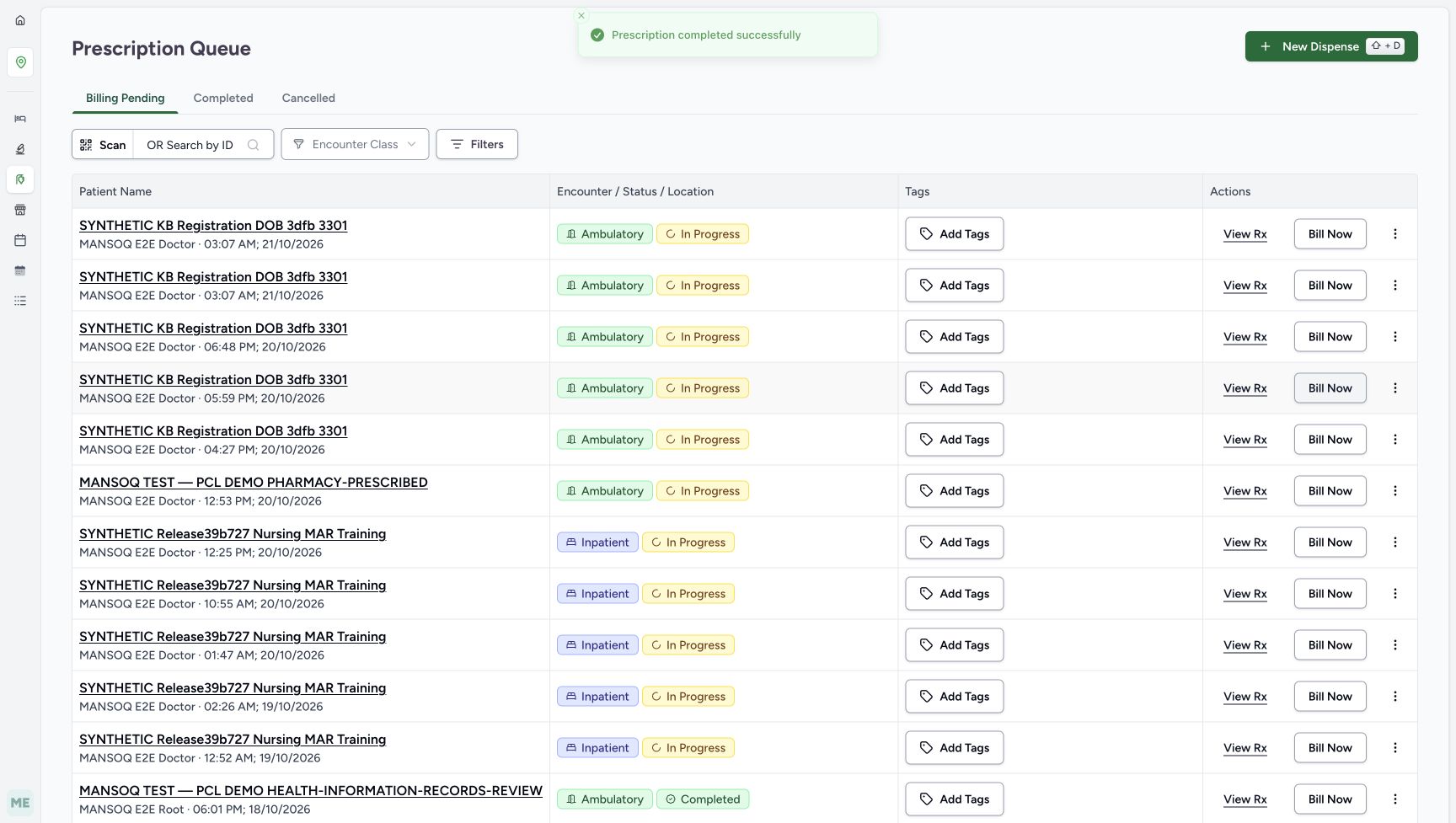 123
123Read success, then refresh the queue
Capture details
Actual6cdc prescription lifecycle completion and ordinary Pharmacist cancellation refusal. Doctor-created A/B are separate fictional prerequisites; no Bill Selected, medicine handover, invoice or payment.
Image SHA-256 4bd62f282942eb77d1a79cd637db52bde14325efe7270f298711203b2a8592fa
- Read the completion success: The visible toast confirms the immediate action succeeded.
- Recognize the initially stale queue rows: The old table still has two 03:07 AM rows; this is not a reason to repeat the status action.
- Locate Completed for fresh verification: After a normal reload finishes, use the Completed tab and verify A with View Rx.
 123
123Find A in the freshly loaded Completed tab
Capture details
Actual6cdc prescription lifecycle completion and ordinary Pharmacist cancellation refusal. Doctor-created A/B are separate fictional prerequisites; no Bill Selected, medicine handover, invoice or payment.
Image SHA-256 f079429318c99e7c9d76366eea35e4b85a805afba9ca809e6bfc82d71d0bb570
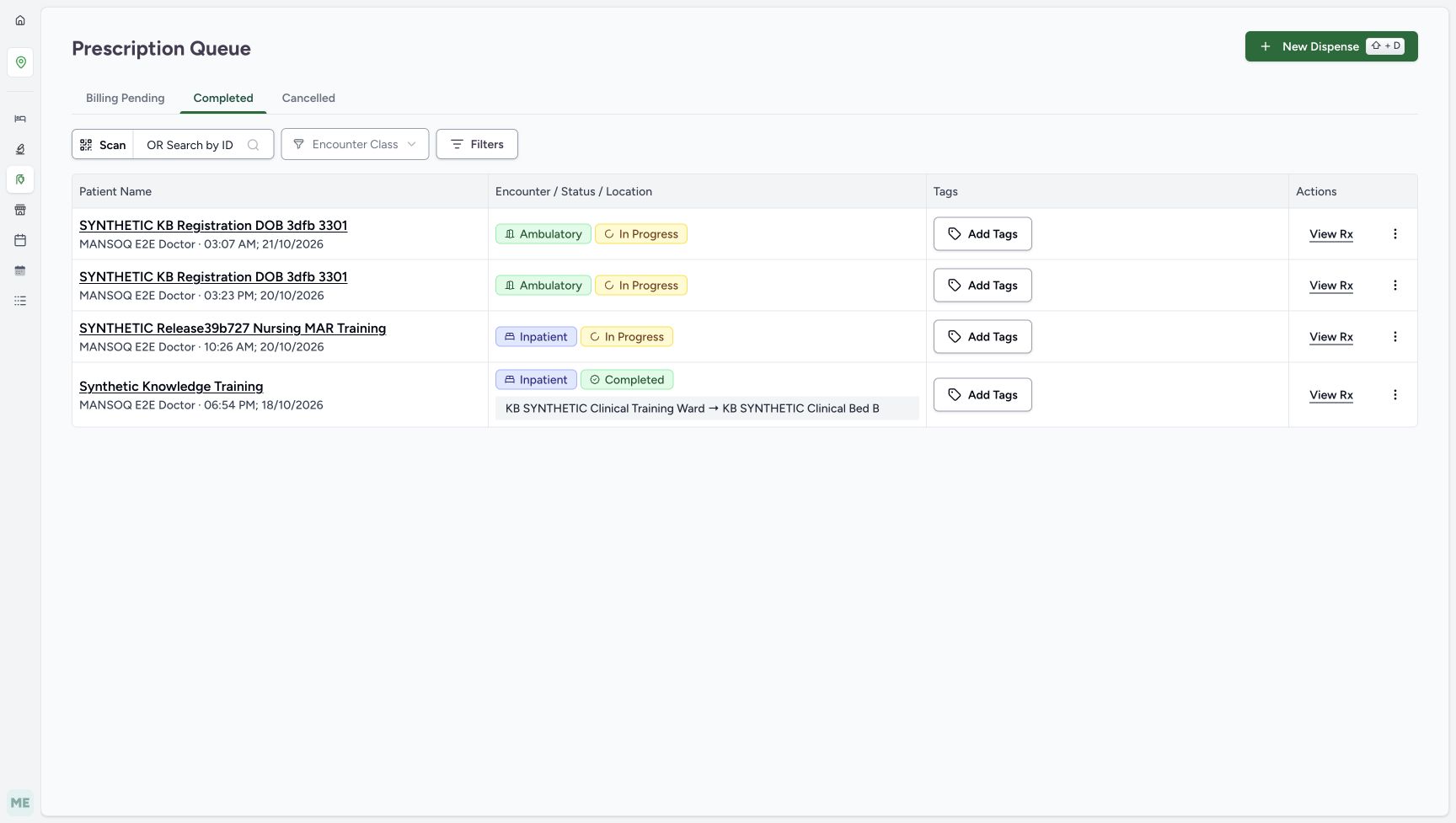
- Read the selected Completed tab: This tab groups prescriptions by their lifecycle status.
- Identify the new completed entry: Match the patient and 21/10/2026 03:07 AM, then check the A note in preview.
- Open the saved A with View Rx: Verify the prescription badge and medicine-row values together.
4. Verify parent Completed without medicine fulfilment
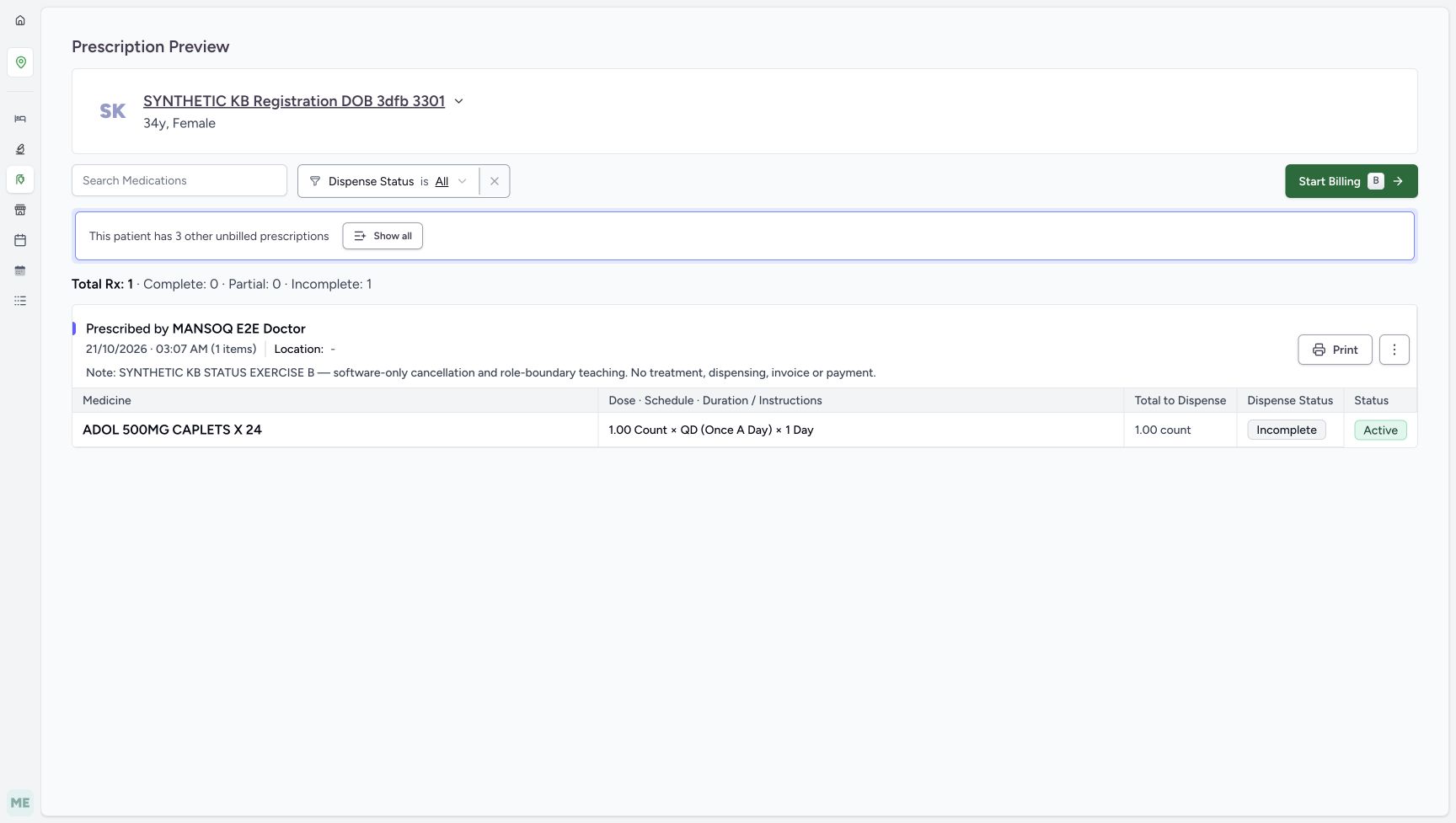
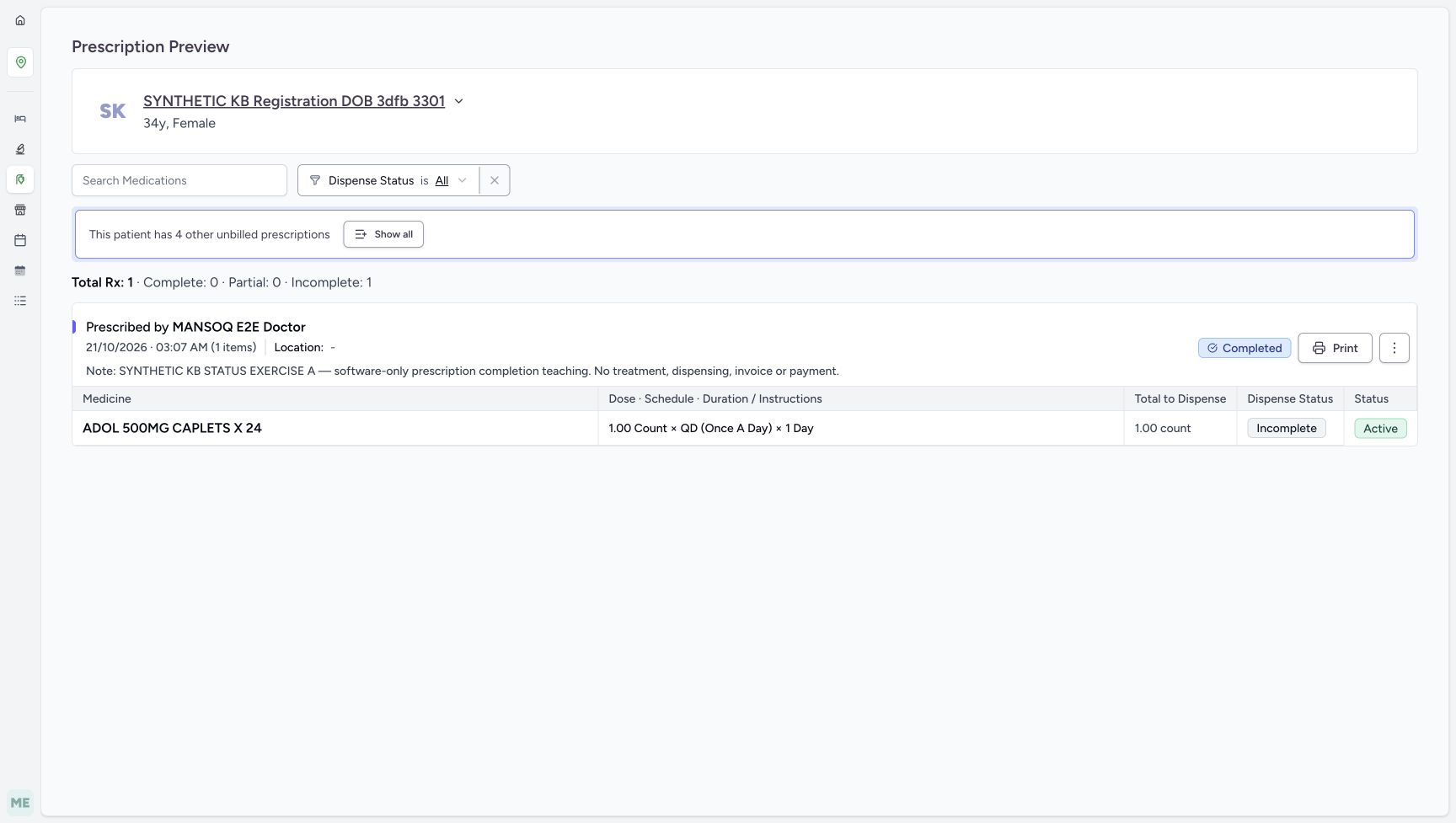
In the fresh Completed tab, choose View Rx for the new 03:07 AM A entry and verify its full note. The preview now has a Completed badge on the prescription, while its ADOL medicine remains Active and Incomplete. Total Rx 1 still has Complete 0, Partial 0 and Incomplete 1, and Start Billing is no longer offered in this preview. This outcome records a prescription lifecycle decision; it does not say the medicine was given, billed or paid.
123Find A in the freshly loaded Completed tab
Capture details
Actual6cdc prescription lifecycle completion and ordinary Pharmacist cancellation refusal. Doctor-created A/B are separate fictional prerequisites; no Bill Selected, medicine handover, invoice or payment.
Image SHA-256 f079429318c99e7c9d76366eea35e4b85a805afba9ca809e6bfc82d71d0bb570
- Read the selected Completed tab: This tab groups prescriptions by their lifecycle status.
- Identify the new completed entry: Match the patient and 21/10/2026 03:07 AM, then check the A note in preview.
- Open the saved A with View Rx: Verify the prescription badge and medicine-row values together.
12345Separate completed prescription from incomplete medicine
Capture details
Actual6cdc prescription lifecycle completion and ordinary Pharmacist cancellation refusal. Doctor-created A/B are separate fictional prerequisites; no Bill Selected, medicine handover, invoice or payment.
Image SHA-256 7c3bf185c79e81a29b7f77f7862817bf1e98919a3d560d81def8c2c3df3f9e20
- Read the parent Completed badge: This is the saved prescription lifecycle outcome.
- Read the unchanged medicine Incomplete: Completing the parent did not fulfil this medicine.
- Read the unchanged medicine Active: The medicine request was not cancelled or completed.
- Read Complete 0 and Incomplete 1: These counters describe medicine fulfilment and remain separate from the parent badge.
- Verify A’s note is retained: This is still the software-only completion example.
5. Open the separate B cancellation example
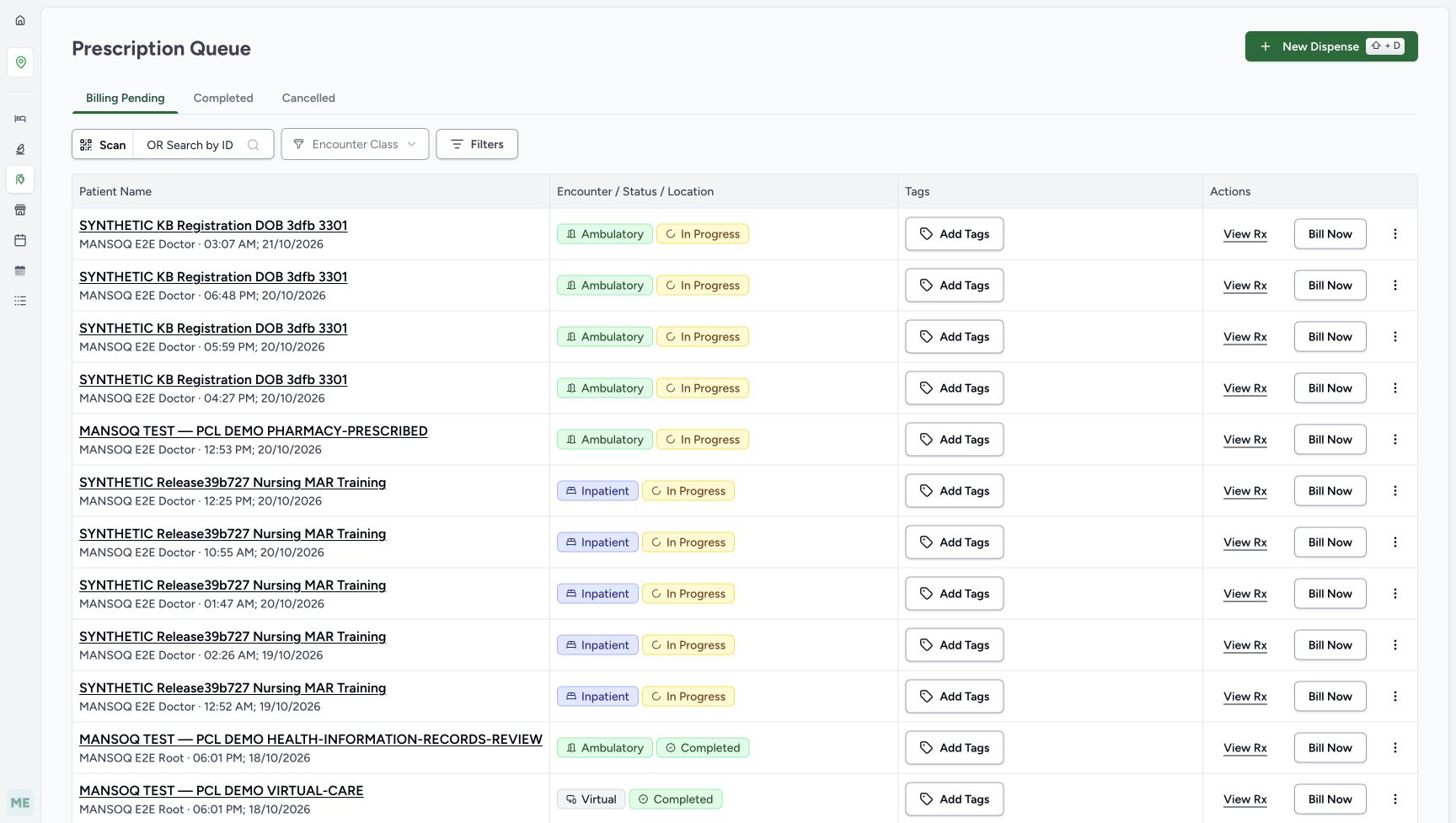
Return to Prescription Queue and its Billing Pending tab. The remaining new 03:07 AM entry is B; the older active prescriptions remain listed. Use View Rx and verify the full B cancellation and role-boundary note, with the medicine still Incomplete and Active. Choose Start Billing for B alone. Set Mark Complete and All Given OFF as in the controlled A form, then open B’s upper prescription menu. Do not include or bill any medicine.
 123
123Find B in fresh Billing Pending
Capture details
Actual6cdc prescription lifecycle completion and ordinary Pharmacist cancellation refusal. Doctor-created A/B are separate fictional prerequisites; no Bill Selected, medicine handover, invoice or payment.
Image SHA-256 9d6cb8495d3997fb57fbb5b3772144a3116b2d6c6583a4639ef0db71daeca619
- Return to Billing Pending: Use the queue’s active-prescription tab for the separate B branch.
- Identify the remaining new entry: B shares A’s original minute; verify its full note next.
- Open B with View Rx: Do not act on an older prescription for this exercise.
 1234
1234Verify B before the cancellation boundary
Capture details
Actual6cdc prescription lifecycle completion and ordinary Pharmacist cancellation refusal. Doctor-created A/B are separate fictional prerequisites; no Bill Selected, medicine handover, invoice or payment.
Image SHA-256 a44dd75eea57e45de80439c1ac8157be05c4a121c23a4cdb3e425f2c50cf5d09
- Verify the full B note: It must identify SYNTHETIC KB STATUS EXERCISE B and cancellation/role-boundary teaching.
- Choose Start Billing for B: Keep B alone and leave the other prescriptions unchanged.
- Read B medicine Incomplete: No medicine has been fulfilled for B.
- Read B medicine Active: This is the saved state before the controlled cancellation attempt.
 1234
1234Observe Cancel Prescription in the immediate menu
Capture details
Actual6cdc prescription lifecycle completion and ordinary Pharmacist cancellation refusal. Doctor-created A/B are separate fictional prerequisites; no Bill Selected, medicine handover, invoice or payment.
Image SHA-256 d52e96a7106201b38174d35e75efa4eb508f1f934170c5799f8e7b4ab6a94ec4
- Choose Cancel Prescription once: This is the controlled role-boundary attempt on B; stop if permission is refused.
- Verify Mark Complete remains OFF: Do not use billing completion to work around the cancellation boundary.
- Recheck B before the immediate attempt: The note distinguishes B from A and the older prescriptions.
- Preserve the expired-stock result: No stock selection or billing is part of the cancellation attempt.
1234Read the permission refusal and leave the form
Capture details
Actual6cdc prescription lifecycle completion and ordinary Pharmacist cancellation refusal. Doctor-created A/B are separate fictional prerequisites; no Bill Selected, medicine handover, invoice or payment.
Image SHA-256 3c7201fa2dbc0630dc112271fc6422627d5c870a3cbf0680860a4dcc8398473c
- Read the exact permission refusal: The action was refused; there is no successful cancellation outcome.
- Choose the outer Cancel to leave: This exits the billing form without cancelling the prescription.
- Keep All Given OFF: Do not mark the medicine given to get past a permission refusal.
- Keep Mark Complete OFF: Do not complete B as a substitute for authorization.
6. Read cancellation refusal and stop the attempt
For this explicit fictional role-boundary demonstration, choose Cancel Prescription once from B’s menu. There is no separate confirmation. The ordinary Pharmacist receives: You do not have permission to update medication request prescription. The form stays open and no successful cancellation is shown. A visible menu item is not permission to change the record. Stop here; do not retry with another account, seek a direct endpoint workaround, or use completion, medicine removal or billing to imitate cancellation. If a real cancellation is needed, contact the facility’s authorized clinical or support staff through the normal process.
1234Observe Cancel Prescription in the immediate menu
Capture details
Actual6cdc prescription lifecycle completion and ordinary Pharmacist cancellation refusal. Doctor-created A/B are separate fictional prerequisites; no Bill Selected, medicine handover, invoice or payment.
Image SHA-256 d52e96a7106201b38174d35e75efa4eb508f1f934170c5799f8e7b4ab6a94ec4
- Choose Cancel Prescription once: This is the controlled role-boundary attempt on B; stop if permission is refused.
- Verify Mark Complete remains OFF: Do not use billing completion to work around the cancellation boundary.
- Recheck B before the immediate attempt: The note distinguishes B from A and the older prescriptions.
- Preserve the expired-stock result: No stock selection or billing is part of the cancellation attempt.
1234Read the permission refusal and leave the form
Capture details
Actual6cdc prescription lifecycle completion and ordinary Pharmacist cancellation refusal. Doctor-created A/B are separate fictional prerequisites; no Bill Selected, medicine handover, invoice or payment.
Image SHA-256 3c7201fa2dbc0630dc112271fc6422627d5c870a3cbf0680860a4dcc8398473c
- Read the exact permission refusal: The action was refused; there is no successful cancellation outcome.
- Choose the outer Cancel to leave: This exits the billing form without cancelling the prescription.
- Keep All Given OFF: Do not mark the medicine given to get past a permission refusal.
- Keep Mark Complete OFF: Do not complete B as a substitute for authorization.
7. Leave with outer Cancel and verify B after reload
Choose the outer Cancel at the bottom of Bill Medications. In this witnessed entry path it returns to B’s Prescription Preview; it does not cancel the prescription. Reload normally and read the same B purpose note. The medicine remains Active and Incomplete, with Total Rx 1, Complete 0, Partial 0 and Incomplete 1. No Bill Selected action occurred in either branch, and this exercise created no dispensing preparation, invoice or payment. Stop after this readback unless the separately approved optional correction below is part of the exercise.
1234Read the permission refusal and leave the form
Capture details
Actual6cdc prescription lifecycle completion and ordinary Pharmacist cancellation refusal. Doctor-created A/B are separate fictional prerequisites; no Bill Selected, medicine handover, invoice or payment.
Image SHA-256 3c7201fa2dbc0630dc112271fc6422627d5c870a3cbf0680860a4dcc8398473c
- Read the exact permission refusal: The action was refused; there is no successful cancellation outcome.
- Choose the outer Cancel to leave: This exits the billing form without cancelling the prescription.
- Keep All Given OFF: Do not mark the medicine given to get past a permission refusal.
- Keep Mark Complete OFF: Do not complete B as a substitute for authorization.
 1234
1234Reload and verify B remains Active and Incomplete
Capture details
Actual6cdc prescription lifecycle completion and ordinary Pharmacist cancellation refusal. Doctor-created A/B are separate fictional prerequisites; no Bill Selected, medicine handover, invoice or payment.
Image SHA-256 a44dd75eea57e45de80439c1ac8157be05c4a121c23a4cdb3e425f2c50cf5d09
- Verify B’s note after reload: This is the same B prescription after refusal and outer Cancel.
- Read the retained Incomplete value: The medicine remains unfulfilled.
- Read the retained Active value: The refused cancellation did not alter this saved medicine status.
- Verify the unchanged counters: Total Rx 1, Complete 0, Partial 0 and Incomplete 1 remain visible.
8. Optionally reactivate the same completed A
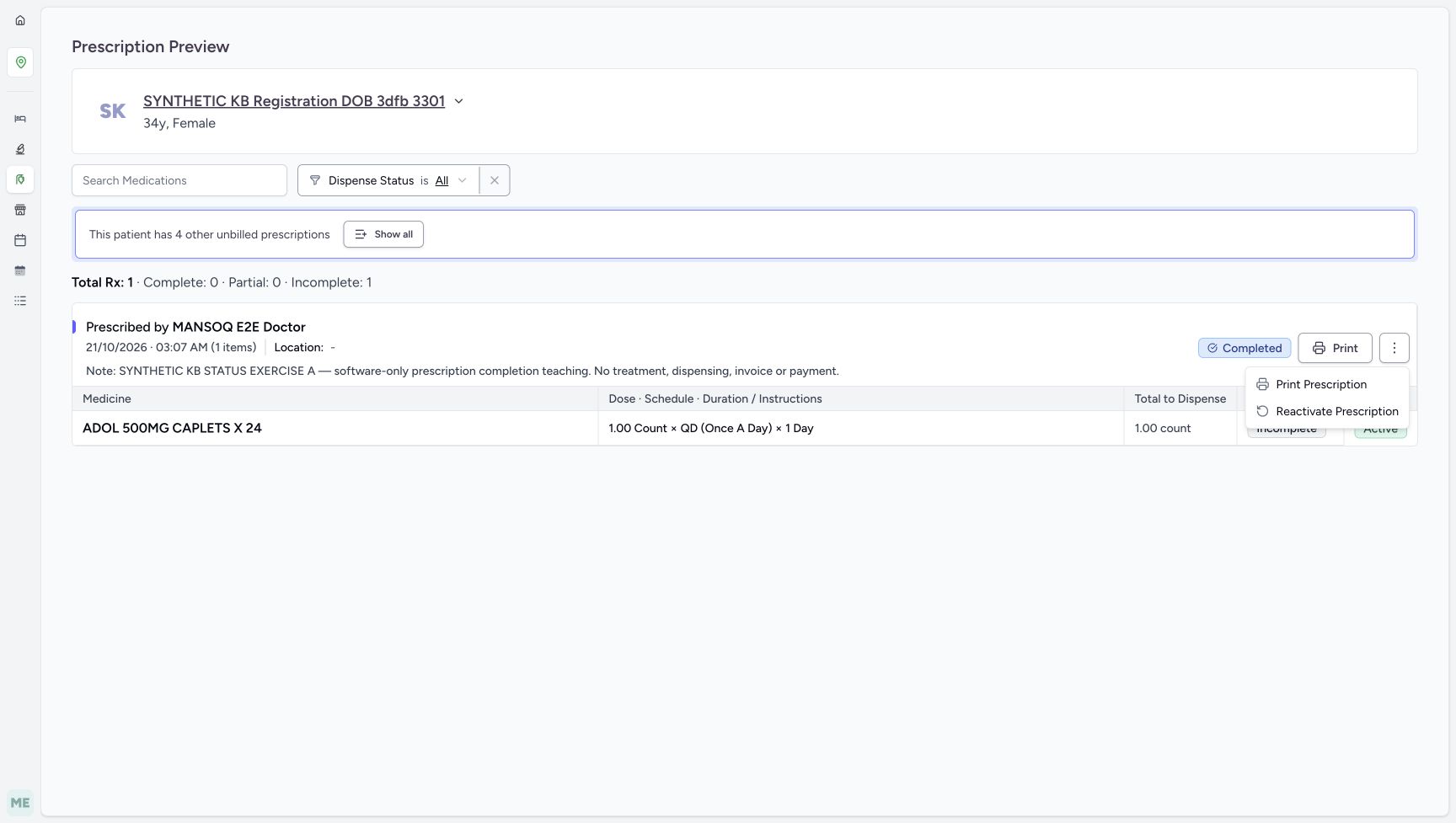
Only when the status correction is approved for this fictional exercise, use the Completed queue and View Rx to revisit A. Verify its full A note, parent Completed badge and medicine Active/Incomplete before acting. Open the preview’s upper three-dot prescription menu and choose Reactivate Prescription once. The action is immediate without a separate confirmation. Read Prescription reactivated successfully: the parent Completed badge disappears and Start Billing returns, while the medicine stays Active and Incomplete. Reload normally and verify this persisted, with Total Rx 1, Complete 0, Partial 0 and Incomplete 1. Leave Start Billing unused. A is now Active again and B remains the separate Active prescription whose cancellation was refused. This demonstrates only Completed to Active for this one fresh prescription; it does not establish reactivation of cancelled or stopped prescriptions, closed encounters, or another role.
123Find A in the freshly loaded Completed tab
Capture details
Actual6cdc prescription lifecycle completion and ordinary Pharmacist cancellation refusal. Doctor-created A/B are separate fictional prerequisites; no Bill Selected, medicine handover, invoice or payment.
Image SHA-256 f079429318c99e7c9d76366eea35e4b85a805afba9ca809e6bfc82d71d0bb570
- Read the selected Completed tab: This tab groups prescriptions by their lifecycle status.
- Identify the new completed entry: Match the patient and 21/10/2026 03:07 AM, then check the A note in preview.
- Open the saved A with View Rx: Verify the prescription badge and medicine-row values together.
 1234
1234Verify the same completed A before optional correction
Capture details
Actual6cdc prescription lifecycle completion and ordinary Pharmacist cancellation refusal. Doctor-created A/B are separate fictional prerequisites; no Bill Selected, medicine handover, invoice or payment.
Image SHA-256 7c3bf185c79e81a29b7f77f7862817bf1e98919a3d560d81def8c2c3df3f9e20
- Verify A is still Completed: Use only the same fresh A prescription for this optional correction.
- Match A’s completion-exercise note: Do not reactivate B or an older prescription by mistake.
- Open A’s preview prescription menu: This is the upper menu on Prescription Preview, not a medicine-row action.
- Read medicine Incomplete before correction: The medicine has not been supplied.
 123
123Locate immediate Reactivate Prescription
Capture details
Actual6cdc prescription lifecycle completion and ordinary Pharmacist cancellation refusal. Doctor-created A/B are separate fictional prerequisites; no Bill Selected, medicine handover, invoice or payment.
Image SHA-256 7a235ee7019fb5f8e535cabc99d36227e90b76d7a88609b353900d227fd2035a
- Choose Reactivate Prescription once: Use this only for the approved optional correction of the same Completed A; no separate confirmation appears.
- Confirm the current Completed parent: This lesson demonstrates Completed to Active only.
- Recheck A’s exact note: The correction belongs to the original completion exercise.
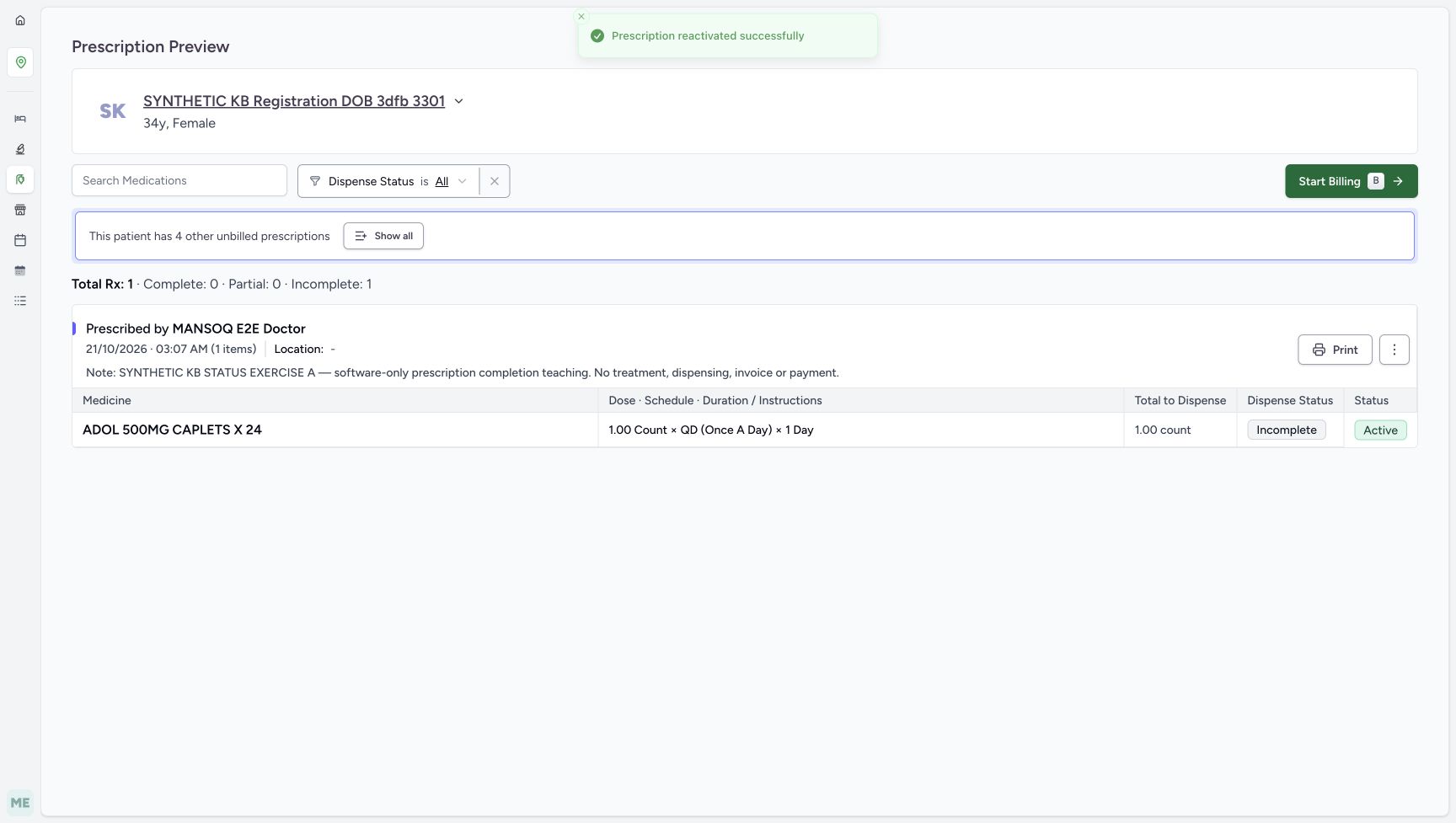 12345
12345Read the successful A reactivation
Capture details
Actual6cdc prescription lifecycle completion and ordinary Pharmacist cancellation refusal. Doctor-created A/B are separate fictional prerequisites; no Bill Selected, medicine handover, invoice or payment.
Image SHA-256 48541516d71c54de00aff0446dcf291c69cf4610b409399fa29bc57c85c55ce7
- Read the reactivation success: One immediate Reactivate Prescription action succeeded.
- Notice Start Billing has returned: Its availability does not mean a bill was created; leave it unused.
- Verify the same A purpose note: The saved prescription identity and note are unchanged.
- Read medicine Incomplete after correction: Reactivation did not fulfil the medicine.
- Read medicine Active after correction: The medicine-row value remains unchanged.
12345Reload and verify the optional correction persisted
Capture details
Actual6cdc prescription lifecycle completion and ordinary Pharmacist cancellation refusal. Doctor-created A/B are separate fictional prerequisites; no Bill Selected, medicine handover, invoice or payment.
Image SHA-256 7ab877102e533a850a86405c8ed18184e41492e7598d91cc7fa6eb03bba3f718
- Verify A’s note after reload: This is the same A prescription, now Active again.
- Read restored Start Billing availability: Stop at readback without opening or submitting another bill.
- Read retained medicine Incomplete: No medicine fulfilment was added by reactivation.
- Read retained medicine Active: The child medicine remains unchanged.
- Verify Complete 0 and Incomplete 1: Prescription lifecycle correction did not change fulfilment counters.
Three completion controls have different meanings
The prescription menu’s Mark as Completed immediately changes the parent prescription lifecycle. The separate Mark Complete checkbox is a choice used by the billing form, and All Given is a medicine-fulfilment switch. In A, both form controls were OFF when the immediate menu action succeeded; the saved preview still shows medicine Active and Incomplete. For the separately captured group and row-selection behavior of those form controls, see Include active prescriptions, select groups and cancel. That lesson has its own unchanged-save outcome. The optional Reactivate Prescription action changes only A’s parent lifecycle back to Active; its medicine remains unfulfilled after reload.
12345Keep billing controls OFF and locate the prescription menu
Capture details
Actual6cdc prescription lifecycle completion and ordinary Pharmacist cancellation refusal. Doctor-created A/B are separate fictional prerequisites; no Bill Selected, medicine handover, invoice or payment.
Image SHA-256 88516704cb0fac79db3e57c59f8c7978e284d7a3b0aa70145ad82d1c5b62815f
- Verify Mark Complete OFF: This checkbox is a billing choice, not the immediate status-menu action.
- Verify All Given OFF: No medicine-fulfilment claim is being submitted.
- Open the prescription-level menu: Use the upper three-dot button beside Print, not the lower medicine-row Actions button.
- Leave the expired-stock result unchanged: No lot, quantity or substitute is selected for this status-only exercise.
- Leave Bill Selected unused: This lesson does not create a preparation or invoice.
123Choose the immediate Mark as Completed action
Capture details
Actual6cdc prescription lifecycle completion and ordinary Pharmacist cancellation refusal. Doctor-created A/B are separate fictional prerequisites; no Bill Selected, medicine handover, invoice or payment.
Image SHA-256 d5f581c341bfd08283e528dc9f1c465ee112b59e34be2475c3c8a1bf017b7191
- Choose Mark as Completed once: This immediate action changes the selected prescription lifecycle; no separate confirmation appears.
- Distinguish the Mark Complete checkbox: The unchecked billing checkbox is not the action being used.
- Recheck A before the immediate action: Read the A completion-exercise note before selecting the menu item.
12345Separate completed prescription from incomplete medicine
Capture details
Actual6cdc prescription lifecycle completion and ordinary Pharmacist cancellation refusal. Doctor-created A/B are separate fictional prerequisites; no Bill Selected, medicine handover, invoice or payment.
Image SHA-256 7c3bf185c79e81a29b7f77f7862817bf1e98919a3d560d81def8c2c3df3f9e20
- Read the parent Completed badge: This is the saved prescription lifecycle outcome.
- Read the unchanged medicine Incomplete: Completing the parent did not fulfil this medicine.
- Read the unchanged medicine Active: The medicine request was not cancelled or completed.
- Read Complete 0 and Incomplete 1: These counters describe medicine fulfilment and remain separate from the parent badge.
- Verify A’s note is retained: This is still the software-only completion example.
1234Verify the same completed A before optional correction
Capture details
Actual6cdc prescription lifecycle completion and ordinary Pharmacist cancellation refusal. Doctor-created A/B are separate fictional prerequisites; no Bill Selected, medicine handover, invoice or payment.
Image SHA-256 7c3bf185c79e81a29b7f77f7862817bf1e98919a3d560d81def8c2c3df3f9e20
- Verify A is still Completed: Use only the same fresh A prescription for this optional correction.
- Match A’s completion-exercise note: Do not reactivate B or an older prescription by mistake.
- Open A’s preview prescription menu: This is the upper menu on Prescription Preview, not a medicine-row action.
- Read medicine Incomplete before correction: The medicine has not been supplied.
123Locate immediate Reactivate Prescription
Capture details
Actual6cdc prescription lifecycle completion and ordinary Pharmacist cancellation refusal. Doctor-created A/B are separate fictional prerequisites; no Bill Selected, medicine handover, invoice or payment.
Image SHA-256 7a235ee7019fb5f8e535cabc99d36227e90b76d7a88609b353900d227fd2035a
- Choose Reactivate Prescription once: Use this only for the approved optional correction of the same Completed A; no separate confirmation appears.
- Confirm the current Completed parent: This lesson demonstrates Completed to Active only.
- Recheck A’s exact note: The correction belongs to the original completion exercise.
12345Reload and verify the optional correction persisted
Capture details
Actual6cdc prescription lifecycle completion and ordinary Pharmacist cancellation refusal. Doctor-created A/B are separate fictional prerequisites; no Bill Selected, medicine handover, invoice or payment.
Image SHA-256 7ab877102e533a850a86405c8ed18184e41492e7598d91cc7fa6eb03bba3f718
- Verify A’s note after reload: This is the same A prescription, now Active again.
- Read restored Start Billing availability: Stop at readback without opening or submitting another bill.
- Read retained medicine Incomplete: No medicine fulfilment was added by reactivation.
- Read retained medicine Active: The child medicine remains unchanged.
- Verify Complete 0 and Incomplete 1: Prescription lifecycle correction did not change fulfilment counters.
Cancellation refusal and leaving a form are different outcomes
Cancel Prescription requests a saved prescription status change. For the observed ordinary Pharmacist it was refused, even though the menu item was visible. The outer Cancel only leaves the unsaved billing form, and B remains Active after reload. This lesson does not demonstrate successful cancellation by a Doctor or any other role, and it supplies no alternate route or permission workaround. Use the assigned role and the facility’s authorized process for any real decision.
1234Verify B before the cancellation boundary
Capture details
Actual6cdc prescription lifecycle completion and ordinary Pharmacist cancellation refusal. Doctor-created A/B are separate fictional prerequisites; no Bill Selected, medicine handover, invoice or payment.
Image SHA-256 a44dd75eea57e45de80439c1ac8157be05c4a121c23a4cdb3e425f2c50cf5d09
- Verify the full B note: It must identify SYNTHETIC KB STATUS EXERCISE B and cancellation/role-boundary teaching.
- Choose Start Billing for B: Keep B alone and leave the other prescriptions unchanged.
- Read B medicine Incomplete: No medicine has been fulfilled for B.
- Read B medicine Active: This is the saved state before the controlled cancellation attempt.
1234Observe Cancel Prescription in the immediate menu
Capture details
Actual6cdc prescription lifecycle completion and ordinary Pharmacist cancellation refusal. Doctor-created A/B are separate fictional prerequisites; no Bill Selected, medicine handover, invoice or payment.
Image SHA-256 d52e96a7106201b38174d35e75efa4eb508f1f934170c5799f8e7b4ab6a94ec4
- Choose Cancel Prescription once: This is the controlled role-boundary attempt on B; stop if permission is refused.
- Verify Mark Complete remains OFF: Do not use billing completion to work around the cancellation boundary.
- Recheck B before the immediate attempt: The note distinguishes B from A and the older prescriptions.
- Preserve the expired-stock result: No stock selection or billing is part of the cancellation attempt.
1234Read the permission refusal and leave the form
Capture details
Actual6cdc prescription lifecycle completion and ordinary Pharmacist cancellation refusal. Doctor-created A/B are separate fictional prerequisites; no Bill Selected, medicine handover, invoice or payment.
Image SHA-256 3c7201fa2dbc0630dc112271fc6422627d5c870a3cbf0680860a4dcc8398473c
- Read the exact permission refusal: The action was refused; there is no successful cancellation outcome.
- Choose the outer Cancel to leave: This exits the billing form without cancelling the prescription.
- Keep All Given OFF: Do not mark the medicine given to get past a permission refusal.
- Keep Mark Complete OFF: Do not complete B as a substitute for authorization.
1234Reload and verify B remains Active and Incomplete
Capture details
Actual6cdc prescription lifecycle completion and ordinary Pharmacist cancellation refusal. Doctor-created A/B are separate fictional prerequisites; no Bill Selected, medicine handover, invoice or payment.
Image SHA-256 a44dd75eea57e45de80439c1ac8157be05c4a121c23a4cdb3e425f2c50cf5d09
- Verify B’s note after reload: This is the same B prescription after refusal and outer Cancel.
- Read the retained Incomplete value: The medicine remains unfulfilled.
- Read the retained Active value: The refused cancellation did not alter this saved medicine status.
- Verify the unchanged counters: Total Rx 1, Complete 0, Partial 0 and Incomplete 1 remain visible.
Keep the two fictional prerequisites distinct
The Doctor saved A and B separately with the same product and fictional schedule, but different whole-prescription purpose notes. Both appear at 03:07 AM. Use the note and intended action to distinguish them; do not apply a lifecycle action to an older prescription merely because its patient or medicine matches. This bounded example covers a single active item in each prescription at the observed Polyclinic/Main Pharmacy, without treatment, physical goods, billing, payment or a successful cancellation outcome. After the optional approved correction, A is Active again; B remains Active after its refusal.
123Recognize the Doctor-prepared fictional product
Capture details
Actual6cdc prescription lifecycle completion and ordinary Pharmacist cancellation refusal. Doctor-created A/B are separate fictional prerequisites; no Bill Selected, medicine handover, invoice or payment.
Image SHA-256 4d21be85f9a690cea149acd27f28d4e2b5390f3e5264672d64cc42a03e503b42
- Read the Product tab: The setup uses the catalogue Product choice.
- Match the exact code: The search is 06285094000103; do not substitute a similar result.
- Identify the ADOL result: ADOL 500MG CAPLETS X 24 is the fictional exercise product, not clinical advice.
123456Read fictional exercise A before Doctor submission
Capture details
Actual6cdc prescription lifecycle completion and ordinary Pharmacist cancellation refusal. Doctor-created A/B are separate fictional prerequisites; no Bill Selected, medicine handover, invoice or payment.
Image SHA-256 f0586464fca37b0652fda33837b98cd4958fcd1a1dbb36776357330fd953508a
- Verify the exercise medicine: The example uses ADOL 500MG CAPLETS X 24.
- Read the fictional dosage: The displayed 1 count is test data, not a recommended dose.
- Read the fictional frequency: QD (Once a day) belongs to this software example only.
- Read the fictional duration: The displayed duration is 1 day.
- Read the A purpose note: SYNTHETIC KB STATUS EXERCISE A identifies completion teaching and excludes treatment, dispensing, invoice and payment.
- Locate Doctor Submit: The prerequisite was saved once by the existing Doctor; the Pharmacist does not repeat this setup.
1234Verify saved example A by its note
Capture details
Actual6cdc prescription lifecycle completion and ordinary Pharmacist cancellation refusal. Doctor-created A/B are separate fictional prerequisites; no Bill Selected, medicine handover, invoice or payment.
Image SHA-256 bb6dd8cd470f12a8039090d6084872cc5c930a161e34f8fc7e942f0714284f7e
- Identify saved A: This selected prescription is A at 03:07 AM; use its full note to distinguish it.
- Read the saved A note: The note says software-only prescription completion teaching.
- Read the saved fictional schedule: The saved row retains 1.00 count, QD (Once a day), and 1 day.
- Verify the prescriber: MANSOQ E2E Doctor prepared the prerequisite.
123Read separate fictional exercise B before submission
Capture details
Actual6cdc prescription lifecycle completion and ordinary Pharmacist cancellation refusal. Doctor-created A/B are separate fictional prerequisites; no Bill Selected, medicine handover, invoice or payment.
Image SHA-256 61be34a3ae4a9f443763988b4fd13557cd062048f0bfee68a0ef673c409b4c4c
- Read the separate fictional B schedule: This second request also uses 1 count, QD and 1 day as test data.
- Read the B purpose note: SYNTHETIC KB STATUS EXERCISE B distinguishes the cancellation and role-boundary example.
- Locate the separate Doctor Submit: The Doctor saved B once as a distinct prescription; do not reuse A for the refusal branch.
123Distinguish the saved B and A entries
Capture details
Actual6cdc prescription lifecycle completion and ordinary Pharmacist cancellation refusal. Doctor-created A/B are separate fictional prerequisites; no Bill Selected, medicine handover, invoice or payment.
Image SHA-256 228af9dd769c6bc1b8655b1a9c75e5b2e2c18f28d5e15aa85943a21055853629
- Read the selected B entry: This is the newly saved B prescription.
- Notice A has the same minute: The adjacent A entry also shows 03:07 AM; a time label alone is insufficient.
- Verify the saved B purpose note: Confirm cancellation and role-boundary teaching before continuing.
12345Verify A before entering its single-prescription bill
Capture details
Actual6cdc prescription lifecycle completion and ordinary Pharmacist cancellation refusal. Doctor-created A/B are separate fictional prerequisites; no Bill Selected, medicine handover, invoice or payment.
Image SHA-256 7ab877102e533a850a86405c8ed18184e41492e7598d91cc7fa6eb03bba3f718
- Verify the full A note: It must say SYNTHETIC KB STATUS EXERCISE A and completion teaching.
- Choose Start Billing for A: Keep this as one prescription; do not use Show all or Include all.
- Read medicine Incomplete: No medicine fulfilment has occurred.
- Read medicine Active: This medicine-row status is separate from the prescription lifecycle.
- Read the initial counters: Total Rx 1 has Complete 0 and Incomplete 1.
1234Verify B before the cancellation boundary
Capture details
Actual6cdc prescription lifecycle completion and ordinary Pharmacist cancellation refusal. Doctor-created A/B are separate fictional prerequisites; no Bill Selected, medicine handover, invoice or payment.
Image SHA-256 a44dd75eea57e45de80439c1ac8157be05c4a121c23a4cdb3e425f2c50cf5d09
- Verify the full B note: It must identify SYNTHETIC KB STATUS EXERCISE B and cancellation/role-boundary teaching.
- Choose Start Billing for B: Keep B alone and leave the other prescriptions unchanged.
- Read B medicine Incomplete: No medicine has been fulfilled for B.
- Read B medicine Active: This is the saved state before the controlled cancellation attempt.
12345Reload and verify the optional correction persisted
Capture details
Actual6cdc prescription lifecycle completion and ordinary Pharmacist cancellation refusal. Doctor-created A/B are separate fictional prerequisites; no Bill Selected, medicine handover, invoice or payment.
Image SHA-256 7ab877102e533a850a86405c8ed18184e41492e7598d91cc7fa6eb03bba3f718
- Verify A’s note after reload: This is the same A prescription, now Active again.
- Read restored Start Billing availability: Stop at readback without opening or submitting another bill.
- Read retained medicine Incomplete: No medicine fulfilment was added by reactivation.
- Read retained medicine Active: The child medicine remains unchanged.
- Verify Complete 0 and Incomplete 1: Prescription lifecycle correction did not change fulfilment counters.
Troubleshooting
The success toast appeared, but A is still in Billing Pending
Do not repeat the immediate completion action from the returned table. The first returned table in this run was stale. Reload normally, wait for data to load, open Completed, and verify A with View Rx and its full note. The saved preview’s parent Completed badge is the relevant outcome; the medicine can still be Active and Incomplete. If the fresh state does not match the intended decision, stop and ask authorized support rather than making more status changes.
123Read success, then refresh the queue
Capture details
Actual6cdc prescription lifecycle completion and ordinary Pharmacist cancellation refusal. Doctor-created A/B are separate fictional prerequisites; no Bill Selected, medicine handover, invoice or payment.
Image SHA-256 4bd62f282942eb77d1a79cd637db52bde14325efe7270f298711203b2a8592fa
- Read the completion success: The visible toast confirms the immediate action succeeded.
- Recognize the initially stale queue rows: The old table still has two 03:07 AM rows; this is not a reason to repeat the status action.
- Locate Completed for fresh verification: After a normal reload finishes, use the Completed tab and verify A with View Rx.
123Find A in the freshly loaded Completed tab
Capture details
Actual6cdc prescription lifecycle completion and ordinary Pharmacist cancellation refusal. Doctor-created A/B are separate fictional prerequisites; no Bill Selected, medicine handover, invoice or payment.
Image SHA-256 f079429318c99e7c9d76366eea35e4b85a805afba9ca809e6bfc82d71d0bb570
- Read the selected Completed tab: This tab groups prescriptions by their lifecycle status.
- Identify the new completed entry: Match the patient and 21/10/2026 03:07 AM, then check the A note in preview.
- Open the saved A with View Rx: Verify the prescription badge and medicine-row values together.
12345Separate completed prescription from incomplete medicine
Capture details
Actual6cdc prescription lifecycle completion and ordinary Pharmacist cancellation refusal. Doctor-created A/B are separate fictional prerequisites; no Bill Selected, medicine handover, invoice or payment.
Image SHA-256 7c3bf185c79e81a29b7f77f7862817bf1e98919a3d560d81def8c2c3df3f9e20
- Read the parent Completed badge: This is the saved prescription lifecycle outcome.
- Read the unchanged medicine Incomplete: Completing the parent did not fulfil this medicine.
- Read the unchanged medicine Active: The medicine request was not cancelled or completed.
- Read Complete 0 and Incomplete 1: These counters describe medicine fulfilment and remain separate from the parent badge.
- Verify A’s note is retained: This is still the software-only completion example.
Cancel Prescription is visible, but I receive a permission error
Read the refusal and stop that attempt. The observed ordinary Pharmacist can use the successful completion branch but cannot use this cancellation change. Choose the outer Cancel only to leave the form, then reload and verify B remains Active and Incomplete. Do not treat leaving the form as cancellation or use billing, medicine removal, another account or a direct endpoint to bypass the boundary. A successful authorized cancellation is outside this captured lesson.
1234Observe Cancel Prescription in the immediate menu
Capture details
Actual6cdc prescription lifecycle completion and ordinary Pharmacist cancellation refusal. Doctor-created A/B are separate fictional prerequisites; no Bill Selected, medicine handover, invoice or payment.
Image SHA-256 d52e96a7106201b38174d35e75efa4eb508f1f934170c5799f8e7b4ab6a94ec4
- Choose Cancel Prescription once: This is the controlled role-boundary attempt on B; stop if permission is refused.
- Verify Mark Complete remains OFF: Do not use billing completion to work around the cancellation boundary.
- Recheck B before the immediate attempt: The note distinguishes B from A and the older prescriptions.
- Preserve the expired-stock result: No stock selection or billing is part of the cancellation attempt.
1234Read the permission refusal and leave the form
Capture details
Actual6cdc prescription lifecycle completion and ordinary Pharmacist cancellation refusal. Doctor-created A/B are separate fictional prerequisites; no Bill Selected, medicine handover, invoice or payment.
Image SHA-256 3c7201fa2dbc0630dc112271fc6422627d5c870a3cbf0680860a4dcc8398473c
- Read the exact permission refusal: The action was refused; there is no successful cancellation outcome.
- Choose the outer Cancel to leave: This exits the billing form without cancelling the prescription.
- Keep All Given OFF: Do not mark the medicine given to get past a permission refusal.
- Keep Mark Complete OFF: Do not complete B as a substitute for authorization.
1234Reload and verify B remains Active and Incomplete
Capture details
Actual6cdc prescription lifecycle completion and ordinary Pharmacist cancellation refusal. Doctor-created A/B are separate fictional prerequisites; no Bill Selected, medicine handover, invoice or payment.
Image SHA-256 a44dd75eea57e45de80439c1ac8157be05c4a121c23a4cdb3e425f2c50cf5d09
- Verify B’s note after reload: This is the same B prescription after refusal and outer Cancel.
- Read the retained Incomplete value: The medicine remains unfulfilled.
- Read the retained Active value: The refused cancellation did not alter this saved medicine status.
- Verify the unchanged counters: Total Rx 1, Complete 0, Partial 0 and Incomplete 1 remain visible.
Source evidence
Every citation uses this exact committed version. The private source repository requires access.
- repositories/platform/mansoq-core/mansoq/emr/api/viewsets/base.py:229 ·
6cdc3676e144f09d4a6a4b16e2b7ec57e75c56feSource file checksum
6a287dd315b8a4957b29c58e4bbc1bef7b8d9d257f9149f93045ff0adbdcae6c - repositories/platform/mansoq-core/mansoq/emr/api/viewsets/encounter_authz_base.py:46 ·
6cdc3676e144f09d4a6a4b16e2b7ec57e75c56feSource file checksum
852c308f990e192a1003e286be7dd57ddcc78840d218da1b90c1fab2eebec4f7 - repositories/platform/mansoq-core/mansoq/emr/api/viewsets/medication_request_prescription.py:68 ·
6cdc3676e144f09d4a6a4b16e2b7ec57e75c56feSource file checksum
dcdfc280892db246723468be3498b5ff080764b7270b5428cef828b293a384ec - repositories/platform/mansoq-core/mansoq/emr/models/medication_request.py:9 ·
6cdc3676e144f09d4a6a4b16e2b7ec57e75c56feSource file checksum
6d0148f12528d99718544a54fd6ccaee3f931d58ff7b6796b8aac66533555f2f - repositories/platform/mansoq-core/mansoq/emr/resources/medication/request_prescription/spec.py:18 ·
6cdc3676e144f09d4a6a4b16e2b7ec57e75c56feSource file checksum
5c4d3b8deeeb4fed124f4e789999fac83b2d64b788a2d74a0cf1c989d241ee10 - repositories/platform/mansoq-core/mansoq/security/authorization/encounter.py:64 ·
6cdc3676e144f09d4a6a4b16e2b7ec57e75c56feSource file checksum
0e7ff8afcfb57b2371201e16ee6fac26125d6e686af66ed7edd95e49bc07de78 - repositories/platform/mansoq-web/src/components/Common/BackButton.tsx:19 ·
6cdc3676e144f09d4a6a4b16e2b7ec57e75c56feSource file checksum
56a741eff730a7b18a5fae594374068bab2d5413993c32dbbaf3625e14743ca3 - repositories/platform/mansoq-web/src/components/Medicine/PrescriptionView.tsx:88 ·
6cdc3676e144f09d4a6a4b16e2b7ec57e75c56feSource file checksum
af1781d51d3dd511231a79e034a7f98412434dfa4603b91dce6676c4474fad96 - repositories/platform/mansoq-web/src/components/Questionnaire/QuestionTypes/MedicationRequestQuestion.tsx:645 ·
6cdc3676e144f09d4a6a4b16e2b7ec57e75c56feSource file checksum
561259e73b1752c9844e31b798ad676878af5f4caf6be5fbd130cd31fcfc89cc - repositories/platform/mansoq-web/src/pages/Facility/services/pharmacy/PrescriptionQueue.tsx:89 ·
6cdc3676e144f09d4a6a4b16e2b7ec57e75c56feSource file checksum
20c2f3e573ae315ec5ff79b19575c1a6e3b2f7ca76b5e98bad319ef595b11d04 - repositories/platform/mansoq-web/src/pages/Facility/services/pharmacy/PrescriptionsPreviewPage.tsx:45 ·
6cdc3676e144f09d4a6a4b16e2b7ec57e75c56feSource file checksum
2a76a064861548bc2d0c5e036bbc9a2ec448582cb8bcb3e970c05a8362498a2e - repositories/platform/mansoq-web/src/pages/Facility/services/pharmacy/billMedications/BillMedicationsFooter.tsx:80 ·
6cdc3676e144f09d4a6a4b16e2b7ec57e75c56feSource file checksum
5a2167f3e4ae3c332f8da9b7076d6339c891543cb41fa43534256c826300c048 - repositories/platform/mansoq-web/src/pages/Facility/services/pharmacy/billMedications/BillMedicationsPrescriptionCard.tsx:243 ·
6cdc3676e144f09d4a6a4b16e2b7ec57e75c56feSource file checksum
e64b9b9ffbc8388dba86070d36c8acef28639ac6166f650ca3586b43e9ac3134 - repositories/platform/mansoq-web/src/pages/Facility/services/pharmacy/billMedications/modes/usePrescriptionsMode.ts:70 ·
6cdc3676e144f09d4a6a4b16e2b7ec57e75c56feSource file checksum
a1f6bfb990ce68bf774a2c1208d914287710742fdb8c891031a38d09636daf1e - repositories/platform/mansoq-web/src/pages/Facility/services/pharmacy/components/PrescriptionsPreviewTable.tsx:94 ·
6cdc3676e144f09d4a6a4b16e2b7ec57e75c56feSource file checksum
0e57013b34eb10f479600ecf182cc77c4cf896062d69aab5dd2f4c04f7fde701