 MANSOQ
 Pharmacy · VERSION 6cdc3676
Include active prescriptions, select groups and cancel
Distinguish Show all in Prescription Preview from Include all in Bill Medications. Review three original prescription groups, their row and completion controls, then read empty-selection validation and Cancel without saving a preparation.
Pharmacist
 1234567
Read all three original prescription groups
Capture details
Actual6cdc unsaved Show all/Include all/group-selection and empty-selection client-validation example. No successful billing, completion, medicine handover, invoice/payment or external exchange is demonstrated.
Image SHA-256 0c6233f4b362b61be7a01d99615a200175aa1dfe1c4c639c41a6894090b13331
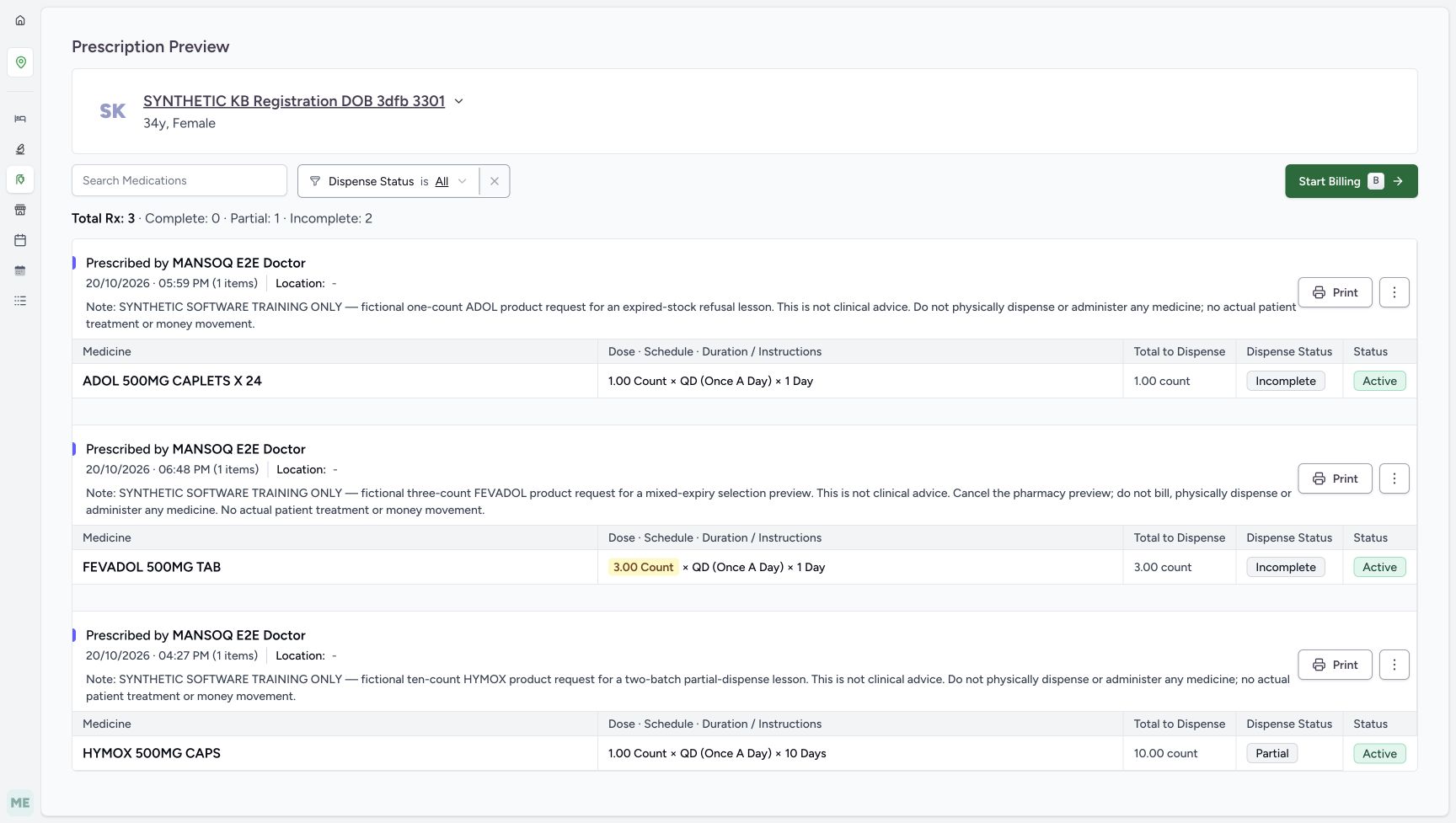
- Read Total Rx 3 and the counters: Complete 0, Partial 1 and Incomplete 2 describe the three original groups.
- Identify ADOL at 05:59 PM: This is the original single prescription used to enter the billing branch.
- Identify FEVADOL at 06:48 PM: This separate request is a preview-only fictional example.
- Read the FEVADOL no-bill instruction: Preserve the instruction to cancel the pharmacy preview and not bill.
- Identify HYMOX at 04:27 PM: This is the earlier partially supplied request.
- Read HYMOX Partial: Do not interpret the later unsaved Mark Complete checkbox as this saved status.
- Verify FEVADOL Active: All three original lifecycle statuses remain Active.
 123456
Read the FEVADOL group deselection result
Capture details
Actual6cdc unsaved Show all/Include all/group-selection and empty-selection client-validation example. No successful billing, completion, medicine handover, invoice/payment or external exchange is demonstrated.
Image SHA-256 e9817890fc0137faedb15b01484dbe49ec064840566491f000f50e9bda761dfd
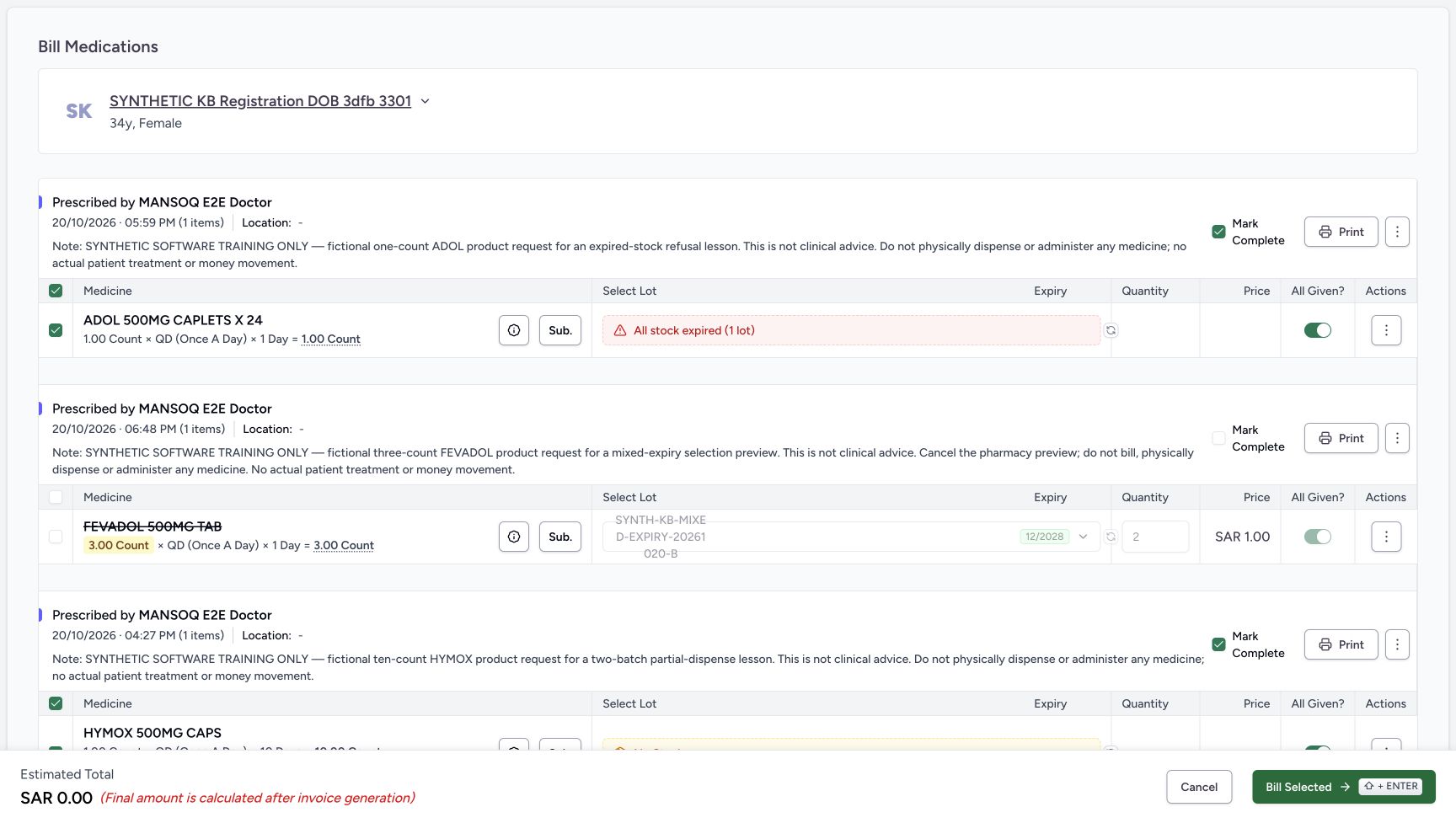
- Verify FEVADOL group OFF: Only the eligible rows in this group were deselected.
- Verify FEVADOL row OFF: The medicine is struck through and excluded from the estimate.
- Read FEVADOL Mark Complete OFF: It changed with the initial group deselection in this run.
- Read retained ON but disabled All Given: Disabled does not mean this stored form value was changed to OFF.
- Verify ADOL stayed selected: The other prescription group was not deselected.
- Read the estimate now SAR 0.00: The excluded FEVADOL no longer contributes to the estimate.
 1234
1234Read the empty-selection validation message
Capture details
Actual6cdc unsaved Show all/Include all/group-selection and empty-selection client-validation example. No successful billing, completion, medicine handover, invoice/payment or external exchange is demonstrated.
Image SHA-256 c1cc4a997dd3ace84fb9c9f134b4a1cb8aa7826fe9379ac0d2614c270455ad07
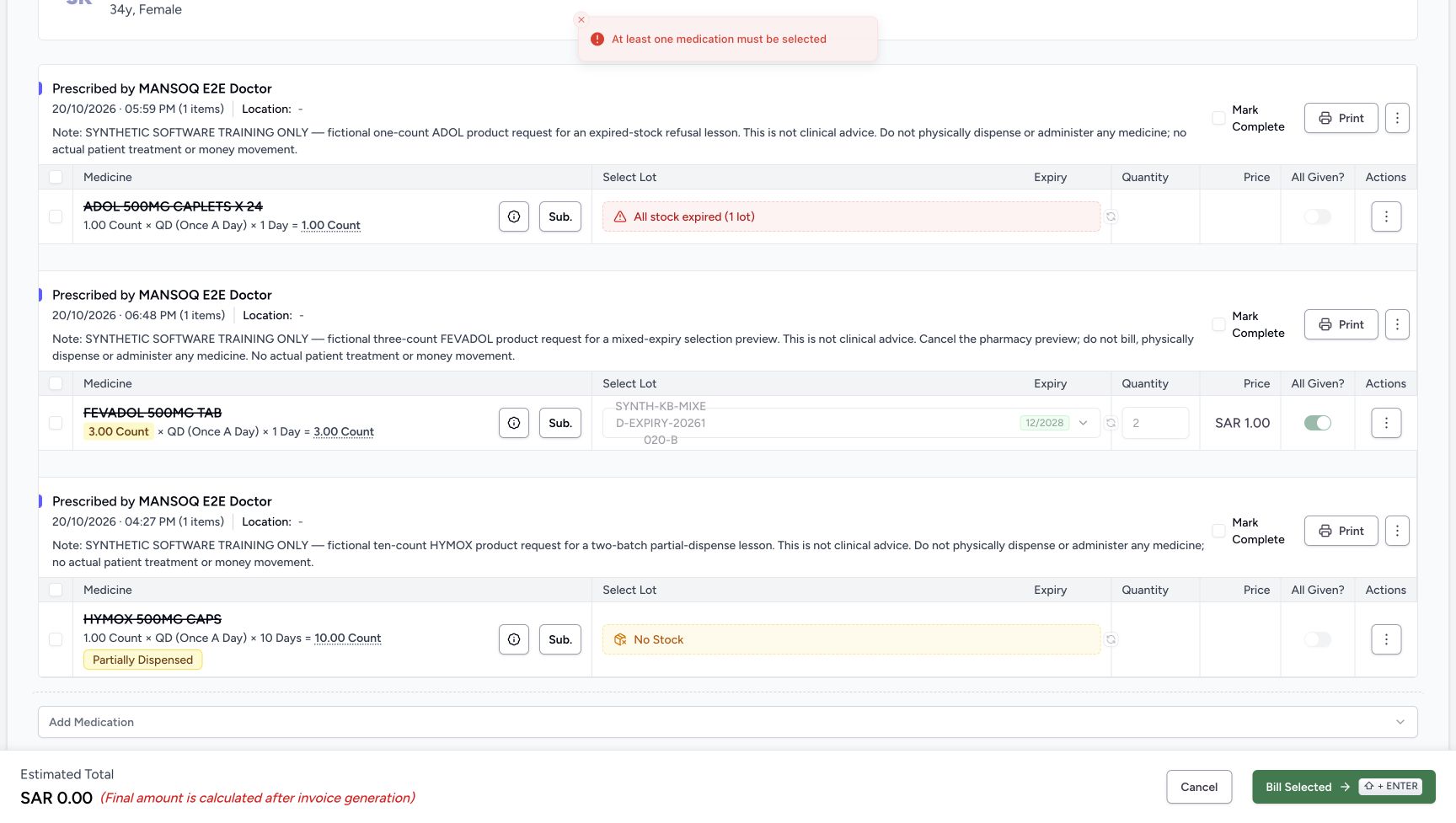
- Read the client validation message: At least one medication must be selected is the visible error.
- Verify the form still has no ADOL selection: The validation has not created a preparation.
- Keep completion choices OFF: This check does not complete a prescription.
- Use Cancel after reading the message: Leave the unsaved exercise rather than selecting a medicine to make it submit.
 123456
Verify all three original saved states remain
Capture details
Actual6cdc unsaved Show all/Include all/group-selection and empty-selection client-validation example. No successful billing, completion, medicine handover, invoice/payment or external exchange is demonstrated.
Image SHA-256 0c6233f4b362b61be7a01d99615a200175aa1dfe1c4c639c41a6894090b13331
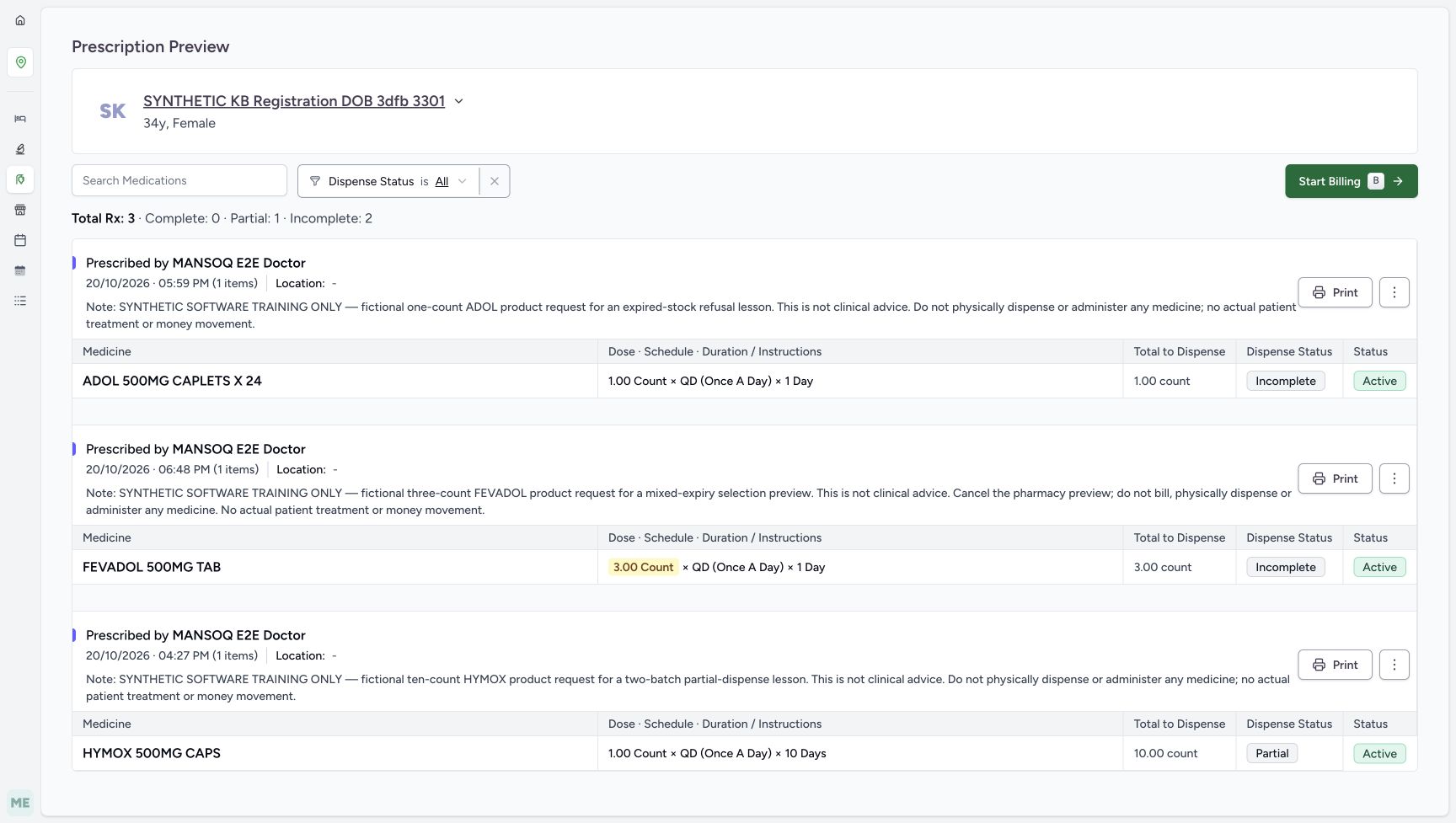
- Read the same three-prescription summary: The counts match the initial expanded preview.
- Verify ADOL Incomplete: The original single request is unchanged.
- Verify FEVADOL Incomplete: The preview-only request was not billed.
- Verify HYMOX Partial: Its earlier partial state is preserved.
- Verify HYMOX remains Active: The unsaved Mark Complete checks did not complete it.
- Read the retained FEVADOL no-bill note: The original instruction remains unchanged.
16 of 16 content blocks have reviewed image alignment.
Before you begin
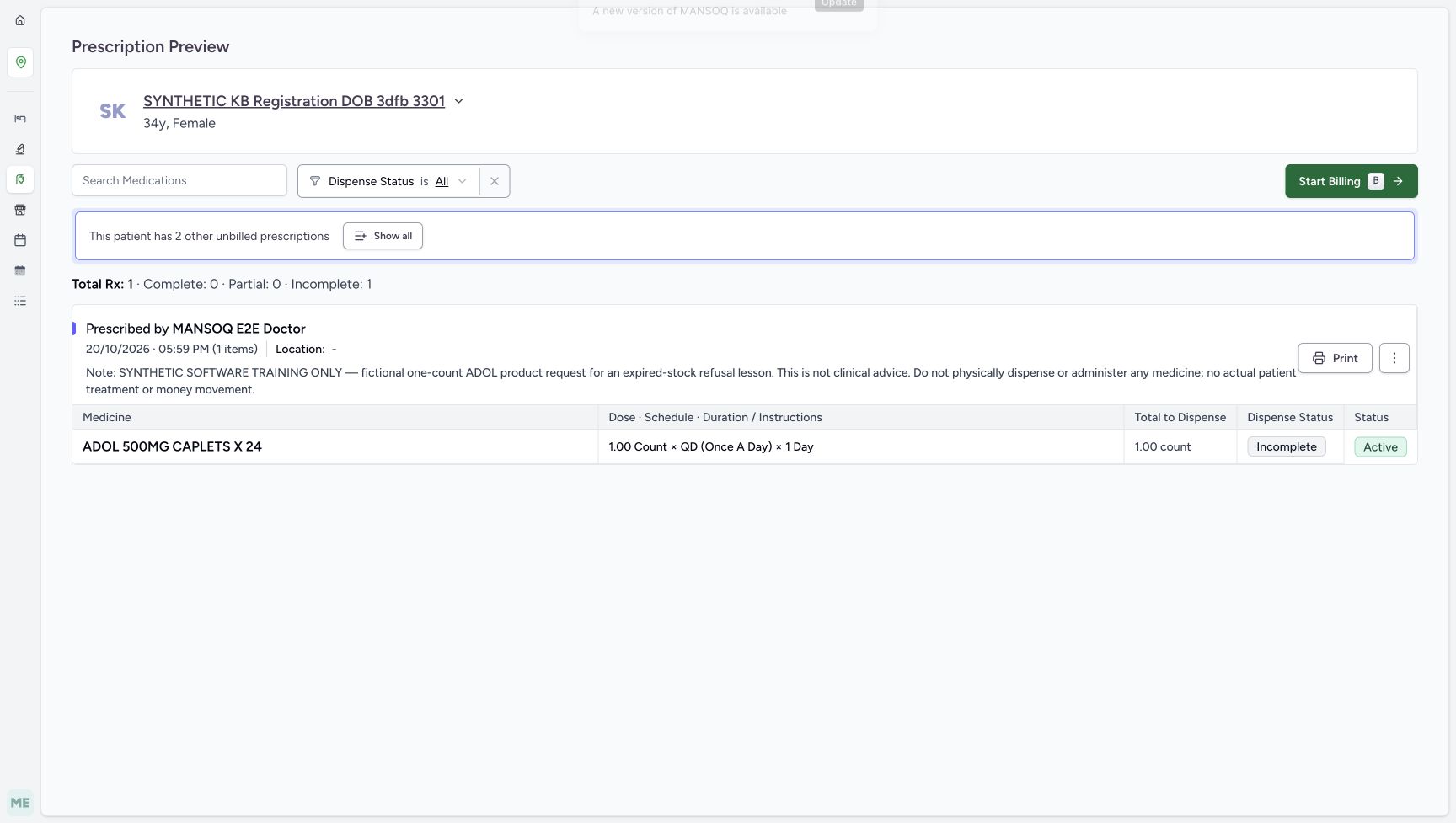
- Use the existing assigned Pharmacist and SYNTHETIC KB Registration DOB 3dfb 3301 patient at the observed Polyclinic/Main Pharmacy. Begin at the existing ADOL prescription from MANSOQ E2E Doctor at 05:59 PM on October 20, 2026. Two other active prescriptions already exist; no patient, encounter or prescription is created here.
 1234
1234Recorded release 6cdc3676 · 2026-10-20T23:42:43.710644+00:00 · 1728 × 977 Verify the existing Pharmacist and original preview
Capture details
Actual6cdc unsaved Show all/Include all/group-selection and empty-selection client-validation example. No successful billing, completion, medicine handover, invoice/payment or external exchange is demonstrated.
Image SHA-256
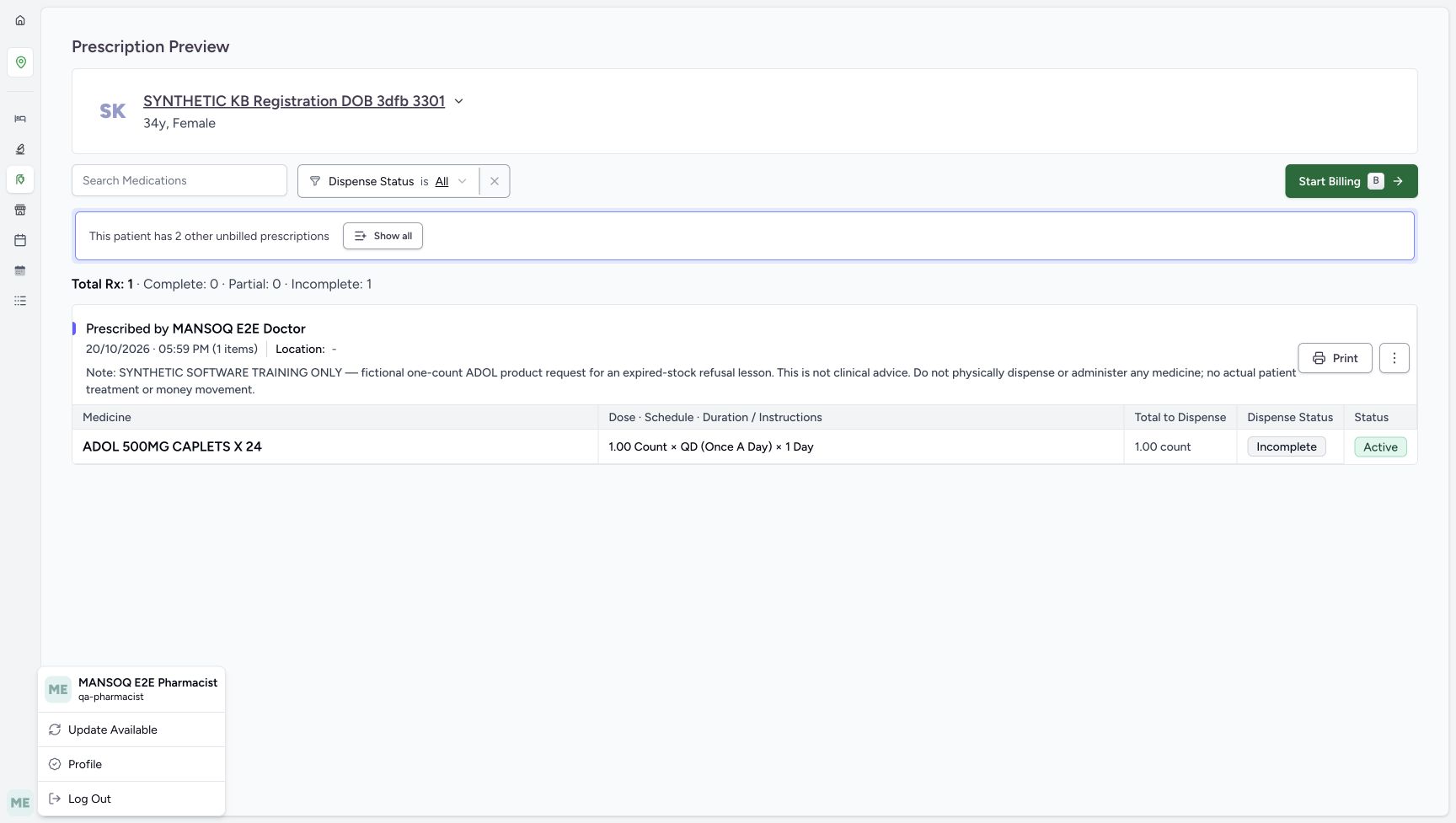
dbb8f8f70e78106933386ad9510d30ad841cb2d2961e4402fb6d0fb32f516556- Verify the existing Pharmacist: Use the assigned account shown in this menu.
- Verify the same synthetic patient: Keep SYNTHETIC KB Registration DOB 3dfb 3301 throughout this example.
- Read original Incomplete fulfilment: This is the existing ADOL request before the selection exercise.
- Read Active status: No prescription completion is performed here.
 1234
1234Recorded release 6cdc3676 · 2026-10-20T23:42:43.962790+00:00 · 1728 × 977 Distinguish Show all from Start Billing
Capture details
Actual6cdc unsaved Show all/Include all/group-selection and empty-selection client-validation example. No successful billing, completion, medicine handover, invoice/payment or external exchange is demonstrated.
Image SHA-256
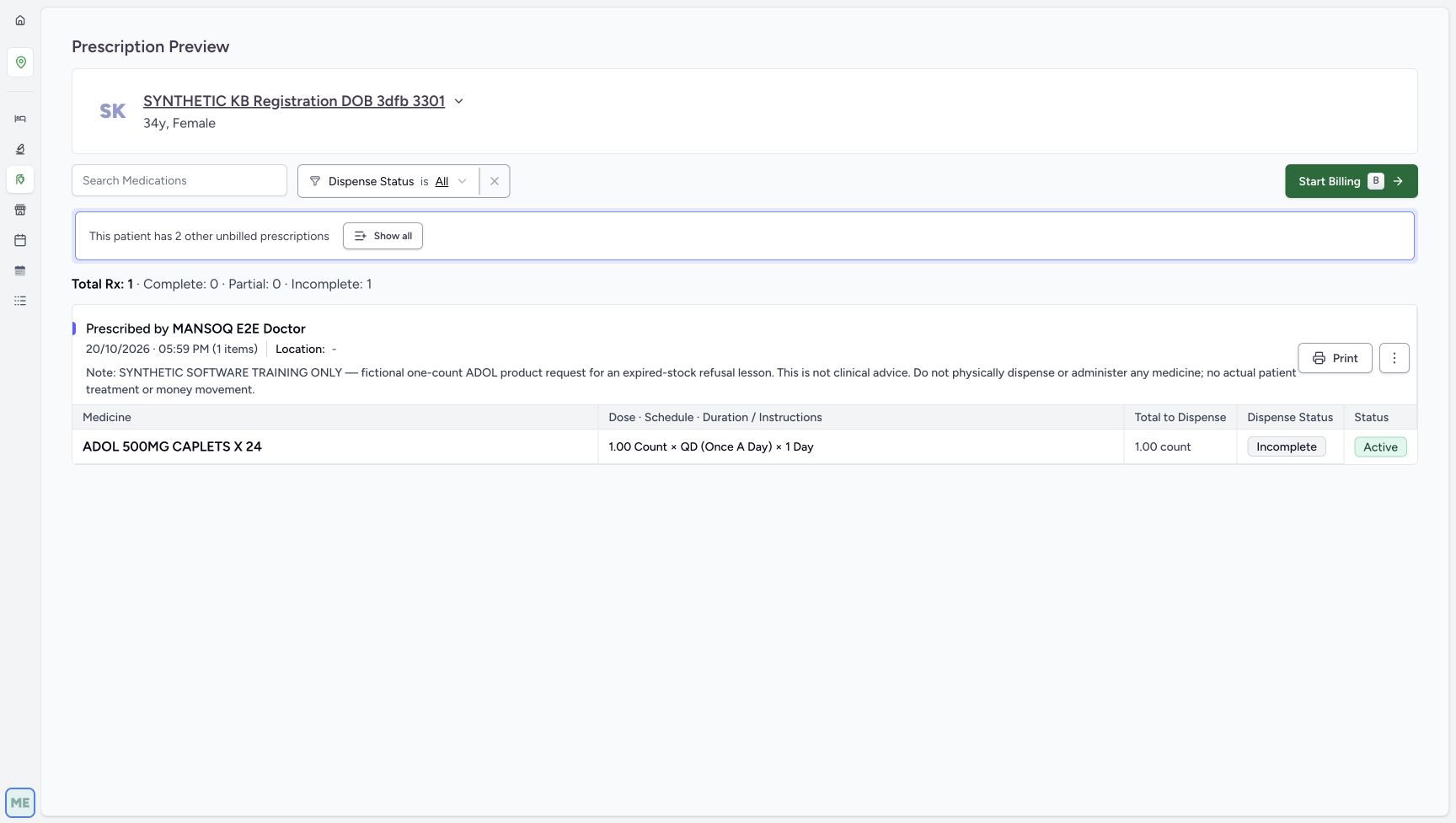
d75851df789be1021654f0a905f50cdb2ff40f2b6e43ba7bf31de6af02869191- Choose Show all for preview expansion: This expands the preview; it does not create a bill.
- Locate the separate Start Billing action: Use it only after returning to this original single preview in the next branch.
- Match the original 05:59 PM prescription: Do not confuse the other dates for the same patient.
- Verify original Incomplete before expansion: The preview’s visible status is separate from any later unsaved checkbox.
1234567Recorded release 6cdc3676 · 2026-10-20T23:43:01.432020+00:00 · 1728 × 977 Read all three original prescription groups
Capture details
Actual6cdc unsaved Show all/Include all/group-selection and empty-selection client-validation example. No successful billing, completion, medicine handover, invoice/payment or external exchange is demonstrated.
Image SHA-256
0c6233f4b362b61be7a01d99615a200175aa1dfe1c4c639c41a6894090b13331- Read Total Rx 3 and the counters: Complete 0, Partial 1 and Incomplete 2 describe the three original groups.
- Identify ADOL at 05:59 PM: This is the original single prescription used to enter the billing branch.
- Identify FEVADOL at 06:48 PM: This separate request is a preview-only fictional example.
- Read the FEVADOL no-bill instruction: Preserve the instruction to cancel the pharmacy preview and not bill.
- Identify HYMOX at 04:27 PM: This is the earlier partially supplied request.
- Read HYMOX Partial: Do not interpret the later unsaved Mark Complete checkbox as this saved status.
- Verify FEVADOL Active: All three original lifecycle statuses remain Active.
- This is an isolated software selection exercise. Preserve the FEVADOL instruction to cancel the pharmacy preview and not bill, physically dispense or administer any medicine. The displayed doses, quantities and catalogue names are fictional test data, not clinical advice. Do not change products, lots or quantities, use per-prescription Mark as Completed/Cancel Prescription, or issue an invoice, record a payment or hand over medicine.1234567
Recorded release 6cdc3676 · 2026-10-20T23:43:01.432020+00:00 · 1728 × 977 Read all three original prescription groups
Capture details
Actual6cdc unsaved Show all/Include all/group-selection and empty-selection client-validation example. No successful billing, completion, medicine handover, invoice/payment or external exchange is demonstrated.
Image SHA-256
0c6233f4b362b61be7a01d99615a200175aa1dfe1c4c639c41a6894090b13331- Read Total Rx 3 and the counters: Complete 0, Partial 1 and Incomplete 2 describe the three original groups.
- Identify ADOL at 05:59 PM: This is the original single prescription used to enter the billing branch.
- Identify FEVADOL at 06:48 PM: This separate request is a preview-only fictional example.
- Read the FEVADOL no-bill instruction: Preserve the instruction to cancel the pharmacy preview and not bill.
- Identify HYMOX at 04:27 PM: This is the earlier partially supplied request.
- Read HYMOX Partial: Do not interpret the later unsaved Mark Complete checkbox as this saved status.
- Verify FEVADOL Active: All three original lifecycle statuses remain Active.
 123456
Recorded release 6cdc3676 · 2026-10-20T23:43:23.555132+00:00 · 1728 × 977 Read the included groups before selection changes
Capture details
Actual6cdc unsaved Show all/Include all/group-selection and empty-selection client-validation example. No successful billing, completion, medicine handover, invoice/payment or external exchange is demonstrated.
Image SHA-256
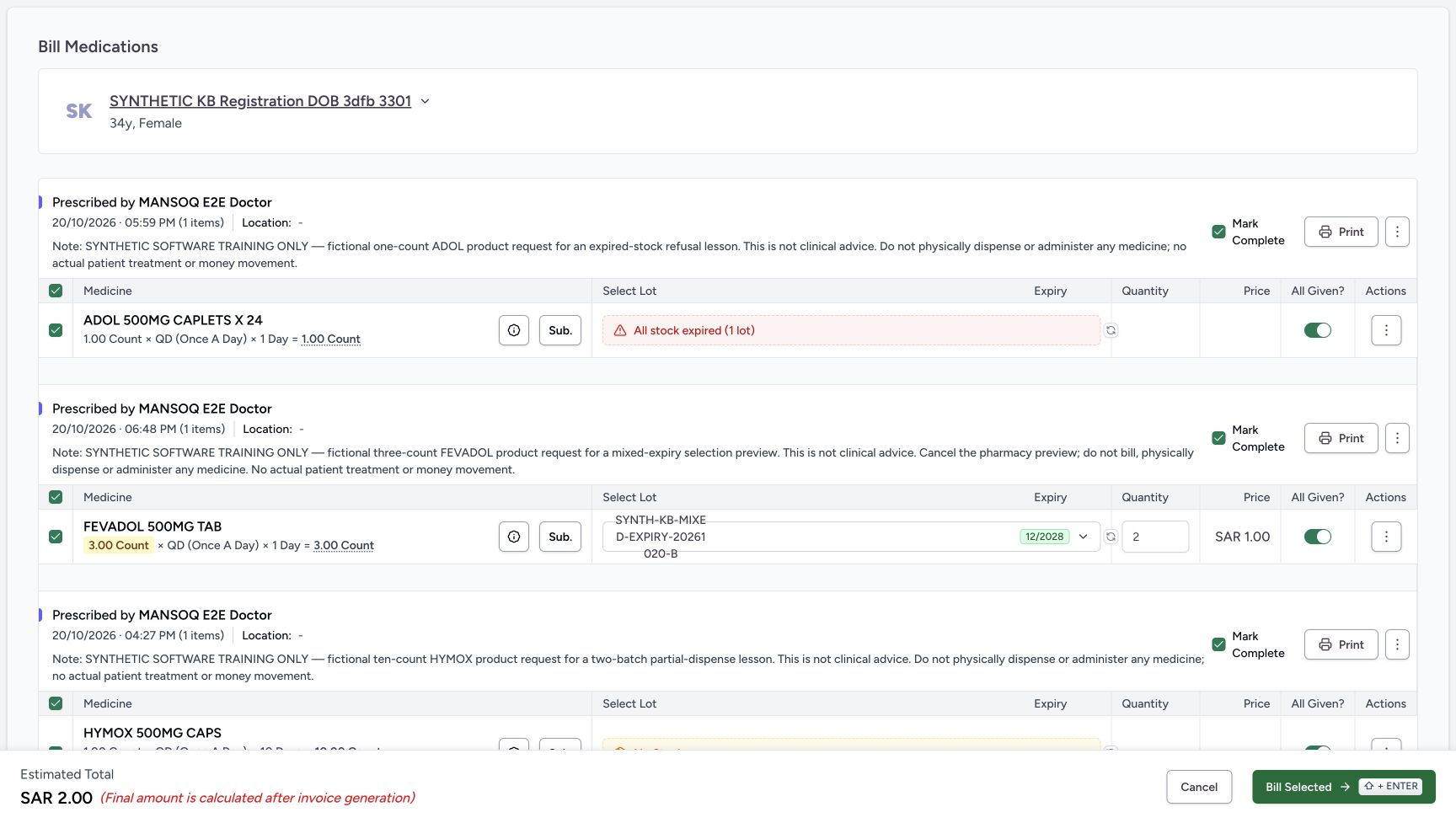
e8b06c2871608027fff05ed29d744b889db8f46ae4c4298b249a10896ee09f0a- Read the ADOL group-header checkbox: This control selects eligible medicines within ADOL’s group.
- Deselect the FEVADOL group header: Exclude the preview-only group without using its prescription-status menu.
- Read FEVADOL Mark Complete initially ON: Observe what happens to this checkbox after group deselection.
- Read FEVADOL All Given initially ON: Its value is not automatically erased when the group is excluded.
- Read the retained preview quantity two: This is an unsaved lot quantity; do not change or bill it.
- Read the SAR 2.00 estimate: This estimate is not an invoice or a money movement.
 123456
Recorded release 6cdc3676 · 2026-10-20T23:44:43.128040+00:00 · 1728 × 977 Scroll the page to inspect the lower HYMOX group
Capture details
Actual6cdc unsaved Show all/Include all/group-selection and empty-selection client-validation example. No successful billing, completion, medicine handover, invoice/payment or external exchange is demonstrated.
Image SHA-256
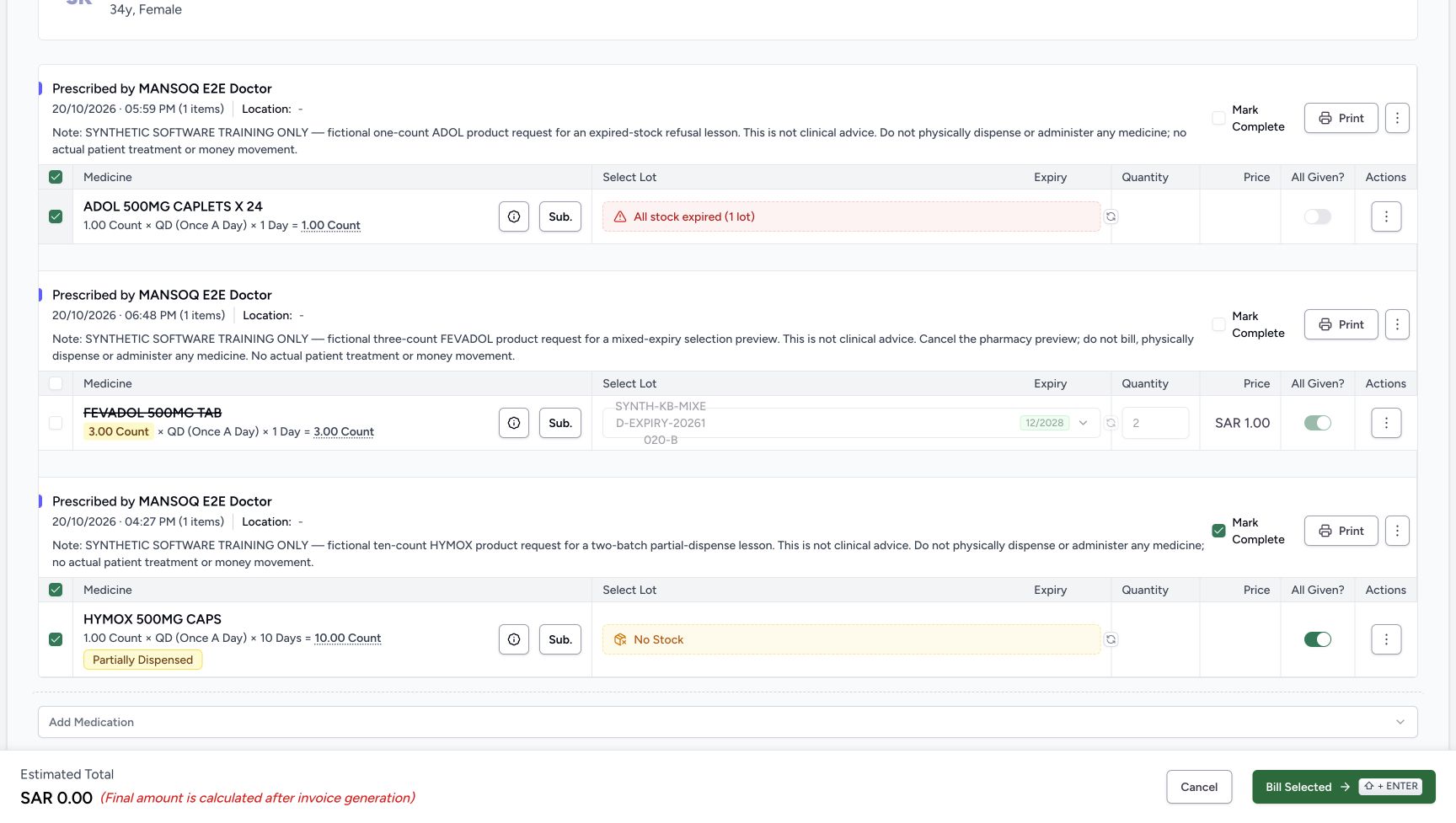
823146ebb36dc96e57b4a9ef3559a8649e2fe847277f0ca3a0240031034b08db- Match HYMOX at 04:27 PM: This is the same original prescription, now fully visible after page scrolling.
- Read HYMOX Mark Complete ON: This group still has its fresh completion default.
- Read HYMOX All Given ON: Review it while the medicine row remains selected.
- Verify HYMOX row selected: The following flags are changed before deselecting this group.
- Read No Stock: No stock or lot change is performed here.
- Read Partially Dispensed: This existing request state is distinct from unsaved completion controls.
1. Expand only the preview with Show all
Verify the existing Pharmacist account, patient and original single ADOL request. Read Incomplete fulfilment and Active status, then choose Show all in the notice about two other unbilled prescriptions. The expanded preview shows three distinct dated groups: ADOL at 05:59 PM, FEVADOL at 06:48 PM and HYMOX at 04:27 PM, all on October 20, 2026. Read Total Rx 3, Complete 0, Partial 1 and Incomplete 2. Match each original note and preserve FEVADOL’s explicit no-bill instruction. Show all expands a preview; it has not started a saved dispense.
1234Verify the existing Pharmacist and original preview
Capture details
Actual6cdc unsaved Show all/Include all/group-selection and empty-selection client-validation example. No successful billing, completion, medicine handover, invoice/payment or external exchange is demonstrated.
Image SHA-256 dbb8f8f70e78106933386ad9510d30ad841cb2d2961e4402fb6d0fb32f516556
- Verify the existing Pharmacist: Use the assigned account shown in this menu.
- Verify the same synthetic patient: Keep SYNTHETIC KB Registration DOB 3dfb 3301 throughout this example.
- Read original Incomplete fulfilment: This is the existing ADOL request before the selection exercise.
- Read Active status: No prescription completion is performed here.
1234Distinguish Show all from Start Billing
Capture details
Actual6cdc unsaved Show all/Include all/group-selection and empty-selection client-validation example. No successful billing, completion, medicine handover, invoice/payment or external exchange is demonstrated.
Image SHA-256 d75851df789be1021654f0a905f50cdb2ff40f2b6e43ba7bf31de6af02869191
- Choose Show all for preview expansion: This expands the preview; it does not create a bill.
- Locate the separate Start Billing action: Use it only after returning to this original single preview in the next branch.
- Match the original 05:59 PM prescription: Do not confuse the other dates for the same patient.
- Verify original Incomplete before expansion: The preview’s visible status is separate from any later unsaved checkbox.
1234567Read all three original prescription groups
Capture details
Actual6cdc unsaved Show all/Include all/group-selection and empty-selection client-validation example. No successful billing, completion, medicine handover, invoice/payment or external exchange is demonstrated.
Image SHA-256 0c6233f4b362b61be7a01d99615a200175aa1dfe1c4c639c41a6894090b13331
- Read Total Rx 3 and the counters: Complete 0, Partial 1 and Incomplete 2 describe the three original groups.
- Identify ADOL at 05:59 PM: This is the original single prescription used to enter the billing branch.
- Identify FEVADOL at 06:48 PM: This separate request is a preview-only fictional example.
- Read the FEVADOL no-bill instruction: Preserve the instruction to cancel the pharmacy preview and not bill.
- Identify HYMOX at 04:27 PM: This is the earlier partially supplied request.
- Read HYMOX Partial: Do not interpret the later unsaved Mark Complete checkbox as this saved status.
- Verify FEVADOL Active: All three original lifecycle statuses remain Active.
2. Return to the single prescription, then use Include all
Use the browser Back button to return to the original single prescription preview, then choose Start Billing. This avoids using Start Billing from the three-prescription expanded preview. In the original ADOL bill, choose Include all before making other form edits. Wait for the three groups to load and verify the same dated originals. Include all expands the billing form, while Show all expanded the preview. The banner refers to active prescriptions offered for this patient at the facility; it is not proof of unpaid invoices. This run does not establish behavior for more records, other encounters or other facilities.
1234Distinguish Show all from Start Billing
Capture details
Actual6cdc unsaved Show all/Include all/group-selection and empty-selection client-validation example. No successful billing, completion, medicine handover, invoice/payment or external exchange is demonstrated.
Image SHA-256 d75851df789be1021654f0a905f50cdb2ff40f2b6e43ba7bf31de6af02869191
- Choose Show all for preview expansion: This expands the preview; it does not create a bill.
- Locate the separate Start Billing action: Use it only after returning to this original single preview in the next branch.
- Match the original 05:59 PM prescription: Do not confuse the other dates for the same patient.
- Verify original Incomplete before expansion: The preview’s visible status is separate from any later unsaved checkbox.
1234567Read all three original prescription groups
Capture details
Actual6cdc unsaved Show all/Include all/group-selection and empty-selection client-validation example. No successful billing, completion, medicine handover, invoice/payment or external exchange is demonstrated.
Image SHA-256 0c6233f4b362b61be7a01d99615a200175aa1dfe1c4c639c41a6894090b13331
- Read Total Rx 3 and the counters: Complete 0, Partial 1 and Incomplete 2 describe the three original groups.
- Identify ADOL at 05:59 PM: This is the original single prescription used to enter the billing branch.
- Identify FEVADOL at 06:48 PM: This separate request is a preview-only fictional example.
- Read the FEVADOL no-bill instruction: Preserve the instruction to cancel the pharmacy preview and not bill.
- Identify HYMOX at 04:27 PM: This is the earlier partially supplied request.
- Read HYMOX Partial: Do not interpret the later unsaved Mark Complete checkbox as this saved status.
- Verify FEVADOL Active: All three original lifecycle statuses remain Active.
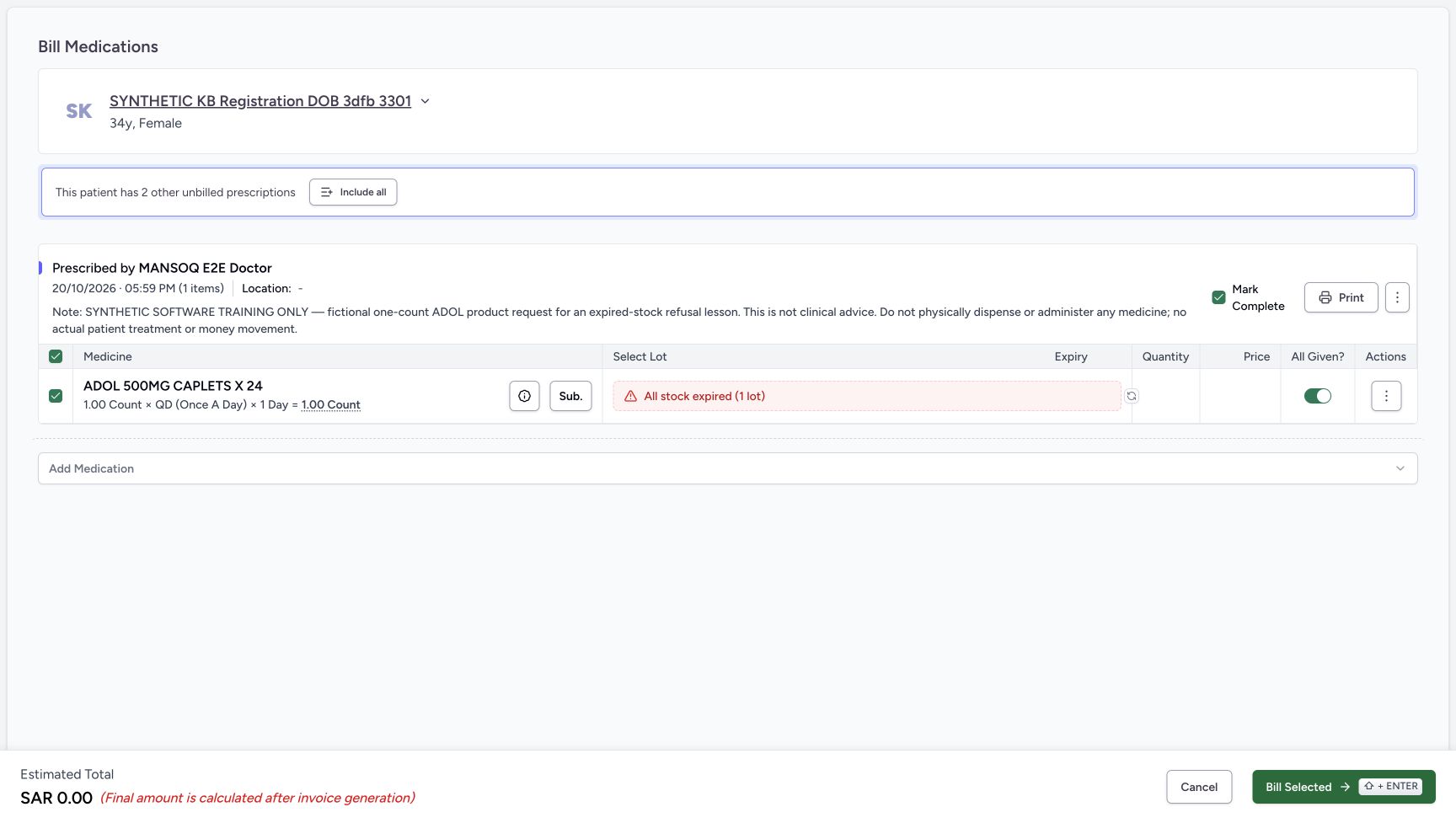 1234
1234Use Include all in the original single bill
Capture details
Actual6cdc unsaved Show all/Include all/group-selection and empty-selection client-validation example. No successful billing, completion, medicine handover, invoice/payment or external exchange is demonstrated.
Image SHA-256 0e09d2e2d6f5e4fb524cd4fbb429d39c2aa0ddc3b30e6b7c8b26f0d5fef7399e
- Choose Include all before other form edits: This expands the billing form, unlike Show all in the preview.
- Read fresh Mark Complete ON: This is a separate prescription-level checkbox.
- Read fresh All Given ON: This medicine-level switch is distinct from Mark Complete.
- Verify the original ADOL row: Include all is being used from the single-prescription bill, not the expanded preview’s Start Billing link.
123456Read the included groups before selection changes
Capture details
Actual6cdc unsaved Show all/Include all/group-selection and empty-selection client-validation example. No successful billing, completion, medicine handover, invoice/payment or external exchange is demonstrated.
Image SHA-256 e8b06c2871608027fff05ed29d744b889db8f46ae4c4298b249a10896ee09f0a
- Read the ADOL group-header checkbox: This control selects eligible medicines within ADOL’s group.
- Deselect the FEVADOL group header: Exclude the preview-only group without using its prescription-status menu.
- Read FEVADOL Mark Complete initially ON: Observe what happens to this checkbox after group deselection.
- Read FEVADOL All Given initially ON: Its value is not automatically erased when the group is excluded.
- Read the retained preview quantity two: This is an unsaved lot quantity; do not change or bill it.
- Read the SAR 2.00 estimate: This estimate is not an invoice or a money movement.
3. Deselect the preview-only FEVADOL group
Initially the groups are selected and Mark Complete defaults are ON. Deselect the FEVADOL group-header checkbox in the Medicine heading, keeping its no-bill instruction in view. Its row checkbox and Mark Complete also turn OFF in this initial deselection. All Given retains ON but becomes disabled, as do its retained lot and quantity inputs. ADOL and HYMOX stay selected. The estimate changes from SAR 2.00 to SAR 0.00 because FEVADOL no longer contributes; these are unsaved estimates, not invoices. Each illustrated group contains one medicine.
123456Read the included groups before selection changes
Capture details
Actual6cdc unsaved Show all/Include all/group-selection and empty-selection client-validation example. No successful billing, completion, medicine handover, invoice/payment or external exchange is demonstrated.
Image SHA-256 e8b06c2871608027fff05ed29d744b889db8f46ae4c4298b249a10896ee09f0a
- Read the ADOL group-header checkbox: This control selects eligible medicines within ADOL’s group.
- Deselect the FEVADOL group header: Exclude the preview-only group without using its prescription-status menu.
- Read FEVADOL Mark Complete initially ON: Observe what happens to this checkbox after group deselection.
- Read FEVADOL All Given initially ON: Its value is not automatically erased when the group is excluded.
- Read the retained preview quantity two: This is an unsaved lot quantity; do not change or bill it.
- Read the SAR 2.00 estimate: This estimate is not an invoice or a money movement.
123456Read the FEVADOL group deselection result
Capture details
Actual6cdc unsaved Show all/Include all/group-selection and empty-selection client-validation example. No successful billing, completion, medicine handover, invoice/payment or external exchange is demonstrated.
Image SHA-256 e9817890fc0137faedb15b01484dbe49ec064840566491f000f50e9bda761dfd
- Verify FEVADOL group OFF: Only the eligible rows in this group were deselected.
- Verify FEVADOL row OFF: The medicine is struck through and excluded from the estimate.
- Read FEVADOL Mark Complete OFF: It changed with the initial group deselection in this run.
- Read retained ON but disabled All Given: Disabled does not mean this stored form value was changed to OFF.
- Verify ADOL stayed selected: The other prescription group was not deselected.
- Read the estimate now SAR 0.00: The excluded FEVADOL no longer contributes to the estimate.
4. Compare ADOL row selection with Mark Complete
Deselect the individual ADOL row. Its one-item group header and Mark Complete become OFF, while All Given retains ON but is disabled. Reselect the ADOL row: its row and group header return ON, but Mark Complete stays OFF in this observed form. Read that actual result rather than assuming completion always follows reselection. With ADOL selected, switch its separate All Given OFF and verify Mark Complete remains OFF. Leave the original expired-stock result unchanged.
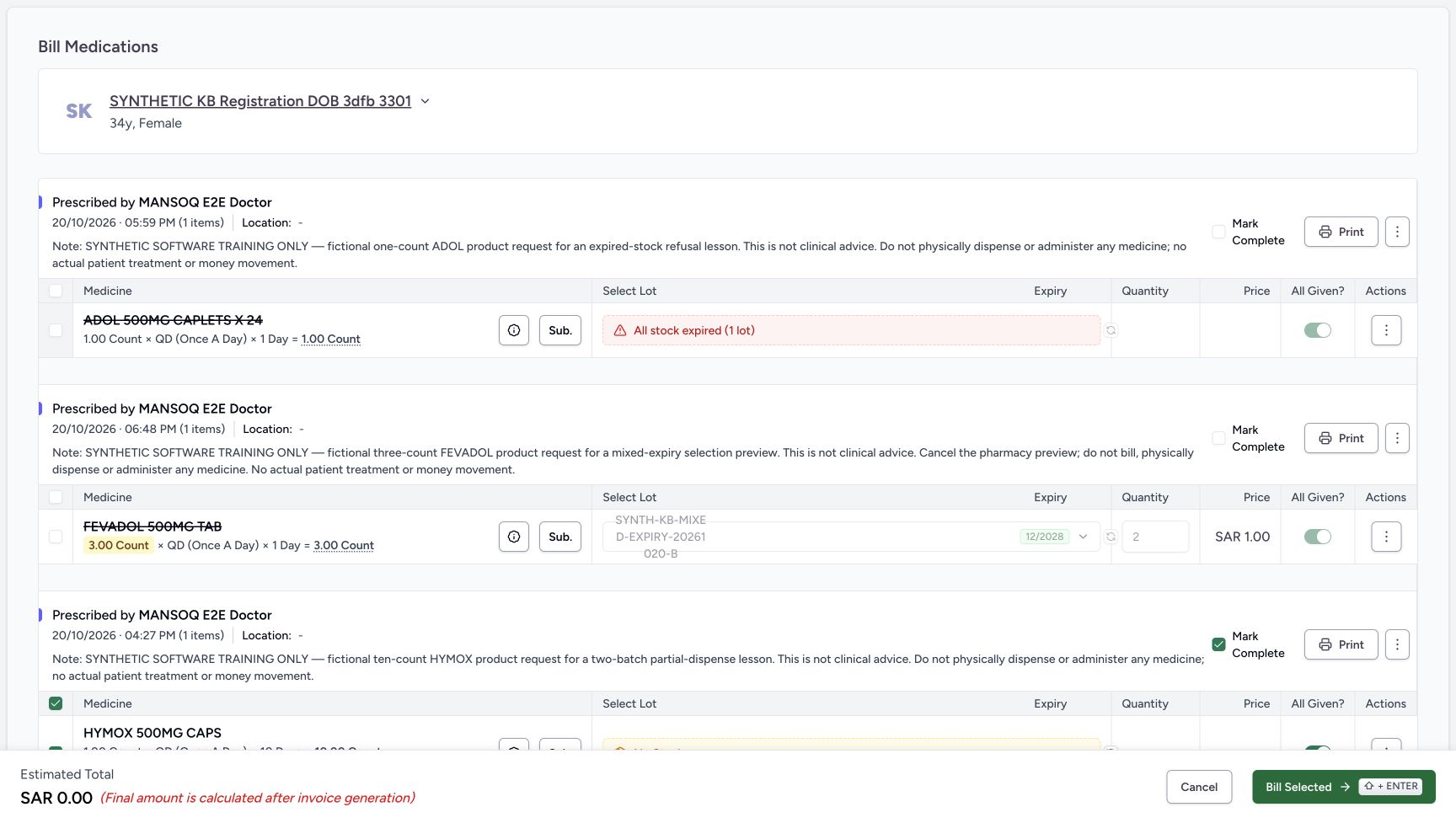 12345
12345Deselect ADOL using its individual row
Capture details
Actual6cdc unsaved Show all/Include all/group-selection and empty-selection client-validation example. No successful billing, completion, medicine handover, invoice/payment or external exchange is demonstrated.
Image SHA-256 44ddc337809fae9c8d614d06f2a09f7e8746753f7b2301b9cf438258e5bc7417
- Read ADOL row OFF: This is an individual medicine checkbox, not a global selection action.
- Read its one-item group header OFF: Each illustrated group contains one medicine.
- Read ADOL Mark Complete OFF: Initial selection changes can also update this separate completion choice.
- Read disabled retained All Given ON: The value was not cleared merely by row deselection.
- Verify HYMOX group still selected: A different prescription group retains its selection.
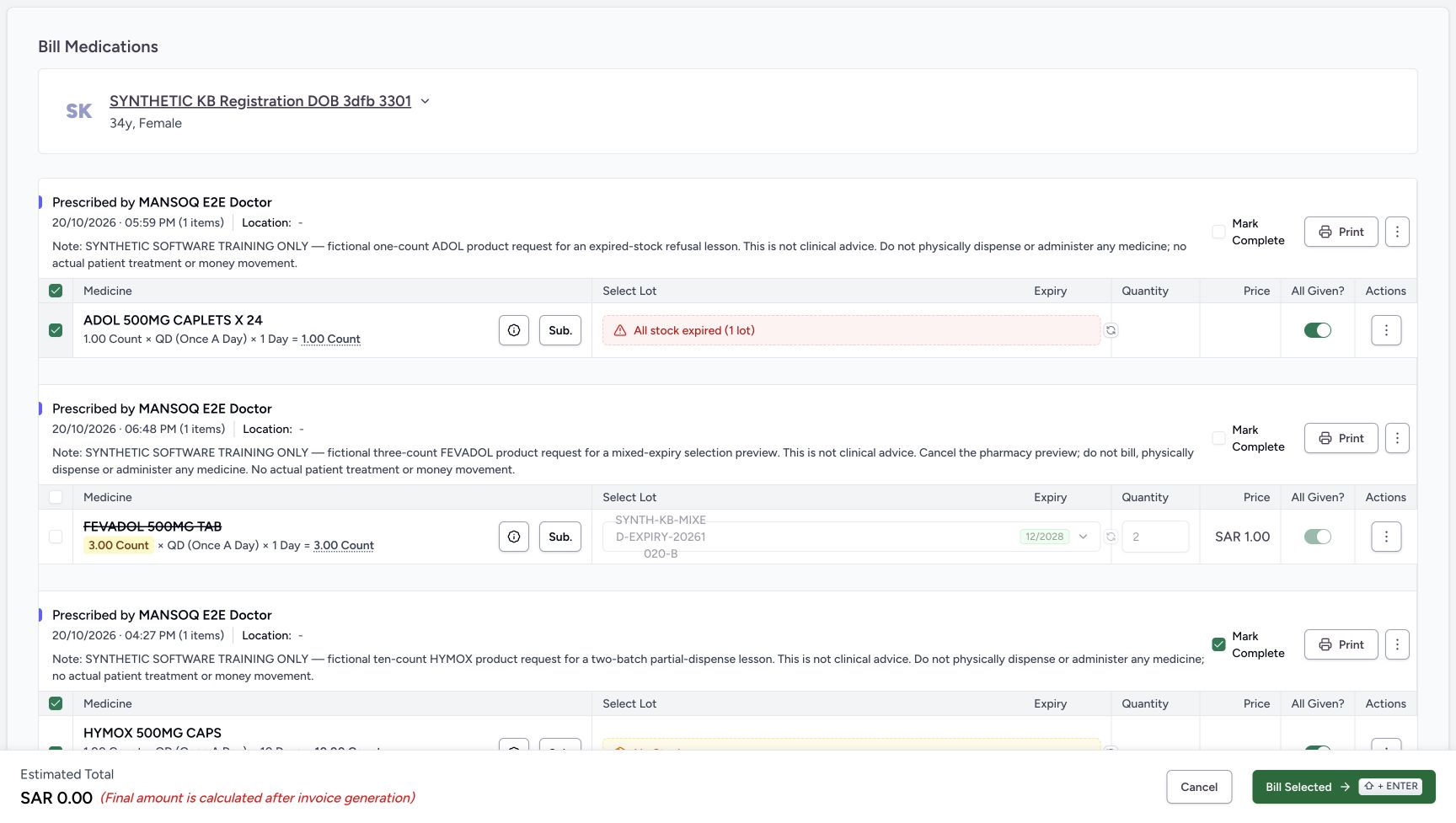 1234
1234Reselect ADOL and check completion separately
Capture details
Actual6cdc unsaved Show all/Include all/group-selection and empty-selection client-validation example. No successful billing, completion, medicine handover, invoice/payment or external exchange is demonstrated.
Image SHA-256 ee565530af9b9e8b51f2c792ea2e6c13b914fcb6b3c8c92f195424100a180132
- Read ADOL row selected again: Reselecting restores this medicine’s participation in the local form.
- Read its group header selected: This one-item group is selected again.
- Verify Mark Complete stayed OFF here: Do not assume every reselection restores completion.
- Read All Given still ON: Review this separate medicine-fulfilment switch explicitly.
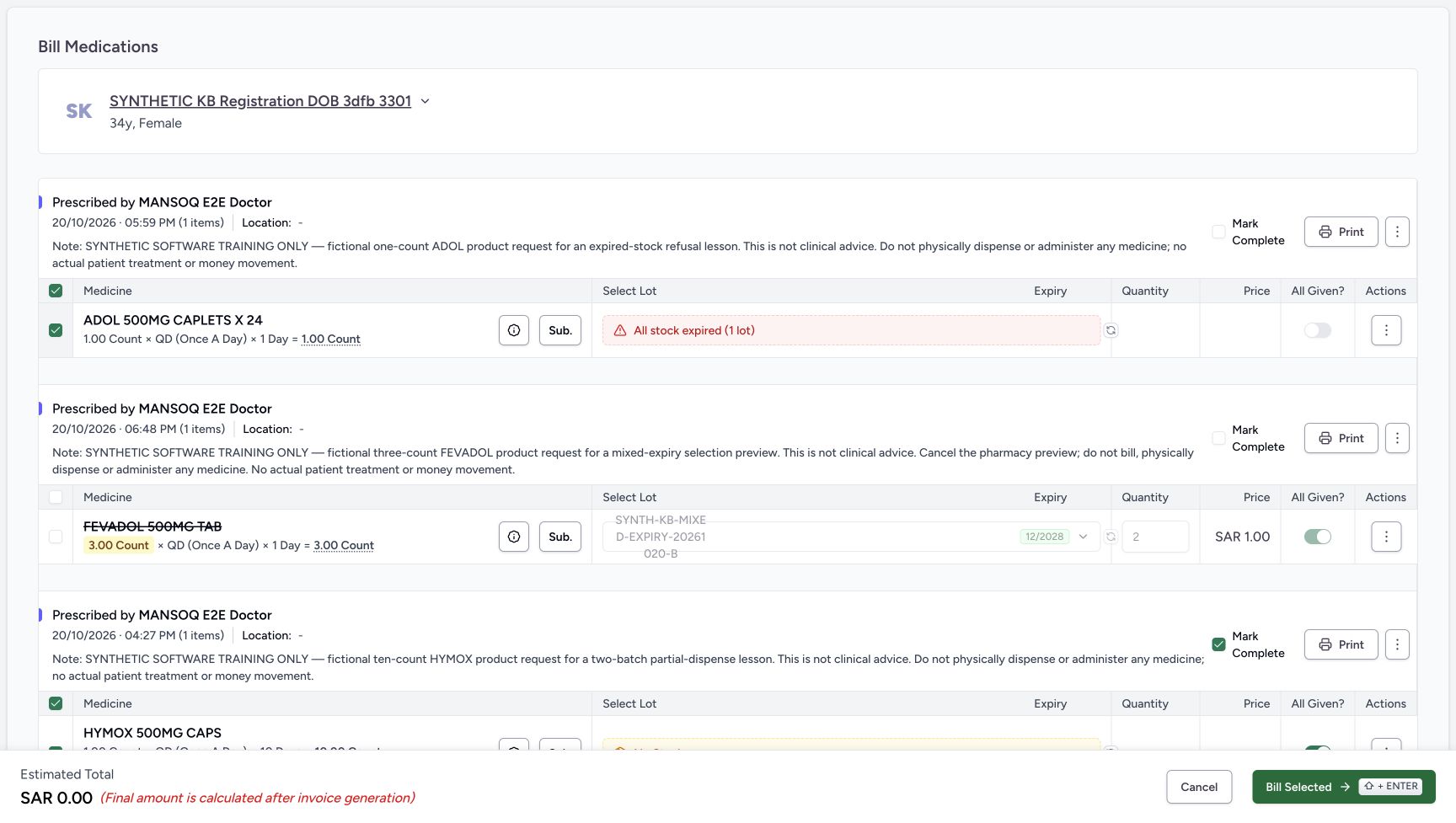 1234
1234Set ADOL All Given OFF while the row is selected
Capture details
Actual6cdc unsaved Show all/Include all/group-selection and empty-selection client-validation example. No successful billing, completion, medicine handover, invoice/payment or external exchange is demonstrated.
Image SHA-256 19476be9a58db6d856a7786cc324e9690cde6cd262674281f93ca99bf3c9b755
- Keep ADOL selected for this check: The All Given control is available while its row is selected.
- Switch ADOL All Given OFF: Review the actual switch separately from the row and Mark Complete.
- Verify Mark Complete remains OFF: This is still a separate prescription completion choice.
- Keep the original stock result unchanged: No lot, product or quantity is changed in this exercise.
5. Review the lower HYMOX group and turn its flags OFF
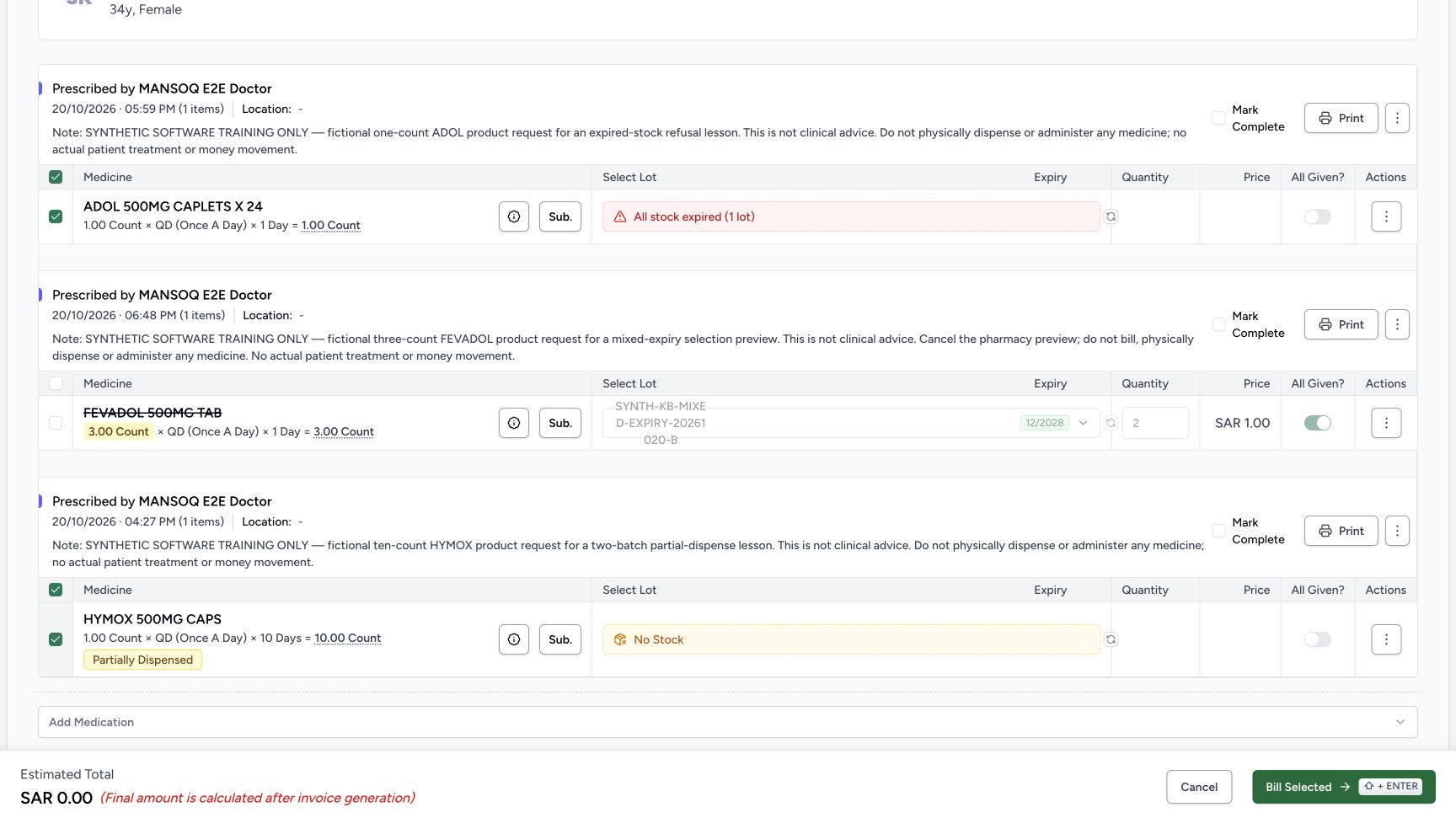
Scroll the page down to see the complete HYMOX group. Its existing Partially Dispensed badge and No Stock result are separate from the unsaved selection controls. HYMOX is still selected with Mark Complete and All Given ON. Manually uncheck HYMOX Mark Complete and switch its All Given OFF while the row is selected. These changes leave HYMOX selected for now. ADOL remains selected with both controls OFF; FEVADOL remains excluded with retained disabled All Given ON. Do not change any stock choice or quantity.
123456Scroll the page to inspect the lower HYMOX group
Capture details
Actual6cdc unsaved Show all/Include all/group-selection and empty-selection client-validation example. No successful billing, completion, medicine handover, invoice/payment or external exchange is demonstrated.
Image SHA-256 823146ebb36dc96e57b4a9ef3559a8649e2fe847277f0ca3a0240031034b08db
- Match HYMOX at 04:27 PM: This is the same original prescription, now fully visible after page scrolling.
- Read HYMOX Mark Complete ON: This group still has its fresh completion default.
- Read HYMOX All Given ON: Review it while the medicine row remains selected.
- Verify HYMOX row selected: The following flags are changed before deselecting this group.
- Read No Stock: No stock or lot change is performed here.
- Read Partially Dispensed: This existing request state is distinct from unsaved completion controls.
 12345
12345Turn HYMOX completion controls OFF before deselecting
Capture details
Actual6cdc unsaved Show all/Include all/group-selection and empty-selection client-validation example. No successful billing, completion, medicine handover, invoice/payment or external exchange is demonstrated.
Image SHA-256 3ccc505fb37c89f70ba5f8ed794ec264e6bb572c6d4e07407b5af1c32fd7892e
- Uncheck HYMOX Mark Complete: This deliberately changes its separate completion choice.
- Switch HYMOX All Given OFF: Do this while the row is selected.
- Verify HYMOX remains selected for now: Changing these two flags has not deselected the medicine.
- Use HYMOX group header next: The next action deselects only this group.
- Verify ADOL remains selected: The other intended group’s selection is preserved.
6. Leave no medicine selected and read the enabled button
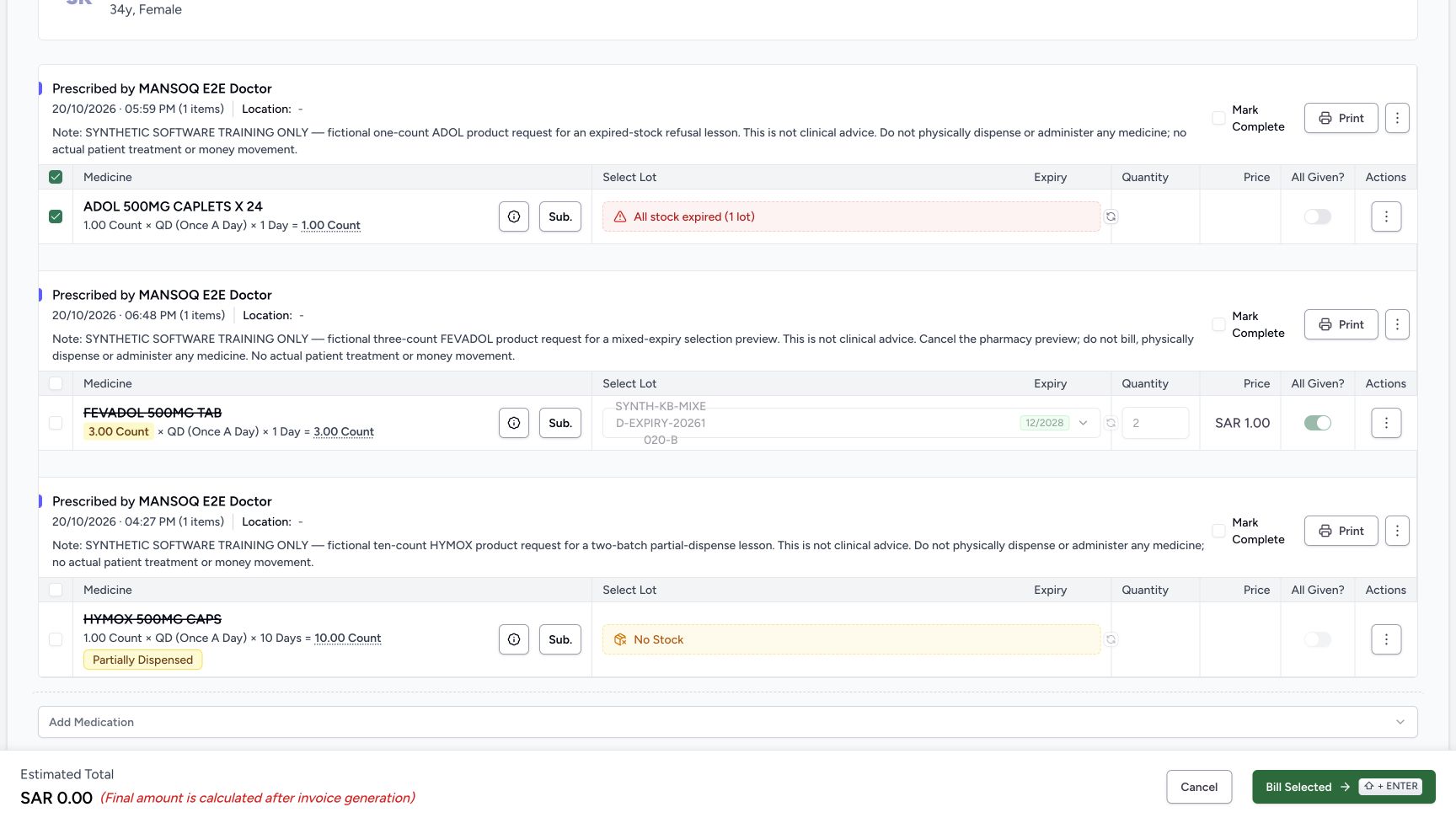
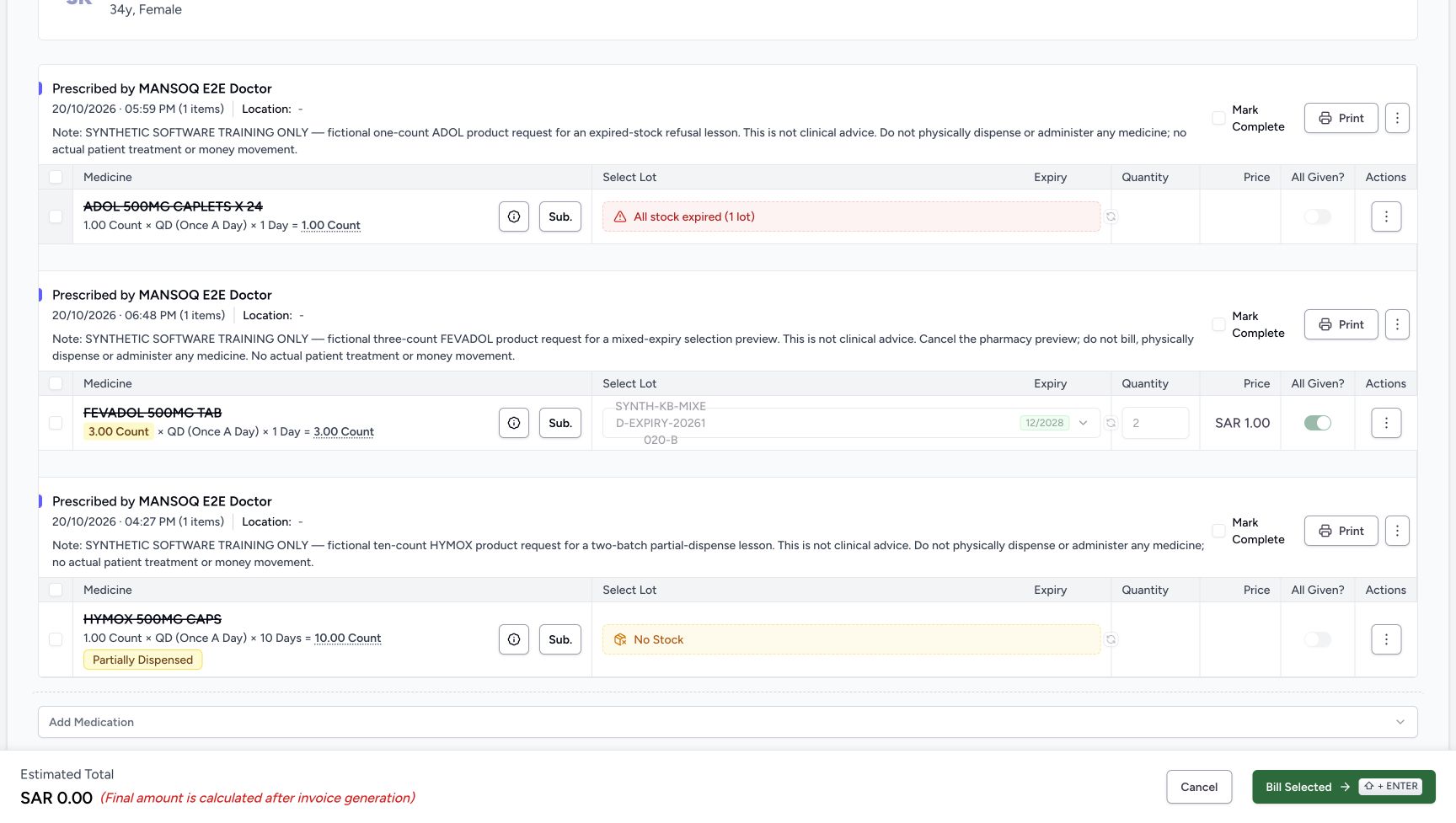
Deselect the HYMOX group header. Its row becomes excluded and its deliberately OFF All Given becomes disabled; the ADOL group remains selected. Then deselect the remaining ADOL row. Now all three group-header checkboxes, all three row checkboxes and all three Mark Complete checkboxes are OFF. All Given is OFF and disabled for ADOL/HYMOX, but remains ON and disabled for FEVADOL. The estimate is zero. Bill Selected remains available, and the next step demonstrates its empty-selection validation.
 1234
1234Deselect HYMOX while ADOL stays selected
Capture details
Actual6cdc unsaved Show all/Include all/group-selection and empty-selection client-validation example. No successful billing, completion, medicine handover, invoice/payment or external exchange is demonstrated.
Image SHA-256 aa2c7d9df65d328edf901f3d0ec7059f90045480504441959ae6b0e4a5d44b5b
- Read HYMOX group header OFF: The group selection has been removed.
- Read HYMOX row OFF: The one medicine in this group is excluded.
- Read OFF and disabled All Given: This value was deliberately set OFF before deselection.
- Deselect the remaining ADOL row next: ADOL is still selected; its row checkbox is the last selection removed for the empty-selection check.
 1234567
Inspect the empty selection before validation
Capture details
Actual6cdc unsaved Show all/Include all/group-selection and empty-selection client-validation example. No successful billing, completion, medicine handover, invoice/payment or external exchange is demonstrated.
Image SHA-256 04d6b9bea0b89db9fc2c53015e33313d354f3fc8a620b4ee937b788923be428d
- Read ADOL group and row area excluded: No ADOL medicine is selected in the local form.
- Read FEVADOL group excluded: The preview-only request remains outside the selected bill.
- Read HYMOX group excluded: No medicine row remains selected.
- Verify the last Mark Complete is OFF: All three completion checkboxes are also OFF.
- Read retained disabled FEVADOL All Given ON: This retained switch value does not make an excluded row selected.
- Recognise Bill Selected is enabled: The empty-selection check occurs on submission; enabled is not a valid-save result.
- Read estimate SAR 0.00: No invoice has been created.
7. Read the empty-selection client validation
For this isolated validation demonstration only, verify that all three medicine rows and all three Mark Complete choices are OFF, then choose Bill Selected once. Read the visible message: At least one medication must be selected. The form stays open with the same empty selection, and no saved preparation or invoice result follows. This form validates the selection before its billing submission callback. Do not select or substitute a medicine merely to make this exercise submit, and do not retry after reading the message. The normal exit is Cancel.
1234567Inspect the empty selection before validation
Capture details
Actual6cdc unsaved Show all/Include all/group-selection and empty-selection client-validation example. No successful billing, completion, medicine handover, invoice/payment or external exchange is demonstrated.
Image SHA-256 04d6b9bea0b89db9fc2c53015e33313d354f3fc8a620b4ee937b788923be428d
- Read ADOL group and row area excluded: No ADOL medicine is selected in the local form.
- Read FEVADOL group excluded: The preview-only request remains outside the selected bill.
- Read HYMOX group excluded: No medicine row remains selected.
- Verify the last Mark Complete is OFF: All three completion checkboxes are also OFF.
- Read retained disabled FEVADOL All Given ON: This retained switch value does not make an excluded row selected.
- Recognise Bill Selected is enabled: The empty-selection check occurs on submission; enabled is not a valid-save result.
- Read estimate SAR 0.00: No invoice has been created.
1234Read the empty-selection validation message
Capture details
Actual6cdc unsaved Show all/Include all/group-selection and empty-selection client-validation example. No successful billing, completion, medicine handover, invoice/payment or external exchange is demonstrated.
Image SHA-256 c1cc4a997dd3ace84fb9c9f134b4a1cb8aa7826fe9379ac0d2614c270455ad07
- Read the client validation message: At least one medication must be selected is the visible error.
- Verify the form still has no ADOL selection: The validation has not created a preparation.
- Keep completion choices OFF: This check does not complete a prescription.
- Use Cancel after reading the message: Leave the unsaved exercise rather than selecting a medicine to make it submit.
8. Cancel, reload and verify all original states
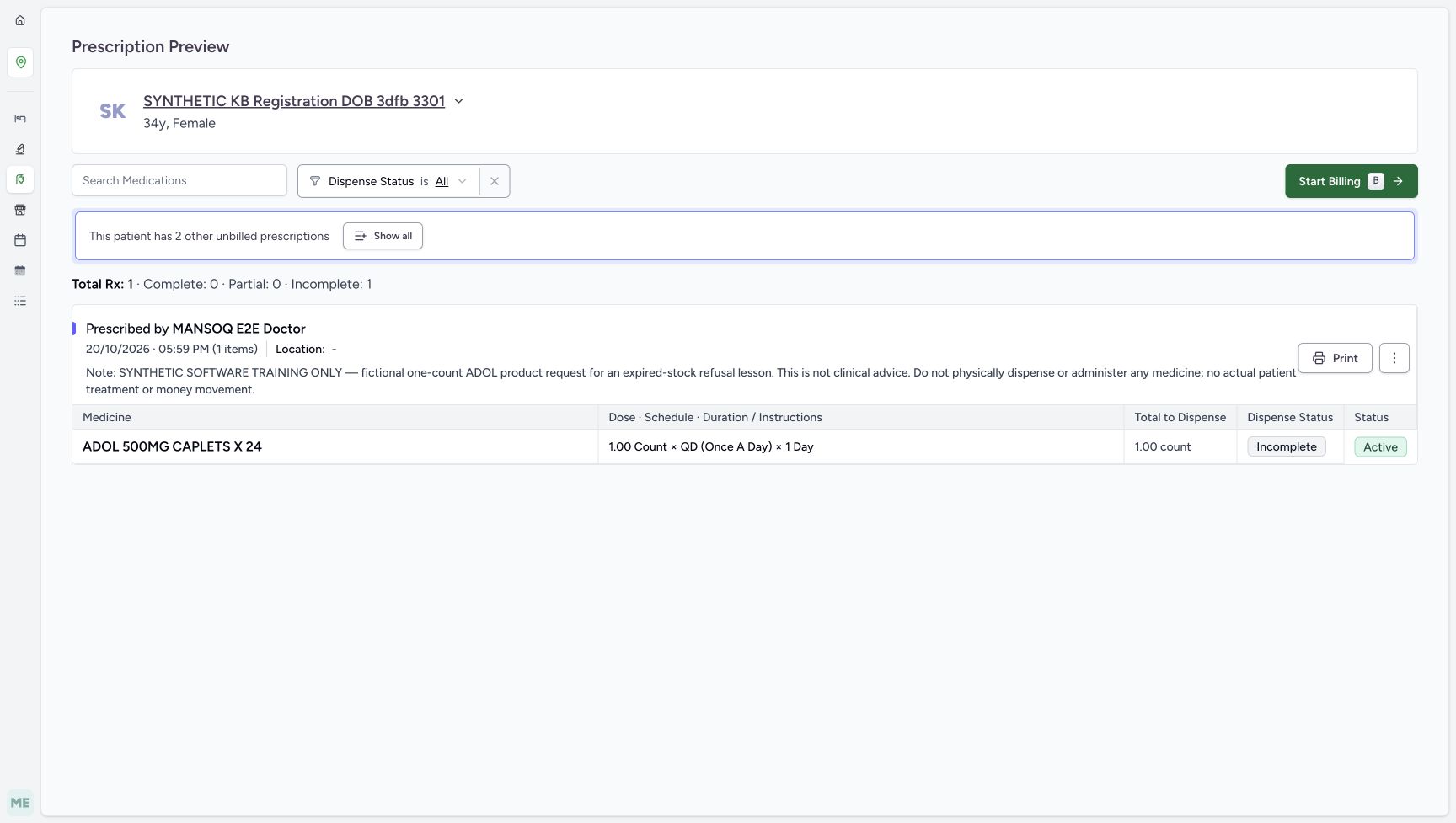
Choose the outer Cancel. In this witnessed entry path, it returns to the original single ADOL Prescription Preview, still Active and Incomplete with two other unbilled prescriptions. Reload that preview normally, then choose Show all once more. Verify the same three originals and counts: ADOL Incomplete/Active, FEVADOL Incomplete/Active and HYMOX Partial/Active; Total Rx 3, Complete 0, Partial 1 and Incomplete 2. The no-bill note remains unchanged. No preparation, order, invoice or payment was created by this unsaved selection and validation exercise. Stop here without starting another bill.
1234Read the empty-selection validation message
Capture details
Actual6cdc unsaved Show all/Include all/group-selection and empty-selection client-validation example. No successful billing, completion, medicine handover, invoice/payment or external exchange is demonstrated.
Image SHA-256 c1cc4a997dd3ace84fb9c9f134b4a1cb8aa7826fe9379ac0d2614c270455ad07
- Read the client validation message: At least one medication must be selected is the visible error.
- Verify the form still has no ADOL selection: The validation has not created a preparation.
- Keep completion choices OFF: This check does not complete a prescription.
- Use Cancel after reading the message: Leave the unsaved exercise rather than selecting a medicine to make it submit.
 123
123Read the original single preview after outer Cancel
Capture details
Actual6cdc unsaved Show all/Include all/group-selection and empty-selection client-validation example. No successful billing, completion, medicine handover, invoice/payment or external exchange is demonstrated.
Image SHA-256 93a1a6b21f49b10ebab5bf186e2d90008bc5aa1c9a8e766c671d3fbedf7be0d2
- Read original Incomplete after Cancel: The local selection exercise did not fulfil ADOL.
- Read Active after Cancel: No prescription-status action was used.
- Read the unchanged two-other-prescriptions notice: Cancelling did not create these earlier prescriptions.
 123
123Reload the same original preview
Capture details
Actual6cdc unsaved Show all/Include all/group-selection and empty-selection client-validation example. No successful billing, completion, medicine handover, invoice/payment or external exchange is demonstrated.
Image SHA-256 cc6c56f032b9fcc005d20605e5e37acfd971cb3c3670492fa6b28b69cdc43ad8
- Verify Incomplete after reload: Read the saved original state after leaving the form.
- Verify Active after reload: No completion was saved.
- Choose Show all for final readback: Expand the same three original prescriptions again without billing.
123456Verify all three original saved states remain
Capture details
Actual6cdc unsaved Show all/Include all/group-selection and empty-selection client-validation example. No successful billing, completion, medicine handover, invoice/payment or external exchange is demonstrated.
Image SHA-256 0c6233f4b362b61be7a01d99615a200175aa1dfe1c4c639c41a6894090b13331
- Read the same three-prescription summary: The counts match the initial expanded preview.
- Verify ADOL Incomplete: The original single request is unchanged.
- Verify FEVADOL Incomplete: The preview-only request was not billed.
- Verify HYMOX Partial: Its earlier partial state is preserved.
- Verify HYMOX remains Active: The unsaved Mark Complete checks did not complete it.
- Read the retained FEVADOL no-bill note: The original instruction remains unchanged.
Group selection is scoped, and completion needs its own check
A group-header checkbox selects eligible medicine rows within that prescription, while an individual row checkbox selects that medicine. In these one-item groups, the header and row have matching selected states; no partially selected multirow group is demonstrated. Initial deselection also changed the group’s untouched Mark Complete, but ADOL reselection did not restore it in this run. Review Mark Complete after selection changes and set the intended value explicitly rather than treating it as a global selector. All Given is a separate medicine-fulfilment switch; deselection can disable it while retaining either ON or OFF.
123456Read the included groups before selection changes
Capture details
Actual6cdc unsaved Show all/Include all/group-selection and empty-selection client-validation example. No successful billing, completion, medicine handover, invoice/payment or external exchange is demonstrated.
Image SHA-256 e8b06c2871608027fff05ed29d744b889db8f46ae4c4298b249a10896ee09f0a
- Read the ADOL group-header checkbox: This control selects eligible medicines within ADOL’s group.
- Deselect the FEVADOL group header: Exclude the preview-only group without using its prescription-status menu.
- Read FEVADOL Mark Complete initially ON: Observe what happens to this checkbox after group deselection.
- Read FEVADOL All Given initially ON: Its value is not automatically erased when the group is excluded.
- Read the retained preview quantity two: This is an unsaved lot quantity; do not change or bill it.
- Read the SAR 2.00 estimate: This estimate is not an invoice or a money movement.
123456Read the FEVADOL group deselection result
Capture details
Actual6cdc unsaved Show all/Include all/group-selection and empty-selection client-validation example. No successful billing, completion, medicine handover, invoice/payment or external exchange is demonstrated.
Image SHA-256 e9817890fc0137faedb15b01484dbe49ec064840566491f000f50e9bda761dfd
- Verify FEVADOL group OFF: Only the eligible rows in this group were deselected.
- Verify FEVADOL row OFF: The medicine is struck through and excluded from the estimate.
- Read FEVADOL Mark Complete OFF: It changed with the initial group deselection in this run.
- Read retained ON but disabled All Given: Disabled does not mean this stored form value was changed to OFF.
- Verify ADOL stayed selected: The other prescription group was not deselected.
- Read the estimate now SAR 0.00: The excluded FEVADOL no longer contributes to the estimate.
12345Deselect ADOL using its individual row
Capture details
Actual6cdc unsaved Show all/Include all/group-selection and empty-selection client-validation example. No successful billing, completion, medicine handover, invoice/payment or external exchange is demonstrated.
Image SHA-256 44ddc337809fae9c8d614d06f2a09f7e8746753f7b2301b9cf438258e5bc7417
- Read ADOL row OFF: This is an individual medicine checkbox, not a global selection action.
- Read its one-item group header OFF: Each illustrated group contains one medicine.
- Read ADOL Mark Complete OFF: Initial selection changes can also update this separate completion choice.
- Read disabled retained All Given ON: The value was not cleared merely by row deselection.
- Verify HYMOX group still selected: A different prescription group retains its selection.
1234Reselect ADOL and check completion separately
Capture details
Actual6cdc unsaved Show all/Include all/group-selection and empty-selection client-validation example. No successful billing, completion, medicine handover, invoice/payment or external exchange is demonstrated.
Image SHA-256 ee565530af9b9e8b51f2c792ea2e6c13b914fcb6b3c8c92f195424100a180132
- Read ADOL row selected again: Reselecting restores this medicine’s participation in the local form.
- Read its group header selected: This one-item group is selected again.
- Verify Mark Complete stayed OFF here: Do not assume every reselection restores completion.
- Read All Given still ON: Review this separate medicine-fulfilment switch explicitly.
1234Set ADOL All Given OFF while the row is selected
Capture details
Actual6cdc unsaved Show all/Include all/group-selection and empty-selection client-validation example. No successful billing, completion, medicine handover, invoice/payment or external exchange is demonstrated.
Image SHA-256 19476be9a58db6d856a7786cc324e9690cde6cd262674281f93ca99bf3c9b755
- Keep ADOL selected for this check: The All Given control is available while its row is selected.
- Switch ADOL All Given OFF: Review the actual switch separately from the row and Mark Complete.
- Verify Mark Complete remains OFF: This is still a separate prescription completion choice.
- Keep the original stock result unchanged: No lot, product or quantity is changed in this exercise.
12345Turn HYMOX completion controls OFF before deselecting
Capture details
Actual6cdc unsaved Show all/Include all/group-selection and empty-selection client-validation example. No successful billing, completion, medicine handover, invoice/payment or external exchange is demonstrated.
Image SHA-256 3ccc505fb37c89f70ba5f8ed794ec264e6bb572c6d4e07407b5af1c32fd7892e
- Uncheck HYMOX Mark Complete: This deliberately changes its separate completion choice.
- Switch HYMOX All Given OFF: Do this while the row is selected.
- Verify HYMOX remains selected for now: Changing these two flags has not deselected the medicine.
- Use HYMOX group header next: The next action deselects only this group.
- Verify ADOL remains selected: The other intended group’s selection is preserved.
1234Deselect HYMOX while ADOL stays selected
Capture details
Actual6cdc unsaved Show all/Include all/group-selection and empty-selection client-validation example. No successful billing, completion, medicine handover, invoice/payment or external exchange is demonstrated.
Image SHA-256 aa2c7d9df65d328edf901f3d0ec7059f90045480504441959ae6b0e4a5d44b5b
- Read HYMOX group header OFF: The group selection has been removed.
- Read HYMOX row OFF: The one medicine in this group is excluded.
- Read OFF and disabled All Given: This value was deliberately set OFF before deselection.
- Deselect the remaining ADOL row next: ADOL is still selected; its row checkbox is the last selection removed for the empty-selection check.
1234567Inspect the empty selection before validation
Capture details
Actual6cdc unsaved Show all/Include all/group-selection and empty-selection client-validation example. No successful billing, completion, medicine handover, invoice/payment or external exchange is demonstrated.
Image SHA-256 04d6b9bea0b89db9fc2c53015e33313d354f3fc8a620b4ee937b788923be428d
- Read ADOL group and row area excluded: No ADOL medicine is selected in the local form.
- Read FEVADOL group excluded: The preview-only request remains outside the selected bill.
- Read HYMOX group excluded: No medicine row remains selected.
- Verify the last Mark Complete is OFF: All three completion checkboxes are also OFF.
- Read retained disabled FEVADOL All Given ON: This retained switch value does not make an excluded row selected.
- Recognise Bill Selected is enabled: The empty-selection check occurs on submission; enabled is not a valid-save result.
- Read estimate SAR 0.00: No invoice has been created.
An enabled Bill Selected button is not a valid-save outcome
The final empty form has an enabled Bill Selected button, but submitting the exact empty selection produces the client message At least one medication must be selected. It does not create an empty bill. This demonstrates the observed client validation and unchanged saved records, not every possible request path or an absence of background traffic. The retained disabled FEVADOL quantity and All Given ON are not selected items and do not contribute to the estimate.
123456Read the FEVADOL group deselection result
Capture details
Actual6cdc unsaved Show all/Include all/group-selection and empty-selection client-validation example. No successful billing, completion, medicine handover, invoice/payment or external exchange is demonstrated.
Image SHA-256 e9817890fc0137faedb15b01484dbe49ec064840566491f000f50e9bda761dfd
- Verify FEVADOL group OFF: Only the eligible rows in this group were deselected.
- Verify FEVADOL row OFF: The medicine is struck through and excluded from the estimate.
- Read FEVADOL Mark Complete OFF: It changed with the initial group deselection in this run.
- Read retained ON but disabled All Given: Disabled does not mean this stored form value was changed to OFF.
- Verify ADOL stayed selected: The other prescription group was not deselected.
- Read the estimate now SAR 0.00: The excluded FEVADOL no longer contributes to the estimate.
1234567Inspect the empty selection before validation
Capture details
Actual6cdc unsaved Show all/Include all/group-selection and empty-selection client-validation example. No successful billing, completion, medicine handover, invoice/payment or external exchange is demonstrated.
Image SHA-256 04d6b9bea0b89db9fc2c53015e33313d354f3fc8a620b4ee937b788923be428d
- Read ADOL group and row area excluded: No ADOL medicine is selected in the local form.
- Read FEVADOL group excluded: The preview-only request remains outside the selected bill.
- Read HYMOX group excluded: No medicine row remains selected.
- Verify the last Mark Complete is OFF: All three completion checkboxes are also OFF.
- Read retained disabled FEVADOL All Given ON: This retained switch value does not make an excluded row selected.
- Recognise Bill Selected is enabled: The empty-selection check occurs on submission; enabled is not a valid-save result.
- Read estimate SAR 0.00: No invoice has been created.
1234Read the empty-selection validation message
Capture details
Actual6cdc unsaved Show all/Include all/group-selection and empty-selection client-validation example. No successful billing, completion, medicine handover, invoice/payment or external exchange is demonstrated.
Image SHA-256 c1cc4a997dd3ace84fb9c9f134b4a1cb8aa7826fe9379ac0d2614c270455ad07
- Read the client validation message: At least one medication must be selected is the visible error.
- Verify the form still has no ADOL selection: The validation has not created a preparation.
- Keep completion choices OFF: This check does not complete a prescription.
- Use Cancel after reading the message: Leave the unsaved exercise rather than selecting a medicine to make it submit.
123Read the original single preview after outer Cancel
Capture details
Actual6cdc unsaved Show all/Include all/group-selection and empty-selection client-validation example. No successful billing, completion, medicine handover, invoice/payment or external exchange is demonstrated.
Image SHA-256 93a1a6b21f49b10ebab5bf186e2d90008bc5aa1c9a8e766c671d3fbedf7be0d2
- Read original Incomplete after Cancel: The local selection exercise did not fulfil ADOL.
- Read Active after Cancel: No prescription-status action was used.
- Read the unchanged two-other-prescriptions notice: Cancelling did not create these earlier prescriptions.
Keep this preview separate from stock or substitution teaching
The ADOL expired-stock message, HYMOX No Stock and retained FEVADOL lot are context only; products, lots and quantities are not edited or successfully billed here. For the separate eligible/hidden-lot and manual-quantity preview, see Preview mixed-expiry lot selection and cancel. For a separately captured local apply/clear and saved substitution workflow, see Apply, clear and save a prescription substitution. Those lessons use their own stated source versions and saved outcomes; this lesson does not repeat or extend them.
1234567Read all three original prescription groups
Capture details
Actual6cdc unsaved Show all/Include all/group-selection and empty-selection client-validation example. No successful billing, completion, medicine handover, invoice/payment or external exchange is demonstrated.
Image SHA-256 0c6233f4b362b61be7a01d99615a200175aa1dfe1c4c639c41a6894090b13331
- Read Total Rx 3 and the counters: Complete 0, Partial 1 and Incomplete 2 describe the three original groups.
- Identify ADOL at 05:59 PM: This is the original single prescription used to enter the billing branch.
- Identify FEVADOL at 06:48 PM: This separate request is a preview-only fictional example.
- Read the FEVADOL no-bill instruction: Preserve the instruction to cancel the pharmacy preview and not bill.
- Identify HYMOX at 04:27 PM: This is the earlier partially supplied request.
- Read HYMOX Partial: Do not interpret the later unsaved Mark Complete checkbox as this saved status.
- Verify FEVADOL Active: All three original lifecycle statuses remain Active.
123456Read the included groups before selection changes
Capture details
Actual6cdc unsaved Show all/Include all/group-selection and empty-selection client-validation example. No successful billing, completion, medicine handover, invoice/payment or external exchange is demonstrated.
Image SHA-256 e8b06c2871608027fff05ed29d744b889db8f46ae4c4298b249a10896ee09f0a
- Read the ADOL group-header checkbox: This control selects eligible medicines within ADOL’s group.
- Deselect the FEVADOL group header: Exclude the preview-only group without using its prescription-status menu.
- Read FEVADOL Mark Complete initially ON: Observe what happens to this checkbox after group deselection.
- Read FEVADOL All Given initially ON: Its value is not automatically erased when the group is excluded.
- Read the retained preview quantity two: This is an unsaved lot quantity; do not change or bill it.
- Read the SAR 2.00 estimate: This estimate is not an invoice or a money movement.
123456Scroll the page to inspect the lower HYMOX group
Capture details
Actual6cdc unsaved Show all/Include all/group-selection and empty-selection client-validation example. No successful billing, completion, medicine handover, invoice/payment or external exchange is demonstrated.
Image SHA-256 823146ebb36dc96e57b4a9ef3559a8649e2fe847277f0ca3a0240031034b08db
- Match HYMOX at 04:27 PM: This is the same original prescription, now fully visible after page scrolling.
- Read HYMOX Mark Complete ON: This group still has its fresh completion default.
- Read HYMOX All Given ON: Review it while the medicine row remains selected.
- Verify HYMOX row selected: The following flags are changed before deselecting this group.
- Read No Stock: No stock or lot change is performed here.
- Read Partially Dispensed: This existing request state is distinct from unsaved completion controls.
123456Verify all three original saved states remain
Capture details
Actual6cdc unsaved Show all/Include all/group-selection and empty-selection client-validation example. No successful billing, completion, medicine handover, invoice/payment or external exchange is demonstrated.
Image SHA-256 0c6233f4b362b61be7a01d99615a200175aa1dfe1c4c639c41a6894090b13331
- Read the same three-prescription summary: The counts match the initial expanded preview.
- Verify ADOL Incomplete: The original single request is unchanged.
- Verify FEVADOL Incomplete: The preview-only request was not billed.
- Verify HYMOX Partial: Its earlier partial state is preserved.
- Verify HYMOX remains Active: The unsaved Mark Complete checks did not complete it.
- Read the retained FEVADOL no-bill note: The original instruction remains unchanged.
Troubleshooting
All Given still looks ON after I deselected a group
Inspect the row checkbox and disabled state. FEVADOL retained All Given ON, its lot and quantity two, but the row was excluded and its controls disabled; the estimate became zero. ADOL and HYMOX had All Given deliberately set OFF before their final deselection. Deselecting is not a promise to clear every stored form value, and retained disabled values do not mean a medicine has been billed or supplied.
123456Read the FEVADOL group deselection result
Capture details
Actual6cdc unsaved Show all/Include all/group-selection and empty-selection client-validation example. No successful billing, completion, medicine handover, invoice/payment or external exchange is demonstrated.
Image SHA-256 e9817890fc0137faedb15b01484dbe49ec064840566491f000f50e9bda761dfd
- Verify FEVADOL group OFF: Only the eligible rows in this group were deselected.
- Verify FEVADOL row OFF: The medicine is struck through and excluded from the estimate.
- Read FEVADOL Mark Complete OFF: It changed with the initial group deselection in this run.
- Read retained ON but disabled All Given: Disabled does not mean this stored form value was changed to OFF.
- Verify ADOL stayed selected: The other prescription group was not deselected.
- Read the estimate now SAR 0.00: The excluded FEVADOL no longer contributes to the estimate.
1234Set ADOL All Given OFF while the row is selected
Capture details
Actual6cdc unsaved Show all/Include all/group-selection and empty-selection client-validation example. No successful billing, completion, medicine handover, invoice/payment or external exchange is demonstrated.
Image SHA-256 19476be9a58db6d856a7786cc324e9690cde6cd262674281f93ca99bf3c9b755
- Keep ADOL selected for this check: The All Given control is available while its row is selected.
- Switch ADOL All Given OFF: Review the actual switch separately from the row and Mark Complete.
- Verify Mark Complete remains OFF: This is still a separate prescription completion choice.
- Keep the original stock result unchanged: No lot, product or quantity is changed in this exercise.
12345Turn HYMOX completion controls OFF before deselecting
Capture details
Actual6cdc unsaved Show all/Include all/group-selection and empty-selection client-validation example. No successful billing, completion, medicine handover, invoice/payment or external exchange is demonstrated.
Image SHA-256 3ccc505fb37c89f70ba5f8ed794ec264e6bb572c6d4e07407b5af1c32fd7892e
- Uncheck HYMOX Mark Complete: This deliberately changes its separate completion choice.
- Switch HYMOX All Given OFF: Do this while the row is selected.
- Verify HYMOX remains selected for now: Changing these two flags has not deselected the medicine.
- Use HYMOX group header next: The next action deselects only this group.
- Verify ADOL remains selected: The other intended group’s selection is preserved.
1234Deselect HYMOX while ADOL stays selected
Capture details
Actual6cdc unsaved Show all/Include all/group-selection and empty-selection client-validation example. No successful billing, completion, medicine handover, invoice/payment or external exchange is demonstrated.
Image SHA-256 aa2c7d9df65d328edf901f3d0ec7059f90045480504441959ae6b0e4a5d44b5b
- Read HYMOX group header OFF: The group selection has been removed.
- Read HYMOX row OFF: The one medicine in this group is excluded.
- Read OFF and disabled All Given: This value was deliberately set OFF before deselection.
- Deselect the remaining ADOL row next: ADOL is still selected; its row checkbox is the last selection removed for the empty-selection check.
1234567Inspect the empty selection before validation
Capture details
Actual6cdc unsaved Show all/Include all/group-selection and empty-selection client-validation example. No successful billing, completion, medicine handover, invoice/payment or external exchange is demonstrated.
Image SHA-256 04d6b9bea0b89db9fc2c53015e33313d354f3fc8a620b4ee937b788923be428d
- Read ADOL group and row area excluded: No ADOL medicine is selected in the local form.
- Read FEVADOL group excluded: The preview-only request remains outside the selected bill.
- Read HYMOX group excluded: No medicine row remains selected.
- Verify the last Mark Complete is OFF: All three completion checkboxes are also OFF.
- Read retained disabled FEVADOL All Given ON: This retained switch value does not make an excluded row selected.
- Recognise Bill Selected is enabled: The empty-selection check occurs on submission; enabled is not a valid-save result.
- Read estimate SAR 0.00: No invoice has been created.
The header or row was reselected, but Mark Complete stayed OFF
Check all three controls separately. In this run, ADOL row and group header returned ON while Mark Complete stayed OFF; All Given was still ON until deliberately switched OFF. Group selection can initially update Mark Complete, but do not assume a permanent lockstep relationship after form edits. For this unsaved exercise, leave the completion choices OFF and Cancel; do not use the immediate per-prescription status-menu actions to make the labels match.
12345Deselect ADOL using its individual row
Capture details
Actual6cdc unsaved Show all/Include all/group-selection and empty-selection client-validation example. No successful billing, completion, medicine handover, invoice/payment or external exchange is demonstrated.
Image SHA-256 44ddc337809fae9c8d614d06f2a09f7e8746753f7b2301b9cf438258e5bc7417
- Read ADOL row OFF: This is an individual medicine checkbox, not a global selection action.
- Read its one-item group header OFF: Each illustrated group contains one medicine.
- Read ADOL Mark Complete OFF: Initial selection changes can also update this separate completion choice.
- Read disabled retained All Given ON: The value was not cleared merely by row deselection.
- Verify HYMOX group still selected: A different prescription group retains its selection.
1234Reselect ADOL and check completion separately
Capture details
Actual6cdc unsaved Show all/Include all/group-selection and empty-selection client-validation example. No successful billing, completion, medicine handover, invoice/payment or external exchange is demonstrated.
Image SHA-256 ee565530af9b9e8b51f2c792ea2e6c13b914fcb6b3c8c92f195424100a180132
- Read ADOL row selected again: Reselecting restores this medicine’s participation in the local form.
- Read its group header selected: This one-item group is selected again.
- Verify Mark Complete stayed OFF here: Do not assume every reselection restores completion.
- Read All Given still ON: Review this separate medicine-fulfilment switch explicitly.
1234Set ADOL All Given OFF while the row is selected
Capture details
Actual6cdc unsaved Show all/Include all/group-selection and empty-selection client-validation example. No successful billing, completion, medicine handover, invoice/payment or external exchange is demonstrated.
Image SHA-256 19476be9a58db6d856a7786cc324e9690cde6cd262674281f93ca99bf3c9b755
- Keep ADOL selected for this check: The All Given control is available while its row is selected.
- Switch ADOL All Given OFF: Review the actual switch separately from the row and Mark Complete.
- Verify Mark Complete remains OFF: This is still a separate prescription completion choice.
- Keep the original stock result unchanged: No lot, product or quantity is changed in this exercise.
1234567Inspect the empty selection before validation
Capture details
Actual6cdc unsaved Show all/Include all/group-selection and empty-selection client-validation example. No successful billing, completion, medicine handover, invoice/payment or external exchange is demonstrated.
Image SHA-256 04d6b9bea0b89db9fc2c53015e33313d354f3fc8a620b4ee937b788923be428d
- Read ADOL group and row area excluded: No ADOL medicine is selected in the local form.
- Read FEVADOL group excluded: The preview-only request remains outside the selected bill.
- Read HYMOX group excluded: No medicine row remains selected.
- Verify the last Mark Complete is OFF: All three completion checkboxes are also OFF.
- Read retained disabled FEVADOL All Given ON: This retained switch value does not make an excluded row selected.
- Recognise Bill Selected is enabled: The empty-selection check occurs on submission; enabled is not a valid-save result.
- Read estimate SAR 0.00: No invoice has been created.
123Read the original single preview after outer Cancel
Capture details
Actual6cdc unsaved Show all/Include all/group-selection and empty-selection client-validation example. No successful billing, completion, medicine handover, invoice/payment or external exchange is demonstrated.
Image SHA-256 93a1a6b21f49b10ebab5bf186e2d90008bc5aa1c9a8e766c671d3fbedf7be0d2
- Read original Incomplete after Cancel: The local selection exercise did not fulfil ADOL.
- Read Active after Cancel: No prescription-status action was used.
- Read the unchanged two-other-prescriptions notice: Cancelling did not create these earlier prescriptions.
Source evidence
Every citation uses this exact committed version. The private source repository requires access.
- repositories/platform/mansoq-web/src/components/Common/BackButton.tsx:19 ·
6cdc3676e144f09d4a6a4b16e2b7ec57e75c56feSource file checksum
56a741eff730a7b18a5fae594374068bab2d5413993c32dbbaf3625e14743ca3 - repositories/platform/mansoq-web/src/pages/Facility/services/pharmacy/PrescriptionsPreviewPage.tsx:112 ·
6cdc3676e144f09d4a6a4b16e2b7ec57e75c56feSource file checksum
2a76a064861548bc2d0c5e036bbc9a2ec448582cb8bcb3e970c05a8362498a2e - repositories/platform/mansoq-web/src/pages/Facility/services/pharmacy/billMedications/BillMedicationsFooter.tsx:24 ·
6cdc3676e144f09d4a6a4b16e2b7ec57e75c56feSource file checksum
5a2167f3e4ae3c332f8da9b7076d6339c891543cb41fa43534256c826300c048 - repositories/platform/mansoq-web/src/pages/Facility/services/pharmacy/billMedications/BillMedicationsForm.tsx:34 ·
6cdc3676e144f09d4a6a4b16e2b7ec57e75c56feSource file checksum
0afc24e60d930e46a370e183f90837fd77897335e784ad42b1617c8d6dfff97f - repositories/platform/mansoq-web/src/pages/Facility/services/pharmacy/billMedications/BillMedicationsPrescriptionCard.tsx:243 ·
6cdc3676e144f09d4a6a4b16e2b7ec57e75c56feSource file checksum
e64b9b9ffbc8388dba86070d36c8acef28639ac6166f650ca3586b43e9ac3134 - repositories/platform/mansoq-web/src/pages/Facility/services/pharmacy/billMedications/BillMedicationsShell.tsx:24 ·
6cdc3676e144f09d4a6a4b16e2b7ec57e75c56feSource file checksum
d39420b221315b57323118fc9e4066c01ce781c1aa370b9fe4e208c0c96ef2a5 - repositories/platform/mansoq-web/src/pages/Facility/services/pharmacy/billMedications/UnbilledPrescriptionsCard.tsx:32 ·
6cdc3676e144f09d4a6a4b16e2b7ec57e75c56feSource file checksum
ef931ab35c361c6a2c21c470e464f7aac23141a1ab4cfdf3ec3d704535a62a8c - repositories/platform/mansoq-web/src/pages/Facility/services/pharmacy/billMedications/formSchema.ts:84 ·
6cdc3676e144f09d4a6a4b16e2b7ec57e75c56feSource file checksum
2e2c87f56b55b0fd45dcb51d7b484673e22ae22f645ef59467aabe55baca7cbf - repositories/platform/mansoq-web/src/pages/Facility/services/pharmacy/billMedications/modes/usePrescriptionsMode.ts:28 ·
6cdc3676e144f09d4a6a4b16e2b7ec57e75c56feSource file checksum
a1f6bfb990ce68bf774a2c1208d914287710742fdb8c891031a38d09636daf1e - repositories/platform/mansoq-web/src/pages/Facility/services/pharmacy/billMedications/utils/useBillMedications.ts:154 ·
6cdc3676e144f09d4a6a4b16e2b7ec57e75c56feSource file checksum
b0a5426e5fea291e3dabb6a3b682b10223af0ff7d8c02591b040792e7329a534