 MANSOQ
 Pharmacy · VERSION d20e68ed
Preview mixed-expiry lot selection and cancel without dispensing
Compare positive inventory with selectable lots, check automatic and manual quantities, keep both completion controls off, then cancel and verify the original request and stock remain unchanged.
Pharmacist
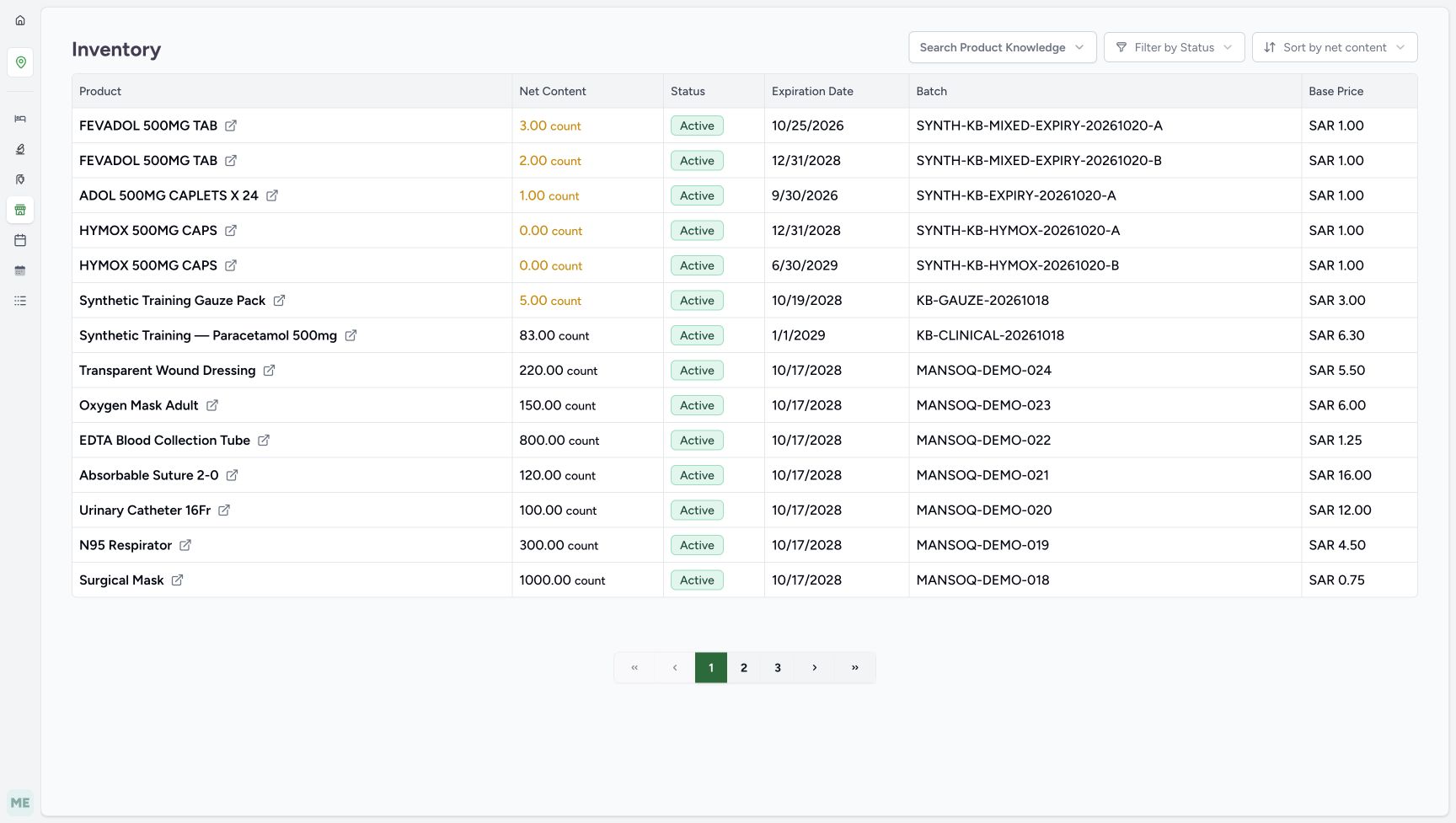 1234567
Ordinary Pharmacist positive A and B stock
Capture details
Genuine natural original from the isolated d20e synthetic estate. Setup and Doctor views are separate role handoffs. No real goods, care or money are involved.
Image SHA-256 6c14097b824853ec7cec5a5658594a6b3b9f1b3d57e133233ba48fec372f8b3b
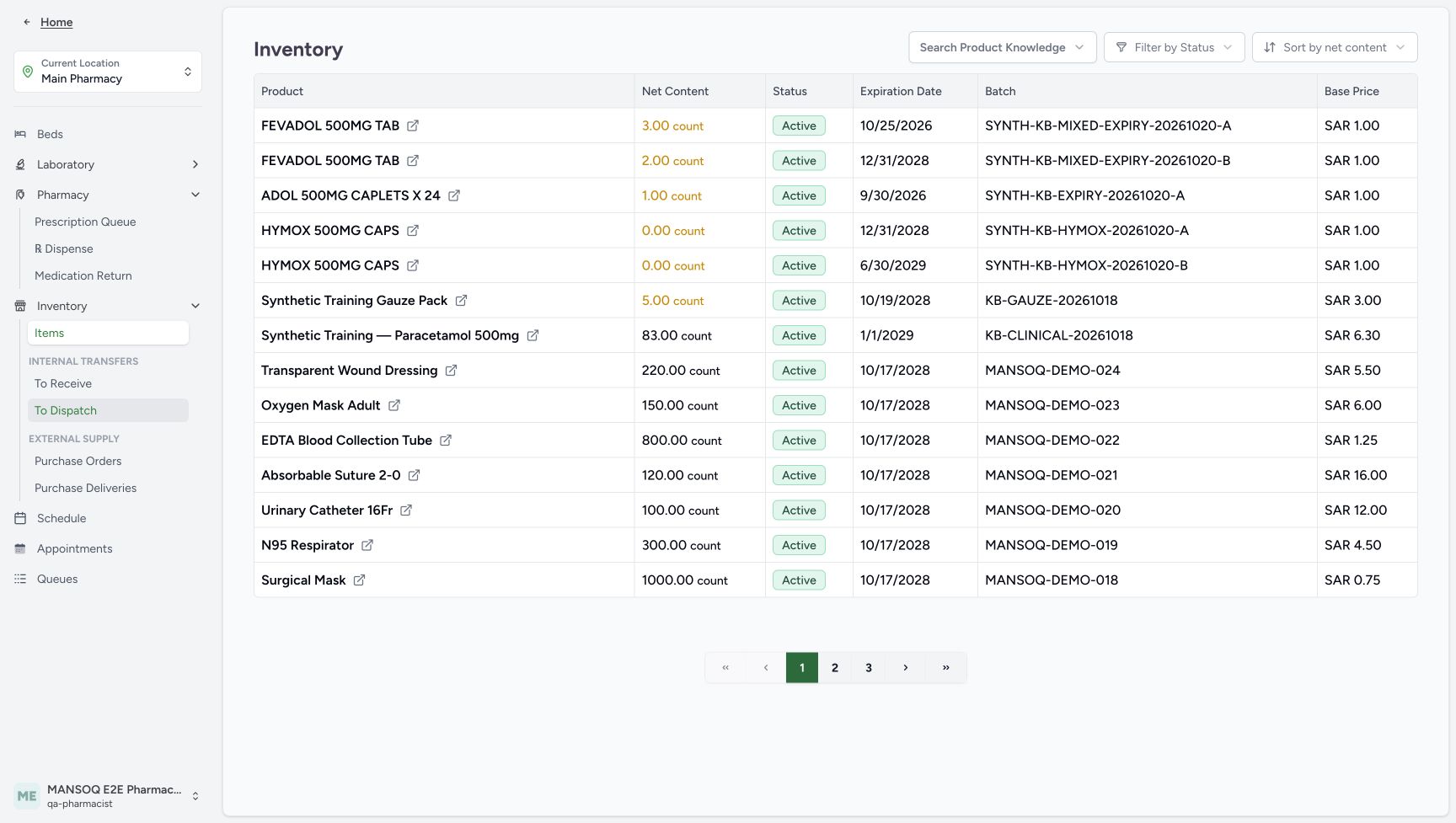
- Open the Main Pharmacy navigation: Expand the assigned location navigation to use the existing Pharmacy and Inventory paths.
- Read A stock three: Lot A has 3.00 count.
- Read current-month A expiry: The inventory date is October 25, 2026.
- Match batch A: Match SYNTH-KB-MIXED-EXPIRY-20261020-A.
- Read B stock two: Lot B has 2.00 count.
- Read B expiry: The inventory date is December 31, 2028.
- Match batch B: Match SYNTH-KB-MIXED-EXPIRY-20261020-B.
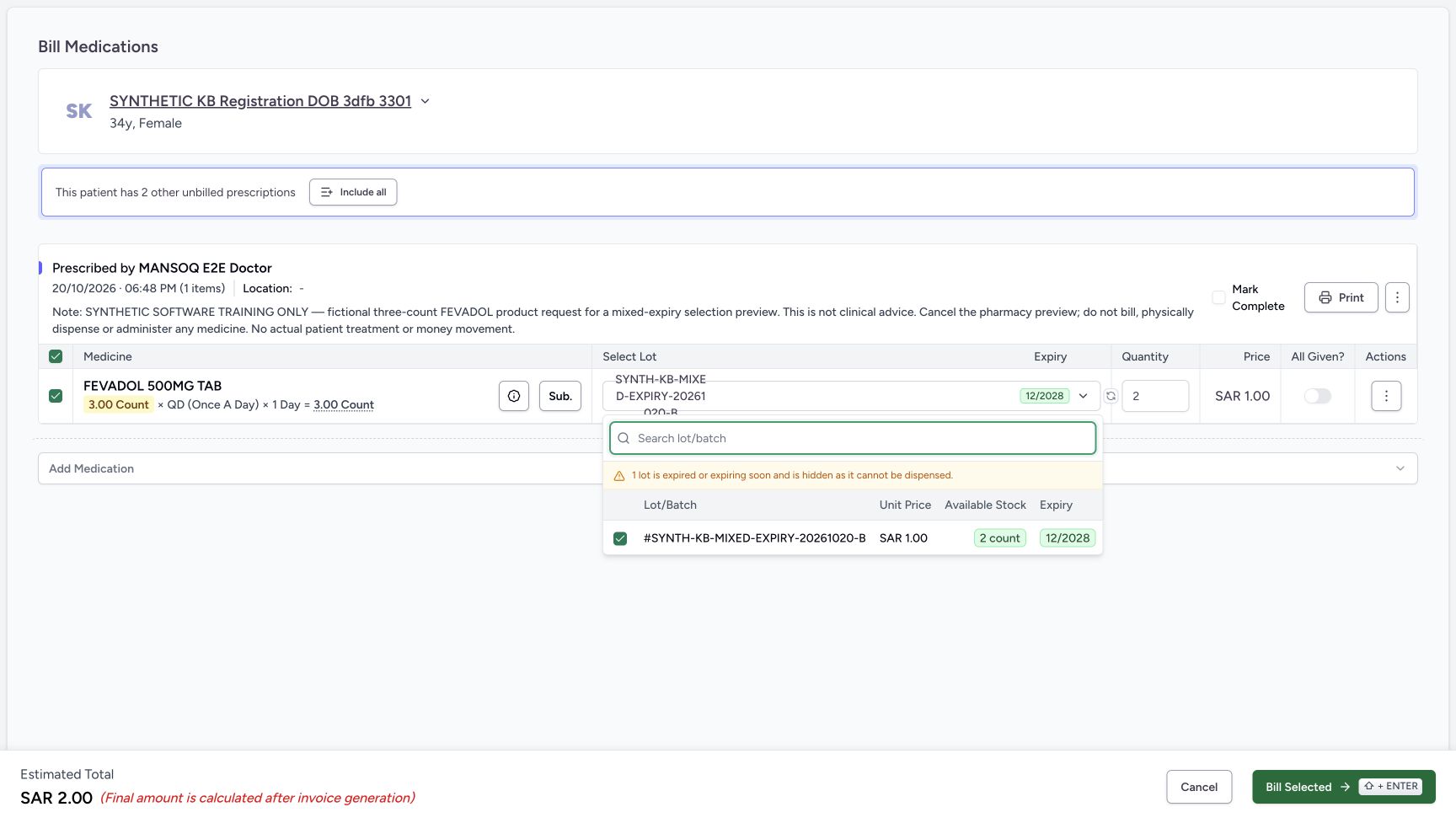 123456
Only B is selectable and one lot is hidden
Capture details
Genuine natural original from the isolated d20e synthetic estate. Setup and Doctor views are separate role handoffs. No real goods, care or money are involved.
Image SHA-256 55ffd28bb75a8ce9c1535b93d42486168b5b49931272115b279daf8f6923c171
- Read the hidden-lot warning: The picker says one lot is expired or expiring soon and is hidden.
- Match only listed batch B: The available row ends MIXED-EXPIRY-20261020-B.
- Read available stock two: Only B has two selectable units.
- Read expiry 12/2028: The displayed selectable batch expires in December 2028.
- Read unit price one: The B unit price is SAR 1.00.
- Uncheck the selected B lot: Manual deselection closes the list and removes the allocation.
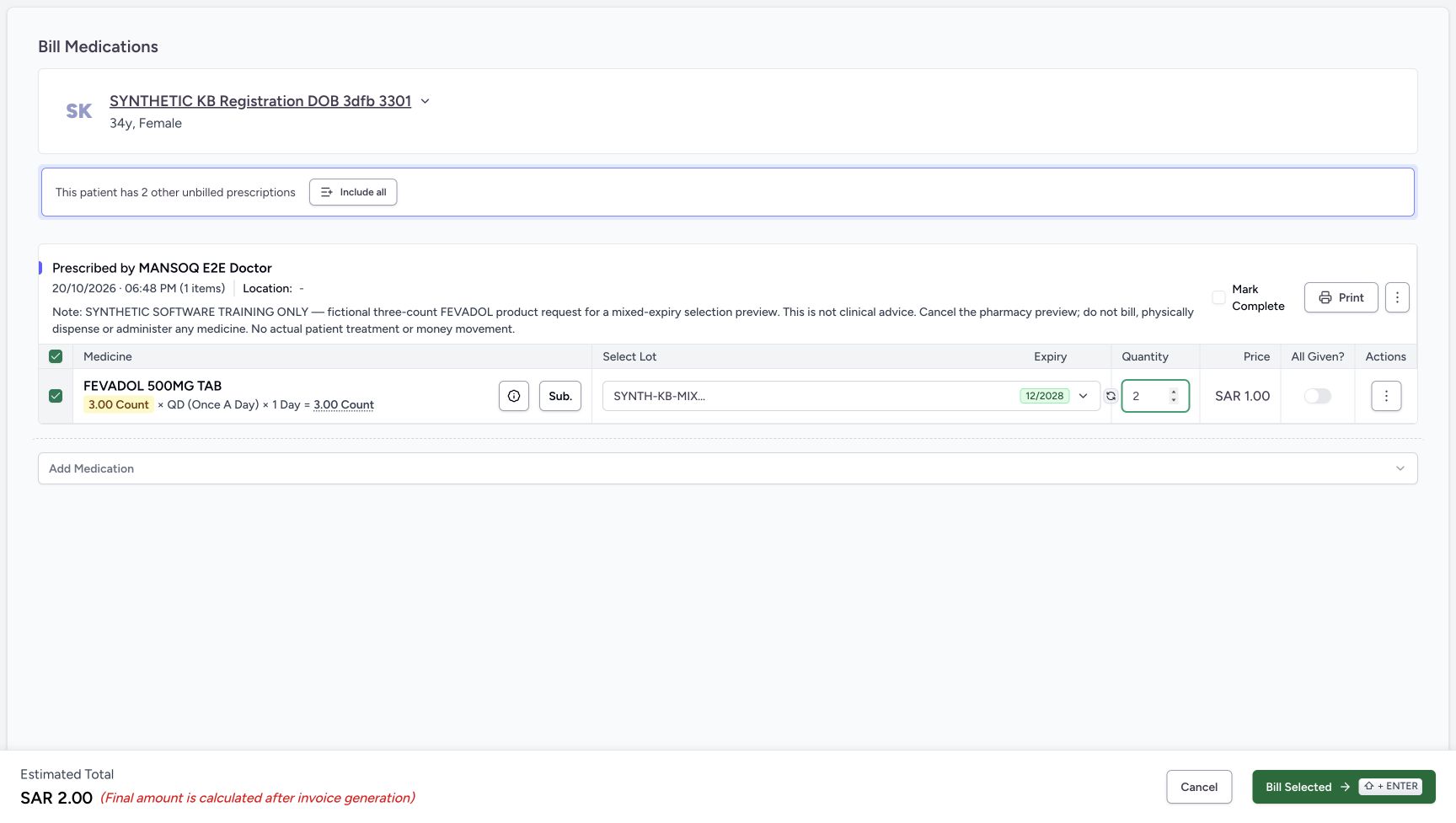 123456
Two-unit preview ready for Cancel
Capture details
Genuine natural original from the isolated d20e synthetic estate. Setup and Doctor views are separate role handoffs. No real goods, care or money are involved.
Image SHA-256 612744d52d39565e8bdb8ce5c20fbf5ac4aed76ab2a1f76196eda83adf9b7546
- Verify manual quantity two: The final preview uses B two, within its available stock.
- Compare original requested three: The requested dosage total remains 3.00 count.
- Keep All Given off: Two selected units do not fulfil this three-count request.
- Keep Mark Complete unchecked: Do not mark this request complete.
- Read the unsaved estimate two: SAR 2.00 is not an issued or saved invoice.
- Choose Cancel: Exit this preview without choosing Bill Selected.
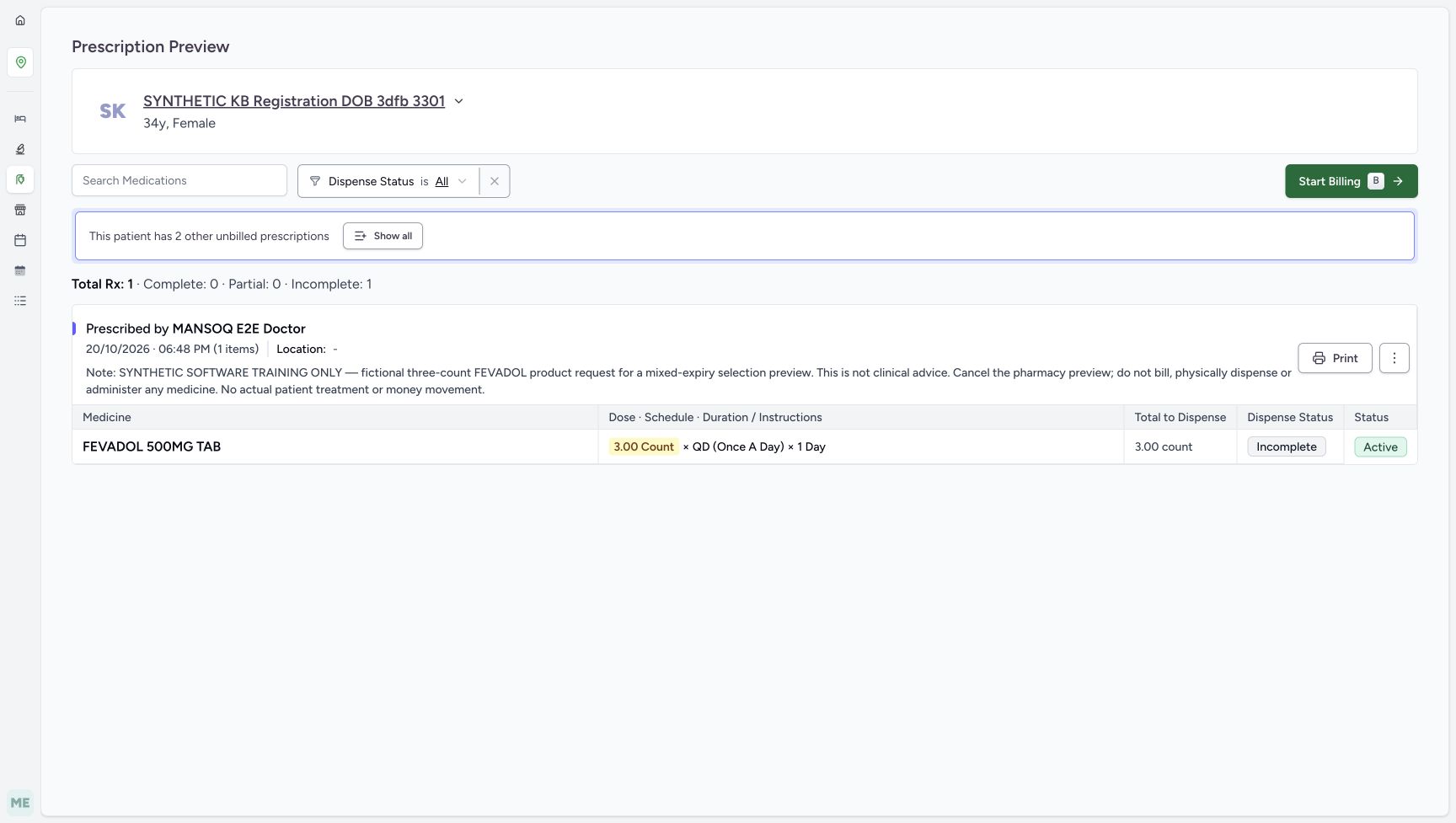 12345678
Original three-count request stays unfinished
Capture details
Genuine natural original from the isolated d20e synthetic estate. Setup and Doctor views are separate role handoffs. No real goods, care or money are involved.
Image SHA-256 8dd29d47ec3c4803c21e9e0c325944c67f4324aa33060708d642a77dd352ec4b
- Verify the same patient: Check identity again before opening the form.
- Match the 06:48 PM request: Keep the correct prescription selected.
- Read the explicit cancellation note: This software exercise ends without billing or physical medicine.
- Read the original total three: The request remains 3.00 count.
- Read Incomplete: The request has no saved partial dispense from this preview.
- Read Active: The request is still active.
- Choose Start Billing: Open the unsaved selection preview.
- Keep other unbilled prescriptions separate: The banner is about other requests, not an invoice from this exercise.
15 of 15 content blocks have reviewed image alignment.
Before you begin
- Use the authorised ordinary Pharmacist account in the isolated synthetic training estate. Continue after the separate Facility Admin lesson “Receive two synthetic batches and verify their saved prices”. Its shared receipt controls apply; the mixed-expiry fixture values below replace that exercise’s HYMOX values. Setup belongs to the authorised Facility Admin, not the Pharmacist.
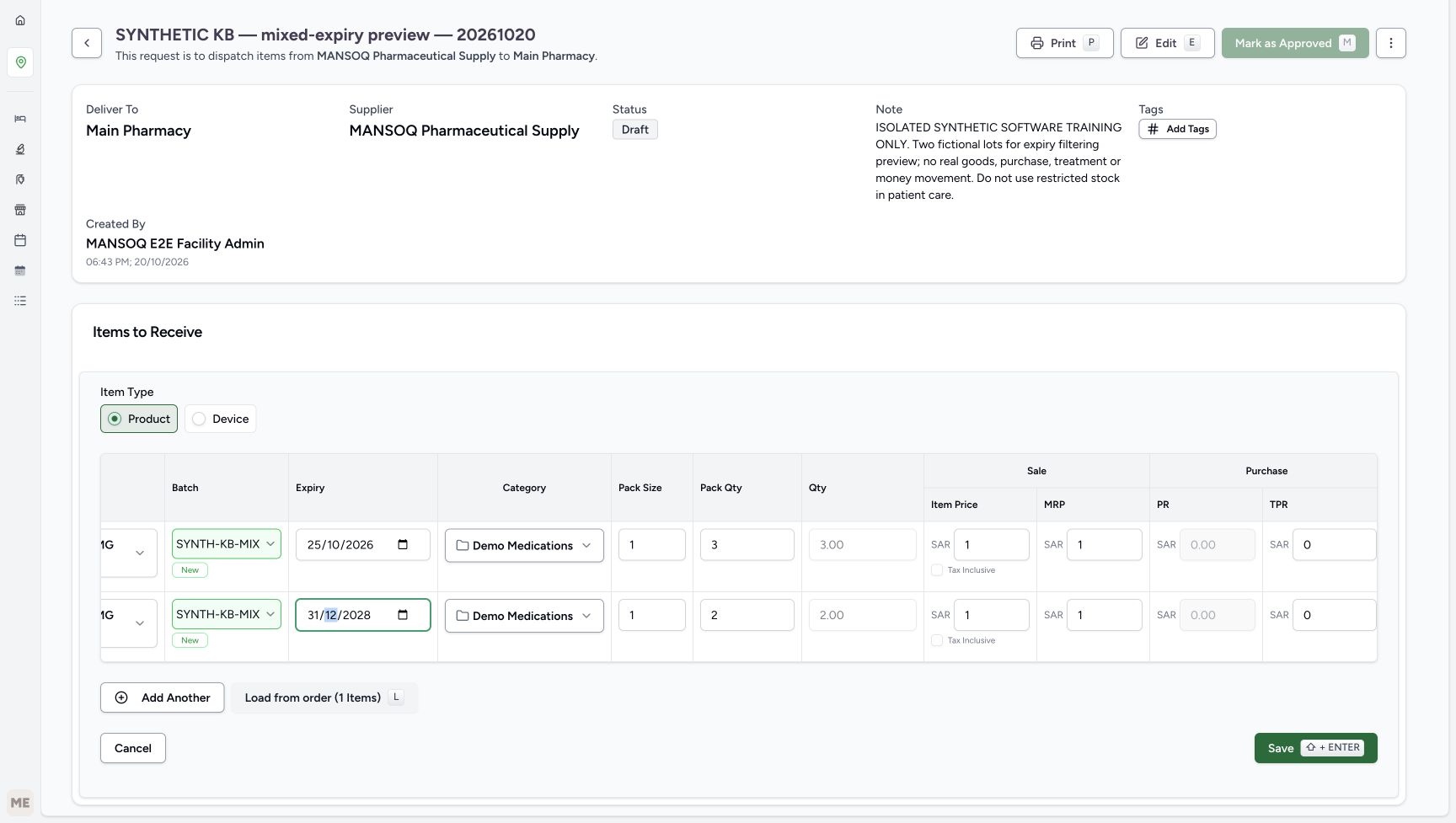 1234567
Recorded release d20e68ed · 2026-10-20T15:45:19.535141+00:00 · 1728 × 977 Mixed-expiry fixture values
Capture details
Genuine natural original from the isolated d20e synthetic estate. Setup and Doctor views are separate role handoffs. No real goods, care or money are involved.
Image SHA-256
24edb93c302e81c18b6a5d4ce73591f1258721e2a45584aea6c0869077e9576d- Compare the A expiry: Lot A uses October 25, 2026.
- Compare A quantity three: Pack size one and pack quantity three give three units.
- Compare the B expiry: Lot B uses December 31, 2028.
- Compare B quantity two: Pack size one and pack quantity two give two units.
- Read A item price one: The synthetic lot item price is SAR 1.00.
- Read B item price one: The second lot also has SAR 1.00 item price.
- Read the entered purchase total zero: Saved Product details separately verify the zero purchase values.
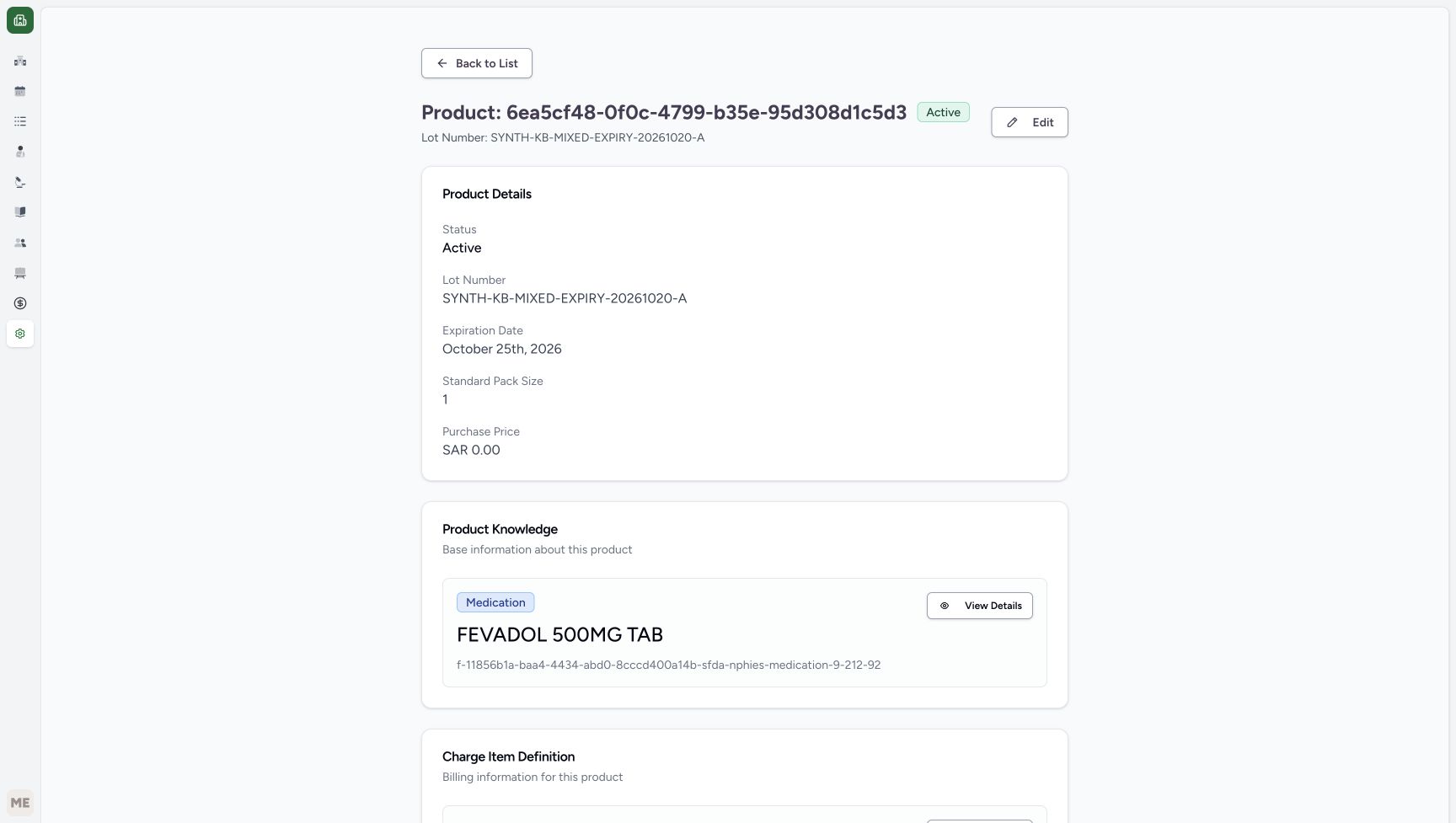 1234
1234Recorded release d20e68ed · 2026-10-20T15:47:24.623220+00:00 · 1728 × 977 Saved Product A details
Capture details
Genuine natural original from the isolated d20e synthetic estate. Setup and Doctor views are separate role handoffs. No real goods, care or money are involved.
Image SHA-256
56cf57e25a5ae61e0e13c01d7c33a9d840db85b405bd9b498367f526cdb6bb9c- Match lot A: The batch ends MIXED-EXPIRY-20261020-A.
- Read October 25 expiry: This is the current-month test date.
- Read pack size one: The saved standard pack size is one.
- Verify saved purchase zero: The saved Purchase Price is SAR 0.00.
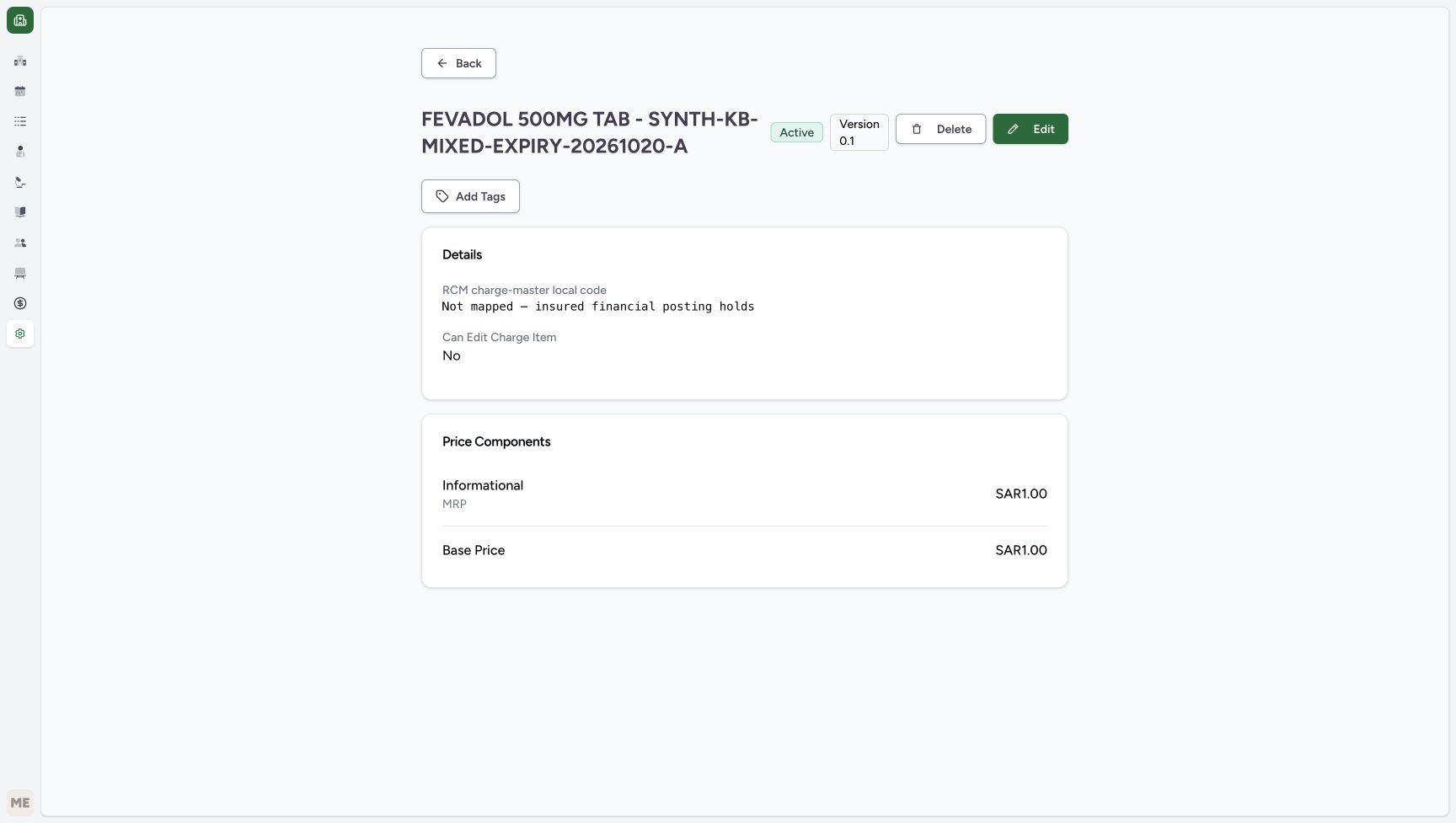 123
123Recorded release d20e68ed · 2026-10-20T15:47:33.001219+00:00 · 1728 × 977 Lot A price and posting boundary
Capture details
Genuine natural original from the isolated d20e synthetic estate. Setup and Doctor views are separate role handoffs. No real goods, care or money are involved.
Image SHA-256
7e6fad6e23a167ab5e3e83b75a0a610e555003c4479ac6ed2b9c88360ca23ef2- Read the insured-posting hold: The local code is Not mapped — insured financial posting holds.
- Read informational MRP one: Informational MRP is SAR 1.00, separate from base price.
- Read A base price one: The lot-specific Base Price is SAR 1.00.
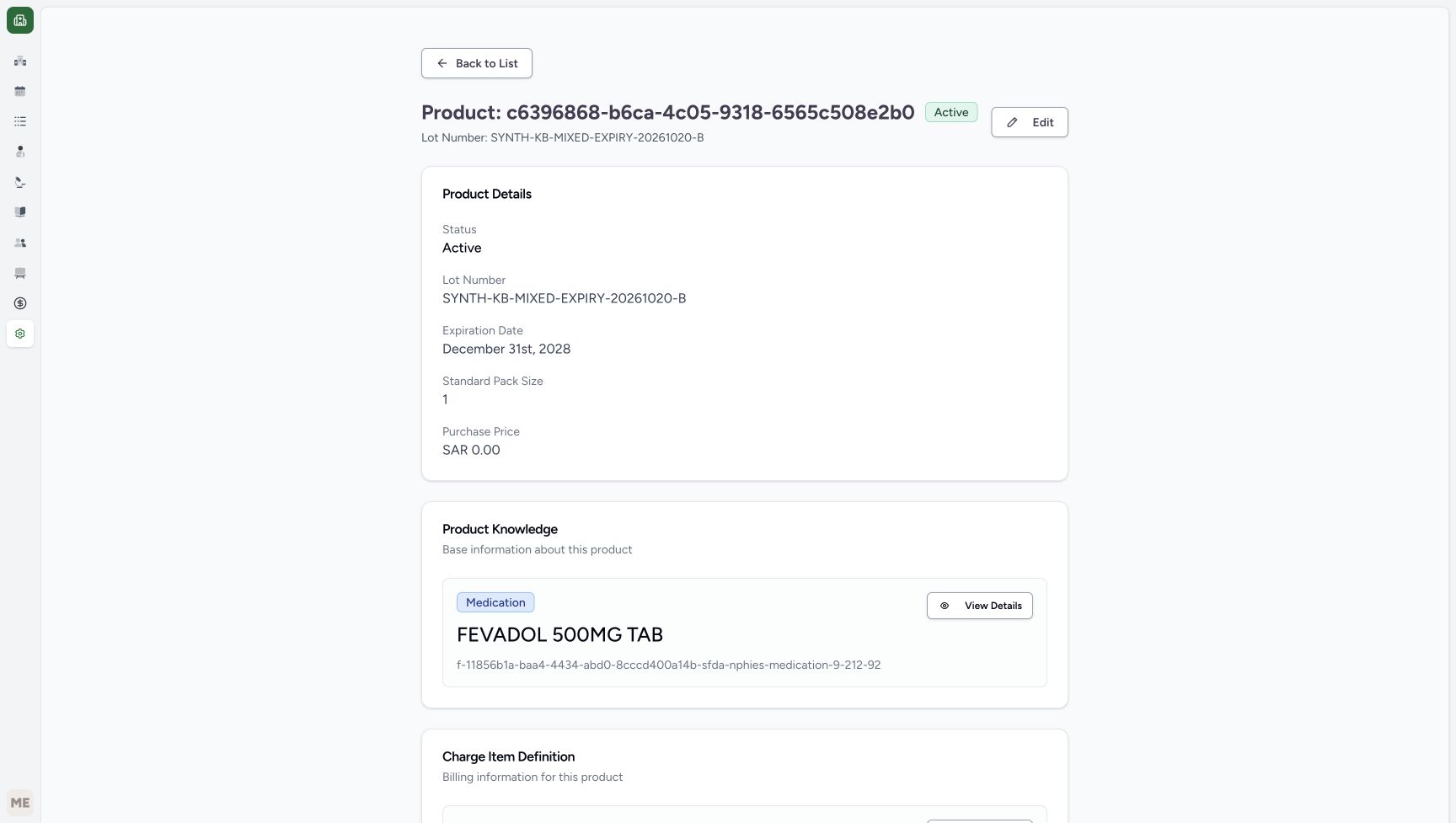 1234
1234Recorded release d20e68ed · 2026-10-20T15:47:44.708242+00:00 · 1728 × 977 Saved Product B details
Capture details
Genuine natural original from the isolated d20e synthetic estate. Setup and Doctor views are separate role handoffs. No real goods, care or money are involved.
Image SHA-256
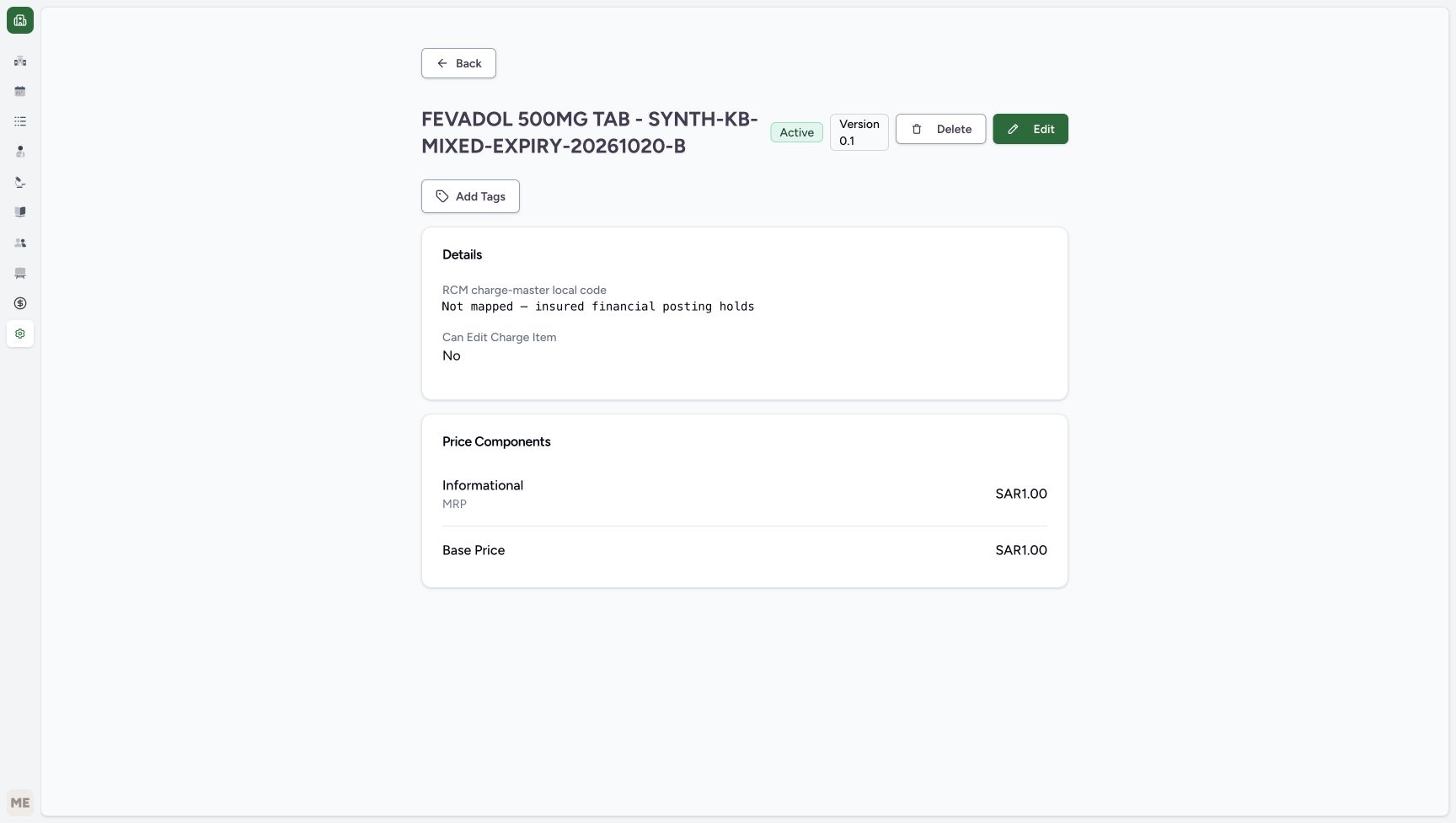
835ba55b71d3aeb8fa91cd7bb2a2663ef60d1cc7f3b25e46177957cdaa6f6f75- Match lot B: The batch ends MIXED-EXPIRY-20261020-B.
- Read December 31 expiry: The second lot expires in 2028.
- Read pack size one: The saved standard pack size is one.
- Verify saved purchase zero: This Product also has SAR 0.00 saved Purchase Price.
 123
123Recorded release d20e68ed · 2026-10-20T15:47:45.111513+00:00 · 1728 × 977 Lot B price and posting boundary
Capture details
Genuine natural original from the isolated d20e synthetic estate. Setup and Doctor views are separate role handoffs. No real goods, care or money are involved.
Image SHA-256
8fcf6a63a3082d7c9e0c5a7c758262d113b3ac4e0cf372f5547d1602cd33d208- Read the same insured-posting hold: The second lot is also not mapped for insured financial posting.
- Read informational MRP one: This is informational MRP, not an additional base charge.
- Read B base price one: The second lot-specific Base Price is SAR 1.00.
1234567Recorded release d20e68ed · 2026-10-20T15:49:29.900869+00:00 · 1728 × 977 Ordinary Pharmacist positive A and B stock
Capture details
Genuine natural original from the isolated d20e synthetic estate. Setup and Doctor views are separate role handoffs. No real goods, care or money are involved.
Image SHA-256
6c14097b824853ec7cec5a5658594a6b3b9f1b3d57e133233ba48fec372f8b3b- Open the Main Pharmacy navigation: Expand the assigned location navigation to use the existing Pharmacy and Inventory paths.
- Read A stock three: Lot A has 3.00 count.
- Read current-month A expiry: The inventory date is October 25, 2026.
- Match batch A: Match SYNTH-KB-MIXED-EXPIRY-20261020-A.
- Read B stock two: Lot B has 2.00 count.
- Read B expiry: The inventory date is December 31, 2028.
- Match batch B: Match SYNTH-KB-MIXED-EXPIRY-20261020-B.
- Continue after the Doctor lesson “Save and reload a fictional one-count ADOL request for the expiry exercise” for the shared Product-request controls. This separate FEVADOL exercise instead has an already saved three-count request at 06:48 PM on October 20, 2026. Verify its exact product, patient and software-only cancellation note; do not create or submit another prescription as the Pharmacist.
 123
123Recorded release d20e68ed · 2026-10-20T15:48:21.763634+00:00 · 1728 × 921 Exact FEVADOL Product and catalogue price
Capture details
Genuine natural original from the isolated d20e synthetic estate. Setup and Doctor views are separate role handoffs. No real goods, care or money are involved.
Image SHA-256
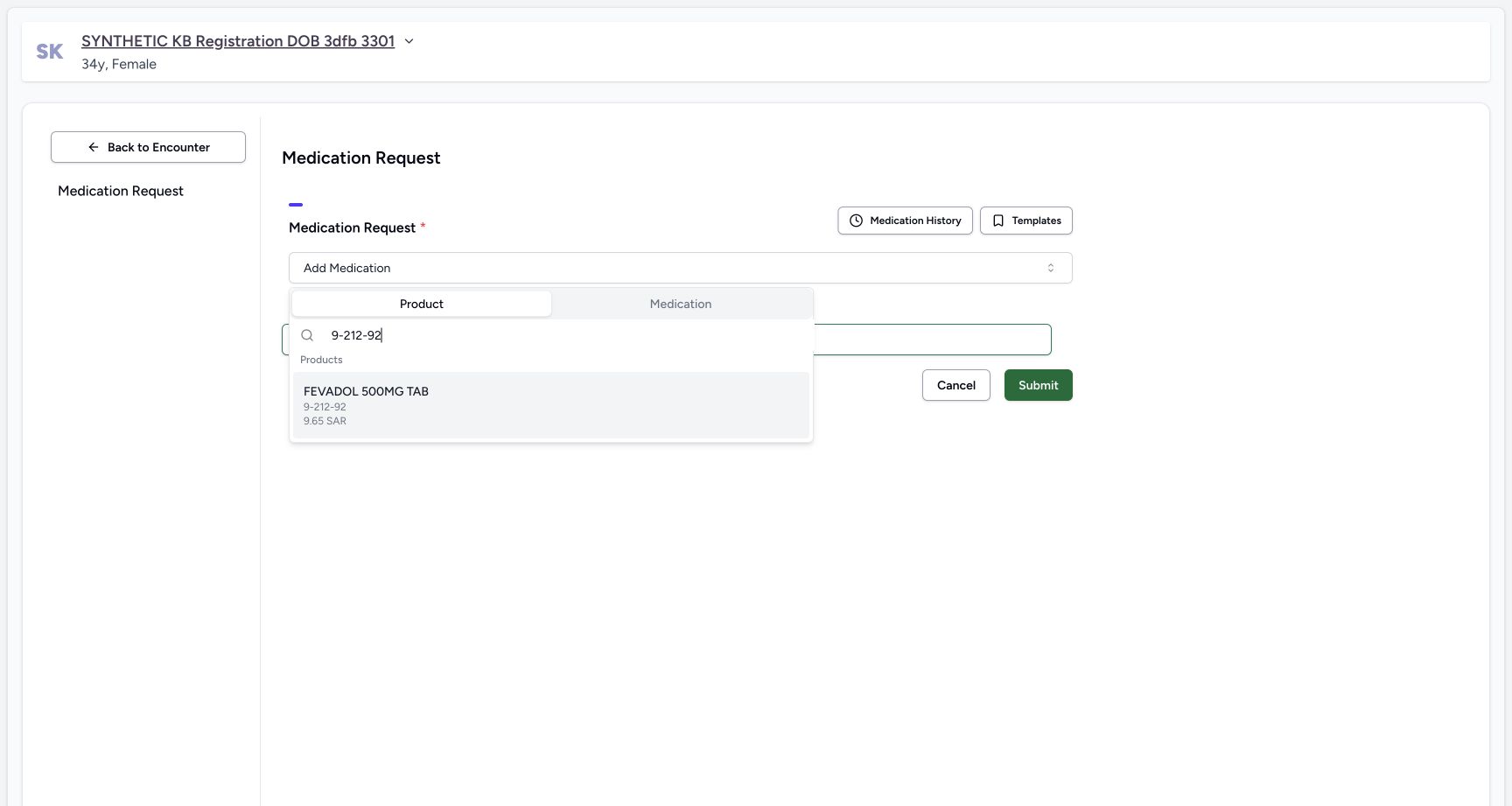
afe9c095bb52baa26732b18ec03f31f7c8f244e2ec243344962d0ec8dcb80ed6- Match exact Product code: The Product search is 9-212-92.
- Match FEVADOL 500MG TAB: The shared Doctor prerequisite uses this exact Product.
- Keep catalogue price separate: SAR 9.65 is the master catalogue display, not either lot base price.
 1234
1234Recorded release d20e68ed · 2026-10-20T15:48:33.868364+00:00 · 1728 × 921 Fictional three-count request values
Capture details
Genuine natural original from the isolated d20e synthetic estate. Setup and Doctor views are separate role handoffs. No real goods, care or money are involved.
Image SHA-256
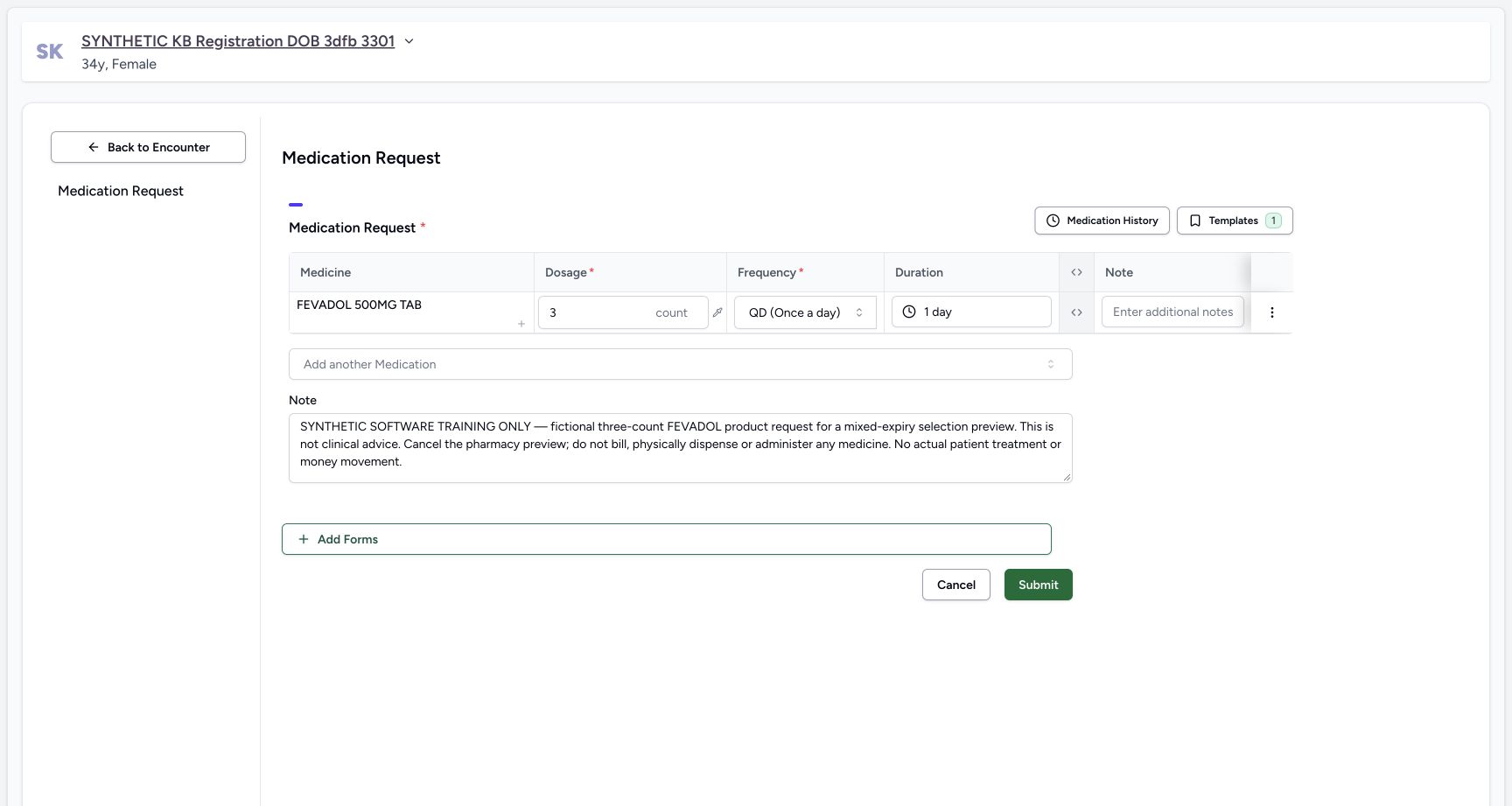
1d92db29cbf64c79c470603c43ae1898ca69aad9aa3be3c44ca3453c9cfde47b- Read fictional dose three count: The request is three count, not the five inventory units.
- Read QD frequency: QD is displayed as Once a day.
- Read duration one day: The fictional exercise requests one day.
- Read the software-only prescription note: The note directs cancellation of the pharmacy preview with no billing or physical medicine.
 12345
12345Recorded release d20e68ed · 2026-10-20T15:49:09.398077+00:00 · 1728 × 921 Saved Doctor request after reload
Capture details
Genuine natural original from the isolated d20e synthetic estate. Setup and Doctor views are separate role handoffs. No real goods, care or money are involved.
Image SHA-256
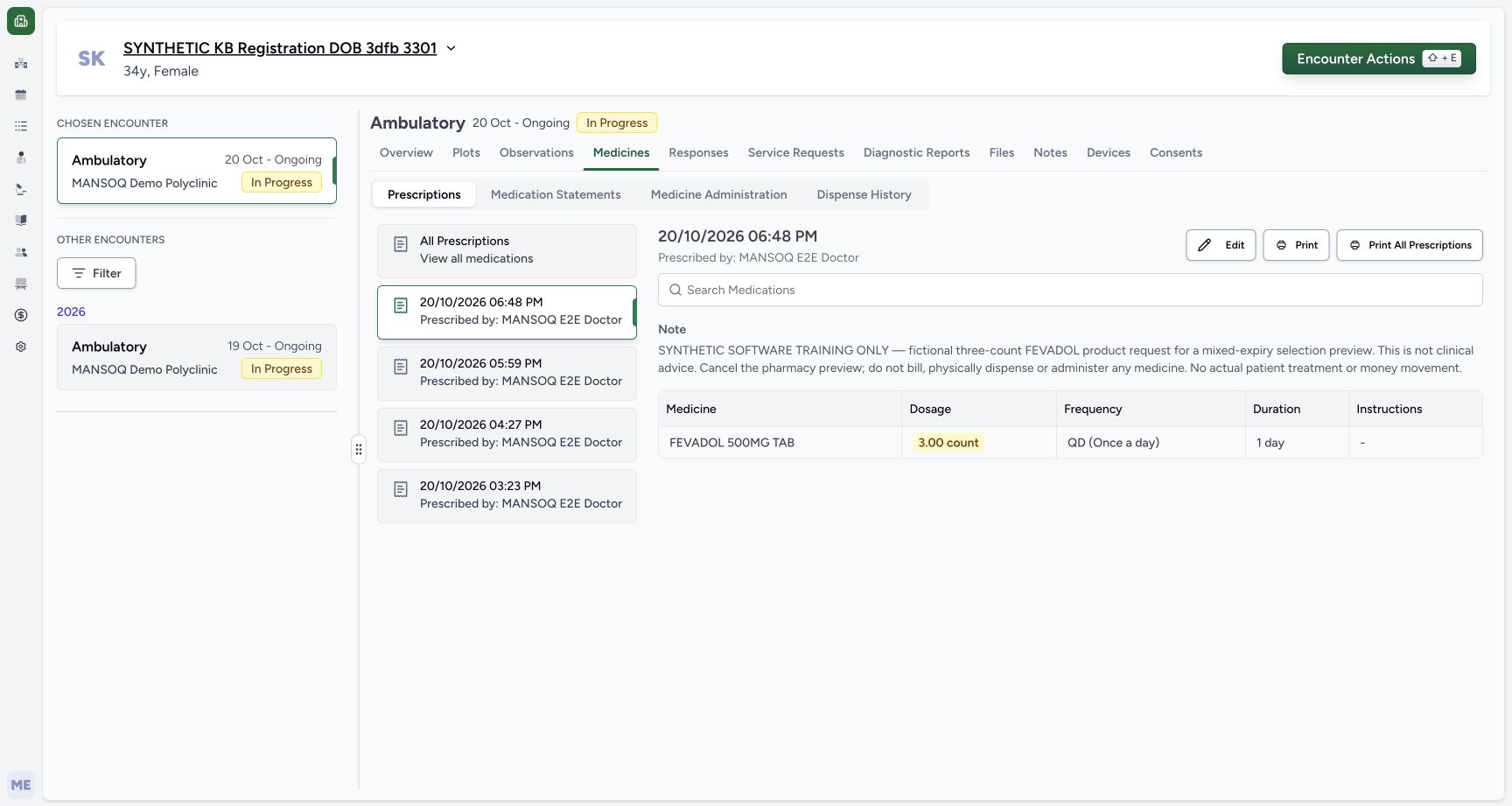
ddd171785dfcfaf8c0cb95acfc57dc7e7a496c880886585af8bc5b9bab3c897e- Match the saved 06:48 PM prescription: The new FEVADOL request is separate from the earlier ADOL and HYMOX requests.
- Verify saved three count: The saved dosage is 3.00 count.
- Verify QD: The saved frequency remains once a day.
- Verify one day: The saved duration remains one day.
- Read the retained training instruction: The prescription note explicitly says to cancel the preview.
12345678Recorded release d20e68ed · 2026-10-20T15:49:59.550239+00:00 · 1728 × 977 Original three-count request stays unfinished
Capture details
Genuine natural original from the isolated d20e synthetic estate. Setup and Doctor views are separate role handoffs. No real goods, care or money are involved.
Image SHA-256
8dd29d47ec3c4803c21e9e0c325944c67f4324aa33060708d642a77dd352ec4b- Verify the same patient: Check identity again before opening the form.
- Match the 06:48 PM request: Keep the correct prescription selected.
- Read the explicit cancellation note: This software exercise ends without billing or physical medicine.
- Read the original total three: The request remains 3.00 count.
- Read Incomplete: The request has no saved partial dispense from this preview.
- Read Active: The request is still active.
- Choose Start Billing: Open the unsaved selection preview.
- Keep other unbilled prescriptions separate: The banner is about other requests, not an invoice from this exercise.
1. Check the assigned location and both stock rows
In Main Pharmacy, open Inventory → Items using the existing location navigation. Match FEVADOL 500MG TAB and both complete synthetic batch names. A has three count with October 25, 2026 expiry; B has two count with December 31, 2028 expiry. Both inventory rows are Active, but lifecycle status and positive quantity do not establish that a lot can be selected. Keep these values unchanged for the preview.
1234567Ordinary Pharmacist positive A and B stock
Capture details
Genuine natural original from the isolated d20e synthetic estate. Setup and Doctor views are separate role handoffs. No real goods, care or money are involved.
Image SHA-256 6c14097b824853ec7cec5a5658594a6b3b9f1b3d57e133233ba48fec372f8b3b
- Open the Main Pharmacy navigation: Expand the assigned location navigation to use the existing Pharmacy and Inventory paths.
- Read A stock three: Lot A has 3.00 count.
- Read current-month A expiry: The inventory date is October 25, 2026.
- Match batch A: Match SYNTH-KB-MIXED-EXPIRY-20261020-A.
- Read B stock two: Lot B has 2.00 count.
- Read B expiry: The inventory date is December 31, 2028.
- Match batch B: Match SYNTH-KB-MIXED-EXPIRY-20261020-B.
 12345
12345Ordinary Pharmacy and Inventory navigation
Capture details
Genuine natural original from the isolated d20e synthetic estate. Setup and Doctor views are separate role handoffs. No real goods, care or money are involved.
Image SHA-256 2f5a815395c4a5f7d5c343cf02a0d6c8b4f1e179da0fcff40f321b7439bdf6e3
- Verify Main Pharmacy: Keep the assigned training location.
- Open Pharmacy: Use the ordinary location menu.
- Choose Prescription Queue: Open the saved requests through the normal queue.
- Return through Inventory Items: Use this path for the final unchanged-stock check.
- Verify the ordinary Pharmacist account: Use the authorised qa-pharmacist session for this exercise.
2. Open only the 06:48 PM FEVADOL request
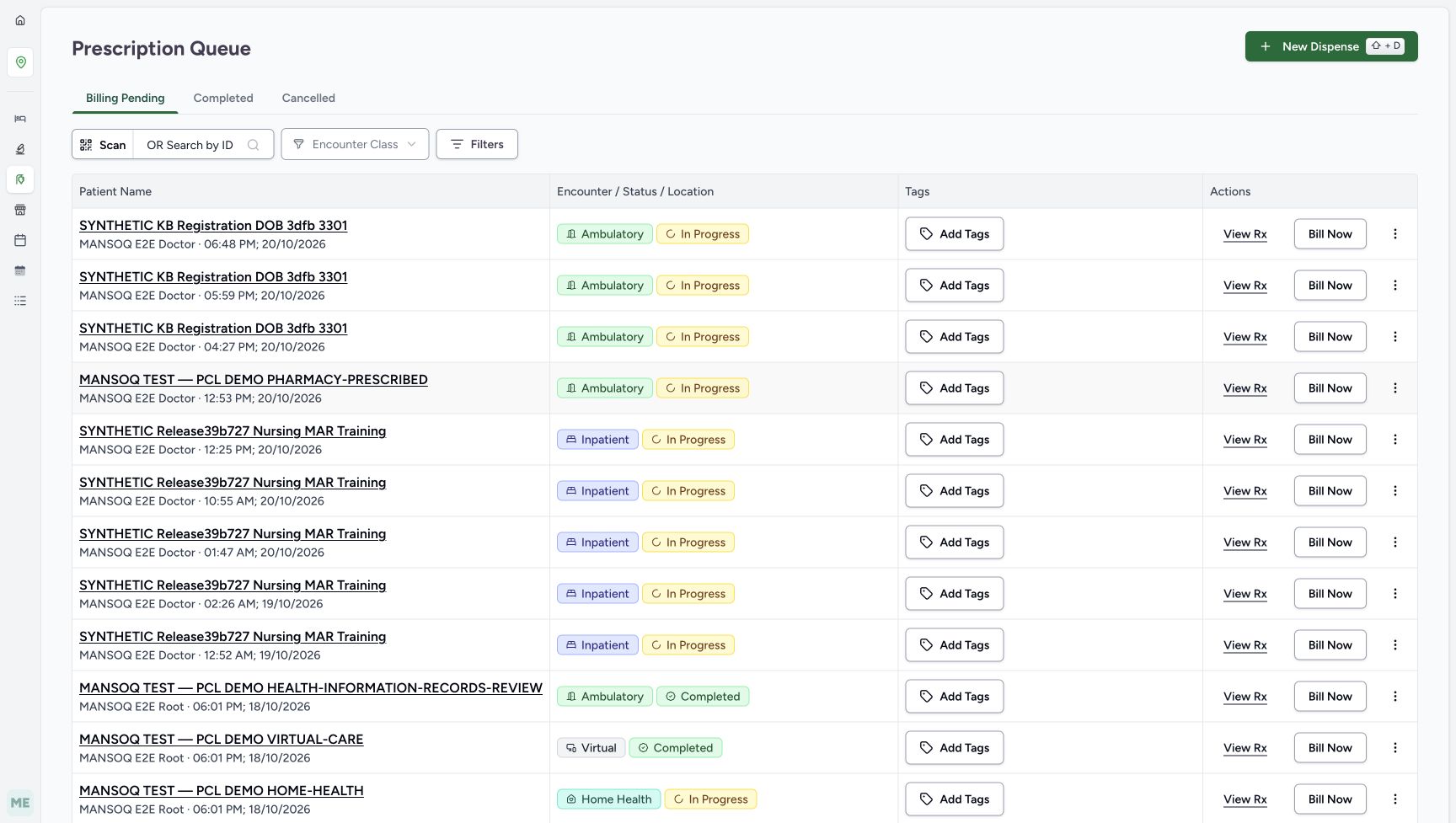
Choose Pharmacy → Prescription Queue. On Billing Pending, match SYNTHETIC KB Registration DOB 3dfb 3301 and the Doctor request at 06:48 PM on October 20. Choose View Rx on that row. Confirm FEVADOL, original total three count, Incomplete, Active and the instruction to cancel the preview. Keep the earlier ADOL and HYMOX requests separate; the other-unbilled-prescriptions banner is not an invoice from this exercise.
12345Ordinary Pharmacy and Inventory navigation
Capture details
Genuine natural original from the isolated d20e synthetic estate. Setup and Doctor views are separate role handoffs. No real goods, care or money are involved.
Image SHA-256 2f5a815395c4a5f7d5c343cf02a0d6c8b4f1e179da0fcff40f321b7439bdf6e3
- Verify Main Pharmacy: Keep the assigned training location.
- Open Pharmacy: Use the ordinary location menu.
- Choose Prescription Queue: Open the saved requests through the normal queue.
- Return through Inventory Items: Use this path for the final unchanged-stock check.
- Verify the ordinary Pharmacist account: Use the authorised qa-pharmacist session for this exercise.
 1234
1234The correct 06:48 PM queue entry
Capture details
Genuine natural original from the isolated d20e synthetic estate. Setup and Doctor views are separate role handoffs. No real goods, care or money are involved.
Image SHA-256 9352432b7032d3f61f85cd7b9db11a617ed3b4eef11084f5b733b220d7a1c3ca
- Match the synthetic patient: Use SYNTHETIC KB Registration DOB 3dfb 3301.
- Match 06:48 PM on October 20: This is the FEVADOL request for the mixed-expiry exercise.
- Choose View Rx on the 06:48 PM row: Preview only this saved request.
- Keep the earlier ADOL request separate: The 05:59 PM request belongs to a different exercise.
12345678Original three-count request stays unfinished
Capture details
Genuine natural original from the isolated d20e synthetic estate. Setup and Doctor views are separate role handoffs. No real goods, care or money are involved.
Image SHA-256 8dd29d47ec3c4803c21e9e0c325944c67f4324aa33060708d642a77dd352ec4b
- Verify the same patient: Check identity again before opening the form.
- Match the 06:48 PM request: Keep the correct prescription selected.
- Read the explicit cancellation note: This software exercise ends without billing or physical medicine.
- Read the original total three: The request remains 3.00 count.
- Read Incomplete: The request has no saved partial dispense from this preview.
- Read Active: The request is still active.
- Choose Start Billing: Open the unsaved selection preview.
- Keep other unbilled prescriptions separate: The banner is about other requests, not an invoice from this exercise.
3. Inspect the automatic allocation and completion defaults
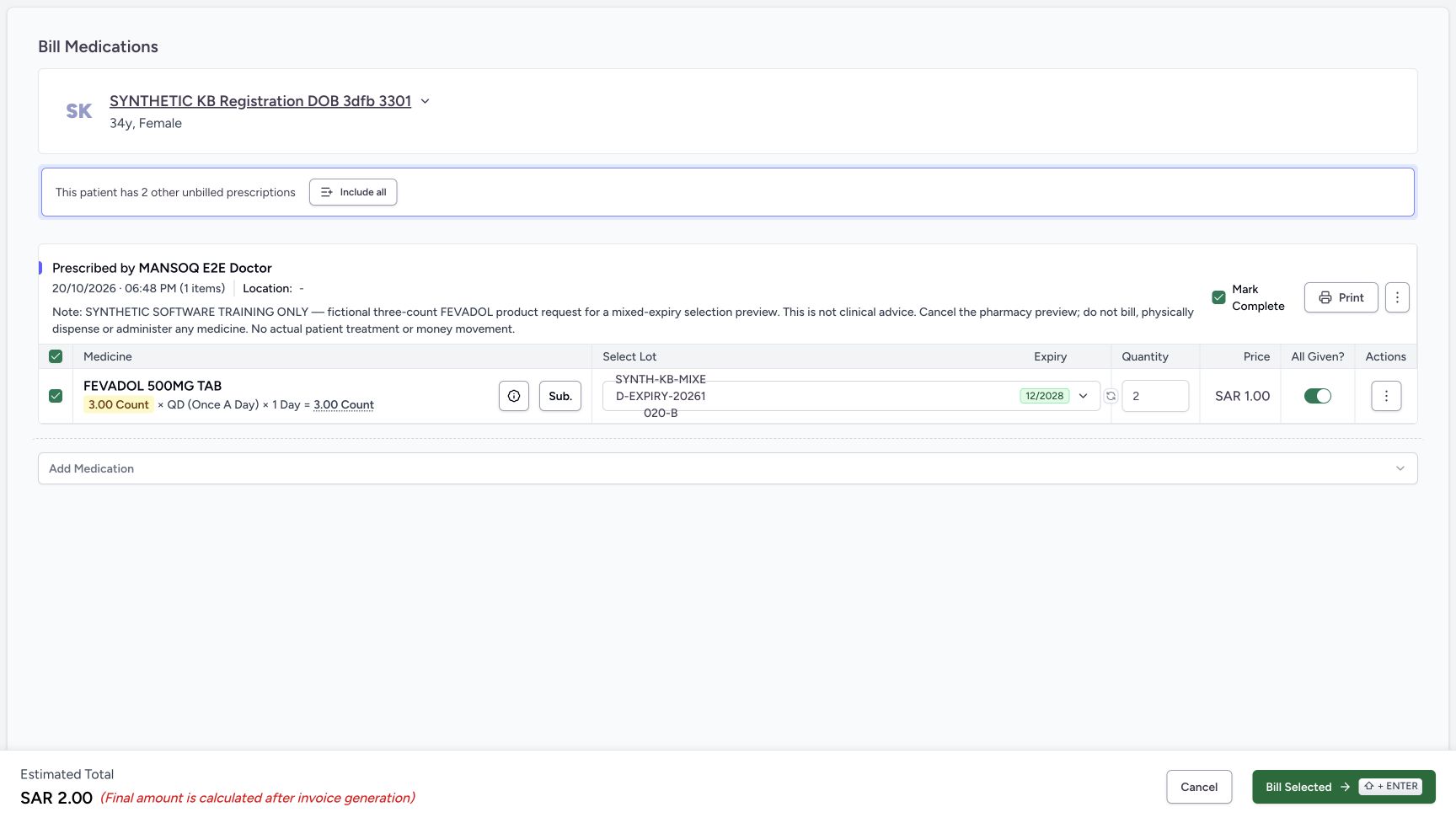
Choose Start Billing for this one request. The initial form selects B quantity two, although the request total is three, and shows Estimated Total SAR 2.00. Review the defaults: All Given is on and Mark Complete is checked. These controls do not prove that the requested quantity has been fulfilled. Leave Include all unused.
12345678Original three-count request stays unfinished
Capture details
Genuine natural original from the isolated d20e synthetic estate. Setup and Doctor views are separate role handoffs. No real goods, care or money are involved.
Image SHA-256 8dd29d47ec3c4803c21e9e0c325944c67f4324aa33060708d642a77dd352ec4b
- Verify the same patient: Check identity again before opening the form.
- Match the 06:48 PM request: Keep the correct prescription selected.
- Read the explicit cancellation note: This software exercise ends without billing or physical medicine.
- Read the original total three: The request remains 3.00 count.
- Read Incomplete: The request has no saved partial dispense from this preview.
- Read Active: The request is still active.
- Choose Start Billing: Open the unsaved selection preview.
- Keep other unbilled prescriptions separate: The banner is about other requests, not an invoice from this exercise.
 12345
12345Initial B two allocation and completion defaults
Capture details
Genuine natural original from the isolated d20e synthetic estate. Setup and Doctor views are separate role handoffs. No real goods, care or money are involved.
Image SHA-256 f1d92b3a55df80ad771271d8aff9bee8bedcd50eb05dac1c7fb4c89907a02879
- Read the initial lot selection: The closed label is shortened; use the open picker to confirm the full B batch name.
- Read initial automatic quantity two: Only two eligible units are allocated for the three-count request.
- Review Mark Complete initially checked: This prescription-level default is separate from All Given.
- Review All Given initially on: Turn this medicine-row toggle off for the preview exercise.
- Read estimate two: SAR 2.00 is an unsaved estimate, not an invoice.
4. Keep both completion controls off and check automatic selection
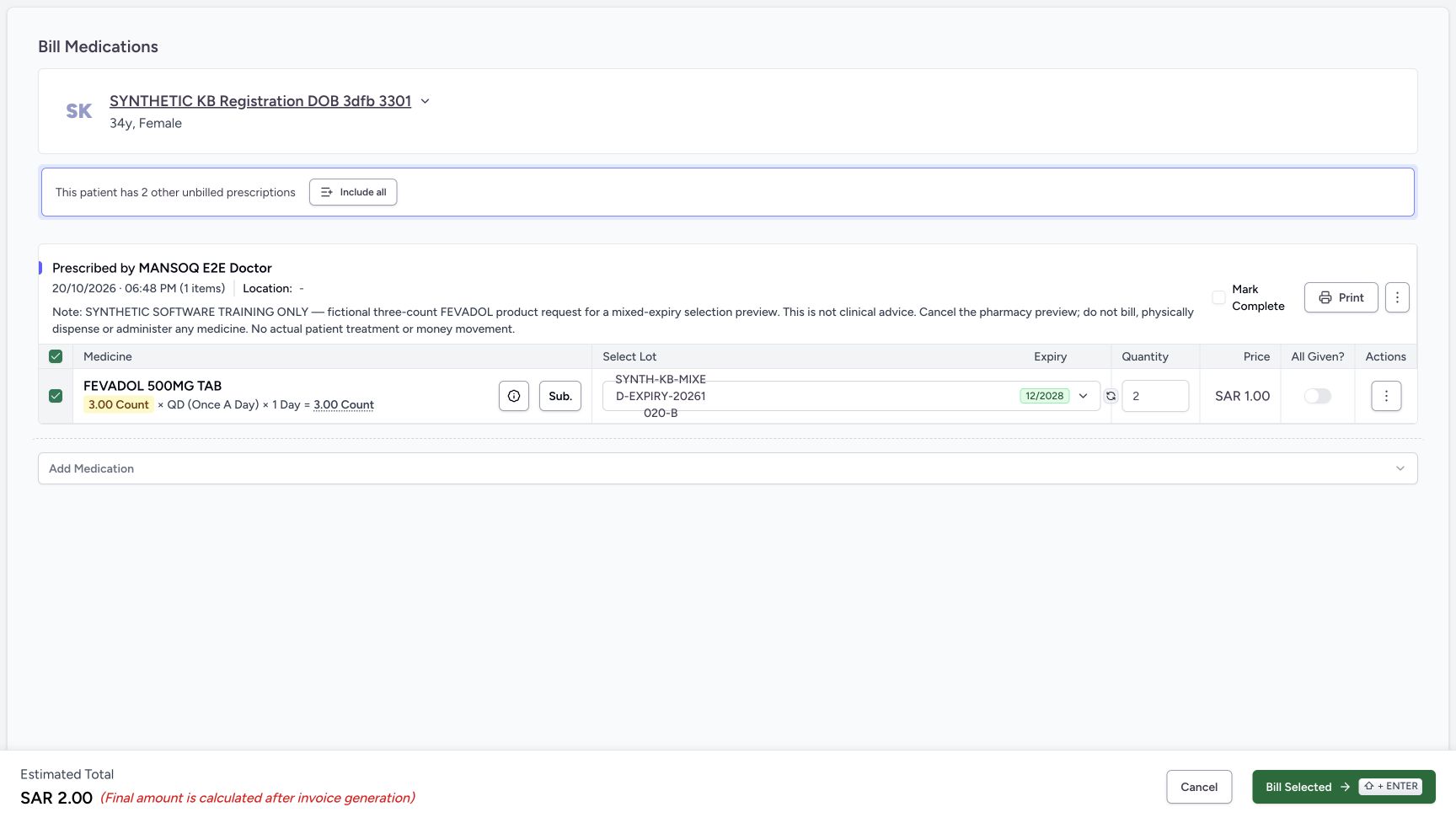
Turn All Given off and uncheck Mark Complete. Verify both are off. Choose the circular-arrow Auto-select control once. In this automatic allocation, B remains quantity two and the estimate remains SAR 2.00. Keep the original three-count request in view; this is a selection preview, not a saved partial dispense.
12345Initial B two allocation and completion defaults
Capture details
Genuine natural original from the isolated d20e synthetic estate. Setup and Doctor views are separate role handoffs. No real goods, care or money are involved.
Image SHA-256 f1d92b3a55df80ad771271d8aff9bee8bedcd50eb05dac1c7fb4c89907a02879
- Read the initial lot selection: The closed label is shortened; use the open picker to confirm the full B batch name.
- Read initial automatic quantity two: Only two eligible units are allocated for the three-count request.
- Review Mark Complete initially checked: This prescription-level default is separate from All Given.
- Review All Given initially on: Turn this medicine-row toggle off for the preview exercise.
- Read estimate two: SAR 2.00 is an unsaved estimate, not an invoice.
 12345
12345Both completion controls off with B two
Capture details
Genuine natural original from the isolated d20e synthetic estate. Setup and Doctor views are separate role handoffs. No real goods, care or money are involved.
Image SHA-256 00a40afdc45760d9b921da0d2d1a7536bd506a6656ad9e155afd5caeab77e705
- Turn All Given off: Keep the medicine-row completion toggle off.
- Verify Mark Complete unchecked: Uncheck this separate control if it remains checked.
- Choose Auto-select once: The circular-arrow control checks automatic eligible-lot selection.
- Verify B quantity two: The explicit automatic selection still has two eligible units.
- Open the lot picker: Inspect the actual available batch list.
5. Inspect the eligible lot and clear its selection
Open Select Lot. Read the warning that one lot is expired or expiring soon and hidden. Only B is listed, with two available count, SAR 1.00 unit price and 12/2028 expiry. A is absent from the selectable rows. Uncheck B in this list. The list closes, the allocation becomes empty and the estimate becomes SAR 0.00. Keep both completion controls off.
12345Both completion controls off with B two
Capture details
Genuine natural original from the isolated d20e synthetic estate. Setup and Doctor views are separate role handoffs. No real goods, care or money are involved.
Image SHA-256 00a40afdc45760d9b921da0d2d1a7536bd506a6656ad9e155afd5caeab77e705
- Turn All Given off: Keep the medicine-row completion toggle off.
- Verify Mark Complete unchecked: Uncheck this separate control if it remains checked.
- Choose Auto-select once: The circular-arrow control checks automatic eligible-lot selection.
- Verify B quantity two: The explicit automatic selection still has two eligible units.
- Open the lot picker: Inspect the actual available batch list.
123456Only B is selectable and one lot is hidden
Capture details
Genuine natural original from the isolated d20e synthetic estate. Setup and Doctor views are separate role handoffs. No real goods, care or money are involved.
Image SHA-256 55ffd28bb75a8ce9c1535b93d42486168b5b49931272115b279daf8f6923c171
- Read the hidden-lot warning: The picker says one lot is expired or expiring soon and is hidden.
- Match only listed batch B: The available row ends MIXED-EXPIRY-20261020-B.
- Read available stock two: Only B has two selectable units.
- Read expiry 12/2028: The displayed selectable batch expires in December 2028.
- Read unit price one: The B unit price is SAR 1.00.
- Uncheck the selected B lot: Manual deselection closes the list and removes the allocation.
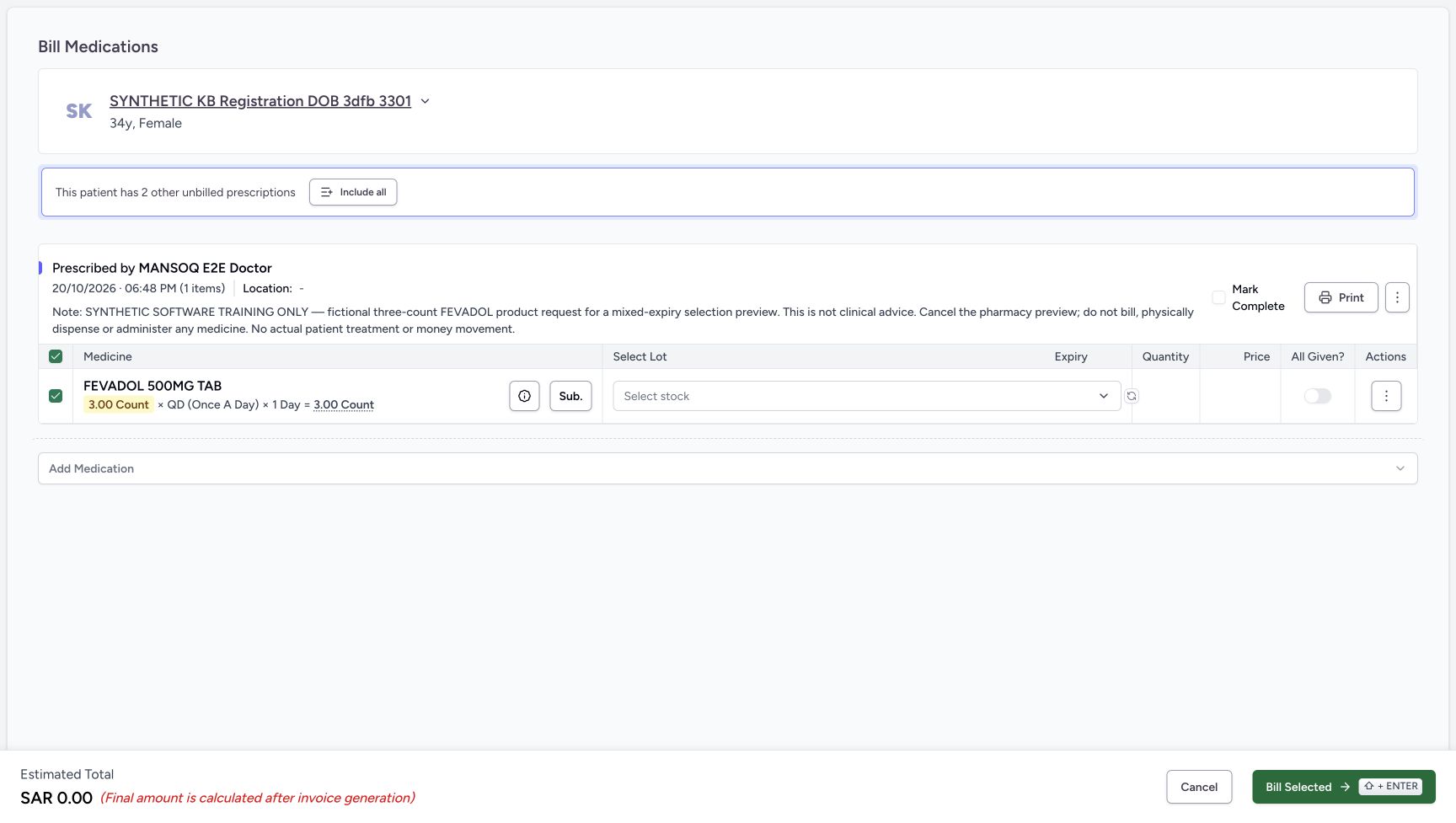 1234
1234Manual deselection clears the preview
Capture details
Genuine natural original from the isolated d20e synthetic estate. Setup and Doctor views are separate role handoffs. No real goods, care or money are involved.
Image SHA-256 5cc493b273a5c5378666855a2fbf24467fc18cae1cc7269735838981419250e9
- Verify Select stock is empty: No lot is selected after deselection.
- Verify the zero estimate: An empty preview shows SAR 0.00 without creating an invoice.
- Open the empty lot selector: Reopen the picker to select B manually.
- Keep Mark Complete unchecked: Clearing the lot does not authorise completing the request.
6. Select B manually and check its starting quantity
Open the empty Select stock field again. Verify that B is the only listed lot, now unchecked, then check B. Manual selection starts at quantity one and estimated SAR 1.00, even though two units are available. Check the actual quantity rather than assuming manual selection repeats the automatic allocation.
1234Manual deselection clears the preview
Capture details
Genuine natural original from the isolated d20e synthetic estate. Setup and Doctor views are separate role handoffs. No real goods, care or money are involved.
Image SHA-256 5cc493b273a5c5378666855a2fbf24467fc18cae1cc7269735838981419250e9
- Verify Select stock is empty: No lot is selected after deselection.
- Verify the zero estimate: An empty preview shows SAR 0.00 without creating an invoice.
- Open the empty lot selector: Reopen the picker to select B manually.
- Keep Mark Complete unchecked: Clearing the lot does not authorise completing the request.
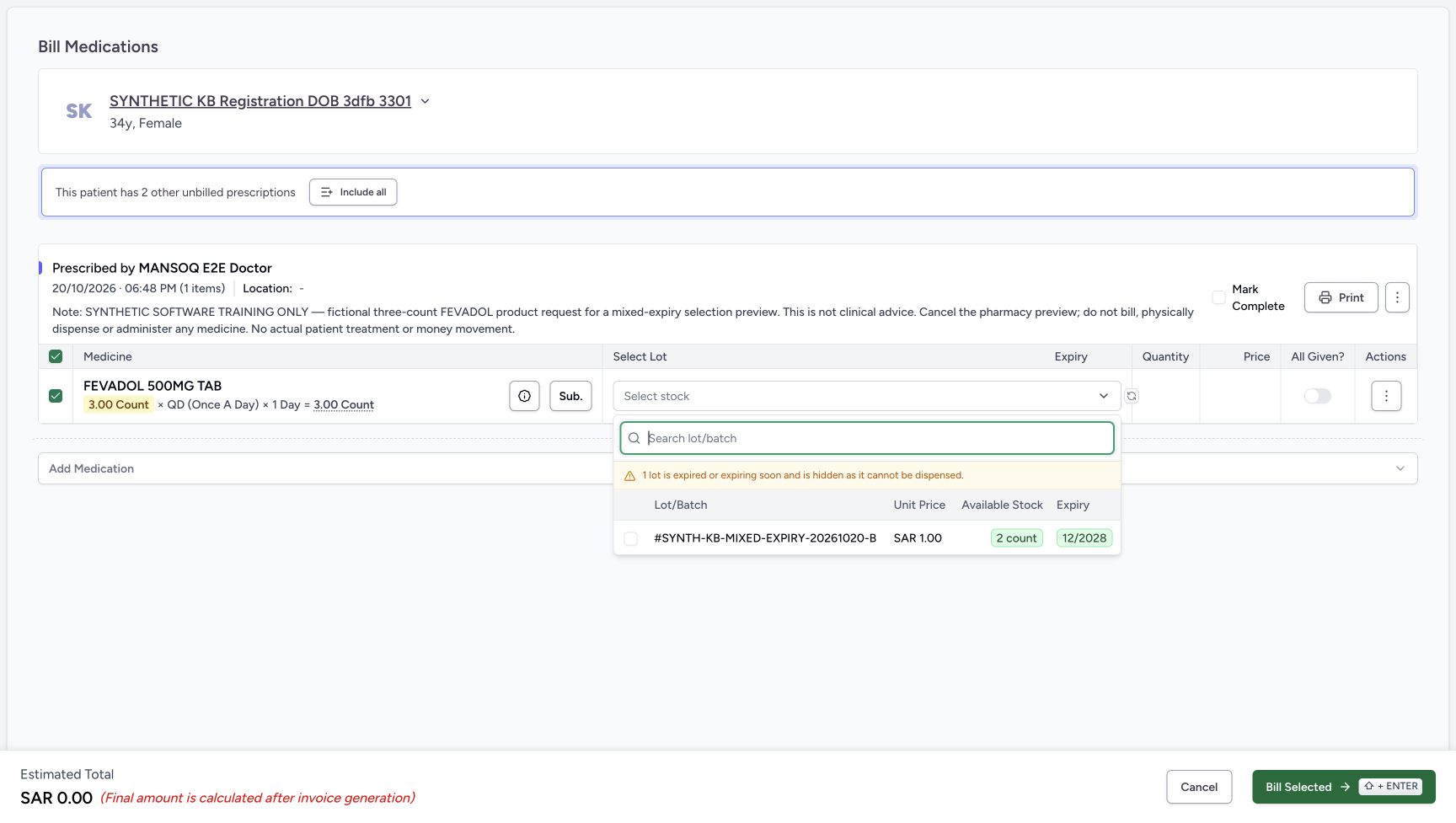 123
123The B row is available for manual selection
Capture details
Genuine natural original from the isolated d20e synthetic estate. Setup and Doctor views are separate role handoffs. No real goods, care or money are involved.
Image SHA-256 8e760959439c15a11e3e2e9875f503556dfcb69e61a7cfa165f4e09e66939fc2
- Select the unchecked B row: Choose the only eligible lot manually.
- Verify batch B before selection: The A batch remains absent from this list.
- Verify the two-unit available limit: Available stock is still two units; manual selection can start below that limit.
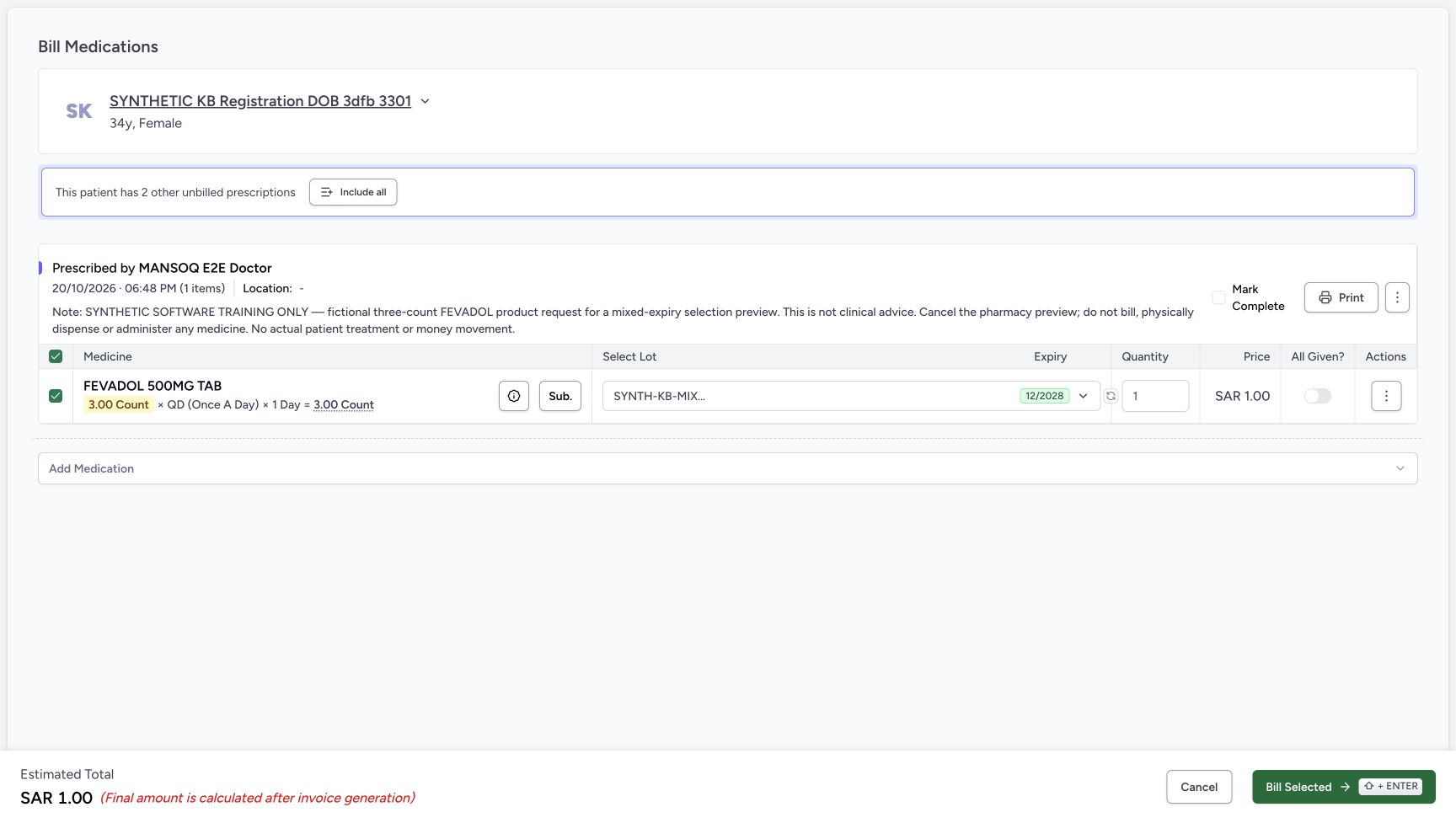 1234
1234Manual B selection starts at one
Capture details
Genuine natural original from the isolated d20e synthetic estate. Setup and Doctor views are separate role handoffs. No real goods, care or money are involved.
Image SHA-256 9e6d31333440d7708b7d7a5a997dac08fefc98adf90fd1951cf25cd2b6ba4fc1
- Read manual starting quantity one: Manually choosing B starts at quantity one.
- Read estimate one: One unit at SAR 1.00 gives an unsaved SAR 1.00 estimate.
- Choose Auto-select after the manual selection: Check the observed preservation of the manually chosen quantity.
- Keep All Given off: The exercise remains a preview.
7. Compare Auto-select after a manual choice, then edit the preview
Choose Auto-select once more with the manual B selection in place. In this example it preserves quantity one and the SAR 1.00 estimate. Change that B quantity to two. Verify the estimate becomes SAR 2.00, the lot is still B, the request total remains three and both All Given and Mark Complete stay off. Auto-select is not a promise to replace a manually chosen quantity.
1234Manual B selection starts at one
Capture details
Genuine natural original from the isolated d20e synthetic estate. Setup and Doctor views are separate role handoffs. No real goods, care or money are involved.
Image SHA-256 9e6d31333440d7708b7d7a5a997dac08fefc98adf90fd1951cf25cd2b6ba4fc1
- Read manual starting quantity one: Manually choosing B starts at quantity one.
- Read estimate one: One unit at SAR 1.00 gives an unsaved SAR 1.00 estimate.
- Choose Auto-select after the manual selection: Check the observed preservation of the manually chosen quantity.
- Keep All Given off: The exercise remains a preview.
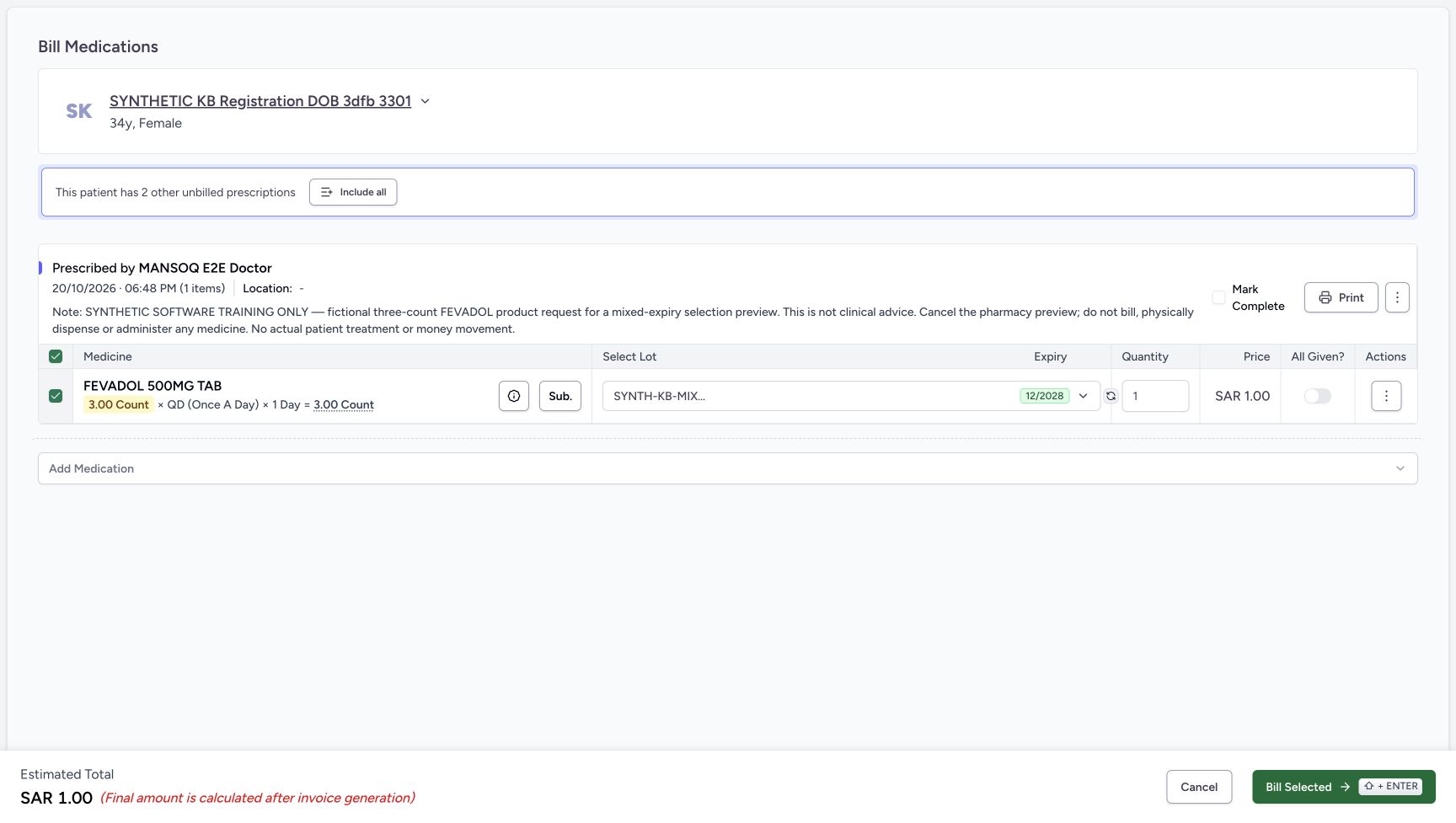 123
123Auto-select preserves manual one
Capture details
Genuine natural original from the isolated d20e synthetic estate. Setup and Doctor views are separate role handoffs. No real goods, care or money are involved.
Image SHA-256 631941b4fd0e853d243f5a0cb8523befd04aa6a34333a8b2fd05bb0a2e7ecfd8
- Verify manual quantity remains one: Auto-select has not forced the manually selected quantity to two.
- Verify estimate remains one: The preview still estimates SAR 1.00.
- Change the preview quantity to two: Enter two only for the eligible B lot; the request total remains three.
123456Two-unit preview ready for Cancel
Capture details
Genuine natural original from the isolated d20e synthetic estate. Setup and Doctor views are separate role handoffs. No real goods, care or money are involved.
Image SHA-256 612744d52d39565e8bdb8ce5c20fbf5ac4aed76ab2a1f76196eda83adf9b7546
- Verify manual quantity two: The final preview uses B two, within its available stock.
- Compare original requested three: The requested dosage total remains 3.00 count.
- Keep All Given off: Two selected units do not fulfil this three-count request.
- Keep Mark Complete unchecked: Do not mark this request complete.
- Read the unsaved estimate two: SAR 2.00 is not an issued or saved invoice.
- Choose Cancel: Exit this preview without choosing Bill Selected.
8. Cancel, reload and verify no selection was saved
Choose Cancel rather than Bill Selected. The preview returns to the same FEVADOL request. Reload normally and wait for the settled result: original three count, Incomplete and Active. Return through Inventory → Items and match A three count and B two count with their original dates and batches. No bill, invoice, payment, saved partial dispense or stock deduction was added by this preview.
123456Two-unit preview ready for Cancel
Capture details
Genuine natural original from the isolated d20e synthetic estate. Setup and Doctor views are separate role handoffs. No real goods, care or money are involved.
Image SHA-256 612744d52d39565e8bdb8ce5c20fbf5ac4aed76ab2a1f76196eda83adf9b7546
- Verify manual quantity two: The final preview uses B two, within its available stock.
- Compare original requested three: The requested dosage total remains 3.00 count.
- Keep All Given off: Two selected units do not fulfil this three-count request.
- Keep Mark Complete unchecked: Do not mark this request complete.
- Read the unsaved estimate two: SAR 2.00 is not an issued or saved invoice.
- Choose Cancel: Exit this preview without choosing Bill Selected.
12345678Original three-count request stays unfinished
Capture details
Genuine natural original from the isolated d20e synthetic estate. Setup and Doctor views are separate role handoffs. No real goods, care or money are involved.
Image SHA-256 8dd29d47ec3c4803c21e9e0c325944c67f4324aa33060708d642a77dd352ec4b
- Verify the same patient: Check identity again before opening the form.
- Match the 06:48 PM request: Keep the correct prescription selected.
- Read the explicit cancellation note: This software exercise ends without billing or physical medicine.
- Read the original total three: The request remains 3.00 count.
- Read Incomplete: The request has no saved partial dispense from this preview.
- Read Active: The request is still active.
- Choose Start Billing: Open the unsaved selection preview.
- Keep other unbilled prescriptions separate: The banner is about other requests, not an invoice from this exercise.
12345Ordinary Pharmacy and Inventory navigation
Capture details
Genuine natural original from the isolated d20e synthetic estate. Setup and Doctor views are separate role handoffs. No real goods, care or money are involved.
Image SHA-256 2f5a815395c4a5f7d5c343cf02a0d6c8b4f1e179da0fcff40f321b7439bdf6e3
- Verify Main Pharmacy: Keep the assigned training location.
- Open Pharmacy: Use the ordinary location menu.
- Choose Prescription Queue: Open the saved requests through the normal queue.
- Return through Inventory Items: Use this path for the final unchanged-stock check.
- Verify the ordinary Pharmacist account: Use the authorised qa-pharmacist session for this exercise.
1234567Ordinary Pharmacist positive A and B stock
Capture details
Genuine natural original from the isolated d20e synthetic estate. Setup and Doctor views are separate role handoffs. No real goods, care or money are involved.
Image SHA-256 6c14097b824853ec7cec5a5658594a6b3b9f1b3d57e133233ba48fec372f8b3b
- Open the Main Pharmacy navigation: Expand the assigned location navigation to use the existing Pharmacy and Inventory paths.
- Read A stock three: Lot A has 3.00 count.
- Read current-month A expiry: The inventory date is October 25, 2026.
- Match batch A: Match SYNTH-KB-MIXED-EXPIRY-20261020-A.
- Read B stock two: Lot B has 2.00 count.
- Read B expiry: The inventory date is December 31, 2028.
- Match batch B: Match SYNTH-KB-MIXED-EXPIRY-20261020-B.
Use the mixed-expiry fixture variation without repeating setup
The authorised setup and Doctor guides teach the shared controls. For this separate software exercise, use the following already prepared values:
| Value | Lot A | Lot B |
|---|---|---|
| Product | FEVADOL 500MG TAB, code 9-212-92 | Same exact Product |
| Batch | SYNTH-KB-MIXED-EXPIRY-20261020-A | SYNTH-KB-MIXED-EXPIRY-20261020-B |
| Stock | 3 count | 2 count |
| Expiry | October 25, 2026 | December 31, 2028 |
| Standard pack size | 1 | 1 |
| Saved Purchase Price | SAR 0.00 | SAR 0.00 |
| Lot Base Price | SAR 1.00 | SAR 1.00 |
| Informational MRP | SAR 1.00 | SAR 1.00 |
The saved Product details verify zero purchase price for each lot. Their separate Charge Item Definitions show Base Price SAR 1.00 and informational MRP SAR 1.00; MRP is not a second base charge. Both show “Not mapped — insured financial posting holds”. The Doctor Product catalogue displays SAR 9.65 for the master, which is different from either lot’s SAR 1.00 base price. No insured posting or invoice is performed here.
The saved Doctor variation is three count, QD for one day, at 06:48 PM. This is a fictional software input, not a clinical recommendation. The prescription note is:
SYNTHETIC SOFTWARE TRAINING ONLY — fictional three-count FEVADOL product request for a mixed-expiry selection preview. This is not clinical advice. Cancel the pharmacy preview; do not bill, physically dispense or administer any medicine. No actual patient treatment or money movement.
1234567Mixed-expiry fixture values
Capture details
Genuine natural original from the isolated d20e synthetic estate. Setup and Doctor views are separate role handoffs. No real goods, care or money are involved.
Image SHA-256 24edb93c302e81c18b6a5d4ce73591f1258721e2a45584aea6c0869077e9576d
- Compare the A expiry: Lot A uses October 25, 2026.
- Compare A quantity three: Pack size one and pack quantity three give three units.
- Compare the B expiry: Lot B uses December 31, 2028.
- Compare B quantity two: Pack size one and pack quantity two give two units.
- Read A item price one: The synthetic lot item price is SAR 1.00.
- Read B item price one: The second lot also has SAR 1.00 item price.
- Read the entered purchase total zero: Saved Product details separately verify the zero purchase values.
1234Saved Product A details
Capture details
Genuine natural original from the isolated d20e synthetic estate. Setup and Doctor views are separate role handoffs. No real goods, care or money are involved.
Image SHA-256 56cf57e25a5ae61e0e13c01d7c33a9d840db85b405bd9b498367f526cdb6bb9c
- Match lot A: The batch ends MIXED-EXPIRY-20261020-A.
- Read October 25 expiry: This is the current-month test date.
- Read pack size one: The saved standard pack size is one.
- Verify saved purchase zero: The saved Purchase Price is SAR 0.00.
123Lot A price and posting boundary
Capture details
Genuine natural original from the isolated d20e synthetic estate. Setup and Doctor views are separate role handoffs. No real goods, care or money are involved.
Image SHA-256 7e6fad6e23a167ab5e3e83b75a0a610e555003c4479ac6ed2b9c88360ca23ef2
- Read the insured-posting hold: The local code is Not mapped — insured financial posting holds.
- Read informational MRP one: Informational MRP is SAR 1.00, separate from base price.
- Read A base price one: The lot-specific Base Price is SAR 1.00.
1234Saved Product B details
Capture details
Genuine natural original from the isolated d20e synthetic estate. Setup and Doctor views are separate role handoffs. No real goods, care or money are involved.
Image SHA-256 835ba55b71d3aeb8fa91cd7bb2a2663ef60d1cc7f3b25e46177957cdaa6f6f75
- Match lot B: The batch ends MIXED-EXPIRY-20261020-B.
- Read December 31 expiry: The second lot expires in 2028.
- Read pack size one: The saved standard pack size is one.
- Verify saved purchase zero: This Product also has SAR 0.00 saved Purchase Price.
123Lot B price and posting boundary
Capture details
Genuine natural original from the isolated d20e synthetic estate. Setup and Doctor views are separate role handoffs. No real goods, care or money are involved.
Image SHA-256 8fcf6a63a3082d7c9e0c5a7c758262d113b3ac4e0cf372f5547d1602cd33d208
- Read the same insured-posting hold: The second lot is also not mapped for insured financial posting.
- Read informational MRP one: This is informational MRP, not an additional base charge.
- Read B base price one: The second lot-specific Base Price is SAR 1.00.
123Exact FEVADOL Product and catalogue price
Capture details
Genuine natural original from the isolated d20e synthetic estate. Setup and Doctor views are separate role handoffs. No real goods, care or money are involved.
Image SHA-256 afe9c095bb52baa26732b18ec03f31f7c8f244e2ec243344962d0ec8dcb80ed6
- Match exact Product code: The Product search is 9-212-92.
- Match FEVADOL 500MG TAB: The shared Doctor prerequisite uses this exact Product.
- Keep catalogue price separate: SAR 9.65 is the master catalogue display, not either lot base price.
1234Fictional three-count request values
Capture details
Genuine natural original from the isolated d20e synthetic estate. Setup and Doctor views are separate role handoffs. No real goods, care or money are involved.
Image SHA-256 1d92db29cbf64c79c470603c43ae1898ca69aad9aa3be3c44ca3453c9cfde47b
- Read fictional dose three count: The request is three count, not the five inventory units.
- Read QD frequency: QD is displayed as Once a day.
- Read duration one day: The fictional exercise requests one day.
- Read the software-only prescription note: The note directs cancellation of the pharmacy preview with no billing or physical medicine.
12345Saved Doctor request after reload
Capture details
Genuine natural original from the isolated d20e synthetic estate. Setup and Doctor views are separate role handoffs. No real goods, care or money are involved.
Image SHA-256 ddd171785dfcfaf8c0cb95acfc57dc7e7a496c880886585af8bc5b9bab3c897e
- Match the saved 06:48 PM prescription: The new FEVADOL request is separate from the earlier ADOL and HYMOX requests.
- Verify saved three count: The saved dosage is 3.00 count.
- Verify QD: The saved frequency remains once a day.
- Verify one day: The saved duration remains one day.
- Read the retained training instruction: The prescription note explicitly says to cancel the preview.
Interpret the current-month restriction and preview result
This exercise was performed on October 20, 2026. A expires on October 25, so it is later on the calendar but still inside the software’s current-month restriction. The current configuration has no additional month offset; that does not remove the current-month-end cutoff. Do not classify A as the separate expiring-soon case merely because the picker uses a combined warning. The result demonstrates A excluded and B selectable in this configuration, not every threshold, timezone, clinical policy or possible dispensing route.
Automatic selection gave B two; manual selection began at one; Auto-select then preserved that manual one. All of these were unsaved form values. After cancellation and reload, the original three-count request remained Incomplete and Active, and A3/B2 stock was unchanged. The SAR 0.00, SAR 1.00 and SAR 2.00 totals were estimates, not generated invoices or money movements.
1234567Ordinary Pharmacist positive A and B stock
Capture details
Genuine natural original from the isolated d20e synthetic estate. Setup and Doctor views are separate role handoffs. No real goods, care or money are involved.
Image SHA-256 6c14097b824853ec7cec5a5658594a6b3b9f1b3d57e133233ba48fec372f8b3b
- Open the Main Pharmacy navigation: Expand the assigned location navigation to use the existing Pharmacy and Inventory paths.
- Read A stock three: Lot A has 3.00 count.
- Read current-month A expiry: The inventory date is October 25, 2026.
- Match batch A: Match SYNTH-KB-MIXED-EXPIRY-20261020-A.
- Read B stock two: Lot B has 2.00 count.
- Read B expiry: The inventory date is December 31, 2028.
- Match batch B: Match SYNTH-KB-MIXED-EXPIRY-20261020-B.
12345Both completion controls off with B two
Capture details
Genuine natural original from the isolated d20e synthetic estate. Setup and Doctor views are separate role handoffs. No real goods, care or money are involved.
Image SHA-256 00a40afdc45760d9b921da0d2d1a7536bd506a6656ad9e155afd5caeab77e705
- Turn All Given off: Keep the medicine-row completion toggle off.
- Verify Mark Complete unchecked: Uncheck this separate control if it remains checked.
- Choose Auto-select once: The circular-arrow control checks automatic eligible-lot selection.
- Verify B quantity two: The explicit automatic selection still has two eligible units.
- Open the lot picker: Inspect the actual available batch list.
123456Only B is selectable and one lot is hidden
Capture details
Genuine natural original from the isolated d20e synthetic estate. Setup and Doctor views are separate role handoffs. No real goods, care or money are involved.
Image SHA-256 55ffd28bb75a8ce9c1535b93d42486168b5b49931272115b279daf8f6923c171
- Read the hidden-lot warning: The picker says one lot is expired or expiring soon and is hidden.
- Match only listed batch B: The available row ends MIXED-EXPIRY-20261020-B.
- Read available stock two: Only B has two selectable units.
- Read expiry 12/2028: The displayed selectable batch expires in December 2028.
- Read unit price one: The B unit price is SAR 1.00.
- Uncheck the selected B lot: Manual deselection closes the list and removes the allocation.
1234Manual deselection clears the preview
Capture details
Genuine natural original from the isolated d20e synthetic estate. Setup and Doctor views are separate role handoffs. No real goods, care or money are involved.
Image SHA-256 5cc493b273a5c5378666855a2fbf24467fc18cae1cc7269735838981419250e9
- Verify Select stock is empty: No lot is selected after deselection.
- Verify the zero estimate: An empty preview shows SAR 0.00 without creating an invoice.
- Open the empty lot selector: Reopen the picker to select B manually.
- Keep Mark Complete unchecked: Clearing the lot does not authorise completing the request.
1234Manual B selection starts at one
Capture details
Genuine natural original from the isolated d20e synthetic estate. Setup and Doctor views are separate role handoffs. No real goods, care or money are involved.
Image SHA-256 9e6d31333440d7708b7d7a5a997dac08fefc98adf90fd1951cf25cd2b6ba4fc1
- Read manual starting quantity one: Manually choosing B starts at quantity one.
- Read estimate one: One unit at SAR 1.00 gives an unsaved SAR 1.00 estimate.
- Choose Auto-select after the manual selection: Check the observed preservation of the manually chosen quantity.
- Keep All Given off: The exercise remains a preview.
123Auto-select preserves manual one
Capture details
Genuine natural original from the isolated d20e synthetic estate. Setup and Doctor views are separate role handoffs. No real goods, care or money are involved.
Image SHA-256 631941b4fd0e853d243f5a0cb8523befd04aa6a34333a8b2fd05bb0a2e7ecfd8
- Verify manual quantity remains one: Auto-select has not forced the manually selected quantity to two.
- Verify estimate remains one: The preview still estimates SAR 1.00.
- Change the preview quantity to two: Enter two only for the eligible B lot; the request total remains three.
123456Two-unit preview ready for Cancel
Capture details
Genuine natural original from the isolated d20e synthetic estate. Setup and Doctor views are separate role handoffs. No real goods, care or money are involved.
Image SHA-256 612744d52d39565e8bdb8ce5c20fbf5ac4aed76ab2a1f76196eda83adf9b7546
- Verify manual quantity two: The final preview uses B two, within its available stock.
- Compare original requested three: The requested dosage total remains 3.00 count.
- Keep All Given off: Two selected units do not fulfil this three-count request.
- Keep Mark Complete unchecked: Do not mark this request complete.
- Read the unsaved estimate two: SAR 2.00 is not an issued or saved invoice.
- Choose Cancel: Exit this preview without choosing Bill Selected.
12345678Original three-count request stays unfinished
Capture details
Genuine natural original from the isolated d20e synthetic estate. Setup and Doctor views are separate role handoffs. No real goods, care or money are involved.
Image SHA-256 8dd29d47ec3c4803c21e9e0c325944c67f4324aa33060708d642a77dd352ec4b
- Verify the same patient: Check identity again before opening the form.
- Match the 06:48 PM request: Keep the correct prescription selected.
- Read the explicit cancellation note: This software exercise ends without billing or physical medicine.
- Read the original total three: The request remains 3.00 count.
- Read Incomplete: The request has no saved partial dispense from this preview.
- Read Active: The request is still active.
- Choose Start Billing: Open the unsaved selection preview.
- Keep other unbilled prescriptions separate: The banner is about other requests, not an invoice from this exercise.
Troubleshooting
A positive Active lot is missing from the picker
Check the exact Product, assigned location, batch and expiry separately from Active status. In this fixture A has three units but falls inside the current-month restriction, while B is selectable. Follow the authorised stock procedure; do not change the expiry, substitute a product or override completion controls to hide the restriction.
1234567Ordinary Pharmacist positive A and B stock
Capture details
Genuine natural original from the isolated d20e synthetic estate. Setup and Doctor views are separate role handoffs. No real goods, care or money are involved.
Image SHA-256 6c14097b824853ec7cec5a5658594a6b3b9f1b3d57e133233ba48fec372f8b3b
- Open the Main Pharmacy navigation: Expand the assigned location navigation to use the existing Pharmacy and Inventory paths.
- Read A stock three: Lot A has 3.00 count.
- Read current-month A expiry: The inventory date is October 25, 2026.
- Match batch A: Match SYNTH-KB-MIXED-EXPIRY-20261020-A.
- Read B stock two: Lot B has 2.00 count.
- Read B expiry: The inventory date is December 31, 2028.
- Match batch B: Match SYNTH-KB-MIXED-EXPIRY-20261020-B.
12345Both completion controls off with B two
Capture details
Genuine natural original from the isolated d20e synthetic estate. Setup and Doctor views are separate role handoffs. No real goods, care or money are involved.
Image SHA-256 00a40afdc45760d9b921da0d2d1a7536bd506a6656ad9e155afd5caeab77e705
- Turn All Given off: Keep the medicine-row completion toggle off.
- Verify Mark Complete unchecked: Uncheck this separate control if it remains checked.
- Choose Auto-select once: The circular-arrow control checks automatic eligible-lot selection.
- Verify B quantity two: The explicit automatic selection still has two eligible units.
- Open the lot picker: Inspect the actual available batch list.
123456Only B is selectable and one lot is hidden
Capture details
Genuine natural original from the isolated d20e synthetic estate. Setup and Doctor views are separate role handoffs. No real goods, care or money are involved.
Image SHA-256 55ffd28bb75a8ce9c1535b93d42486168b5b49931272115b279daf8f6923c171
- Read the hidden-lot warning: The picker says one lot is expired or expiring soon and is hidden.
- Match only listed batch B: The available row ends MIXED-EXPIRY-20261020-B.
- Read available stock two: Only B has two selectable units.
- Read expiry 12/2028: The displayed selectable batch expires in December 2028.
- Read unit price one: The B unit price is SAR 1.00.
- Uncheck the selected B lot: Manual deselection closes the list and removes the allocation.
Auto-select does not change a manual quantity to two
Inspect the quantity that is actually displayed. Manual selection starts at one here, and a later Auto-select preserves that manual one. For this preview, edit B to two only after verifying its two-unit stock limit, keep both completion controls off and finish with Cancel. Do not choose Bill Selected to test persistence.
1234Manual B selection starts at one
Capture details
Genuine natural original from the isolated d20e synthetic estate. Setup and Doctor views are separate role handoffs. No real goods, care or money are involved.
Image SHA-256 9e6d31333440d7708b7d7a5a997dac08fefc98adf90fd1951cf25cd2b6ba4fc1
- Read manual starting quantity one: Manually choosing B starts at quantity one.
- Read estimate one: One unit at SAR 1.00 gives an unsaved SAR 1.00 estimate.
- Choose Auto-select after the manual selection: Check the observed preservation of the manually chosen quantity.
- Keep All Given off: The exercise remains a preview.
123Auto-select preserves manual one
Capture details
Genuine natural original from the isolated d20e synthetic estate. Setup and Doctor views are separate role handoffs. No real goods, care or money are involved.
Image SHA-256 631941b4fd0e853d243f5a0cb8523befd04aa6a34333a8b2fd05bb0a2e7ecfd8
- Verify manual quantity remains one: Auto-select has not forced the manually selected quantity to two.
- Verify estimate remains one: The preview still estimates SAR 1.00.
- Change the preview quantity to two: Enter two only for the eligible B lot; the request total remains three.
123456Two-unit preview ready for Cancel
Capture details
Genuine natural original from the isolated d20e synthetic estate. Setup and Doctor views are separate role handoffs. No real goods, care or money are involved.
Image SHA-256 612744d52d39565e8bdb8ce5c20fbf5ac4aed76ab2a1f76196eda83adf9b7546
- Verify manual quantity two: The final preview uses B two, within its available stock.
- Compare original requested three: The requested dosage total remains 3.00 count.
- Keep All Given off: Two selected units do not fulfil this three-count request.
- Keep Mark Complete unchecked: Do not mark this request complete.
- Read the unsaved estimate two: SAR 2.00 is not an issued or saved invoice.
- Choose Cancel: Exit this preview without choosing Bill Selected.
12345678Original three-count request stays unfinished
Capture details
Genuine natural original from the isolated d20e synthetic estate. Setup and Doctor views are separate role handoffs. No real goods, care or money are involved.
Image SHA-256 8dd29d47ec3c4803c21e9e0c325944c67f4324aa33060708d642a77dd352ec4b
- Verify the same patient: Check identity again before opening the form.
- Match the 06:48 PM request: Keep the correct prescription selected.
- Read the explicit cancellation note: This software exercise ends without billing or physical medicine.
- Read the original total three: The request remains 3.00 count.
- Read Incomplete: The request has no saved partial dispense from this preview.
- Read Active: The request is still active.
- Choose Start Billing: Open the unsaved selection preview.
- Keep other unbilled prescriptions separate: The banner is about other requests, not an invoice from this exercise.
Source evidence
Every citation uses this exact committed version. The private source repository requires access.
- repositories/platform/mansoq-web/src/pages/Facility/services/pharmacy/billMedications/BillMedicationsForm.tsx:34 ·
d20e68ed4a9e0b005aa54f218f84172160974b02Source file checksum
9cc718a513e22df66f1c2b92d2c8b4b63e0e4d02e58b90705fa8ca5dbf6f8ac4 - repositories/platform/mansoq-web/src/pages/Facility/services/pharmacy/billMedications/formSchema.ts:94 ·
d20e68ed4a9e0b005aa54f218f84172160974b02Source file checksum
654a1d61d9eea0ed21dbbda6fcc0f127eb9cc1631bd178f3023bb334258571e2 - repositories/platform/mansoq-web/src/pages/Facility/services/inventory/DispenseLotSelector.tsx:64 ·
d20e68ed4a9e0b005aa54f218f84172160974b02Source file checksum
4153614e75921f3325472744644989be488f49762c6b694d777538969664b6dc - repositories/platform/mansoq-web/src/pages/Facility/services/pharmacy/billMedications/utils/useInventoryItemsAutoSelect.ts:53 ·
d20e68ed4a9e0b005aa54f218f84172160974b02Source file checksum
689be89ed73722f369100ad448b2ceb37e559bb86a354edbd63393cc8d61af9b - repositories/platform/mansoq-web/src/pages/Facility/services/pharmacy/billMedications/BillMedicationsPrescriptionCard.tsx:573 ·
d20e68ed4a9e0b005aa54f218f84172160974b02Source file checksum
e64b9b9ffbc8388dba86070d36c8acef28639ac6166f650ca3586b43e9ac3134 - repositories/platform/mansoq-web/src/pages/Facility/services/pharmacy/billMedications/BillMedicationsFooter.tsx:80 ·
d20e68ed4a9e0b005aa54f218f84172160974b02Source file checksum
5a2167f3e4ae3c332f8da9b7076d6339c891543cb41fa43534256c826300c048 - repositories/platform/mansoq-web/src/components/Common/BackButton.tsx:19 ·
d20e68ed4a9e0b005aa54f218f84172160974b02Source file checksum
56a741eff730a7b18a5fae594374068bab2d5413993c32dbbaf3625e14743ca3 - repositories/platform/mansoq-web/src/pages/Facility/services/pharmacy/PrescriptionQueue.tsx:250 ·
d20e68ed4a9e0b005aa54f218f84172160974b02Source file checksum
20c2f3e573ae315ec5ff79b19575c1a6e3b2f7ca76b5e98bad319ef595b11d04 - repositories/platform/mansoq-web/src/pages/Facility/services/pharmacy/PrescriptionsPreviewPage.tsx:117 ·
d20e68ed4a9e0b005aa54f218f84172160974b02Source file checksum
2a76a064861548bc2d0c5e036bbc9a2ec448582cb8bcb3e970c05a8362498a2e - repositories/platform/mansoq-web/src/pages/Facility/services/inventory/InventoryList.tsx:49 ·
d20e68ed4a9e0b005aa54f218f84172160974b02Source file checksum
6a78d506a34a44f2e24877ebf2a55eeee05cfde35b8cc6a474c399bf099f1806 - repositories/platform/mansoq-web/mansoq.config.ts:387 ·
d20e68ed4a9e0b005aa54f218f84172160974b02Source file checksum
6dfbc14c545d178f584364adfb57ce67d9914e1e612612b78173ae20913a80ff - repositories/platform/mansoq-web/src/Utils/inventory.ts:14 ·
d20e68ed4a9e0b005aa54f218f84172160974b02Source file checksum
762baa1da72864af3ee6138b43b16181e722f8bbad97d35400b79a8b3109df0d - repositories/platform/mansoq-web/src/pages/Facility/services/inventory/utils.ts:1 ·
d20e68ed4a9e0b005aa54f218f84172160974b02Source file checksum
346bd8088dfc07e4c9af19c712e71246c66d17ef6e7e2e9b13e1be0ec7634b73