 MANSOQ
 Pharmacy · VERSION d20e68ed
Save and reload a fictional one-count ADOL request for the expiry exercise
Create one separate ADOL Product request in the existing synthetic encounter, verify the exact code and software-only note, and confirm the saved one-count one-day instruction after reload. No dispensing or billing is performed.
Doctor
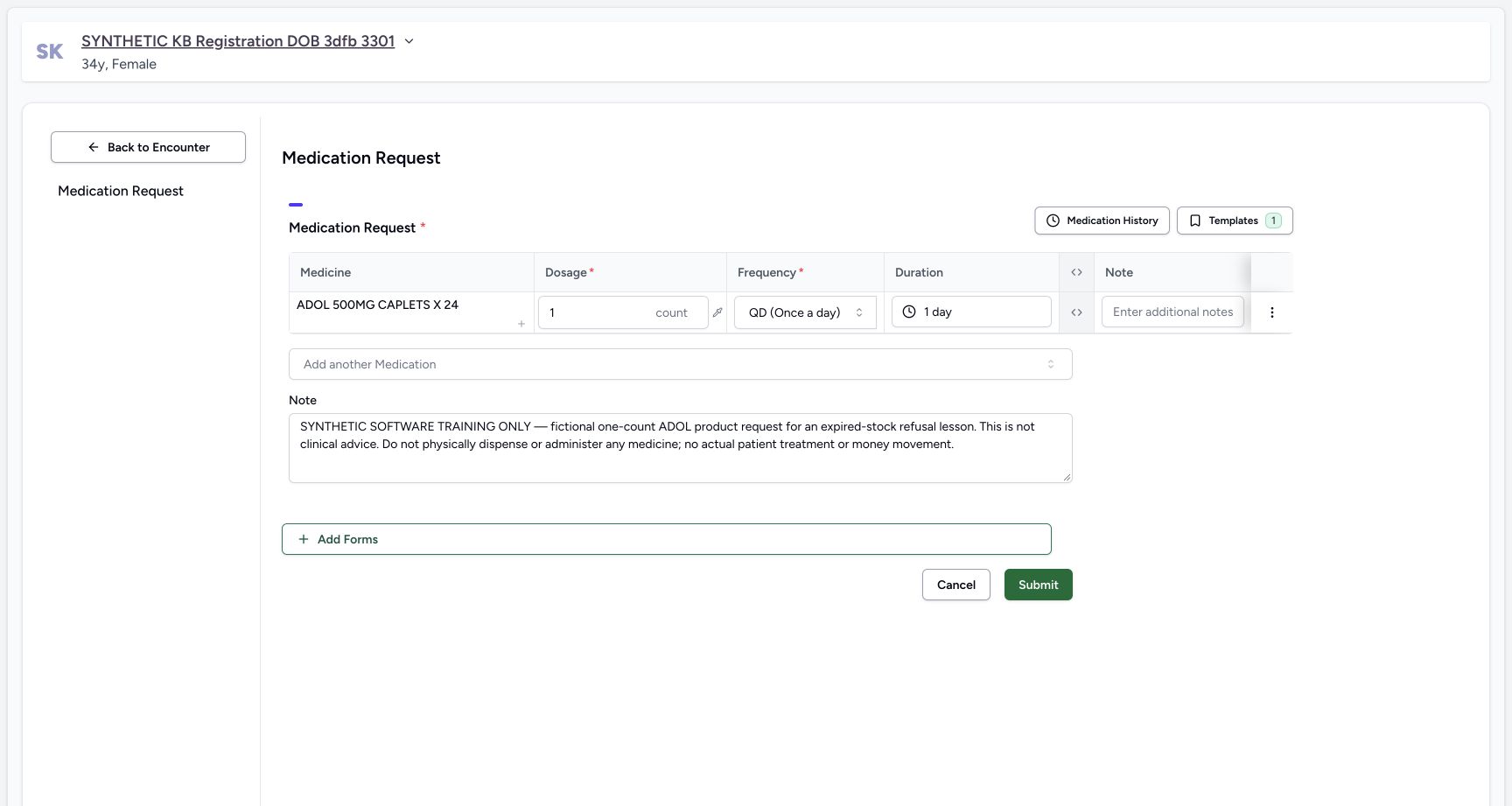 12345
12345Reviewed one-count one-day request
Capture details
Captured in the isolated synthetic d20e training estate with the ordinary Doctor role. The one-count QD one-day instruction is fictional software test data, not a clinical recommendation or permission to dispense or administer any medicine.
Image SHA-256 a625e39edbbf0157d47e89c13ca3d23069886a7453c121ceea4faade8d8c12e6
- Review one count: Check the fictional dose before submit.
- Review QD: The chosen frequency is QD Once a day.
- Review one day: Duration is1 day, not the ten-day instructions on the earlier requests.
- Verify the full fictional note: Preserve the expiry-refusal exercise note.
- Submit once: Save this one reviewed ADOL request once.
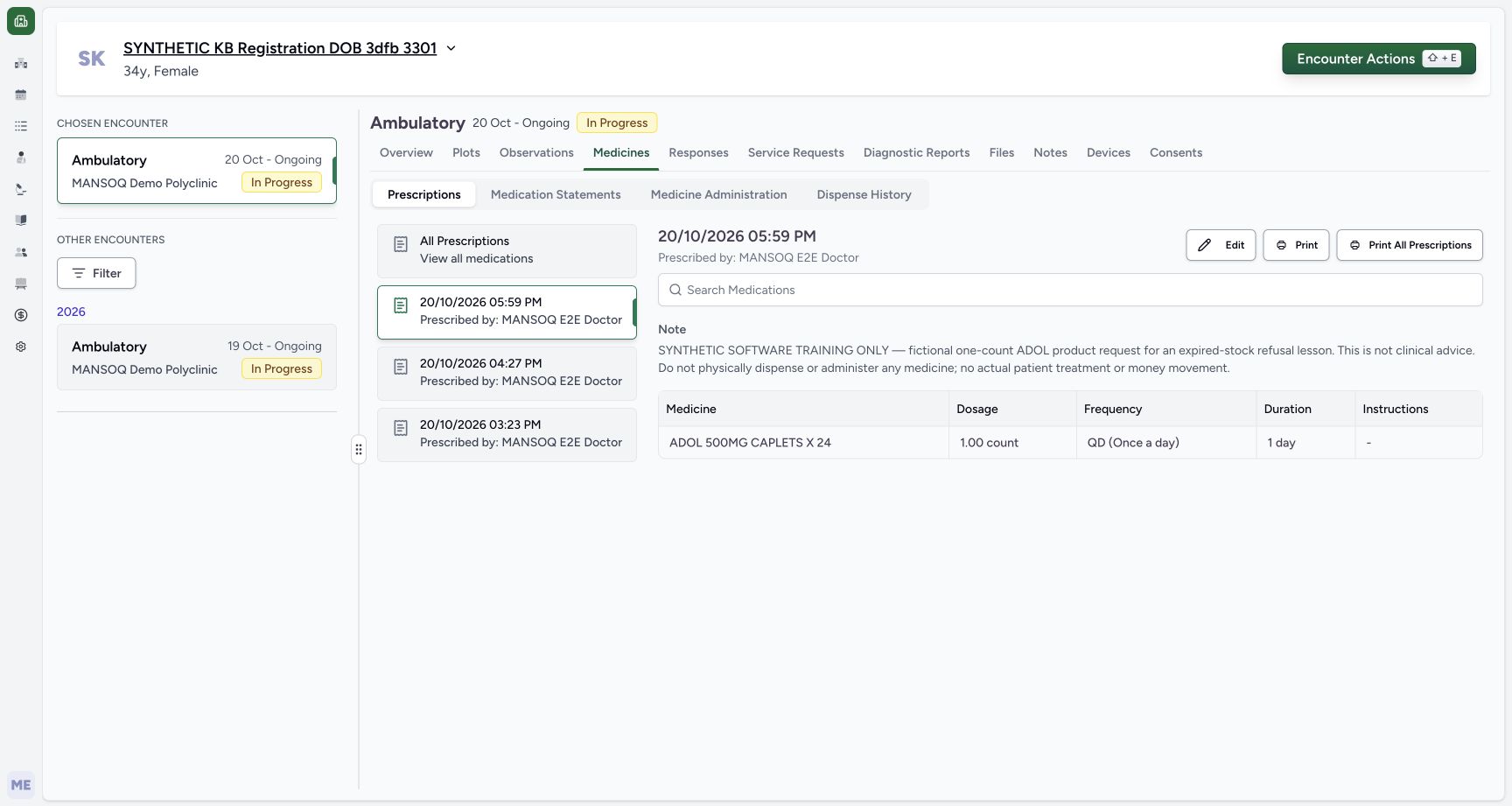 1234
1234Saved ADOL request and note
Capture details
Captured in the isolated synthetic d20e training estate with the ordinary Doctor role. The one-count QD one-day instruction is fictional software test data, not a clinical recommendation or permission to dispense or administer any medicine.
Image SHA-256 7f1bbb5d0650e49079e6bd62e7ebda03b5a6d48dbf64535d453b1190009dd170
- Verify the selected new request: The 05:59 PM card is selected.
- Read the exact saved note: This is the explicit software-only expiry-refusal note.
- Verify saved dosage one count: The detail keeps the intended fictional count.
- Verify saved duration one day: The selected request retains1 day.
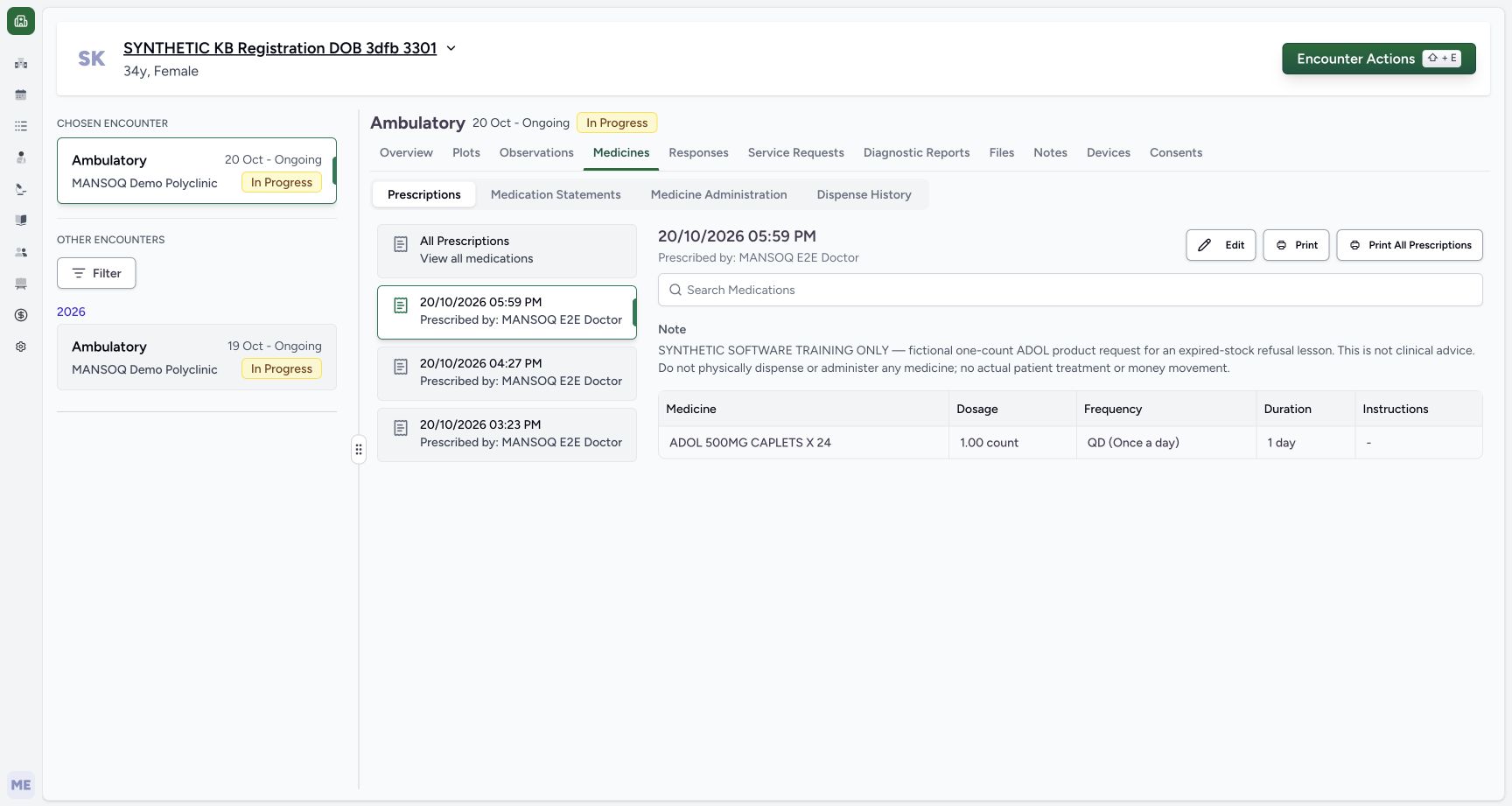 12345
12345Same ADOL detail reopened after reload
Capture details
Captured in the isolated synthetic d20e training estate with the ordinary Doctor role. The one-count QD one-day instruction is fictional software test data, not a clinical recommendation or permission to dispense or administer any medicine.
Image SHA-256 7f1bbb5d0650e49079e6bd62e7ebda03b5a6d48dbf64535d453b1190009dd170
- Verify the same 05:59 PMdetail: The reopened detail is the new ADOL request.
- Verify the exact note persists: The software-only note remains after reload.
- Verify one count persists: The saved request still contains1.00 count.
- Verify QD persists: Frequency remains QD Once a day.
- Verify one day persists: Duration remains1 day without another Submit.
14 of 14 content blocks have reviewed image alignment.
Before you begin
- Use the authorised ordinary Doctor account in the isolated synthetic estate. The one-count QD one-day instruction is test data solely for the expiry-safeguard exercise, not a medical recommendation or authorisation to dispense or administer any medicine.12345
Recorded release d20e68ed · 2026-10-20T14:59:32.773Z · 1728 × 921 Reviewed one-count one-day request
Capture details
Captured in the isolated synthetic d20e training estate with the ordinary Doctor role. The one-count QD one-day instruction is fictional software test data, not a clinical recommendation or permission to dispense or administer any medicine.
Image SHA-256
a625e39edbbf0157d47e89c13ca3d23069886a7453c121ceea4faade8d8c12e6- Review one count: Check the fictional dose before submit.
- Review QD: The chosen frequency is QD Once a day.
- Review one day: Duration is1 day, not the ten-day instructions on the earlier requests.
- Verify the full fictional note: Preserve the expiry-refusal exercise note.
- Submit once: Save this one reviewed ADOL request once.
- Start with SYNTHETIC KB Registration DOB 3dfb 3301 and its existing October 20 Ambulatory In Progress encounter. “Save and reload a fictional ten-count HYMOX Product request” covers the common patient/encounter navigation and request controls. Preserve both earlier prescriptions and the existing demographics.
 123456
Recorded release d20e68ed · 2026-10-20T14:58:28.393Z · 1728 × 921 Existing patient and Ambulatory encounter
Capture details
Captured in the isolated synthetic d20e training estate with the ordinary Doctor role. The one-count QD one-day instruction is fictional software test data, not a clinical recommendation or permission to dispense or administer any medicine.
Image SHA-256
ead7e7af0fd6b62bc072f6e111b1a333518c44f1e2f5bd9c2ce90344286bbda7- Verify the assigned synthetic patient: Use SYNTHETIC KB Registration DOB 3dfb 3301.
- Keep the existing Ambulatory encounter: The chosen encounter is the October 20 ongoing encounter, not the earlier encounter below.
- Open Medicines: Use the existing encounter Medicines tab.
- Create a separate prescription: Create the one ADOL test request without editing the two earlier prescriptions.
- Keep the earlier HYMOX request: Its existing ten-day row stays separate.
- Keep the earlier Paracetamol request: The other saved prescription is also preserved.
- The separate FacilityAdmin lesson “Create a clearly synthetic past-date ADOL fixture for expiry safeguards” establishes the isolated batch. The Doctor selects the existing ADOL Product master 06285094000103, not a lot or price definition. Do not edit the catalog price or imply the request makes expired stock usable.
 123456
Recorded release d20e68ed · 2026-10-20T14:59:07.624Z · 1728 × 921 Exact ADOL Product result
Capture details
Captured in the isolated synthetic d20e training estate with the ordinary Doctor role. The one-count QD one-day instruction is fictional software test data, not a clinical recommendation or permission to dispense or administer any medicine.
Image SHA-256
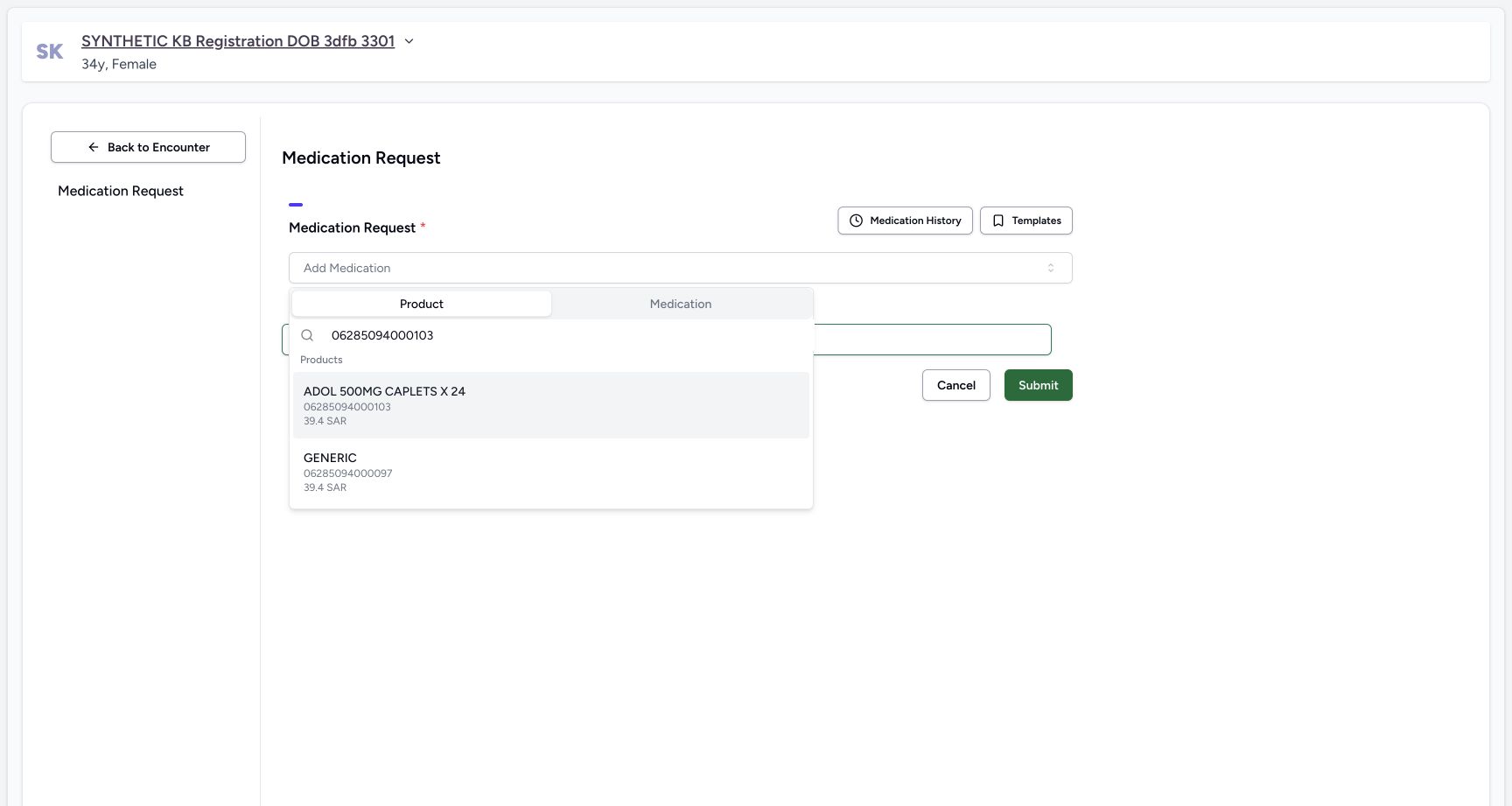
a05637382c3d83a9fcc7b1866bc0e1d197161a5f30bf40015c279931d7ac0a86- Use Product search: Choose the Product tab rather than Medication.
- Search exact 06285094000103: Use the actual ADOL product code.
- Choose exact ADOL: Select ADOL 500MG CAPLETS X24 with actual code 06285094000103.
- Verify ADOL actual code: Match the code beneath its name, not only text in a name.
- Distinguish nearby GENERIC: The other result has actual code 06285094000097.
- Keep catalog price separate: The search shows 39.4 SAR; it is not the synthetic batch price or an invoice.
1. Create a separate request in the existing encounter
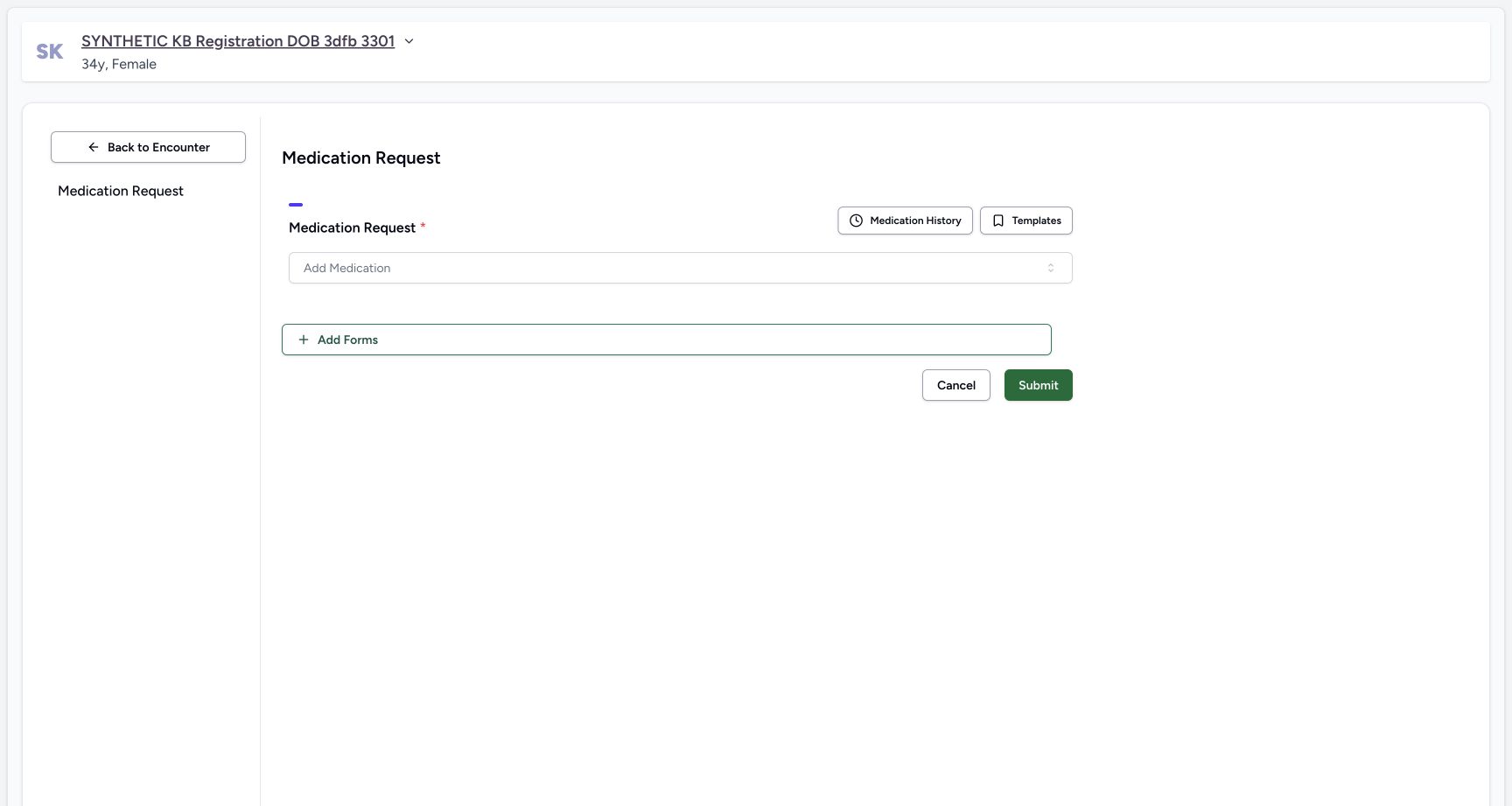
Verify the assigned synthetic patient and chosen October 20 Ambulatory encounter. Open Medicines → Prescriptions and choose Create. Keep the earlier HYMOX and Paracetamol requests unchanged. The fresh Medication Request form is empty; choose Add Medication.
123456Existing patient and Ambulatory encounter
Capture details
Captured in the isolated synthetic d20e training estate with the ordinary Doctor role. The one-count QD one-day instruction is fictional software test data, not a clinical recommendation or permission to dispense or administer any medicine.
Image SHA-256 ead7e7af0fd6b62bc072f6e111b1a333518c44f1e2f5bd9c2ce90344286bbda7
- Verify the assigned synthetic patient: Use SYNTHETIC KB Registration DOB 3dfb 3301.
- Keep the existing Ambulatory encounter: The chosen encounter is the October 20 ongoing encounter, not the earlier encounter below.
- Open Medicines: Use the existing encounter Medicines tab.
- Create a separate prescription: Create the one ADOL test request without editing the two earlier prescriptions.
- Keep the earlier HYMOX request: Its existing ten-day row stays separate.
- Keep the earlier Paracetamol request: The other saved prescription is also preserved.
 12
12Fresh medication request
Capture details
Captured in the isolated synthetic d20e training estate with the ordinary Doctor role. The one-count QD one-day instruction is fictional software test data, not a clinical recommendation or permission to dispense or administer any medicine.
Image SHA-256 904d65c770925195c0c12b3283b582b3a47418afff6df1da04f8a9cdaf564e8e
- Verify the same patient in the form: Keep the assigned existing patient.
- Choose Add Medication: Open the medication selector for the new request.
2. Select the exact ADOL Product
Use the Product tab and search 06285094000103. Choose ADOL 500MG CAPLETS X24 with that actual code. Do not choose the nearby GENERIC result 06285094000097. The 39.4 SAR catalog display belongs to the master; it is separate from the fixture batch’s one-SAR price and is not an invoice.
12Fresh medication request
Capture details
Captured in the isolated synthetic d20e training estate with the ordinary Doctor role. The one-count QD one-day instruction is fictional software test data, not a clinical recommendation or permission to dispense or administer any medicine.
Image SHA-256 904d65c770925195c0c12b3283b582b3a47418afff6df1da04f8a9cdaf564e8e
- Verify the same patient in the form: Keep the assigned existing patient.
- Choose Add Medication: Open the medication selector for the new request.
123456Exact ADOL Product result
Capture details
Captured in the isolated synthetic d20e training estate with the ordinary Doctor role. The one-count QD one-day instruction is fictional software test data, not a clinical recommendation or permission to dispense or administer any medicine.
Image SHA-256 a05637382c3d83a9fcc7b1866bc0e1d197161a5f30bf40015c279931d7ac0a86
- Use Product search: Choose the Product tab rather than Medication.
- Search exact 06285094000103: Use the actual ADOL product code.
- Choose exact ADOL: Select ADOL 500MG CAPLETS X24 with actual code 06285094000103.
- Verify ADOL actual code: Match the code beneath its name, not only text in a name.
- Distinguish nearby GENERIC: The other result has actual code 06285094000097.
- Keep catalog price separate: The search shows 39.4 SAR; it is not the synthetic batch price or an invoice.
3. Review the fictional one-count one-day instruction
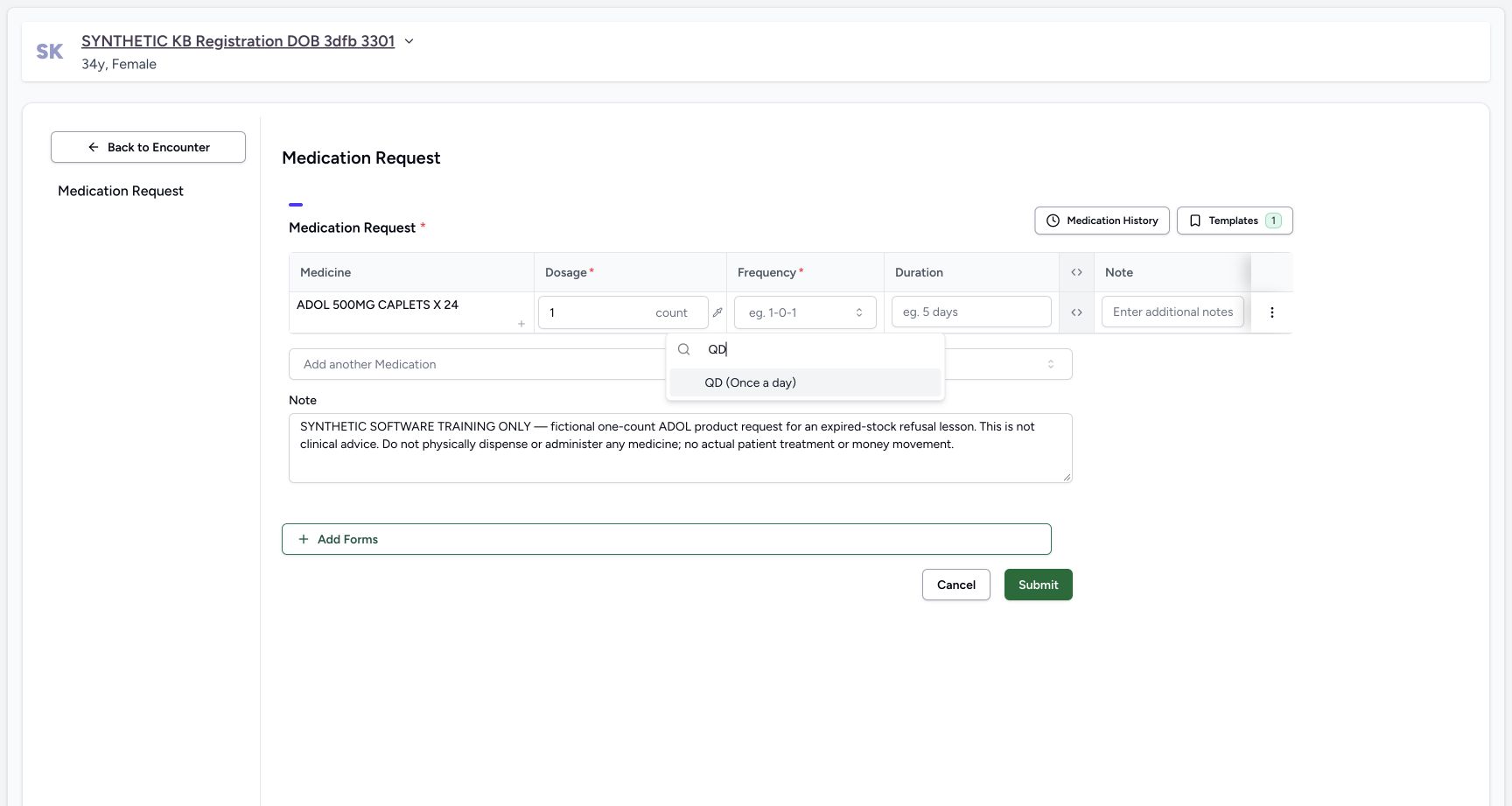
Enter dosage 1 count, filter frequency by QD and select QD (Once a day), then set Duration 1 day. Preserve this exact note: SYNTHETIC SOFTWARE TRAINING ONLY — fictional one-count ADOL product request for an expired-stock refusal lesson. This is not clinical advice. Do not physically dispense or administer any medicine; no actual patient treatment or money movement. Review the final ADOL row, frequency, duration and note before saving. These values exist only to exercise software refusal, not to recommend treatment.
 12345
12345Filtered QD test frequency
Capture details
Captured in the isolated synthetic d20e training estate with the ordinary Doctor role. The one-count QD one-day instruction is fictional software test data, not a clinical recommendation or permission to dispense or administer any medicine.
Image SHA-256 01adab046d35f4f14bce7c9bb392f3dc1e0c9570965f4b864aaf26e1a984ff64
- Keep fictional dosage one count: This value is software test data only, not a medical recommendation.
- Filter frequency by QD: Use the frequency search field.
- Choose QD Once a day: Select the actual filtered result.
- Set duration one day: Keep this separate one-day test request.
- Keep the explicit software-only note: The note forbids physical dispensing or administration and actual treatment or money movement.
12345Reviewed one-count one-day request
Capture details
Captured in the isolated synthetic d20e training estate with the ordinary Doctor role. The one-count QD one-day instruction is fictional software test data, not a clinical recommendation or permission to dispense or administer any medicine.
Image SHA-256 a625e39edbbf0157d47e89c13ca3d23069886a7453c121ceea4faade8d8c12e6
- Review one count: Check the fictional dose before submit.
- Review QD: The chosen frequency is QD Once a day.
- Review one day: Duration is1 day, not the ten-day instructions on the earlier requests.
- Verify the full fictional note: Preserve the expiry-refusal exercise note.
- Submit once: Save this one reviewed ADOL request once.
4. Submit the reviewed request once
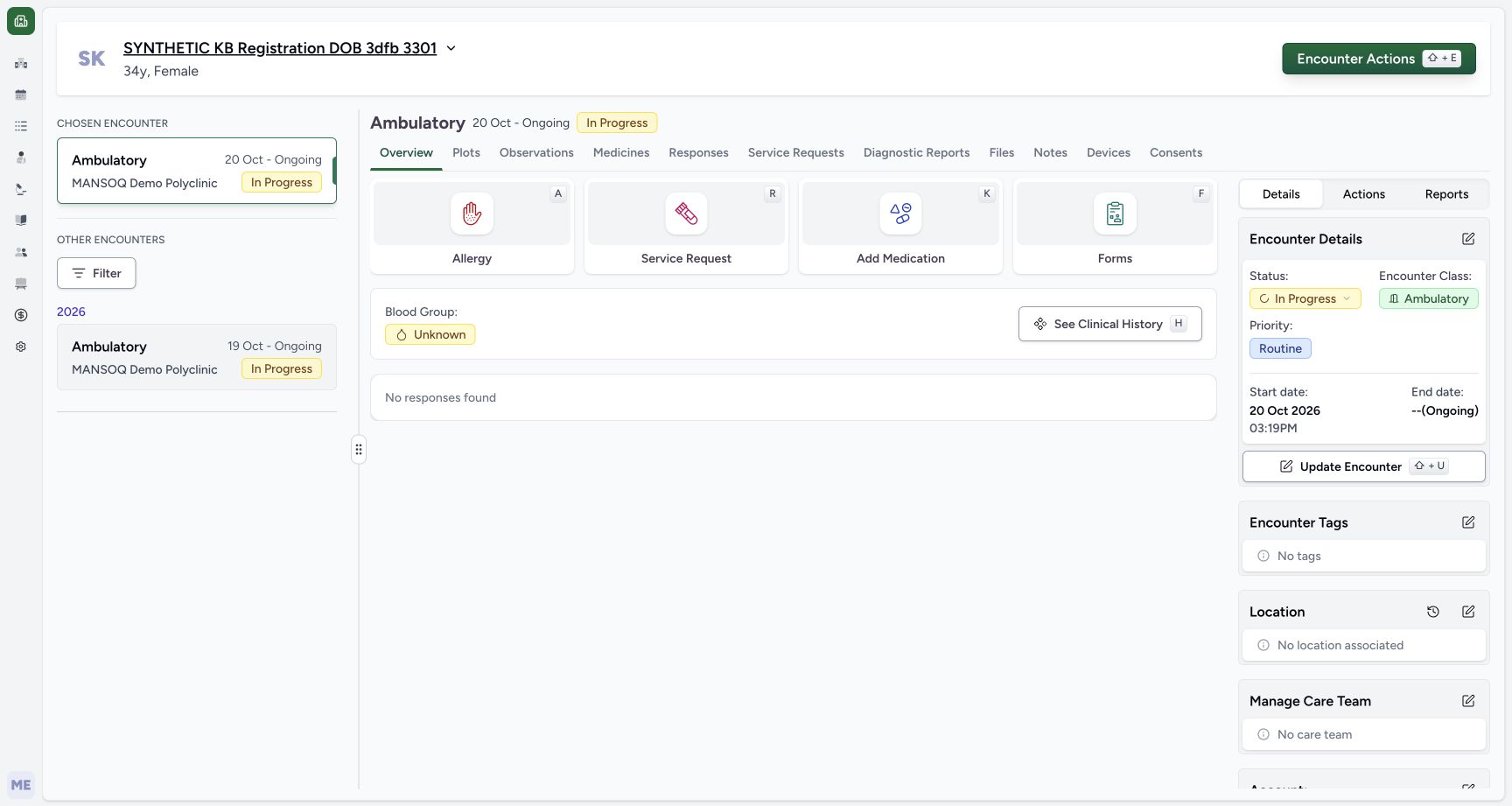
Choose Submit once. When the form returns to the existing encounter Overview, open Medicines. Inspect the saved request there rather than submitting again. The encounter remains Ambulatory and In Progress; this save does not create an admission or dispense stock.
12345Reviewed one-count one-day request
Capture details
Captured in the isolated synthetic d20e training estate with the ordinary Doctor role. The one-count QD one-day instruction is fictional software test data, not a clinical recommendation or permission to dispense or administer any medicine.
Image SHA-256 a625e39edbbf0157d47e89c13ca3d23069886a7453c121ceea4faade8d8c12e6
- Review one count: Check the fictional dose before submit.
- Review QD: The chosen frequency is QD Once a day.
- Review one day: Duration is1 day, not the ten-day instructions on the earlier requests.
- Verify the full fictional note: Preserve the expiry-refusal exercise note.
- Submit once: Save this one reviewed ADOL request once.
 123
123Return to encounter after one Submit
Capture details
Captured in the isolated synthetic d20e training estate with the ordinary Doctor role. The one-count QD one-day instruction is fictional software test data, not a clinical recommendation or permission to dispense or administer any medicine.
Image SHA-256 58993c6523bf386b1ff3aba5e5f411ad1a1756e39ec8bfb2d2080d5022df1831
- Return to Medicines: After the form returns to the encounter, open Medicines.
- Keep Ambulatory encounter class: Saving the request has not created an admission.
- Keep encounter In Progress: The existing encounter remains in progress.
5. Inspect the new 05:59 PM request and retained earlier prescriptions
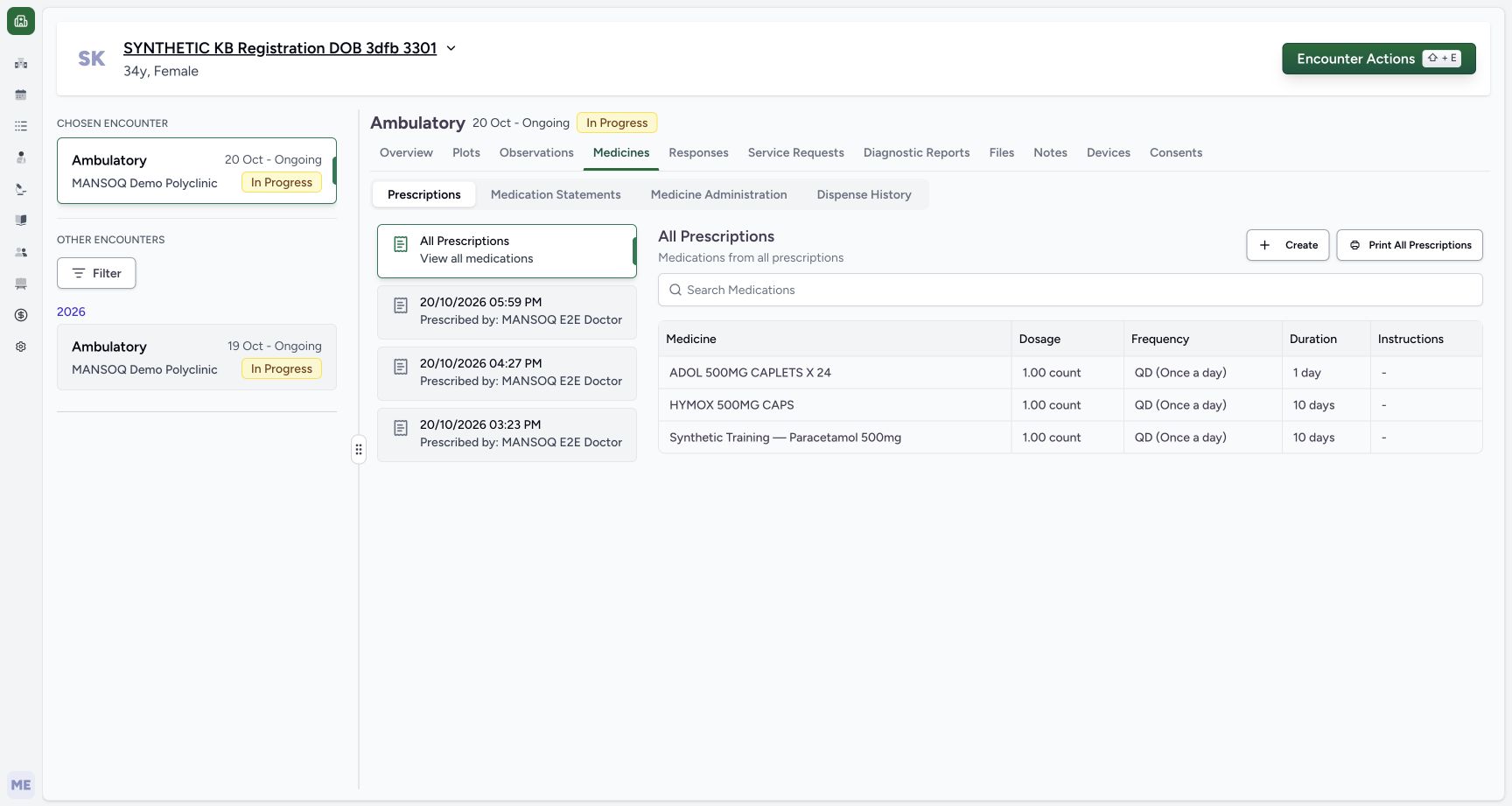
In All Prescriptions, match the new October 20, 05:59 PM card and ADOL one count, QD Once a day, one day. The earlier 04:27 PM HYMOX and 03:23 PM Paracetamol requests remain separate. Choose the new card and verify the full software-only note and saved ADOL instruction. Do not use Edit or Print for this readback.
 1234
1234New request beside the earlier two
Capture details
Captured in the isolated synthetic d20e training estate with the ordinary Doctor role. The one-count QD one-day instruction is fictional software test data, not a clinical recommendation or permission to dispense or administer any medicine.
Image SHA-256 e5efdf64d976a50d6d56df22506ce19d9774676520147a31275127fd0d0bc239
- Choose the new 05:59 PM card: Use the new October 20 request, not the earlier 04:27 or 03:23 cards.
- Verify saved ADOL: The new row is ADOL 500MG CAPLETS X24.
- Read saved one count: The saved ADOL dosage is1.00 count.
- Read saved one day: The ADOL duration is1 day; earlier rows still show10 days.
1234Saved ADOL request and note
Capture details
Captured in the isolated synthetic d20e training estate with the ordinary Doctor role. The one-count QD one-day instruction is fictional software test data, not a clinical recommendation or permission to dispense or administer any medicine.
Image SHA-256 7f1bbb5d0650e49079e6bd62e7ebda03b5a6d48dbf64535d453b1190009dd170
- Verify the selected new request: The 05:59 PM card is selected.
- Read the exact saved note: This is the explicit software-only expiry-refusal note.
- Verify saved dosage one count: The detail keeps the intended fictional count.
- Verify saved duration one day: The selected request retains1 day.
6. Reload and reopen the same saved request
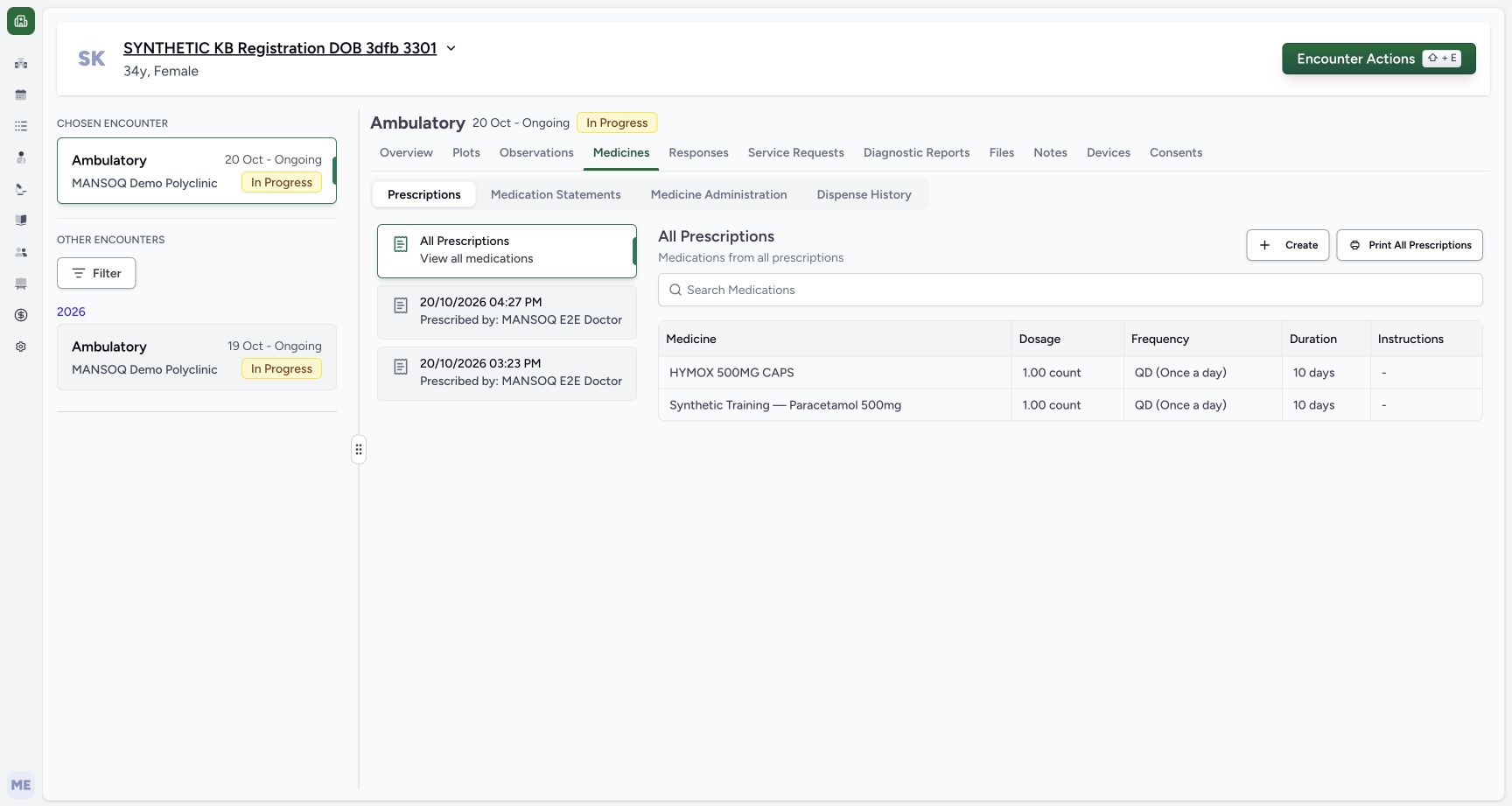
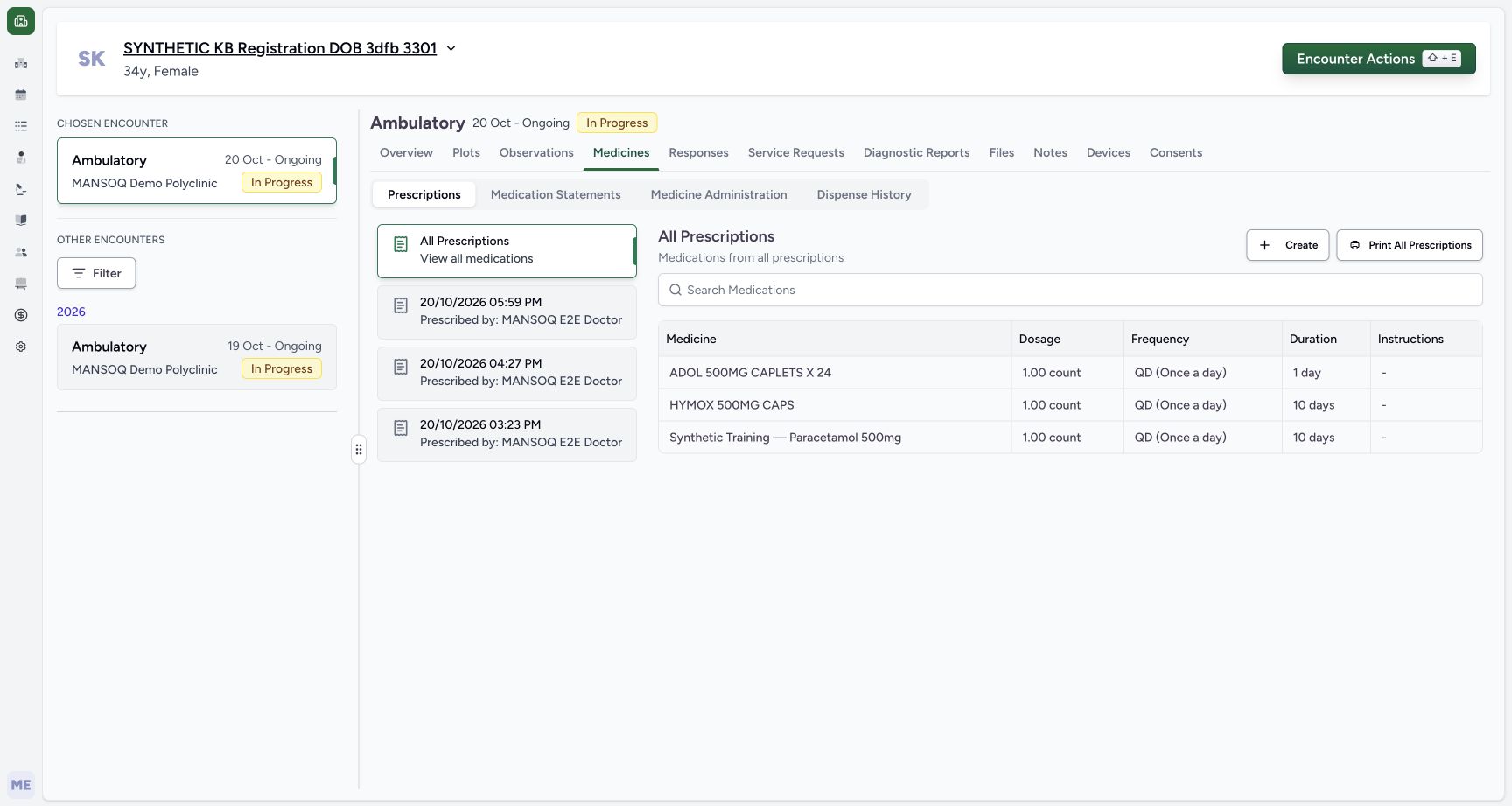
Reload normally and wait for All Prescriptions. Verify the ADOL row and the earlier two requests remain, then reopen the 05:59 PM card. Confirm the same exact note, one-count dosage, QD frequency and one-day duration. No second Submit is required. Hand off to the separate ordinary Pharmacist expiry-check lesson; the Doctor has not dispensed, billed or paid for the fixture.
 123
123All Prescriptions after normal reload
Capture details
Captured in the isolated synthetic d20e training estate with the ordinary Doctor role. The one-count QD one-day instruction is fictional software test data, not a clinical recommendation or permission to dispense or administer any medicine.
Image SHA-256 a1ada1d75f70b8f5230d9b8dd0a82f064397b6892f37d39e3e4b033879077790
- Reopen the same new card after reload: All Prescriptions returns after reload; choose 05:59 PMagain.
- Verify ADOL persists: The new request remains alongside the two earlier medication rows.
- Keep earlier prescriptions separate: Do not select or edit the earlier HYMOX request for this exercise.
12345Same ADOL detail reopened after reload
Capture details
Captured in the isolated synthetic d20e training estate with the ordinary Doctor role. The one-count QD one-day instruction is fictional software test data, not a clinical recommendation or permission to dispense or administer any medicine.
Image SHA-256 7f1bbb5d0650e49079e6bd62e7ebda03b5a6d48dbf64535d453b1190009dd170
- Verify the same 05:59 PMdetail: The reopened detail is the new ADOL request.
- Verify the exact note persists: The software-only note remains after reload.
- Verify one count persists: The saved request still contains1.00 count.
- Verify QD persists: Frequency remains QD Once a day.
- Verify one day persists: Duration remains1 day without another Submit.
Keep the Product request distinct from available stock
The request selects an existing Product master by exact code. It does not choose the past-date batch, create a price, alter stock or prove dispensing eligibility. The catalog 39.4 SAR display and the fixture’s separate one-SAR definition are different records; neither is a payment.
123456Exact ADOL Product result
Capture details
Captured in the isolated synthetic d20e training estate with the ordinary Doctor role. The one-count QD one-day instruction is fictional software test data, not a clinical recommendation or permission to dispense or administer any medicine.
Image SHA-256 a05637382c3d83a9fcc7b1866bc0e1d197161a5f30bf40015c279931d7ac0a86
- Use Product search: Choose the Product tab rather than Medication.
- Search exact 06285094000103: Use the actual ADOL product code.
- Choose exact ADOL: Select ADOL 500MG CAPLETS X24 with actual code 06285094000103.
- Verify ADOL actual code: Match the code beneath its name, not only text in a name.
- Distinguish nearby GENERIC: The other result has actual code 06285094000097.
- Keep catalog price separate: The search shows 39.4 SAR; it is not the synthetic batch price or an invoice.
12345Reviewed one-count one-day request
Capture details
Captured in the isolated synthetic d20e training estate with the ordinary Doctor role. The one-count QD one-day instruction is fictional software test data, not a clinical recommendation or permission to dispense or administer any medicine.
Image SHA-256 a625e39edbbf0157d47e89c13ca3d23069886a7453c121ceea4faade8d8c12e6
- Review one count: Check the fictional dose before submit.
- Review QD: The chosen frequency is QD Once a day.
- Review one day: Duration is1 day, not the ten-day instructions on the earlier requests.
- Verify the full fictional note: Preserve the expiry-refusal exercise note.
- Submit once: Save this one reviewed ADOL request once.
1234Saved ADOL request and note
Capture details
Captured in the isolated synthetic d20e training estate with the ordinary Doctor role. The one-count QD one-day instruction is fictional software test data, not a clinical recommendation or permission to dispense or administer any medicine.
Image SHA-256 7f1bbb5d0650e49079e6bd62e7ebda03b5a6d48dbf64535d453b1190009dd170
- Verify the selected new request: The 05:59 PM card is selected.
- Read the exact saved note: This is the explicit software-only expiry-refusal note.
- Verify saved dosage one count: The detail keeps the intended fictional count.
- Verify saved duration one day: The selected request retains1 day.
Keep the expiry exercise separate from treatment
The explicit note limits the request to fictional software testing. The saved one-count one-day request and its note persist after reload while the earlier prescriptions remain. The ordinary Pharmacist lesson must separately establish what the expiry selector allows or refuses. No physical medicine, actual patient treatment or money movement is demonstrated here.
12345Reviewed one-count one-day request
Capture details
Captured in the isolated synthetic d20e training estate with the ordinary Doctor role. The one-count QD one-day instruction is fictional software test data, not a clinical recommendation or permission to dispense or administer any medicine.
Image SHA-256 a625e39edbbf0157d47e89c13ca3d23069886a7453c121ceea4faade8d8c12e6
- Review one count: Check the fictional dose before submit.
- Review QD: The chosen frequency is QD Once a day.
- Review one day: Duration is1 day, not the ten-day instructions on the earlier requests.
- Verify the full fictional note: Preserve the expiry-refusal exercise note.
- Submit once: Save this one reviewed ADOL request once.
1234New request beside the earlier two
Capture details
Captured in the isolated synthetic d20e training estate with the ordinary Doctor role. The one-count QD one-day instruction is fictional software test data, not a clinical recommendation or permission to dispense or administer any medicine.
Image SHA-256 e5efdf64d976a50d6d56df22506ce19d9774676520147a31275127fd0d0bc239
- Choose the new 05:59 PM card: Use the new October 20 request, not the earlier 04:27 or 03:23 cards.
- Verify saved ADOL: The new row is ADOL 500MG CAPLETS X24.
- Read saved one count: The saved ADOL dosage is1.00 count.
- Read saved one day: The ADOL duration is1 day; earlier rows still show10 days.
123All Prescriptions after normal reload
Capture details
Captured in the isolated synthetic d20e training estate with the ordinary Doctor role. The one-count QD one-day instruction is fictional software test data, not a clinical recommendation or permission to dispense or administer any medicine.
Image SHA-256 a1ada1d75f70b8f5230d9b8dd0a82f064397b6892f37d39e3e4b033879077790
- Reopen the same new card after reload: All Prescriptions returns after reload; choose 05:59 PMagain.
- Verify ADOL persists: The new request remains alongside the two earlier medication rows.
- Keep earlier prescriptions separate: Do not select or edit the earlier HYMOX request for this exercise.
12345Same ADOL detail reopened after reload
Capture details
Captured in the isolated synthetic d20e training estate with the ordinary Doctor role. The one-count QD one-day instruction is fictional software test data, not a clinical recommendation or permission to dispense or administer any medicine.
Image SHA-256 7f1bbb5d0650e49079e6bd62e7ebda03b5a6d48dbf64535d453b1190009dd170
- Verify the same 05:59 PMdetail: The reopened detail is the new ADOL request.
- Verify the exact note persists: The software-only note remains after reload.
- Verify one count persists: The saved request still contains1.00 count.
- Verify QD persists: Frequency remains QD Once a day.
- Verify one day persists: Duration remains1 day without another Submit.
Troubleshooting
The search shows ADOL and a nearby GENERIC item
Read the actual code under each result. Match 06285094000103 and the ADOL name, not 06285094000097. Keep the existing catalog values unchanged.
123456Exact ADOL Product result
Capture details
Captured in the isolated synthetic d20e training estate with the ordinary Doctor role. The one-count QD one-day instruction is fictional software test data, not a clinical recommendation or permission to dispense or administer any medicine.
Image SHA-256 a05637382c3d83a9fcc7b1866bc0e1d197161a5f30bf40015c279931d7ac0a86
- Use Product search: Choose the Product tab rather than Medication.
- Search exact 06285094000103: Use the actual ADOL product code.
- Choose exact ADOL: Select ADOL 500MG CAPLETS X24 with actual code 06285094000103.
- Verify ADOL actual code: Match the code beneath its name, not only text in a name.
- Distinguish nearby GENERIC: The other result has actual code 06285094000097.
- Keep catalog price separate: The search shows 39.4 SAR; it is not the synthetic batch price or an invoice.
Reload opens All Prescriptions instead of the individual request
Find the new 05:59 PM card, then reopen it and inspect the exact note and one-day ADOL instruction. Do not create or submit another request just to return to its detail.
1234New request beside the earlier two
Capture details
Captured in the isolated synthetic d20e training estate with the ordinary Doctor role. The one-count QD one-day instruction is fictional software test data, not a clinical recommendation or permission to dispense or administer any medicine.
Image SHA-256 e5efdf64d976a50d6d56df22506ce19d9774676520147a31275127fd0d0bc239
- Choose the new 05:59 PM card: Use the new October 20 request, not the earlier 04:27 or 03:23 cards.
- Verify saved ADOL: The new row is ADOL 500MG CAPLETS X24.
- Read saved one count: The saved ADOL dosage is1.00 count.
- Read saved one day: The ADOL duration is1 day; earlier rows still show10 days.
1234Saved ADOL request and note
Capture details
Captured in the isolated synthetic d20e training estate with the ordinary Doctor role. The one-count QD one-day instruction is fictional software test data, not a clinical recommendation or permission to dispense or administer any medicine.
Image SHA-256 7f1bbb5d0650e49079e6bd62e7ebda03b5a6d48dbf64535d453b1190009dd170
- Verify the selected new request: The 05:59 PM card is selected.
- Read the exact saved note: This is the explicit software-only expiry-refusal note.
- Verify saved dosage one count: The detail keeps the intended fictional count.
- Verify saved duration one day: The selected request retains1 day.
123All Prescriptions after normal reload
Capture details
Captured in the isolated synthetic d20e training estate with the ordinary Doctor role. The one-count QD one-day instruction is fictional software test data, not a clinical recommendation or permission to dispense or administer any medicine.
Image SHA-256 a1ada1d75f70b8f5230d9b8dd0a82f064397b6892f37d39e3e4b033879077790
- Reopen the same new card after reload: All Prescriptions returns after reload; choose 05:59 PMagain.
- Verify ADOL persists: The new request remains alongside the two earlier medication rows.
- Keep earlier prescriptions separate: Do not select or edit the earlier HYMOX request for this exercise.
12345Same ADOL detail reopened after reload
Capture details
Captured in the isolated synthetic d20e training estate with the ordinary Doctor role. The one-count QD one-day instruction is fictional software test data, not a clinical recommendation or permission to dispense or administer any medicine.
Image SHA-256 7f1bbb5d0650e49079e6bd62e7ebda03b5a6d48dbf64535d453b1190009dd170
- Verify the same 05:59 PMdetail: The reopened detail is the new ADOL request.
- Verify the exact note persists: The software-only note remains after reload.
- Verify one count persists: The saved request still contains1.00 count.
- Verify QD persists: Frequency remains QD Once a day.
- Verify one day persists: Duration remains1 day without another Submit.
Source evidence
Every citation uses this exact committed version. The private source repository requires access.
- repositories/platform/mansoq-web/src/components/Questionnaire/QuestionTypes/MedicationRequestQuestion.tsx:612 ·
d20e68ed4a9e0b005aa54f218f84172160974b02Source file checksum
561259e73b1752c9844e31b798ad676878af5f4caf6be5fbd130cd31fcfc89cc - repositories/platform/mansoq-web/src/components/Medicine/DosageFrequencyInput.tsx:135 ·
d20e68ed4a9e0b005aa54f218f84172160974b02Source file checksum
25dd21fd48a38c46bc40f2fb8b8586e89ed72eb97451fadd29c3d54591a5e420 - repositories/platform/mansoq-web/src/components/Medicine/DurationInput.tsx:123 ·
d20e68ed4a9e0b005aa54f218f84172160974b02Source file checksum
c271b7c60fd93d91bb97ce8ab38644b1999b0a1115db3db9d5c0626557eb0c11 - repositories/platform/mansoq-web/src/components/Questionnaire/MedicationValueSetSelect.tsx:332 ·
d20e68ed4a9e0b005aa54f218f84172160974b02Source file checksum
bb8d5d5f1595778be9e9ad260296e8f43e5696fe9d19fb608e27a33a6a739610 - repositories/platform/mansoq-web/src/components/Questionnaire/QuestionnaireForm.tsx:744 ·
d20e68ed4a9e0b005aa54f218f84172160974b02Source file checksum
39b7abd29b788b0e905bbf510664b54a5234ceb83c1346e3bfa4424310f71e75 - repositories/platform/mansoq-web/src/components/Questionnaire/structured/handlers.ts:65 ·
d20e68ed4a9e0b005aa54f218f84172160974b02Source file checksum
1504758d6035ad8d5019deced4fcf9c67671ffc955846f6c9ca74f86cd795e21 - repositories/platform/mansoq-core/mansoq/emr/resources/medication/request/spec.py:282 ·
d20e68ed4a9e0b005aa54f218f84172160974b02Source file checksum
9f9e929369e186f88af131f2a1ccc3a773d9bfe9648f92a98f6a4935c09a7ade - repositories/platform/mansoq-core/mansoq/emr/api/viewsets/medication_request.py:85 ·
d20e68ed4a9e0b005aa54f218f84172160974b02Source file checksum
a3f3ae8042fb8134112c5d04fe8b060e68bce11dae682d138aafaae64119c215 - repositories/platform/mansoq-web/src/components/Medicine/PrescriptionListSelector.tsx:86 ·
d20e68ed4a9e0b005aa54f218f84172160974b02Source file checksum
d440785347dcc3045dea0d4d5c81052a9e3c7de074405fc4de87dea79cd4b083 - repositories/platform/mansoq-web/src/components/Medicine/PrescriptionView.tsx:38 ·
d20e68ed4a9e0b005aa54f218f84172160974b02Source file checksum
af1781d51d3dd511231a79e034a7f98412434dfa4603b91dce6676c4474fad96 - repositories/platform/mansoq-web/src/components/Medicine/MedicationsTable.tsx:32 ·
d20e68ed4a9e0b005aa54f218f84172160974b02Source file checksum
8bdf0ac1770dc1423e4534f9ed0f75f51bda5be717ef7bd0aa345edc79244830 - repositories/platform/mansoq-web/src/components/Patient/PatientIndex.tsx:640 ·
d20e68ed4a9e0b005aa54f218f84172160974b02Source file checksum
b7f38ea49ab4aee4872fd6f35263f9a23a609f9cb2622332ea741192fb3013de - repositories/platform/mansoq-web/src/components/Facility/EncounterCard.tsx:152 ·
d20e68ed4a9e0b005aa54f218f84172160974b02Source file checksum
5e9572f88aba61bd917500b1cd0e6fbb8f46dde4123639d935ee0d80a5c71068