 MANSOQ
 Pharmacy · VERSION d20e68ed
Create a clearly synthetic past-date ADOL fixture for expiry safeguards
Use the ordinary FacilityAdmin receipt path in the isolated training estate to save one labelled past-date test unit, enter and verify expiry, and verify its batch, stock and separate price. This does not authorise accepting expired medicines as usable.
Facility Admin
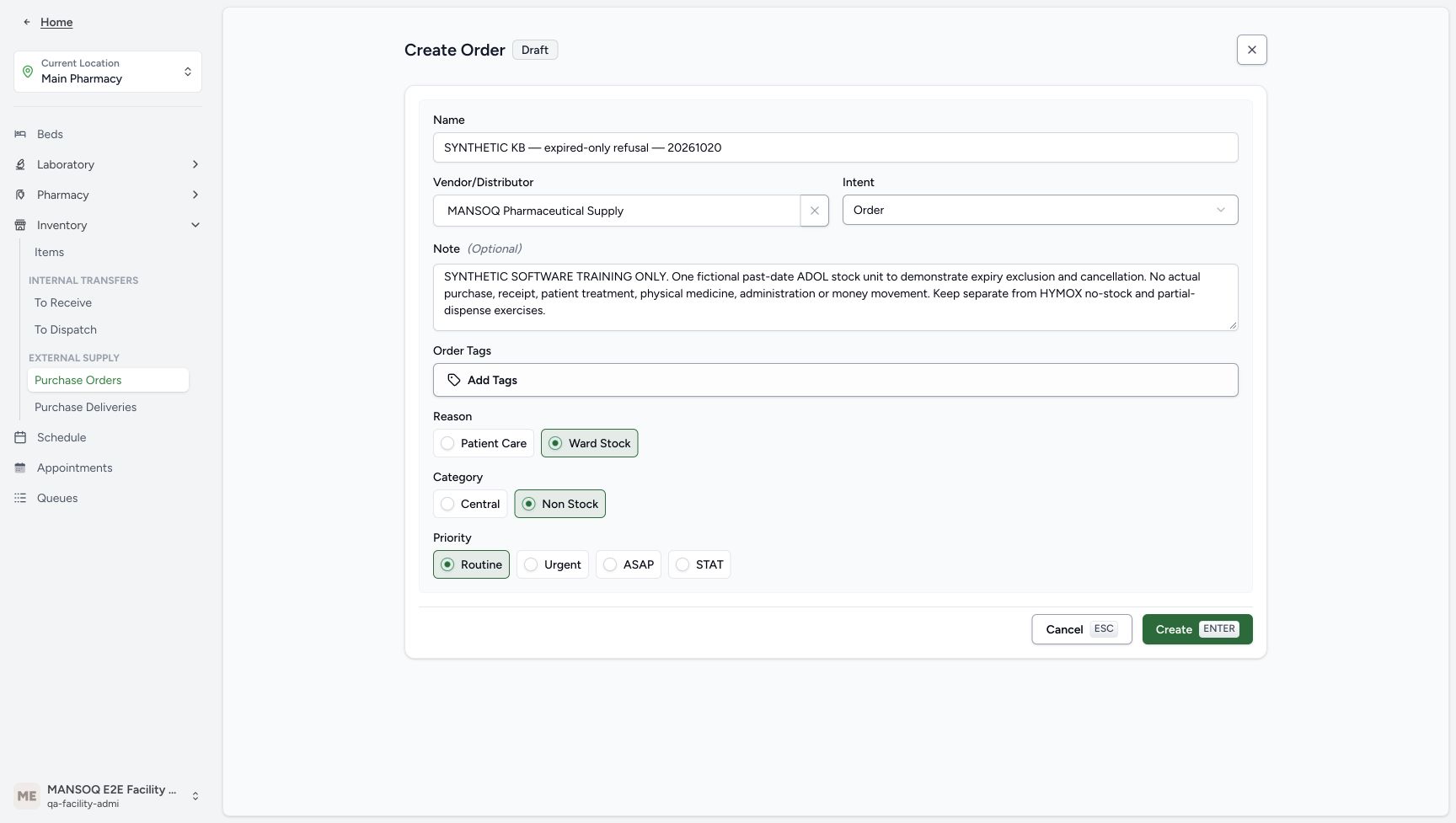 12345678
Explicit synthetic request before Create
Capture details
Captured in the isolated synthetic d20e training estate with the ordinary FacilityAdmin role. This past-date test fixture does not authorise accepting expired medicines as usable. No physical goods, patient treatment, actual purchase or money movement is involved.
Image SHA-256 f8c94e6ae7dbf69a8dfcc1616803f029b6a2db92ce79d5e6ea11c03378be1b3f
- Keep the explicit synthetic order name: The name is SYNTHETIC KB — expired-only refusal — 20261020.
- Use the existing fictional supplier: The selected supplier is MANSOQ Pharmaceutical Supply.
- Retain Order intent: The illustrated intent is Order.
- Preserve the software-only note: The note excludes actual purchase, receipt, treatment, medicine, administration and money movement.
- Keep the illustrated Ward Stock reason: This is a synthetic fixture value, not a clinical stock decision.
- Keep Non Stock category: Use the illustrated request category, separate from the later price category.
- Keep Routine priority: The isolated example uses Routine.
- Create this one labelled request: Submit the reviewed separate fixture request once.
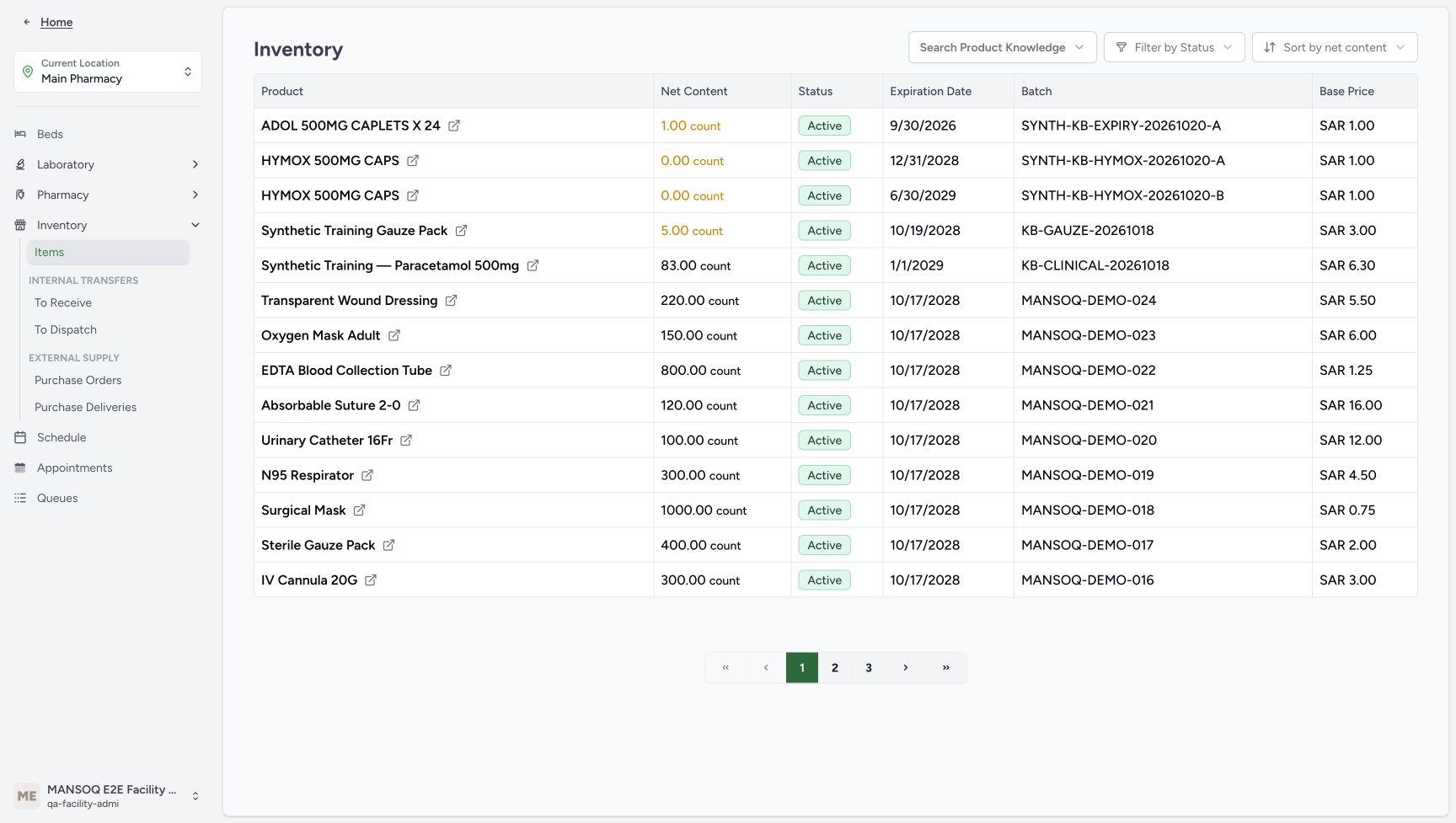 123456
Positive stock with a past date
Capture details
Captured in the isolated synthetic d20e training estate with the ordinary FacilityAdmin role. This past-date test fixture does not authorise accepting expired medicines as usable. No physical goods, patient treatment, actual purchase or money movement is involved.
Image SHA-256 86b809c281511f377d4a8f8c2620aee2edcc90e2996917117f742080a785eb6d
- Open the saved ADOL Product link: The inventory first row belongs to the new isolated fixture.
- Read positive stock one: The ADOL inventory row contains 1.00 count.
- Read Active as lifecycle only: Active does not establish that stock is unexpired or dispensable.
- Read the past expiry: The inventory date is 9/30/2026.
- Match the exact synthetic batch: Use SYNTH-KB-EXPIRY-20261020-A.
- Read Base Price SAR 1.00: This inventory price is separate from a bill or payment.
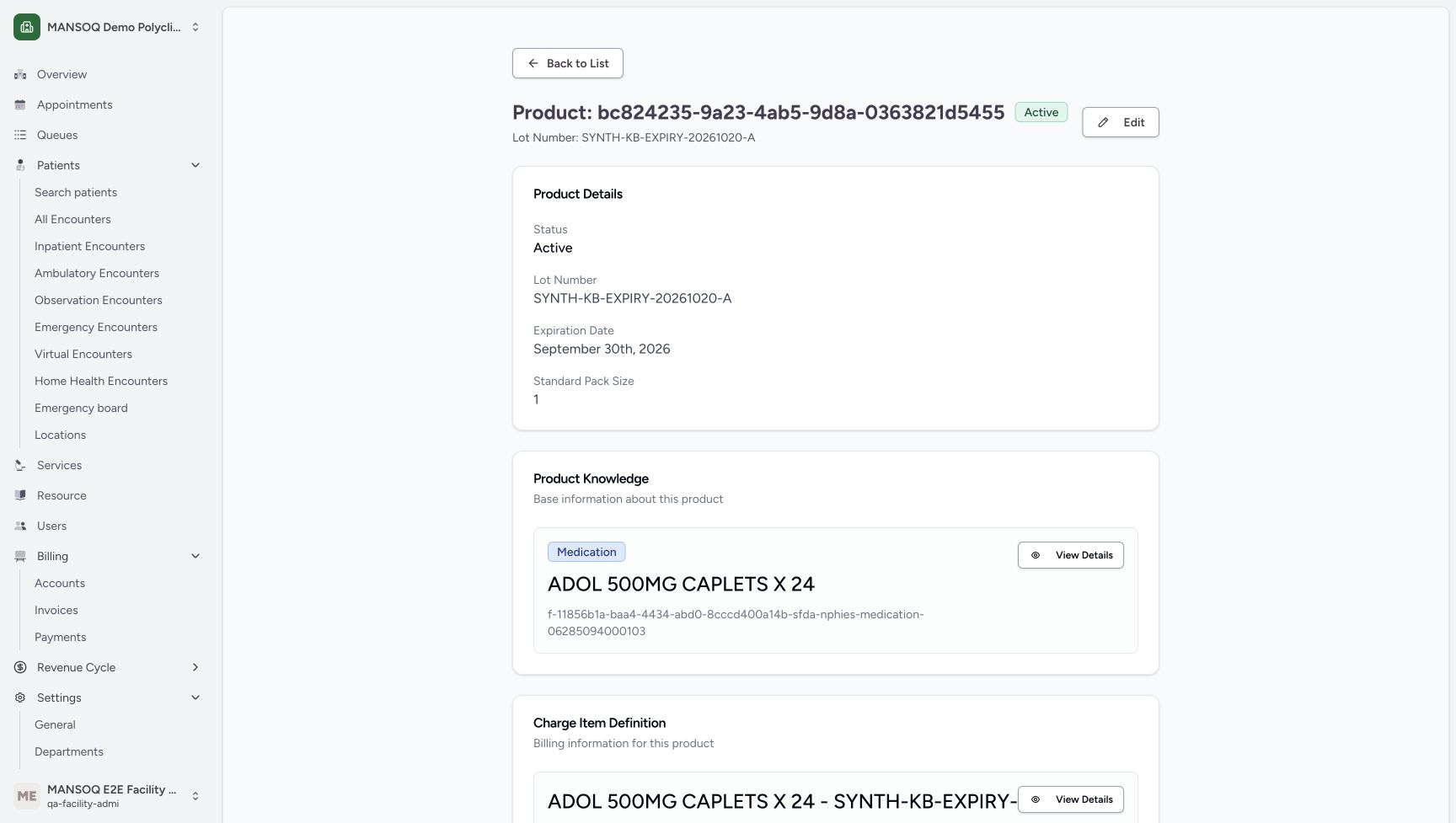 12345
12345Saved Product batch and past expiry
Capture details
Captured in the isolated synthetic d20e training estate with the ordinary FacilityAdmin role. This past-date test fixture does not authorise accepting expired medicines as usable. No physical goods, patient treatment, actual purchase or money movement is involved.
Image SHA-256 c34a27f3c1222f298f8b6602fc155438f8091125cabe6e88676db329878dc1ff
- Verify saved batch: The Product retains the exact synthetic lot.
- Verify saved September 30 expiry: The Product displays September 30th, 2026.
- Verify Standard Pack Size one: The saved pack size is 1.
- Verify actual ADOL master code: The linked Product Knowledge code ends 06285094000103.
- Keep Active separate from expiry eligibility: This badge is lifecycle status, not a dispensing clearance.
23 of 23 content blocks have reviewed image alignment.
Before you begin
- Use only the authorised isolated synthetic software-training estate and existing ordinary FacilityAdmin account. This deliberate past-date fixture exists solely for the separate expiry-safeguard exercise. Do not use this procedure to accept expired physical medicines or establish clinical usability; no actual goods, treatment, purchase or money are involved.
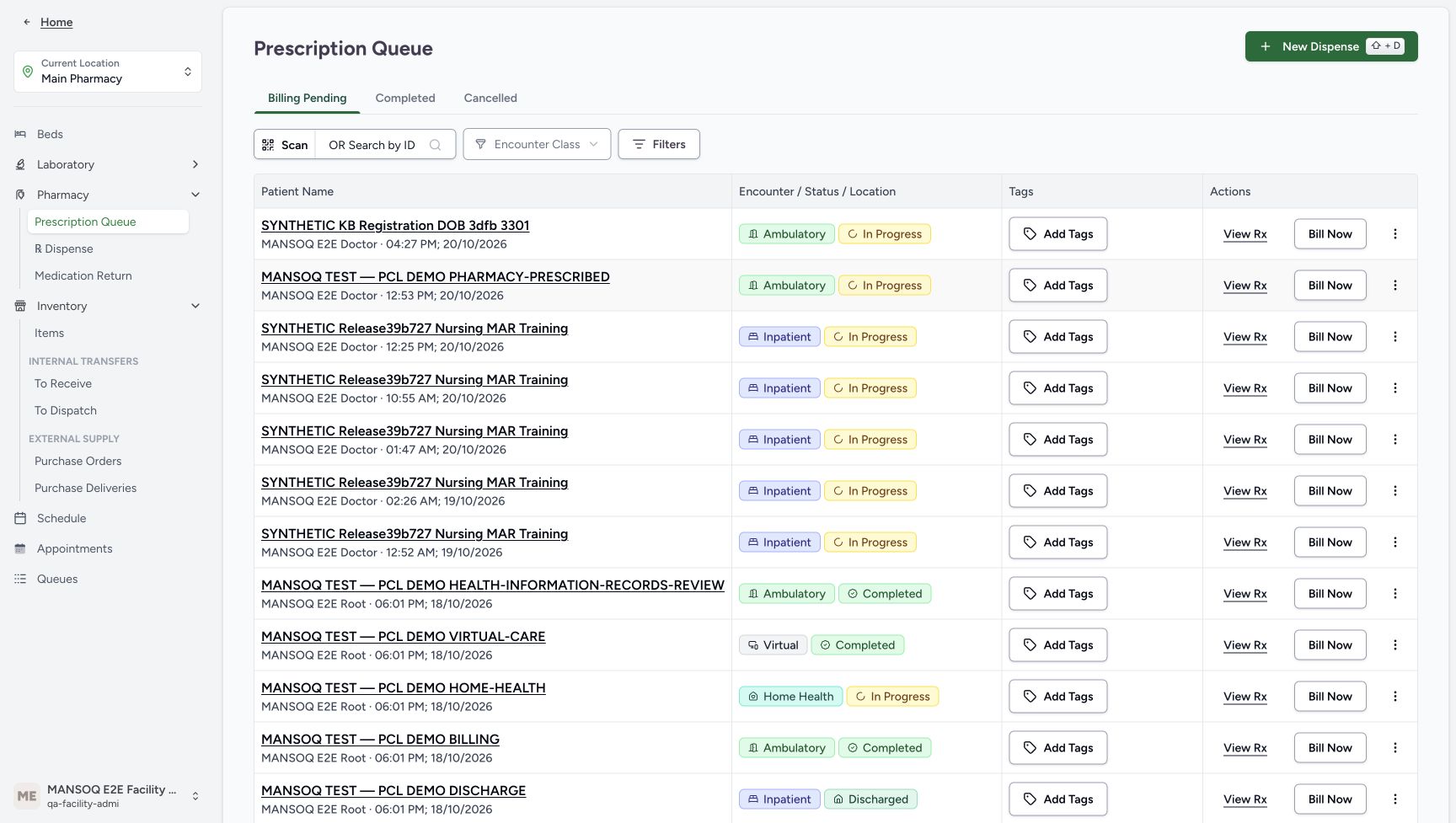 123
123Recorded release d20e68ed · 2026-10-20T14:47:12.351Z · 1728 × 977 Assigned location and ordinary actor
Capture details
Captured in the isolated synthetic d20e training estate with the ordinary FacilityAdmin role. This past-date test fixture does not authorise accepting expired medicines as usable. No physical goods, patient treatment, actual purchase or money movement is involved.
Image SHA-256
5a9e371c17037c0f36e58ba738f693a4d454bcbdc7a911dcad84a78433b6272a- Verify Main Pharmacy: Start at the already assigned Main Pharmacy training location.
- Recognise the ordinary FacilityAdmin account: Verify the existing MANSOQ E2E Facility Admin account.
- Open Purchase Orders: Use the expanded Inventory external-supply navigation.
12345678Recorded release d20e68ed · 2026-10-20T14:47:37.476Z · 1728 × 977 Explicit synthetic request before Create
Capture details
Captured in the isolated synthetic d20e training estate with the ordinary FacilityAdmin role. This past-date test fixture does not authorise accepting expired medicines as usable. No physical goods, patient treatment, actual purchase or money movement is involved.
Image SHA-256
f8c94e6ae7dbf69a8dfcc1616803f029b6a2db92ce79d5e6ea11c03378be1b3f- Keep the explicit synthetic order name: The name is SYNTHETIC KB — expired-only refusal — 20261020.
- Use the existing fictional supplier: The selected supplier is MANSOQ Pharmaceutical Supply.
- Retain Order intent: The illustrated intent is Order.
- Preserve the software-only note: The note excludes actual purchase, receipt, treatment, medicine, administration and money movement.
- Keep the illustrated Ward Stock reason: This is a synthetic fixture value, not a clinical stock decision.
- Keep Non Stock category: Use the illustrated request category, separate from the later price category.
- Keep Routine priority: The isolated example uses Routine.
- Create this one labelled request: Submit the reviewed separate fixture request once.
- Start at the assigned Main Pharmacy location. “Receive two synthetic batches and verify their saved prices” already demonstrates normal Services/location and inventory navigation. This is a separate labelled ADOL fixture; preserve the earlier HYMOX and Paracetamol records, orders and payments.123
Recorded release d20e68ed · 2026-10-20T14:47:12.351Z · 1728 × 977 Assigned location and ordinary actor
Capture details
Captured in the isolated synthetic d20e training estate with the ordinary FacilityAdmin role. This past-date test fixture does not authorise accepting expired medicines as usable. No physical goods, patient treatment, actual purchase or money movement is involved.
Image SHA-256
5a9e371c17037c0f36e58ba738f693a4d454bcbdc7a911dcad84a78433b6272a- Verify Main Pharmacy: Start at the already assigned Main Pharmacy training location.
- Recognise the ordinary FacilityAdmin account: Verify the existing MANSOQ E2E Facility Admin account.
- Open Purchase Orders: Use the expanded Inventory external-supply navigation.
 123
123Recorded release d20e68ed · 2026-10-20T14:56:22.481Z · 1728 × 977 Inventory Items readback navigation
Capture details
Captured in the isolated synthetic d20e training estate with the ordinary FacilityAdmin role. This past-date test fixture does not authorise accepting expired medicines as usable. No physical goods, patient treatment, actual purchase or money movement is involved.
Image SHA-256
93a2572c569bd41348044565780186e2df08803ed953dc22608ee822981deab1- Use the Inventory menu: The location menu is expanded for readback.
- Open Items: Inspect Main Pharmacy inventory.
- Keep the completed delivery context: This readback starts from the same saved fixture delivery.
- Use the existing ADOL 500MG CAPLETS X24 master with exact code 06285094000103, the existing MANSOQ Pharmaceutical Supply supplier and Demo Medications price category. The request category Non Stock is a different field. Retain the explicit synthetic name and note throughout.12345678
Recorded release d20e68ed · 2026-10-20T14:47:37.476Z · 1728 × 977 Explicit synthetic request before Create
Capture details
Captured in the isolated synthetic d20e training estate with the ordinary FacilityAdmin role. This past-date test fixture does not authorise accepting expired medicines as usable. No physical goods, patient treatment, actual purchase or money movement is involved.
Image SHA-256
f8c94e6ae7dbf69a8dfcc1616803f029b6a2db92ce79d5e6ea11c03378be1b3f- Keep the explicit synthetic order name: The name is SYNTHETIC KB — expired-only refusal — 20261020.
- Use the existing fictional supplier: The selected supplier is MANSOQ Pharmaceutical Supply.
- Retain Order intent: The illustrated intent is Order.
- Preserve the software-only note: The note excludes actual purchase, receipt, treatment, medicine, administration and money movement.
- Keep the illustrated Ward Stock reason: This is a synthetic fixture value, not a clinical stock decision.
- Keep Non Stock category: Use the illustrated request category, separate from the later price category.
- Keep Routine priority: The isolated example uses Routine.
- Create this one labelled request: Submit the reviewed separate fixture request once.
 123
123Recorded release d20e68ed · 2026-10-20T14:51:08.027Z · 1728 × 977 Exact ADOL code versus nearby result
Capture details
Captured in the isolated synthetic d20e training estate with the ordinary FacilityAdmin role. This past-date test fixture does not authorise accepting expired medicines as usable. No physical goods, patient treatment, actual purchase or money movement is involved.
Image SHA-256
86f4c8e68b5ca702ab6c00a68506f51b52e1f437ab9fdd89b7b157e4ddc6435d- Search the exact ADOL code: The search is 06285094000103.
- Choose the exact ADOL result: Select ADOL 500MG CAPLETS X24 with actual code 06285094000103.
- Distinguish the nearby GENERIC result: The other visible result has code 06285094000097 and is not the intended master.
 12345678910
Recorded release d20e68ed · 2026-10-20T14:53:47.357Z · 1728 × 977 Deliberate past-date synthetic receipt draft
Capture details
Captured in the isolated synthetic d20e training estate with the ordinary FacilityAdmin role. This past-date test fixture does not authorise accepting expired medicines as usable. No physical goods, patient treatment, actual purchase or money movement is involved.
Image SHA-256
94c9950016f5cc3f86437f8fe8b25665ba97f3c41c8a185ace61a9ab4989f6a4- Verify ADOL in the receipt row: Use the exact selected master, not the nearby GENERIC result.
- Set the isolated synthetic batch: The full saved batch is SYNTH-KB-EXPIRY-20261020-A.
- Enter the deliberate past expiry: The fixture date is September 30, 2026, shown as 30/09/2026; this is not acceptable usable-stock training.
- Keep existing Demo Medications: This is the price definition category, not the earlier request category.
- Keep Pack Size one: The synthetic unit has pack size 1.
- Keep Pack Qty one: Only one fictional unit is prepared.
- Verify calculated quantity one: The form calculates 1.00.
- Keep Sale Item Price SAR 1.00: This is a fictional test price, not an invoice or actual purchase.
- Keep Tax Inclusive unchecked: No tax-exemption or payer decision is implied.
- Locate the receipt Save: Complete the expiry entry, leave the date field and verify it before saving.
1. Start a separate labelled request at Main Pharmacy
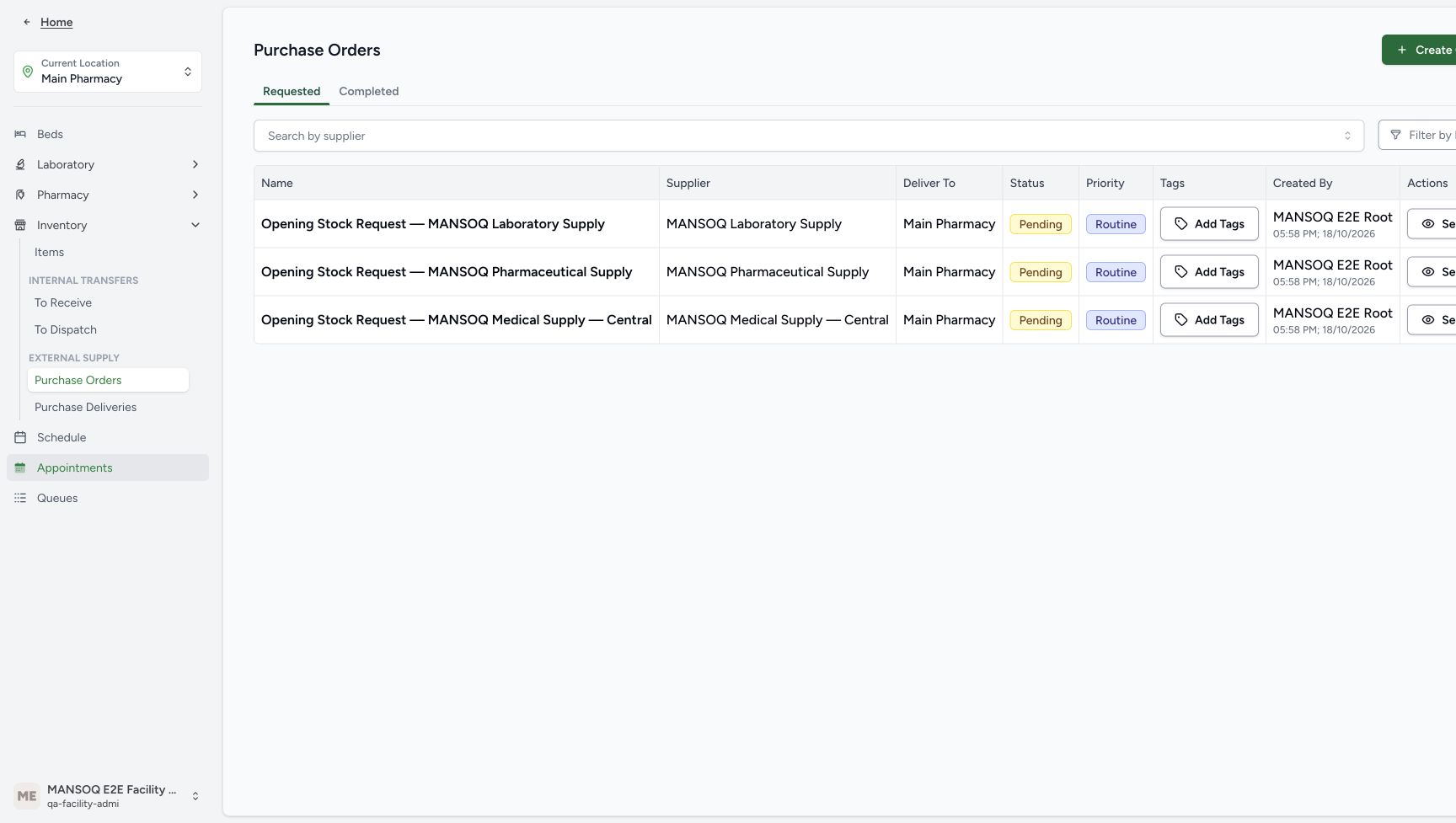
From the existing location, choose Inventory → Purchase Orders, then Create Order. Leave the opening orders unchanged. The location and existing FacilityAdmin account are visible in the starting navigation.
123Assigned location and ordinary actor
Capture details
Captured in the isolated synthetic d20e training estate with the ordinary FacilityAdmin role. This past-date test fixture does not authorise accepting expired medicines as usable. No physical goods, patient treatment, actual purchase or money movement is involved.
Image SHA-256 5a9e371c17037c0f36e58ba738f693a4d454bcbdc7a911dcad84a78433b6272a
- Verify Main Pharmacy: Start at the already assigned Main Pharmacy training location.
- Recognise the ordinary FacilityAdmin account: Verify the existing MANSOQ E2E Facility Admin account.
- Open Purchase Orders: Use the expanded Inventory external-supply navigation.
 1
1Separate request creation entry
Capture details
Captured in the isolated synthetic d20e training estate with the ordinary FacilityAdmin role. This past-date test fixture does not authorise accepting expired medicines as usable. No physical goods, patient treatment, actual purchase or money movement is involved.
Image SHA-256 74190e4fd45cbf32342ddcb597fc4fa6f315571976bdddbec6b97438264dcb0c
- Create a separate order: Choose the visible Create Order control at the right edge; preserve the existing opening orders.
2. Review the software-only request and Create once
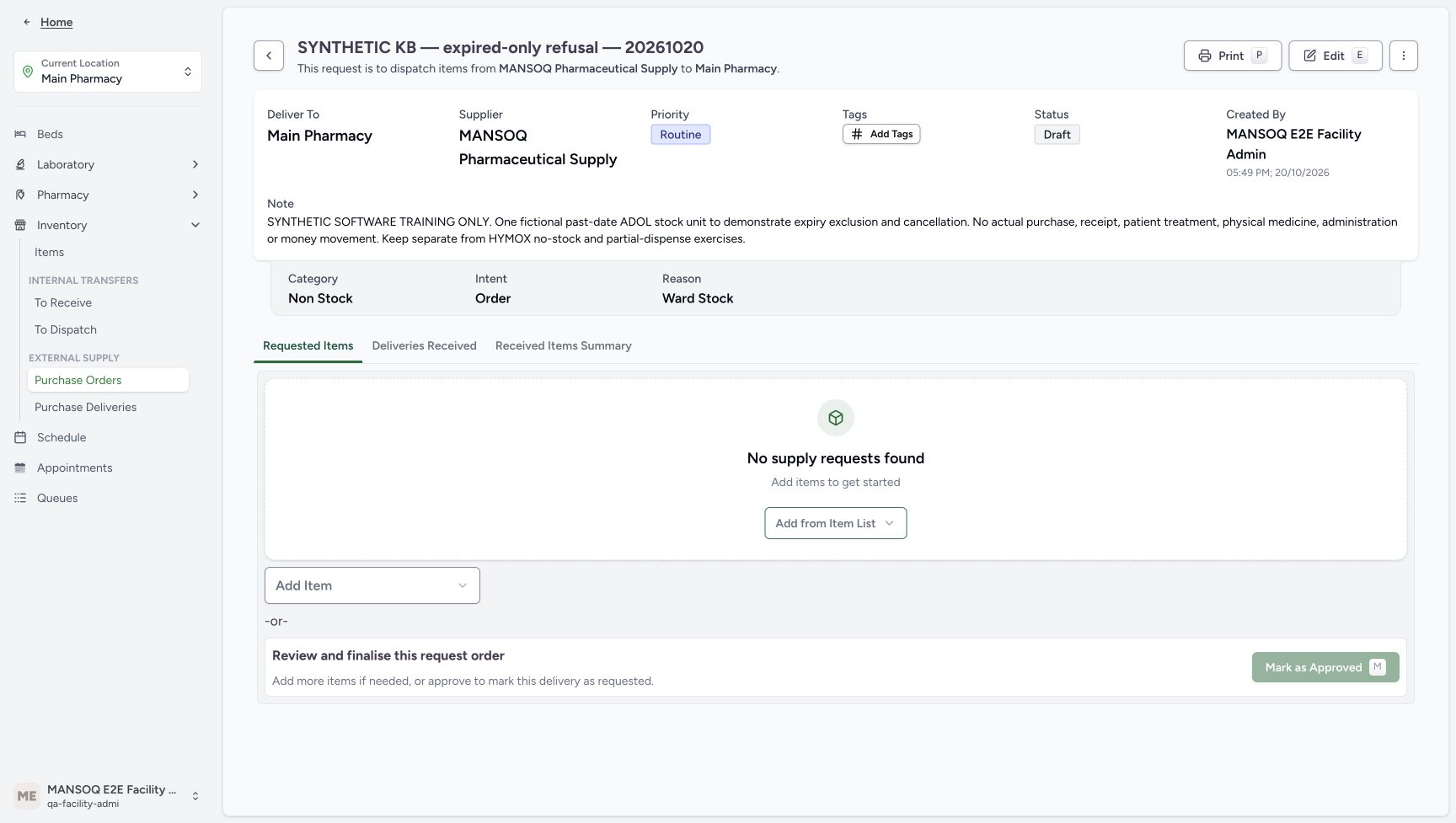
Use name SYNTHETIC KB — expired-only refusal — 20261020. Select existing MANSOQ Pharmaceutical Supply, keep Order intent, Ward Stock reason, Non Stock category and Routine priority. Preserve the illustrated note excluding actual purchase, receipt, treatment, physical medicine, administration and money movement. Choose Create once. The saved request is Draft and initially has no supply rows.
12345678Explicit synthetic request before Create
Capture details
Captured in the isolated synthetic d20e training estate with the ordinary FacilityAdmin role. This past-date test fixture does not authorise accepting expired medicines as usable. No physical goods, patient treatment, actual purchase or money movement is involved.
Image SHA-256 f8c94e6ae7dbf69a8dfcc1616803f029b6a2db92ce79d5e6ea11c03378be1b3f
- Keep the explicit synthetic order name: The name is SYNTHETIC KB — expired-only refusal — 20261020.
- Use the existing fictional supplier: The selected supplier is MANSOQ Pharmaceutical Supply.
- Retain Order intent: The illustrated intent is Order.
- Preserve the software-only note: The note excludes actual purchase, receipt, treatment, medicine, administration and money movement.
- Keep the illustrated Ward Stock reason: This is a synthetic fixture value, not a clinical stock decision.
- Keep Non Stock category: Use the illustrated request category, separate from the later price category.
- Keep Routine priority: The isolated example uses Routine.
- Create this one labelled request: Submit the reviewed separate fixture request once.
 123
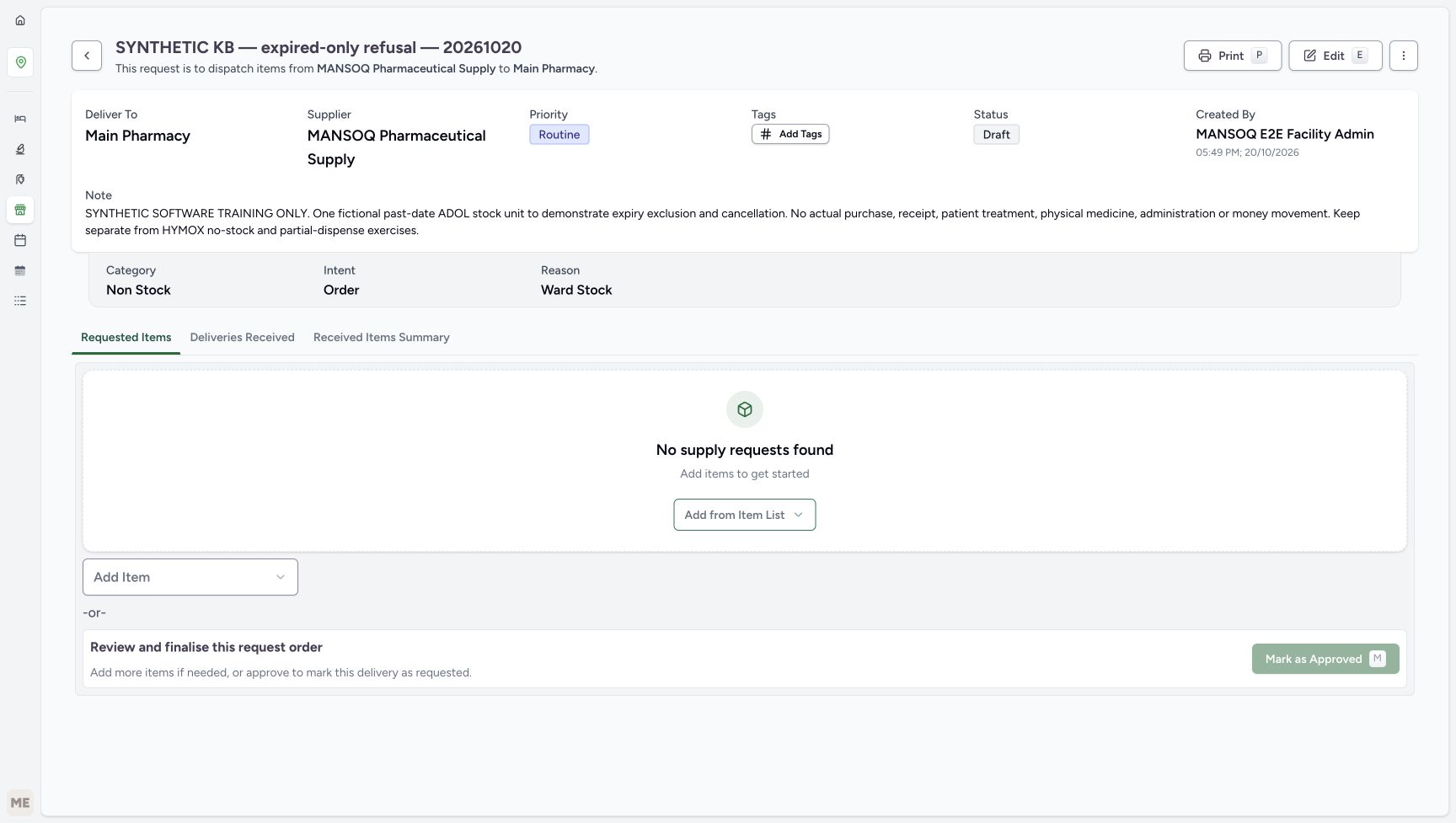
123Saved Draft request is empty
Capture details
Captured in the isolated synthetic d20e training estate with the ordinary FacilityAdmin role. This past-date test fixture does not authorise accepting expired medicines as usable. No physical goods, patient treatment, actual purchase or money movement is involved.
Image SHA-256 b73f2f75b2a08acab4dd75781fc2c4201b16a4bf44444cad02f1a68d25d221ba
- Match the labelled Draft request: The saved request retains its synthetic name.
- Read Draft: Creating the request has not yet received any stock.
- Choose Add Item: Open the medication master selector for this request.
3. Choose exact ADOL and verify the editable row
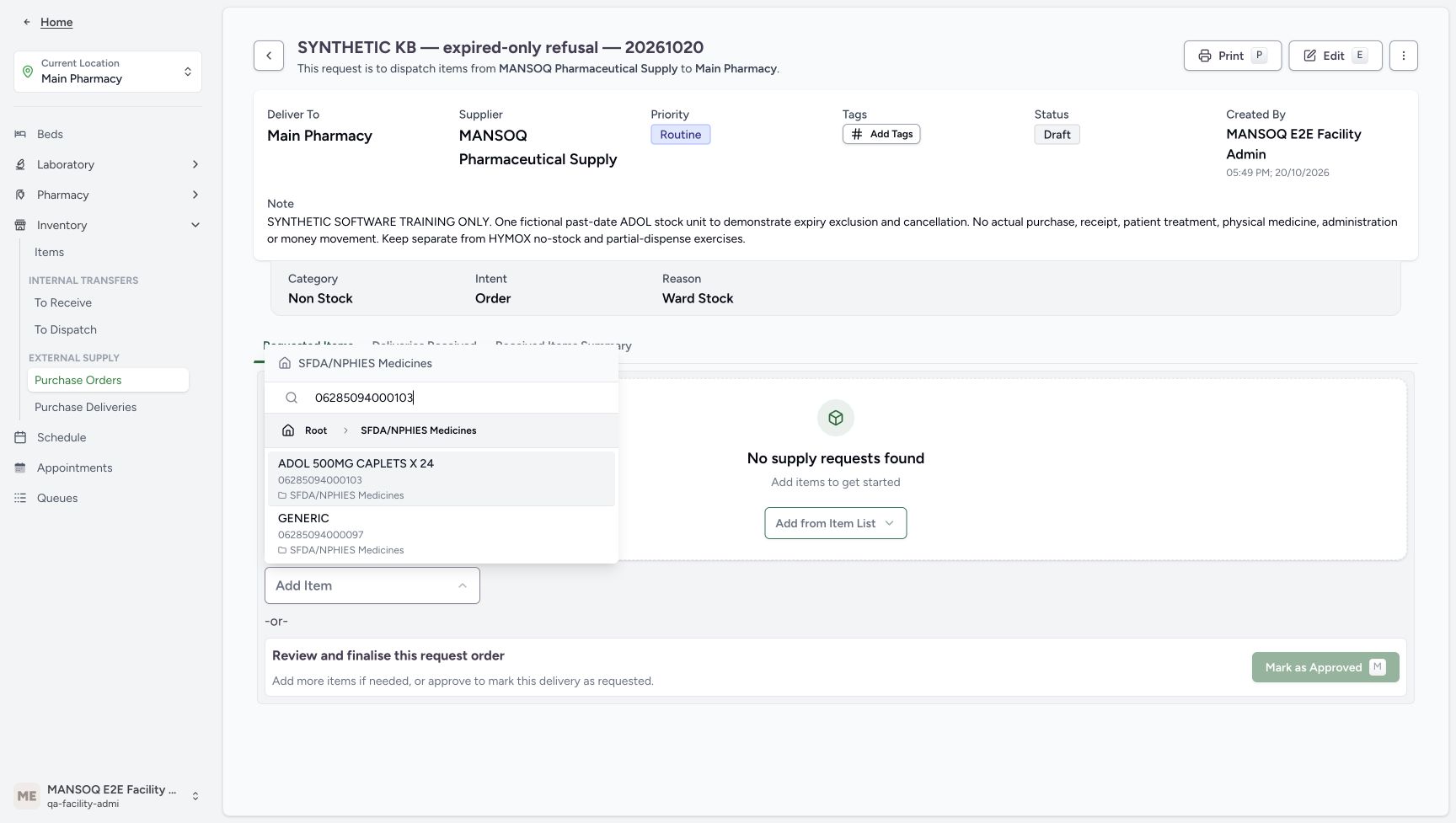
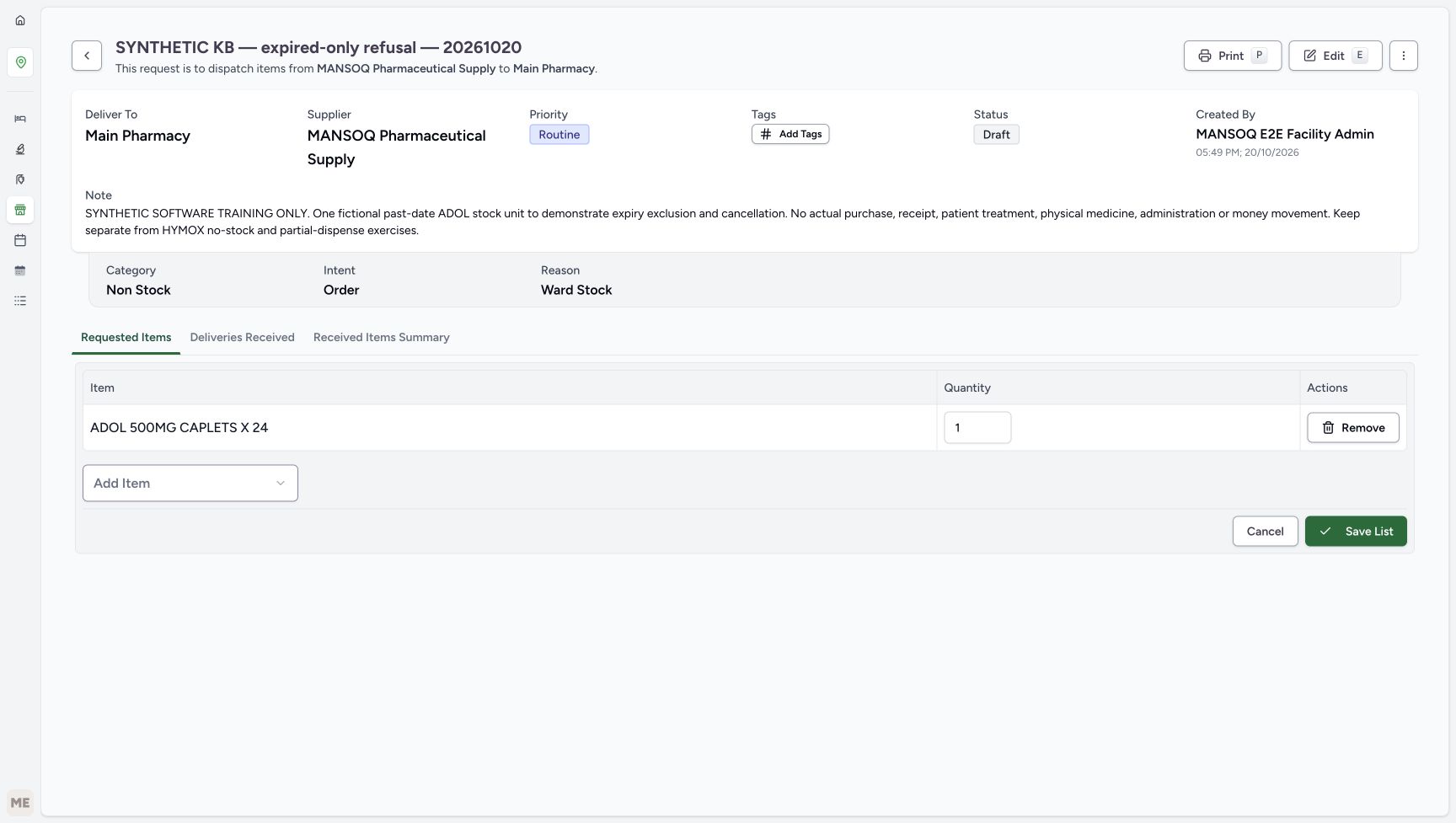
Choose Add Item and search 06285094000103. Select ADOL 500MG CAPLETS X24 with that actual code, not the nearby GENERIC result 06285094000097. If the item list is empty after selection, wait for the page to settle, choose Add Item again and reselect the exact master. Verify the editable ADOL row and quantity 1 before choosing Save List.
123Saved Draft request is empty
Capture details
Captured in the isolated synthetic d20e training estate with the ordinary FacilityAdmin role. This past-date test fixture does not authorise accepting expired medicines as usable. No physical goods, patient treatment, actual purchase or money movement is involved.
Image SHA-256 b73f2f75b2a08acab4dd75781fc2c4201b16a4bf44444cad02f1a68d25d221ba
- Match the labelled Draft request: The saved request retains its synthetic name.
- Read Draft: Creating the request has not yet received any stock.
- Choose Add Item: Open the medication master selector for this request.
123Exact ADOL code versus nearby result
Capture details
Captured in the isolated synthetic d20e training estate with the ordinary FacilityAdmin role. This past-date test fixture does not authorise accepting expired medicines as usable. No physical goods, patient treatment, actual purchase or money movement is involved.
Image SHA-256 86f4c8e68b5ca702ab6c00a68506f51b52e1f437ab9fdd89b7b157e4ddc6435d
- Search the exact ADOL code: The search is 06285094000103.
- Choose the exact ADOL result: Select ADOL 500MG CAPLETS X24 with actual code 06285094000103.
- Distinguish the nearby GENERIC result: The other visible result has code 06285094000097 and is not the intended master.
 12
12Check an empty item list
Capture details
Captured in the isolated synthetic d20e training estate with the ordinary FacilityAdmin role. This past-date test fixture does not authorise accepting expired medicines as usable. No physical goods, patient treatment, actual purchase or money movement is involved.
Image SHA-256 9e8466328d790a7453ac2d7f82a87a3f35b5ee3463c5f49ea630d7eb18beec9e
- Check whether the item list is empty: No supply requests found means no editable item row is present yet.
- Choose Add Item again: Select the same exact ADOL master after the page settles.
 123
123Verify the editable one-unit request row
Capture details
Captured in the isolated synthetic d20e training estate with the ordinary FacilityAdmin role. This past-date test fixture does not authorise accepting expired medicines as usable. No physical goods, patient treatment, actual purchase or money movement is involved.
Image SHA-256 e9ee1a2fc56cb723653ebbe9393854532145b2c9e75408b86a38bc950c91f30a
- Verify the editable one-unit ADOL row: Check the ADOL name and editable quantity before saving.
- Keep requested quantity one: Review the one fictional unit before saving the list.
- Save List once: Save only this settled one-unit request row.
4. Save one request row and approve that request
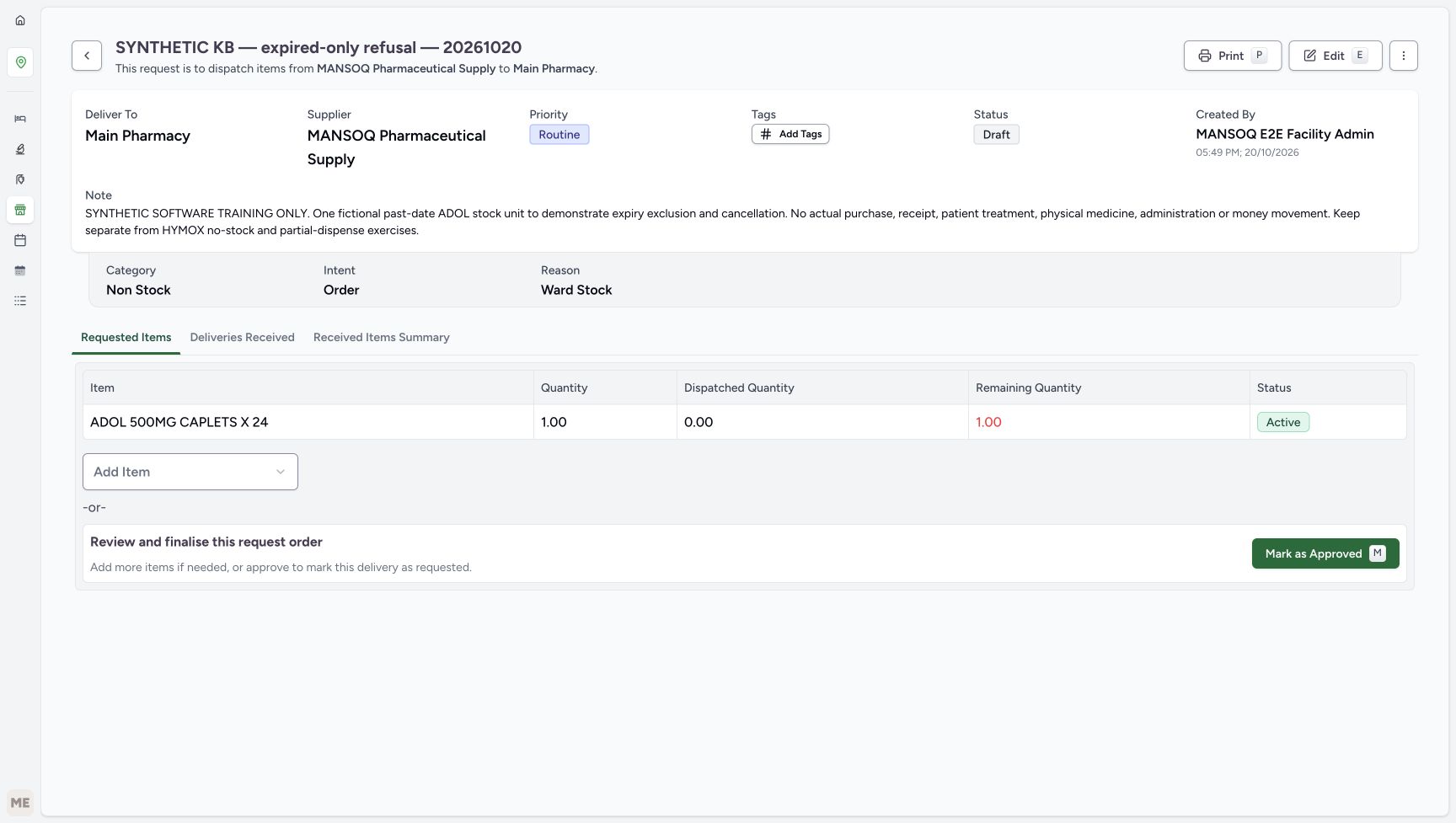
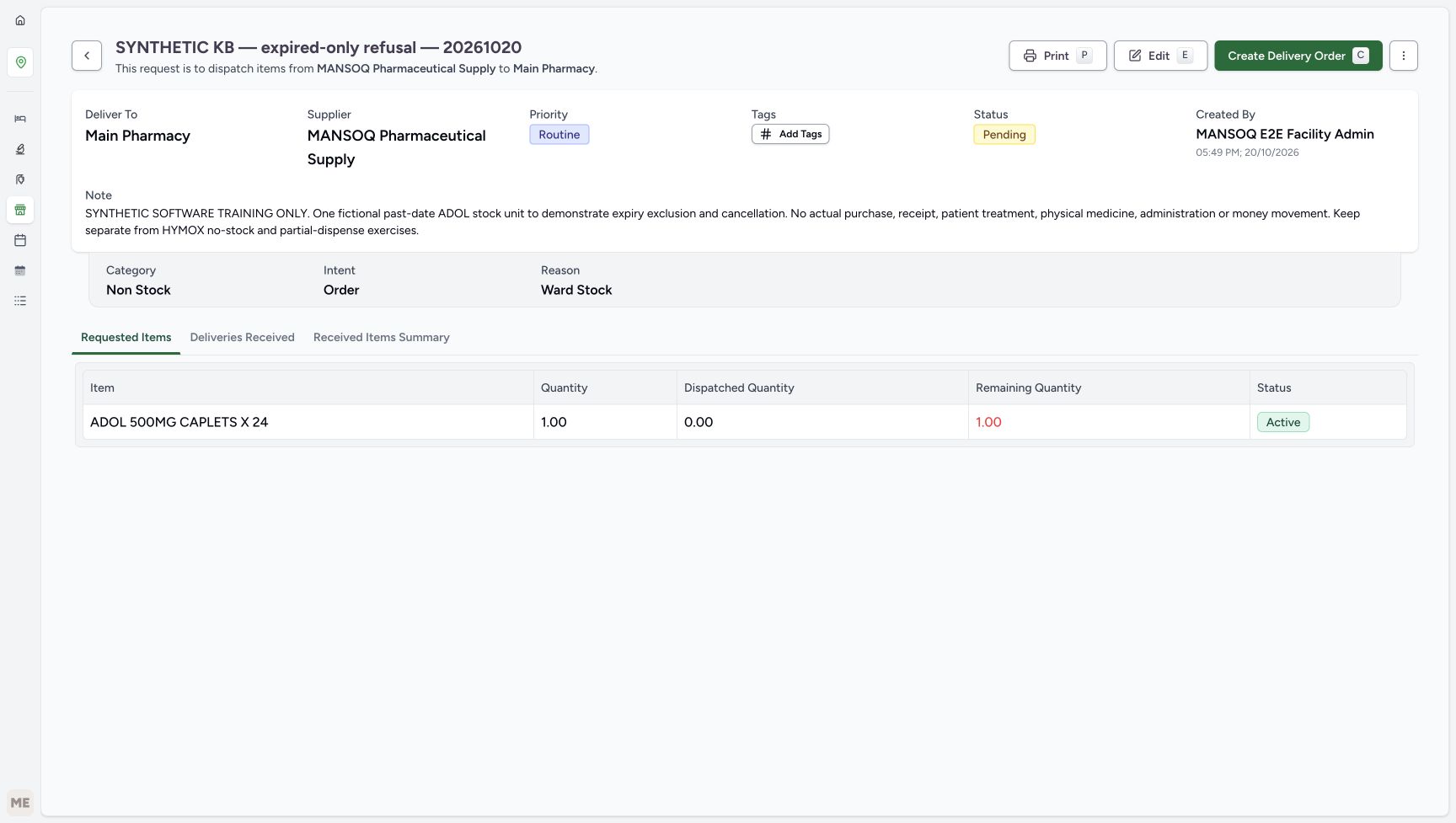
Keep requested quantity 1 and choose Save List once. The saved row shows requested 1.00, dispatched 0.00, remaining 1.00 and Active. Choose Mark as Approved for this labelled request. Its header becomes Pending and Create Delivery Order is available. Request approval alone has not received stock.
123Verify the editable one-unit request row
Capture details
Captured in the isolated synthetic d20e training estate with the ordinary FacilityAdmin role. This past-date test fixture does not authorise accepting expired medicines as usable. No physical goods, patient treatment, actual purchase or money movement is involved.
Image SHA-256 e9ee1a2fc56cb723653ebbe9393854532145b2c9e75408b86a38bc950c91f30a
- Verify the editable one-unit ADOL row: Check the ADOL name and editable quantity before saving.
- Keep requested quantity one: Review the one fictional unit before saving the list.
- Save List once: Save only this settled one-unit request row.
 12345
12345Saved request before approval
Capture details
Captured in the isolated synthetic d20e training estate with the ordinary FacilityAdmin role. This past-date test fixture does not authorise accepting expired medicines as usable. No physical goods, patient treatment, actual purchase or money movement is involved.
Image SHA-256 9c51d0acccce69ad0f26c77ce66488e7ece92ad33957b2c3a26c29856619ee74
- Read requested quantity one: The saved request contains 1.00 unit.
- Read dispatched zero: The request has not yet been supplied.
- Read remaining one: The initial outstanding quantity is 1.00.
- Read request-row Active: This is the supply-request lifecycle state.
- Mark the request as Approved: Approve this labelled fixture request once.
 12
12Approved request ready for separate delivery
Capture details
Captured in the isolated synthetic d20e training estate with the ordinary FacilityAdmin role. This past-date test fixture does not authorise accepting expired medicines as usable. No physical goods, patient treatment, actual purchase or money movement is involved.
Image SHA-256 e204e862adb3be773501f762d967a0ba69b7dbd6406b3fdbd82534e50c3726c0
- Read request Pending: Approval changes the request header to Pending, not stock received.
- Create Delivery Order: Start the separate delivery from the approved one-item request.
5. Create the separate inherited delivery
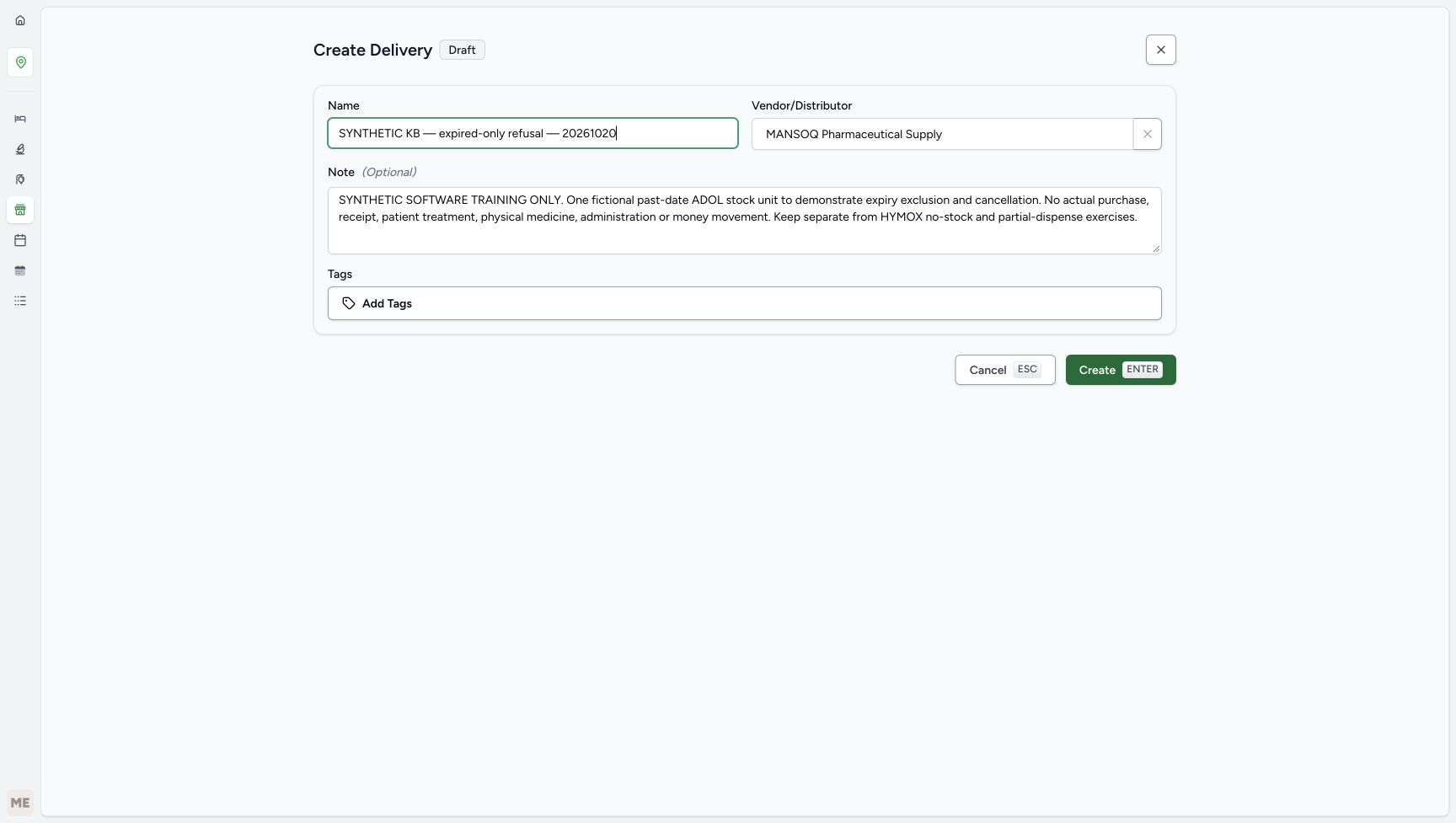
Choose Create Delivery Order. Review the inherited synthetic name, existing supplier and software-only note, then choose Create once. The new delivery is Draft with no receipt row. This delivery record is separate from the source request.
12Approved request ready for separate delivery
Capture details
Captured in the isolated synthetic d20e training estate with the ordinary FacilityAdmin role. This past-date test fixture does not authorise accepting expired medicines as usable. No physical goods, patient treatment, actual purchase or money movement is involved.
Image SHA-256 e204e862adb3be773501f762d967a0ba69b7dbd6406b3fdbd82534e50c3726c0
- Read request Pending: Approval changes the request header to Pending, not stock received.
- Create Delivery Order: Start the separate delivery from the approved one-item request.
 1234
1234Inherited delivery draft review
Capture details
Captured in the isolated synthetic d20e training estate with the ordinary FacilityAdmin role. This past-date test fixture does not authorise accepting expired medicines as usable. No physical goods, patient treatment, actual purchase or money movement is involved.
Image SHA-256 cbb5f7d53c173376d6d5e240d51e0768d5f6a82b2ed326980c992ac70be2cbde
- Review the inherited name: The delivery keeps the same explicit synthetic fixture name.
- Review the inherited supplier: Keep MANSOQ Pharmaceutical Supply as the existing supplier.
- Preserve the inherited software-only note: Do not remove the limitations from the delivery.
- Create this one delivery: Create the reviewed separate delivery once.
 12
12Separate Draft delivery before loading
Capture details
Captured in the isolated synthetic d20e training estate with the ordinary FacilityAdmin role. This past-date test fixture does not authorise accepting expired medicines as usable. No physical goods, patient treatment, actual purchase or money movement is involved.
Image SHA-256 c6d41feb14e5fa8e07e5aa305ae2b9878a6b8984456b83b5dc9744db2341998c
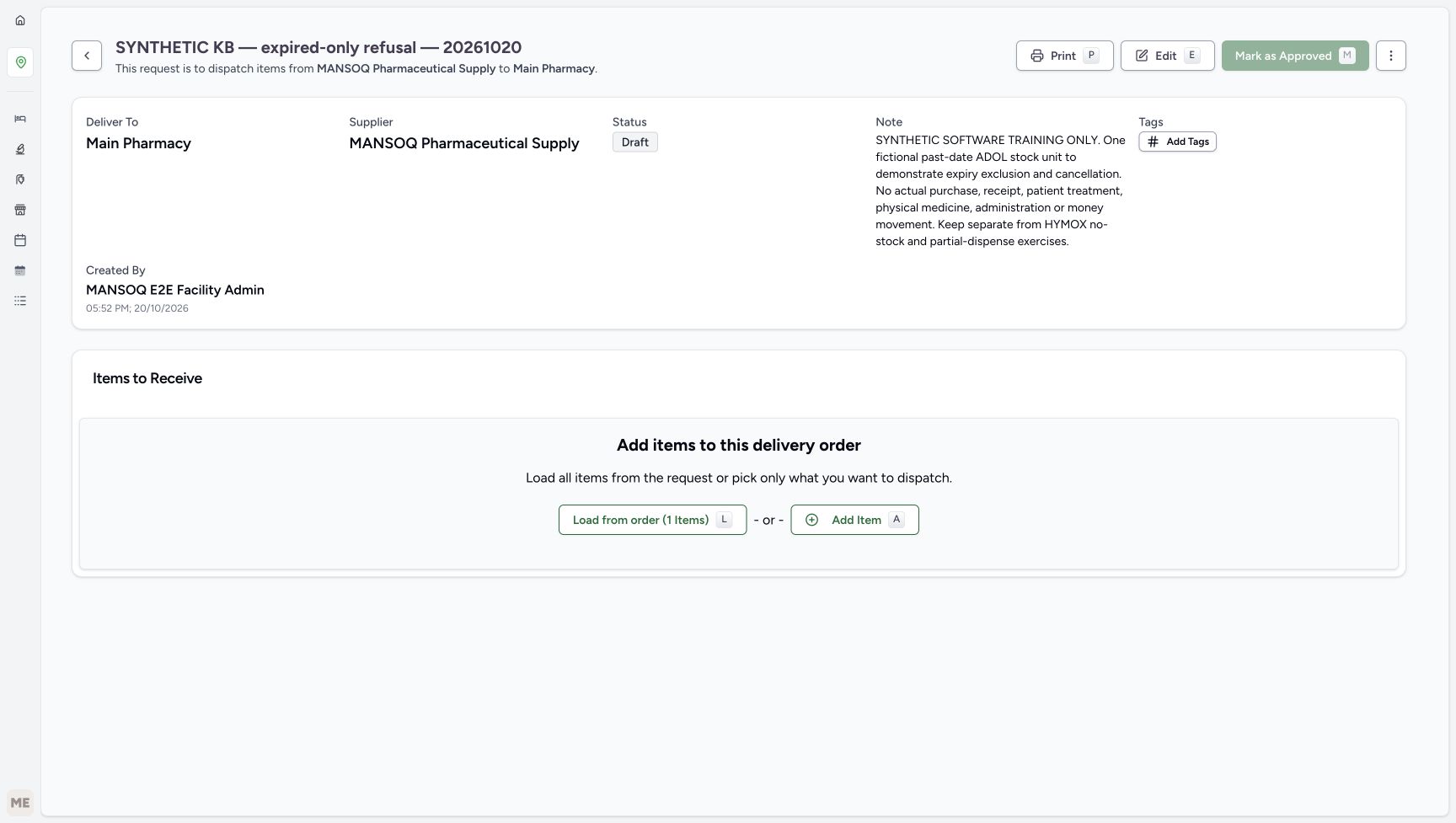
- Read delivery Draft: This is now the separate delivery order; it contains no received rows yet.
- Load from the one-item order: Load the original ADOL request rather than adding an unrelated product.
6. Load only the original one-count request
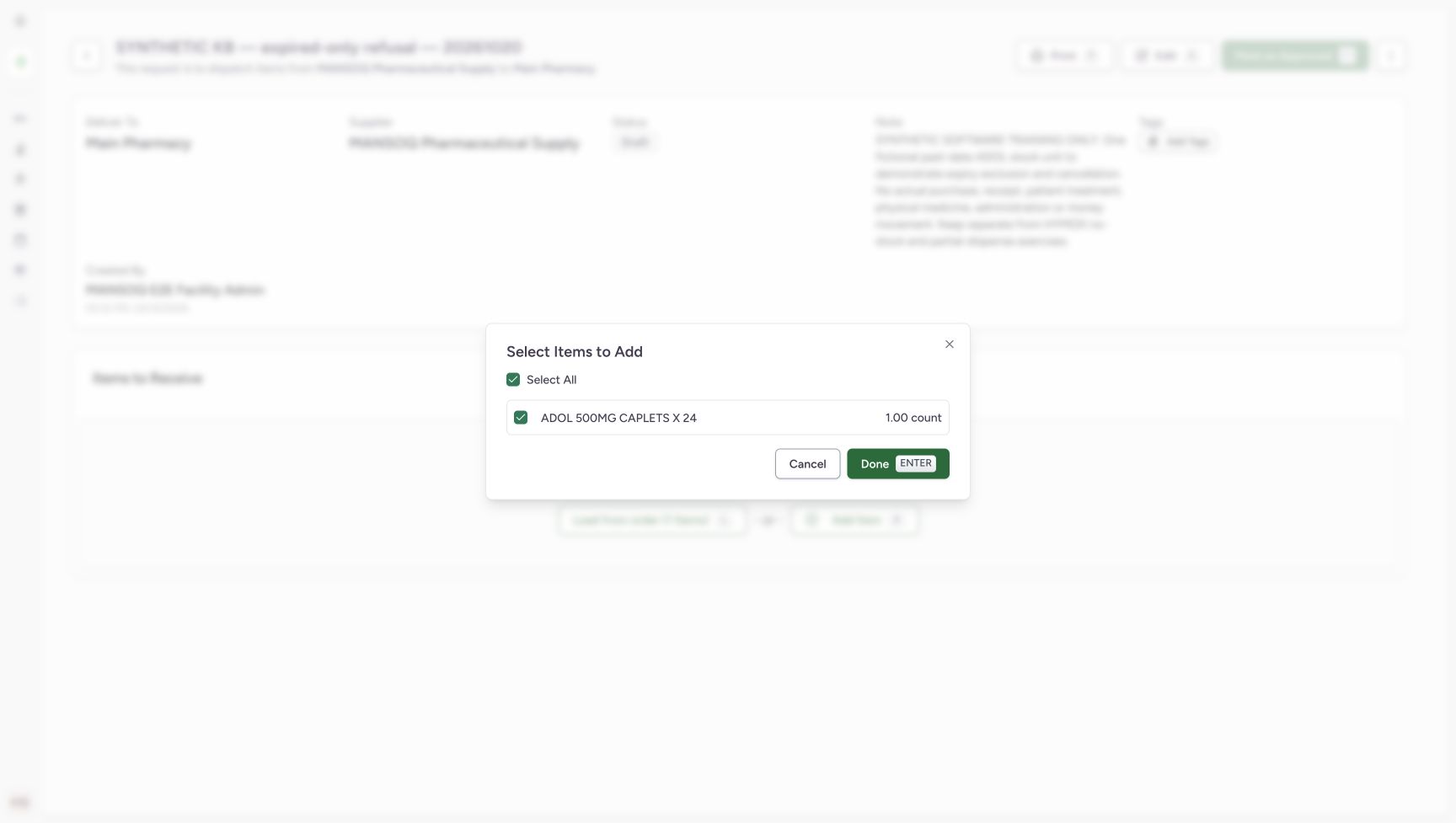
Choose Load from order (1 Items). In Select Items to Add, verify the single checked ADOL 1.00 count row and choose Done. This loads an editable receipt row; it does not yet receive the unit.
12Separate Draft delivery before loading
Capture details
Captured in the isolated synthetic d20e training estate with the ordinary FacilityAdmin role. This past-date test fixture does not authorise accepting expired medicines as usable. No physical goods, patient treatment, actual purchase or money movement is involved.
Image SHA-256 c6d41feb14e5fa8e07e5aa305ae2b9878a6b8984456b83b5dc9744db2341998c
- Read delivery Draft: This is now the separate delivery order; it contains no received rows yet.
- Load from the one-item order: Load the original ADOL request rather than adding an unrelated product.
 123
123One selected original request
Capture details
Captured in the isolated synthetic d20e training estate with the ordinary FacilityAdmin role. This past-date test fixture does not authorise accepting expired medicines as usable. No physical goods, patient treatment, actual purchase or money movement is involved.
Image SHA-256 25cf7b34ae06f737984b6feb1c2d67f81f4dd0151499d1f494a650253adced41
- Verify the selected ADOL request: The item selection dialog contains the intended one ADOL row.
- Verify requested one count: The dialog shows 1.00 count.
- Choose Done: Load that selected request into the editable receipt form.
7. Enter the deliberately past-date fixture values
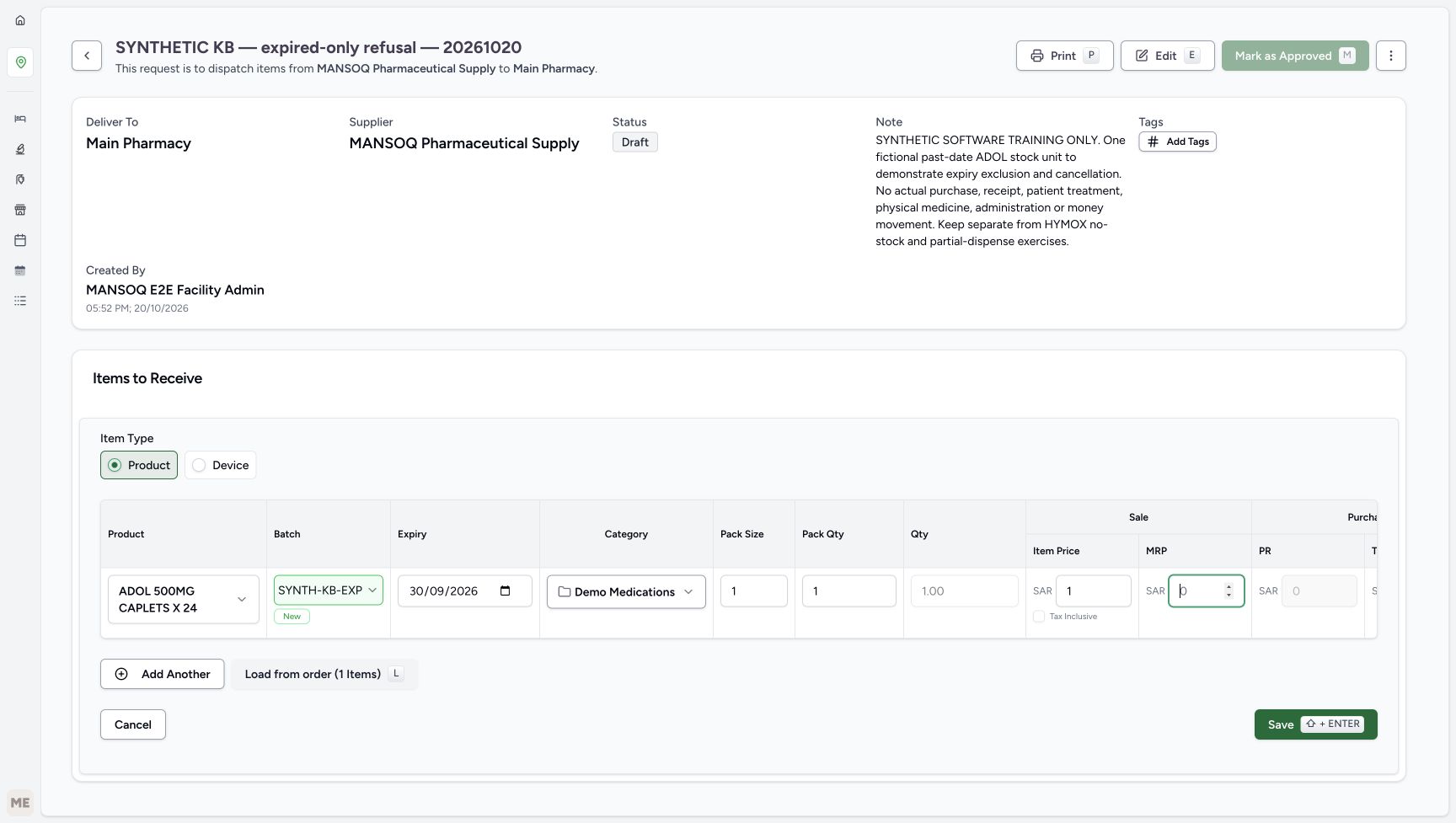
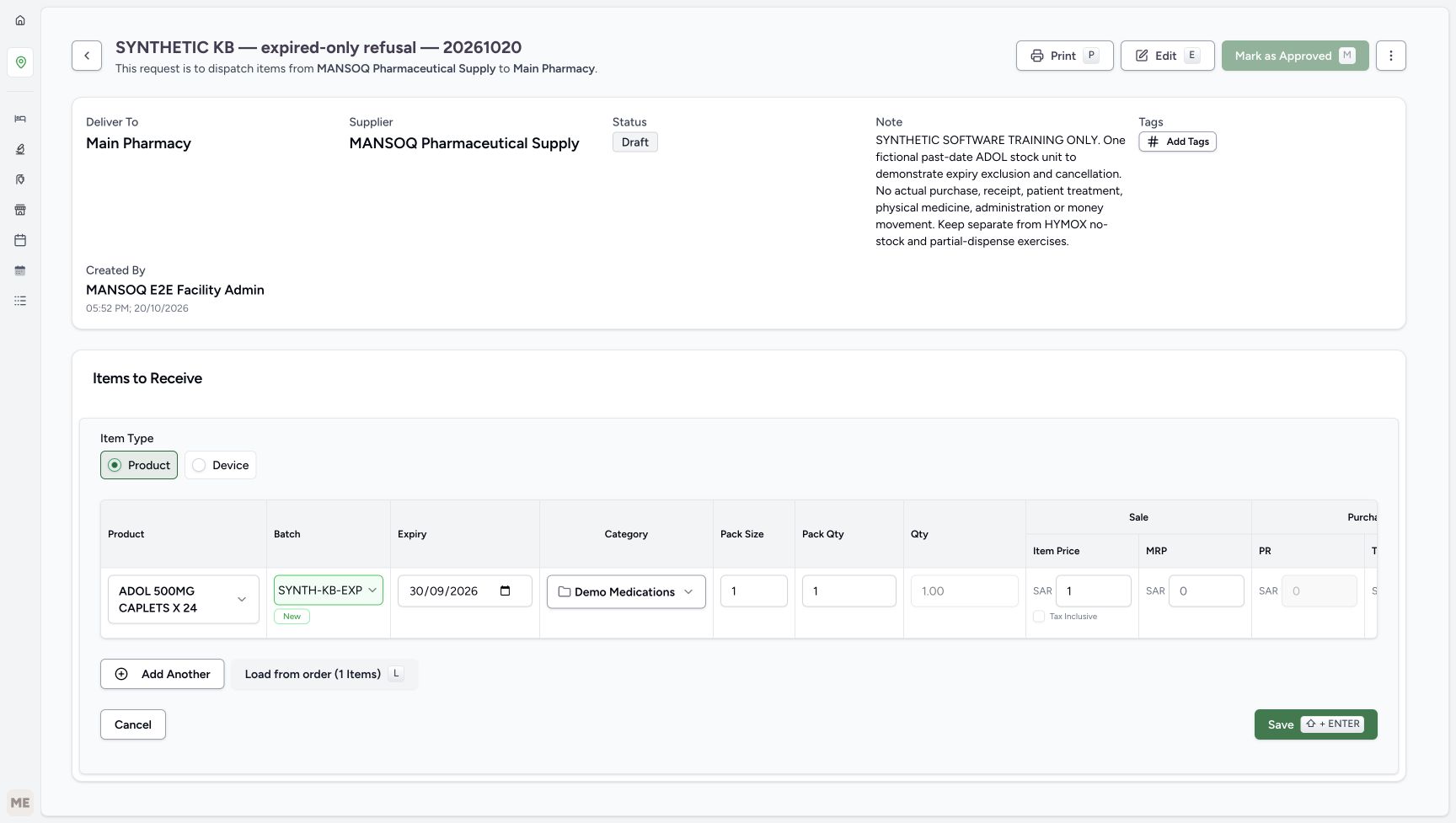
In the isolated test row, use batch SYNTH-KB-EXPIRY-20261020-A and expiry September 30, 2026, shown 30/09/2026. Choose existing Demo Medications, keep Pack Size 1 and Pack Qty 1, and verify Qty 1.00. Set Sale Item Price SAR 1.00 and keep Tax Inclusive unchecked. These are fictional test values, not a tax decision or usable-stock acceptance. The draft may display zero-valued price inputs; the saved purchase fields must be read separately.
12345678910Deliberate past-date synthetic receipt draft
Capture details
Captured in the isolated synthetic d20e training estate with the ordinary FacilityAdmin role. This past-date test fixture does not authorise accepting expired medicines as usable. No physical goods, patient treatment, actual purchase or money movement is involved.
Image SHA-256 94c9950016f5cc3f86437f8fe8b25665ba97f3c41c8a185ace61a9ab4989f6a4
- Verify ADOL in the receipt row: Use the exact selected master, not the nearby GENERIC result.
- Set the isolated synthetic batch: The full saved batch is SYNTH-KB-EXPIRY-20261020-A.
- Enter the deliberate past expiry: The fixture date is September 30, 2026, shown as 30/09/2026; this is not acceptable usable-stock training.
- Keep existing Demo Medications: This is the price definition category, not the earlier request category.
- Keep Pack Size one: The synthetic unit has pack size 1.
- Keep Pack Qty one: Only one fictional unit is prepared.
- Verify calculated quantity one: The form calculates 1.00.
- Keep Sale Item Price SAR 1.00: This is a fictional test price, not an invoice or actual purchase.
- Keep Tax Inclusive unchecked: No tax-exemption or payer decision is implied.
- Locate the receipt Save: Complete the expiry entry, leave the date field and verify it before saving.
8. Verify the expiry and save the receipt
Enter the test expiry in the normal native date field, press Tab to leave it, and verify September 30, 2026 before choosing Save. If the form requests an expiry date, return to the field, complete the entry, press Tab and verify it again, then choose Save once. Wait for the saved ADOL line with quantity 1.00, In Progress, Normal and sale price SAR 1.00. If that saved row is already present, inspect it rather than creating another receipt.
12345678910Deliberate past-date synthetic receipt draft
Capture details
Captured in the isolated synthetic d20e training estate with the ordinary FacilityAdmin role. This past-date test fixture does not authorise accepting expired medicines as usable. No physical goods, patient treatment, actual purchase or money movement is involved.
Image SHA-256 94c9950016f5cc3f86437f8fe8b25665ba97f3c41c8a185ace61a9ab4989f6a4
- Verify ADOL in the receipt row: Use the exact selected master, not the nearby GENERIC result.
- Set the isolated synthetic batch: The full saved batch is SYNTH-KB-EXPIRY-20261020-A.
- Enter the deliberate past expiry: The fixture date is September 30, 2026, shown as 30/09/2026; this is not acceptable usable-stock training.
- Keep existing Demo Medications: This is the price definition category, not the earlier request category.
- Keep Pack Size one: The synthetic unit has pack size 1.
- Keep Pack Qty one: Only one fictional unit is prepared.
- Verify calculated quantity one: The form calculates 1.00.
- Keep Sale Item Price SAR 1.00: This is a fictional test price, not an invoice or actual purchase.
- Keep Tax Inclusive unchecked: No tax-exemption or payer decision is implied.
- Locate the receipt Save: Complete the expiry entry, leave the date field and verify it before saving.
 12
12Complete and verify the expiry field
Capture details
Captured in the isolated synthetic d20e training estate with the ordinary FacilityAdmin role. This past-date test fixture does not authorise accepting expired medicines as usable. No physical goods, patient treatment, actual purchase or money movement is involved.
Image SHA-256 ba02a97fe1b35969aec23d8bb3137334fbf3caf8f4850929c679c2b7b1773440
- Complete and verify the expiry field: Enter September 30, 2026 in the native date field, press Tab and verify the date.
- Save after checking the expiry: If the form requests an expiry, complete the date entry and verify it before choosing Save once.
 1234567
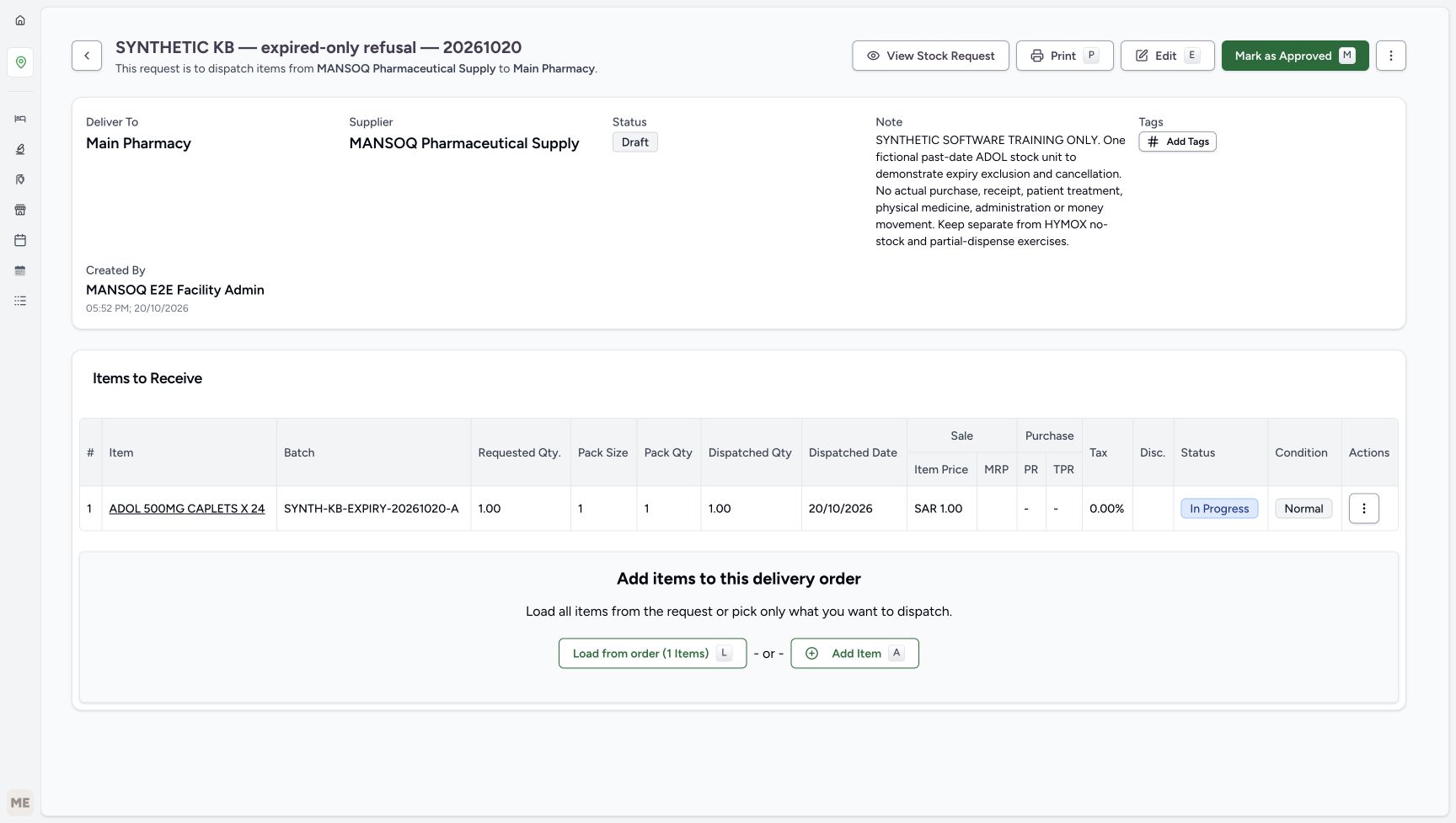
One successful saved In Progress line
Capture details
Captured in the isolated synthetic d20e training estate with the ordinary FacilityAdmin role. This past-date test fixture does not authorise accepting expired medicines as usable. No physical goods, patient treatment, actual purchase or money movement is involved.
Image SHA-256 e538dd4d12159f8db21724932622be9377618b927c9e723c8ac1ada9fed11075
- Read the one saved ADOL line: Verify one saved ADOL receipt line before continuing.
- Verify the exact saved batch: The complete synthetic batch name is pictured.
- Verify saved quantity one: The row retains1.00.
- Keep absent purchase values distinct from zero: The saved purchase columns show dashes; saved purchase price is null, not recorded zero cost.
- Read In Progress: Saving the receipt row does not yet mark it received.
- Read Normal as the fixture condition: This software condition label does not mean an expired medicine is usable.
- Approve the delivery once: This approval belongs to the delivery, separate from earlier request approval.
9. Approve the delivery and receive its one selected row
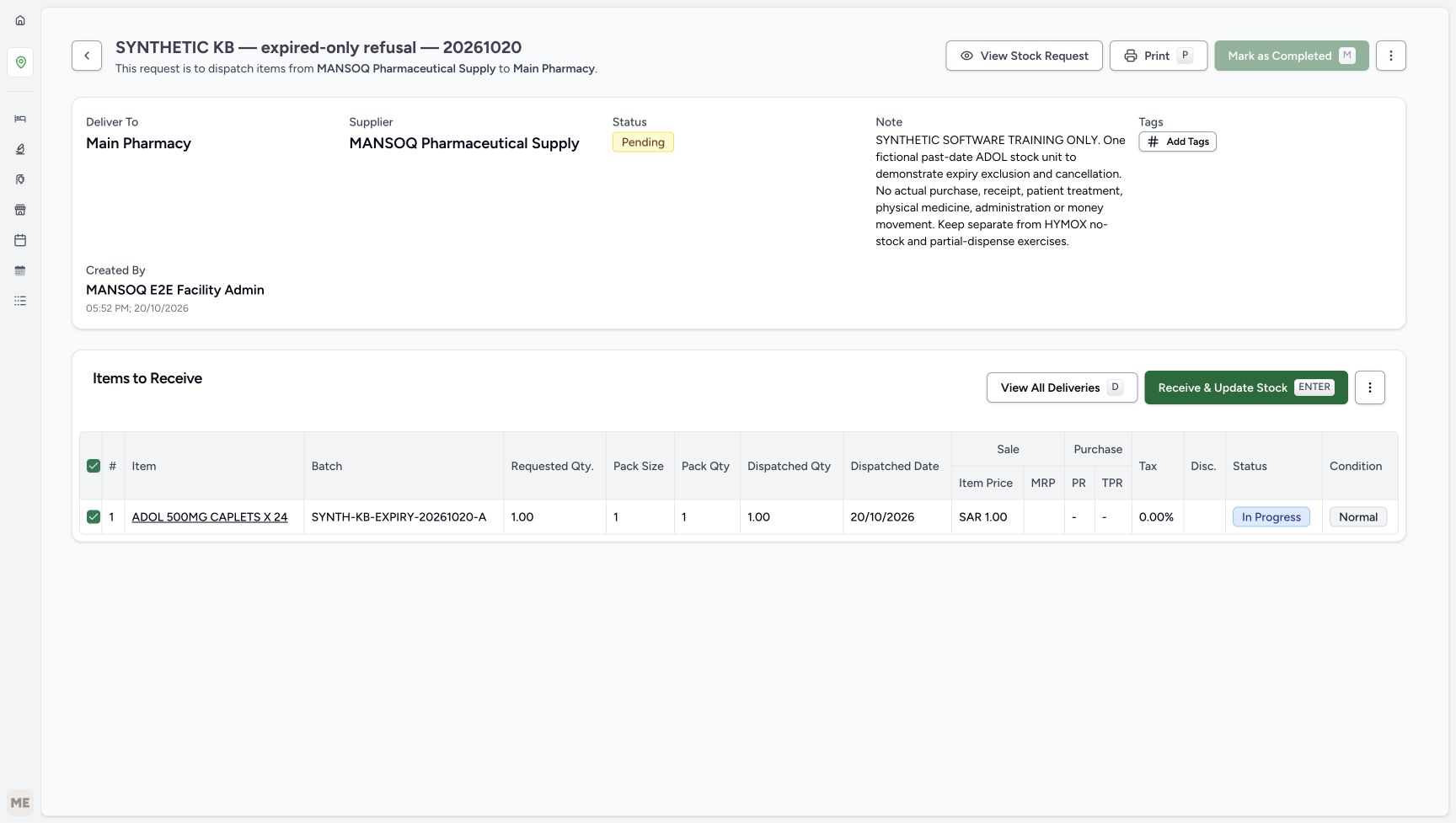
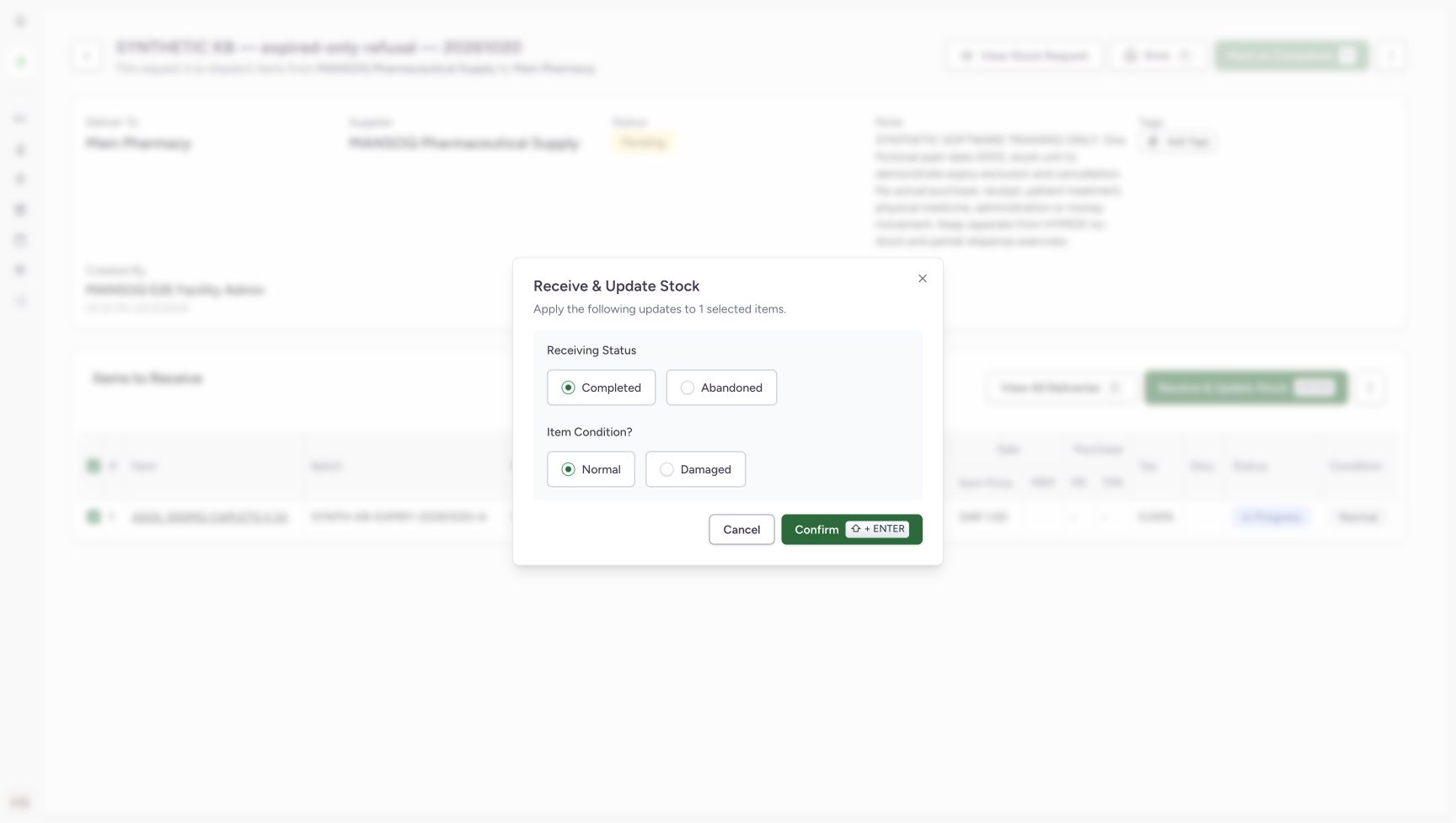
Choose Mark as Approved on the delivery, separately from the earlier request approval. Its header becomes Pending. Verify the one selected row and choose Receive & Update Stock. The dialog applies to one selected item; retain the illustrated Completed and Normal values only for this isolated software fixture, then Confirm once. These labels do not certify an expired medicine as usable.
1234567One successful saved In Progress line
Capture details
Captured in the isolated synthetic d20e training estate with the ordinary FacilityAdmin role. This past-date test fixture does not authorise accepting expired medicines as usable. No physical goods, patient treatment, actual purchase or money movement is involved.
Image SHA-256 e538dd4d12159f8db21724932622be9377618b927c9e723c8ac1ada9fed11075
- Read the one saved ADOL line: Verify one saved ADOL receipt line before continuing.
- Verify the exact saved batch: The complete synthetic batch name is pictured.
- Verify saved quantity one: The row retains1.00.
- Keep absent purchase values distinct from zero: The saved purchase columns show dashes; saved purchase price is null, not recorded zero cost.
- Read In Progress: Saving the receipt row does not yet mark it received.
- Read Normal as the fixture condition: This software condition label does not mean an expired medicine is usable.
- Approve the delivery once: This approval belongs to the delivery, separate from earlier request approval.
 12345
12345Pending delivery before receipt confirmation
Capture details
Captured in the isolated synthetic d20e training estate with the ordinary FacilityAdmin role. This past-date test fixture does not authorise accepting expired medicines as usable. No physical goods, patient treatment, actual purchase or money movement is involved.
Image SHA-256 064ba6f18b0282979f453bb0fcfe0d6beecd62c71851b3cc186b497570e7979f
- Read delivery Pending: The delivery is approved and awaits receipt.
- Verify the one selected row: Only the one synthetic ADOL row is selected.
- Verify one unit before receive: Retain the intended quantity.
- Receive and Update Stock: Open the confirmation for this selected fixture row.
- Recognise disabled parent completion: The delivery cannot be completed before receipt settles.
 1234
1234Isolated synthetic receive confirmation
Capture details
Captured in the isolated synthetic d20e training estate with the ordinary FacilityAdmin role. This past-date test fixture does not authorise accepting expired medicines as usable. No physical goods, patient treatment, actual purchase or money movement is involved.
Image SHA-256 4714a541469fc06a2c0def05077dacc5200b08ad2fa641278c3e38846ac1e0fd
- Verify one selected item: The dialog applies only to the single selected row.
- Retain Completed for this isolated test: The illustrated receipt status is Completed.
- Retain Normal only as fixture data: This deliberate synthetic state exists to test expiry exclusion; it is not an operational acceptance of expired goods.
- Confirm once: Submit this one selected receipt once.
10. Complete the delivery after receipt settles
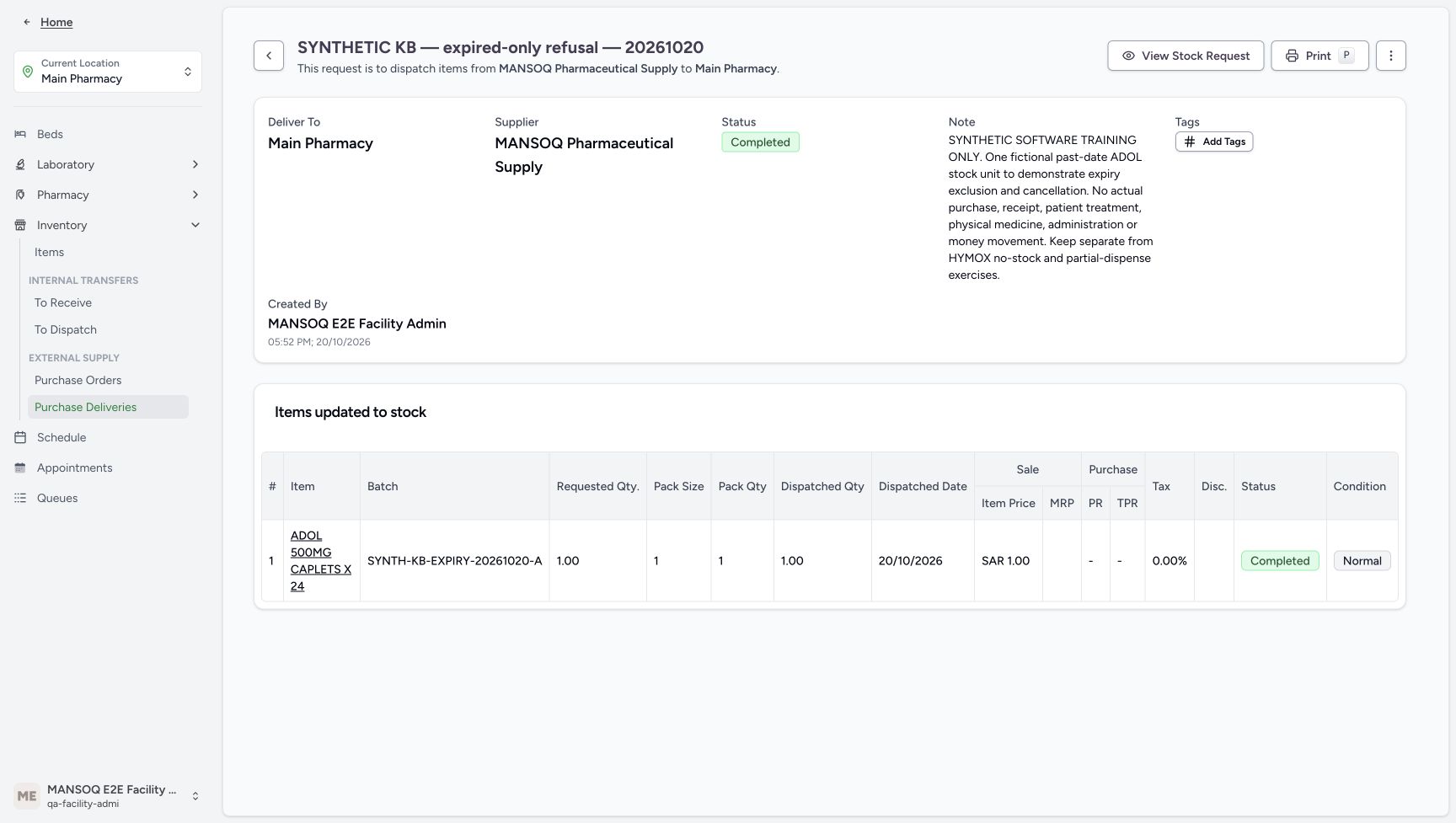
After confirmation, the single row is Completed and Normal while the delivery header remains Pending. Choose Mark as Completed on the parent once. The settled result is a Completed delivery with Items updated to stock and the same single Completed row. Parent completion did not receive another unit. This Completed badge does not establish that the separate source request is completed.
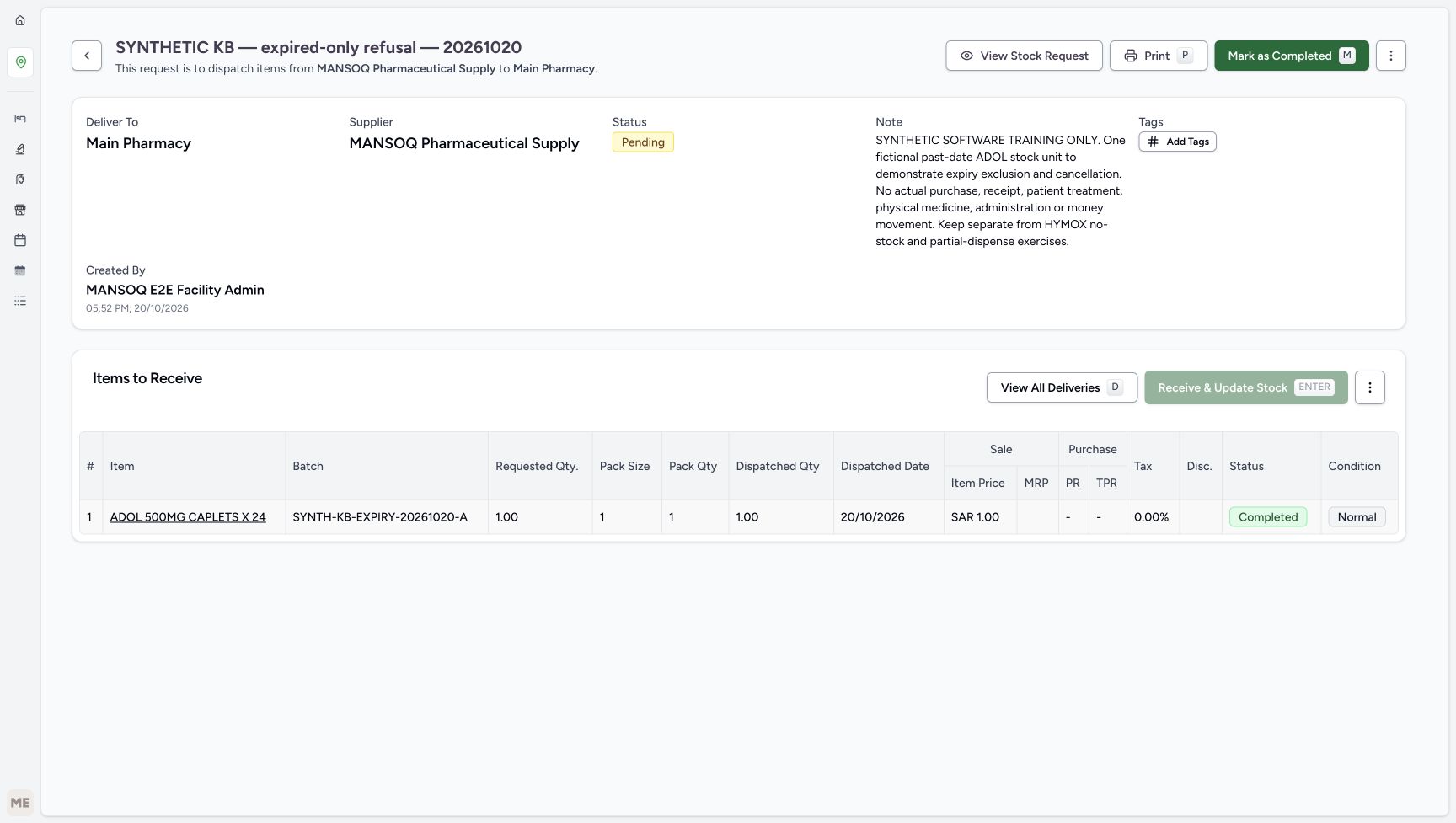 1234
1234Receipt complete while parent remains Pending
Capture details
Captured in the isolated synthetic d20e training estate with the ordinary FacilityAdmin role. This past-date test fixture does not authorise accepting expired medicines as usable. No physical goods, patient treatment, actual purchase or money movement is involved.
Image SHA-256 be2d9e0db567c3ad36239e2566262bcf7fc2e0ea53834de14421c96c842f83b5
- Read parent still Pending: Child receipt completion and parent completion are separate.
- Verify quantity one: Receiving has not changed the selected quantity.
- Read child Completed: The single receipt row is now Completed.
- Mark the delivery as Completed: Complete the parent only after its one receipt has settled.
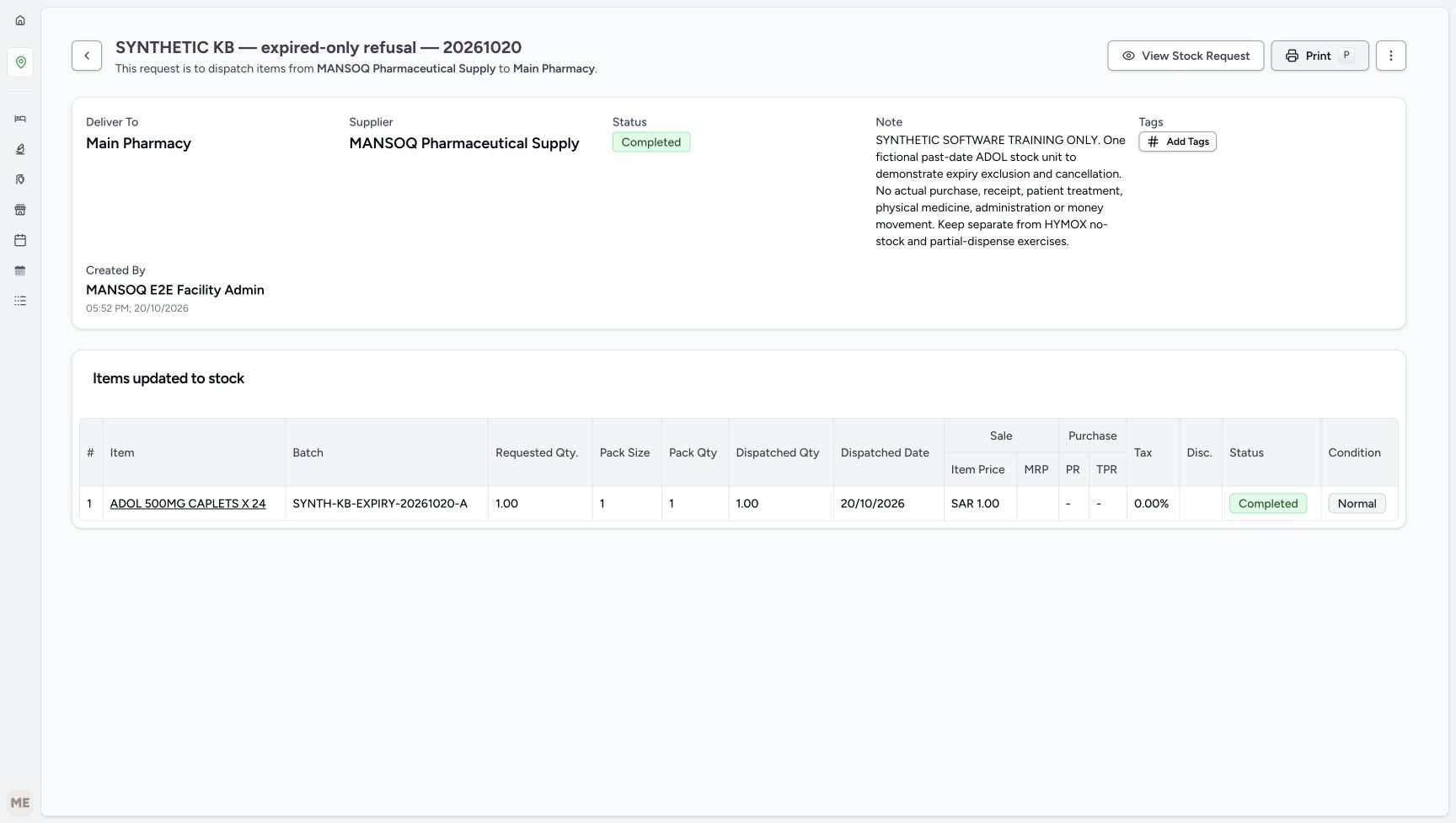 1234
1234Completed delivery with the same single unit
Capture details
Captured in the isolated synthetic d20e training estate with the ordinary FacilityAdmin role. This past-date test fixture does not authorise accepting expired medicines as usable. No physical goods, patient treatment, actual purchase or money movement is involved.
Image SHA-256 c3c32c1211bad648b7d33cff59b78f5cb454e13b2a5b7f10ce103476bce6bc42
- Read delivery Completed: This badge belongs to the DeliveryOrder.
- Read Items updated to stock: The delivery result is separate from a prescription or dispense.
- Verify one unit remains one: Parent completion did not receive another unit.
- Read saved child Completed: The existing one receipt remains Completed.
11. Reload the saved delivery without repeating receipt
Reload normally and wait for the settled result. The same delivery and its one-unit receipt remain Completed. Do not repeat Receive or create another delivery merely to verify the record.
1234Completed delivery with the same single unit
Capture details
Captured in the isolated synthetic d20e training estate with the ordinary FacilityAdmin role. This past-date test fixture does not authorise accepting expired medicines as usable. No physical goods, patient treatment, actual purchase or money movement is involved.
Image SHA-256 c3c32c1211bad648b7d33cff59b78f5cb454e13b2a5b7f10ce103476bce6bc42
- Read delivery Completed: This badge belongs to the DeliveryOrder.
- Read Items updated to stock: The delivery result is separate from a prescription or dispense.
- Verify one unit remains one: Parent completion did not receive another unit.
- Read saved child Completed: The existing one receipt remains Completed.
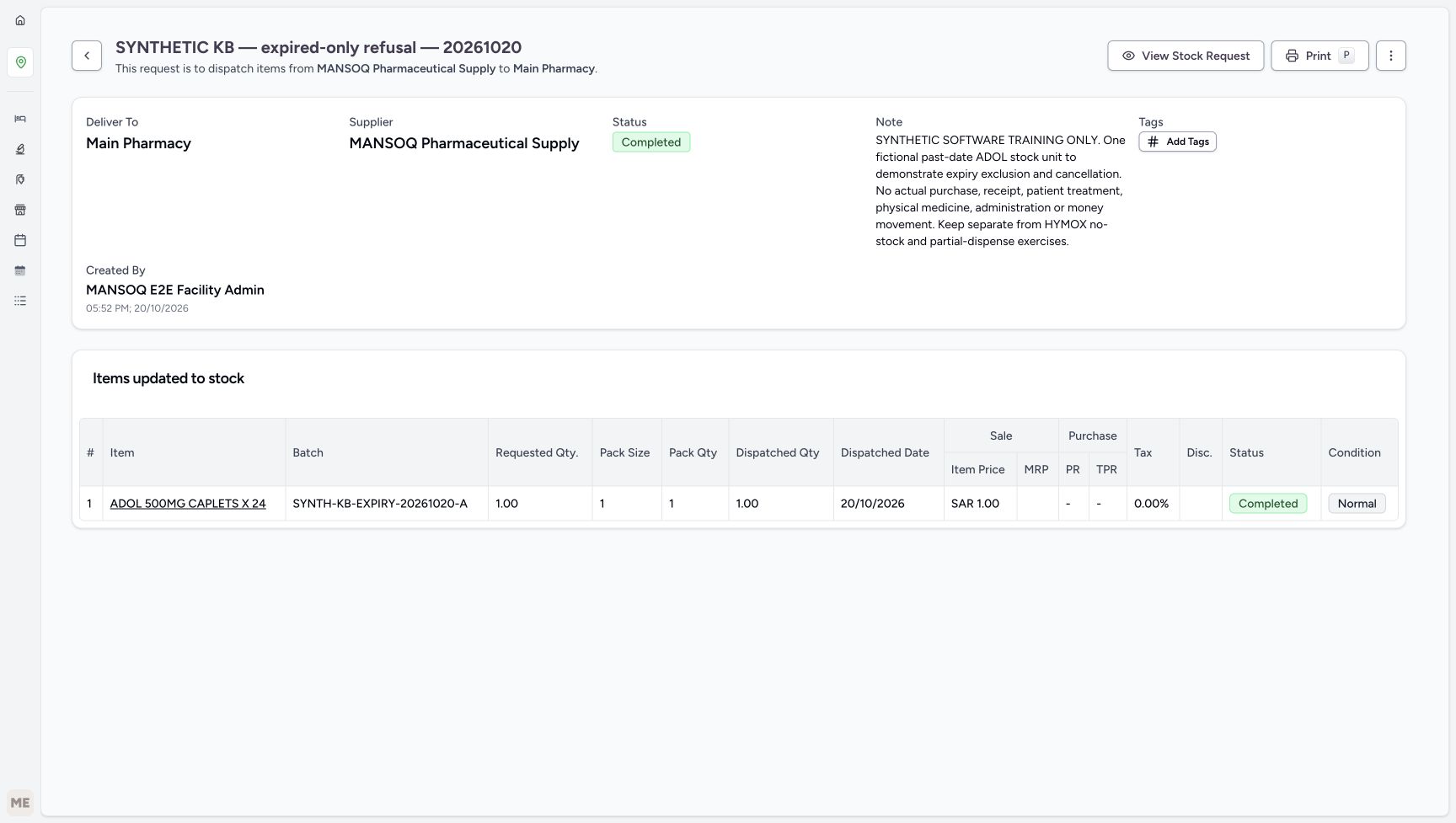 123
123Completed delivery after reload
Capture details
Captured in the isolated synthetic d20e training estate with the ordinary FacilityAdmin role. This past-date test fixture does not authorise accepting expired medicines as usable. No physical goods, patient treatment, actual purchase or money movement is involved.
Image SHA-256 48269342c7bcc3c5ca14d7a7c2b6d055e3afbd6a05538324cccb465441a9cc35
- Verify Completed after normal reload: The settled reloaded delivery retains Completed.
- Verify the same one-unit receipt: The quantity persists after reload.
- Verify the child remains Completed: No second receipt is needed.
12. Read positive inventory with its actual past expiry
Expand Inventory at Main Pharmacy and choose Items. Match ADOL 1.00 count, batch SYNTH-KB-EXPIRY-20261020-A, expiry 9/30/2026 and Base Price SAR 1.00. The row is Active as a lifecycle state. Active and positive stock do not establish unexpired or dispensable stock. This readback is the fixture prerequisite, not yet the separate Pharmacist safeguard result.
123Inventory Items readback navigation
Capture details
Captured in the isolated synthetic d20e training estate with the ordinary FacilityAdmin role. This past-date test fixture does not authorise accepting expired medicines as usable. No physical goods, patient treatment, actual purchase or money movement is involved.
Image SHA-256 93a2572c569bd41348044565780186e2df08803ed953dc22608ee822981deab1
- Use the Inventory menu: The location menu is expanded for readback.
- Open Items: Inspect Main Pharmacy inventory.
- Keep the completed delivery context: This readback starts from the same saved fixture delivery.
123456Positive stock with a past date
Capture details
Captured in the isolated synthetic d20e training estate with the ordinary FacilityAdmin role. This past-date test fixture does not authorise accepting expired medicines as usable. No physical goods, patient treatment, actual purchase or money movement is involved.
Image SHA-256 86b809c281511f377d4a8f8c2620aee2edcc90e2996917117f742080a785eb6d
- Open the saved ADOL Product link: The inventory first row belongs to the new isolated fixture.
- Read positive stock one: The ADOL inventory row contains 1.00 count.
- Read Active as lifecycle only: Active does not establish that stock is unexpired or dispensable.
- Read the past expiry: The inventory date is 9/30/2026.
- Match the exact synthetic batch: Use SYNTH-KB-EXPIRY-20261020-A.
- Read Base Price SAR 1.00: This inventory price is separate from a bill or payment.
13. Inspect the saved Product and the correct lower price link
Open the ADOL Product link. Read the exact batch, September 30th, 2026 expiry, Standard Pack Size 1 and linked master code 06285094000103. Scroll down to Charge Item Definition and choose that lower card’s View Details. The upper Product Knowledge View Details is a different link. Do not edit either record during readback.
123456Positive stock with a past date
Capture details
Captured in the isolated synthetic d20e training estate with the ordinary FacilityAdmin role. This past-date test fixture does not authorise accepting expired medicines as usable. No physical goods, patient treatment, actual purchase or money movement is involved.
Image SHA-256 86b809c281511f377d4a8f8c2620aee2edcc90e2996917117f742080a785eb6d
- Open the saved ADOL Product link: The inventory first row belongs to the new isolated fixture.
- Read positive stock one: The ADOL inventory row contains 1.00 count.
- Read Active as lifecycle only: Active does not establish that stock is unexpired or dispensable.
- Read the past expiry: The inventory date is 9/30/2026.
- Match the exact synthetic batch: Use SYNTH-KB-EXPIRY-20261020-A.
- Read Base Price SAR 1.00: This inventory price is separate from a bill or payment.
12345Saved Product batch and past expiry
Capture details
Captured in the isolated synthetic d20e training estate with the ordinary FacilityAdmin role. This past-date test fixture does not authorise accepting expired medicines as usable. No physical goods, patient treatment, actual purchase or money movement is involved.
Image SHA-256 c34a27f3c1222f298f8b6602fc155438f8091125cabe6e88676db329878dc1ff
- Verify saved batch: The Product retains the exact synthetic lot.
- Verify saved September 30 expiry: The Product displays September 30th, 2026.
- Verify Standard Pack Size one: The saved pack size is 1.
- Verify actual ADOL master code: The linked Product Knowledge code ends 06285094000103.
- Keep Active separate from expiry eligibility: This badge is lifecycle status, not a dispensing clearance.
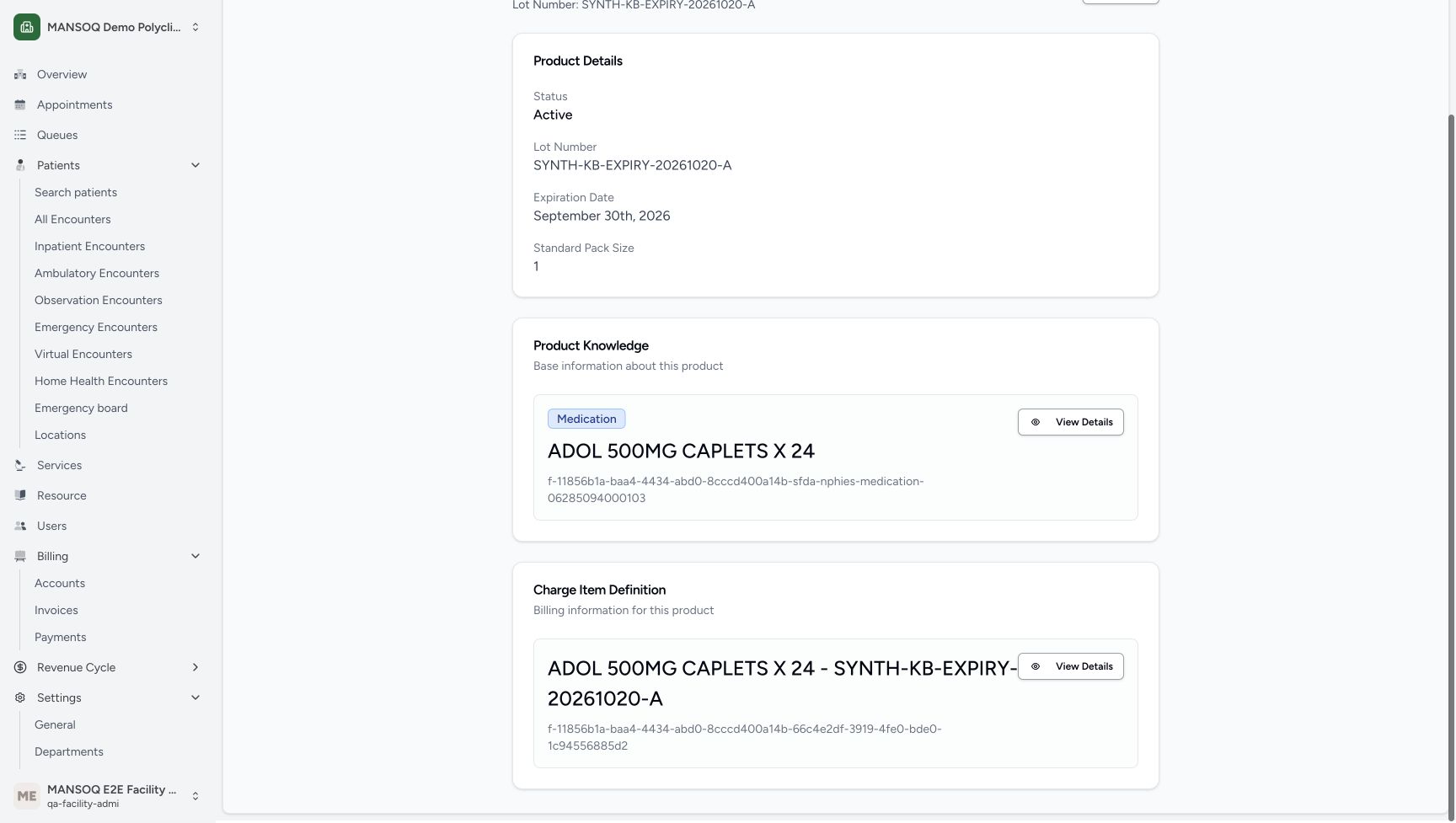 123
123Actual lower price-definition link
Capture details
Captured in the isolated synthetic d20e training estate with the ordinary FacilityAdmin role. This past-date test fixture does not authorise accepting expired medicines as usable. No physical goods, patient treatment, actual purchase or money movement is involved.
Image SHA-256 a23cce3889419689edf2815efb24546d432db9bb0b863f7a049d9e71b0a0d1d6
- Match the separate Charge Item Definition: The lower card title belongs to this synthetic ADOL batch.
- Open lower View Details: Use the price-definition link, not the upper Product Knowledge View Details.
- Keep the existing master distinct: The upper card remains the original ADOL master.
14. Verify the independent one-SAR definition and stop at the fixture
Read the exact synthetic batch title and Base Price SAR 1.00. Keep the displayed Not mapped — insured financial posting holds warning and Can Edit Charge Item No distinct from expiry eligibility. The saved delivery’s purchase fields are dashes and its saved purchase price is absent; an entered zero is not recorded zero cost. Stop here with the one clearly labelled fixture. A later separate Doctor prerequisite and ordinary Pharmacist lesson must establish the actual expired-stock behavior; no dispensing, billing or payment is performed here.
1234567One successful saved In Progress line
Capture details
Captured in the isolated synthetic d20e training estate with the ordinary FacilityAdmin role. This past-date test fixture does not authorise accepting expired medicines as usable. No physical goods, patient treatment, actual purchase or money movement is involved.
Image SHA-256 e538dd4d12159f8db21724932622be9377618b927c9e723c8ac1ada9fed11075
- Read the one saved ADOL line: Verify one saved ADOL receipt line before continuing.
- Verify the exact saved batch: The complete synthetic batch name is pictured.
- Verify saved quantity one: The row retains1.00.
- Keep absent purchase values distinct from zero: The saved purchase columns show dashes; saved purchase price is null, not recorded zero cost.
- Read In Progress: Saving the receipt row does not yet mark it received.
- Read Normal as the fixture condition: This software condition label does not mean an expired medicine is usable.
- Approve the delivery once: This approval belongs to the delivery, separate from earlier request approval.
123Completed delivery after reload
Capture details
Captured in the isolated synthetic d20e training estate with the ordinary FacilityAdmin role. This past-date test fixture does not authorise accepting expired medicines as usable. No physical goods, patient treatment, actual purchase or money movement is involved.
Image SHA-256 48269342c7bcc3c5ca14d7a7c2b6d055e3afbd6a05538324cccb465441a9cc35
- Verify Completed after normal reload: The settled reloaded delivery retains Completed.
- Verify the same one-unit receipt: The quantity persists after reload.
- Verify the child remains Completed: No second receipt is needed.
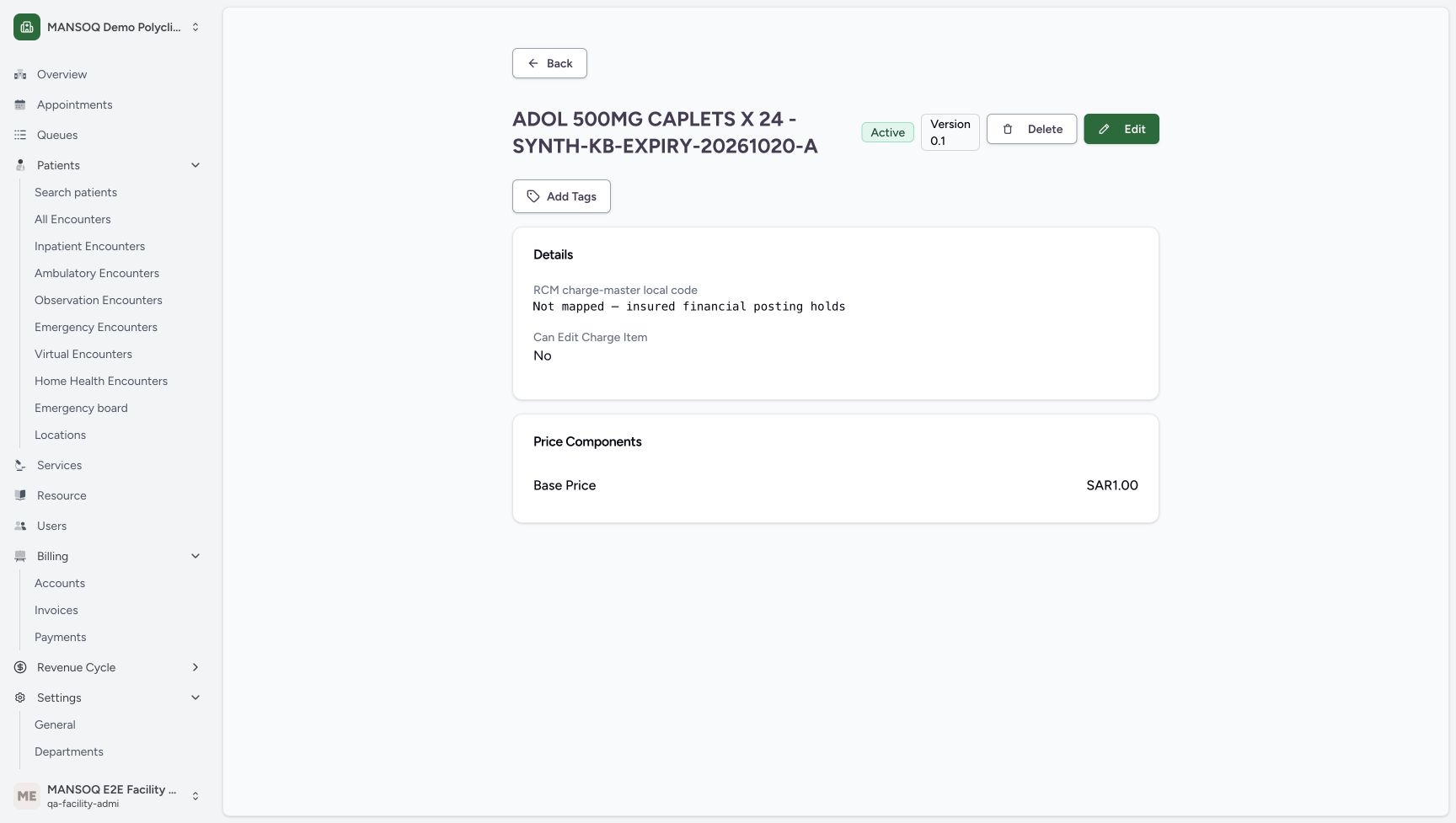 1234
1234Independent base price and posting limitation
Capture details
Captured in the isolated synthetic d20e training estate with the ordinary FacilityAdmin role. This past-date test fixture does not authorise accepting expired medicines as usable. No physical goods, patient treatment, actual purchase or money movement is involved.
Image SHA-256 0d9347540b181ba279ef57c97e100da06887d6b39a5d7abf4ba4e32105b42f8f
- Match the independent batch price definition: The title includes the exact synthetic batch.
- Verify Base Price SAR 1.00: The saved definition has a one-SAR base component.
- Retain the unmapped insured-posting warning: Not mapped — insured financial posting holds is a real displayed limitation.
- Read Can Edit Charge Item No: This displayed property is not an action or expiry permission.
Keep test receipt, lifecycle and expiry eligibility separate
This isolated fixture deliberately holds a past-date unit so the software safeguard can be examined. Normal is the recorded receipt-condition choice, Active is lifecycle status, and Completed describes the delivery or receipt. None of those labels means the unit is unexpired or suitable for dispensing. Keep the synthetic name and note attached, and use the separate ordinary Pharmacist lesson for its actual eligibility result.
12345678Explicit synthetic request before Create
Capture details
Captured in the isolated synthetic d20e training estate with the ordinary FacilityAdmin role. This past-date test fixture does not authorise accepting expired medicines as usable. No physical goods, patient treatment, actual purchase or money movement is involved.
Image SHA-256 f8c94e6ae7dbf69a8dfcc1616803f029b6a2db92ce79d5e6ea11c03378be1b3f
- Keep the explicit synthetic order name: The name is SYNTHETIC KB — expired-only refusal — 20261020.
- Use the existing fictional supplier: The selected supplier is MANSOQ Pharmaceutical Supply.
- Retain Order intent: The illustrated intent is Order.
- Preserve the software-only note: The note excludes actual purchase, receipt, treatment, medicine, administration and money movement.
- Keep the illustrated Ward Stock reason: This is a synthetic fixture value, not a clinical stock decision.
- Keep Non Stock category: Use the illustrated request category, separate from the later price category.
- Keep Routine priority: The isolated example uses Routine.
- Create this one labelled request: Submit the reviewed separate fixture request once.
1234Isolated synthetic receive confirmation
Capture details
Captured in the isolated synthetic d20e training estate with the ordinary FacilityAdmin role. This past-date test fixture does not authorise accepting expired medicines as usable. No physical goods, patient treatment, actual purchase or money movement is involved.
Image SHA-256 4714a541469fc06a2c0def05077dacc5200b08ad2fa641278c3e38846ac1e0fd
- Verify one selected item: The dialog applies only to the single selected row.
- Retain Completed for this isolated test: The illustrated receipt status is Completed.
- Retain Normal only as fixture data: This deliberate synthetic state exists to test expiry exclusion; it is not an operational acceptance of expired goods.
- Confirm once: Submit this one selected receipt once.
1234Completed delivery with the same single unit
Capture details
Captured in the isolated synthetic d20e training estate with the ordinary FacilityAdmin role. This past-date test fixture does not authorise accepting expired medicines as usable. No physical goods, patient treatment, actual purchase or money movement is involved.
Image SHA-256 c3c32c1211bad648b7d33cff59b78f5cb454e13b2a5b7f10ce103476bce6bc42
- Read delivery Completed: This badge belongs to the DeliveryOrder.
- Read Items updated to stock: The delivery result is separate from a prescription or dispense.
- Verify one unit remains one: Parent completion did not receive another unit.
- Read saved child Completed: The existing one receipt remains Completed.
123456Positive stock with a past date
Capture details
Captured in the isolated synthetic d20e training estate with the ordinary FacilityAdmin role. This past-date test fixture does not authorise accepting expired medicines as usable. No physical goods, patient treatment, actual purchase or money movement is involved.
Image SHA-256 86b809c281511f377d4a8f8c2620aee2edcc90e2996917117f742080a785eb6d
- Open the saved ADOL Product link: The inventory first row belongs to the new isolated fixture.
- Read positive stock one: The ADOL inventory row contains 1.00 count.
- Read Active as lifecycle only: Active does not establish that stock is unexpired or dispensable.
- Read the past expiry: The inventory date is 9/30/2026.
- Match the exact synthetic batch: Use SYNTH-KB-EXPIRY-20261020-A.
- Read Base Price SAR 1.00: This inventory price is separate from a bill or payment.
12345Saved Product batch and past expiry
Capture details
Captured in the isolated synthetic d20e training estate with the ordinary FacilityAdmin role. This past-date test fixture does not authorise accepting expired medicines as usable. No physical goods, patient treatment, actual purchase or money movement is involved.
Image SHA-256 c34a27f3c1222f298f8b6602fc155438f8091125cabe6e88676db329878dc1ff
- Verify saved batch: The Product retains the exact synthetic lot.
- Verify saved September 30 expiry: The Product displays September 30th, 2026.
- Verify Standard Pack Size one: The saved pack size is 1.
- Verify actual ADOL master code: The linked Product Knowledge code ends 06285094000103.
- Keep Active separate from expiry eligibility: This badge is lifecycle status, not a dispensing clearance.
Read saved price and quantity rather than draft assumptions
The saved fixture contains one Product batch, one completed receipt unit and one separate base price definition at SAR 1.00. The purchase columns show dashes and the saved purchase price is absent, so do not infer a recorded zero-cost purchase from the draft entry. No patient bill, insurer transaction or payment was created. The original records remain separate from this new labelled fixture.
12345678910Deliberate past-date synthetic receipt draft
Capture details
Captured in the isolated synthetic d20e training estate with the ordinary FacilityAdmin role. This past-date test fixture does not authorise accepting expired medicines as usable. No physical goods, patient treatment, actual purchase or money movement is involved.
Image SHA-256 94c9950016f5cc3f86437f8fe8b25665ba97f3c41c8a185ace61a9ab4989f6a4
- Verify ADOL in the receipt row: Use the exact selected master, not the nearby GENERIC result.
- Set the isolated synthetic batch: The full saved batch is SYNTH-KB-EXPIRY-20261020-A.
- Enter the deliberate past expiry: The fixture date is September 30, 2026, shown as 30/09/2026; this is not acceptable usable-stock training.
- Keep existing Demo Medications: This is the price definition category, not the earlier request category.
- Keep Pack Size one: The synthetic unit has pack size 1.
- Keep Pack Qty one: Only one fictional unit is prepared.
- Verify calculated quantity one: The form calculates 1.00.
- Keep Sale Item Price SAR 1.00: This is a fictional test price, not an invoice or actual purchase.
- Keep Tax Inclusive unchecked: No tax-exemption or payer decision is implied.
- Locate the receipt Save: Complete the expiry entry, leave the date field and verify it before saving.
1234567One successful saved In Progress line
Capture details
Captured in the isolated synthetic d20e training estate with the ordinary FacilityAdmin role. This past-date test fixture does not authorise accepting expired medicines as usable. No physical goods, patient treatment, actual purchase or money movement is involved.
Image SHA-256 e538dd4d12159f8db21724932622be9377618b927c9e723c8ac1ada9fed11075
- Read the one saved ADOL line: Verify one saved ADOL receipt line before continuing.
- Verify the exact saved batch: The complete synthetic batch name is pictured.
- Verify saved quantity one: The row retains1.00.
- Keep absent purchase values distinct from zero: The saved purchase columns show dashes; saved purchase price is null, not recorded zero cost.
- Read In Progress: Saving the receipt row does not yet mark it received.
- Read Normal as the fixture condition: This software condition label does not mean an expired medicine is usable.
- Approve the delivery once: This approval belongs to the delivery, separate from earlier request approval.
1234Completed delivery with the same single unit
Capture details
Captured in the isolated synthetic d20e training estate with the ordinary FacilityAdmin role. This past-date test fixture does not authorise accepting expired medicines as usable. No physical goods, patient treatment, actual purchase or money movement is involved.
Image SHA-256 c3c32c1211bad648b7d33cff59b78f5cb454e13b2a5b7f10ce103476bce6bc42
- Read delivery Completed: This badge belongs to the DeliveryOrder.
- Read Items updated to stock: The delivery result is separate from a prescription or dispense.
- Verify one unit remains one: Parent completion did not receive another unit.
- Read saved child Completed: The existing one receipt remains Completed.
123456Positive stock with a past date
Capture details
Captured in the isolated synthetic d20e training estate with the ordinary FacilityAdmin role. This past-date test fixture does not authorise accepting expired medicines as usable. No physical goods, patient treatment, actual purchase or money movement is involved.
Image SHA-256 86b809c281511f377d4a8f8c2620aee2edcc90e2996917117f742080a785eb6d
- Open the saved ADOL Product link: The inventory first row belongs to the new isolated fixture.
- Read positive stock one: The ADOL inventory row contains 1.00 count.
- Read Active as lifecycle only: Active does not establish that stock is unexpired or dispensable.
- Read the past expiry: The inventory date is 9/30/2026.
- Match the exact synthetic batch: Use SYNTH-KB-EXPIRY-20261020-A.
- Read Base Price SAR 1.00: This inventory price is separate from a bill or payment.
123Actual lower price-definition link
Capture details
Captured in the isolated synthetic d20e training estate with the ordinary FacilityAdmin role. This past-date test fixture does not authorise accepting expired medicines as usable. No physical goods, patient treatment, actual purchase or money movement is involved.
Image SHA-256 a23cce3889419689edf2815efb24546d432db9bb0b863f7a049d9e71b0a0d1d6
- Match the separate Charge Item Definition: The lower card title belongs to this synthetic ADOL batch.
- Open lower View Details: Use the price-definition link, not the upper Product Knowledge View Details.
- Keep the existing master distinct: The upper card remains the original ADOL master.
1234Independent base price and posting limitation
Capture details
Captured in the isolated synthetic d20e training estate with the ordinary FacilityAdmin role. This past-date test fixture does not authorise accepting expired medicines as usable. No physical goods, patient treatment, actual purchase or money movement is involved.
Image SHA-256 0d9347540b181ba279ef57c97e100da06887d6b39a5d7abf4ba4e32105b42f8f
- Match the independent batch price definition: The title includes the exact synthetic batch.
- Verify Base Price SAR 1.00: The saved definition has a one-SAR base component.
- Retain the unmapped insured-posting warning: Not mapped — insured financial posting holds is a real displayed limitation.
- Read Can Edit Charge Item No: This displayed property is not an action or expiry permission.
Troubleshooting
The item list is empty after selection
Wait for the page to settle. If the list still says No supply requests found, choose Add Item again, match the exact ADOL code and verify the editable one-unit row before choosing Save List.
123Exact ADOL code versus nearby result
Capture details
Captured in the isolated synthetic d20e training estate with the ordinary FacilityAdmin role. This past-date test fixture does not authorise accepting expired medicines as usable. No physical goods, patient treatment, actual purchase or money movement is involved.
Image SHA-256 86f4c8e68b5ca702ab6c00a68506f51b52e1f437ab9fdd89b7b157e4ddc6435d
- Search the exact ADOL code: The search is 06285094000103.
- Choose the exact ADOL result: Select ADOL 500MG CAPLETS X24 with actual code 06285094000103.
- Distinguish the nearby GENERIC result: The other visible result has code 06285094000097 and is not the intended master.
12Check an empty item list
Capture details
Captured in the isolated synthetic d20e training estate with the ordinary FacilityAdmin role. This past-date test fixture does not authorise accepting expired medicines as usable. No physical goods, patient treatment, actual purchase or money movement is involved.
Image SHA-256 9e8466328d790a7453ac2d7f82a87a3f35b5ee3463c5f49ea630d7eb18beec9e
- Check whether the item list is empty: No supply requests found means no editable item row is present yet.
- Choose Add Item again: Select the same exact ADOL master after the page settles.
123Verify the editable one-unit request row
Capture details
Captured in the isolated synthetic d20e training estate with the ordinary FacilityAdmin role. This past-date test fixture does not authorise accepting expired medicines as usable. No physical goods, patient treatment, actual purchase or money movement is involved.
Image SHA-256 e9ee1a2fc56cb723653ebbe9393854532145b2c9e75408b86a38bc950c91f30a
- Verify the editable one-unit ADOL row: Check the ADOL name and editable quantity before saving.
- Keep requested quantity one: Review the one fictional unit before saving the list.
- Save List once: Save only this settled one-unit request row.
Expiry is required despite a date being visible
Return to the native expiry field and complete the date entry. Press Tab to leave the field, verify the required September 30, 2026 test date, then choose Save once. Inspect the saved receipt row and Product expiry to confirm the result; do not assume that text in an unfinished field has already been saved.
12345678910Deliberate past-date synthetic receipt draft
Capture details
Captured in the isolated synthetic d20e training estate with the ordinary FacilityAdmin role. This past-date test fixture does not authorise accepting expired medicines as usable. No physical goods, patient treatment, actual purchase or money movement is involved.
Image SHA-256 94c9950016f5cc3f86437f8fe8b25665ba97f3c41c8a185ace61a9ab4989f6a4
- Verify ADOL in the receipt row: Use the exact selected master, not the nearby GENERIC result.
- Set the isolated synthetic batch: The full saved batch is SYNTH-KB-EXPIRY-20261020-A.
- Enter the deliberate past expiry: The fixture date is September 30, 2026, shown as 30/09/2026; this is not acceptable usable-stock training.
- Keep existing Demo Medications: This is the price definition category, not the earlier request category.
- Keep Pack Size one: The synthetic unit has pack size 1.
- Keep Pack Qty one: Only one fictional unit is prepared.
- Verify calculated quantity one: The form calculates 1.00.
- Keep Sale Item Price SAR 1.00: This is a fictional test price, not an invoice or actual purchase.
- Keep Tax Inclusive unchecked: No tax-exemption or payer decision is implied.
- Locate the receipt Save: Complete the expiry entry, leave the date field and verify it before saving.
12Complete and verify the expiry field
Capture details
Captured in the isolated synthetic d20e training estate with the ordinary FacilityAdmin role. This past-date test fixture does not authorise accepting expired medicines as usable. No physical goods, patient treatment, actual purchase or money movement is involved.
Image SHA-256 ba02a97fe1b35969aec23d8bb3137334fbf3caf8f4850929c679c2b7b1773440
- Complete and verify the expiry field: Enter September 30, 2026 in the native date field, press Tab and verify the date.
- Save after checking the expiry: If the form requests an expiry, complete the date entry and verify it before choosing Save once.
1234567One successful saved In Progress line
Capture details
Captured in the isolated synthetic d20e training estate with the ordinary FacilityAdmin role. This past-date test fixture does not authorise accepting expired medicines as usable. No physical goods, patient treatment, actual purchase or money movement is involved.
Image SHA-256 e538dd4d12159f8db21724932622be9377618b927c9e723c8ac1ada9fed11075
- Read the one saved ADOL line: Verify one saved ADOL receipt line before continuing.
- Verify the exact saved batch: The complete synthetic batch name is pictured.
- Verify saved quantity one: The row retains1.00.
- Keep absent purchase values distinct from zero: The saved purchase columns show dashes; saved purchase price is null, not recorded zero cost.
- Read In Progress: Saving the receipt row does not yet mark it received.
- Read Normal as the fixture condition: This software condition label does not mean an expired medicine is usable.
- Approve the delivery once: This approval belongs to the delivery, separate from earlier request approval.
12345Saved Product batch and past expiry
Capture details
Captured in the isolated synthetic d20e training estate with the ordinary FacilityAdmin role. This past-date test fixture does not authorise accepting expired medicines as usable. No physical goods, patient treatment, actual purchase or money movement is involved.
Image SHA-256 c34a27f3c1222f298f8b6602fc155438f8091125cabe6e88676db329878dc1ff
- Verify saved batch: The Product retains the exact synthetic lot.
- Verify saved September 30 expiry: The Product displays September 30th, 2026.
- Verify Standard Pack Size one: The saved pack size is 1.
- Verify actual ADOL master code: The linked Product Knowledge code ends 06285094000103.
- Keep Active separate from expiry eligibility: This badge is lifecycle status, not a dispensing clearance.
Completed or Active is mistaken for permission to dispense
Read the expiry separately. This fixture has a September 30, 2026 past date even though its delivery is Completed and inventory lifecycle is Active. Do not use those labels as acceptance of expired goods. Hand off to the separate synthetic expiry-check lesson; do not dispense or alter the expiry to hide the test condition.
1234Completed delivery with the same single unit
Capture details
Captured in the isolated synthetic d20e training estate with the ordinary FacilityAdmin role. This past-date test fixture does not authorise accepting expired medicines as usable. No physical goods, patient treatment, actual purchase or money movement is involved.
Image SHA-256 c3c32c1211bad648b7d33cff59b78f5cb454e13b2a5b7f10ce103476bce6bc42
- Read delivery Completed: This badge belongs to the DeliveryOrder.
- Read Items updated to stock: The delivery result is separate from a prescription or dispense.
- Verify one unit remains one: Parent completion did not receive another unit.
- Read saved child Completed: The existing one receipt remains Completed.
123456Positive stock with a past date
Capture details
Captured in the isolated synthetic d20e training estate with the ordinary FacilityAdmin role. This past-date test fixture does not authorise accepting expired medicines as usable. No physical goods, patient treatment, actual purchase or money movement is involved.
Image SHA-256 86b809c281511f377d4a8f8c2620aee2edcc90e2996917117f742080a785eb6d
- Open the saved ADOL Product link: The inventory first row belongs to the new isolated fixture.
- Read positive stock one: The ADOL inventory row contains 1.00 count.
- Read Active as lifecycle only: Active does not establish that stock is unexpired or dispensable.
- Read the past expiry: The inventory date is 9/30/2026.
- Match the exact synthetic batch: Use SYNTH-KB-EXPIRY-20261020-A.
- Read Base Price SAR 1.00: This inventory price is separate from a bill or payment.
12345Saved Product batch and past expiry
Capture details
Captured in the isolated synthetic d20e training estate with the ordinary FacilityAdmin role. This past-date test fixture does not authorise accepting expired medicines as usable. No physical goods, patient treatment, actual purchase or money movement is involved.
Image SHA-256 c34a27f3c1222f298f8b6602fc155438f8091125cabe6e88676db329878dc1ff
- Verify saved batch: The Product retains the exact synthetic lot.
- Verify saved September 30 expiry: The Product displays September 30th, 2026.
- Verify Standard Pack Size one: The saved pack size is 1.
- Verify actual ADOL master code: The linked Product Knowledge code ends 06285094000103.
- Keep Active separate from expiry eligibility: This badge is lifecycle status, not a dispensing clearance.
Source evidence
Every citation uses this exact committed version. The private source repository requires access.
- repositories/platform/mansoq-web/src/pages/Facility/services/inventory/externalSupply/deliveryOrder/DeliveryOrderForm.tsx:61 ·
d20e68ed4a9e0b005aa54f218f84172160974b02Source file checksum
01fdfb912606a5231ac3461e9f320349574bc44b34f5a317475cdbf26aa9187f - repositories/platform/mansoq-web/src/pages/Facility/services/inventory/externalSupply/deliveryOrder/AddSupplyDeliveryForm.tsx:89 ·
d20e68ed4a9e0b005aa54f218f84172160974b02Source file checksum
392d5c2d3cb7a1aa91002b90a19ceaa2a4bd1d6ba89ccd1be23351fee3a30185 - repositories/platform/mansoq-web/src/pages/Facility/services/inventory/externalSupply/deliveryOrder/SmartExternalDeliveryRow.tsx:334 ·
d20e68ed4a9e0b005aa54f218f84172160974b02Source file checksum
2d129e9801f337e542b3ed7ada4db683383a30830d354005c451f3df8ee30e6f - repositories/platform/mansoq-web/src/pages/Facility/services/inventory/externalSupply/deliveryOrder/DeliveryOrderShow.tsx:472 ·
d20e68ed4a9e0b005aa54f218f84172160974b02Source file checksum
f2e95a502140751606261b88372d81a416bb59d0ea613dcdda8a4fdb7494d0f3 - repositories/platform/mansoq-web/src/pages/Facility/services/inventory/SupplyDeliveryTable.tsx:269 ·
d20e68ed4a9e0b005aa54f218f84172160974b02Source file checksum
93d710b98775916c5f0957830a822fd92b54736fd6cd1dd7aa7d94b476cc72d5 - repositories/platform/mansoq-web/src/pages/Facility/services/inventory/InventoryList.tsx:49 ·
d20e68ed4a9e0b005aa54f218f84172160974b02Source file checksum
6a78d506a34a44f2e24877ebf2a55eeee05cfde35b8cc6a474c399bf099f1806 - repositories/platform/mansoq-web/src/pages/Facility/settings/product/ProductView.tsx:230 ·
d20e68ed4a9e0b005aa54f218f84172160974b02Source file checksum
642be0b43db263b28441d2cb3800efd15ebf2fb66363444d22021a5a5feddf39 - repositories/platform/mansoq-web/src/pages/Facility/settings/chargeItemDefinitions/ChargeItemDefinitionDetail.tsx:262 ·
d20e68ed4a9e0b005aa54f218f84172160974b02Source file checksum
64606c69318be7dc54576d3ab03763ab377b0b2b46631b6fc3b4c1c475340b77 - repositories/platform/mansoq-core/mansoq/emr/resources/inventory/supply_delivery/spec.py:78 ·
d20e68ed4a9e0b005aa54f218f84172160974b02Source file checksum
53fcab738ac254b418fc8e9e373d50803217079902b8d640d820aeb12c478406 - repositories/platform/mansoq-core/mansoq/emr/resources/inventory/inventory_item/sync_inventory_item.py:48 ·
d20e68ed4a9e0b005aa54f218f84172160974b02Source file checksum
46256e24c4ef53004e128a1d73b58e994369b24bd2dbd74b717fa1c08f4b844e - repositories/platform/mansoq-web/src/pages/Facility/services/inventory/externalSupply/requestOrder/RequestOrderForm.tsx:65 ·
d20e68ed4a9e0b005aa54f218f84172160974b02Source file checksum
988a9f19aa1401f2400eeaff306bbeaa3f14ce7777af27a3b14b0eae509c1de6 - repositories/platform/mansoq-web/src/pages/Facility/services/inventory/externalSupply/requestOrder/RequestOrderShow.tsx:232 ·
d20e68ed4a9e0b005aa54f218f84172160974b02Source file checksum
dfe36168156413a2b2d03df93755086e5c4fc20e9863c70888b9ac5ec6e5a1dd - repositories/platform/mansoq-web/src/pages/Facility/services/inventory/externalSupply/requestOrder/AddItemsForm.tsx:46 ·
d20e68ed4a9e0b005aa54f218f84172160974b02Source file checksum
71b37559a9e9f67ef84e9992b32f51ce006ce8c191a9e7b8a5e1c7b77eb104f6