 MANSOQ
 Pharmacy · VERSION d20e68ed
Recognise expired-only ADOL stock and cancel without new dispensing
Read positive inventory separately from expiry eligibility, inspect only the new ADOL request, recognise the expired-lot exclusion and empty-lot refusal, then cancel and verify the same request and stock remain unchanged.
Pharmacist
 1234567
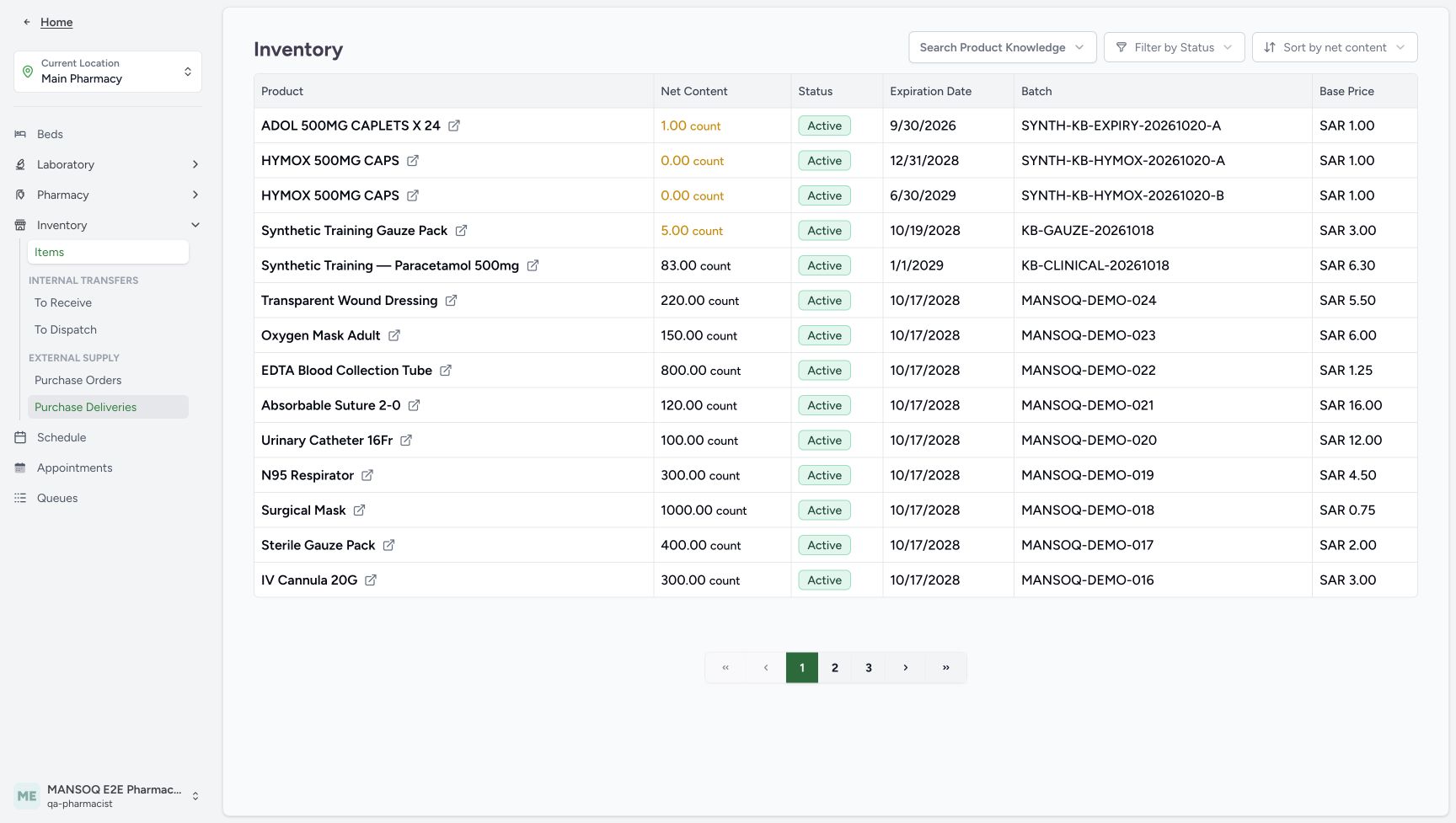
Positive inventory with a past expiry
Capture details
Captured in the isolated synthetic d20e training estate with the ordinary Pharmacist role. This example shows expired-only lot exclusion and an unsaved empty-allocation refusal. No physical medicine, patient treatment, actual money or additional dispensing is involved.
Image SHA-256 3fcf1496f4d4a2cab52a32df5d2a2514881c12e1b259f0866a95b5507db1d605
- Verify Main Pharmacy: Keep the assigned training location.
- Verify the ordinary Pharmacist account: Use the existing MANSOQ E2E Pharmacist account.
- Match the synthetic ADOL Product: The test row is ADOL 500MG CAPLETS X24.
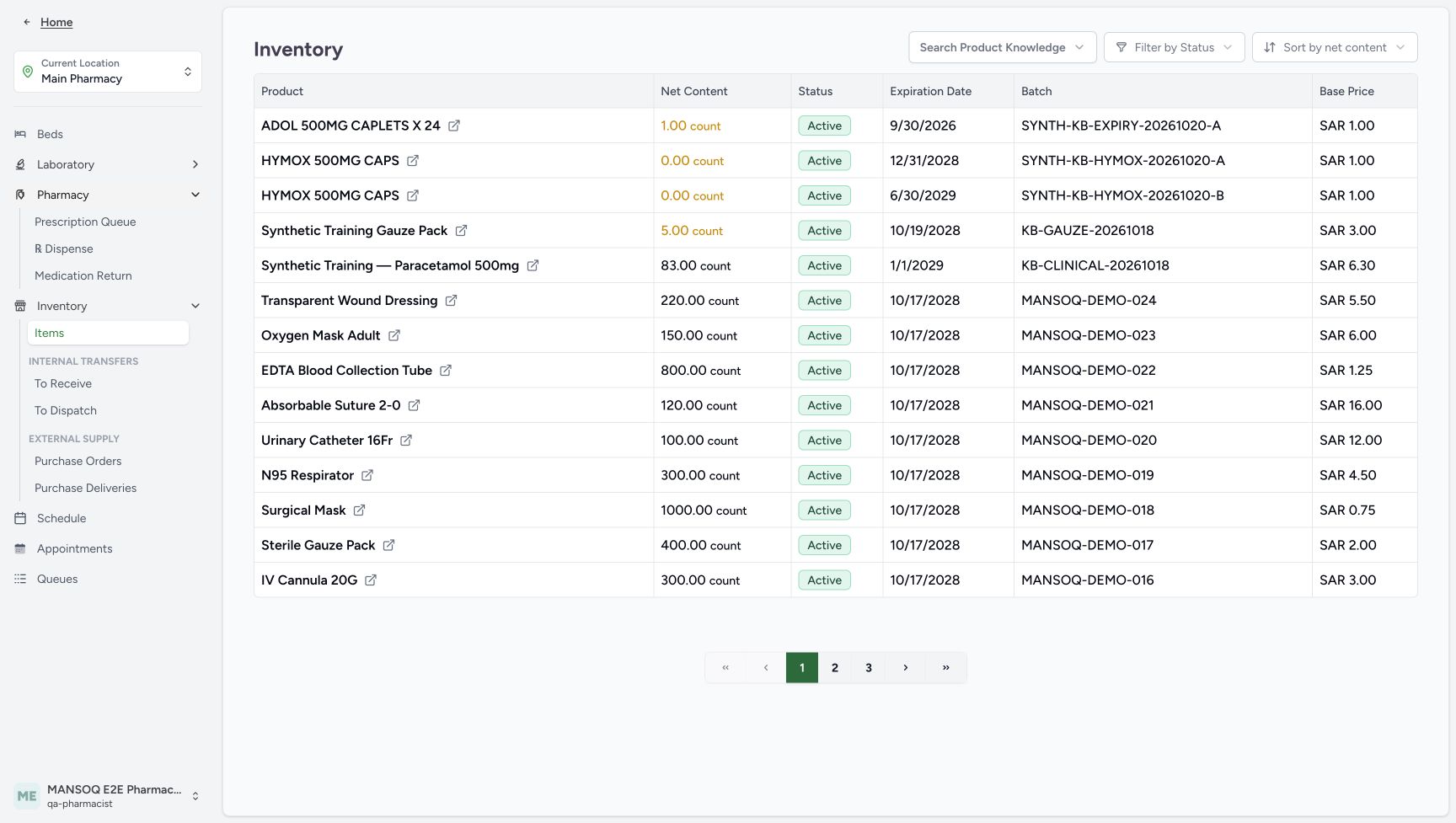
- Read positive stock one: Inventory contains 1.00 count, not zero stock.
- Read the past expiry: The date is September 30, 2026.
- Keep Active separate from eligibility: Active is lifecycle status and does not mean the lot is unexpired.
- Expand Pharmacy: Use the existing location menu.
 123456
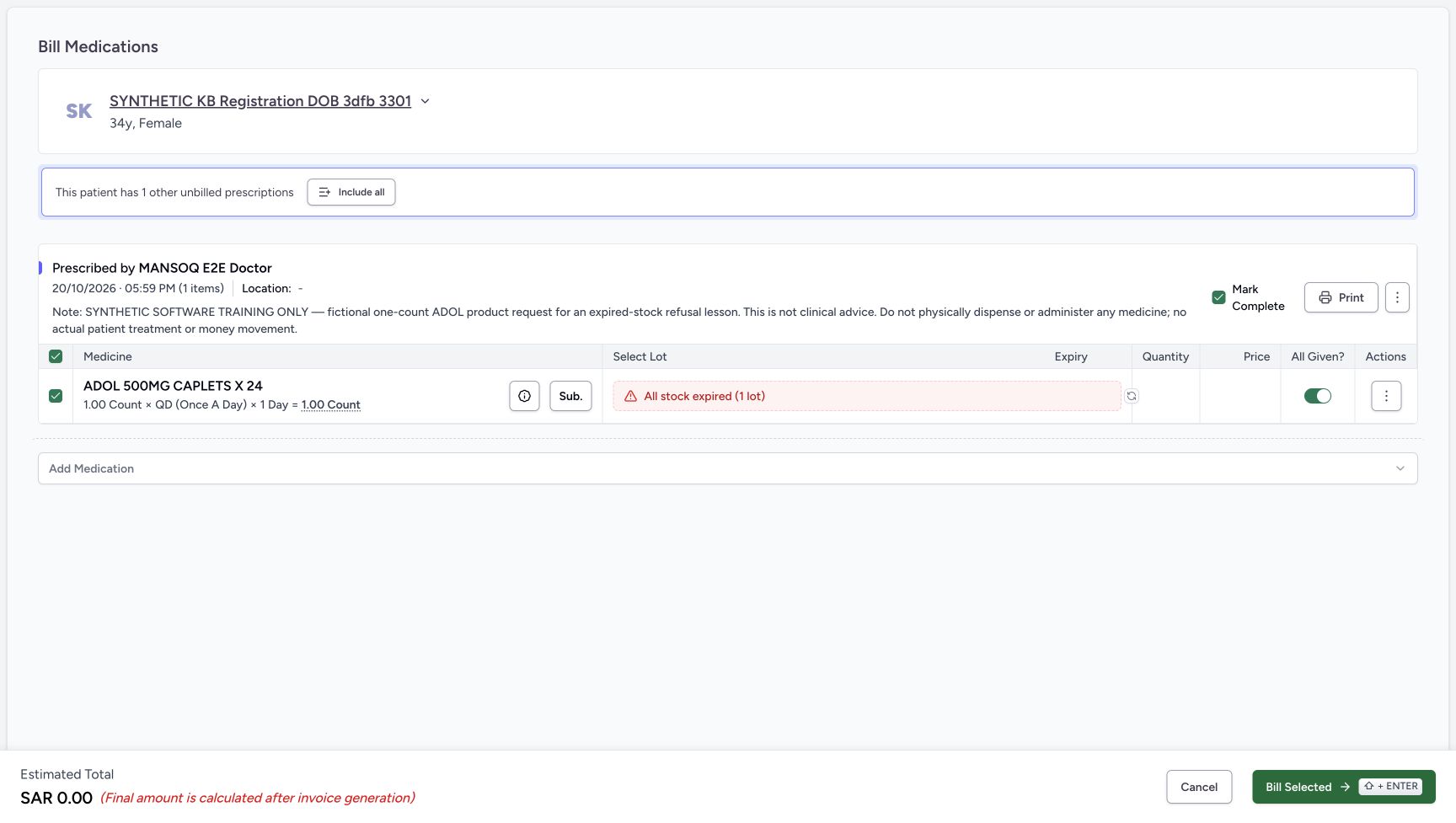
Expired-only availability with initial defaults
Capture details
Captured in the isolated synthetic d20e training estate with the ordinary Pharmacist role. This example shows expired-only lot exclusion and an unsaved empty-allocation refusal. No physical medicine, patient treatment, actual money or additional dispensing is involved.
Image SHA-256 10397d5cafb173e914f96296a5a64023e212e01da25e2fbf01175d3a5ddc797f
- Read All stock expired (1 lot): The red availability label excludes the one lot from selection.
- Recognise no allocated quantity: The form has no eligible lot quantity or price.
- Review All Given initially on: This initial default must be checked before the isolated refusal example.
- Review Mark Complete initially checked: This is separate from the medicine-row toggle.
- Read the unsaved zero estimate: SAR 0.00 is an estimate, not a generated invoice.
- Keep Include all unused: Do not add the other unbilled prescription.
 12345
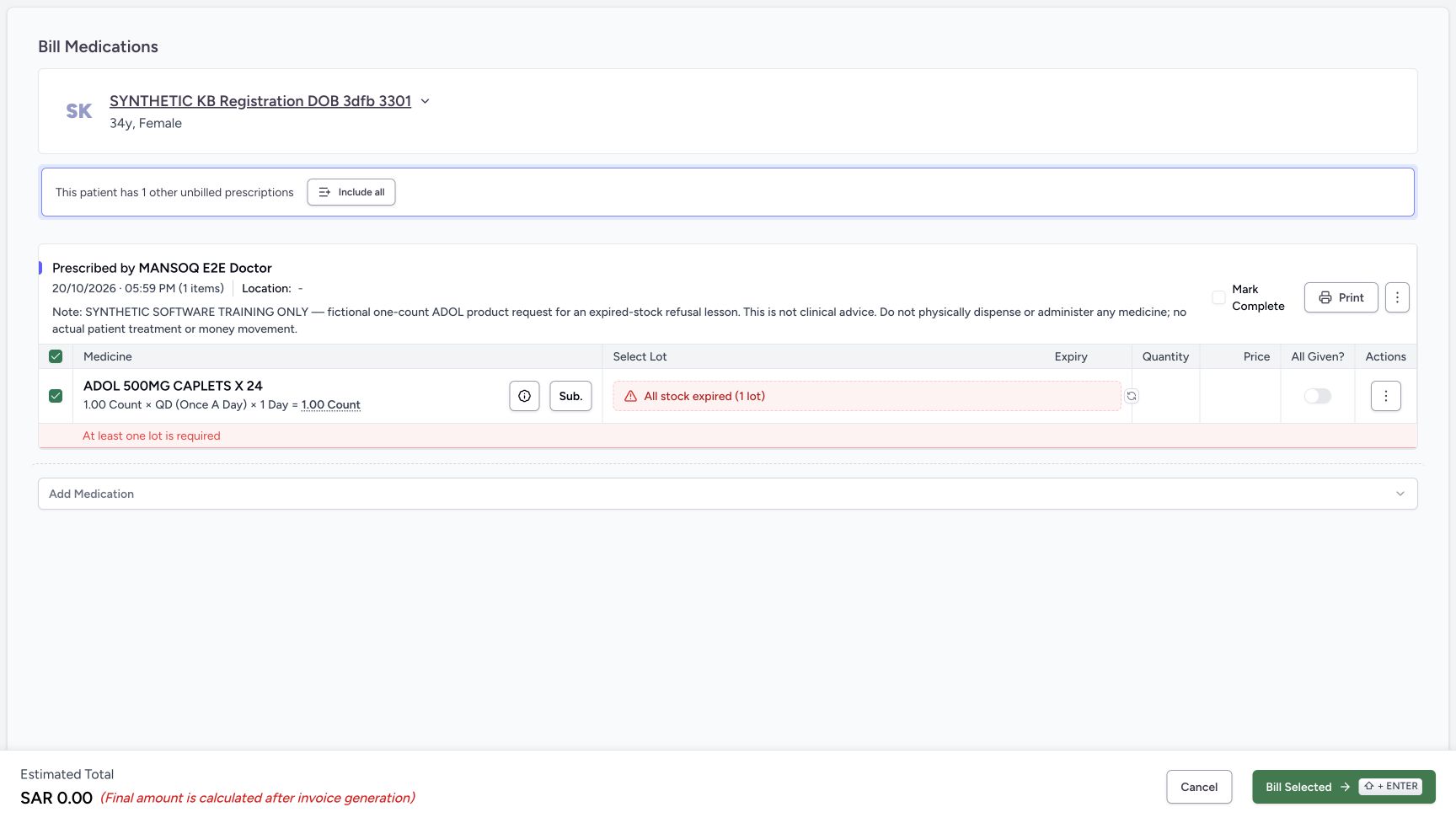
12345Empty-lot refusal beside the expiry warning
Capture details
Captured in the isolated synthetic d20e training estate with the ordinary Pharmacist role. This example shows expired-only lot exclusion and an unsaved empty-allocation refusal. No physical medicine, patient treatment, actual money or additional dispensing is involved.
Image SHA-256 dbca600484e6c4a6e4f7ac2e1151aedda12ded2cf2c58b5f06a80db1aec675bd
- Read At least one lot is required: The form refuses to save an empty lot allocation.
- Keep the expiry warning distinct: The expired-only label remains above the validation message.
- Keep All Given off: Do not override progress to hide unavailable stock.
- Keep Mark Complete unchecked: The empty allocation must not complete the request.
- Choose Cancel: Leave the unsaved form without retrying the rejected allocation.
 1234
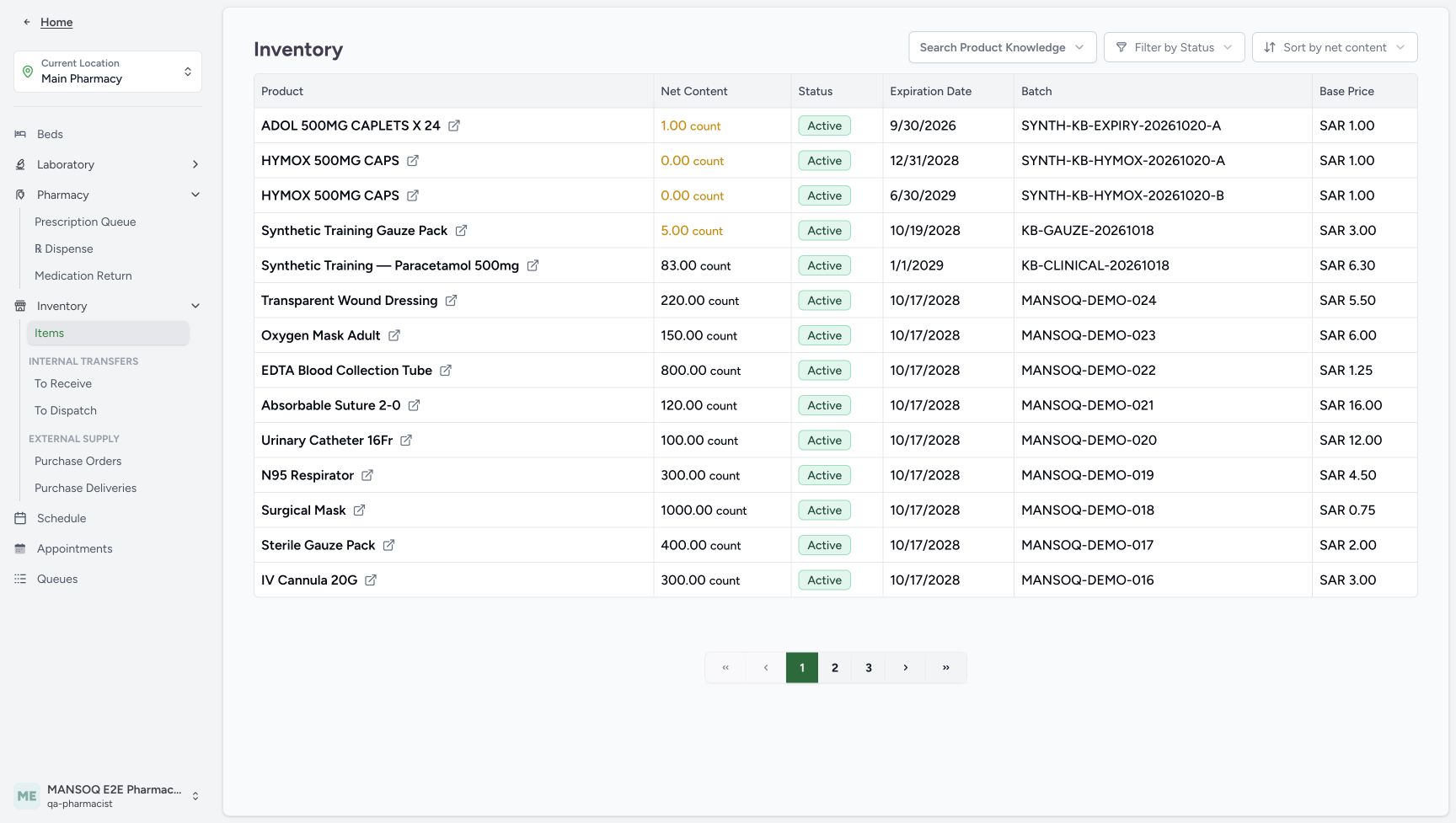
1234Same expired unit after cancellation
Capture details
Captured in the isolated synthetic d20e training estate with the ordinary Pharmacist role. This example shows expired-only lot exclusion and an unsaved empty-allocation refusal. No physical medicine, patient treatment, actual money or additional dispensing is involved.
Image SHA-256 3281992aad3a8f271a7cc432d8cded313635c2124771b3b18d5b08642ca7020d
- Verify the expired unit remains one: The same ADOL inventory still contains 1.00 count.
- Verify the same September 30 expiry: The test date has not been edited to make the lot eligible.
- Verify the same synthetic batch: Match SYNTH-KB-EXPIRY-20261020-A.
- Keep Active separate from expiry: The unchanged lifecycle badge is not permission to dispense.
17 of 17 content blocks have reviewed image alignment.
Before you begin
- Continue as the authorised ordinary Pharmacist in the isolated synthetic estate. The separate FacilityAdmin lesson “Create a clearly synthetic past-date ADOL fixture for expiry safeguards” established one labelled test unit. This is software training only, not acceptance of expired medicines as usable.1234567
Recorded release d20e68ed · 2026-10-20T15:02:07.479Z · 1728 × 977 Positive inventory with a past expiry
Capture details
Captured in the isolated synthetic d20e training estate with the ordinary Pharmacist role. This example shows expired-only lot exclusion and an unsaved empty-allocation refusal. No physical medicine, patient treatment, actual money or additional dispensing is involved.
Image SHA-256
3fcf1496f4d4a2cab52a32df5d2a2514881c12e1b259f0866a95b5507db1d605- Verify Main Pharmacy: Keep the assigned training location.
- Verify the ordinary Pharmacist account: Use the existing MANSOQ E2E Pharmacist account.
- Match the synthetic ADOL Product: The test row is ADOL 500MG CAPLETS X24.
- Read positive stock one: Inventory contains 1.00 count, not zero stock.
- Read the past expiry: The date is September 30, 2026.
- Keep Active separate from eligibility: Active is lifecycle status and does not mean the lot is unexpired.
- Expand Pharmacy: Use the existing location menu.
- The Doctor must first finish “Save and reload a fictional one-count ADOL request for the expiry exercise”. Use the same synthetic registration patient and October 20, 2026 at 05:59 PM request. Its one-count QD one-day instruction and explicit note are fictional test data, not a clinical recommendation or permission to dispense or administer medicine.
 1234
1234Recorded release d20e68ed · 2026-10-20T15:02:32.183Z · 1728 × 977 Correct new prescription timestamp
Capture details
Captured in the isolated synthetic d20e training estate with the ordinary Pharmacist role. This example shows expired-only lot exclusion and an unsaved empty-allocation refusal. No physical medicine, patient treatment, actual money or additional dispensing is involved.
Image SHA-256
511a7a6db4a4617686bff53bed3c6478314528b5c87e2123e308f005e9c13c38- Match the assigned synthetic patient: Use SYNTHETIC KB Registration DOB 3dfb 3301.
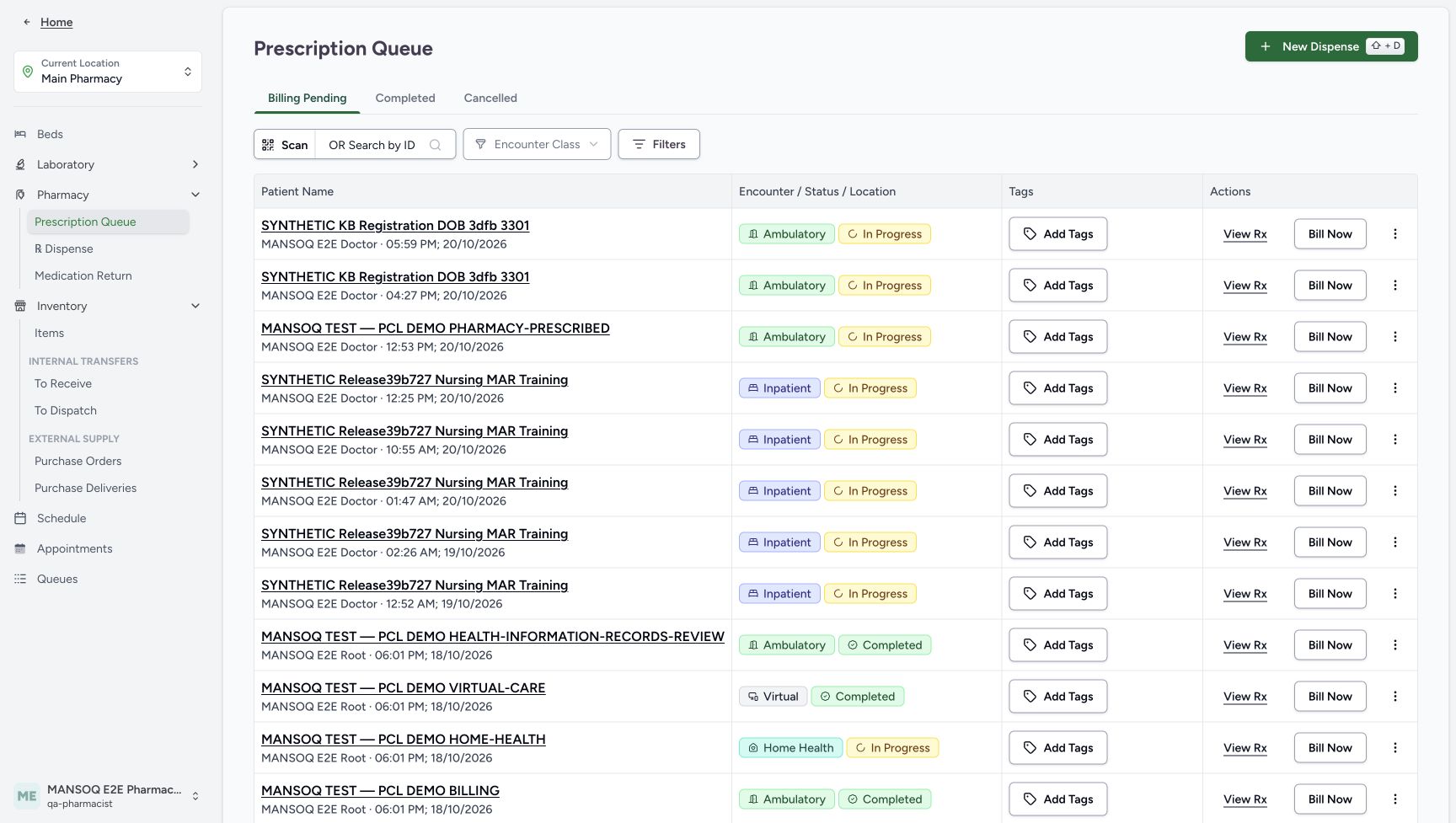
- Match the new 05:59 PM request: Choose the October 20 ADOL request, not the earlier HYMOX request.
- Choose View Rx on that row: Preview only this request.
- Keep the earlier 04:27 PM request separate: Do not combine that different request into the expiry exercise.
 12345678
Recorded release d20e68ed · 2026-10-20T15:02:42.018Z · 1728 × 977 Single ADOL request before billing
Capture details
Captured in the isolated synthetic d20e training estate with the ordinary Pharmacist role. This example shows expired-only lot exclusion and an unsaved empty-allocation refusal. No physical medicine, patient treatment, actual money or additional dispensing is involved.
Image SHA-256
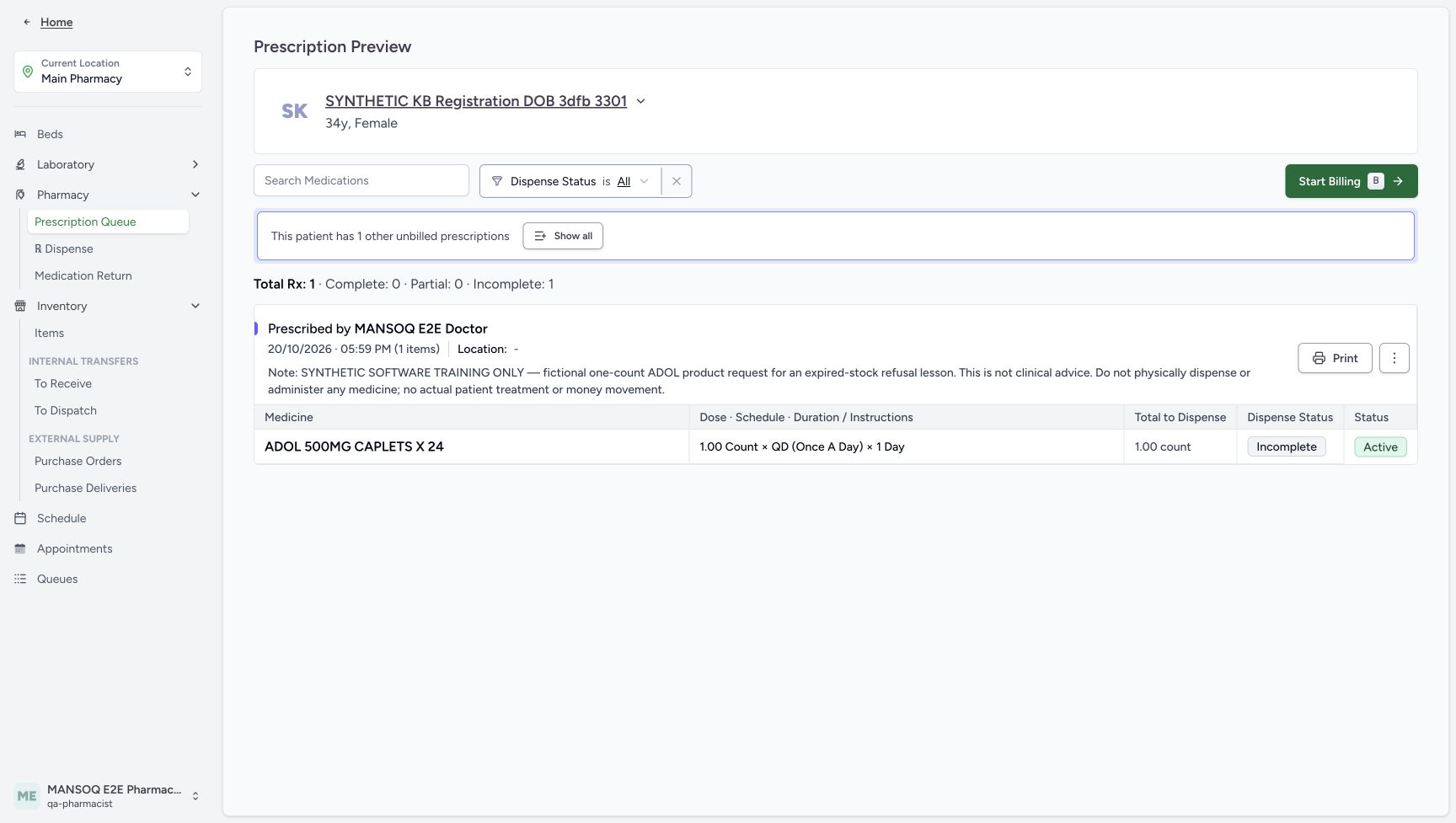
0cc4b19eea85267ae73eebbcdf705861059f66a5f0d51c8c17663e97baf755fa- Verify the same patient: Check the assigned synthetic registration patient.
- Verify the 05:59 PM Doctor request: The selected request contains one ADOL item.
- Read original total one count: The fictional request total is 1.00 count.
- Read Incomplete: No part of this separate request has been dispensed.
- Read Active: The request remains active.
- Keep the other unbilled request separate: This banner refers to another prescription, not an unpaid invoice from this exercise.
- Leave Show all unused: Keep this single-request exercise separate.
- Choose Start Billing: Inspect the selected ADOL request in the billing form.
- Keep the earlier HYMOX 04:27 PM request separate. The earlier no-stock lesson covers a different case with zero stock; this ADOL case has one positive unit with a September 30, 2026 expiry. Preserve the batch, expiry, original requests and earlier financial records.1234567
Recorded release d20e68ed · 2026-10-20T15:02:07.479Z · 1728 × 977 Positive inventory with a past expiry
Capture details
Captured in the isolated synthetic d20e training estate with the ordinary Pharmacist role. This example shows expired-only lot exclusion and an unsaved empty-allocation refusal. No physical medicine, patient treatment, actual money or additional dispensing is involved.
Image SHA-256
3fcf1496f4d4a2cab52a32df5d2a2514881c12e1b259f0866a95b5507db1d605- Verify Main Pharmacy: Keep the assigned training location.
- Verify the ordinary Pharmacist account: Use the existing MANSOQ E2E Pharmacist account.
- Match the synthetic ADOL Product: The test row is ADOL 500MG CAPLETS X24.
- Read positive stock one: Inventory contains 1.00 count, not zero stock.
- Read the past expiry: The date is September 30, 2026.
- Keep Active separate from eligibility: Active is lifecycle status and does not mean the lot is unexpired.
- Expand Pharmacy: Use the existing location menu.
1234Recorded release d20e68ed · 2026-10-20T15:02:32.183Z · 1728 × 977 Correct new prescription timestamp
Capture details
Captured in the isolated synthetic d20e training estate with the ordinary Pharmacist role. This example shows expired-only lot exclusion and an unsaved empty-allocation refusal. No physical medicine, patient treatment, actual money or additional dispensing is involved.
Image SHA-256
511a7a6db4a4617686bff53bed3c6478314528b5c87e2123e308f005e9c13c38- Match the assigned synthetic patient: Use SYNTHETIC KB Registration DOB 3dfb 3301.
- Match the new 05:59 PM request: Choose the October 20 ADOL request, not the earlier HYMOX request.
- Choose View Rx on that row: Preview only this request.
- Keep the earlier 04:27 PM request separate: Do not combine that different request into the expiry exercise.
1. Read the positive past-date stock before opening the queue
At Main Pharmacy Inventory → Items, match ADOL 500MG CAPLETS X24, 1.00 count, batch SYNTH-KB-EXPIRY-20261020-A and expiry September 30, 2026. Active is lifecycle status, not proof the lot is unexpired or dispensable. Verify the ordinary Pharmacist context, then expand Pharmacy and choose Prescription Queue.
1234567Positive inventory with a past expiry
Capture details
Captured in the isolated synthetic d20e training estate with the ordinary Pharmacist role. This example shows expired-only lot exclusion and an unsaved empty-allocation refusal. No physical medicine, patient treatment, actual money or additional dispensing is involved.
Image SHA-256 3fcf1496f4d4a2cab52a32df5d2a2514881c12e1b259f0866a95b5507db1d605
- Verify Main Pharmacy: Keep the assigned training location.
- Verify the ordinary Pharmacist account: Use the existing MANSOQ E2E Pharmacist account.
- Match the synthetic ADOL Product: The test row is ADOL 500MG CAPLETS X24.
- Read positive stock one: Inventory contains 1.00 count, not zero stock.
- Read the past expiry: The date is September 30, 2026.
- Keep Active separate from eligibility: Active is lifecycle status and does not mean the lot is unexpired.
- Expand Pharmacy: Use the existing location menu.
 1
1Pharmacy queue navigation
Capture details
Captured in the isolated synthetic d20e training estate with the ordinary Pharmacist role. This example shows expired-only lot exclusion and an unsaved empty-allocation refusal. No physical medicine, patient treatment, actual money or additional dispensing is involved.
Image SHA-256 6b903b8d137474c465ada06d33df8e223b04dad2131dc2e06a85c3246fd5d03b
- Open Prescription Queue: Inspect the saved Doctor request through the ordinary queue.
2. Preview only the new 05:59 PM ADOL request
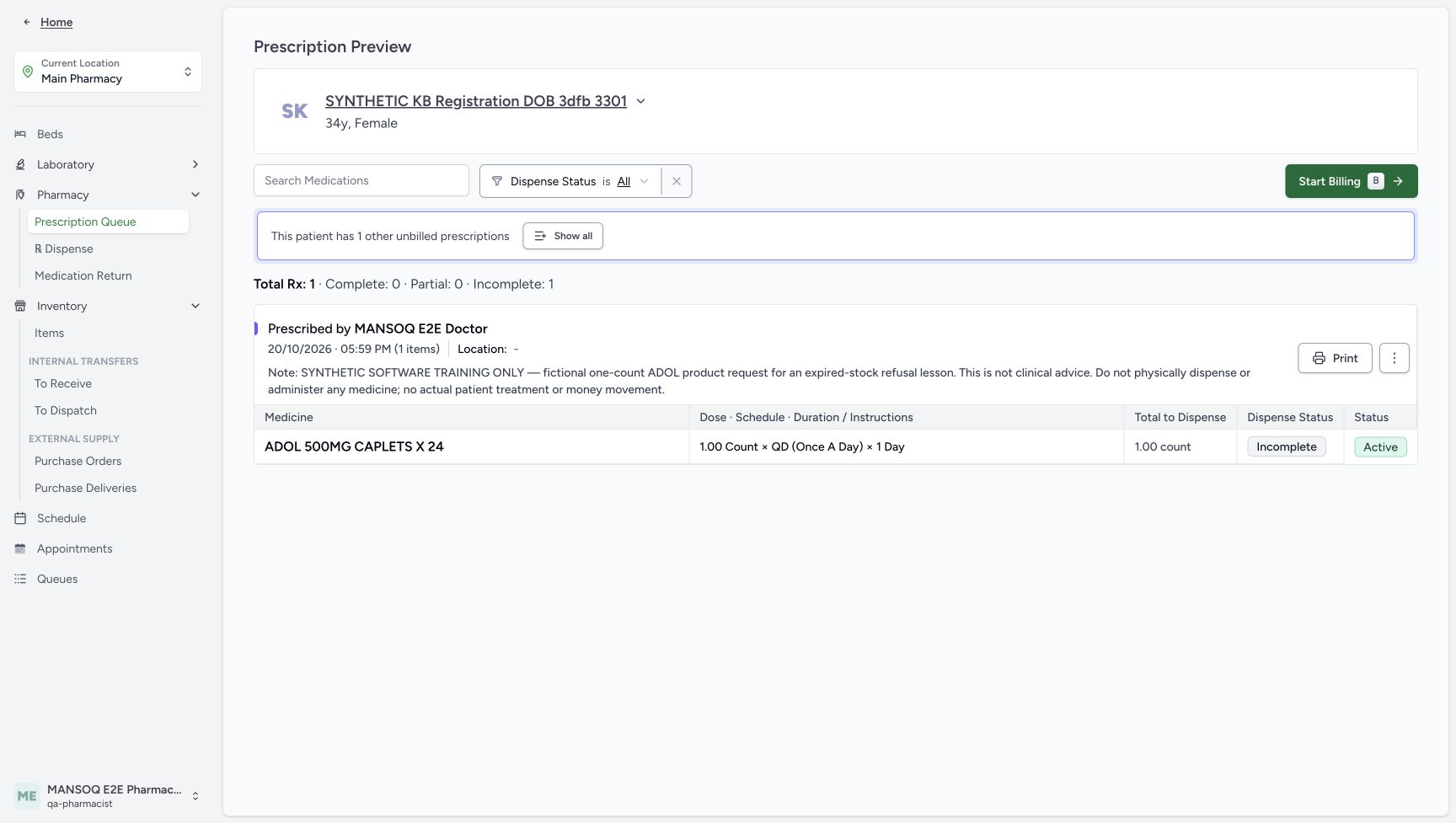
Match the assigned SYNTHETIC KB Registration DOB 3dfb 3301 row at 05:59 PM and choose View Rx. Verify ADOL, the explicit software-only note, original total 1.00 count, Incomplete and Active. Leave Show all unused: the banner about one other unbilled prescription refers to the earlier separate request, not a new unpaid invoice in this exercise.
1234Correct new prescription timestamp
Capture details
Captured in the isolated synthetic d20e training estate with the ordinary Pharmacist role. This example shows expired-only lot exclusion and an unsaved empty-allocation refusal. No physical medicine, patient treatment, actual money or additional dispensing is involved.
Image SHA-256 511a7a6db4a4617686bff53bed3c6478314528b5c87e2123e308f005e9c13c38
- Match the assigned synthetic patient: Use SYNTHETIC KB Registration DOB 3dfb 3301.
- Match the new 05:59 PM request: Choose the October 20 ADOL request, not the earlier HYMOX request.
- Choose View Rx on that row: Preview only this request.
- Keep the earlier 04:27 PM request separate: Do not combine that different request into the expiry exercise.
12345678Single ADOL request before billing
Capture details
Captured in the isolated synthetic d20e training estate with the ordinary Pharmacist role. This example shows expired-only lot exclusion and an unsaved empty-allocation refusal. No physical medicine, patient treatment, actual money or additional dispensing is involved.
Image SHA-256 0cc4b19eea85267ae73eebbcdf705861059f66a5f0d51c8c17663e97baf755fa
- Verify the same patient: Check the assigned synthetic registration patient.
- Verify the 05:59 PM Doctor request: The selected request contains one ADOL item.
- Read original total one count: The fictional request total is 1.00 count.
- Read Incomplete: No part of this separate request has been dispensed.
- Read Active: The request remains active.
- Keep the other unbilled request separate: This banner refers to another prescription, not an unpaid invoice from this exercise.
- Leave Show all unused: Keep this single-request exercise separate.
- Choose Start Billing: Inspect the selected ADOL request in the billing form.
3. Open billing and read All stock expired
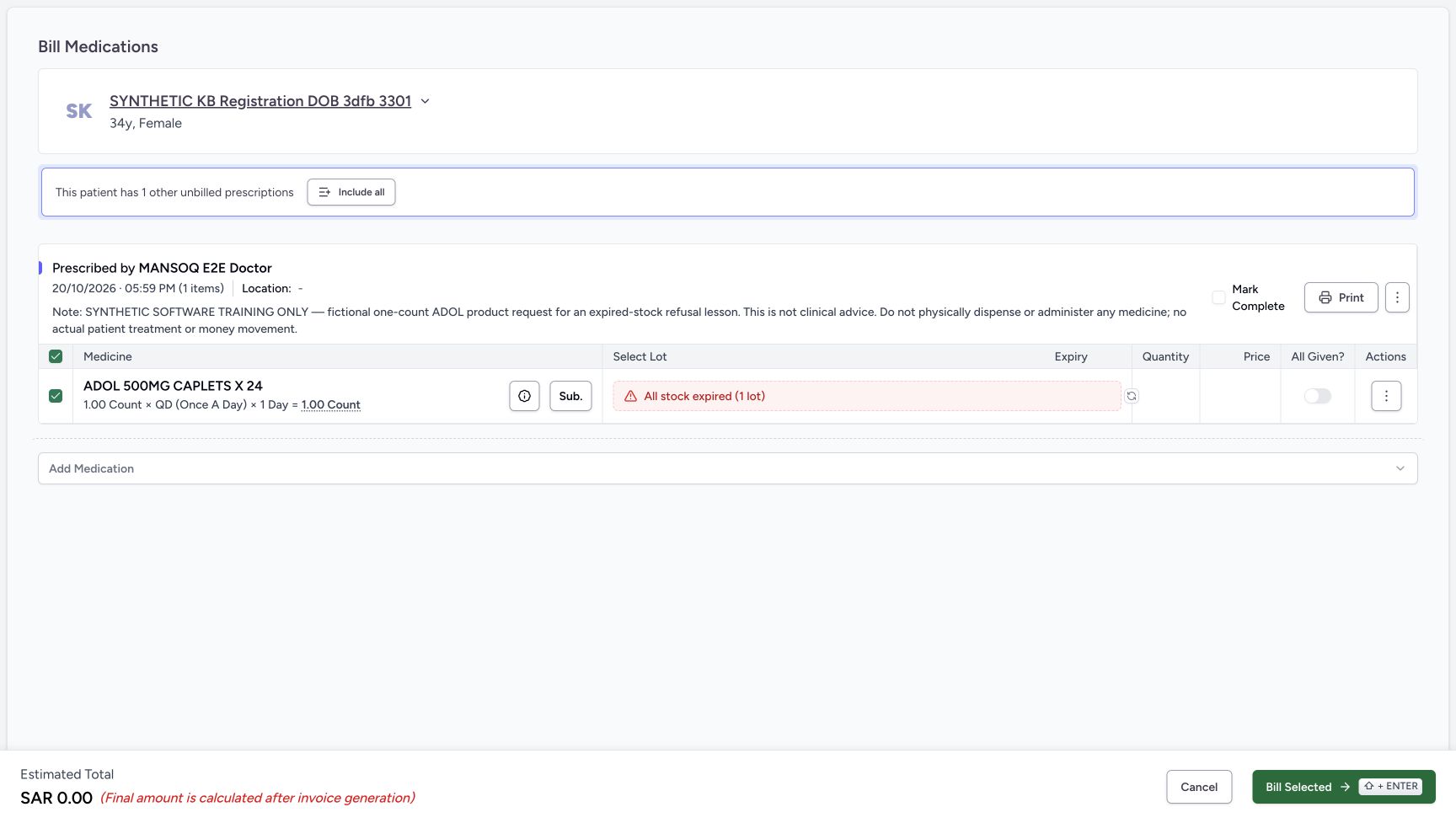
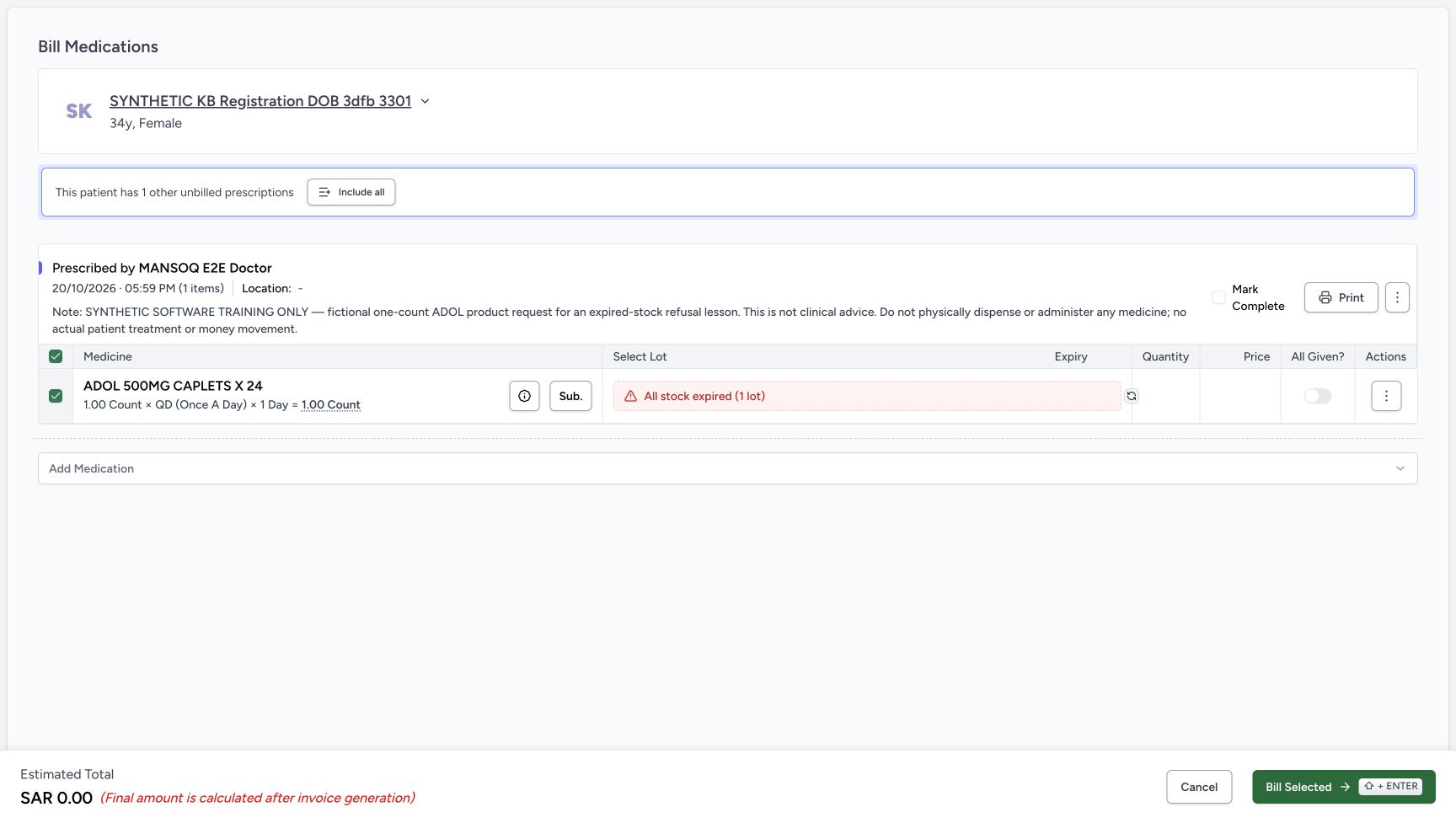
Choose Start Billing for this selected request. The settled form shows All stock expired (1 lot), with no eligible lot quantity or price. The red message describes availability; it is not a selectable usable lot. The estimated SAR 0.00 is not an invoice. Do not use Include all to add the other request. Review the separate initial defaults: All Given is on and Mark Complete is checked.
12345678Single ADOL request before billing
Capture details
Captured in the isolated synthetic d20e training estate with the ordinary Pharmacist role. This example shows expired-only lot exclusion and an unsaved empty-allocation refusal. No physical medicine, patient treatment, actual money or additional dispensing is involved.
Image SHA-256 0cc4b19eea85267ae73eebbcdf705861059f66a5f0d51c8c17663e97baf755fa
- Verify the same patient: Check the assigned synthetic registration patient.
- Verify the 05:59 PM Doctor request: The selected request contains one ADOL item.
- Read original total one count: The fictional request total is 1.00 count.
- Read Incomplete: No part of this separate request has been dispensed.
- Read Active: The request remains active.
- Keep the other unbilled request separate: This banner refers to another prescription, not an unpaid invoice from this exercise.
- Leave Show all unused: Keep this single-request exercise separate.
- Choose Start Billing: Inspect the selected ADOL request in the billing form.
123456Expired-only availability with initial defaults
Capture details
Captured in the isolated synthetic d20e training estate with the ordinary Pharmacist role. This example shows expired-only lot exclusion and an unsaved empty-allocation refusal. No physical medicine, patient treatment, actual money or additional dispensing is involved.
Image SHA-256 10397d5cafb173e914f96296a5a64023e212e01da25e2fbf01175d3a5ddc797f
- Read All stock expired (1 lot): The red availability label excludes the one lot from selection.
- Recognise no allocated quantity: The form has no eligible lot quantity or price.
- Review All Given initially on: This initial default must be checked before the isolated refusal example.
- Review Mark Complete initially checked: This is separate from the medicine-row toggle.
- Read the unsaved zero estimate: SAR 0.00 is an estimate, not a generated invoice.
- Keep Include all unused: Do not add the other unbilled prescription.
4. Keep both completion controls off and check Auto-select once
Turn All Given off and separately verify Mark Complete is unchecked, unchecking it if necessary. Choose the circular-arrow Auto-select control once. The form still has All stock expired (1 lot), no allocated lot and a zero estimate. Auto-select does not change the fixture expiry or supply an eligible unit.
 1234
1234Both completion controls off
Capture details
Captured in the isolated synthetic d20e training estate with the ordinary Pharmacist role. This example shows expired-only lot exclusion and an unsaved empty-allocation refusal. No physical medicine, patient treatment, actual money or additional dispensing is involved.
Image SHA-256 9255d2ddd4db5c05b09f1a9938e4a22e63a73df54d186039dbbfbc62c91de300
- Turn All Given off: Keep the medicine-row completion toggle off.
- Verify Mark Complete unchecked: Review the separate prescription-level checkbox.
- Read expired-only exclusion remains: Changing completion controls does not make the lot available.
- Run Auto-select once: Use the circular-arrow control once to check eligible selection.
 1234
1234No eligible lot after one Auto-select
Capture details
Captured in the isolated synthetic d20e training estate with the ordinary Pharmacist role. This example shows expired-only lot exclusion and an unsaved empty-allocation refusal. No physical medicine, patient treatment, actual money or additional dispensing is involved.
Image SHA-256 7c226d66717b566782a77ce75ccf47617f02760d1a879885543cfcf38852e54d
- Verify the lot remains excluded: All stock expired (1 lot) remains after Auto-select.
- Keep Auto-select separate from replenishment: The action has not supplied usable stock.
- Verify estimate stays zero: There is still no saved invoice.
- Locate the one controlled Bill Selected attempt: The training example uses this once to show the empty-lot guard; normal recovery may cancel directly.
5. Recognise the one controlled empty-lot refusal
Normal recovery is to cancel when no eligible lot exists. In this isolated training example, Bill Selected was chosen once with both completion controls off and no allocated lot. The form displayed At least one lot is required while the expiry warning remained. No dispense order, invoice or payment was saved. Do not retry an empty allocation or use another action to hide the unavailable stock.
1234No eligible lot after one Auto-select
Capture details
Captured in the isolated synthetic d20e training estate with the ordinary Pharmacist role. This example shows expired-only lot exclusion and an unsaved empty-allocation refusal. No physical medicine, patient treatment, actual money or additional dispensing is involved.
Image SHA-256 7c226d66717b566782a77ce75ccf47617f02760d1a879885543cfcf38852e54d
- Verify the lot remains excluded: All stock expired (1 lot) remains after Auto-select.
- Keep Auto-select separate from replenishment: The action has not supplied usable stock.
- Verify estimate stays zero: There is still no saved invoice.
- Locate the one controlled Bill Selected attempt: The training example uses this once to show the empty-lot guard; normal recovery may cancel directly.
12345Empty-lot refusal beside the expiry warning
Capture details
Captured in the isolated synthetic d20e training estate with the ordinary Pharmacist role. This example shows expired-only lot exclusion and an unsaved empty-allocation refusal. No physical medicine, patient treatment, actual money or additional dispensing is involved.
Image SHA-256 dbca600484e6c4a6e4f7ac2e1151aedda12ded2cf2c58b5f06a80db1aec675bd
- Read At least one lot is required: The form refuses to save an empty lot allocation.
- Keep the expiry warning distinct: The expired-only label remains above the validation message.
- Keep All Given off: Do not override progress to hide unavailable stock.
- Keep Mark Complete unchecked: The empty allocation must not complete the request.
- Choose Cancel: Leave the unsaved form without retrying the rejected allocation.
6. Cancel without changing the request
Choose Cancel. The preview returns to the same ADOL request at one count, Incomplete and Active. No substitution, Mark as Already Given, Remove Medication or group completion action is part of this exercise.
12345Empty-lot refusal beside the expiry warning
Capture details
Captured in the isolated synthetic d20e training estate with the ordinary Pharmacist role. This example shows expired-only lot exclusion and an unsaved empty-allocation refusal. No physical medicine, patient treatment, actual money or additional dispensing is involved.
Image SHA-256 dbca600484e6c4a6e4f7ac2e1151aedda12ded2cf2c58b5f06a80db1aec675bd
- Read At least one lot is required: The form refuses to save an empty lot allocation.
- Keep the expiry warning distinct: The expired-only label remains above the validation message.
- Keep All Given off: Do not override progress to hide unavailable stock.
- Keep Mark Complete unchecked: The empty allocation must not complete the request.
- Choose Cancel: Leave the unsaved form without retrying the rejected allocation.
 123
123Same unfinished request after Cancel
Capture details
Captured in the isolated synthetic d20e training estate with the ordinary Pharmacist role. This example shows expired-only lot exclusion and an unsaved empty-allocation refusal. No physical medicine, patient treatment, actual money or additional dispensing is involved.
Image SHA-256 0cc4b19eea85267ae73eebbcdf705861059f66a5f0d51c8c17663e97baf755fa
- Verify Incomplete after Cancel: The request has not become partially or fully dispensed.
- Verify Active after Cancel: The original request remains active.
- Verify original total one: The preview keeps the fictional 1.00 count request.
7. Reload and verify the same unfinished request
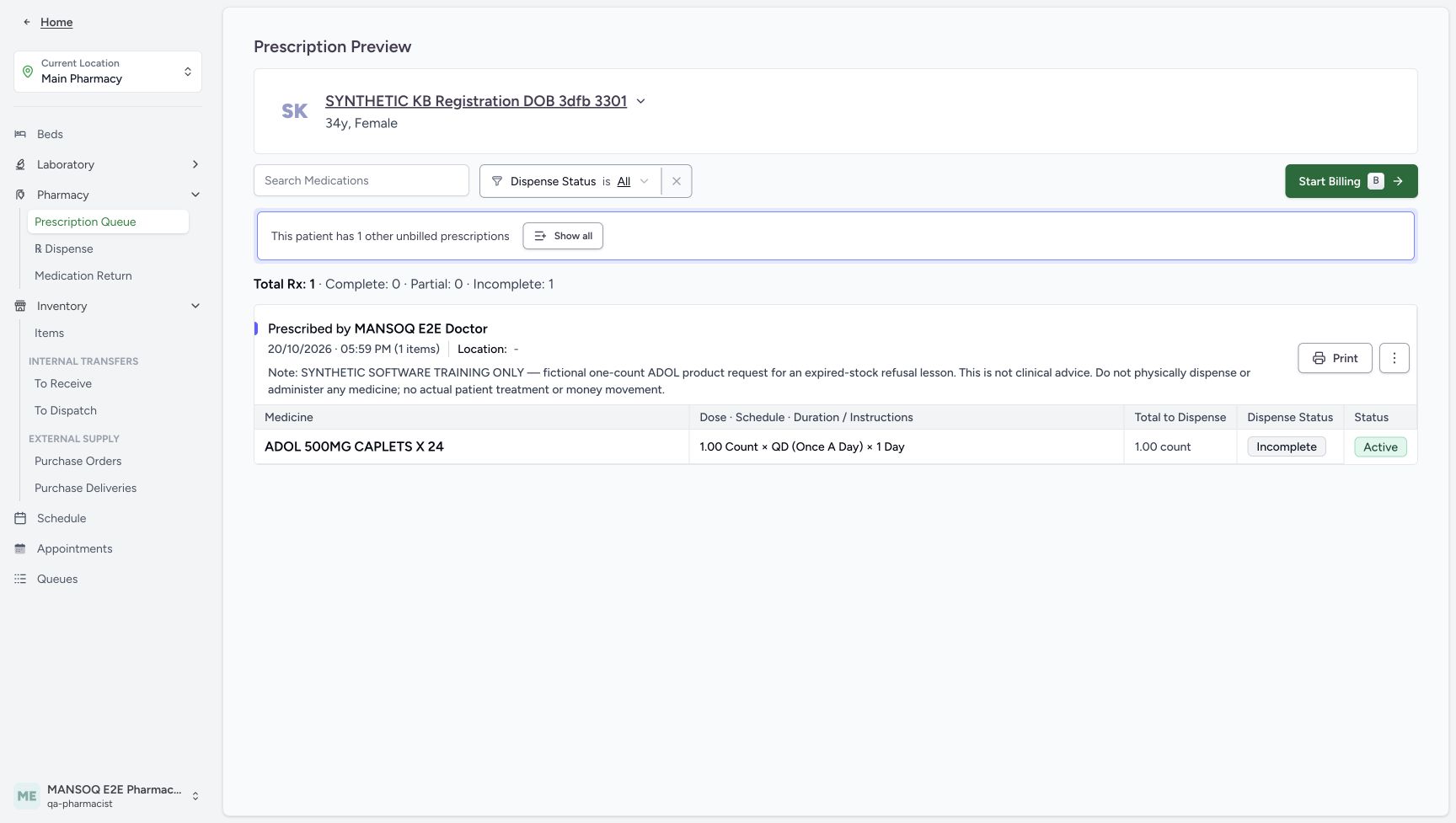
Reload normally and wait for the settled preview. Confirm the same 05:59 PM request, explicit note, original one-count total, Incomplete and Active. Keep the earlier HYMOX request separate and do not submit another bill to perform this readback.
123Same unfinished request after Cancel
Capture details
Captured in the isolated synthetic d20e training estate with the ordinary Pharmacist role. This example shows expired-only lot exclusion and an unsaved empty-allocation refusal. No physical medicine, patient treatment, actual money or additional dispensing is involved.
Image SHA-256 0cc4b19eea85267ae73eebbcdf705861059f66a5f0d51c8c17663e97baf755fa
- Verify Incomplete after Cancel: The request has not become partially or fully dispensed.
- Verify Active after Cancel: The original request remains active.
- Verify original total one: The preview keeps the fictional 1.00 count request.
 1234
1234Unchanged preview after normal reload
Capture details
Captured in the isolated synthetic d20e training estate with the ordinary Pharmacist role. This example shows expired-only lot exclusion and an unsaved empty-allocation refusal. No physical medicine, patient treatment, actual money or additional dispensing is involved.
Image SHA-256 0cc4b19eea85267ae73eebbcdf705861059f66a5f0d51c8c17663e97baf755fa
- Verify Incomplete after reload: Normal reload keeps the same unfinished request.
- Verify Active after reload: The original status remains active.
- Verify the same one-count total: No new quantity or request has appeared.
- Return to Inventory Items: Use the existing expanded Inventory menu for stock readback.
8. Verify the expired unit was not consumed
Open Inventory → Items again. Match the same ADOL one count, September 30 expiry and exact synthetic batch. The inventory remains Active as a lifecycle state, and its positive unit remains separate from eligibility for this request. Hand off any stock investigation to the authorised inventory owner under the facility’s procedure; do not edit the expiry or treat this test unit as usable medicine.
1234Unchanged preview after normal reload
Capture details
Captured in the isolated synthetic d20e training estate with the ordinary Pharmacist role. This example shows expired-only lot exclusion and an unsaved empty-allocation refusal. No physical medicine, patient treatment, actual money or additional dispensing is involved.
Image SHA-256 0cc4b19eea85267ae73eebbcdf705861059f66a5f0d51c8c17663e97baf755fa
- Verify Incomplete after reload: Normal reload keeps the same unfinished request.
- Verify Active after reload: The original status remains active.
- Verify the same one-count total: No new quantity or request has appeared.
- Return to Inventory Items: Use the existing expanded Inventory menu for stock readback.
1234Same expired unit after cancellation
Capture details
Captured in the isolated synthetic d20e training estate with the ordinary Pharmacist role. This example shows expired-only lot exclusion and an unsaved empty-allocation refusal. No physical medicine, patient treatment, actual money or additional dispensing is involved.
Image SHA-256 3281992aad3a8f271a7cc432d8cded313635c2124771b3b18d5b08642ca7020d
- Verify the expired unit remains one: The same ADOL inventory still contains 1.00 count.
- Verify the same September 30 expiry: The test date has not been edited to make the lot eligible.
- Verify the same synthetic batch: Match SYNTH-KB-EXPIRY-20261020-A.
- Keep Active separate from expiry: The unchanged lifecycle badge is not permission to dispense.
Distinguish expired-only stock from no stock
This fixture has a positive unit in Inventory but no eligible lot in the billing selector. All stock expired (1 lot) identifies a restricted lot; the earlier No Stock case had zero available units and needs its own checks. The lot count is not a saved dispense quantity. This exercise uses a clearly past September 30 date and does not establish every near-expiry cutoff or other stock condition.
1234567Positive inventory with a past expiry
Capture details
Captured in the isolated synthetic d20e training estate with the ordinary Pharmacist role. This example shows expired-only lot exclusion and an unsaved empty-allocation refusal. No physical medicine, patient treatment, actual money or additional dispensing is involved.
Image SHA-256 3fcf1496f4d4a2cab52a32df5d2a2514881c12e1b259f0866a95b5507db1d605
- Verify Main Pharmacy: Keep the assigned training location.
- Verify the ordinary Pharmacist account: Use the existing MANSOQ E2E Pharmacist account.
- Match the synthetic ADOL Product: The test row is ADOL 500MG CAPLETS X24.
- Read positive stock one: Inventory contains 1.00 count, not zero stock.
- Read the past expiry: The date is September 30, 2026.
- Keep Active separate from eligibility: Active is lifecycle status and does not mean the lot is unexpired.
- Expand Pharmacy: Use the existing location menu.
123456Expired-only availability with initial defaults
Capture details
Captured in the isolated synthetic d20e training estate with the ordinary Pharmacist role. This example shows expired-only lot exclusion and an unsaved empty-allocation refusal. No physical medicine, patient treatment, actual money or additional dispensing is involved.
Image SHA-256 10397d5cafb173e914f96296a5a64023e212e01da25e2fbf01175d3a5ddc797f
- Read All stock expired (1 lot): The red availability label excludes the one lot from selection.
- Recognise no allocated quantity: The form has no eligible lot quantity or price.
- Review All Given initially on: This initial default must be checked before the isolated refusal example.
- Review Mark Complete initially checked: This is separate from the medicine-row toggle.
- Read the unsaved zero estimate: SAR 0.00 is an estimate, not a generated invoice.
- Keep Include all unused: Do not add the other unbilled prescription.
1234No eligible lot after one Auto-select
Capture details
Captured in the isolated synthetic d20e training estate with the ordinary Pharmacist role. This example shows expired-only lot exclusion and an unsaved empty-allocation refusal. No physical medicine, patient treatment, actual money or additional dispensing is involved.
Image SHA-256 7c226d66717b566782a77ce75ccf47617f02760d1a879885543cfcf38852e54d
- Verify the lot remains excluded: All stock expired (1 lot) remains after Auto-select.
- Keep Auto-select separate from replenishment: The action has not supplied usable stock.
- Verify estimate stays zero: There is still no saved invoice.
- Locate the one controlled Bill Selected attempt: The training example uses this once to show the empty-lot guard; normal recovery may cancel directly.
1234Same expired unit after cancellation
Capture details
Captured in the isolated synthetic d20e training estate with the ordinary Pharmacist role. This example shows expired-only lot exclusion and an unsaved empty-allocation refusal. No physical medicine, patient treatment, actual money or additional dispensing is involved.
Image SHA-256 3281992aad3a8f271a7cc432d8cded313635c2124771b3b18d5b08642ca7020d
- Verify the expired unit remains one: The same ADOL inventory still contains 1.00 count.
- Verify the same September 30 expiry: The test date has not been edited to make the lot eligible.
- Verify the same synthetic batch: Match SYNTH-KB-EXPIRY-20261020-A.
- Keep Active separate from expiry: The unchanged lifecycle badge is not permission to dispense.
Keep the form safeguard and unchanged result in scope
The illustrated form excluded the expired lot and refused an empty allocation. After Cancel and reload, the original request stayed Incomplete and Active, and the same expired stock unit remained. No new dispensing, billing, payment or physical handover occurred. This result describes the illustrated software path; it does not certify every possible dispensing route or authorise any attempt to bypass the safeguard.
12345Empty-lot refusal beside the expiry warning
Capture details
Captured in the isolated synthetic d20e training estate with the ordinary Pharmacist role. This example shows expired-only lot exclusion and an unsaved empty-allocation refusal. No physical medicine, patient treatment, actual money or additional dispensing is involved.
Image SHA-256 dbca600484e6c4a6e4f7ac2e1151aedda12ded2cf2c58b5f06a80db1aec675bd
- Read At least one lot is required: The form refuses to save an empty lot allocation.
- Keep the expiry warning distinct: The expired-only label remains above the validation message.
- Keep All Given off: Do not override progress to hide unavailable stock.
- Keep Mark Complete unchecked: The empty allocation must not complete the request.
- Choose Cancel: Leave the unsaved form without retrying the rejected allocation.
123Same unfinished request after Cancel
Capture details
Captured in the isolated synthetic d20e training estate with the ordinary Pharmacist role. This example shows expired-only lot exclusion and an unsaved empty-allocation refusal. No physical medicine, patient treatment, actual money or additional dispensing is involved.
Image SHA-256 0cc4b19eea85267ae73eebbcdf705861059f66a5f0d51c8c17663e97baf755fa
- Verify Incomplete after Cancel: The request has not become partially or fully dispensed.
- Verify Active after Cancel: The original request remains active.
- Verify original total one: The preview keeps the fictional 1.00 count request.
1234Unchanged preview after normal reload
Capture details
Captured in the isolated synthetic d20e training estate with the ordinary Pharmacist role. This example shows expired-only lot exclusion and an unsaved empty-allocation refusal. No physical medicine, patient treatment, actual money or additional dispensing is involved.
Image SHA-256 0cc4b19eea85267ae73eebbcdf705861059f66a5f0d51c8c17663e97baf755fa
- Verify Incomplete after reload: Normal reload keeps the same unfinished request.
- Verify Active after reload: The original status remains active.
- Verify the same one-count total: No new quantity or request has appeared.
- Return to Inventory Items: Use the existing expanded Inventory menu for stock readback.
1234Same expired unit after cancellation
Capture details
Captured in the isolated synthetic d20e training estate with the ordinary Pharmacist role. This example shows expired-only lot exclusion and an unsaved empty-allocation refusal. No physical medicine, patient treatment, actual money or additional dispensing is involved.
Image SHA-256 3281992aad3a8f271a7cc432d8cded313635c2124771b3b18d5b08642ca7020d
- Verify the expired unit remains one: The same ADOL inventory still contains 1.00 count.
- Verify the same September 30 expiry: The test date has not been edited to make the lot eligible.
- Verify the same synthetic batch: Match SYNTH-KB-EXPIRY-20261020-A.
- Keep Active separate from expiry: The unchanged lifecycle badge is not permission to dispense.
Troubleshooting
Inventory is Active but the selector says all stock expired
Read expiry separately from lifecycle. The test row is Active with one unit but has a September 30 past date. Confirm the exact product and assigned location, keep the expiry unchanged and follow the authorised stock procedure. Active does not clear the expiry restriction.
1234567Positive inventory with a past expiry
Capture details
Captured in the isolated synthetic d20e training estate with the ordinary Pharmacist role. This example shows expired-only lot exclusion and an unsaved empty-allocation refusal. No physical medicine, patient treatment, actual money or additional dispensing is involved.
Image SHA-256 3fcf1496f4d4a2cab52a32df5d2a2514881c12e1b259f0866a95b5507db1d605
- Verify Main Pharmacy: Keep the assigned training location.
- Verify the ordinary Pharmacist account: Use the existing MANSOQ E2E Pharmacist account.
- Match the synthetic ADOL Product: The test row is ADOL 500MG CAPLETS X24.
- Read positive stock one: Inventory contains 1.00 count, not zero stock.
- Read the past expiry: The date is September 30, 2026.
- Keep Active separate from eligibility: Active is lifecycle status and does not mean the lot is unexpired.
- Expand Pharmacy: Use the existing location menu.
123456Expired-only availability with initial defaults
Capture details
Captured in the isolated synthetic d20e training estate with the ordinary Pharmacist role. This example shows expired-only lot exclusion and an unsaved empty-allocation refusal. No physical medicine, patient treatment, actual money or additional dispensing is involved.
Image SHA-256 10397d5cafb173e914f96296a5a64023e212e01da25e2fbf01175d3a5ddc797f
- Read All stock expired (1 lot): The red availability label excludes the one lot from selection.
- Recognise no allocated quantity: The form has no eligible lot quantity or price.
- Review All Given initially on: This initial default must be checked before the isolated refusal example.
- Review Mark Complete initially checked: This is separate from the medicine-row toggle.
- Read the unsaved zero estimate: SAR 0.00 is an estimate, not a generated invoice.
- Keep Include all unused: Do not add the other unbilled prescription.
1234Same expired unit after cancellation
Capture details
Captured in the isolated synthetic d20e training estate with the ordinary Pharmacist role. This example shows expired-only lot exclusion and an unsaved empty-allocation refusal. No physical medicine, patient treatment, actual money or additional dispensing is involved.
Image SHA-256 3281992aad3a8f271a7cc432d8cded313635c2124771b3b18d5b08642ca7020d
- Verify the expired unit remains one: The same ADOL inventory still contains 1.00 count.
- Verify the same September 30 expiry: The test date has not been edited to make the lot eligible.
- Verify the same synthetic batch: Match SYNTH-KB-EXPIRY-20261020-A.
- Keep Active separate from expiry: The unchanged lifecycle badge is not permission to dispense.
Auto-select leaves no lot but Bill Selected is enabled
An enabled button does not guarantee a valid allocation. Keep both completion controls off. The controlled example shows At least one lot is required; routine recovery can use Cancel directly. Do not keep repeating the refused bill.
1234Both completion controls off
Capture details
Captured in the isolated synthetic d20e training estate with the ordinary Pharmacist role. This example shows expired-only lot exclusion and an unsaved empty-allocation refusal. No physical medicine, patient treatment, actual money or additional dispensing is involved.
Image SHA-256 9255d2ddd4db5c05b09f1a9938e4a22e63a73df54d186039dbbfbc62c91de300
- Turn All Given off: Keep the medicine-row completion toggle off.
- Verify Mark Complete unchecked: Review the separate prescription-level checkbox.
- Read expired-only exclusion remains: Changing completion controls does not make the lot available.
- Run Auto-select once: Use the circular-arrow control once to check eligible selection.
1234No eligible lot after one Auto-select
Capture details
Captured in the isolated synthetic d20e training estate with the ordinary Pharmacist role. This example shows expired-only lot exclusion and an unsaved empty-allocation refusal. No physical medicine, patient treatment, actual money or additional dispensing is involved.
Image SHA-256 7c226d66717b566782a77ce75ccf47617f02760d1a879885543cfcf38852e54d
- Verify the lot remains excluded: All stock expired (1 lot) remains after Auto-select.
- Keep Auto-select separate from replenishment: The action has not supplied usable stock.
- Verify estimate stays zero: There is still no saved invoice.
- Locate the one controlled Bill Selected attempt: The training example uses this once to show the empty-lot guard; normal recovery may cancel directly.
12345Empty-lot refusal beside the expiry warning
Capture details
Captured in the isolated synthetic d20e training estate with the ordinary Pharmacist role. This example shows expired-only lot exclusion and an unsaved empty-allocation refusal. No physical medicine, patient treatment, actual money or additional dispensing is involved.
Image SHA-256 dbca600484e6c4a6e4f7ac2e1151aedda12ded2cf2c58b5f06a80db1aec675bd
- Read At least one lot is required: The form refuses to save an empty lot allocation.
- Keep the expiry warning distinct: The expired-only label remains above the validation message.
- Keep All Given off: Do not override progress to hide unavailable stock.
- Keep Mark Complete unchecked: The empty allocation must not complete the request.
- Choose Cancel: Leave the unsaved form without retrying the rejected allocation.
123Same unfinished request after Cancel
Capture details
Captured in the isolated synthetic d20e training estate with the ordinary Pharmacist role. This example shows expired-only lot exclusion and an unsaved empty-allocation refusal. No physical medicine, patient treatment, actual money or additional dispensing is involved.
Image SHA-256 0cc4b19eea85267ae73eebbcdf705861059f66a5f0d51c8c17663e97baf755fa
- Verify Incomplete after Cancel: The request has not become partially or fully dispensed.
- Verify Active after Cancel: The original request remains active.
- Verify original total one: The preview keeps the fictional 1.00 count request.
Another unbilled prescription is offered
Keep this expiry exercise on the new 05:59 PM ADOL request. Do not choose Show all or Include all to bring the earlier HYMOX request into it. That separate prescription does not prove an unpaid balance on the completed earlier order.
1234Correct new prescription timestamp
Capture details
Captured in the isolated synthetic d20e training estate with the ordinary Pharmacist role. This example shows expired-only lot exclusion and an unsaved empty-allocation refusal. No physical medicine, patient treatment, actual money or additional dispensing is involved.
Image SHA-256 511a7a6db4a4617686bff53bed3c6478314528b5c87e2123e308f005e9c13c38
- Match the assigned synthetic patient: Use SYNTHETIC KB Registration DOB 3dfb 3301.
- Match the new 05:59 PM request: Choose the October 20 ADOL request, not the earlier HYMOX request.
- Choose View Rx on that row: Preview only this request.
- Keep the earlier 04:27 PM request separate: Do not combine that different request into the expiry exercise.
12345678Single ADOL request before billing
Capture details
Captured in the isolated synthetic d20e training estate with the ordinary Pharmacist role. This example shows expired-only lot exclusion and an unsaved empty-allocation refusal. No physical medicine, patient treatment, actual money or additional dispensing is involved.
Image SHA-256 0cc4b19eea85267ae73eebbcdf705861059f66a5f0d51c8c17663e97baf755fa
- Verify the same patient: Check the assigned synthetic registration patient.
- Verify the 05:59 PM Doctor request: The selected request contains one ADOL item.
- Read original total one count: The fictional request total is 1.00 count.
- Read Incomplete: No part of this separate request has been dispensed.
- Read Active: The request remains active.
- Keep the other unbilled request separate: This banner refers to another prescription, not an unpaid invoice from this exercise.
- Leave Show all unused: Keep this single-request exercise separate.
- Choose Start Billing: Inspect the selected ADOL request in the billing form.
123456Expired-only availability with initial defaults
Capture details
Captured in the isolated synthetic d20e training estate with the ordinary Pharmacist role. This example shows expired-only lot exclusion and an unsaved empty-allocation refusal. No physical medicine, patient treatment, actual money or additional dispensing is involved.
Image SHA-256 10397d5cafb173e914f96296a5a64023e212e01da25e2fbf01175d3a5ddc797f
- Read All stock expired (1 lot): The red availability label excludes the one lot from selection.
- Recognise no allocated quantity: The form has no eligible lot quantity or price.
- Review All Given initially on: This initial default must be checked before the isolated refusal example.
- Review Mark Complete initially checked: This is separate from the medicine-row toggle.
- Read the unsaved zero estimate: SAR 0.00 is an estimate, not a generated invoice.
- Keep Include all unused: Do not add the other unbilled prescription.
Source evidence
Every citation uses this exact committed version. The private source repository requires access.
- repositories/platform/mansoq-web/src/pages/Facility/services/pharmacy/billMedications/BillMedicationsForm.tsx:34 ·
d20e68ed4a9e0b005aa54f218f84172160974b02Source file checksum
9cc718a513e22df66f1c2b92d2c8b4b63e0e4d02e58b90705fa8ca5dbf6f8ac4 - repositories/platform/mansoq-web/src/pages/Facility/services/pharmacy/billMedications/formSchema.ts:94 ·
d20e68ed4a9e0b005aa54f218f84172160974b02Source file checksum
654a1d61d9eea0ed21dbbda6fcc0f127eb9cc1631bd178f3023bb334258571e2 - repositories/platform/mansoq-web/src/pages/Facility/services/inventory/DispenseLotSelector.tsx:64 ·
d20e68ed4a9e0b005aa54f218f84172160974b02Source file checksum
4153614e75921f3325472744644989be488f49762c6b694d777538969664b6dc - repositories/platform/mansoq-web/src/pages/Facility/services/pharmacy/billMedications/utils/useInventoryItemsAutoSelect.ts:53 ·
d20e68ed4a9e0b005aa54f218f84172160974b02Source file checksum
689be89ed73722f369100ad448b2ceb37e559bb86a354edbd63393cc8d61af9b - repositories/platform/mansoq-web/src/pages/Facility/services/pharmacy/billMedications/BillMedicationsPrescriptionCard.tsx:573 ·
d20e68ed4a9e0b005aa54f218f84172160974b02Source file checksum
e64b9b9ffbc8388dba86070d36c8acef28639ac6166f650ca3586b43e9ac3134 - repositories/platform/mansoq-web/src/pages/Facility/services/pharmacy/billMedications/BillMedicationsFooter.tsx:80 ·
d20e68ed4a9e0b005aa54f218f84172160974b02Source file checksum
5a2167f3e4ae3c332f8da9b7076d6339c891543cb41fa43534256c826300c048 - repositories/platform/mansoq-web/src/components/Common/BackButton.tsx:19 ·
d20e68ed4a9e0b005aa54f218f84172160974b02Source file checksum
56a741eff730a7b18a5fae594374068bab2d5413993c32dbbaf3625e14743ca3 - repositories/platform/mansoq-web/src/pages/Facility/services/pharmacy/PrescriptionQueue.tsx:250 ·
d20e68ed4a9e0b005aa54f218f84172160974b02Source file checksum
20c2f3e573ae315ec5ff79b19575c1a6e3b2f7ca76b5e98bad319ef595b11d04 - repositories/platform/mansoq-web/src/pages/Facility/services/pharmacy/PrescriptionsPreviewPage.tsx:117 ·
d20e68ed4a9e0b005aa54f218f84172160974b02Source file checksum
2a76a064861548bc2d0c5e036bbc9a2ec448582cb8bcb3e970c05a8362498a2e - repositories/platform/mansoq-web/src/pages/Facility/services/inventory/InventoryList.tsx:49 ·
d20e68ed4a9e0b005aa54f218f84172160974b02Source file checksum
6a78d506a34a44f2e24877ebf2a55eeee05cfde35b8cc6a474c399bf099f1806 - repositories/platform/mansoq-web/mansoq.config.ts:387 ·
d20e68ed4a9e0b005aa54f218f84172160974b02Source file checksum
6dfbc14c545d178f584364adfb57ce67d9914e1e612612b78173ae20913a80ff - repositories/platform/mansoq-web/src/Utils/inventory.ts:14 ·
d20e68ed4a9e0b005aa54f218f84172160974b02Source file checksum
762baa1da72864af3ee6138b43b16181e722f8bbad97d35400b79a8b3109df0d - repositories/platform/mansoq-web/src/pages/Facility/services/inventory/utils.ts:1 ·
d20e68ed4a9e0b005aa54f218f84172160974b02Source file checksum
346bd8088dfc07e4c9af19c712e71246c66d17ef6e7e2e9b13e1be0ec7634b73