 MANSOQ
 Pharmacy · VERSION d20e68ed
Review no-stock history and leave an unfinished prescription unchanged
Inspect the same partial request, distinguish loading from No Stock, review earlier dispense history, recognise the empty-lot guard and cancel without another order, invoice or payment.
Pharmacist
 1234
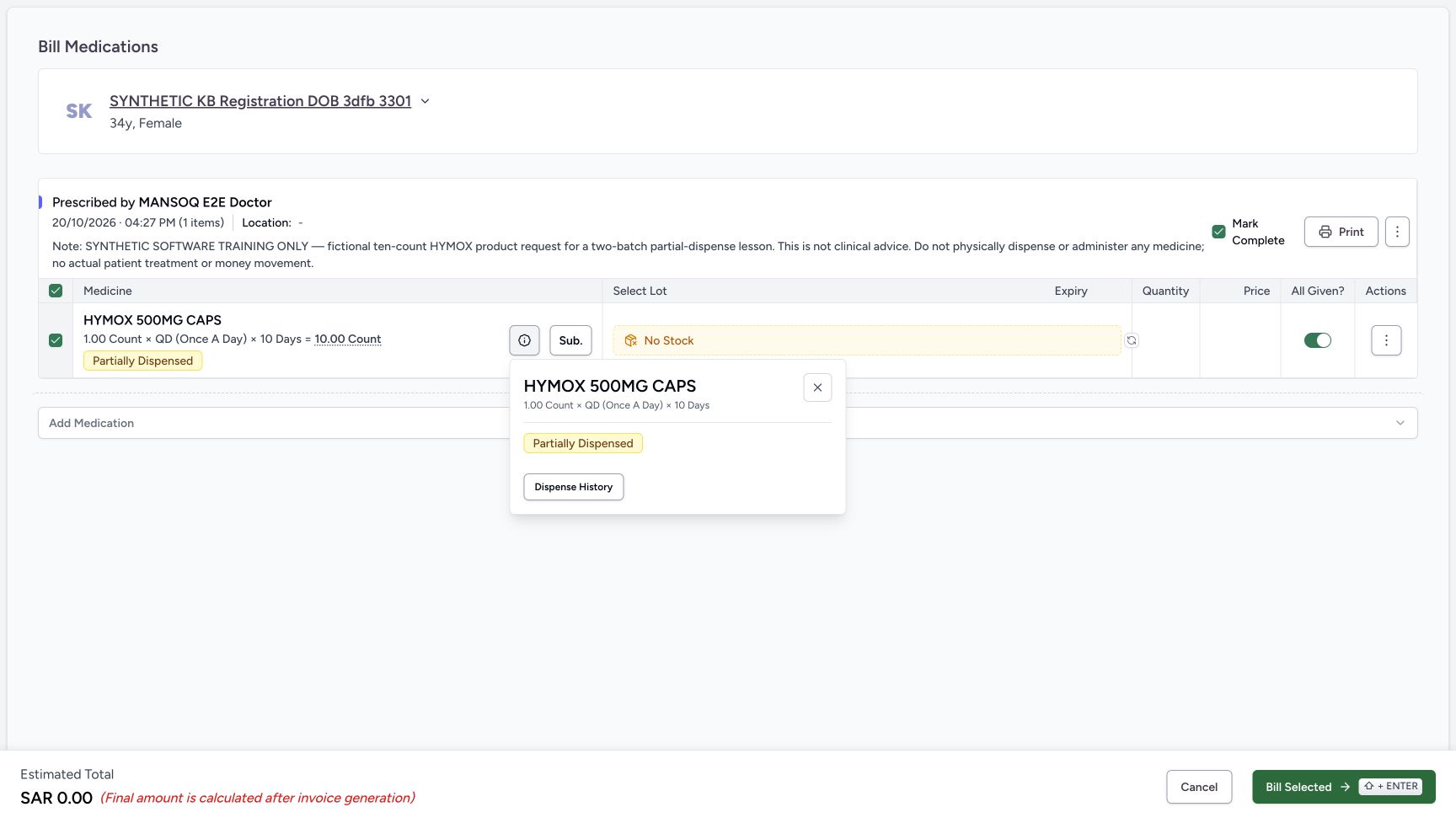
1234No Stock with medicine information open
Capture details
Genuine unchanged natural 1728×977 original from the exact local committed d20e build, LOCAL_UNPUSHED. This is a fictional software recovery example; no additional medicine, money or dispensing record was created.
Image SHA-256 5e8d9723acf02b427ed827f536b5abcef7f283d9420b5ba048ca474083717270
- Read the settled No Stock label: The selector has no available lot rows for this request at this location in the illustrated case.
- Locate the medicine information trigger: This icon opens the pictured information popover; the popover is not a selectable lot list.
- Read Partially Dispensed in information: The popover retains the original request progress.
- Open Dispense History: Review previously saved rows for this request before considering another bill.
 1234
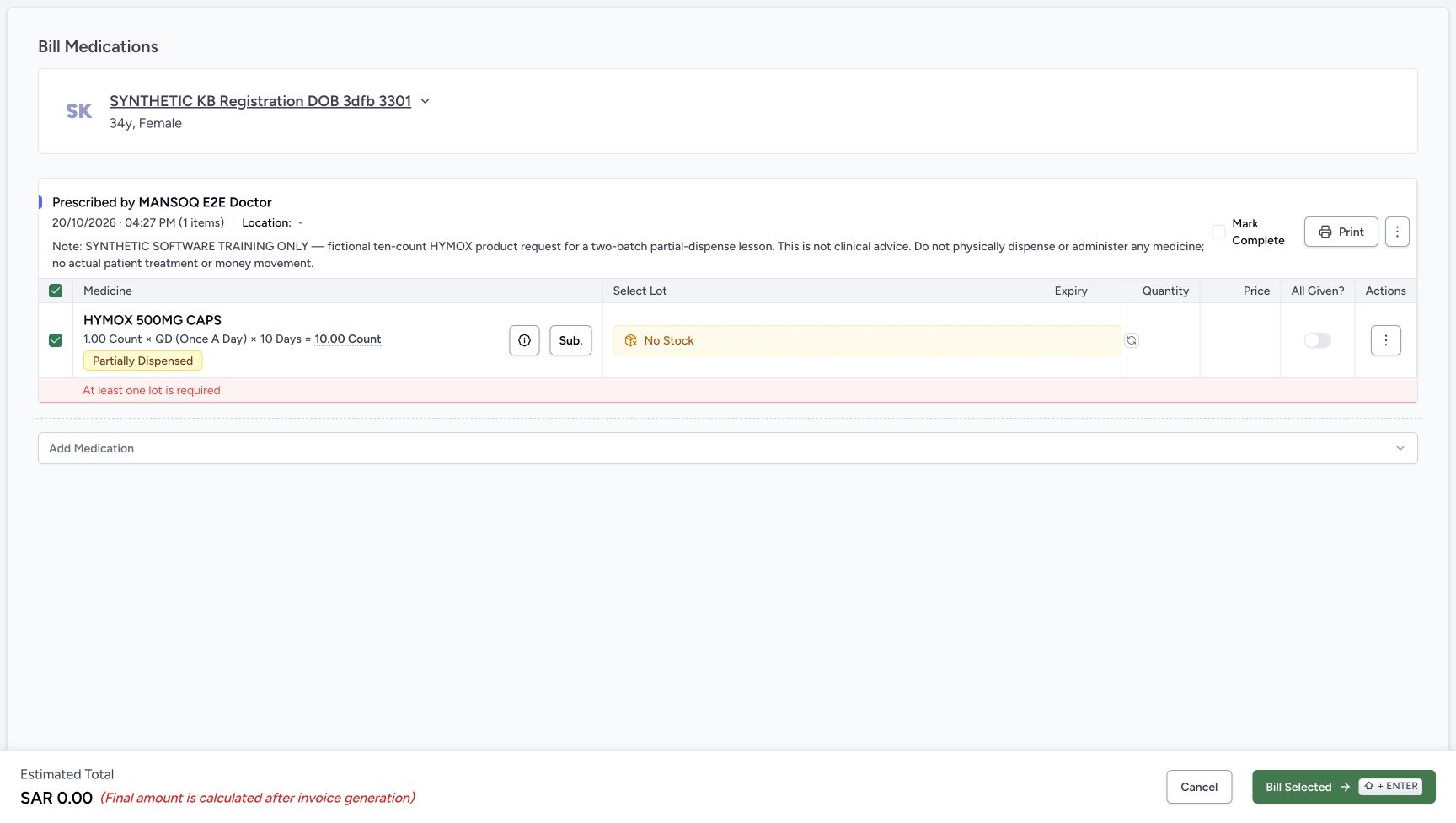
1234Inline empty-lot validation refusal
Capture details
Genuine unchanged natural 1728×977 original from the exact local committed d20e build, LOCAL_UNPUSHED. This is a fictional software recovery example; no additional medicine, money or dispensing record was created.
Image SHA-256 37468c299332f1a452781a94dd48545720feae9ddc634f71de5afef68f168a3c
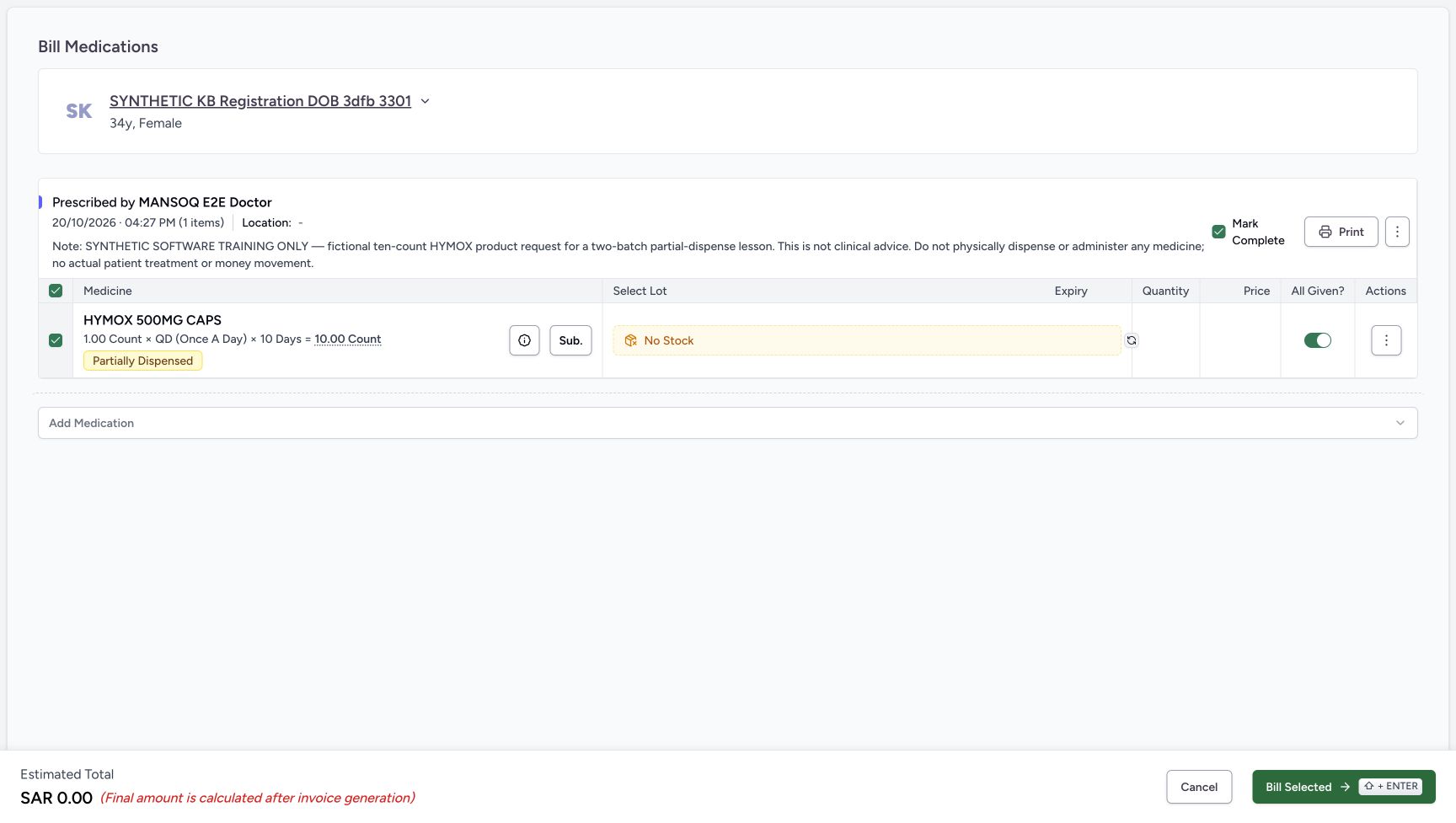
- Read At least one lot is required: This inline validation refused the empty selection. No API status or saved bill is implied.
- Keep All Given off after refusal: The refusal does not justify overriding progress controls.
- Keep Mark Complete unchecked: The request is not completed by an empty-lot attempt.
- Choose Cancel: Leave the unsaved billing form without retrying the rejected bill.
 1234
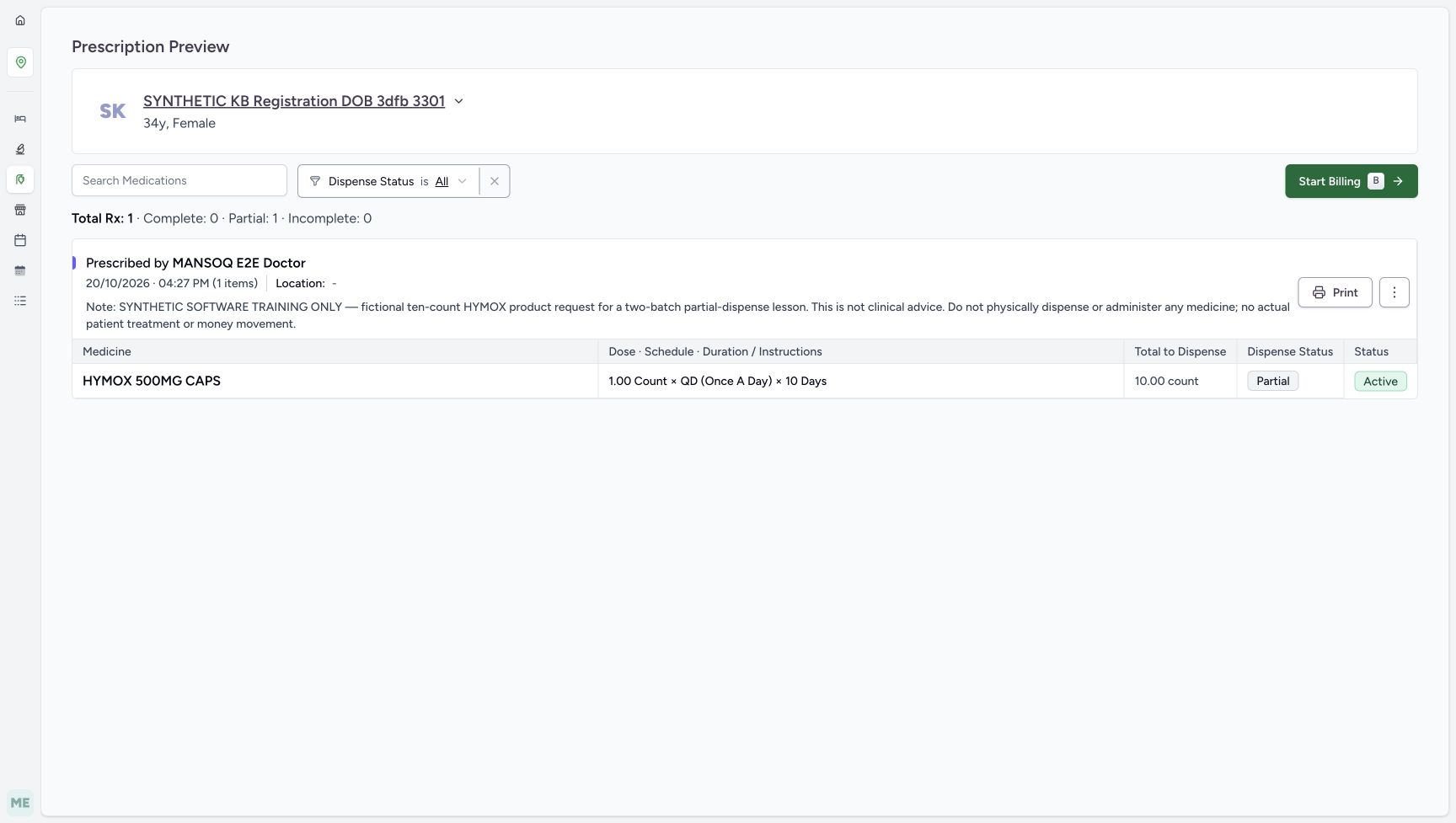
1234Settled unchanged preview after reload
Capture details
Genuine unchanged natural 1728×977 original from the exact local committed d20e build, LOCAL_UNPUSHED. This is a fictional software recovery example; no additional medicine, money or dispensing record was created.
Image SHA-256 09905f562030f0befc846727e213927883bf45271e800dd9c9658798f6078e31
- Verify the same patient after reload: The settled preview returns to the assigned synthetic patient.
- Verify Partial persists: The empty-lot attempt and Cancel created no new dispensing.
- Verify Active persists: The original prescription has not been completed.
- Verify original Total to Dispense ten: The settled UI retains 10.00 count, not a generated remaining-five request.
17 of 17 content blocks have reviewed image alignment.
Before you begin
- Continue as the authorised ordinary Pharmacist after “Prepare five of ten requested units from two synthetic lots” and “Pay and complete one two-lot partial order while the prescription stays active”. Their reviewed FacilityAdmin batch receipt and Doctor ten-count Product-request prerequisites have already been completed. Reuse the same Main Pharmacy location and synthetic patient; do not repeat those saves.
 1234
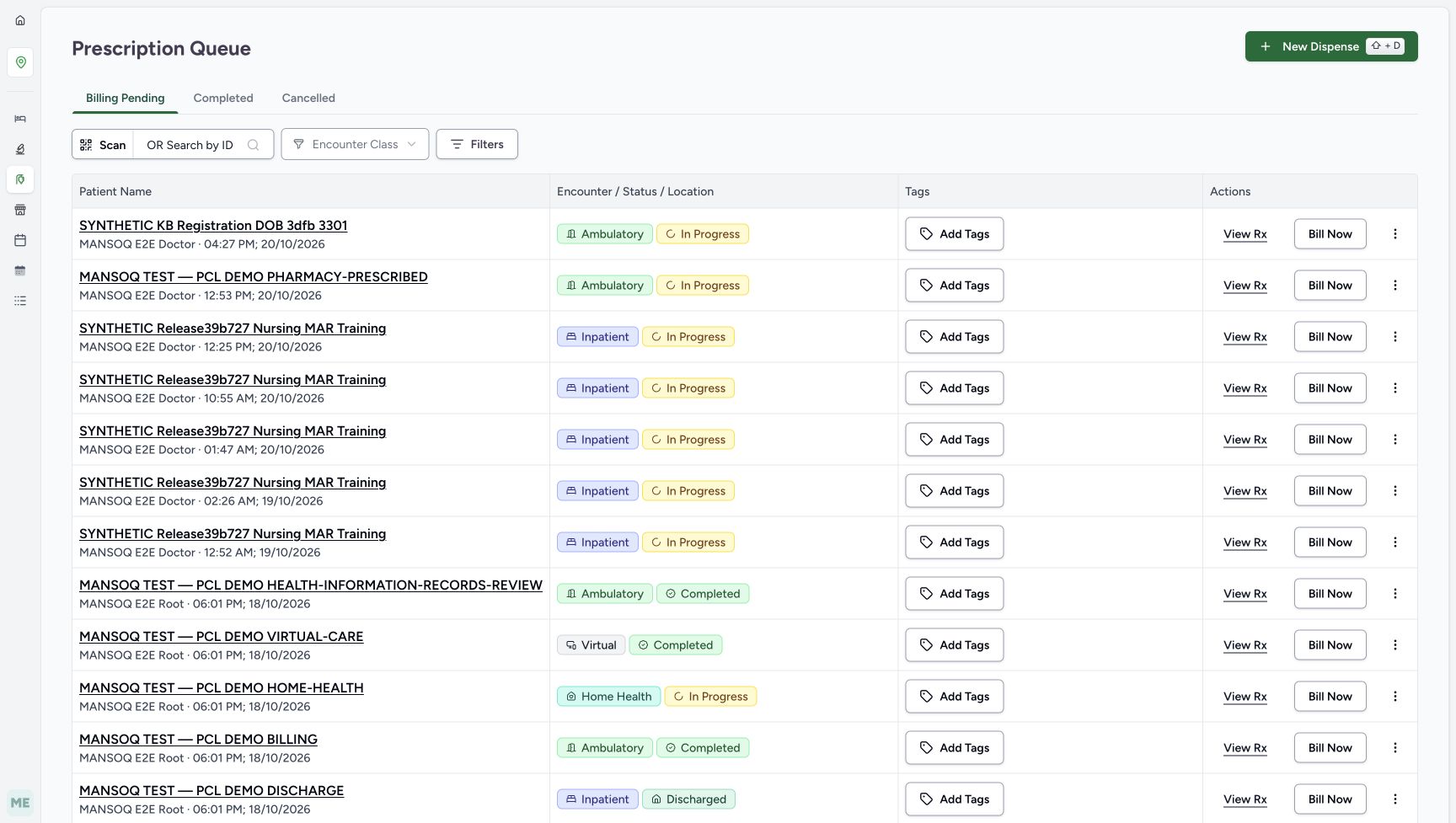
1234Recorded release d20e68ed · 2026-10-20T14:15:54.297Z · 1728 × 977 Same unfinished prescription queue
Capture details
Genuine unchanged natural 1728×977 original from the exact local committed d20e build, LOCAL_UNPUSHED. This is a fictional software recovery example; no additional medicine, money or dispensing record was created.
Image SHA-256
117b792e5e26bbd668e0767122158ab1d3b2b47cf327e4856c875674b2009f9d- Keep the Billing Pending prescription context: This is the still-unfinished prescription workflow, not an unpaid invoice on the completed earlier order.
- Match the assigned synthetic patient: Use SYNTHETIC KB Registration DOB 3dfb 3301.
- Match the existing 04:27 PM request: The intended Doctor request is dated October 20, 2026 at 04:27 PM.
- Open View Rx: Inspect this same request rather than starting a new dispense.
 12345
12345Recorded release d20e68ed · 2026-10-20T14:16:12.122Z · 1728 × 977 Existing Partial and Active request
Capture details
Genuine unchanged natural 1728×977 original from the exact local committed d20e build, LOCAL_UNPUSHED. This is a fictional software recovery example; no additional medicine, money or dispensing record was created.
Image SHA-256
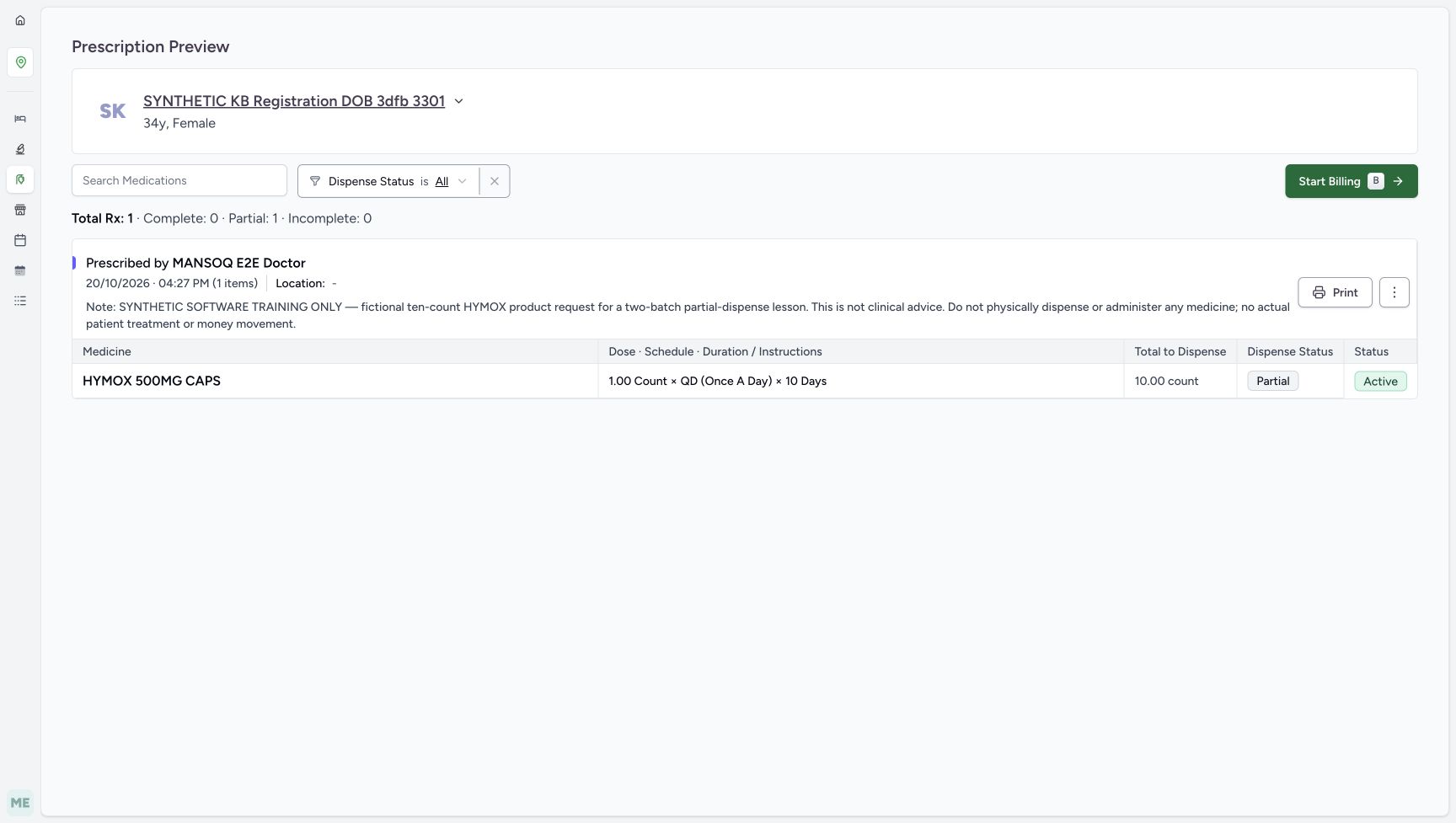
09905f562030f0befc846727e213927883bf45271e800dd9c9658798f6078e31- Verify the same patient in preview: Retain the existing synthetic patient and fictional prescription note.
- Read the original ten-count total: Total to Dispense remains 10.00 count; it is not an automatic remaining-five field.
- Read Partial: The previous five-unit order left this request partially dispensed.
- Read Active: Completing the earlier order did not complete this prescription.
- Open Start Billing: Inspect available stock for the same existing request.
- The prior software order completed only A two and B three. Its invoice was balanced with one five-riyal fictional cash ledger payment, while the original October 20, 2026 at 04:27 PM prescription stayed Partial and Active. Preserve the explicit software-only note; no physical medicine, actual payment or clinical recommendation is part of this lesson.12345
Recorded release d20e68ed · 2026-10-20T14:16:12.122Z · 1728 × 977 Existing Partial and Active request
Capture details
Genuine unchanged natural 1728×977 original from the exact local committed d20e build, LOCAL_UNPUSHED. This is a fictional software recovery example; no additional medicine, money or dispensing record was created.
Image SHA-256
09905f562030f0befc846727e213927883bf45271e800dd9c9658798f6078e31- Verify the same patient in preview: Retain the existing synthetic patient and fictional prescription note.
- Read the original ten-count total: Total to Dispense remains 10.00 count; it is not an automatic remaining-five field.
- Read Partial: The previous five-unit order left this request partially dispensed.
- Read Active: Completing the earlier order did not complete this prescription.
- Open Start Billing: Inspect available stock for the same existing request.
 123
123Recorded release d20e68ed · 2026-10-20T14:16:32.937Z · 1728 × 977 History sheet still sliding into view
Capture details
Genuine unchanged natural 1728×977 historical original. This is an immediate mid-slide history view, not a claim of a permanent narrow layout or missing controls. Later separately captured read-only views show the settled sheet and actual Close.
Image SHA-256
da65eb85a01c89d49a36a8750cb8492b7b1f92b37430cda3f2f4ef425d771dcc- Read Dispensed Items: This sheet shows existing history for the same medication request.
- Read the earlier three-count quantity: The first visible history quantity is 3.00 count; the full saved batch is B.
- Read the earlier two-count quantity: The second visible quantity is 2.00 count; the full saved batch is A.
- In this frozen case, independent saved-record checks confirm both illustrated lot balances are zero. A No Stock display alone does not prove all physical stock is absent: filters, location, loading and inventory-query failure can also affect what appears. This lesson ends with the same unfinished request and an authorised stock handoff, not another fill.1234
Recorded release d20e68ed · 2026-10-20T14:16:23.254Z · 1728 × 977 No Stock with medicine information open
Capture details
Genuine unchanged natural 1728×977 original from the exact local committed d20e build, LOCAL_UNPUSHED. This is a fictional software recovery example; no additional medicine, money or dispensing record was created.
Image SHA-256
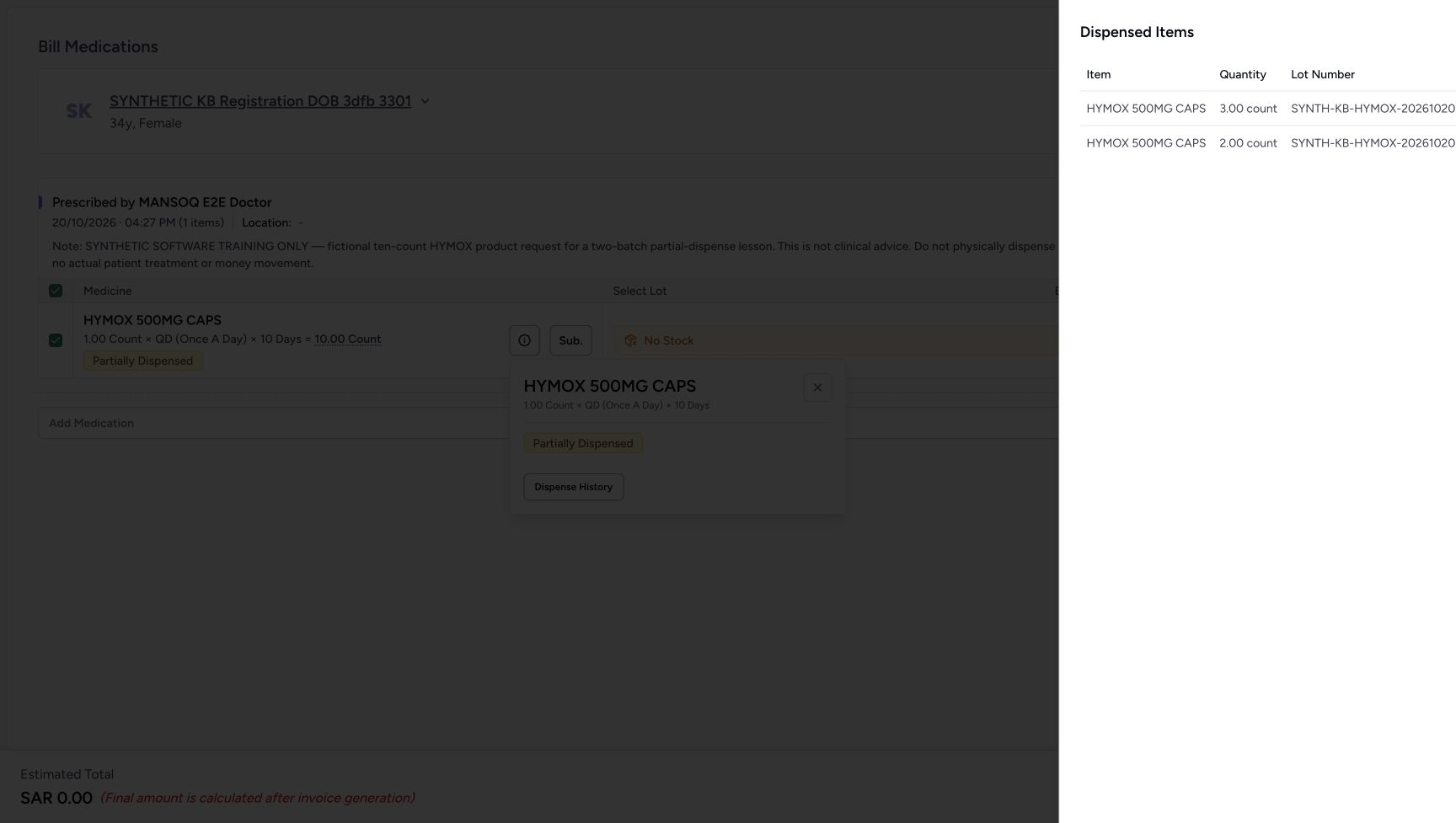
5e8d9723acf02b427ed827f536b5abcef7f283d9420b5ba048ca474083717270- Read the settled No Stock label: The selector has no available lot rows for this request at this location in the illustrated case.
- Locate the medicine information trigger: This icon opens the pictured information popover; the popover is not a selectable lot list.
- Read Partially Dispensed in information: The popover retains the original request progress.
- Open Dispense History: Review previously saved rows for this request before considering another bill.
 12345
12345Recorded release d20e68ed · 2026-10-20T14:16:58.214Z · 1728 × 977 No Stock after one Auto-select
Capture details
Genuine unchanged natural 1728×977 original from the exact local committed d20e build, LOCAL_UNPUSHED. This is a fictional software recovery example; no additional medicine, money or dispensing record was created.
Image SHA-256
553277dd146ca5de6ad35536daf6b3d1d323360acdbcbc68af1a319abc424a1b- Run Auto-select once after closing history: Use the circular-arrow control once; it cannot manufacture stock.
- Read No Stock after Auto-select: The settled form still offers no usable lot rows.
- Keep the zero estimate distinct from an invoice: SAR 0.00 is an unsaved estimate, not a newly generated invoice.
- Review the initial All Given default: The empty form initially has All Given on.
- Review the separate Mark Complete default: The prescription checkbox is initially checked despite the empty lot selection.
1. Match the same request in Billing Pending
Keep the existing Main Pharmacy queue context. Match SYNTHETIC KB Registration DOB 3dfb 3301 and the Doctor request dated October 20 at 04:27 PM. Choose View Rx. Read Partial and Active and the original Total to Dispense 10.00 count. Billing Pending describes the prescription workflow; the previous completed order’s invoice was already settled.
1234Same unfinished prescription queue
Capture details
Genuine unchanged natural 1728×977 original from the exact local committed d20e build, LOCAL_UNPUSHED. This is a fictional software recovery example; no additional medicine, money or dispensing record was created.
Image SHA-256 117b792e5e26bbd668e0767122158ab1d3b2b47cf327e4856c875674b2009f9d
- Keep the Billing Pending prescription context: This is the still-unfinished prescription workflow, not an unpaid invoice on the completed earlier order.
- Match the assigned synthetic patient: Use SYNTHETIC KB Registration DOB 3dfb 3301.
- Match the existing 04:27 PM request: The intended Doctor request is dated October 20, 2026 at 04:27 PM.
- Open View Rx: Inspect this same request rather than starting a new dispense.
12345Existing Partial and Active request
Capture details
Genuine unchanged natural 1728×977 original from the exact local committed d20e build, LOCAL_UNPUSHED. This is a fictional software recovery example; no additional medicine, money or dispensing record was created.
Image SHA-256 09905f562030f0befc846727e213927883bf45271e800dd9c9658798f6078e31
- Verify the same patient in preview: Retain the existing synthetic patient and fictional prescription note.
- Read the original ten-count total: Total to Dispense remains 10.00 count; it is not an automatic remaining-five field.
- Read Partial: The previous five-unit order left this request partially dispensed.
- Read Active: Completing the earlier order did not complete this prescription.
- Open Start Billing: Inspect available stock for the same existing request.
2. Open billing and wait for the settled stock result
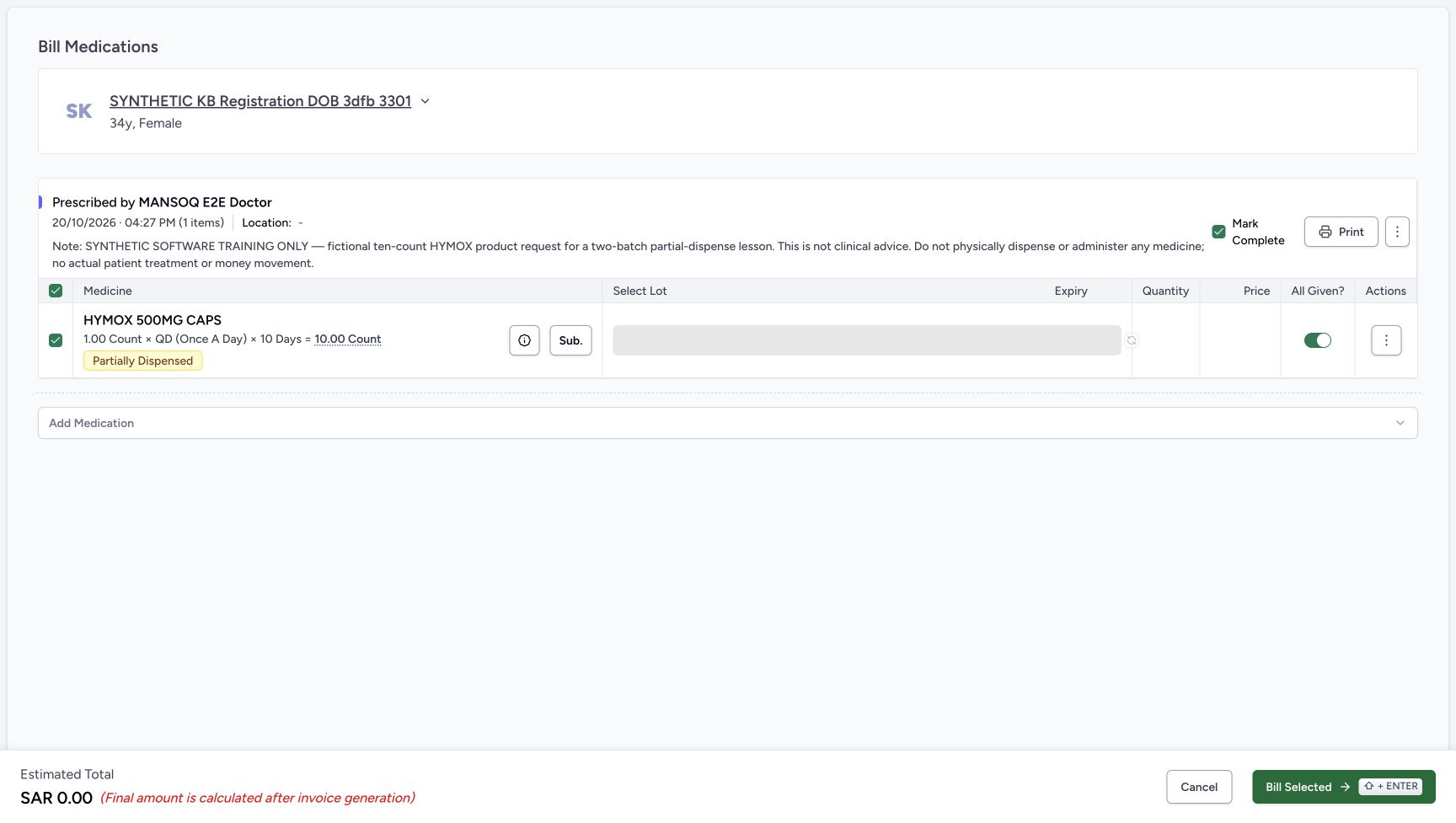
Choose Start Billing for that same request. The first form has a gray lot-loading region and a disabled Auto-select control; wait for it to settle. The later form shows No Stock, no usable lot rows and an estimated SAR 0.00. Open the medicine information icon beside HYMOX to inspect the pictured popover. This is medication information, not a list of selectable lots.
12345Existing Partial and Active request
Capture details
Genuine unchanged natural 1728×977 original from the exact local committed d20e build, LOCAL_UNPUSHED. This is a fictional software recovery example; no additional medicine, money or dispensing record was created.
Image SHA-256 09905f562030f0befc846727e213927883bf45271e800dd9c9658798f6078e31
- Verify the same patient in preview: Retain the existing synthetic patient and fictional prescription note.
- Read the original ten-count total: Total to Dispense remains 10.00 count; it is not an automatic remaining-five field.
- Read Partial: The previous five-unit order left this request partially dispensed.
- Read Active: Completing the earlier order did not complete this prescription.
- Open Start Billing: Inspect available stock for the same existing request.
 123
123Initial billing lot loading
Capture details
Genuine unchanged natural 1728×977 original from the exact local committed d20e build, LOCAL_UNPUSHED. This is a fictional software recovery example; no additional medicine, money or dispensing record was created. This is an immediate loading state; use the later settled image to establish the result.
Image SHA-256 169fa74228b37726daae703f23f11a26b53791a0652403e4e05edc10757b32d4
- Wait for initial lot loading: This gray loading region does not yet establish the settled stock result.
- Wait while Auto-select is disabled: Do not treat the disabled loading control as a completed stock search.
- Open medicine information after loading: The information icon opens the medication popover shown in the next image.
1234No Stock with medicine information open
Capture details
Genuine unchanged natural 1728×977 original from the exact local committed d20e build, LOCAL_UNPUSHED. This is a fictional software recovery example; no additional medicine, money or dispensing record was created.
Image SHA-256 5e8d9723acf02b427ed827f536b5abcef7f283d9420b5ba048ca474083717270
- Read the settled No Stock label: The selector has no available lot rows for this request at this location in the illustrated case.
- Locate the medicine information trigger: This icon opens the pictured information popover; the popover is not a selectable lot list.
- Read Partially Dispensed in information: The popover retains the original request progress.
- Open Dispense History: Review previously saved rows for this request before considering another bill.
3. Read the earlier dispense history without creating another fill
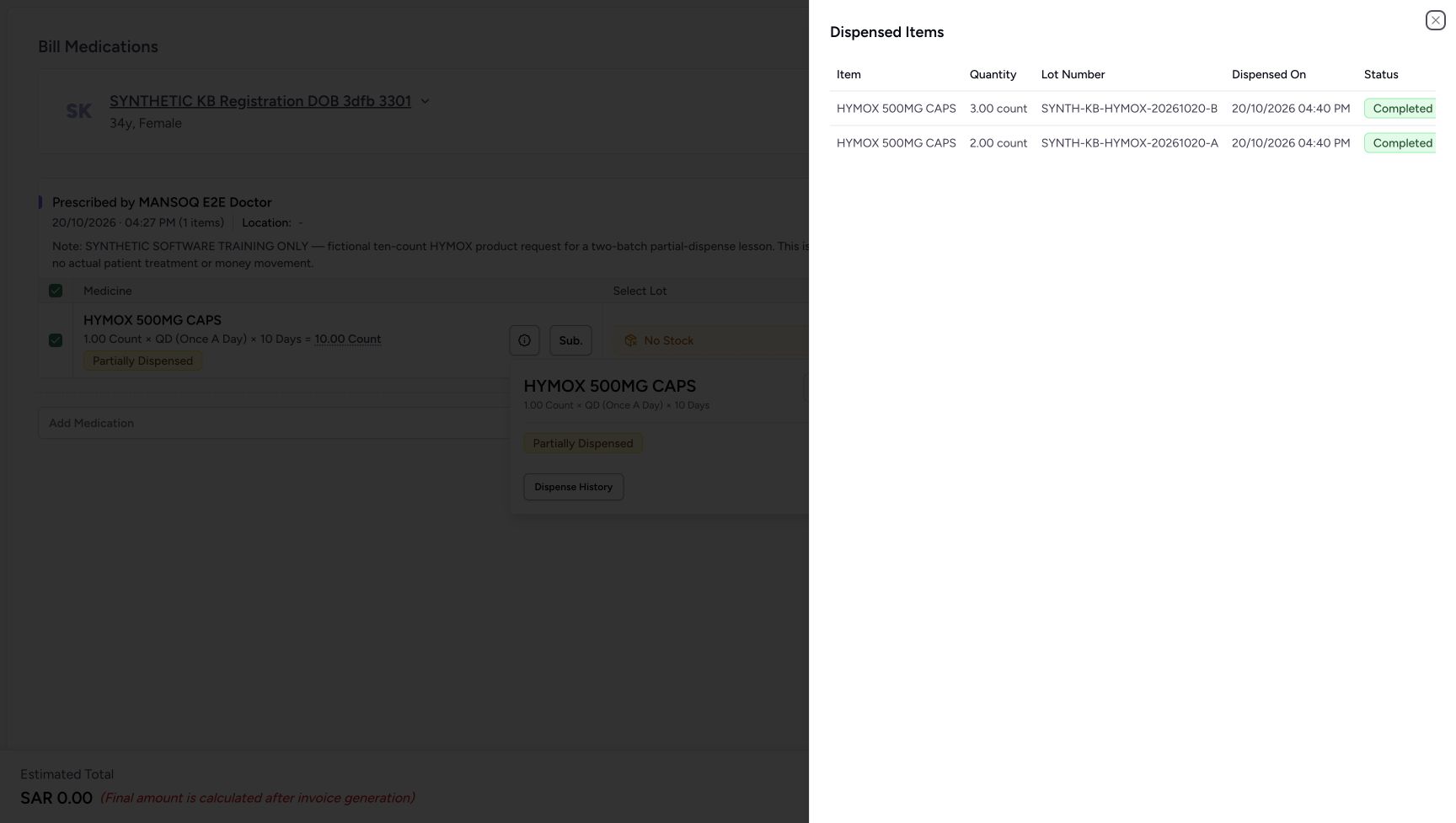
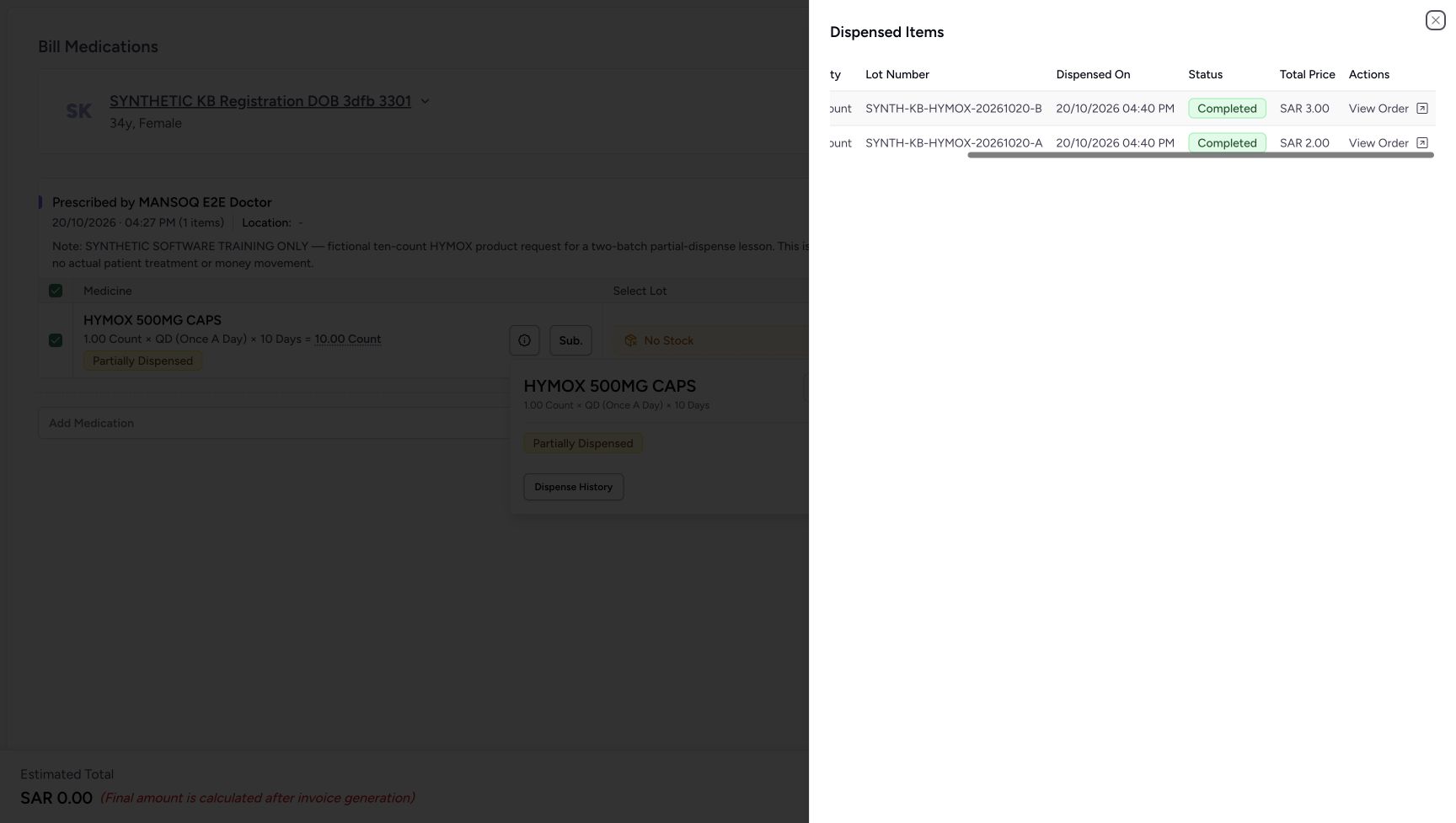
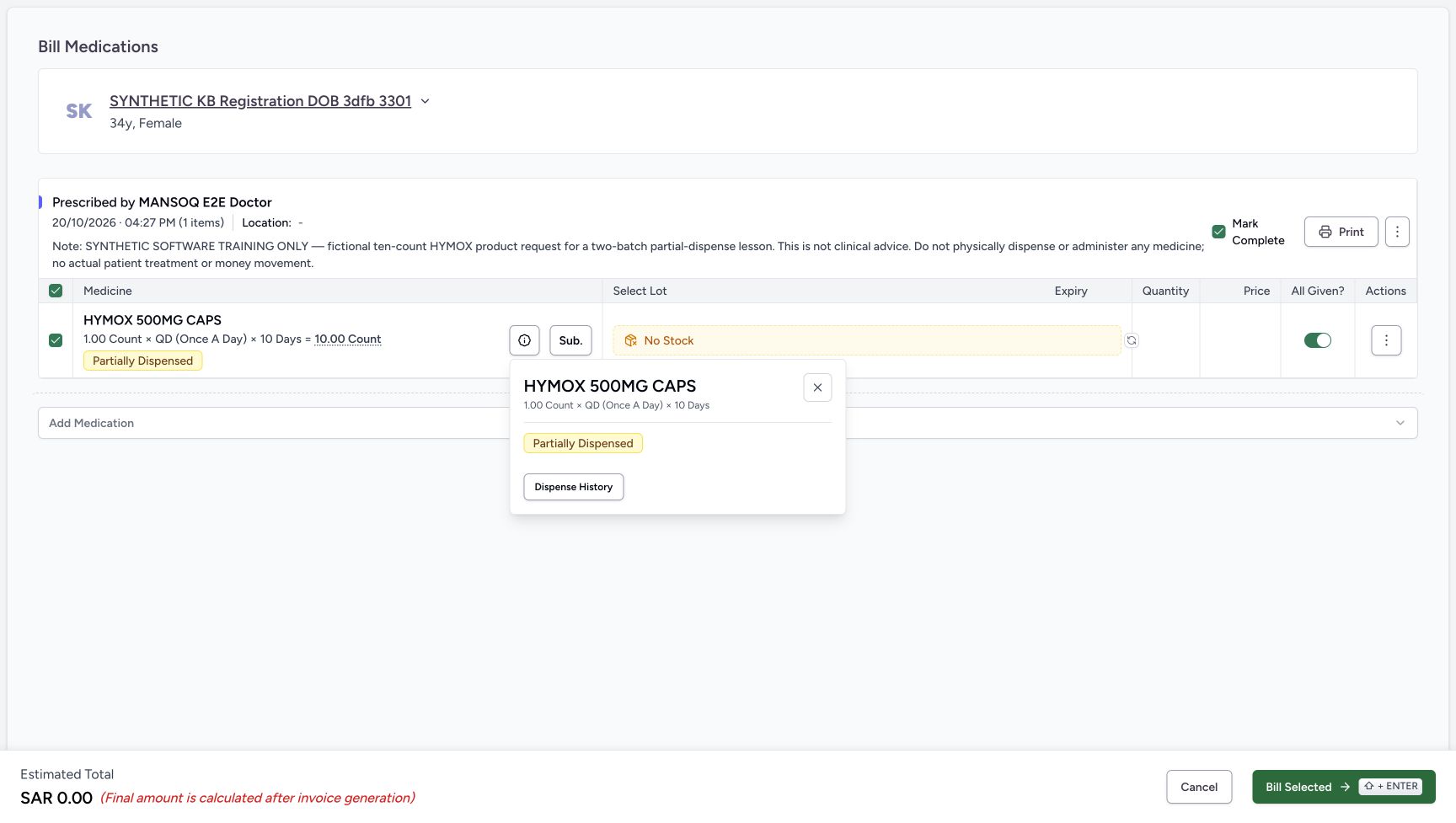
In the medicine information popover, choose Dispense History and wait for the sheet to settle. The immediate historical image caught it mid-slide. The later separate read-only companion shows the same earlier B three and A two, their full batch names and Completed badges. Scroll the history table horizontally to inspect the saved SAR 3.00 and SAR 2.00 row totals and View Order links; no order-link click is required here. These are existing rows in the same previous order, not new dispensing. Choose the history sheet’s upper-right Close X, then the information popover’s own X to return to billing. The settled companion views were captured later after the original Cancel and reload; they demonstrate existing history and the actual closure controls, not another fill or another Bill Selected attempt.
1234No Stock with medicine information open
Capture details
Genuine unchanged natural 1728×977 original from the exact local committed d20e build, LOCAL_UNPUSHED. This is a fictional software recovery example; no additional medicine, money or dispensing record was created.
Image SHA-256 5e8d9723acf02b427ed827f536b5abcef7f283d9420b5ba048ca474083717270
- Read the settled No Stock label: The selector has no available lot rows for this request at this location in the illustrated case.
- Locate the medicine information trigger: This icon opens the pictured information popover; the popover is not a selectable lot list.
- Read Partially Dispensed in information: The popover retains the original request progress.
- Open Dispense History: Review previously saved rows for this request before considering another bill.
123History sheet still sliding into view
Capture details
Genuine unchanged natural 1728×977 historical original. This is an immediate mid-slide history view, not a claim of a permanent narrow layout or missing controls. Later separately captured read-only views show the settled sheet and actual Close.
Image SHA-256 da65eb85a01c89d49a36a8750cb8492b7b1f92b37430cda3f2f4ef425d771dcc
- Read Dispensed Items: This sheet shows existing history for the same medication request.
- Read the earlier three-count quantity: The first visible history quantity is 3.00 count; the full saved batch is B.
- Read the earlier two-count quantity: The second visible quantity is 2.00 count; the full saved batch is A.
 1234567
Later settled existing dispense history
Capture details
Genuine unchanged natural 1728×977 original from the exact local committed d20e build, LOCAL_UNPUSHED. This is a later separate read-only history and closure demonstration after the original Cancel/reload; it is not an earlier uninterrupted frame or another billing attempt. Fresh reopened completion defaults are on here; original07 alone is the both-off state before the one refusal08.
Image SHA-256 7e19e4fc3ce30d9fb89f9532ab1a1e38122414fa35b44f0e979b5e2ffa006c43
- Read existing B quantity three: The settled history retains 3.00 count for batch B.
- Read existing A quantity two: The second row retains 2.00 count for batch A.
- Match full batch B suffix: The full lot name ends in 20261020-B.
- Match full batch A suffix: The second full lot name ends in 20261020-A.
- Read B Completed: This is the earlier saved completed dispense, not a new stock allocation.
- Read A Completed: The prior A row is also Completed.
- Close the settled history sheet: This genuine later read-only companion pictures the actual upper-right Close X.
 1234
1234Later history after horizontal inspection
Capture details
Genuine unchanged natural 1728×977 original from the exact local committed d20e build, LOCAL_UNPUSHED. This is a later separate read-only history and closure demonstration after the original Cancel/reload; it is not an earlier uninterrupted frame or another billing attempt. Fresh reopened completion defaults are on here; original07 alone is the both-off state before the one refusal08.
Image SHA-256 574559e6ecd549a188961146147f138f4e3284f1728aceda9001354aa603632d
- Read existing B total SAR3.00: This is the saved total price of the earlier three-count row.
- Read existing A total SAR2.00: The earlier two-count row has total price SAR2.00.
- Keep View Order separate: The history offers View Order; no order-link click or new action was performed in this readback.
- Inspect the history table horizontally: A native horizontal scroll reveals its price and action columns; no data save is involved.
 123
123Actual information close after later history
Capture details
Genuine unchanged natural 1728×977 original from the exact local committed d20e build, LOCAL_UNPUSHED. This is a later separate read-only history and closure demonstration after the original Cancel/reload; it is not an earlier uninterrupted frame or another billing attempt. Fresh reopened completion defaults are on here; original07 alone is the both-off state before the one refusal08.
Image SHA-256 f7ac3f7110ebb3d02e45724a14a2a5ec0bf3a0536a26f136532f2c9f38df04e0
- Close the medicine information popover: After closing history, choose this actual visible X to return to the same billing form.
- Recognise fresh read-only defaults: This later reopened form has All Given on; it is not the original validation-ready frame.
- Keep the later checked default separate: Mark Complete is checked in this later read-only view. Only original07 has both controls off before original08 refusal.
4. Try Auto-select once and keep the zero estimate distinct
Choose the circular-arrow Auto-select control once. The settled form still shows No Stock, no selected quantities and an estimated SAR 0.00. Auto-select has not restored the consumed stock or generated a bill. Review the initial All Given and separate Mark Complete defaults; both are on in this view even though no lot is available.
12345No Stock after one Auto-select
Capture details
Genuine unchanged natural 1728×977 original from the exact local committed d20e build, LOCAL_UNPUSHED. This is a fictional software recovery example; no additional medicine, money or dispensing record was created.
Image SHA-256 553277dd146ca5de6ad35536daf6b3d1d323360acdbcbc68af1a319abc424a1b
- Run Auto-select once after closing history: Use the circular-arrow control once; it cannot manufacture stock.
- Read No Stock after Auto-select: The settled form still offers no usable lot rows.
- Keep the zero estimate distinct from an invoice: SAR 0.00 is an unsaved estimate, not a newly generated invoice.
- Review the initial All Given default: The empty form initially has All Given on.
- Review the separate Mark Complete default: The prescription checkbox is initially checked despite the empty lot selection.
5. Set both completion controls off for the empty-lot demonstration
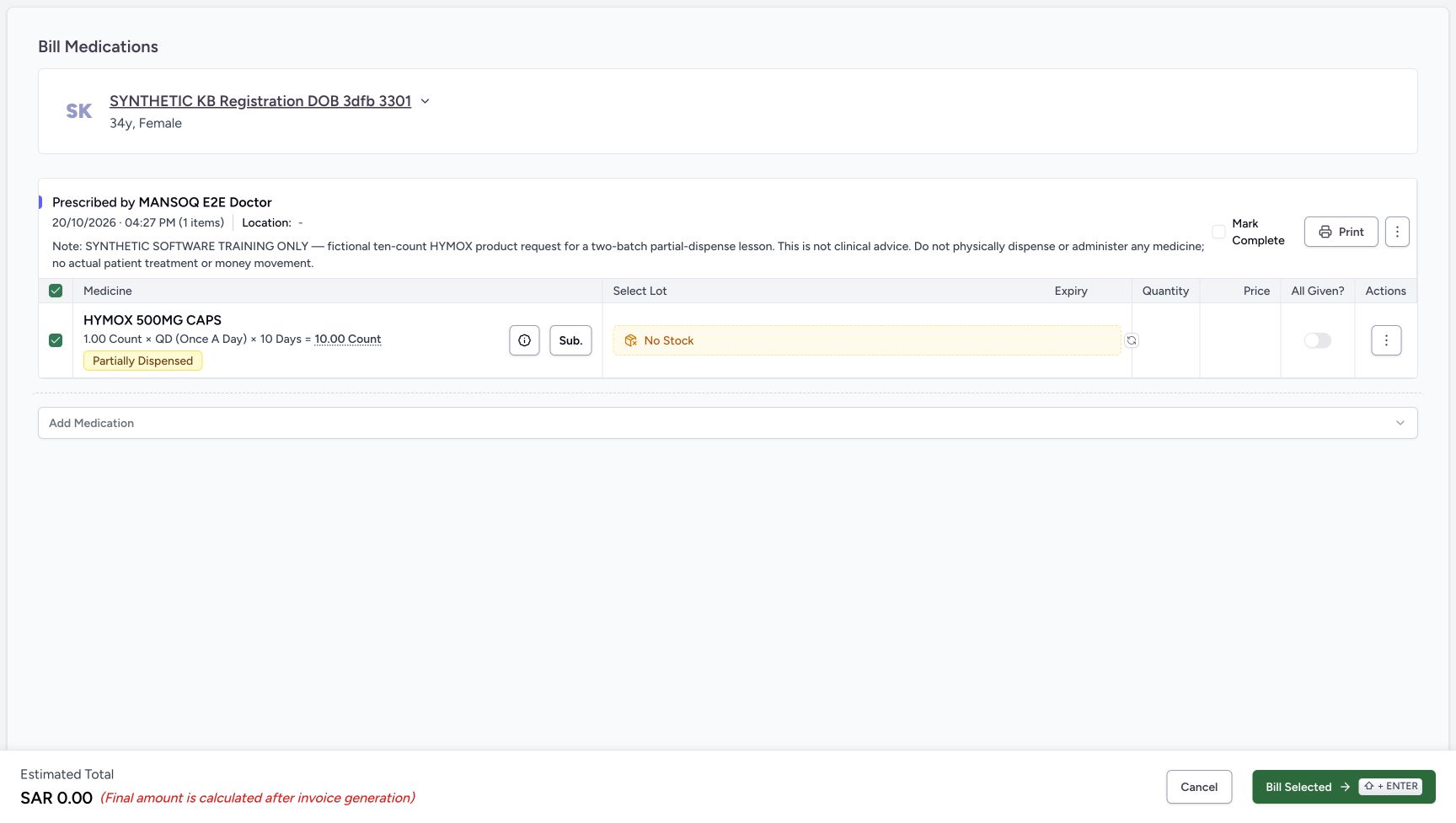
Turn All Given off and separately verify Mark Complete is unchecked, unchecking it if necessary. The ready frame still contains no lots and no available quantity. Changing completion controls does not supply inventory. Normal no-stock recovery is to cancel; the next step records the one isolated software validation example rather than a successful bill.
12345No Stock after one Auto-select
Capture details
Genuine unchanged natural 1728×977 original from the exact local committed d20e build, LOCAL_UNPUSHED. This is a fictional software recovery example; no additional medicine, money or dispensing record was created.
Image SHA-256 553277dd146ca5de6ad35536daf6b3d1d323360acdbcbc68af1a319abc424a1b
- Run Auto-select once after closing history: Use the circular-arrow control once; it cannot manufacture stock.
- Read No Stock after Auto-select: The settled form still offers no usable lot rows.
- Keep the zero estimate distinct from an invoice: SAR 0.00 is an unsaved estimate, not a newly generated invoice.
- Review the initial All Given default: The empty form initially has All Given on.
- Review the separate Mark Complete default: The prescription checkbox is initially checked despite the empty lot selection.
 1234
1234Empty selection with both completion controls off
Capture details
Genuine unchanged natural 1728×977 original from the exact local committed d20e build, LOCAL_UNPUSHED. This is a fictional software recovery example; no additional medicine, money or dispensing record was created.
Image SHA-256 31801dea21678dffac49f94a0c5bbdfc2c7427ada7b302865702476c603d2de9
- Turn All Given off: The illustrated empty-lot validation is performed with this toggle off.
- Verify Mark Complete unchecked: Review this separate prescription-level checkbox; uncheck it if necessary.
- Verify there are still no selected lots: No quantity has become available merely by changing completion controls.
- Locate the one controlled Bill Selected attempt: The isolated training example submits this empty form once to demonstrate its client guard; routine recovery can cancel without this attempt.
6. Recognise the one empty-lot validation refusal
In this controlled synthetic demonstration, Bill Selected was chosen once with both controls off and no lots. The form displayed the inline message “At least one lot is required”. This is client validation, not a successful save, a pictured toast or a claimed API response. No new dispense, order, invoice or payment was created. Do not retry the rejected empty selection or use completion actions to bypass it.
1234Empty selection with both completion controls off
Capture details
Genuine unchanged natural 1728×977 original from the exact local committed d20e build, LOCAL_UNPUSHED. This is a fictional software recovery example; no additional medicine, money or dispensing record was created.
Image SHA-256 31801dea21678dffac49f94a0c5bbdfc2c7427ada7b302865702476c603d2de9
- Turn All Given off: The illustrated empty-lot validation is performed with this toggle off.
- Verify Mark Complete unchecked: Review this separate prescription-level checkbox; uncheck it if necessary.
- Verify there are still no selected lots: No quantity has become available merely by changing completion controls.
- Locate the one controlled Bill Selected attempt: The isolated training example submits this empty form once to demonstrate its client guard; routine recovery can cancel without this attempt.
1234Inline empty-lot validation refusal
Capture details
Genuine unchanged natural 1728×977 original from the exact local committed d20e build, LOCAL_UNPUSHED. This is a fictional software recovery example; no additional medicine, money or dispensing record was created.
Image SHA-256 37468c299332f1a452781a94dd48545720feae9ddc634f71de5afef68f168a3c
- Read At least one lot is required: This inline validation refused the empty selection. No API status or saved bill is implied.
- Keep All Given off after refusal: The refusal does not justify overriding progress controls.
- Keep Mark Complete unchecked: The request is not completed by an empty-lot attempt.
- Choose Cancel: Leave the unsaved billing form without retrying the rejected bill.
7. Cancel the unsaved form and retain the partial request
Choose Cancel from the refused billing form. The preview returns to the same patient and HYMOX request with Partial, Active and the original 10.00 count total. The earlier three-plus-two history is still distinct from this unsaved empty attempt. No Mark as Already Given, Remove Medication, substitution or group completion action was used.
1234Inline empty-lot validation refusal
Capture details
Genuine unchanged natural 1728×977 original from the exact local committed d20e build, LOCAL_UNPUSHED. This is a fictional software recovery example; no additional medicine, money or dispensing record was created.
Image SHA-256 37468c299332f1a452781a94dd48545720feae9ddc634f71de5afef68f168a3c
- Read At least one lot is required: This inline validation refused the empty selection. No API status or saved bill is implied.
- Keep All Given off after refusal: The refusal does not justify overriding progress controls.
- Keep Mark Complete unchecked: The request is not completed by an empty-lot attempt.
- Choose Cancel: Leave the unsaved billing form without retrying the rejected bill.
 123
123Same preview after cancellation
Capture details
Genuine unchanged natural 1728×977 original from the exact local committed d20e build, LOCAL_UNPUSHED. This is a fictional software recovery example; no additional medicine, money or dispensing record was created.
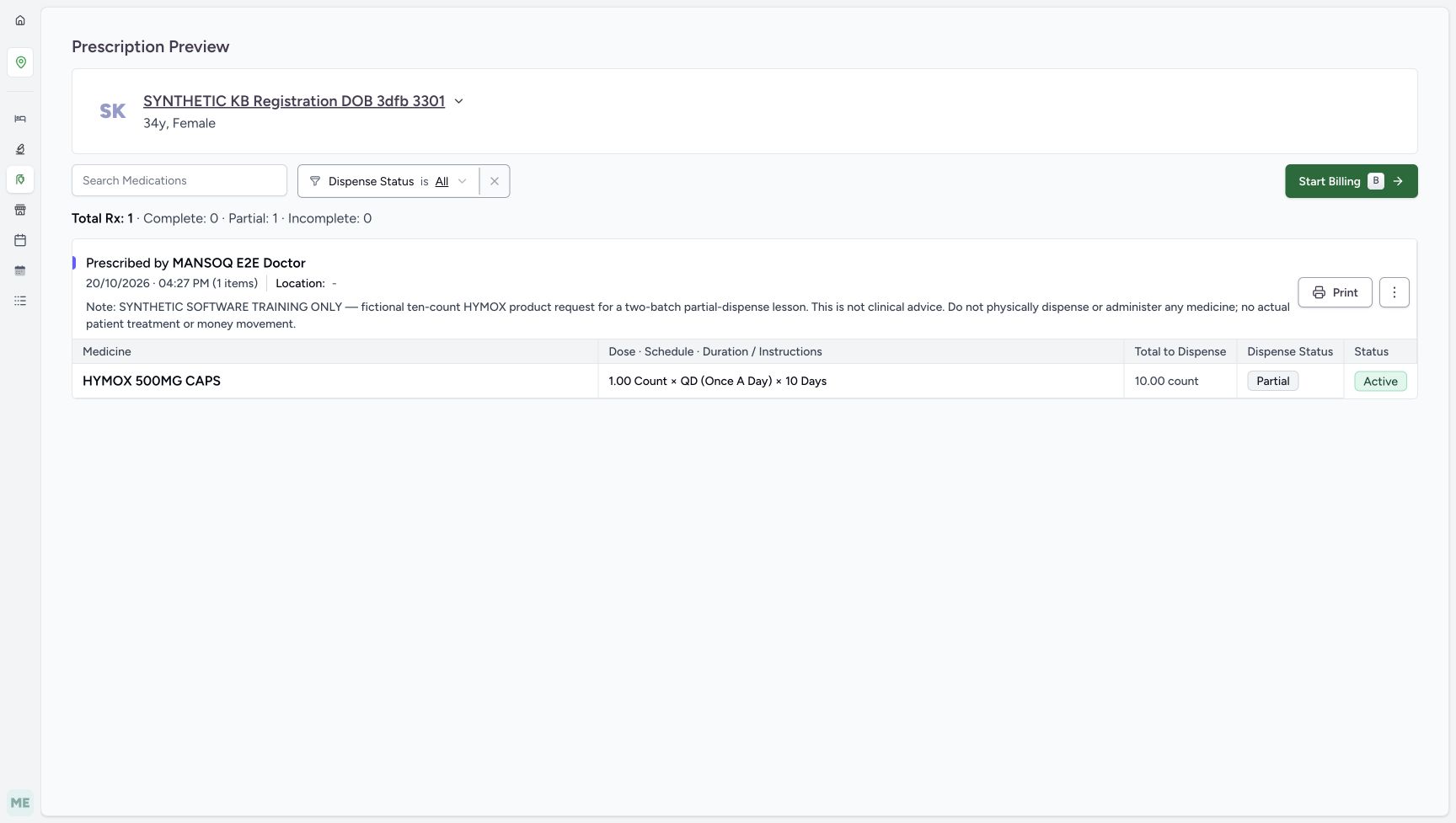
Image SHA-256 09905f562030f0befc846727e213927883bf45271e800dd9c9658798f6078e31
- Verify Partial after Cancel: Cancel returns to the same partially dispensed request.
- Verify Active after Cancel: The request remains active.
- Verify the original ten-count total retained: The preview still displays 10.00 count and the original schedule.
8. Reload, verify the unchanged request and hand off stock work
Reload normally and wait through the loading symbol. The settled preview again shows the same request, Partial, Active and original Total to Dispense 10.00 count. No automatic remaining-five request is displayed. Confirm the assigned location and product identity, review existing history and pass the stock issue to the authorised inventory owner under the facility’s procedure. Do not invent stock, another fill or prescription completion from this screen.
123Same preview after cancellation
Capture details
Genuine unchanged natural 1728×977 original from the exact local committed d20e build, LOCAL_UNPUSHED. This is a fictional software recovery example; no additional medicine, money or dispensing record was created.
Image SHA-256 09905f562030f0befc846727e213927883bf45271e800dd9c9658798f6078e31
- Verify Partial after Cancel: Cancel returns to the same partially dispensed request.
- Verify Active after Cancel: The request remains active.
- Verify the original ten-count total retained: The preview still displays 10.00 count and the original schedule.
 1
1Immediate reload still loading
Capture details
Genuine unchanged natural 1728×977 original from the exact local committed d20e build, LOCAL_UNPUSHED. This is a fictional software recovery example; no additional medicine, money or dispensing record was created. This is an immediate loading state; use the later settled image to establish the result.
Image SHA-256 27cf5b2367b7d4b83348b0a76c3ea57ca41b0913ee9a8a656bf82609939a36d6
- Wait for the normal reload: This loading symbol is not a settled prescription result.
1234Settled unchanged preview after reload
Capture details
Genuine unchanged natural 1728×977 original from the exact local committed d20e build, LOCAL_UNPUSHED. This is a fictional software recovery example; no additional medicine, money or dispensing record was created.
Image SHA-256 09905f562030f0befc846727e213927883bf45271e800dd9c9658798f6078e31
- Verify the same patient after reload: The settled preview returns to the assigned synthetic patient.
- Verify Partial persists: The empty-lot attempt and Cancel created no new dispensing.
- Verify Active persists: The original prescription has not been completed.
- Verify original Total to Dispense ten: The settled UI retains 10.00 count, not a generated remaining-five request.
Interpret No Stock within its actual scope
The selector filters available inventory for the current location and matching product. Wait for loading and check identity and location before interpreting an empty result. An inventory-query failure can also leave this UI showing No Stock, so escalate an unresolved lookup rather than declaring every lot or physical stock absent. In this particular case, independent saved records confirm the two illustrated lot balances were already zero after the earlier partial bill; the new branch changed none of the checked records.
1234Same unfinished prescription queue
Capture details
Genuine unchanged natural 1728×977 original from the exact local committed d20e build, LOCAL_UNPUSHED. This is a fictional software recovery example; no additional medicine, money or dispensing record was created.
Image SHA-256 117b792e5e26bbd668e0767122158ab1d3b2b47cf327e4856c875674b2009f9d
- Keep the Billing Pending prescription context: This is the still-unfinished prescription workflow, not an unpaid invoice on the completed earlier order.
- Match the assigned synthetic patient: Use SYNTHETIC KB Registration DOB 3dfb 3301.
- Match the existing 04:27 PM request: The intended Doctor request is dated October 20, 2026 at 04:27 PM.
- Open View Rx: Inspect this same request rather than starting a new dispense.
123Initial billing lot loading
Capture details
Genuine unchanged natural 1728×977 original from the exact local committed d20e build, LOCAL_UNPUSHED. This is a fictional software recovery example; no additional medicine, money or dispensing record was created. This is an immediate loading state; use the later settled image to establish the result.
Image SHA-256 169fa74228b37726daae703f23f11a26b53791a0652403e4e05edc10757b32d4
- Wait for initial lot loading: This gray loading region does not yet establish the settled stock result.
- Wait while Auto-select is disabled: Do not treat the disabled loading control as a completed stock search.
- Open medicine information after loading: The information icon opens the medication popover shown in the next image.
1234No Stock with medicine information open
Capture details
Genuine unchanged natural 1728×977 original from the exact local committed d20e build, LOCAL_UNPUSHED. This is a fictional software recovery example; no additional medicine, money or dispensing record was created.
Image SHA-256 5e8d9723acf02b427ed827f536b5abcef7f283d9420b5ba048ca474083717270
- Read the settled No Stock label: The selector has no available lot rows for this request at this location in the illustrated case.
- Locate the medicine information trigger: This icon opens the pictured information popover; the popover is not a selectable lot list.
- Read Partially Dispensed in information: The popover retains the original request progress.
- Open Dispense History: Review previously saved rows for this request before considering another bill.
12345No Stock after one Auto-select
Capture details
Genuine unchanged natural 1728×977 original from the exact local committed d20e build, LOCAL_UNPUSHED. This is a fictional software recovery example; no additional medicine, money or dispensing record was created.
Image SHA-256 553277dd146ca5de6ad35536daf6b3d1d323360acdbcbc68af1a319abc424a1b
- Run Auto-select once after closing history: Use the circular-arrow control once; it cannot manufacture stock.
- Read No Stock after Auto-select: The settled form still offers no usable lot rows.
- Keep the zero estimate distinct from an invoice: SAR 0.00 is an unsaved estimate, not a newly generated invoice.
- Review the initial All Given default: The empty form initially has All Given on.
- Review the separate Mark Complete default: The prescription checkbox is initially checked despite the empty lot selection.
1234Settled unchanged preview after reload
Capture details
Genuine unchanged natural 1728×977 original from the exact local committed d20e build, LOCAL_UNPUSHED. This is a fictional software recovery example; no additional medicine, money or dispensing record was created.
Image SHA-256 09905f562030f0befc846727e213927883bf45271e800dd9c9658798f6078e31
- Verify the same patient after reload: The settled preview returns to the assigned synthetic patient.
- Verify Partial persists: The empty-lot attempt and Cancel created no new dispensing.
- Verify Active persists: The original prescription has not been completed.
- Verify original Total to Dispense ten: The settled UI retains 10.00 count, not a generated remaining-five request.
Keep history, requested total and new billing separate
History shows earlier software dispensing, not permission to repeat it. The original ten-count instruction remains visible after the previous five-unit order and after this cancelled attempt. This screen does not automatically replace that total with a remaining-five request. After cancellation and reload, the same original request and earlier completed order remain, with no added bill, payment or stock deduction.
12345Existing Partial and Active request
Capture details
Genuine unchanged natural 1728×977 original from the exact local committed d20e build, LOCAL_UNPUSHED. This is a fictional software recovery example; no additional medicine, money or dispensing record was created.
Image SHA-256 09905f562030f0befc846727e213927883bf45271e800dd9c9658798f6078e31
- Verify the same patient in preview: Retain the existing synthetic patient and fictional prescription note.
- Read the original ten-count total: Total to Dispense remains 10.00 count; it is not an automatic remaining-five field.
- Read Partial: The previous five-unit order left this request partially dispensed.
- Read Active: Completing the earlier order did not complete this prescription.
- Open Start Billing: Inspect available stock for the same existing request.
123History sheet still sliding into view
Capture details
Genuine unchanged natural 1728×977 historical original. This is an immediate mid-slide history view, not a claim of a permanent narrow layout or missing controls. Later separately captured read-only views show the settled sheet and actual Close.
Image SHA-256 da65eb85a01c89d49a36a8750cb8492b7b1f92b37430cda3f2f4ef425d771dcc
- Read Dispensed Items: This sheet shows existing history for the same medication request.
- Read the earlier three-count quantity: The first visible history quantity is 3.00 count; the full saved batch is B.
- Read the earlier two-count quantity: The second visible quantity is 2.00 count; the full saved batch is A.
1234Inline empty-lot validation refusal
Capture details
Genuine unchanged natural 1728×977 original from the exact local committed d20e build, LOCAL_UNPUSHED. This is a fictional software recovery example; no additional medicine, money or dispensing record was created.
Image SHA-256 37468c299332f1a452781a94dd48545720feae9ddc634f71de5afef68f168a3c
- Read At least one lot is required: This inline validation refused the empty selection. No API status or saved bill is implied.
- Keep All Given off after refusal: The refusal does not justify overriding progress controls.
- Keep Mark Complete unchecked: The request is not completed by an empty-lot attempt.
- Choose Cancel: Leave the unsaved billing form without retrying the rejected bill.
123Same preview after cancellation
Capture details
Genuine unchanged natural 1728×977 original from the exact local committed d20e build, LOCAL_UNPUSHED. This is a fictional software recovery example; no additional medicine, money or dispensing record was created.
Image SHA-256 09905f562030f0befc846727e213927883bf45271e800dd9c9658798f6078e31
- Verify Partial after Cancel: Cancel returns to the same partially dispensed request.
- Verify Active after Cancel: The request remains active.
- Verify the original ten-count total retained: The preview still displays 10.00 count and the original schedule.
1234Settled unchanged preview after reload
Capture details
Genuine unchanged natural 1728×977 original from the exact local committed d20e build, LOCAL_UNPUSHED. This is a fictional software recovery example; no additional medicine, money or dispensing record was created.
Image SHA-256 09905f562030f0befc846727e213927883bf45271e800dd9c9658798f6078e31
- Verify the same patient after reload: The settled preview returns to the assigned synthetic patient.
- Verify Partial persists: The empty-lot attempt and Cancel created no new dispensing.
- Verify Active persists: The original prescription has not been completed.
- Verify original Total to Dispense ten: The settled UI retains 10.00 count, not a generated remaining-five request.
Troubleshooting
No Stock remains after Auto-select
Do not keep repeating the action or add an invented lot. Check the correct patient, prescription, product and assigned location; wait for loading and use normal refresh to resolve a stale view. Review history and ask the authorised inventory owner to investigate stock or query availability. Only this fixture’s zero balances were independently verified; this lesson does not demonstrate replenishment.
1234Same unfinished prescription queue
Capture details
Genuine unchanged natural 1728×977 original from the exact local committed d20e build, LOCAL_UNPUSHED. This is a fictional software recovery example; no additional medicine, money or dispensing record was created.
Image SHA-256 117b792e5e26bbd668e0767122158ab1d3b2b47cf327e4856c875674b2009f9d
- Keep the Billing Pending prescription context: This is the still-unfinished prescription workflow, not an unpaid invoice on the completed earlier order.
- Match the assigned synthetic patient: Use SYNTHETIC KB Registration DOB 3dfb 3301.
- Match the existing 04:27 PM request: The intended Doctor request is dated October 20, 2026 at 04:27 PM.
- Open View Rx: Inspect this same request rather than starting a new dispense.
12345Existing Partial and Active request
Capture details
Genuine unchanged natural 1728×977 original from the exact local committed d20e build, LOCAL_UNPUSHED. This is a fictional software recovery example; no additional medicine, money or dispensing record was created.
Image SHA-256 09905f562030f0befc846727e213927883bf45271e800dd9c9658798f6078e31
- Verify the same patient in preview: Retain the existing synthetic patient and fictional prescription note.
- Read the original ten-count total: Total to Dispense remains 10.00 count; it is not an automatic remaining-five field.
- Read Partial: The previous five-unit order left this request partially dispensed.
- Read Active: Completing the earlier order did not complete this prescription.
- Open Start Billing: Inspect available stock for the same existing request.
123Initial billing lot loading
Capture details
Genuine unchanged natural 1728×977 original from the exact local committed d20e build, LOCAL_UNPUSHED. This is a fictional software recovery example; no additional medicine, money or dispensing record was created. This is an immediate loading state; use the later settled image to establish the result.
Image SHA-256 169fa74228b37726daae703f23f11a26b53791a0652403e4e05edc10757b32d4
- Wait for initial lot loading: This gray loading region does not yet establish the settled stock result.
- Wait while Auto-select is disabled: Do not treat the disabled loading control as a completed stock search.
- Open medicine information after loading: The information icon opens the medication popover shown in the next image.
1234No Stock with medicine information open
Capture details
Genuine unchanged natural 1728×977 original from the exact local committed d20e build, LOCAL_UNPUSHED. This is a fictional software recovery example; no additional medicine, money or dispensing record was created.
Image SHA-256 5e8d9723acf02b427ed827f536b5abcef7f283d9420b5ba048ca474083717270
- Read the settled No Stock label: The selector has no available lot rows for this request at this location in the illustrated case.
- Locate the medicine information trigger: This icon opens the pictured information popover; the popover is not a selectable lot list.
- Read Partially Dispensed in information: The popover retains the original request progress.
- Open Dispense History: Review previously saved rows for this request before considering another bill.
123History sheet still sliding into view
Capture details
Genuine unchanged natural 1728×977 historical original. This is an immediate mid-slide history view, not a claim of a permanent narrow layout or missing controls. Later separately captured read-only views show the settled sheet and actual Close.
Image SHA-256 da65eb85a01c89d49a36a8750cb8492b7b1f92b37430cda3f2f4ef425d771dcc
- Read Dispensed Items: This sheet shows existing history for the same medication request.
- Read the earlier three-count quantity: The first visible history quantity is 3.00 count; the full saved batch is B.
- Read the earlier two-count quantity: The second visible quantity is 2.00 count; the full saved batch is A.
12345No Stock after one Auto-select
Capture details
Genuine unchanged natural 1728×977 original from the exact local committed d20e build, LOCAL_UNPUSHED. This is a fictional software recovery example; no additional medicine, money or dispensing record was created.
Image SHA-256 553277dd146ca5de6ad35536daf6b3d1d323360acdbcbc68af1a319abc424a1b
- Run Auto-select once after closing history: Use the circular-arrow control once; it cannot manufacture stock.
- Read No Stock after Auto-select: The settled form still offers no usable lot rows.
- Keep the zero estimate distinct from an invoice: SAR 0.00 is an unsaved estimate, not a newly generated invoice.
- Review the initial All Given default: The empty form initially has All Given on.
- Review the separate Mark Complete default: The prescription checkbox is initially checked despite the empty lot selection.
1234Settled unchanged preview after reload
Capture details
Genuine unchanged natural 1728×977 original from the exact local committed d20e build, LOCAL_UNPUSHED. This is a fictional software recovery example; no additional medicine, money or dispensing record was created.
Image SHA-256 09905f562030f0befc846727e213927883bf45271e800dd9c9658798f6078e31
- Verify the same patient after reload: The settled preview returns to the assigned synthetic patient.
- Verify Partial persists: The empty-lot attempt and Cancel created no new dispensing.
- Verify Active persists: The original prescription has not been completed.
- Verify original Total to Dispense ten: The settled UI retains 10.00 count, not a generated remaining-five request.
Bill Selected shows At least one lot is required
The selected medication has no lot allocation. The inline message is a refusal, not a zero-value invoice. Leave both completion controls off and use Cancel to return to the same Partial and Active request. Do not mark already given, remove the medication or complete the prescription to hide the shortage.
1234Empty selection with both completion controls off
Capture details
Genuine unchanged natural 1728×977 original from the exact local committed d20e build, LOCAL_UNPUSHED. This is a fictional software recovery example; no additional medicine, money or dispensing record was created.
Image SHA-256 31801dea21678dffac49f94a0c5bbdfc2c7427ada7b302865702476c603d2de9
- Turn All Given off: The illustrated empty-lot validation is performed with this toggle off.
- Verify Mark Complete unchecked: Review this separate prescription-level checkbox; uncheck it if necessary.
- Verify there are still no selected lots: No quantity has become available merely by changing completion controls.
- Locate the one controlled Bill Selected attempt: The isolated training example submits this empty form once to demonstrate its client guard; routine recovery can cancel without this attempt.
1234Inline empty-lot validation refusal
Capture details
Genuine unchanged natural 1728×977 original from the exact local committed d20e build, LOCAL_UNPUSHED. This is a fictional software recovery example; no additional medicine, money or dispensing record was created.
Image SHA-256 37468c299332f1a452781a94dd48545720feae9ddc634f71de5afef68f168a3c
- Read At least one lot is required: This inline validation refused the empty selection. No API status or saved bill is implied.
- Keep All Given off after refusal: The refusal does not justify overriding progress controls.
- Keep Mark Complete unchecked: The request is not completed by an empty-lot attempt.
- Choose Cancel: Leave the unsaved billing form without retrying the rejected bill.
123Same preview after cancellation
Capture details
Genuine unchanged natural 1728×977 original from the exact local committed d20e build, LOCAL_UNPUSHED. This is a fictional software recovery example; no additional medicine, money or dispensing record was created.
Image SHA-256 09905f562030f0befc846727e213927883bf45271e800dd9c9658798f6078e31
- Verify Partial after Cancel: Cancel returns to the same partially dispensed request.
- Verify Active after Cancel: The request remains active.
- Verify the original ten-count total retained: The preview still displays 10.00 count and the original schedule.
History quantities total five but preview still says ten
The history records A two and B three from the earlier completed order. The preview retains the original request total ten and its Partial progress; it is not an automatically generated remaining-five instruction. Keep those records distinct and obtain the required authorised stock and prescribing decisions before any separate later workflow.
12345Existing Partial and Active request
Capture details
Genuine unchanged natural 1728×977 original from the exact local committed d20e build, LOCAL_UNPUSHED. This is a fictional software recovery example; no additional medicine, money or dispensing record was created.
Image SHA-256 09905f562030f0befc846727e213927883bf45271e800dd9c9658798f6078e31
- Verify the same patient in preview: Retain the existing synthetic patient and fictional prescription note.
- Read the original ten-count total: Total to Dispense remains 10.00 count; it is not an automatic remaining-five field.
- Read Partial: The previous five-unit order left this request partially dispensed.
- Read Active: Completing the earlier order did not complete this prescription.
- Open Start Billing: Inspect available stock for the same existing request.
123History sheet still sliding into view
Capture details
Genuine unchanged natural 1728×977 historical original. This is an immediate mid-slide history view, not a claim of a permanent narrow layout or missing controls. Later separately captured read-only views show the settled sheet and actual Close.
Image SHA-256 da65eb85a01c89d49a36a8750cb8492b7b1f92b37430cda3f2f4ef425d771dcc
- Read Dispensed Items: This sheet shows existing history for the same medication request.
- Read the earlier three-count quantity: The first visible history quantity is 3.00 count; the full saved batch is B.
- Read the earlier two-count quantity: The second visible quantity is 2.00 count; the full saved batch is A.
123Same preview after cancellation
Capture details
Genuine unchanged natural 1728×977 original from the exact local committed d20e build, LOCAL_UNPUSHED. This is a fictional software recovery example; no additional medicine, money or dispensing record was created.
Image SHA-256 09905f562030f0befc846727e213927883bf45271e800dd9c9658798f6078e31
- Verify Partial after Cancel: Cancel returns to the same partially dispensed request.
- Verify Active after Cancel: The request remains active.
- Verify the original ten-count total retained: The preview still displays 10.00 count and the original schedule.
1234Settled unchanged preview after reload
Capture details
Genuine unchanged natural 1728×977 original from the exact local committed d20e build, LOCAL_UNPUSHED. This is a fictional software recovery example; no additional medicine, money or dispensing record was created.
Image SHA-256 09905f562030f0befc846727e213927883bf45271e800dd9c9658798f6078e31
- Verify the same patient after reload: The settled preview returns to the assigned synthetic patient.
- Verify Partial persists: The empty-lot attempt and Cancel created no new dispensing.
- Verify Active persists: The original prescription has not been completed.
- Verify original Total to Dispense ten: The settled UI retains 10.00 count, not a generated remaining-five request.
Source evidence
Every citation uses this exact committed version. The private source repository requires access.
- repositories/platform/mansoq-web/src/pages/Facility/services/pharmacy/billMedications/BillMedicationsForm.tsx:34 ·
d20e68ed4a9e0b005aa54f218f84172160974b02Source file checksum
9cc718a513e22df66f1c2b92d2c8b4b63e0e4d02e58b90705fa8ca5dbf6f8ac4 - repositories/platform/mansoq-web/src/pages/Facility/services/pharmacy/billMedications/formSchema.ts:94 ·
d20e68ed4a9e0b005aa54f218f84172160974b02Source file checksum
654a1d61d9eea0ed21dbbda6fcc0f127eb9cc1631bd178f3023bb334258571e2 - repositories/platform/mansoq-web/src/pages/Facility/services/inventory/DispenseLotSelector.tsx:64 ·
d20e68ed4a9e0b005aa54f218f84172160974b02Source file checksum
4153614e75921f3325472744644989be488f49762c6b694d777538969664b6dc - repositories/platform/mansoq-web/src/pages/Facility/services/pharmacy/billMedications/utils/useInventoryItemsAutoSelect.ts:36 ·
d20e68ed4a9e0b005aa54f218f84172160974b02Source file checksum
689be89ed73722f369100ad448b2ceb37e559bb86a354edbd63393cc8d61af9b - repositories/platform/mansoq-web/src/pages/Facility/services/pharmacy/billMedications/BillMedicationsPrescriptionCard.tsx:573 ·
d20e68ed4a9e0b005aa54f218f84172160974b02Source file checksum
e64b9b9ffbc8388dba86070d36c8acef28639ac6166f650ca3586b43e9ac3134 - repositories/platform/mansoq-web/src/pages/Facility/services/pharmacy/billMedications/BillMedicationsFooter.tsx:80 ·
d20e68ed4a9e0b005aa54f218f84172160974b02Source file checksum
5a2167f3e4ae3c332f8da9b7076d6339c891543cb41fa43534256c826300c048 - repositories/platform/mansoq-web/src/components/Common/BackButton.tsx:19 ·
d20e68ed4a9e0b005aa54f218f84172160974b02Source file checksum
56a741eff730a7b18a5fae594374068bab2d5413993c32dbbaf3625e14743ca3 - repositories/platform/mansoq-web/src/pages/Facility/services/pharmacy/components/MedicineInfoPopover.tsx:48 ·
d20e68ed4a9e0b005aa54f218f84172160974b02Source file checksum
853483bc1b344434bee247aac3361041b37acdc4a9ba5b2b71a2ad491cba7821 - repositories/platform/mansoq-web/src/pages/Facility/services/pharmacy/components/DispensedItemsSheet.tsx:58 ·
d20e68ed4a9e0b005aa54f218f84172160974b02Source file checksum
41a058cbd36f06fdb1701ad96f949ea7b24b7bb09a9b35a60e17d10b76d0d3d2