 MANSOQ
 Pharmacy · VERSION d20e68ed
Pay and complete one two-lot partial order while the prescription stays active
Issue the existing five-riyal partial-order invoice, record one fictional Cash payment, balance from the order banner and complete the two batch rows; verify the completed order separately from the still Partial and Active ten-count prescription.
Pharmacist
 123456
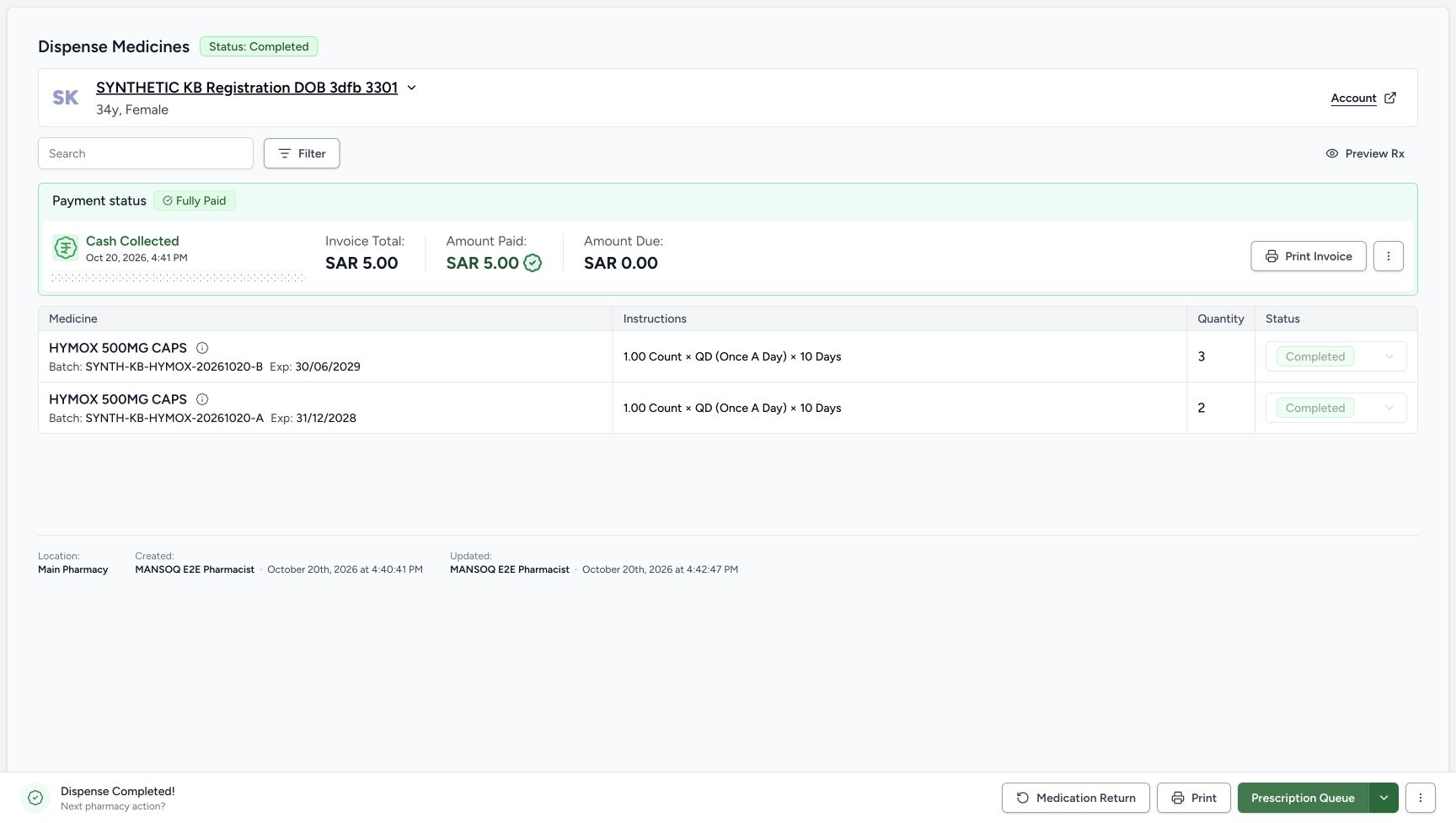
Saved completed two-batch order
Capture details
Genuine unchanged natural 1728×977 original from the exact local committed d20e build, LOCAL_UNPUSHED. This is fictional software dispensing and cash-ledger training, not physical medicine, actual money, clinical advice, insurance posting or external settlement.
Image SHA-256 e803ba74e1bfd3eaaf0bc61b38d286b9e62c301d118c0c8bb3dfe6d6a15ba6ea
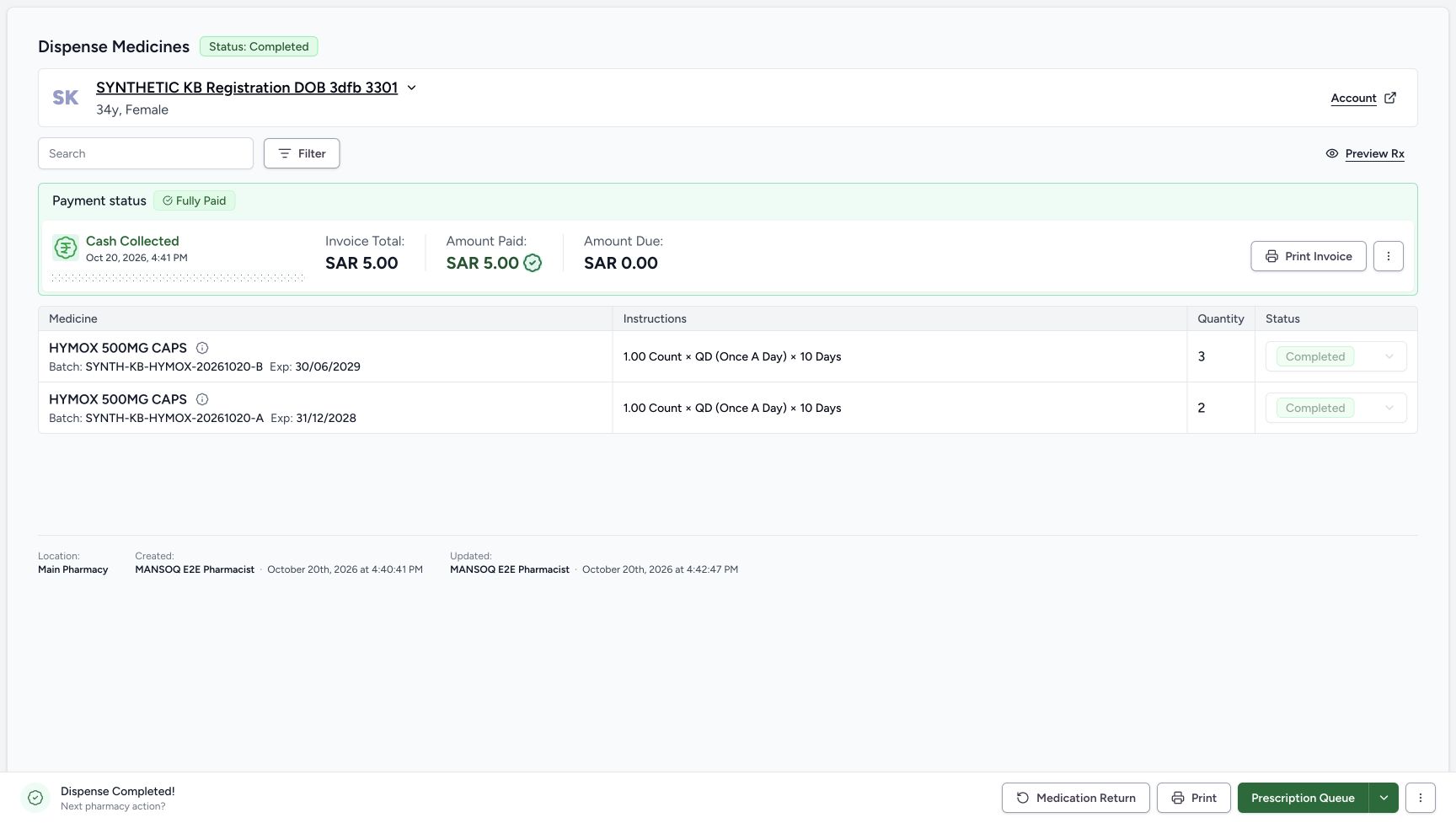
- Read saved order Completed: The parent order has completed.
- Verify B completed quantity three: The completed layout retains B three count.
- Verify A completed quantity two: The completed layout retains A two count.
- Read B Completed: The B row is Completed.
- Read A Completed: The A row is also Completed.
- Read Dispense Completed: This is software completion of the five prepared units, not physical handover.
 123
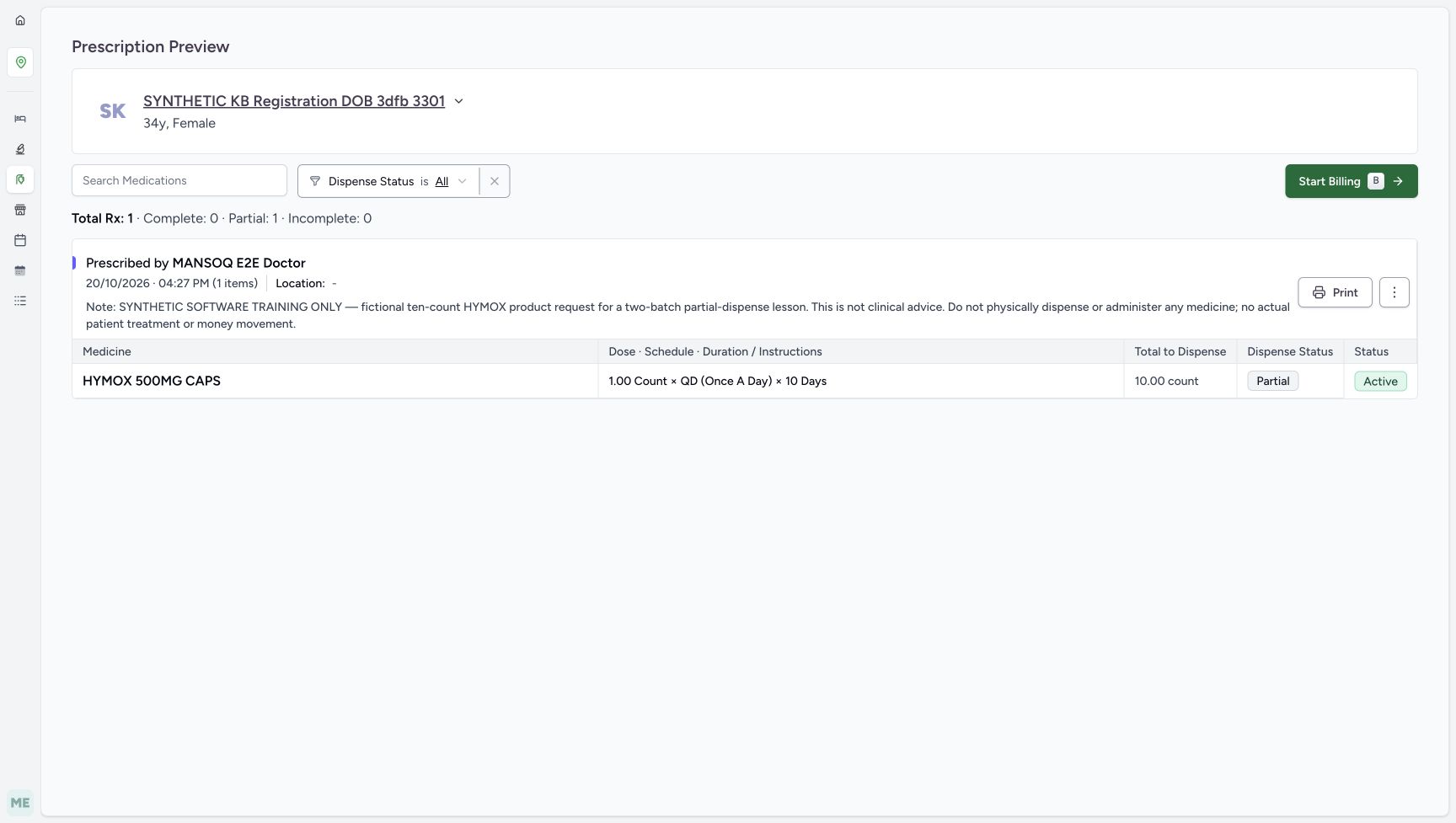
123Prescription still Partial and Active
Capture details
Genuine unchanged natural 1728×977 original from the exact local committed d20e build, LOCAL_UNPUSHED. This is fictional software dispensing and cash-ledger training, not physical medicine, actual money, clinical advice, insurance posting or external settlement.
Image SHA-256 09905f562030f0befc846727e213927883bf45271e800dd9c9658798f6078e31
- Read prescription still Partial: Completing the order has not changed the request progress to Complete.
- Read prescription still Active: The prescription remains Active after the partial order is Completed.
- Read original Total to Dispense 10: The visible total still states the original ten-count request; no automatic remaining-five value is pictured.
 123
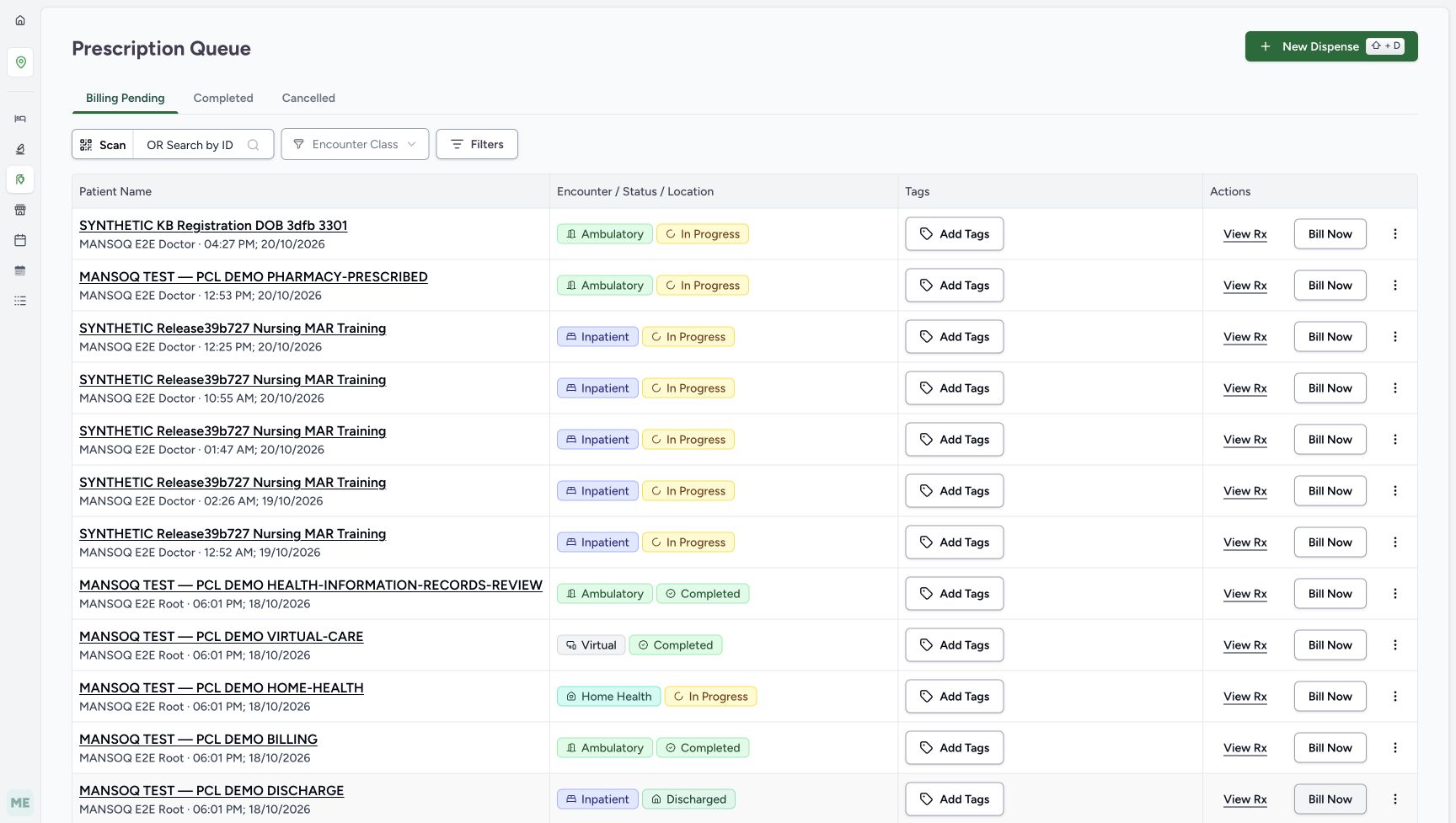
123Same prescription retained in Billing Pending
Capture details
Genuine unchanged natural 1728×977 original from the exact local committed d20e build, LOCAL_UNPUSHED. This is fictional software dispensing and cash-ledger training, not physical medicine, actual money, clinical advice, insurance posting or external settlement.
Image SHA-256 6cda9529bfa7da4f5c7af0e4514f8181d83fd51b8b2e420e9422caf97541755c
- Read the Billing Pending tab accurately: This queue tab describes prescription workflow, not an unpaid balance on the completed order.
- Find the same active request: The assigned synthetic patient remains listed under its04:27 PM Doctor prescription.
- Keep View Rx separate from another bill: View Rx remains available; no second Bill Now action was taken.
18 of 18 content blocks have reviewed image alignment.
Before you begin
- First finish “Prepare five of ten requested units from two synthetic lots”, following its reviewed FacilityAdmin batch-receipt and Doctor ten-count Product-request prerequisites. Continue as the ordinary Pharmacist on that same saved patient order: parent In Progress, B three and A two in Preparation, and Draft Invoice SAR 5.00. Reuse it; do not start another bill or a new prescription.
 12345678
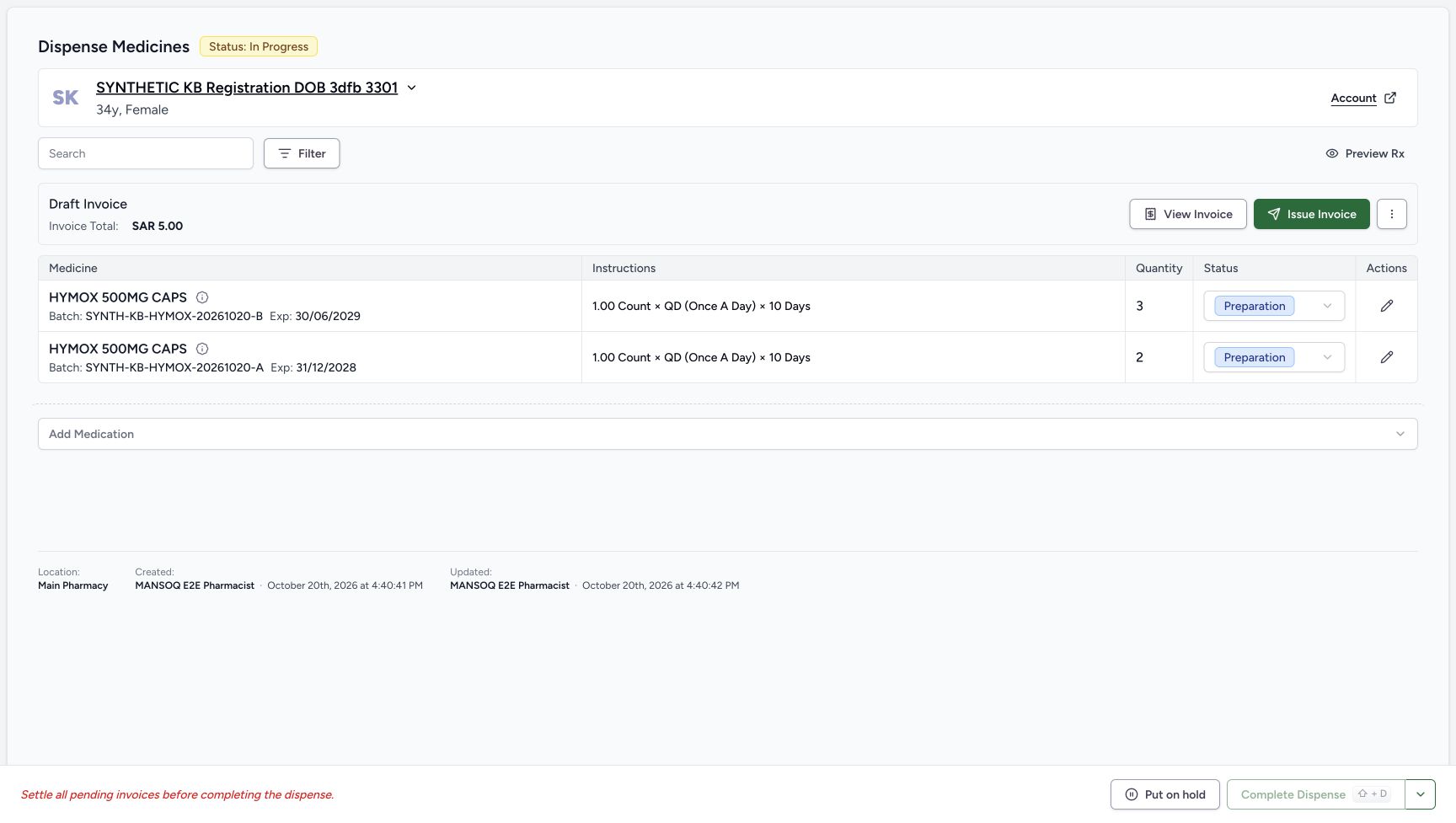
Recorded release d20e68ed · 2026-10-20T13:40:50.535Z · 1728 × 977 Saved partial Preparation and Draft invoice
Capture details
Genuine unchanged natural 1728×977 original from the exact local committed d20e build, LOCAL_UNPUSHED. This is fictional software dispensing and cash-ledger training, not physical medicine, actual money, clinical advice, insurance posting or external settlement.
Image SHA-256
148d87dd1aec8a108e6e552bf1c3d1f1fdf44d281a3fbe454090a81a35b256ba- Read saved order In Progress: One bill created a single order that is still In Progress.
- Verify saved B quantity three: The B Preparation row contains three count.
- Verify saved A quantity two: The A Preparation row contains two count.
- Read B Preparation: The B medicine row is not yet Completed.
- Read A Preparation: A is also still Preparation.
- Read saved Draft Invoice SAR 5.00: The saved invoice total for these two rows is five SAR.
- Open Preview Rx: Inspect the same prescription after partial preparation.
- Locate the separate Issue Invoice action: Issuance is the next lesson, after inspecting the saved partial result.
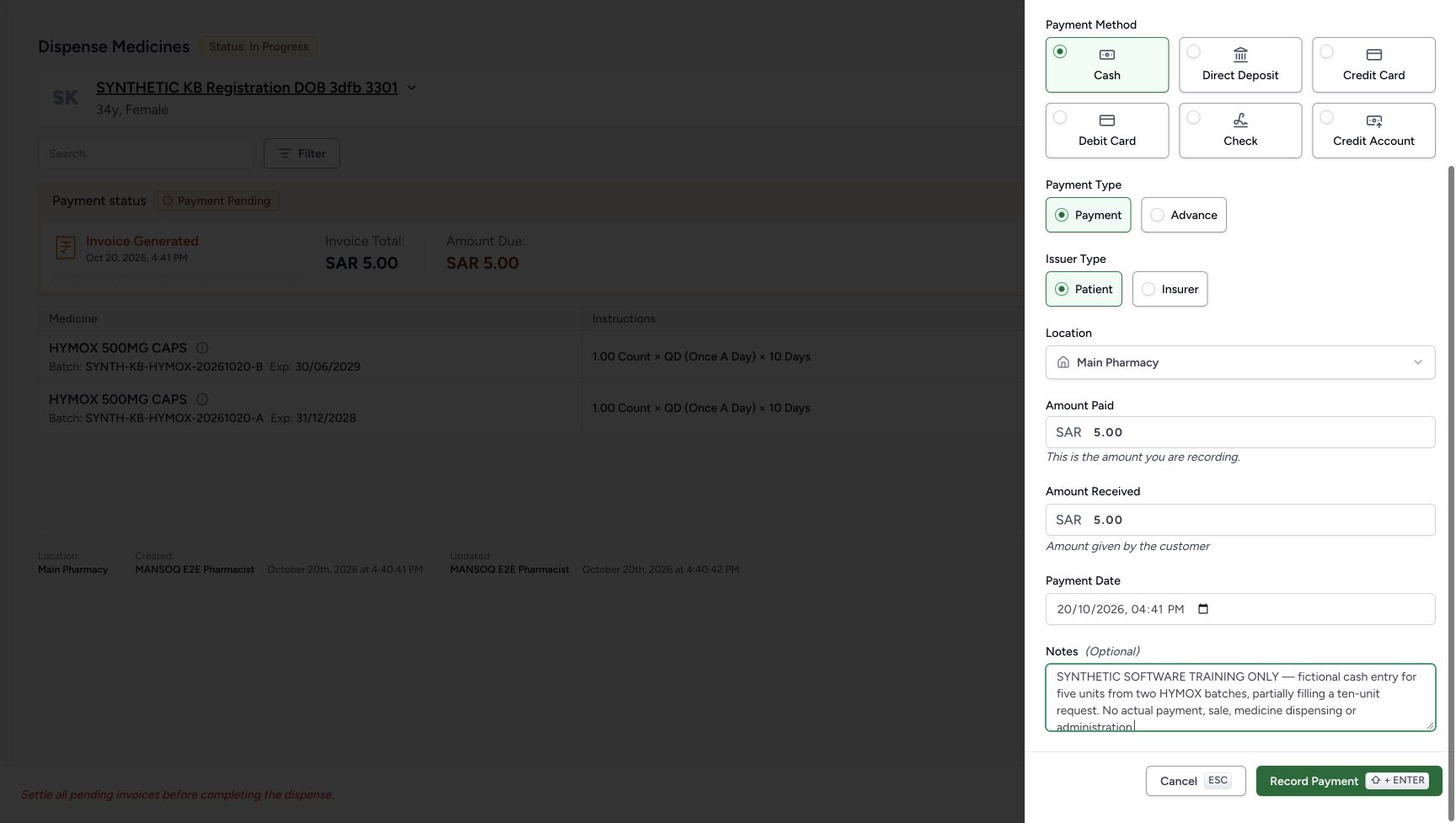
- This is a fictional self-pay cash ledger exercise. The illustrated net payment and tender are both 5.00, with zero change. Use the existing Main Pharmacy context, Payment and Patient choices; no insurer, external provider, bank deposit or physical handover is demonstrated.
 123456789
Recorded release d20e68ed · 2026-10-20T13:41:30.777Z · 1728 × 977 Reviewed fictional Cash five-riyal payment
Capture details
Genuine unchanged natural 1728×977 original from the exact local committed d20e build, LOCAL_UNPUSHED. This is fictional software dispensing and cash-ledger training, not physical medicine, actual money, clinical advice, insurance posting or external settlement.
Image SHA-256
5f65e0477f80568357f6fb0a585e100cf4f780d25fff5eecb19ec0f1e48ca2ad- Choose or verify Cash: The recorded method is Cash, not an external provider transfer.
- Keep Payment selected: Use Payment for this invoice, not Advance.
- Keep Patient selected: This is the synthetic self-pay Patient entry.
- Verify Main Pharmacy: The illustrated payment location is Main Pharmacy.
- Keep Amount Paid 5.00: This is the net ledger amount for this invoice.
- Keep Amount Received 5.00: The fictional tender equals the net amount; saved change is zero.
- Retain the actual form date: The form shows October 20, 2026 at 04:41 PM.
- Retain the exact fictional note: The note excludes actual payment, sale, medicine dispensing and administration.
- Record Payment once: Submit this one reviewed fictional cash entry once.
 12345
12345Recorded release d20e68ed · 2026-10-20T13:42:13.317Z · 1728 × 977 Saved one Cash payment with available actions
Capture details
Genuine unchanged natural 1728×977 original from the exact local committed d20e build, LOCAL_UNPUSHED. This is fictional software dispensing and cash-ledger training, not physical medicine, actual money, clinical advice, insurance posting or external settlement.
Image SHA-256
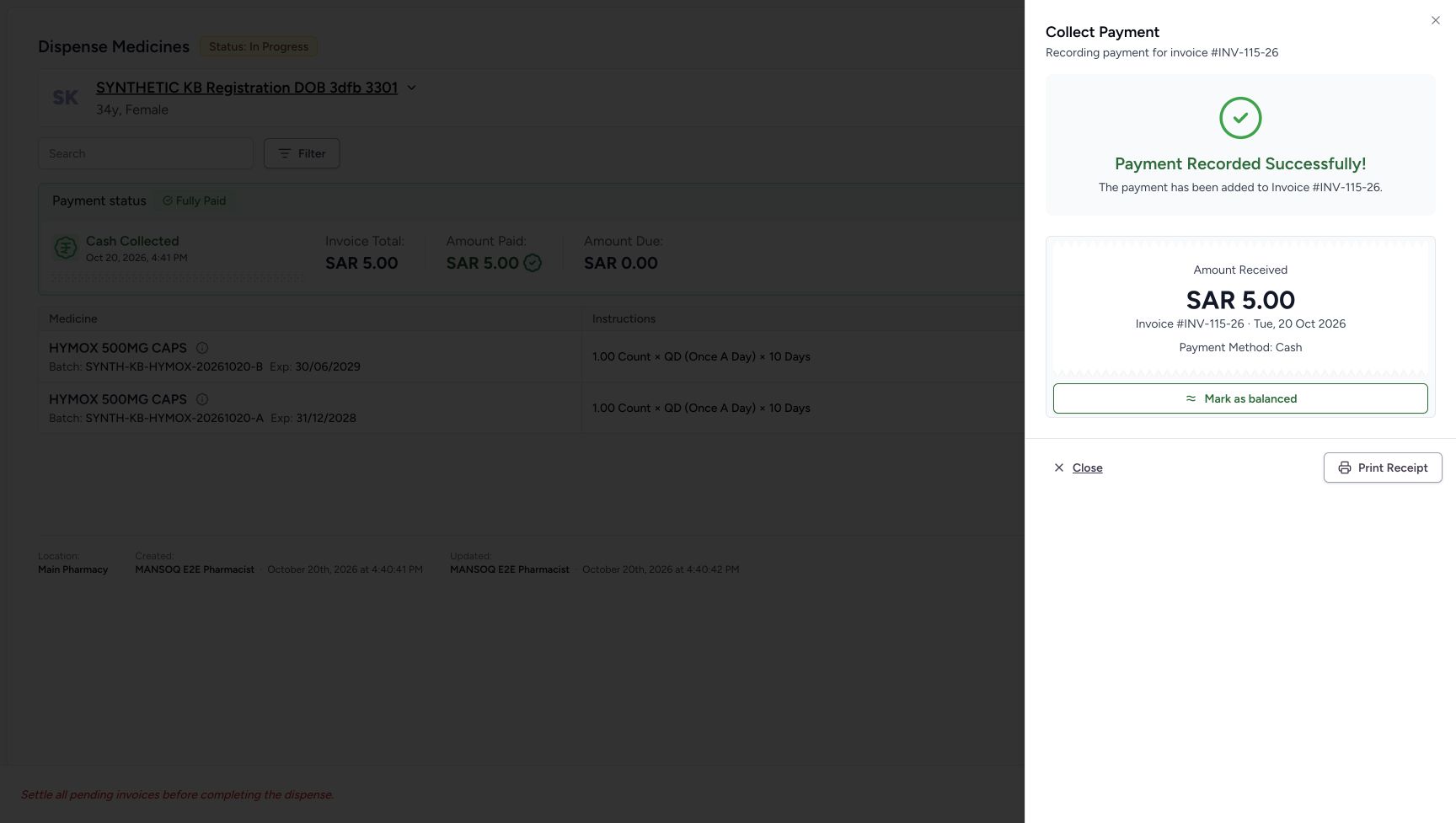
7769b3edb71907e2df062d28db7e00490c47940a57011029077a1e4e7444eea8- Read Payment Recorded Successfully: The success sheet confirms one saved payment for INV-115-26.
- Read received SAR 5.00: The one Cash receipt is for five SAR.
- Recognise the unused success-sheet balance option: This action is available here, but the recorded route closes the sheet and balances from the order banner later.
- Choose Close once: Use the lower Close action and wait for the settled order banner.
- Keep Print Receipt separate: Printing is available but was not used.
- The prescription remains an original ten-count request. Completing the five-unit order does not authorise another fill or automatically complete its prescription. Preserve the explicit fictional notes and perform only the one recorded payment, balance and completion actions.
 12345
12345Recorded release d20e68ed · 2026-10-20T13:35:41.848Z · 1728 × 977 Original requested ten count
Capture details
Genuine unchanged natural 1728×977 original from the exact local committed d20e build, LOCAL_UNPUSHED. This is fictional software dispensing and cash-ledger training, not physical medicine, actual money, clinical advice, insurance posting or external settlement.
Image SHA-256
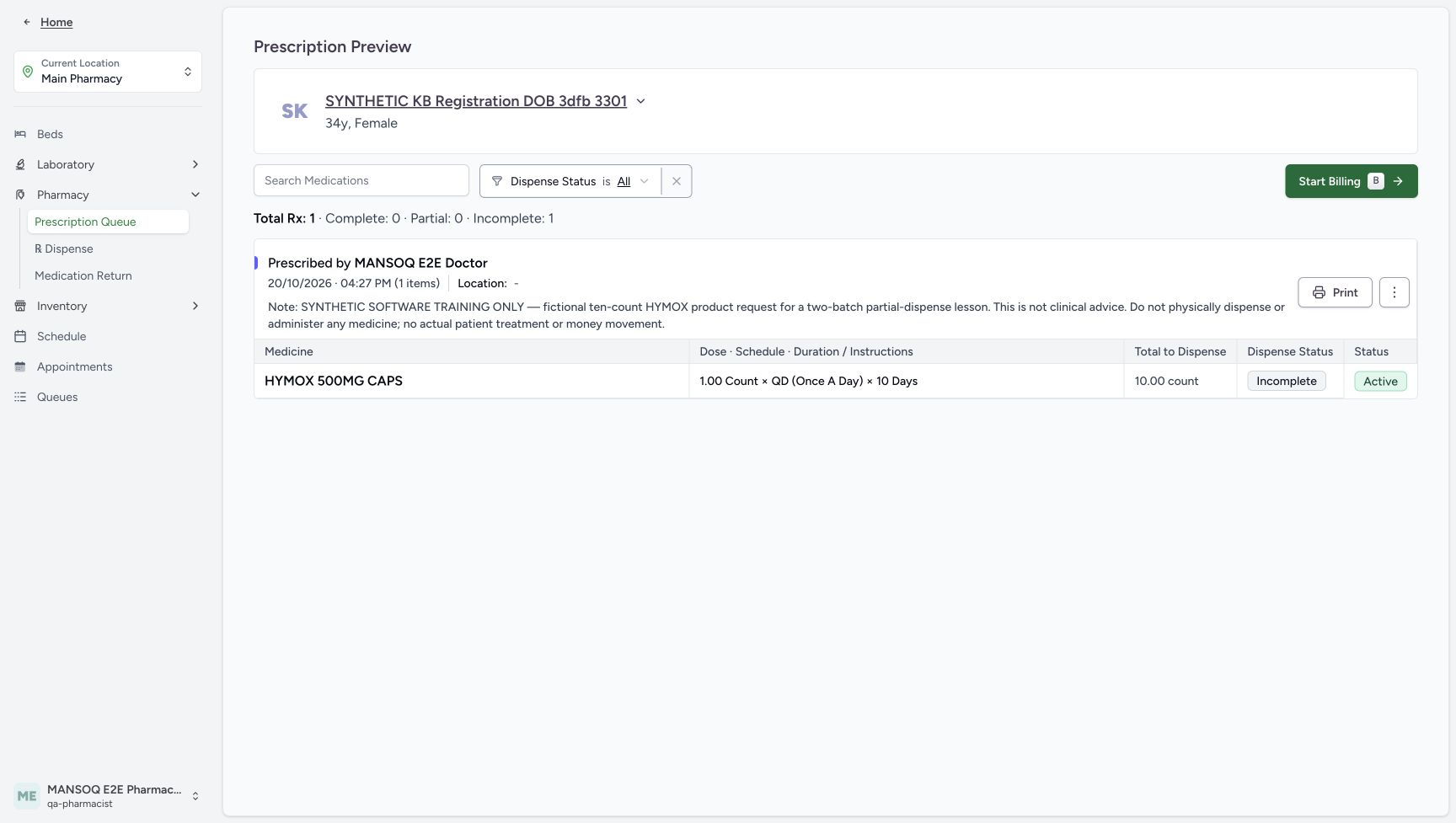
f64d33c78e2a2d626b357afb468851c58f8ca440fc2face52d36cdb7b9fc1d87- Check the patient in preview: The preview belongs to the assigned synthetic registration patient.
- Read the original request total 10: Total to Dispense is 10.00 count for the fictional one-count QD ten-day request.
- Read starting Incomplete: No part of this request has been given at this starting checkpoint.
- Read Active: The prescription remains Active.
- Choose Start Billing: Open the billing form for the same existing request.
123456789Recorded release d20e68ed · 2026-10-20T13:41:30.777Z · 1728 × 977 Reviewed fictional Cash five-riyal payment
Capture details
Genuine unchanged natural 1728×977 original from the exact local committed d20e build, LOCAL_UNPUSHED. This is fictional software dispensing and cash-ledger training, not physical medicine, actual money, clinical advice, insurance posting or external settlement.
Image SHA-256
5f65e0477f80568357f6fb0a585e100cf4f780d25fff5eecb19ec0f1e48ca2ad- Choose or verify Cash: The recorded method is Cash, not an external provider transfer.
- Keep Payment selected: Use Payment for this invoice, not Advance.
- Keep Patient selected: This is the synthetic self-pay Patient entry.
- Verify Main Pharmacy: The illustrated payment location is Main Pharmacy.
- Keep Amount Paid 5.00: This is the net ledger amount for this invoice.
- Keep Amount Received 5.00: The fictional tender equals the net amount; saved change is zero.
- Retain the actual form date: The form shows October 20, 2026 at 04:41 PM.
- Retain the exact fictional note: The note excludes actual payment, sale, medicine dispensing and administration.
- Record Payment once: Submit this one reviewed fictional cash entry once.
123Recorded release d20e68ed · 2026-10-20T13:43:05.821Z · 1728 × 977 Prescription still Partial and Active
Capture details
Genuine unchanged natural 1728×977 original from the exact local committed d20e build, LOCAL_UNPUSHED. This is fictional software dispensing and cash-ledger training, not physical medicine, actual money, clinical advice, insurance posting or external settlement.
Image SHA-256
09905f562030f0befc846727e213927883bf45271e800dd9c9658798f6078e31- Read prescription still Partial: Completing the order has not changed the request progress to Complete.
- Read prescription still Active: The prescription remains Active after the partial order is Completed.
- Read original Total to Dispense 10: The visible total still states the original ten-count request; no automatic remaining-five value is pictured.
1. Issue the saved Draft invoice once
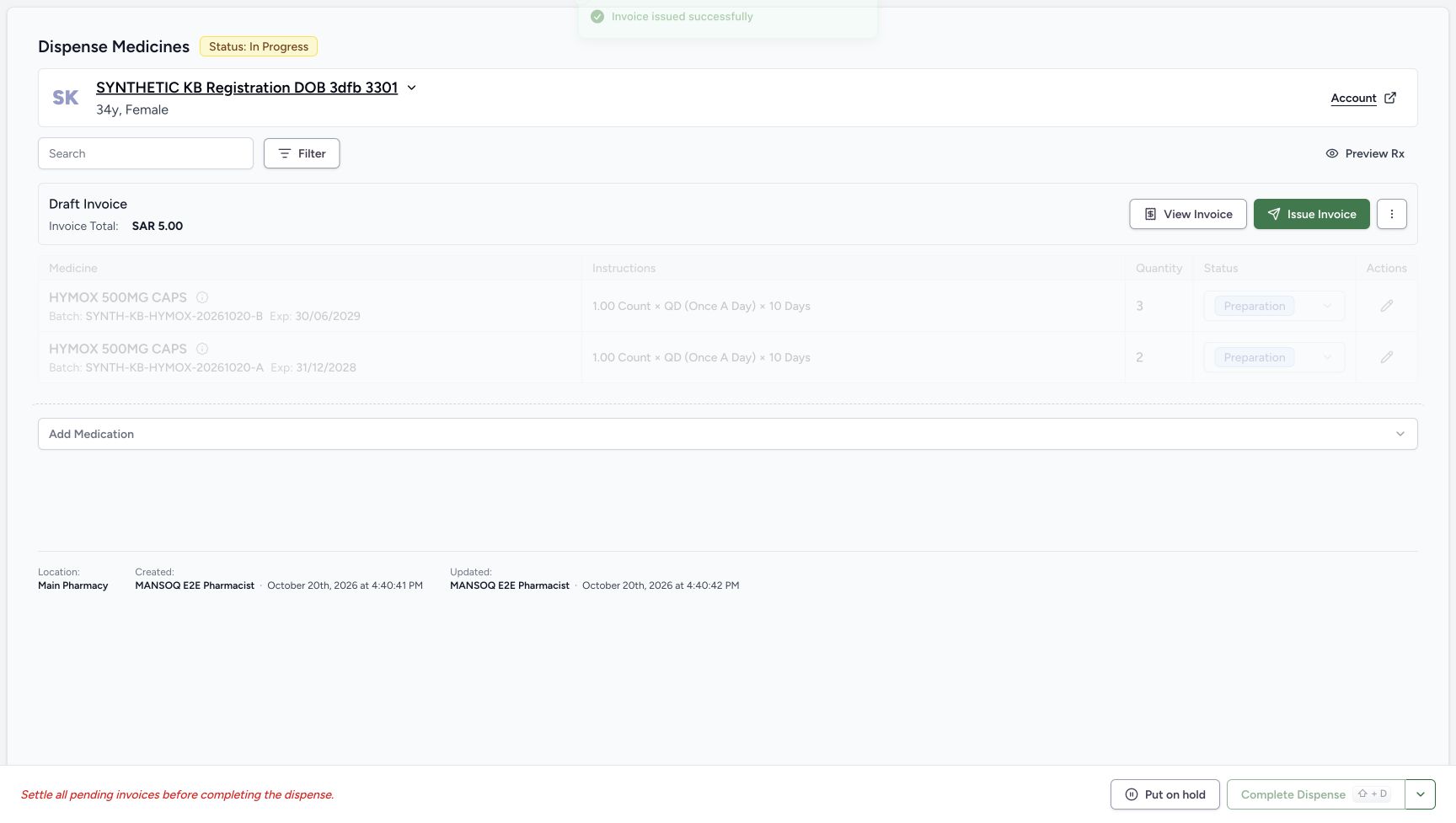
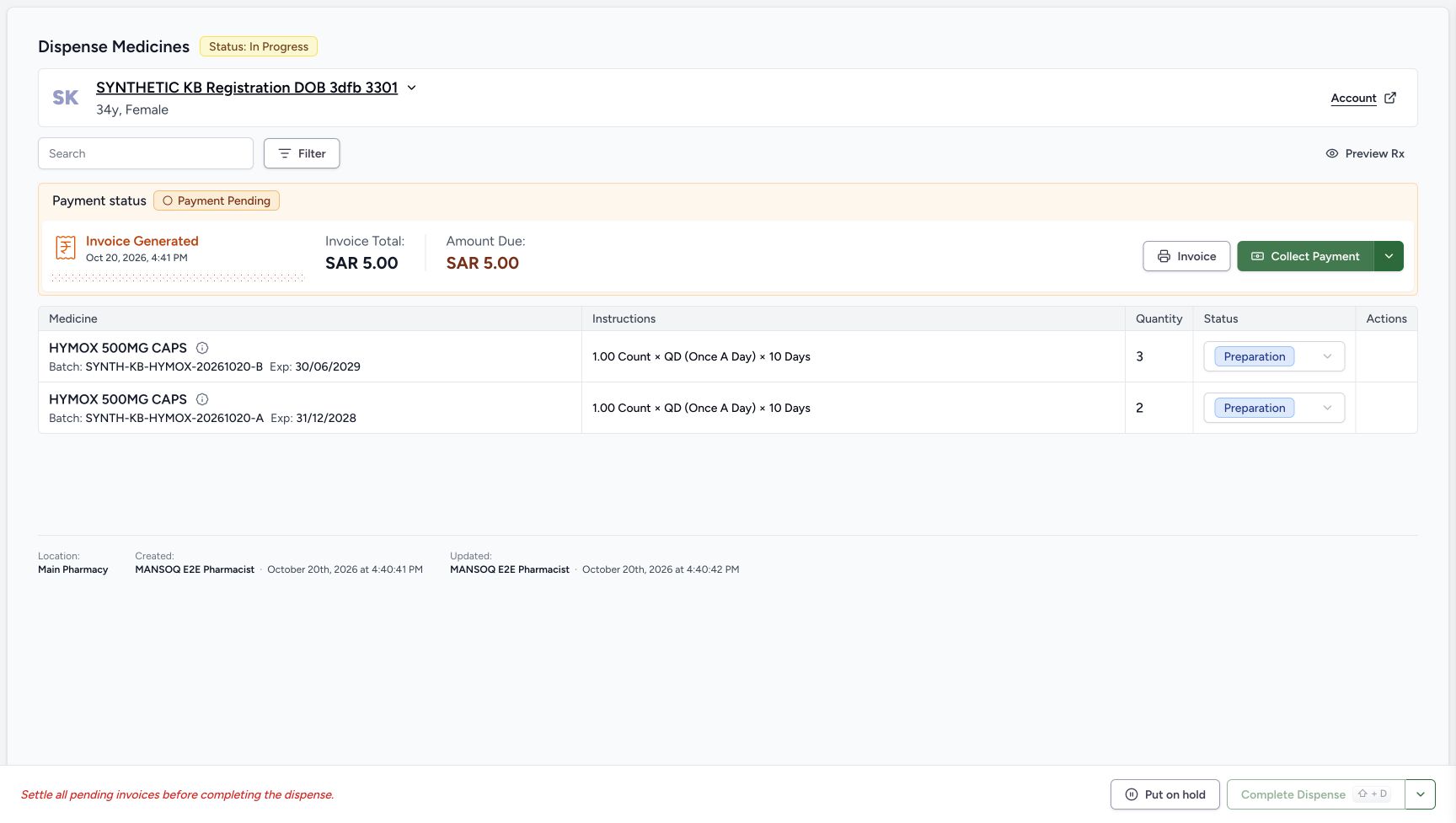
After returning to the existing order, choose Issue Invoice on its Draft banner once. The immediate image includes Invoice issued successfully while the older Draft banner is still refreshing. Wait for the settled Payment Pending banner with Invoice Generated, total SAR 5.00 and due SAR 5.00. No issue-confirmation dialog is pictured.
12345678Saved partial Preparation and Draft invoice
Capture details
Genuine unchanged natural 1728×977 original from the exact local committed d20e build, LOCAL_UNPUSHED. This is fictional software dispensing and cash-ledger training, not physical medicine, actual money, clinical advice, insurance posting or external settlement.
Image SHA-256 148d87dd1aec8a108e6e552bf1c3d1f1fdf44d281a3fbe454090a81a35b256ba
- Read saved order In Progress: One bill created a single order that is still In Progress.
- Verify saved B quantity three: The B Preparation row contains three count.
- Verify saved A quantity two: The A Preparation row contains two count.
- Read B Preparation: The B medicine row is not yet Completed.
- Read A Preparation: A is also still Preparation.
- Read saved Draft Invoice SAR 5.00: The saved invoice total for these two rows is five SAR.
- Open Preview Rx: Inspect the same prescription after partial preparation.
- Locate the separate Issue Invoice action: Issuance is the next lesson, after inspecting the saved partial result.
 12
12Immediate issue result refresh
Capture details
Genuine unchanged natural 1728×977 original from the exact local committed d20e build, LOCAL_UNPUSHED. This is fictional software dispensing and cash-ledger training, not physical medicine, actual money, clinical advice, insurance posting or external settlement. This immediate/pending view is qualified separately from the settled outcome. Neither balance nor completion used a confirmation dialog.
Image SHA-256 028a9d15b2fc745984a3f6a3554befc6e48db8d58e690163aa768e9d008fbd98
- Wait for issue result after one click: This immediate issue view can retain the old Draft banner during refresh.
- Read the actual issue success feedback: The image visibly includes Invoice issued successfully while the banner is still refreshing.
 1234
1234Settled issued order before collection
Capture details
Genuine unchanged natural 1728×977 original from the exact local committed d20e build, LOCAL_UNPUSHED. This is fictional software dispensing and cash-ledger training, not physical medicine, actual money, clinical advice, insurance posting or external settlement.
Image SHA-256 6fafb03b327417ce3d8a69d1f20ddae0727fdbeb27e4d56a56ca37cad4054b57
- Read settled Payment Pending: This is the settled issued order banner, not an open payment sheet.
- Read invoice total SAR 5.00: The generated invoice total remains five SAR.
- Read amount due SAR 5.00: No payment has yet been recorded for this invoice.
- Open Collect Payment: Use this control for the single fictional payment.
2. Review the one fictional five-riyal Cash entry
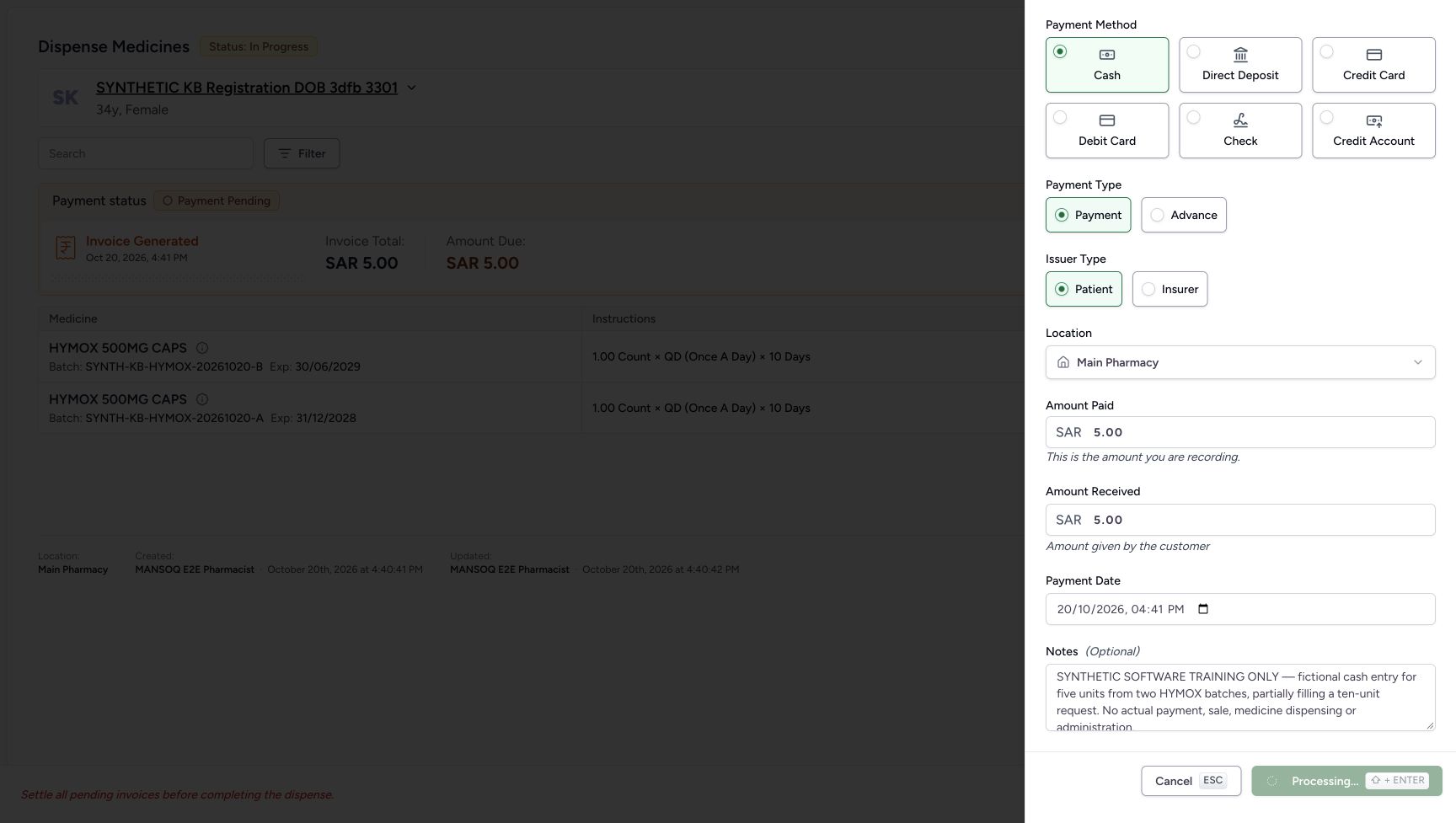
Choose Collect Payment on the settled order. Select or verify Cash and the illustrated Payment, Patient and Main Pharmacy values. Keep Amount Paid 5.00 and Amount Received 5.00; this equal fictional tender has zero saved change. Retain the actual form date October 20, 2026 at 04:41 PM and exact note: SYNTHETIC SOFTWARE TRAINING ONLY — fictional cash entry for five units from two HYMOX batches, partially filling a ten-unit request. No actual payment, sale, medicine dispensing or administration.
1234Settled issued order before collection
Capture details
Genuine unchanged natural 1728×977 original from the exact local committed d20e build, LOCAL_UNPUSHED. This is fictional software dispensing and cash-ledger training, not physical medicine, actual money, clinical advice, insurance posting or external settlement.
Image SHA-256 6fafb03b327417ce3d8a69d1f20ddae0727fdbeb27e4d56a56ca37cad4054b57
- Read settled Payment Pending: This is the settled issued order banner, not an open payment sheet.
- Read invoice total SAR 5.00: The generated invoice total remains five SAR.
- Read amount due SAR 5.00: No payment has yet been recorded for this invoice.
- Open Collect Payment: Use this control for the single fictional payment.
123456789Reviewed fictional Cash five-riyal payment
Capture details
Genuine unchanged natural 1728×977 original from the exact local committed d20e build, LOCAL_UNPUSHED. This is fictional software dispensing and cash-ledger training, not physical medicine, actual money, clinical advice, insurance posting or external settlement.
Image SHA-256 5f65e0477f80568357f6fb0a585e100cf4f780d25fff5eecb19ec0f1e48ca2ad
- Choose or verify Cash: The recorded method is Cash, not an external provider transfer.
- Keep Payment selected: Use Payment for this invoice, not Advance.
- Keep Patient selected: This is the synthetic self-pay Patient entry.
- Verify Main Pharmacy: The illustrated payment location is Main Pharmacy.
- Keep Amount Paid 5.00: This is the net ledger amount for this invoice.
- Keep Amount Received 5.00: The fictional tender equals the net amount; saved change is zero.
- Retain the actual form date: The form shows October 20, 2026 at 04:41 PM.
- Retain the exact fictional note: The note excludes actual payment, sale, medicine dispensing and administration.
- Record Payment once: Submit this one reviewed fictional cash entry once.
3. Record Payment once and read the success sheet
Choose Record Payment once. Wait while Processing is disabled, then read Payment Recorded Successfully for INV-115-26, SAR 5.00 and Cash. The success sheet also offers Mark as balanced, Close and Print Receipt. The recorded route uses Close and then the order-banner balance action; it does not click the sheet’s balance action or print.
123456789Reviewed fictional Cash five-riyal payment
Capture details
Genuine unchanged natural 1728×977 original from the exact local committed d20e build, LOCAL_UNPUSHED. This is fictional software dispensing and cash-ledger training, not physical medicine, actual money, clinical advice, insurance posting or external settlement.
Image SHA-256 5f65e0477f80568357f6fb0a585e100cf4f780d25fff5eecb19ec0f1e48ca2ad
- Choose or verify Cash: The recorded method is Cash, not an external provider transfer.
- Keep Payment selected: Use Payment for this invoice, not Advance.
- Keep Patient selected: This is the synthetic self-pay Patient entry.
- Verify Main Pharmacy: The illustrated payment location is Main Pharmacy.
- Keep Amount Paid 5.00: This is the net ledger amount for this invoice.
- Keep Amount Received 5.00: The fictional tender equals the net amount; saved change is zero.
- Retain the actual form date: The form shows October 20, 2026 at 04:41 PM.
- Retain the exact fictional note: The note excludes actual payment, sale, medicine dispensing and administration.
- Record Payment once: Submit this one reviewed fictional cash entry once.
 1
1One payment Processing
Capture details
Genuine unchanged natural 1728×977 original from the exact local committed d20e build, LOCAL_UNPUSHED. This is fictional software dispensing and cash-ledger training, not physical medicine, actual money, clinical advice, insurance posting or external settlement. This immediate/pending view is qualified separately from the settled outcome. Neither balance nor completion used a confirmation dialog.
Image SHA-256 de05597081be8e40ae6510eedd1ae2413975514aabd144e9980796a970f62565
- Wait during Processing: The disabled action is pending; do not record a duplicate payment.
12345Saved one Cash payment with available actions
Capture details
Genuine unchanged natural 1728×977 original from the exact local committed d20e build, LOCAL_UNPUSHED. This is fictional software dispensing and cash-ledger training, not physical medicine, actual money, clinical advice, insurance posting or external settlement.
Image SHA-256 7769b3edb71907e2df062d28db7e00490c47940a57011029077a1e4e7444eea8
- Read Payment Recorded Successfully: The success sheet confirms one saved payment for INV-115-26.
- Read received SAR 5.00: The one Cash receipt is for five SAR.
- Recognise the unused success-sheet balance option: This action is available here, but the recorded route closes the sheet and balances from the order banner later.
- Choose Close once: Use the lower Close action and wait for the settled order banner.
- Keep Print Receipt separate: Printing is available but was not used.
4. Close the success sheet and inspect the settled order
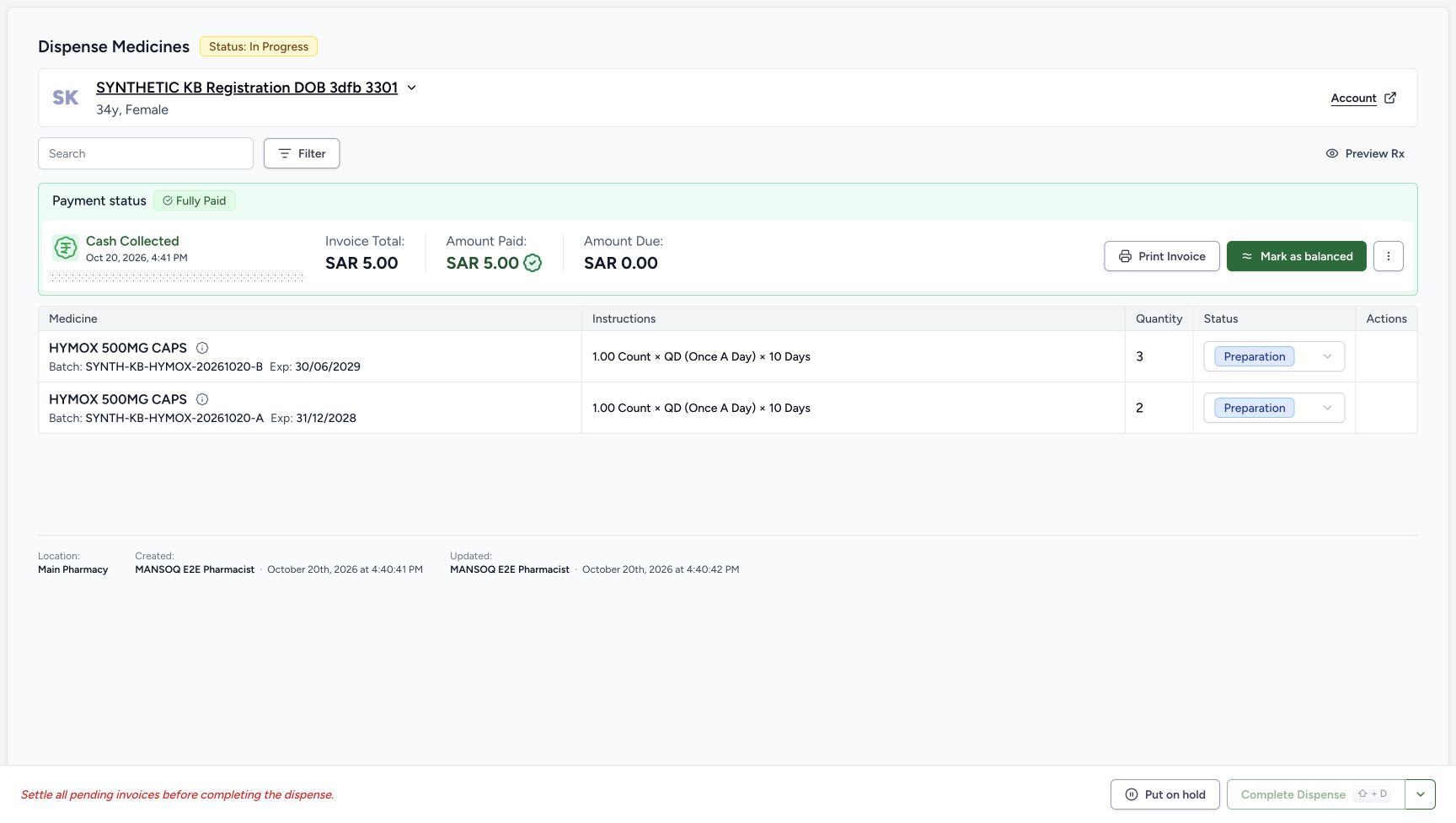
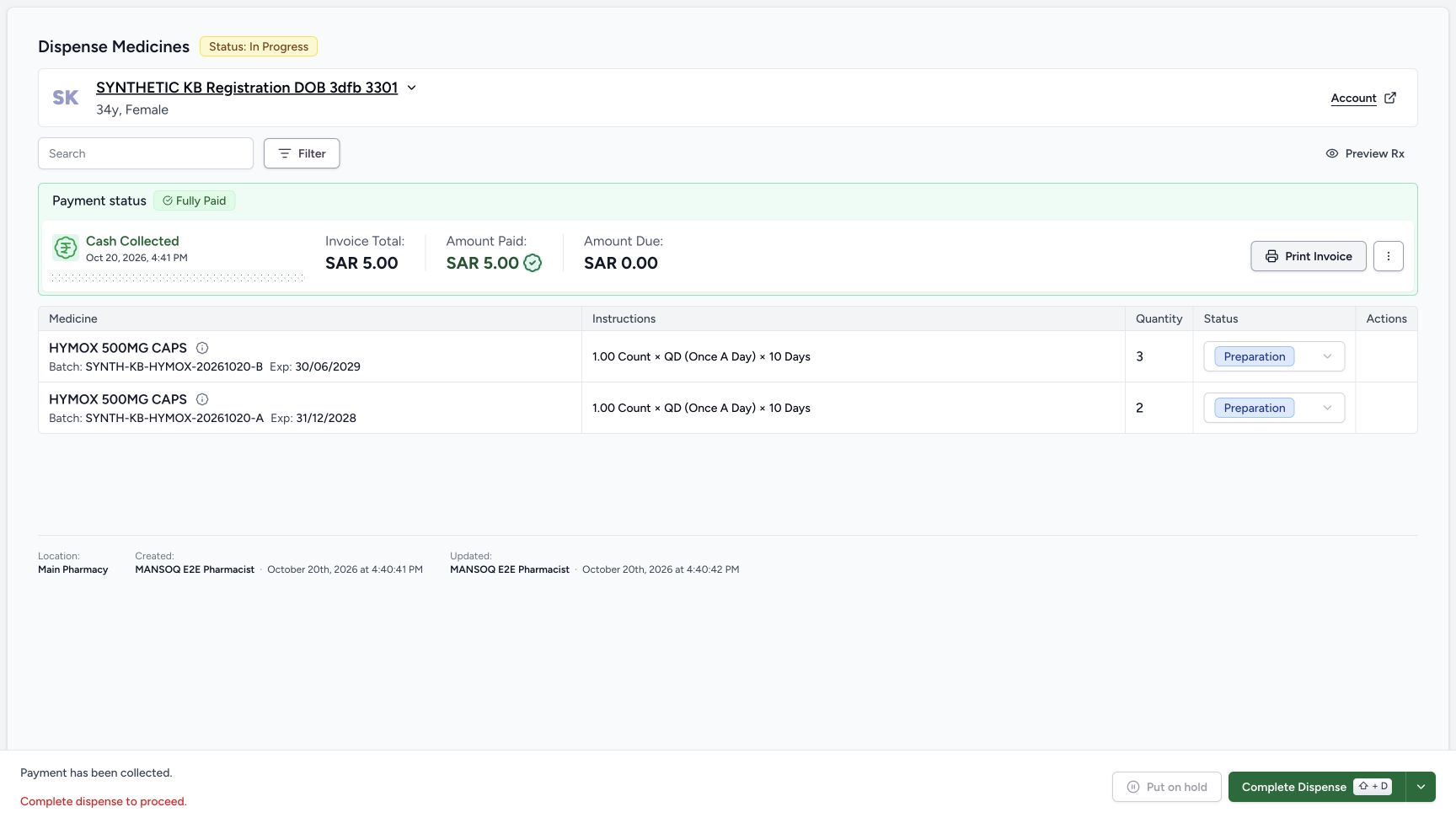
Use the lower Close action once and wait for the settled order banner. A transient form view during dismissal is not another saved payment. The settled order shows Fully Paid, SAR 5.00 paid and zero due, but Mark as balanced is still available and Complete Dispense remains disabled. Do not record another payment to clear that separate requirement.
12345Saved one Cash payment with available actions
Capture details
Genuine unchanged natural 1728×977 original from the exact local committed d20e build, LOCAL_UNPUSHED. This is fictional software dispensing and cash-ledger training, not physical medicine, actual money, clinical advice, insurance posting or external settlement.
Image SHA-256 7769b3edb71907e2df062d28db7e00490c47940a57011029077a1e4e7444eea8
- Read Payment Recorded Successfully: The success sheet confirms one saved payment for INV-115-26.
- Read received SAR 5.00: The one Cash receipt is for five SAR.
- Recognise the unused success-sheet balance option: This action is available here, but the recorded route closes the sheet and balances from the order banner later.
- Choose Close once: Use the lower Close action and wait for the settled order banner.
- Keep Print Receipt separate: Printing is available but was not used.
 12345
12345Fully Paid with balance still required
Capture details
Genuine unchanged natural 1728×977 original from the exact local committed d20e build, LOCAL_UNPUSHED. This is fictional software dispensing and cash-ledger training, not physical medicine, actual money, clinical advice, insurance posting or external settlement.
Image SHA-256 932bff6cd38febc18bc8b7e11b94db34fa2ddad58d74cc9a5b6d35d404d0e2fe
- Read Fully Paid: The single payment has paid the five-riyal invoice.
- Read Amount Paid 5.00: The net cash ledger payment is five SAR.
- Read Amount Due0.00: The invoice has zero amount due.
- Mark as balanced from the order banner: This is the actual one balance action used in the recording.
- Keep completion separate: Complete Dispense is still disabled before the balance action settles.
5. Balance from the order banner once without a dialog
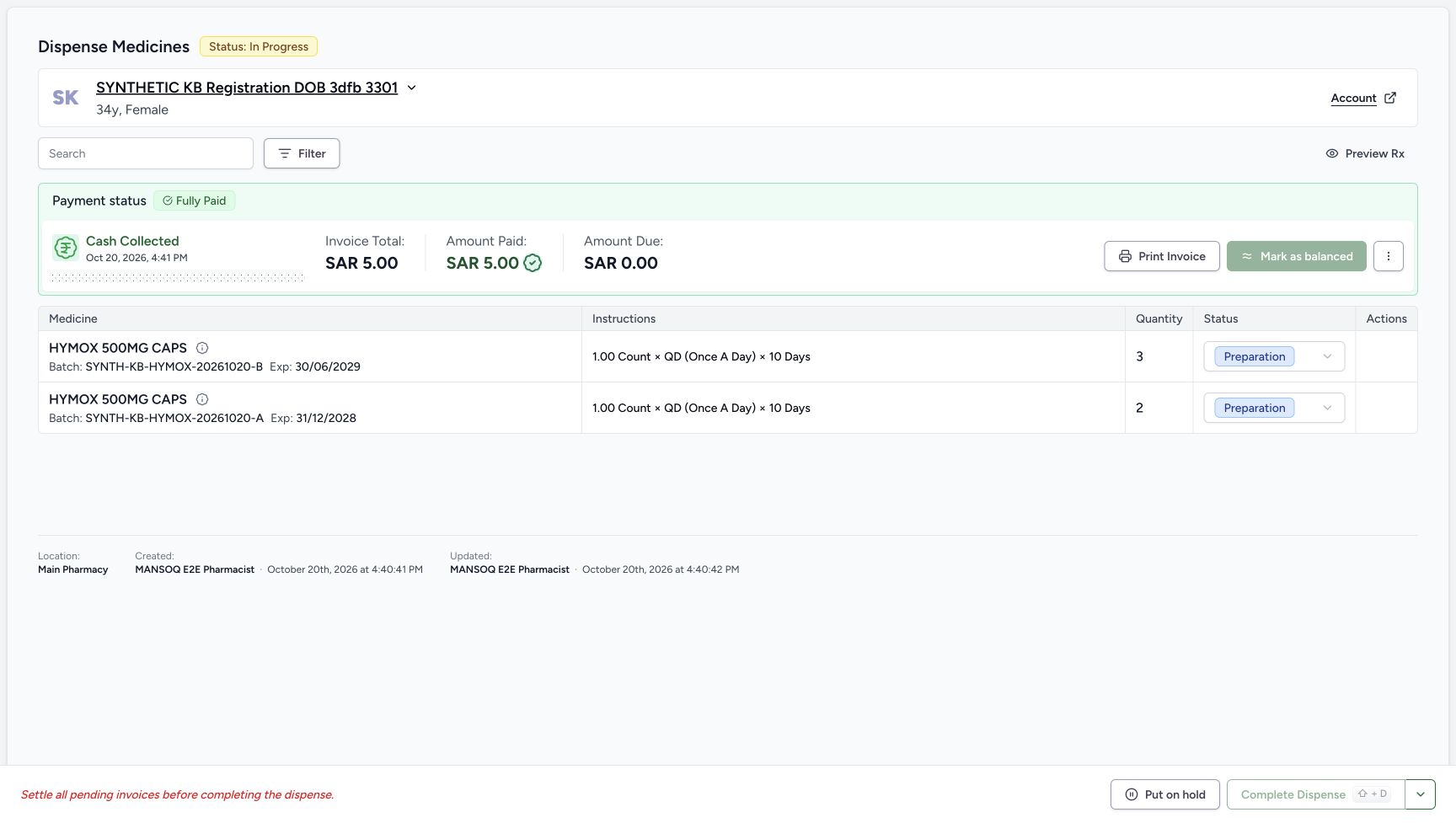
Choose Mark as balanced on the order banner once. This direct action does not open a confirmation dialog. The immediate frame only has a disabled pending button. Wait until that action disappears and Complete Dispense becomes enabled; the batch rows are still Preparation. The saved-record check confirms the invoice is now Balanced.
12345Fully Paid with balance still required
Capture details
Genuine unchanged natural 1728×977 original from the exact local committed d20e build, LOCAL_UNPUSHED. This is fictional software dispensing and cash-ledger training, not physical medicine, actual money, clinical advice, insurance posting or external settlement.
Image SHA-256 932bff6cd38febc18bc8b7e11b94db34fa2ddad58d74cc9a5b6d35d404d0e2fe
- Read Fully Paid: The single payment has paid the five-riyal invoice.
- Read Amount Paid 5.00: The net cash ledger payment is five SAR.
- Read Amount Due0.00: The invoice has zero amount due.
- Mark as balanced from the order banner: This is the actual one balance action used in the recording.
- Keep completion separate: Complete Dispense is still disabled before the balance action settles.
 1
1Balance request pending without dialog
Capture details
Genuine unchanged natural 1728×977 original from the exact local committed d20e build, LOCAL_UNPUSHED. This is fictional software dispensing and cash-ledger training, not physical medicine, actual money, clinical advice, insurance posting or external settlement. This immediate/pending view is qualified separately from the settled outcome. Neither balance nor completion used a confirmation dialog.
Image SHA-256 9bbc525d0f90ae6072b84093b72dd424a269d2d84c2611ee3dbe57c2b3bab32d
- Wait while balance is pending: This disabled Mark as balanced action is not a confirmation dialog.
 123
123Balanced order ready for direct completion
Capture details
Genuine unchanged natural 1728×977 original from the exact local committed d20e build, LOCAL_UNPUSHED. This is fictional software dispensing and cash-ledger training, not physical medicine, actual money, clinical advice, insurance posting or external settlement.
Image SHA-256 f0116f1629abd60f24f00321e4beed9d03350ecd61f5632d2dec828b2598c30c
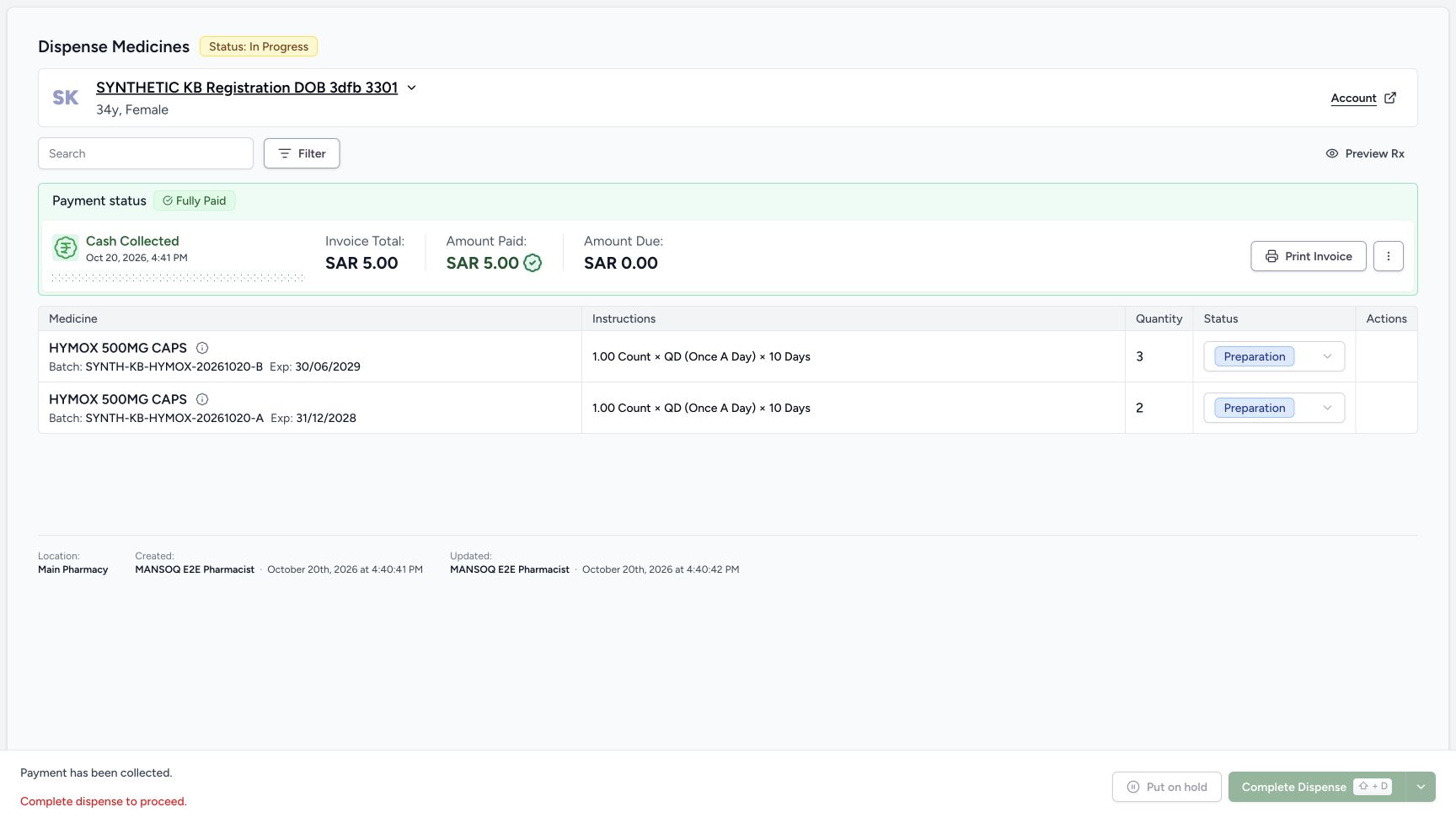
- Complete Dispense once when enabled: After balance settles, the direct completion action is enabled.
- Recognise disabled hold: Put on hold is disabled at this paid checkpoint.
- Read Preparation before completion: The medicine rows are still Preparation before this separate action.
6. Complete the partial order once without a dialog
Review the same two batch quantities, Fully Paid SAR 5.00 and zero due. Choose the enabled Complete Dispense once. This route directly submits the action; the next image is a disabled pending button with old labels, not a confirmation dialog. Wait for the settled parent and both batch rows to read Completed, retaining B3 and A2.
123Balanced order ready for direct completion
Capture details
Genuine unchanged natural 1728×977 original from the exact local committed d20e build, LOCAL_UNPUSHED. This is fictional software dispensing and cash-ledger training, not physical medicine, actual money, clinical advice, insurance posting or external settlement.
Image SHA-256 f0116f1629abd60f24f00321e4beed9d03350ecd61f5632d2dec828b2598c30c
- Complete Dispense once when enabled: After balance settles, the direct completion action is enabled.
- Recognise disabled hold: Put on hold is disabled at this paid checkpoint.
- Read Preparation before completion: The medicine rows are still Preparation before this separate action.
 12
12Direct completion pending
Capture details
Genuine unchanged natural 1728×977 original from the exact local committed d20e build, LOCAL_UNPUSHED. This is fictional software dispensing and cash-ledger training, not physical medicine, actual money, clinical advice, insurance posting or external settlement. This immediate/pending view is qualified separately from the settled outcome. Neither balance nor completion used a confirmation dialog.
Image SHA-256 80acef419de56a079f0d90863162cc823e069eb4d6bb20d1c9aa3077796460fe
- Wait while completion is pending: The direct Complete action is disabled during its request; no confirmation dialog is pictured.
- Do not treat the old status as final: The immediate view still has In Progress while the result refreshes.
123456Saved completed two-batch order
Capture details
Genuine unchanged natural 1728×977 original from the exact local committed d20e build, LOCAL_UNPUSHED. This is fictional software dispensing and cash-ledger training, not physical medicine, actual money, clinical advice, insurance posting or external settlement.
Image SHA-256 e803ba74e1bfd3eaaf0bc61b38d286b9e62c301d118c0c8bb3dfe6d6a15ba6ea
- Read saved order Completed: The parent order has completed.
- Verify B completed quantity three: The completed layout retains B three count.
- Verify A completed quantity two: The completed layout retains A two count.
- Read B Completed: The B row is Completed.
- Read A Completed: The A row is also Completed.
- Read Dispense Completed: This is software completion of the five prepared units, not physical handover.
7. Reload and verify the settled completed order
Reload normally and wait for loading to finish. The settled order remains Completed with both Completed batch rows and the same quantities. Its invoice banner still has SAR 5.00 paid and zero due. Completing did not create another payment or deduct those stock quantities again. Return, Print and financial-correction actions are separate branches and were not used.
123456Saved completed two-batch order
Capture details
Genuine unchanged natural 1728×977 original from the exact local committed d20e build, LOCAL_UNPUSHED. This is fictional software dispensing and cash-ledger training, not physical medicine, actual money, clinical advice, insurance posting or external settlement.
Image SHA-256 e803ba74e1bfd3eaaf0bc61b38d286b9e62c301d118c0c8bb3dfe6d6a15ba6ea
- Read saved order Completed: The parent order has completed.
- Verify B completed quantity three: The completed layout retains B three count.
- Verify A completed quantity two: The completed layout retains A two count.
- Read B Completed: The B row is Completed.
- Read A Completed: The A row is also Completed.
- Read Dispense Completed: This is software completion of the five prepared units, not physical handover.
 123456
Settled completed order after reload
Capture details
Genuine unchanged natural 1728×977 original from the exact local committed d20e build, LOCAL_UNPUSHED. This is fictional software dispensing and cash-ledger training, not physical medicine, actual money, clinical advice, insurance posting or external settlement.
Image SHA-256 261b29d3c99a2e8cd29b53cff35b7690d2dbc5d7a92b47fd7b82f73ae8ac4178
- Verify Completed after normal reload: The settled reloaded order retains Completed.
- Verify B quantity three retained: The saved B batch remains at three count.
- Verify A quantity two retained: The saved A batch remains at two count.
- Verify zero due retained: The invoice banner retains SAR 5.00 paid and zero due.
- Inspect Preview Rx after completion: This opens the separate prescription progress readback.
- Return through Prescription Queue: Use the completed-order footer queue entry after inspecting the existing prescription.
8. Read the separate prescription progress after completion
Use Preview Rx from the completed order. The prescription remains Partial and Active, and Total to Dispense still displays the original 10.00 count. That is distinct from the completed five-unit order. The UI does not display an automatic remaining-five request here. Use normal browser Back to return to the same completed order.
123456Settled completed order after reload
Capture details
Genuine unchanged natural 1728×977 original from the exact local committed d20e build, LOCAL_UNPUSHED. This is fictional software dispensing and cash-ledger training, not physical medicine, actual money, clinical advice, insurance posting or external settlement.
Image SHA-256 261b29d3c99a2e8cd29b53cff35b7690d2dbc5d7a92b47fd7b82f73ae8ac4178
- Verify Completed after normal reload: The settled reloaded order retains Completed.
- Verify B quantity three retained: The saved B batch remains at three count.
- Verify A quantity two retained: The saved A batch remains at two count.
- Verify zero due retained: The invoice banner retains SAR 5.00 paid and zero due.
- Inspect Preview Rx after completion: This opens the separate prescription progress readback.
- Return through Prescription Queue: Use the completed-order footer queue entry after inspecting the existing prescription.
123Prescription still Partial and Active
Capture details
Genuine unchanged natural 1728×977 original from the exact local committed d20e build, LOCAL_UNPUSHED. This is fictional software dispensing and cash-ledger training, not physical medicine, actual money, clinical advice, insurance posting or external settlement.
Image SHA-256 09905f562030f0befc846727e213927883bf45271e800dd9c9658798f6078e31
- Read prescription still Partial: Completing the order has not changed the request progress to Complete.
- Read prescription still Active: The prescription remains Active after the partial order is Completed.
- Read original Total to Dispense 10: The visible total still states the original ten-count request; no automatic remaining-five value is pictured.
9. Return to the prescription queue and keep the states distinct
Choose Prescription Queue in the completed-order footer and wait for the settled list. The same 04:27 PM Doctor request is still in Billing Pending. This tab describes the unfinished prescription workflow; it does not mean the five-riyal invoice on the completed order is unpaid. No second Bill Now, another payment or another dispense was performed.
123456Settled completed order after reload
Capture details
Genuine unchanged natural 1728×977 original from the exact local committed d20e build, LOCAL_UNPUSHED. This is fictional software dispensing and cash-ledger training, not physical medicine, actual money, clinical advice, insurance posting or external settlement.
Image SHA-256 261b29d3c99a2e8cd29b53cff35b7690d2dbc5d7a92b47fd7b82f73ae8ac4178
- Verify Completed after normal reload: The settled reloaded order retains Completed.
- Verify B quantity three retained: The saved B batch remains at three count.
- Verify A quantity two retained: The saved A batch remains at two count.
- Verify zero due retained: The invoice banner retains SAR 5.00 paid and zero due.
- Inspect Preview Rx after completion: This opens the separate prescription progress readback.
- Return through Prescription Queue: Use the completed-order footer queue entry after inspecting the existing prescription.
123Same prescription retained in Billing Pending
Capture details
Genuine unchanged natural 1728×977 original from the exact local committed d20e build, LOCAL_UNPUSHED. This is fictional software dispensing and cash-ledger training, not physical medicine, actual money, clinical advice, insurance posting or external settlement.
Image SHA-256 6cda9529bfa7da4f5c7af0e4514f8181d83fd51b8b2e420e9422caf97541755c
- Read the Billing Pending tab accurately: This queue tab describes prescription workflow, not an unpaid balance on the completed order.
- Find the same active request: The assigned synthetic patient remains listed under its04:27 PM Doctor prescription.
- Keep View Rx separate from another bill: View Rx remains available; no second Bill Now action was taken.
Keep cash receipt, balance and dispense completion distinct
One fictional Cash payment applied five SAR. Mark as balanced then changed the invoice state; Complete Dispense separately completed the parent and two medicine rows. Neither balance nor completion used another confirmation dialog in this recording. The original prescription remained Active with Partial progress throughout those later actions.
12345Saved one Cash payment with available actions
Capture details
Genuine unchanged natural 1728×977 original from the exact local committed d20e build, LOCAL_UNPUSHED. This is fictional software dispensing and cash-ledger training, not physical medicine, actual money, clinical advice, insurance posting or external settlement.
Image SHA-256 7769b3edb71907e2df062d28db7e00490c47940a57011029077a1e4e7444eea8
- Read Payment Recorded Successfully: The success sheet confirms one saved payment for INV-115-26.
- Read received SAR 5.00: The one Cash receipt is for five SAR.
- Recognise the unused success-sheet balance option: This action is available here, but the recorded route closes the sheet and balances from the order banner later.
- Choose Close once: Use the lower Close action and wait for the settled order banner.
- Keep Print Receipt separate: Printing is available but was not used.
12345Fully Paid with balance still required
Capture details
Genuine unchanged natural 1728×977 original from the exact local committed d20e build, LOCAL_UNPUSHED. This is fictional software dispensing and cash-ledger training, not physical medicine, actual money, clinical advice, insurance posting or external settlement.
Image SHA-256 932bff6cd38febc18bc8b7e11b94db34fa2ddad58d74cc9a5b6d35d404d0e2fe
- Read Fully Paid: The single payment has paid the five-riyal invoice.
- Read Amount Paid 5.00: The net cash ledger payment is five SAR.
- Read Amount Due0.00: The invoice has zero amount due.
- Mark as balanced from the order banner: This is the actual one balance action used in the recording.
- Keep completion separate: Complete Dispense is still disabled before the balance action settles.
1Balance request pending without dialog
Capture details
Genuine unchanged natural 1728×977 original from the exact local committed d20e build, LOCAL_UNPUSHED. This is fictional software dispensing and cash-ledger training, not physical medicine, actual money, clinical advice, insurance posting or external settlement. This immediate/pending view is qualified separately from the settled outcome. Neither balance nor completion used a confirmation dialog.
Image SHA-256 9bbc525d0f90ae6072b84093b72dd424a269d2d84c2611ee3dbe57c2b3bab32d
- Wait while balance is pending: This disabled Mark as balanced action is not a confirmation dialog.
123Balanced order ready for direct completion
Capture details
Genuine unchanged natural 1728×977 original from the exact local committed d20e build, LOCAL_UNPUSHED. This is fictional software dispensing and cash-ledger training, not physical medicine, actual money, clinical advice, insurance posting or external settlement.
Image SHA-256 f0116f1629abd60f24f00321e4beed9d03350ecd61f5632d2dec828b2598c30c
- Complete Dispense once when enabled: After balance settles, the direct completion action is enabled.
- Recognise disabled hold: Put on hold is disabled at this paid checkpoint.
- Read Preparation before completion: The medicine rows are still Preparation before this separate action.
12Direct completion pending
Capture details
Genuine unchanged natural 1728×977 original from the exact local committed d20e build, LOCAL_UNPUSHED. This is fictional software dispensing and cash-ledger training, not physical medicine, actual money, clinical advice, insurance posting or external settlement. This immediate/pending view is qualified separately from the settled outcome. Neither balance nor completion used a confirmation dialog.
Image SHA-256 80acef419de56a079f0d90863162cc823e069eb4d6bb20d1c9aa3077796460fe
- Wait while completion is pending: The direct Complete action is disabled during its request; no confirmation dialog is pictured.
- Do not treat the old status as final: The immediate view still has In Progress while the result refreshes.
123456Saved completed two-batch order
Capture details
Genuine unchanged natural 1728×977 original from the exact local committed d20e build, LOCAL_UNPUSHED. This is fictional software dispensing and cash-ledger training, not physical medicine, actual money, clinical advice, insurance posting or external settlement.
Image SHA-256 e803ba74e1bfd3eaaf0bc61b38d286b9e62c301d118c0c8bb3dfe6d6a15ba6ea
- Read saved order Completed: The parent order has completed.
- Verify B completed quantity three: The completed layout retains B three count.
- Verify A completed quantity two: The completed layout retains A two count.
- Read B Completed: The B row is Completed.
- Read A Completed: The A row is also Completed.
- Read Dispense Completed: This is software completion of the five prepared units, not physical handover.
123Prescription still Partial and Active
Capture details
Genuine unchanged natural 1728×977 original from the exact local committed d20e build, LOCAL_UNPUSHED. This is fictional software dispensing and cash-ledger training, not physical medicine, actual money, clinical advice, insurance posting or external settlement.
Image SHA-256 09905f562030f0befc846727e213927883bf45271e800dd9c9658798f6078e31
- Read prescription still Partial: Completing the order has not changed the request progress to Complete.
- Read prescription still Active: The prescription remains Active after the partial order is Completed.
- Read original Total to Dispense 10: The visible total still states the original ten-count request; no automatic remaining-five value is pictured.
123456Settled completed order after reload
Capture details
Genuine unchanged natural 1728×977 original from the exact local committed d20e build, LOCAL_UNPUSHED. This is fictional software dispensing and cash-ledger training, not physical medicine, actual money, clinical advice, insurance posting or external settlement.
Image SHA-256 261b29d3c99a2e8cd29b53cff35b7690d2dbc5d7a92b47fd7b82f73ae8ac4178
- Verify Completed after normal reload: The settled reloaded order retains Completed.
- Verify B quantity three retained: The saved B batch remains at three count.
- Verify A quantity two retained: The saved A batch remains at two count.
- Verify zero due retained: The invoice banner retains SAR 5.00 paid and zero due.
- Inspect Preview Rx after completion: This opens the separate prescription progress readback.
- Return through Prescription Queue: Use the completed-order footer queue entry after inspecting the existing prescription.
Read the saved scope without inventing a remaining request
The checked saved records retain the original ten-day instruction and request total. The two completed child dispenses remain inpatient category as originally saved; that field is not displayed by the Completed status badges and does not establish an admission. Both lot stock balances stayed zero after billing; completion changed only status and audit timestamps, not another stock deduction. The reload and prescription readback retained all checked scoped records. This is the illustrated synthetic software path, not clinical advice or qualification of every Pharmacy, insurance, tax, return or external settlement branch.
 12345678
Selected lots and available stock
Capture details
Genuine unchanged natural 1728×977 original from the exact local committed d20e build, LOCAL_UNPUSHED. This is fictional software dispensing and cash-ledger training, not physical medicine, actual money, clinical advice, insurance posting or external settlement.
Image SHA-256 02e707f73a58cf1198014bf74b4b9dbf5e994a3c72e90248dcc46066447eb217
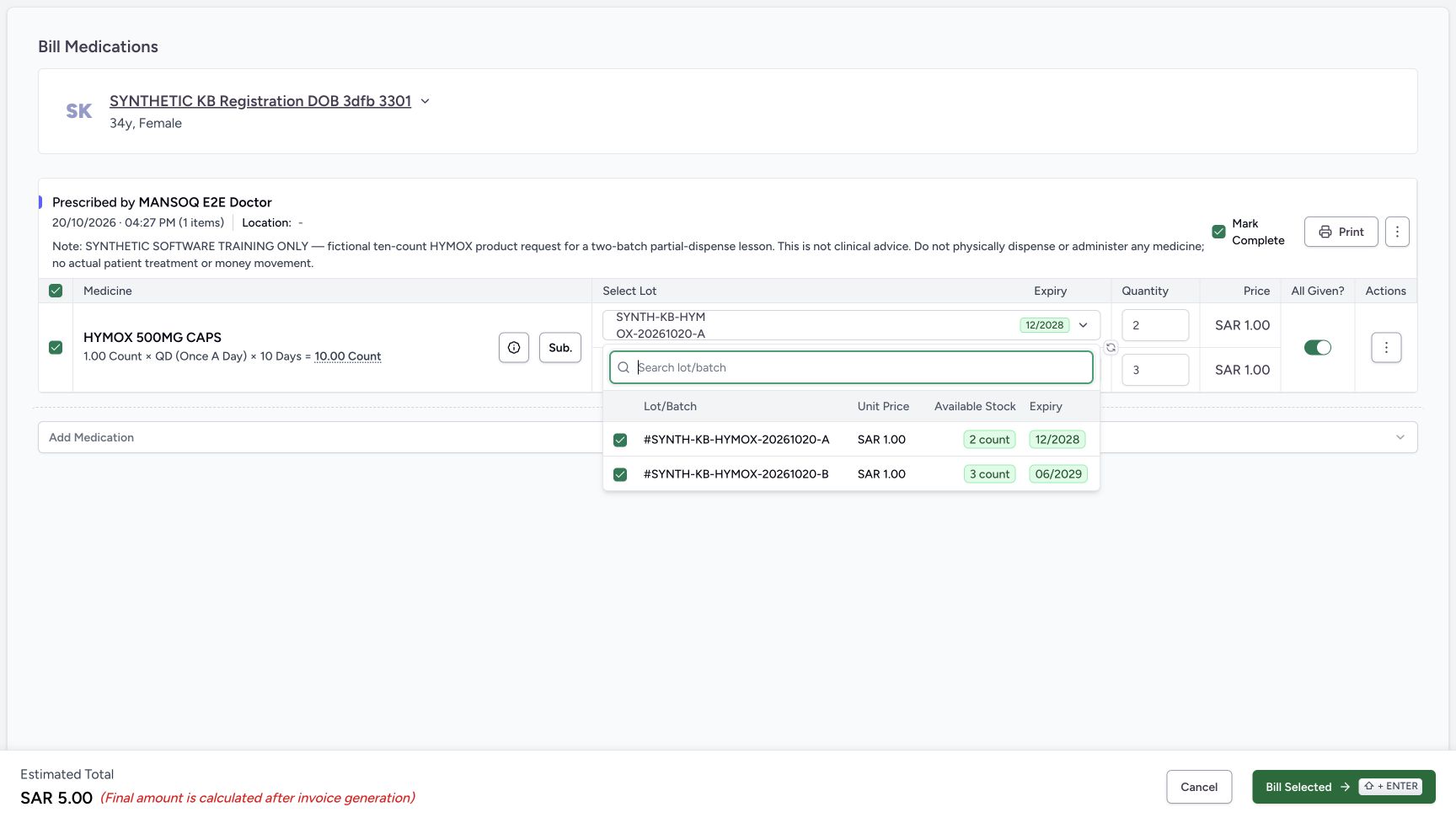
- Match selected A batch: The list shows SYNTH-KB-HYMOX-20261020-A.
- Match selected B batch: The list shows SYNTH-KB-HYMOX-20261020-B.
- Read A available two count: Only two count are available in the selected A lot.
- Read B available three count: The selected B lot has three count.
- Read A unit price 1.00: The synthetic A price is one SAR per count.
- Read B unit price 1.00: The B lot has its own one-SAR price.
- Read A expiry 12/2028: A is the earlier-expiring selected batch.
- Read B expiry 06/2029: B is the later-expiring selected batch.
12345678Saved partial Preparation and Draft invoice
Capture details
Genuine unchanged natural 1728×977 original from the exact local committed d20e build, LOCAL_UNPUSHED. This is fictional software dispensing and cash-ledger training, not physical medicine, actual money, clinical advice, insurance posting or external settlement.
Image SHA-256 148d87dd1aec8a108e6e552bf1c3d1f1fdf44d281a3fbe454090a81a35b256ba
- Read saved order In Progress: One bill created a single order that is still In Progress.
- Verify saved B quantity three: The B Preparation row contains three count.
- Verify saved A quantity two: The A Preparation row contains two count.
- Read B Preparation: The B medicine row is not yet Completed.
- Read A Preparation: A is also still Preparation.
- Read saved Draft Invoice SAR 5.00: The saved invoice total for these two rows is five SAR.
- Open Preview Rx: Inspect the same prescription after partial preparation.
- Locate the separate Issue Invoice action: Issuance is the next lesson, after inspecting the saved partial result.
123456Saved completed two-batch order
Capture details
Genuine unchanged natural 1728×977 original from the exact local committed d20e build, LOCAL_UNPUSHED. This is fictional software dispensing and cash-ledger training, not physical medicine, actual money, clinical advice, insurance posting or external settlement.
Image SHA-256 e803ba74e1bfd3eaaf0bc61b38d286b9e62c301d118c0c8bb3dfe6d6a15ba6ea
- Read saved order Completed: The parent order has completed.
- Verify B completed quantity three: The completed layout retains B three count.
- Verify A completed quantity two: The completed layout retains A two count.
- Read B Completed: The B row is Completed.
- Read A Completed: The A row is also Completed.
- Read Dispense Completed: This is software completion of the five prepared units, not physical handover.
123Prescription still Partial and Active
Capture details
Genuine unchanged natural 1728×977 original from the exact local committed d20e build, LOCAL_UNPUSHED. This is fictional software dispensing and cash-ledger training, not physical medicine, actual money, clinical advice, insurance posting or external settlement.
Image SHA-256 09905f562030f0befc846727e213927883bf45271e800dd9c9658798f6078e31
- Read prescription still Partial: Completing the order has not changed the request progress to Complete.
- Read prescription still Active: The prescription remains Active after the partial order is Completed.
- Read original Total to Dispense 10: The visible total still states the original ten-count request; no automatic remaining-five value is pictured.
123456Settled completed order after reload
Capture details
Genuine unchanged natural 1728×977 original from the exact local committed d20e build, LOCAL_UNPUSHED. This is fictional software dispensing and cash-ledger training, not physical medicine, actual money, clinical advice, insurance posting or external settlement.
Image SHA-256 261b29d3c99a2e8cd29b53cff35b7690d2dbc5d7a92b47fd7b82f73ae8ac4178
- Verify Completed after normal reload: The settled reloaded order retains Completed.
- Verify B quantity three retained: The saved B batch remains at three count.
- Verify A quantity two retained: The saved A batch remains at two count.
- Verify zero due retained: The invoice banner retains SAR 5.00 paid and zero due.
- Inspect Preview Rx after completion: This opens the separate prescription progress readback.
- Return through Prescription Queue: Use the completed-order footer queue entry after inspecting the existing prescription.
123Same prescription retained in Billing Pending
Capture details
Genuine unchanged natural 1728×977 original from the exact local committed d20e build, LOCAL_UNPUSHED. This is fictional software dispensing and cash-ledger training, not physical medicine, actual money, clinical advice, insurance posting or external settlement.
Image SHA-256 6cda9529bfa7da4f5c7af0e4514f8181d83fd51b8b2e420e9422caf97541755c
- Read the Billing Pending tab accurately: This queue tab describes prescription workflow, not an unpaid balance on the completed order.
- Find the same active request: The assigned synthetic patient remains listed under its04:27 PM Doctor prescription.
- Keep View Rx separate from another bill: View Rx remains available; no second Bill Now action was taken.
Troubleshooting
Fully Paid is shown but Complete Dispense is disabled
Payment and invoice balance are separate. In the recorded settled paid state, the order still offers Mark as balanced. Perform that one reviewed banner action and wait for it to settle; do not enter a second payment or invent a dialog.
12345Saved one Cash payment with available actions
Capture details
Genuine unchanged natural 1728×977 original from the exact local committed d20e build, LOCAL_UNPUSHED. This is fictional software dispensing and cash-ledger training, not physical medicine, actual money, clinical advice, insurance posting or external settlement.
Image SHA-256 7769b3edb71907e2df062d28db7e00490c47940a57011029077a1e4e7444eea8
- Read Payment Recorded Successfully: The success sheet confirms one saved payment for INV-115-26.
- Read received SAR 5.00: The one Cash receipt is for five SAR.
- Recognise the unused success-sheet balance option: This action is available here, but the recorded route closes the sheet and balances from the order banner later.
- Choose Close once: Use the lower Close action and wait for the settled order banner.
- Keep Print Receipt separate: Printing is available but was not used.
12345Fully Paid with balance still required
Capture details
Genuine unchanged natural 1728×977 original from the exact local committed d20e build, LOCAL_UNPUSHED. This is fictional software dispensing and cash-ledger training, not physical medicine, actual money, clinical advice, insurance posting or external settlement.
Image SHA-256 932bff6cd38febc18bc8b7e11b94db34fa2ddad58d74cc9a5b6d35d404d0e2fe
- Read Fully Paid: The single payment has paid the five-riyal invoice.
- Read Amount Paid 5.00: The net cash ledger payment is five SAR.
- Read Amount Due0.00: The invoice has zero amount due.
- Mark as balanced from the order banner: This is the actual one balance action used in the recording.
- Keep completion separate: Complete Dispense is still disabled before the balance action settles.
1Balance request pending without dialog
Capture details
Genuine unchanged natural 1728×977 original from the exact local committed d20e build, LOCAL_UNPUSHED. This is fictional software dispensing and cash-ledger training, not physical medicine, actual money, clinical advice, insurance posting or external settlement. This immediate/pending view is qualified separately from the settled outcome. Neither balance nor completion used a confirmation dialog.
Image SHA-256 9bbc525d0f90ae6072b84093b72dd424a269d2d84c2611ee3dbe57c2b3bab32d
- Wait while balance is pending: This disabled Mark as balanced action is not a confirmation dialog.
123Balanced order ready for direct completion
Capture details
Genuine unchanged natural 1728×977 original from the exact local committed d20e build, LOCAL_UNPUSHED. This is fictional software dispensing and cash-ledger training, not physical medicine, actual money, clinical advice, insurance posting or external settlement.
Image SHA-256 f0116f1629abd60f24f00321e4beed9d03350ecd61f5632d2dec828b2598c30c
- Complete Dispense once when enabled: After balance settles, the direct completion action is enabled.
- Recognise disabled hold: Put on hold is disabled at this paid checkpoint.
- Read Preparation before completion: The medicine rows are still Preparation before this separate action.
A pending action still shows the earlier labels
Billing, issue, payment, balance and completion have immediate refresh states. Do not repeat a disabled pending action. Use the corresponding settled order or success view to establish the result, then reload only at the illustrated readback step.
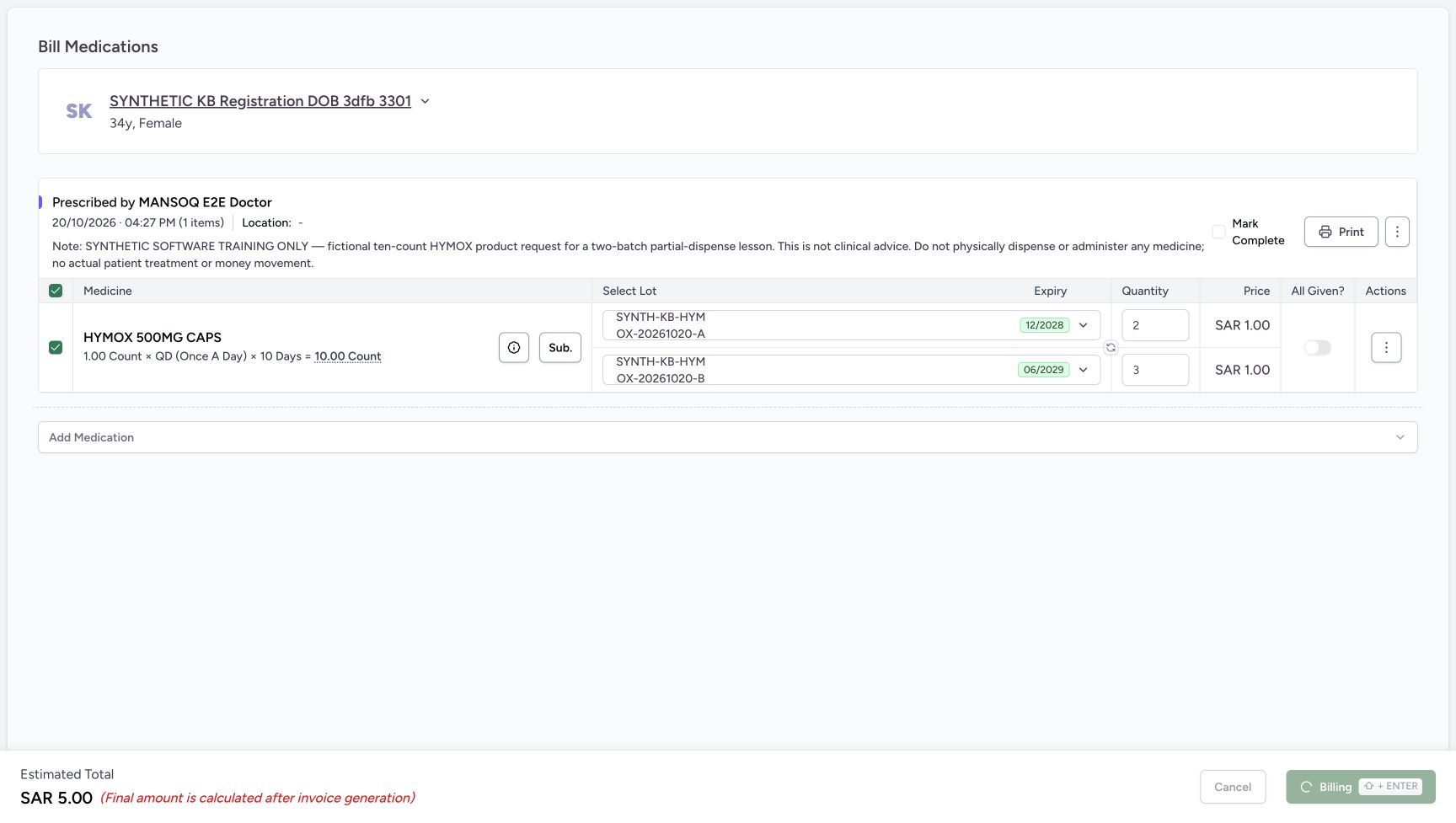 1
1One billing request pending
Capture details
Genuine unchanged natural 1728×977 original from the exact local committed d20e build, LOCAL_UNPUSHED. This is fictional software dispensing and cash-ledger training, not physical medicine, actual money, clinical advice, insurance posting or external settlement. This immediate/pending view is qualified separately from the settled outcome. Neither balance nor completion used a confirmation dialog.
Image SHA-256 abf4580e8a8e6aaba7815744c1e8d852062db642dd5a6e1505ac26ba3434a6d0
- Wait while Billing is disabled: The immediate Billing state is pending; do not submit again.
12345678Saved partial Preparation and Draft invoice
Capture details
Genuine unchanged natural 1728×977 original from the exact local committed d20e build, LOCAL_UNPUSHED. This is fictional software dispensing and cash-ledger training, not physical medicine, actual money, clinical advice, insurance posting or external settlement.
Image SHA-256 148d87dd1aec8a108e6e552bf1c3d1f1fdf44d281a3fbe454090a81a35b256ba
- Read saved order In Progress: One bill created a single order that is still In Progress.
- Verify saved B quantity three: The B Preparation row contains three count.
- Verify saved A quantity two: The A Preparation row contains two count.
- Read B Preparation: The B medicine row is not yet Completed.
- Read A Preparation: A is also still Preparation.
- Read saved Draft Invoice SAR 5.00: The saved invoice total for these two rows is five SAR.
- Open Preview Rx: Inspect the same prescription after partial preparation.
- Locate the separate Issue Invoice action: Issuance is the next lesson, after inspecting the saved partial result.
12Immediate issue result refresh
Capture details
Genuine unchanged natural 1728×977 original from the exact local committed d20e build, LOCAL_UNPUSHED. This is fictional software dispensing and cash-ledger training, not physical medicine, actual money, clinical advice, insurance posting or external settlement. This immediate/pending view is qualified separately from the settled outcome. Neither balance nor completion used a confirmation dialog.
Image SHA-256 028a9d15b2fc745984a3f6a3554befc6e48db8d58e690163aa768e9d008fbd98
- Wait for issue result after one click: This immediate issue view can retain the old Draft banner during refresh.
- Read the actual issue success feedback: The image visibly includes Invoice issued successfully while the banner is still refreshing.
1234Settled issued order before collection
Capture details
Genuine unchanged natural 1728×977 original from the exact local committed d20e build, LOCAL_UNPUSHED. This is fictional software dispensing and cash-ledger training, not physical medicine, actual money, clinical advice, insurance posting or external settlement.
Image SHA-256 6fafb03b327417ce3d8a69d1f20ddae0727fdbeb27e4d56a56ca37cad4054b57
- Read settled Payment Pending: This is the settled issued order banner, not an open payment sheet.
- Read invoice total SAR 5.00: The generated invoice total remains five SAR.
- Read amount due SAR 5.00: No payment has yet been recorded for this invoice.
- Open Collect Payment: Use this control for the single fictional payment.
1One payment Processing
Capture details
Genuine unchanged natural 1728×977 original from the exact local committed d20e build, LOCAL_UNPUSHED. This is fictional software dispensing and cash-ledger training, not physical medicine, actual money, clinical advice, insurance posting or external settlement. This immediate/pending view is qualified separately from the settled outcome. Neither balance nor completion used a confirmation dialog.
Image SHA-256 de05597081be8e40ae6510eedd1ae2413975514aabd144e9980796a970f62565
- Wait during Processing: The disabled action is pending; do not record a duplicate payment.
12345Saved one Cash payment with available actions
Capture details
Genuine unchanged natural 1728×977 original from the exact local committed d20e build, LOCAL_UNPUSHED. This is fictional software dispensing and cash-ledger training, not physical medicine, actual money, clinical advice, insurance posting or external settlement.
Image SHA-256 7769b3edb71907e2df062d28db7e00490c47940a57011029077a1e4e7444eea8
- Read Payment Recorded Successfully: The success sheet confirms one saved payment for INV-115-26.
- Read received SAR 5.00: The one Cash receipt is for five SAR.
- Recognise the unused success-sheet balance option: This action is available here, but the recorded route closes the sheet and balances from the order banner later.
- Choose Close once: Use the lower Close action and wait for the settled order banner.
- Keep Print Receipt separate: Printing is available but was not used.
1Balance request pending without dialog
Capture details
Genuine unchanged natural 1728×977 original from the exact local committed d20e build, LOCAL_UNPUSHED. This is fictional software dispensing and cash-ledger training, not physical medicine, actual money, clinical advice, insurance posting or external settlement. This immediate/pending view is qualified separately from the settled outcome. Neither balance nor completion used a confirmation dialog.
Image SHA-256 9bbc525d0f90ae6072b84093b72dd424a269d2d84c2611ee3dbe57c2b3bab32d
- Wait while balance is pending: This disabled Mark as balanced action is not a confirmation dialog.
123Balanced order ready for direct completion
Capture details
Genuine unchanged natural 1728×977 original from the exact local committed d20e build, LOCAL_UNPUSHED. This is fictional software dispensing and cash-ledger training, not physical medicine, actual money, clinical advice, insurance posting or external settlement.
Image SHA-256 f0116f1629abd60f24f00321e4beed9d03350ecd61f5632d2dec828b2598c30c
- Complete Dispense once when enabled: After balance settles, the direct completion action is enabled.
- Recognise disabled hold: Put on hold is disabled at this paid checkpoint.
- Read Preparation before completion: The medicine rows are still Preparation before this separate action.
12Direct completion pending
Capture details
Genuine unchanged natural 1728×977 original from the exact local committed d20e build, LOCAL_UNPUSHED. This is fictional software dispensing and cash-ledger training, not physical medicine, actual money, clinical advice, insurance posting or external settlement. This immediate/pending view is qualified separately from the settled outcome. Neither balance nor completion used a confirmation dialog.
Image SHA-256 80acef419de56a079f0d90863162cc823e069eb4d6bb20d1c9aa3077796460fe
- Wait while completion is pending: The direct Complete action is disabled during its request; no confirmation dialog is pictured.
- Do not treat the old status as final: The immediate view still has In Progress while the result refreshes.
123456Saved completed two-batch order
Capture details
Genuine unchanged natural 1728×977 original from the exact local committed d20e build, LOCAL_UNPUSHED. This is fictional software dispensing and cash-ledger training, not physical medicine, actual money, clinical advice, insurance posting or external settlement.
Image SHA-256 e803ba74e1bfd3eaaf0bc61b38d286b9e62c301d118c0c8bb3dfe6d6a15ba6ea
- Read saved order Completed: The parent order has completed.
- Verify B completed quantity three: The completed layout retains B three count.
- Verify A completed quantity two: The completed layout retains A two count.
- Read B Completed: The B row is Completed.
- Read A Completed: The A row is also Completed.
- Read Dispense Completed: This is software completion of the five prepared units, not physical handover.
123456Settled completed order after reload
Capture details
Genuine unchanged natural 1728×977 original from the exact local committed d20e build, LOCAL_UNPUSHED. This is fictional software dispensing and cash-ledger training, not physical medicine, actual money, clinical advice, insurance posting or external settlement.
Image SHA-256 261b29d3c99a2e8cd29b53cff35b7690d2dbc5d7a92b47fd7b82f73ae8ac4178
- Verify Completed after normal reload: The settled reloaded order retains Completed.
- Verify B quantity three retained: The saved B batch remains at three count.
- Verify A quantity two retained: The saved A batch remains at two count.
- Verify zero due retained: The invoice banner retains SAR 5.00 paid and zero due.
- Inspect Preview Rx after completion: This opens the separate prescription progress readback.
- Return through Prescription Queue: Use the completed-order footer queue entry after inspecting the existing prescription.
The prescription is still in Billing Pending after order completion
Only five of the original ten units were prepared. The completed order and its settled invoice are separate from the Partial and Active prescription. Check the same prescription’s preview and retained original total; do not assume the software has created a new remaining-five request or automatically completed the prescription.
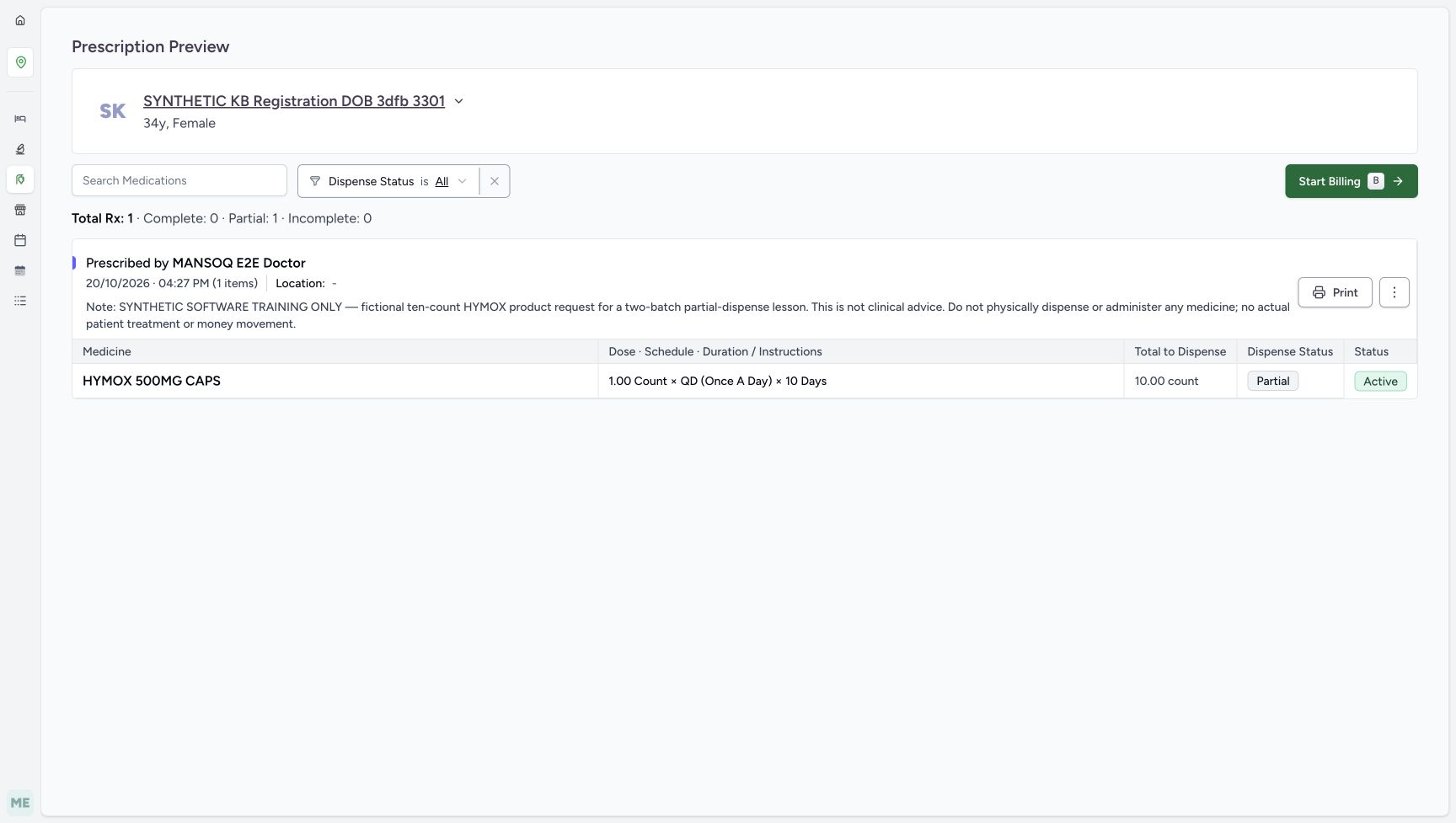 123
123Prescription Partial and Active after billing
Capture details
Genuine unchanged natural 1728×977 original from the exact local committed d20e build, LOCAL_UNPUSHED. This is fictional software dispensing and cash-ledger training, not physical medicine, actual money, clinical advice, insurance posting or external settlement.
Image SHA-256 09905f562030f0befc846727e213927883bf45271e800dd9c9658798f6078e31
- Read Partial after billing: The prescription progress changed to Partial.
- Read Active after billing: The prescription itself remains Active.
- Read the retained original total ten: This preview still shows10.00 count; it is not an automatically reduced remaining-five field.
123456Saved completed two-batch order
Capture details
Genuine unchanged natural 1728×977 original from the exact local committed d20e build, LOCAL_UNPUSHED. This is fictional software dispensing and cash-ledger training, not physical medicine, actual money, clinical advice, insurance posting or external settlement.
Image SHA-256 e803ba74e1bfd3eaaf0bc61b38d286b9e62c301d118c0c8bb3dfe6d6a15ba6ea
- Read saved order Completed: The parent order has completed.
- Verify B completed quantity three: The completed layout retains B three count.
- Verify A completed quantity two: The completed layout retains A two count.
- Read B Completed: The B row is Completed.
- Read A Completed: The A row is also Completed.
- Read Dispense Completed: This is software completion of the five prepared units, not physical handover.
123Prescription still Partial and Active
Capture details
Genuine unchanged natural 1728×977 original from the exact local committed d20e build, LOCAL_UNPUSHED. This is fictional software dispensing and cash-ledger training, not physical medicine, actual money, clinical advice, insurance posting or external settlement.
Image SHA-256 09905f562030f0befc846727e213927883bf45271e800dd9c9658798f6078e31
- Read prescription still Partial: Completing the order has not changed the request progress to Complete.
- Read prescription still Active: The prescription remains Active after the partial order is Completed.
- Read original Total to Dispense 10: The visible total still states the original ten-count request; no automatic remaining-five value is pictured.
123456Settled completed order after reload
Capture details
Genuine unchanged natural 1728×977 original from the exact local committed d20e build, LOCAL_UNPUSHED. This is fictional software dispensing and cash-ledger training, not physical medicine, actual money, clinical advice, insurance posting or external settlement.
Image SHA-256 261b29d3c99a2e8cd29b53cff35b7690d2dbc5d7a92b47fd7b82f73ae8ac4178
- Verify Completed after normal reload: The settled reloaded order retains Completed.
- Verify B quantity three retained: The saved B batch remains at three count.
- Verify A quantity two retained: The saved A batch remains at two count.
- Verify zero due retained: The invoice banner retains SAR 5.00 paid and zero due.
- Inspect Preview Rx after completion: This opens the separate prescription progress readback.
- Return through Prescription Queue: Use the completed-order footer queue entry after inspecting the existing prescription.
123Same prescription retained in Billing Pending
Capture details
Genuine unchanged natural 1728×977 original from the exact local committed d20e build, LOCAL_UNPUSHED. This is fictional software dispensing and cash-ledger training, not physical medicine, actual money, clinical advice, insurance posting or external settlement.
Image SHA-256 6cda9529bfa7da4f5c7af0e4514f8181d83fd51b8b2e420e9422caf97541755c
- Read the Billing Pending tab accurately: This queue tab describes prescription workflow, not an unpaid balance on the completed order.
- Find the same active request: The assigned synthetic patient remains listed under its04:27 PM Doctor prescription.
- Keep View Rx separate from another bill: View Rx remains available; no second Bill Now action was taken.
Source evidence
Every citation uses this exact committed version. The private source repository requires access.
- repositories/platform/mansoq-core/mansoq/emr/api/viewsets/inventory/dispense_order.py:37 ·
d20e68ed4a9e0b005aa54f218f84172160974b02Source file checksum
0de11ecaa664fdb4d5b4205ca5753379d8e1aaf1724fa9c9f7f1eba1d81407f4 - repositories/platform/mansoq-core/mansoq/emr/api/viewsets/invoice.py:590 ·
d20e68ed4a9e0b005aa54f218f84172160974b02Source file checksum
03e73113c89d4be24b4f7ae6f0bf3d4538d8129774ce6dedd0272219530bb88e - repositories/platform/mansoq-core/mansoq/emr/api/viewsets/medication_dispense.py:169 ·
d20e68ed4a9e0b005aa54f218f84172160974b02Source file checksum
c1db5d5c78472ce05b7bf736c4563e0e4a29706c1f4d6b074304c112e89dd206 - repositories/platform/mansoq-core/mansoq/emr/api/viewsets/payment_reconciliation.py:114 ·
d20e68ed4a9e0b005aa54f218f84172160974b02Source file checksum
e4c6dfe2386ce4da7e12c595a67def571b82b755ee3599f64ac04f4d30ffccd9 - repositories/platform/mansoq-core/mansoq/emr/resources/account/sync_items.py:19 ·
d20e68ed4a9e0b005aa54f218f84172160974b02Source file checksum
935300e4d8c4228999cfeccf85ae483ee808f81054d7127dcfec1638ca7145be - repositories/platform/mansoq-core/mansoq/emr/resources/charge_item/apply_charge_item_definition.py:13 ·
d20e68ed4a9e0b005aa54f218f84172160974b02Source file checksum
f0e436da014c81006a40a5449126439c94a70b0da84953fec62018de5d8203db - repositories/platform/mansoq-core/mansoq/emr/resources/inventory/inventory_item/sync_inventory_item.py:71 ·
d20e68ed4a9e0b005aa54f218f84172160974b02Source file checksum
46256e24c4ef53004e128a1d73b58e994369b24bd2dbd74b717fa1c08f4b844e - repositories/platform/mansoq-core/mansoq/emr/resources/invoice/spec.py:23 ·
d20e68ed4a9e0b005aa54f218f84172160974b02Source file checksum
3d4732a756a8b868c7ee47b4a7db6bff086c0b8f807b96f6db4022f036ad3fa0 - repositories/platform/mansoq-core/mansoq/emr/resources/invoice/sync_items.py:19 ·
d20e68ed4a9e0b005aa54f218f84172160974b02Source file checksum
e232d244e2f09171c7cf76ffebd6da04bd62a6f9353de709224a08c0fde8cff3 - repositories/platform/mansoq-core/mansoq/emr/resources/medication/dispense/dispense_order.py:15 ·
d20e68ed4a9e0b005aa54f218f84172160974b02Source file checksum
0ecec58fbb37b0cfb2bd7370034de438247fde64ffe395d872c90542c3e5a704 - repositories/platform/mansoq-core/mansoq/emr/resources/medication/dispense/spec.py:104 ·
d20e68ed4a9e0b005aa54f218f84172160974b02Source file checksum
e52a9ae743c750dd1a32ec8678ffc986406a42fa7d25940877af63de1a6862c7 - repositories/platform/mansoq-core/mansoq/emr/resources/payment_reconciliation/spec.py:105 ·
d20e68ed4a9e0b005aa54f218f84172160974b02Source file checksum
318887ff3c7699c920de6eeb9a278c0b0d2450fe2e50fb4724e22f84bde53197 - repositories/platform/mansoq-web/src/pages/Facility/billing/PaymentReconciliationSheet.tsx:822 ·
d20e68ed4a9e0b005aa54f218f84172160974b02Source file checksum
319652a7ff999e8cbb461435b7b5dc7ad1641768fe89db72c5260a0992248968 - repositories/platform/mansoq-web/src/pages/Facility/billing/invoice/InvoiceShow.tsx:498 ·
d20e68ed4a9e0b005aa54f218f84172160974b02Source file checksum
9068995fbe413fe3e14031d9c832943cc14d9188a5f72be91d3c16baa53fc6ff - repositories/platform/mansoq-web/src/pages/Facility/services/pharmacy/DispenseOrderView.tsx:268 ·
d20e68ed4a9e0b005aa54f218f84172160974b02Source file checksum
59bebd01a2422d3b62d5e57b0f3a9211d5eb03ddd94f81704e3dbecd47cd197d - repositories/platform/mansoq-web/src/pages/Facility/services/pharmacy/billMedications/BillMedicationsFooter.tsx:26 ·
d20e68ed4a9e0b005aa54f218f84172160974b02Source file checksum
5a2167f3e4ae3c332f8da9b7076d6339c891543cb41fa43534256c826300c048 - repositories/platform/mansoq-web/src/pages/Facility/services/pharmacy/billMedications/formSchema.ts:47 ·
d20e68ed4a9e0b005aa54f218f84172160974b02Source file checksum
654a1d61d9eea0ed21dbbda6fcc0f127eb9cc1631bd178f3023bb334258571e2 - repositories/platform/mansoq-web/src/pages/Facility/services/pharmacy/billMedications/modes/usePrescriptionsMode.ts:123 ·
d20e68ed4a9e0b005aa54f218f84172160974b02Source file checksum
a1f6bfb990ce68bf774a2c1208d914287710742fdb8c891031a38d09636daf1e - repositories/platform/mansoq-web/src/pages/Facility/services/pharmacy/billMedications/utils/useBillMedications.ts:139 ·
d20e68ed4a9e0b005aa54f218f84172160974b02Source file checksum
ac95fb2bf082bbb0e911754db978a5c4be73078def98c944d634db2713810b8d - repositories/platform/mansoq-web/src/pages/Facility/services/pharmacy/billMedications/utils/useInventoryItemsAutoSelect.ts:28 ·
d20e68ed4a9e0b005aa54f218f84172160974b02Source file checksum
689be89ed73722f369100ad448b2ceb37e559bb86a354edbd63393cc8d61af9b - repositories/platform/mansoq-web/src/pages/Facility/services/pharmacy/billMedications/utils/utils.ts:6 ·
d20e68ed4a9e0b005aa54f218f84172160974b02Source file checksum
c9f3c61d9da120bbfd903233554e181724c5f8dda0a6742fa755354c0a4c9a28 - repositories/platform/mansoq-web/src/pages/Facility/services/pharmacy/components/DispenseOrderViewFooter.tsx:139 ·
d20e68ed4a9e0b005aa54f218f84172160974b02Source file checksum
9ddc555df83d78afd04ed0e339630d6e67ccd52a1545d5103a835d8633d0acd6 - repositories/platform/mansoq-web/src/pages/Facility/services/pharmacy/hooks/useUpdateDispenseOrderStatus.ts:42 ·
d20e68ed4a9e0b005aa54f218f84172160974b02Source file checksum
21f899b3779d6d59f10fcfff9ccf3f9a866fac07a720faa02040a1b2988b4d7e - repositories/platform/mansoq-web/src/pages/Facility/services/FacilityServices.tsx:22 ·
d20e68ed4a9e0b005aa54f218f84172160974b02Source file checksum
81938a877311725f375328c2e8bd33813e406fd2692a1894acf11d70b887a535 - repositories/platform/mansoq-web/src/pages/Facility/services/HealthcareServiceShow.tsx:51 ·
d20e68ed4a9e0b005aa54f218f84172160974b02Source file checksum
4d7356b19adcc37d5f521e343ce7b35cafe1f5f04e1ec05683b5f84915e27d19 - repositories/platform/mansoq-web/src/pages/Facility/services/pharmacy/PrescriptionQueue.tsx:250 ·
d20e68ed4a9e0b005aa54f218f84172160974b02Source file checksum
20c2f3e573ae315ec5ff79b19575c1a6e3b2f7ca76b5e98bad319ef595b11d04 - repositories/platform/mansoq-web/src/pages/Facility/services/pharmacy/PrescriptionsPreviewPage.tsx:117 ·
d20e68ed4a9e0b005aa54f218f84172160974b02Source file checksum
2a76a064861548bc2d0c5e036bbc9a2ec448582cb8bcb3e970c05a8362498a2e - repositories/platform/mansoq-web/src/pages/Facility/services/pharmacy/billMedications/BillMedicationsPrescriptionCard.tsx:291 ·
d20e68ed4a9e0b005aa54f218f84172160974b02Source file checksum
e64b9b9ffbc8388dba86070d36c8acef28639ac6166f650ca3586b43e9ac3134 - repositories/platform/mansoq-web/src/pages/Facility/services/inventory/DispenseLotSelector.tsx:146 ·
d20e68ed4a9e0b005aa54f218f84172160974b02Source file checksum
4153614e75921f3325472744644989be488f49762c6b694d777538969664b6dc - repositories/platform/mansoq-web/src/pages/Facility/services/pharmacy/components/PaymentStatusBanner.tsx:241 ·
d20e68ed4a9e0b005aa54f218f84172160974b02Source file checksum
6944de9cc4af2719c11551df04c6900471f88c3e66e64266855236e9119aff82 - repositories/platform/mansoq-web/src/components/ui/popover.tsx:26 ·
d20e68ed4a9e0b005aa54f218f84172160974b02Source file checksum
b635874f5b605e1a82127de2e9d2207d319d5e7587fd12852a38fd5f8a64ab78