 MANSOQ
 Pharmacy · VERSION b946bd3d
Correct an unreceived return row and keep the return Draft
Create a separate synthetic Draft, manually save one Normal item, and correct that mistaken unreceived row as Entered in Error. Reload the saved history and verify that stock and the existing account remain unchanged.
Facility Admin
 123456
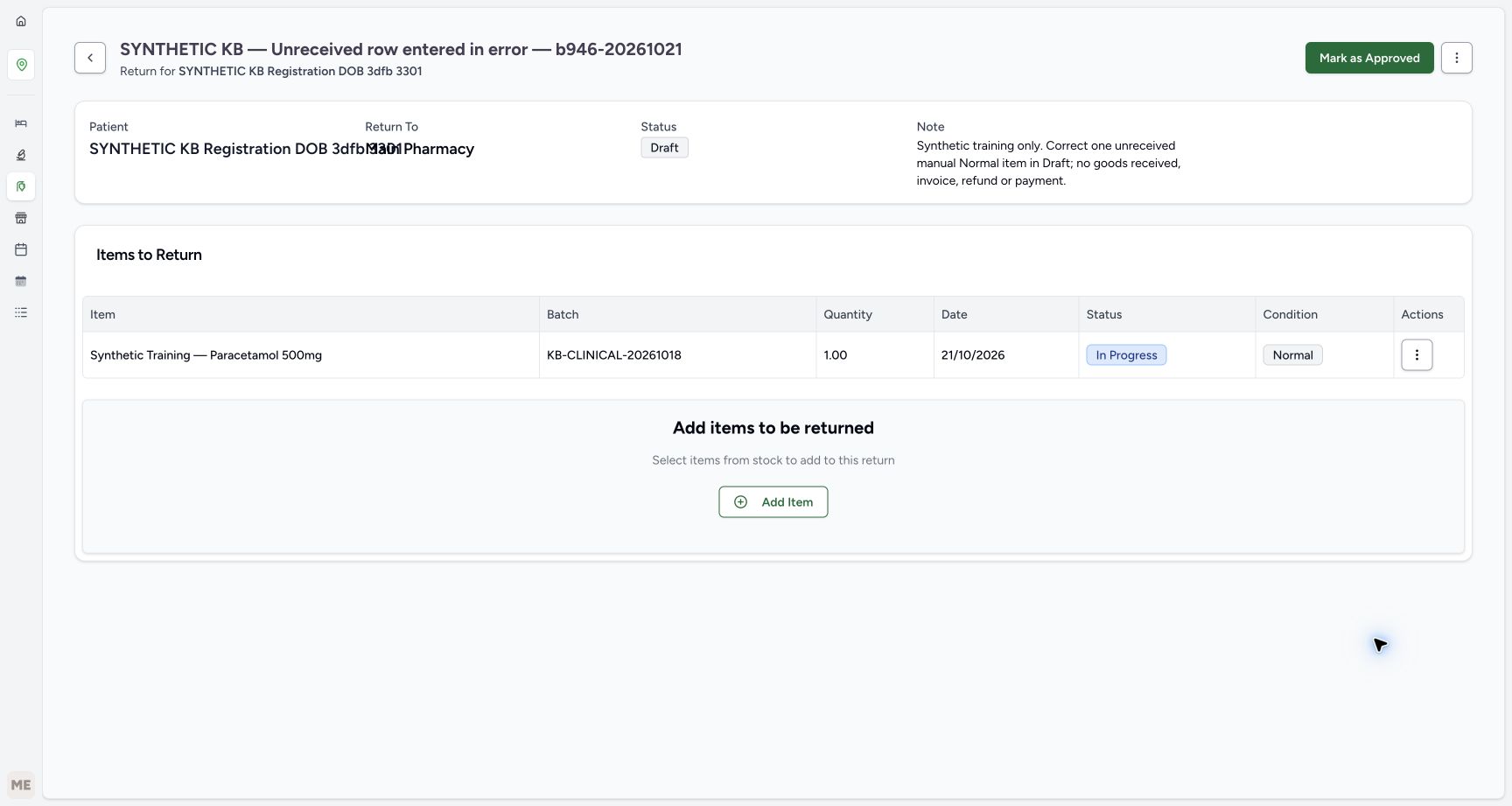
Verify one saved In Progress and Normal row
Capture details
Isolated synthetic software exercise at MANSOQ Demo Polyclinic/Main Pharmacy. No physical medicine, clinical treatment, goods receipt, invoice issuance, payment, cash refund or external exchange is involved.
Image SHA-256 44be1872ccb0e2e5ed48e5517c62748704248141702d8a17fda9eace7cfe87d2
- Verify the return is still Draft: Saving a row is separate from approval and receiving.
- Match the full saved batch: The complete batch identifier is visible in the saved table.
- Verify saved quantity one: There is exactly one saved row to correct.
- Verify row In Progress: The item remains unreceived.
- Verify condition Normal: Condition metadata does not establish receipt.
- Open this row Actions menu: Correct only the intended saved row.
 1234
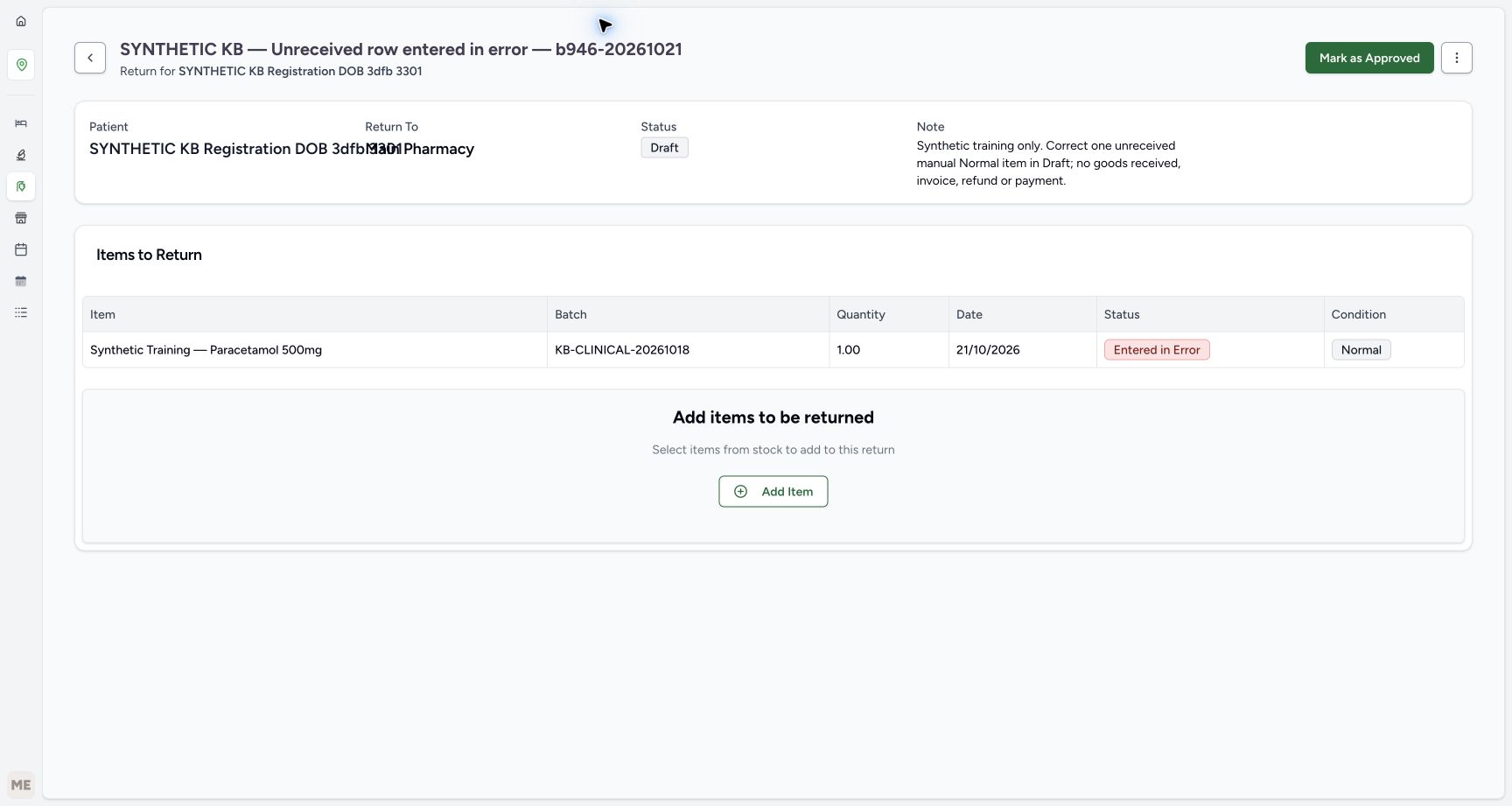
1234Verify the corrected Draft after reload
Capture details
Isolated synthetic software exercise at MANSOQ Demo Polyclinic/Main Pharmacy. No physical medicine, clinical treatment, goods receipt, invoice issuance, payment, cash refund or external exchange is involved.
Image SHA-256 b50228e321d4b95ea48e609d3196bdd140be13fd110b21a82c5c58dbeb5559b0
- Verify Draft after reload: The saved return remains unfinished.
- Verify the corrected row after reload: The corrected row history persists.
- Verify the same quantity one: The saved quantity has not changed.
- Open Inventory: Use the visible Inventory icon for the stock check.
 123
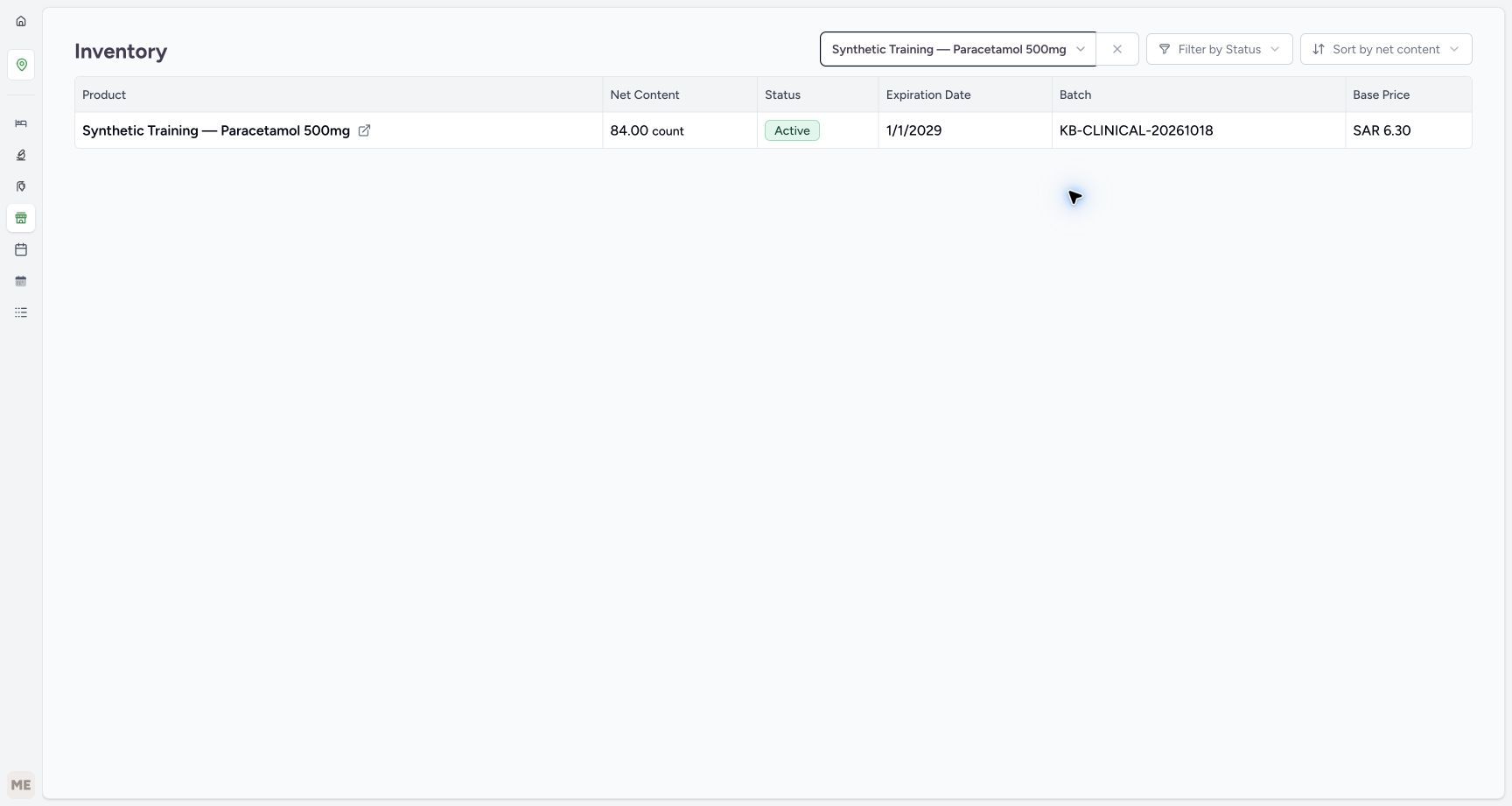
123Verify stock is unchanged after correction
Capture details
Isolated synthetic software exercise at MANSOQ Demo Polyclinic/Main Pharmacy. No physical medicine, clinical treatment, goods receipt, invoice issuance, payment, cash refund or external exchange is involved.
Image SHA-256 df50ba7e79292729724a821dfe496ab388a0cf4dacc86bf15175948896cf080f
- Verify stock remains eighty-four: The unreceived row correction has not changed usable stock.
- Match the same original batch: This is still KB-CLINICAL-20261018.
- Verify the same expiry: The matched batch remains January 2029.
15 of 15 content blocks have reviewed image alignment.
Before you begin
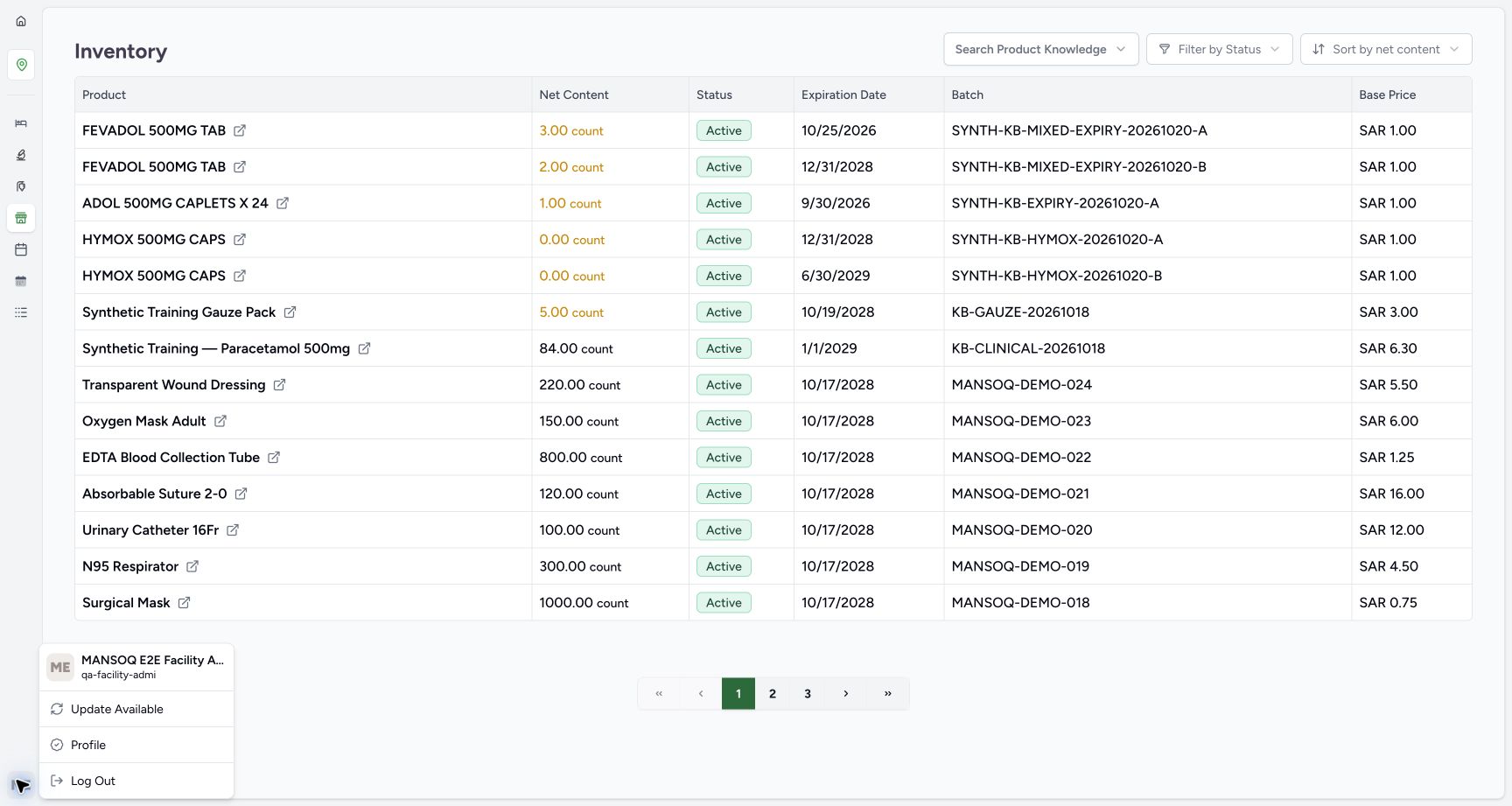
- Use the existing authorised Facility Admin at MANSOQ Demo Polyclinic/Main Pharmacy and the existing SYNTHETIC KB Registration DOB 3dfb 3301 patient. This isolated software exercise involves no physical medicine, clinical treatment or money movement.
 1
1Recorded release b946bd3d · 2026-10-20T21:19:26.304428+00:00 · 1728 × 921 Verify the existing Facility Admin context
Capture details
Isolated synthetic software exercise at MANSOQ Demo Polyclinic/Main Pharmacy. No physical medicine, clinical treatment, goods receipt, invoice issuance, payment, cash refund or external exchange is involved.
Image SHA-256
a28fd7b2dcf9c2621a43a9b9943710b9b627359e4102abe224493d3a87e48a17- Check the existing Facility Admin context: Use the existing authorised training account; this menu shortens its identity text.
 123456
Recorded release b946bd3d · 2026-10-20T21:20:43.456390+00:00 · 1728 × 921 Review the new return before creating it
Capture details
Isolated synthetic software exercise at MANSOQ Demo Polyclinic/Main Pharmacy. No physical medicine, clinical treatment, goods receipt, invoice issuance, payment, cash refund or external exchange is involved.
Image SHA-256
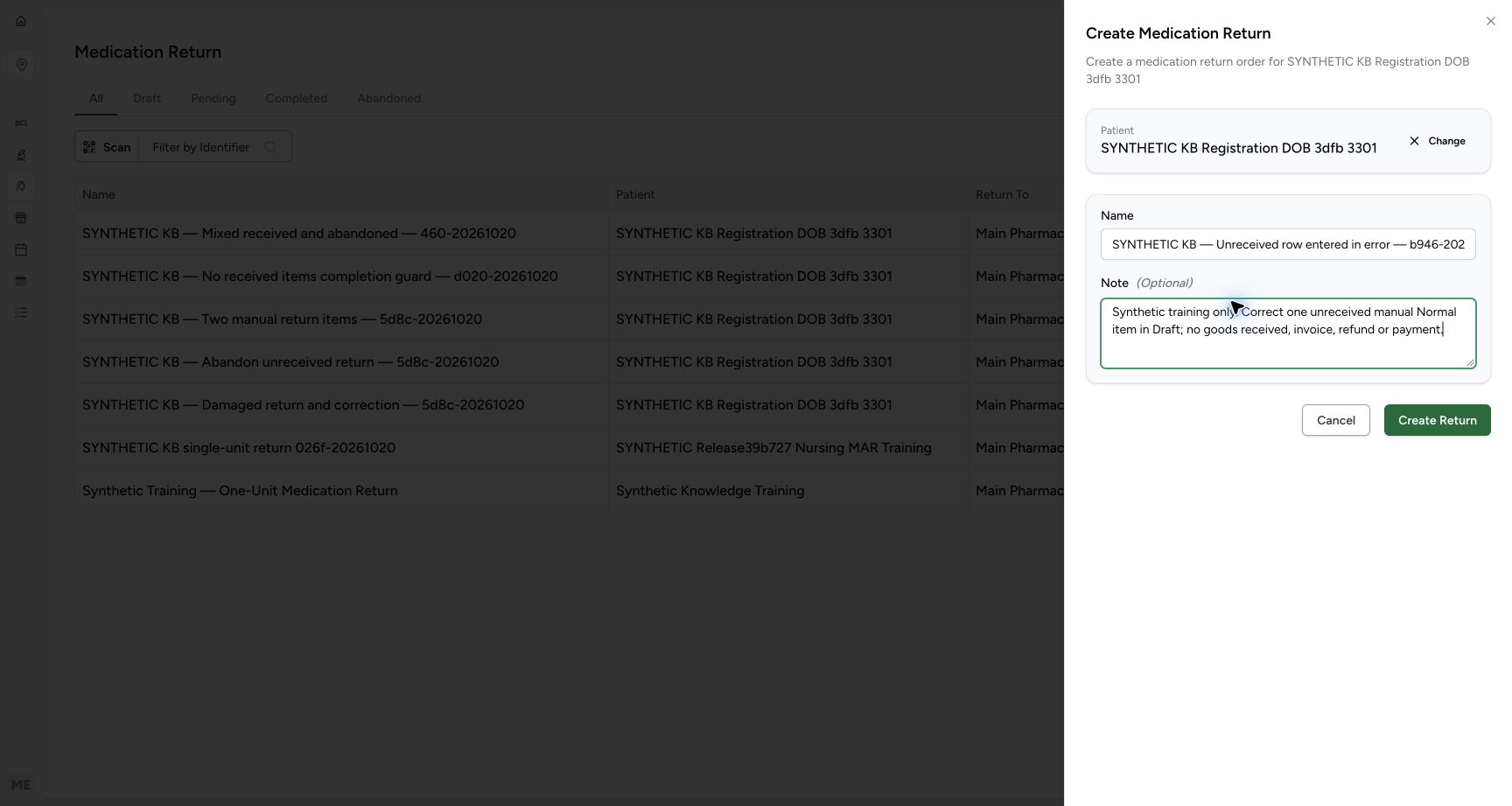
1c5a565b988bfcb883d26c9721976ac6fa104640df8fc46a66754c6c319e1bc9- Verify the full selected patient name: This sheet shows the identity clearly before the later summary fields overlap.
- Enter a unique synthetic return name: Use SYNTHETIC KB — Unreceived row entered in error — b946-20261021 for this example.
- Review the optional training note: The note identifies an unreceived mistaken row and excludes goods, invoice, refund or payment actions.
- Choose Create Return once: Wait for the new saved Draft.
- Choose Change if the patient is wrong: Correct patient selection before creating the return.
- Choose Cancel to stop creation: Leave the form without creating a return if its details are wrong.
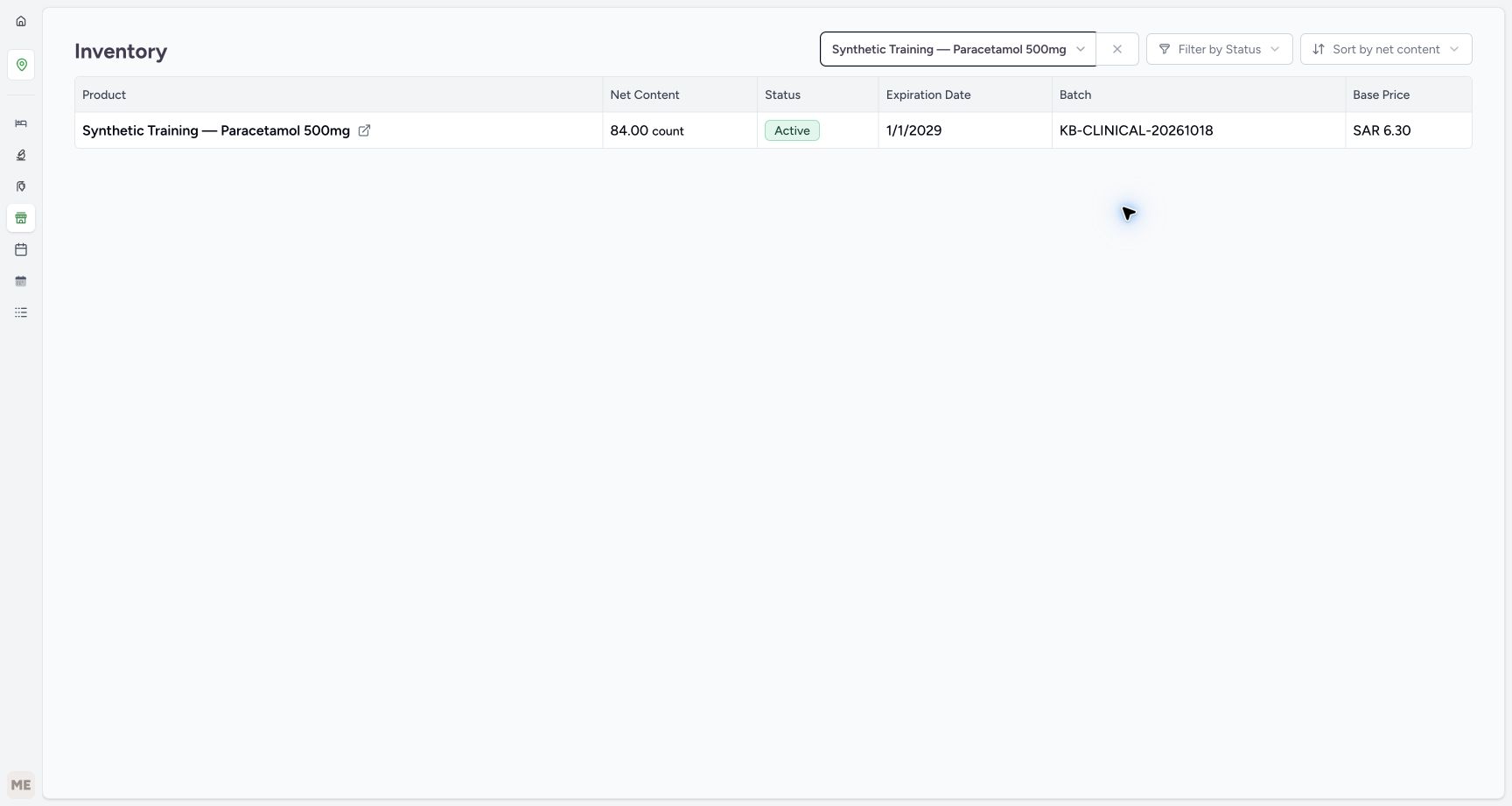
- Use the existing synthetic Paracetamol product code 06281086104491 and batch KB-CLINICAL-20261018, with 84 units available and expiry January 2029. Correct only a mistaken, still-unreceived manual row in a separate Draft; preserve all earlier returns, sales, prescriptions and payments.
 123
123Recorded release b946bd3d · 2026-10-20T21:19:55.535529+00:00 · 1728 × 921 Read the starting stock and open Pharmacy
Capture details
Isolated synthetic software exercise at MANSOQ Demo Polyclinic/Main Pharmacy. No physical medicine, clinical treatment, goods receipt, invoice issuance, payment, cash refund or external exchange is involved.
Image SHA-256
bb1f9a8cb5afb2edae113c445386ddfa71921ab19ac59466488b86368933a8a4- Read starting stock eighty-four: Match this batch before creating the separate training return.
- Match batch KB-CLINICAL-20261018: Keep this product and lot unchanged throughout the exercise.
- Open the Pharmacy menu: Use the visible Pharmacy icon beside the inventory view.
 12345
12345Recorded release b946bd3d · 2026-10-20T21:21:21.973327+00:00 · 1728 × 921 Match the complete batch in the open stock list
Capture details
Isolated synthetic software exercise at MANSOQ Demo Polyclinic/Main Pharmacy. No physical medicine, clinical treatment, goods receipt, invoice issuance, payment, cash refund or external exchange is involved.
Image SHA-256
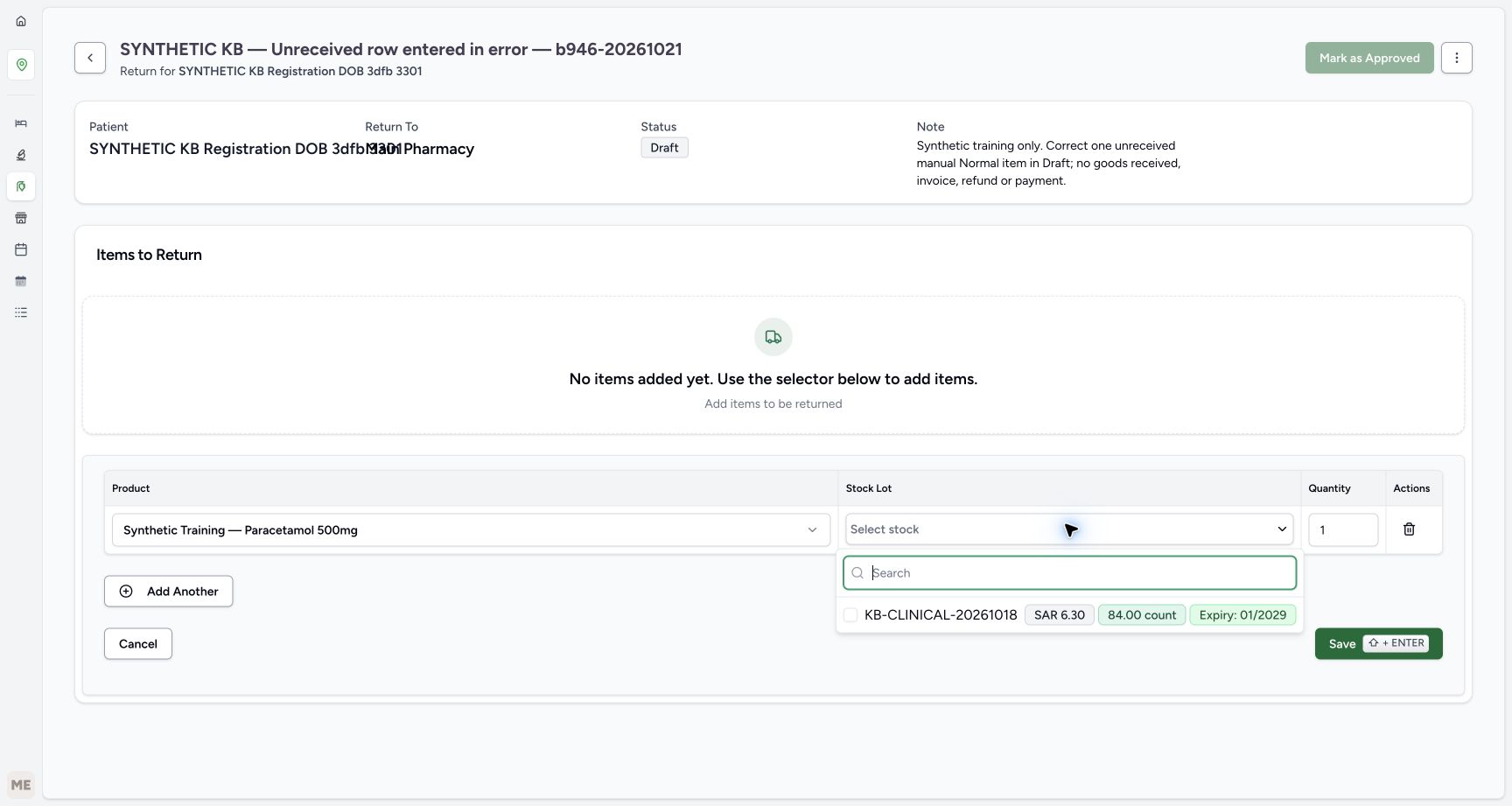
10d67546697ab1e7cc656cf9c1ddcd2de5b317c63bc39d755eb029daf085da9a- Select the matching batch checkbox: Choose KB-CLINICAL-20261018 once.
- Read the full batch identifier: Use this full open-list label for verification.
- Read batch price SAR 6.30: This is the selected batch price displayed in the form.
- Verify eighty-four available: This return row has not received or removed stock.
- Verify expiry January 2029: Keep the same selected batch.
1. Open the Medication Return list
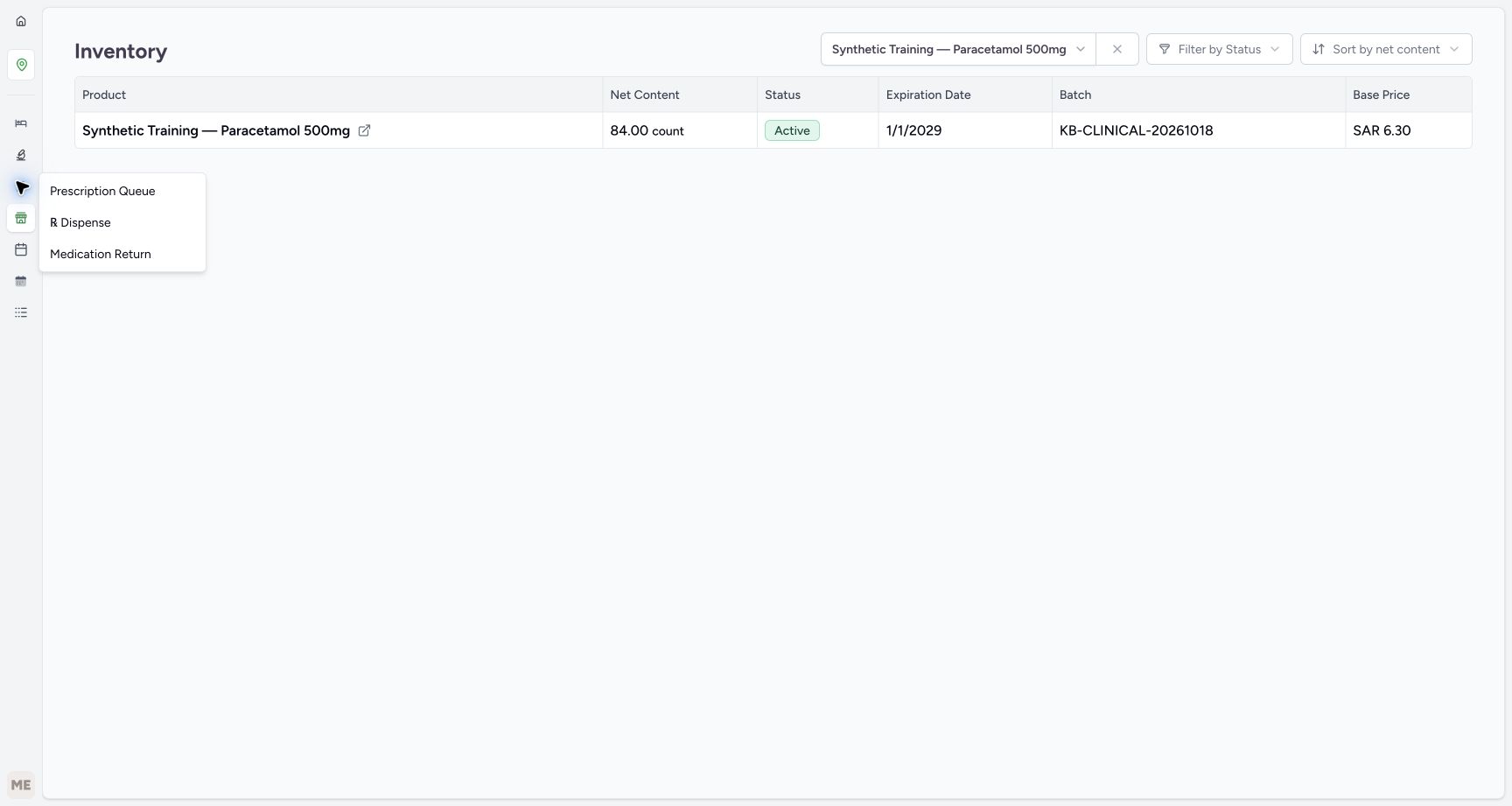
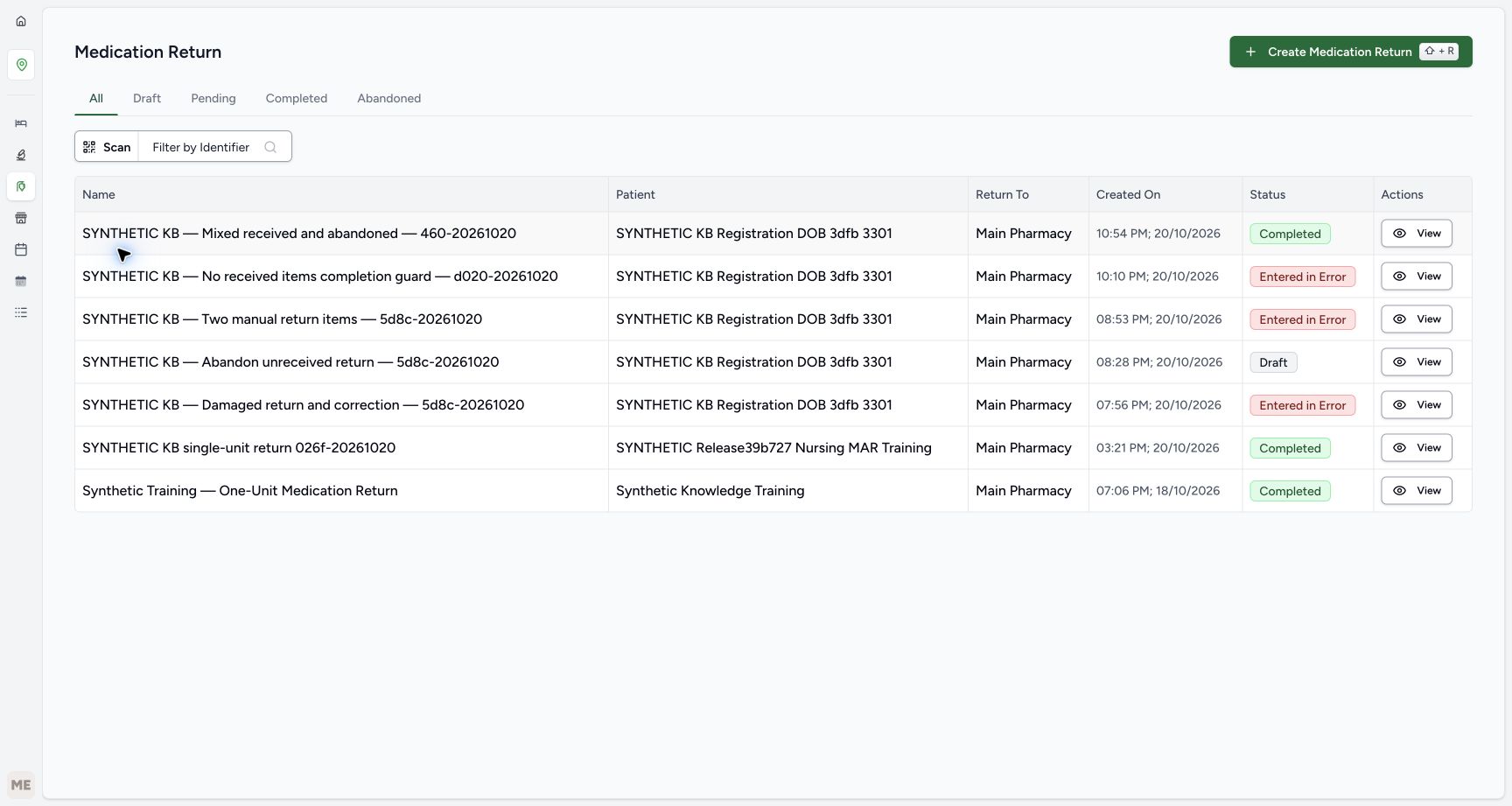
From Main Pharmacy inventory, choose the visible Pharmacy icon, then Medication Return in its flyout. On the return list, choose Create Medication Return. Keep the earlier listed returns unchanged.
123Read the starting stock and open Pharmacy
Capture details
Isolated synthetic software exercise at MANSOQ Demo Polyclinic/Main Pharmacy. No physical medicine, clinical treatment, goods receipt, invoice issuance, payment, cash refund or external exchange is involved.
Image SHA-256 bb1f9a8cb5afb2edae113c445386ddfa71921ab19ac59466488b86368933a8a4
- Read starting stock eighty-four: Match this batch before creating the separate training return.
- Match batch KB-CLINICAL-20261018: Keep this product and lot unchanged throughout the exercise.
- Open the Pharmacy menu: Use the visible Pharmacy icon beside the inventory view.
 1
1Choose Medication Return
Capture details
Isolated synthetic software exercise at MANSOQ Demo Polyclinic/Main Pharmacy. No physical medicine, clinical treatment, goods receipt, invoice issuance, payment, cash refund or external exchange is involved.
Image SHA-256 13f0d2137a9462c79a03b1d0a5b8743837ef0881dee4486b85938d5d4b7ca598
- Choose Medication Return: Open the list of existing returns without changing an earlier return.
 1
1Create a separate medication return
Capture details
Isolated synthetic software exercise at MANSOQ Demo Polyclinic/Main Pharmacy. No physical medicine, clinical treatment, goods receipt, invoice issuance, payment, cash refund or external exchange is involved.
Image SHA-256 c6db453c144f0e818b526864c004cfc027bad21f19e191e60a99945b0364d2b8
- Choose Create Medication Return: Create a new synthetic Draft rather than editing an earlier return.
2. Choose the existing patient and create the training return
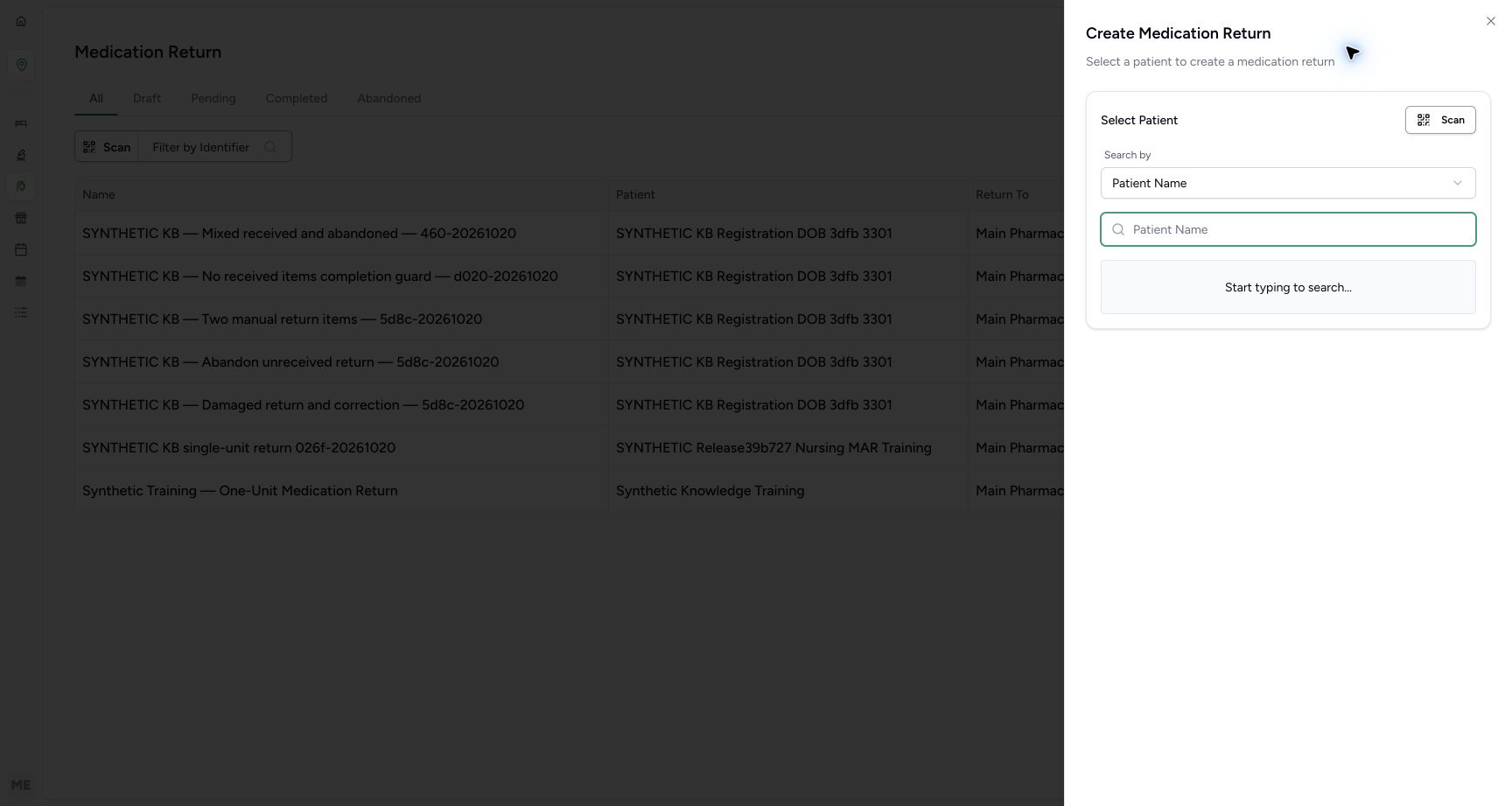
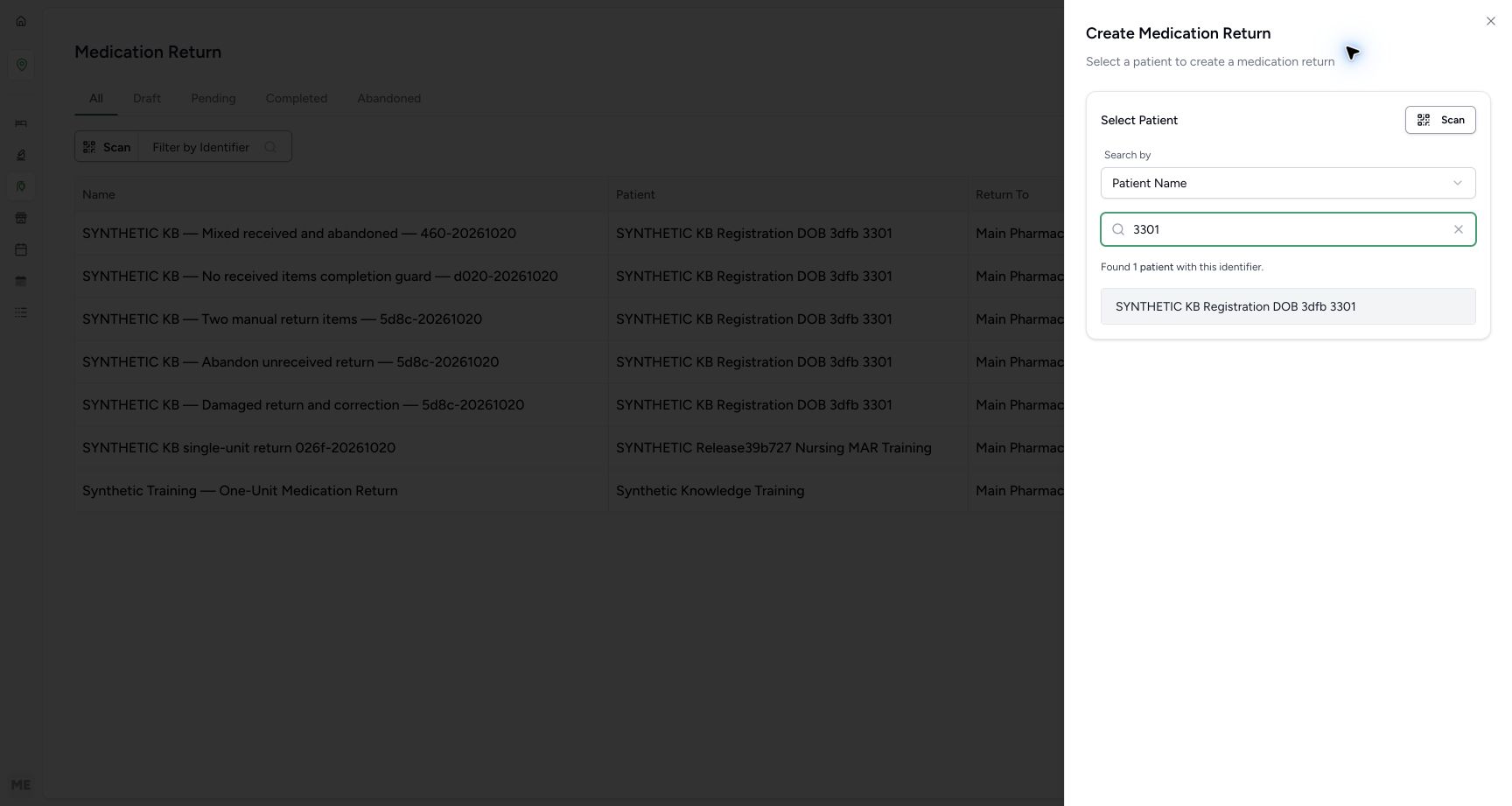
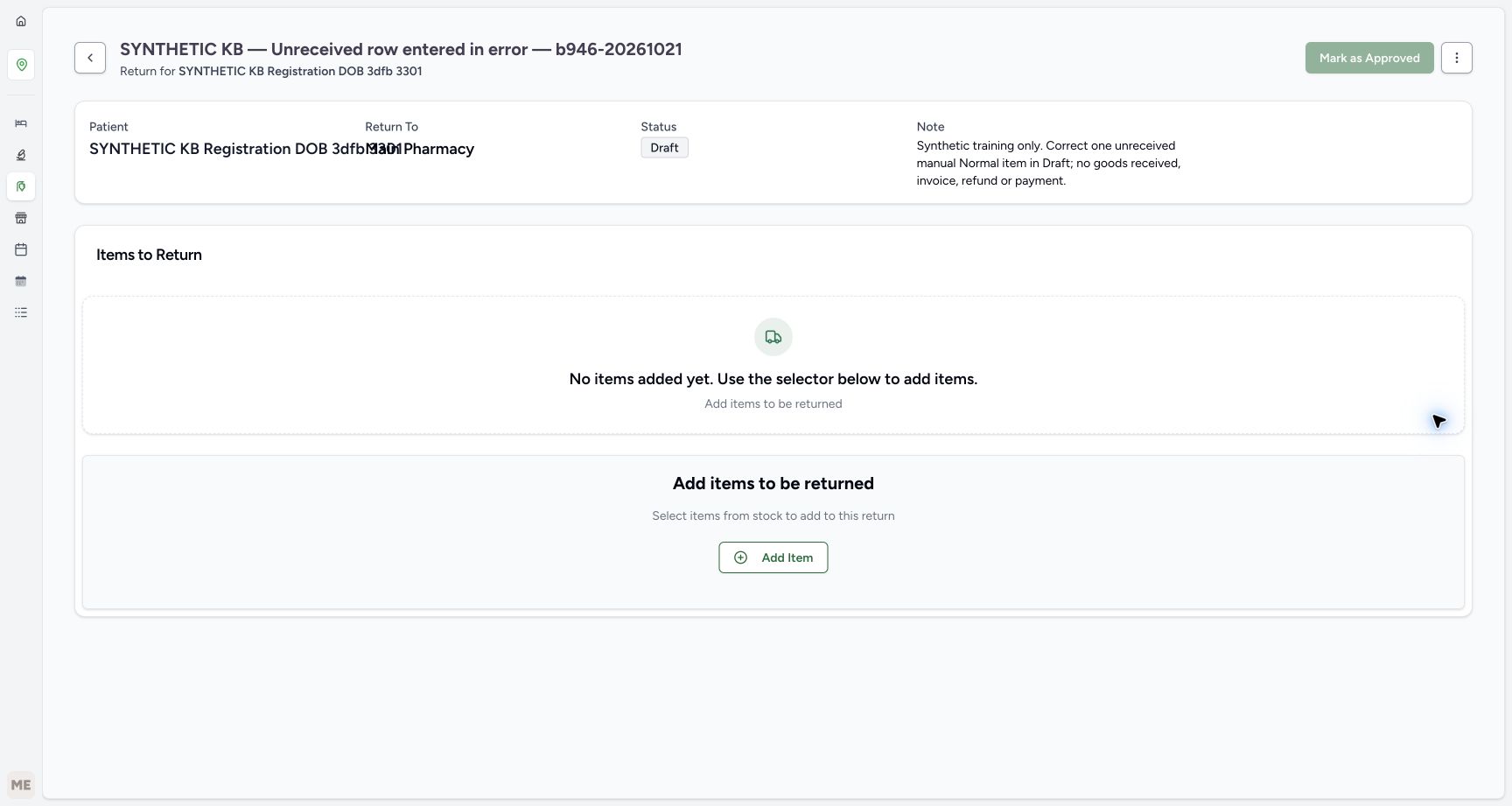
Use Patient Name search and enter 3301. Select SYNTHETIC KB Registration DOB 3dfb 3301, then verify the full selected name. Enter the unique name “SYNTHETIC KB — Unreceived row entered in error — b946-20261021”. The optional note in this example is “Synthetic training only. Correct one unreceived manual Normal item in Draft; no goods received, invoice, refund or payment.” If the patient is wrong, use Change or Cancel before creating. Choose Create Return once and wait for the new Draft with no saved items. The later Patient and Return To summary fields overlap; use the clear selected-patient name and readable return subtitle to verify identity.
 12
12Search for the existing synthetic patient
Capture details
Isolated synthetic software exercise at MANSOQ Demo Polyclinic/Main Pharmacy. No physical medicine, clinical treatment, goods receipt, invoice issuance, payment, cash refund or external exchange is involved.
Image SHA-256 427bcf649dc99bf19435e9e624ecc120f37e6ebbe24066d395799a9740863978
- Verify Patient Name search: Use the existing synthetic patient.
- Enter the unique name fragment 3301: Search for the intended existing record.
 12
12Choose the matching existing patient
Capture details
Isolated synthetic software exercise at MANSOQ Demo Polyclinic/Main Pharmacy. No physical medicine, clinical treatment, goods receipt, invoice issuance, payment, cash refund or external exchange is involved.
Image SHA-256 391da9cba915fadc79f728cf9faed12ff6acb9d6a8092e005151ec83f7547198
- Verify the search term 3301: The one matching result is displayed below.
- Select the existing synthetic patient: Match the complete patient name before creating a return.
123456Review the new return before creating it
Capture details
Isolated synthetic software exercise at MANSOQ Demo Polyclinic/Main Pharmacy. No physical medicine, clinical treatment, goods receipt, invoice issuance, payment, cash refund or external exchange is involved.
Image SHA-256 1c5a565b988bfcb883d26c9721976ac6fa104640df8fc46a66754c6c319e1bc9
- Verify the full selected patient name: This sheet shows the identity clearly before the later summary fields overlap.
- Enter a unique synthetic return name: Use SYNTHETIC KB — Unreceived row entered in error — b946-20261021 for this example.
- Review the optional training note: The note identifies an unreceived mistaken row and excludes goods, invoice, refund or payment actions.
- Choose Create Return once: Wait for the new saved Draft.
- Choose Change if the patient is wrong: Correct patient selection before creating the return.
- Choose Cancel to stop creation: Leave the form without creating a return if its details are wrong.
 1234
1234Verify the new empty Draft and add one item
Capture details
Isolated synthetic software exercise at MANSOQ Demo Polyclinic/Main Pharmacy. No physical medicine, clinical treatment, goods receipt, invoice issuance, payment, cash refund or external exchange is involved.
Image SHA-256 9b4ec52d7a62de2cc2abdfe312393832c902aa8271e4b90129f27575329bd29f
- Verify the readable patient subtitle: Match the selected synthetic patient without relying on the overlapping summary fields.
- Verify the new return is Draft: Creating the return has not received goods.
- Verify no items have been saved: The manual item list starts empty.
- Choose Add Item: Begin one manual Paracetamol row.
3. Manually select one exact product and stock lot
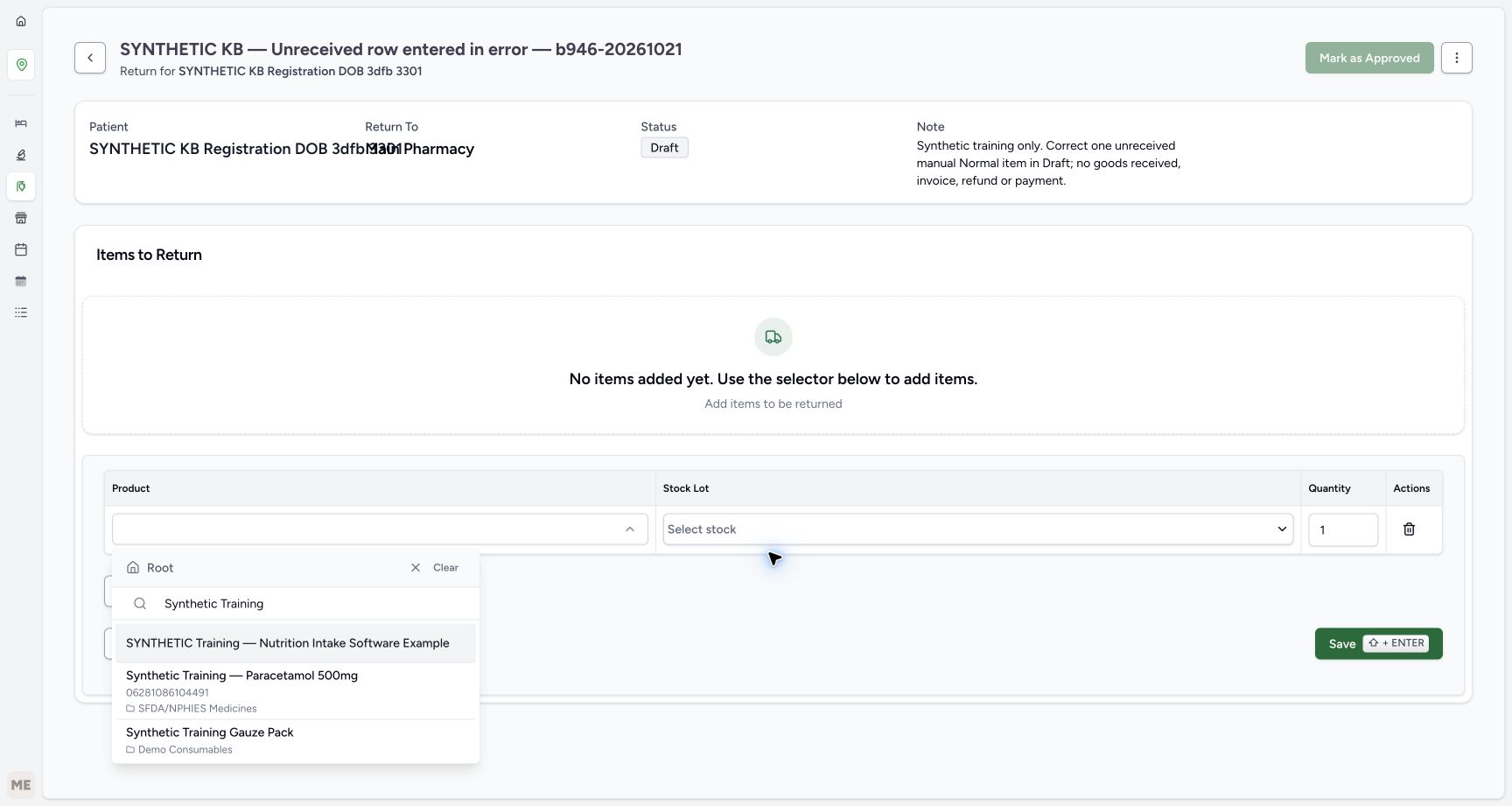
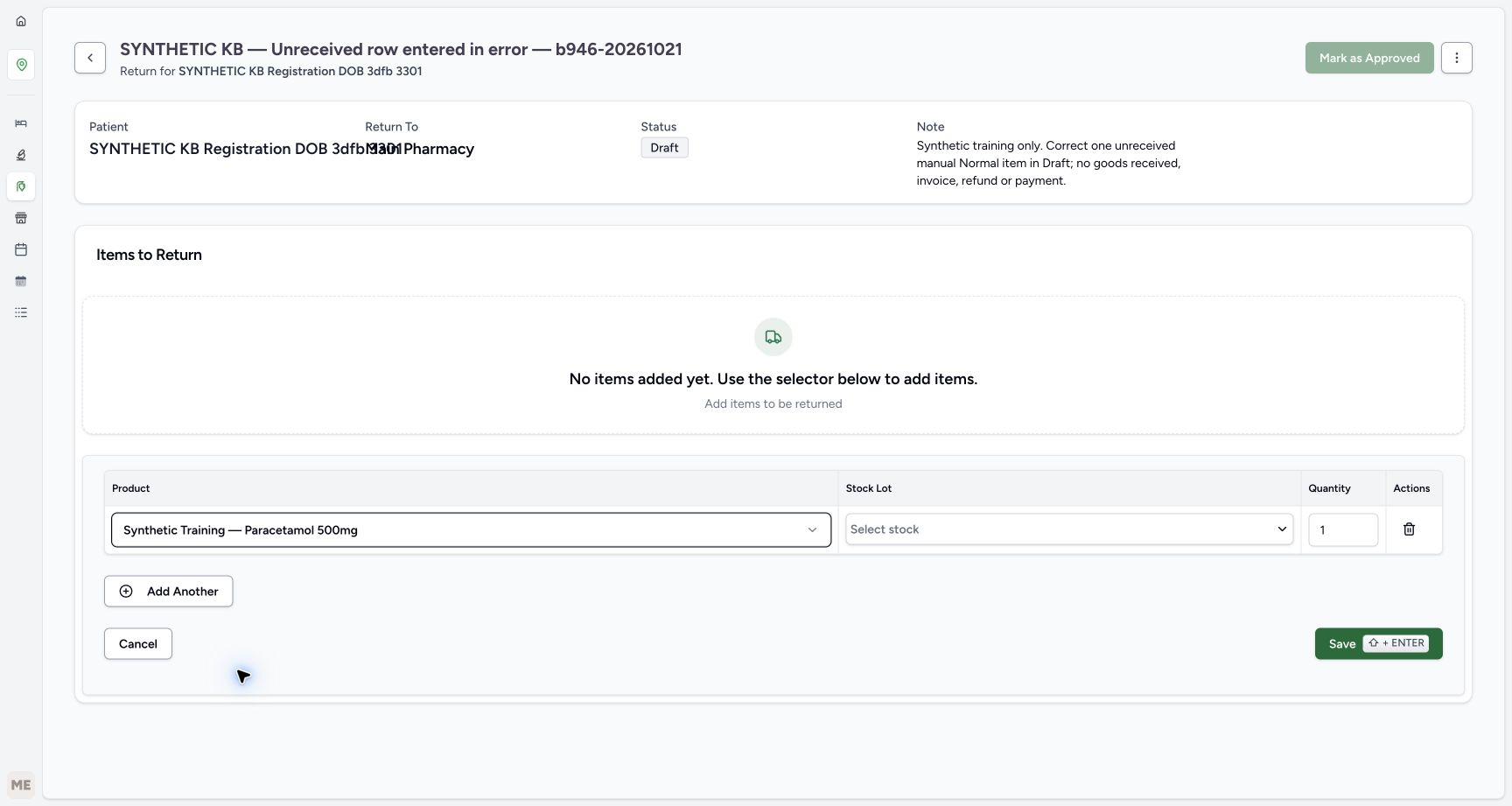
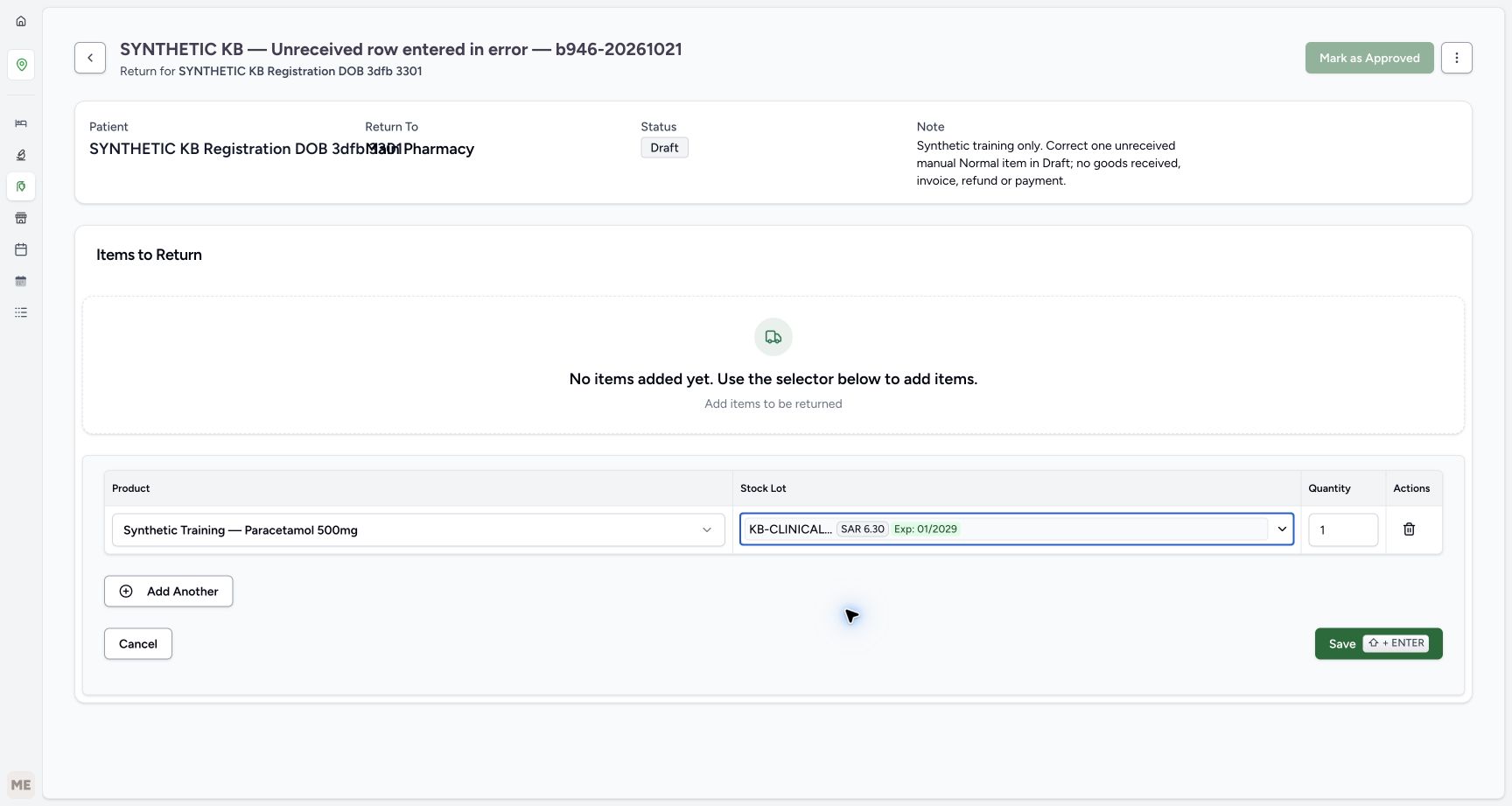
Choose Add Item. At Root, search for Synthetic Training and select Synthetic Training — Paracetamol 500mg, product code 06281086104491. Press Escape to close the product picker. Open Select stock, match the full batch KB-CLINICAL-20261018, expiry January 2029, 84 count available and price SAR 6.30, then select its checkbox. Press Escape to close the stock list. Verify the default quantity remains one. Closed lot labels are shortened, so use the open list to check the full identity.
1234Verify the new empty Draft and add one item
Capture details
Isolated synthetic software exercise at MANSOQ Demo Polyclinic/Main Pharmacy. No physical medicine, clinical treatment, goods receipt, invoice issuance, payment, cash refund or external exchange is involved.
Image SHA-256 9b4ec52d7a62de2cc2abdfe312393832c902aa8271e4b90129f27575329bd29f
- Verify the readable patient subtitle: Match the selected synthetic patient without relying on the overlapping summary fields.
- Verify the new return is Draft: Creating the return has not received goods.
- Verify no items have been saved: The manual item list starts empty.
- Choose Add Item: Begin one manual Paracetamol row.
 123
123Search for the exact Paracetamol product
Capture details
Isolated synthetic software exercise at MANSOQ Demo Polyclinic/Main Pharmacy. No physical medicine, clinical treatment, goods receipt, invoice issuance, payment, cash refund or external exchange is involved.
Image SHA-256 4630db651aabf0ecad529a91447c1a1751f080d9d82bbd7c90345567fefa5f93
- Verify Root search: Search the product catalogue from Root.
- Search for Synthetic Training: Match the exact Paracetamol product in the results.
- Choose Paracetamol product code 06281086104491: Select this product rather than the nutrition or gauze result.
 12
12Choose stock for the unsaved one-unit row
Capture details
Isolated synthetic software exercise at MANSOQ Demo Polyclinic/Main Pharmacy. No physical medicine, clinical treatment, goods receipt, invoice issuance, payment, cash refund or external exchange is involved.
Image SHA-256 e2d55572986631f3c27c18fa21688489f9701b2fcc5e8fd3c8c191ccf0a2c76b
- Open Select stock: Choose the existing matching batch.
- Verify default quantity one: The exercise uses one unit; no quantity change is needed.
12345Match the complete batch in the open stock list
Capture details
Isolated synthetic software exercise at MANSOQ Demo Polyclinic/Main Pharmacy. No physical medicine, clinical treatment, goods receipt, invoice issuance, payment, cash refund or external exchange is involved.
Image SHA-256 10d67546697ab1e7cc656cf9c1ddcd2de5b317c63bc39d755eb029daf085da9a
- Select the matching batch checkbox: Choose KB-CLINICAL-20261018 once.
- Read the full batch identifier: Use this full open-list label for verification.
- Read batch price SAR 6.30: This is the selected batch price displayed in the form.
- Verify eighty-four available: This return row has not received or removed stock.
- Verify expiry January 2029: Keep the same selected batch.
 123
123Review the single unsaved row before saving
Capture details
Isolated synthetic software exercise at MANSOQ Demo Polyclinic/Main Pharmacy. No physical medicine, clinical treatment, goods receipt, invoice issuance, payment, cash refund or external exchange is involved.
Image SHA-256 6e3b5ddfc96aeef2edeb29591dab470bf168ac7fd62077f019838df0ec6858ec
- Verify a stock lot is selected: Use the full batch in the open list to identify it; this closed label is shortened.
- Verify one unit before saving: Keep the single reviewed manual row.
- Choose Save once: Wait for the saved table before correcting the mistaken row.
4. Save the one row and verify it remains unreceived
Review the selected product, lot and quantity one, then choose Save once. Wait for exactly one saved row showing In Progress and Normal, with the return still Draft. Saving the row has not approved the return or received goods. Leave Mark as Approved unused.
123Review the single unsaved row before saving
Capture details
Isolated synthetic software exercise at MANSOQ Demo Polyclinic/Main Pharmacy. No physical medicine, clinical treatment, goods receipt, invoice issuance, payment, cash refund or external exchange is involved.
Image SHA-256 6e3b5ddfc96aeef2edeb29591dab470bf168ac7fd62077f019838df0ec6858ec
- Verify a stock lot is selected: Use the full batch in the open list to identify it; this closed label is shortened.
- Verify one unit before saving: Keep the single reviewed manual row.
- Choose Save once: Wait for the saved table before correcting the mistaken row.
123456Verify one saved In Progress and Normal row
Capture details
Isolated synthetic software exercise at MANSOQ Demo Polyclinic/Main Pharmacy. No physical medicine, clinical treatment, goods receipt, invoice issuance, payment, cash refund or external exchange is involved.
Image SHA-256 44be1872ccb0e2e5ed48e5517c62748704248141702d8a17fda9eace7cfe87d2
- Verify the return is still Draft: Saving a row is separate from approval and receiving.
- Match the full saved batch: The complete batch identifier is visible in the saved table.
- Verify saved quantity one: There is exactly one saved row to correct.
- Verify row In Progress: The item remains unreceived.
- Verify condition Normal: Condition metadata does not establish receipt.
- Open this row Actions menu: Correct only the intended saved row.
5. Correct only the mistaken row as entered in error
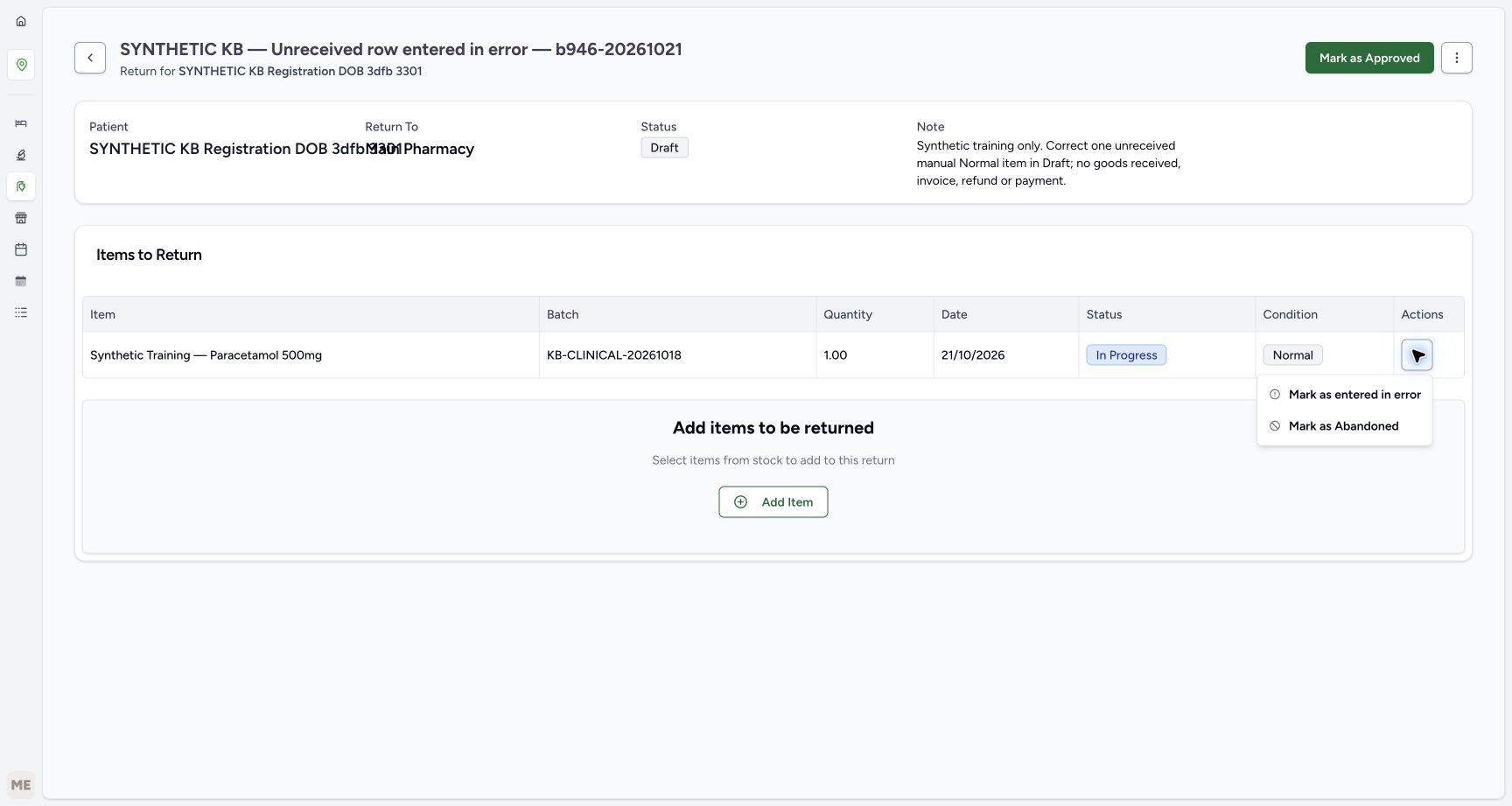
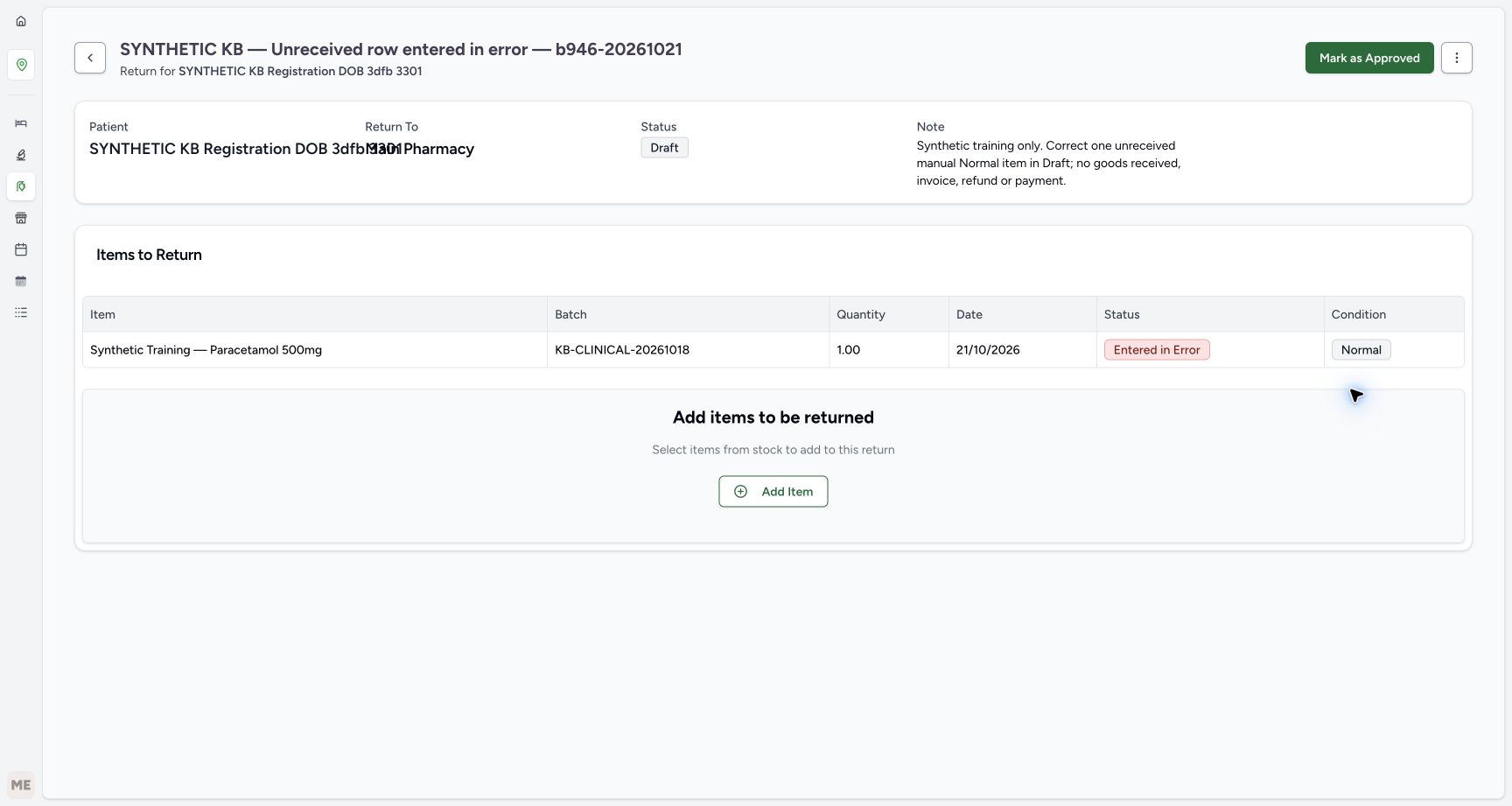
On this Draft, open the sole saved row’s Actions menu and choose Mark as entered in error. It is a direct row action with no confirmation dialog. Wait for the saved status to become Entered in Error, while quantity one and Normal condition remain. The return itself stays Draft. The separate Mark as Abandoned option is not used for this mistaken entry.
123456Verify one saved In Progress and Normal row
Capture details
Isolated synthetic software exercise at MANSOQ Demo Polyclinic/Main Pharmacy. No physical medicine, clinical treatment, goods receipt, invoice issuance, payment, cash refund or external exchange is involved.
Image SHA-256 44be1872ccb0e2e5ed48e5517c62748704248141702d8a17fda9eace7cfe87d2
- Verify the return is still Draft: Saving a row is separate from approval and receiving.
- Match the full saved batch: The complete batch identifier is visible in the saved table.
- Verify saved quantity one: There is exactly one saved row to correct.
- Verify row In Progress: The item remains unreceived.
- Verify condition Normal: Condition metadata does not establish receipt.
- Open this row Actions menu: Correct only the intended saved row.
 1
1Correct the mistaken row directly
Capture details
Isolated synthetic software exercise at MANSOQ Demo Polyclinic/Main Pharmacy. No physical medicine, clinical treatment, goods receipt, invoice issuance, payment, cash refund or external exchange is involved.
Image SHA-256 bc9fa603c7721cc0dcb95718e4397eef57ec273dcd85300ca325accae08936ce
- Choose Mark as entered in error: This is the direct row correction; no row confirmation dialog follows.
 1234
1234Verify the saved row correction
Capture details
Isolated synthetic software exercise at MANSOQ Demo Polyclinic/Main Pharmacy. No physical medicine, clinical treatment, goods receipt, invoice issuance, payment, cash refund or external exchange is involved.
Image SHA-256 699d6ff876b9391a869b6cf58462788eec5bde67de0a85be4b2389a94e418b59
- Verify Draft is retained: Correcting the row has not closed or approved the return.
- Verify row Entered in Error: The mistaken row remains in the saved history.
- Verify retained Normal condition: The row was not received as goods.
- Recognise the unused approval control: Leave Mark as Approved unused in this correction exercise.
6. Reload and keep the corrected return Draft
Reload the return normally. Verify the same Draft and the one Entered in Error row, with Normal condition and quantity one retained. The row Actions menu is no longer offered. Leave the visible Mark as Approved and Add Item controls unused; this exercise ends with an unfinished Draft correction record, not a completed return of goods.
1234Verify the saved row correction
Capture details
Isolated synthetic software exercise at MANSOQ Demo Polyclinic/Main Pharmacy. No physical medicine, clinical treatment, goods receipt, invoice issuance, payment, cash refund or external exchange is involved.
Image SHA-256 699d6ff876b9391a869b6cf58462788eec5bde67de0a85be4b2389a94e418b59
- Verify Draft is retained: Correcting the row has not closed or approved the return.
- Verify row Entered in Error: The mistaken row remains in the saved history.
- Verify retained Normal condition: The row was not received as goods.
- Recognise the unused approval control: Leave Mark as Approved unused in this correction exercise.
1234Verify the corrected Draft after reload
Capture details
Isolated synthetic software exercise at MANSOQ Demo Polyclinic/Main Pharmacy. No physical medicine, clinical treatment, goods receipt, invoice issuance, payment, cash refund or external exchange is involved.
Image SHA-256 b50228e321d4b95ea48e609d3196bdd140be13fd110b21a82c5c58dbeb5559b0
- Verify Draft after reload: The saved return remains unfinished.
- Verify the corrected row after reload: The corrected row history persists.
- Verify the same quantity one: The saved quantity has not changed.
- Open Inventory: Use the visible Inventory icon for the stock check.
7. Verify the same stock after the correction
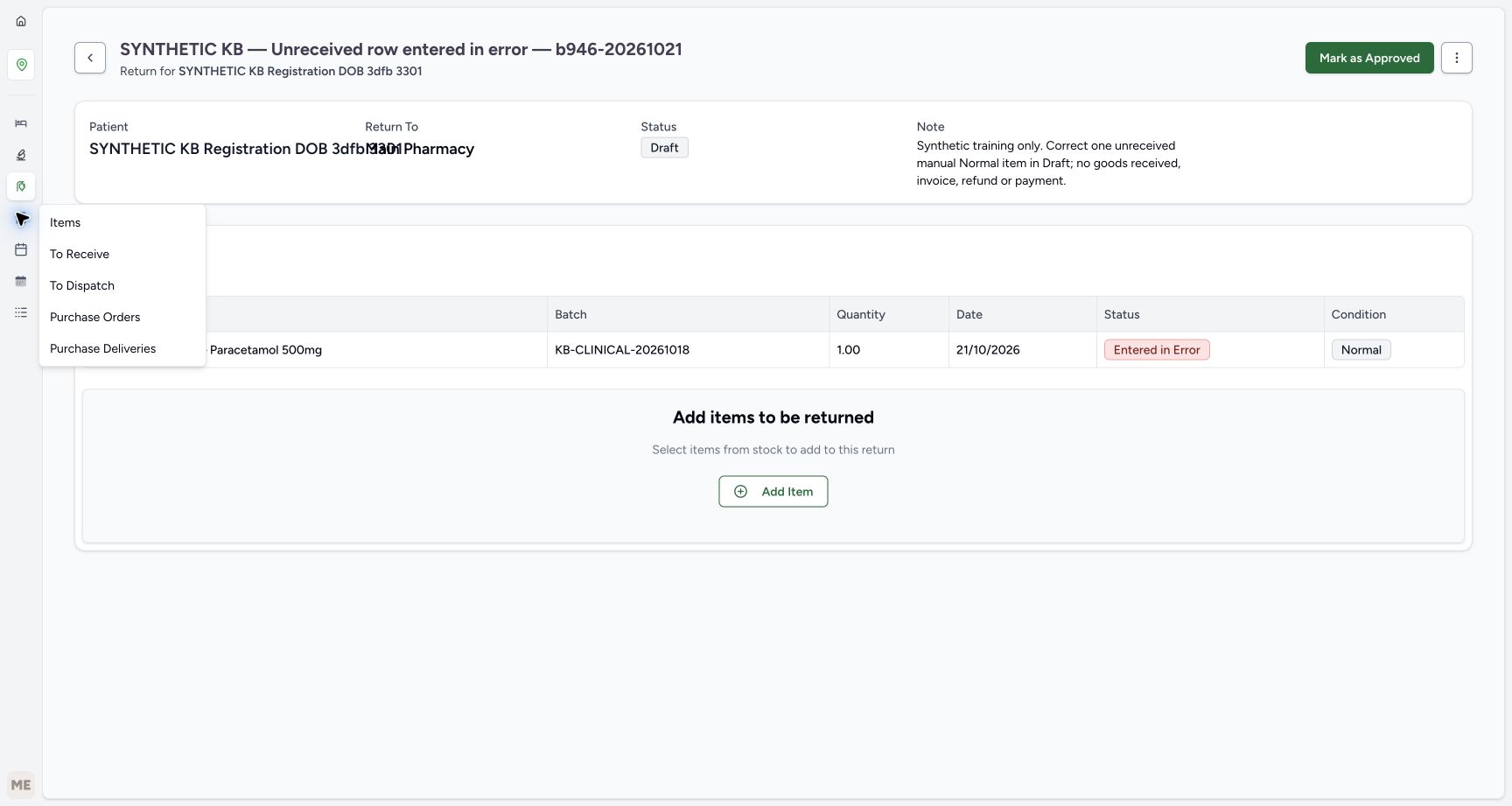
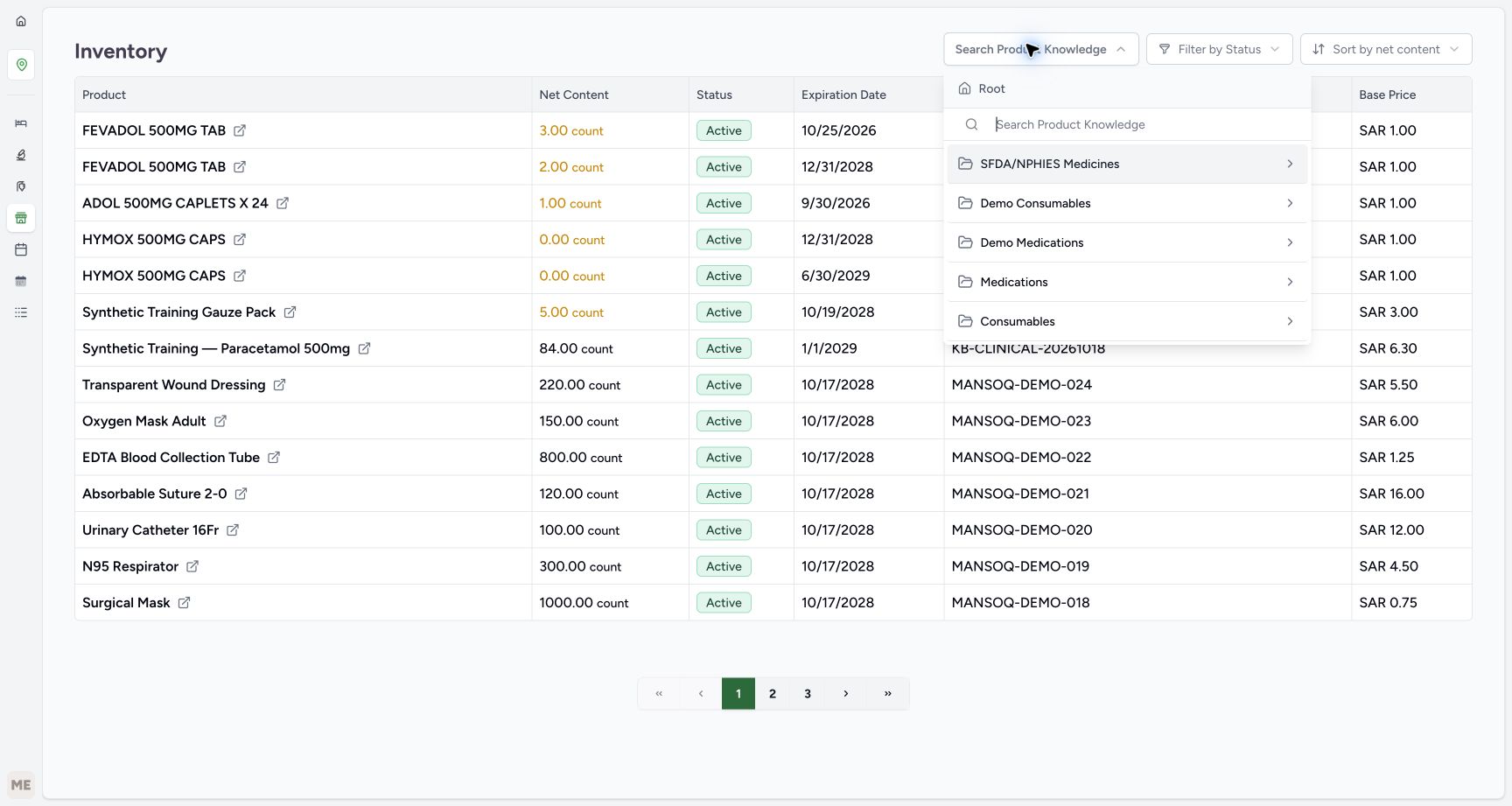
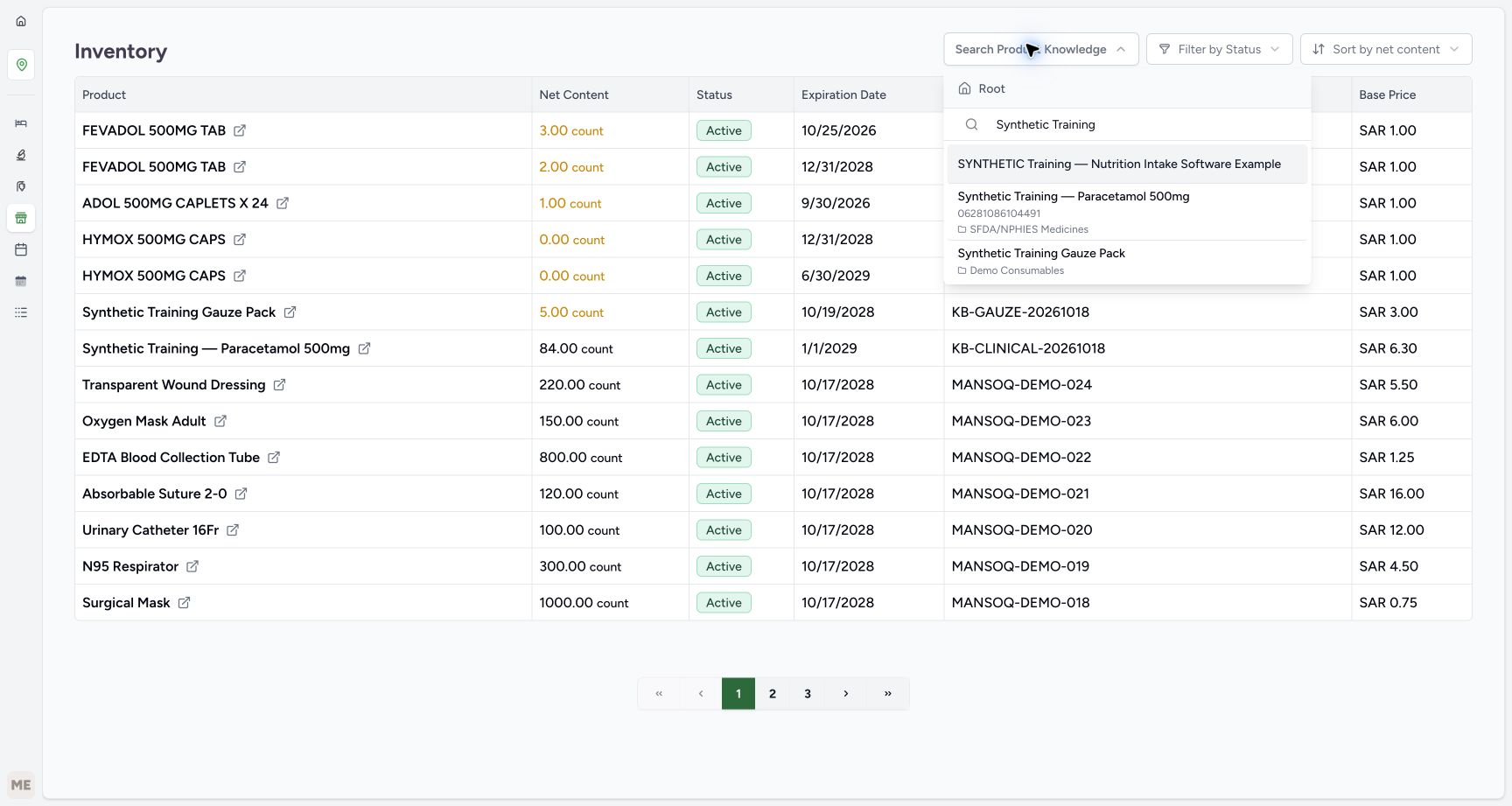
Choose the visible Inventory icon, then Items in its flyout. Open Search Product Knowledge, search at Root for Synthetic Training and select the same Paracetamol product code 06281086104491. Press Escape to close the picker. Read the refreshed filtered inventory table and verify the same batch still has 84 units and expiry January 2029. No unit has been received or removed.
1234Verify the corrected Draft after reload
Capture details
Isolated synthetic software exercise at MANSOQ Demo Polyclinic/Main Pharmacy. No physical medicine, clinical treatment, goods receipt, invoice issuance, payment, cash refund or external exchange is involved.
Image SHA-256 b50228e321d4b95ea48e609d3196bdd140be13fd110b21a82c5c58dbeb5559b0
- Verify Draft after reload: The saved return remains unfinished.
- Verify the corrected row after reload: The corrected row history persists.
- Verify the same quantity one: The saved quantity has not changed.
- Open Inventory: Use the visible Inventory icon for the stock check.
 1
1Choose Items in the Inventory flyout
Capture details
Isolated synthetic software exercise at MANSOQ Demo Polyclinic/Main Pharmacy. No physical medicine, clinical treatment, goods receipt, invoice issuance, payment, cash refund or external exchange is involved.
Image SHA-256 3f8a52bc82b8d47f78f4d5384b2a16f299e50cba8f459083bd3a7408b72b6e07
- Choose Items: Read stock without receiving or editing goods.
 123
123Search inventory for the same product
Capture details
Isolated synthetic software exercise at MANSOQ Demo Polyclinic/Main Pharmacy. No physical medicine, clinical treatment, goods receipt, invoice issuance, payment, cash refund or external exchange is involved.
Image SHA-256 bee7c458a6256e613663a431b1436959fe3aba70690350bf9bc2b1b4d3af6ea9
- Open Search Product Knowledge: Filter the inventory readback to the exact product.
- Verify Root search: Use the same catalogue identity as the manual row.
- Enter Synthetic Training: Find the exact Paracetamol product.
 1
1Choose the exact inventory product filter
Capture details
Isolated synthetic software exercise at MANSOQ Demo Polyclinic/Main Pharmacy. No physical medicine, clinical treatment, goods receipt, invoice issuance, payment, cash refund or external exchange is involved.
Image SHA-256 e2cd15a221d7293ba4a499ddea273cb2ee8947287350803d4aff6ce1a1af30d4
- Choose product code 06281086104491: Filter to the same Paracetamol product, then press Escape to close the picker.
123Verify stock is unchanged after correction
Capture details
Isolated synthetic software exercise at MANSOQ Demo Polyclinic/Main Pharmacy. No physical medicine, clinical treatment, goods receipt, invoice issuance, payment, cash refund or external exchange is involved.
Image SHA-256 df50ba7e79292729724a821dfe496ab388a0cf4dacc86bf15175948896cf080f
- Verify stock remains eighty-four: The unreceived row correction has not changed usable stock.
- Match the same original batch: This is still KB-CLINICAL-20261018.
- Verify the same expiry: The matched batch remains January 2029.
8. Reopen the same saved Draft for the final check
Using this return’s already known saved address, reopen the same named training return. Verify Draft, one Entered in Error Paracetamol row, quantity one and Normal condition. No approval, receiving, return completion or financial action is part of this correction.
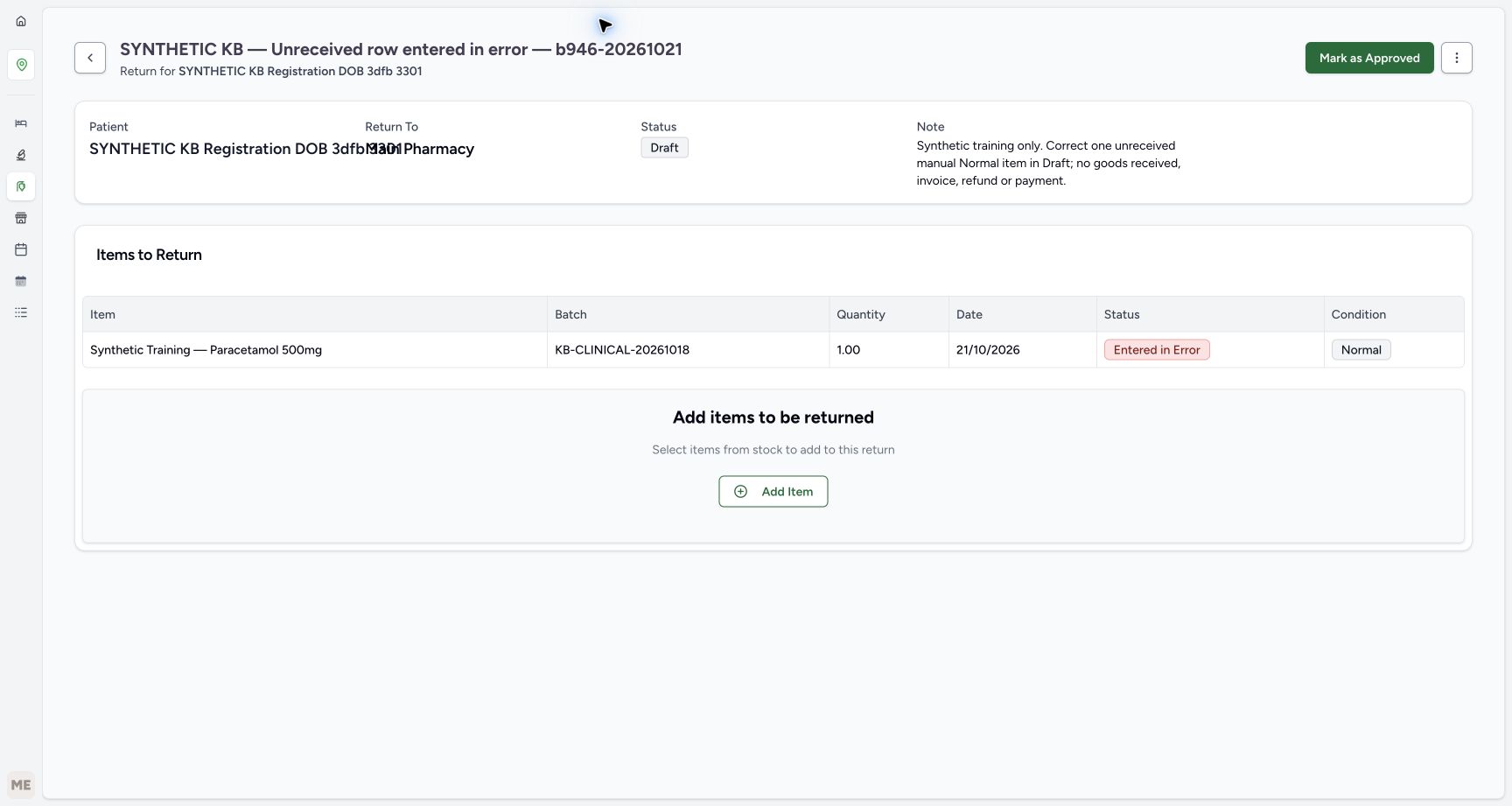 12345
12345Read the final saved Draft again
Capture details
Isolated synthetic software exercise at MANSOQ Demo Polyclinic/Main Pharmacy. No physical medicine, clinical treatment, goods receipt, invoice issuance, payment, cash refund or external exchange is involved.
Image SHA-256 24a283ebed8cfdd98c72ef1413a13245b7f7dc8f15a2f961b0346f242db98249
- Match the same saved return title: Reopen only the already known address for this separate training return.
- Verify final Draft status: No approval, receiving or return completion has occurred.
- Verify final Entered in Error history: The corrected row remains visible.
- Verify the same one-unit quantity: The row quantity persists.
- Verify Normal metadata is retained: This still does not establish a goods receipt.
Entered in Error corrects the mistaken row, not the whole return
This exercise corrects an erroneous unreceived manual row. The row remains visible as Entered in Error; the return remains Draft. Normal is retained condition metadata, not proof of a goods receipt. The corrected row has no resume or undo action in this view. For the different case of a valid item that will not be received, see Abandon an unreceived return item.
1Correct the mistaken row directly
Capture details
Isolated synthetic software exercise at MANSOQ Demo Polyclinic/Main Pharmacy. No physical medicine, clinical treatment, goods receipt, invoice issuance, payment, cash refund or external exchange is involved.
Image SHA-256 bc9fa603c7721cc0dcb95718e4397eef57ec273dcd85300ca325accae08936ce
- Choose Mark as entered in error: This is the direct row correction; no row confirmation dialog follows.
1234Verify the saved row correction
Capture details
Isolated synthetic software exercise at MANSOQ Demo Polyclinic/Main Pharmacy. No physical medicine, clinical treatment, goods receipt, invoice issuance, payment, cash refund or external exchange is involved.
Image SHA-256 699d6ff876b9391a869b6cf58462788eec5bde67de0a85be4b2389a94e418b59
- Verify Draft is retained: Correcting the row has not closed or approved the return.
- Verify row Entered in Error: The mistaken row remains in the saved history.
- Verify retained Normal condition: The row was not received as goods.
- Recognise the unused approval control: Leave Mark as Approved unused in this correction exercise.
1234Verify the corrected Draft after reload
Capture details
Isolated synthetic software exercise at MANSOQ Demo Polyclinic/Main Pharmacy. No physical medicine, clinical treatment, goods receipt, invoice issuance, payment, cash refund or external exchange is involved.
Image SHA-256 b50228e321d4b95ea48e609d3196bdd140be13fd110b21a82c5c58dbeb5559b0
- Verify Draft after reload: The saved return remains unfinished.
- Verify the corrected row after reload: The corrected row history persists.
- Verify the same quantity one: The saved quantity has not changed.
- Open Inventory: Use the visible Inventory icon for the stock check.
12345Read the final saved Draft again
Capture details
Isolated synthetic software exercise at MANSOQ Demo Polyclinic/Main Pharmacy. No physical medicine, clinical treatment, goods receipt, invoice issuance, payment, cash refund or external exchange is involved.
Image SHA-256 24a283ebed8cfdd98c72ef1413a13245b7f7dc8f15a2f961b0346f242db98249
- Match the same saved return title: Reopen only the already known address for this separate training return.
- Verify final Draft status: No approval, receiving or return completion has occurred.
- Verify final Entered in Error history: The corrected row remains visible.
- Verify the same one-unit quantity: The row quantity persists.
- Verify Normal metadata is retained: This still does not establish a goods receipt.
Optional: read the previously verified existing account
For an optional read-only finance check, open the patient’s previously verified existing account address directly. This check does not use an Account control on the return. Verify due −SAR 6.30, paid SAR 68.00 and gross SAR 61.70, with the same six earlier invoices. The −SAR 6.30 account credit belongs to an earlier completed return; this row correction has created no new invoice or credit. Choose Payments and verify the original active Cash entries of SAR 5.00 and SAR 63.00. No payment, refund, rebalance or account closure is performed.
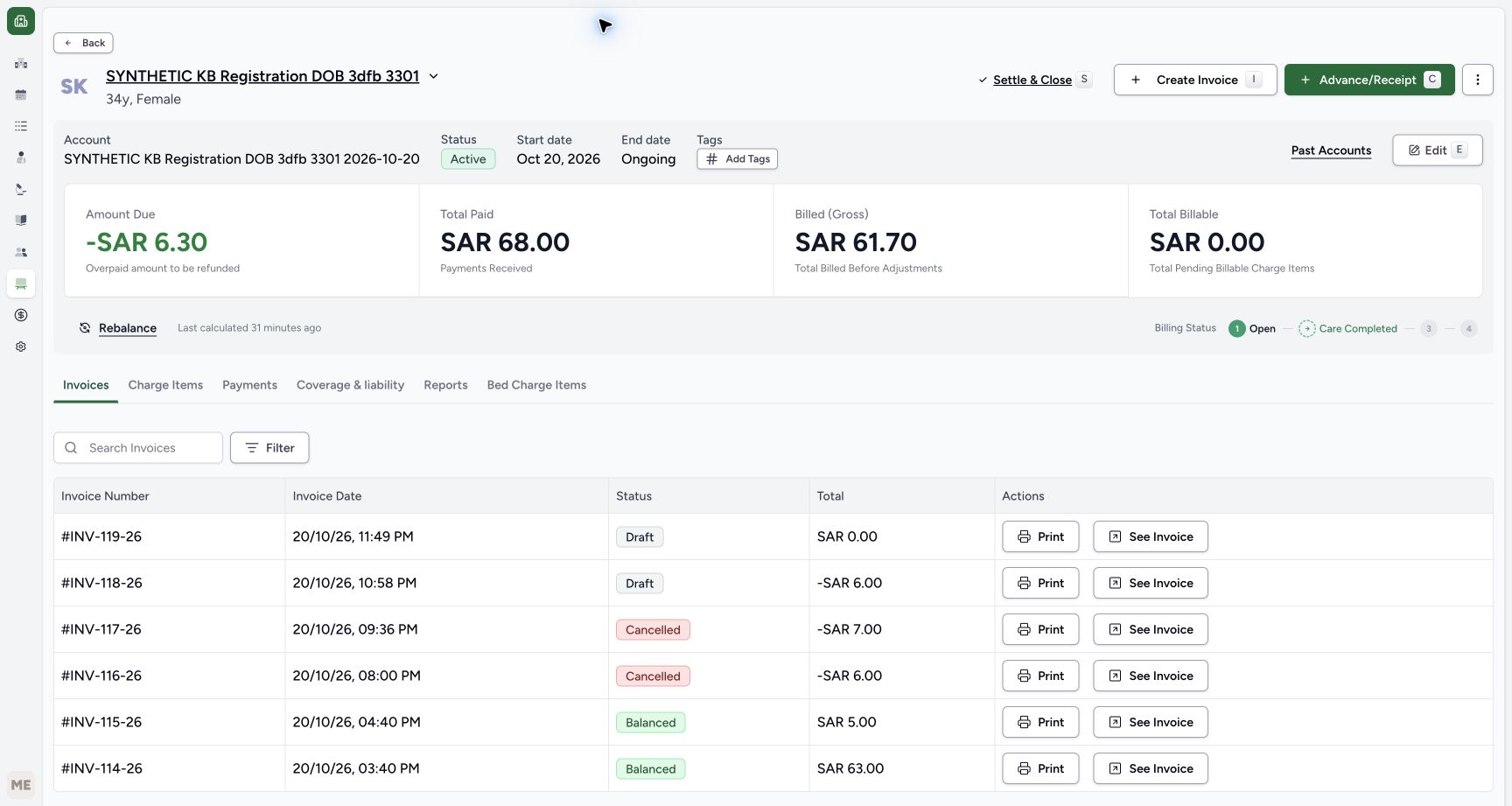 123456
Optional: review the existing account readback
Capture details
Isolated synthetic software exercise at MANSOQ Demo Polyclinic/Main Pharmacy. No physical medicine, clinical treatment, goods receipt, invoice issuance, payment, cash refund or external exchange is involved.
Image SHA-256 903016dfb0899a4803b65c45efc1876bee56bc7645c1b4683588c0709892d671
- Read existing account due minus SAR 6.30: This credit belongs to the earlier completed return, not this row correction.
- Verify existing paid SAR 68.00: The paid total is unchanged.
- Verify existing gross SAR 61.70: The row correction has not created a new credit.
- Keep the earlier Draft credit separate: INV-118-26 remains the earlier minus SAR 6.00 invoice.
- Keep the earlier zero Draft separate: INV-119-26 belongs to the earlier preparation cancellation.
- Choose Payments for a read-only check: Review the original entries without recording a payment.
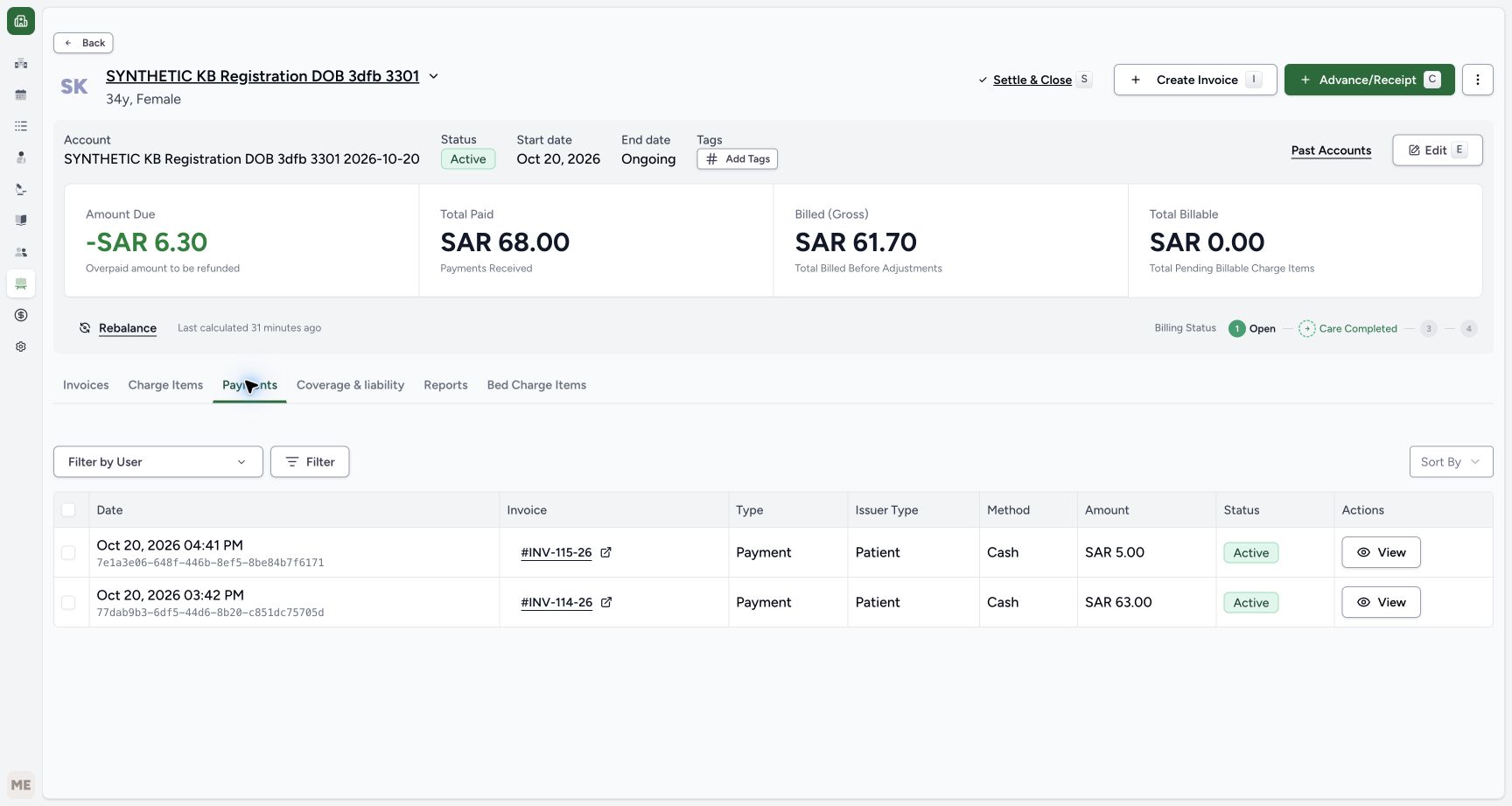 123
123Optional: verify the two original cash entries
Capture details
Isolated synthetic software exercise at MANSOQ Demo Polyclinic/Main Pharmacy. No physical medicine, clinical treatment, goods receipt, invoice issuance, payment, cash refund or external exchange is involved.
Image SHA-256 49bc52f17059e56b2cd09b2bb5667255e20f95754751ecaebe4c77d0625973bf
- Verify the original SAR 5.00 cash entry: No new payment or refund was made in this correction.
- Verify the original SAR 63.00 cash entry: The earlier sale payment remains unchanged.
- Verify the original entry remains Active: Read the existing record without changing it.
Troubleshooting
The row action is missing
Check the saved return is still Draft and the intended row is In Progress before correcting it. The row Actions menu is shown in that state. After Entered in Error is saved, the row has no correction/resume menu. Use only the intended erroneous, unreceived row; do not approve it first or substitute the whole-return correction menu.
123456Verify one saved In Progress and Normal row
Capture details
Isolated synthetic software exercise at MANSOQ Demo Polyclinic/Main Pharmacy. No physical medicine, clinical treatment, goods receipt, invoice issuance, payment, cash refund or external exchange is involved.
Image SHA-256 44be1872ccb0e2e5ed48e5517c62748704248141702d8a17fda9eace7cfe87d2
- Verify the return is still Draft: Saving a row is separate from approval and receiving.
- Match the full saved batch: The complete batch identifier is visible in the saved table.
- Verify saved quantity one: There is exactly one saved row to correct.
- Verify row In Progress: The item remains unreceived.
- Verify condition Normal: Condition metadata does not establish receipt.
- Open this row Actions menu: Correct only the intended saved row.
1Correct the mistaken row directly
Capture details
Isolated synthetic software exercise at MANSOQ Demo Polyclinic/Main Pharmacy. No physical medicine, clinical treatment, goods receipt, invoice issuance, payment, cash refund or external exchange is involved.
Image SHA-256 bc9fa603c7721cc0dcb95718e4397eef57ec273dcd85300ca325accae08936ce
- Choose Mark as entered in error: This is the direct row correction; no row confirmation dialog follows.
1234Verify the corrected Draft after reload
Capture details
Isolated synthetic software exercise at MANSOQ Demo Polyclinic/Main Pharmacy. No physical medicine, clinical treatment, goods receipt, invoice issuance, payment, cash refund or external exchange is involved.
Image SHA-256 b50228e321d4b95ea48e609d3196bdd140be13fd110b21a82c5c58dbeb5559b0
- Verify Draft after reload: The saved return remains unfinished.
- Verify the corrected row after reload: The corrected row history persists.
- Verify the same quantity one: The saved quantity has not changed.
- Open Inventory: Use the visible Inventory icon for the stock check.
Saving seems to imply the return is completed
Read the authoritative saved statuses: after Save, the return is Draft and the row In Progress/Normal. After correction, it is Draft with an Entered in Error/Normal row. A generic save-success notice is not evidence of goods receipt or return completion. Verify stock remains 84 and keep the earlier account invoices and payments separate from this correction.
123456Verify one saved In Progress and Normal row
Capture details
Isolated synthetic software exercise at MANSOQ Demo Polyclinic/Main Pharmacy. No physical medicine, clinical treatment, goods receipt, invoice issuance, payment, cash refund or external exchange is involved.
Image SHA-256 44be1872ccb0e2e5ed48e5517c62748704248141702d8a17fda9eace7cfe87d2
- Verify the return is still Draft: Saving a row is separate from approval and receiving.
- Match the full saved batch: The complete batch identifier is visible in the saved table.
- Verify saved quantity one: There is exactly one saved row to correct.
- Verify row In Progress: The item remains unreceived.
- Verify condition Normal: Condition metadata does not establish receipt.
- Open this row Actions menu: Correct only the intended saved row.
1234Verify the corrected Draft after reload
Capture details
Isolated synthetic software exercise at MANSOQ Demo Polyclinic/Main Pharmacy. No physical medicine, clinical treatment, goods receipt, invoice issuance, payment, cash refund or external exchange is involved.
Image SHA-256 b50228e321d4b95ea48e609d3196bdd140be13fd110b21a82c5c58dbeb5559b0
- Verify Draft after reload: The saved return remains unfinished.
- Verify the corrected row after reload: The corrected row history persists.
- Verify the same quantity one: The saved quantity has not changed.
- Open Inventory: Use the visible Inventory icon for the stock check.
123Verify stock is unchanged after correction
Capture details
Isolated synthetic software exercise at MANSOQ Demo Polyclinic/Main Pharmacy. No physical medicine, clinical treatment, goods receipt, invoice issuance, payment, cash refund or external exchange is involved.
Image SHA-256 df50ba7e79292729724a821dfe496ab388a0cf4dacc86bf15175948896cf080f
- Verify stock remains eighty-four: The unreceived row correction has not changed usable stock.
- Match the same original batch: This is still KB-CLINICAL-20261018.
- Verify the same expiry: The matched batch remains January 2029.
123456Optional: review the existing account readback
Capture details
Isolated synthetic software exercise at MANSOQ Demo Polyclinic/Main Pharmacy. No physical medicine, clinical treatment, goods receipt, invoice issuance, payment, cash refund or external exchange is involved.
Image SHA-256 903016dfb0899a4803b65c45efc1876bee56bc7645c1b4683588c0709892d671
- Read existing account due minus SAR 6.30: This credit belongs to the earlier completed return, not this row correction.
- Verify existing paid SAR 68.00: The paid total is unchanged.
- Verify existing gross SAR 61.70: The row correction has not created a new credit.
- Keep the earlier Draft credit separate: INV-118-26 remains the earlier minus SAR 6.00 invoice.
- Keep the earlier zero Draft separate: INV-119-26 belongs to the earlier preparation cancellation.
- Choose Payments for a read-only check: Review the original entries without recording a payment.
123Optional: verify the two original cash entries
Capture details
Isolated synthetic software exercise at MANSOQ Demo Polyclinic/Main Pharmacy. No physical medicine, clinical treatment, goods receipt, invoice issuance, payment, cash refund or external exchange is involved.
Image SHA-256 49bc52f17059e56b2cd09b2bb5667255e20f95754751ecaebe4c77d0625973bf
- Verify the original SAR 5.00 cash entry: No new payment or refund was made in this correction.
- Verify the original SAR 63.00 cash entry: The earlier sale payment remains unchanged.
- Verify the original entry remains Active: Read the existing record without changing it.
Source evidence
Every citation uses this exact committed version. The private source repository requires access.
- repositories/platform/mansoq-core/mansoq/emr/api/viewsets/inventory/delivery_order.py:126 ·
b946bd3d7ff6478c4546651c6d8b4a03bc342166Source file checksum
d18ed0813750bf23a1da2a7553880bb340724b8c63396e0a2e045c0b66843063 - repositories/platform/mansoq-core/mansoq/emr/api/viewsets/inventory/supply_delivery.py:121 ·
b946bd3d7ff6478c4546651c6d8b4a03bc342166Source file checksum
f9cbb60413017b4a822ac5c5a233181d96e88088d52e70a76dbc0782d0637220 - repositories/platform/mansoq-core/mansoq/emr/resources/inventory/inventory_item/sync_inventory_item.py:47 ·
b946bd3d7ff6478c4546651c6d8b4a03bc342166Source file checksum
a6f8395ab8059b937700d212bbbcce46c1fc633848c38026c4c8ee9bc2e4c573 - repositories/platform/mansoq-core/mansoq/emr/resources/invoice/return_items_invoice.py:34 ·
b946bd3d7ff6478c4546651c6d8b4a03bc342166Source file checksum
d5667f0da3428d4223da2d2a5d1ae91a0c9924c5a79be298df61d7b6efa993ba - repositories/platform/mansoq-web/src/components/Common/ResourceDefinitionCategoryPicker.tsx:220 ·
b946bd3d7ff6478c4546651c6d8b4a03bc342166Source file checksum
e3bbd6c3128be97b85b9df7781d87cf0c365a13341e17687711ada78a16770f0 - repositories/platform/mansoq-web/src/components/Patient/PatientIdentifierSelector.tsx:152 ·
b946bd3d7ff6478c4546651c6d8b4a03bc342166Source file checksum
285cb0ed78d92cabc7e614d5c15b5a5f719edb8a1dd77e263398d772dbea6ef5 - repositories/platform/mansoq-web/src/components/ui/sidebar/facility/location/location-nav.tsx:31 ·
b946bd3d7ff6478c4546651c6d8b4a03bc342166Source file checksum
6af667ed1286bb6d7b1b8c832a3baf08480366ba5ce2d7b12127db96a8328ae1 - repositories/platform/mansoq-web/src/pages/Facility/billing/account/AccountShow.tsx:299 ·
b946bd3d7ff6478c4546651c6d8b4a03bc342166Source file checksum
9277e49a749307ff5f222c77dbb069a9f827ecc24763bf1a5e7fb4ce9998d8ad - repositories/platform/mansoq-web/src/pages/Facility/billing/invoice/InvoicesData.tsx:102 ·
b946bd3d7ff6478c4546651c6d8b4a03bc342166Source file checksum
72c693044793da37720daa41d31d9f82dcfe7d5aa417fed2a973b78334bd0925 - repositories/platform/mansoq-web/src/pages/Facility/billing/paymentReconciliation/PaymentsData.tsx:122 ·
b946bd3d7ff6478c4546651c6d8b4a03bc342166Source file checksum
2d6067cd410f136388c269e97ddd341de54e05261aeac603ccdd2b6f8ee94a9f - repositories/platform/mansoq-web/src/pages/Facility/services/inventory/InventoryList.tsx:69 ·
b946bd3d7ff6478c4546651c6d8b4a03bc342166Source file checksum
6a78d506a34a44f2e24877ebf2a55eeee05cfde35b8cc6a474c399bf099f1806 - repositories/platform/mansoq-web/src/pages/Facility/services/inventory/ProductKnowledgeSelect.tsx:51 ·
b946bd3d7ff6478c4546651c6d8b4a03bc342166Source file checksum
4f0d5e6a70e93b833387e3ab0029e40f614c83a04cf6aa6c78d213d920b3ad84 - repositories/platform/mansoq-web/src/pages/Facility/services/inventory/StockLotSelector.tsx:79 ·
b946bd3d7ff6478c4546651c6d8b4a03bc342166Source file checksum
3cd66c79716549e0ddb549cb1552deb5bec0e89dc87489d3409a15f92b22e1ff - repositories/platform/mansoq-web/src/pages/Facility/services/pharmacy/CreateMedicationReturnSheet.tsx:114 ·
b946bd3d7ff6478c4546651c6d8b4a03bc342166Source file checksum
160e574ee81cfceecc6be5450962fa8f23f89a7ac7ad420f1d6281da2e5d7d99 - repositories/platform/mansoq-web/src/pages/Facility/services/pharmacy/MedicationReturnList.tsx:63 ·
b946bd3d7ff6478c4546651c6d8b4a03bc342166Source file checksum
7c714c6f8981d7cb598f85699d90b74ba406afcd029e87736940bfded45961ab - repositories/platform/mansoq-web/src/pages/Facility/services/pharmacy/MedicationReturnShow.tsx:324 ·
b946bd3d7ff6478c4546651c6d8b4a03bc342166Source file checksum
a261f3259c204106ae04f38271be2ce29ef8d532b9aa9664e4c44df3dab97565 - repositories/platform/mansoq-web/src/pages/Facility/services/pharmacy/components/AddMedicationReturnItemForm.tsx:209 ·
b946bd3d7ff6478c4546651c6d8b4a03bc342166Source file checksum
6b9fd8a41fdbbacee538c541940bf8e49968e2481340caa06d9b050a6663106f - repositories/platform/mansoq-web/src/pages/Facility/services/pharmacy/components/MedicationReturnItemsTable.tsx:63 ·
b946bd3d7ff6478c4546651c6d8b4a03bc342166Source file checksum
7fc8409f101c0d1584f88c889ff85351dc15680a81babc4c7dea2dd6b4a196eb