 MANSOQ
 Pharmacy · VERSION 1e88a43b
Set and check medicine frequency patterns
Select a frequency preset or custom fractional pattern, check whether Duration is retained or cleared, read the separate required and whole-lot quantities, and recover from an unavailable search without adding or billing a medicine.
Pharmacist
 1234
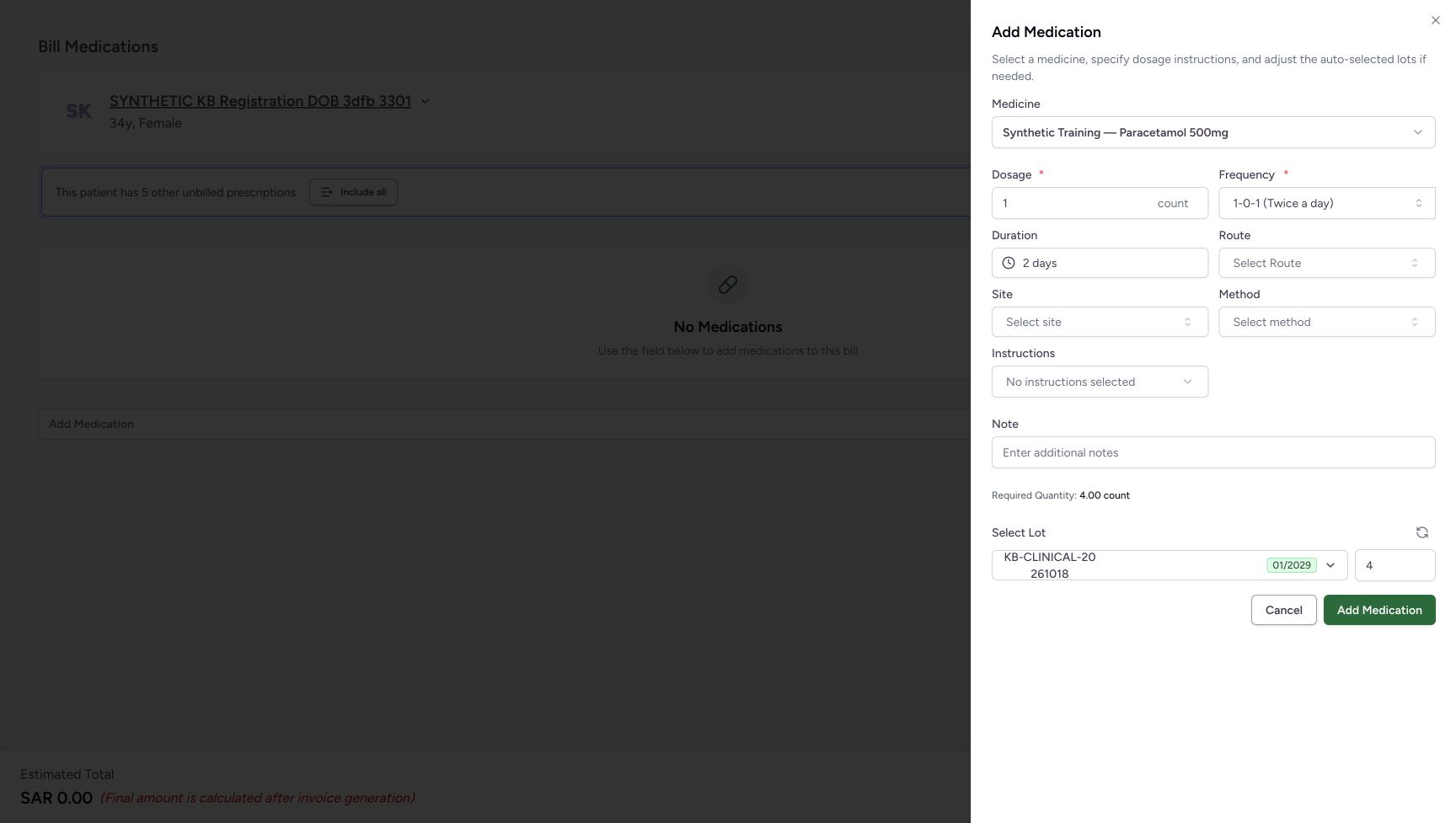
1234Check the two-day preset result
Capture details
Isolated synthetic frequency-pattern exercise with automatic quantities, local search and cancellation. No medicine is added and no bill is submitted.
Image SHA-256 3f22d9f53542c84f62b9a950fb38f03829a6eda4defdb38d21640f432aece6a6
- Check the selected frequency: The twice-a-day preset is unchanged.
- Check Duration: Duration is now 2 days.
- Read Required Quantity: The software estimate is now 4.00 count.
- Read the automatic lot quantity: The automatic lot quantity is now 4.
 1234
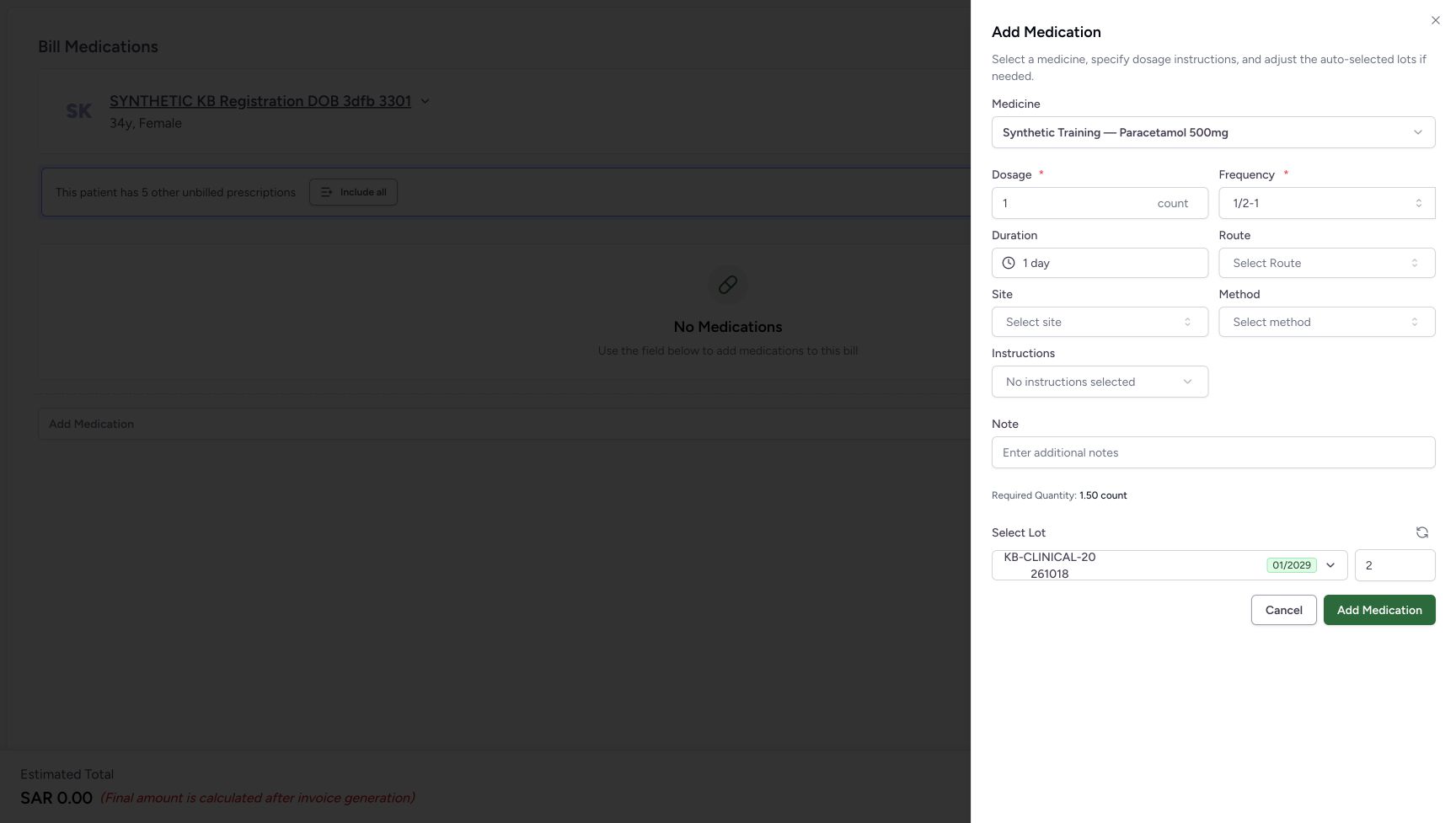
1234Separate fractional required count from whole lot quantity
Capture details
Isolated synthetic frequency-pattern exercise with automatic quantities, local search and cancellation. No medicine is added and no bill is submitted.
Image SHA-256 aec227ec18d33c8d5bfbccf36dc72388557d912e2e1400b5e410d923e7408e2a
- Check the selected frequency: The two-slot pattern remains 1/2-1.
- Check Duration: Duration is committed as 1 day.
- Read Required Quantity: The displayed required amount is 1.50 count.
- Read the automatic lot quantity: The automatic whole lot selection is 2, separate from the fractional required amount.
 12
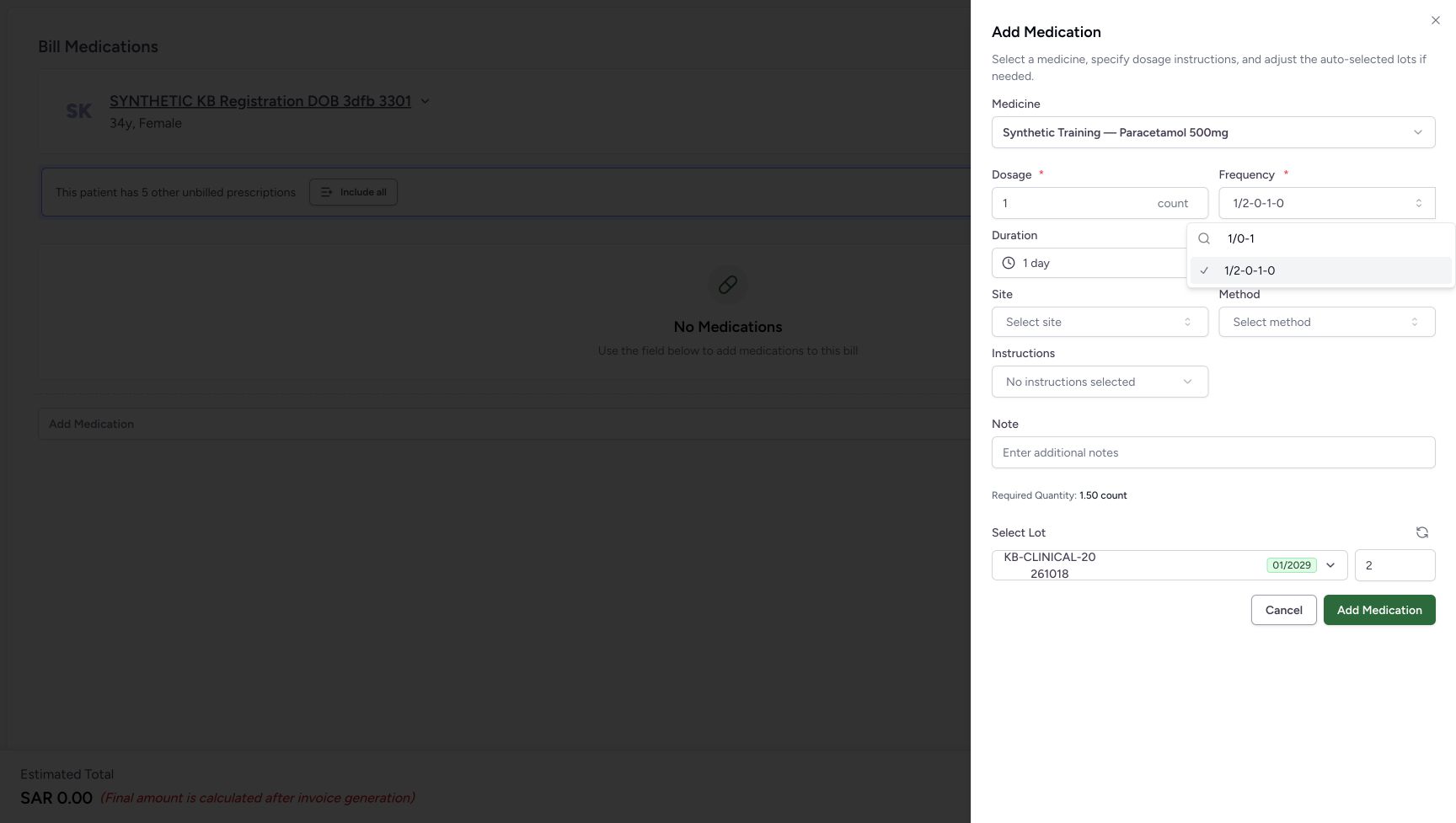
12Recognise an unavailable zero-denominator value
Capture details
Isolated synthetic frequency-pattern exercise with automatic quantities, local search and cancellation. No medicine is added and no bill is submitted.
Image SHA-256 1299aeec4eb22a0391c18e28cff77d6656c49c209c322af01355962a33f7f608
- Inspect the invalid zero denominator: 1/0-1 is search text, not a newly committed instruction.
- Recognise the retained valid option: The checked 1/2-0-1-0 is the previous selection, not acceptance of 1/0-1.
 123
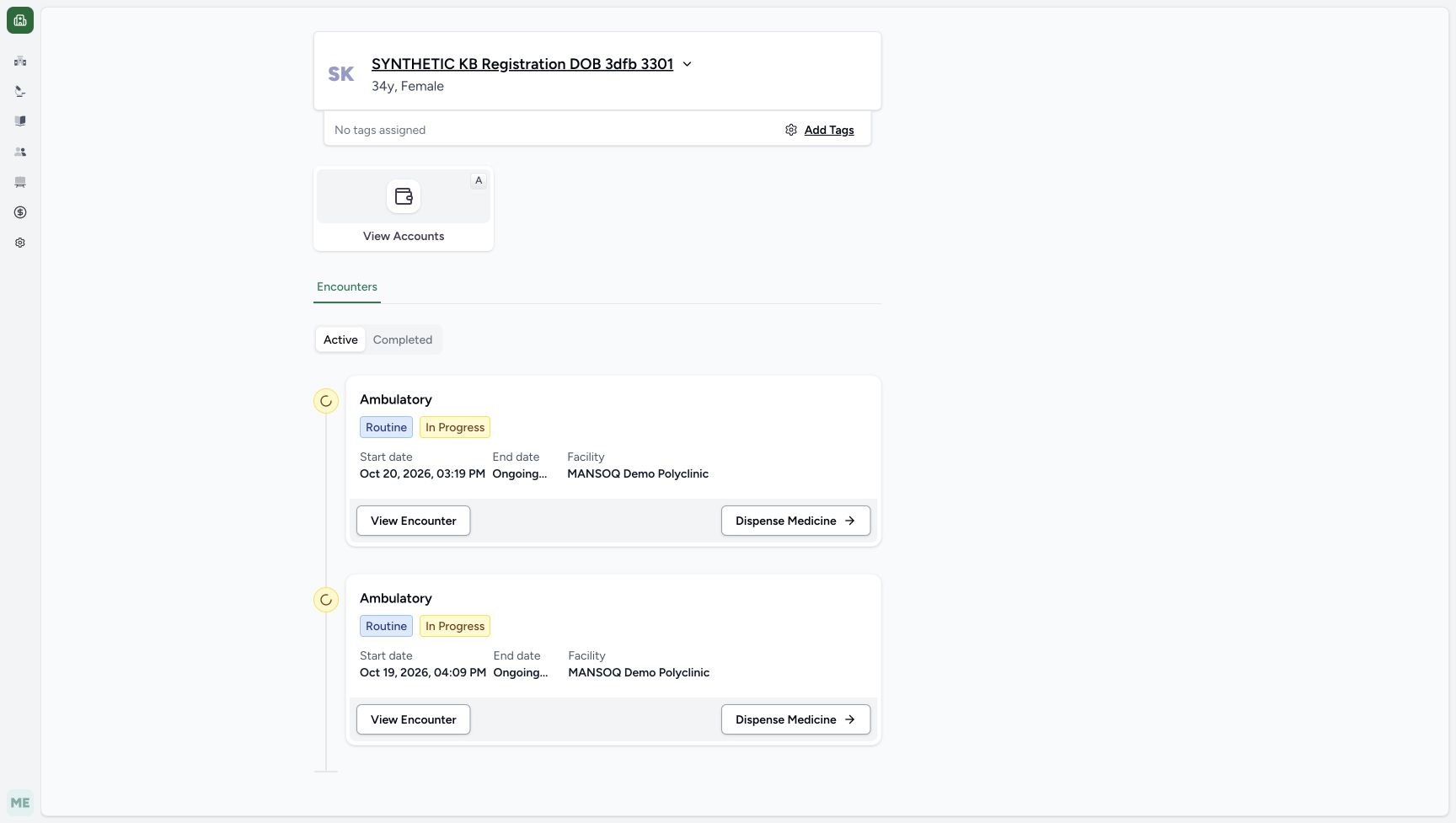
123Confirm the return to existing encounters
Capture details
Isolated synthetic frequency-pattern exercise with automatic quantities, local search and cancellation. No medicine is added and no bill is submitted.
Image SHA-256 44b479a7d3efbd617d57d21692b6293e1f55d0e2254cdce7c9e63490447650cc
- Verify the same patient: The cancellation returns to the existing patient home.
- Read the Active encounter list: The two original encounters remain available.
- Recognise the intended existing encounter: The Oct 20, 2026, 03:19 PM encounter remains in the list.
16 of 16 content blocks have reviewed image alignment.
Before you begin
- Use your assigned Pharmacist access and the intended existing encounter preparation. This isolated software exercise uses SYNTHETIC KB Registration DOB 3dfb 3301 at MANSOQ Demo Polyclinic / Main Pharmacy and Synthetic Training — Paracetamol 500mg. For the established entry and medicine selection, see Enter, check and remove a medicine before billing.
 123456
Recorded release 1e88a43b · 2026-10-21T05:18:31.818067+00:00 · 1728 × 977 Begin with an empty preparation
Capture details
Isolated synthetic frequency-pattern exercise with automatic quantities, local search and cancellation. No medicine is added and no bill is submitted.
Image SHA-256
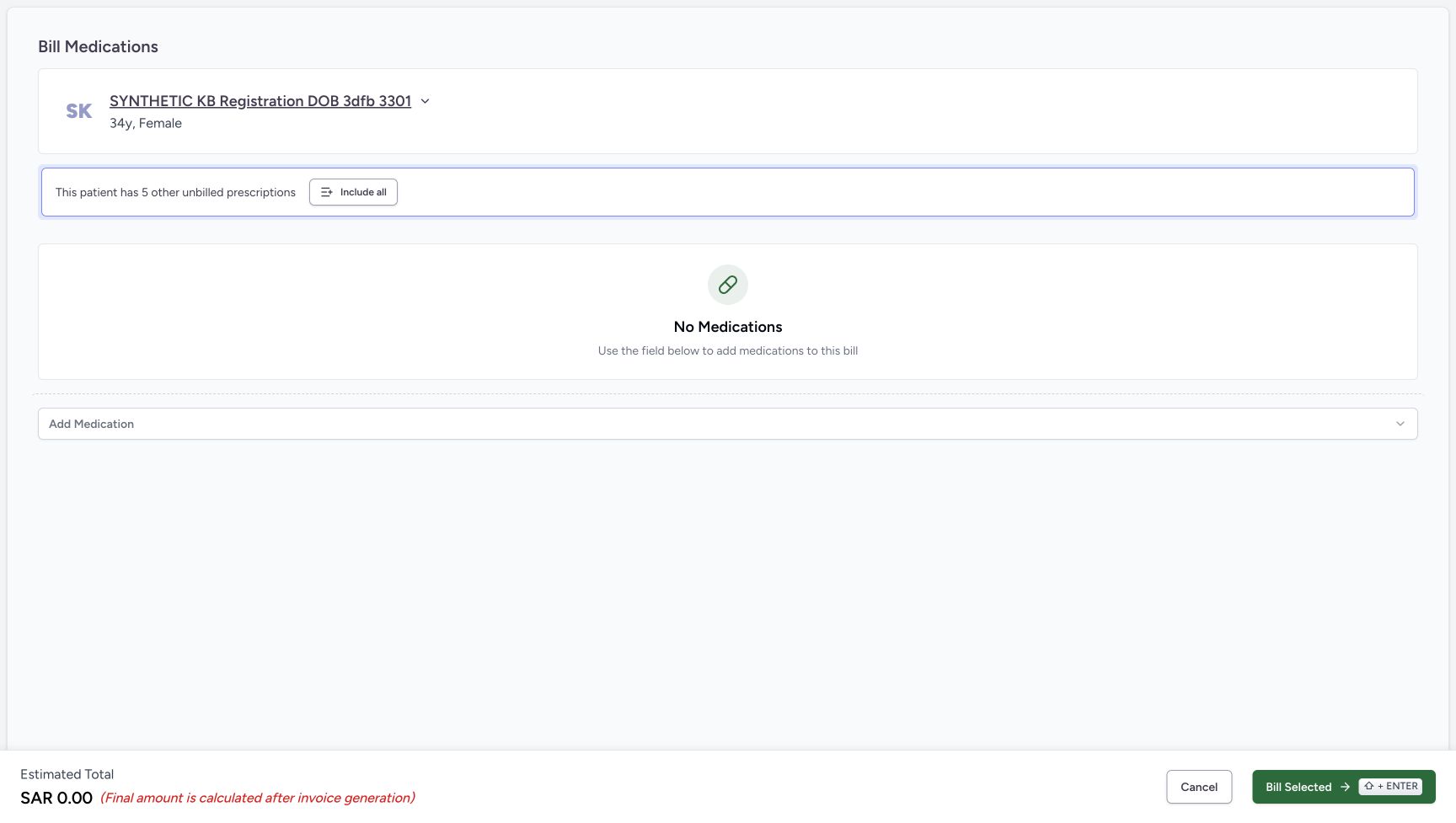
6a02e203d96273ee71722f2ab321be8cf24888e452d8ed26bdde169a877cb71a- Verify the intended patient: Check SYNTHETIC KB Registration DOB 3dfb 3301 before opening the medicine selector.
- Read No Medications: No medicine row has been added.
- Open Add Medication: Open the catalogue for this unsaved software exercise.
- Check the zero estimate: SAR 0.00 is the empty preparation estimate.
- Cancel the empty preparation: Use this footer Cancel after discarding the medicine sheet.
- Leave Bill Selected unused: This exercise does not create a bill or save a dispensing order.
 12
12Recorded release 1e88a43b · 2026-10-21T05:18:38.130835+00:00 · 1728 × 977 Choose the existing synthetic medicine
Capture details
Isolated synthetic frequency-pattern exercise with automatic quantities, local search and cancellation. No medicine is added and no bill is submitted.
Image SHA-256
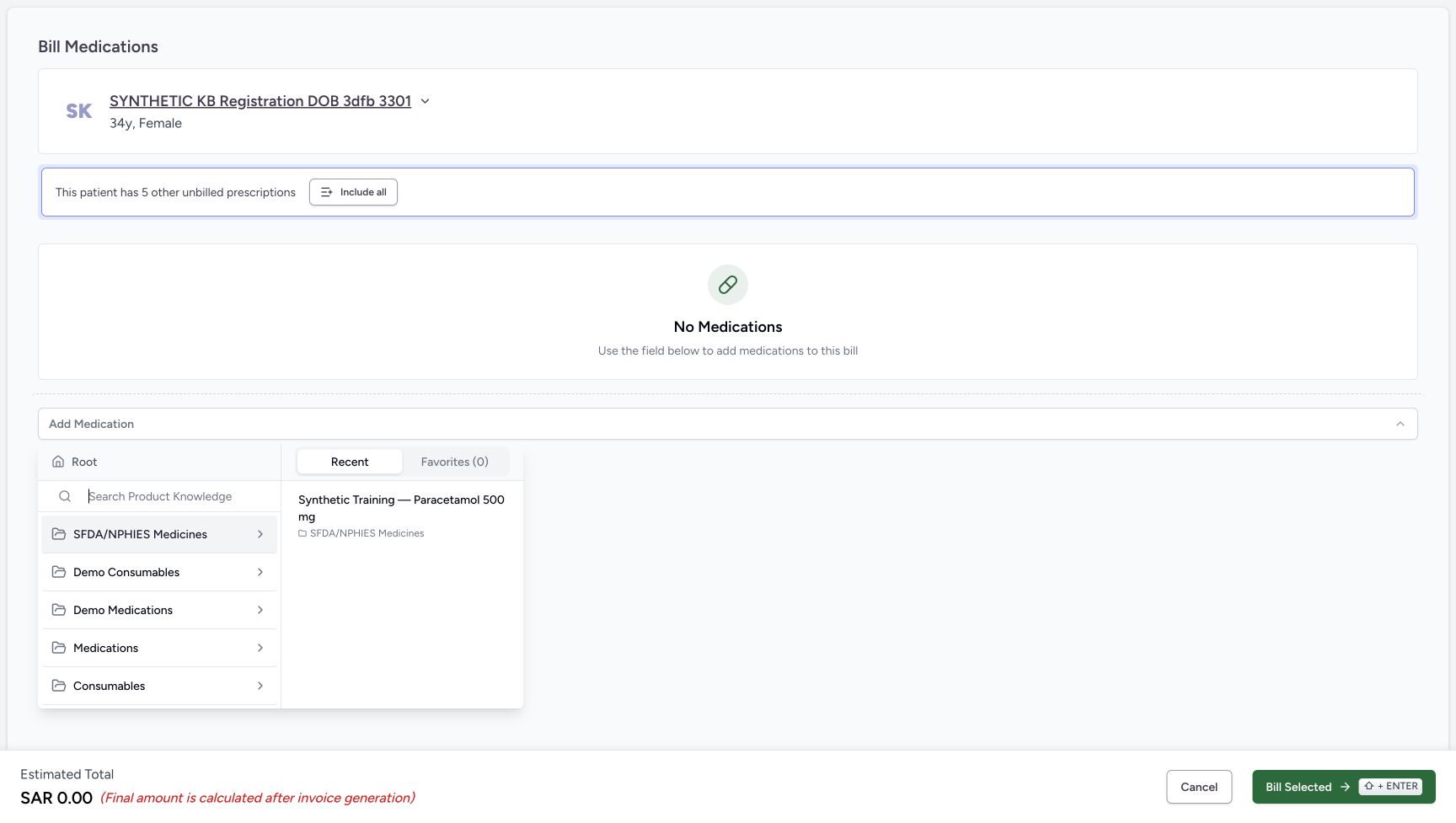
438b680d38b53b49c4d7f701310750d7a0c36f2649beb4a63a2244f3cfdcbe99- Use Recent: The previously used fictional medicine is available here.
- Select Synthetic Training — Paracetamol 500mg: Verify this full name before selecting the row.
- Keep dosage at 1 count and keep automatic lot selection for the comparisons below. The example values demonstrate software behavior, not a patient regimen. Review real instructions through your approved clinical process. For committing a Duration option and the separate range/date modes, see Set a medicine duration, range and fixed dates. The linked entry and duration guides illustrate shared controls from earlier versions; use the frequency screens in this lesson for these comparisons. Do not choose the medicine sheet’s Add Medication button or the preparation’s Bill Selected button in this exercise.
 12345
12345Recorded release 1e88a43b · 2026-10-21T05:18:42.613000+00:00 · 1728 × 977 Check the starting frequency and dose
Capture details
Isolated synthetic frequency-pattern exercise with automatic quantities, local search and cancellation. No medicine is added and no bill is submitted.
Image SHA-256
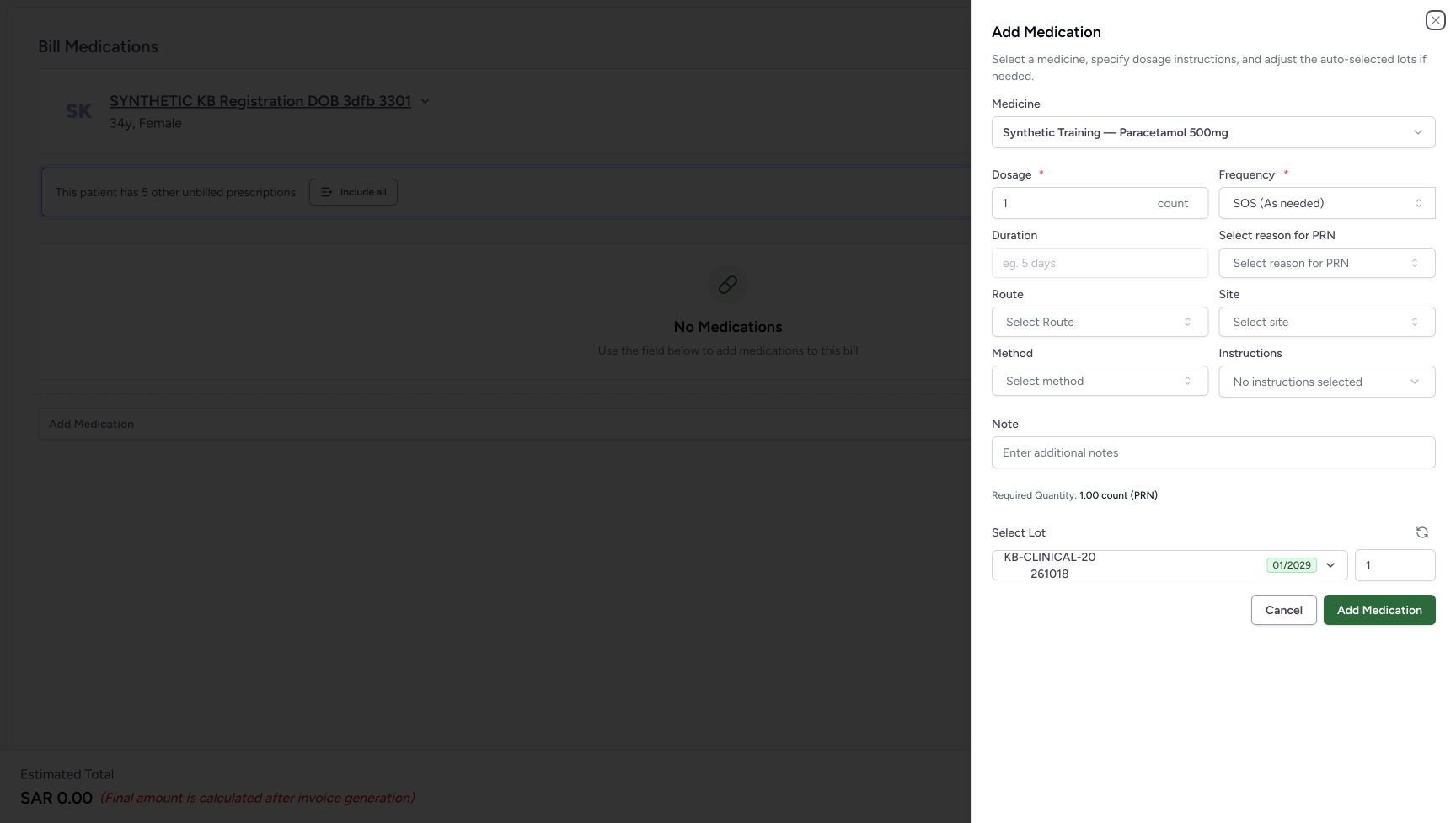
20200b4b521e2eac2e216dc629e91bca2470d2a9d4782cc22fe69aa24e843918- Keep dosage 1 count: All frequency comparisons use this unchanged software test value.
- Open Frequency: The current selection is SOS (As needed).
- Notice the disabled empty Duration: The starting SOS selection has no course duration.
- Read the initial required quantity: The displayed as-needed estimate is 1.00 count.
- Read the initial lot quantity: The automatic lot quantity is 1.
 1234
1234Recorded release 1e88a43b · 2026-10-21T05:19:20.399891+00:00 · 1728 × 977 Review STAT’s retained duration carefully
Capture details
Isolated synthetic frequency-pattern exercise with automatic quantities, local search and cancellation. No medicine is added and no bill is submitted.
Image SHA-256
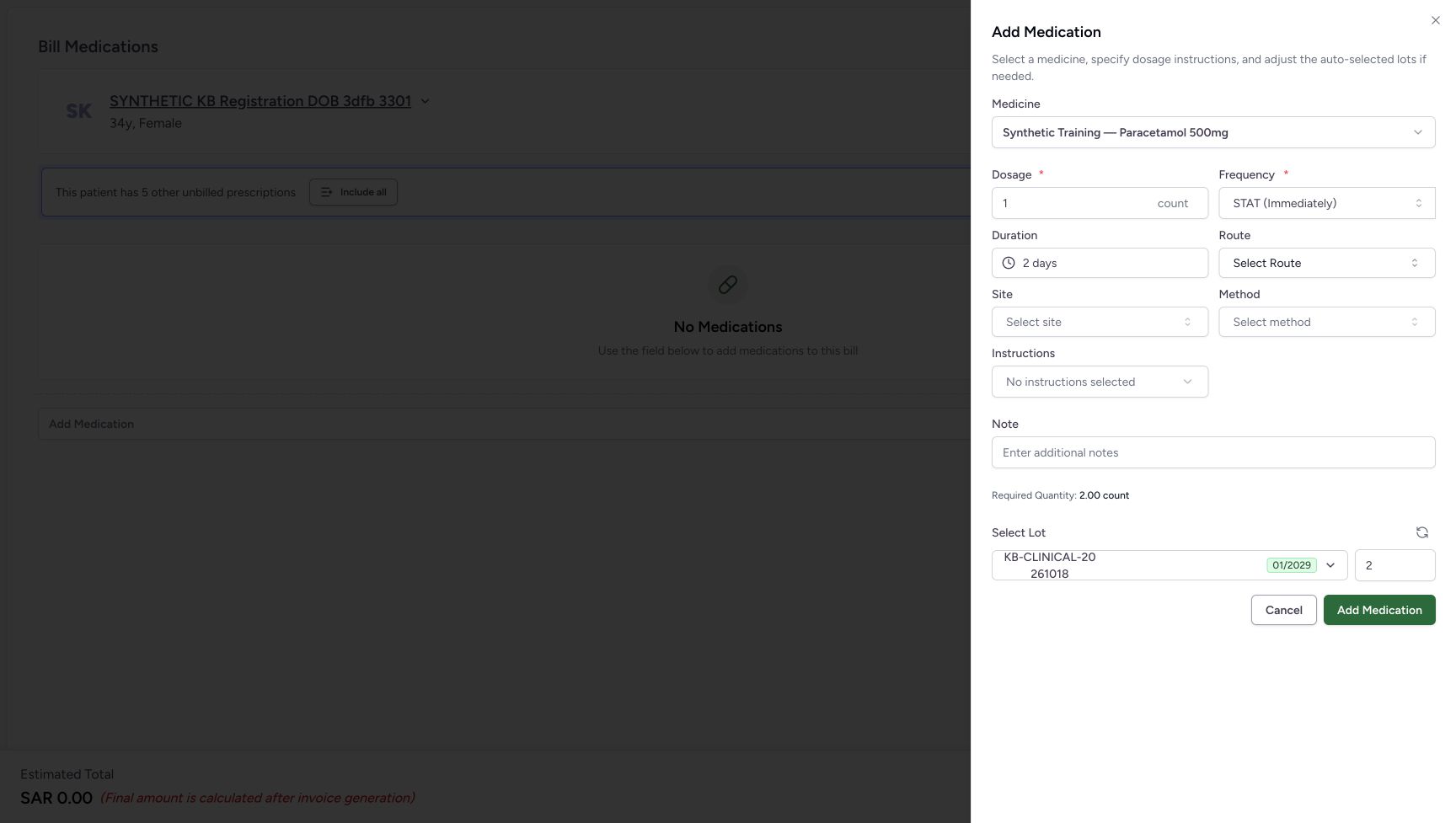
c75350bc7b79ccbe8ea6bbe03997306d5473ece0435253989e8bf6cdf60bba50- Check the selected frequency: STAT (Immediately) is selected.
- Check Duration: The earlier 2 days are still present; review them against the approved instructions.
- Read Required Quantity: The displayed estimate is 2.00 count.
- Read the automatic lot quantity: The automatic whole lot quantity is 2.
1. Open the synthetic medicine without adding it
Verify the patient on the empty Bill Medications screen, then choose Add Medication. In Recent, select Synthetic Training — Paracetamol 500mg. Wait for the sheet and check dosage 1 count, Frequency SOS (As needed), the disabled empty Duration field and automatic lot quantity 1. Leave the other medicine fields unchanged.
123456Begin with an empty preparation
Capture details
Isolated synthetic frequency-pattern exercise with automatic quantities, local search and cancellation. No medicine is added and no bill is submitted.
Image SHA-256 6a02e203d96273ee71722f2ab321be8cf24888e452d8ed26bdde169a877cb71a
- Verify the intended patient: Check SYNTHETIC KB Registration DOB 3dfb 3301 before opening the medicine selector.
- Read No Medications: No medicine row has been added.
- Open Add Medication: Open the catalogue for this unsaved software exercise.
- Check the zero estimate: SAR 0.00 is the empty preparation estimate.
- Cancel the empty preparation: Use this footer Cancel after discarding the medicine sheet.
- Leave Bill Selected unused: This exercise does not create a bill or save a dispensing order.
12Choose the existing synthetic medicine
Capture details
Isolated synthetic frequency-pattern exercise with automatic quantities, local search and cancellation. No medicine is added and no bill is submitted.
Image SHA-256 438b680d38b53b49c4d7f701310750d7a0c36f2649beb4a63a2244f3cfdcbe99
- Use Recent: The previously used fictional medicine is available here.
- Select Synthetic Training — Paracetamol 500mg: Verify this full name before selecting the row.
12345Check the starting frequency and dose
Capture details
Isolated synthetic frequency-pattern exercise with automatic quantities, local search and cancellation. No medicine is added and no bill is submitted.
Image SHA-256 20200b4b521e2eac2e216dc629e91bca2470d2a9d4782cc22fe69aa24e843918
- Keep dosage 1 count: All frequency comparisons use this unchanged software test value.
- Open Frequency: The current selection is SOS (As needed).
- Notice the disabled empty Duration: The starting SOS selection has no course duration.
- Read the initial required quantity: The displayed as-needed estimate is 1.00 count.
- Read the initial lot quantity: The automatic lot quantity is 1.
2. Select the exact preset and commit a two-day duration
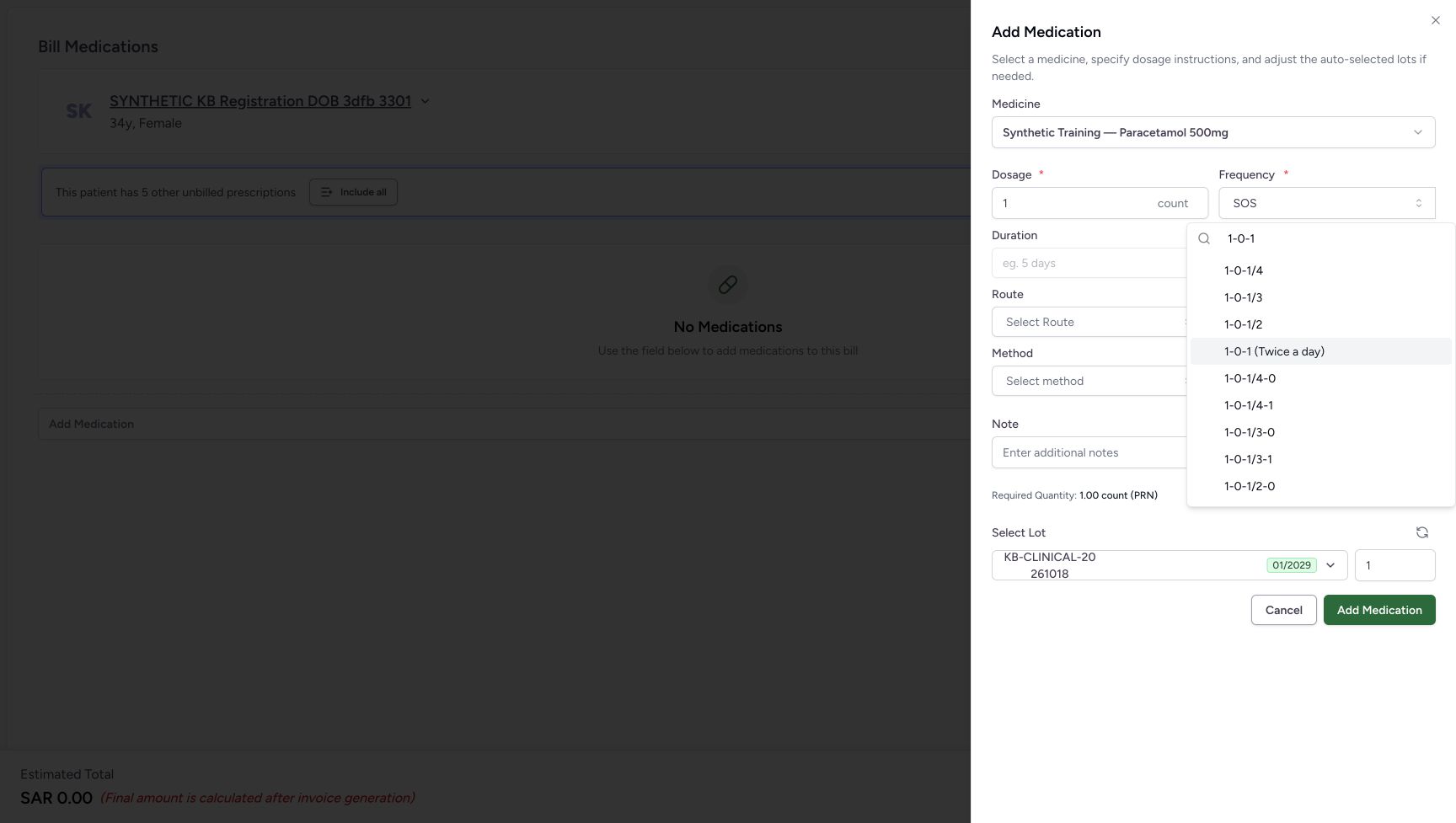
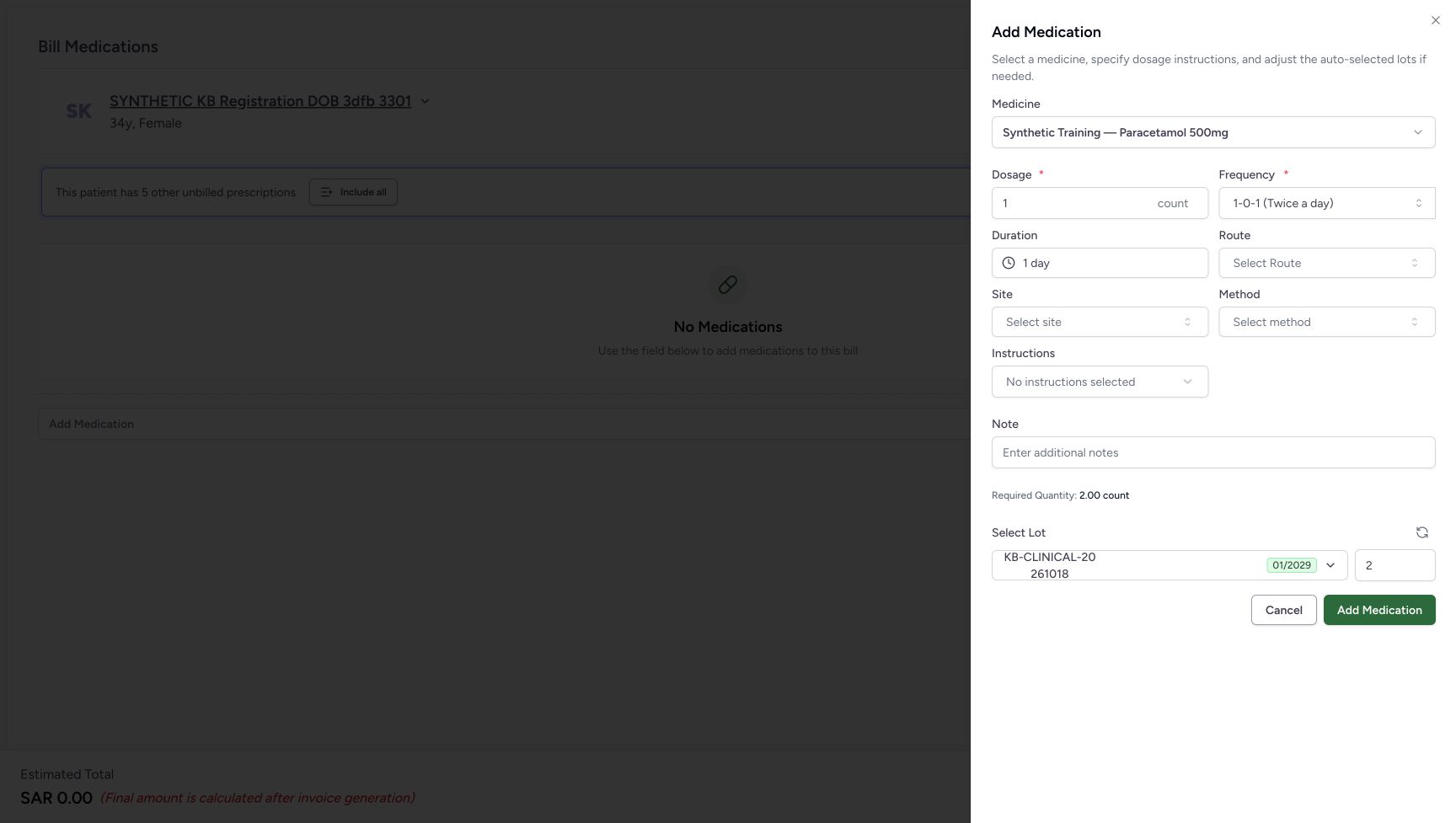
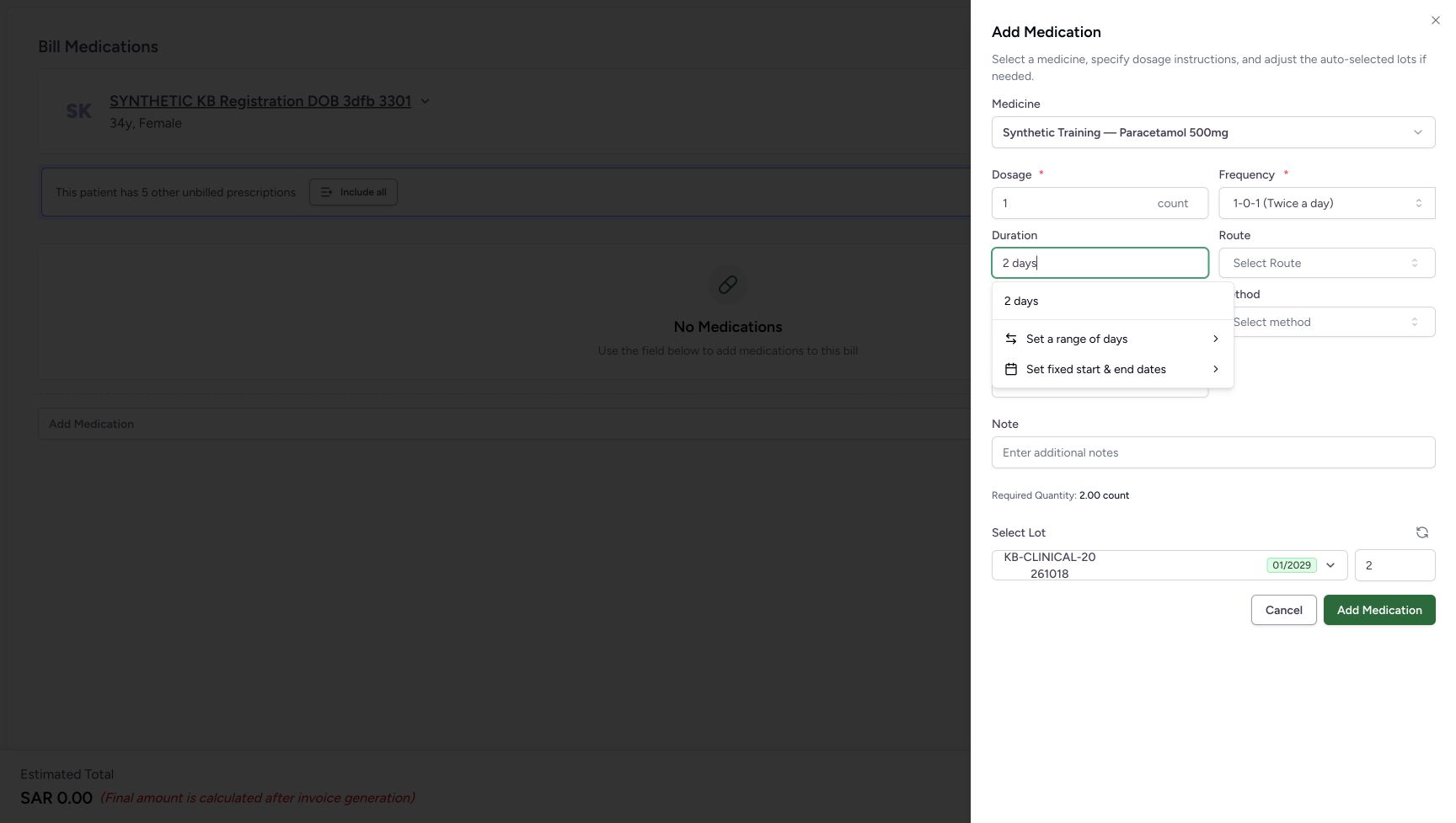
Open Frequency and search 1-0-1. Choose the exact 1-0-1 (Twice a day) result rather than a longer completion. The selected preset supplies Duration 1 day, Required Quantity 2.00 count and lot quantity 2. Enter 2 days in Duration and choose the matching 2 days option. Once it is selected, verify Duration 2 days, Required Quantity 4.00 count and lot quantity 4.
 12
12Choose the exact twice-a-day preset
Capture details
Isolated synthetic frequency-pattern exercise with automatic quantities, local search and cancellation. No medicine is added and no bill is submitted.
Image SHA-256 6a0f7fadd654f2b20360bef1e06b64d6a84e3576aa1b0227be65b8d527b8f9b3
- Enter the frequency search: Type 1-0-1, then inspect the complete option label.
- Choose 1-0-1 (Twice a day): Choose the exact displayed option rather than a longer suggested completion.
 1234
1234Check the preset’s initial duration
Capture details
Isolated synthetic frequency-pattern exercise with automatic quantities, local search and cancellation. No medicine is added and no bill is submitted.
Image SHA-256 a7ace5465d91f201c1271f22449e7c4bcf99d39a2f34bca27580bc63f6fe3bae
- Check the selected frequency: 1-0-1 (Twice a day) is selected.
- Check Duration: The preset has supplied 1 day.
- Read Required Quantity: The software estimate is 2.00 count.
- Read the automatic lot quantity: The automatic whole lot quantity is 2.
 12
12Commit the two-day Duration option
Capture details
Isolated synthetic frequency-pattern exercise with automatic quantities, local search and cancellation. No medicine is added and no bill is submitted.
Image SHA-256 c97a30bb2d706bf9e3ac0b73e4215f3d8849fe7c74c4c9f6f00098520ef5d21b
- Enter 2 days in Duration: Typing is not the same as choosing the duration option.
- Select 2 days: Commit the matching option to update the course estimate.
1234Check the two-day preset result
Capture details
Isolated synthetic frequency-pattern exercise with automatic quantities, local search and cancellation. No medicine is added and no bill is submitted.
Image SHA-256 3f22d9f53542c84f62b9a950fb38f03829a6eda4defdb38d21640f432aece6a6
- Check the selected frequency: The twice-a-day preset is unchanged.
- Check Duration: Duration is now 2 days.
- Read Required Quantity: The software estimate is now 4.00 count.
- Read the automatic lot quantity: The automatic lot quantity is now 4.
3. Check the retained duration when choosing coded options
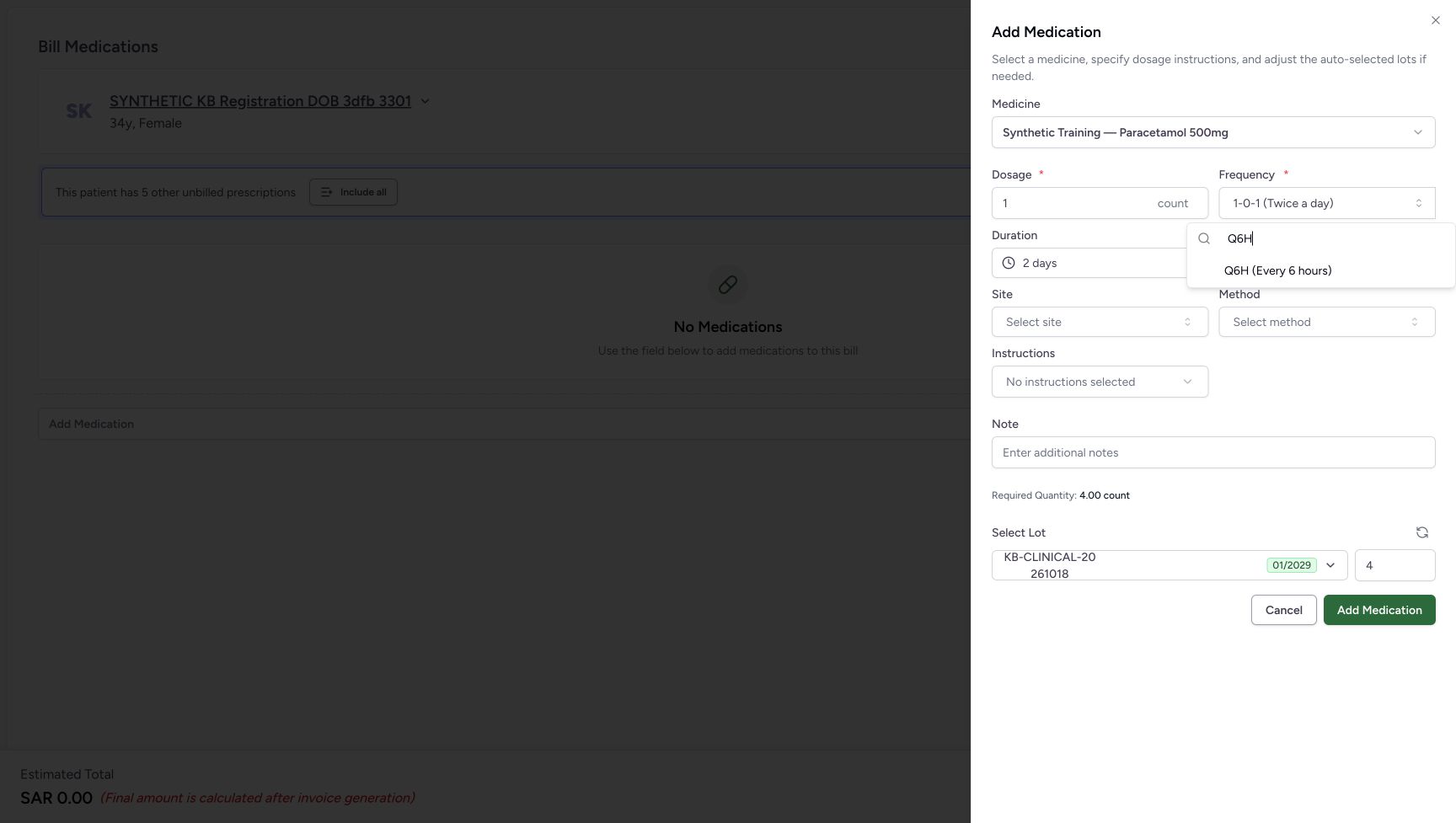
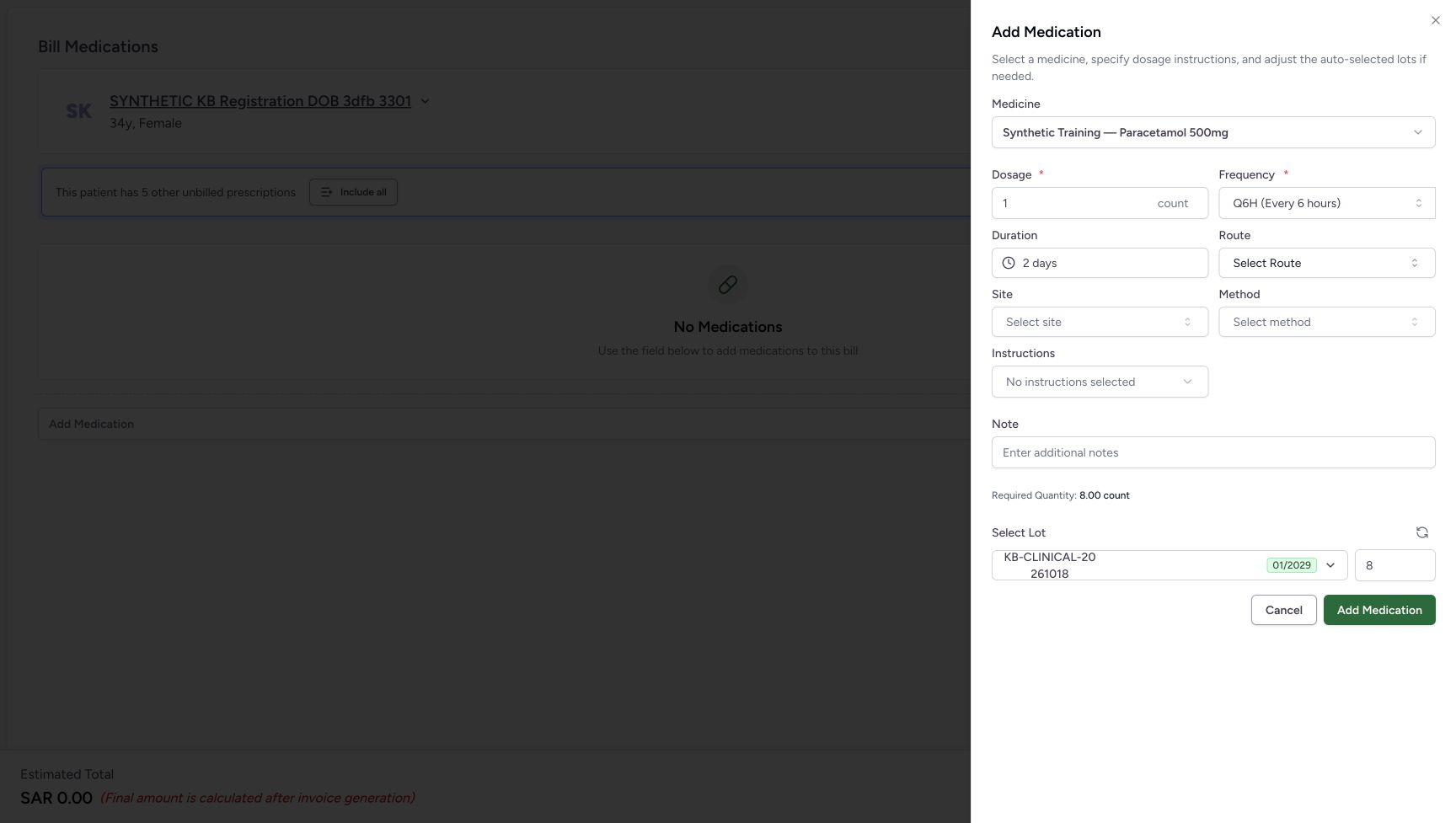
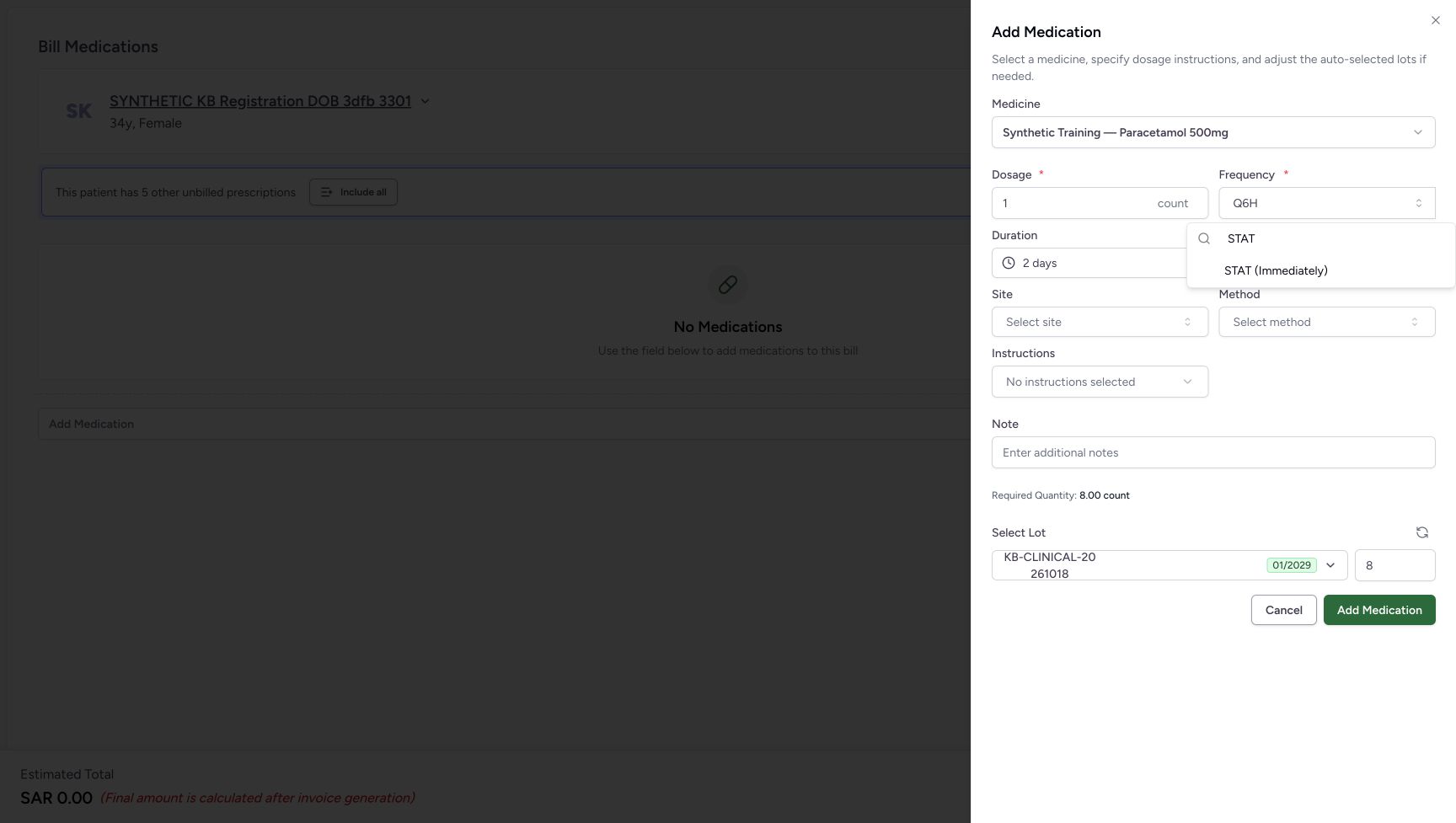
Open Frequency, search Q6H and select Q6H (Every 6 hours). The existing 2 days remain, and this software example shows Required Quantity 8.00 count and lot quantity 8. Next search STAT and select STAT (Immediately). The same 2 days remain; Required Quantity becomes 2.00 count and lot quantity 2. Review the frequency and retained Duration together against the approved instructions before any real save. The word Immediately does not automatically clear the earlier course duration in this control.
 12
12Find the coded Q6H option
Capture details
Isolated synthetic frequency-pattern exercise with automatic quantities, local search and cancellation. No medicine is added and no bill is submitted.
Image SHA-256 176e851cd2b6d6ca75f0d3600b6e71eba73e9856ba6437b5692d704d1c724d76
- Enter the frequency search: Type Q6H without assuming that typing changes the selection.
- Select Q6H (Every 6 hours): Choose the exact displayed option rather than a longer suggested completion.
 1234
1234Read Q6H with the retained duration
Capture details
Isolated synthetic frequency-pattern exercise with automatic quantities, local search and cancellation. No medicine is added and no bill is submitted.
Image SHA-256 e4d1768785c074ba59ac4713ee8d4e3b7671c30f7a16687da3c643ca70cfe2fe
- Check the selected frequency: Q6H (Every 6 hours) is selected.
- Check Duration: The existing 2 days have been retained.
- Read Required Quantity: The displayed software estimate is 8.00 count.
- Read the automatic lot quantity: The automatic lot quantity is 8.
 12
12Find the coded STAT option
Capture details
Isolated synthetic frequency-pattern exercise with automatic quantities, local search and cancellation. No medicine is added and no bill is submitted.
Image SHA-256 b3797103115c252a77ce3b9cf1809b8c08ccdb941340053a264116cfc015d023
- Enter the frequency search: Type STAT and inspect the exact matching option.
- Select STAT (Immediately): Choose the exact displayed option rather than a longer suggested completion.
1234Review STAT’s retained duration carefully
Capture details
Isolated synthetic frequency-pattern exercise with automatic quantities, local search and cancellation. No medicine is added and no bill is submitted.
Image SHA-256 c75350bc7b79ccbe8ea6bbe03997306d5473ece0435253989e8bf6cdf60bba50
- Check the selected frequency: STAT (Immediately) is selected.
- Check Duration: The earlier 2 days are still present; review them against the approved instructions.
- Read Required Quantity: The displayed estimate is 2.00 count.
- Read the automatic lot quantity: The automatic whole lot quantity is 2.
4. Set a two-slot fractional pattern and reselect Duration
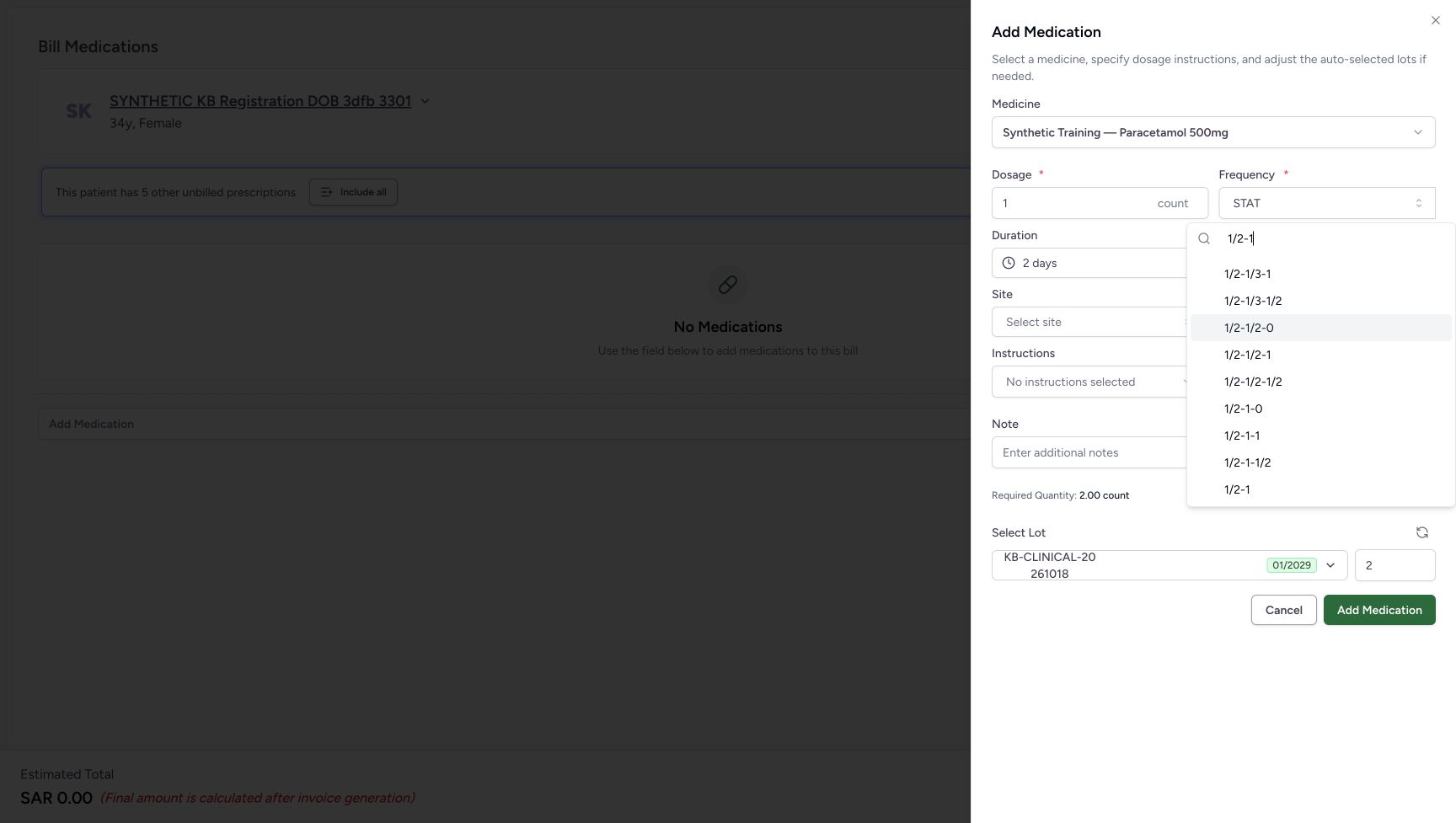
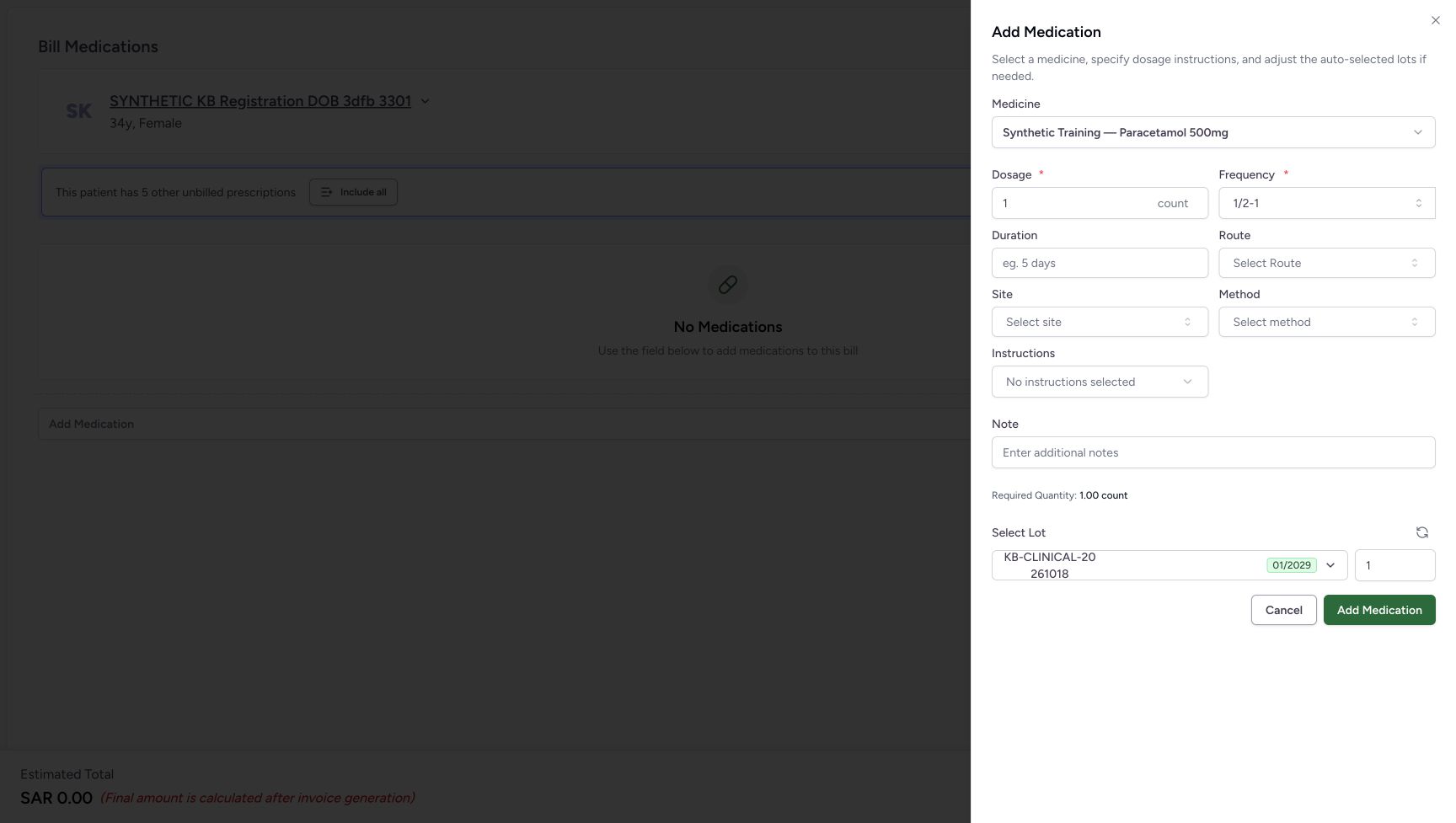
Search 1/2-1. Scroll inside the Frequency suggestions until the exact two-slot 1/2-1 result is visible at the bottom; do not choose the highlighted longer 1/2-1/2-0 completion. The selected custom pattern clears Duration, and the current required estimate falls back to 1.00 count with lot quantity 1. Enter 1 day in Duration and choose its matching option. Verify the pattern remains 1/2-1, Duration is 1 day, Required Quantity is 1.50 count and the automatic whole lot quantity is 2.
 12
12Select the exact two-slot fractional pattern
Capture details
Isolated synthetic frequency-pattern exercise with automatic quantities, local search and cancellation. No medicine is added and no bill is submitted.
Image SHA-256 9e49d428ffc8f146804dacd3f8070f88cdc79947a104654a2becd39219515159
- Enter the frequency search: Type 1/2-1 and distinguish the exact result from longer completions.
- Select the exact 1/2-1 option: Choose the exact displayed option rather than a longer suggested completion.
 1234
1234Check that the custom pattern cleared Duration
Capture details
Isolated synthetic frequency-pattern exercise with automatic quantities, local search and cancellation. No medicine is added and no bill is submitted.
Image SHA-256 350153848cd8d0c5c371b674f80ea1372ff0c54da2aae5d9a63e9184685a8276
- Check the selected frequency: The exact custom 1/2-1 pattern is selected.
- Check Duration: Duration has cleared; the previous 2 days have not been retained.
- Read Required Quantity: Without a course duration, this display falls back to 1.00 count.
- Read the automatic lot quantity: The current automatic lot quantity is 1.
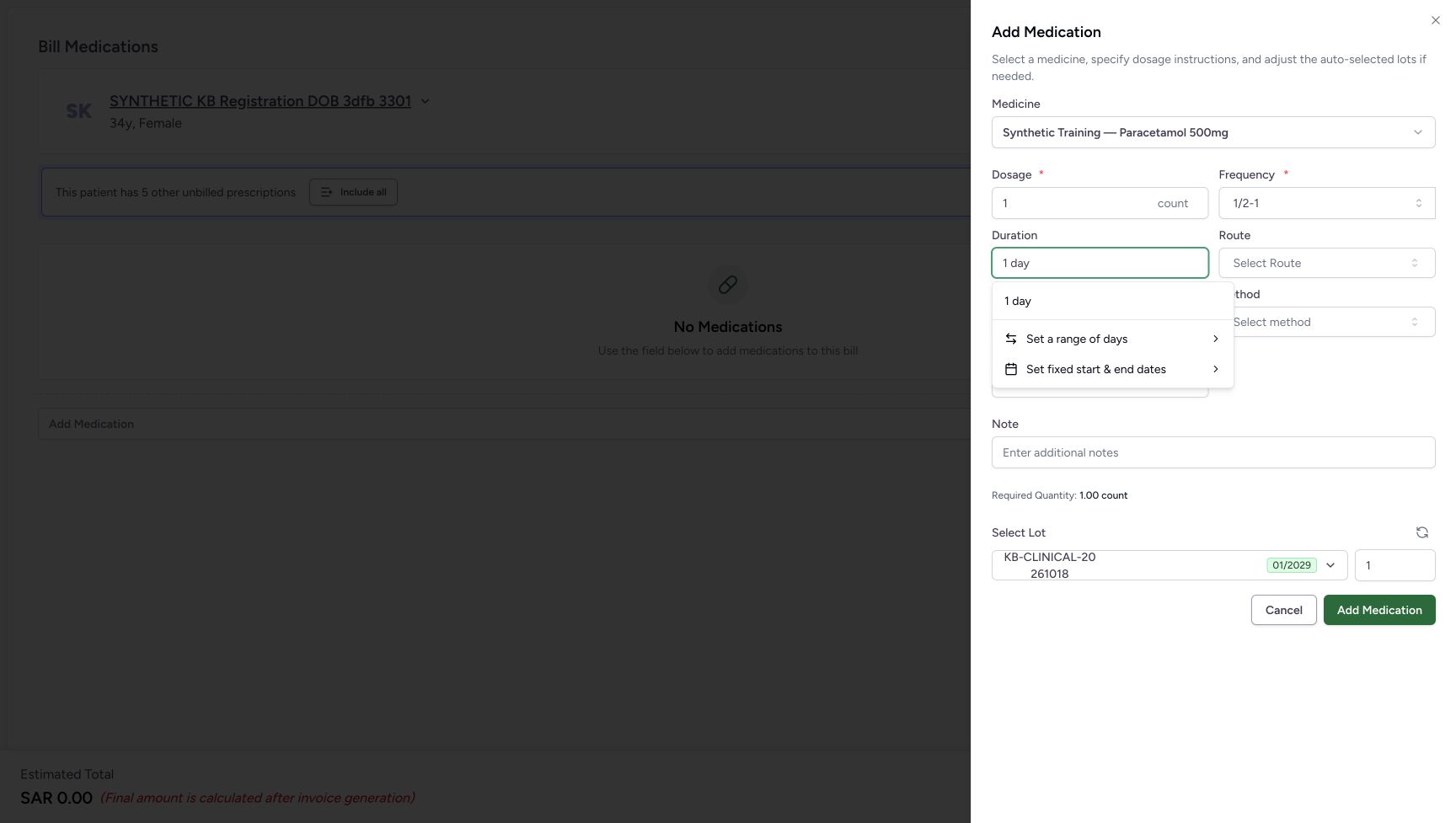 12
12Choose one day for the custom pattern
Capture details
Isolated synthetic frequency-pattern exercise with automatic quantities, local search and cancellation. No medicine is added and no bill is submitted.
Image SHA-256 3a4431200bbec3b92e8bfd3033c62ca501b49d88a76d8824da6cf0d3d8a9f4e6
- Enter 1 day in Duration: Use the same duration control after selecting the custom pattern.
- Select 1 day: Commit the matching option; do not leave only the search text.
1234Separate fractional required count from whole lot quantity
Capture details
Isolated synthetic frequency-pattern exercise with automatic quantities, local search and cancellation. No medicine is added and no bill is submitted.
Image SHA-256 aec227ec18d33c8d5bfbccf36dc72388557d912e2e1400b5e410d923e7408e2a
- Check the selected frequency: The two-slot pattern remains 1/2-1.
- Check Duration: Duration is committed as 1 day.
- Read Required Quantity: The displayed required amount is 1.50 count.
- Read the automatic lot quantity: The automatic whole lot selection is 2, separate from the fractional required amount.
5. Compare a three-slot custom pattern
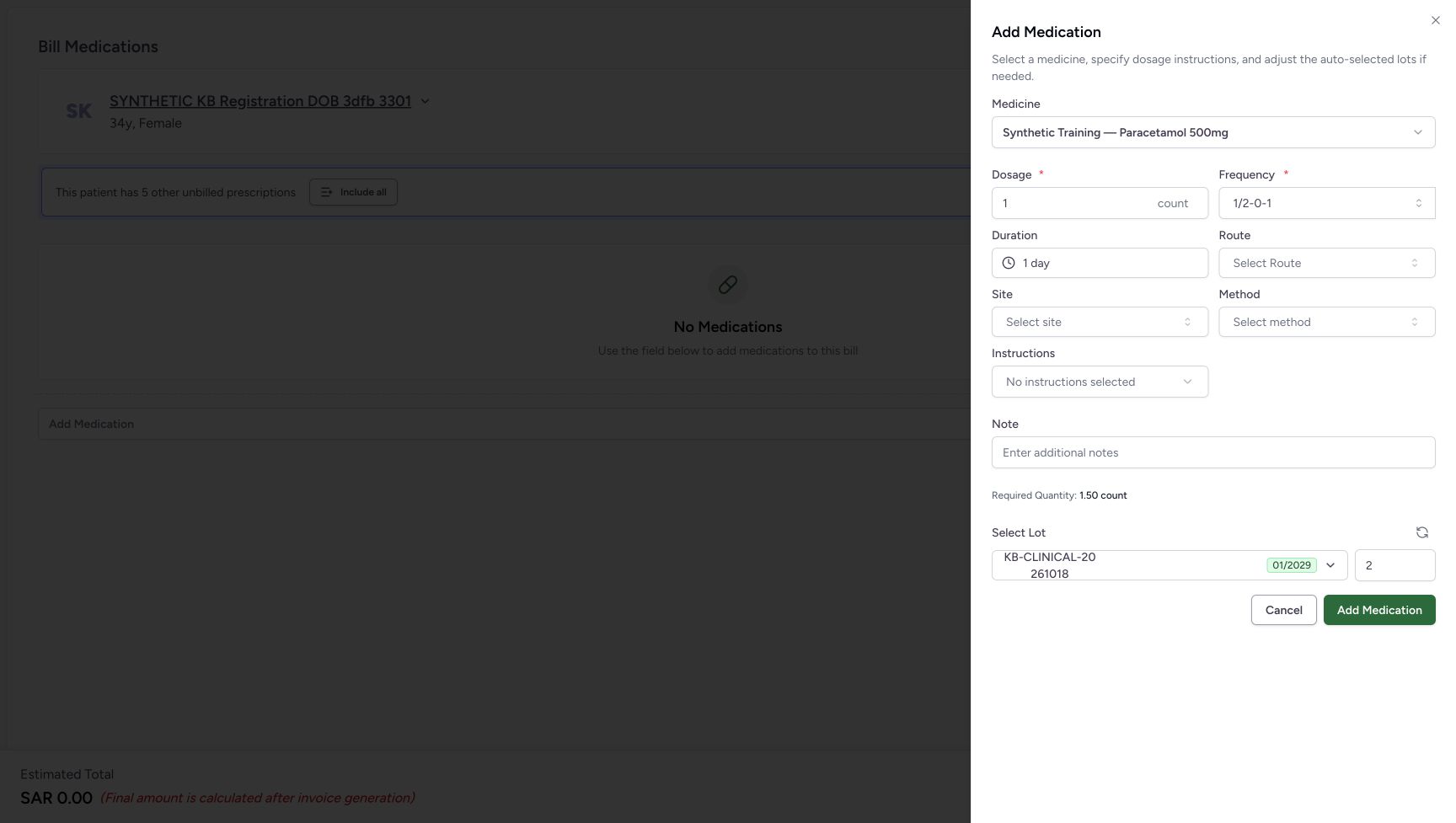
Search 1/2-0-1 and select its exact three-slot option. Check that Duration clears again and the undated estimate returns to 1.00 count with lot quantity 1. Enter 1 day in Duration and select the matching option. The selected pattern with that duration displays Required Quantity 1.50 count and automatic lot quantity 2. The zero slot is valid because the complete pattern has a positive total.
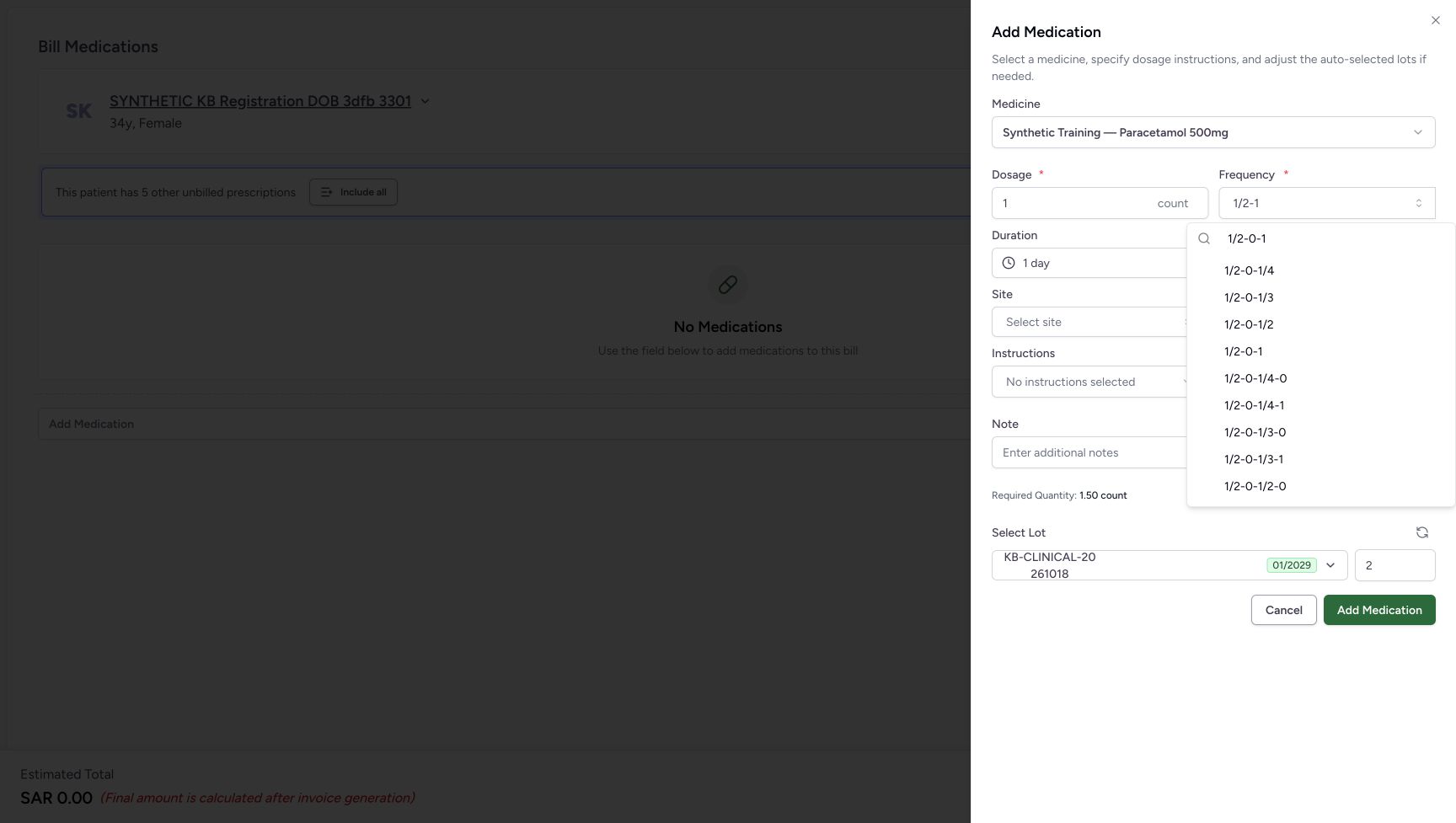 12
12Select the exact three-slot fractional pattern
Capture details
Isolated synthetic frequency-pattern exercise with automatic quantities, local search and cancellation. No medicine is added and no bill is submitted.
Image SHA-256 8418f7c200486cbc9e0f252e63d7add959344c2a126e5a1c7828db3dade3af2a
- Enter the frequency search: Type 1/2-0-1, then inspect its exact label.
- Select the exact 1/2-0-1 option: Choose the exact displayed option rather than a longer suggested completion.
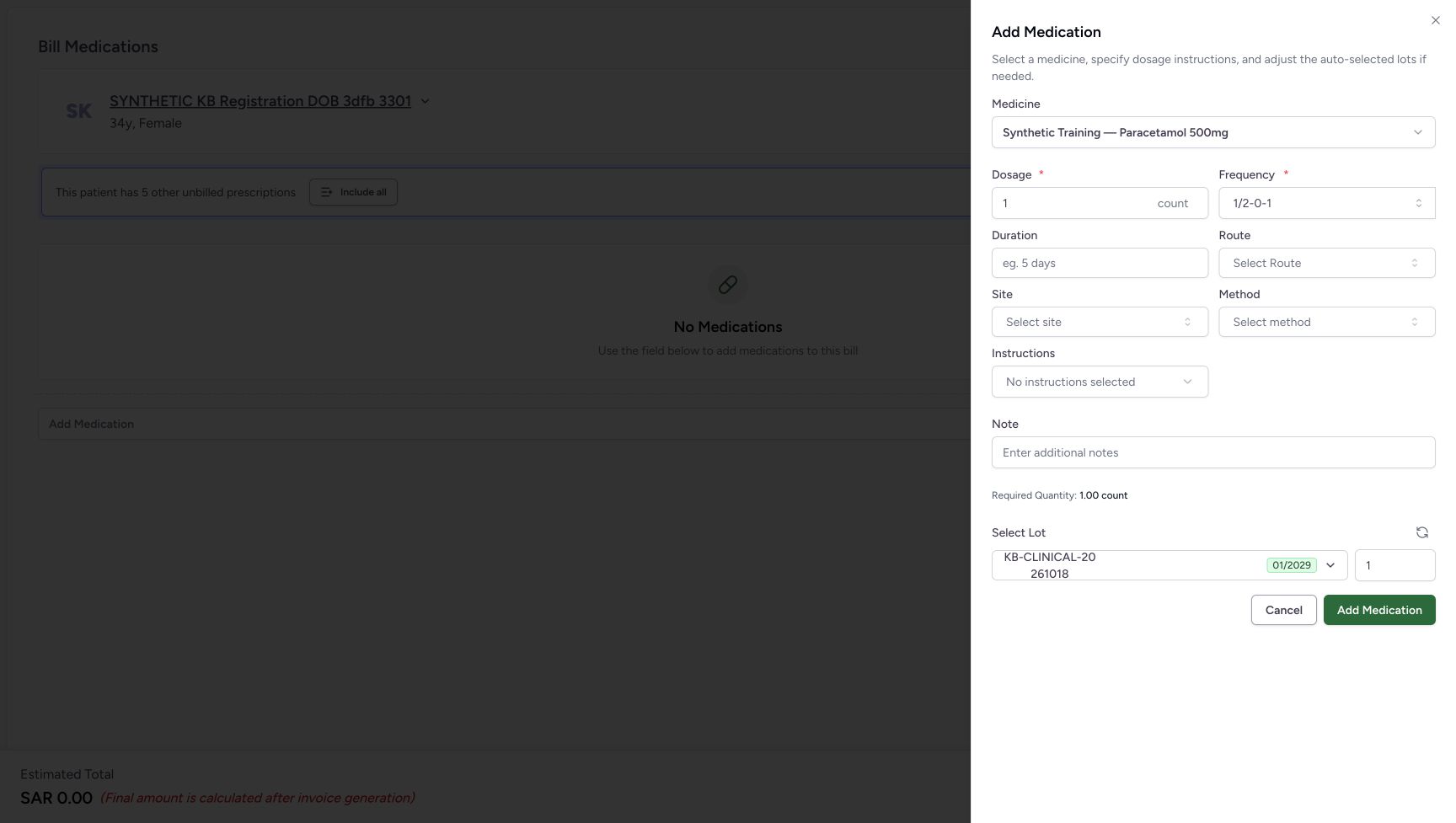 1234
1234Check the three-slot Duration reset
Capture details
Isolated synthetic frequency-pattern exercise with automatic quantities, local search and cancellation. No medicine is added and no bill is submitted.
Image SHA-256 d44d71a76a67c4baad4cbe5d504e9247cf79bfdf0d14608c5f4fffa7bf3c41e3
- Check the selected frequency: The exact three-slot 1/2-0-1 pattern is selected.
- Check Duration: Duration is empty again.
- Read Required Quantity: The temporary fallback estimate is 1.00 count.
- Read the automatic lot quantity: The automatic whole lot quantity is 1.
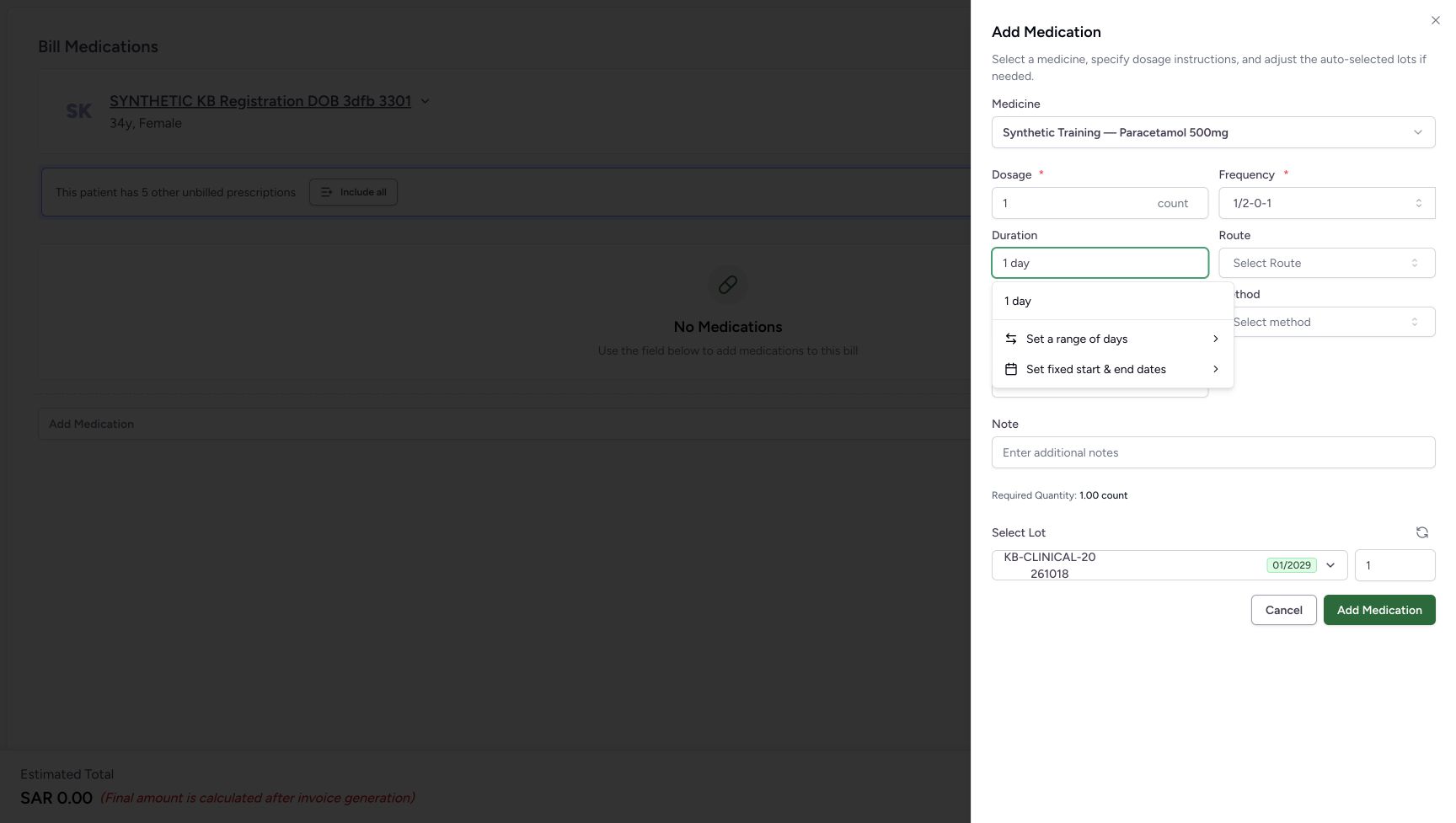 123
123Choose one day for the three-slot pattern
Capture details
Isolated synthetic frequency-pattern exercise with automatic quantities, local search and cancellation. No medicine is added and no bill is submitted.
Image SHA-256 a604c490492bc902dafd611355d4bbcd861c45d8fe6d0a1a81018a0e07803b39
- Check the selected custom pattern: This separate example uses 1/2-0-1.
- Enter 1 day in Duration: The text is a duration search until its matching option is selected.
- Select 1 day: Commit this matching option for the displayed custom pattern.
 1234
1234Read the three-slot one-day result
Capture details
Isolated synthetic frequency-pattern exercise with automatic quantities, local search and cancellation. No medicine is added and no bill is submitted.
Image SHA-256 b7a5549820286fa24d3d3f84e93f1f596e5ce90d54dad4c394fab90e1341ddad
- Check the selected frequency: The three-slot pattern remains selected.
- Check Duration: Duration is 1 day.
- Read Required Quantity: The required amount is 1.50 count.
- Read the automatic lot quantity: The automatic whole lot quantity is 2.
6. Compare a four-slot custom pattern
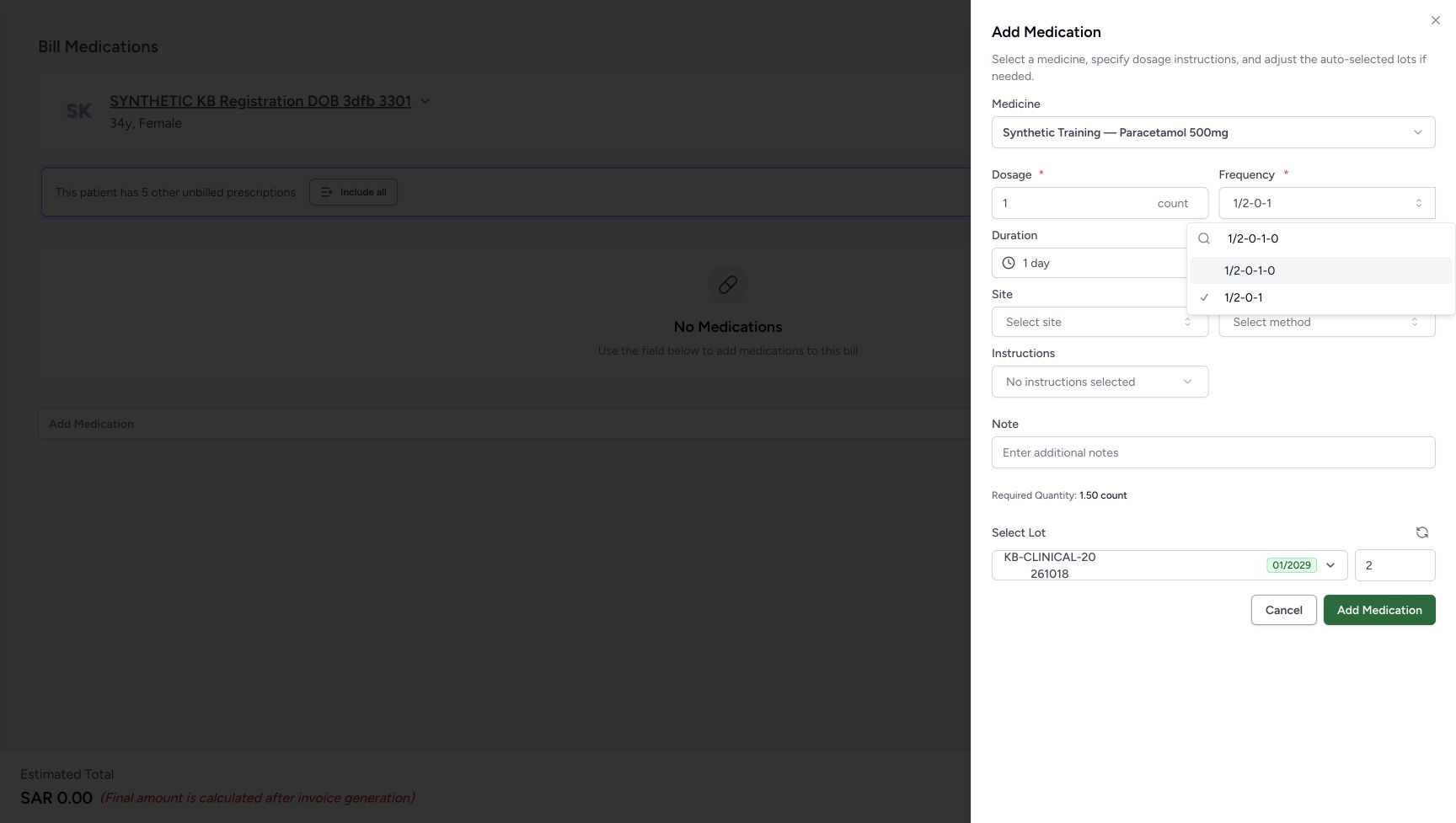
Search 1/2-0-1-0 and select that exact four-slot option above the checked previous selection. Duration clears again. Select 1 day in Duration and verify the final pattern, 1 day, Required Quantity 1.50 count and automatic whole lot quantity 2. These are representative custom pattern modes; the examples are not clinical instructions.
 12
12Select the exact four-slot fractional pattern
Capture details
Isolated synthetic frequency-pattern exercise with automatic quantities, local search and cancellation. No medicine is added and no bill is submitted.
Image SHA-256 198dc7ba9dda2526170f4fc2639cf5d207c35be9ad30ff94357025e319ac5c33
- Enter the frequency search: Type 1/2-0-1-0 and distinguish it from the checked prior selection.
- Select the exact 1/2-0-1-0 option: Choose the exact displayed option rather than a longer suggested completion.
 1234
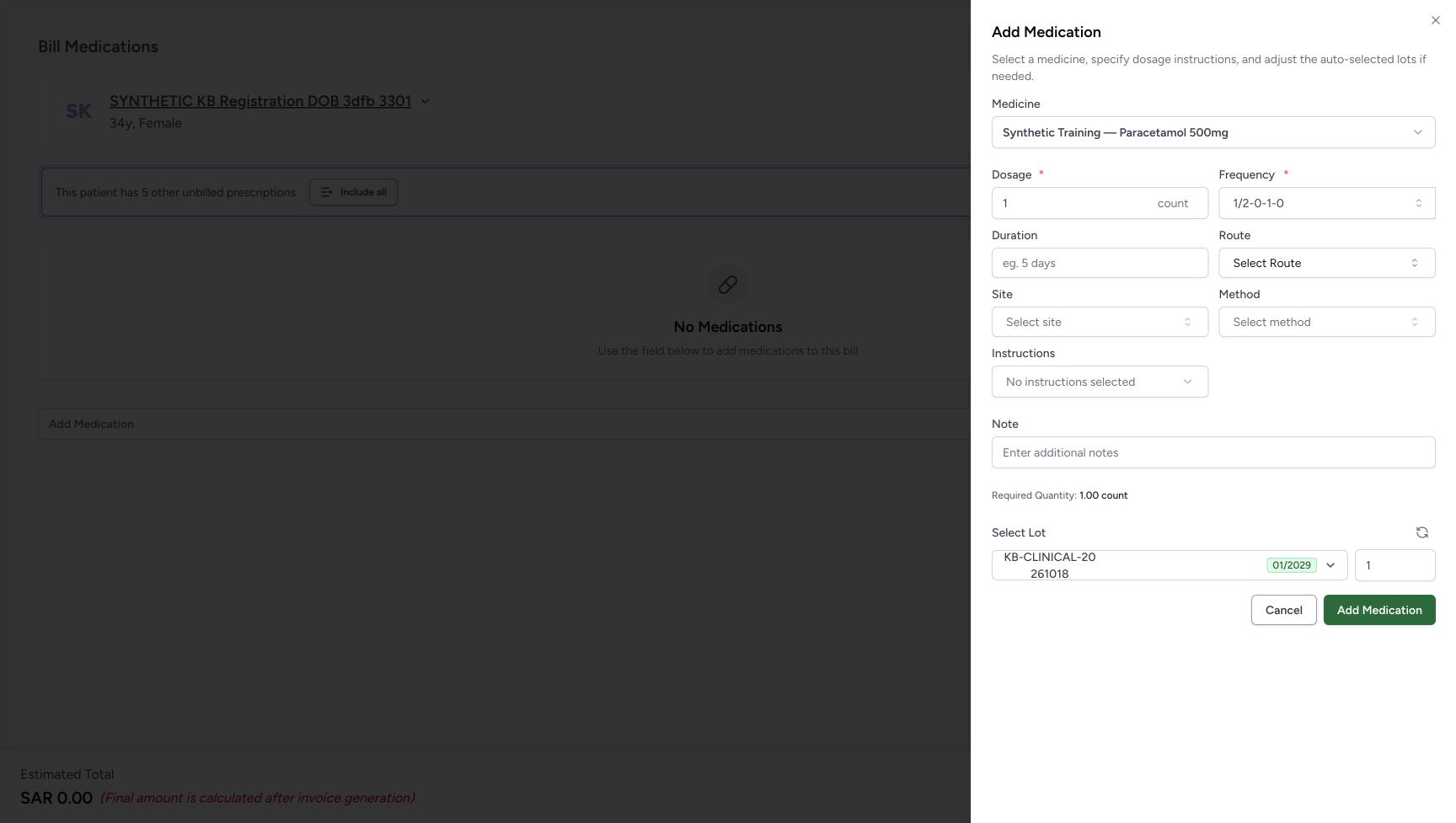
1234Check the four-slot Duration reset
Capture details
Isolated synthetic frequency-pattern exercise with automatic quantities, local search and cancellation. No medicine is added and no bill is submitted.
Image SHA-256 3a4fb3cdf0eef0c9600e7889d9da4ce27745caab401b15843f485f8bad528090
- Check the selected frequency: The four-slot pattern is now selected.
- Check Duration: Duration has cleared again.
- Read Required Quantity: The temporary fallback estimate is 1.00 count.
- Read the automatic lot quantity: The automatic whole lot quantity is 1.
 123
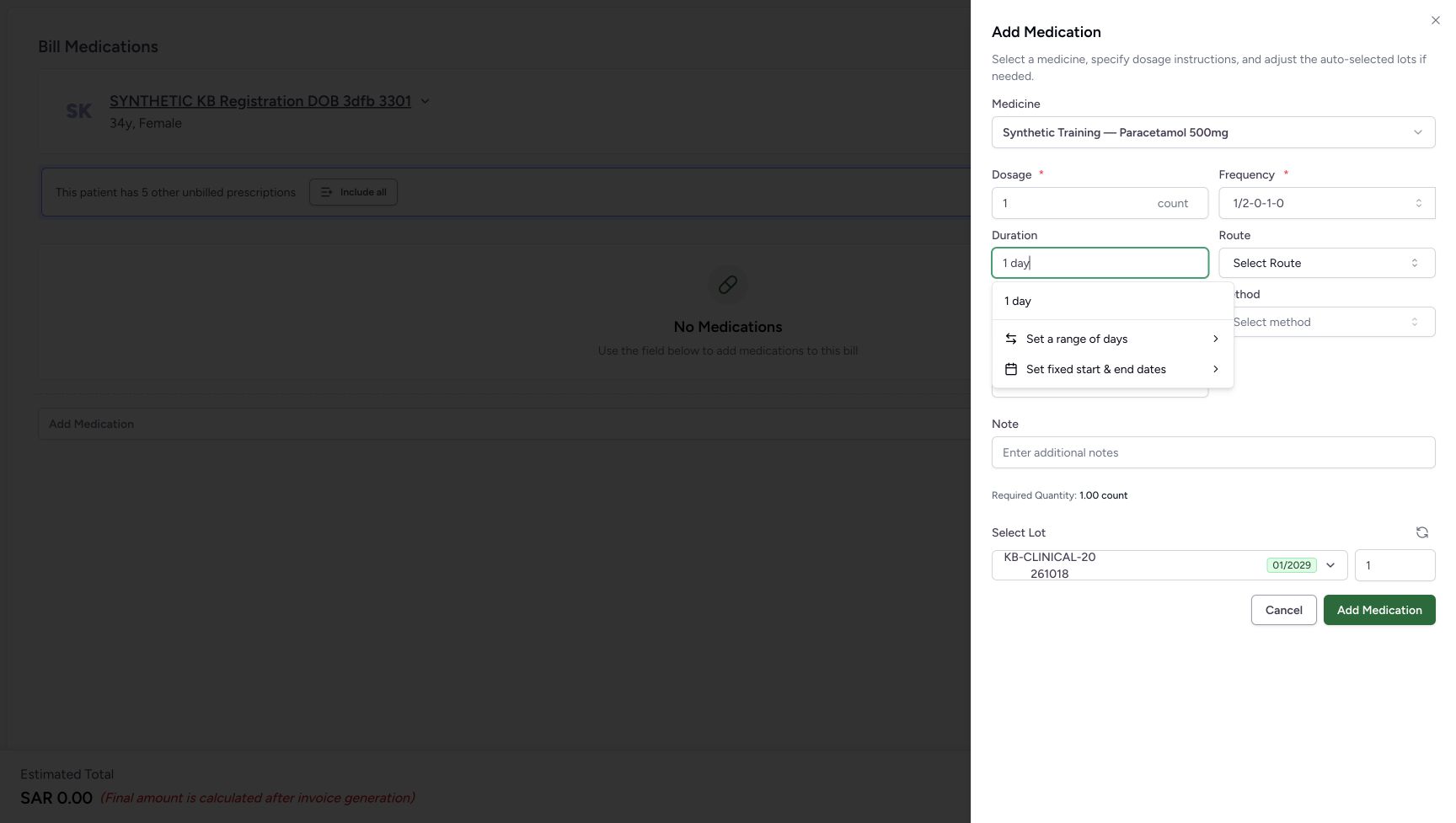
123Choose one day for the four-slot pattern
Capture details
Isolated synthetic frequency-pattern exercise with automatic quantities, local search and cancellation. No medicine is added and no bill is submitted.
Image SHA-256 2122936eb66d453c5dce6a5f2d0202634e513a588700c1ae88fd910240743f86
- Check the selected custom pattern: This separate example uses 1/2-0-1-0.
- Enter 1 day in Duration: The text is a duration search until its matching option is selected.
- Select 1 day: Commit this matching option for the displayed custom pattern.
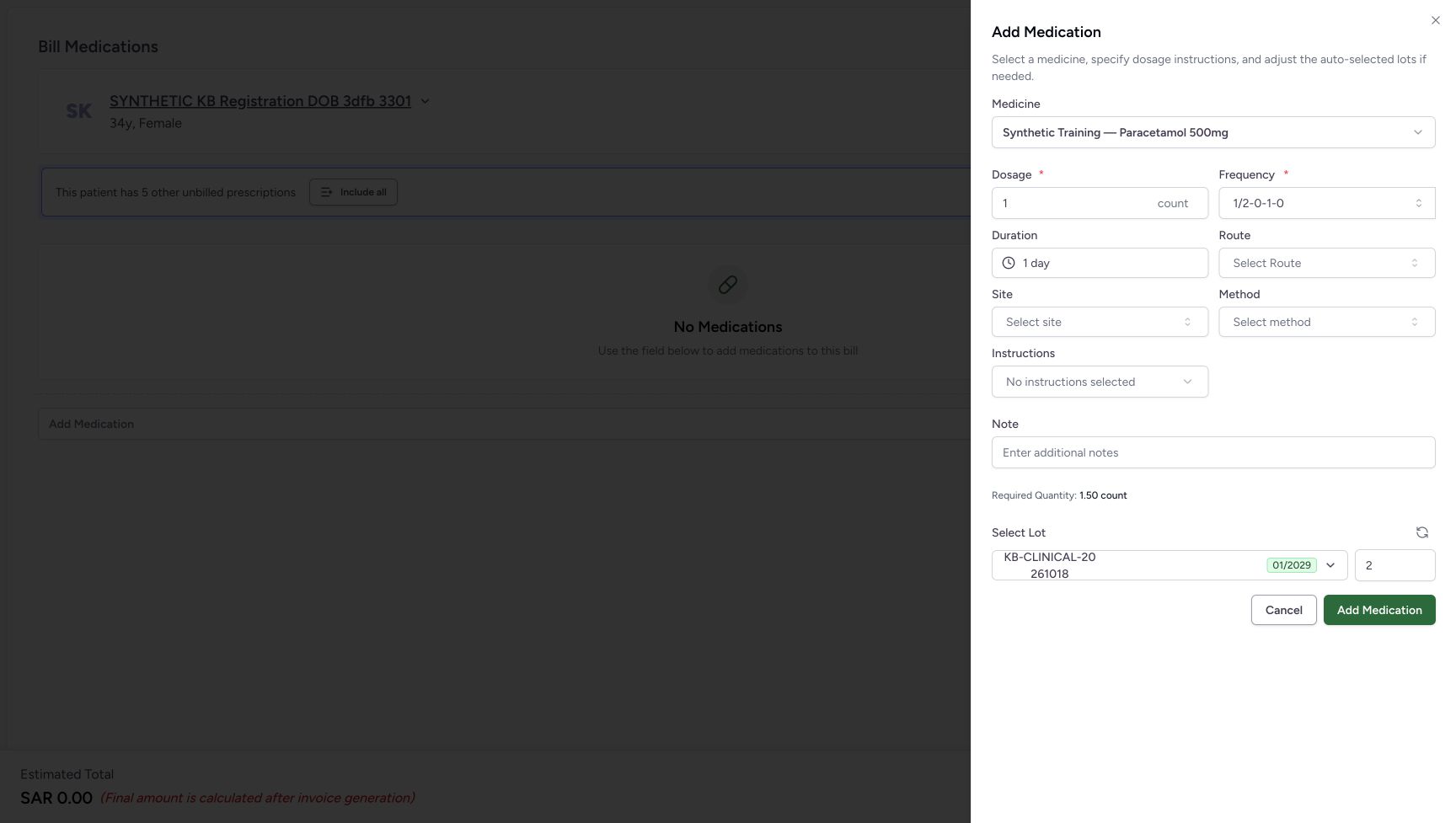 123456
Read and retain the final valid selection
Capture details
Isolated synthetic frequency-pattern exercise with automatic quantities, local search and cancellation. No medicine is added and no bill is submitted.
Image SHA-256 d20af0f24138c34a187bf452c23ff6e0ea5fad3a5ea8bf02379a4a29c17e3eb0
- Check the selected frequency: The valid four-slot selection is 1/2-0-1-0.
- Check Duration: The committed Duration is 1 day.
- Read Required Quantity: Required Quantity is 1.50 count.
- Read the automatic lot quantity: The automatic whole lot quantity is 2.
- Use the heading outside the frequency popup: Click this visible Add Medication heading to dismiss only an open frequency popup.
- Cancel the medicine sheet: Discard the unadded medicine after checking the retained valid instruction.
7. Inspect unavailable patterns without replacing the valid selection
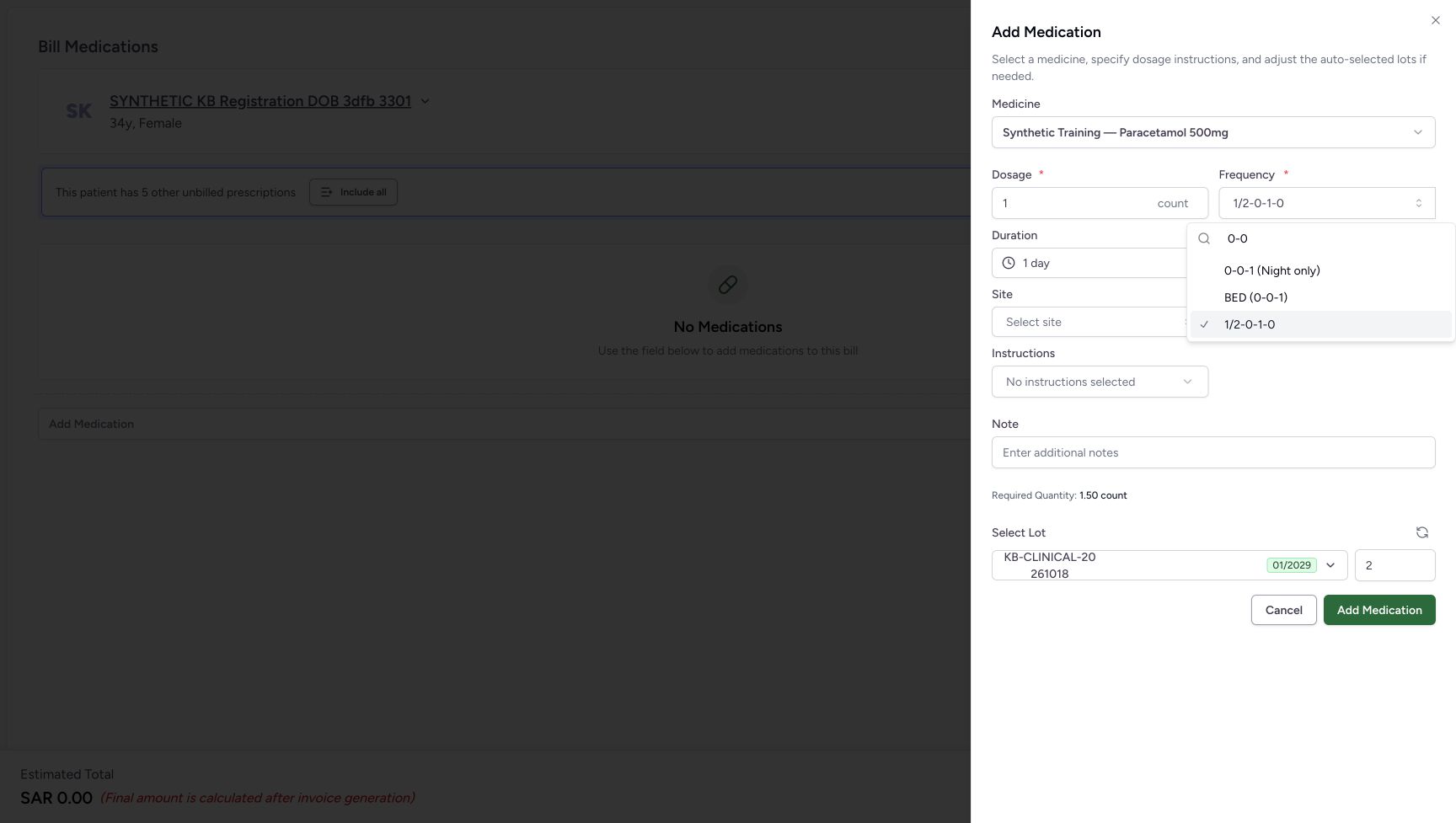
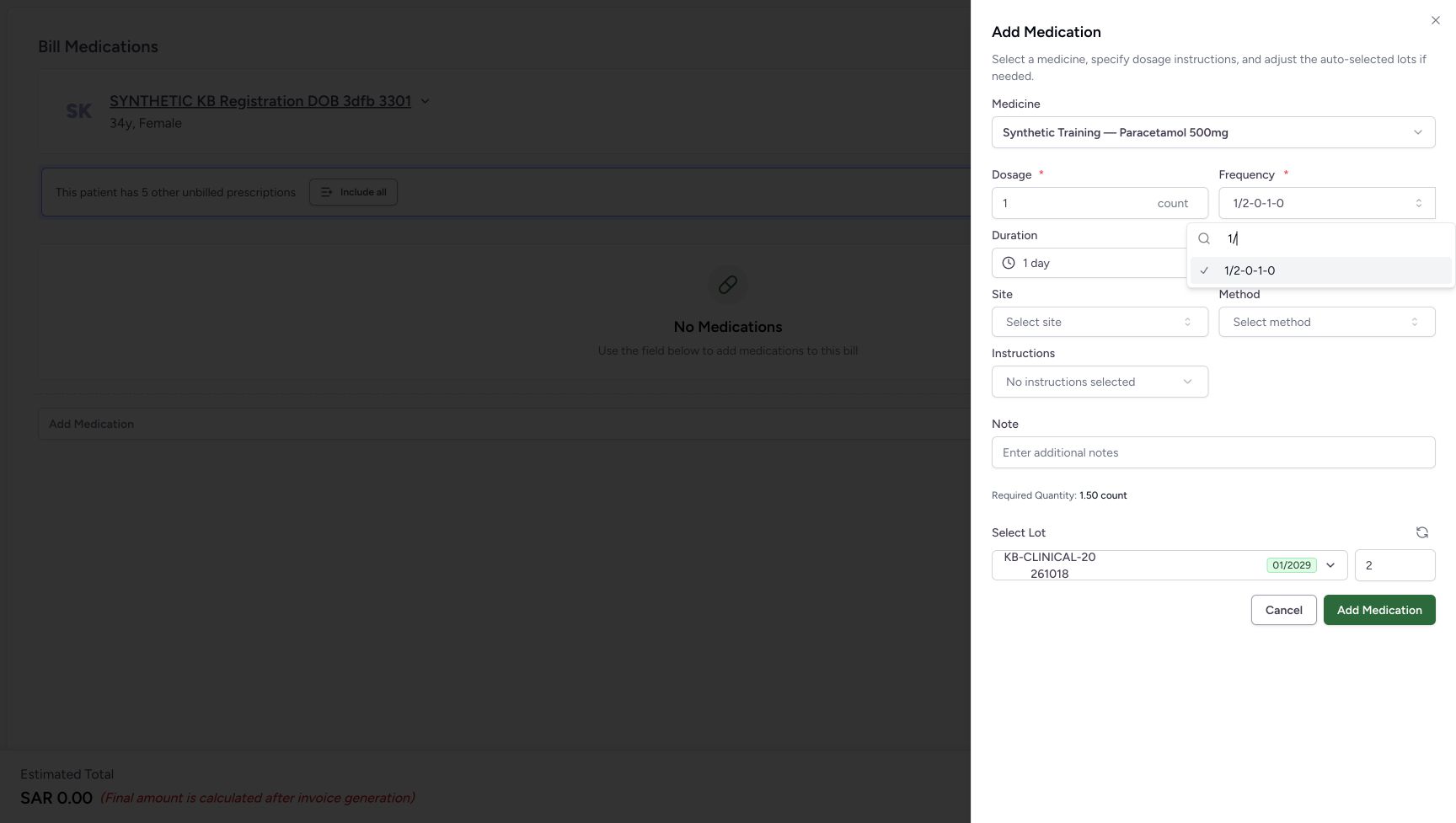
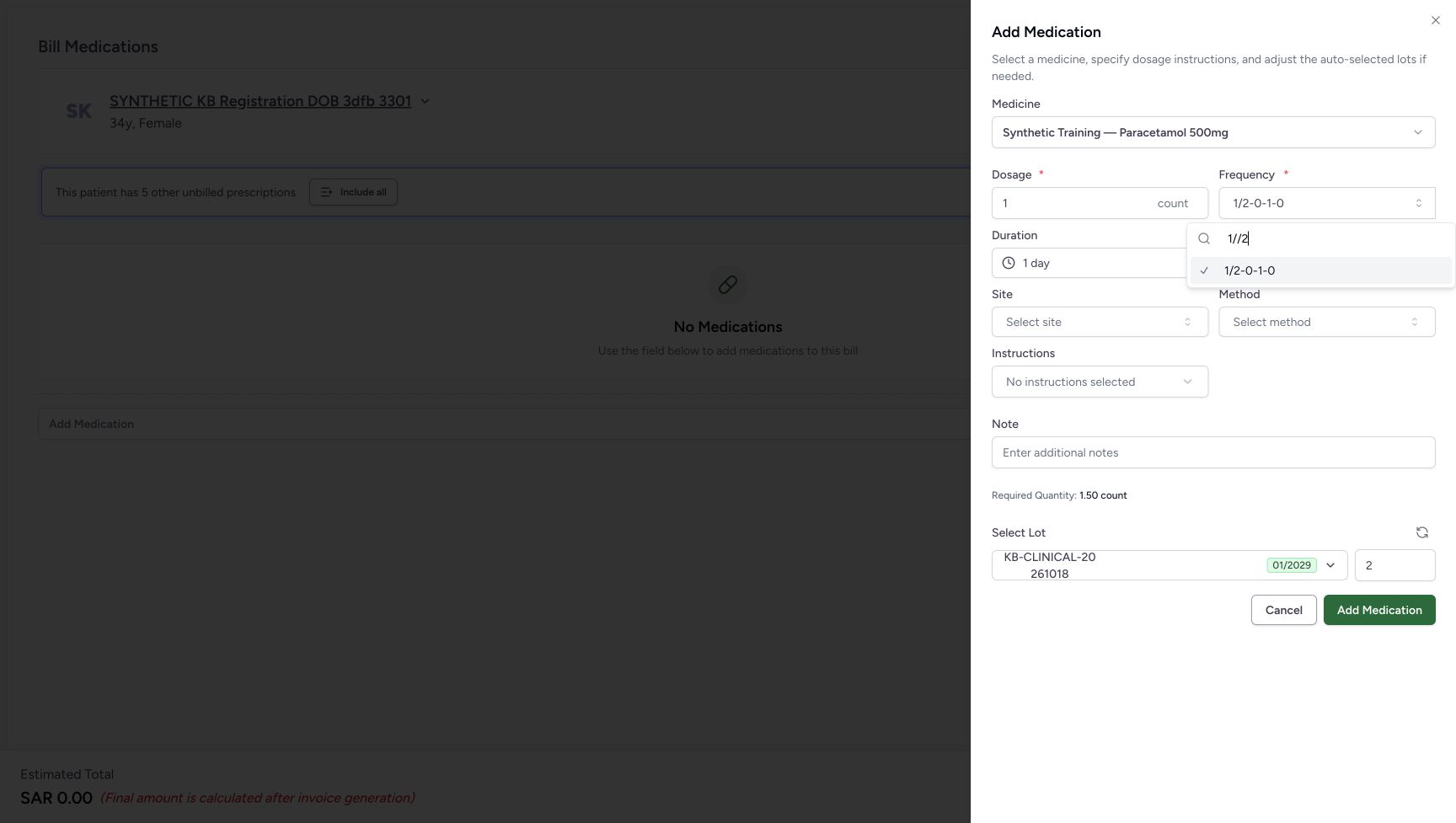
Open Frequency and compare the searches 1/0-1, 0-0, 1/ and 1//2. None is available as the exact requested custom value: the examples contain a zero denominator, an all-zero total, an incomplete fraction or a malformed fraction. The prior checked 1/2-0-1-0 option can remain visible. Searching 0-0 also offers valid longer 0-0-1 and BED choices; leave those unselected in this comparison. A visible list does not mean the invalid exact query was accepted, and typing a query does not change the selected instruction.
12Recognise an unavailable zero-denominator value
Capture details
Isolated synthetic frequency-pattern exercise with automatic quantities, local search and cancellation. No medicine is added and no bill is submitted.
Image SHA-256 1299aeec4eb22a0391c18e28cff77d6656c49c209c322af01355962a33f7f608
- Inspect the invalid zero denominator: 1/0-1 is search text, not a newly committed instruction.
- Recognise the retained valid option: The checked 1/2-0-1-0 is the previous selection, not acceptance of 1/0-1.
 123
123Distinguish an all-zero query from valid completions
Capture details
Isolated synthetic frequency-pattern exercise with automatic quantities, local search and cancellation. No medicine is added and no bill is submitted.
Image SHA-256 ba07cabfb93160723d00ca5ca1dc1005b8d804e80ea671f290afda5cd4a91289
- Inspect the all-zero query: The exact 0-0 value is not a selectable complete pattern.
- Read a valid longer completion: 0-0-1 (Night only) is a different, positive-total pattern; leave it unselected here.
- Check the unchanged prior selection: The checked 1/2-0-1-0 remains the selected instruction.
 12
12Recognise an incomplete fraction
Capture details
Isolated synthetic frequency-pattern exercise with automatic quantities, local search and cancellation. No medicine is added and no bill is submitted.
Image SHA-256 6b42d07849dd309cd059234296e96d364a804005bf8534256b083fcd62cd07c8
- Inspect the incomplete fraction: A denominator is missing from this search.
- Keep the prior selected frequency distinct: This checked option remains 1/2-0-1-0; the search has not replaced it.
 12
12Recognise a malformed doubled slash
Capture details
Isolated synthetic frequency-pattern exercise with automatic quantities, local search and cancellation. No medicine is added and no bill is submitted.
Image SHA-256 7bbf593741429e3a15aa9c40ffa5e7dead5598ec998f459c6ebe65e850677f16
- Inspect the doubled slash: 1//2 is not a selectable exact custom pattern.
- Recognise the retained selection: The existing 1/2-0-1-0 instruction has not changed.
8. Read an empty search and dismiss only its popup
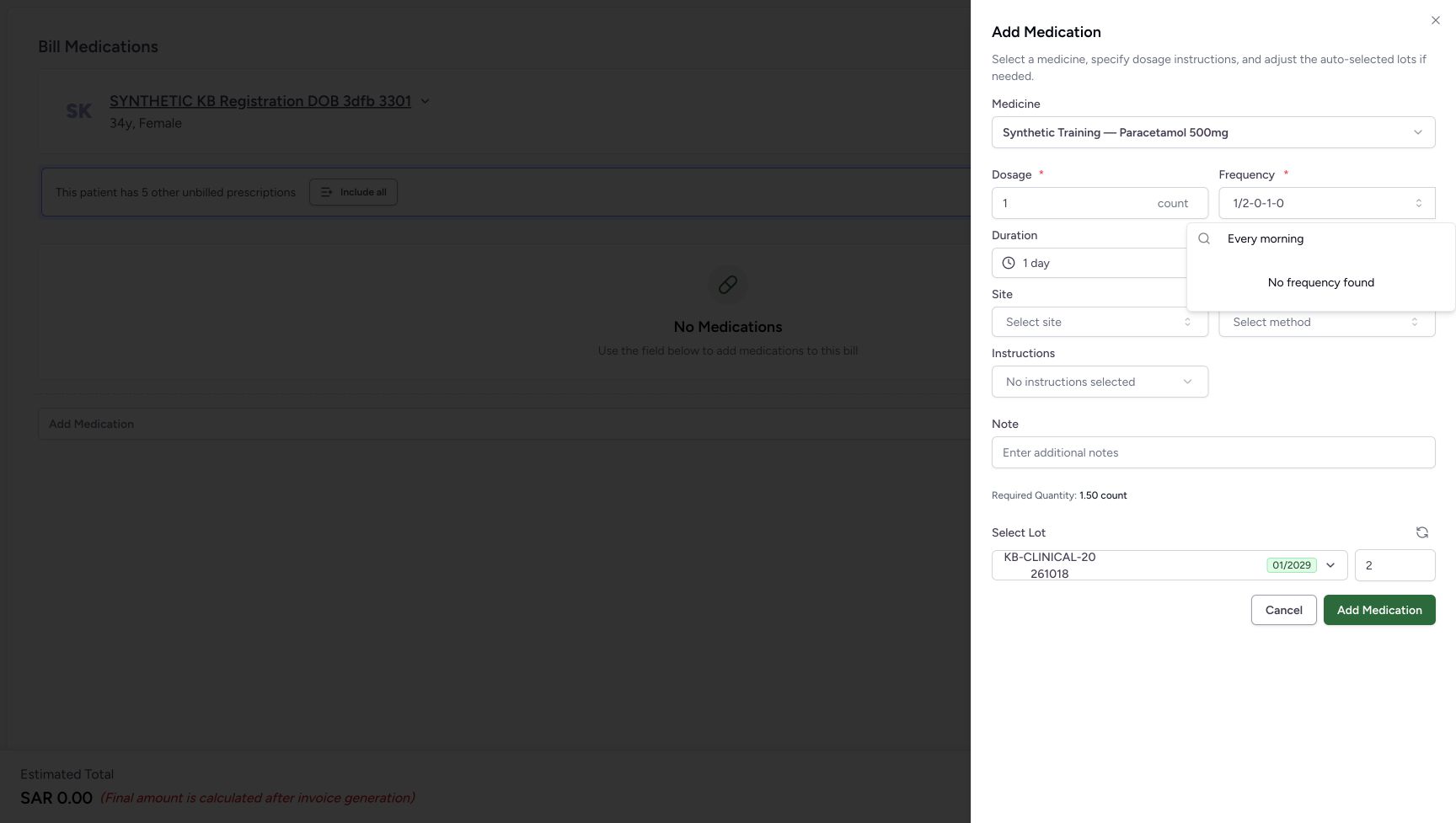
Replace the search with Every morning. This pictured query shows No frequency found; arbitrary prose is not selected as a custom pattern. Click the visible Add Medication heading outside the popup to close only the popup. Verify that 1/2-0-1-0, Duration 1 day, Required Quantity 1.50 count and lot quantity 2 are retained. The Add Medication button can remain enabled for that earlier valid instruction while a different query is being typed; it does not show acceptance of the query.
 123
123Read a genuine empty frequency search
Capture details
Isolated synthetic frequency-pattern exercise with automatic quantities, local search and cancellation. No medicine is added and no bill is submitted.
Image SHA-256 f48a7acf03e221db8e16e88e688131e7368c137edf15f55c2fb9606e56a2ad5e
- Inspect the free-text search: Typing Every morning searches the options; it does not commit arbitrary prose.
- Read No frequency found: This is the pictured empty option search, separate from the invalid queries that still showed the prior selection.
- Click the visible heading outside the popup: Close only the frequency popup and retain the valid selection and Duration.
123456Read and retain the final valid selection
Capture details
Isolated synthetic frequency-pattern exercise with automatic quantities, local search and cancellation. No medicine is added and no bill is submitted.
Image SHA-256 d20af0f24138c34a187bf452c23ff6e0ea5fad3a5ea8bf02379a4a29c17e3eb0
- Check the selected frequency: The valid four-slot selection is 1/2-0-1-0.
- Check Duration: The committed Duration is 1 day.
- Read Required Quantity: Required Quantity is 1.50 count.
- Read the automatic lot quantity: The automatic whole lot quantity is 2.
- Use the heading outside the frequency popup: Click this visible Add Medication heading to dismiss only an open frequency popup.
- Cancel the medicine sheet: Discard the unadded medicine after checking the retained valid instruction.
9. Cancel both unsaved screens
Choose Cancel in the medicine sheet. The empty preparation returns with No Medications and Estimated Total SAR 0.00. Then choose its footer Cancel. Patient Home shows the same two existing Active Ambulatory encounters. No medicine was added, no Bill Selected submission occurred, and no dispensing order, invoice, payment or stock deduction was created by this exercise.
123456Read and retain the final valid selection
Capture details
Isolated synthetic frequency-pattern exercise with automatic quantities, local search and cancellation. No medicine is added and no bill is submitted.
Image SHA-256 d20af0f24138c34a187bf452c23ff6e0ea5fad3a5ea8bf02379a4a29c17e3eb0
- Check the selected frequency: The valid four-slot selection is 1/2-0-1-0.
- Check Duration: The committed Duration is 1 day.
- Read Required Quantity: Required Quantity is 1.50 count.
- Read the automatic lot quantity: The automatic whole lot quantity is 2.
- Use the heading outside the frequency popup: Click this visible Add Medication heading to dismiss only an open frequency popup.
- Cancel the medicine sheet: Discard the unadded medicine after checking the retained valid instruction.
123456Begin with an empty preparation
Capture details
Isolated synthetic frequency-pattern exercise with automatic quantities, local search and cancellation. No medicine is added and no bill is submitted.
Image SHA-256 6a02e203d96273ee71722f2ab321be8cf24888e452d8ed26bdde169a877cb71a
- Verify the intended patient: Check SYNTHETIC KB Registration DOB 3dfb 3301 before opening the medicine selector.
- Read No Medications: No medicine row has been added.
- Open Add Medication: Open the catalogue for this unsaved software exercise.
- Check the zero estimate: SAR 0.00 is the empty preparation estimate.
- Cancel the empty preparation: Use this footer Cancel after discarding the medicine sheet.
- Leave Bill Selected unused: This exercise does not create a bill or save a dispensing order.
123Confirm the return to existing encounters
Capture details
Isolated synthetic frequency-pattern exercise with automatic quantities, local search and cancellation. No medicine is added and no bill is submitted.
Image SHA-256 44b479a7d3efbd617d57d21692b6293e1f55d0e2254cdce7c9e63490447650cc
- Verify the same patient: The cancellation returns to the existing patient home.
- Read the Active encounter list: The two original encounters remain available.
- Recognise the intended existing encounter: The Oct 20, 2026, 03:19 PM encounter remains in the list.
Read the required amount and lot quantity separately
With dosage 1 count and Duration 1 day, each illustrated fractional pattern totals 1.50 count, while the automatic lot selector uses a whole quantity of 2. These separate readouts describe the software estimate and selected stock quantity. They do not establish a tablet-splitting instruction, product-strength conversion or clinically appropriate dose.
1234Separate fractional required count from whole lot quantity
Capture details
Isolated synthetic frequency-pattern exercise with automatic quantities, local search and cancellation. No medicine is added and no bill is submitted.
Image SHA-256 aec227ec18d33c8d5bfbccf36dc72388557d912e2e1400b5e410d923e7408e2a
- Check the selected frequency: The two-slot pattern remains 1/2-1.
- Check Duration: Duration is committed as 1 day.
- Read Required Quantity: The displayed required amount is 1.50 count.
- Read the automatic lot quantity: The automatic whole lot selection is 2, separate from the fractional required amount.
1234Read the three-slot one-day result
Capture details
Isolated synthetic frequency-pattern exercise with automatic quantities, local search and cancellation. No medicine is added and no bill is submitted.
Image SHA-256 b7a5549820286fa24d3d3f84e93f1f596e5ce90d54dad4c394fab90e1341ddad
- Check the selected frequency: The three-slot pattern remains selected.
- Check Duration: Duration is 1 day.
- Read Required Quantity: The required amount is 1.50 count.
- Read the automatic lot quantity: The automatic whole lot quantity is 2.
123456Read and retain the final valid selection
Capture details
Isolated synthetic frequency-pattern exercise with automatic quantities, local search and cancellation. No medicine is added and no bill is submitted.
Image SHA-256 d20af0f24138c34a187bf452c23ff6e0ea5fad3a5ea8bf02379a4a29c17e3eb0
- Check the selected frequency: The valid four-slot selection is 1/2-0-1-0.
- Check Duration: The committed Duration is 1 day.
- Read Required Quantity: Required Quantity is 1.50 count.
- Read the automatic lot quantity: The automatic whole lot quantity is 2.
- Use the heading outside the frequency popup: Click this visible Add Medication heading to dismiss only an open frequency popup.
- Cancel the medicine sheet: Discard the unadded medicine after checking the retained valid instruction.
Keep frequency admission separate from clinical approval
The chooser admits two to four whole-number or fractional slots with a positive total and nonzero denominators; zero-valued individual slots can be valid. Presets and coded choices can retain Duration, while the custom patterns shown here clear it. These controls do not replace an approved prescription or clinical review. This lesson ends with cancellation and does not demonstrate a saved frequency payload or a backend clinical-validation response.
1234Review STAT’s retained duration carefully
Capture details
Isolated synthetic frequency-pattern exercise with automatic quantities, local search and cancellation. No medicine is added and no bill is submitted.
Image SHA-256 c75350bc7b79ccbe8ea6bbe03997306d5473ece0435253989e8bf6cdf60bba50
- Check the selected frequency: STAT (Immediately) is selected.
- Check Duration: The earlier 2 days are still present; review them against the approved instructions.
- Read Required Quantity: The displayed estimate is 2.00 count.
- Read the automatic lot quantity: The automatic whole lot quantity is 2.
1234Check the three-slot Duration reset
Capture details
Isolated synthetic frequency-pattern exercise with automatic quantities, local search and cancellation. No medicine is added and no bill is submitted.
Image SHA-256 d44d71a76a67c4baad4cbe5d504e9247cf79bfdf0d14608c5f4fffa7bf3c41e3
- Check the selected frequency: The exact three-slot 1/2-0-1 pattern is selected.
- Check Duration: Duration is empty again.
- Read Required Quantity: The temporary fallback estimate is 1.00 count.
- Read the automatic lot quantity: The automatic whole lot quantity is 1.
123Distinguish an all-zero query from valid completions
Capture details
Isolated synthetic frequency-pattern exercise with automatic quantities, local search and cancellation. No medicine is added and no bill is submitted.
Image SHA-256 ba07cabfb93160723d00ca5ca1dc1005b8d804e80ea671f290afda5cd4a91289
- Inspect the all-zero query: The exact 0-0 value is not a selectable complete pattern.
- Read a valid longer completion: 0-0-1 (Night only) is a different, positive-total pattern; leave it unselected here.
- Check the unchanged prior selection: The checked 1/2-0-1-0 remains the selected instruction.
Troubleshooting
Duration disappeared after I selected a custom pattern
A newly selected non-preset custom pattern clears the earlier Duration in this control. Inspect the empty field, then enter and select the intended Duration again before reviewing the required and lot quantities. Do not assume that the earlier course duration survived merely because dosage stayed at 1 count.
1234Check that the custom pattern cleared Duration
Capture details
Isolated synthetic frequency-pattern exercise with automatic quantities, local search and cancellation. No medicine is added and no bill is submitted.
Image SHA-256 350153848cd8d0c5c371b674f80ea1372ff0c54da2aae5d9a63e9184685a8276
- Check the selected frequency: The exact custom 1/2-1 pattern is selected.
- Check Duration: Duration has cleared; the previous 2 days have not been retained.
- Read Required Quantity: Without a course duration, this display falls back to 1.00 count.
- Read the automatic lot quantity: The current automatic lot quantity is 1.
12Choose one day for the custom pattern
Capture details
Isolated synthetic frequency-pattern exercise with automatic quantities, local search and cancellation. No medicine is added and no bill is submitted.
Image SHA-256 3a4431200bbec3b92e8bfd3033c62ca501b49d88a76d8824da6cf0d3d8a9f4e6
- Enter 1 day in Duration: Use the same duration control after selecting the custom pattern.
- Select 1 day: Commit the matching option; do not leave only the search text.
1234Separate fractional required count from whole lot quantity
Capture details
Isolated synthetic frequency-pattern exercise with automatic quantities, local search and cancellation. No medicine is added and no bill is submitted.
Image SHA-256 aec227ec18d33c8d5bfbccf36dc72388557d912e2e1400b5e410d923e7408e2a
- Check the selected frequency: The two-slot pattern remains 1/2-1.
- Check Duration: Duration is committed as 1 day.
- Read Required Quantity: The displayed required amount is 1.50 count.
- Read the automatic lot quantity: The automatic whole lot selection is 2, separate from the fractional required amount.
1234Check the three-slot Duration reset
Capture details
Isolated synthetic frequency-pattern exercise with automatic quantities, local search and cancellation. No medicine is added and no bill is submitted.
Image SHA-256 d44d71a76a67c4baad4cbe5d504e9247cf79bfdf0d14608c5f4fffa7bf3c41e3
- Check the selected frequency: The exact three-slot 1/2-0-1 pattern is selected.
- Check Duration: Duration is empty again.
- Read Required Quantity: The temporary fallback estimate is 1.00 count.
- Read the automatic lot quantity: The automatic whole lot quantity is 1.
1234Check the four-slot Duration reset
Capture details
Isolated synthetic frequency-pattern exercise with automatic quantities, local search and cancellation. No medicine is added and no bill is submitted.
Image SHA-256 3a4fb3cdf0eef0c9600e7889d9da4ce27745caab401b15843f485f8bad528090
- Check the selected frequency: The four-slot pattern is now selected.
- Check Duration: Duration has cleared again.
- Read Required Quantity: The temporary fallback estimate is 1.00 count.
- Read the automatic lot quantity: The automatic whole lot quantity is 1.
An invalid search still shows an option or an enabled Add button
Compare the typed search with the checked selected option. A previous valid frequency can remain in the list and continue to satisfy the form while you search. Valid completions of a partial query are also different values. Do not select a different completion to force an invalid value through. For an empty result such as the illustrated Every morning search, use the visible heading outside the popup to close it, then review the retained valid instruction or cancel the medicine sheet.
12Recognise an unavailable zero-denominator value
Capture details
Isolated synthetic frequency-pattern exercise with automatic quantities, local search and cancellation. No medicine is added and no bill is submitted.
Image SHA-256 1299aeec4eb22a0391c18e28cff77d6656c49c209c322af01355962a33f7f608
- Inspect the invalid zero denominator: 1/0-1 is search text, not a newly committed instruction.
- Recognise the retained valid option: The checked 1/2-0-1-0 is the previous selection, not acceptance of 1/0-1.
123Distinguish an all-zero query from valid completions
Capture details
Isolated synthetic frequency-pattern exercise with automatic quantities, local search and cancellation. No medicine is added and no bill is submitted.
Image SHA-256 ba07cabfb93160723d00ca5ca1dc1005b8d804e80ea671f290afda5cd4a91289
- Inspect the all-zero query: The exact 0-0 value is not a selectable complete pattern.
- Read a valid longer completion: 0-0-1 (Night only) is a different, positive-total pattern; leave it unselected here.
- Check the unchanged prior selection: The checked 1/2-0-1-0 remains the selected instruction.
12Recognise an incomplete fraction
Capture details
Isolated synthetic frequency-pattern exercise with automatic quantities, local search and cancellation. No medicine is added and no bill is submitted.
Image SHA-256 6b42d07849dd309cd059234296e96d364a804005bf8534256b083fcd62cd07c8
- Inspect the incomplete fraction: A denominator is missing from this search.
- Keep the prior selected frequency distinct: This checked option remains 1/2-0-1-0; the search has not replaced it.
12Recognise a malformed doubled slash
Capture details
Isolated synthetic frequency-pattern exercise with automatic quantities, local search and cancellation. No medicine is added and no bill is submitted.
Image SHA-256 7bbf593741429e3a15aa9c40ffa5e7dead5598ec998f459c6ebe65e850677f16
- Inspect the doubled slash: 1//2 is not a selectable exact custom pattern.
- Recognise the retained selection: The existing 1/2-0-1-0 instruction has not changed.
123Read a genuine empty frequency search
Capture details
Isolated synthetic frequency-pattern exercise with automatic quantities, local search and cancellation. No medicine is added and no bill is submitted.
Image SHA-256 f48a7acf03e221db8e16e88e688131e7368c137edf15f55c2fb9606e56a2ad5e
- Inspect the free-text search: Typing Every morning searches the options; it does not commit arbitrary prose.
- Read No frequency found: This is the pictured empty option search, separate from the invalid queries that still showed the prior selection.
- Click the visible heading outside the popup: Close only the frequency popup and retain the valid selection and Duration.
123456Read and retain the final valid selection
Capture details
Isolated synthetic frequency-pattern exercise with automatic quantities, local search and cancellation. No medicine is added and no bill is submitted.
Image SHA-256 d20af0f24138c34a187bf452c23ff6e0ea5fad3a5ea8bf02379a4a29c17e3eb0
- Check the selected frequency: The valid four-slot selection is 1/2-0-1-0.
- Check Duration: The committed Duration is 1 day.
- Read Required Quantity: Required Quantity is 1.50 count.
- Read the automatic lot quantity: The automatic whole lot quantity is 2.
- Use the heading outside the frequency popup: Click this visible Add Medication heading to dismiss only an open frequency popup.
- Cancel the medicine sheet: Discard the unadded medicine after checking the retained valid instruction.
Source evidence
Every citation uses this exact committed version. The private source repository requires access.
- repositories/platform/mansoq-web/src/types/emr/medicationRequest/medicationRequest.ts:176 ·
1e88a43b34c40aaff4d56418861be0c387fe9dccSource file checksum
2067cbe1c3fcb9458883e3f735204aa0ef8cb95a8d756712cba987ae0cfd4e5e - repositories/platform/mansoq-web/src/components/Medicine/DosageFrequencyInput.tsx:79 ·
1e88a43b34c40aaff4d56418861be0c387fe9dccSource file checksum
f6be919809c5a10adf5764d912fb54aa7d59e7bfca4b06ad09f1b6629c11dd7f - repositories/platform/mansoq-web/src/pages/Facility/services/pharmacy/components/AddMedicationSheet.tsx:100 ·
1e88a43b34c40aaff4d56418861be0c387fe9dccSource file checksum
273712a008b44fc50f895db4652e5b49cfcd990626feb2caa0a90dbd4230bc77 - repositories/platform/mansoq-web/src/components/ui/autocomplete.tsx:82 ·
1e88a43b34c40aaff4d56418861be0c387fe9dccSource file checksum
b50fc18b873bb21dd1d86407b9e0138dfd19ea2dec13961cec72dd19dff234e6 - repositories/platform/mansoq-web/src/components/Medicine/DurationInput.tsx:100 ·
1e88a43b34c40aaff4d56418861be0c387fe9dccSource file checksum
c271b7c60fd93d91bb97ce8ab38644b1999b0a1115db3db9d5c0626557eb0c11 - repositories/platform/mansoq-web/src/components/Medicine/utils.ts:193 ·
1e88a43b34c40aaff4d56418861be0c387fe9dccSource file checksum
3cd9c9563e68a8ff18ac581c422477ddab664733f4c85a4b596403bf9cf87aa8 - repositories/platform/mansoq-web/src/pages/Facility/services/pharmacy/billMedications/utils/useInventoryItemsAutoSelect.ts:36 ·
1e88a43b34c40aaff4d56418861be0c387fe9dccSource file checksum
689be89ed73722f369100ad448b2ceb37e559bb86a354edbd63393cc8d61af9b - repositories/platform/mansoq-web/src/Utils/decimal.ts:75 ·
1e88a43b34c40aaff4d56418861be0c387fe9dccSource file checksum
3852058a3a9cbb6adcae7e8c78b7917a3a1de43785dc4742ecc72c34c0bc6227 - repositories/platform/mansoq-web/public/locale/en.json:2892 ·
1e88a43b34c40aaff4d56418861be0c387fe9dccSource file checksum
93dc0209036e8f4eb120f7686a7487542ca5f6043620ad04973dbe96961d7b9c