 MANSOQ
 Pharmacy · VERSION 812d8272
Set a medicine duration, range and fixed dates
Compare a selected duration, a corrected numeric range and fixed calendar dates; inspect the displayed quantity, leave an invalid draft with Escape, and cancel without adding or billing the medicine.
Pharmacist
 1234567
Inspect the starting QD and one-day values
Capture details
Unsaved medicine duration practice: choose days, correct a numeric range, apply fixed dates, leave an invalid draft with Escape and cancel. No medicine row is added or billed.
Image SHA-256 2ffd6f9cdcfb04b410759df7ea24e4f10600b6e21421cacee0c0a5e2e4bf38fa
- Verify the synthetic medicine: This medicine is used only to illustrate software controls.
- Read QD (Once a day): Keep the displayed frequency unchanged during this duration comparison.
- Open Duration: This field offers duration suggestions, a range and fixed dates.
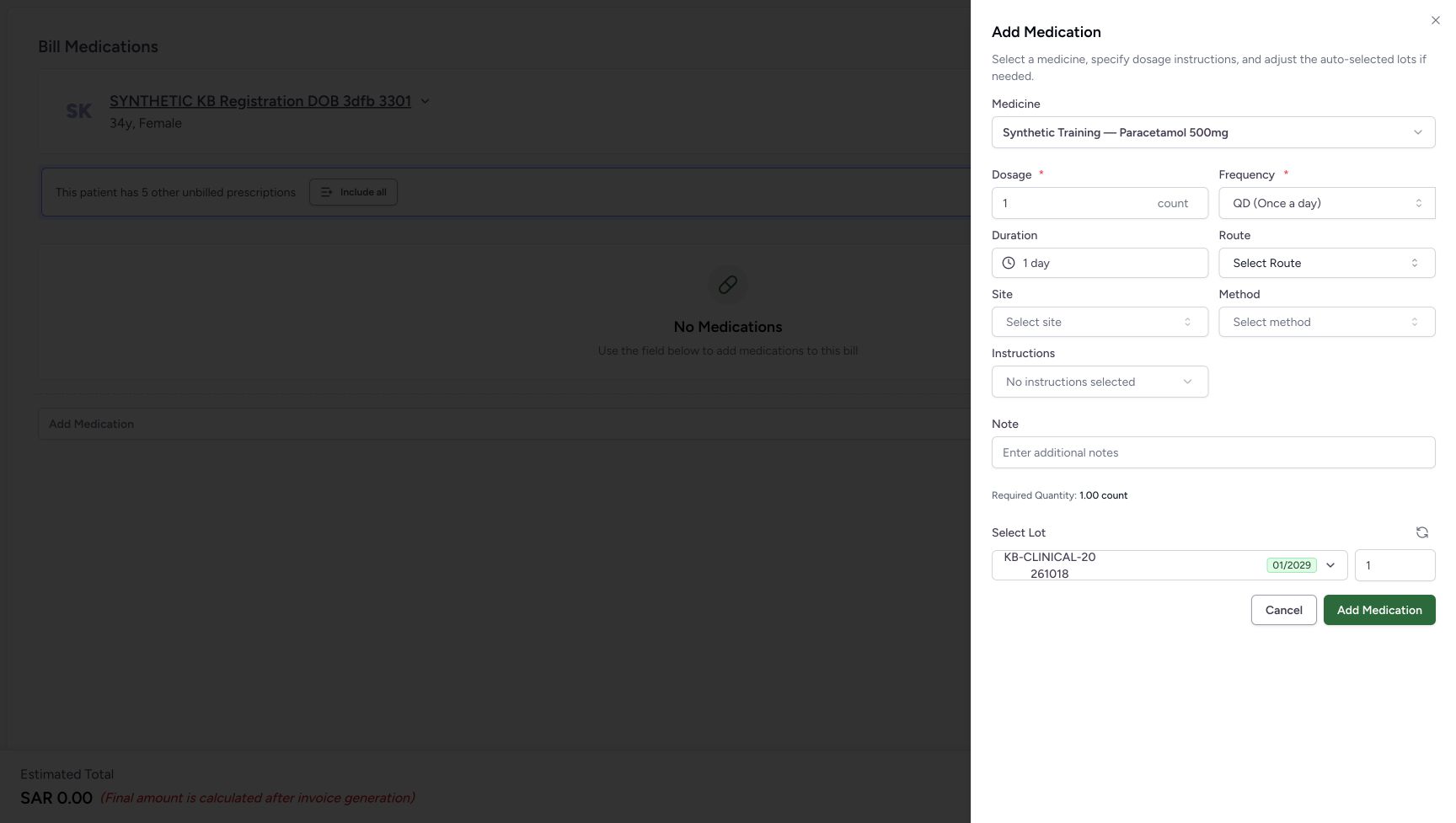
- Read Required Quantity 1.00 count: This is the quantity displayed for the starting example.
- Read lot quantity 1: The automatic lot quantity initially matches the displayed requirement.
- Locate sheet Cancel: This leaves the unadded medicine sheet.
- Leave this Add Medication unused: The practice ends without adding a medicine row.
 1234
1234Read the fixed dates and their retained Escape outcome
Capture details
Unsaved medicine duration practice: choose days, correct a numeric range, apply fixed dates, leave an invalid draft with Escape and cancel. No medicine row is added or billed.
Image SHA-256 f6645d1e0af60356f44f6bec9f242daab27e17d93e0188750feb186dff42d490
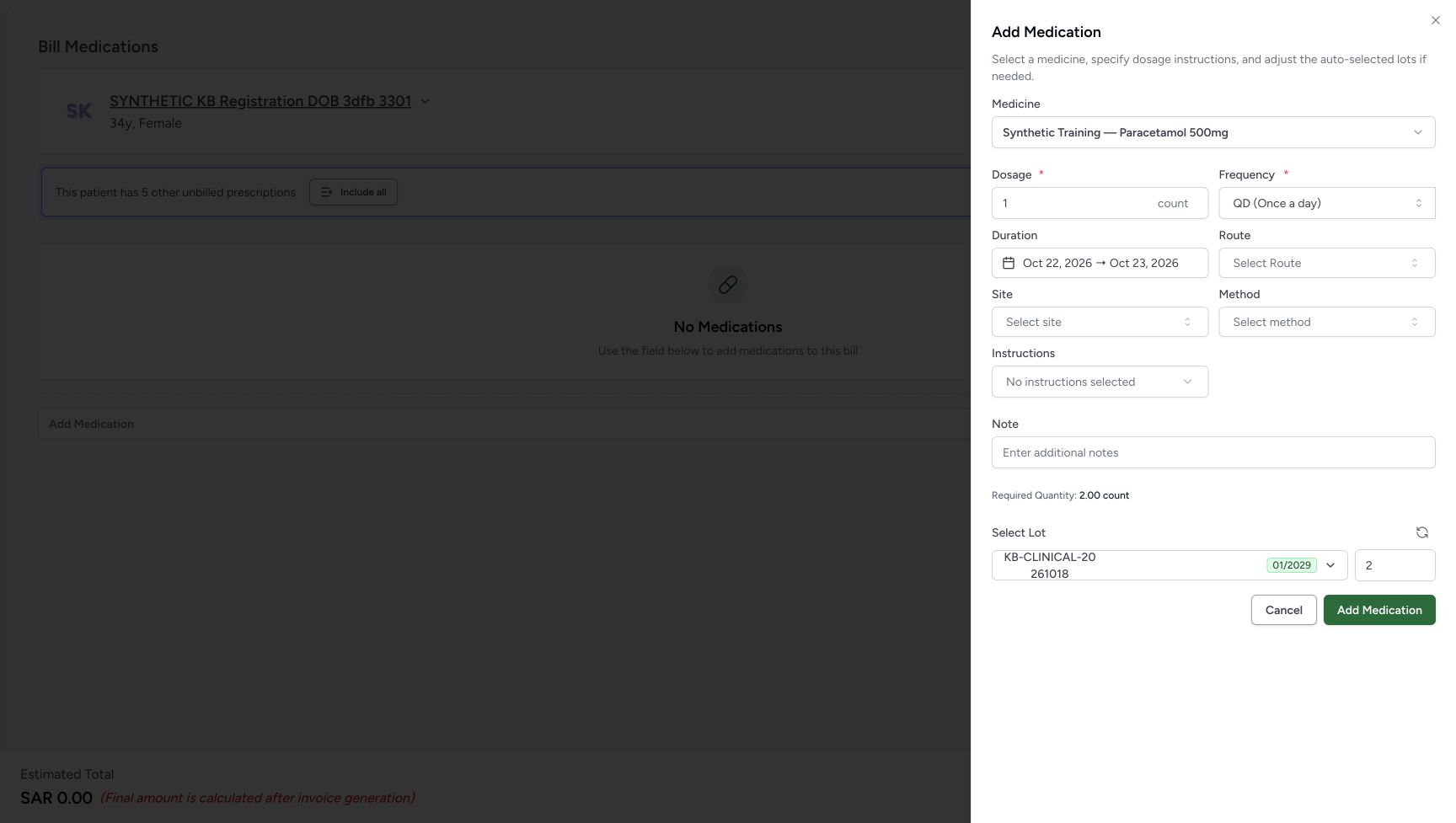
- Read the fixed-date summary: The selected dates remain October 22 through October 23.
- Read Required Quantity 2.00 count: This is the quantity displayed for the illustrated dates.
- Read automatic lot quantity 2: The automatic selection still contains quantity 2.
- Cancel the medicine sheet: Leave the medicine unadded after completing the control comparison.
 123
123Finish at the same patient home
Capture details
Unsaved medicine duration practice: choose days, correct a numeric range, apply fixed dates, leave an invalid draft with Escape and cancel. No medicine row is added or billed.
Image SHA-256 44b479a7d3efbd617d57d21692b6293e1f55d0e2254cdce7c9e63490447650cc
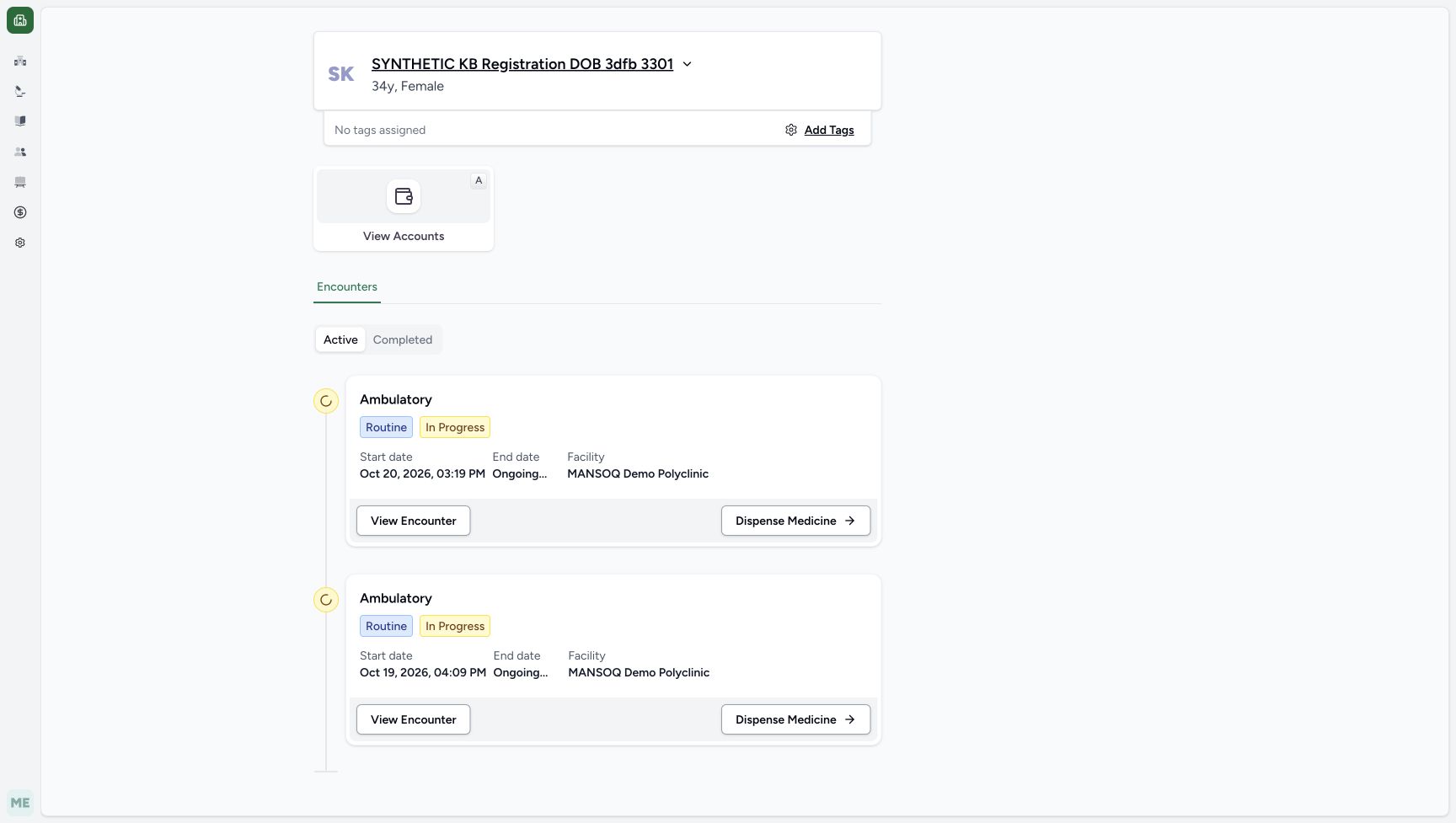
- Verify the same patient: Check the intended synthetic patient after leaving the preparation.
- Recognise the intended encounter: The October 20, 2026, 03:19 PM encounter is the one used for this software exercise.
- Locate the existing encounter entry: Dispense Medicine remains an existing handoff control. This lesson ends here.
18 of 18 content blocks have reviewed image alignment.
Before you begin
- Use assigned Pharmacist access and verify the intended synthetic patient and encounter. The example uses SYNTHETIC KB Registration DOB 3dfb 3301 at MANSOQ Demo Polyclinic / Main Pharmacy. See Enter, check and remove a medicine before billing for the existing medicine-selection route.
 12345
12345Recorded release 812d8272 · 2026-10-21T04:40:12.240097+00:00 · 1728 × 977 Start and finish with an empty preparation
Capture details
Unsaved medicine duration practice: choose days, correct a numeric range, apply fixed dates, leave an invalid draft with Escape and cancel. No medicine row is added or billed.
Image SHA-256
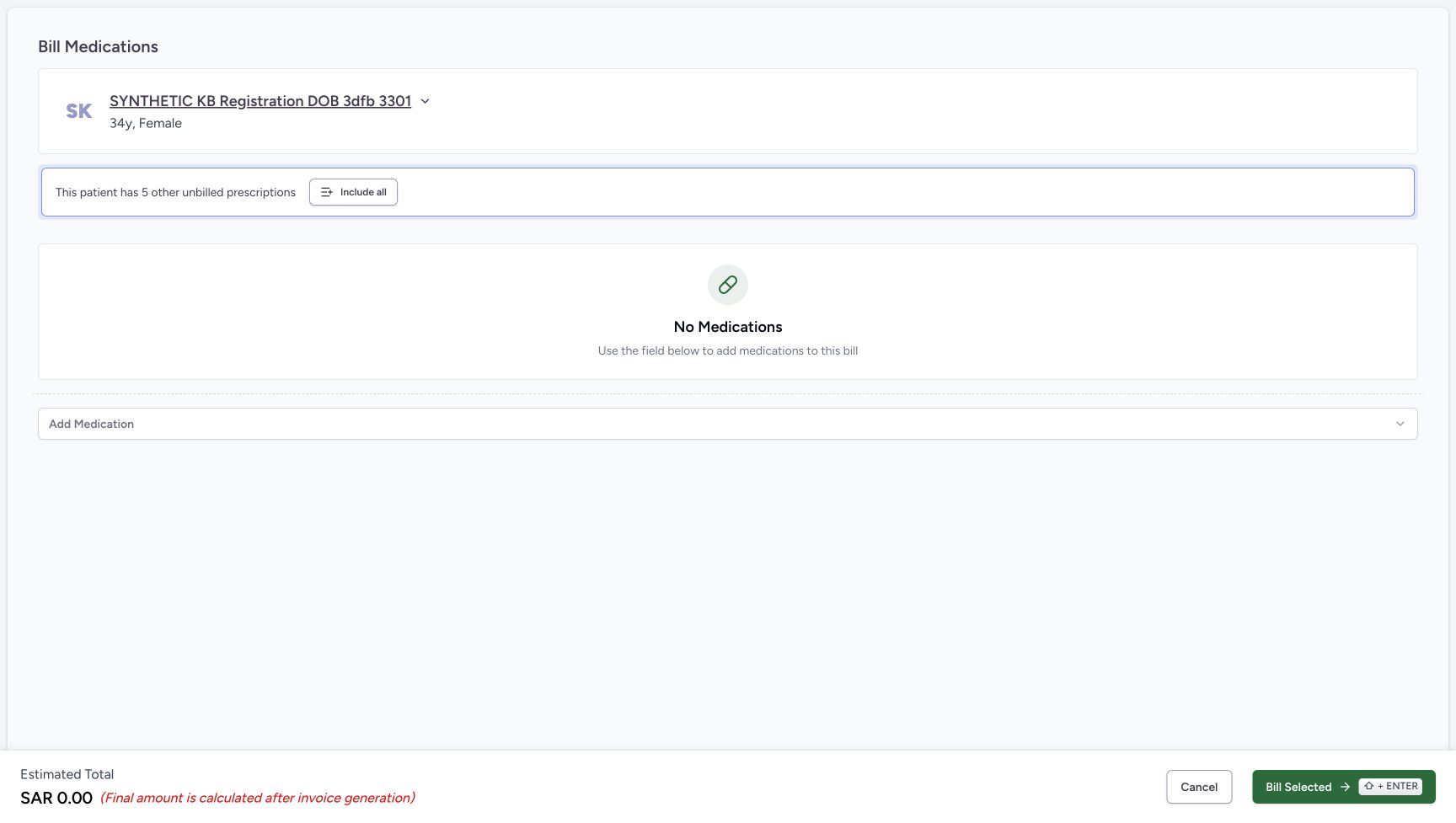
6a02e203d96273ee71722f2ab321be8cf24888e452d8ed26bdde169a877cb71a- Verify the patient: Check the intended synthetic patient before practising medicine duration.
- Locate medicine selection: The core entry guide shows how to open the same synthetic medicine sheet.
- Read No Medications: No medicine row has been added to the preparation.
- Cancel the empty preparation: After leaving the unadded medicine sheet, use this footer Cancel.
- Leave Bill Selected unused: No medicine bill is submitted in this practice.
123Recorded release 812d8272 · 2026-10-21T04:42:04.446200+00:00 · 1728 × 977 Finish at the same patient home
Capture details
Unsaved medicine duration practice: choose days, correct a numeric range, apply fixed dates, leave an invalid draft with Escape and cancel. No medicine row is added or billed.
Image SHA-256
44b479a7d3efbd617d57d21692b6293e1f55d0e2254cdce7c9e63490447650cc- Verify the same patient: Check the intended synthetic patient after leaving the preparation.
- Recognise the intended encounter: The October 20, 2026, 03:19 PM encounter is the one used for this software exercise.
- Locate the existing encounter entry: Dispense Medicine remains an existing handoff control. This lesson ends here.
- Begin with the synthetic Paracetamol sheet open at Dosage 1 count, QD (Once a day) and Duration 1 day. These numbers and dates are a fictional software exercise, not prescribing instructions. Keep frequency, Route, Site, Method, Instructions and Note unchanged during the comparison.1234567
Recorded release 812d8272 · 2026-10-21T04:40:47.006999+00:00 · 1728 × 977 Inspect the starting QD and one-day values
Capture details
Unsaved medicine duration practice: choose days, correct a numeric range, apply fixed dates, leave an invalid draft with Escape and cancel. No medicine row is added or billed.
Image SHA-256
2ffd6f9cdcfb04b410759df7ea24e4f10600b6e21421cacee0c0a5e2e4bf38fa- Verify the synthetic medicine: This medicine is used only to illustrate software controls.
- Read QD (Once a day): Keep the displayed frequency unchanged during this duration comparison.
- Open Duration: This field offers duration suggestions, a range and fixed dates.
- Read Required Quantity 1.00 count: This is the quantity displayed for the starting example.
- Read lot quantity 1: The automatic lot quantity initially matches the displayed requirement.
- Locate sheet Cancel: This leaves the unadded medicine sheet.
- Leave this Add Medication unused: The practice ends without adding a medicine row.
- Keep the medicine unadded. Use only the duration editors and their Done buttons, then cancel the medicine sheet and the empty preparation. Do not choose the medicine sheet’s Add Medication or the preparation’s Bill Selected.1234567
Recorded release 812d8272 · 2026-10-21T04:40:47.006999+00:00 · 1728 × 977 Inspect the starting QD and one-day values
Capture details
Unsaved medicine duration practice: choose days, correct a numeric range, apply fixed dates, leave an invalid draft with Escape and cancel. No medicine row is added or billed.
Image SHA-256
2ffd6f9cdcfb04b410759df7ea24e4f10600b6e21421cacee0c0a5e2e4bf38fa- Verify the synthetic medicine: This medicine is used only to illustrate software controls.
- Read QD (Once a day): Keep the displayed frequency unchanged during this duration comparison.
- Open Duration: This field offers duration suggestions, a range and fixed dates.
- Read Required Quantity 1.00 count: This is the quantity displayed for the starting example.
- Read lot quantity 1: The automatic lot quantity initially matches the displayed requirement.
- Locate sheet Cancel: This leaves the unadded medicine sheet.
- Leave this Add Medication unused: The practice ends without adding a medicine row.
12345Recorded release 812d8272 · 2026-10-21T04:40:12.240097+00:00 · 1728 × 977 Start and finish with an empty preparation
Capture details
Unsaved medicine duration practice: choose days, correct a numeric range, apply fixed dates, leave an invalid draft with Escape and cancel. No medicine row is added or billed.
Image SHA-256
6a02e203d96273ee71722f2ab321be8cf24888e452d8ed26bdde169a877cb71a- Verify the patient: Check the intended synthetic patient before practising medicine duration.
- Locate medicine selection: The core entry guide shows how to open the same synthetic medicine sheet.
- Read No Medications: No medicine row has been added to the preparation.
- Cancel the empty preparation: After leaving the unadded medicine sheet, use this footer Cancel.
- Leave Bill Selected unused: No medicine bill is submitted in this practice.
1. Inspect the starting values before editing Duration
Verify Synthetic Training — Paracetamol 500mg, Dosage 1 count and QD (Once a day) in the open sheet. Read Duration 1 day, Required Quantity 1.00 count and automatic lot quantity 1. Open Duration to begin the comparison.
1234567Inspect the starting QD and one-day values
Capture details
Unsaved medicine duration practice: choose days, correct a numeric range, apply fixed dates, leave an invalid draft with Escape and cancel. No medicine row is added or billed.
Image SHA-256 2ffd6f9cdcfb04b410759df7ea24e4f10600b6e21421cacee0c0a5e2e4bf38fa
- Verify the synthetic medicine: This medicine is used only to illustrate software controls.
- Read QD (Once a day): Keep the displayed frequency unchanged during this duration comparison.
- Open Duration: This field offers duration suggestions, a range and fixed dates.
- Read Required Quantity 1.00 count: This is the quantity displayed for the starting example.
- Read lot quantity 1: The automatic lot quantity initially matches the displayed requirement.
- Locate sheet Cancel: This leaves the unadded medicine sheet.
- Leave this Add Medication unused: The practice ends without adding a medicine row.
2. Distinguish search text from a selected duration
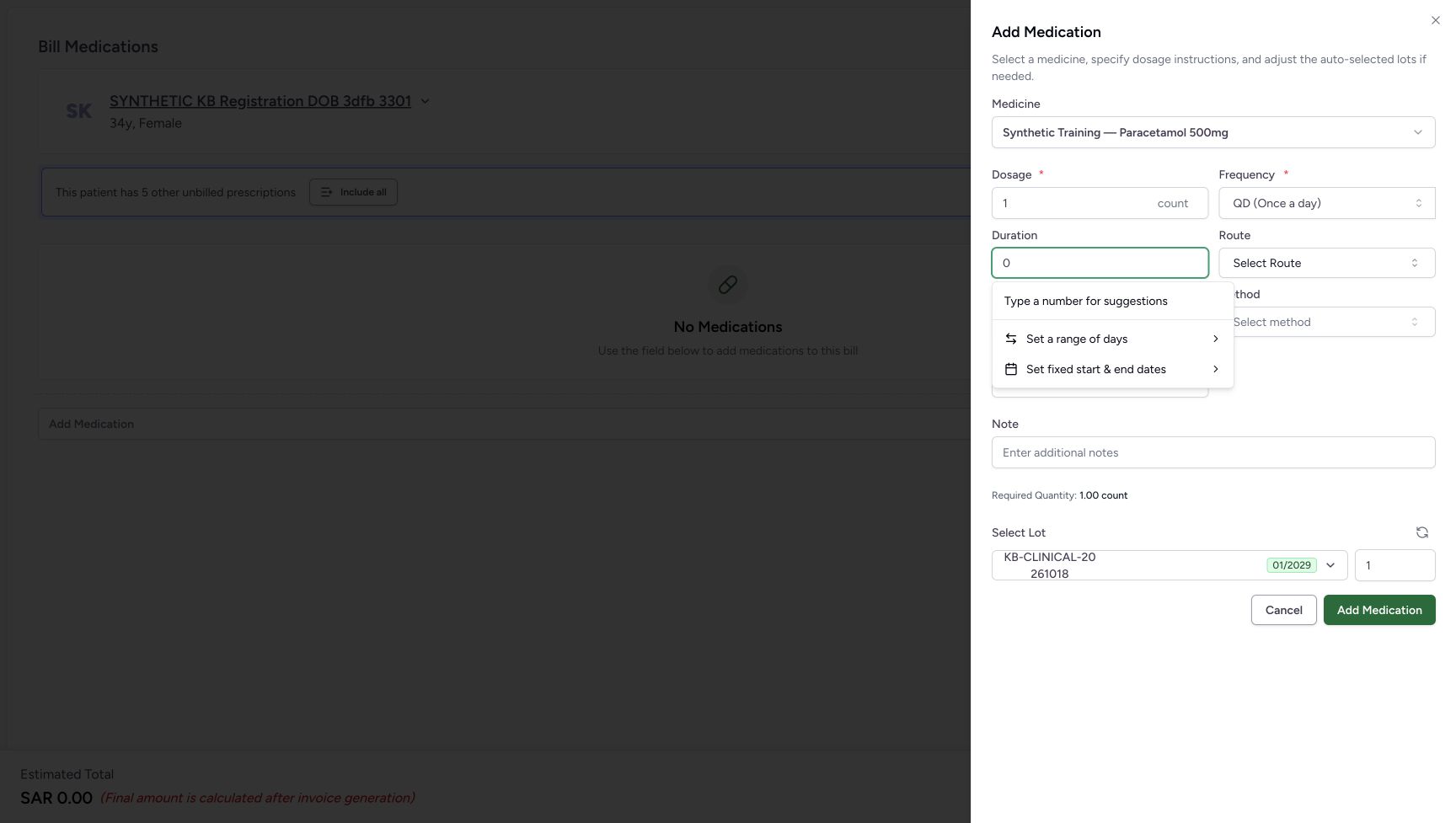
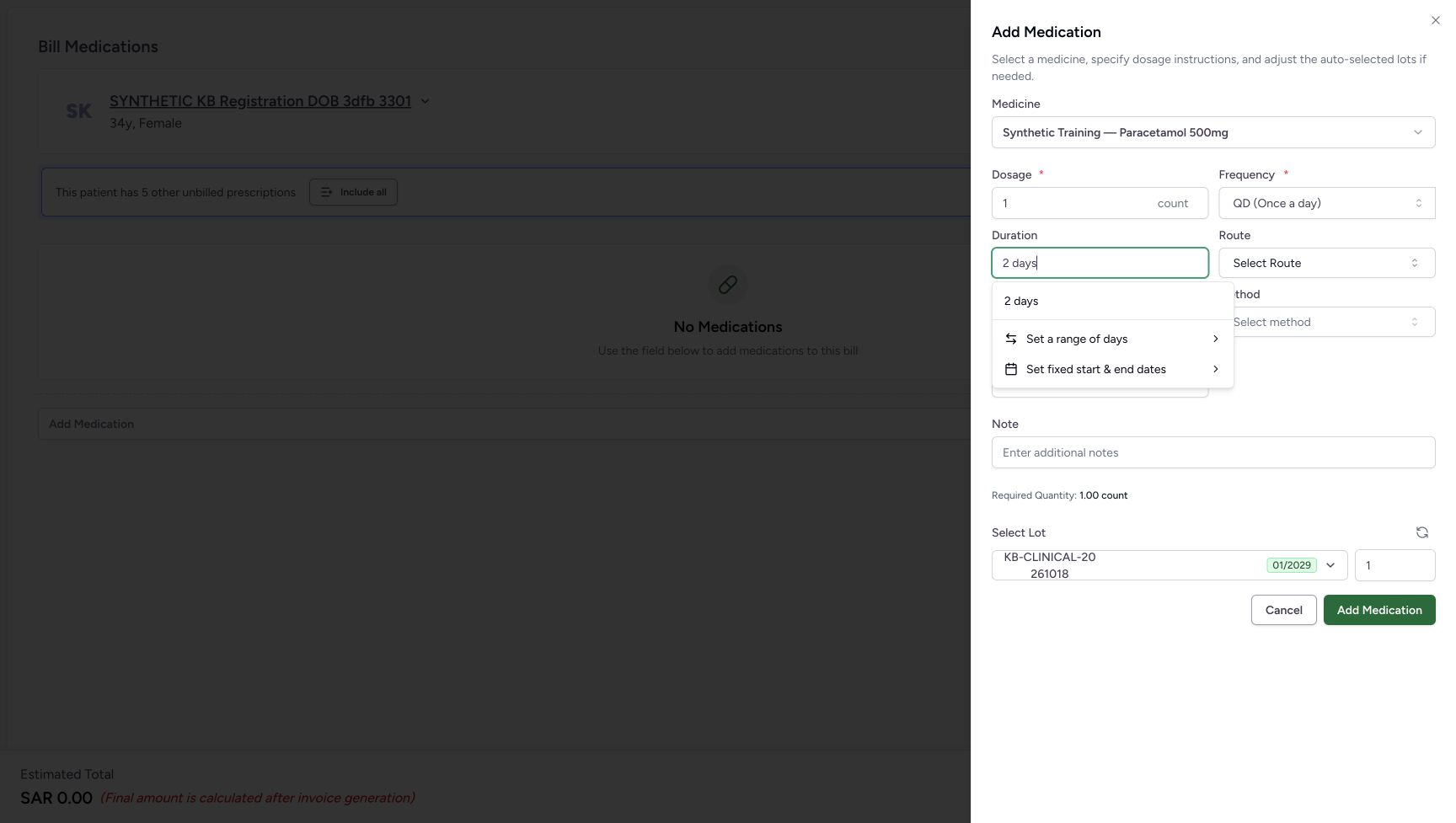
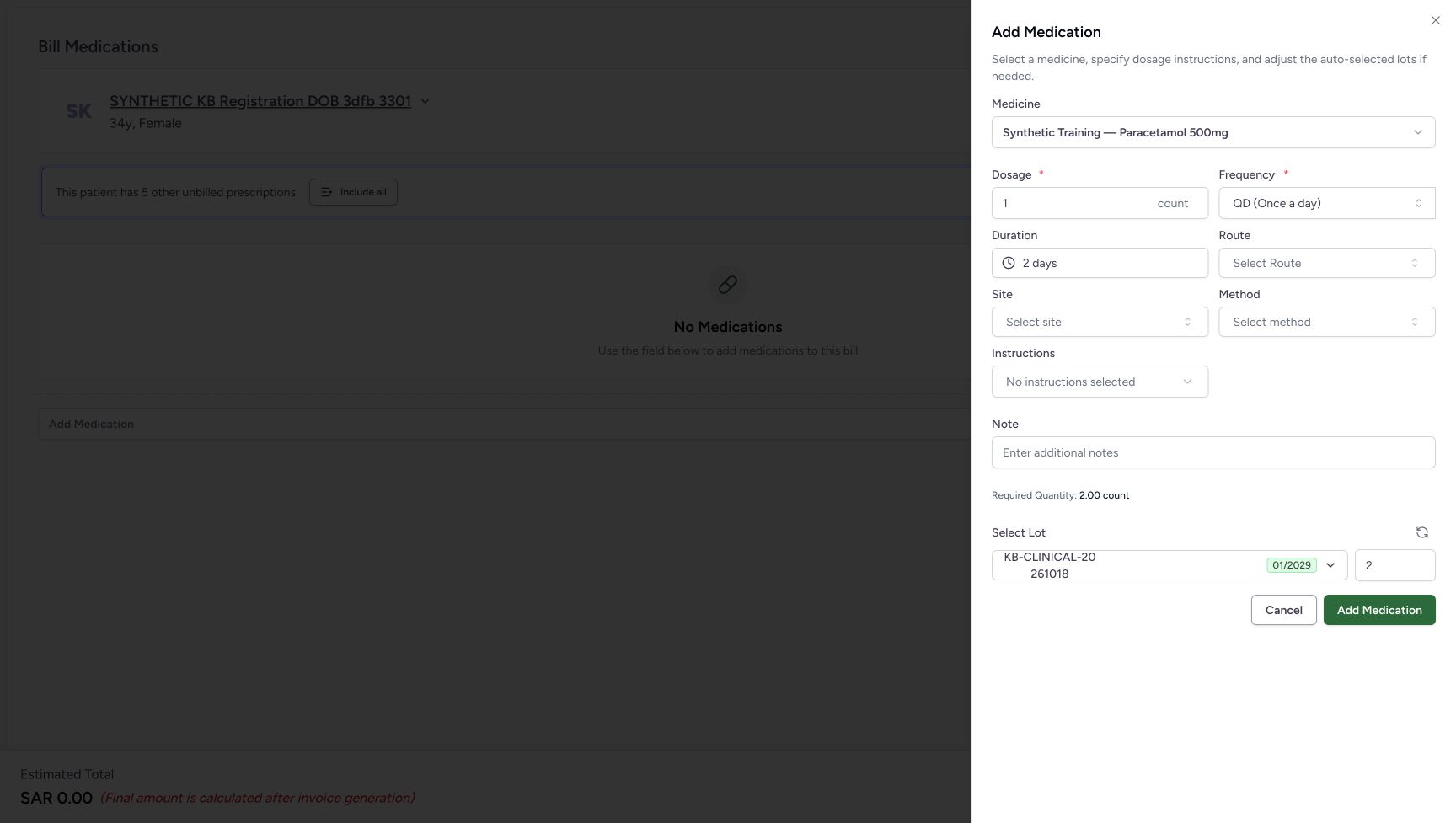
Replace the Duration search text with 0. No zero-day suggestion appears; the popup says Type a number for suggestions. This does not select a zero-day duration, and the sheet’s Add Medication button can remain available. Replace the text with 2 days, then select the 2 days suggestion. After selection, the field shows 2 days, Required Quantity becomes 2.00 count and the automatic lot quantity becomes 2.
 123
123Keep a typed zero separate from a duration choice
Capture details
Unsaved medicine duration practice: choose days, correct a numeric range, apply fixed dates, leave an invalid draft with Escape and cancel. No medicine row is added or billed.
Image SHA-256 f5b34acac6f2017dac9e912ce414169fa3a2a379f7f62b06bf8da111ebeeb7ea
- Inspect the typed 0: This is search text in the open control, not a selected zero-day duration.
- Read the suggestion guidance: No zero-duration choice appears in the result area.
- Do not use button availability as duration validation: The sheet’s Add Medication remains available in this state; leave it unused.
 123
123Choose the two-day suggestion
Capture details
Unsaved medicine duration practice: choose days, correct a numeric range, apply fixed dates, leave an invalid draft with Escape and cancel. No medicine row is added or billed.
Image SHA-256 ceb1269f805bac0d54b8ec676eb9c469669a0356441795f4537b2638b9d2cad7
- Type 2 days: Replace the search text with 2 days.
- Select the 2 days suggestion: Choose the result to apply two days to the open medicine sheet.
- Locate Set a range of days: This is the alternative editor used after the two-day result is applied.
 123
123Review the selected two-day duration and quantity
Capture details
Unsaved medicine duration practice: choose days, correct a numeric range, apply fixed dates, leave an invalid draft with Escape and cancel. No medicine row is added or billed.
Image SHA-256 5612353367cbf8754bce090bb1fc83f40334407f60907e15f7f853b699a0510e
- Read and reopen 2 days: Check the selected duration, then reopen the control for a range.
- Read Required Quantity 2.00 count: The displayed requirement changed after the duration was selected.
- Read automatic lot quantity 2: Review the quantity shown for the selected lot.
3. Open a numeric range and inspect its draft
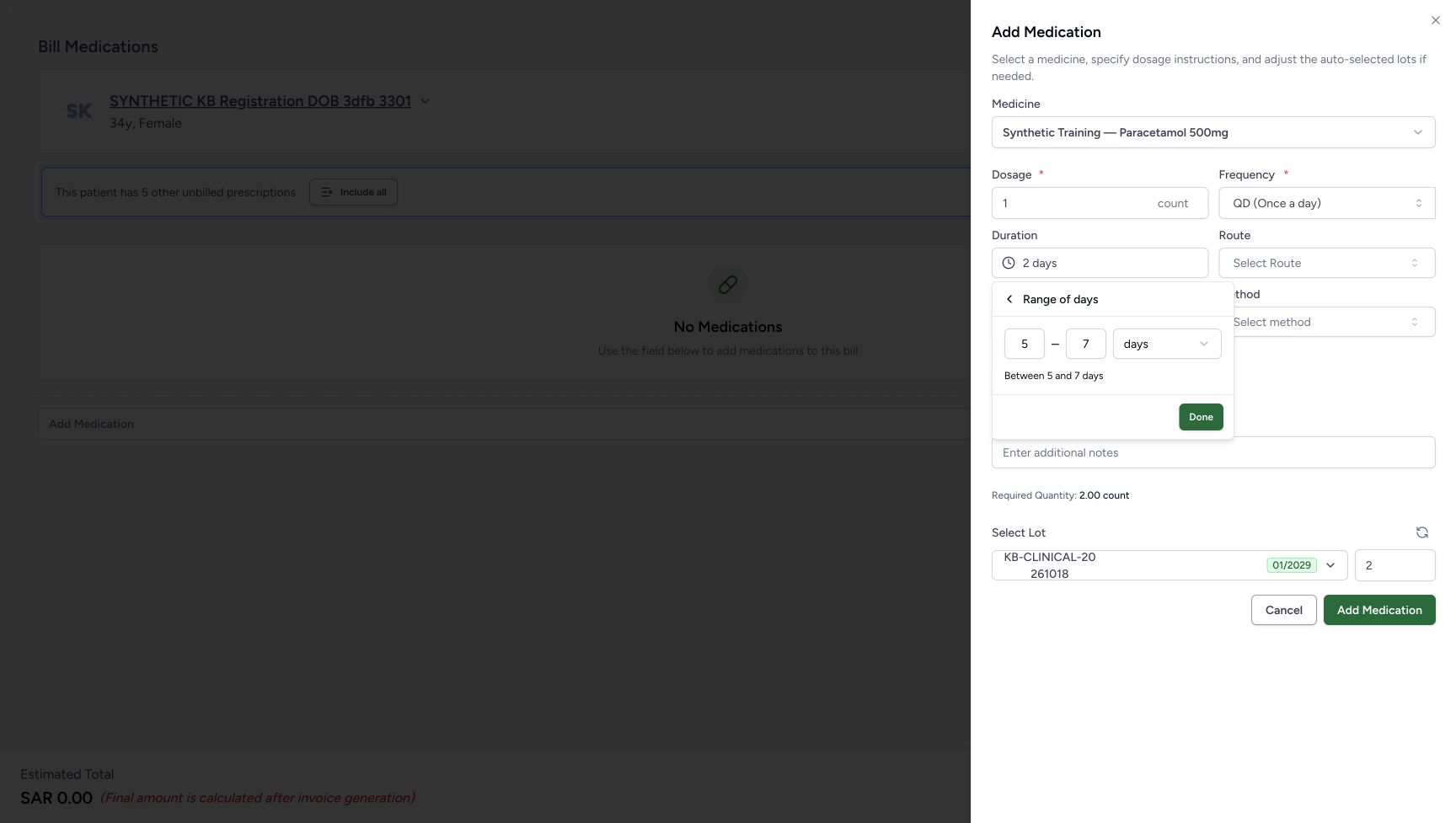
Reopen Duration and choose Set a range of days. The range editor starts with draft values 5 and 7 days in this example; the previously selected 2 days remains in the field above. Change the first field to 3 and the second to 1. Done is disabled for this reversed range. The draft does not replace the selected duration.
123Review the selected two-day duration and quantity
Capture details
Unsaved medicine duration practice: choose days, correct a numeric range, apply fixed dates, leave an invalid draft with Escape and cancel. No medicine row is added or billed.
Image SHA-256 5612353367cbf8754bce090bb1fc83f40334407f60907e15f7f853b699a0510e
- Read and reopen 2 days: Check the selected duration, then reopen the control for a range.
- Read Required Quantity 2.00 count: The displayed requirement changed after the duration was selected.
- Read automatic lot quantity 2: Review the quantity shown for the selected lot.
123Choose the two-day suggestion
Capture details
Unsaved medicine duration practice: choose days, correct a numeric range, apply fixed dates, leave an invalid draft with Escape and cancel. No medicine row is added or billed.
Image SHA-256 ceb1269f805bac0d54b8ec676eb9c469669a0356441795f4537b2638b9d2cad7
- Type 2 days: Replace the search text with 2 days.
- Select the 2 days suggestion: Choose the result to apply two days to the open medicine sheet.
- Locate Set a range of days: This is the alternative editor used after the two-day result is applied.
 12345
12345Edit a range without applying its starting values
Capture details
Unsaved medicine duration practice: choose days, correct a numeric range, apply fixed dates, leave an invalid draft with Escape and cancel. No medicine row is added or billed.
Image SHA-256 c2dbcdfda82cf7cf423d38a2c96506c9fef7005dd9375f6bcc3beeba7697032e
- Locate the range back header: This header returns to the main duration choices.
- Edit the range start: The first field is the start of the range.
- Edit the range end: The second field is the end of the range.
- Read the days unit: Keep days for this example.
- Locate Done: Done applies a valid range only to the open medicine sheet.
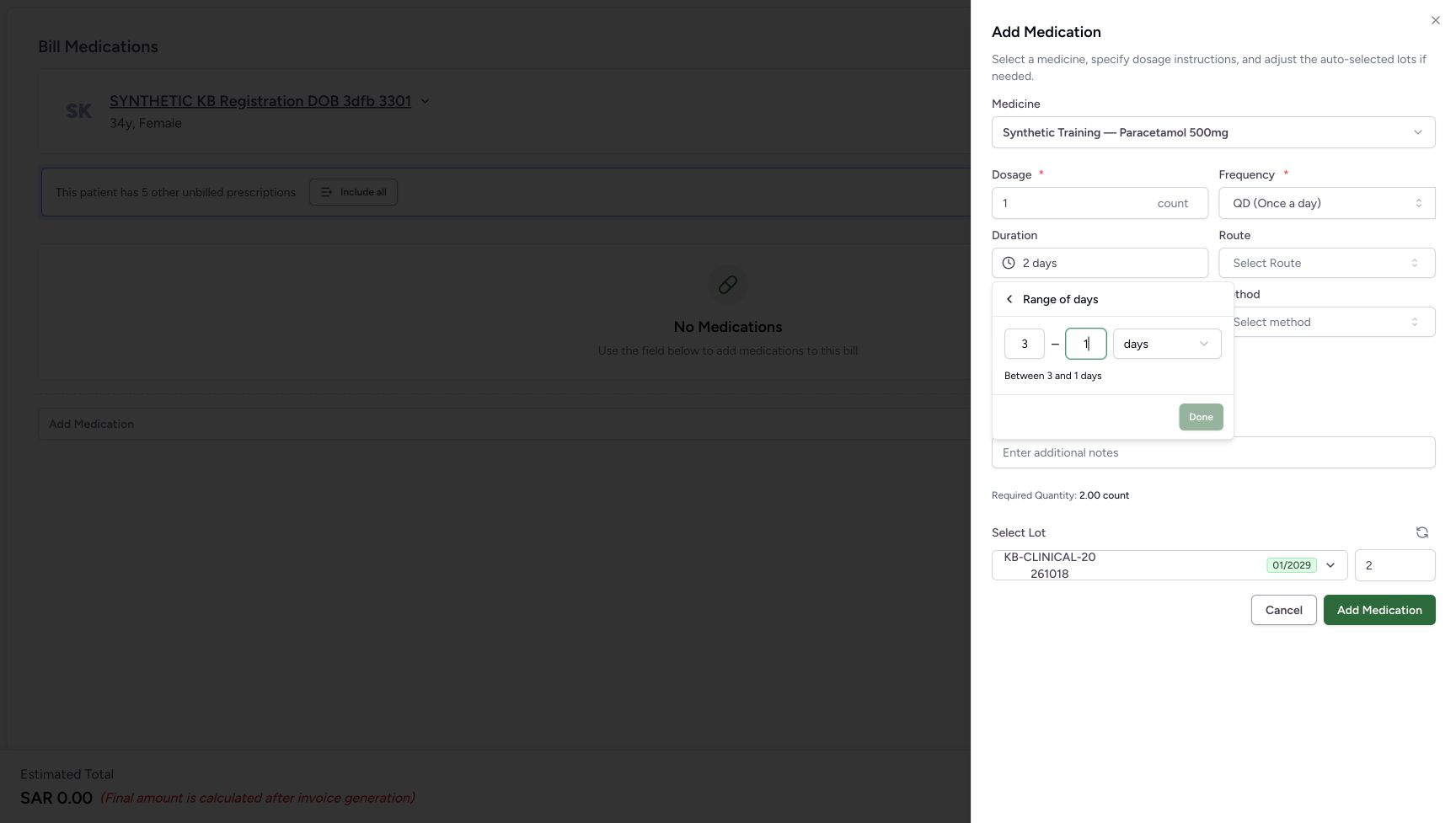 123
123Recognise a reversed range with Done disabled
Capture details
Unsaved medicine duration practice: choose days, correct a numeric range, apply fixed dates, leave an invalid draft with Escape and cancel. No medicine row is added or billed.
Image SHA-256 811810a443d5d7b22f2a6610c5786298247ea77a0241060daa600311993a1bf8
- Read the start value 3: This draft begins after its end value.
- Read the end value 1: Correct the reversed values before applying a range.
- Read disabled Done: This reversed range cannot be applied with Done.
4. Correct and apply the one-to-two-day range
Change the first range value to 1 and the second to 2, keeping days. Check Between 1 and 2 days and choose Done. The Duration field shows 1–2 days, Required Quantity is 2.00 count and automatic lot quantity is 2. Reopen Duration: it goes directly to the selected range with 1 and 2 retained. Choose the Range of days back header to return to the main list.
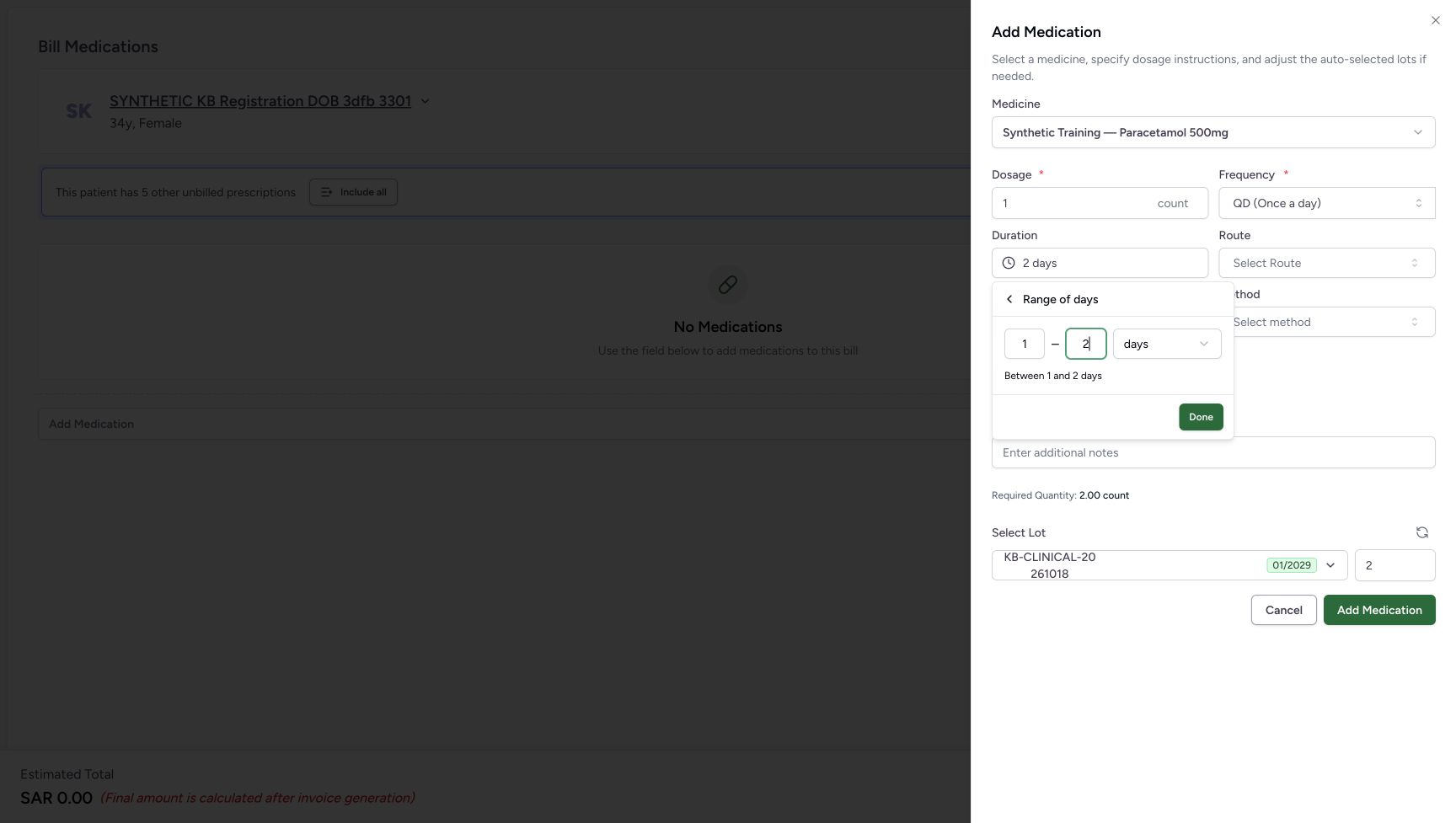 1234
1234Correct the range to one through two days
Capture details
Unsaved medicine duration practice: choose days, correct a numeric range, apply fixed dates, leave an invalid draft with Escape and cancel. No medicine row is added or billed.
Image SHA-256 495defc16e339cfce3fee08846dafe81fdd93a81d891fd394b51a62c844bb8a9
- Set the start to 1: Use 1 as the first value for this software example.
- Set the end to 2: Use 2 as the second value and keep days.
- Choose Done: Apply the valid 1–2 days range to the open sheet.
- Read Between 1 and 2 days: Check the range summary before applying it.
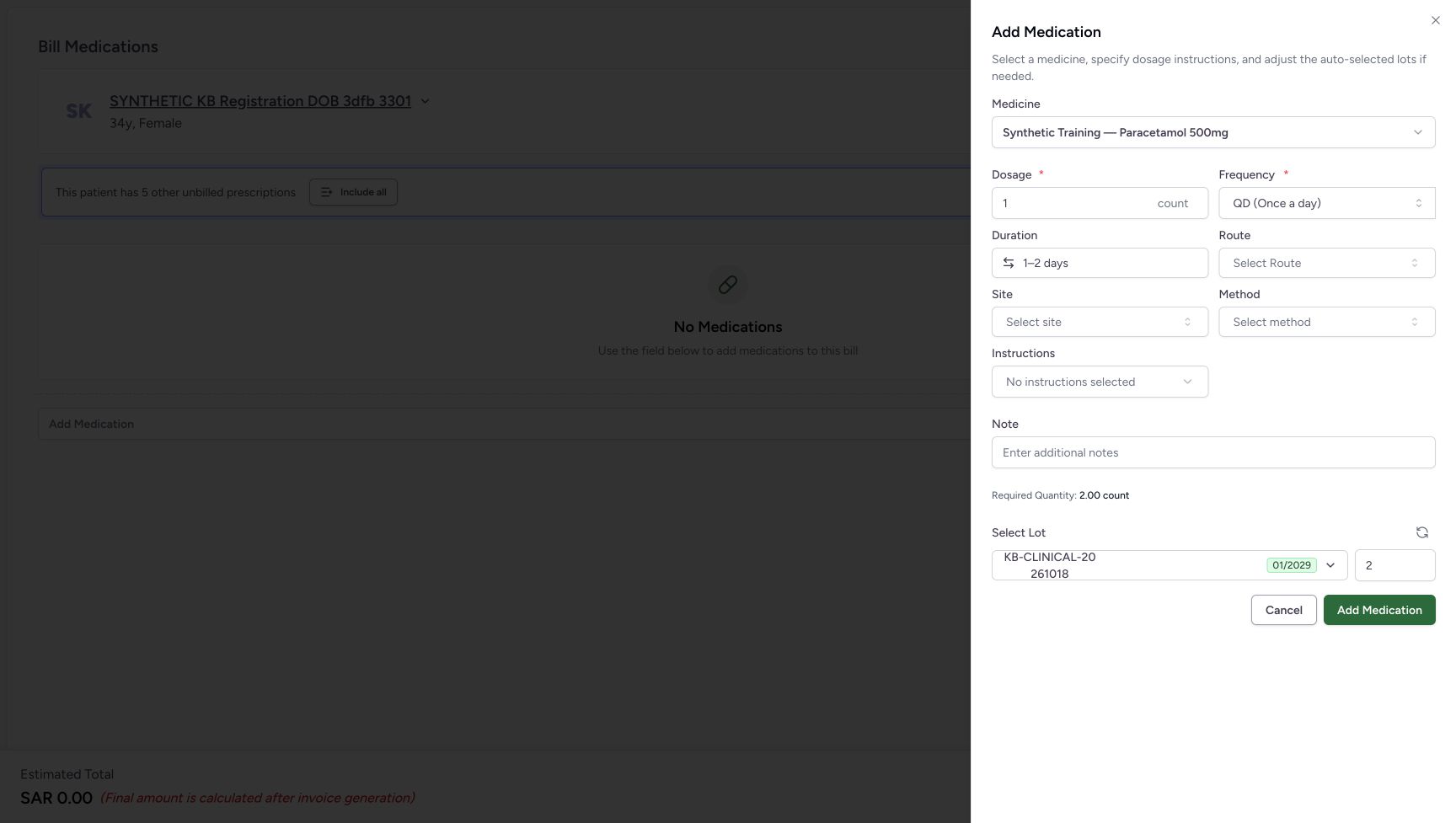 123
123Review the applied range
Capture details
Unsaved medicine duration practice: choose days, correct a numeric range, apply fixed dates, leave an invalid draft with Escape and cancel. No medicine row is added or billed.
Image SHA-256 9311d2a3ce3c27a9a6a1a031ac7d1cdcb7dfbf466b644d76b64aa0f98e5e5608
- Read and reopen 1–2 days: Reopen Duration to inspect the selected range.
- Read Required Quantity 2.00 count: Review the displayed requirement for this particular example.
- Read automatic lot quantity 2: The selected lot quantity is still 2.
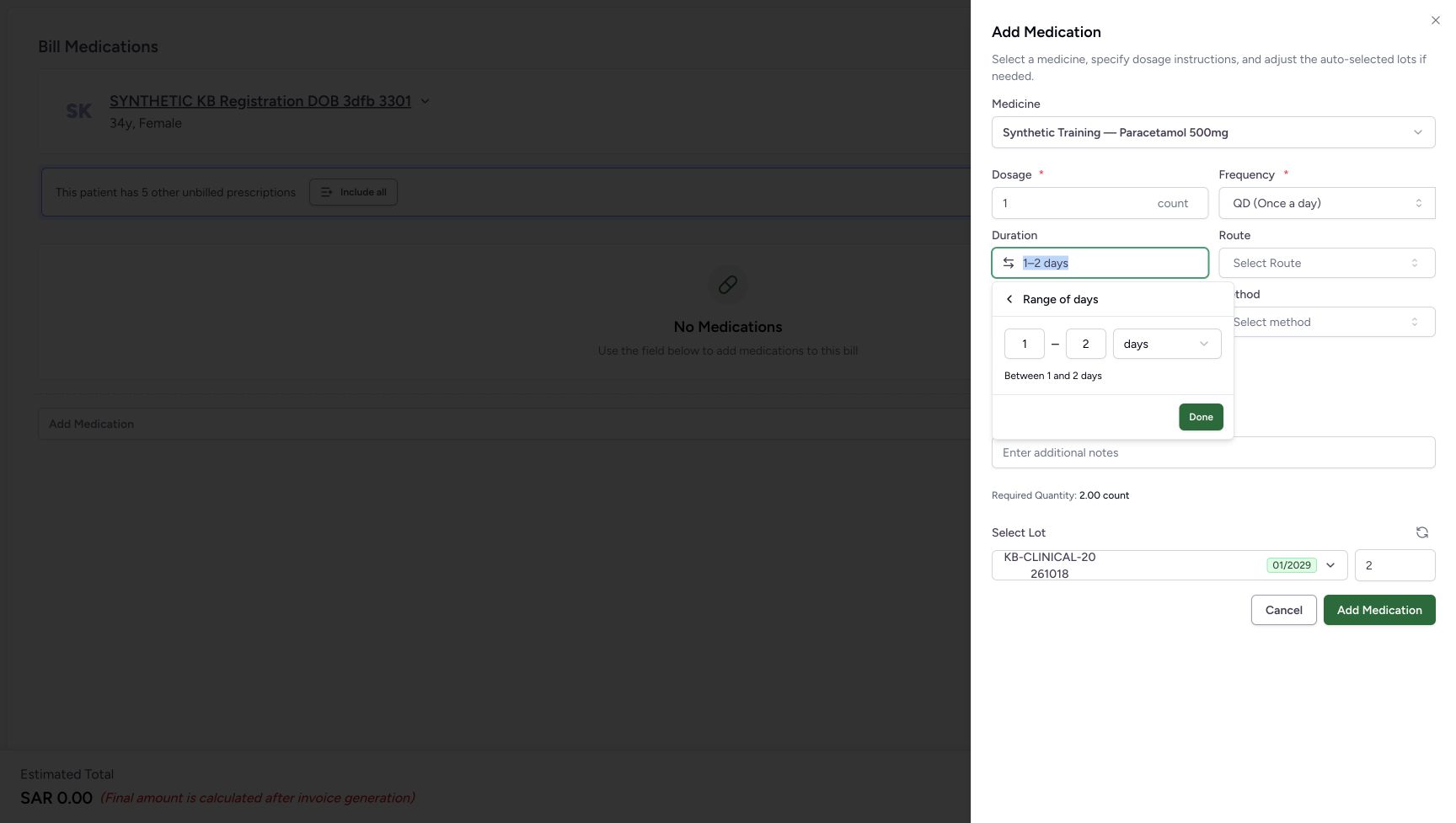 123
123Reopen directly into the selected range
Capture details
Unsaved medicine duration practice: choose days, correct a numeric range, apply fixed dates, leave an invalid draft with Escape and cancel. No medicine row is added or billed.
Image SHA-256 d4eb338e2554d94605f0b62d2fd578675a01ff1af98ebc4d725b579cfac50618
- Return through the range header: Choose the Range of days back header to reach the main duration choices.
- Read retained start 1: The reopened editor shows the selected range start.
- Read retained end 2: The reopened editor shows the selected range end.
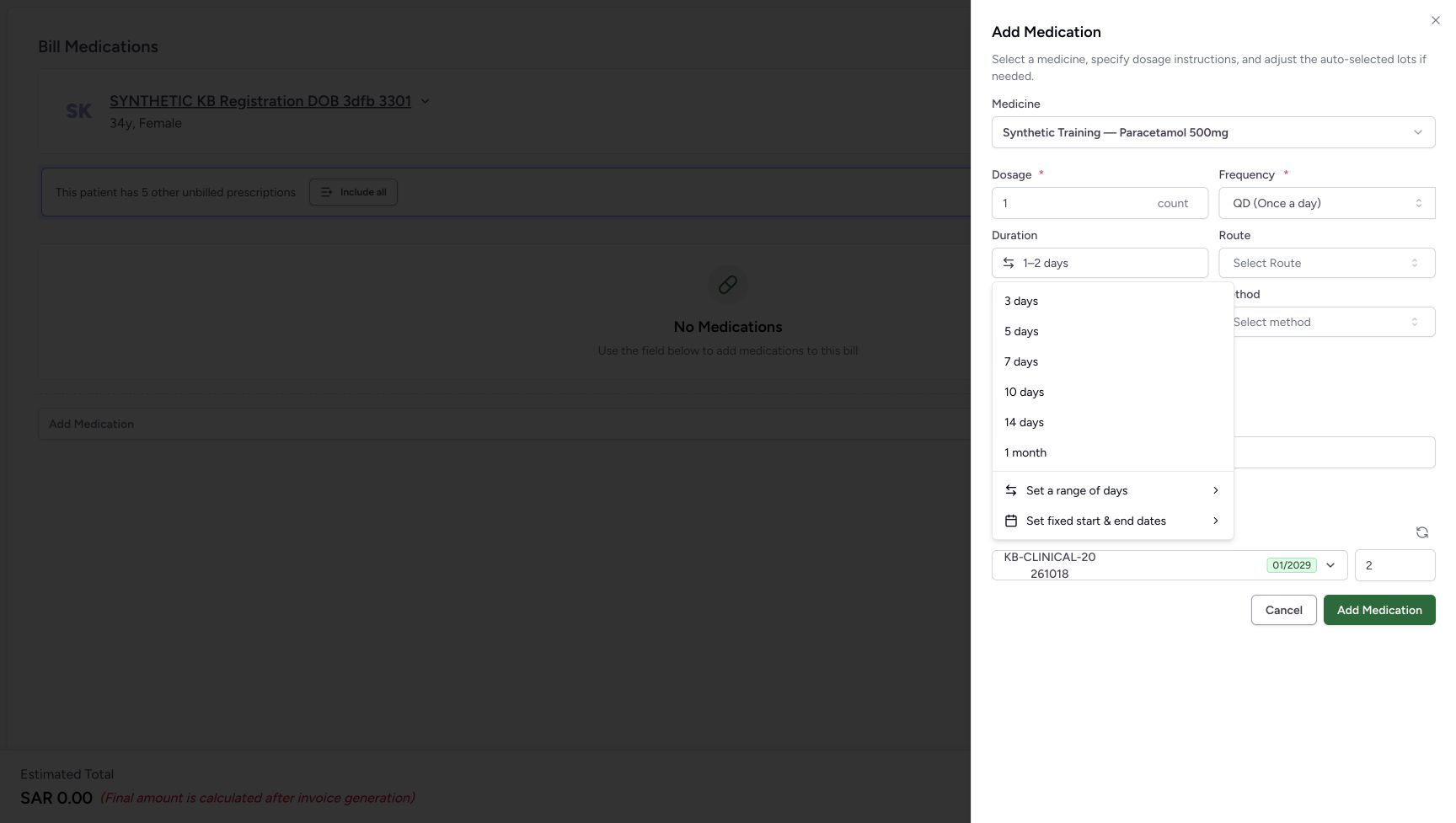 12
12Choose a different duration format from the main list
Capture details
Unsaved medicine duration practice: choose days, correct a numeric range, apply fixed dates, leave an invalid draft with Escape and cancel. No medicine row is added or billed.
Image SHA-256 8aadbae41d2e2f0618559d13022cb46e3dc4a064b349e7edbd10a2c8e51c2968
- Open Set a range of days: This returns to the numeric range editor when needed.
- Choose Set fixed start & end dates: Open the calendar editor for the fixed-date comparison.
5. Compare the first calendar date with two selected dates
Choose Set fixed start & end dates. The October 2026 calendar initially has no endpoints and Done is disabled. Choose October 22: the first click already forms a same-day draft and enables Done. For this example, then choose October 23 to extend the selection. Review both dates and choose Done. The sheet shows Oct 22, 2026 → Oct 23, 2026, Required Quantity 2.00 count and lot quantity 2.
12Choose a different duration format from the main list
Capture details
Unsaved medicine duration practice: choose days, correct a numeric range, apply fixed dates, leave an invalid draft with Escape and cancel. No medicine row is added or billed.
Image SHA-256 8aadbae41d2e2f0618559d13022cb46e3dc4a064b349e7edbd10a2c8e51c2968
- Open Set a range of days: This returns to the numeric range editor when needed.
- Choose Set fixed start & end dates: Open the calendar editor for the fixed-date comparison.
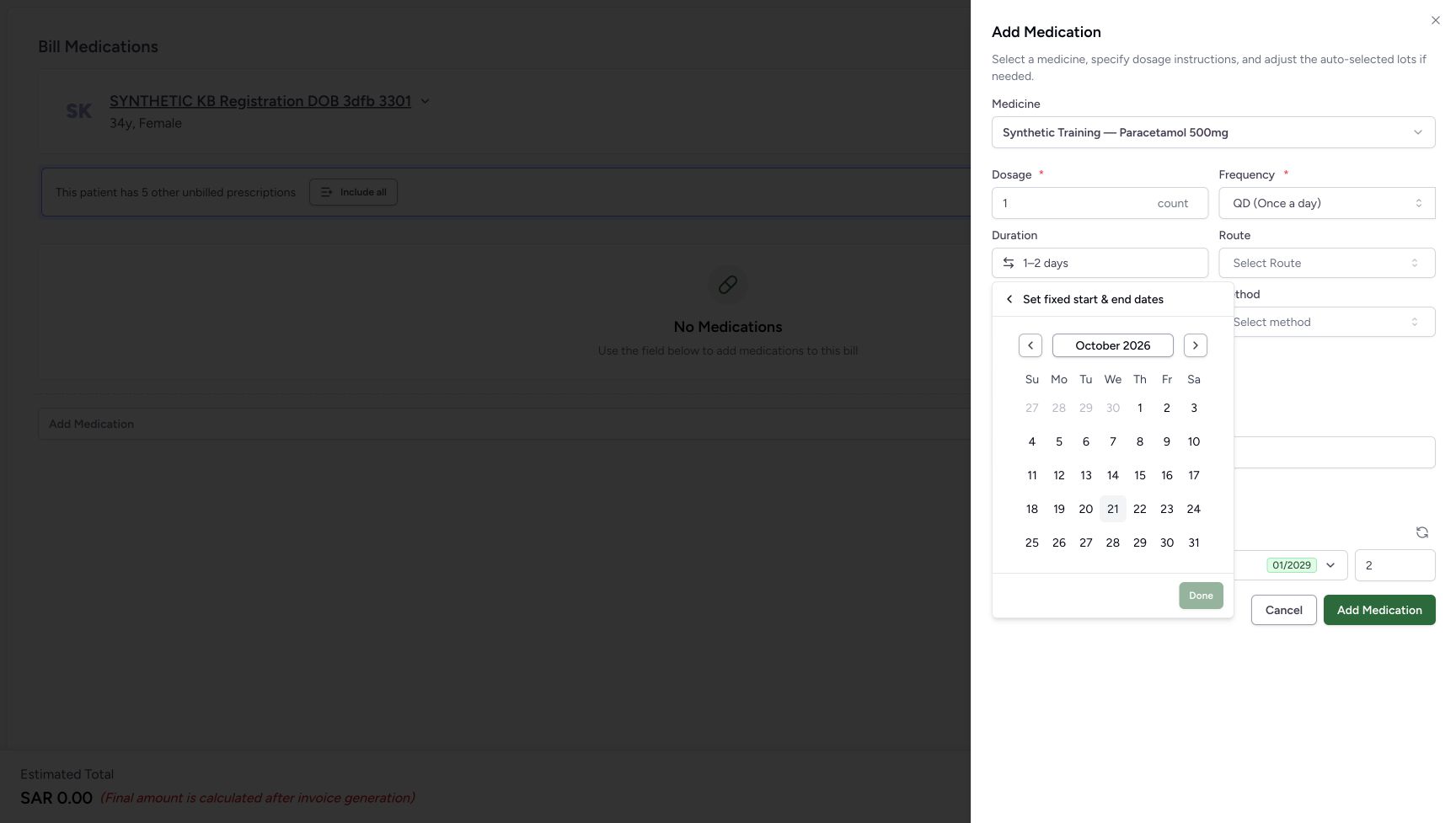 123
123Inspect the initially empty calendar draft
Capture details
Unsaved medicine duration practice: choose days, correct a numeric range, apply fixed dates, leave an invalid draft with Escape and cancel. No medicine row is added or billed.
Image SHA-256 11bee3f0b936ece3c5b2cb94cbf11a89f90efeb1ca152002e538918c6c4a08ec
- Check October 2026: Use the displayed month for this fictional date example.
- Choose October 22: Select the first date in the illustrated calendar.
- Read initially disabled Done: No date range is ready to apply before the first date is chosen.
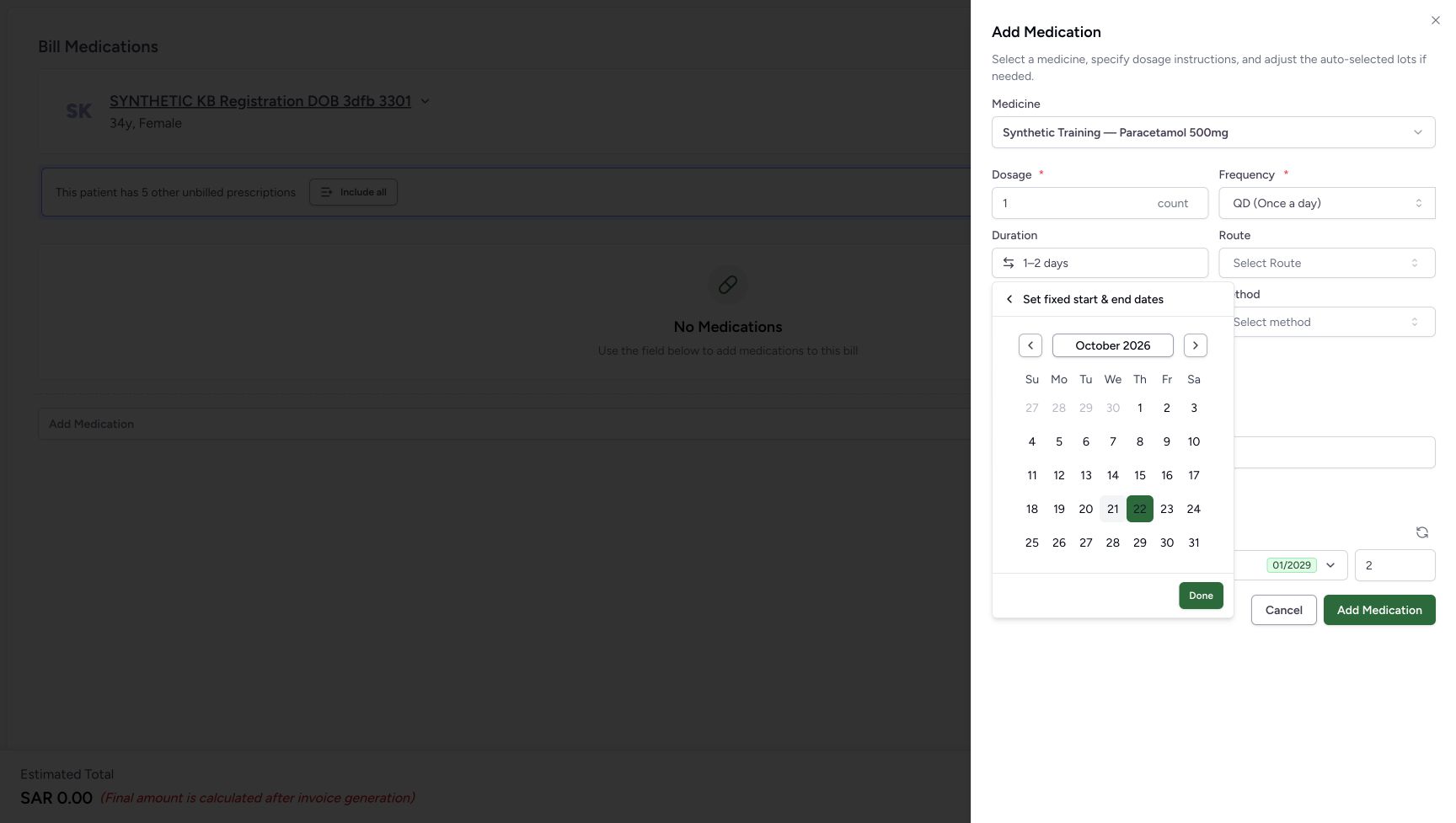 12
12See that the first date already forms a same-day draft
Capture details
Unsaved medicine duration practice: choose days, correct a numeric range, apply fixed dates, leave an invalid draft with Escape and cancel. No medicine row is added or billed.
Image SHA-256 6a009732c2b8732a6205e3a363f014ab568eb2814284a539e0d60e8588b2f61d
- Read enabled Done after one date: The first selected date already permits a same-day range.
- Choose October 23: For this example, extend the selection to the following date before applying it.
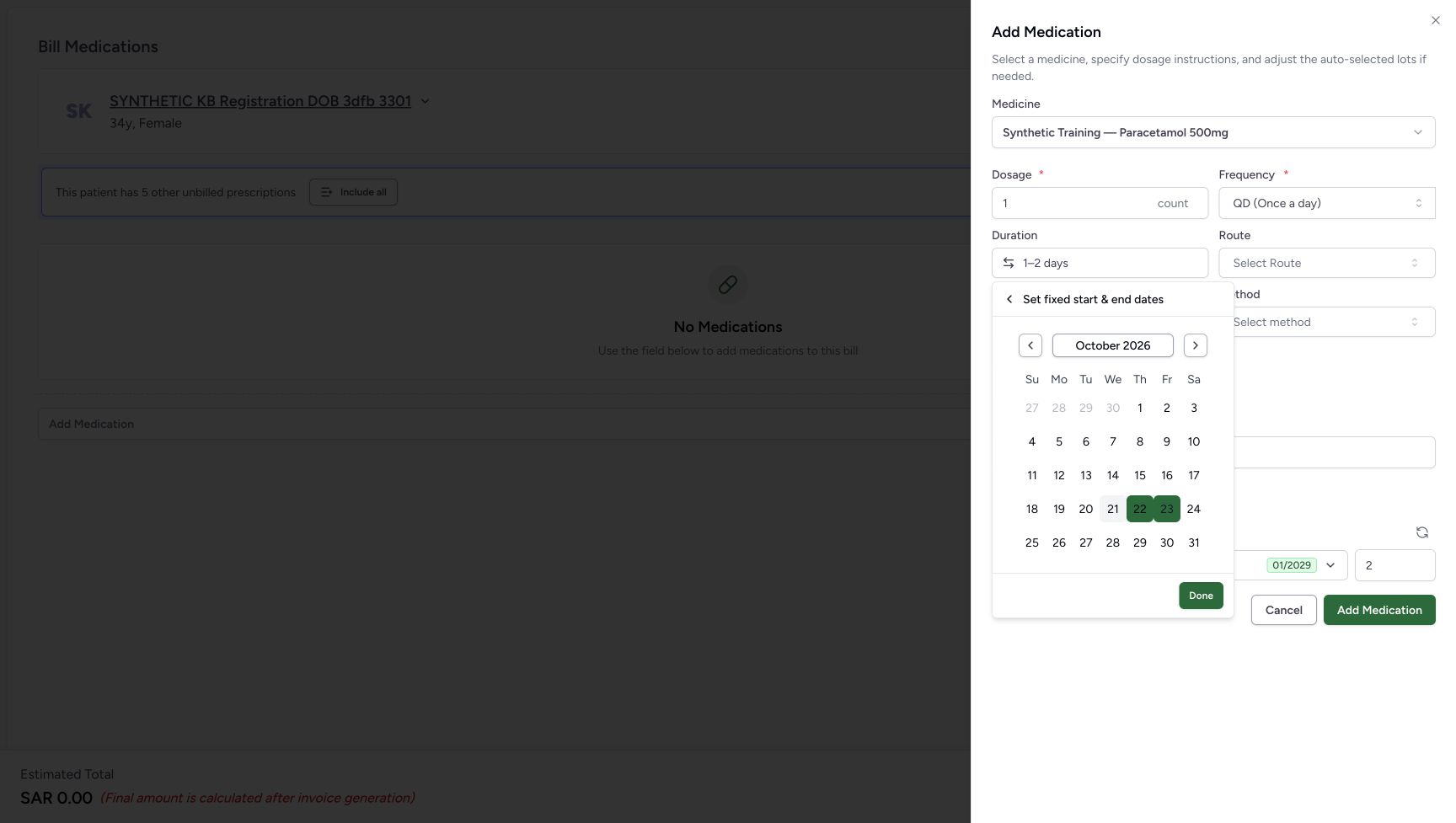 12
12Apply the October 22 to October 23 dates
Capture details
Unsaved medicine duration practice: choose days, correct a numeric range, apply fixed dates, leave an invalid draft with Escape and cancel. No medicine row is added or billed.
Image SHA-256 4f04035502a798b6c6acf3fb2bad4800e33117e1db299c608a89b8388d0f5b35
- Review the selected end date: October 23 is the illustrated range end, following October 22.
- Choose calendar Done: Apply these fixed dates to the open medicine sheet.
1234Read the fixed dates and their retained Escape outcome
Capture details
Unsaved medicine duration practice: choose days, correct a numeric range, apply fixed dates, leave an invalid draft with Escape and cancel. No medicine row is added or billed.
Image SHA-256 f6645d1e0af60356f44f6bec9f242daab27e17d93e0188750feb186dff42d490
- Read the fixed-date summary: The selected dates remain October 22 through October 23.
- Read Required Quantity 2.00 count: This is the quantity displayed for the illustrated dates.
- Read automatic lot quantity 2: The automatic selection still contains quantity 2.
- Cancel the medicine sheet: Leave the medicine unadded after completing the control comparison.
6. Reopen the dates and leave an invalid range unapplied
Reopen Duration to see the same selected calendar dates. Use its Set fixed start & end dates back header, then choose Set a range of days from the main list. Enter 0 in the first field and 2 in the second. Done is disabled. Open the unit menu to inspect days, weeks and months; choose days to retain it and close that menu. Focus the first range field and press Escape once to leave the invalid range draft. The previous October 22 through October 23 summary remains, with Required Quantity 2.00 count and lot quantity 2.
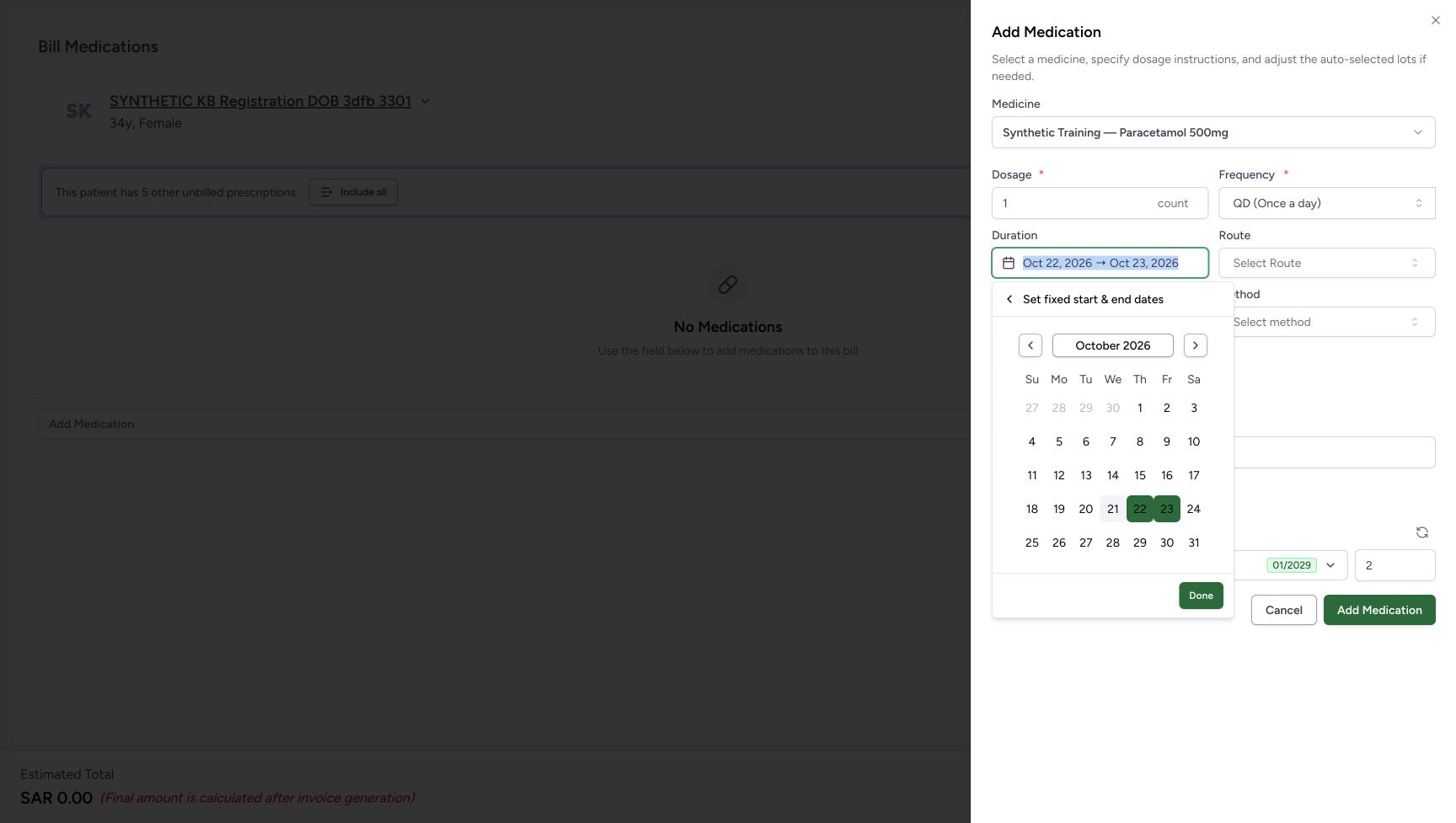 12
12Reopen directly into the selected calendar
Capture details
Unsaved medicine duration practice: choose days, correct a numeric range, apply fixed dates, leave an invalid draft with Escape and cancel. No medicine row is added or billed.
Image SHA-256 2d64734f2ae583f2a71a8cd89e6518171c2e73fbe54a211e629dedccfcc51106
- Reopen the date summary: Duration opens the editor for the selected date format.
- Use the calendar back header: Return to the main duration list before opening a numeric range again.
12Choose a different duration format from the main list
Capture details
Unsaved medicine duration practice: choose days, correct a numeric range, apply fixed dates, leave an invalid draft with Escape and cancel. No medicine row is added or billed.
Image SHA-256 8aadbae41d2e2f0618559d13022cb46e3dc4a064b349e7edbd10a2c8e51c2968
- Open Set a range of days: This returns to the numeric range editor when needed.
- Choose Set fixed start & end dates: Open the calendar editor for the fixed-date comparison.
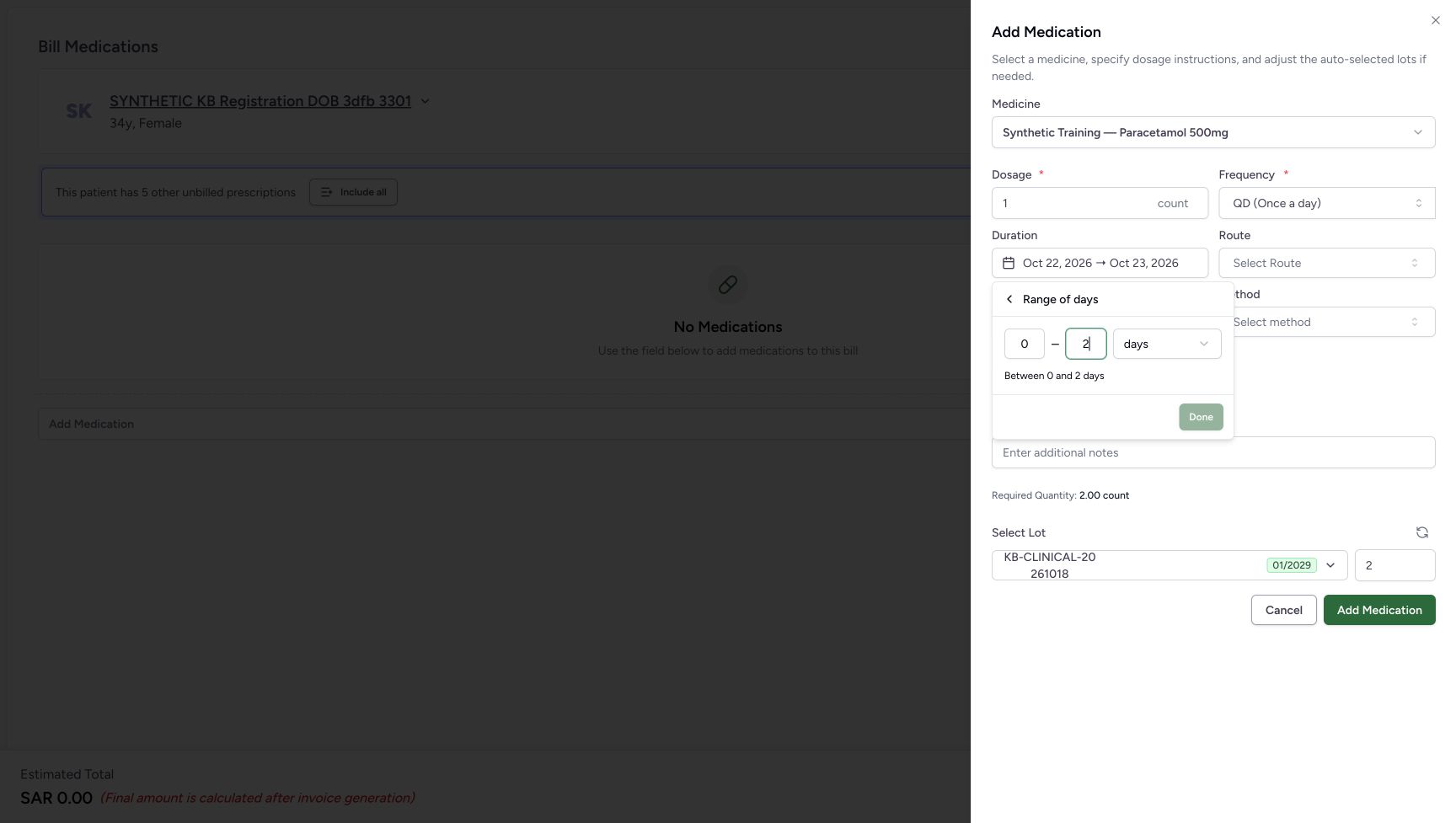 123
123Leave an invalid zero-start range unapplied
Capture details
Unsaved medicine duration practice: choose days, correct a numeric range, apply fixed dates, leave an invalid draft with Escape and cancel. No medicine row is added or billed.
Image SHA-256 18d8fbe6b8627d99d1c985d6d53cce77b991349fc73bc6a7bd53797f494edf0b
- Set and inspect start 0: This zero-start draft cannot be applied with Done. It is separate from the selected date summary above.
- Read end 2: The second field remains 2 days.
- Read disabled Done: Leave this invalid range unapplied.
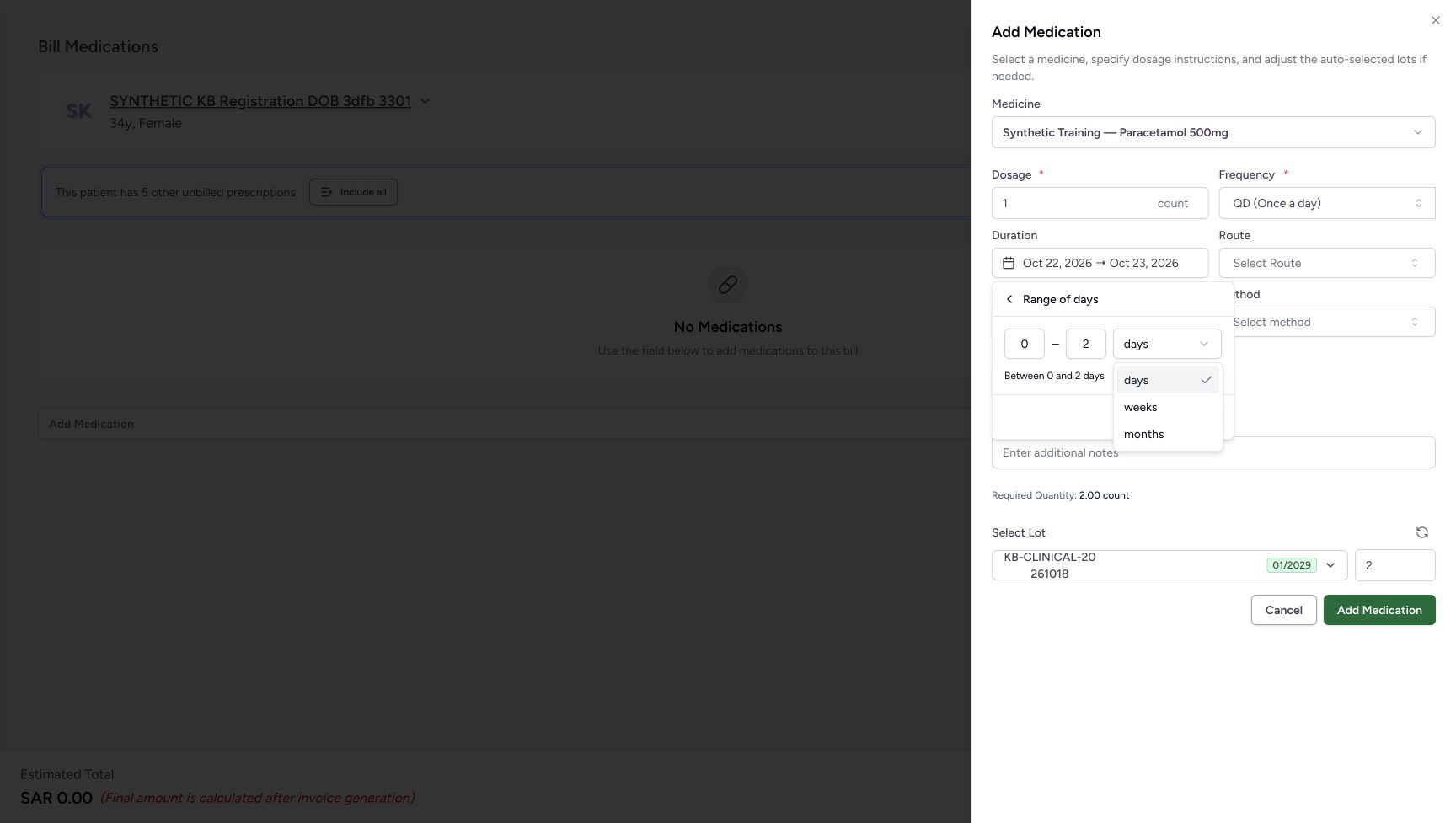 123
123Inspect the range-unit choices and retain days
Capture details
Unsaved medicine duration practice: choose days, correct a numeric range, apply fixed dates, leave an invalid draft with Escape and cancel. No medicine row is added or billed.
Image SHA-256 15eca06d7b2131552f6169cc4041c81fd2f2d27df5cd53964a23718c310463a9
- Open the unit menu: Inspect the available range units.
- Choose days: Retain days and close the unit menu for this example.
- Locate the other offered units: Weeks and months are also offered here; this example does not apply or calculate either.
1234Read the fixed dates and their retained Escape outcome
Capture details
Unsaved medicine duration practice: choose days, correct a numeric range, apply fixed dates, leave an invalid draft with Escape and cancel. No medicine row is added or billed.
Image SHA-256 f6645d1e0af60356f44f6bec9f242daab27e17d93e0188750feb186dff42d490
- Read the fixed-date summary: The selected dates remain October 22 through October 23.
- Read Required Quantity 2.00 count: This is the quantity displayed for the illustrated dates.
- Read automatic lot quantity 2: The automatic selection still contains quantity 2.
- Cancel the medicine sheet: Leave the medicine unadded after completing the control comparison.
7. Cancel the medicine sheet without adding a row
Choose the medicine sheet’s Cancel. The preparation shows No Medications and Estimated Total SAR 0.00. Done applied the duration choices only inside the open sheet; it did not add this medicine to the preparation.
1234Read the fixed dates and their retained Escape outcome
Capture details
Unsaved medicine duration practice: choose days, correct a numeric range, apply fixed dates, leave an invalid draft with Escape and cancel. No medicine row is added or billed.
Image SHA-256 f6645d1e0af60356f44f6bec9f242daab27e17d93e0188750feb186dff42d490
- Read the fixed-date summary: The selected dates remain October 22 through October 23.
- Read Required Quantity 2.00 count: This is the quantity displayed for the illustrated dates.
- Read automatic lot quantity 2: The automatic selection still contains quantity 2.
- Cancel the medicine sheet: Leave the medicine unadded after completing the control comparison.
12345Start and finish with an empty preparation
Capture details
Unsaved medicine duration practice: choose days, correct a numeric range, apply fixed dates, leave an invalid draft with Escape and cancel. No medicine row is added or billed.
Image SHA-256 6a02e203d96273ee71722f2ab321be8cf24888e452d8ed26bdde169a877cb71a
- Verify the patient: Check the intended synthetic patient before practising medicine duration.
- Locate medicine selection: The core entry guide shows how to open the same synthetic medicine sheet.
- Read No Medications: No medicine row has been added to the preparation.
- Cancel the empty preparation: After leaving the unadded medicine sheet, use this footer Cancel.
- Leave Bill Selected unused: No medicine bill is submitted in this practice.
8. Leave the empty preparation
Choose the preparation footer Cancel. In this observed entry route it returns to the same patient home with the existing Active Ambulatory encounters. The medicine sheet’s Add Medication and the preparation’s Bill Selected were not used.
12345Start and finish with an empty preparation
Capture details
Unsaved medicine duration practice: choose days, correct a numeric range, apply fixed dates, leave an invalid draft with Escape and cancel. No medicine row is added or billed.
Image SHA-256 6a02e203d96273ee71722f2ab321be8cf24888e452d8ed26bdde169a877cb71a
- Verify the patient: Check the intended synthetic patient before practising medicine duration.
- Locate medicine selection: The core entry guide shows how to open the same synthetic medicine sheet.
- Read No Medications: No medicine row has been added to the preparation.
- Cancel the empty preparation: After leaving the unadded medicine sheet, use this footer Cancel.
- Leave Bill Selected unused: No medicine bill is submitted in this practice.
123Finish at the same patient home
Capture details
Unsaved medicine duration practice: choose days, correct a numeric range, apply fixed dates, leave an invalid draft with Escape and cancel. No medicine row is added or billed.
Image SHA-256 44b479a7d3efbd617d57d21692b6293e1f55d0e2254cdce7c9e63490447650cc
- Verify the same patient: Check the intended synthetic patient after leaving the preparation.
- Recognise the intended encounter: The October 20, 2026, 03:19 PM encounter is the one used for this software exercise.
- Locate the existing encounter entry: Dispense Medicine remains an existing handoff control. This lesson ends here.
Check the selected summary and quantity after each change
Typing in the duration search or editing a range/calendar draft is different from choosing a suggestion or Done. Read the closed Duration summary, Required Quantity and selected lot quantity after each applied change. The illustrated two-day duration, 1–2 days range and October 22 through October 23 dates each display a requirement of 2 count in this particular 1 count/QD example.
123Keep a typed zero separate from a duration choice
Capture details
Unsaved medicine duration practice: choose days, correct a numeric range, apply fixed dates, leave an invalid draft with Escape and cancel. No medicine row is added or billed.
Image SHA-256 f5b34acac6f2017dac9e912ce414169fa3a2a379f7f62b06bf8da111ebeeb7ea
- Inspect the typed 0: This is search text in the open control, not a selected zero-day duration.
- Read the suggestion guidance: No zero-duration choice appears in the result area.
- Do not use button availability as duration validation: The sheet’s Add Medication remains available in this state; leave it unused.
123Review the selected two-day duration and quantity
Capture details
Unsaved medicine duration practice: choose days, correct a numeric range, apply fixed dates, leave an invalid draft with Escape and cancel. No medicine row is added or billed.
Image SHA-256 5612353367cbf8754bce090bb1fc83f40334407f60907e15f7f853b699a0510e
- Read and reopen 2 days: Check the selected duration, then reopen the control for a range.
- Read Required Quantity 2.00 count: The displayed requirement changed after the duration was selected.
- Read automatic lot quantity 2: Review the quantity shown for the selected lot.
123Review the applied range
Capture details
Unsaved medicine duration practice: choose days, correct a numeric range, apply fixed dates, leave an invalid draft with Escape and cancel. No medicine row is added or billed.
Image SHA-256 9311d2a3ce3c27a9a6a1a031ac7d1cdcb7dfbf466b644d76b64aa0f98e5e5608
- Read and reopen 1–2 days: Reopen Duration to inspect the selected range.
- Read Required Quantity 2.00 count: Review the displayed requirement for this particular example.
- Read automatic lot quantity 2: The selected lot quantity is still 2.
1234Read the fixed dates and their retained Escape outcome
Capture details
Unsaved medicine duration practice: choose days, correct a numeric range, apply fixed dates, leave an invalid draft with Escape and cancel. No medicine row is added or billed.
Image SHA-256 f6645d1e0af60356f44f6bec9f242daab27e17d93e0188750feb186dff42d490
- Read the fixed-date summary: The selected dates remain October 22 through October 23.
- Read Required Quantity 2.00 count: This is the quantity displayed for the illustrated dates.
- Read automatic lot quantity 2: The automatic selection still contains quantity 2.
- Cancel the medicine sheet: Leave the medicine unadded after completing the control comparison.
Does Done save or dispense the medicine?
No. Here Done changes the open medicine sheet. The sheet’s Add Medication would add a local preparation row, and Bill Selected is a separate submission action. This exercise uses neither. It does not demonstrate a saved prescription, dispense, invoice, payment or stock movement.
1234Correct the range to one through two days
Capture details
Unsaved medicine duration practice: choose days, correct a numeric range, apply fixed dates, leave an invalid draft with Escape and cancel. No medicine row is added or billed.
Image SHA-256 495defc16e339cfce3fee08846dafe81fdd93a81d891fd394b51a62c844bb8a9
- Set the start to 1: Use 1 as the first value for this software example.
- Set the end to 2: Use 2 as the second value and keep days.
- Choose Done: Apply the valid 1–2 days range to the open sheet.
- Read Between 1 and 2 days: Check the range summary before applying it.
12Apply the October 22 to October 23 dates
Capture details
Unsaved medicine duration practice: choose days, correct a numeric range, apply fixed dates, leave an invalid draft with Escape and cancel. No medicine row is added or billed.
Image SHA-256 4f04035502a798b6c6acf3fb2bad4800e33117e1db299c608a89b8388d0f5b35
- Review the selected end date: October 23 is the illustrated range end, following October 22.
- Choose calendar Done: Apply these fixed dates to the open medicine sheet.
1234Read the fixed dates and their retained Escape outcome
Capture details
Unsaved medicine duration practice: choose days, correct a numeric range, apply fixed dates, leave an invalid draft with Escape and cancel. No medicine row is added or billed.
Image SHA-256 f6645d1e0af60356f44f6bec9f242daab27e17d93e0188750feb186dff42d490
- Read the fixed-date summary: The selected dates remain October 22 through October 23.
- Read Required Quantity 2.00 count: This is the quantity displayed for the illustrated dates.
- Read automatic lot quantity 2: The automatic selection still contains quantity 2.
- Cancel the medicine sheet: Leave the medicine unadded after completing the control comparison.
12345Start and finish with an empty preparation
Capture details
Unsaved medicine duration practice: choose days, correct a numeric range, apply fixed dates, leave an invalid draft with Escape and cancel. No medicine row is added or billed.
Image SHA-256 6a02e203d96273ee71722f2ab321be8cf24888e452d8ed26bdde169a877cb71a
- Verify the patient: Check the intended synthetic patient before practising medicine duration.
- Locate medicine selection: The core entry guide shows how to open the same synthetic medicine sheet.
- Read No Medications: No medicine row has been added to the preparation.
- Cancel the empty preparation: After leaving the unadded medicine sheet, use this footer Cancel.
- Leave Bill Selected unused: No medicine bill is submitted in this practice.
Can I use the other units or optional selectors?
The range menu offers days, weeks and months. This example keeps days; it does not illustrate calculations for the other units. For the separate PRN, Site, Method and Instruction controls, see Practice optional medicine selectors with demo terms. Use approved actual instructions for real work.
123Inspect the range-unit choices and retain days
Capture details
Unsaved medicine duration practice: choose days, correct a numeric range, apply fixed dates, leave an invalid draft with Escape and cancel. No medicine row is added or billed.
Image SHA-256 15eca06d7b2131552f6169cc4041c81fd2f2d27df5cd53964a23718c310463a9
- Open the unit menu: Inspect the available range units.
- Choose days: Retain days and close the unit menu for this example.
- Locate the other offered units: Weeks and months are also offered here; this example does not apply or calculate either.
1234567Inspect the starting QD and one-day values
Capture details
Unsaved medicine duration practice: choose days, correct a numeric range, apply fixed dates, leave an invalid draft with Escape and cancel. No medicine row is added or billed.
Image SHA-256 2ffd6f9cdcfb04b410759df7ea24e4f10600b6e21421cacee0c0a5e2e4bf38fa
- Verify the synthetic medicine: This medicine is used only to illustrate software controls.
- Read QD (Once a day): Keep the displayed frequency unchanged during this duration comparison.
- Open Duration: This field offers duration suggestions, a range and fixed dates.
- Read Required Quantity 1.00 count: This is the quantity displayed for the starting example.
- Read lot quantity 1: The automatic lot quantity initially matches the displayed requirement.
- Locate sheet Cancel: This leaves the unadded medicine sheet.
- Leave this Add Medication unused: The practice ends without adding a medicine row.
Troubleshooting
Typing 0 does not produce a duration choice
The input is search text. No zero-day suggestion is offered in this state. Choose a valid offered duration or correct a range before applying it; do not treat the sheet’s available Add Medication button as proof that your typed duration was accepted.
123Keep a typed zero separate from a duration choice
Capture details
Unsaved medicine duration practice: choose days, correct a numeric range, apply fixed dates, leave an invalid draft with Escape and cancel. No medicine row is added or billed.
Image SHA-256 f5b34acac6f2017dac9e912ce414169fa3a2a379f7f62b06bf8da111ebeeb7ea
- Inspect the typed 0: This is search text in the open control, not a selected zero-day duration.
- Read the suggestion guidance: No zero-duration choice appears in the result area.
- Do not use button availability as duration validation: The sheet’s Add Medication remains available in this state; leave it unused.
123Choose the two-day suggestion
Capture details
Unsaved medicine duration practice: choose days, correct a numeric range, apply fixed dates, leave an invalid draft with Escape and cancel. No medicine row is added or billed.
Image SHA-256 ceb1269f805bac0d54b8ec676eb9c469669a0356441795f4537b2638b9d2cad7
- Type 2 days: Replace the search text with 2 days.
- Select the 2 days suggestion: Choose the result to apply two days to the open medicine sheet.
- Locate Set a range of days: This is the alternative editor used after the two-day result is applied.
Done is disabled in the numeric range editor
Compare the two values. The illustrated 3 to 1 reversed range and 0 to 2 range cannot be applied. Correct the values to the illustrated 1 to 2 days for this software exercise, or press Escape from the range field to leave the draft and retain the prior selection.
123Recognise a reversed range with Done disabled
Capture details
Unsaved medicine duration practice: choose days, correct a numeric range, apply fixed dates, leave an invalid draft with Escape and cancel. No medicine row is added or billed.
Image SHA-256 811810a443d5d7b22f2a6610c5786298247ea77a0241060daa600311993a1bf8
- Read the start value 3: This draft begins after its end value.
- Read the end value 1: Correct the reversed values before applying a range.
- Read disabled Done: This reversed range cannot be applied with Done.
1234Correct the range to one through two days
Capture details
Unsaved medicine duration practice: choose days, correct a numeric range, apply fixed dates, leave an invalid draft with Escape and cancel. No medicine row is added or billed.
Image SHA-256 495defc16e339cfce3fee08846dafe81fdd93a81d891fd394b51a62c844bb8a9
- Set the start to 1: Use 1 as the first value for this software example.
- Set the end to 2: Use 2 as the second value and keep days.
- Choose Done: Apply the valid 1–2 days range to the open sheet.
- Read Between 1 and 2 days: Check the range summary before applying it.
123Leave an invalid zero-start range unapplied
Capture details
Unsaved medicine duration practice: choose days, correct a numeric range, apply fixed dates, leave an invalid draft with Escape and cancel. No medicine row is added or billed.
Image SHA-256 18d8fbe6b8627d99d1c985d6d53cce77b991349fc73bc6a7bd53797f494edf0b
- Set and inspect start 0: This zero-start draft cannot be applied with Done. It is separate from the selected date summary above.
- Read end 2: The second field remains 2 days.
- Read disabled Done: Leave this invalid range unapplied.
1234Read the fixed dates and their retained Escape outcome
Capture details
Unsaved medicine duration practice: choose days, correct a numeric range, apply fixed dates, leave an invalid draft with Escape and cancel. No medicine row is added or billed.
Image SHA-256 f6645d1e0af60356f44f6bec9f242daab27e17d93e0188750feb186dff42d490
- Read the fixed-date summary: The selected dates remain October 22 through October 23.
- Read Required Quantity 2.00 count: This is the quantity displayed for the illustrated dates.
- Read automatic lot quantity 2: The automatic selection still contains quantity 2.
- Cancel the medicine sheet: Leave the medicine unadded after completing the control comparison.
Duration reopens a range or calendar instead of the main list
It reopens the editor for the currently selected format. Use the back header inside Range of days or Set fixed start & end dates to reach the main duration choices; changing views alone does not replace the selected summary.
123Reopen directly into the selected range
Capture details
Unsaved medicine duration practice: choose days, correct a numeric range, apply fixed dates, leave an invalid draft with Escape and cancel. No medicine row is added or billed.
Image SHA-256 d4eb338e2554d94605f0b62d2fd578675a01ff1af98ebc4d725b579cfac50618
- Return through the range header: Choose the Range of days back header to reach the main duration choices.
- Read retained start 1: The reopened editor shows the selected range start.
- Read retained end 2: The reopened editor shows the selected range end.
12Reopen directly into the selected calendar
Capture details
Unsaved medicine duration practice: choose days, correct a numeric range, apply fixed dates, leave an invalid draft with Escape and cancel. No medicine row is added or billed.
Image SHA-256 2d64734f2ae583f2a71a8cd89e6518171c2e73fbe54a211e629dedccfcc51106
- Reopen the date summary: Duration opens the editor for the selected date format.
- Use the calendar back header: Return to the main duration list before opening a numeric range again.
12Choose a different duration format from the main list
Capture details
Unsaved medicine duration practice: choose days, correct a numeric range, apply fixed dates, leave an invalid draft with Escape and cancel. No medicine row is added or billed.
Image SHA-256 8aadbae41d2e2f0618559d13022cb46e3dc4a064b349e7edbd10a2c8e51c2968
- Open Set a range of days: This returns to the numeric range editor when needed.
- Choose Set fixed start & end dates: Open the calendar editor for the fixed-date comparison.
Source evidence
Every citation uses this exact committed version. The private source repository requires access.
- repositories/platform/mansoq-web/src/pages/Facility/services/pharmacy/components/AddMedicationSheet.tsx:119 ·
812d82726586cea96f4654e610596edc5b2ecabbSource file checksum
842a70125b47efb8d6c682b65058f1f960b952c4c4860f5c6e16d10364317545 - repositories/platform/mansoq-web/src/pages/Facility/services/pharmacy/billMedications/BillMedicationsFooter.tsx:68 ·
812d82726586cea96f4654e610596edc5b2ecabbSource file checksum
5a2167f3e4ae3c332f8da9b7076d6339c891543cb41fa43534256c826300c048 - repositories/platform/mansoq-web/src/components/Common/BackButton.tsx:19 ·
812d82726586cea96f4654e610596edc5b2ecabbSource file checksum
56a741eff730a7b18a5fae594374068bab2d5413993c32dbbaf3625e14743ca3 - repositories/platform/mansoq-web/src/components/Medicine/DosageFrequencyInput.tsx:158 ·
812d82726586cea96f4654e610596edc5b2ecabbSource file checksum
25dd21fd48a38c46bc40f2fb8b8586e89ed72eb97451fadd29c3d54591a5e420 - repositories/platform/mansoq-web/src/pages/Facility/services/pharmacy/billMedications/BillMedicationsForm.tsx:103 ·
812d82726586cea96f4654e610596edc5b2ecabbSource file checksum
0afc24e60d930e46a370e183f90837fd77897335e784ad42b1617c8d6dfff97f - repositories/platform/mansoq-web/public/locale/en.json:2078 ·
812d82726586cea96f4654e610596edc5b2ecabbSource file checksum
93dc0209036e8f4eb120f7686a7487542ca5f6043620ad04973dbe96961d7b9c - repositories/platform/mansoq-web/src/components/Medicine/DurationInput.tsx:113 ·
812d82726586cea96f4654e610596edc5b2ecabbSource file checksum
c271b7c60fd93d91bb97ce8ab38644b1999b0a1115db3db9d5c0626557eb0c11 - repositories/platform/mansoq-web/src/components/Medicine/utils.ts:193 ·
812d82726586cea96f4654e610596edc5b2ecabbSource file checksum
3cd9c9563e68a8ff18ac581c422477ddab664733f4c85a4b596403bf9cf87aa8 - repositories/platform/mansoq-web/src/components/ui/calendar.tsx:167 ·
812d82726586cea96f4654e610596edc5b2ecabbSource file checksum
a5b757bf59ad9d18d910a18316433644d222b1d457197126da6d4221ad007ebd - repositories/platform/mansoq-web/src/components/ui/combobox-input.tsx:102 ·
812d82726586cea96f4654e610596edc5b2ecabbSource file checksum
fdfb075d2ecbff637069a57f866bce0ef144df92c9cc7a952f3fc9acfa600d45 - repositories/platform/mansoq-web/src/pages/Facility/services/pharmacy/billMedications/utils/useInventoryItemsAutoSelect.ts:36 ·
812d82726586cea96f4654e610596edc5b2ecabbSource file checksum
689be89ed73722f369100ad448b2ceb37e559bb86a354edbd63393cc8d61af9b - repositories/platform/mansoq-web/src/types/emr/medicationRequest/medicationRequest.ts:1604 ·
812d82726586cea96f4654e610596edc5b2ecabbSource file checksum
a39df63f9b7f2d976d4379511d7a2d4c8e3e284fd1e9b67c28e59392e8545b2b