 MANSOQ
 Pharmacy · VERSION 812d8272
Practice optional medicine selectors with demo terms
Select clearly labelled nonclinical PRN, Site, Method and Instruction examples; compare frequency and reselection resets, remove an instruction chip, and cancel without adding or billing a medicine.
Pharmacist
 123
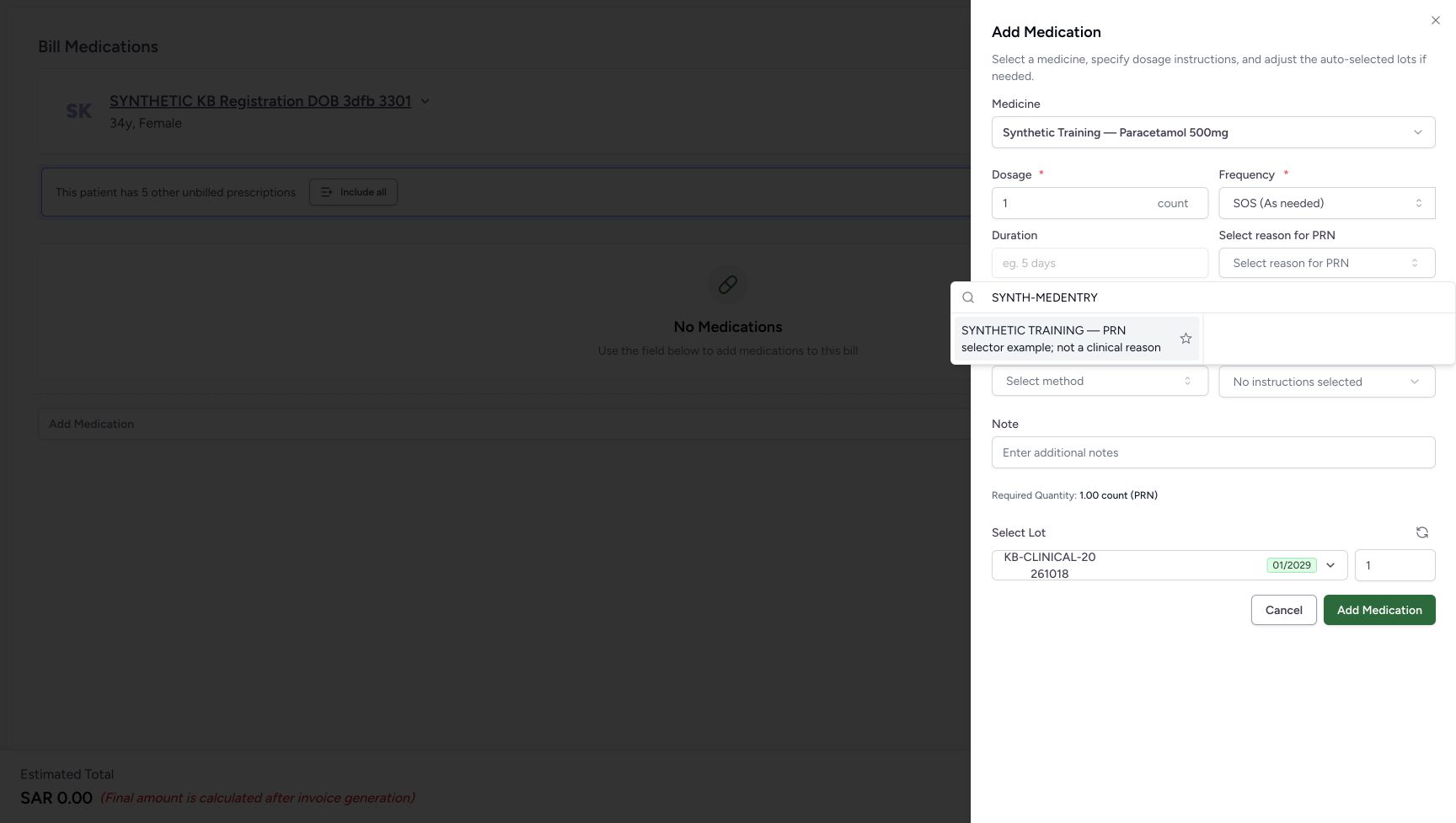
123Select the clearly labelled demo PRN result
Capture details
Optional-selector practice with clearly labelled nonclinical demo terms. PRN frequency reset, Site and Method selection, instruction-chip removal and cancellation are illustrated. No medicine is added or billed.
Image SHA-256 0c764b974f70962fdb0ed995aec691059774514d13b4339ac6172c021cd3e473
- Locate the PRN selector: Open this field before entering the demo search.
- Search SYNTH-MEDENTRY: Type this exact text only in the approved demo configuration.
- Choose the demo PRN term: Verify the full label says PRN selector example; not a clinical reason. Select the result text, not its star.
 123
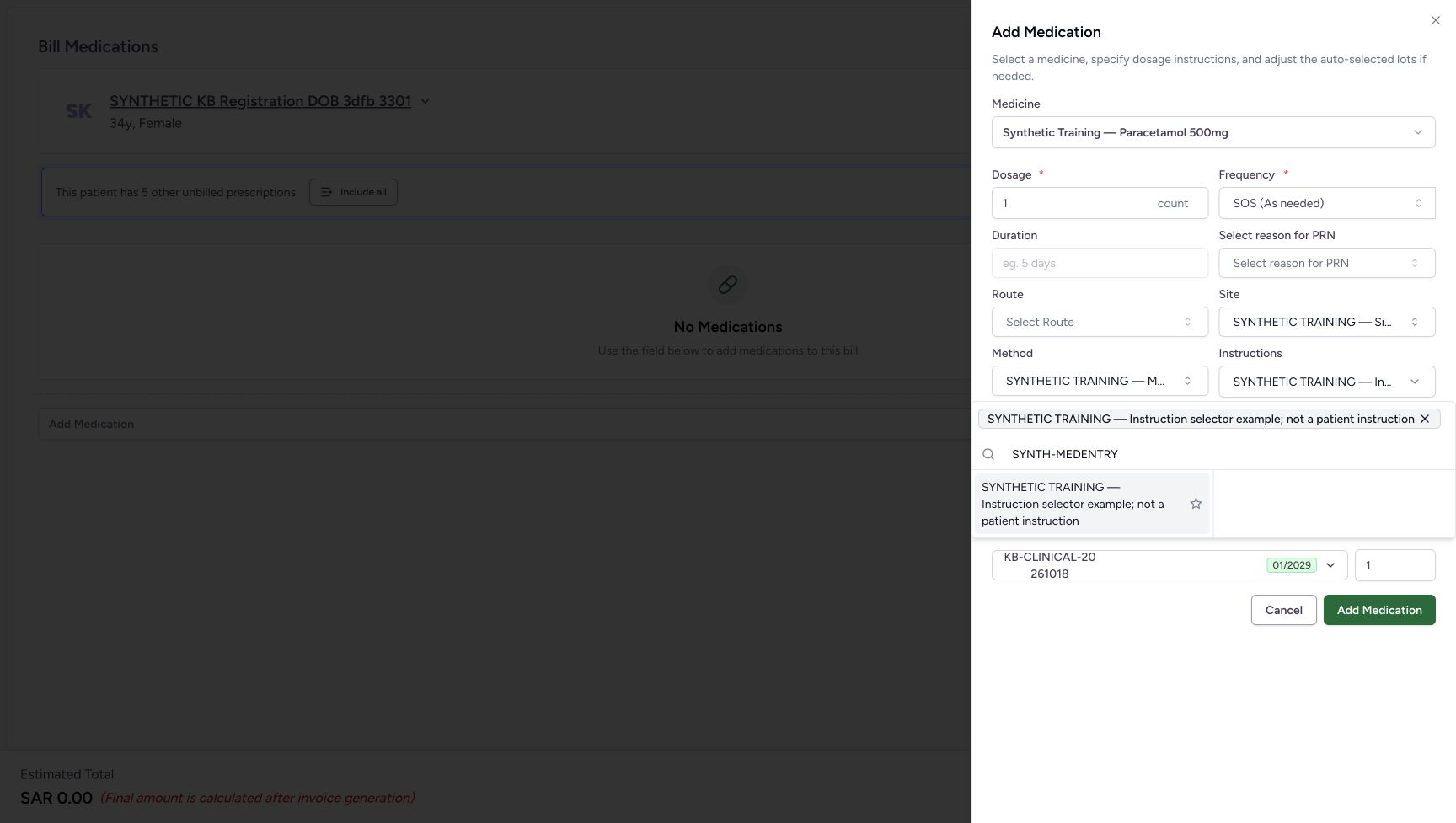
123Remove the selected instruction chip
Capture details
Optional-selector practice with clearly labelled nonclinical demo terms. PRN frequency reset, Site and Method selection, instruction-chip removal and cancellation are illustrated. No medicine is added or billed.
Image SHA-256 11e30fddd4a0376188ea80f70ab6ddef322f2b88ed929363fc90df587aaed053
- Read the selected instruction chip: This chip represents the current optional instruction selection.
- Remove this instruction: Choose the X on the selected chip to remove that selection.
- Distinguish the remaining search result: A result below the chip is still available to select; it is not an additional selected instruction.
 123
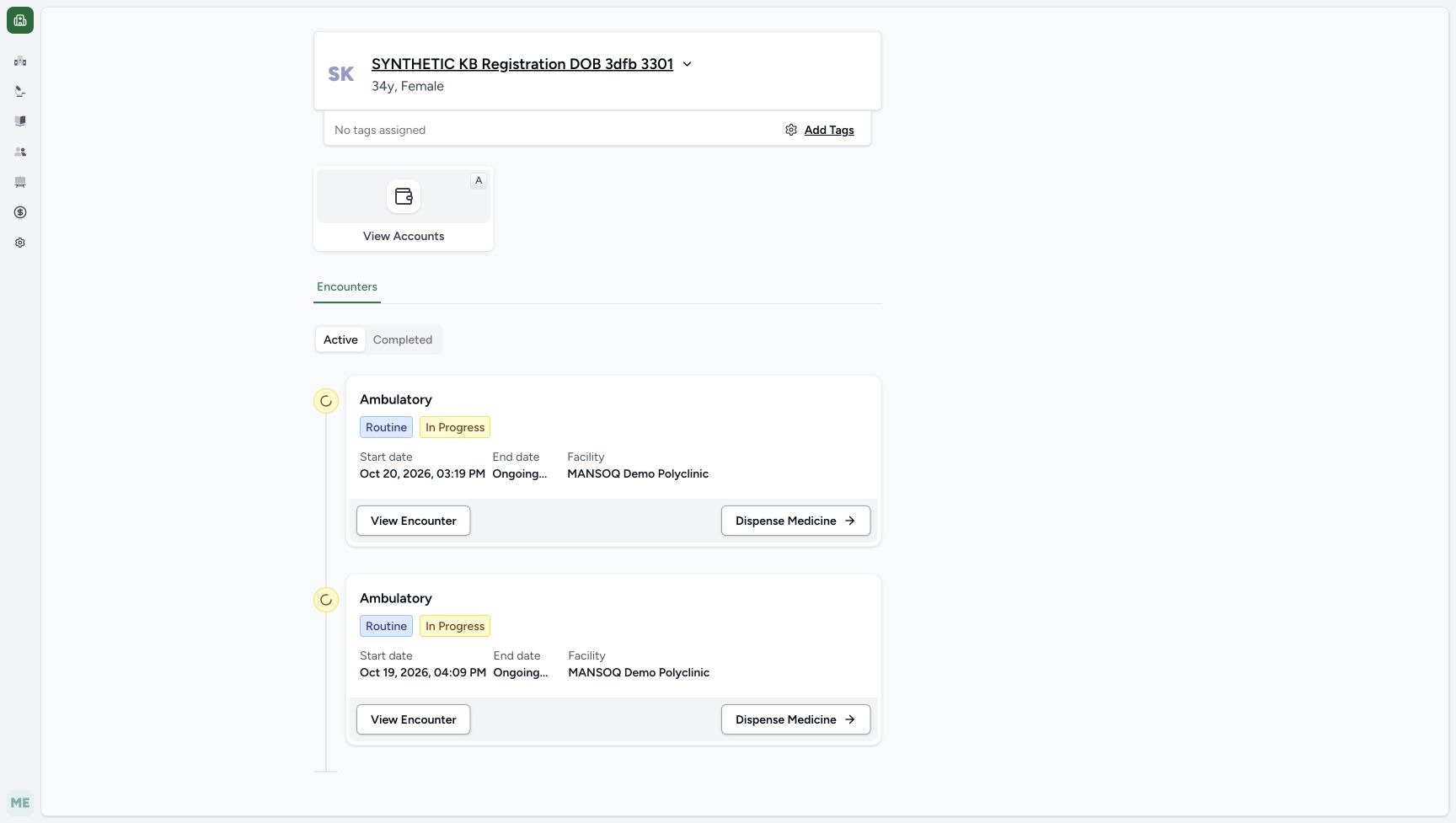
123Finish at the same patient home
Capture details
Optional-selector practice with clearly labelled nonclinical demo terms. PRN frequency reset, Site and Method selection, instruction-chip removal and cancellation are illustrated. No medicine is added or billed.
Image SHA-256 44b479a7d3efbd617d57d21692b6293e1f55d0e2254cdce7c9e63490447650cc
- Verify the same patient: Check the same synthetic patient after leaving the preparation.
- Locate the intended encounter: The October 20, 2026, 03:19 PM encounter is the one used for this software exercise.
- Recognise the encounter handoff: Dispense Medicine is the existing entry control. This practice ends here without reopening it.
17 of 17 content blocks have reviewed image alignment.
Before you begin
- Use your assigned Pharmacist access and verify the intended synthetic patient and encounter. This example uses SYNTHETIC KB Registration DOB 3dfb 3301 at MANSOQ Demo Polyclinic / Main Pharmacy. Follow Enter, check and remove a medicine before billing for the existing medicine-selection route.
 12345
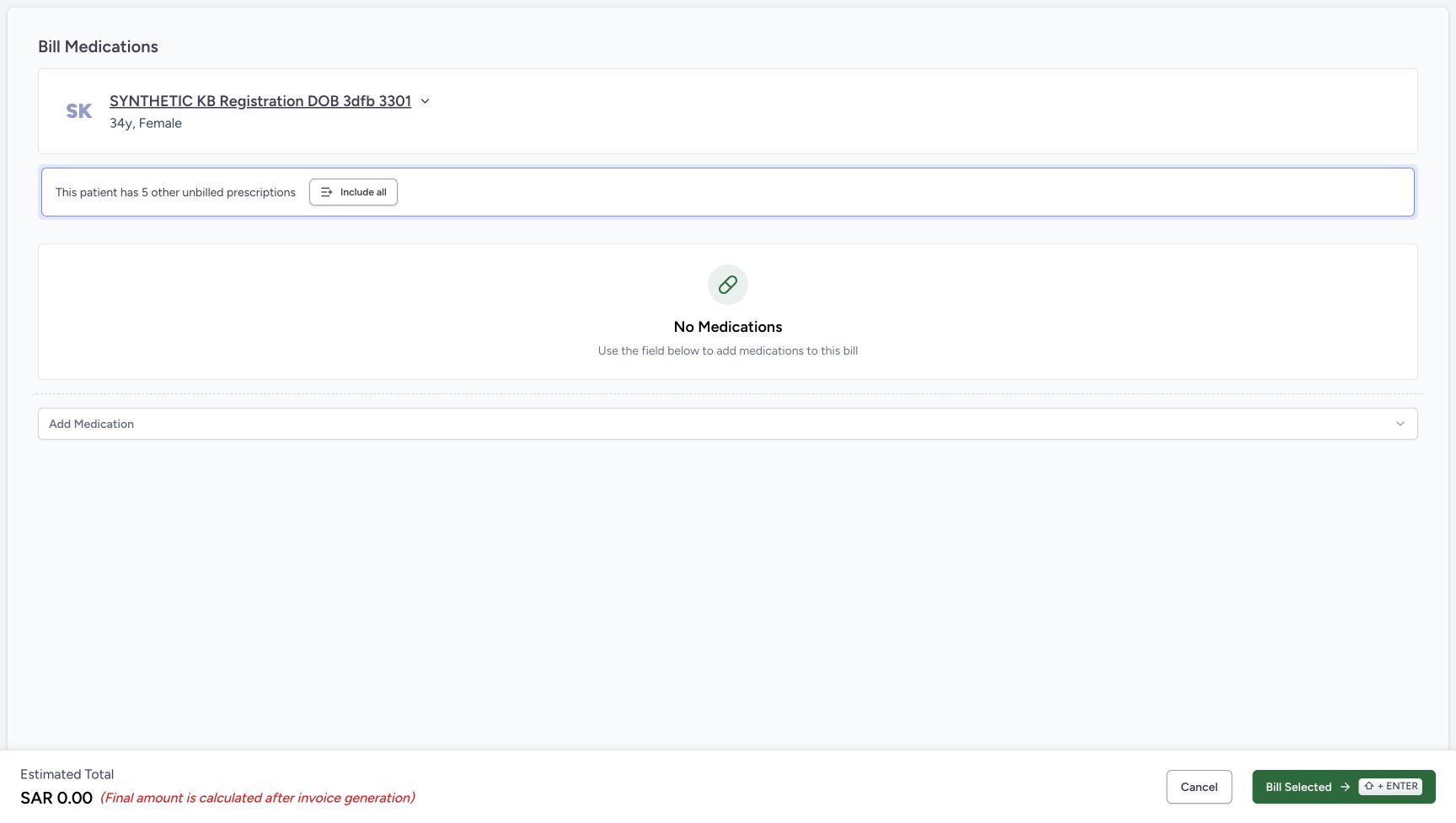
12345Recorded release 812d8272 · 2026-10-21T04:16:55.750013+00:00 · 1728 × 977 Keep the preparation empty during this exercise
Capture details
Optional-selector practice with clearly labelled nonclinical demo terms. PRN frequency reset, Site and Method selection, instruction-chip removal and cancellation are illustrated. No medicine is added or billed.
Image SHA-256
6a02e203d96273ee71722f2ab321be8cf24888e452d8ed26bdde169a877cb71a- Verify the patient: Check the intended synthetic patient before opening the medicine sheet.
- Open medicine selection: Use the core medicine-entry instructions to select the same synthetic medicine for the reset comparison.
- Read No Medications: No medicine row has been added to this preparation.
- Cancel the empty preparation: After cancelling the unadded sheet, use this footer Cancel. The observed route returns to patient home.
- Leave Bill Selected unused: This selector practice does not submit a medicine bill.
123Recorded release 812d8272 · 2026-10-21T04:18:43.154272+00:00 · 1728 × 977 Finish at the same patient home
Capture details
Optional-selector practice with clearly labelled nonclinical demo terms. PRN frequency reset, Site and Method selection, instruction-chip removal and cancellation are illustrated. No medicine is added or billed.
Image SHA-256
44b479a7d3efbd617d57d21692b6293e1f55d0e2254cdce7c9e63490447650cc- Verify the same patient: Check the same synthetic patient after leaving the preparation.
- Locate the intended encounter: The October 20, 2026, 03:19 PM encounter is the one used for this software exercise.
- Recognise the encounter handoff: Dispense Medicine is the existing entry control. This practice ends here without reopening it.
- Use an approved isolated training setup for this practice. Each offered demo term explicitly says SYNTHETIC TRAINING and says it is not a clinical reason, anatomical site, administration method or patient instruction. These terms illustrate controls only; in actual work use the approved terms appropriate to the authorised medicine instructions.123
Recorded release 812d8272 · 2026-10-21T04:17:13.992265+00:00 · 1728 × 977 Select the clearly labelled demo PRN result
Capture details
Optional-selector practice with clearly labelled nonclinical demo terms. PRN frequency reset, Site and Method selection, instruction-chip removal and cancellation are illustrated. No medicine is added or billed.
Image SHA-256
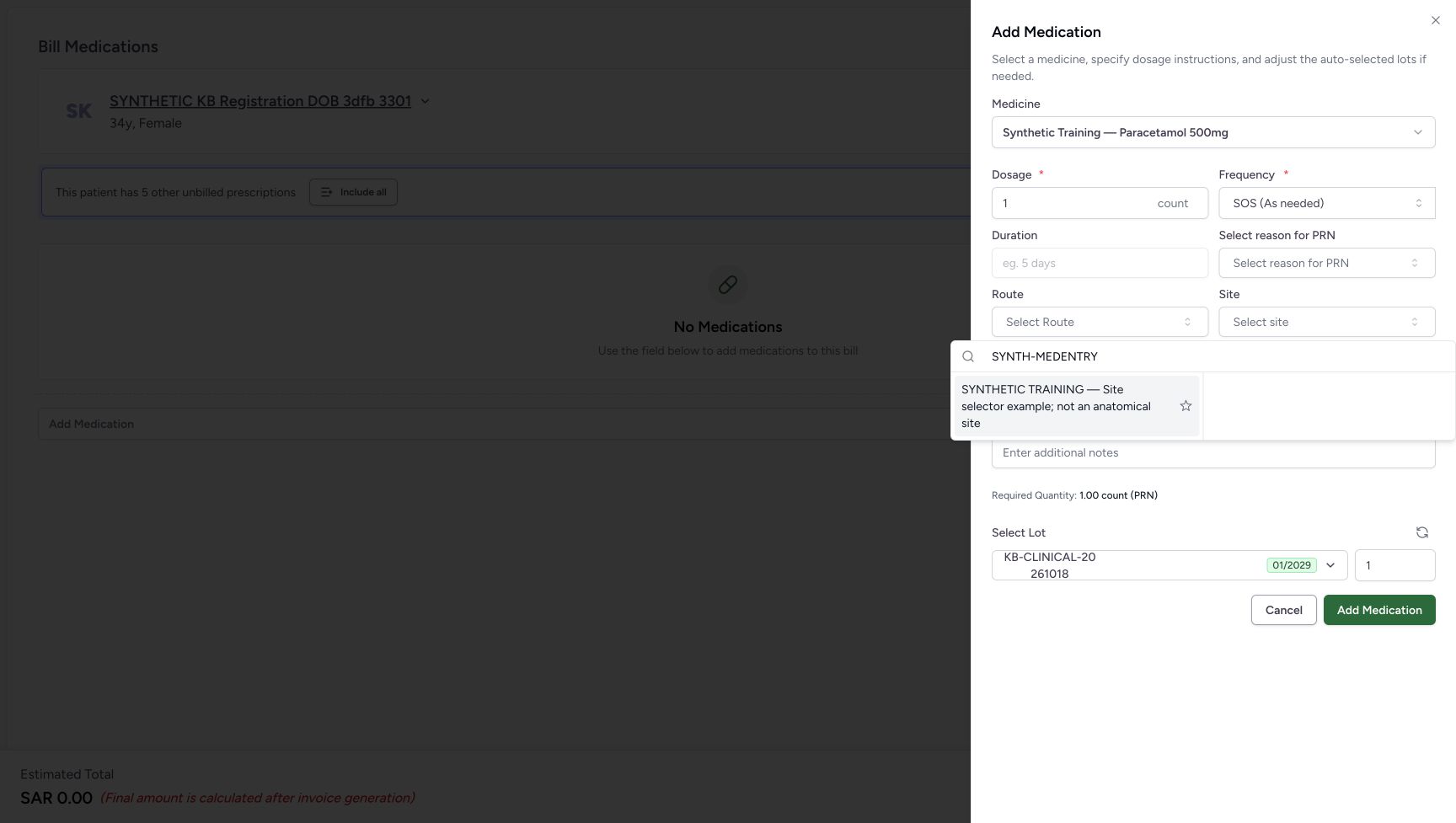
0c764b974f70962fdb0ed995aec691059774514d13b4339ac6172c021cd3e473- Locate the PRN selector: Open this field before entering the demo search.
- Search SYNTH-MEDENTRY: Type this exact text only in the approved demo configuration.
- Choose the demo PRN term: Verify the full label says PRN selector example; not a clinical reason. Select the result text, not its star.
 123
123Recorded release 812d8272 · 2026-10-21T04:17:41.626835+00:00 · 1728 × 977 Select the clearly labelled demo Site result
Capture details
Optional-selector practice with clearly labelled nonclinical demo terms. PRN frequency reset, Site and Method selection, instruction-chip removal and cancellation are illustrated. No medicine is added or billed.
Image SHA-256
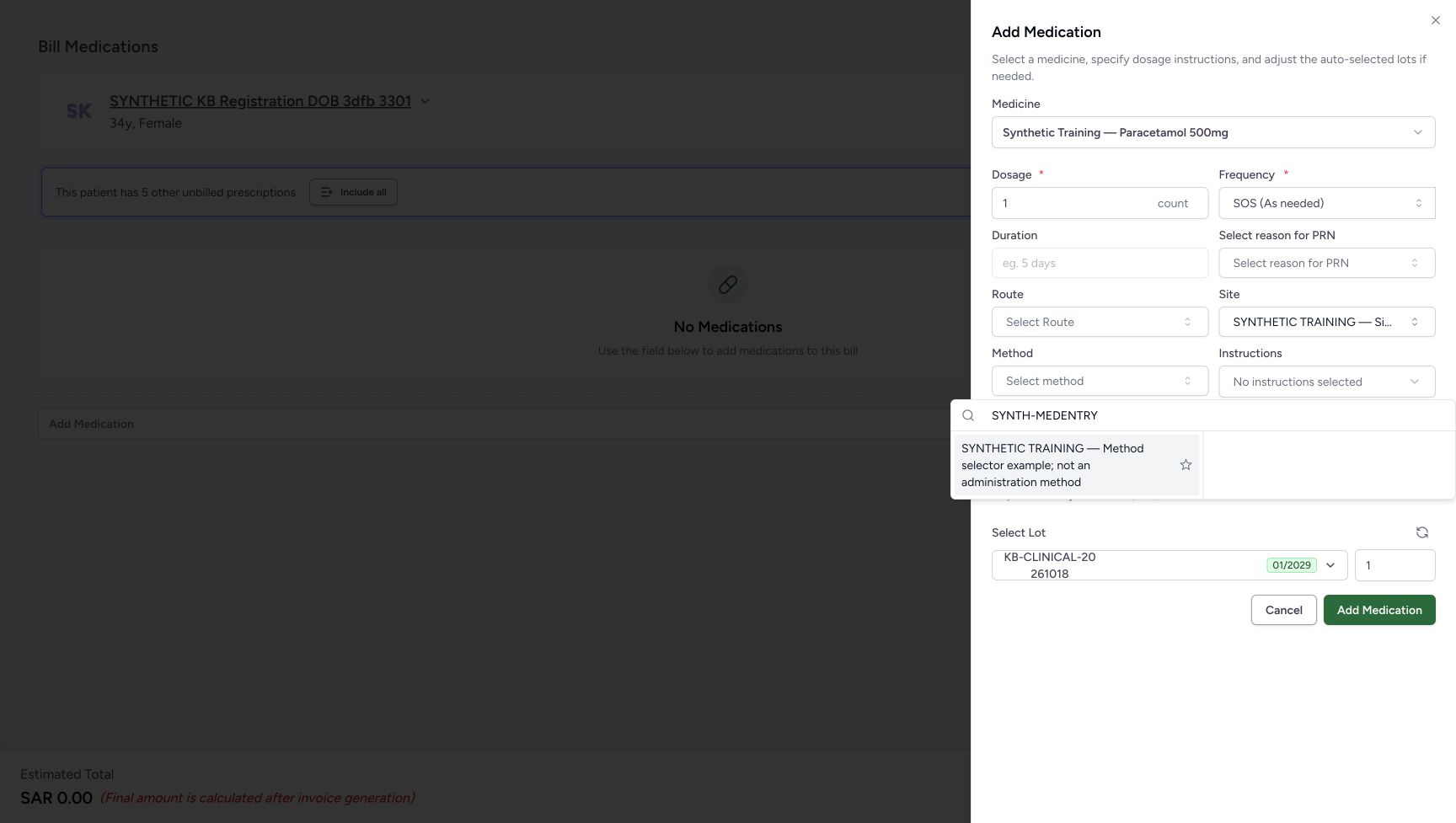
914bf3ea68407c84f7e8db245dd4707e490842ace3adc68b99586ff6f06a6da7- Open Site: Use the optional Site selector.
- Search SYNTH-MEDENTRY: Use the demo search text in this selector.
- Choose the demo Site term: Verify the full label says Site selector example; not an anatomical site. Select the result text, not its star.
 123
123Recorded release 812d8272 · 2026-10-21T04:17:53.435920+00:00 · 1728 × 977 Select the clearly labelled demo Method result
Capture details
Optional-selector practice with clearly labelled nonclinical demo terms. PRN frequency reset, Site and Method selection, instruction-chip removal and cancellation are illustrated. No medicine is added or billed.
Image SHA-256
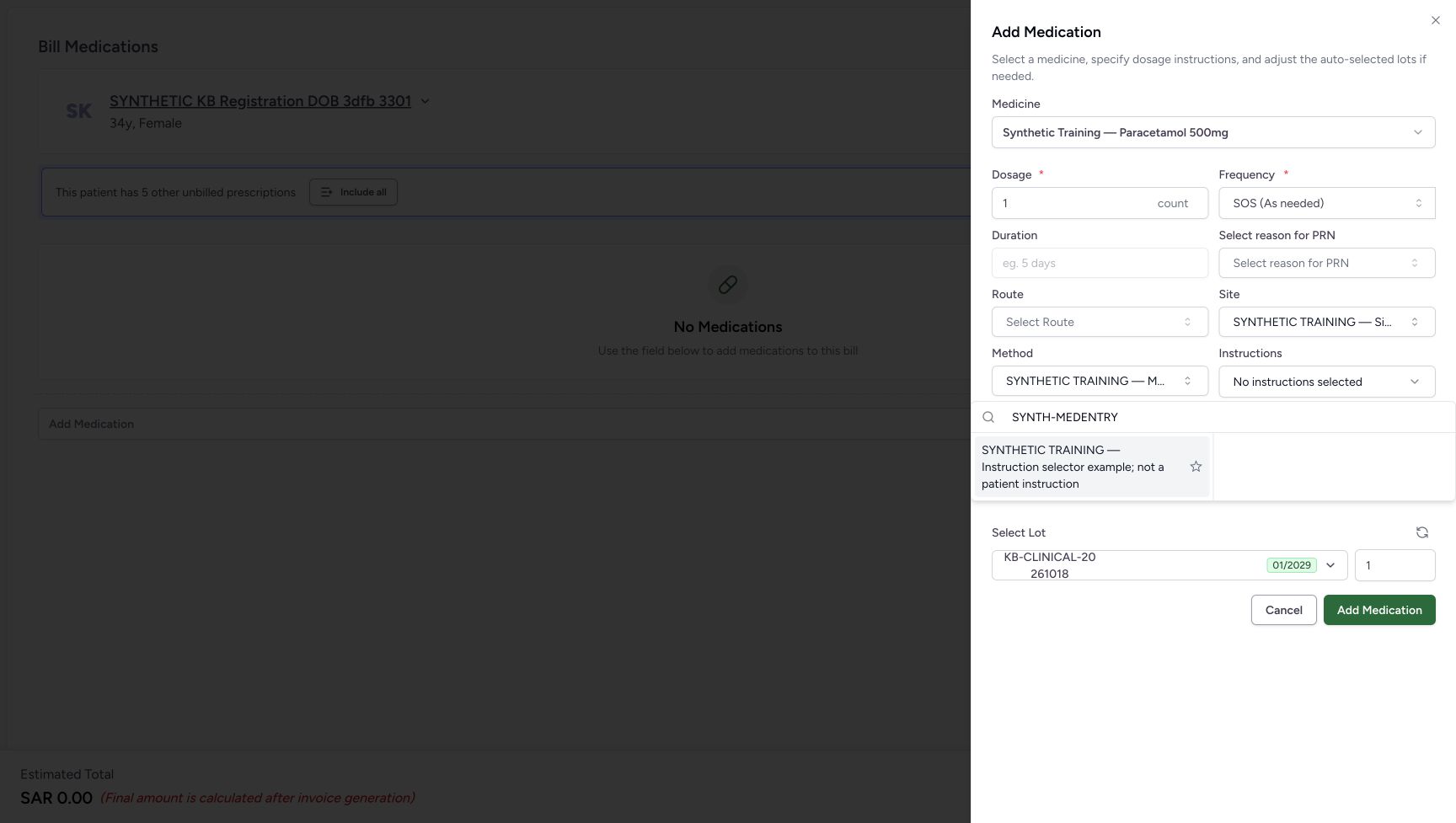
15d5be97814d9dbced9dd42be4b20600815c630ffc03c00bf094fbf1238b0979- Locate Method: This popup belongs to Method.
- Search SYNTH-MEDENTRY: Use the demo search text in the Method selector.
- Choose the demo Method term: Verify the full label says Method selector example; not an administration method. Select the result text, not its star.
 123
123Recorded release 812d8272 · 2026-10-21T04:18:01.633769+00:00 · 1728 × 977 Choose the demo instruction result
Capture details
Optional-selector practice with clearly labelled nonclinical demo terms. PRN frequency reset, Site and Method selection, instruction-chip removal and cancellation are illustrated. No medicine is added or billed.
Image SHA-256
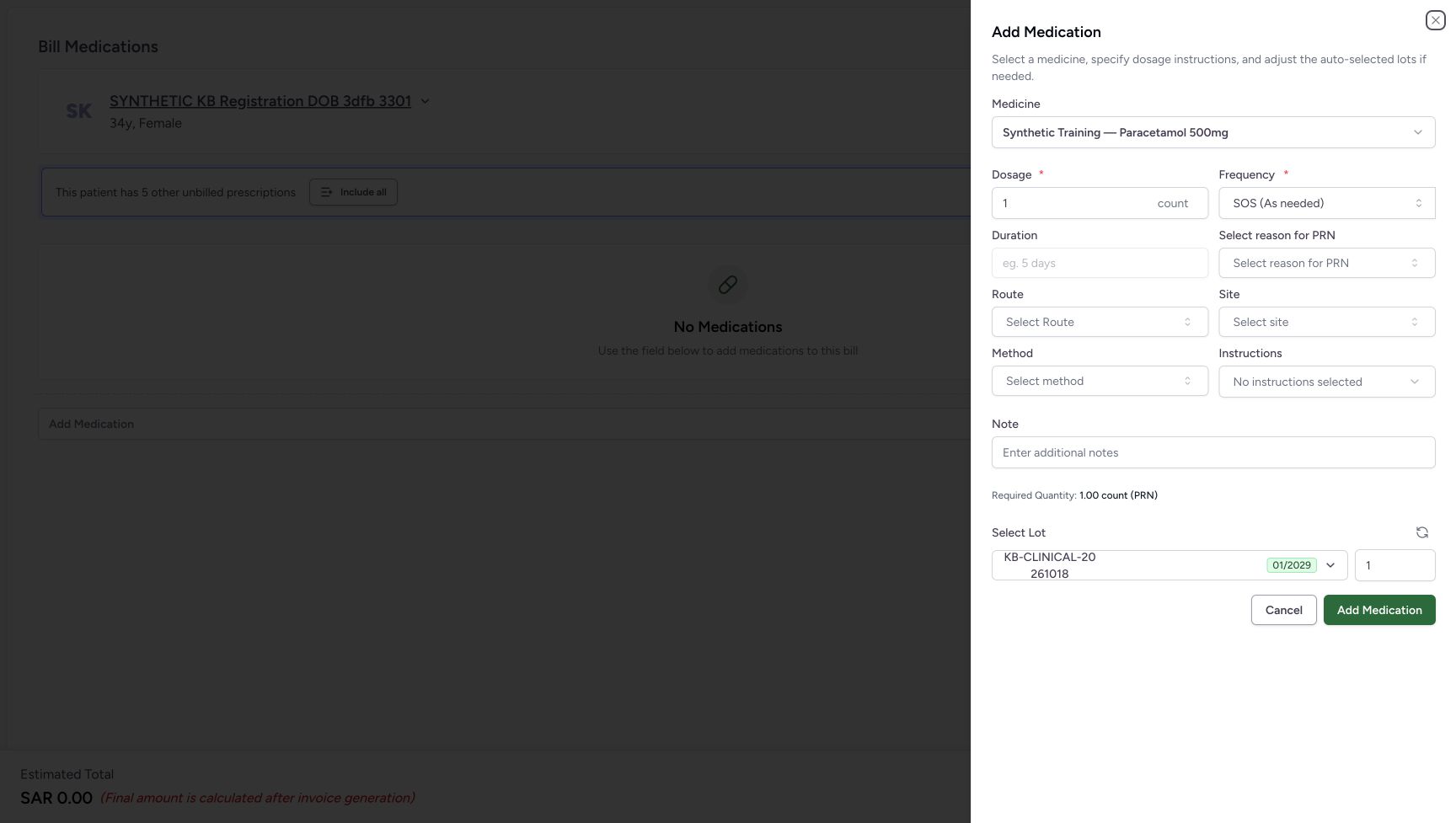
1de224946c9e1e45437c310a16c9c651df1833ac2c236e070bd612a49138359c- Locate Instructions: This popup belongs to Instructions.
- Search SYNTH-MEDENTRY: Use the same demo search text in the instruction selector.
- Choose the demo Instruction term: Verify the full label says Instruction selector example; not a patient instruction. Select the result text, not its star.
- Begin with the synthetic Paracetamol medicine sheet open, Dosage 1 count and SOS (As needed), with the optional selectors blank. Leave Route and Note unchanged. This exercise ends with Cancel: do not choose the sheet’s Add Medication, the preparation’s Bill Selected or any favourite star.
 12345678
Recorded release 812d8272 · 2026-10-21T04:17:03.887583+00:00 · 1728 × 977 Start with blank optional fields in the SOS sheet
Capture details
Optional-selector practice with clearly labelled nonclinical demo terms. PRN frequency reset, Site and Method selection, instruction-chip removal and cancellation are illustrated. No medicine is added or billed.
Image SHA-256
20200b4b521e2eac2e216dc629e91bca2470d2a9d4782cc22fe69aa24e843918- Verify the synthetic medicine: This is the medicine used only to illustrate the software form.
- Locate Frequency: Use this control for the SOS to QD and back comparison.
- Open Select reason for PRN: The reason selector is visible while SOS is selected.
- Open Site: The Site search is a separate optional selector.
- Open Method: The Method search is a separate optional selector.
- Open Instructions: This opens the additional-instruction selector and its removable selections.
- Cancel the unadded sheet: Use Cancel to leave the medicine sheet without choosing Add Medication.
- Leave Add Medication unused: No medicine row is added during this practice.
12345Recorded release 812d8272 · 2026-10-21T04:16:55.750013+00:00 · 1728 × 977 Keep the preparation empty during this exercise
Capture details
Optional-selector practice with clearly labelled nonclinical demo terms. PRN frequency reset, Site and Method selection, instruction-chip removal and cancellation are illustrated. No medicine is added or billed.
Image SHA-256
6a02e203d96273ee71722f2ab321be8cf24888e452d8ed26bdde169a877cb71a- Verify the patient: Check the intended synthetic patient before opening the medicine sheet.
- Open medicine selection: Use the core medicine-entry instructions to select the same synthetic medicine for the reset comparison.
- Read No Medications: No medicine row has been added to this preparation.
- Cancel the empty preparation: After cancelling the unadded sheet, use this footer Cancel. The observed route returns to patient home.
- Leave Bill Selected unused: This selector practice does not submit a medicine bill.
1. Inspect the blank SOS optional fields
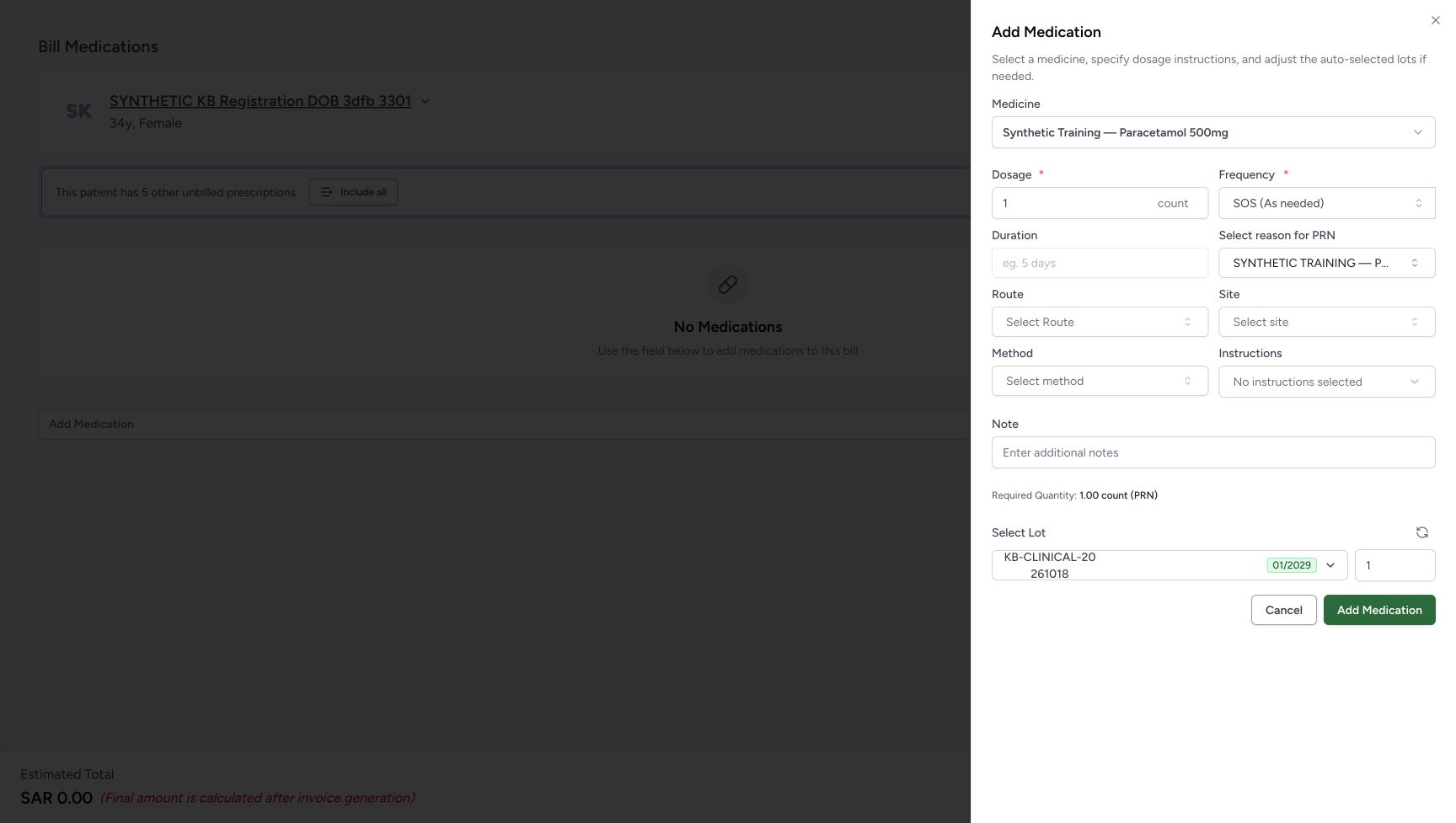
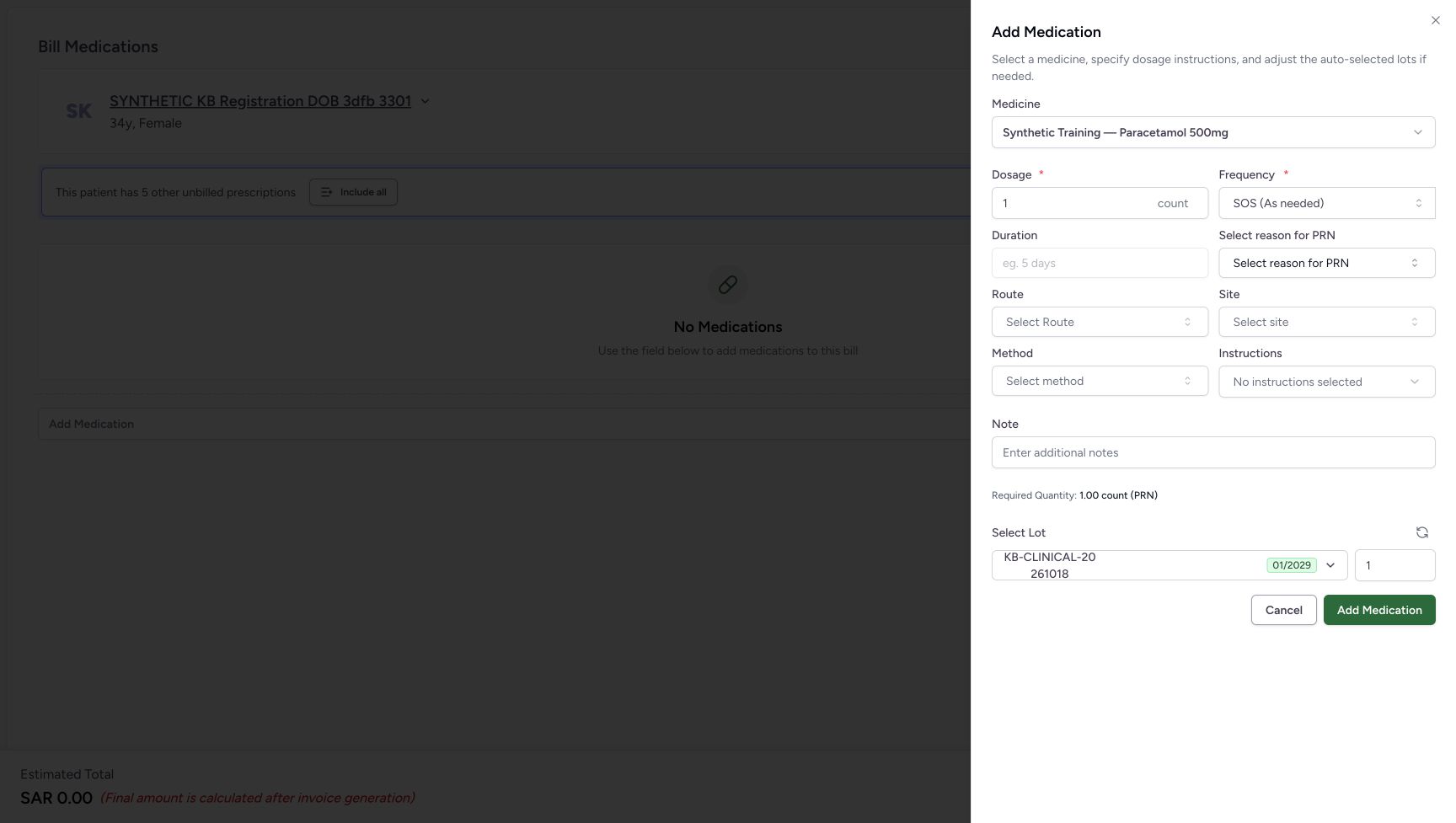
Verify Synthetic Training — Paracetamol 500mg in the open Add Medication sheet. Locate Select reason for PRN, Site, Method and Instructions. SOS (As needed) is selected, so the PRN reason field is shown and Duration is disabled. The form values in this software example are not a dosing recommendation.
12345678Start with blank optional fields in the SOS sheet
Capture details
Optional-selector practice with clearly labelled nonclinical demo terms. PRN frequency reset, Site and Method selection, instruction-chip removal and cancellation are illustrated. No medicine is added or billed.
Image SHA-256 20200b4b521e2eac2e216dc629e91bca2470d2a9d4782cc22fe69aa24e843918
- Verify the synthetic medicine: This is the medicine used only to illustrate the software form.
- Locate Frequency: Use this control for the SOS to QD and back comparison.
- Open Select reason for PRN: The reason selector is visible while SOS is selected.
- Open Site: The Site search is a separate optional selector.
- Open Method: The Method search is a separate optional selector.
- Open Instructions: This opens the additional-instruction selector and its removable selections.
- Cancel the unadded sheet: Use Cancel to leave the medicine sheet without choosing Add Medication.
- Leave Add Medication unused: No medicine row is added during this practice.
2. Select the demo PRN reason
Open Select reason for PRN and type SYNTH-MEDENTRY. Wait for the result, then choose “SYNTHETIC TRAINING — PRN selector example; not a clinical reason” by its result text. The field now displays a shortened SYNTHETIC TRAINING label. Leave the star unused.
12345678Start with blank optional fields in the SOS sheet
Capture details
Optional-selector practice with clearly labelled nonclinical demo terms. PRN frequency reset, Site and Method selection, instruction-chip removal and cancellation are illustrated. No medicine is added or billed.
Image SHA-256 20200b4b521e2eac2e216dc629e91bca2470d2a9d4782cc22fe69aa24e843918
- Verify the synthetic medicine: This is the medicine used only to illustrate the software form.
- Locate Frequency: Use this control for the SOS to QD and back comparison.
- Open Select reason for PRN: The reason selector is visible while SOS is selected.
- Open Site: The Site search is a separate optional selector.
- Open Method: The Method search is a separate optional selector.
- Open Instructions: This opens the additional-instruction selector and its removable selections.
- Cancel the unadded sheet: Use Cancel to leave the medicine sheet without choosing Add Medication.
- Leave Add Medication unused: No medicine row is added during this practice.
123Select the clearly labelled demo PRN result
Capture details
Optional-selector practice with clearly labelled nonclinical demo terms. PRN frequency reset, Site and Method selection, instruction-chip removal and cancellation are illustrated. No medicine is added or billed.
Image SHA-256 0c764b974f70962fdb0ed995aec691059774514d13b4339ac6172c021cd3e473
- Locate the PRN selector: Open this field before entering the demo search.
- Search SYNTH-MEDENTRY: Type this exact text only in the approved demo configuration.
- Choose the demo PRN term: Verify the full label says PRN selector example; not a clinical reason. Select the result text, not its star.
 12
12Read the selected PRN field before changing frequency
Capture details
Optional-selector practice with clearly labelled nonclinical demo terms. PRN frequency reset, Site and Method selection, instruction-chip removal and cancellation are illustrated. No medicine is added or billed.
Image SHA-256 c66d67cfe596372166cd7c68a86adc6c5b0f5cd681e2b8a29559a01e18085d9b
- Read the selected PRN field: The closed control shortens the label; the open result provides the full demo wording.
- Open Frequency: Change frequency to compare what happens to the selected PRN reason.
3. Change frequency and check the PRN reset
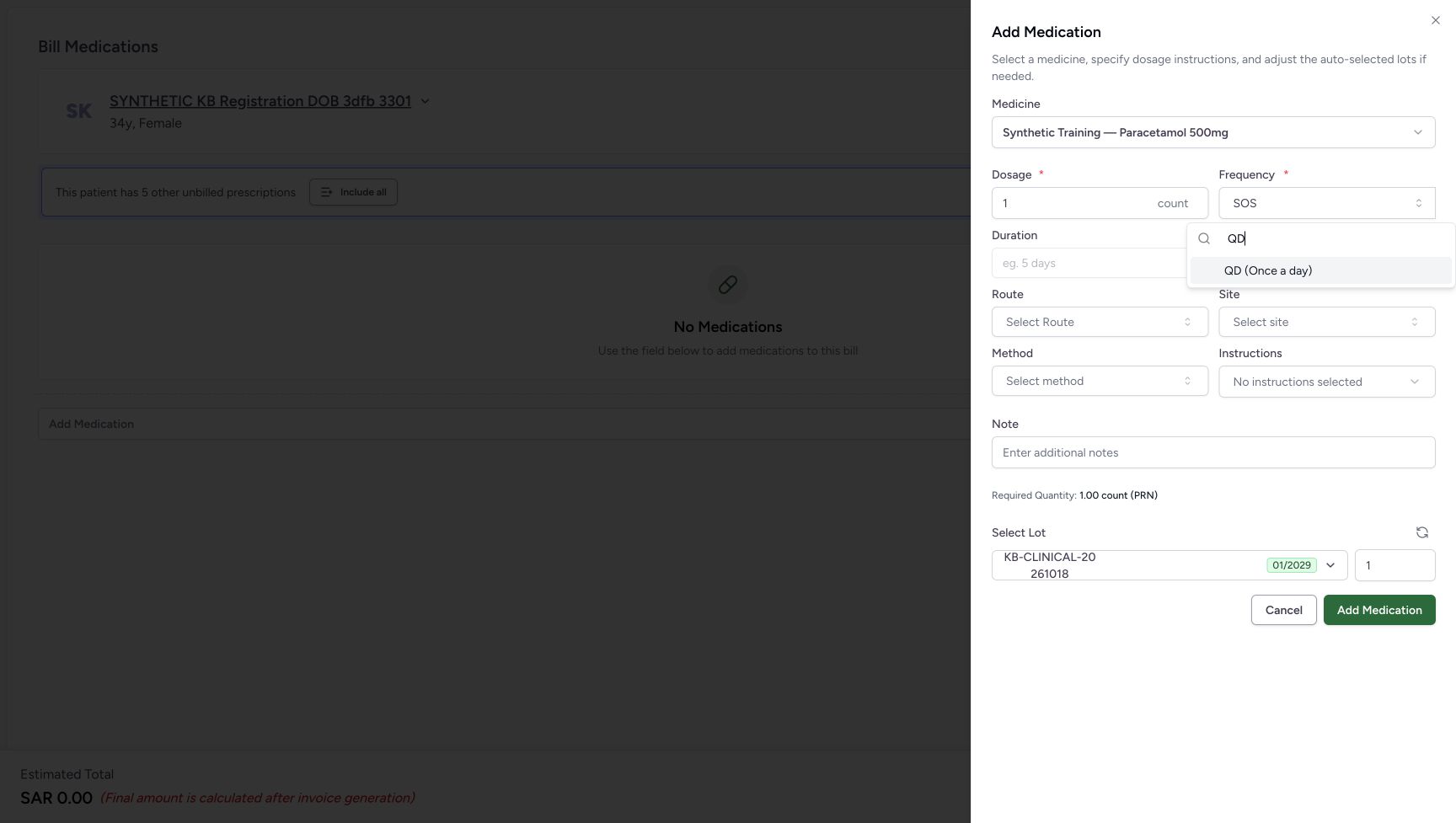
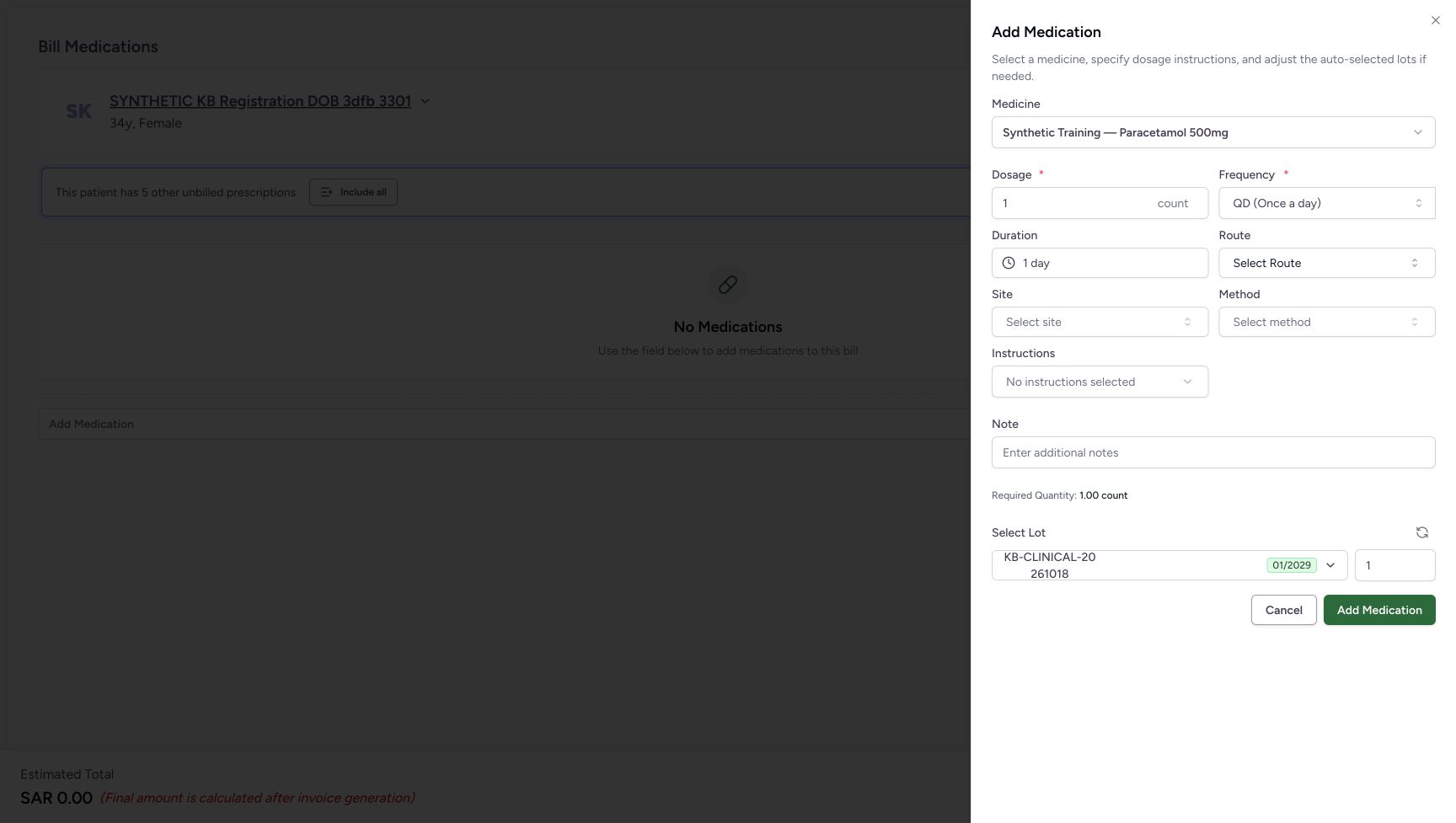
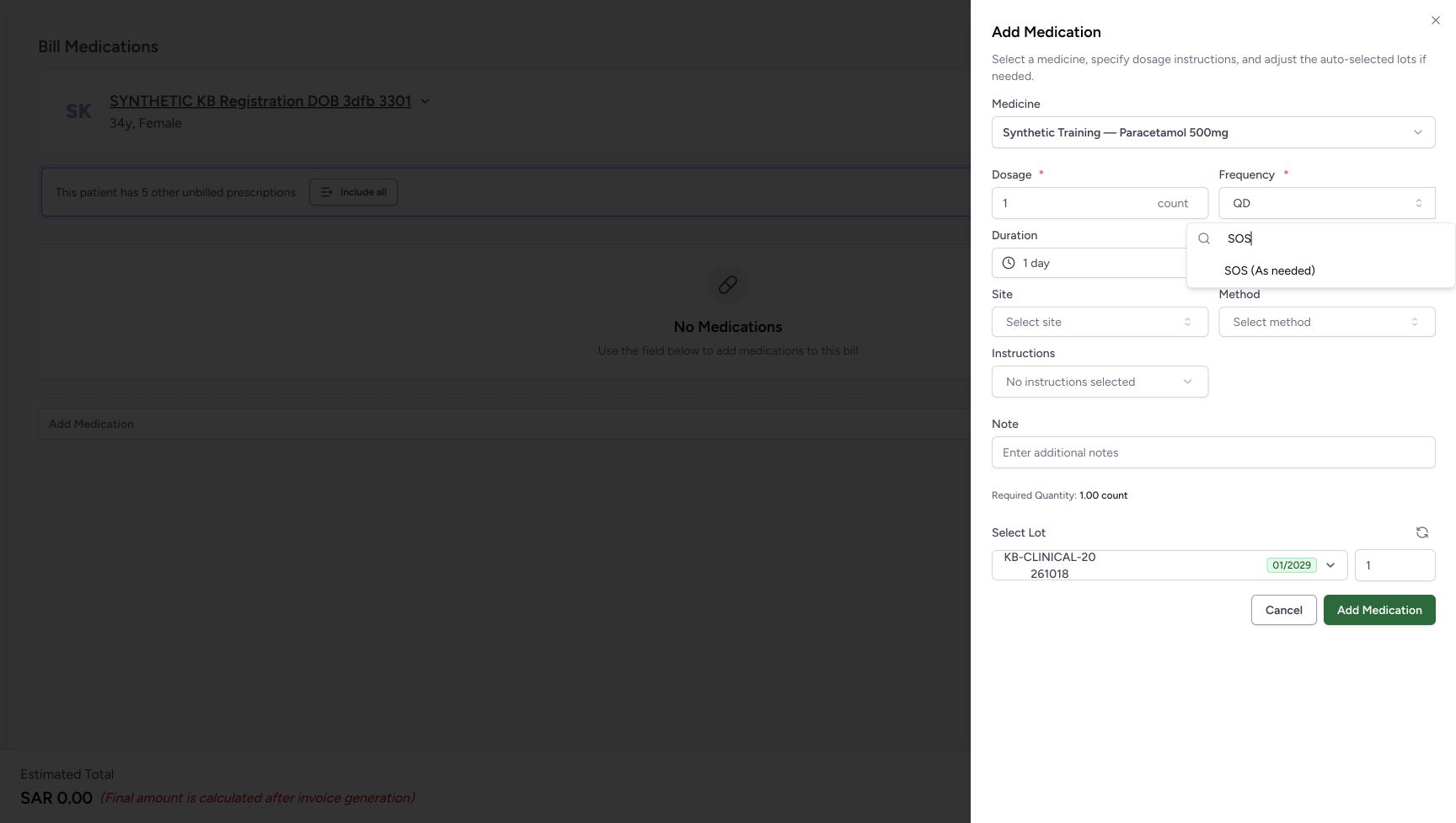
Open Frequency, search QD and choose QD (Once a day). Duration shows 1 day and the PRN reason control disappears. Open Frequency again, search SOS and choose SOS (As needed). Select reason for PRN returns blank; the earlier demo reason is not restored. Review the frequency and PRN reason together whenever changing this part of the form.
12Read the selected PRN field before changing frequency
Capture details
Optional-selector practice with clearly labelled nonclinical demo terms. PRN frequency reset, Site and Method selection, instruction-chip removal and cancellation are illustrated. No medicine is added or billed.
Image SHA-256 c66d67cfe596372166cd7c68a86adc6c5b0f5cd681e2b8a29559a01e18085d9b
- Read the selected PRN field: The closed control shortens the label; the open result provides the full demo wording.
- Open Frequency: Change frequency to compare what happens to the selected PRN reason.
 123
123Choose QD from the frequency menu
Capture details
Optional-selector practice with clearly labelled nonclinical demo terms. PRN frequency reset, Site and Method selection, instruction-chip removal and cancellation are illustrated. No medicine is added or billed.
Image SHA-256 0c9ef88f3f47717cfdf6a6c4b0a1c54b48089b7a676f16751cca38e72a29248f
- Locate Frequency: Open the frequency menu from this control.
- Search QD: Replace the frequency search with QD.
- Choose QD (Once a day): Select the visible QD option for the reset comparison.
 12
12Observe the QD state
Capture details
Optional-selector practice with clearly labelled nonclinical demo terms. PRN frequency reset, Site and Method selection, instruction-chip removal and cancellation are illustrated. No medicine is added or billed.
Image SHA-256 18b345fda002a590be1607f4e042c1a6056c92b0ec0e498af3fdcda31bbdd608
- Read QD: This is the selected frequency in the comparison.
- Read Duration 1 day: The displayed duration accompanies this QD state; the PRN reason field is no longer present.
 123
123Return to SOS through the visible menu option
Capture details
Optional-selector practice with clearly labelled nonclinical demo terms. PRN frequency reset, Site and Method selection, instruction-chip removal and cancellation are illustrated. No medicine is added or billed.
Image SHA-256 e6fd34802b442617a072b722895c702eccc0f55bc638f7b63e99f49c69a72659
- Open Frequency again: Use the same control to return from QD.
- Search SOS: Replace the frequency search with SOS.
- Choose SOS (As needed): Select the visible SOS option to inspect the PRN field again.
 12
12Check that the PRN reason returns blank
Capture details
Optional-selector practice with clearly labelled nonclinical demo terms. PRN frequency reset, Site and Method selection, instruction-chip removal and cancellation are illustrated. No medicine is added or billed.
Image SHA-256 18de461b4ae65d89c484531870c07087d8494b09f01ad68092a1573a106ac152
- Read SOS (As needed): The form has returned to the as-needed frequency state.
- Read the blank PRN reason: The selected demo reason was cleared by the frequency change.
4. Select the separate demo Site and Method
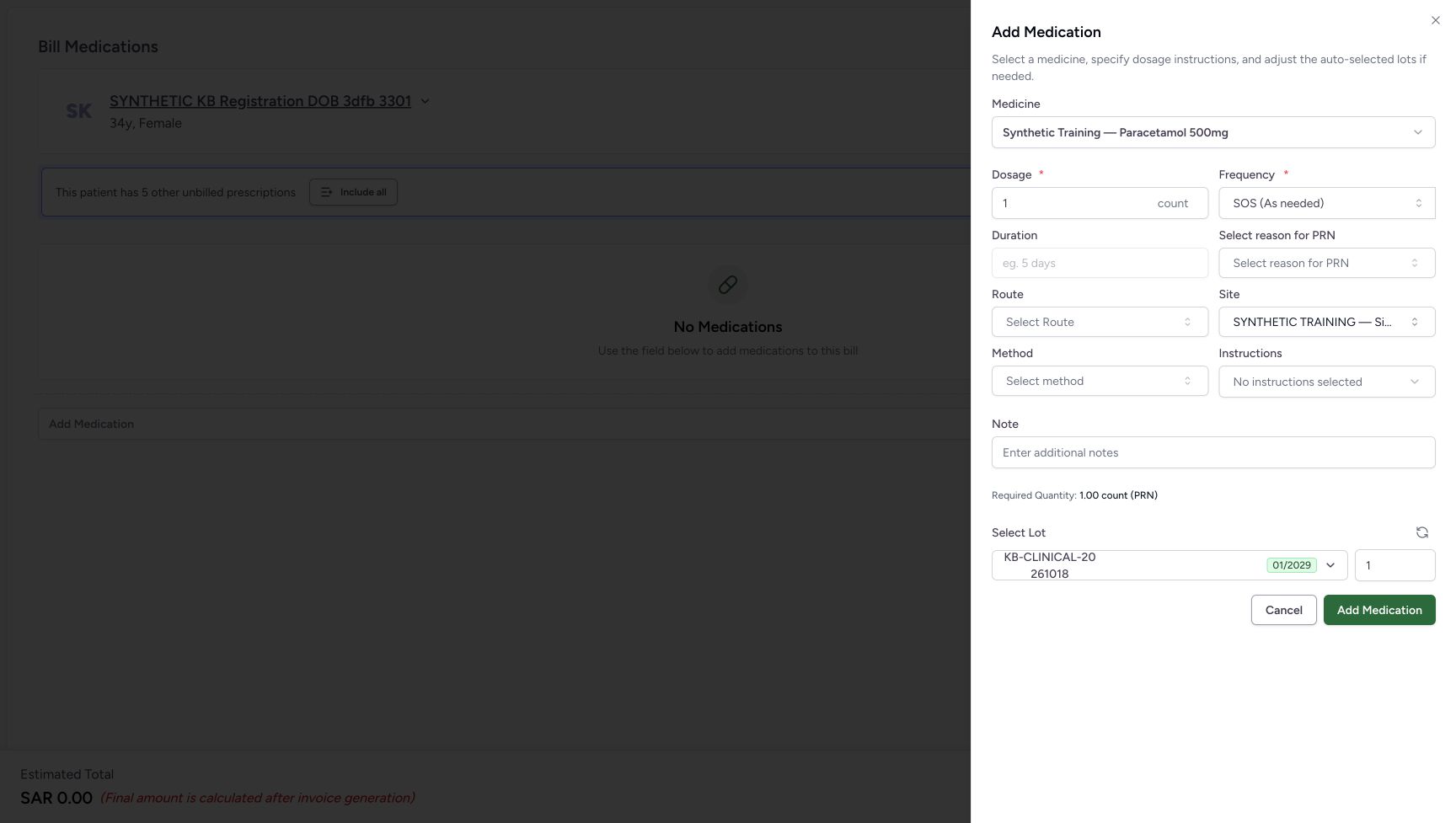
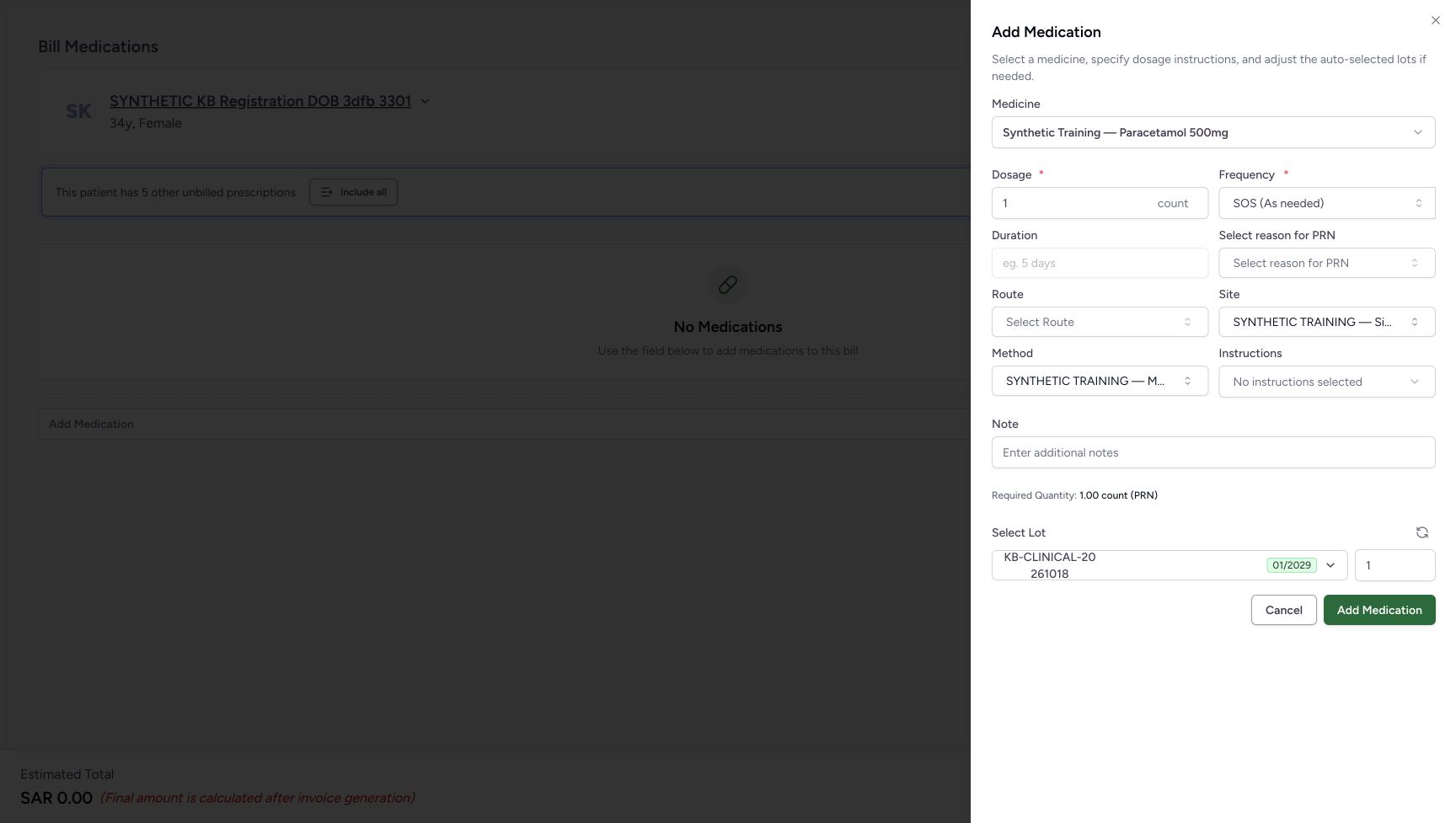
Open Site and search SYNTH-MEDENTRY. Choose “SYNTHETIC TRAINING — Site selector example; not an anatomical site”. Then open Method, search the same text and choose “SYNTHETIC TRAINING — Method selector example; not an administration method”. Each selected field shows a shortened label; its open result shows the full wording. These selections are software examples, not instructions for administering this medicine.
12Check that the PRN reason returns blank
Capture details
Optional-selector practice with clearly labelled nonclinical demo terms. PRN frequency reset, Site and Method selection, instruction-chip removal and cancellation are illustrated. No medicine is added or billed.
Image SHA-256 18de461b4ae65d89c484531870c07087d8494b09f01ad68092a1573a106ac152
- Read SOS (As needed): The form has returned to the as-needed frequency state.
- Read the blank PRN reason: The selected demo reason was cleared by the frequency change.
123Select the clearly labelled demo Site result
Capture details
Optional-selector practice with clearly labelled nonclinical demo terms. PRN frequency reset, Site and Method selection, instruction-chip removal and cancellation are illustrated. No medicine is added or billed.
Image SHA-256 914bf3ea68407c84f7e8db245dd4707e490842ace3adc68b99586ff6f06a6da7
- Open Site: Use the optional Site selector.
- Search SYNTH-MEDENTRY: Use the demo search text in this selector.
- Choose the demo Site term: Verify the full label says Site selector example; not an anatomical site. Select the result text, not its star.
 12
12Keep Site selected while moving to Method
Capture details
Optional-selector practice with clearly labelled nonclinical demo terms. PRN frequency reset, Site and Method selection, instruction-chip removal and cancellation are illustrated. No medicine is added or billed.
Image SHA-256 6935904156a43e1c46c6c5a593fc0149ce54f3c4992f2baeb70a053390791203
- Read the selected Site field: The closed control shortens the selected demo label.
- Open Method: Continue to the separate Method selector.
123Select the clearly labelled demo Method result
Capture details
Optional-selector practice with clearly labelled nonclinical demo terms. PRN frequency reset, Site and Method selection, instruction-chip removal and cancellation are illustrated. No medicine is added or billed.
Image SHA-256 15d5be97814d9dbced9dd42be4b20600815c630ffc03c00bf094fbf1238b0979
- Locate Method: This popup belongs to Method.
- Search SYNTH-MEDENTRY: Use the demo search text in the Method selector.
- Choose the demo Method term: Verify the full label says Method selector example; not an administration method. Select the result text, not its star.
 123
123Read Site and Method before opening Instructions
Capture details
Optional-selector practice with clearly labelled nonclinical demo terms. PRN frequency reset, Site and Method selection, instruction-chip removal and cancellation are illustrated. No medicine is added or billed.
Image SHA-256 509d7a97dd80f77e2534a1107c1c540dcf99802c068da88824ce39f8c4fae128
- Read Site: The Site demo selection remains in the sheet.
- Read Method: The Method demo selection remains in the sheet.
- Open Instructions: Use this separate selector to add the demo instruction chip.
5. Select and remove a demo instruction
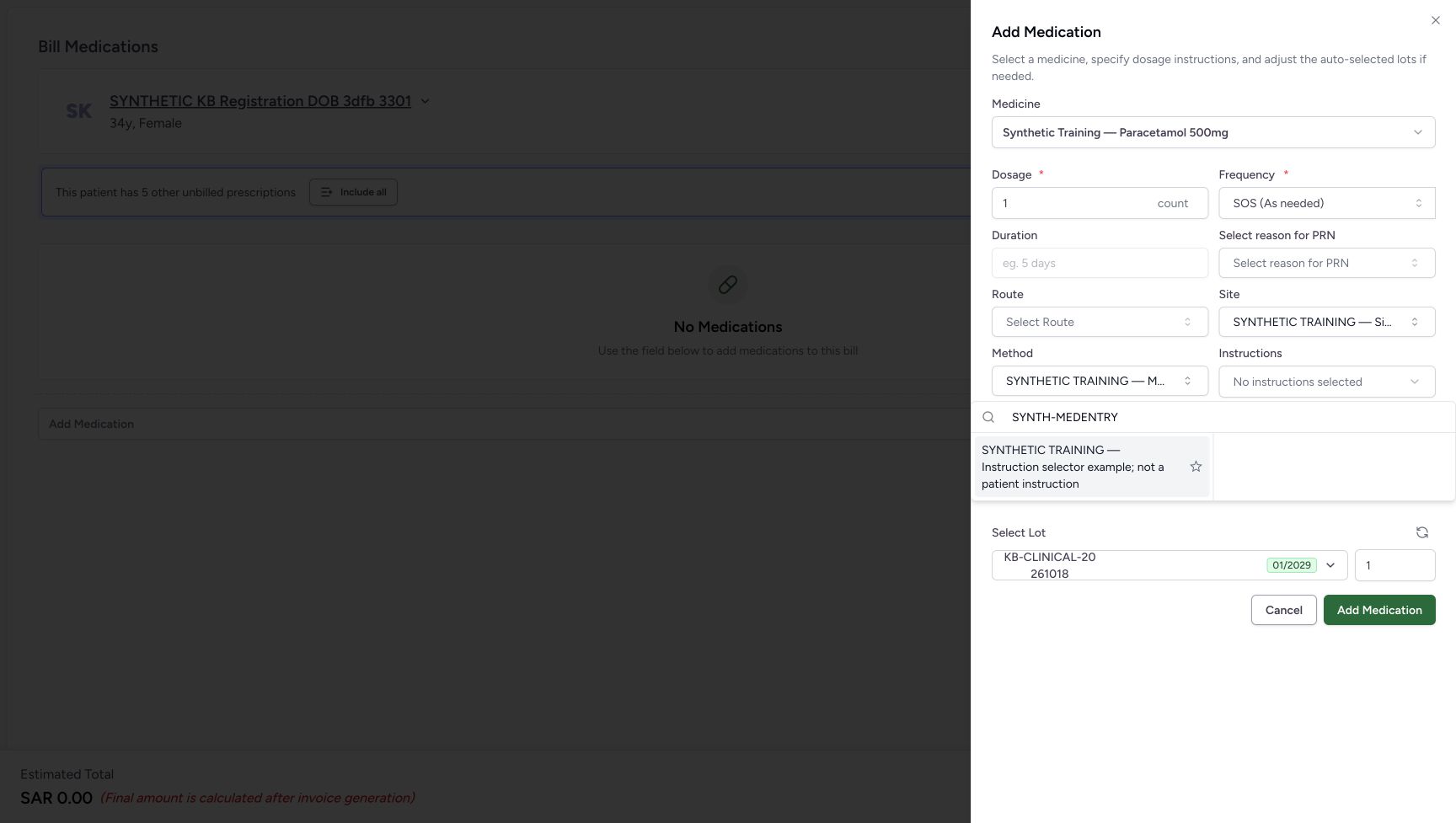
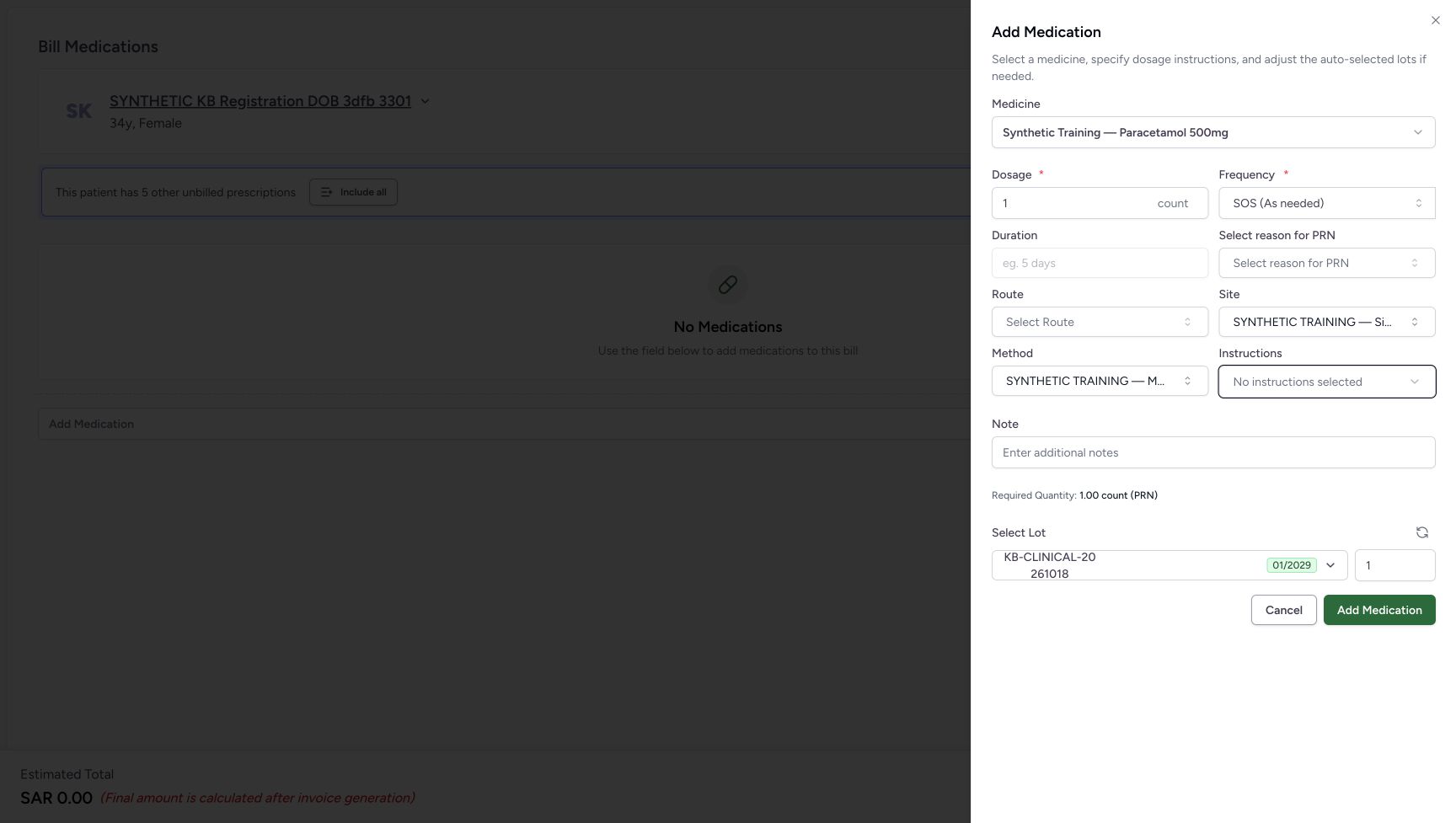
Open Instructions and search SYNTH-MEDENTRY. Choose “SYNTHETIC TRAINING — Instruction selector example; not a patient instruction”. The selected term appears as a chip above the search input. Choose the chip’s Remove X. The chip disappears and the trigger says No instructions selected; the matching search result can still remain below. With the search input focused, press Escape to close the popup.
123Read Site and Method before opening Instructions
Capture details
Optional-selector practice with clearly labelled nonclinical demo terms. PRN frequency reset, Site and Method selection, instruction-chip removal and cancellation are illustrated. No medicine is added or billed.
Image SHA-256 509d7a97dd80f77e2534a1107c1c540dcf99802c068da88824ce39f8c4fae128
- Read Site: The Site demo selection remains in the sheet.
- Read Method: The Method demo selection remains in the sheet.
- Open Instructions: Use this separate selector to add the demo instruction chip.
123Choose the demo instruction result
Capture details
Optional-selector practice with clearly labelled nonclinical demo terms. PRN frequency reset, Site and Method selection, instruction-chip removal and cancellation are illustrated. No medicine is added or billed.
Image SHA-256 1de224946c9e1e45437c310a16c9c651df1833ac2c236e070bd612a49138359c
- Locate Instructions: This popup belongs to Instructions.
- Search SYNTH-MEDENTRY: Use the same demo search text in the instruction selector.
- Choose the demo Instruction term: Verify the full label says Instruction selector example; not a patient instruction. Select the result text, not its star.
123Remove the selected instruction chip
Capture details
Optional-selector practice with clearly labelled nonclinical demo terms. PRN frequency reset, Site and Method selection, instruction-chip removal and cancellation are illustrated. No medicine is added or billed.
Image SHA-256 11e30fddd4a0376188ea80f70ab6ddef322f2b88ed929363fc90df587aaed053
- Read the selected instruction chip: This chip represents the current optional instruction selection.
- Remove this instruction: Choose the X on the selected chip to remove that selection.
- Distinguish the remaining search result: A result below the chip is still available to select; it is not an additional selected instruction.
 12
12Confirm the chip was removed before closing the popup
Capture details
Optional-selector practice with clearly labelled nonclinical demo terms. PRN frequency reset, Site and Method selection, instruction-chip removal and cancellation are illustrated. No medicine is added or billed.
Image SHA-256 a322086005c73270b0c9fd023d7c90be1dd120b53753cfd06bc504ce4c466b2e
- Read No instructions selected: The selected instruction has been removed.
- Close with Escape: With this search input focused, press Escape to close the popup without selecting the result again.
 1234
1234Cancel while Site and Method remain unsaved
Capture details
Optional-selector practice with clearly labelled nonclinical demo terms. PRN frequency reset, Site and Method selection, instruction-chip removal and cancellation are illustrated. No medicine is added or billed.
Image SHA-256 a26b22cc6274e396986d400b34c35f60ec1206664d58a11f923466d6ed54aa52
- Read the unsaved Site selection: Site remains selected until the whole sheet is cancelled.
- Read the unsaved Method selection: Method remains selected until the whole sheet is cancelled.
- Read the empty Instructions field: The removed instruction is no longer selected.
- Cancel the medicine sheet: Leave the optional selections without adding a medicine row.
6. Cancel the sheet and check the reset on reselection
With Site and Method still selected and Instructions empty, choose the medicine sheet’s Cancel. The preparation remains at No Medications and Estimated Total SAR 0.00. Use Add Medication and the core medicine-selection steps to select the same synthetic medicine again. Its new sheet starts with SOS and blank PRN reason, Site, Method and Instructions. The blank-sheet illustration is reused to compare these identical starting and reset appearances.
1234Cancel while Site and Method remain unsaved
Capture details
Optional-selector practice with clearly labelled nonclinical demo terms. PRN frequency reset, Site and Method selection, instruction-chip removal and cancellation are illustrated. No medicine is added or billed.
Image SHA-256 a26b22cc6274e396986d400b34c35f60ec1206664d58a11f923466d6ed54aa52
- Read the unsaved Site selection: Site remains selected until the whole sheet is cancelled.
- Read the unsaved Method selection: Method remains selected until the whole sheet is cancelled.
- Read the empty Instructions field: The removed instruction is no longer selected.
- Cancel the medicine sheet: Leave the optional selections without adding a medicine row.
12345Keep the preparation empty during this exercise
Capture details
Optional-selector practice with clearly labelled nonclinical demo terms. PRN frequency reset, Site and Method selection, instruction-chip removal and cancellation are illustrated. No medicine is added or billed.
Image SHA-256 6a02e203d96273ee71722f2ab321be8cf24888e452d8ed26bdde169a877cb71a
- Verify the patient: Check the intended synthetic patient before opening the medicine sheet.
- Open medicine selection: Use the core medicine-entry instructions to select the same synthetic medicine for the reset comparison.
- Read No Medications: No medicine row has been added to this preparation.
- Cancel the empty preparation: After cancelling the unadded sheet, use this footer Cancel. The observed route returns to patient home.
- Leave Bill Selected unused: This selector practice does not submit a medicine bill.
12345678Start with blank optional fields in the SOS sheet
Capture details
Optional-selector practice with clearly labelled nonclinical demo terms. PRN frequency reset, Site and Method selection, instruction-chip removal and cancellation are illustrated. No medicine is added or billed.
Image SHA-256 20200b4b521e2eac2e216dc629e91bca2470d2a9d4782cc22fe69aa24e843918
- Verify the synthetic medicine: This is the medicine used only to illustrate the software form.
- Locate Frequency: Use this control for the SOS to QD and back comparison.
- Open Select reason for PRN: The reason selector is visible while SOS is selected.
- Open Site: The Site search is a separate optional selector.
- Open Method: The Method search is a separate optional selector.
- Open Instructions: This opens the additional-instruction selector and its removable selections.
- Cancel the unadded sheet: Use Cancel to leave the medicine sheet without choosing Add Medication.
- Leave Add Medication unused: No medicine row is added during this practice.
7. Leave the practice without adding or billing
Choose the reselected medicine sheet’s Cancel, then choose the empty preparation’s footer Cancel. In this observed entry route it returns to the same patient home, with the existing Active Ambulatory encounters still shown. The medicine sheet’s Add Medication and the preparation’s Bill Selected are not used in this practice.
12345678Start with blank optional fields in the SOS sheet
Capture details
Optional-selector practice with clearly labelled nonclinical demo terms. PRN frequency reset, Site and Method selection, instruction-chip removal and cancellation are illustrated. No medicine is added or billed.
Image SHA-256 20200b4b521e2eac2e216dc629e91bca2470d2a9d4782cc22fe69aa24e843918
- Verify the synthetic medicine: This is the medicine used only to illustrate the software form.
- Locate Frequency: Use this control for the SOS to QD and back comparison.
- Open Select reason for PRN: The reason selector is visible while SOS is selected.
- Open Site: The Site search is a separate optional selector.
- Open Method: The Method search is a separate optional selector.
- Open Instructions: This opens the additional-instruction selector and its removable selections.
- Cancel the unadded sheet: Use Cancel to leave the medicine sheet without choosing Add Medication.
- Leave Add Medication unused: No medicine row is added during this practice.
12345Keep the preparation empty during this exercise
Capture details
Optional-selector practice with clearly labelled nonclinical demo terms. PRN frequency reset, Site and Method selection, instruction-chip removal and cancellation are illustrated. No medicine is added or billed.
Image SHA-256 6a02e203d96273ee71722f2ab321be8cf24888e452d8ed26bdde169a877cb71a
- Verify the patient: Check the intended synthetic patient before opening the medicine sheet.
- Open medicine selection: Use the core medicine-entry instructions to select the same synthetic medicine for the reset comparison.
- Read No Medications: No medicine row has been added to this preparation.
- Cancel the empty preparation: After cancelling the unadded sheet, use this footer Cancel. The observed route returns to patient home.
- Leave Bill Selected unused: This selector practice does not submit a medicine bill.
123Finish at the same patient home
Capture details
Optional-selector practice with clearly labelled nonclinical demo terms. PRN frequency reset, Site and Method selection, instruction-chip removal and cancellation are illustrated. No medicine is added or billed.
Image SHA-256 44b479a7d3efbd617d57d21692b6293e1f55d0e2254cdce7c9e63490447650cc
- Verify the same patient: Check the same synthetic patient after leaving the preparation.
- Locate the intended encounter: The October 20, 2026, 03:19 PM encounter is the one used for this software exercise.
- Recognise the encounter handoff: Dispense Medicine is the existing entry control. This practice ends here without reopening it.
Keep selector choices separate from saving a medicine
Selecting a term changes the open medicine sheet. It can also update your personal Recent choices even when the sheet is later cancelled. The sheet’s Add Medication would add a local preparation row; Bill Selected is a separate submission action. Neither is used here. No favourite star is selected.
123Remove the selected instruction chip
Capture details
Optional-selector practice with clearly labelled nonclinical demo terms. PRN frequency reset, Site and Method selection, instruction-chip removal and cancellation are illustrated. No medicine is added or billed.
Image SHA-256 11e30fddd4a0376188ea80f70ab6ddef322f2b88ed929363fc90df587aaed053
- Read the selected instruction chip: This chip represents the current optional instruction selection.
- Remove this instruction: Choose the X on the selected chip to remove that selection.
- Distinguish the remaining search result: A result below the chip is still available to select; it is not an additional selected instruction.
1234Cancel while Site and Method remain unsaved
Capture details
Optional-selector practice with clearly labelled nonclinical demo terms. PRN frequency reset, Site and Method selection, instruction-chip removal and cancellation are illustrated. No medicine is added or billed.
Image SHA-256 a26b22cc6274e396986d400b34c35f60ec1206664d58a11f923466d6ed54aa52
- Read the unsaved Site selection: Site remains selected until the whole sheet is cancelled.
- Read the unsaved Method selection: Method remains selected until the whole sheet is cancelled.
- Read the empty Instructions field: The removed instruction is no longer selected.
- Cancel the medicine sheet: Leave the optional selections without adding a medicine row.
12345Keep the preparation empty during this exercise
Capture details
Optional-selector practice with clearly labelled nonclinical demo terms. PRN frequency reset, Site and Method selection, instruction-chip removal and cancellation are illustrated. No medicine is added or billed.
Image SHA-256 6a02e203d96273ee71722f2ab321be8cf24888e452d8ed26bdde169a877cb71a
- Verify the patient: Check the intended synthetic patient before opening the medicine sheet.
- Open medicine selection: Use the core medicine-entry instructions to select the same synthetic medicine for the reset comparison.
- Read No Medications: No medicine row has been added to this preparation.
- Cancel the empty preparation: After cancelling the unadded sheet, use this footer Cancel. The observed route returns to patient home.
- Leave Bill Selected unused: This selector practice does not submit a medicine bill.
Why are the demo terms unavailable in the normal list?
The examples use a temporary, approved training configuration. It was removed after the practice. Do not expect these labels in the normal clinical lists or treat them as SNOMED terminology. Use approved actual terms for real work; this exercise demonstrates selection and reset behaviour only.
123Select the clearly labelled demo PRN result
Capture details
Optional-selector practice with clearly labelled nonclinical demo terms. PRN frequency reset, Site and Method selection, instruction-chip removal and cancellation are illustrated. No medicine is added or billed.
Image SHA-256 0c764b974f70962fdb0ed995aec691059774514d13b4339ac6172c021cd3e473
- Locate the PRN selector: Open this field before entering the demo search.
- Search SYNTH-MEDENTRY: Type this exact text only in the approved demo configuration.
- Choose the demo PRN term: Verify the full label says PRN selector example; not a clinical reason. Select the result text, not its star.
123Select the clearly labelled demo Site result
Capture details
Optional-selector practice with clearly labelled nonclinical demo terms. PRN frequency reset, Site and Method selection, instruction-chip removal and cancellation are illustrated. No medicine is added or billed.
Image SHA-256 914bf3ea68407c84f7e8db245dd4707e490842ace3adc68b99586ff6f06a6da7
- Open Site: Use the optional Site selector.
- Search SYNTH-MEDENTRY: Use the demo search text in this selector.
- Choose the demo Site term: Verify the full label says Site selector example; not an anatomical site. Select the result text, not its star.
123Select the clearly labelled demo Method result
Capture details
Optional-selector practice with clearly labelled nonclinical demo terms. PRN frequency reset, Site and Method selection, instruction-chip removal and cancellation are illustrated. No medicine is added or billed.
Image SHA-256 15d5be97814d9dbced9dd42be4b20600815c630ffc03c00bf094fbf1238b0979
- Locate Method: This popup belongs to Method.
- Search SYNTH-MEDENTRY: Use the demo search text in the Method selector.
- Choose the demo Method term: Verify the full label says Method selector example; not an administration method. Select the result text, not its star.
123Choose the demo instruction result
Capture details
Optional-selector practice with clearly labelled nonclinical demo terms. PRN frequency reset, Site and Method selection, instruction-chip removal and cancellation are illustrated. No medicine is added or billed.
Image SHA-256 1de224946c9e1e45437c310a16c9c651df1833ac2c236e070bd612a49138359c
- Locate Instructions: This popup belongs to Instructions.
- Search SYNTH-MEDENTRY: Use the same demo search text in the instruction selector.
- Choose the demo Instruction term: Verify the full label says Instruction selector example; not a patient instruction. Select the result text, not its star.
Does a removed instruction stop appearing in search?
Removing the chip clears the current selection. It does not remove the term from the available search results. Compare the selected chip, the remaining result and the closed No instructions selected field before continuing.
123Remove the selected instruction chip
Capture details
Optional-selector practice with clearly labelled nonclinical demo terms. PRN frequency reset, Site and Method selection, instruction-chip removal and cancellation are illustrated. No medicine is added or billed.
Image SHA-256 11e30fddd4a0376188ea80f70ab6ddef322f2b88ed929363fc90df587aaed053
- Read the selected instruction chip: This chip represents the current optional instruction selection.
- Remove this instruction: Choose the X on the selected chip to remove that selection.
- Distinguish the remaining search result: A result below the chip is still available to select; it is not an additional selected instruction.
12Confirm the chip was removed before closing the popup
Capture details
Optional-selector practice with clearly labelled nonclinical demo terms. PRN frequency reset, Site and Method selection, instruction-chip removal and cancellation are illustrated. No medicine is added or billed.
Image SHA-256 a322086005c73270b0c9fd023d7c90be1dd120b53753cfd06bc504ce4c466b2e
- Read No instructions selected: The selected instruction has been removed.
- Close with Escape: With this search input focused, press Escape to close the popup without selecting the result again.
1234Cancel while Site and Method remain unsaved
Capture details
Optional-selector practice with clearly labelled nonclinical demo terms. PRN frequency reset, Site and Method selection, instruction-chip removal and cancellation are illustrated. No medicine is added or billed.
Image SHA-256 a26b22cc6274e396986d400b34c35f60ec1206664d58a11f923466d6ed54aa52
- Read the unsaved Site selection: Site remains selected until the whole sheet is cancelled.
- Read the unsaved Method selection: Method remains selected until the whole sheet is cancelled.
- Read the empty Instructions field: The removed instruction is no longer selected.
- Cancel the medicine sheet: Leave the optional selections without adding a medicine row.
Troubleshooting
A lookup fails or shows no matching term
Wait for the lookup to settle and read its message. A failed search is different from a successful search with no match. Do not substitute an unverified term. See Recover from a medication terminology search error for the error, Try Again and no-match comparison; this lesson’s open results show only the configured demo terms.
123Select the clearly labelled demo PRN result
Capture details
Optional-selector practice with clearly labelled nonclinical demo terms. PRN frequency reset, Site and Method selection, instruction-chip removal and cancellation are illustrated. No medicine is added or billed.
Image SHA-256 0c764b974f70962fdb0ed995aec691059774514d13b4339ac6172c021cd3e473
- Locate the PRN selector: Open this field before entering the demo search.
- Search SYNTH-MEDENTRY: Type this exact text only in the approved demo configuration.
- Choose the demo PRN term: Verify the full label says PRN selector example; not a clinical reason. Select the result text, not its star.
123Select the clearly labelled demo Site result
Capture details
Optional-selector practice with clearly labelled nonclinical demo terms. PRN frequency reset, Site and Method selection, instruction-chip removal and cancellation are illustrated. No medicine is added or billed.
Image SHA-256 914bf3ea68407c84f7e8db245dd4707e490842ace3adc68b99586ff6f06a6da7
- Open Site: Use the optional Site selector.
- Search SYNTH-MEDENTRY: Use the demo search text in this selector.
- Choose the demo Site term: Verify the full label says Site selector example; not an anatomical site. Select the result text, not its star.
123Select the clearly labelled demo Method result
Capture details
Optional-selector practice with clearly labelled nonclinical demo terms. PRN frequency reset, Site and Method selection, instruction-chip removal and cancellation are illustrated. No medicine is added or billed.
Image SHA-256 15d5be97814d9dbced9dd42be4b20600815c630ffc03c00bf094fbf1238b0979
- Locate Method: This popup belongs to Method.
- Search SYNTH-MEDENTRY: Use the demo search text in the Method selector.
- Choose the demo Method term: Verify the full label says Method selector example; not an administration method. Select the result text, not its star.
123Choose the demo instruction result
Capture details
Optional-selector practice with clearly labelled nonclinical demo terms. PRN frequency reset, Site and Method selection, instruction-chip removal and cancellation are illustrated. No medicine is added or billed.
Image SHA-256 1de224946c9e1e45437c310a16c9c651df1833ac2c236e070bd612a49138359c
- Locate Instructions: This popup belongs to Instructions.
- Search SYNTH-MEDENTRY: Use the same demo search text in the instruction selector.
- Choose the demo Instruction term: Verify the full label says Instruction selector example; not a patient instruction. Select the result text, not its star.
The closed selector cuts off the term label
Check the full wording in the open result before selecting it. The shortened Site, Method and PRN labels in the closed controls are not a different term.
123Select the clearly labelled demo PRN result
Capture details
Optional-selector practice with clearly labelled nonclinical demo terms. PRN frequency reset, Site and Method selection, instruction-chip removal and cancellation are illustrated. No medicine is added or billed.
Image SHA-256 0c764b974f70962fdb0ed995aec691059774514d13b4339ac6172c021cd3e473
- Locate the PRN selector: Open this field before entering the demo search.
- Search SYNTH-MEDENTRY: Type this exact text only in the approved demo configuration.
- Choose the demo PRN term: Verify the full label says PRN selector example; not a clinical reason. Select the result text, not its star.
12Read the selected PRN field before changing frequency
Capture details
Optional-selector practice with clearly labelled nonclinical demo terms. PRN frequency reset, Site and Method selection, instruction-chip removal and cancellation are illustrated. No medicine is added or billed.
Image SHA-256 c66d67cfe596372166cd7c68a86adc6c5b0f5cd681e2b8a29559a01e18085d9b
- Read the selected PRN field: The closed control shortens the label; the open result provides the full demo wording.
- Open Frequency: Change frequency to compare what happens to the selected PRN reason.
123Select the clearly labelled demo Site result
Capture details
Optional-selector practice with clearly labelled nonclinical demo terms. PRN frequency reset, Site and Method selection, instruction-chip removal and cancellation are illustrated. No medicine is added or billed.
Image SHA-256 914bf3ea68407c84f7e8db245dd4707e490842ace3adc68b99586ff6f06a6da7
- Open Site: Use the optional Site selector.
- Search SYNTH-MEDENTRY: Use the demo search text in this selector.
- Choose the demo Site term: Verify the full label says Site selector example; not an anatomical site. Select the result text, not its star.
12Keep Site selected while moving to Method
Capture details
Optional-selector practice with clearly labelled nonclinical demo terms. PRN frequency reset, Site and Method selection, instruction-chip removal and cancellation are illustrated. No medicine is added or billed.
Image SHA-256 6935904156a43e1c46c6c5a593fc0149ce54f3c4992f2baeb70a053390791203
- Read the selected Site field: The closed control shortens the selected demo label.
- Open Method: Continue to the separate Method selector.
123Select the clearly labelled demo Method result
Capture details
Optional-selector practice with clearly labelled nonclinical demo terms. PRN frequency reset, Site and Method selection, instruction-chip removal and cancellation are illustrated. No medicine is added or billed.
Image SHA-256 15d5be97814d9dbced9dd42be4b20600815c630ffc03c00bf094fbf1238b0979
- Locate Method: This popup belongs to Method.
- Search SYNTH-MEDENTRY: Use the demo search text in the Method selector.
- Choose the demo Method term: Verify the full label says Method selector example; not an administration method. Select the result text, not its star.
123Read Site and Method before opening Instructions
Capture details
Optional-selector practice with clearly labelled nonclinical demo terms. PRN frequency reset, Site and Method selection, instruction-chip removal and cancellation are illustrated. No medicine is added or billed.
Image SHA-256 509d7a97dd80f77e2534a1107c1c540dcf99802c068da88824ce39f8c4fae128
- Read Site: The Site demo selection remains in the sheet.
- Read Method: The Method demo selection remains in the sheet.
- Open Instructions: Use this separate selector to add the demo instruction chip.
Optional choices are blank after cancelling and selecting the medicine again
That is the reset shown here. Cancelling leaves the preparation without a medicine row, and selecting the medicine again starts a fresh sheet. Re-enter only approved choices if you intentionally resume; do not assume cancelled optional selections were saved.
1234Cancel while Site and Method remain unsaved
Capture details
Optional-selector practice with clearly labelled nonclinical demo terms. PRN frequency reset, Site and Method selection, instruction-chip removal and cancellation are illustrated. No medicine is added or billed.
Image SHA-256 a26b22cc6274e396986d400b34c35f60ec1206664d58a11f923466d6ed54aa52
- Read the unsaved Site selection: Site remains selected until the whole sheet is cancelled.
- Read the unsaved Method selection: Method remains selected until the whole sheet is cancelled.
- Read the empty Instructions field: The removed instruction is no longer selected.
- Cancel the medicine sheet: Leave the optional selections without adding a medicine row.
12345Keep the preparation empty during this exercise
Capture details
Optional-selector practice with clearly labelled nonclinical demo terms. PRN frequency reset, Site and Method selection, instruction-chip removal and cancellation are illustrated. No medicine is added or billed.
Image SHA-256 6a02e203d96273ee71722f2ab321be8cf24888e452d8ed26bdde169a877cb71a
- Verify the patient: Check the intended synthetic patient before opening the medicine sheet.
- Open medicine selection: Use the core medicine-entry instructions to select the same synthetic medicine for the reset comparison.
- Read No Medications: No medicine row has been added to this preparation.
- Cancel the empty preparation: After cancelling the unadded sheet, use this footer Cancel. The observed route returns to patient home.
- Leave Bill Selected unused: This selector practice does not submit a medicine bill.
12345678Start with blank optional fields in the SOS sheet
Capture details
Optional-selector practice with clearly labelled nonclinical demo terms. PRN frequency reset, Site and Method selection, instruction-chip removal and cancellation are illustrated. No medicine is added or billed.
Image SHA-256 20200b4b521e2eac2e216dc629e91bca2470d2a9d4782cc22fe69aa24e843918
- Verify the synthetic medicine: This is the medicine used only to illustrate the software form.
- Locate Frequency: Use this control for the SOS to QD and back comparison.
- Open Select reason for PRN: The reason selector is visible while SOS is selected.
- Open Site: The Site search is a separate optional selector.
- Open Method: The Method search is a separate optional selector.
- Open Instructions: This opens the additional-instruction selector and its removable selections.
- Cancel the unadded sheet: Use Cancel to leave the medicine sheet without choosing Add Medication.
- Leave Add Medication unused: No medicine row is added during this practice.
Source evidence
Every citation uses this exact committed version. The private source repository requires access.
- repositories/platform/mansoq-web/src/components/Questionnaire/ValueSetSearchContent.tsx:169 ·
812d82726586cea96f4654e610596edc5b2ecabbSource file checksum
1f6840dc6672288d3e1ce0a4b11f3241467afa24cd4259f87ecdd468fe603f5a - repositories/platform/mansoq-web/src/components/Questionnaire/ValueSetSelect.tsx:64 ·
812d82726586cea96f4654e610596edc5b2ecabbSource file checksum
eb7d4a641568583ef0d26355254461e324685fae5c7b972a1e1964d6d045fc26 - repositories/platform/mansoq-web/src/components/Medicine/InstructionsPopover.tsx:53 ·
812d82726586cea96f4654e610596edc5b2ecabbSource file checksum
a64c25db5a5af8dcd0ea6fa5d3ce7a7d29a5a068618b272673385ad1f049adcd - repositories/platform/mansoq-web/src/pages/Facility/services/pharmacy/components/AddMedicationSheet.tsx:45 ·
812d82726586cea96f4654e610596edc5b2ecabbSource file checksum
842a70125b47efb8d6c682b65058f1f960b952c4c4860f5c6e16d10364317545 - repositories/platform/mansoq-web/src/pages/Facility/services/pharmacy/billMedications/BillMedicationsFooter.tsx:70 ·
812d82726586cea96f4654e610596edc5b2ecabbSource file checksum
5a2167f3e4ae3c332f8da9b7076d6339c891543cb41fa43534256c826300c048 - repositories/platform/mansoq-web/src/components/Common/BackButton.tsx:19 ·
812d82726586cea96f4654e610596edc5b2ecabbSource file checksum
56a741eff730a7b18a5fae594374068bab2d5413993c32dbbaf3625e14743ca3 - repositories/platform/mansoq-core/mansoq/emr/api/viewsets/valueset.py:44 ·
812d82726586cea96f4654e610596edc5b2ecabbSource file checksum
772841c50105d523530a79f758964537988b9366e3a8fb7ec90cef1fa3b13fe2 - repositories/platform/mansoq-core/mansoq/emr/models/valueset.py:40 ·
812d82726586cea96f4654e610596edc5b2ecabbSource file checksum
36e46250876bf40cc74268c495bfd96b75784b7dc067a514ca0e572e8107a68d - repositories/platform/mansoq-core/mansoq/emr/utils/local_terminology.py:21 ·
812d82726586cea96f4654e610596edc5b2ecabbSource file checksum
d1a9126bcc12e59f1efa2a4fa48585c2c98921f9e0f098b815b7ac8d3525837e - repositories/platform/mansoq-web/src/components/Medicine/DosageFrequencyInput.tsx:150 ·
812d82726586cea96f4654e610596edc5b2ecabbSource file checksum
25dd21fd48a38c46bc40f2fb8b8586e89ed72eb97451fadd29c3d54591a5e420 - repositories/platform/mansoq-web/src/pages/Facility/services/pharmacy/billMedications/BillMedicationsForm.tsx:53 ·
812d82726586cea96f4654e610596edc5b2ecabbSource file checksum
0afc24e60d930e46a370e183f90837fd77897335e784ad42b1617c8d6dfff97f