 MANSOQ
 Pharmacy · VERSION 812d8272
Recover from a medication terminology search error
Recognise a failed optional medicine lookup, try it once, compare a working Route search with a no-match result, and cancel without adding a medicine or submitting a bill.
Pharmacist
 123
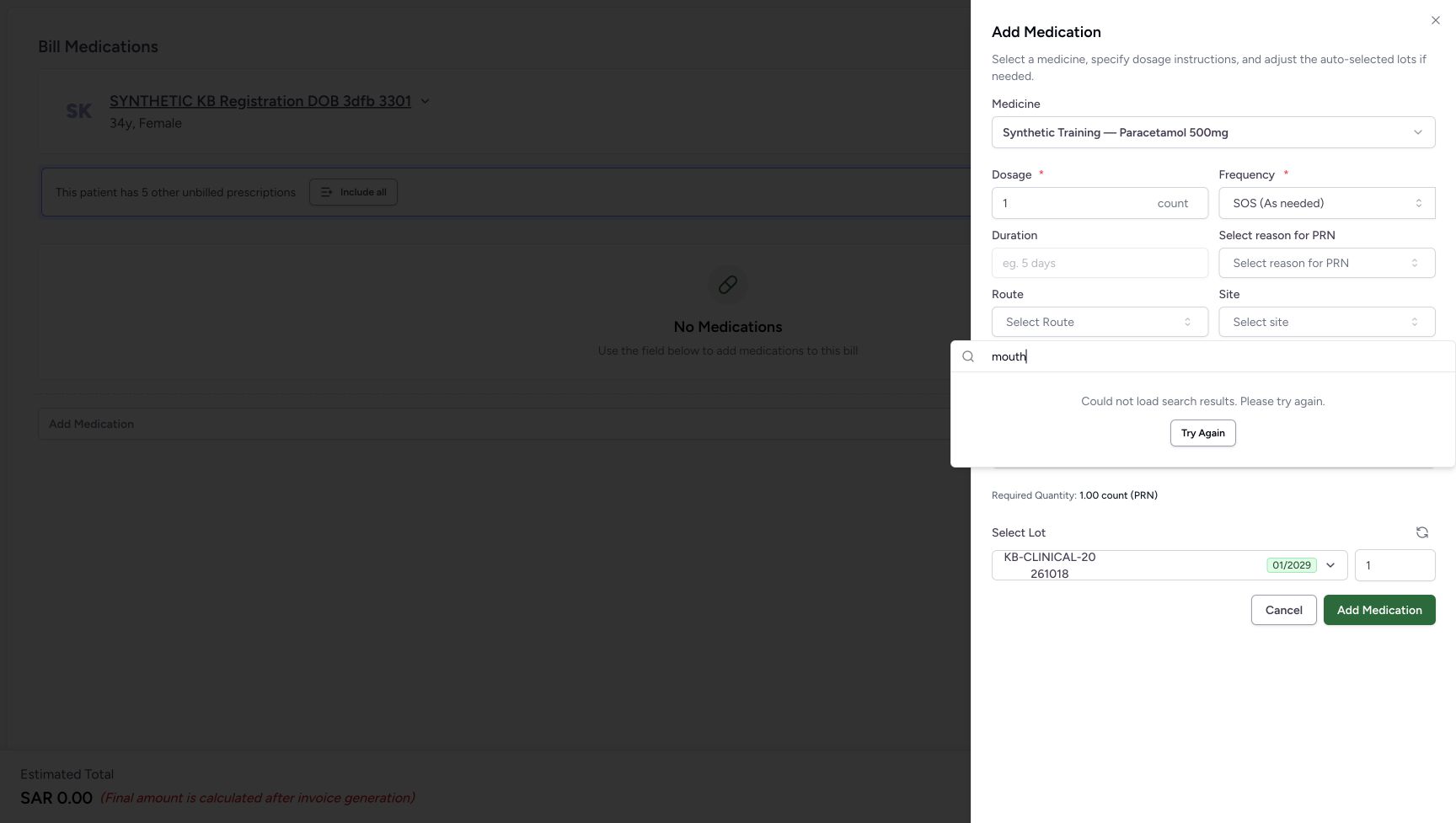
123Read a failed Site lookup and locate Try Again
Capture details
Software-only optional lookup recovery: failed searches, one unsuccessful retry, working and empty Route searches, then cancellation without adding or billing.
Image SHA-256 91361d5e89378cff1217fddc72166a601cf6897185e4cf4b804902b34536371b
- Check the Site search text: The illustrated query is mouth.
- Read the failed-search message: The lookup did not load; this message does not establish that no matching term exists.
- Choose Try Again once: Retry this same lookup once, then wait for its result.
 12
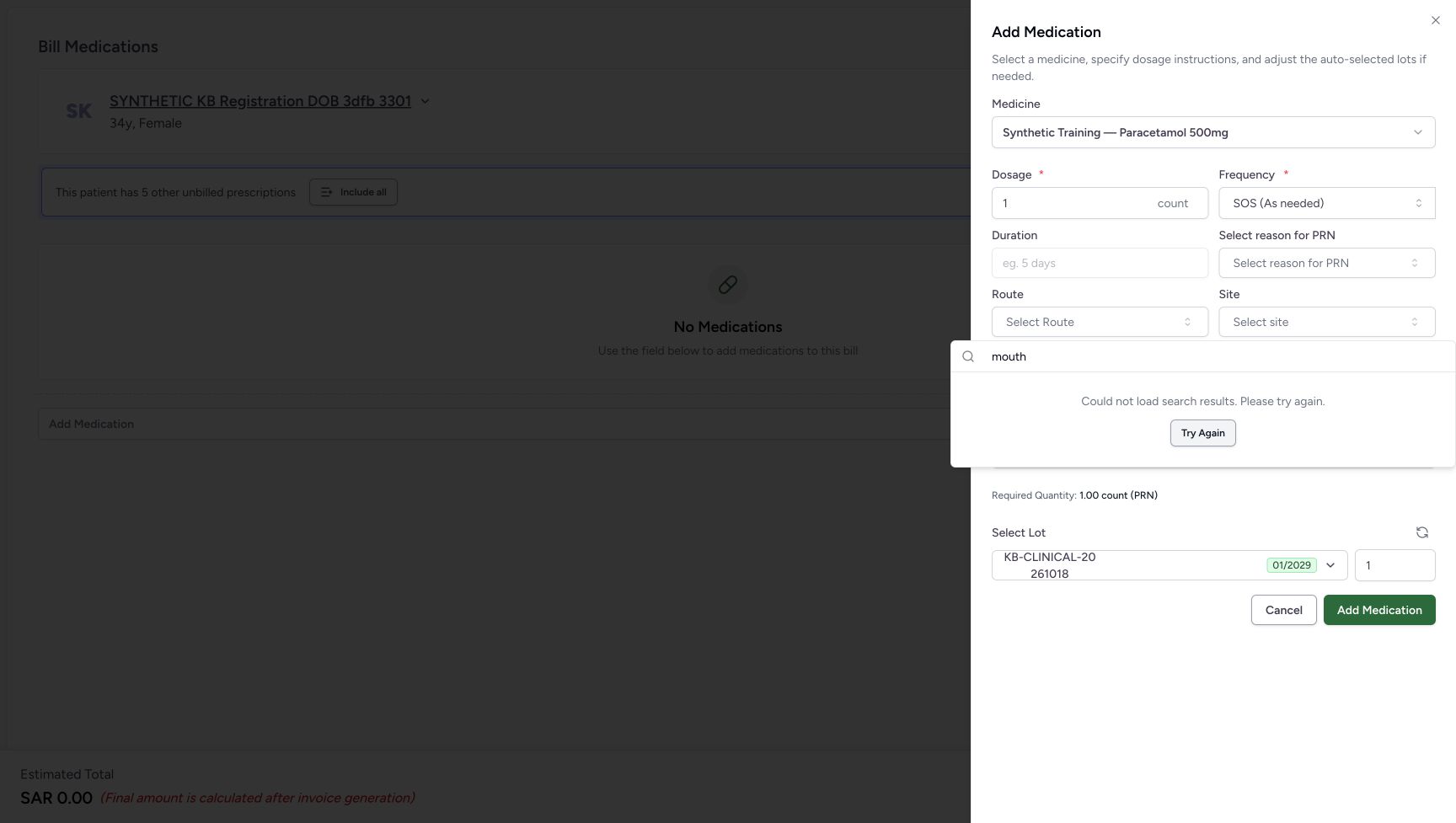
12Recognise that the retry still failed
Capture details
Software-only optional lookup recovery: failed searches, one unsuccessful retry, working and empty Route searches, then cancellation without adding or billing.
Image SHA-256 0eac82da6175badc1422186e8b8ff37d359d29d61c775215cd5503e733a74bd7
- Read the repeated failure: The retry has returned to the same failure message.
- Notice Try Again remains available: Its presence does not mean that the lookup recovered. This example does not click it again.
 12
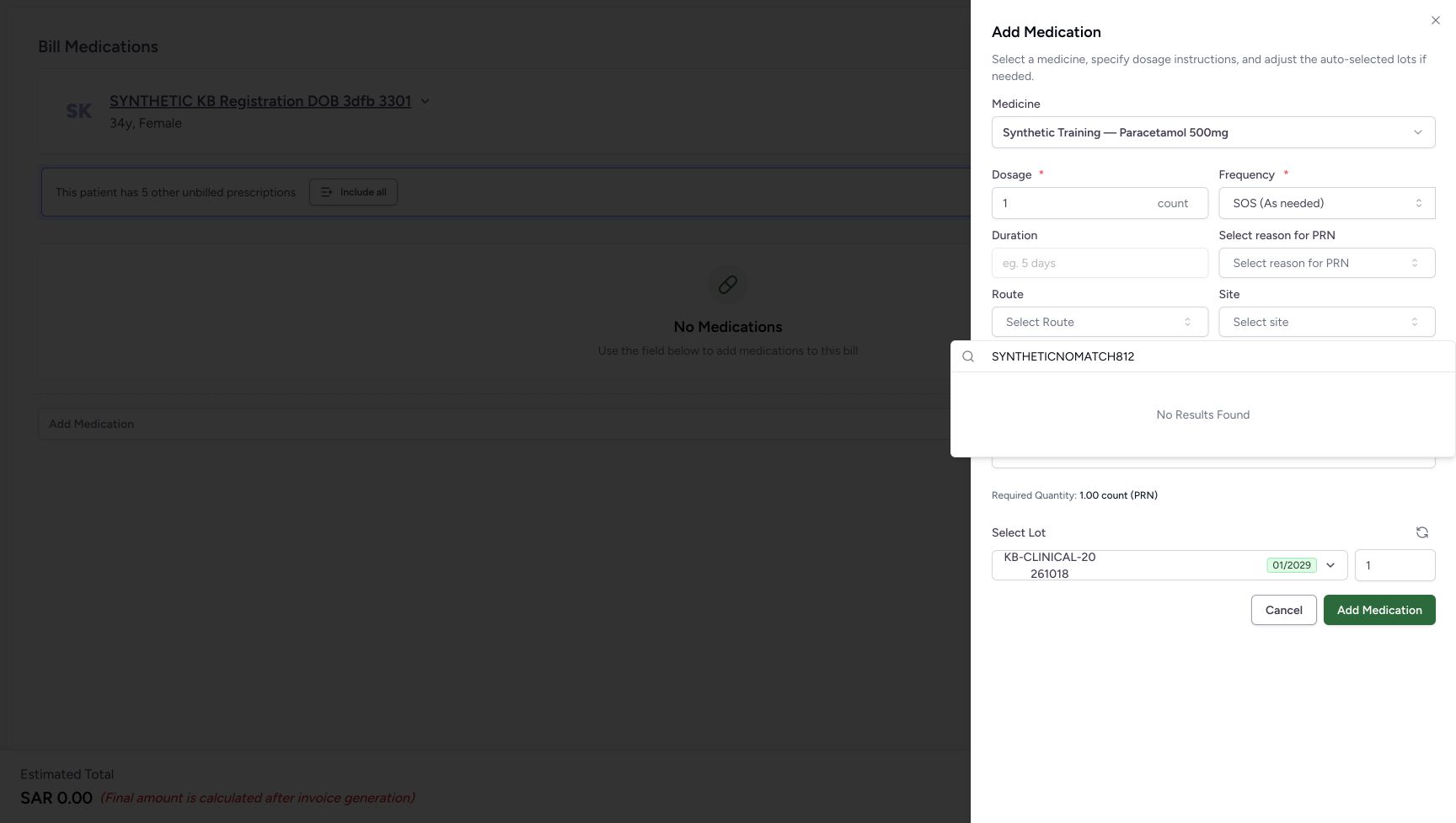
12Read a genuine no-match Route result
Capture details
Software-only optional lookup recovery: failed searches, one unsuccessful retry, working and empty Route searches, then cancellation without adding or billing.
Image SHA-256 c4fbca5993bda049be2f1ac3141876f078d5aad9173770d4602722502d3d7a16
- Check the deliberate no-match text: The search text is SYNTHETICNOMATCH812.
- Read No Results Found: This result concerns the current search text; it does not mean that every Route option is missing.
 123
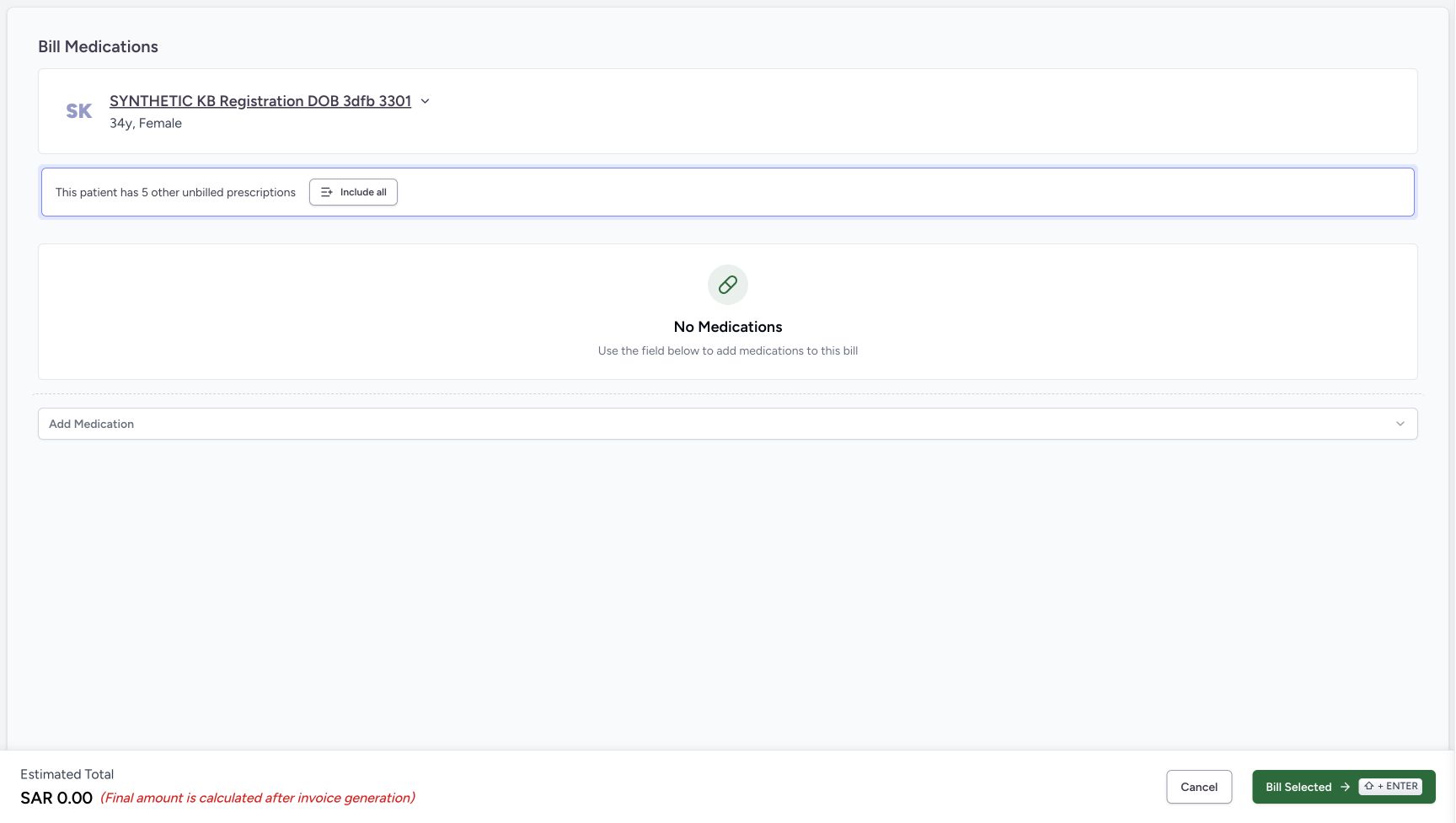
123Verify that cancelling the sheet added no medicine
Capture details
Software-only optional lookup recovery: failed searches, one unsuccessful retry, working and empty Route searches, then cancellation without adding or billing.
Image SHA-256 c5b5496b61d3f05e8bd2e0c44c43fc2119b60f0450b37173dd00c80c020f227e
- Verify the preparation is empty: No Other Items row was added from the cancelled medicine sheet.
- Read the unchanged zero estimate: The empty preparation remains at SAR 0.00.
- Cancel the empty preparation: Leave this unsaved preparation and return to the verified patient home.
13 of 13 content blocks have reviewed image alignment.
Before you begin
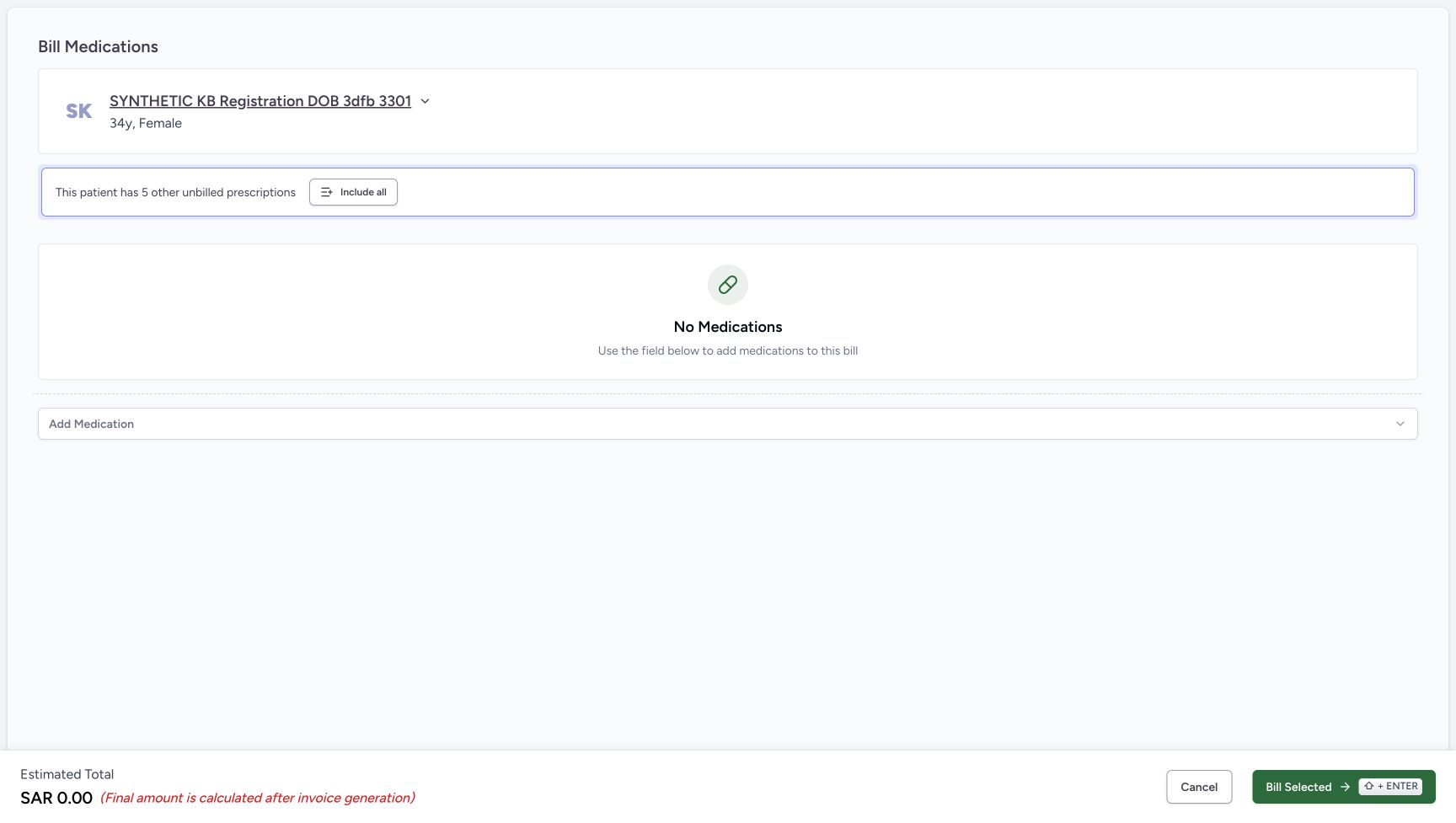
- Use your assigned Pharmacist access and the intended patient’s existing encounter preparation. The example uses SYNTHETIC KB Registration DOB 3dfb 3301 at MANSOQ Demo Polyclinic / Main Pharmacy. Begin at the empty Bill Medications screen after verifying the patient and encounter.
 123456
Recorded release 812d8272 · 2026-10-21T03:54:50.221659+00:00 · 1728 × 977 Begin with an empty encounter preparation
Capture details
Software-only optional lookup recovery: failed searches, one unsuccessful retry, working and empty Route searches, then cancellation without adding or billing.
Image SHA-256
6a02e203d96273ee71722f2ab321be8cf24888e452d8ed26bdde169a877cb71a- Verify the intended patient: Check SYNTHETIC KB Registration DOB 3dfb 3301 before opening the medicine selector.
- Read No Medications: No medicine has been added to this preparation.
- Open Add Medication: Open the medicine catalogue for this unsaved software exercise.
- Read the zero estimate: SAR 0.00 is an empty preparation estimate.
- Locate preparation Cancel: This footer Cancel leaves the preparation screen.
- Leave Bill Selected unused: This exercise ends without submitting a medicine bill.
 1234
1234Recorded release 812d8272 · 2026-10-21T03:57:12.163999+00:00 · 1728 × 977 Confirm the existing patient home
Capture details
Software-only optional lookup recovery: failed searches, one unsuccessful retry, working and empty Route searches, then cancellation without adding or billing.
Image SHA-256
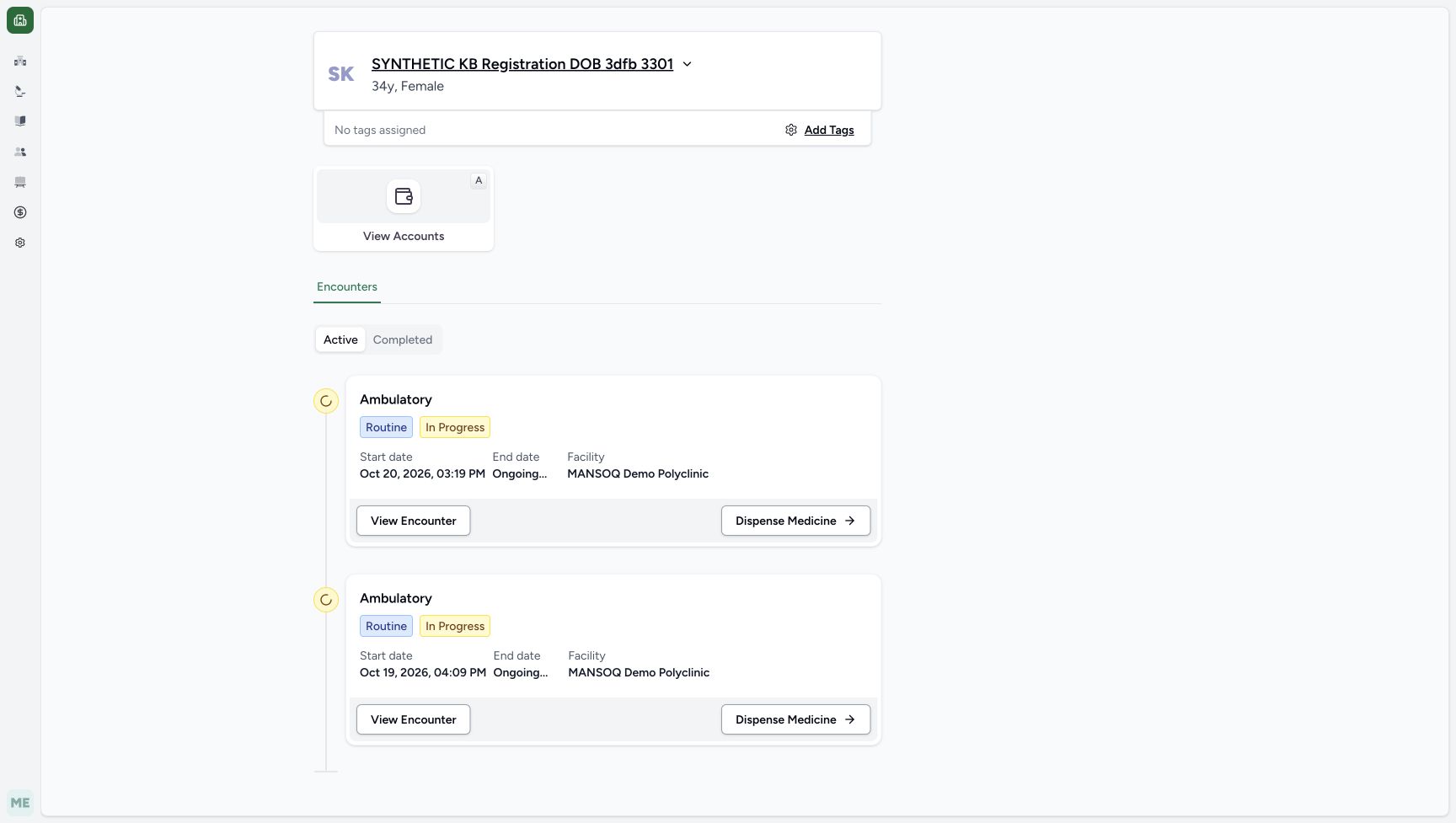
44b479a7d3efbd617d57d21692b6293e1f55d0e2254cdce7c9e63490447650cc- Verify the same patient: SYNTHETIC KB Registration DOB 3dfb 3301 remains the current patient.
- Read the Active encounter list: The two existing encounters remain visible.
- Read the Oct 20 encounter: The original Oct 20, 2026, 03:19 PM encounter is still present.
- Read the older Oct 19 encounter: The original Oct 19, 2026, 04:09 PM encounter is also still present.
- Use these search words only for the illustrated software exercise. Leave the displayed medicine instructions unchanged, select no terminology option, and do not choose Add Medication or Bill Selected. The example ends by cancelling the medicine sheet and the empty preparation.
 12345678
Recorded release 812d8272 · 2026-10-21T03:55:05.441760+00:00 · 1728 × 977 Locate the optional lookup controls and sheet Cancel
Capture details
Software-only optional lookup recovery: failed searches, one unsuccessful retry, working and empty Route searches, then cancellation without adding or billing.
Image SHA-256
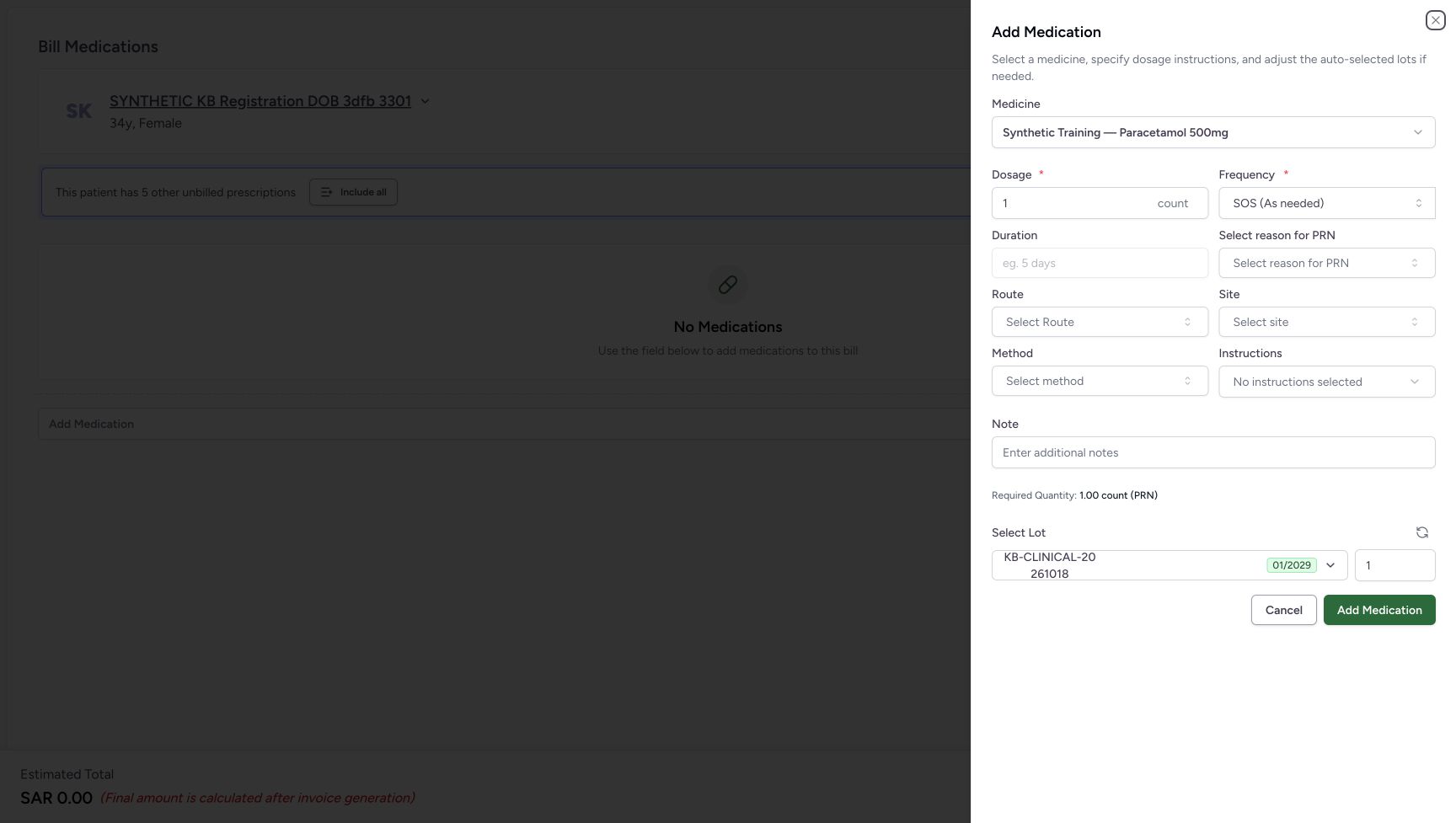
20200b4b521e2eac2e216dc629e91bca2470d2a9d4782cc22fe69aa24e843918- Verify the synthetic medicine: The sheet still refers to Synthetic Training — Paracetamol 500mg.
- Read the existing SOS frequency: The PRN reason control is visible with this displayed frequency; leave the medicine instructions unchanged.
- Open Select reason for PRN: Use this optional lookup for the illustrated pain search.
- Open Route: This separate lookup is used to compare working results and a no-match search.
- Open Site: This optional lookup is used for the illustrated mouth search.
- Open Method: This optional lookup is used for the illustrated swallow search.
- Open Instructions: Open the additional-instructions lookup for the illustrated food search.
- Cancel the medicine sheet: Use this Cancel to discard the unadded medicine and return to the empty preparation.
123Recorded release 812d8272 · 2026-10-21T03:56:55.207540+00:00 · 1728 × 977 Verify that cancelling the sheet added no medicine
Capture details
Software-only optional lookup recovery: failed searches, one unsuccessful retry, working and empty Route searches, then cancellation without adding or billing.
Image SHA-256
c5b5496b61d3f05e8bd2e0c44c43fc2119b60f0450b37173dd00c80c020f227e- Verify the preparation is empty: No Other Items row was added from the cancelled medicine sheet.
- Read the unchanged zero estimate: The empty preparation remains at SAR 0.00.
- Cancel the empty preparation: Leave this unsaved preparation and return to the verified patient home.
1. Open the synthetic medicine’s optional fields
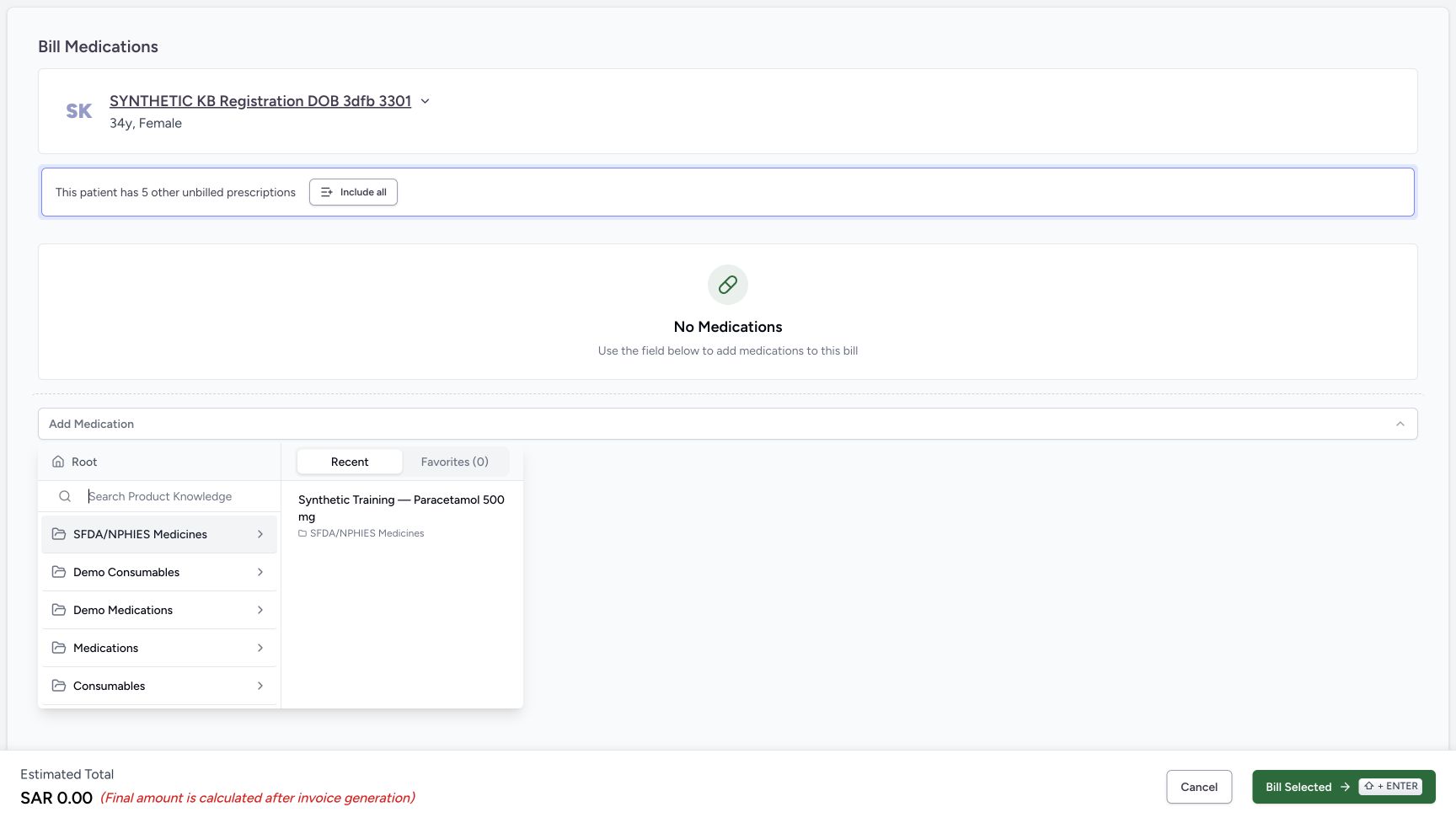
Verify the patient on the empty preparation and choose Add Medication. In Recent, choose Synthetic Training — Paracetamol 500mg. Wait for the Add Medication sheet. Locate Site, Method, Instructions, Select reason for PRN and Route. SOS is the displayed frequency, so the PRN reason field is visible. Leave the medicine instructions unchanged.
123456Begin with an empty encounter preparation
Capture details
Software-only optional lookup recovery: failed searches, one unsuccessful retry, working and empty Route searches, then cancellation without adding or billing.
Image SHA-256 6a02e203d96273ee71722f2ab321be8cf24888e452d8ed26bdde169a877cb71a
- Verify the intended patient: Check SYNTHETIC KB Registration DOB 3dfb 3301 before opening the medicine selector.
- Read No Medications: No medicine has been added to this preparation.
- Open Add Medication: Open the medicine catalogue for this unsaved software exercise.
- Read the zero estimate: SAR 0.00 is an empty preparation estimate.
- Locate preparation Cancel: This footer Cancel leaves the preparation screen.
- Leave Bill Selected unused: This exercise ends without submitting a medicine bill.
 12
12Choose the existing synthetic medicine
Capture details
Software-only optional lookup recovery: failed searches, one unsuccessful retry, working and empty Route searches, then cancellation without adding or billing.
Image SHA-256 438b680d38b53b49c4d7f701310750d7a0c36f2649beb4a63a2244f3cfdcbe99
- Read the Recent tab: The previously used synthetic medicine is shown in this list.
- Choose the synthetic Paracetamol row: Verify the full Synthetic Training — Paracetamol 500mg name before selecting it.
12345678Locate the optional lookup controls and sheet Cancel
Capture details
Software-only optional lookup recovery: failed searches, one unsuccessful retry, working and empty Route searches, then cancellation without adding or billing.
Image SHA-256 20200b4b521e2eac2e216dc629e91bca2470d2a9d4782cc22fe69aa24e843918
- Verify the synthetic medicine: The sheet still refers to Synthetic Training — Paracetamol 500mg.
- Read the existing SOS frequency: The PRN reason control is visible with this displayed frequency; leave the medicine instructions unchanged.
- Open Select reason for PRN: Use this optional lookup for the illustrated pain search.
- Open Route: This separate lookup is used to compare working results and a no-match search.
- Open Site: This optional lookup is used for the illustrated mouth search.
- Open Method: This optional lookup is used for the illustrated swallow search.
- Open Instructions: Open the additional-instructions lookup for the illustrated food search.
- Cancel the medicine sheet: Use this Cancel to discard the unadded medicine and return to the empty preparation.
2. Recognise the Site failure and try once
Open Site and type mouth. Read “Could not load search results. Please try again.” This means the lookup did not load; it is not a successful search with no match. Choose Try Again once and wait for the lookup to settle. In this example the same failure message returns and Try Again remains available. Do not treat the retry as a successful recovery or choose an unverified term.
12345678Locate the optional lookup controls and sheet Cancel
Capture details
Software-only optional lookup recovery: failed searches, one unsuccessful retry, working and empty Route searches, then cancellation without adding or billing.
Image SHA-256 20200b4b521e2eac2e216dc629e91bca2470d2a9d4782cc22fe69aa24e843918
- Verify the synthetic medicine: The sheet still refers to Synthetic Training — Paracetamol 500mg.
- Read the existing SOS frequency: The PRN reason control is visible with this displayed frequency; leave the medicine instructions unchanged.
- Open Select reason for PRN: Use this optional lookup for the illustrated pain search.
- Open Route: This separate lookup is used to compare working results and a no-match search.
- Open Site: This optional lookup is used for the illustrated mouth search.
- Open Method: This optional lookup is used for the illustrated swallow search.
- Open Instructions: Open the additional-instructions lookup for the illustrated food search.
- Cancel the medicine sheet: Use this Cancel to discard the unadded medicine and return to the empty preparation.
123Read a failed Site lookup and locate Try Again
Capture details
Software-only optional lookup recovery: failed searches, one unsuccessful retry, working and empty Route searches, then cancellation without adding or billing.
Image SHA-256 91361d5e89378cff1217fddc72166a601cf6897185e4cf4b804902b34536371b
- Check the Site search text: The illustrated query is mouth.
- Read the failed-search message: The lookup did not load; this message does not establish that no matching term exists.
- Choose Try Again once: Retry this same lookup once, then wait for its result.
12Recognise that the retry still failed
Capture details
Software-only optional lookup recovery: failed searches, one unsuccessful retry, working and empty Route searches, then cancellation without adding or billing.
Image SHA-256 0eac82da6175badc1422186e8b8ff37d359d29d61c775215cd5503e733a74bd7
- Read the repeated failure: The retry has returned to the same failure message.
- Notice Try Again remains available: Its presence does not mean that the lookup recovered. This example does not click it again.
3. Check the other optional lookups without selecting a term
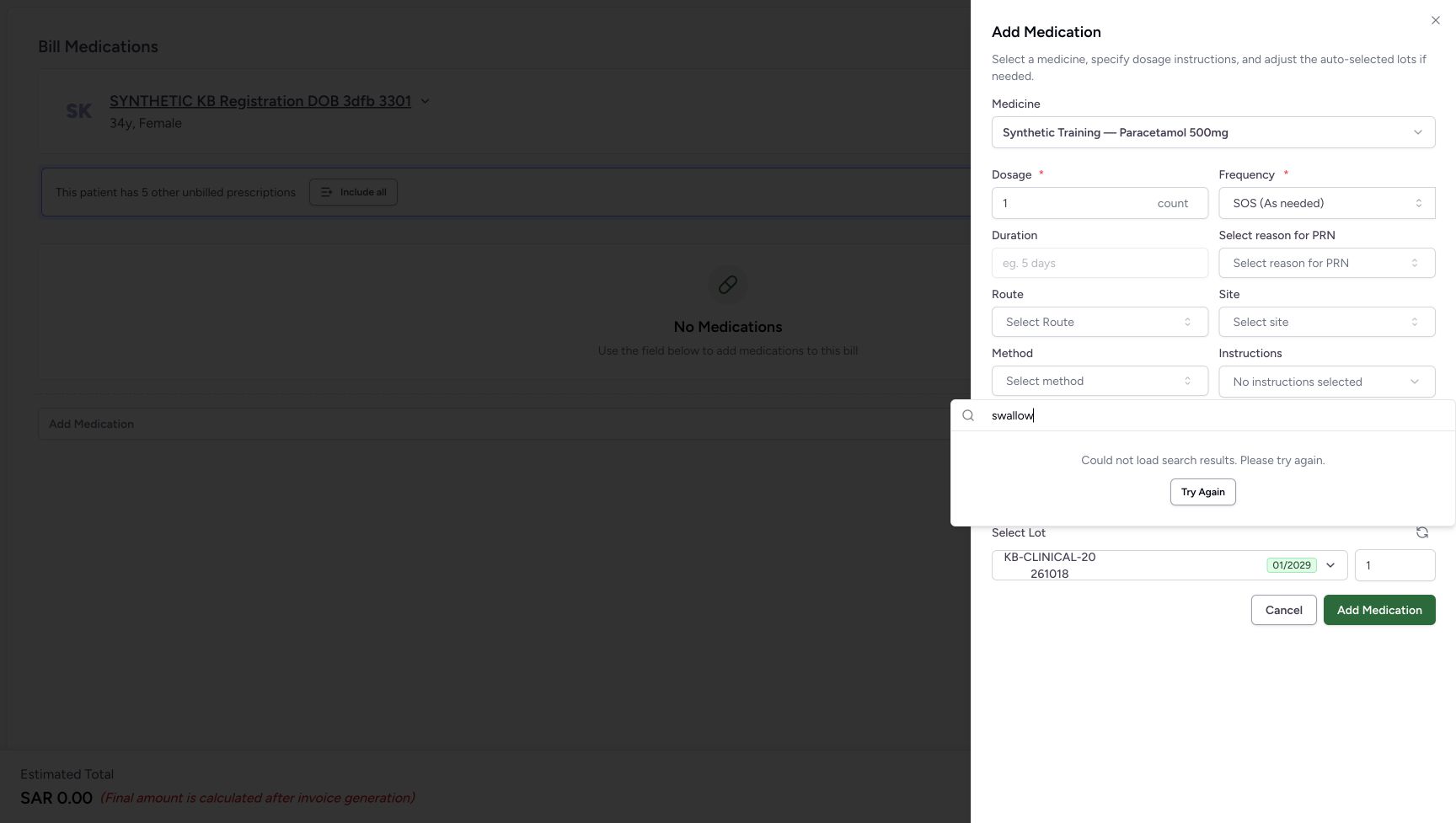
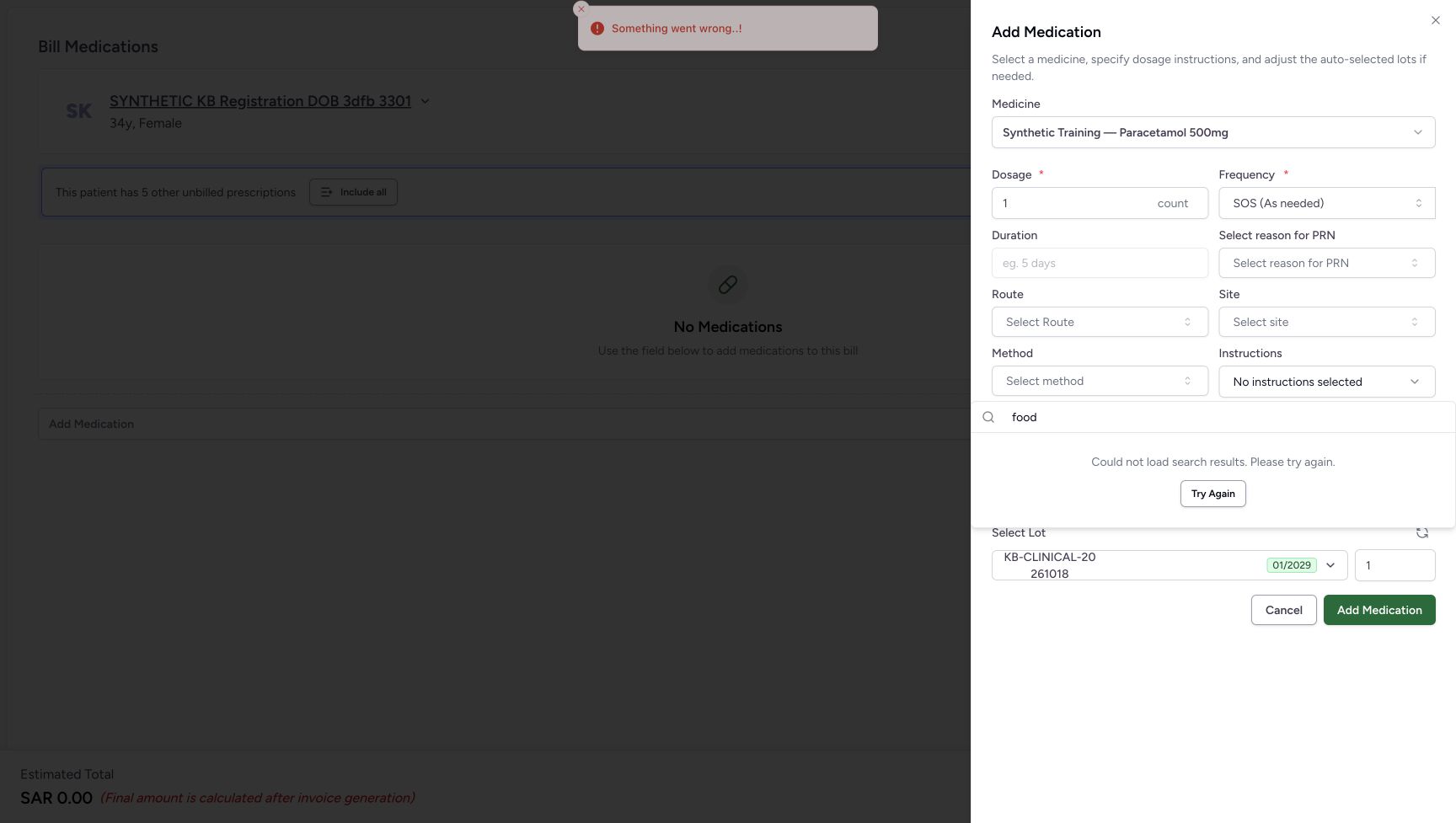
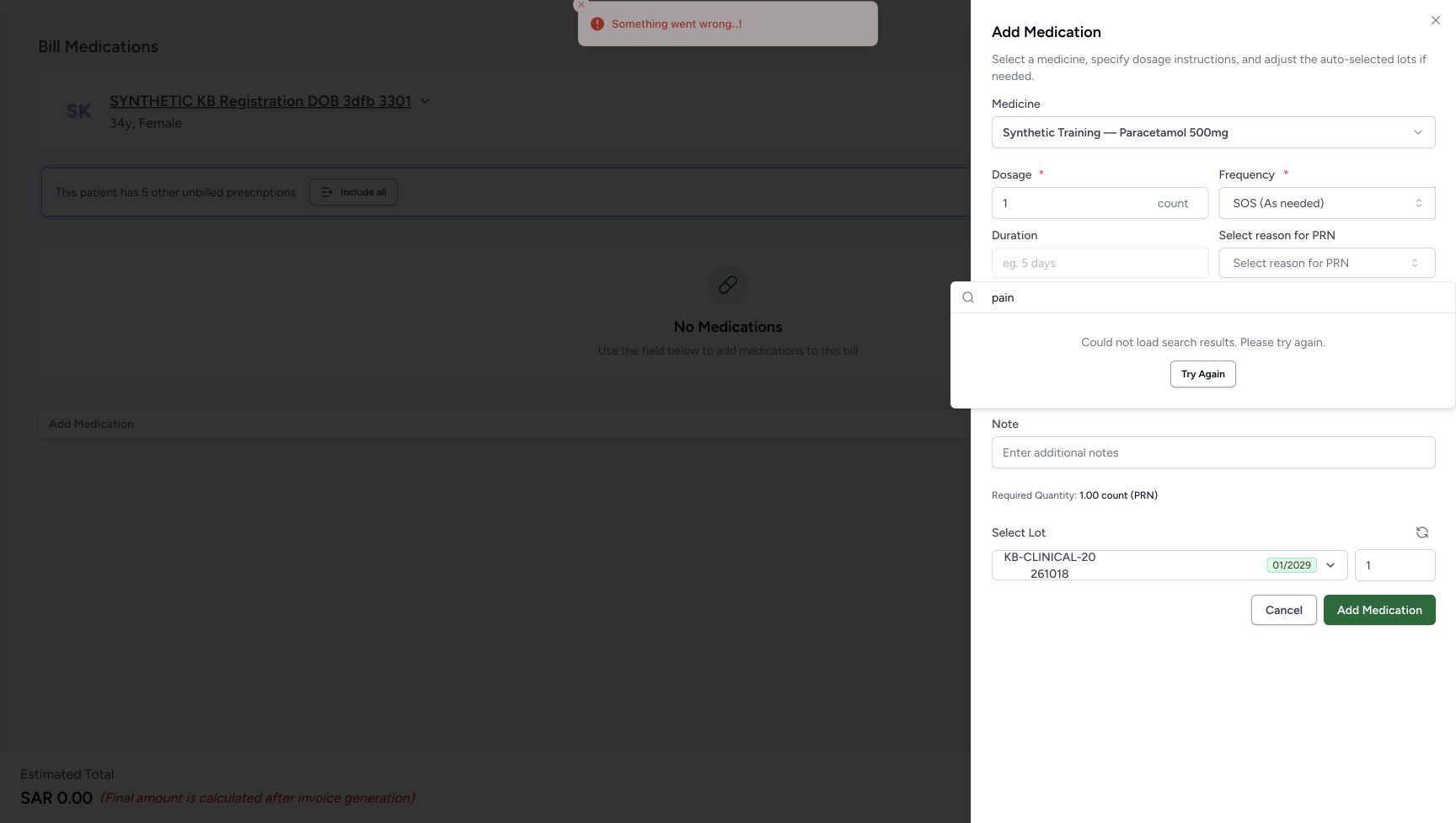
With the Site search input focused, press Escape to close its popup. Open Method and search swallow; it also shows the failed-search message. Press Escape in that search input, open Instructions and search food. Close that popup with Escape, then open Select reason for PRN and search pain. These lookups also fail in this example. Leave all three fields unselected; no further Try Again action is demonstrated.
12345678Locate the optional lookup controls and sheet Cancel
Capture details
Software-only optional lookup recovery: failed searches, one unsuccessful retry, working and empty Route searches, then cancellation without adding or billing.
Image SHA-256 20200b4b521e2eac2e216dc629e91bca2470d2a9d4782cc22fe69aa24e843918
- Verify the synthetic medicine: The sheet still refers to Synthetic Training — Paracetamol 500mg.
- Read the existing SOS frequency: The PRN reason control is visible with this displayed frequency; leave the medicine instructions unchanged.
- Open Select reason for PRN: Use this optional lookup for the illustrated pain search.
- Open Route: This separate lookup is used to compare working results and a no-match search.
- Open Site: This optional lookup is used for the illustrated mouth search.
- Open Method: This optional lookup is used for the illustrated swallow search.
- Open Instructions: Open the additional-instructions lookup for the illustrated food search.
- Cancel the medicine sheet: Use this Cancel to discard the unadded medicine and return to the empty preparation.
 12
12Recognise the Method lookup failure
Capture details
Software-only optional lookup recovery: failed searches, one unsuccessful retry, working and empty Route searches, then cancellation without adding or billing.
Image SHA-256 7ce314beb1e07ba2ecde87e0d389ff64b4b2a7077968f9a7dd1de00133d72bd0
- Check the Method query: The illustrated query is swallow.
- Read the Method lookup failure: Leave the optional method unselected when its lookup cannot load.
 12
12Recognise the Instructions lookup failure
Capture details
Software-only optional lookup recovery: failed searches, one unsuccessful retry, working and empty Route searches, then cancellation without adding or billing.
Image SHA-256 acbc81a5271deb1d55892433e17d2033f48233341f64f6adfdf6163198711f49
- Check the Instructions query: The illustrated query is food.
- Read the Instructions lookup failure: No additional instruction is selected in this example.
 12
12Recognise the PRN reason lookup failure
Capture details
Software-only optional lookup recovery: failed searches, one unsuccessful retry, working and empty Route searches, then cancellation without adding or billing.
Image SHA-256 c83e31f1381589cdebf9c2d16df1f9127daf23a07a4fa9dcb910159ccf678430
- Check the PRN reason query: The illustrated query is pain.
- Read the PRN reason lookup failure: The search has not loaded; no reason is selected.
4. Distinguish a working search from a no-match result
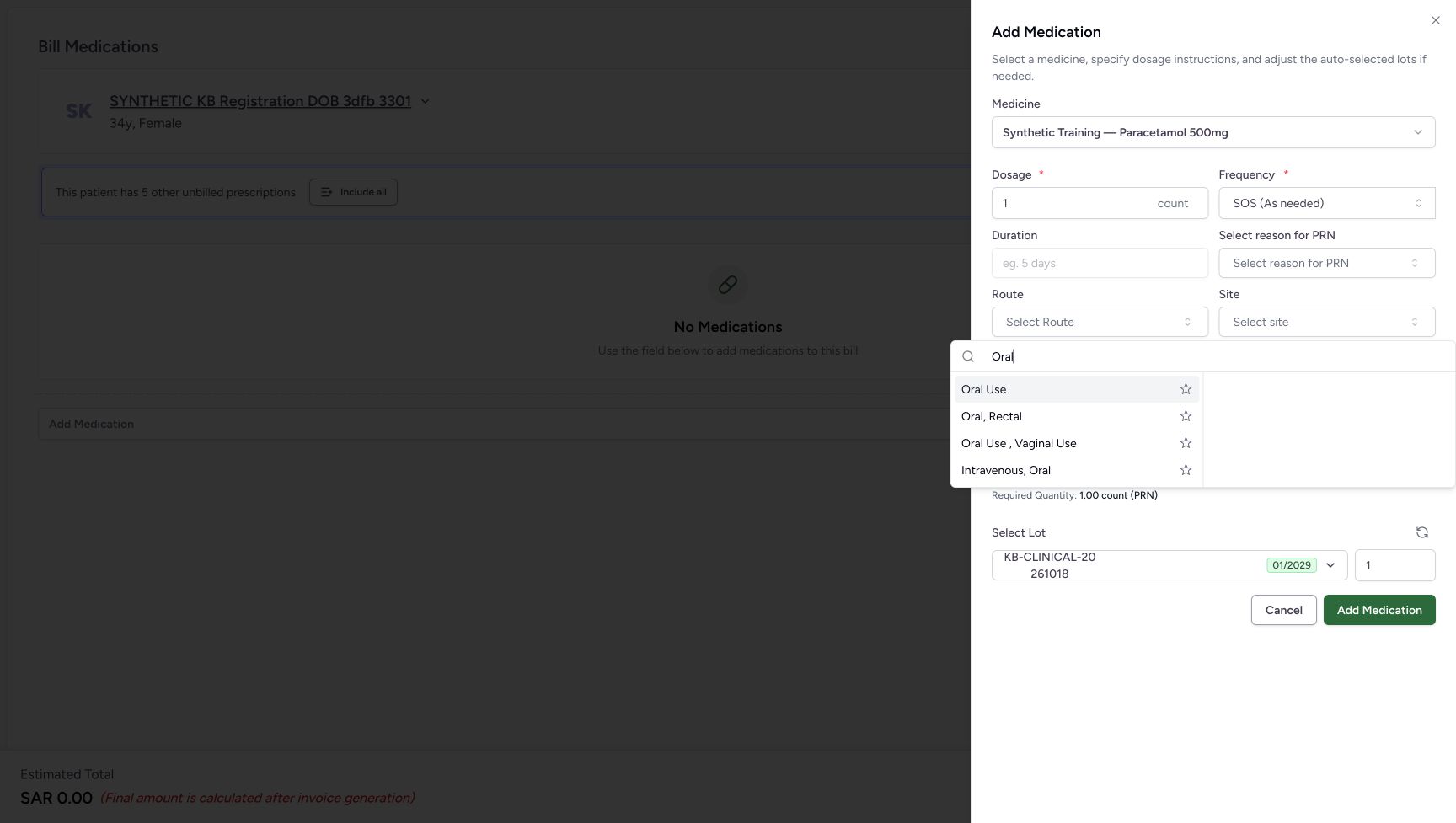
Press Escape in the PRN search input, then open Route. Search Oral and compare the four displayed labels without selecting one. Replace the search text with SYNTHETICNOMATCH812 and wait: No Results Found appears for that deliberate no-match query. The working Route lookup shows a different outcome from the failed Site, Method, Instructions and PRN lookups.
12345678Locate the optional lookup controls and sheet Cancel
Capture details
Software-only optional lookup recovery: failed searches, one unsuccessful retry, working and empty Route searches, then cancellation without adding or billing.
Image SHA-256 20200b4b521e2eac2e216dc629e91bca2470d2a9d4782cc22fe69aa24e843918
- Verify the synthetic medicine: The sheet still refers to Synthetic Training — Paracetamol 500mg.
- Read the existing SOS frequency: The PRN reason control is visible with this displayed frequency; leave the medicine instructions unchanged.
- Open Select reason for PRN: Use this optional lookup for the illustrated pain search.
- Open Route: This separate lookup is used to compare working results and a no-match search.
- Open Site: This optional lookup is used for the illustrated mouth search.
- Open Method: This optional lookup is used for the illustrated swallow search.
- Open Instructions: Open the additional-instructions lookup for the illustrated food search.
- Cancel the medicine sheet: Use this Cancel to discard the unadded medicine and return to the empty preparation.
 12345
12345Compare a working Route search
Capture details
Software-only optional lookup recovery: failed searches, one unsuccessful retry, working and empty Route searches, then cancellation without adding or billing.
Image SHA-256 5b6ffebdb18103a18240fbde2bf646b0b1ed3e5be20f1a509f4ede49d0f7a5d8
- Check the Route query: The query Oral has loaded visible options.
- Read Oral Use: This is a displayed option, not an instruction to select it in this exercise.
- Read Oral, Rectal: This is a separate combined-route label.
- Read Oral Use, Vaginal Use: This is another distinct combined-route label.
- Read Intravenous, Oral: Compare the full labels rather than assuming all results mean the same thing.
12Read a genuine no-match Route result
Capture details
Software-only optional lookup recovery: failed searches, one unsuccessful retry, working and empty Route searches, then cancellation without adding or billing.
Image SHA-256 c4fbca5993bda049be2f1ac3141876f078d5aad9173770d4602722502d3d7a16
- Check the deliberate no-match text: The search text is SYNTHETICNOMATCH812.
- Read No Results Found: This result concerns the current search text; it does not mean that every Route option is missing.
5. Cancel the unadded medicine sheet
Press Escape in the Route search input to close its popup. Choose the Cancel button at the bottom of the Add Medication sheet. The preparation returns to No Medications and Estimated Total SAR 0.00. No medicine was added from the sheet.
12Read a genuine no-match Route result
Capture details
Software-only optional lookup recovery: failed searches, one unsuccessful retry, working and empty Route searches, then cancellation without adding or billing.
Image SHA-256 c4fbca5993bda049be2f1ac3141876f078d5aad9173770d4602722502d3d7a16
- Check the deliberate no-match text: The search text is SYNTHETICNOMATCH812.
- Read No Results Found: This result concerns the current search text; it does not mean that every Route option is missing.
12345678Locate the optional lookup controls and sheet Cancel
Capture details
Software-only optional lookup recovery: failed searches, one unsuccessful retry, working and empty Route searches, then cancellation without adding or billing.
Image SHA-256 20200b4b521e2eac2e216dc629e91bca2470d2a9d4782cc22fe69aa24e843918
- Verify the synthetic medicine: The sheet still refers to Synthetic Training — Paracetamol 500mg.
- Read the existing SOS frequency: The PRN reason control is visible with this displayed frequency; leave the medicine instructions unchanged.
- Open Select reason for PRN: Use this optional lookup for the illustrated pain search.
- Open Route: This separate lookup is used to compare working results and a no-match search.
- Open Site: This optional lookup is used for the illustrated mouth search.
- Open Method: This optional lookup is used for the illustrated swallow search.
- Open Instructions: Open the additional-instructions lookup for the illustrated food search.
- Cancel the medicine sheet: Use this Cancel to discard the unadded medicine and return to the empty preparation.
123Verify that cancelling the sheet added no medicine
Capture details
Software-only optional lookup recovery: failed searches, one unsuccessful retry, working and empty Route searches, then cancellation without adding or billing.
Image SHA-256 c5b5496b61d3f05e8bd2e0c44c43fc2119b60f0450b37173dd00c80c020f227e
- Verify the preparation is empty: No Other Items row was added from the cancelled medicine sheet.
- Read the unchanged zero estimate: The empty preparation remains at SAR 0.00.
- Cancel the empty preparation: Leave this unsaved preparation and return to the verified patient home.
6. Leave the empty preparation
Choose the preparation footer Cancel. In this illustrated entry route it returns to the same verified patient home. The two existing Active Ambulatory, In Progress encounters remain visible. This exercise submits no medicine bill and creates no dispense or payment.
123Verify that cancelling the sheet added no medicine
Capture details
Software-only optional lookup recovery: failed searches, one unsuccessful retry, working and empty Route searches, then cancellation without adding or billing.
Image SHA-256 c5b5496b61d3f05e8bd2e0c44c43fc2119b60f0450b37173dd00c80c020f227e
- Verify the preparation is empty: No Other Items row was added from the cancelled medicine sheet.
- Read the unchanged zero estimate: The empty preparation remains at SAR 0.00.
- Cancel the empty preparation: Leave this unsaved preparation and return to the verified patient home.
1234Confirm the existing patient home
Capture details
Software-only optional lookup recovery: failed searches, one unsuccessful retry, working and empty Route searches, then cancellation without adding or billing.
Image SHA-256 44b479a7d3efbd617d57d21692b6293e1f55d0e2254cdce7c9e63490447650cc
- Verify the same patient: SYNTHETIC KB Registration DOB 3dfb 3301 remains the current patient.
- Read the Active encounter list: The two existing encounters remain visible.
- Read the Oct 20 encounter: The original Oct 20, 2026, 03:19 PM encounter is still present.
- Read the older Oct 19 encounter: The original Oct 19, 2026, 04:09 PM encounter is also still present.
Use the shared patient and medicine-entry instructions
For the common starting route, see Choose a patient and encounter for New Dispense. For catalogue search, dose and lot checks, and local row removal, see Enter, check and remove a medicine before billing. This companion covers the lookup-error and cancellation path only.
123456Begin with an empty encounter preparation
Capture details
Software-only optional lookup recovery: failed searches, one unsuccessful retry, working and empty Route searches, then cancellation without adding or billing.
Image SHA-256 6a02e203d96273ee71722f2ab321be8cf24888e452d8ed26bdde169a877cb71a
- Verify the intended patient: Check SYNTHETIC KB Registration DOB 3dfb 3301 before opening the medicine selector.
- Read No Medications: No medicine has been added to this preparation.
- Open Add Medication: Open the medicine catalogue for this unsaved software exercise.
- Read the zero estimate: SAR 0.00 is an empty preparation estimate.
- Locate preparation Cancel: This footer Cancel leaves the preparation screen.
- Leave Bill Selected unused: This exercise ends without submitting a medicine bill.
12Choose the existing synthetic medicine
Capture details
Software-only optional lookup recovery: failed searches, one unsuccessful retry, working and empty Route searches, then cancellation without adding or billing.
Image SHA-256 438b680d38b53b49c4d7f701310750d7a0c36f2649beb4a63a2244f3cfdcbe99
- Read the Recent tab: The previously used synthetic medicine is shown in this list.
- Choose the synthetic Paracetamol row: Verify the full Synthetic Training — Paracetamol 500mg name before selecting it.
12345678Locate the optional lookup controls and sheet Cancel
Capture details
Software-only optional lookup recovery: failed searches, one unsuccessful retry, working and empty Route searches, then cancellation without adding or billing.
Image SHA-256 20200b4b521e2eac2e216dc629e91bca2470d2a9d4782cc22fe69aa24e843918
- Verify the synthetic medicine: The sheet still refers to Synthetic Training — Paracetamol 500mg.
- Read the existing SOS frequency: The PRN reason control is visible with this displayed frequency; leave the medicine instructions unchanged.
- Open Select reason for PRN: Use this optional lookup for the illustrated pain search.
- Open Route: This separate lookup is used to compare working results and a no-match search.
- Open Site: This optional lookup is used for the illustrated mouth search.
- Open Method: This optional lookup is used for the illustrated swallow search.
- Open Instructions: Open the additional-instructions lookup for the illustrated food search.
- Cancel the medicine sheet: Use this Cancel to discard the unadded medicine and return to the empty preparation.
Read the lookup outcome before proceeding
A failed-search message says the lookup could not load. Try Again starts another attempt; the repeated error shown here still means the lookup is unavailable. No Results Found describes the current completed no-match Route search. Check the search text and full result labels; neither message establishes that every medicine or terminology option is absent. The illustrated failure does not verify the availability of the underlying terminology service.
123Read a failed Site lookup and locate Try Again
Capture details
Software-only optional lookup recovery: failed searches, one unsuccessful retry, working and empty Route searches, then cancellation without adding or billing.
Image SHA-256 91361d5e89378cff1217fddc72166a601cf6897185e4cf4b804902b34536371b
- Check the Site search text: The illustrated query is mouth.
- Read the failed-search message: The lookup did not load; this message does not establish that no matching term exists.
- Choose Try Again once: Retry this same lookup once, then wait for its result.
12Recognise that the retry still failed
Capture details
Software-only optional lookup recovery: failed searches, one unsuccessful retry, working and empty Route searches, then cancellation without adding or billing.
Image SHA-256 0eac82da6175badc1422186e8b8ff37d359d29d61c775215cd5503e733a74bd7
- Read the repeated failure: The retry has returned to the same failure message.
- Notice Try Again remains available: Its presence does not mean that the lookup recovered. This example does not click it again.
12345Compare a working Route search
Capture details
Software-only optional lookup recovery: failed searches, one unsuccessful retry, working and empty Route searches, then cancellation without adding or billing.
Image SHA-256 5b6ffebdb18103a18240fbde2bf646b0b1ed3e5be20f1a509f4ede49d0f7a5d8
- Check the Route query: The query Oral has loaded visible options.
- Read Oral Use: This is a displayed option, not an instruction to select it in this exercise.
- Read Oral, Rectal: This is a separate combined-route label.
- Read Oral Use, Vaginal Use: This is another distinct combined-route label.
- Read Intravenous, Oral: Compare the full labels rather than assuming all results mean the same thing.
12Read a genuine no-match Route result
Capture details
Software-only optional lookup recovery: failed searches, one unsuccessful retry, working and empty Route searches, then cancellation without adding or billing.
Image SHA-256 c4fbca5993bda049be2f1ac3141876f078d5aad9173770d4602722502d3d7a16
- Check the deliberate no-match text: The search text is SYNTHETICNOMATCH812.
- Read No Results Found: This result concerns the current search text; it does not mean that every Route option is missing.
Troubleshooting
The same failure returns after Try Again
Leave the affected optional field unselected and cancel this example without adding or billing. If the lookup is required to finish your authorised work, ask the facility’s approved support staff to resolve it before proceeding. A generic error notification may accompany the inline message; it does not turn the failed lookup into a successful empty result.
123Read a failed Site lookup and locate Try Again
Capture details
Software-only optional lookup recovery: failed searches, one unsuccessful retry, working and empty Route searches, then cancellation without adding or billing.
Image SHA-256 91361d5e89378cff1217fddc72166a601cf6897185e4cf4b804902b34536371b
- Check the Site search text: The illustrated query is mouth.
- Read the failed-search message: The lookup did not load; this message does not establish that no matching term exists.
- Choose Try Again once: Retry this same lookup once, then wait for its result.
12Recognise that the retry still failed
Capture details
Software-only optional lookup recovery: failed searches, one unsuccessful retry, working and empty Route searches, then cancellation without adding or billing.
Image SHA-256 0eac82da6175badc1422186e8b8ff37d359d29d61c775215cd5503e733a74bd7
- Read the repeated failure: The retry has returned to the same failure message.
- Notice Try Again remains available: Its presence does not mean that the lookup recovered. This example does not click it again.
12Recognise the Instructions lookup failure
Capture details
Software-only optional lookup recovery: failed searches, one unsuccessful retry, working and empty Route searches, then cancellation without adding or billing.
Image SHA-256 acbc81a5271deb1d55892433e17d2033f48233341f64f6adfdf6163198711f49
- Check the Instructions query: The illustrated query is food.
- Read the Instructions lookup failure: No additional instruction is selected in this example.
12Recognise the PRN reason lookup failure
Capture details
Software-only optional lookup recovery: failed searches, one unsuccessful retry, working and empty Route searches, then cancellation without adding or billing.
Image SHA-256 c83e31f1381589cdebf9c2d16df1f9127daf23a07a4fa9dcb910159ccf678430
- Check the PRN reason query: The illustrated query is pain.
- Read the PRN reason lookup failure: The search has not loaded; no reason is selected.
123Verify that cancelling the sheet added no medicine
Capture details
Software-only optional lookup recovery: failed searches, one unsuccessful retry, working and empty Route searches, then cancellation without adding or billing.
Image SHA-256 c5b5496b61d3f05e8bd2e0c44c43fc2119b60f0450b37173dd00c80c020f227e
- Verify the preparation is empty: No Other Items row was added from the cancelled medicine sheet.
- Read the unchanged zero estimate: The empty preparation remains at SAR 0.00.
- Cancel the empty preparation: Leave this unsaved preparation and return to the verified patient home.
The lookup popup covers the next field
Press Escape while its search input is focused, then use the next visible field. To discard the medicine entirely, use the sheet’s own Cancel; afterward, use the separate preparation Cancel to leave. In the pictured no-match Route example, the deliberate search text explains the empty result; compare it with the shown Oral results before assuming all Route options are missing.
12345678Locate the optional lookup controls and sheet Cancel
Capture details
Software-only optional lookup recovery: failed searches, one unsuccessful retry, working and empty Route searches, then cancellation without adding or billing.
Image SHA-256 20200b4b521e2eac2e216dc629e91bca2470d2a9d4782cc22fe69aa24e843918
- Verify the synthetic medicine: The sheet still refers to Synthetic Training — Paracetamol 500mg.
- Read the existing SOS frequency: The PRN reason control is visible with this displayed frequency; leave the medicine instructions unchanged.
- Open Select reason for PRN: Use this optional lookup for the illustrated pain search.
- Open Route: This separate lookup is used to compare working results and a no-match search.
- Open Site: This optional lookup is used for the illustrated mouth search.
- Open Method: This optional lookup is used for the illustrated swallow search.
- Open Instructions: Open the additional-instructions lookup for the illustrated food search.
- Cancel the medicine sheet: Use this Cancel to discard the unadded medicine and return to the empty preparation.
12345Compare a working Route search
Capture details
Software-only optional lookup recovery: failed searches, one unsuccessful retry, working and empty Route searches, then cancellation without adding or billing.
Image SHA-256 5b6ffebdb18103a18240fbde2bf646b0b1ed3e5be20f1a509f4ede49d0f7a5d8
- Check the Route query: The query Oral has loaded visible options.
- Read Oral Use: This is a displayed option, not an instruction to select it in this exercise.
- Read Oral, Rectal: This is a separate combined-route label.
- Read Oral Use, Vaginal Use: This is another distinct combined-route label.
- Read Intravenous, Oral: Compare the full labels rather than assuming all results mean the same thing.
12Read a genuine no-match Route result
Capture details
Software-only optional lookup recovery: failed searches, one unsuccessful retry, working and empty Route searches, then cancellation without adding or billing.
Image SHA-256 c4fbca5993bda049be2f1ac3141876f078d5aad9173770d4602722502d3d7a16
- Check the deliberate no-match text: The search text is SYNTHETICNOMATCH812.
- Read No Results Found: This result concerns the current search text; it does not mean that every Route option is missing.
123Verify that cancelling the sheet added no medicine
Capture details
Software-only optional lookup recovery: failed searches, one unsuccessful retry, working and empty Route searches, then cancellation without adding or billing.
Image SHA-256 c5b5496b61d3f05e8bd2e0c44c43fc2119b60f0450b37173dd00c80c020f227e
- Verify the preparation is empty: No Other Items row was added from the cancelled medicine sheet.
- Read the unchanged zero estimate: The empty preparation remains at SAR 0.00.
- Cancel the empty preparation: Leave this unsaved preparation and return to the verified patient home.
1234Confirm the existing patient home
Capture details
Software-only optional lookup recovery: failed searches, one unsuccessful retry, working and empty Route searches, then cancellation without adding or billing.
Image SHA-256 44b479a7d3efbd617d57d21692b6293e1f55d0e2254cdce7c9e63490447650cc
- Verify the same patient: SYNTHETIC KB Registration DOB 3dfb 3301 remains the current patient.
- Read the Active encounter list: The two existing encounters remain visible.
- Read the Oct 20 encounter: The original Oct 20, 2026, 03:19 PM encounter is still present.
- Read the older Oct 19 encounter: The original Oct 19, 2026, 04:09 PM encounter is also still present.
Source evidence
Every citation uses this exact committed version. The private source repository requires access.
- repositories/platform/mansoq-web/src/components/Questionnaire/ValueSetSearchContent.tsx:168 ·
812d82726586cea96f4654e610596edc5b2ecabbSource file checksum
1f6840dc6672288d3e1ce0a4b11f3241467afa24cd4259f87ecdd468fe603f5a - repositories/platform/mansoq-web/src/components/Questionnaire/ValueSetSelect.tsx:64 ·
812d82726586cea96f4654e610596edc5b2ecabbSource file checksum
eb7d4a641568583ef0d26355254461e324685fae5c7b972a1e1964d6d045fc26 - repositories/platform/mansoq-web/src/components/Medicine/InstructionsPopover.tsx:93 ·
812d82726586cea96f4654e610596edc5b2ecabbSource file checksum
a64c25db5a5af8dcd0ea6fa5d3ce7a7d29a5a068618b272673385ad1f049adcd - repositories/platform/mansoq-web/src/pages/Facility/services/pharmacy/components/AddMedicationSheet.tsx:117 ·
812d82726586cea96f4654e610596edc5b2ecabbSource file checksum
842a70125b47efb8d6c682b65058f1f960b952c4c4860f5c6e16d10364317545 - repositories/platform/mansoq-web/src/pages/Facility/services/pharmacy/billMedications/BillMedicationsFooter.tsx:70 ·
812d82726586cea96f4654e610596edc5b2ecabbSource file checksum
5a2167f3e4ae3c332f8da9b7076d6339c891543cb41fa43534256c826300c048 - repositories/platform/mansoq-web/src/components/Common/BackButton.tsx:19 ·
812d82726586cea96f4654e610596edc5b2ecabbSource file checksum
56a741eff730a7b18a5fae594374068bab2d5413993c32dbbaf3625e14743ca3