 MANSOQ
 Clinical care · VERSION 3dfb7c9f
Copy a reported medication statement into a new demonstration prescription
Inspect the source reported statement, copy it into a fresh Doctor request, enter separate prescribing fields and notes, then verify the new prescription and unchanged source after reload.
Doctor
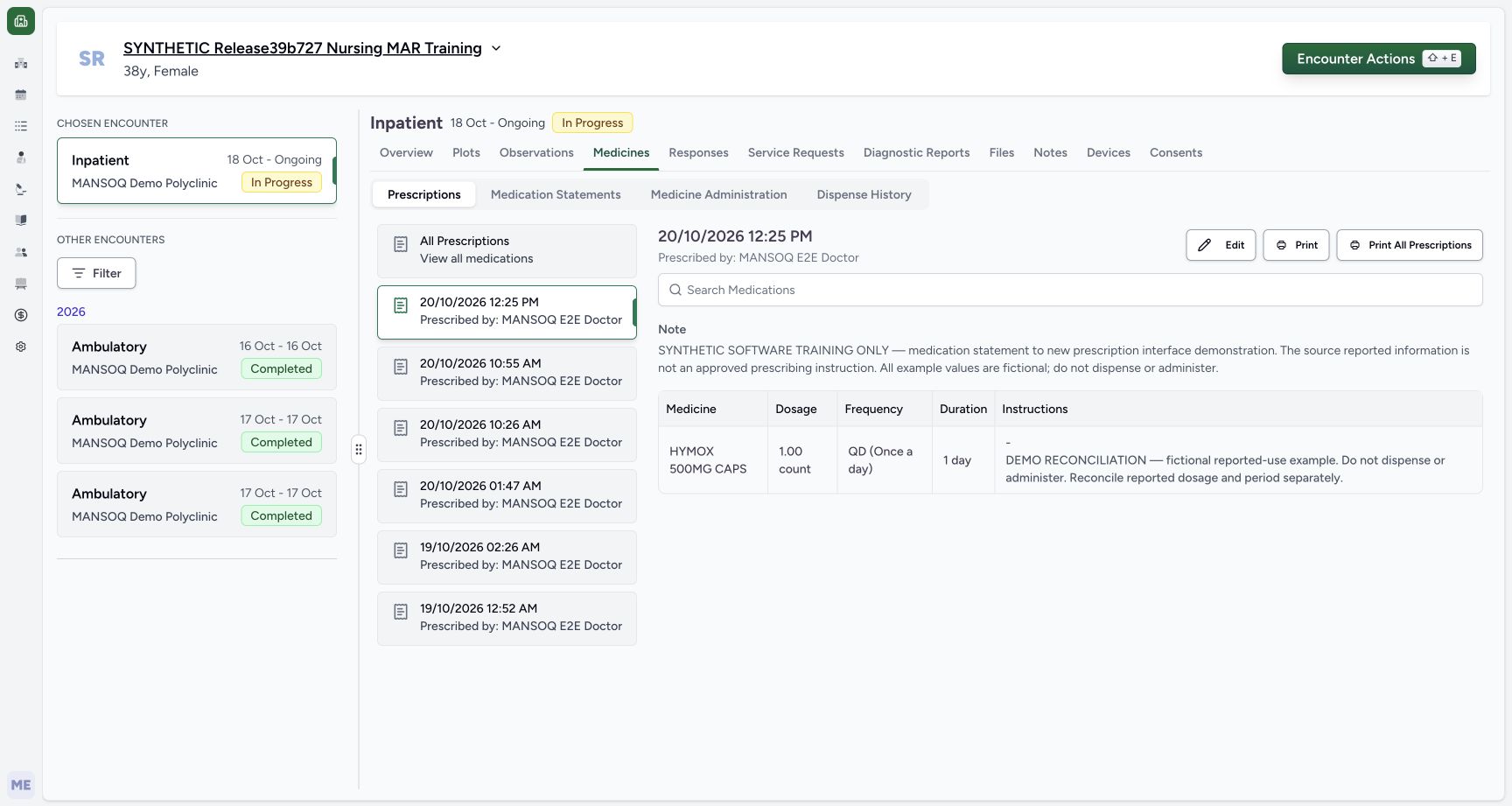 12345
12345Saved new prescription card
Capture details
Observed 3dfb software on 20 October 2026. One new Doctor prescription copied from a reported medication statement; all prescribing values are fictional software examples. Original pixels and capture times preserved.
Image SHA-256 8c9056874cbac6dbb67cc974e0a165084b9bb1737a51fc032405170ded8fb2c6
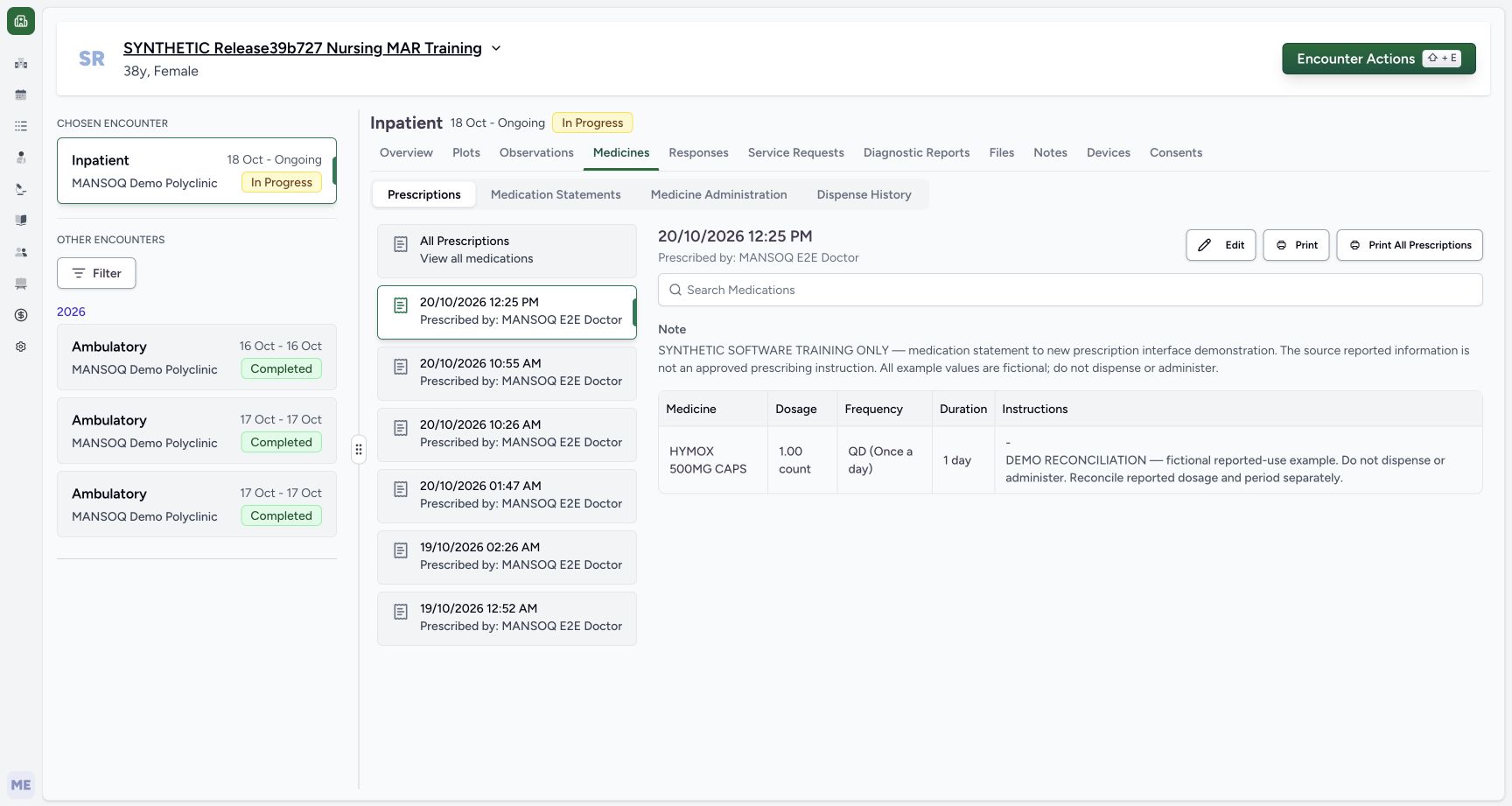
- Select the new 20/10/2026 12:25 PM card: This is the newly created prescription, separate from the older 10:55 AM source prescription.
- Read the Doctor prescriber: The saved card identifies MANSOQ E2E Doctor.
- Read the complete shared prescription Note: The software-only shared Note is above the medicine table.
- Read count, QD and one day: The saved structured instruction is 1.00 count, QD (Once a day), 1 day.
- Read the complete row note: The Instructions cell retains the DEMO RECONCILIATION note copied from the statement.
19 of 19 content blocks have reviewed image alignment.
Before you begin
- Use an authorised Doctor account, the assigned fictional patient and the intended ongoing encounter. This example uses the synthetic Inpatient encounter shown.
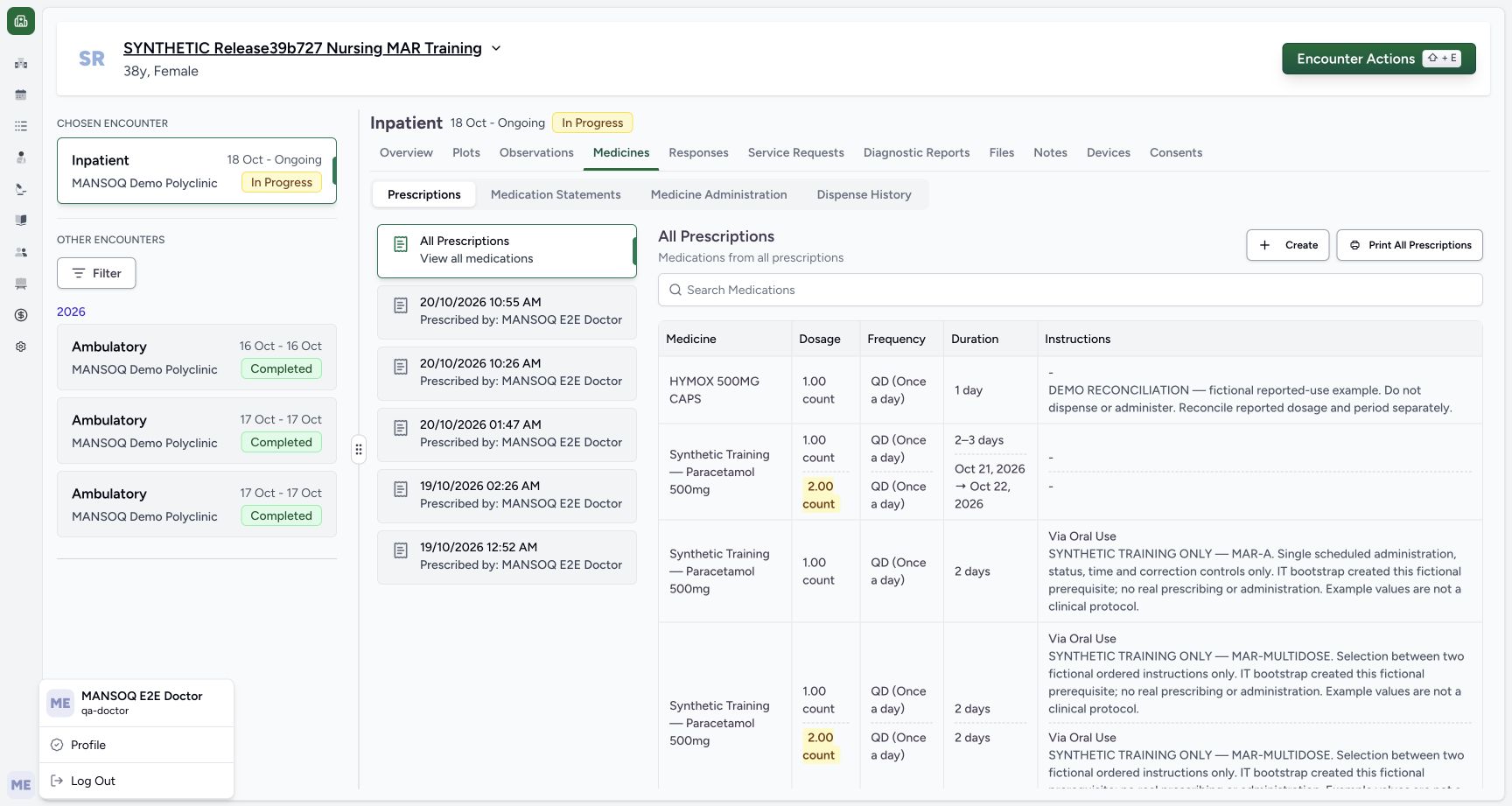 1234
1234Recorded release 3dfb7c9f · 2026-10-20T09:18:45.831Z · 1728 × 921 Doctor identity
Capture details
Observed 3dfb software on 20 October 2026. One new Doctor prescription copied from a reported medication statement; all prescribing values are fictional software examples. Original pixels and capture times preserved.
Image SHA-256
d414ce48df010e64341de3c2e46ae41e468799d9c4caa69b1dca08330adf4be8- Check the Doctor account: The open account menu identifies MANSOQ E2E Doctor and qa-doctor.
- Check the fictional patient: Use the assigned synthetic patient, not a real patient record.
- Check the selected In Progress encounter: The selected Inpatient encounter remains ongoing.
- Open Medicines: The prescribing and reported-statement tabs are separate within Medicines.
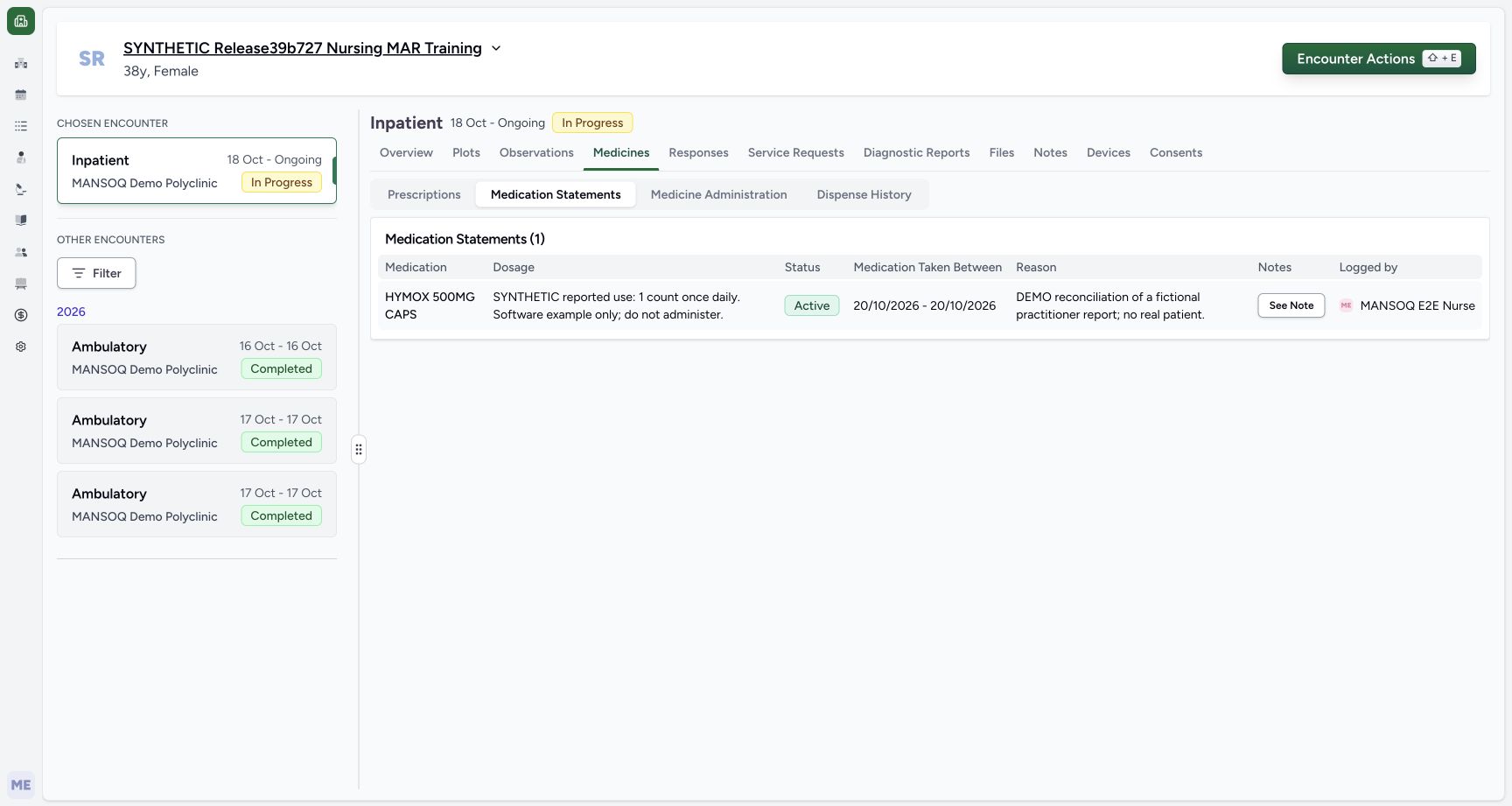 12345
12345Recorded release 3dfb7c9f · 2026-10-20T09:19:33.217Z · 1728 × 921 Source statement table
Capture details
Observed 3dfb software on 20 October 2026. One new Doctor prescription copied from a reported medication statement; all prescribing values are fictional software examples. Original pixels and capture times preserved.
Image SHA-256
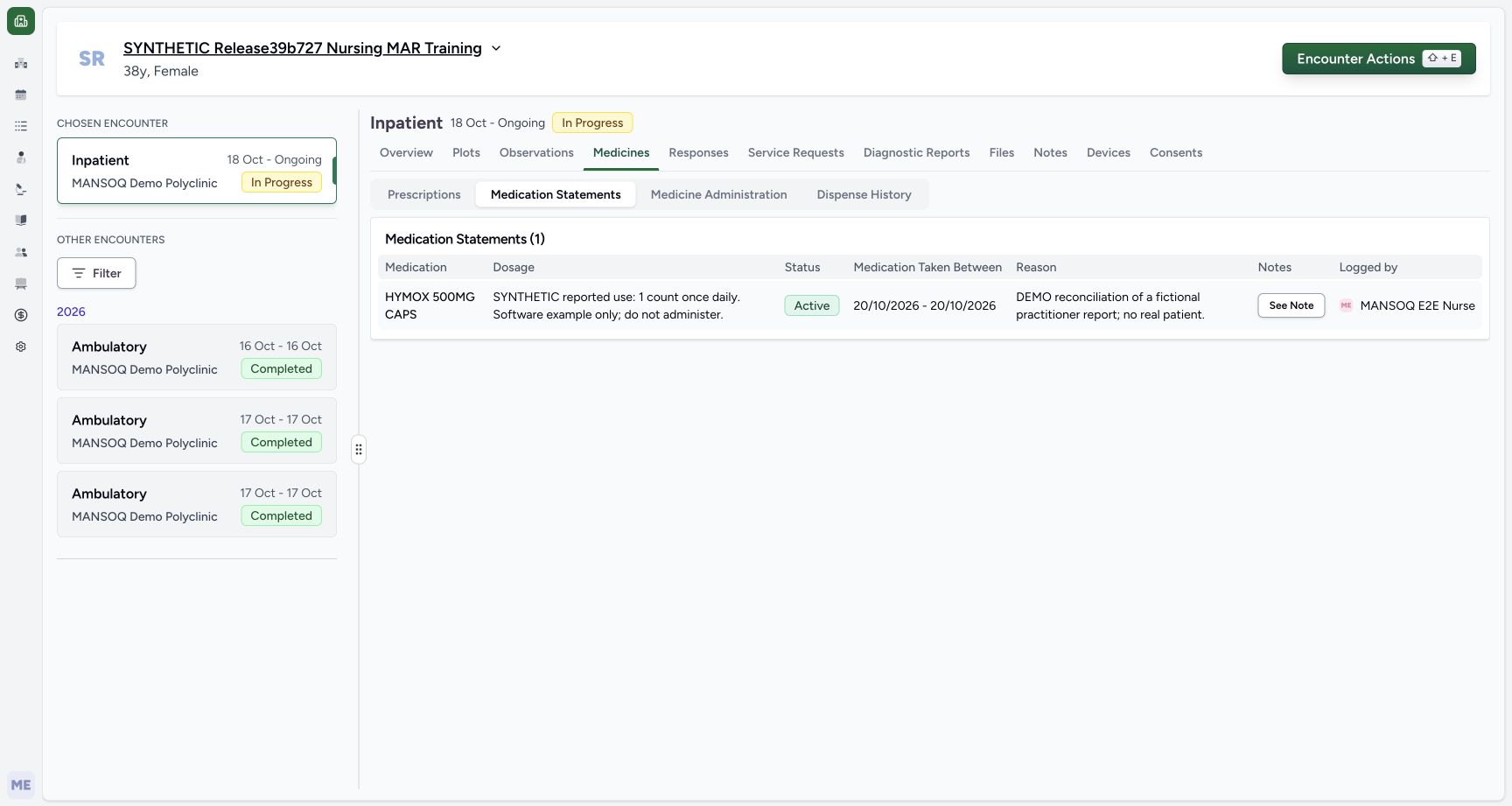
d34d76501a793fe1083c410880972e192d523057fbada38c816e48bd83360892- Select Medication Statements: Read the saved reported statement separately from Prescriptions.
- Read the reported dosage text: This free text is reported information, not a new prescription dosage.
- Read the reported period: Both local dates are 20/10/2026.
- Read Logged by MANSOQ E2E Nurse: The Nurse is the saved statement author.
- Open See Note: Inspect the source statement note before copying.
- The illustrated Nurse-reported HYMOX statement already exists with its fictional dosage text, local 20 October period and reconciliation note. Copying reported information does not establish a prescribing decision or verify medication taking.12345
Recorded release 3dfb7c9f · 2026-10-20T09:19:33.217Z · 1728 × 921 Source statement table
Capture details
Observed 3dfb software on 20 October 2026. One new Doctor prescription copied from a reported medication statement; all prescribing values are fictional software examples. Original pixels and capture times preserved.
Image SHA-256
d34d76501a793fe1083c410880972e192d523057fbada38c816e48bd83360892- Select Medication Statements: Read the saved reported statement separately from Prescriptions.
- Read the reported dosage text: This free text is reported information, not a new prescription dosage.
- Read the reported period: Both local dates are 20/10/2026.
- Read Logged by MANSOQ E2E Nurse: The Nurse is the saved statement author.
- Open See Note: Inspect the source statement note before copying.
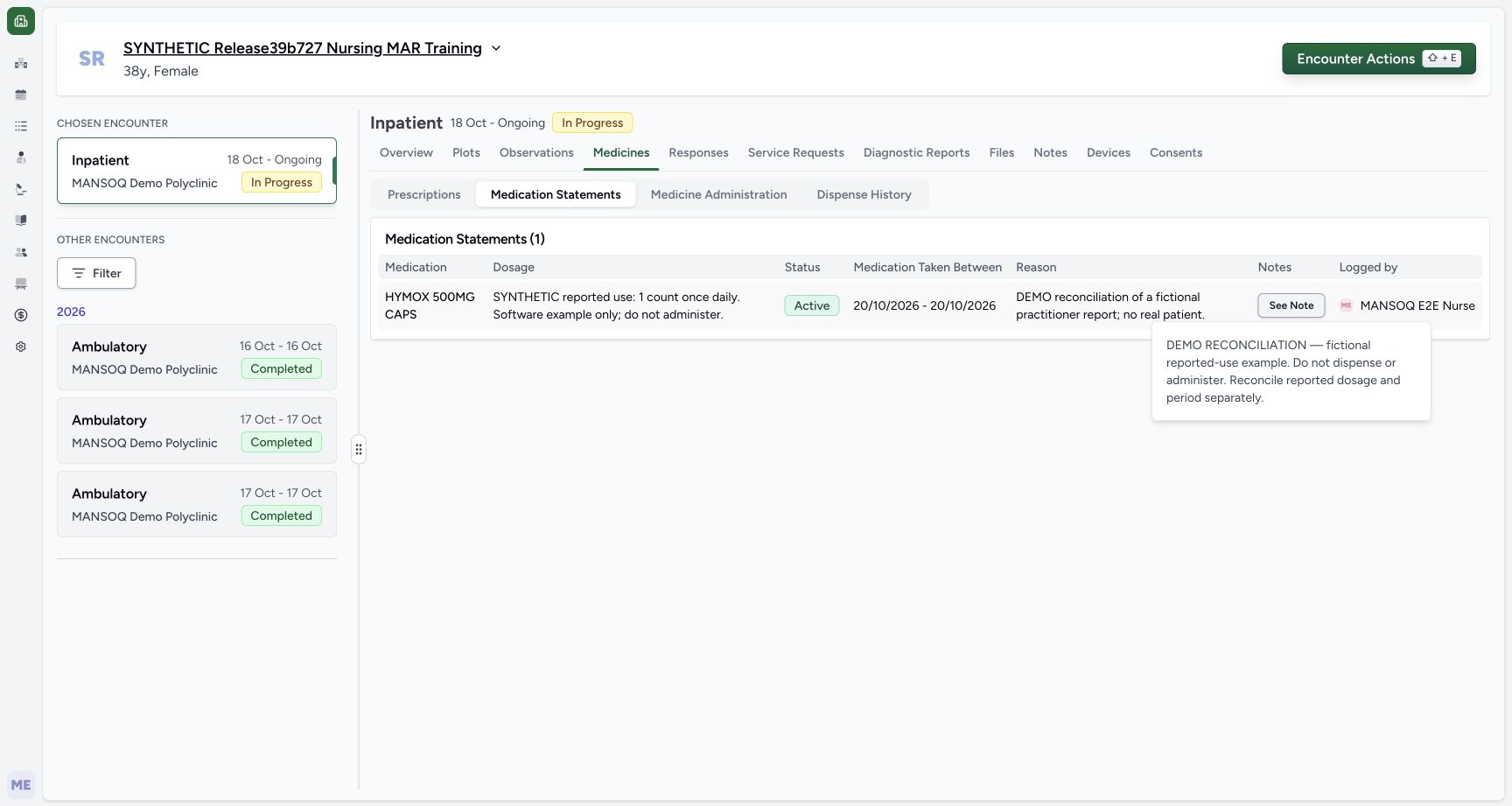 12
12Recorded release 3dfb7c9f · 2026-10-20T09:19:42.223Z · 1728 × 921 Source statement note
Capture details
Observed 3dfb software on 20 October 2026. One new Doctor prescription copied from a reported medication statement; all prescribing values are fictional software examples. Original pixels and capture times preserved.
Image SHA-256
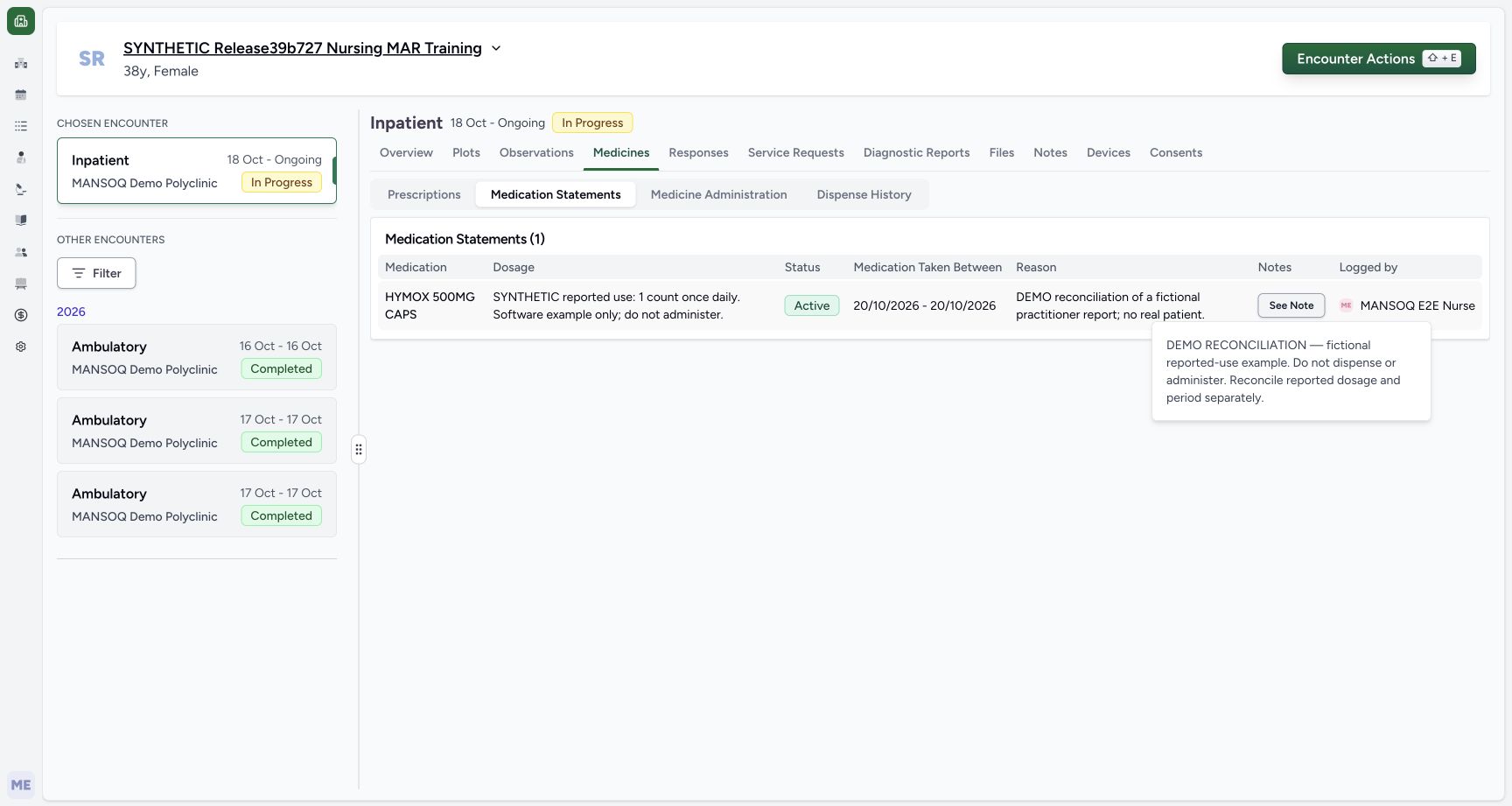
9a89f21dfd4312afb3489e77819627472e408d80bd27126f167cf303e6a67f85- Locate the source See Note control: This popover belongs to the reported statement.
- Read the complete source note: The DEMO RECONCILIATION note is the text carried into the new medication row.
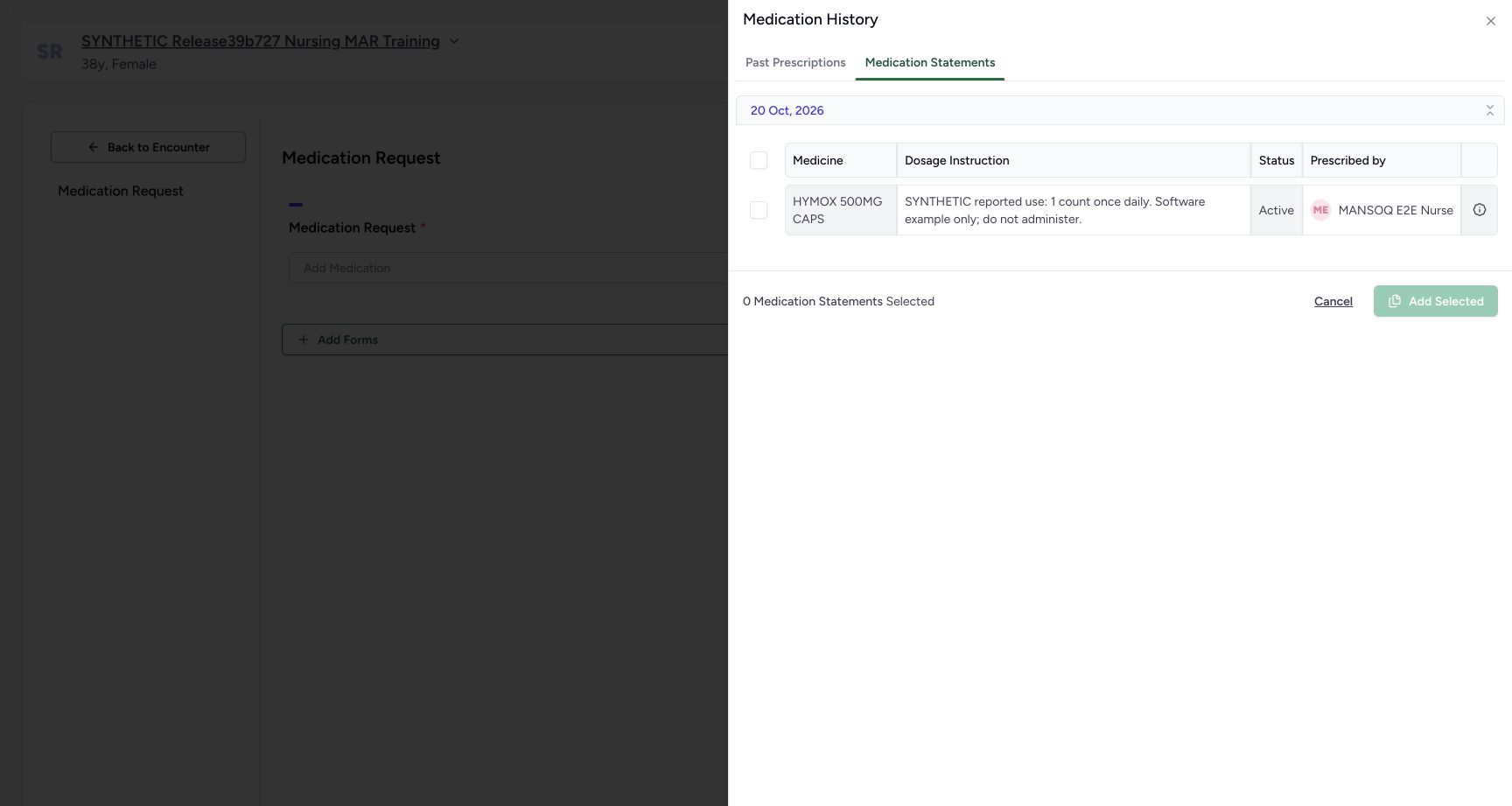 1234567
Recorded release 3dfb7c9f · 2026-10-20T09:20:37.061Z · 1728 × 921 Statement history zero selection
Capture details
Observed 3dfb software on 20 October 2026. One new Doctor prescription copied from a reported medication statement; all prescribing values are fictional software examples. Original pixels and capture times preserved.
Image SHA-256
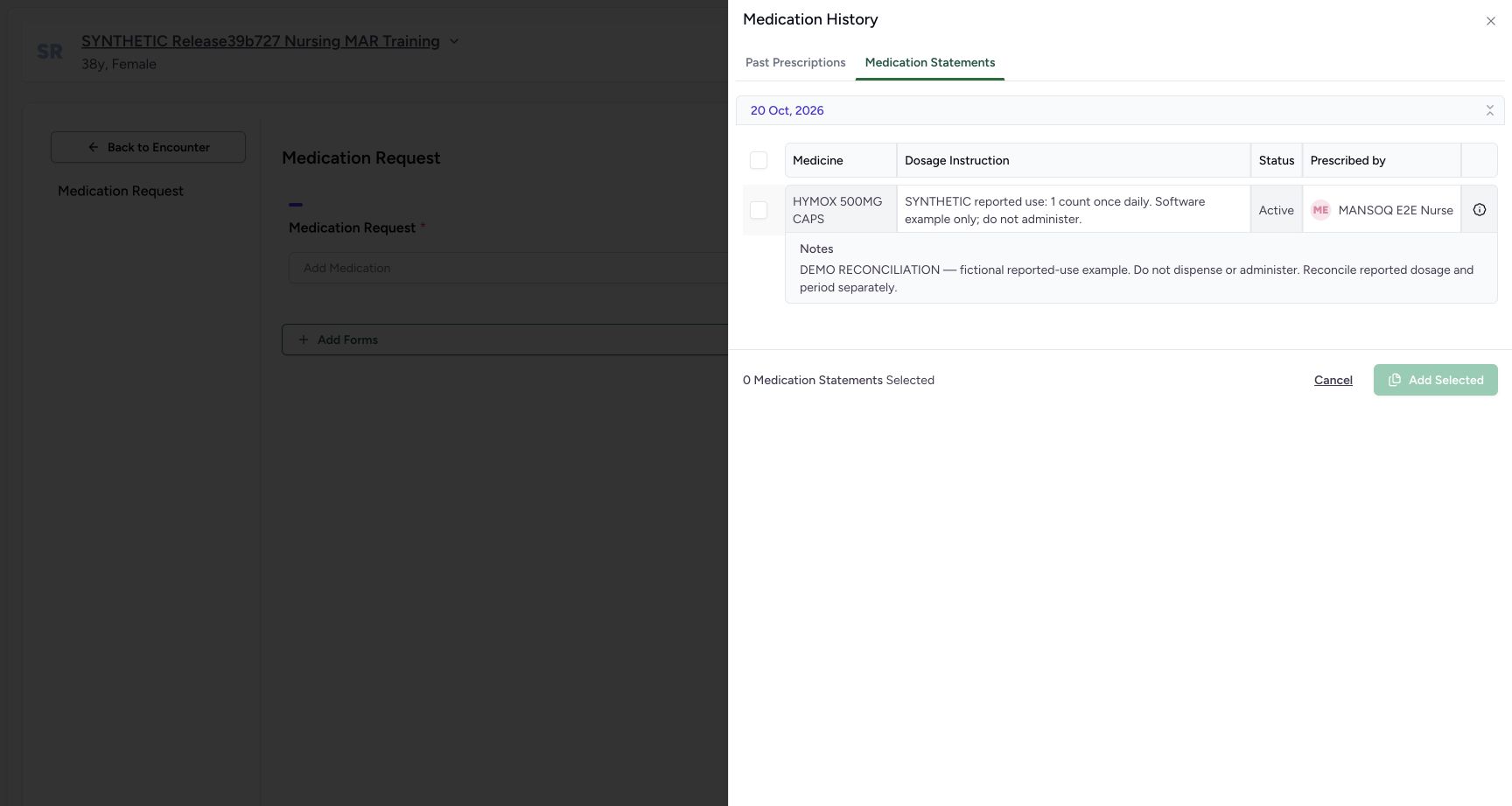
6e970863864eae93db4da31a53b2ad2cc4b21f661be6d60d8479bf6c90111870- Select Medication Statements in history: Use this history tab rather than Past Prescriptions.
- Read the 20 Oct, 2026 group: The statement is grouped by its creation day.
- Identify HYMOX 500MG CAPS: Match the medicine to the reported statement you inspected.
- Read the source reported text: It describes the earlier software exercise, not a new prescribing instruction.
- Read the Nurse author under Prescribed by: In this Medication Statements tab the heading is Prescribed by, but the name shown is the statement creator, MANSOQ E2E Nurse.
- Open the source row information: Expand the information icon to read its note.
- Check zero selected: Before selection, the counter reads 0 Medication Statements Selected and Add Selected is disabled.
- All entered dose, frequency, duration and notes are fictional software-training values. Do not dispense or administer them. Create a new request; do not edit the earlier source prescription or reported statement.
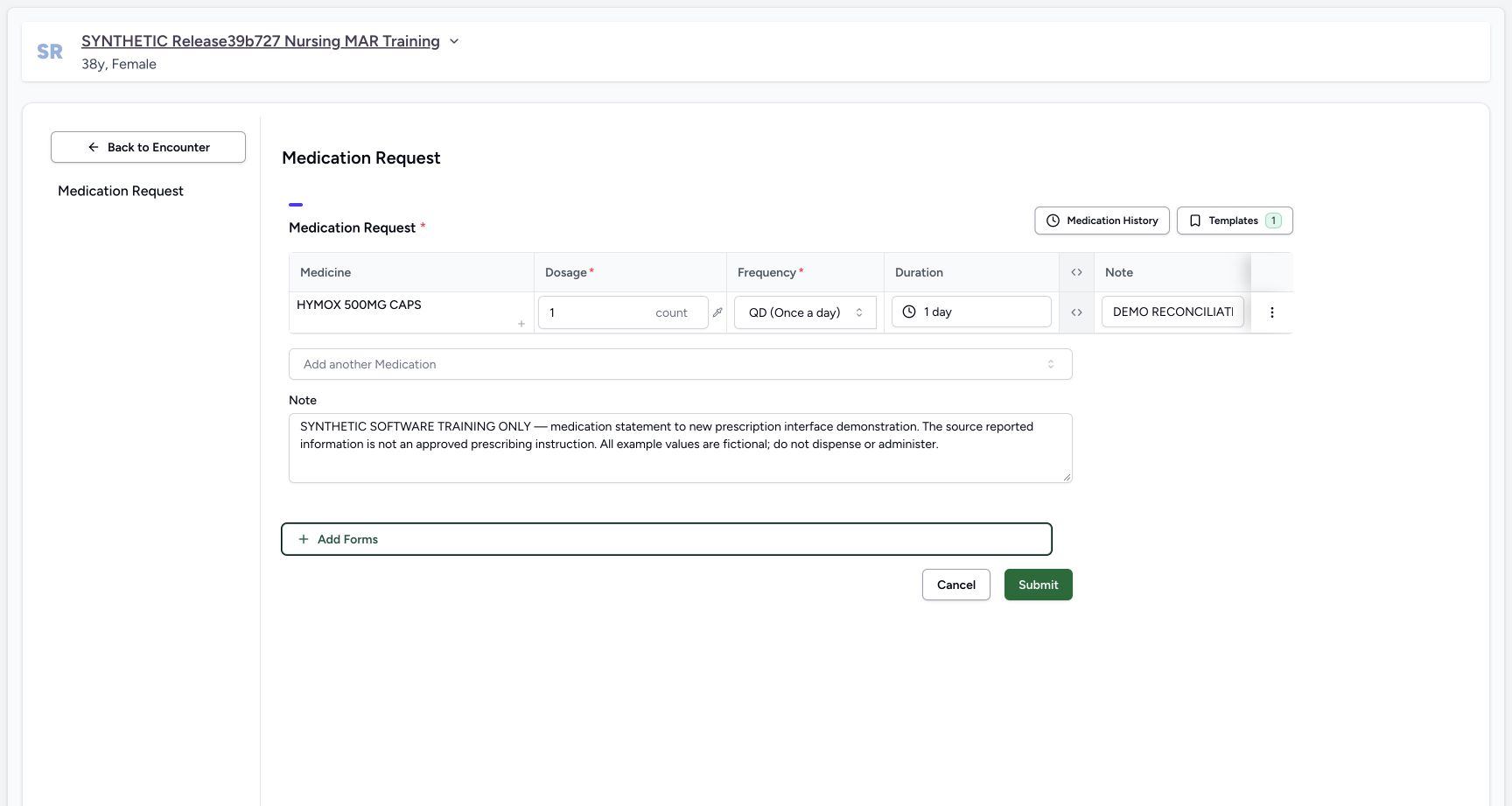 123
123Recorded release 3dfb7c9f · 2026-10-20T09:25:37.514Z · 1728 × 921 Review before single submit
Capture details
Observed 3dfb software on 20 October 2026. One new Doctor prescription copied from a reported medication statement; all prescribing values are fictional software examples. Original pixels and capture times preserved.
Image SHA-256
94fc3aa23ad734c8afb9e72081d26f0eba6ac79682b91806d187bde4dba68277- Keep the copied row Note: The row note still contains the source reconciliation text.
- Enter the separate shared prescription Note: The complete software-only text below the table has a different scope from the row note.
- Choose Submit once after reviewing the new request: This saves the new Doctor prescription, not the Nurse source statement.
12345Recorded release 3dfb7c9f · 2026-10-20T09:26:04.083Z · 1728 × 921 Saved new prescription card
Capture details
Observed 3dfb software on 20 October 2026. One new Doctor prescription copied from a reported medication statement; all prescribing values are fictional software examples. Original pixels and capture times preserved.
Image SHA-256
8c9056874cbac6dbb67cc974e0a165084b9bb1737a51fc032405170ded8fb2c6- Select the new 20/10/2026 12:25 PM card: This is the newly created prescription, separate from the older 10:55 AM source prescription.
- Read the Doctor prescriber: The saved card identifies MANSOQ E2E Doctor.
- Read the complete shared prescription Note: The software-only shared Note is above the medicine table.
- Read count, QD and one day: The saved structured instruction is 1.00 count, QD (Once a day), 1 day.
- Read the complete row note: The Instructions cell retains the DEMO RECONCILIATION note copied from the statement.
1. Inspect the reported source and its note
In the selected encounter open Medicines, then Medication Statements. Read the HYMOX 500MG CAPS row, its complete reported Dosage text, Active software status, local 20/10/2026 – 20/10/2026 period, Reason and Logged by MANSOQ E2E Nurse. Select See Note and read the full DEMO RECONCILIATION text. Close the popover before continuing.
1234Doctor identity
Capture details
Observed 3dfb software on 20 October 2026. One new Doctor prescription copied from a reported medication statement; all prescribing values are fictional software examples. Original pixels and capture times preserved.
Image SHA-256 d414ce48df010e64341de3c2e46ae41e468799d9c4caa69b1dca08330adf4be8
- Check the Doctor account: The open account menu identifies MANSOQ E2E Doctor and qa-doctor.
- Check the fictional patient: Use the assigned synthetic patient, not a real patient record.
- Check the selected In Progress encounter: The selected Inpatient encounter remains ongoing.
- Open Medicines: The prescribing and reported-statement tabs are separate within Medicines.
12345Source statement table
Capture details
Observed 3dfb software on 20 October 2026. One new Doctor prescription copied from a reported medication statement; all prescribing values are fictional software examples. Original pixels and capture times preserved.
Image SHA-256 d34d76501a793fe1083c410880972e192d523057fbada38c816e48bd83360892
- Select Medication Statements: Read the saved reported statement separately from Prescriptions.
- Read the reported dosage text: This free text is reported information, not a new prescription dosage.
- Read the reported period: Both local dates are 20/10/2026.
- Read Logged by MANSOQ E2E Nurse: The Nurse is the saved statement author.
- Open See Note: Inspect the source statement note before copying.
12Source statement note
Capture details
Observed 3dfb software on 20 October 2026. One new Doctor prescription copied from a reported medication statement; all prescribing values are fictional software examples. Original pixels and capture times preserved.
Image SHA-256 9a89f21dfd4312afb3489e77819627472e408d80bd27126f167cf303e6a67f85
- Locate the source See Note control: This popover belongs to the reported statement.
- Read the complete source note: The DEMO RECONCILIATION note is the text carried into the new medication row.
2. Create a new request and open history
Select Prescriptions, then Create. Use the fresh empty Medication Request rather than an earlier prescription card’s Edit control. Select Medication History, then the Medication Statements tab in the drawer.
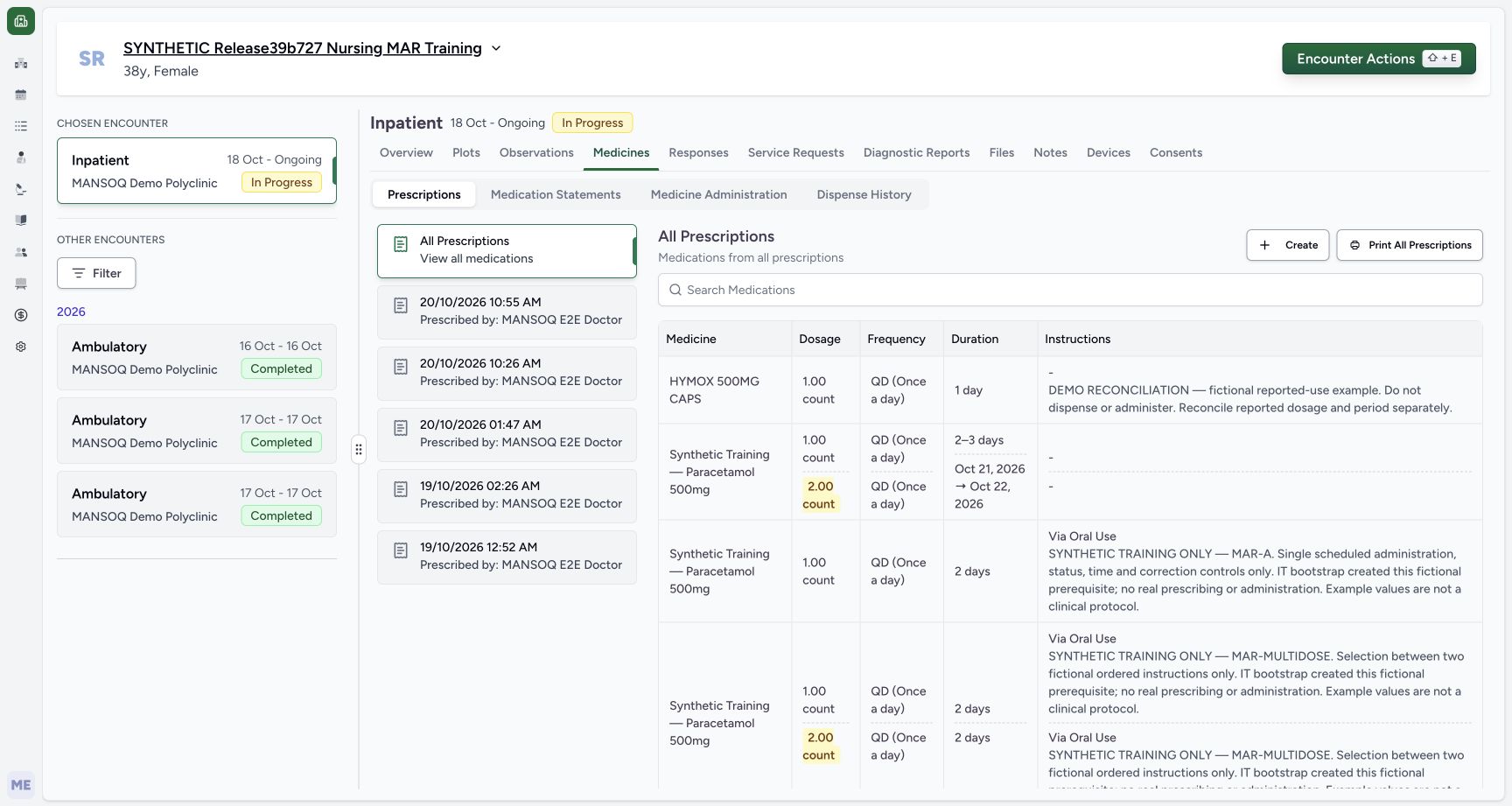 12
12New request entry
Capture details
Observed 3dfb software on 20 October 2026. One new Doctor prescription copied from a reported medication statement; all prescribing values are fictional software examples. Original pixels and capture times preserved.
Image SHA-256 03df32e5f50fa03ab1ea1a27d0fcc15d5f69e192c620393d7486dc0e0a2b0c8a
- Select Prescriptions: Return to the prescribing tab, without editing the earlier prescription cards.
- Choose Create: Open a fresh Medication Request instead of an existing card’s Edit control.
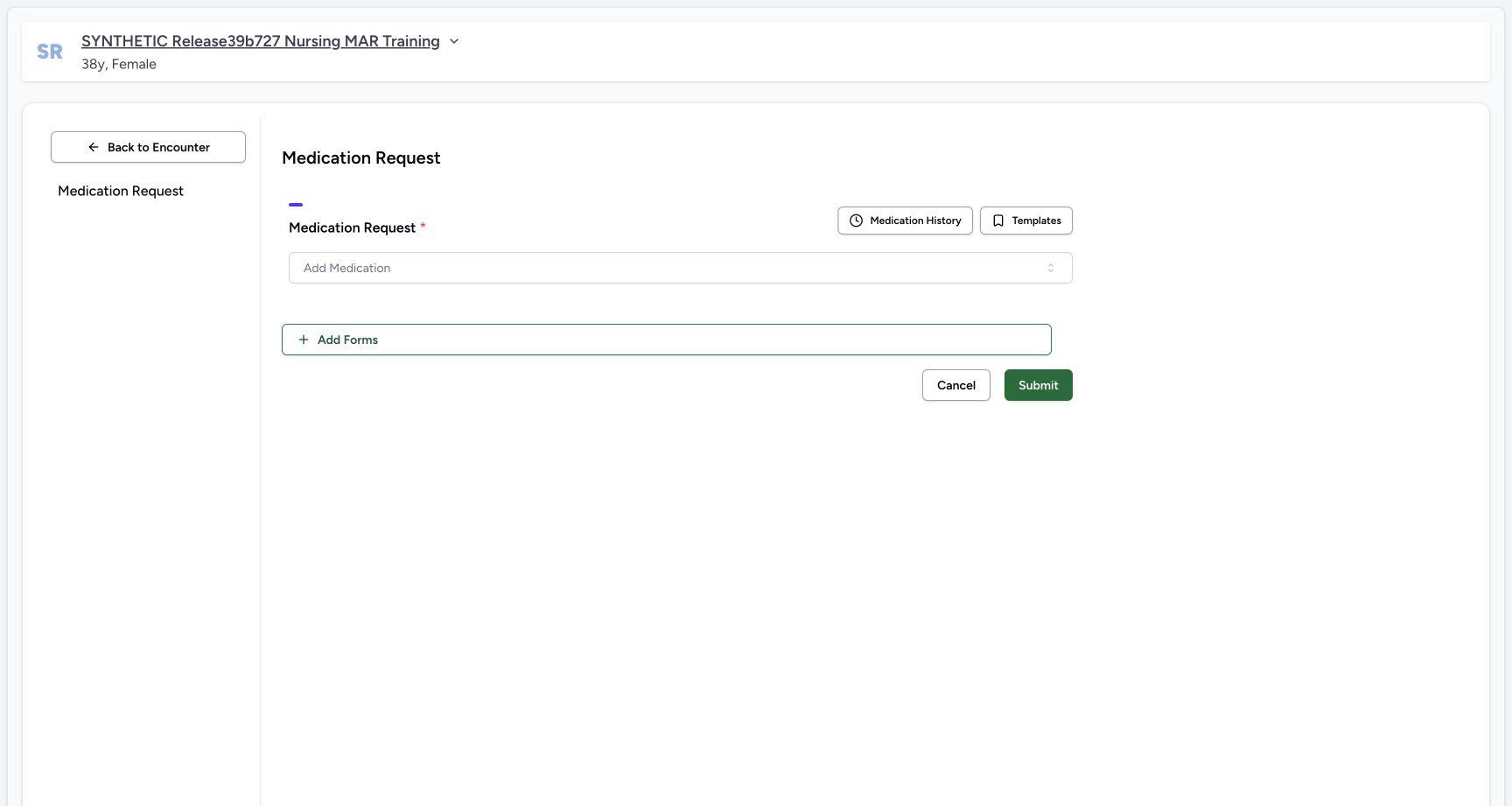 12
12Empty new request
Capture details
Observed 3dfb software on 20 October 2026. One new Doctor prescription copied from a reported medication statement; all prescribing values are fictional software examples. Original pixels and capture times preserved.
Image SHA-256 23c2b1feea5944c2a6b87cc37691cb09e3ebe4044657137e648116cf7ac8d8ac
- Open Medication History: The new request is empty; use history to choose a source statement.
- Check the new request is empty: No medicine row has been added yet.
1234567Statement history zero selection
Capture details
Observed 3dfb software on 20 October 2026. One new Doctor prescription copied from a reported medication statement; all prescribing values are fictional software examples. Original pixels and capture times preserved.
Image SHA-256 6e970863864eae93db4da31a53b2ad2cc4b21f661be6d60d8479bf6c90111870
- Select Medication Statements in history: Use this history tab rather than Past Prescriptions.
- Read the 20 Oct, 2026 group: The statement is grouped by its creation day.
- Identify HYMOX 500MG CAPS: Match the medicine to the reported statement you inspected.
- Read the source reported text: It describes the earlier software exercise, not a new prescribing instruction.
- Read the Nurse author under Prescribed by: In this Medication Statements tab the heading is Prescribed by, but the name shown is the statement creator, MANSOQ E2E Nurse.
- Open the source row information: Expand the information icon to read its note.
- Check zero selected: Before selection, the counter reads 0 Medication Statements Selected and Add Selected is disabled.
3. Read the statement before selecting it
In the 20 Oct, 2026 group identify the illustrated HYMOX statement and read its reported text and Active status. The column is labelled Prescribed by, but in this Medication Statements tab it shows the statement creator, MANSOQ E2E Nurse. Do not interpret that label as a Nurse prescription. Open the information icon to read the complete note. Before selection the counter is 0 and Add Selected is disabled.
1234567Statement history zero selection
Capture details
Observed 3dfb software on 20 October 2026. One new Doctor prescription copied from a reported medication statement; all prescribing values are fictional software examples. Original pixels and capture times preserved.
Image SHA-256 6e970863864eae93db4da31a53b2ad2cc4b21f661be6d60d8479bf6c90111870
- Select Medication Statements in history: Use this history tab rather than Past Prescriptions.
- Read the 20 Oct, 2026 group: The statement is grouped by its creation day.
- Identify HYMOX 500MG CAPS: Match the medicine to the reported statement you inspected.
- Read the source reported text: It describes the earlier software exercise, not a new prescribing instruction.
- Read the Nurse author under Prescribed by: In this Medication Statements tab the heading is Prescribed by, but the name shown is the statement creator, MANSOQ E2E Nurse.
- Open the source row information: Expand the information icon to read its note.
- Check zero selected: Before selection, the counter reads 0 Medication Statements Selected and Add Selected is disabled.
 12
12Statement history source note
Capture details
Observed 3dfb software on 20 October 2026. One new Doctor prescription copied from a reported medication statement; all prescribing values are fictional software examples. Original pixels and capture times preserved.
Image SHA-256 3d323094430250f0c7610c3f2fd3a782732771c25751c1c4b4164c33aa642669
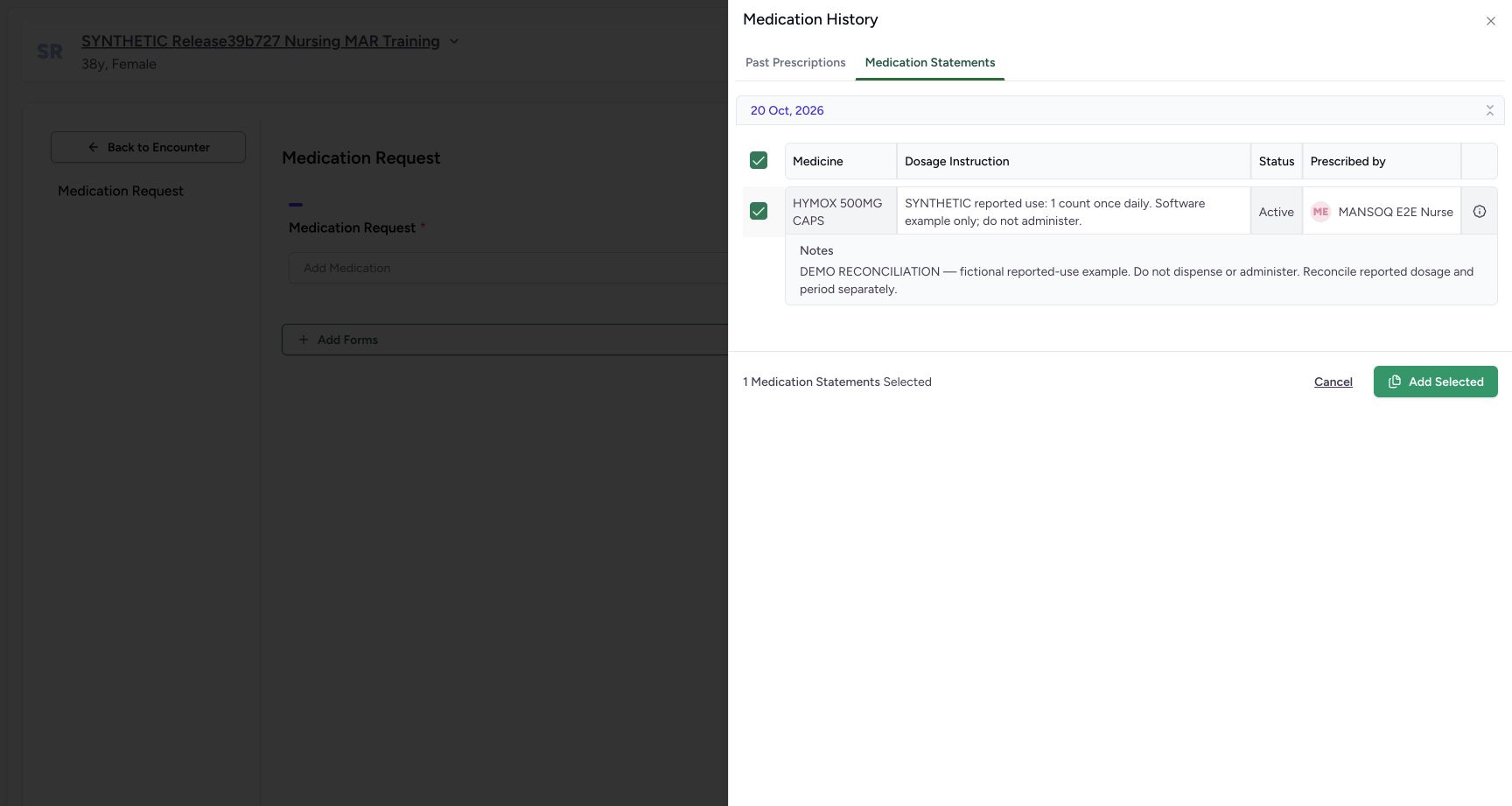
- Read the full source note in history: This is the same DEMO RECONCILIATION note shown in the statement table.
- Select only the illustrated statement row: Use its individual row checkbox; this example has one source row.
4. Select one statement and add a draft row
Select only the illustrated row checkbox and check 1 Medication Statements Selected. Because this example has one row, the group checkbox also appears selected. Choose Add Selected once. This adds an unsaved medicine request row; it does not save a prescription or change the original statement.
12Statement history source note
Capture details
Observed 3dfb software on 20 October 2026. One new Doctor prescription copied from a reported medication statement; all prescribing values are fictional software examples. Original pixels and capture times preserved.
Image SHA-256 3d323094430250f0c7610c3f2fd3a782732771c25751c1c4b4164c33aa642669
- Read the full source note in history: This is the same DEMO RECONCILIATION note shown in the statement table.
- Select only the illustrated statement row: Use its individual row checkbox; this example has one source row.
 123
123One statement selected
Capture details
Observed 3dfb software on 20 October 2026. One new Doctor prescription copied from a reported medication statement; all prescribing values are fictional software examples. Original pixels and capture times preserved.
Image SHA-256 cb85890545d7b33ce2043c611e78da5251a82b59e7005a8729fe930d08aac4ca
- Check the selected source row: Only the illustrated HYMOX statement is selected.
- Check one selected statement: The counter reads 1 Medication Statements Selected.
- Choose Add Selected once: This creates a new unsaved request row; it does not submit a prescription.
 123456
Fresh imported request draft
Capture details
Observed 3dfb software on 20 October 2026. One new Doctor prescription copied from a reported medication statement; all prescribing values are fictional software examples. Original pixels and capture times preserved.
Image SHA-256 3836b729963565cde8d2f023e98d259ab11f6dee384aa3f1ad4307dff67b5a8a
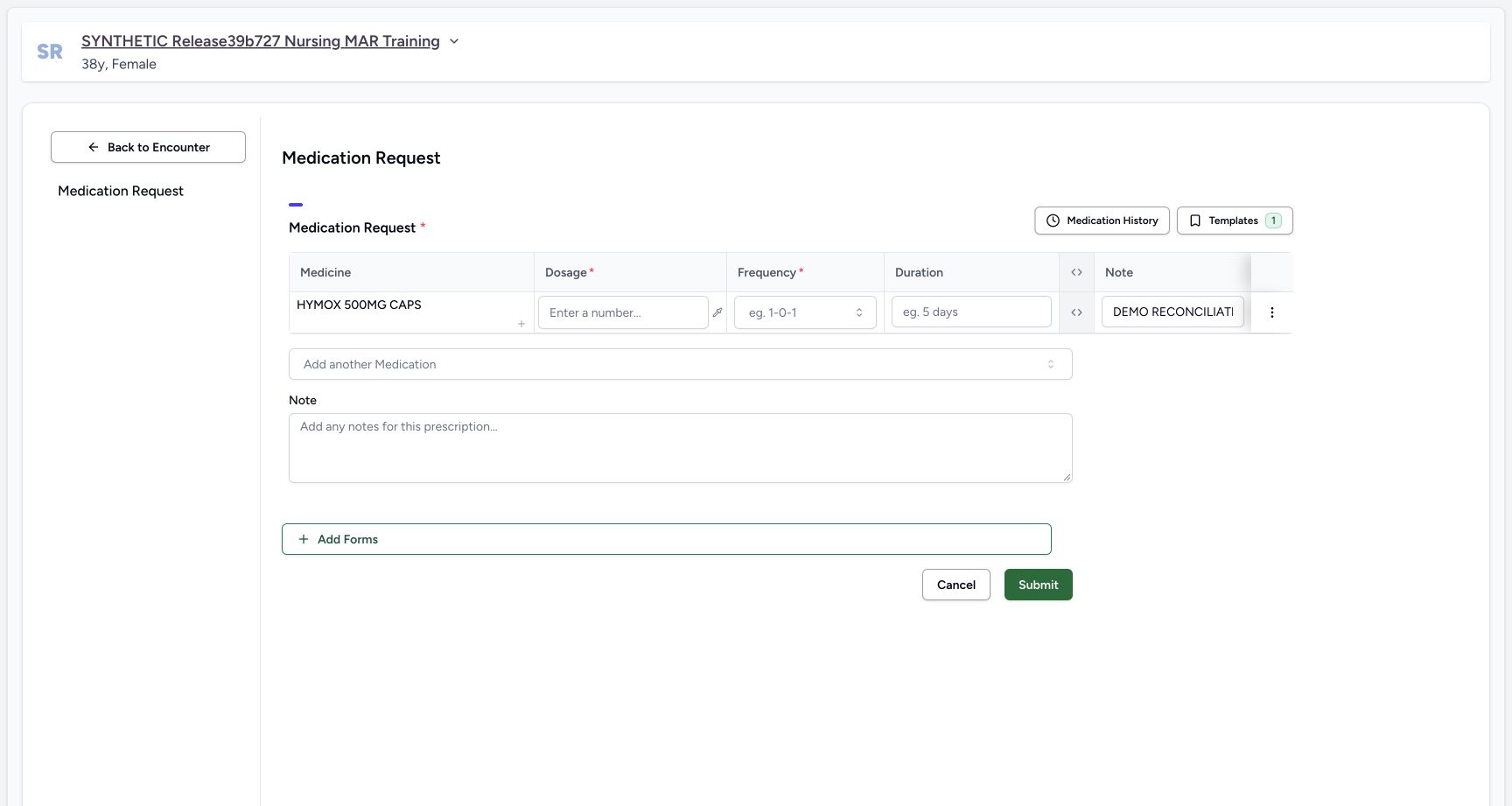
- Inspect the blank Dosage: The statement’s reported dosage text has not filled a prescribing dose.
- Inspect the blank Frequency: A structured frequency still needs to be chosen.
- Inspect the blank Duration: The reported period has not filled a prescribing duration.
- Read the copied row Note: The narrow input shows the beginning of the retained source note; the full saved Instructions cell provides readback.
- Inspect the empty shared Note: This separate prescription-level Note starts blank.
- Expand the advanced columns: Use this header control, then scroll the medication table right to review the new request metadata.
5. Check the fresh prescribing fields
The copied row retains the medicine and its reconciliation Note. Dosage, Frequency and Duration are initially blank; the reported free text and period were not converted into prescribing instructions. The shared Note below the table also starts empty. Review what was copied before entering the separate prescribing fields.
123456Fresh imported request draft
Capture details
Observed 3dfb software on 20 October 2026. One new Doctor prescription copied from a reported medication statement; all prescribing values are fictional software examples. Original pixels and capture times preserved.
Image SHA-256 3836b729963565cde8d2f023e98d259ab11f6dee384aa3f1ad4307dff67b5a8a
- Inspect the blank Dosage: The statement’s reported dosage text has not filled a prescribing dose.
- Inspect the blank Frequency: A structured frequency still needs to be chosen.
- Inspect the blank Duration: The reported period has not filled a prescribing duration.
- Read the copied row Note: The narrow input shows the beginning of the retained source note; the full saved Instructions cell provides readback.
- Inspect the empty shared Note: This separate prescription-level Note starts blank.
- Expand the advanced columns: Use this header control, then scroll the medication table right to review the new request metadata.
6. Check the new requester and authored date
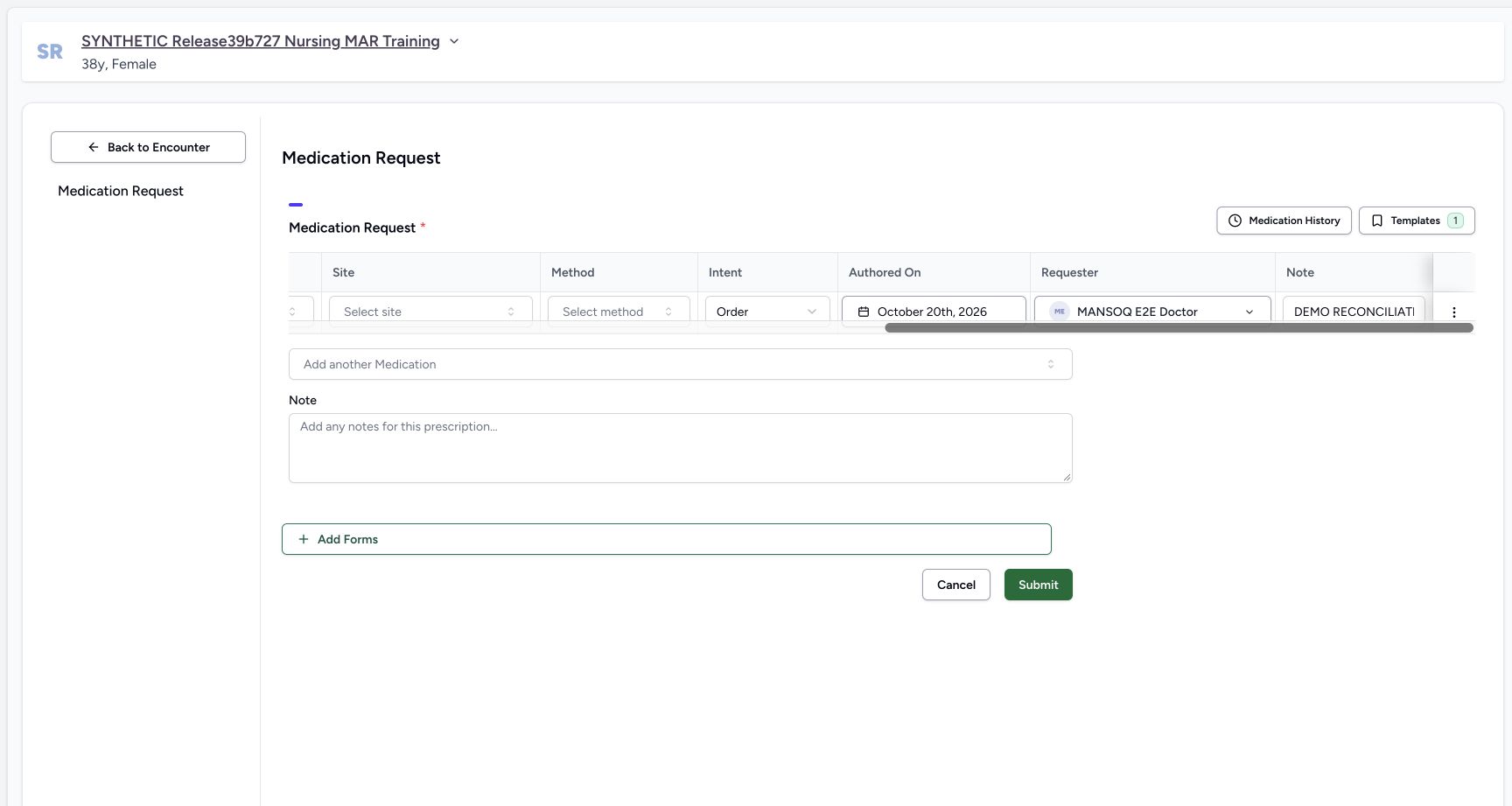
Expand the table’s advanced columns using the header control, then scroll the table horizontally right. Check Order, October 20th, 2026 and requester MANSOQ E2E Doctor. These belong to the new request, separately from the Nurse source statement and its reported-use period. Scroll left and collapse the advanced columns using the same header control illustrated in the earlier draft view.
123456Fresh imported request draft
Capture details
Observed 3dfb software on 20 October 2026. One new Doctor prescription copied from a reported medication statement; all prescribing values are fictional software examples. Original pixels and capture times preserved.
Image SHA-256 3836b729963565cde8d2f023e98d259ab11f6dee384aa3f1ad4307dff67b5a8a
- Inspect the blank Dosage: The statement’s reported dosage text has not filled a prescribing dose.
- Inspect the blank Frequency: A structured frequency still needs to be chosen.
- Inspect the blank Duration: The reported period has not filled a prescribing duration.
- Read the copied row Note: The narrow input shows the beginning of the retained source note; the full saved Instructions cell provides readback.
- Inspect the empty shared Note: This separate prescription-level Note starts blank.
- Expand the advanced columns: Use this header control, then scroll the medication table right to review the new request metadata.
 1234
1234Settled fresh doctor requester date
Capture details
Observed 3dfb software on 20 October 2026. One new Doctor prescription copied from a reported medication statement; all prescribing values are fictional software examples. Original pixels and capture times preserved.
Image SHA-256 1797414baea85124c225f7e819d4be5c5c250d96bc36e01aa7384e3260a6a89b
- Review the new Order intent: This is a new medication request, not a change to the source reported statement.
- Review the new authored date: The fresh draft shows October 20th, 2026, separately from the source reported-use period.
- Review the Doctor requester: MANSOQ E2E Doctor is the new requester, distinct from the Nurse statement author.
- Scroll the table back to the left: Use the horizontal table scrollbar to return to Dosage and Frequency, then collapse the advanced columns with the same header control shown in the earlier draft view.
7. Enter the fictional quantity with an explicit unit
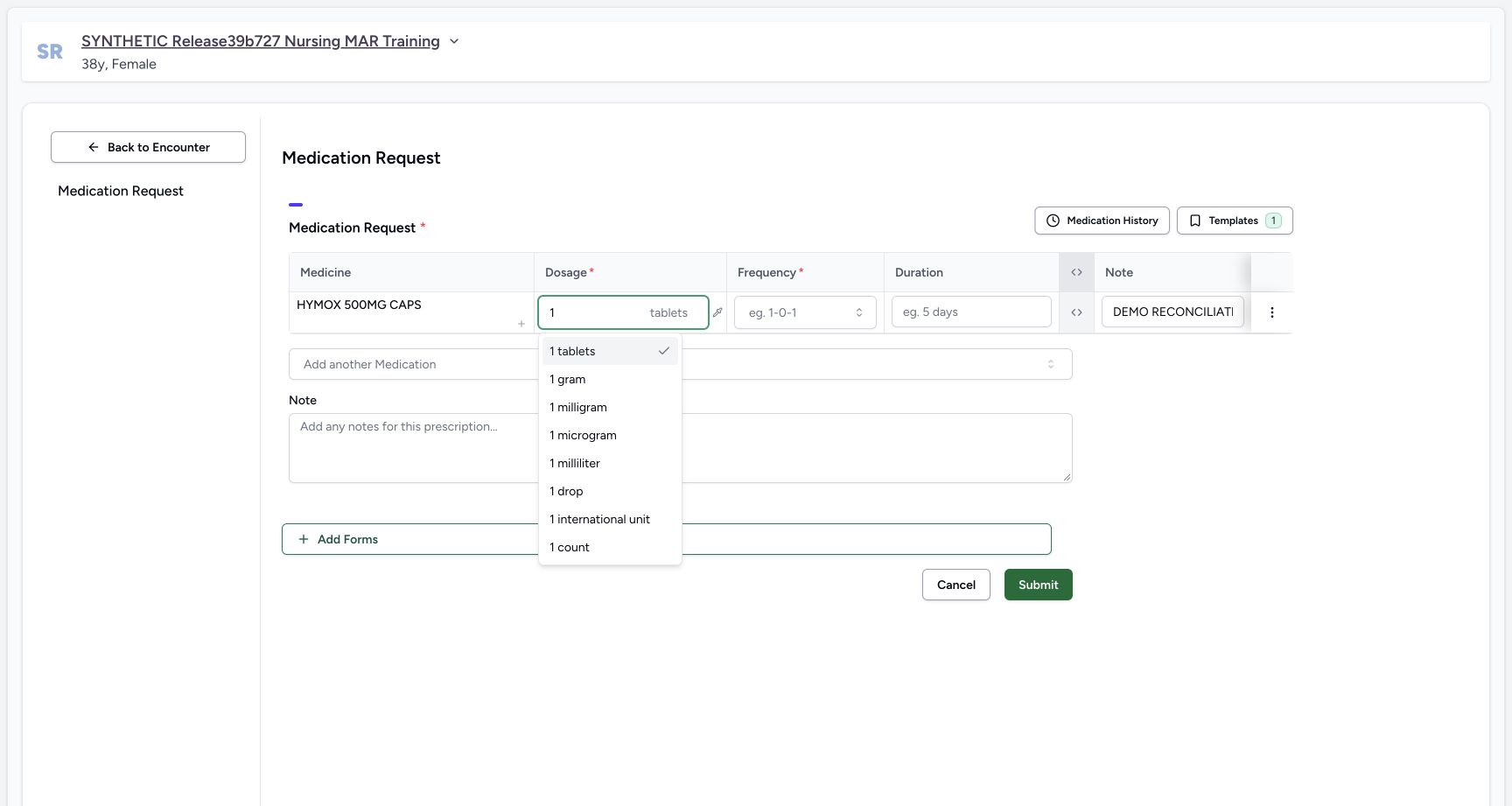
In Dosage enter 1. The selector initially suggests tablets; choose the visible 1 count option explicitly for this software example. Do not infer the unit from the number alone.
 12
12Dose count choice
Capture details
Observed 3dfb software on 20 October 2026. One new Doctor prescription copied from a reported medication statement; all prescribing values are fictional software examples. Original pixels and capture times preserved.
Image SHA-256 baa652ca8b72bd9d1b5e51501ad330e1cc2cc0d6c307ca1c731ca7577d58a7b5
- Enter the fictional quantity 1: Entering the number initially suggests tablets; choose the unit explicitly.
- Choose 1 count: For this software-only exercise select count, not the initial tablets suggestion.
 123
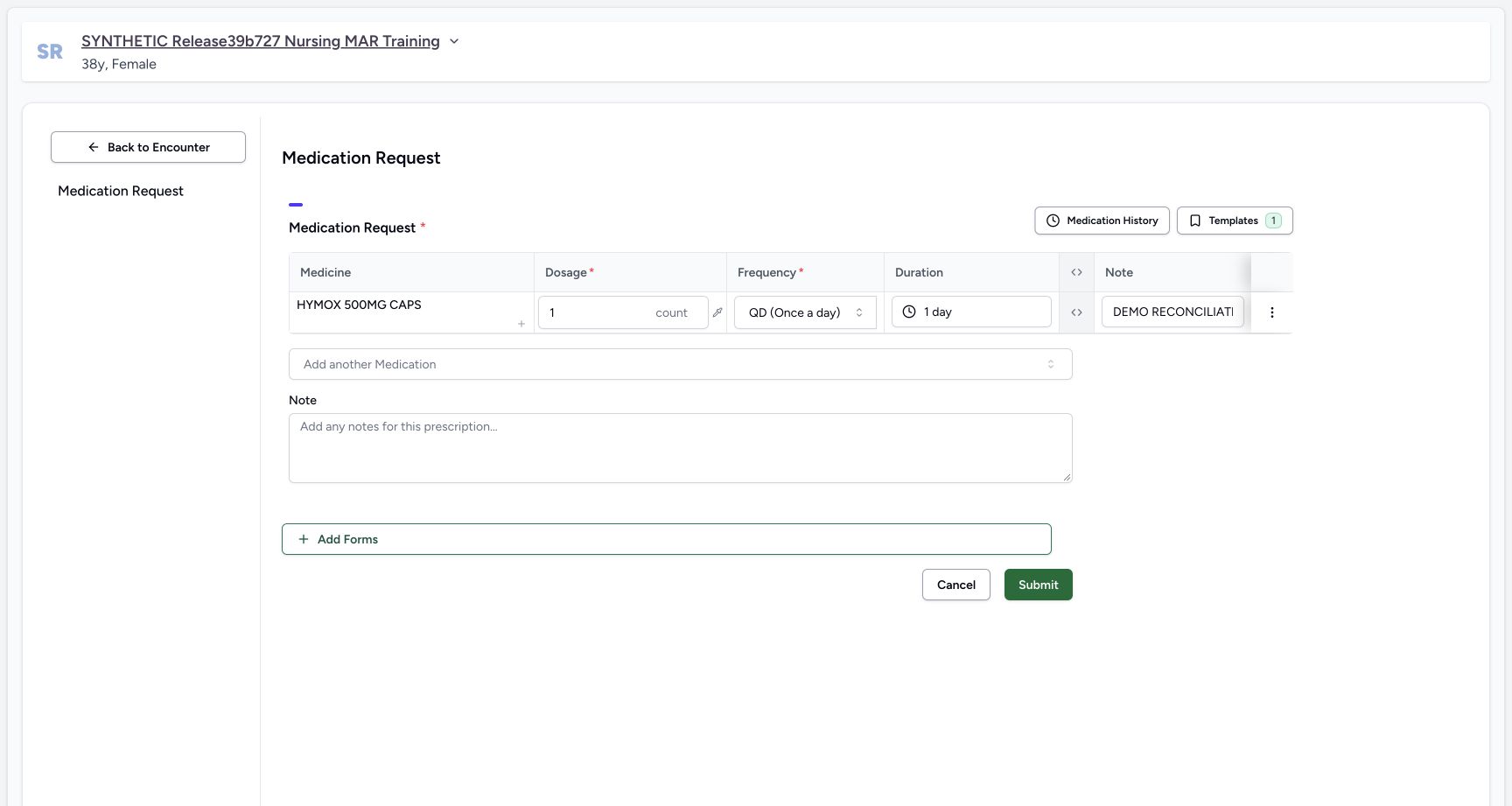
123Selected count qd one day
Capture details
Observed 3dfb software on 20 October 2026. One new Doctor prescription copied from a reported medication statement; all prescribing values are fictional software examples. Original pixels and capture times preserved.
Image SHA-256 73054a6bc5dca837089f5647babd25e5d603d48ff55ee6cedb508a067c8c8544
- Review 1 count: The count unit is now explicit.
- Review QD (Once a day): Frequency was selected independently of the reported statement text.
- Review the preset 1 day: The QD preset supplied this duration; review it as a separate prescribing field.
8. Choose a separate frequency and review duration
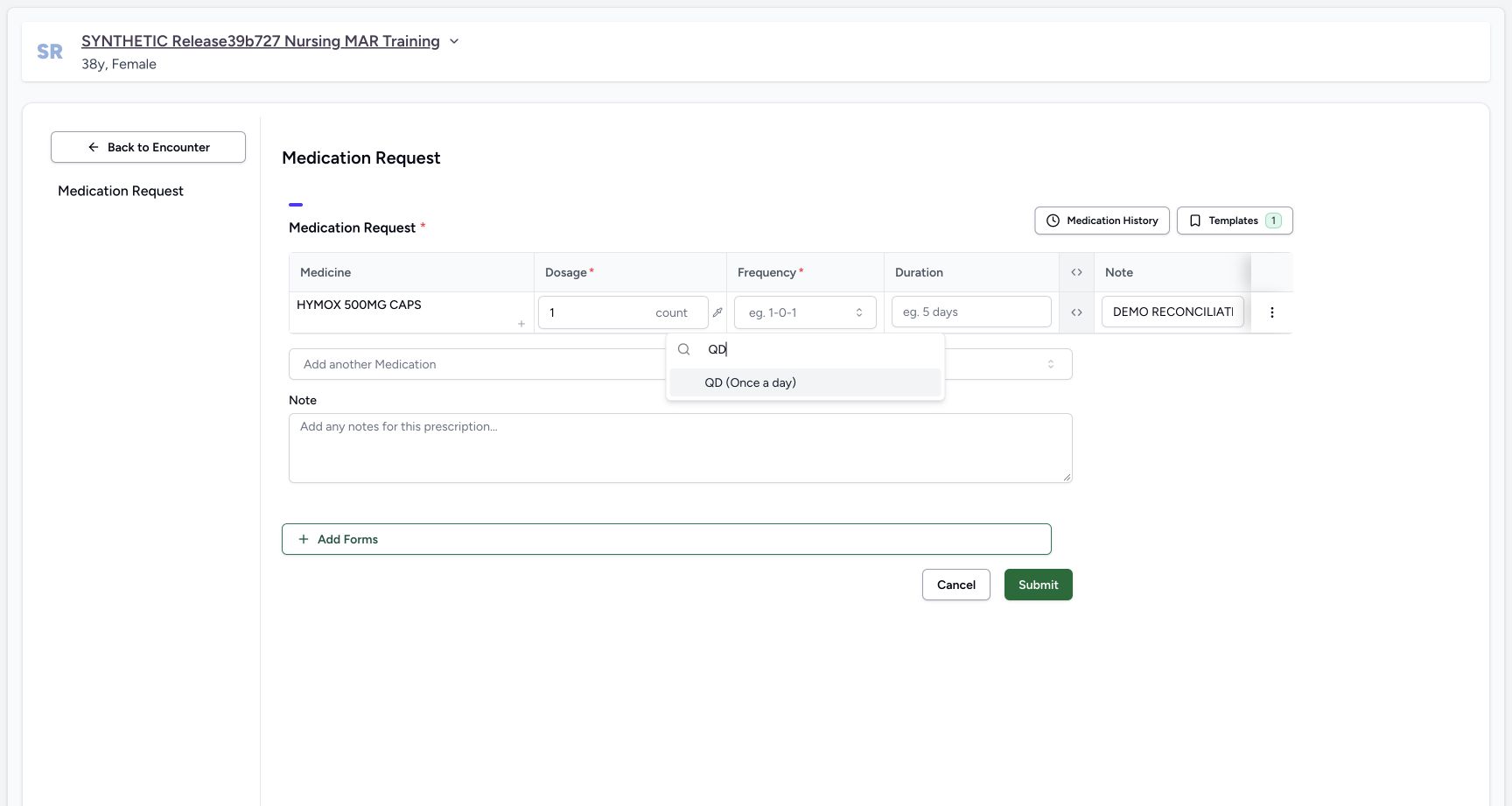
Open Frequency, search QD and choose QD (Once a day). Review the selected 1 count, QD and preset 1 day duration in the current row. The frequency preset supplies this initial duration; it was not imported from the reported statement’s dates. These values are fictional interface examples.
 123
123Frequency search qd
Capture details
Observed 3dfb software on 20 October 2026. One new Doctor prescription copied from a reported medication statement; all prescribing values are fictional software examples. Original pixels and capture times preserved.
Image SHA-256 949604a3358b26361072ad18d3dfa7a43efae1651847f8b5139836ce754aab10
- Open Frequency: This actual current medicine row has its Frequency selector open.
- Search QD: The frequency search contains QD.
- Choose QD (Once a day): Choose the visible QD result for this fictional interface example.
123Selected count qd one day
Capture details
Observed 3dfb software on 20 October 2026. One new Doctor prescription copied from a reported medication statement; all prescribing values are fictional software examples. Original pixels and capture times preserved.
Image SHA-256 73054a6bc5dca837089f5647babd25e5d603d48ff55ee6cedb508a067c8c8544
- Review 1 count: The count unit is now explicit.
- Review QD (Once a day): Frequency was selected independently of the reported statement text.
- Review the preset 1 day: The QD preset supplied this duration; review it as a separate prescribing field.
9. Keep the copied note and enter a separate shared note
Keep the row Note unchanged: DEMO RECONCILIATION — fictional reported-use example. Do not dispense or administer. Reconcile reported dosage and period separately. The narrow field clips this text; the saved Instructions cell later shows it in full. In the shared Note below the table enter: SYNTHETIC SOFTWARE TRAINING ONLY — medication statement to new prescription interface demonstration. The source reported information is not an approved prescribing instruction. All example values are fictional; do not dispense or administer. Read the two notes in their separate scopes.
123456Fresh imported request draft
Capture details
Observed 3dfb software on 20 October 2026. One new Doctor prescription copied from a reported medication statement; all prescribing values are fictional software examples. Original pixels and capture times preserved.
Image SHA-256 3836b729963565cde8d2f023e98d259ab11f6dee384aa3f1ad4307dff67b5a8a
- Inspect the blank Dosage: The statement’s reported dosage text has not filled a prescribing dose.
- Inspect the blank Frequency: A structured frequency still needs to be chosen.
- Inspect the blank Duration: The reported period has not filled a prescribing duration.
- Read the copied row Note: The narrow input shows the beginning of the retained source note; the full saved Instructions cell provides readback.
- Inspect the empty shared Note: This separate prescription-level Note starts blank.
- Expand the advanced columns: Use this header control, then scroll the medication table right to review the new request metadata.
123Review before single submit
Capture details
Observed 3dfb software on 20 October 2026. One new Doctor prescription copied from a reported medication statement; all prescribing values are fictional software examples. Original pixels and capture times preserved.
Image SHA-256 94fc3aa23ad734c8afb9e72081d26f0eba6ac79682b91806d187bde4dba68277
- Keep the copied row Note: The row note still contains the source reconciliation text.
- Enter the separate shared prescription Note: The complete software-only text below the table has a different scope from the row note.
- Choose Submit once after reviewing the new request: This saves the new Doctor prescription, not the Nurse source statement.
10. Review and submit the new prescription once
Review the one HYMOX row, explicit 1 count, QD, 1 day, Doctor requester and both note scopes. Choose Submit once and wait for the return to Overview. Open Medicines, keep Prescriptions selected and select the new 20/10/2026 12:25 PM card. This is separate from the earlier 10:55 AM prescription.
1234Settled fresh doctor requester date
Capture details
Observed 3dfb software on 20 October 2026. One new Doctor prescription copied from a reported medication statement; all prescribing values are fictional software examples. Original pixels and capture times preserved.
Image SHA-256 1797414baea85124c225f7e819d4be5c5c250d96bc36e01aa7384e3260a6a89b
- Review the new Order intent: This is a new medication request, not a change to the source reported statement.
- Review the new authored date: The fresh draft shows October 20th, 2026, separately from the source reported-use period.
- Review the Doctor requester: MANSOQ E2E Doctor is the new requester, distinct from the Nurse statement author.
- Scroll the table back to the left: Use the horizontal table scrollbar to return to Dosage and Frequency, then collapse the advanced columns with the same header control shown in the earlier draft view.
123Review before single submit
Capture details
Observed 3dfb software on 20 October 2026. One new Doctor prescription copied from a reported medication statement; all prescribing values are fictional software examples. Original pixels and capture times preserved.
Image SHA-256 94fc3aa23ad734c8afb9e72081d26f0eba6ac79682b91806d187bde4dba68277
- Keep the copied row Note: The row note still contains the source reconciliation text.
- Enter the separate shared prescription Note: The complete software-only text below the table has a different scope from the row note.
- Choose Submit once after reviewing the new request: This saves the new Doctor prescription, not the Nurse source statement.
 1
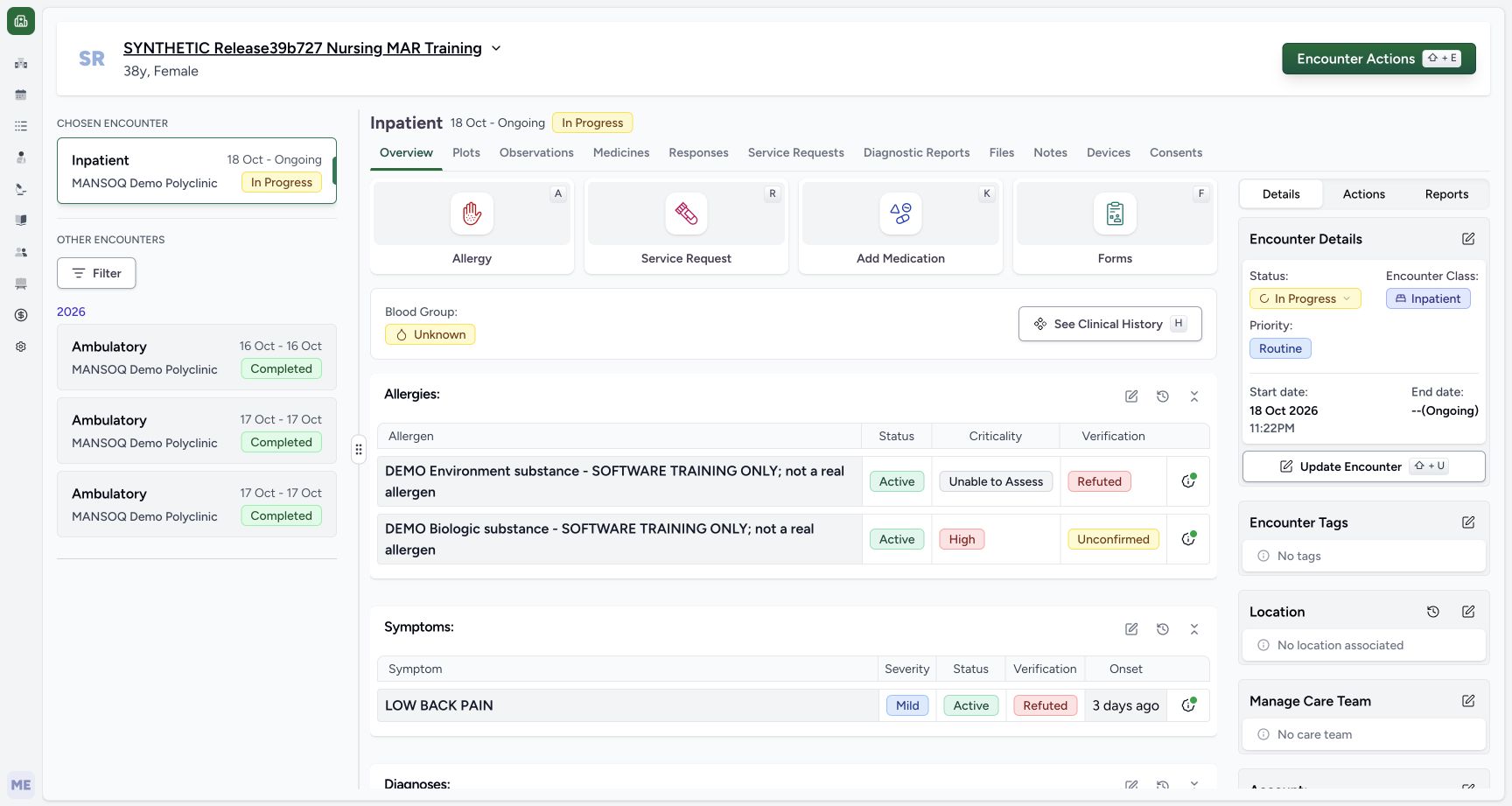
1Returned overview after one submit
Capture details
Observed 3dfb software on 20 October 2026. One new Doctor prescription copied from a reported medication statement; all prescribing values are fictional software examples. Original pixels and capture times preserved.
Image SHA-256 b1dd1e75496c9c59e92486a3125b6997138eacd4e9832f6bd04f41a5d394588b
- Open Medicines after the return: Wait for the form to return to Overview before opening the saved result. No success-toast is pictured here.
12345Saved new prescription card
Capture details
Observed 3dfb software on 20 October 2026. One new Doctor prescription copied from a reported medication statement; all prescribing values are fictional software examples. Original pixels and capture times preserved.
Image SHA-256 8c9056874cbac6dbb67cc974e0a165084b9bb1737a51fc032405170ded8fb2c6
- Select the new 20/10/2026 12:25 PM card: This is the newly created prescription, separate from the older 10:55 AM source prescription.
- Read the Doctor prescriber: The saved card identifies MANSOQ E2E Doctor.
- Read the complete shared prescription Note: The software-only shared Note is above the medicine table.
- Read count, QD and one day: The saved structured instruction is 1.00 count, QD (Once a day), 1 day.
- Read the complete row note: The Instructions cell retains the DEMO RECONCILIATION note copied from the statement.
11. Read the saved result and verify it after reload
Read the Doctor prescriber, complete shared Note, 1.00 count, QD (Once a day), 1 day and complete copied note in Instructions. Use the browser’s Reload command once, wait for Medicines to load and select the same 12:25 PM card again. Check the same saved contents. Do not repeat Submit to refresh the display.
12345Saved new prescription card
Capture details
Observed 3dfb software on 20 October 2026. One new Doctor prescription copied from a reported medication statement; all prescribing values are fictional software examples. Original pixels and capture times preserved.
Image SHA-256 8c9056874cbac6dbb67cc974e0a165084b9bb1737a51fc032405170ded8fb2c6
- Select the new 20/10/2026 12:25 PM card: This is the newly created prescription, separate from the older 10:55 AM source prescription.
- Read the Doctor prescriber: The saved card identifies MANSOQ E2E Doctor.
- Read the complete shared prescription Note: The software-only shared Note is above the medicine table.
- Read count, QD and one day: The saved structured instruction is 1.00 count, QD (Once a day), 1 day.
- Read the complete row note: The Instructions cell retains the DEMO RECONCILIATION note copied from the statement.
 123
123Reloaded same new prescription
Capture details
Observed 3dfb software on 20 October 2026. One new Doctor prescription copied from a reported medication statement; all prescribing values are fictional software examples. Original pixels and capture times preserved.
Image SHA-256 8c9056874cbac6dbb67cc974e0a165084b9bb1737a51fc032405170ded8fb2c6
- Reselect the same card after browser Reload: The 12:25 PM prescription remains after one normal browser reload.
- Recheck both saved note scopes: The shared Note remains above the table and the copied row note remains in Instructions.
- Select Medication Statements to recheck the source: This separate tab returns to the original reported statement without editing it.
12. Recheck the original reported statement
Select Medication Statements. Read the original Nurse-reported row again: its free-text Dosage, Active status, local 20/10/2026 – 20/10/2026 dates, Reason and Nurse author remain. Open See Note and read its original full reconciliation text. The new Doctor prescription and this reported statement remain separate records.
123Reloaded same new prescription
Capture details
Observed 3dfb software on 20 October 2026. One new Doctor prescription copied from a reported medication statement; all prescribing values are fictional software examples. Original pixels and capture times preserved.
Image SHA-256 8c9056874cbac6dbb67cc974e0a165084b9bb1737a51fc032405170ded8fb2c6
- Reselect the same card after browser Reload: The 12:25 PM prescription remains after one normal browser reload.
- Recheck both saved note scopes: The shared Note remains above the table and the copied row note remains in Instructions.
- Select Medication Statements to recheck the source: This separate tab returns to the original reported statement without editing it.
 1234
1234Original nurse statement retained
Capture details
Observed 3dfb software on 20 October 2026. One new Doctor prescription copied from a reported medication statement; all prescribing values are fictional software examples. Original pixels and capture times preserved.
Image SHA-256 d34d76501a793fe1083c410880972e192d523057fbada38c816e48bd83360892
- Recheck the original reported dosage text: The Nurse’s complete reported text remains unchanged.
- Recheck the local reported dates: The source still shows 20/10/2026 – 20/10/2026.
- Recheck the Nurse author: Logged by remains MANSOQ E2E Nurse.
- Open the retained source See Note: Read the original statement’s note without changing it.
 1
1Original nurse note retained
Capture details
Observed 3dfb software on 20 October 2026. One new Doctor prescription copied from a reported medication statement; all prescribing values are fictional software examples. Original pixels and capture times preserved.
Image SHA-256 9a89f21dfd4312afb3489e77819627472e408d80bd27126f167cf303e6a67f85
- Read the unchanged source note: The original statement retains its full DEMO RECONCILIATION note after the separate new prescription was saved.
Copying is a starting point, not a prescribing decision
The history action carries the coded medicine and row Note into a fresh request. It does not carry the statement’s reported dosage text, period, information-source choice, Reason or author into prescribing fields. Review the source, then enter the new prescription’s required dose and frequency separately. This demonstration gives no treatment or medication-taking advice.
1234567Statement history zero selection
Capture details
Observed 3dfb software on 20 October 2026. One new Doctor prescription copied from a reported medication statement; all prescribing values are fictional software examples. Original pixels and capture times preserved.
Image SHA-256 6e970863864eae93db4da31a53b2ad2cc4b21f661be6d60d8479bf6c90111870
- Select Medication Statements in history: Use this history tab rather than Past Prescriptions.
- Read the 20 Oct, 2026 group: The statement is grouped by its creation day.
- Identify HYMOX 500MG CAPS: Match the medicine to the reported statement you inspected.
- Read the source reported text: It describes the earlier software exercise, not a new prescribing instruction.
- Read the Nurse author under Prescribed by: In this Medication Statements tab the heading is Prescribed by, but the name shown is the statement creator, MANSOQ E2E Nurse.
- Open the source row information: Expand the information icon to read its note.
- Check zero selected: Before selection, the counter reads 0 Medication Statements Selected and Add Selected is disabled.
12Statement history source note
Capture details
Observed 3dfb software on 20 October 2026. One new Doctor prescription copied from a reported medication statement; all prescribing values are fictional software examples. Original pixels and capture times preserved.
Image SHA-256 3d323094430250f0c7610c3f2fd3a782732771c25751c1c4b4164c33aa642669
- Read the full source note in history: This is the same DEMO RECONCILIATION note shown in the statement table.
- Select only the illustrated statement row: Use its individual row checkbox; this example has one source row.
123456Fresh imported request draft
Capture details
Observed 3dfb software on 20 October 2026. One new Doctor prescription copied from a reported medication statement; all prescribing values are fictional software examples. Original pixels and capture times preserved.
Image SHA-256 3836b729963565cde8d2f023e98d259ab11f6dee384aa3f1ad4307dff67b5a8a
- Inspect the blank Dosage: The statement’s reported dosage text has not filled a prescribing dose.
- Inspect the blank Frequency: A structured frequency still needs to be chosen.
- Inspect the blank Duration: The reported period has not filled a prescribing duration.
- Read the copied row Note: The narrow input shows the beginning of the retained source note; the full saved Instructions cell provides readback.
- Inspect the empty shared Note: This separate prescription-level Note starts blank.
- Expand the advanced columns: Use this header control, then scroll the medication table right to review the new request metadata.
123Selected count qd one day
Capture details
Observed 3dfb software on 20 October 2026. One new Doctor prescription copied from a reported medication statement; all prescribing values are fictional software examples. Original pixels and capture times preserved.
Image SHA-256 73054a6bc5dca837089f5647babd25e5d603d48ff55ee6cedb508a067c8c8544
- Review 1 count: The count unit is now explicit.
- Review QD (Once a day): Frequency was selected independently of the reported statement text.
- Review the preset 1 day: The QD preset supplied this duration; review it as a separate prescribing field.
Keep authors, dates and note scopes distinct
The source table’s Logged by Nurse and the history drawer’s Prescribed by Nurse identify the statement creator in these views. The fresh request instead shows the Doctor requester and a new authored date. Its saved prescription card displays its creation time, 12:25 PM. The copied row note appears under Instructions; the separate shared Note appears above the saved table.
12345Source statement table
Capture details
Observed 3dfb software on 20 October 2026. One new Doctor prescription copied from a reported medication statement; all prescribing values are fictional software examples. Original pixels and capture times preserved.
Image SHA-256 d34d76501a793fe1083c410880972e192d523057fbada38c816e48bd83360892
- Select Medication Statements: Read the saved reported statement separately from Prescriptions.
- Read the reported dosage text: This free text is reported information, not a new prescription dosage.
- Read the reported period: Both local dates are 20/10/2026.
- Read Logged by MANSOQ E2E Nurse: The Nurse is the saved statement author.
- Open See Note: Inspect the source statement note before copying.
1234567Statement history zero selection
Capture details
Observed 3dfb software on 20 October 2026. One new Doctor prescription copied from a reported medication statement; all prescribing values are fictional software examples. Original pixels and capture times preserved.
Image SHA-256 6e970863864eae93db4da31a53b2ad2cc4b21f661be6d60d8479bf6c90111870
- Select Medication Statements in history: Use this history tab rather than Past Prescriptions.
- Read the 20 Oct, 2026 group: The statement is grouped by its creation day.
- Identify HYMOX 500MG CAPS: Match the medicine to the reported statement you inspected.
- Read the source reported text: It describes the earlier software exercise, not a new prescribing instruction.
- Read the Nurse author under Prescribed by: In this Medication Statements tab the heading is Prescribed by, but the name shown is the statement creator, MANSOQ E2E Nurse.
- Open the source row information: Expand the information icon to read its note.
- Check zero selected: Before selection, the counter reads 0 Medication Statements Selected and Add Selected is disabled.
1234Settled fresh doctor requester date
Capture details
Observed 3dfb software on 20 October 2026. One new Doctor prescription copied from a reported medication statement; all prescribing values are fictional software examples. Original pixels and capture times preserved.
Image SHA-256 1797414baea85124c225f7e819d4be5c5c250d96bc36e01aa7384e3260a6a89b
- Review the new Order intent: This is a new medication request, not a change to the source reported statement.
- Review the new authored date: The fresh draft shows October 20th, 2026, separately from the source reported-use period.
- Review the Doctor requester: MANSOQ E2E Doctor is the new requester, distinct from the Nurse statement author.
- Scroll the table back to the left: Use the horizontal table scrollbar to return to Dosage and Frequency, then collapse the advanced columns with the same header control shown in the earlier draft view.
12345Saved new prescription card
Capture details
Observed 3dfb software on 20 October 2026. One new Doctor prescription copied from a reported medication statement; all prescribing values are fictional software examples. Original pixels and capture times preserved.
Image SHA-256 8c9056874cbac6dbb67cc974e0a165084b9bb1737a51fc032405170ded8fb2c6
- Select the new 20/10/2026 12:25 PM card: This is the newly created prescription, separate from the older 10:55 AM source prescription.
- Read the Doctor prescriber: The saved card identifies MANSOQ E2E Doctor.
- Read the complete shared prescription Note: The software-only shared Note is above the medicine table.
- Read count, QD and one day: The saved structured instruction is 1.00 count, QD (Once a day), 1 day.
- Read the complete row note: The Instructions cell retains the DEMO RECONCILIATION note copied from the statement.
Verify a new prescription without replacing the source
The saved new 12:25 PM card persists after reload, while the original reported statement and complete Note remain available in their own tab. This lesson creates one new synthetic prescription and does not edit the earlier prescription, rewrite the Nurse statement, dispense or administer anything.
12345Saved new prescription card
Capture details
Observed 3dfb software on 20 October 2026. One new Doctor prescription copied from a reported medication statement; all prescribing values are fictional software examples. Original pixels and capture times preserved.
Image SHA-256 8c9056874cbac6dbb67cc974e0a165084b9bb1737a51fc032405170ded8fb2c6
- Select the new 20/10/2026 12:25 PM card: This is the newly created prescription, separate from the older 10:55 AM source prescription.
- Read the Doctor prescriber: The saved card identifies MANSOQ E2E Doctor.
- Read the complete shared prescription Note: The software-only shared Note is above the medicine table.
- Read count, QD and one day: The saved structured instruction is 1.00 count, QD (Once a day), 1 day.
- Read the complete row note: The Instructions cell retains the DEMO RECONCILIATION note copied from the statement.
123Reloaded same new prescription
Capture details
Observed 3dfb software on 20 October 2026. One new Doctor prescription copied from a reported medication statement; all prescribing values are fictional software examples. Original pixels and capture times preserved.
Image SHA-256 8c9056874cbac6dbb67cc974e0a165084b9bb1737a51fc032405170ded8fb2c6
- Reselect the same card after browser Reload: The 12:25 PM prescription remains after one normal browser reload.
- Recheck both saved note scopes: The shared Note remains above the table and the copied row note remains in Instructions.
- Select Medication Statements to recheck the source: This separate tab returns to the original reported statement without editing it.
1234Original nurse statement retained
Capture details
Observed 3dfb software on 20 October 2026. One new Doctor prescription copied from a reported medication statement; all prescribing values are fictional software examples. Original pixels and capture times preserved.
Image SHA-256 d34d76501a793fe1083c410880972e192d523057fbada38c816e48bd83360892
- Recheck the original reported dosage text: The Nurse’s complete reported text remains unchanged.
- Recheck the local reported dates: The source still shows 20/10/2026 – 20/10/2026.
- Recheck the Nurse author: Logged by remains MANSOQ E2E Nurse.
- Open the retained source See Note: Read the original statement’s note without changing it.
1Original nurse note retained
Capture details
Observed 3dfb software on 20 October 2026. One new Doctor prescription copied from a reported medication statement; all prescribing values are fictional software examples. Original pixels and capture times preserved.
Image SHA-256 9a89f21dfd4312afb3489e77819627472e408d80bd27126f167cf303e6a67f85
- Read the unchanged source note: The original statement retains its full DEMO RECONCILIATION note after the separate new prescription was saved.
Source evidence
Every citation uses this exact committed version. The private source repository requires access.
- repositories/platform/mansoq-core/mansoq/emr/resources/medication/statement/spec.py:25 ·
3dfb7c9f519fb5b4cd4452439f3c12346bf58319Source file checksum
542258fe317d93cd03fc4b0efe7fe5704069be9e99e172a63ece6d39f6f2920e - repositories/platform/mansoq-web/src/components/HistoricalRecordSelector/index.tsx:119 ·
3dfb7c9f519fb5b4cd4452439f3c12346bf58319Source file checksum
0ab03afa6a5954112061e0bf07b15cd3f4c901444f3c3de8a8e194524ef1f0c2 - repositories/platform/mansoq-web/src/components/Patient/MedicationStatementList.tsx:39 ·
3dfb7c9f519fb5b4cd4452439f3c12346bf58319Source file checksum
4dd254b2d7ab8c46c4178ec9962ed631b863a602450378050dc329bbac82a1e5 - repositories/platform/mansoq-web/src/components/Patient/MedicationStatementTable.tsx:61 ·
3dfb7c9f519fb5b4cd4452439f3c12346bf58319Source file checksum
24093db90d546211a702299533d012a8c28883c7ac936971c6fde01a1b8bce21 - repositories/platform/mansoq-web/src/components/Questionnaire/MedicationValueSetSelect.tsx:318 ·
3dfb7c9f519fb5b4cd4452439f3c12346bf58319Source file checksum
bb8d5d5f1595778be9e9ad260296e8f43e5696fe9d19fb608e27a33a6a739610 - repositories/platform/mansoq-web/src/components/Questionnaire/QuestionTypes/MedicationRequestQuestion.tsx:674 ·
3dfb7c9f519fb5b4cd4452439f3c12346bf58319Source file checksum
561259e73b1752c9844e31b798ad676878af5f4caf6be5fbd130cd31fcfc89cc - repositories/platform/mansoq-web/src/components/Questionnaire/QuestionTypes/MedicationStatementQuestion.tsx:91 ·
3dfb7c9f519fb5b4cd4452439f3c12346bf58319Source file checksum
aa6bfad3dcb6e4315c58908fe9fffdc4ea47cb84f8c2596cb3db30fe640c19d7 - repositories/platform/mansoq-web/src/components/Questionnaire/QuestionnaireForm.tsx:421 ·
3dfb7c9f519fb5b4cd4452439f3c12346bf58319Source file checksum
ee6c2195f13e48f0896a2d3da566c2f2a67910adad08894df6b77862f9cfdeec - repositories/platform/mansoq-web/src/components/Questionnaire/ValueSetSearchContent.tsx:118 ·
3dfb7c9f519fb5b4cd4452439f3c12346bf58319Source file checksum
d6adc1b84f5956cd554042aa8579a0a83b9a13c5337c64bd0ee6b7f9af5b8019 - repositories/platform/mansoq-web/src/components/Questionnaire/structured/handlers.ts:65 ·
3dfb7c9f519fb5b4cd4452439f3c12346bf58319Source file checksum
459ade48f77316279ab2978dc7b4466cb96acb8223c61b9a1f87ca9973be7c7f - repositories/platform/mansoq-web/src/types/emr/medicationRequest/medicationRequest.ts:977 ·
3dfb7c9f519fb5b4cd4452439f3c12346bf58319Source file checksum
a39df63f9b7f2d976d4379511d7a2d4c8e3e284fd1e9b67c28e59392e8545b2b - repositories/platform/mansoq-web/src/types/emr/medicationStatement.ts:7 ·
3dfb7c9f519fb5b4cd4452439f3c12346bf58319Source file checksum
5784010754caa19b544f2db2f1a374d7739d76518159a239b73a3a8c9fb5a091