 MANSOQ
 Pharmacy · VERSION 460538ee
Complete a mixed received and Abandoned return
Receive one Normal Paracetamol unit while keeping the other HYMOX unit Abandoned. Complete the mixed return, review the single received-item Draft credit, and verify stock, account totals and original payments after reload.
Facility Admin
 1234
1234Verify completed parent and retained child history
Capture details
Isolated synthetic software exercise at MANSOQ Demo Polyclinic/Main Pharmacy. No physical medicine, clinical treatment, cash payout or external exchange is involved.
Image SHA-256 d9b0a9ca48bb0fe1080e03bf068003842b34db729ed21505702659f1f0d611a8
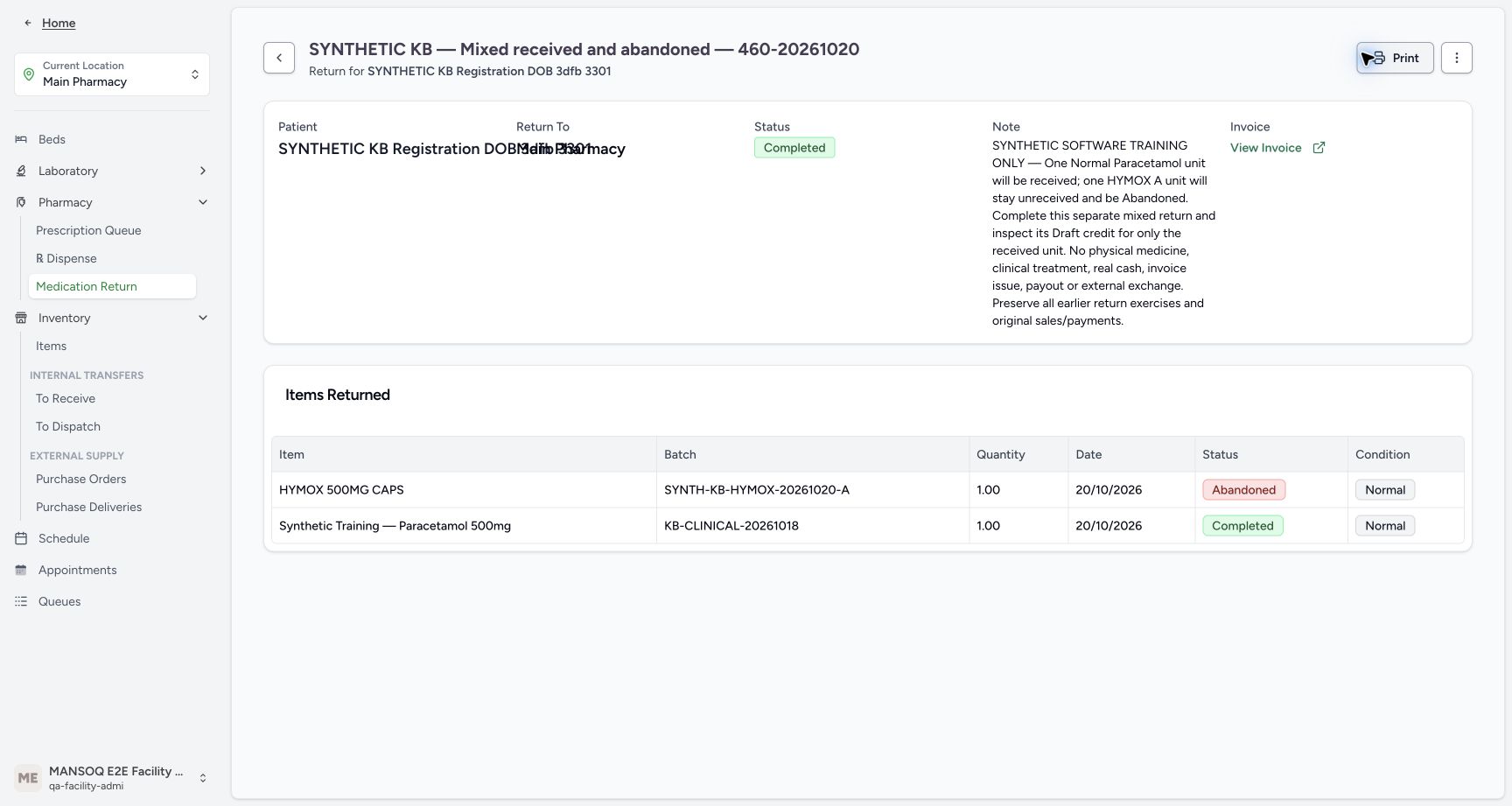
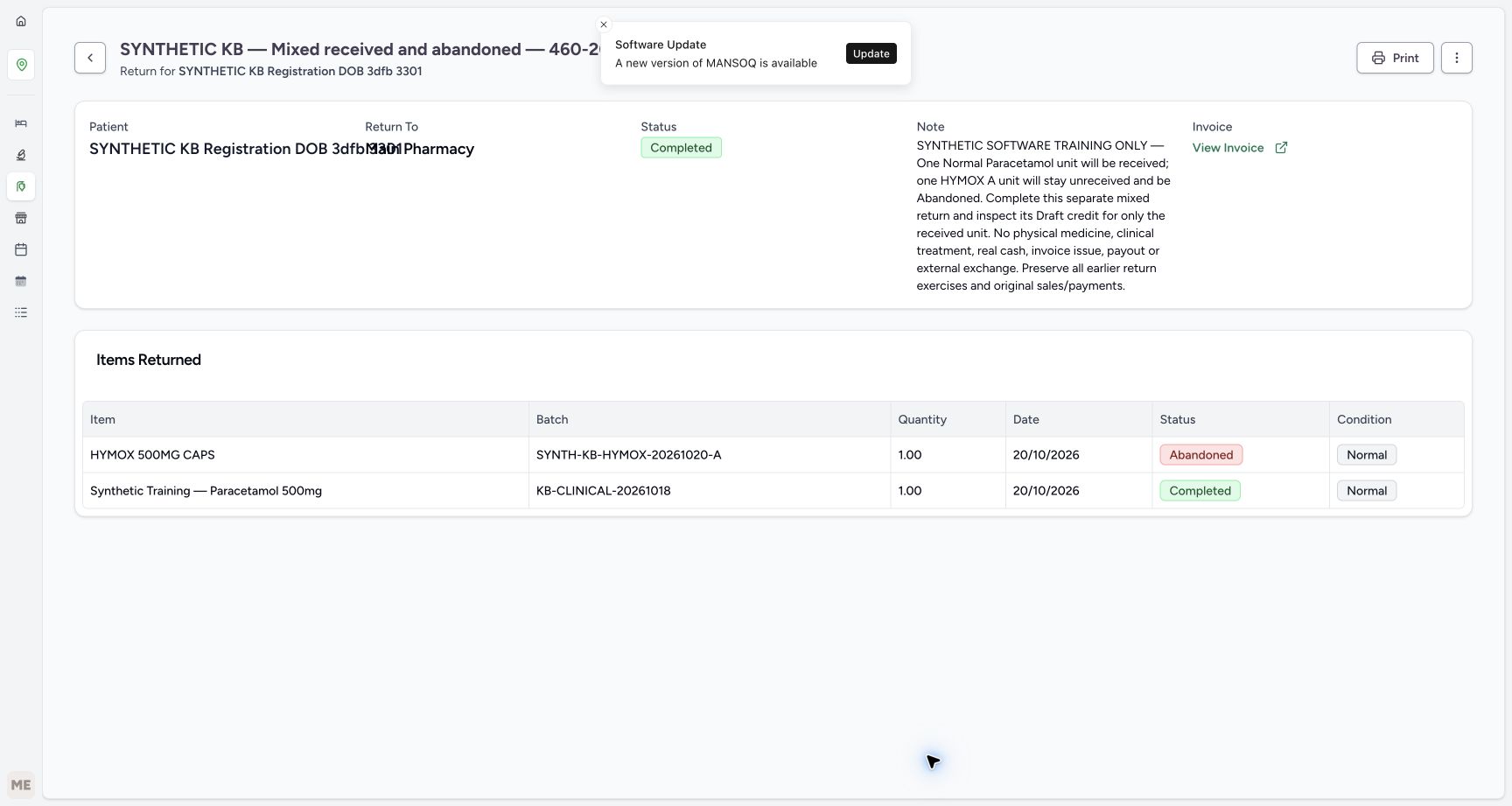
- Verify parent Completed: The mixed child statuses remain distinct.
- Verify retained HYMOX Abandoned history: Parent completion does not receive this item.
- Verify retained Paracetamol Completed history: This is still the single received unit.
- Open View Invoice: Inspect the generated Draft credit without issuing or printing it.
 12345678
Read the single received-item Draft credit
Capture details
Isolated synthetic software exercise at MANSOQ Demo Polyclinic/Main Pharmacy. No physical medicine, clinical treatment, cash payout or external exchange is involved.
Image SHA-256 e76393dd00794c4f7a68d9bf3997619ddfca0006b8f40a188a7548210dffca94
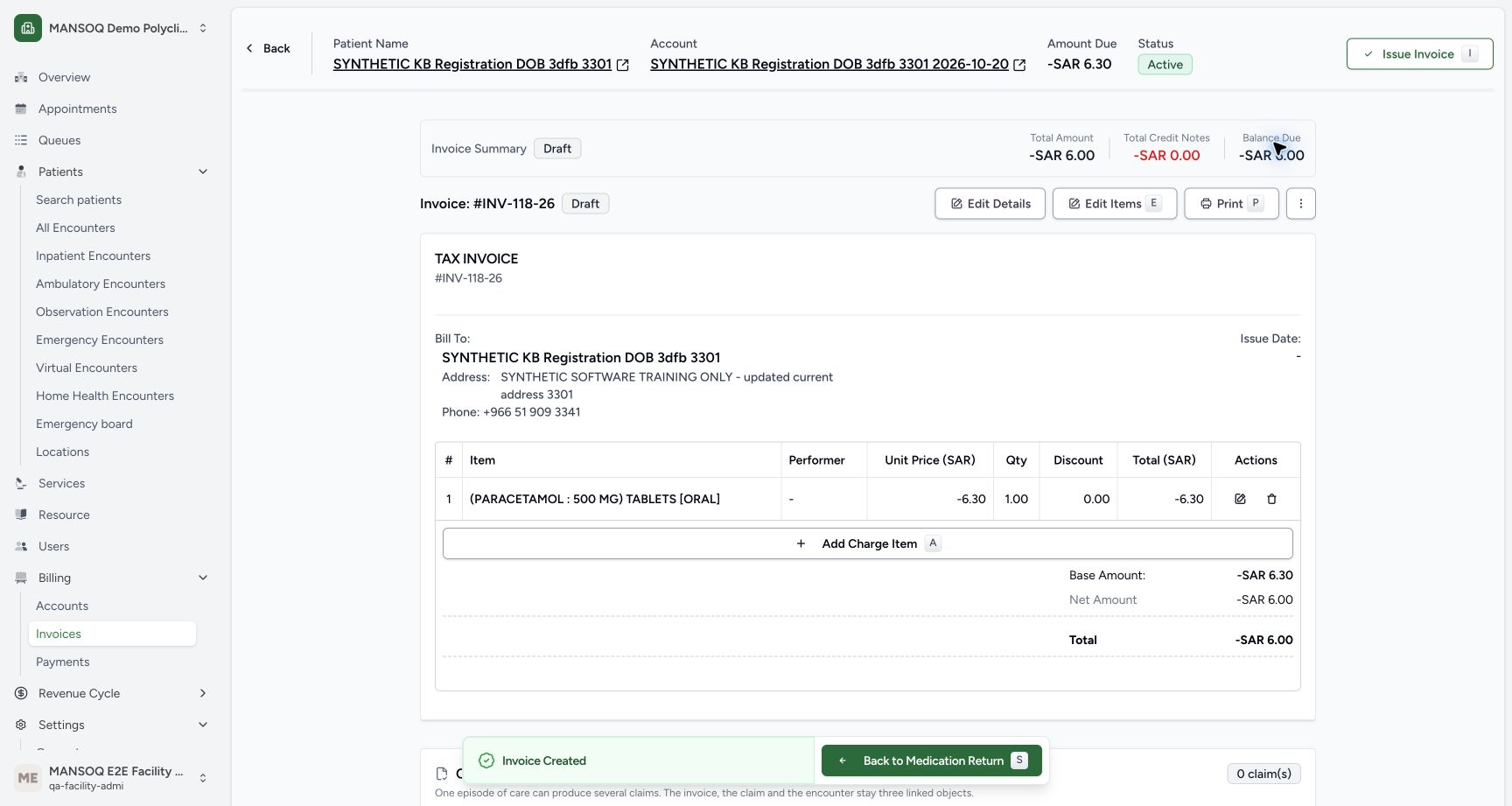
- Verify INV-118-26 is Draft: The return has not issued this invoice.
- Verify Issue Date is blank: No invoice issue action forms part of the exercise.
- Verify quantity one: Only the received Paracetamol unit is credited.
- Read unit price minus SAR 6.30: This uses the selected Product current price.
- Read the one line total minus SAR 6.30: There is no HYMOX line.
- Read base amount minus SAR 6.30: Keep the unrounded base separate from the displayed invoice total.
- Read invoice total minus SAR 6.00: Configured invoice rounding affects this displayed total.
- Open the invoice header Account link: This actual link navigates in the same tab.
 1234
1234Read the one-unit stock increase
Capture details
Isolated synthetic software exercise at MANSOQ Demo Polyclinic/Main Pharmacy. No physical medicine, clinical treatment, cash payout or external exchange is involved.
Image SHA-256 f0a5347e1c7526f5bbdc5ee0b5cc15a457613dcdd6c4851ef11fdac7244ff5ae
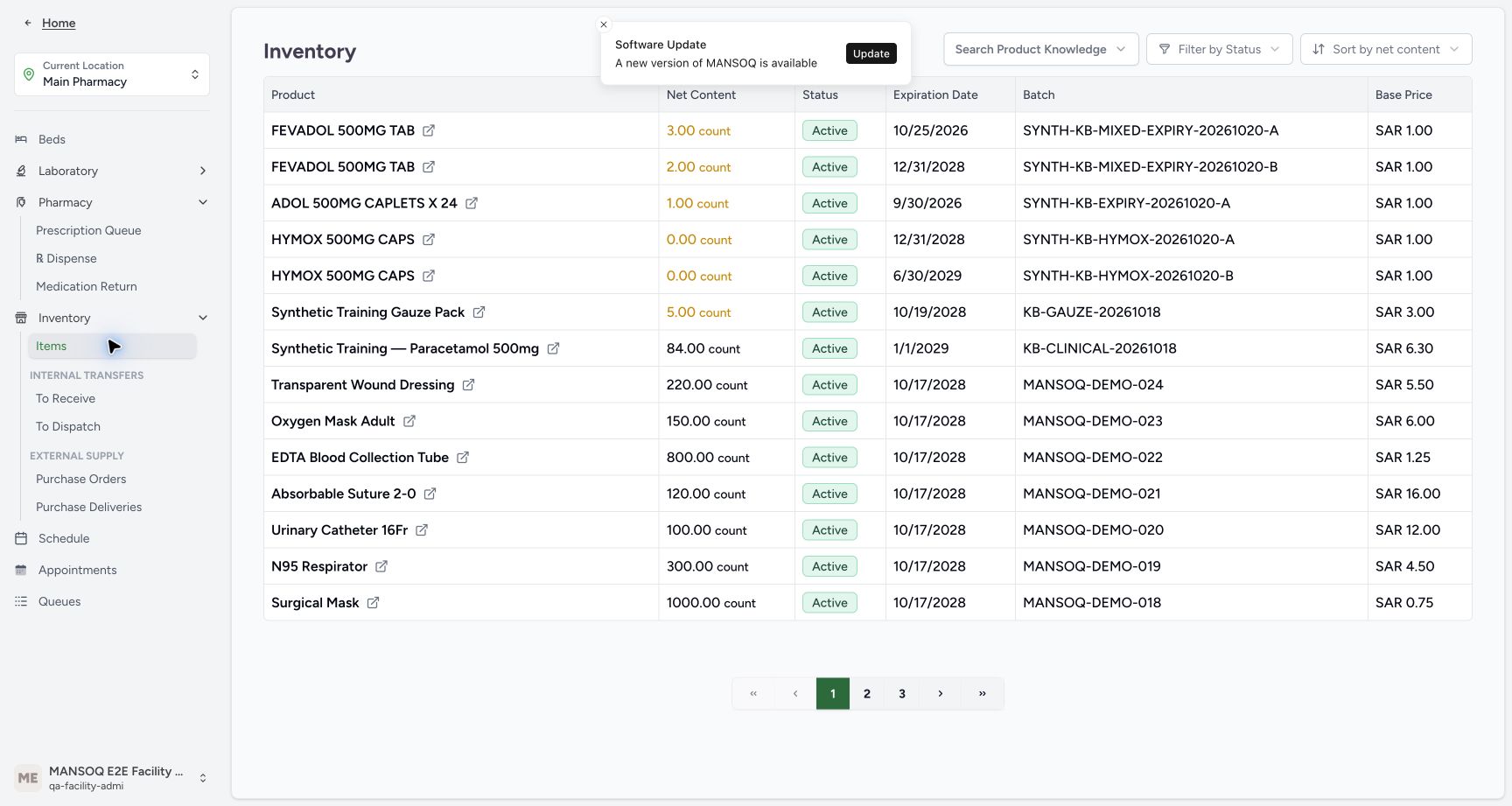
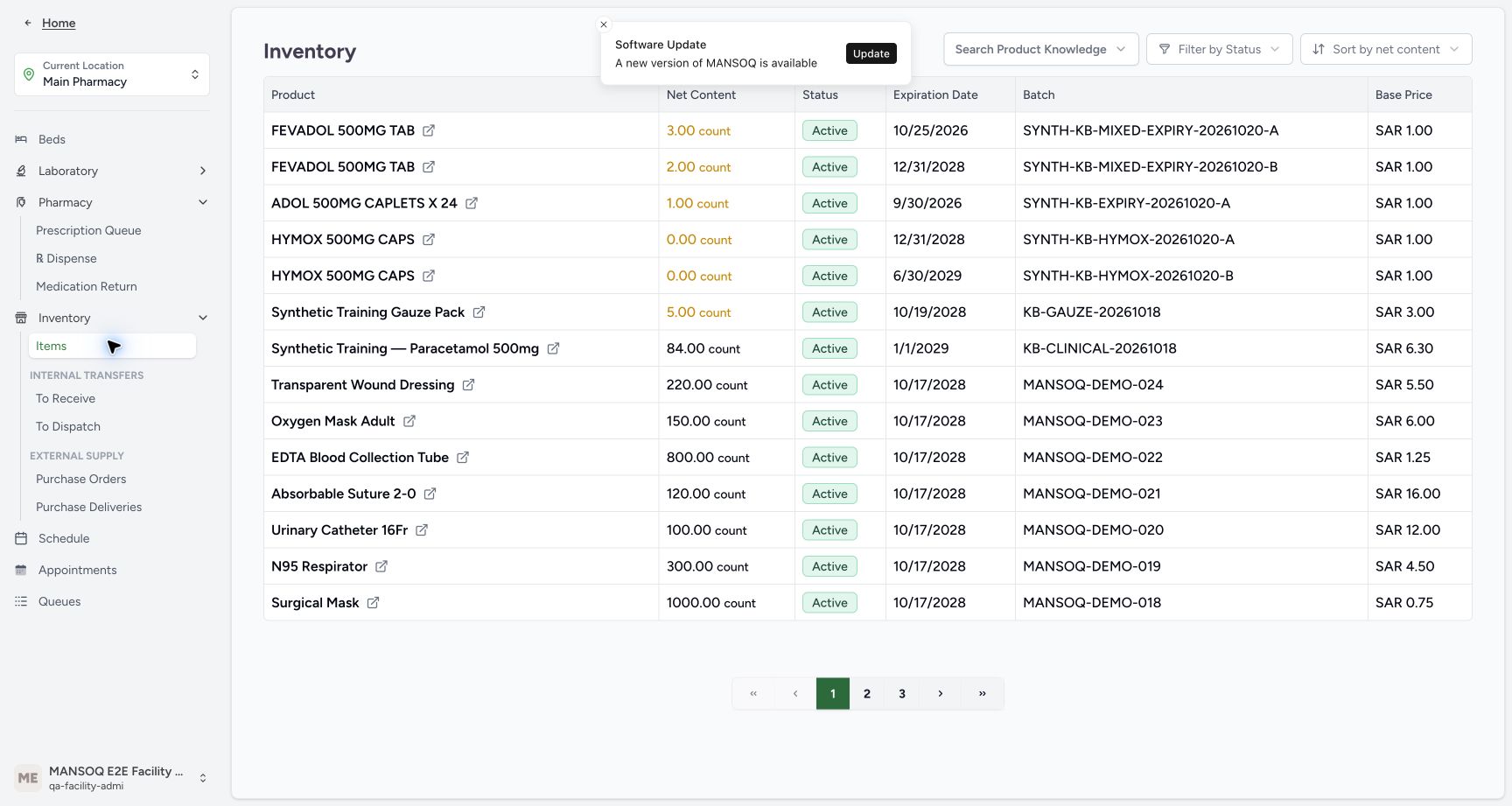
- Read Paracetamol stock eighty-four: The one Normal receipt added one unit to the original eighty-three.
- Verify HYMOX A remains zero: Abandonment has added no usable stock.
- Verify HYMOX B remains zero: The other lot is untouched.
- Match the original Paracetamol batch: Read KB-CLINICAL-20261018, not another product.
16 of 16 content blocks have reviewed image alignment.
Before you begin
- Use the existing authorised Facility Admin at MANSOQ Demo Polyclinic/Main Pharmacy and the named synthetic patient. This isolated software exercise involves no physical medicine, clinical treatment, cash payout or external exchange.
 1234
1234Recorded release 460538ee · 2026-10-20T19:53:41.077524+00:00 · 1728 × 921 Check the original stock for this exercise
Capture details
Isolated synthetic software exercise at MANSOQ Demo Polyclinic/Main Pharmacy. No physical medicine, clinical treatment, cash payout or external exchange is involved.
Image SHA-256
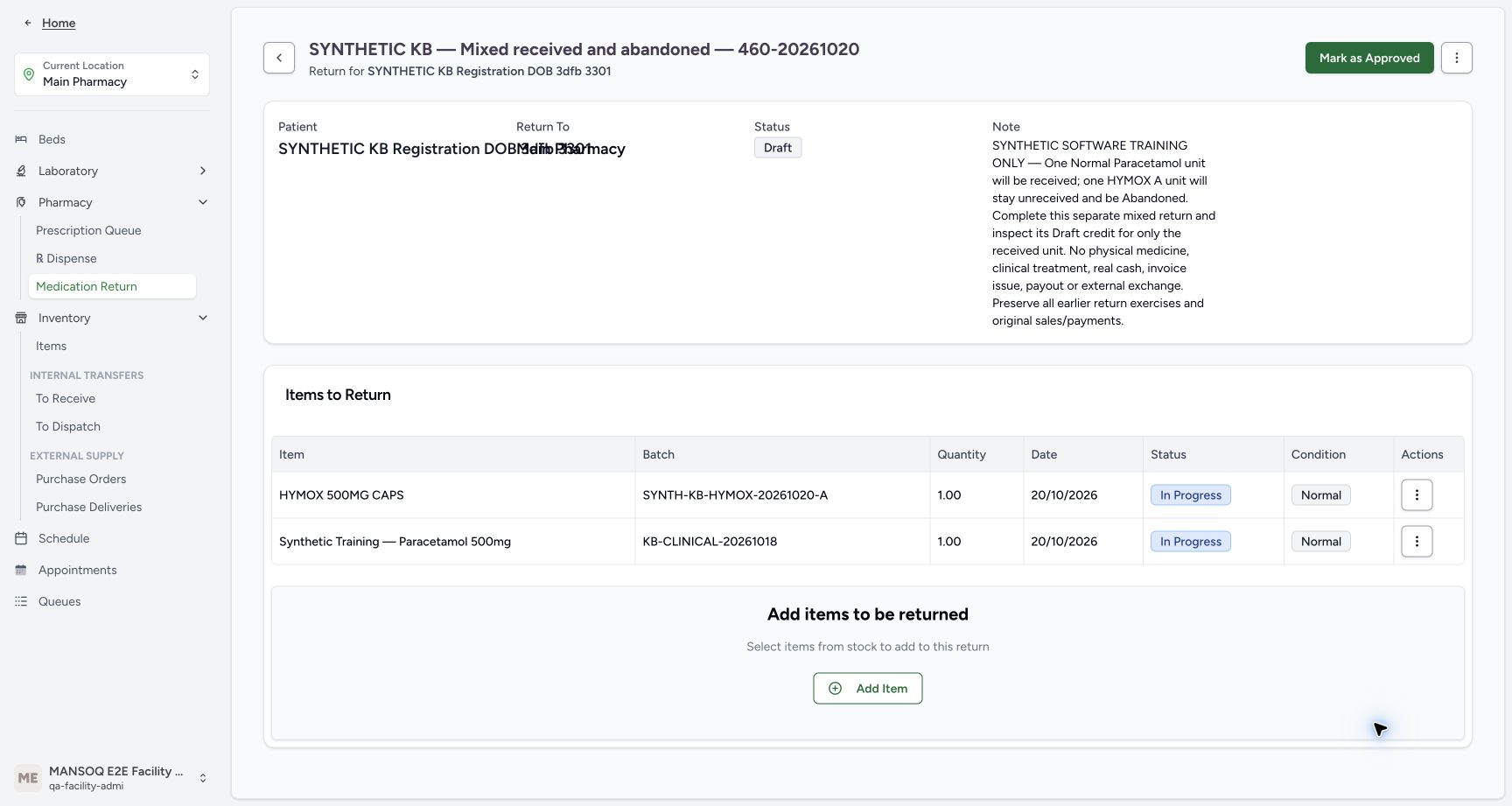
f15540aa0de24f7074263b3ce48e992533de00f136f20d00a145e7fb169829f5- Read starting Paracetamol stock eighty-three: Use the existing KB-CLINICAL-20261018 batch.
- Read starting HYMOX A stock zero: This lot is not being received in this exercise.
- Read starting HYMOX B stock zero: The other HYMOX lot is also unchanged.
- Match the Paracetamol batch: Keep the existing synthetic batch separate from other products.
 123456
Recorded release 460538ee · 2026-10-20T19:56:53.323414+00:00 · 1728 × 921 Verify the saved Draft before abandoning a row
Capture details
Isolated synthetic software exercise at MANSOQ Demo Polyclinic/Main Pharmacy. No physical medicine, clinical treatment, cash payout or external exchange is involved.
Image SHA-256
863849bcb96f35f3fce49999dd25d5d388150f0392523bd830ee6de44919e5f4- Match the separate return and patient: Use the readable patient subtitle; the Patient and Return To fields overlap below.
- Verify the parent is Draft: The saved rows have not been approved or received.
- Match the saved HYMOX A batch: The full A batch identifier is visible in the saved row.
- Verify HYMOX is In Progress: This is the unreceived row to abandon.
- Verify Paracetamol is In Progress: Keep this one-unit row for receipt.
- Open the HYMOX row Actions: Use the menu on the HYMOX row, not the parent menu.
- Prepare a separate Draft with the existing Paracetamol batch KB-CLINICAL-20261018 and HYMOX A batch SYNTH-KB-HYMOX-20261020-A, one unit each. Keep all earlier returns, original paid sales and payments unchanged.
 12345
12345Recorded release 460538ee · 2026-10-20T19:56:40.976549+00:00 · 1728 × 921 Review the two one-unit rows before saving
Capture details
Isolated synthetic software exercise at MANSOQ Demo Polyclinic/Main Pharmacy. No physical medicine, clinical treatment, cash payout or external exchange is involved.
Image SHA-256
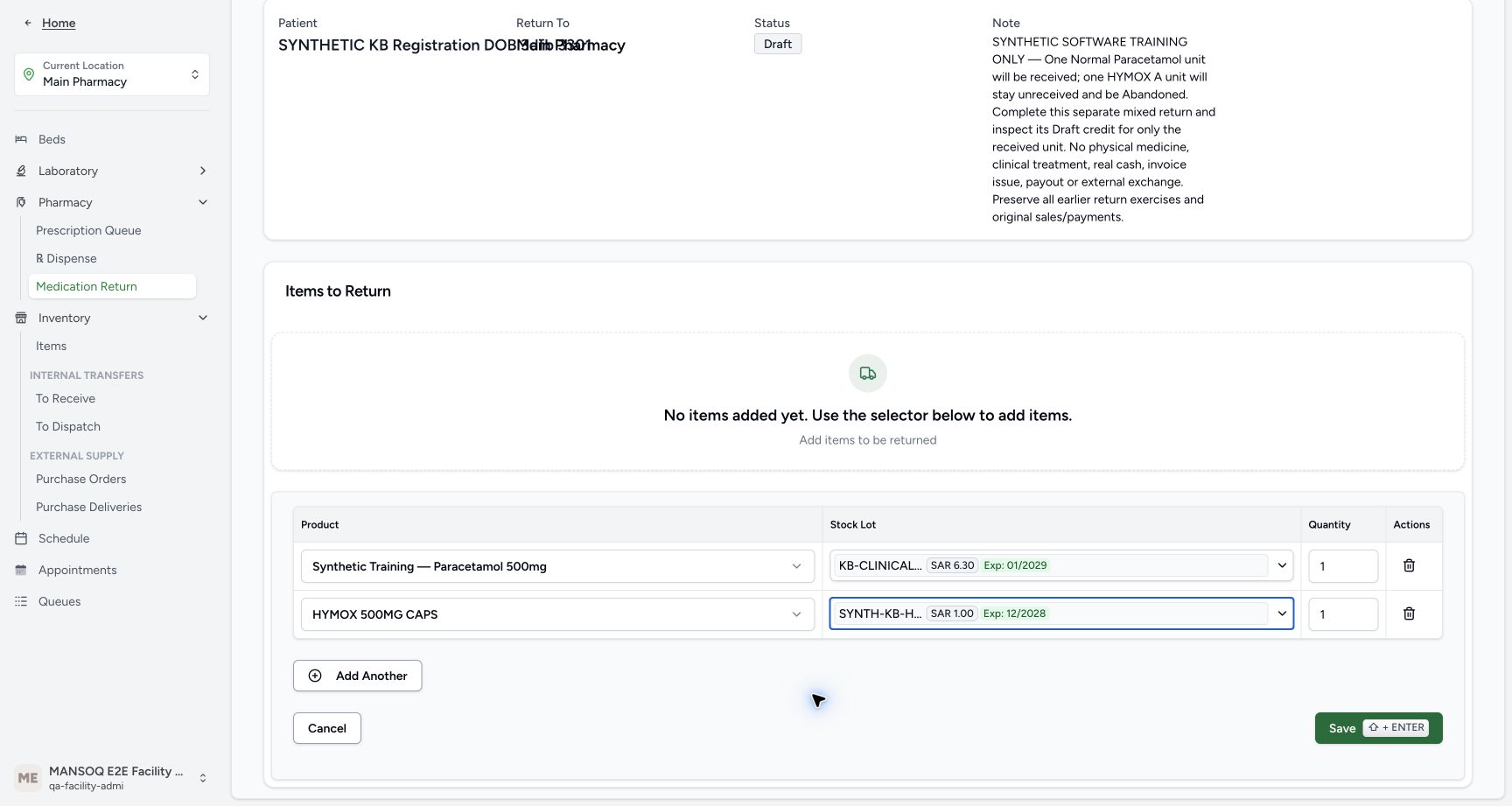
7d760c18c4f555f0d22b75d3a24f8ab91777fee42e221cd82adc96f0abcdc451- Verify the Paracetamol product: Use the shared manual-entry instructions for the exact synthetic product and batch.
- Verify the HYMOX product: Use the exact HYMOX master and A batch from the shared prerequisite.
- Verify Paracetamol quantity one: This row will be received as Normal.
- Verify HYMOX quantity one: This row will remain unreceived and be Abandoned.
- Save the two reviewed rows once: Wait for the saved table before taking another action.
123456Recorded release 460538ee · 2026-10-20T19:56:53.323414+00:00 · 1728 × 921 Verify the saved Draft before abandoning a row
Capture details
Isolated synthetic software exercise at MANSOQ Demo Polyclinic/Main Pharmacy. No physical medicine, clinical treatment, cash payout or external exchange is involved.
Image SHA-256
863849bcb96f35f3fce49999dd25d5d388150f0392523bd830ee6de44919e5f4- Match the separate return and patient: Use the readable patient subtitle; the Patient and Return To fields overlap below.
- Verify the parent is Draft: The saved rows have not been approved or received.
- Match the saved HYMOX A batch: The full A batch identifier is visible in the saved row.
- Verify HYMOX is In Progress: This is the unreceived row to abandon.
- Verify Paracetamol is In Progress: Keep this one-unit row for receipt.
- Open the HYMOX row Actions: Use the menu on the HYMOX row, not the parent menu.
1. Save and verify the separate two-item Draft
Use Manually receive two Normal return items and correct the Draft refund for the shared creation, exact product/lot selection and two-row entry controls. This separate return is named “SYNTHETIC KB — Mixed received and abandoned — 460-20261020”. Review one Paracetamol unit and one HYMOX A unit, then Save once and wait for exactly two saved In Progress/Normal rows. Closed lot labels are shortened; verify full batch identifiers in the saved table. Use the readable patient subtitle where Patient and Return To overlap.
12345Review the two one-unit rows before saving
Capture details
Isolated synthetic software exercise at MANSOQ Demo Polyclinic/Main Pharmacy. No physical medicine, clinical treatment, cash payout or external exchange is involved.
Image SHA-256 7d760c18c4f555f0d22b75d3a24f8ab91777fee42e221cd82adc96f0abcdc451
- Verify the Paracetamol product: Use the shared manual-entry instructions for the exact synthetic product and batch.
- Verify the HYMOX product: Use the exact HYMOX master and A batch from the shared prerequisite.
- Verify Paracetamol quantity one: This row will be received as Normal.
- Verify HYMOX quantity one: This row will remain unreceived and be Abandoned.
- Save the two reviewed rows once: Wait for the saved table before taking another action.
123456Verify the saved Draft before abandoning a row
Capture details
Isolated synthetic software exercise at MANSOQ Demo Polyclinic/Main Pharmacy. No physical medicine, clinical treatment, cash payout or external exchange is involved.
Image SHA-256 863849bcb96f35f3fce49999dd25d5d388150f0392523bd830ee6de44919e5f4
- Match the separate return and patient: Use the readable patient subtitle; the Patient and Return To fields overlap below.
- Verify the parent is Draft: The saved rows have not been approved or received.
- Match the saved HYMOX A batch: The full A batch identifier is visible in the saved row.
- Verify HYMOX is In Progress: This is the unreceived row to abandon.
- Verify Paracetamol is In Progress: Keep this one-unit row for receipt.
- Open the HYMOX row Actions: Use the menu on the HYMOX row, not the parent menu.
2. Abandon only the HYMOX unit that remains unreceived
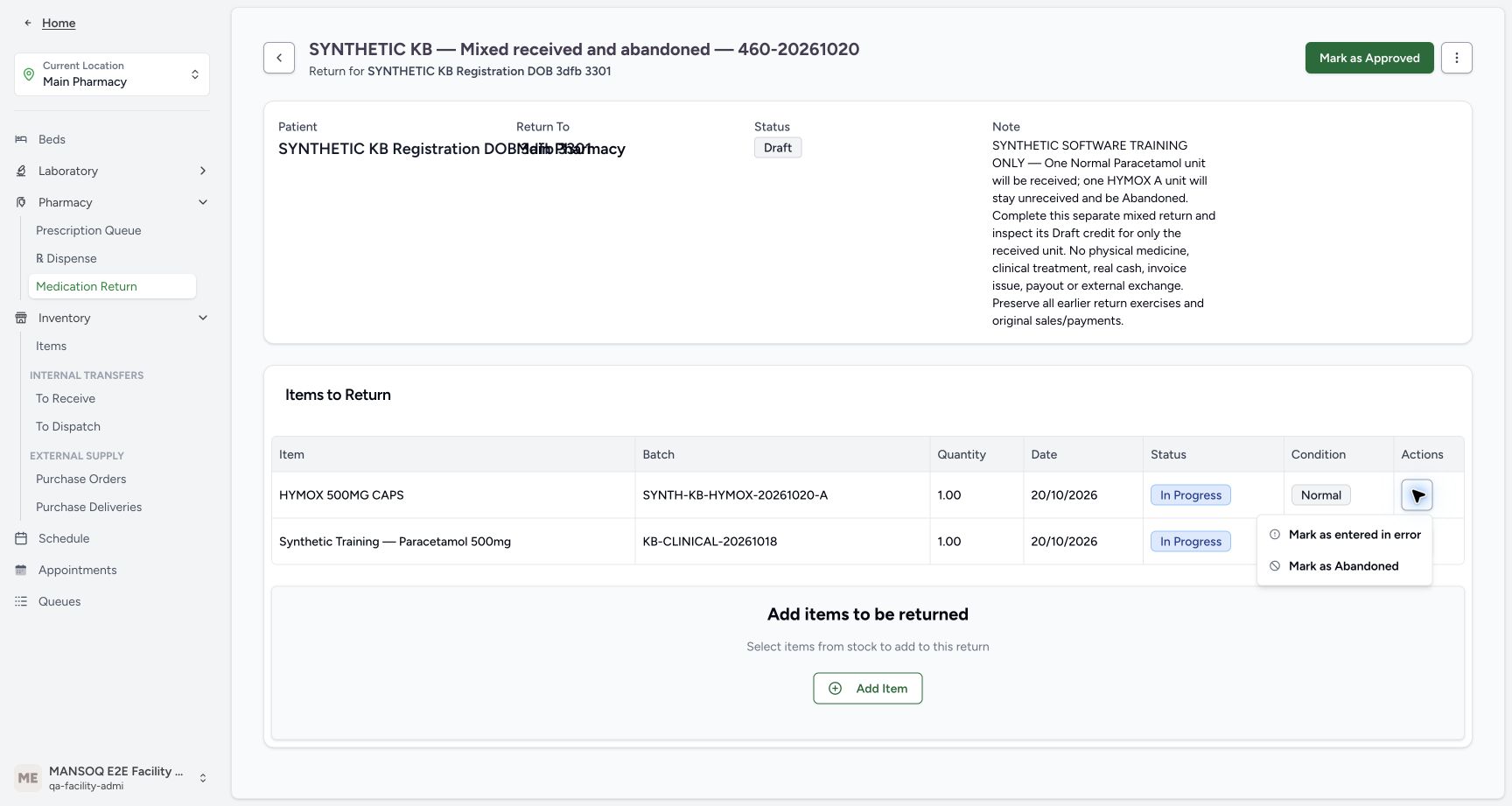
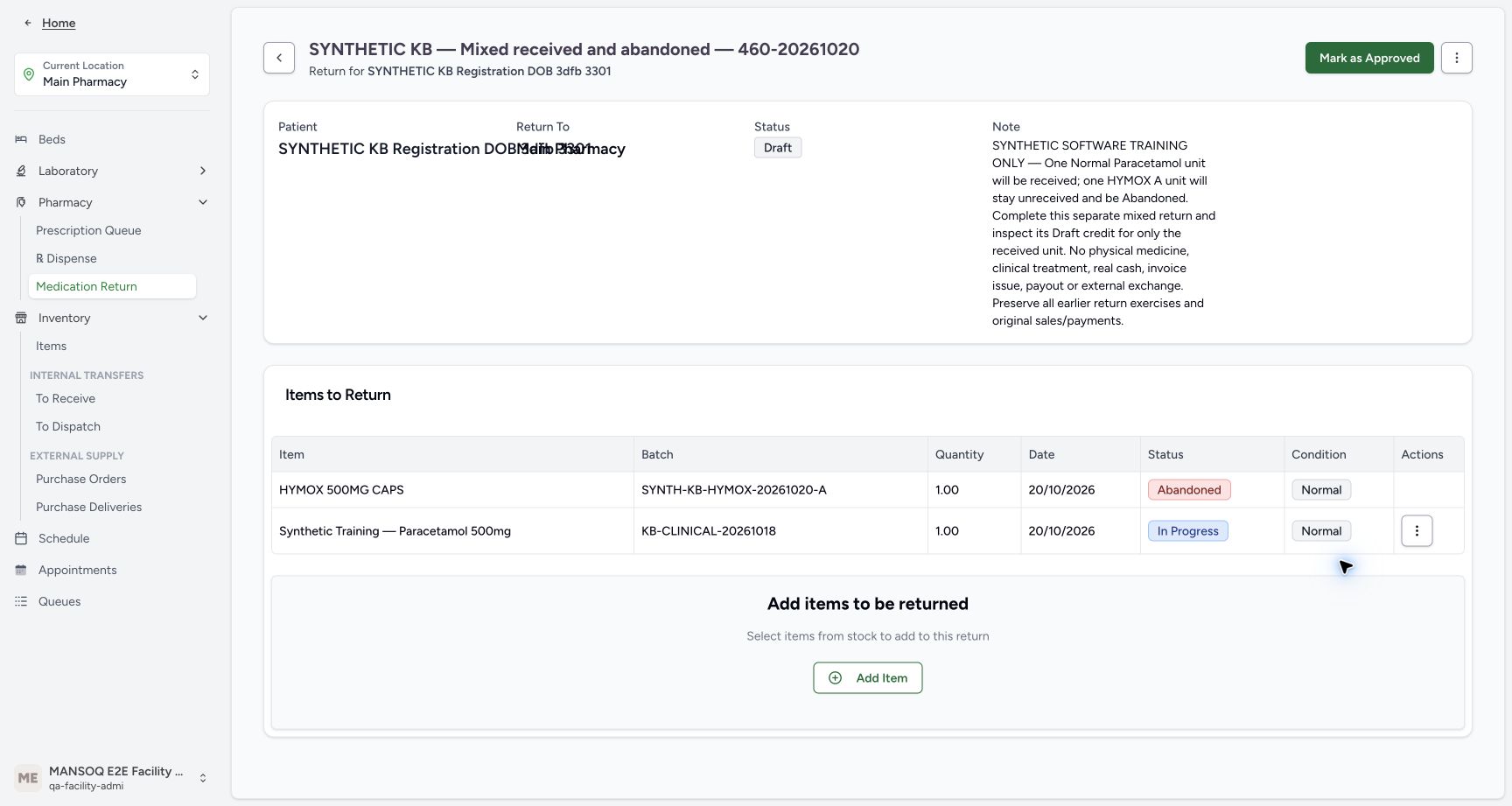
On the saved Draft, open the HYMOX row Actions and choose Mark as Abandoned. This is a direct row action without a confirmation dialog. Verify HYMOX A becomes Abandoned, while Paracetamol remains In Progress, one unit each. Normal is retained condition metadata; it does not establish receipt. The unreceived-item lesson explains that terminal row history. Keep the parent and the valid Paracetamol row intact.
123456Verify the saved Draft before abandoning a row
Capture details
Isolated synthetic software exercise at MANSOQ Demo Polyclinic/Main Pharmacy. No physical medicine, clinical treatment, cash payout or external exchange is involved.
Image SHA-256 863849bcb96f35f3fce49999dd25d5d388150f0392523bd830ee6de44919e5f4
- Match the separate return and patient: Use the readable patient subtitle; the Patient and Return To fields overlap below.
- Verify the parent is Draft: The saved rows have not been approved or received.
- Match the saved HYMOX A batch: The full A batch identifier is visible in the saved row.
- Verify HYMOX is In Progress: This is the unreceived row to abandon.
- Verify Paracetamol is In Progress: Keep this one-unit row for receipt.
- Open the HYMOX row Actions: Use the menu on the HYMOX row, not the parent menu.
 12
12Abandon only the unreceived HYMOX row
Capture details
Isolated synthetic software exercise at MANSOQ Demo Polyclinic/Main Pharmacy. No physical medicine, clinical treatment, cash payout or external exchange is involved.
Image SHA-256 e2c285e58ecf8fda1dd0aaa93a8440b8bd3a6a9bd184ab7dd4da6860a03d9db7
- Choose Mark as Abandoned: This direct row action has no confirmation dialog.
- Match the HYMOX A row: Keep the Paracetamol row unchanged.
 1234
1234Verify mixed unreceived statuses and approve
Capture details
Isolated synthetic software exercise at MANSOQ Demo Polyclinic/Main Pharmacy. No physical medicine, clinical treatment, cash payout or external exchange is involved.
Image SHA-256 a5482d41201c560c275988468f81ba101ce65f59b1e50a00ffcd466c3d85368a
- Verify Draft is retained: Row abandonment has not completed the parent.
- Verify HYMOX is Abandoned: The valid unreceived row stays in the history.
- Verify Paracetamol is In Progress: This is the only row to receive.
- Choose Mark as Approved once: Move the reviewed saved return to Pending.
3. Approve and select only the eligible Paracetamol row
Choose Mark as Approved once and wait for Pending. The eligible Paracetamol row may already be selected. With it unchecked, Receive & Update Stock is disabled; select Paracetamol again to enable receiving. HYMOX Abandoned has no receipt checkbox. The received-item requirement remains until a row has been received. Verify only Paracetamol is selected, then choose Receive & Update Stock.
1234Verify mixed unreceived statuses and approve
Capture details
Isolated synthetic software exercise at MANSOQ Demo Polyclinic/Main Pharmacy. No physical medicine, clinical treatment, cash payout or external exchange is involved.
Image SHA-256 a5482d41201c560c275988468f81ba101ce65f59b1e50a00ffcd466c3d85368a
- Verify Draft is retained: Row abandonment has not completed the parent.
- Verify HYMOX is Abandoned: The valid unreceived row stays in the history.
- Verify Paracetamol is In Progress: This is the only row to receive.
- Choose Mark as Approved once: Move the reviewed saved return to Pending.
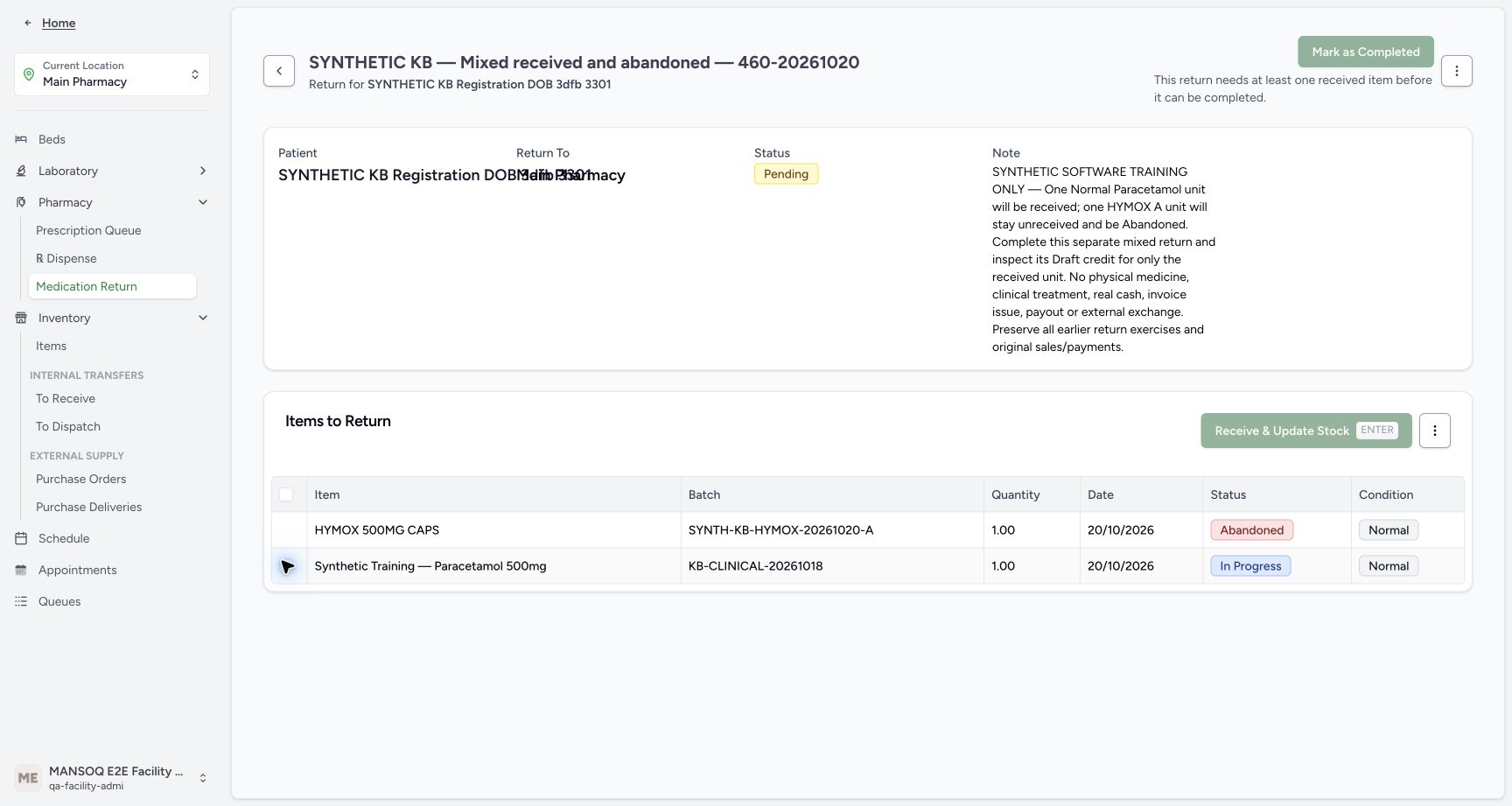 1234
1234Recognise the no-selection state
Capture details
Isolated synthetic software exercise at MANSOQ Demo Polyclinic/Main Pharmacy. No physical medicine, clinical treatment, cash payout or external exchange is involved.
Image SHA-256 b21d803c8d09c8030b59d037fb98836085703fb38b349325ebda555bc8309ed8
- Verify the parent is Pending: Approval has not received a unit.
- Read disabled receiving with no selection: Select the one eligible row before receiving.
- Select the Paracetamol row: Only this In Progress row is eligible; HYMOX has no receipt checkbox.
- Read the received-item requirement: The parent cannot complete before any item is received.
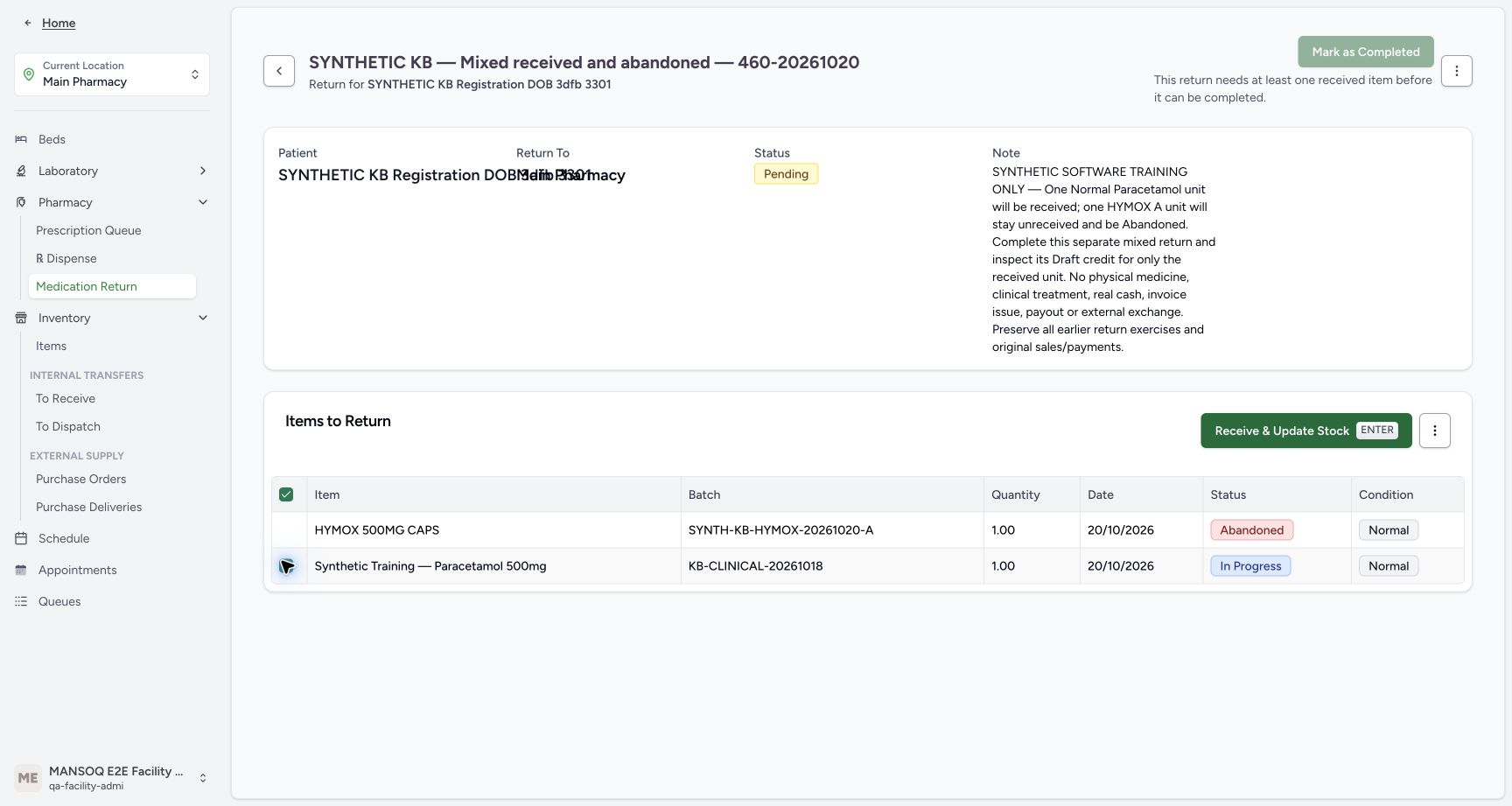 123
123Select only Paracetamol for receipt
Capture details
Isolated synthetic software exercise at MANSOQ Demo Polyclinic/Main Pharmacy. No physical medicine, clinical treatment, cash payout or external exchange is involved.
Image SHA-256 3b993ce2c65621dfece178d395a7b11cb4d2c5fd968fcd4b5f8ae2409db93cfb
- Verify Paracetamol is selected: The page may already select the eligible row when Pending opens.
- Verify HYMOX stays Abandoned: Do not receive or change this row.
- Open Receive & Update Stock: The confirmation applies to the single selected Paracetamol row.
4. Confirm one Normal receipt and check both statuses
In the confirmation, verify it applies to one selected item, with Completed receiving status and Normal condition. Confirm once. Wait for the saved rows to settle: Paracetamol is Completed/Normal, HYMOX is still Abandoned/Normal, and the parent is Pending. Receiving is now disabled with no item selected. Do not receive the unit again.
123Select only Paracetamol for receipt
Capture details
Isolated synthetic software exercise at MANSOQ Demo Polyclinic/Main Pharmacy. No physical medicine, clinical treatment, cash payout or external exchange is involved.
Image SHA-256 3b993ce2c65621dfece178d395a7b11cb4d2c5fd968fcd4b5f8ae2409db93cfb
- Verify Paracetamol is selected: The page may already select the eligible row when Pending opens.
- Verify HYMOX stays Abandoned: Do not receive or change this row.
- Open Receive & Update Stock: The confirmation applies to the single selected Paracetamol row.
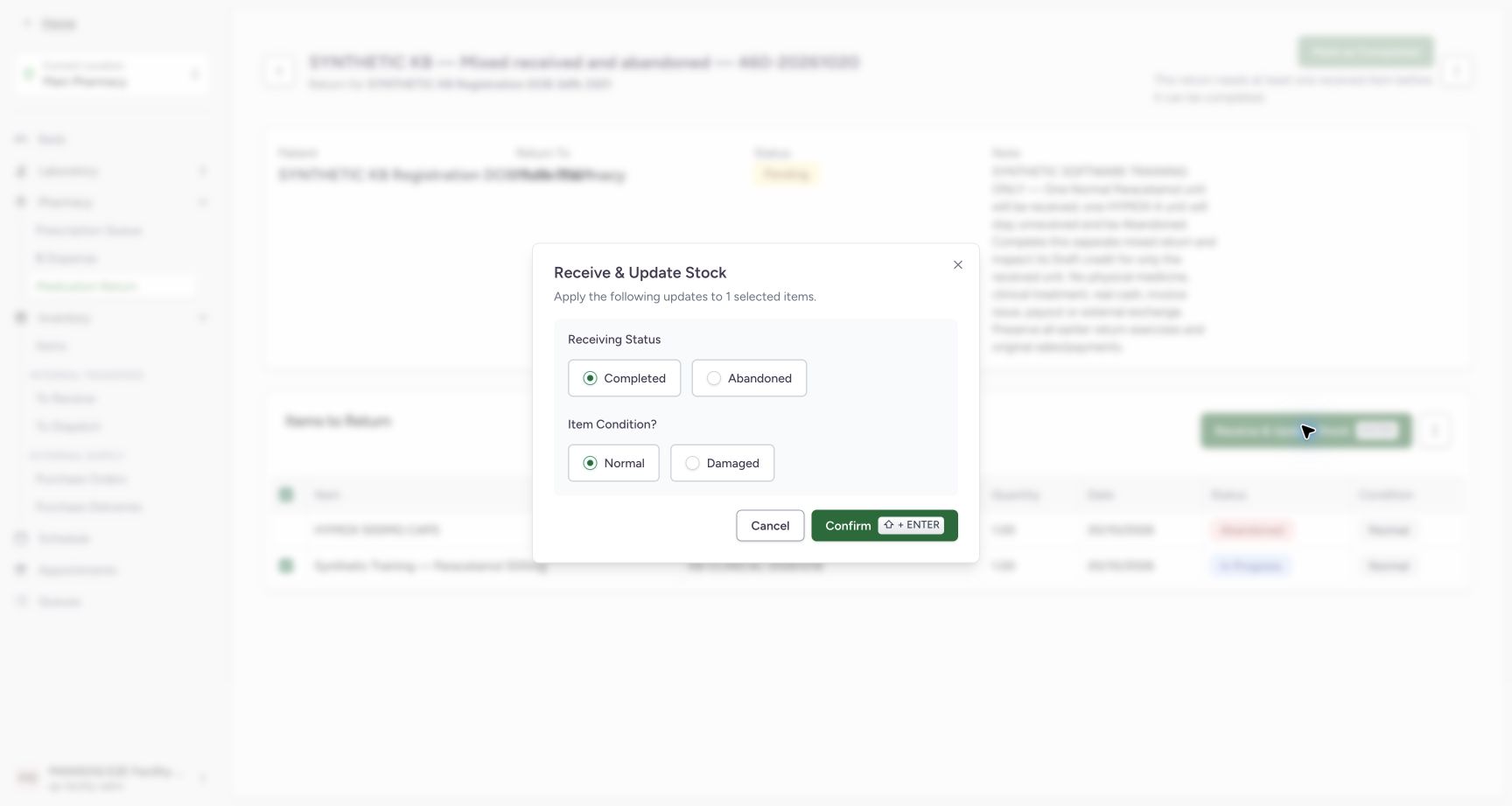 1234
1234Confirm one Normal receipt
Capture details
Isolated synthetic software exercise at MANSOQ Demo Polyclinic/Main Pharmacy. No physical medicine, clinical treatment, cash payout or external exchange is involved.
Image SHA-256 9fabb1a48c2c16b12e97959cfeb8a70f606817fd041de3f521edb0d117c29e7f
- Verify one selected item: Only the Paracetamol unit is included.
- Verify Completed receiving status: This is the receipt status for the selected item.
- Verify Normal condition: Normal receiving adds this unit to usable stock.
- Confirm the one-unit receipt once: Wait for the settled saved rows.
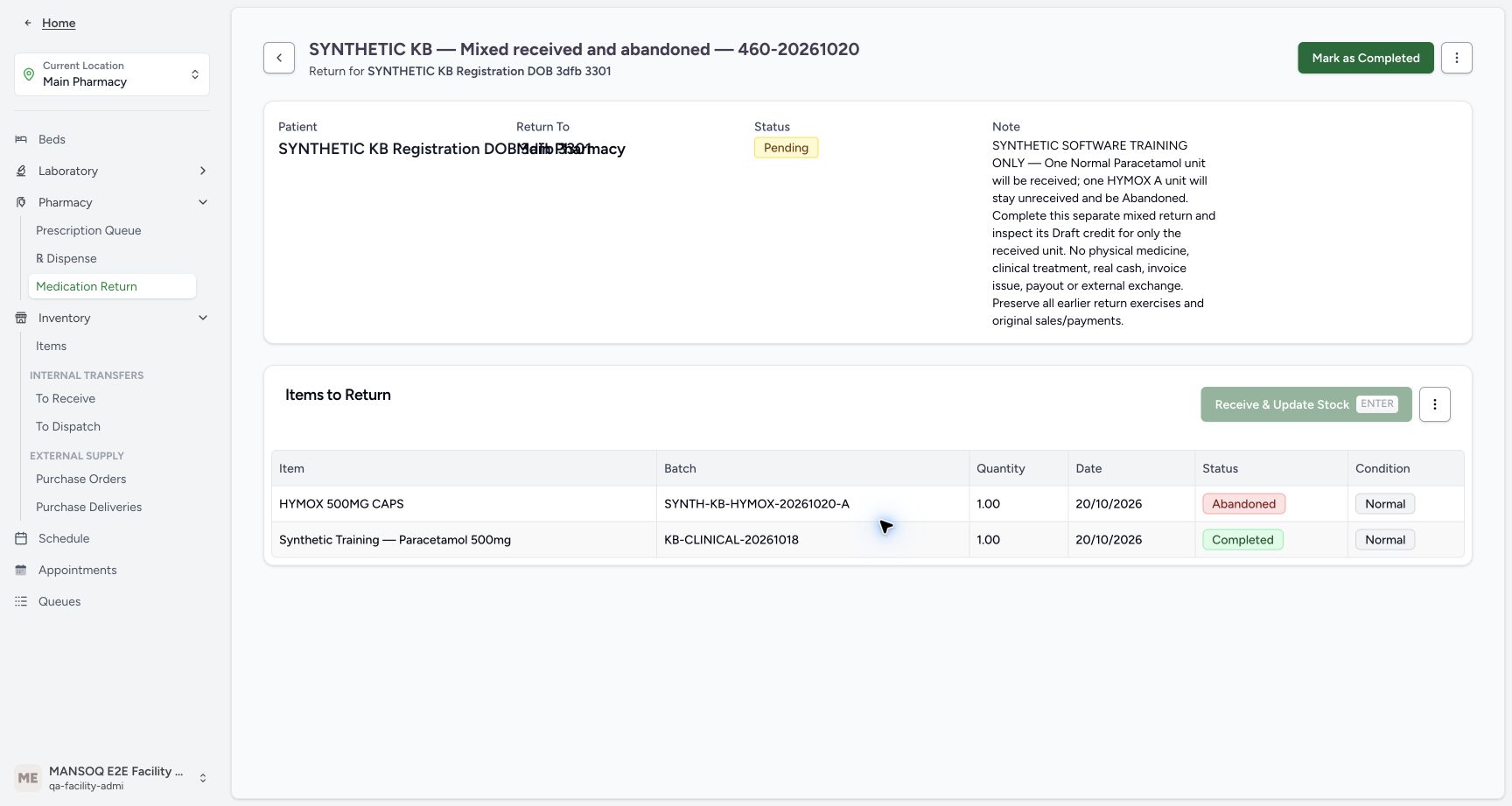 12345
12345Check the mixed result before completing the parent
Capture details
Isolated synthetic software exercise at MANSOQ Demo Polyclinic/Main Pharmacy. No physical medicine, clinical treatment, cash payout or external exchange is involved.
Image SHA-256 10eeb65d0102e0c699917ba0401ec85f0a8515fdac63bfa746975cc46f87fba4
- Verify the parent is still Pending: Receiving and parent completion are separate actions.
- Verify HYMOX remains Abandoned: The unreceived row has not become Completed.
- Verify Paracetamol is Completed: This is the one received Normal unit.
- Recognise no further receipt is selected: Do not receive the unit again.
- Choose Mark as Completed once: Complete this mixed return after the saved receipt has settled.
5. Complete the parent and open its Draft credit
After the one received item has settled and no item is selected, choose Mark as Completed once. The parent becomes Completed while the two child statuses remain different. Choose View Invoice. Verify INV-118-26 is Draft, its Issue Date is blank, and the only line is one Paracetamol unit. The Abandoned HYMOX row creates no credit line. Leave this valid credit Draft.
12345Check the mixed result before completing the parent
Capture details
Isolated synthetic software exercise at MANSOQ Demo Polyclinic/Main Pharmacy. No physical medicine, clinical treatment, cash payout or external exchange is involved.
Image SHA-256 10eeb65d0102e0c699917ba0401ec85f0a8515fdac63bfa746975cc46f87fba4
- Verify the parent is still Pending: Receiving and parent completion are separate actions.
- Verify HYMOX remains Abandoned: The unreceived row has not become Completed.
- Verify Paracetamol is Completed: This is the one received Normal unit.
- Recognise no further receipt is selected: Do not receive the unit again.
- Choose Mark as Completed once: Complete this mixed return after the saved receipt has settled.
1234Verify completed parent and retained child history
Capture details
Isolated synthetic software exercise at MANSOQ Demo Polyclinic/Main Pharmacy. No physical medicine, clinical treatment, cash payout or external exchange is involved.
Image SHA-256 d9b0a9ca48bb0fe1080e03bf068003842b34db729ed21505702659f1f0d611a8
- Verify parent Completed: The mixed child statuses remain distinct.
- Verify retained HYMOX Abandoned history: Parent completion does not receive this item.
- Verify retained Paracetamol Completed history: This is still the single received unit.
- Open View Invoice: Inspect the generated Draft credit without issuing or printing it.
12345678Read the single received-item Draft credit
Capture details
Isolated synthetic software exercise at MANSOQ Demo Polyclinic/Main Pharmacy. No physical medicine, clinical treatment, cash payout or external exchange is involved.
Image SHA-256 e76393dd00794c4f7a68d9bf3997619ddfca0006b8f40a188a7548210dffca94
- Verify INV-118-26 is Draft: The return has not issued this invoice.
- Verify Issue Date is blank: No invoice issue action forms part of the exercise.
- Verify quantity one: Only the received Paracetamol unit is credited.
- Read unit price minus SAR 6.30: This uses the selected Product current price.
- Read the one line total minus SAR 6.30: There is no HYMOX line.
- Read base amount minus SAR 6.30: Keep the unrounded base separate from the displayed invoice total.
- Read invoice total minus SAR 6.00: Configured invoice rounding affects this displayed total.
- Open the invoice header Account link: This actual link navigates in the same tab.
6. Keep the line, rounded invoice and account amounts distinct
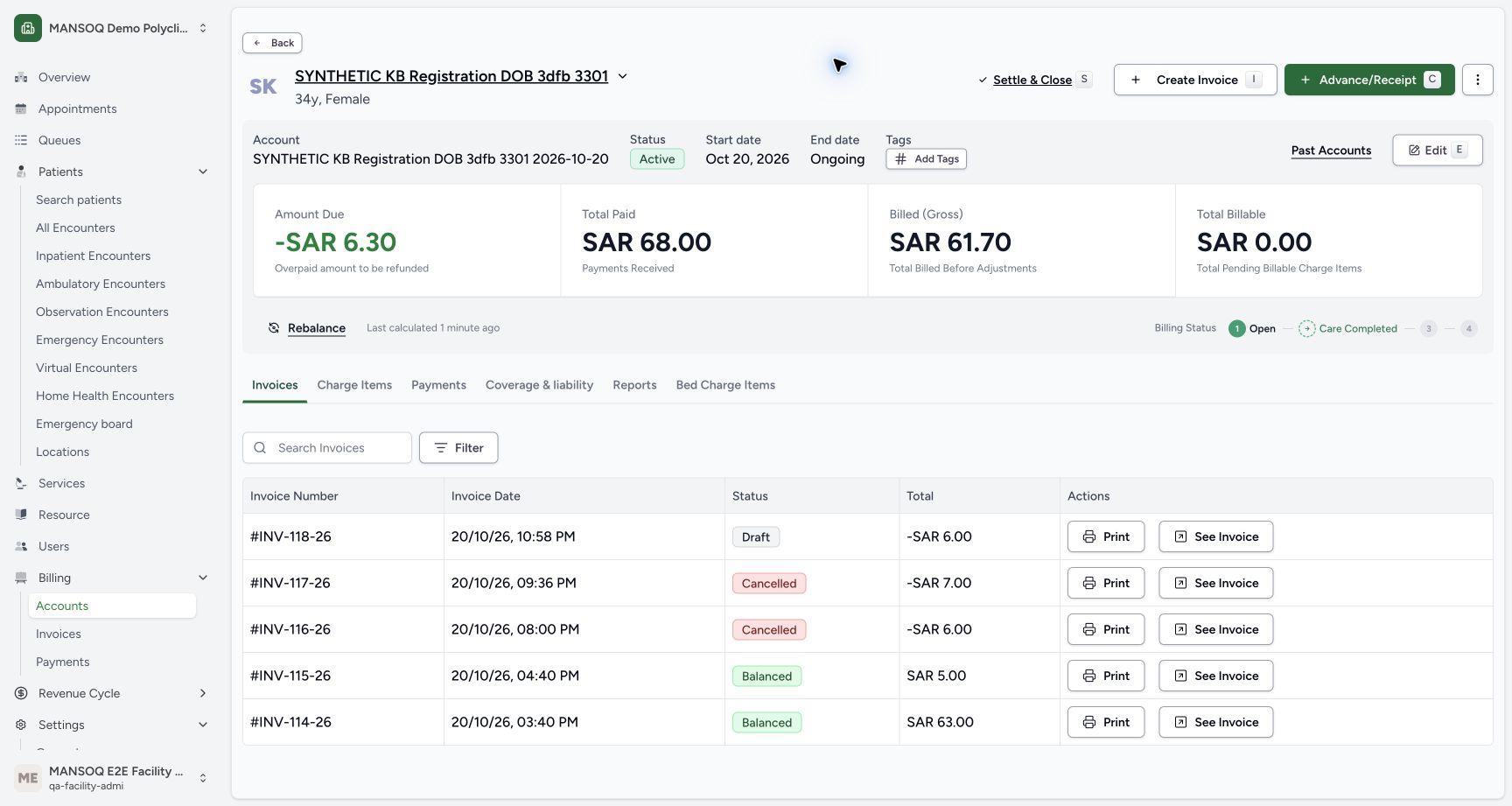
Read the single line and Base Amount of −SAR 6.30. The displayed invoice Net Amount and Total are −SAR 6.00 under the current invoice rounding. The account amount due is −SAR 6.30. Choose the invoice header Account link; it opens the existing account in the same tab. Verify −SAR 6.30 due, SAR 68.00 paid and SAR 61.70 gross. The new INV-118-26 remains Draft at −SAR 6.00; the earlier two Cancelled refunds and two Balanced sales remain separate history.
12345678Read the single received-item Draft credit
Capture details
Isolated synthetic software exercise at MANSOQ Demo Polyclinic/Main Pharmacy. No physical medicine, clinical treatment, cash payout or external exchange is involved.
Image SHA-256 e76393dd00794c4f7a68d9bf3997619ddfca0006b8f40a188a7548210dffca94
- Verify INV-118-26 is Draft: The return has not issued this invoice.
- Verify Issue Date is blank: No invoice issue action forms part of the exercise.
- Verify quantity one: Only the received Paracetamol unit is credited.
- Read unit price minus SAR 6.30: This uses the selected Product current price.
- Read the one line total minus SAR 6.30: There is no HYMOX line.
- Read base amount minus SAR 6.30: Keep the unrounded base separate from the displayed invoice total.
- Read invoice total minus SAR 6.00: Configured invoice rounding affects this displayed total.
- Open the invoice header Account link: This actual link navigates in the same tab.
 12345
12345Review account credit and original invoices
Capture details
Isolated synthetic software exercise at MANSOQ Demo Polyclinic/Main Pharmacy. No physical medicine, clinical treatment, cash payout or external exchange is involved.
Image SHA-256 5e56c79da9caff9f1e41829f510c307bcacb2bb8f248c630e5cf33c6b0b49cb0
- Read account due minus SAR 6.30: The account readout differs from the rounded Draft invoice total.
- Verify paid SAR 68.00: The two original payments remain.
- Read gross SAR 61.70: The received-item credit has changed this account total.
- Verify the new invoice remains Draft: The earlier Cancelled and Balanced invoices remain separate history.
- Choose Payments: Read the original cash entries without creating another payment.
7. Read the original payments and reload
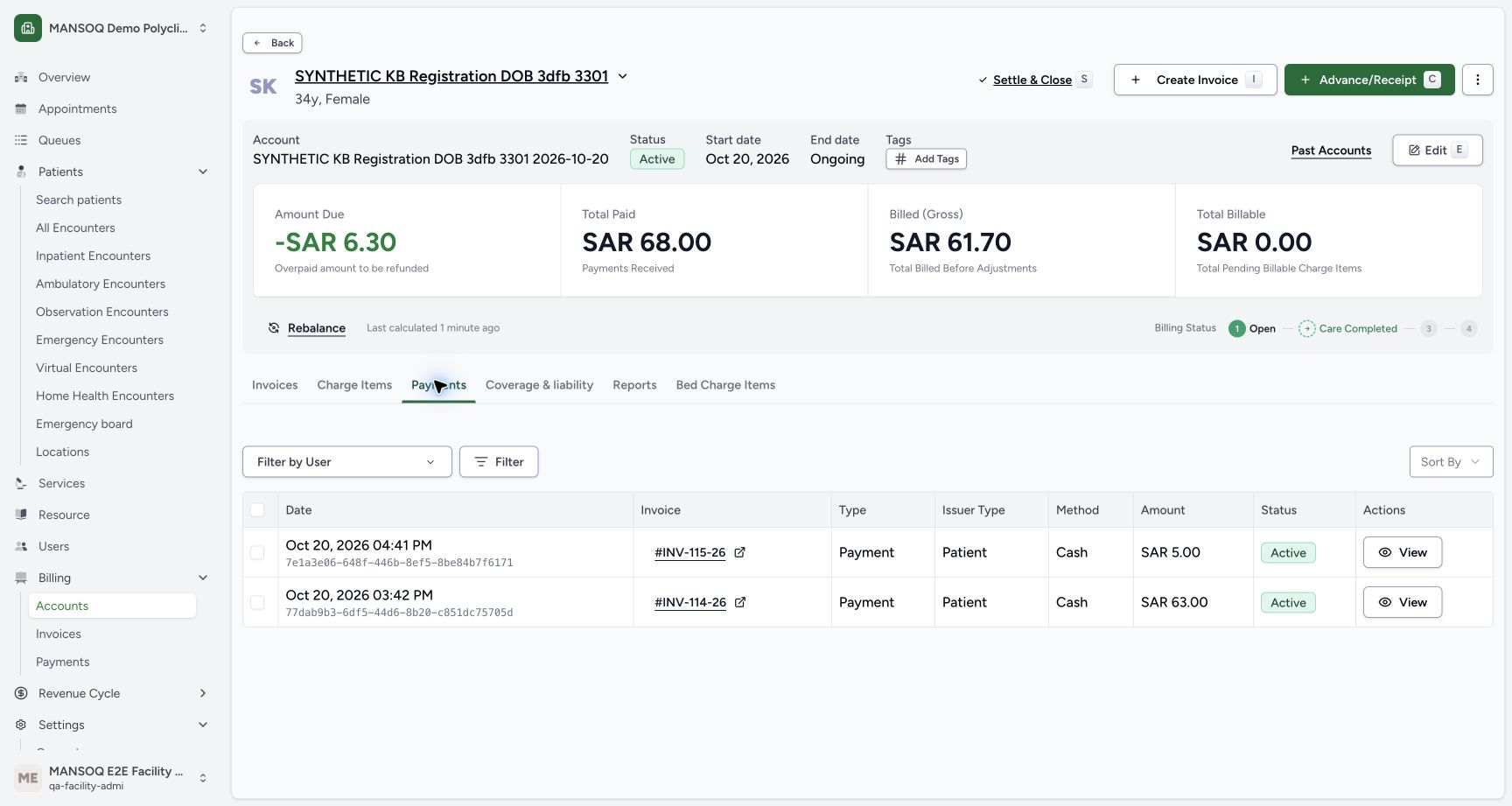
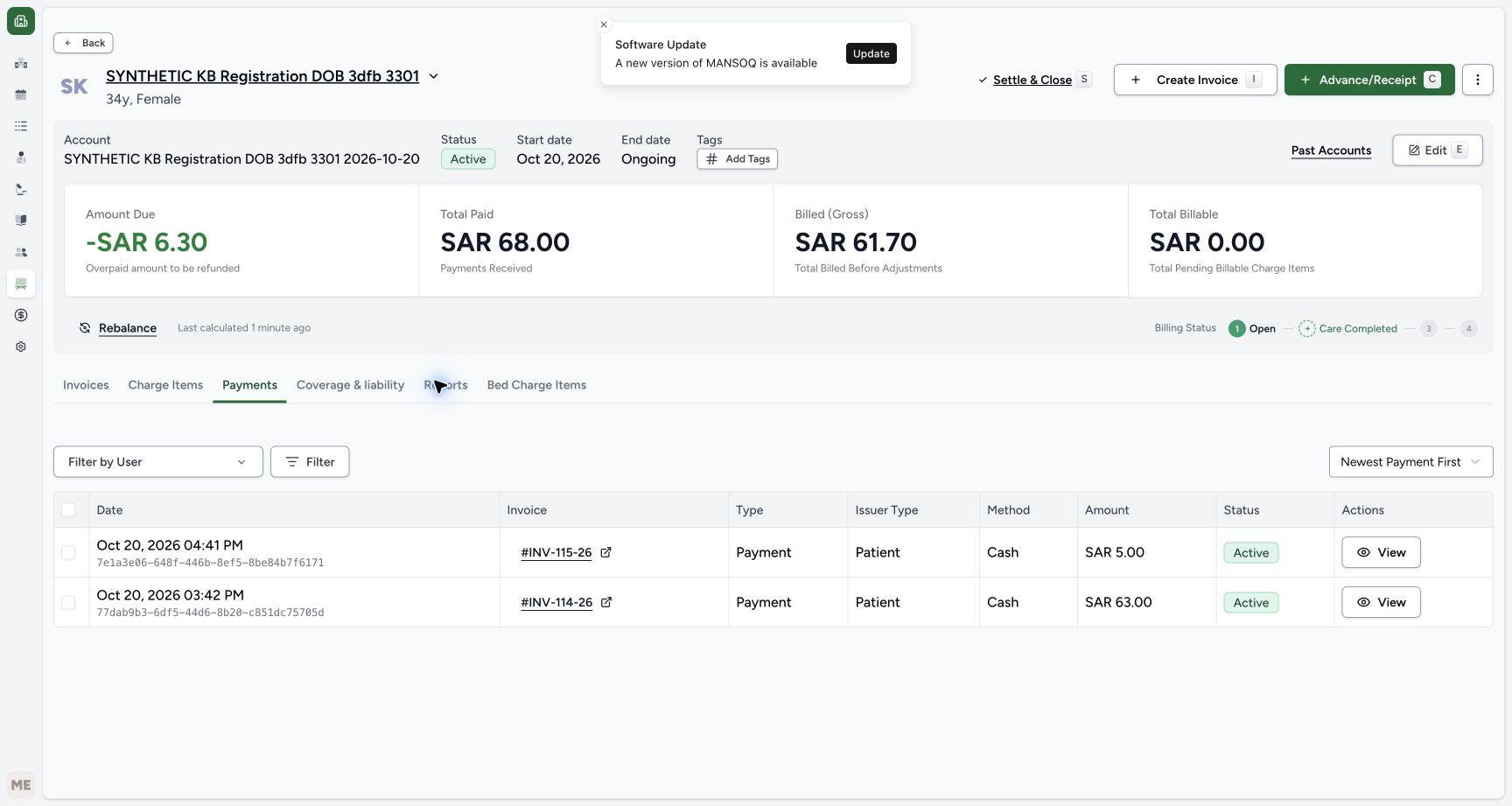
Choose Payments on that account. Verify only the original active Cash entries of SAR 5.00 and SAR 63.00, with total paid SAR 68.00. Reload normally and verify the same payments, −SAR 6.30 due and SAR 61.70 gross remain. A Draft credit is not a recorded cash refund. No payment, payout, manual rebalance or account closure is performed.
12345Review account credit and original invoices
Capture details
Isolated synthetic software exercise at MANSOQ Demo Polyclinic/Main Pharmacy. No physical medicine, clinical treatment, cash payout or external exchange is involved.
Image SHA-256 5e56c79da9caff9f1e41829f510c307bcacb2bb8f248c630e5cf33c6b0b49cb0
- Read account due minus SAR 6.30: The account readout differs from the rounded Draft invoice total.
- Verify paid SAR 68.00: The two original payments remain.
- Read gross SAR 61.70: The received-item credit has changed this account total.
- Verify the new invoice remains Draft: The earlier Cancelled and Balanced invoices remain separate history.
- Choose Payments: Read the original cash entries without creating another payment.
 12345
12345Verify only the original cash payments
Capture details
Isolated synthetic software exercise at MANSOQ Demo Polyclinic/Main Pharmacy. No physical medicine, clinical treatment, cash payout or external exchange is involved.
Image SHA-256 54c8eb25f84f1dfcaf375fafd936cb189fee84143f72507e247de8915b9c1b06
- Verify original SAR 5.00 cash payment: This remains the earlier HYMOX sale payment.
- Verify original SAR 63.00 cash payment: This remains the earlier Paracetamol sale payment.
- Verify the payment is Active: No outgoing refund payment is added here.
- Verify total paid SAR 68.00: The original cash total is unchanged.
- Read account due minus SAR 6.30: The credit has not been paid out.
 12345
12345Verify account and payments after reload
Capture details
Isolated synthetic software exercise at MANSOQ Demo Polyclinic/Main Pharmacy. No physical medicine, clinical treatment, cash payout or external exchange is involved.
Image SHA-256 88f82a7e590e5ca887bb5dd2a180b71a603fd3d96f5878f5a482482821cf2d2b
- Verify due minus SAR 6.30 after reload: The account credit persists.
- Verify paid SAR 68.00 after reload: The original paid total persists.
- Verify gross SAR 61.70 after reload: The account readout persists.
- Verify the same SAR 5.00 entry: No new payment has appeared.
- Verify the same SAR 63.00 entry: The original payment history remains.
8. Return through the originating invoice and verify persistence
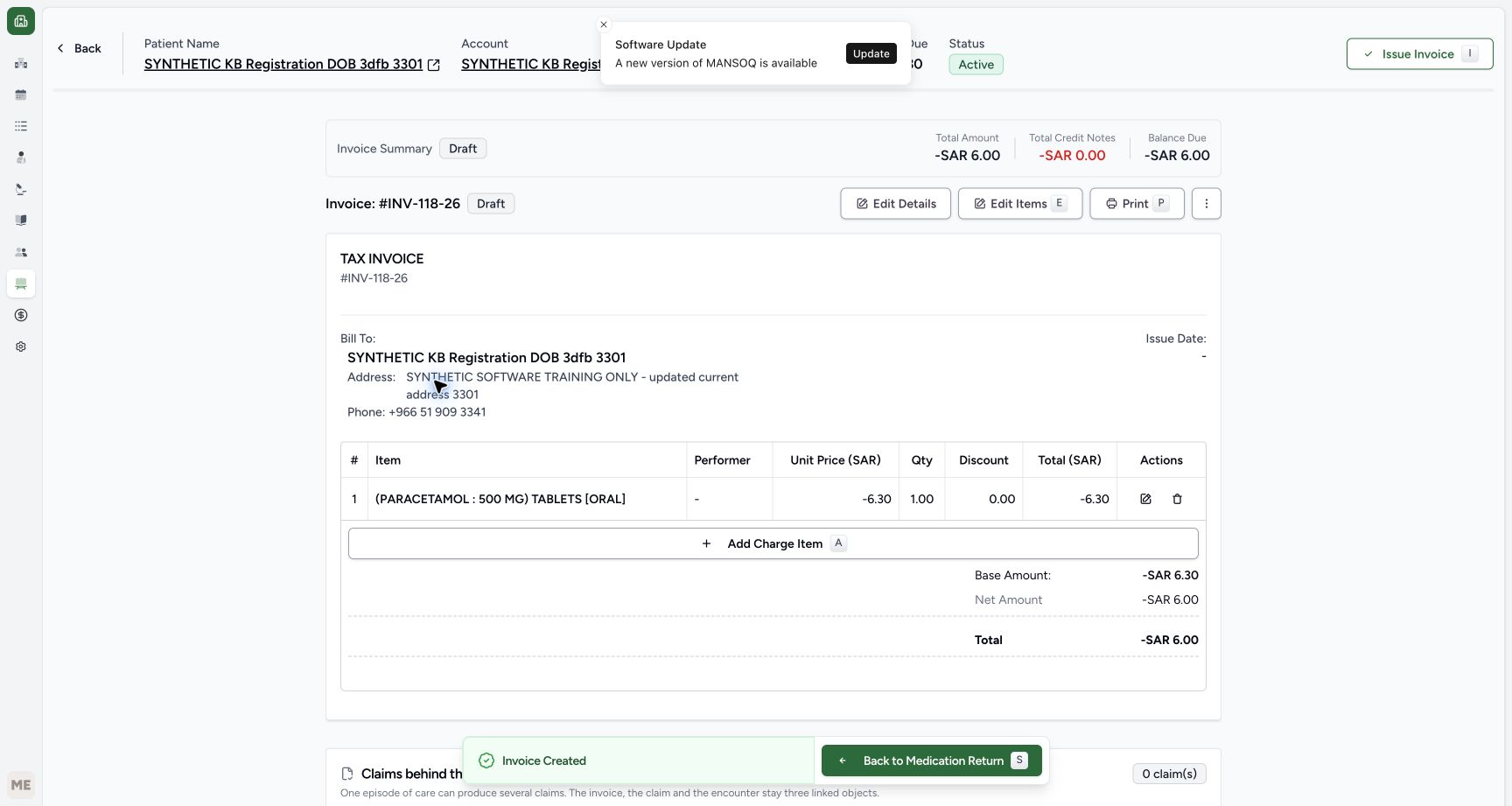
In the same original tab, use Browser Back as needed until the matching INV-118-26 opened from this parent’s View Invoice is shown. Do not use a fixed number of Back actions. Match the patient and invoice, then choose the pictured Back to Medication Return footer. Opening an invoice separately from the account list does not carry this return-source footer. Reload the return normally and verify the parent is Completed, Paracetamol is Completed/Normal and HYMOX remains Abandoned/Normal, one unit each.
 123
123Return through the originating invoice
Capture details
Isolated synthetic software exercise at MANSOQ Demo Polyclinic/Main Pharmacy. No physical medicine, clinical treatment, cash payout or external exchange is involved.
Image SHA-256 d5d6d1bea6ad2db0724bca3b44d348fb9565782f7433f6b7edc9a8a3e3e2883a
- Match Draft INV-118-26: Use Browser Back as needed in the same original tab until this originating invoice is shown.
- Verify the same one-unit line: The Draft credit is unchanged.
- Choose Back to Medication Return: Use this source-aware footer to return to the same mixed return.
 1234
1234Verify the completed mixed return after reload
Capture details
Isolated synthetic software exercise at MANSOQ Demo Polyclinic/Main Pharmacy. No physical medicine, clinical treatment, cash payout or external exchange is involved.
Image SHA-256 aebcb8fa1566ef536260b7efeaf1af9e7efaec8dfbd48dbccabfcf3c7aa811a2
- Verify parent Completed after reload: The saved parent outcome persists.
- Verify HYMOX remains Abandoned: There is no receipt for the HYMOX row.
- Verify Paracetamol remains Completed: The one Normal receipt persists.
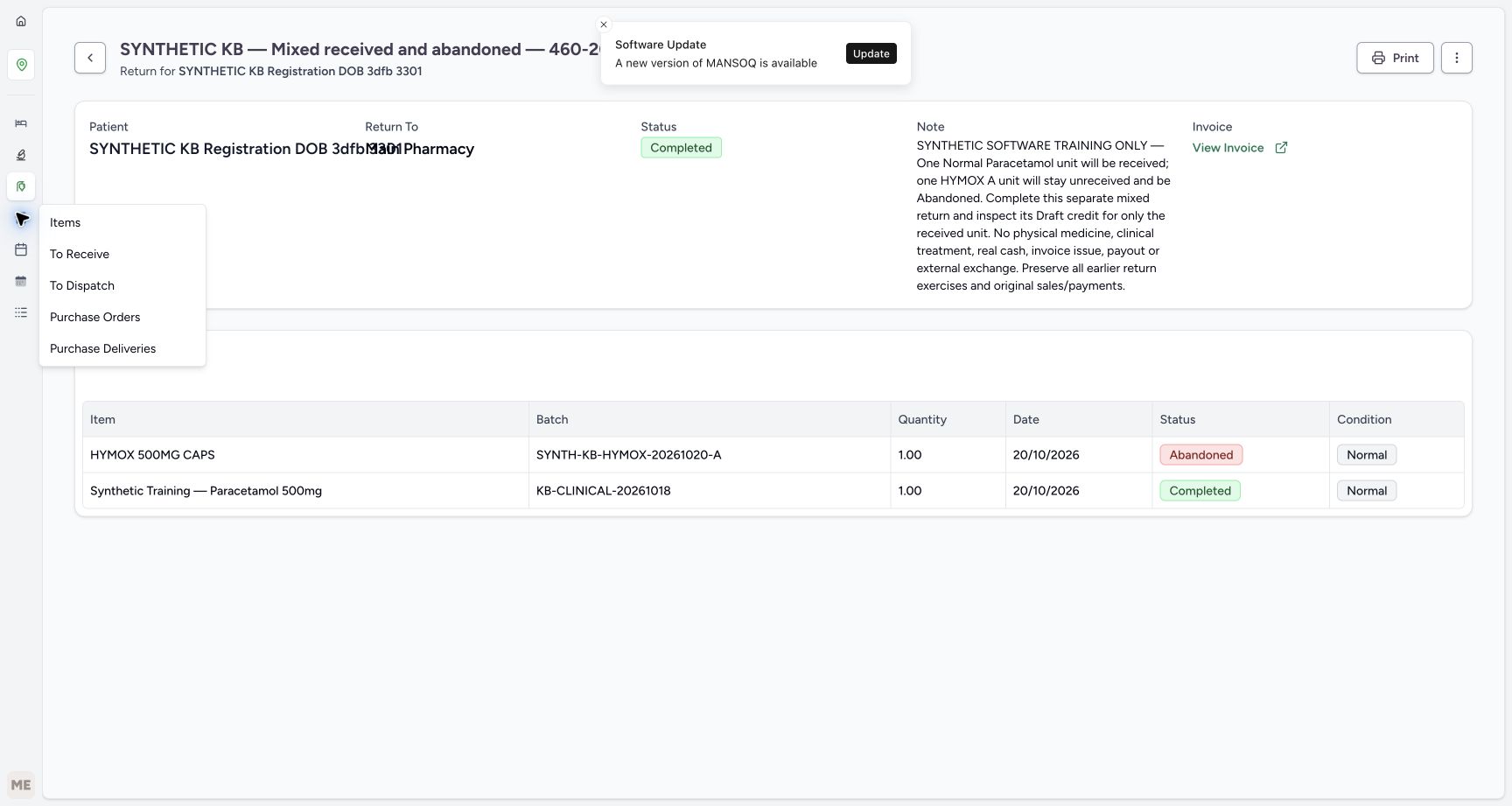
- Open Inventory: Use the visible Inventory icon to open its Items flyout.
9. Verify stock after the single receipt
Choose the visible Inventory icon, then Items in its flyout. Match the existing batches: Paracetamol is now 84, increased once from 83; HYMOX A and B remain zero. Reload inventory normally and verify the same values. Parent completion has not added another unit, and the Abandoned HYMOX row has added none.
1234Verify the completed mixed return after reload
Capture details
Isolated synthetic software exercise at MANSOQ Demo Polyclinic/Main Pharmacy. No physical medicine, clinical treatment, cash payout or external exchange is involved.
Image SHA-256 aebcb8fa1566ef536260b7efeaf1af9e7efaec8dfbd48dbccabfcf3c7aa811a2
- Verify parent Completed after reload: The saved parent outcome persists.
- Verify HYMOX remains Abandoned: There is no receipt for the HYMOX row.
- Verify Paracetamol remains Completed: The one Normal receipt persists.
- Open Inventory: Use the visible Inventory icon to open its Items flyout.
 1
1Choose Items in the Inventory flyout
Capture details
Isolated synthetic software exercise at MANSOQ Demo Polyclinic/Main Pharmacy. No physical medicine, clinical treatment, cash payout or external exchange is involved.
Image SHA-256 e1a56b5236c675bd67576e7192efff70184c108bef820ca160582ace658859f1
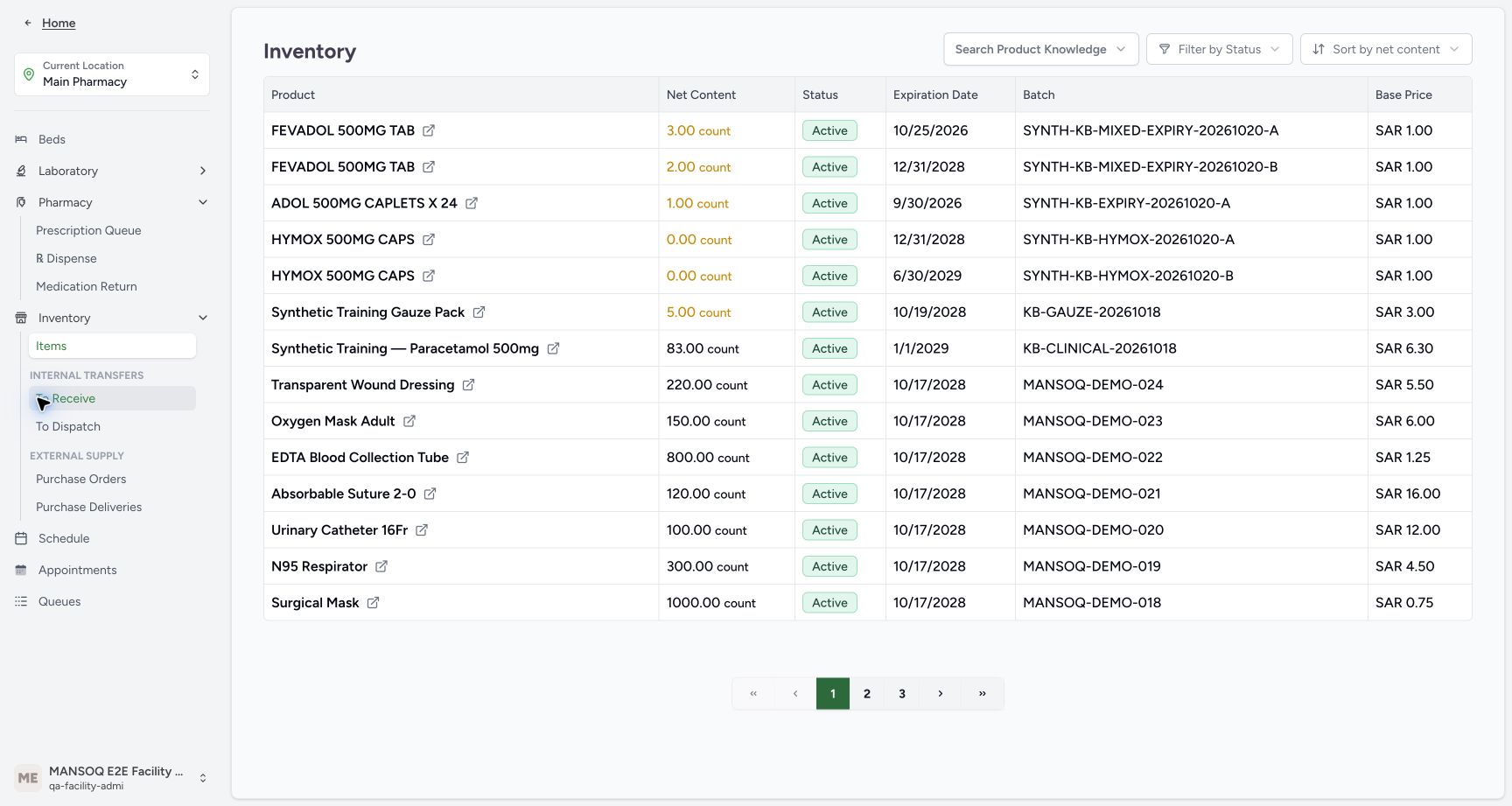
- Choose Items in the flyout: Open the existing pharmacy inventory to verify the saved stock.
1234Read the one-unit stock increase
Capture details
Isolated synthetic software exercise at MANSOQ Demo Polyclinic/Main Pharmacy. No physical medicine, clinical treatment, cash payout or external exchange is involved.
Image SHA-256 f0a5347e1c7526f5bbdc5ee0b5cc15a457613dcdd6c4851ef11fdac7244ff5ae
- Read Paracetamol stock eighty-four: The one Normal receipt added one unit to the original eighty-three.
- Verify HYMOX A remains zero: Abandonment has added no usable stock.
- Verify HYMOX B remains zero: The other lot is untouched.
- Match the original Paracetamol batch: Read KB-CLINICAL-20261018, not another product.
 1234
1234Verify the same stock after reload
Capture details
Isolated synthetic software exercise at MANSOQ Demo Polyclinic/Main Pharmacy. No physical medicine, clinical treatment, cash payout or external exchange is involved.
Image SHA-256 6f8fb3c2d276c8c5919301d0d1e4ff920c9f1bb4cf0cbef33640926eb8e15486
- Verify Paracetamol eighty-four after reload: Parent completion has not added another unit.
- Verify HYMOX A zero after reload: The unreceived row has added nothing.
- Verify HYMOX B zero after reload: The separate lot remains unchanged.
- Verify the same saved batch: The existing batch identity persists.
A mixed return can retain an Abandoned row
This parent has one saved Normal receipt and one valid unreceived row. Completing the parent retains Paracetamol Completed and HYMOX Abandoned. The parent does not require every child to become Completed, and completing it does not receive the Abandoned row. For the different case with no received items, use Handle a return with no received items; that parent cannot create an empty refund.
1234Recognise the no-selection state
Capture details
Isolated synthetic software exercise at MANSOQ Demo Polyclinic/Main Pharmacy. No physical medicine, clinical treatment, cash payout or external exchange is involved.
Image SHA-256 b21d803c8d09c8030b59d037fb98836085703fb38b349325ebda555bc8309ed8
- Verify the parent is Pending: Approval has not received a unit.
- Read disabled receiving with no selection: Select the one eligible row before receiving.
- Select the Paracetamol row: Only this In Progress row is eligible; HYMOX has no receipt checkbox.
- Read the received-item requirement: The parent cannot complete before any item is received.
12345Check the mixed result before completing the parent
Capture details
Isolated synthetic software exercise at MANSOQ Demo Polyclinic/Main Pharmacy. No physical medicine, clinical treatment, cash payout or external exchange is involved.
Image SHA-256 10eeb65d0102e0c699917ba0401ec85f0a8515fdac63bfa746975cc46f87fba4
- Verify the parent is still Pending: Receiving and parent completion are separate actions.
- Verify HYMOX remains Abandoned: The unreceived row has not become Completed.
- Verify Paracetamol is Completed: This is the one received Normal unit.
- Recognise no further receipt is selected: Do not receive the unit again.
- Choose Mark as Completed once: Complete this mixed return after the saved receipt has settled.
1234Verify completed parent and retained child history
Capture details
Isolated synthetic software exercise at MANSOQ Demo Polyclinic/Main Pharmacy. No physical medicine, clinical treatment, cash payout or external exchange is involved.
Image SHA-256 d9b0a9ca48bb0fe1080e03bf068003842b34db729ed21505702659f1f0d611a8
- Verify parent Completed: The mixed child statuses remain distinct.
- Verify retained HYMOX Abandoned history: Parent completion does not receive this item.
- Verify retained Paracetamol Completed history: This is still the single received unit.
- Open View Invoice: Inspect the generated Draft credit without issuing or printing it.
1234Verify the completed mixed return after reload
Capture details
Isolated synthetic software exercise at MANSOQ Demo Polyclinic/Main Pharmacy. No physical medicine, clinical treatment, cash payout or external exchange is involved.
Image SHA-256 aebcb8fa1566ef536260b7efeaf1af9e7efaec8dfbd48dbccabfcf3c7aa811a2
- Verify parent Completed after reload: The saved parent outcome persists.
- Verify HYMOX remains Abandoned: There is no receipt for the HYMOX row.
- Verify Paracetamol remains Completed: The one Normal receipt persists.
- Open Inventory: Use the visible Inventory icon to open its Items flyout.
Leave the valid credit Draft without a payout
Only the received Paracetamol unit contributes the −SAR 6.30 credit line. The invoice’s displayed rounded −SAR 6.00 and the account’s −SAR 6.30 due are distinct readouts in this exercise. The original cash payments remain SAR 5.00 and SAR 63.00. This lesson ends with a valid Draft credit; it does not issue the invoice, make a cash payout or correct the return as entered in error.
12345678Read the single received-item Draft credit
Capture details
Isolated synthetic software exercise at MANSOQ Demo Polyclinic/Main Pharmacy. No physical medicine, clinical treatment, cash payout or external exchange is involved.
Image SHA-256 e76393dd00794c4f7a68d9bf3997619ddfca0006b8f40a188a7548210dffca94
- Verify INV-118-26 is Draft: The return has not issued this invoice.
- Verify Issue Date is blank: No invoice issue action forms part of the exercise.
- Verify quantity one: Only the received Paracetamol unit is credited.
- Read unit price minus SAR 6.30: This uses the selected Product current price.
- Read the one line total minus SAR 6.30: There is no HYMOX line.
- Read base amount minus SAR 6.30: Keep the unrounded base separate from the displayed invoice total.
- Read invoice total minus SAR 6.00: Configured invoice rounding affects this displayed total.
- Open the invoice header Account link: This actual link navigates in the same tab.
12345Review account credit and original invoices
Capture details
Isolated synthetic software exercise at MANSOQ Demo Polyclinic/Main Pharmacy. No physical medicine, clinical treatment, cash payout or external exchange is involved.
Image SHA-256 5e56c79da9caff9f1e41829f510c307bcacb2bb8f248c630e5cf33c6b0b49cb0
- Read account due minus SAR 6.30: The account readout differs from the rounded Draft invoice total.
- Verify paid SAR 68.00: The two original payments remain.
- Read gross SAR 61.70: The received-item credit has changed this account total.
- Verify the new invoice remains Draft: The earlier Cancelled and Balanced invoices remain separate history.
- Choose Payments: Read the original cash entries without creating another payment.
12345Verify only the original cash payments
Capture details
Isolated synthetic software exercise at MANSOQ Demo Polyclinic/Main Pharmacy. No physical medicine, clinical treatment, cash payout or external exchange is involved.
Image SHA-256 54c8eb25f84f1dfcaf375fafd936cb189fee84143f72507e247de8915b9c1b06
- Verify original SAR 5.00 cash payment: This remains the earlier HYMOX sale payment.
- Verify original SAR 63.00 cash payment: This remains the earlier Paracetamol sale payment.
- Verify the payment is Active: No outgoing refund payment is added here.
- Verify total paid SAR 68.00: The original cash total is unchanged.
- Read account due minus SAR 6.30: The credit has not been paid out.
1234Read the one-unit stock increase
Capture details
Isolated synthetic software exercise at MANSOQ Demo Polyclinic/Main Pharmacy. No physical medicine, clinical treatment, cash payout or external exchange is involved.
Image SHA-256 f0a5347e1c7526f5bbdc5ee0b5cc15a457613dcdd6c4851ef11fdac7244ff5ae
- Read Paracetamol stock eighty-four: The one Normal receipt added one unit to the original eighty-three.
- Verify HYMOX A remains zero: Abandonment has added no usable stock.
- Verify HYMOX B remains zero: The other lot is untouched.
- Match the original Paracetamol batch: Read KB-CLINICAL-20261018, not another product.
Troubleshooting
Receiving or parent completion is disabled
Check selection, loading and saved row statuses. With nothing selected, receiving is disabled. Select only the eligible In Progress Paracetamol row; an Abandoned row has no receipt checkbox. Complete the parent only after the receipt has settled, at least one item is Completed and no item remains selected. A selection or disabled-button state alone is not proof of receiving.
1234Recognise the no-selection state
Capture details
Isolated synthetic software exercise at MANSOQ Demo Polyclinic/Main Pharmacy. No physical medicine, clinical treatment, cash payout or external exchange is involved.
Image SHA-256 b21d803c8d09c8030b59d037fb98836085703fb38b349325ebda555bc8309ed8
- Verify the parent is Pending: Approval has not received a unit.
- Read disabled receiving with no selection: Select the one eligible row before receiving.
- Select the Paracetamol row: Only this In Progress row is eligible; HYMOX has no receipt checkbox.
- Read the received-item requirement: The parent cannot complete before any item is received.
123Select only Paracetamol for receipt
Capture details
Isolated synthetic software exercise at MANSOQ Demo Polyclinic/Main Pharmacy. No physical medicine, clinical treatment, cash payout or external exchange is involved.
Image SHA-256 3b993ce2c65621dfece178d395a7b11cb4d2c5fd968fcd4b5f8ae2409db93cfb
- Verify Paracetamol is selected: The page may already select the eligible row when Pending opens.
- Verify HYMOX stays Abandoned: Do not receive or change this row.
- Open Receive & Update Stock: The confirmation applies to the single selected Paracetamol row.
1234Confirm one Normal receipt
Capture details
Isolated synthetic software exercise at MANSOQ Demo Polyclinic/Main Pharmacy. No physical medicine, clinical treatment, cash payout or external exchange is involved.
Image SHA-256 9fabb1a48c2c16b12e97959cfeb8a70f606817fd041de3f521edb0d117c29e7f
- Verify one selected item: Only the Paracetamol unit is included.
- Verify Completed receiving status: This is the receipt status for the selected item.
- Verify Normal condition: Normal receiving adds this unit to usable stock.
- Confirm the one-unit receipt once: Wait for the settled saved rows.
12345Check the mixed result before completing the parent
Capture details
Isolated synthetic software exercise at MANSOQ Demo Polyclinic/Main Pharmacy. No physical medicine, clinical treatment, cash payout or external exchange is involved.
Image SHA-256 10eeb65d0102e0c699917ba0401ec85f0a8515fdac63bfa746975cc46f87fba4
- Verify the parent is still Pending: Receiving and parent completion are separate actions.
- Verify HYMOX remains Abandoned: The unreceived row has not become Completed.
- Verify Paracetamol is Completed: This is the one received Normal unit.
- Recognise no further receipt is selected: Do not receive the unit again.
- Choose Mark as Completed once: Complete this mixed return after the saved receipt has settled.
The invoice, account or notice appears to tell a different story
Read each saved field in context: line/Base −SAR 6.30, displayed rounded invoice Total −SAR 6.00, account due −SAR 6.30 and unchanged paid SAR 68.00. Existing Cancelled invoices belong to earlier exercises. Software Update and Invoice Created notices can remain visible during navigation; neither proves another receipt, a second invoice or a payout. Use the originating invoice’s source-aware footer to return to this parent.
12345678Read the single received-item Draft credit
Capture details
Isolated synthetic software exercise at MANSOQ Demo Polyclinic/Main Pharmacy. No physical medicine, clinical treatment, cash payout or external exchange is involved.
Image SHA-256 e76393dd00794c4f7a68d9bf3997619ddfca0006b8f40a188a7548210dffca94
- Verify INV-118-26 is Draft: The return has not issued this invoice.
- Verify Issue Date is blank: No invoice issue action forms part of the exercise.
- Verify quantity one: Only the received Paracetamol unit is credited.
- Read unit price minus SAR 6.30: This uses the selected Product current price.
- Read the one line total minus SAR 6.30: There is no HYMOX line.
- Read base amount minus SAR 6.30: Keep the unrounded base separate from the displayed invoice total.
- Read invoice total minus SAR 6.00: Configured invoice rounding affects this displayed total.
- Open the invoice header Account link: This actual link navigates in the same tab.
12345Review account credit and original invoices
Capture details
Isolated synthetic software exercise at MANSOQ Demo Polyclinic/Main Pharmacy. No physical medicine, clinical treatment, cash payout or external exchange is involved.
Image SHA-256 5e56c79da9caff9f1e41829f510c307bcacb2bb8f248c630e5cf33c6b0b49cb0
- Read account due minus SAR 6.30: The account readout differs from the rounded Draft invoice total.
- Verify paid SAR 68.00: The two original payments remain.
- Read gross SAR 61.70: The received-item credit has changed this account total.
- Verify the new invoice remains Draft: The earlier Cancelled and Balanced invoices remain separate history.
- Choose Payments: Read the original cash entries without creating another payment.
12345Verify account and payments after reload
Capture details
Isolated synthetic software exercise at MANSOQ Demo Polyclinic/Main Pharmacy. No physical medicine, clinical treatment, cash payout or external exchange is involved.
Image SHA-256 88f82a7e590e5ca887bb5dd2a180b71a603fd3d96f5878f5a482482821cf2d2b
- Verify due minus SAR 6.30 after reload: The account credit persists.
- Verify paid SAR 68.00 after reload: The original paid total persists.
- Verify gross SAR 61.70 after reload: The account readout persists.
- Verify the same SAR 5.00 entry: No new payment has appeared.
- Verify the same SAR 63.00 entry: The original payment history remains.
123Return through the originating invoice
Capture details
Isolated synthetic software exercise at MANSOQ Demo Polyclinic/Main Pharmacy. No physical medicine, clinical treatment, cash payout or external exchange is involved.
Image SHA-256 d5d6d1bea6ad2db0724bca3b44d348fb9565782f7433f6b7edc9a8a3e3e2883a
- Match Draft INV-118-26: Use Browser Back as needed in the same original tab until this originating invoice is shown.
- Verify the same one-unit line: The Draft credit is unchanged.
- Choose Back to Medication Return: Use this source-aware footer to return to the same mixed return.
1234Verify the completed mixed return after reload
Capture details
Isolated synthetic software exercise at MANSOQ Demo Polyclinic/Main Pharmacy. No physical medicine, clinical treatment, cash payout or external exchange is involved.
Image SHA-256 aebcb8fa1566ef536260b7efeaf1af9e7efaec8dfbd48dbccabfcf3c7aa811a2
- Verify parent Completed after reload: The saved parent outcome persists.
- Verify HYMOX remains Abandoned: There is no receipt for the HYMOX row.
- Verify Paracetamol remains Completed: The one Normal receipt persists.
- Open Inventory: Use the visible Inventory icon to open its Items flyout.
Source evidence
Every citation uses this exact committed version. The private source repository requires access.
- repositories/platform/mansoq-core/mansoq/emr/api/viewsets/inventory/delivery_order.py:126 ·
460538ee7089a098affbea46de6a365430f608b9Source file checksum
d18ed0813750bf23a1da2a7553880bb340724b8c63396e0a2e045c0b66843063 - repositories/platform/mansoq-core/mansoq/emr/resources/inventory/inventory_item/sync_inventory_item.py:47 ·
460538ee7089a098affbea46de6a365430f608b9Source file checksum
a6f8395ab8059b937700d212bbbcce46c1fc633848c38026c4c8ee9bc2e4c573 - repositories/platform/mansoq-core/mansoq/emr/resources/invoice/return_items_invoice.py:40 ·
460538ee7089a098affbea46de6a365430f608b9Source file checksum
d5667f0da3428d4223da2d2a5d1ae91a0c9924c5a79be298df61d7b6efa993ba - repositories/platform/mansoq-core/mansoq/emr/resources/invoice/sync_items.py:50 ·
460538ee7089a098affbea46de6a365430f608b9Source file checksum
e232d244e2f09171c7cf76ffebd6da04bd62a6f9353de709224a08c0fde8cff3 - repositories/platform/mansoq-web/src/pages/Facility/billing/account/AccountShow.tsx:321 ·
460538ee7089a098affbea46de6a365430f608b9Source file checksum
9277e49a749307ff5f222c77dbb069a9f827ecc24763bf1a5e7fb4ce9998d8ad - repositories/platform/mansoq-web/src/pages/Facility/billing/invoice/InvoiceShow.tsx:399 ·
460538ee7089a098affbea46de6a365430f608b9Source file checksum
9068995fbe413fe3e14031d9c832943cc14d9188a5f72be91d3c16baa53fc6ff - repositories/platform/mansoq-web/src/pages/Facility/services/pharmacy/MedicationReturnShow.tsx:325 ·
460538ee7089a098affbea46de6a365430f608b9Source file checksum
a261f3259c204106ae04f38271be2ce29ef8d532b9aa9664e4c44df3dab97565 - repositories/platform/mansoq-web/src/pages/Facility/services/pharmacy/components/AddMedicationReturnItemForm.tsx:209 ·
460538ee7089a098affbea46de6a365430f608b9Source file checksum
6b9fd8a41fdbbacee538c541940bf8e49968e2481340caa06d9b050a6663106f - repositories/platform/mansoq-web/src/pages/Facility/services/pharmacy/components/MedicationReturnItemsTable.tsx:221 ·
460538ee7089a098affbea46de6a365430f608b9Source file checksum
7fc8409f101c0d1584f88c889ff85351dc15680a81babc4c7dea2dd6b4a196eb