 MANSOQ
 Pharmacy · VERSION 460538ee
Handle a return with no received items
Recognise why a return with only an unreceived Abandoned item cannot be completed or create a refund. Keep the unfinished return distinct from an optional correction of a deliberately mistaken entry, then verify unchanged stock, original sales and payments.
Facility Admin
 123456
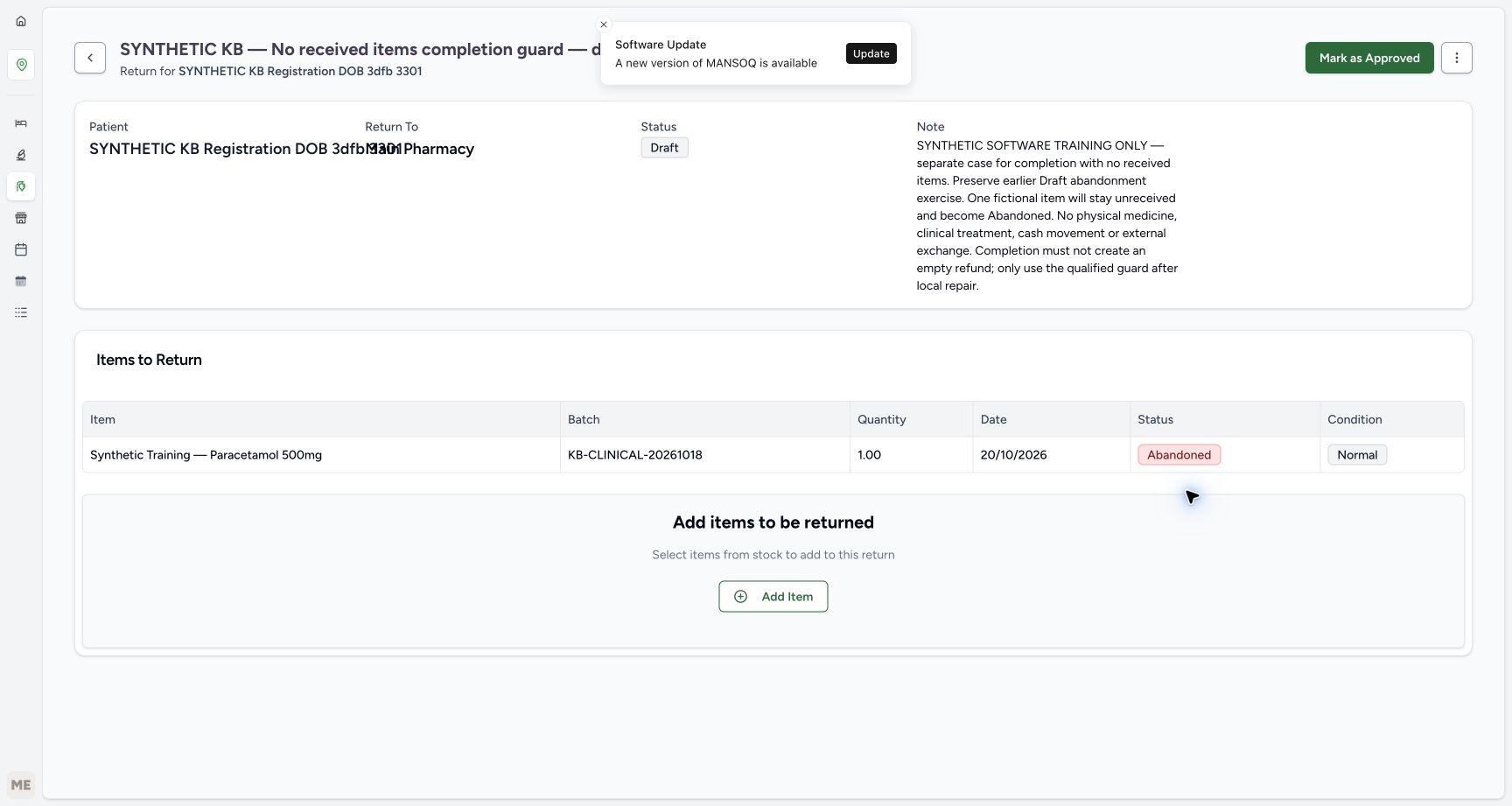
Start with one unreceived Abandoned item
Capture details
Isolated synthetic software exercise at MANSOQ Demo Polyclinic/Main Pharmacy. No physical medicine, clinical treatment, cash movement or external exchange is involved.
Image SHA-256 b7e781d12f01f37011e5086eca5183d5e240725d60d965a9e36694c529bc0f16
- Match the patient subtitle: Use the named synthetic patient and the separate no-received-items exercise.
- Verify Draft parent: This return has not been approved or completed.
- Verify the item is Abandoned: The unit remains unreceived.
- Verify quantity one: Keep the saved one-unit history.
- Read retained Normal condition: This label does not mean the unit was received.
- Choose Mark as Approved once: Move this reviewed Draft to Pending without receiving stock.
 123456
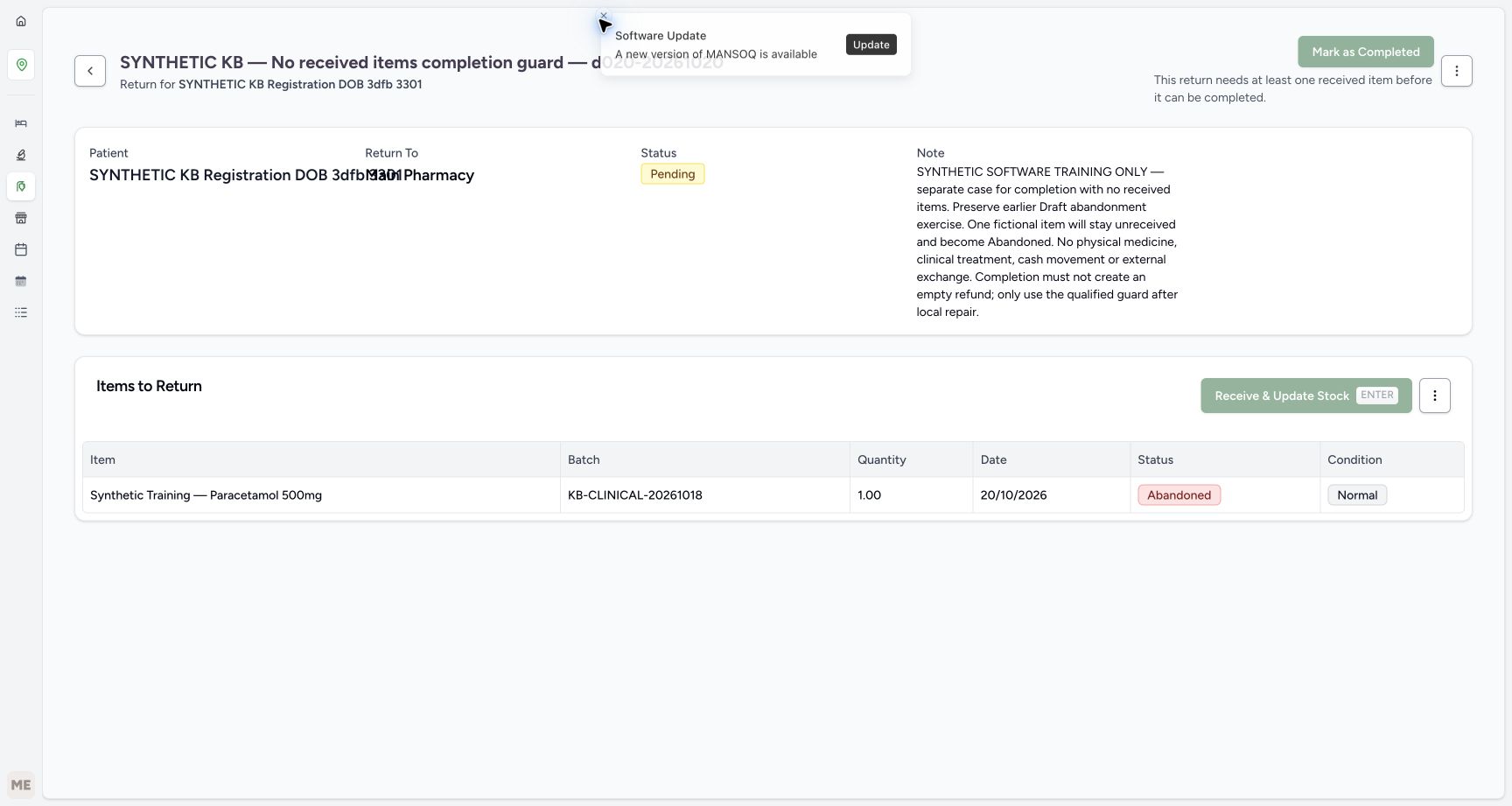
Read the completion requirement
Capture details
Isolated synthetic software exercise at MANSOQ Demo Polyclinic/Main Pharmacy. No physical medicine, clinical treatment, cash movement or external exchange is involved.
Image SHA-256 0672c7bd7a4b6e5639f2bc527d6d63243d6dc7c1d53c8a0d09d8b14eca490df7
- Verify Pending: Approval has not received the unit.
- Recognise disabled completion: No completion request is sent from this disabled action.
- Read the received-item requirement: This return needs at least one received item before it can be completed.
- Verify the only item is Abandoned: There is no Completed receipt in this return.
- Read Normal without inferring receipt: The historical condition is separate from receiving status.
- Recognise disabled receiving: There is no selected receivable In Progress row here.
 12345678
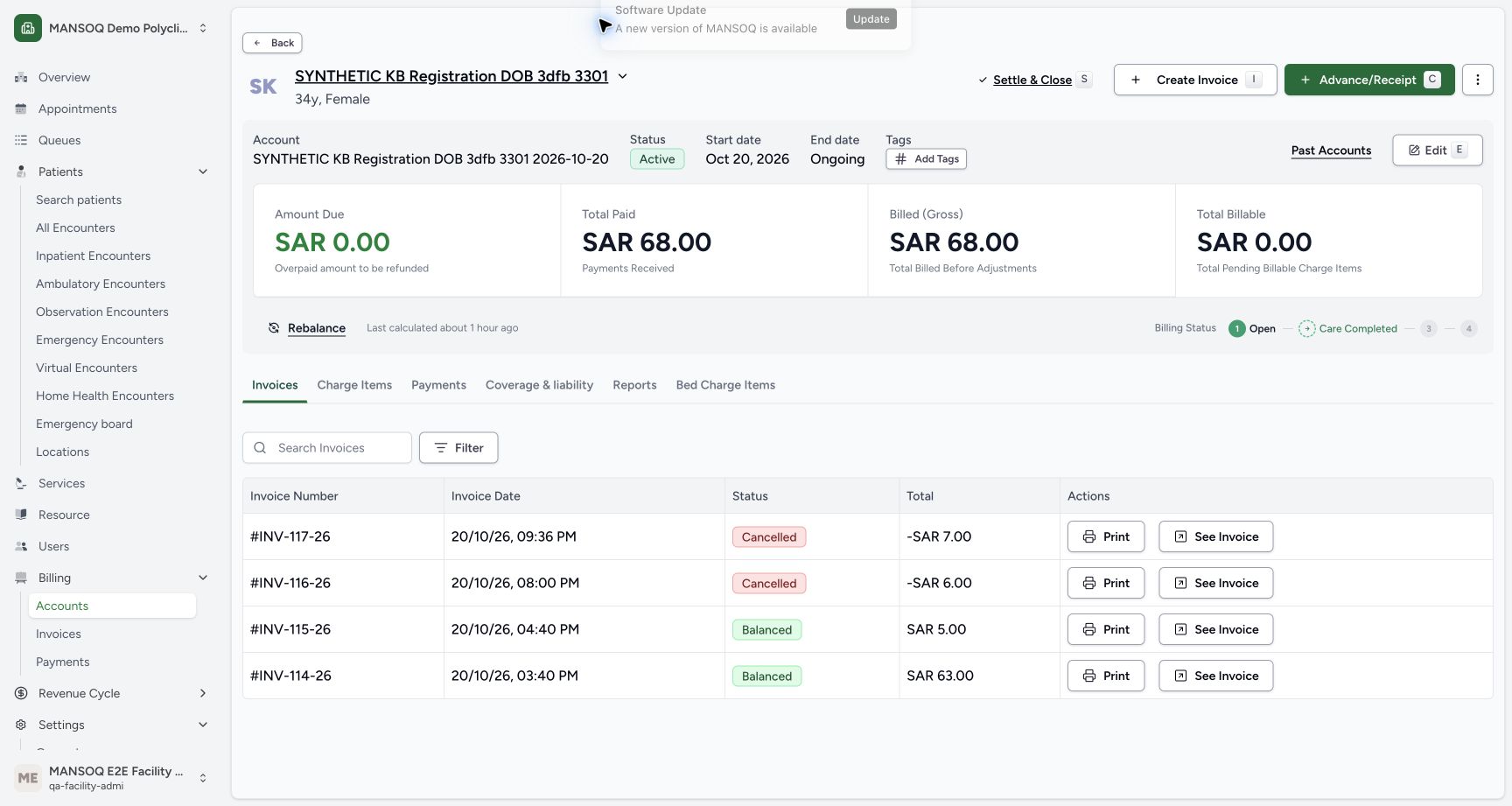
Read the existing account without a new credit
Capture details
Isolated synthetic software exercise at MANSOQ Demo Polyclinic/Main Pharmacy. No physical medicine, clinical treatment, cash movement or external exchange is involved.
Image SHA-256 0ce6b2258b3c7c581b30d8398bda4480562bed5829c09eb5835585d294fcad26
- Read zero account due: This branch has added no credit.
- Read paid SAR 68.00: The original payment total is unchanged.
- Read gross SAR 68.00: The original sales remain the gross.
- Identify earlier Cancelled INV-117-26: This belongs to the prior manual two-item correction.
- Identify earlier Cancelled INV-116-26: This belongs to the prior Damaged correction.
- Verify HYMOX sale Balanced: The earlier SAR 5.00 sale remains.
- Verify Paracetamol sale Balanced: The earlier SAR 63.00 sale remains.
- Choose Payments: Read the original cash entries without creating another.
14 of 14 content blocks have reviewed image alignment.
Before you begin
- Use the existing authorised Facility Admin at MANSOQ Demo Polyclinic/Main Pharmacy and the named synthetic patient. This isolated software exercise involves no physical medicine, clinical treatment, cash movement or external exchange.123456
Recorded release 460538ee · 2026-10-20T19:29:19.636910+00:00 · 1728 × 921 Start with one unreceived Abandoned item
Capture details
Isolated synthetic software exercise at MANSOQ Demo Polyclinic/Main Pharmacy. No physical medicine, clinical treatment, cash movement or external exchange is involved.
Image SHA-256
b7e781d12f01f37011e5086eca5183d5e240725d60d965a9e36694c529bc0f16- Match the patient subtitle: Use the named synthetic patient and the separate no-received-items exercise.
- Verify Draft parent: This return has not been approved or completed.
- Verify the item is Abandoned: The unit remains unreceived.
- Verify quantity one: Keep the saved one-unit history.
- Read retained Normal condition: This label does not mean the unit was received.
- Choose Mark as Approved once: Move this reviewed Draft to Pending without receiving stock.
 12345
12345Recorded release 460538ee · 2026-10-20T19:32:04.626061+00:00 · 1728 × 921 Read unchanged usable stock
Capture details
Isolated synthetic software exercise at MANSOQ Demo Polyclinic/Main Pharmacy. No physical medicine, clinical treatment, cash movement or external exchange is involved.
Image SHA-256
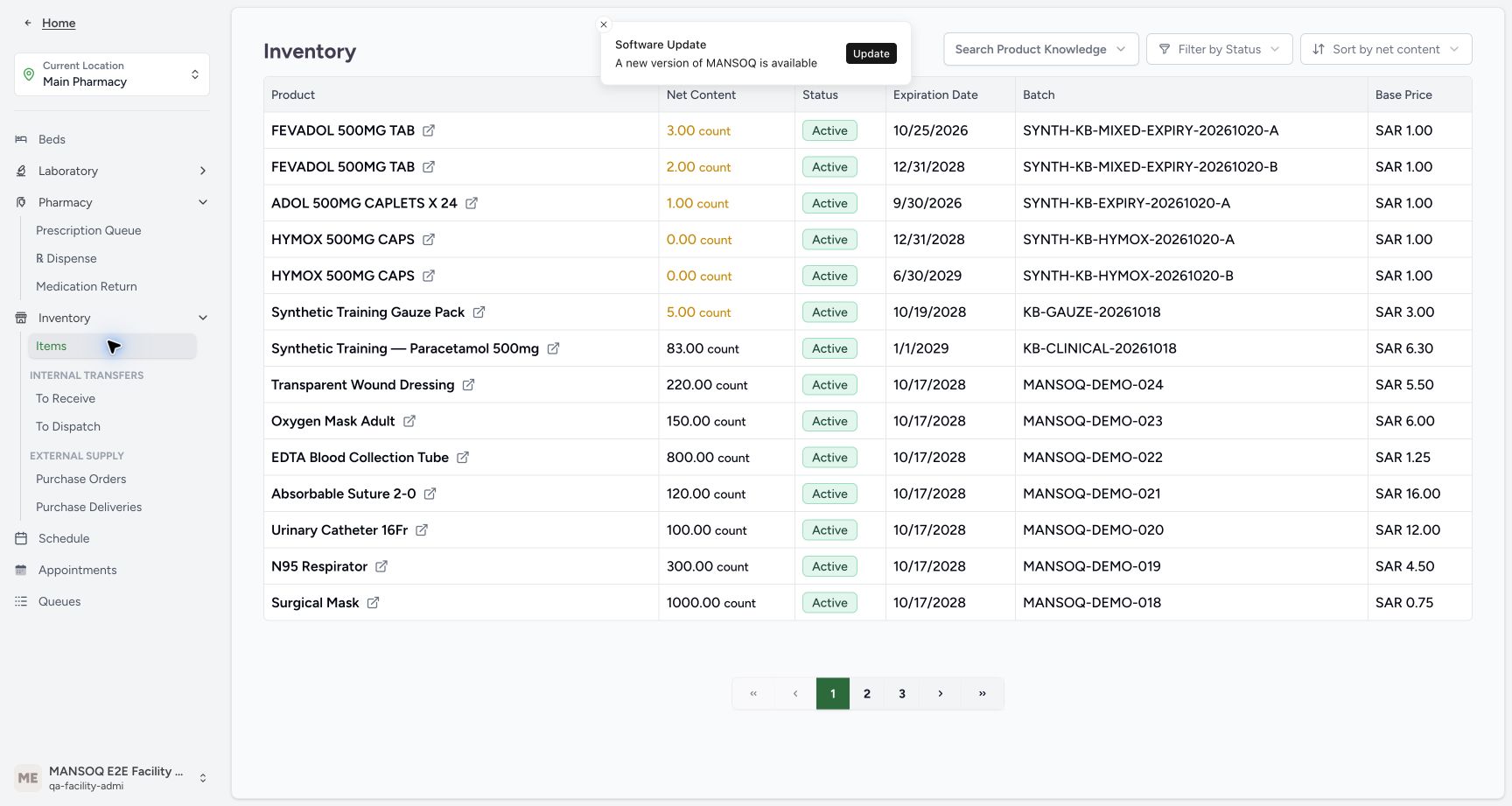
0ba0bdeabc560ae4136ccc336e61ad6404489401fd026a86d3db5205cc8f98c5- Verify Inventory Items view: The selected Items page shows the inventory readback; use the flyout action when navigation is collapsed.
- Read Paracetamol stock eighty-three: No unreceived unit has been added.
- Read HYMOX A stock zero: The earlier A lot is unchanged.
- Read HYMOX B stock zero: The earlier B lot is unchanged.
- Match the original Paracetamol batch: Use KB-CLINICAL-20261018.
- Resume the separate saved Draft named “SYNTHETIC KB — No received items completion guard — d020-20261020”, containing one unreceived Abandoned Paracetamol unit. Keep earlier return exercises and the original paid sales unchanged.123456
Recorded release 460538ee · 2026-10-20T19:29:19.636910+00:00 · 1728 × 921 Start with one unreceived Abandoned item
Capture details
Isolated synthetic software exercise at MANSOQ Demo Polyclinic/Main Pharmacy. No physical medicine, clinical treatment, cash movement or external exchange is involved.
Image SHA-256
b7e781d12f01f37011e5086eca5183d5e240725d60d965a9e36694c529bc0f16- Match the patient subtitle: Use the named synthetic patient and the separate no-received-items exercise.
- Verify Draft parent: This return has not been approved or completed.
- Verify the item is Abandoned: The unit remains unreceived.
- Verify quantity one: Keep the saved one-unit history.
- Read retained Normal condition: This label does not mean the unit was received.
- Choose Mark as Approved once: Move this reviewed Draft to Pending without receiving stock.
 1234567
Recorded release 460538ee · 2026-10-20T19:33:42.035500+00:00 · 1728 × 921 Use the original sale’s direct Account link
Capture details
Isolated synthetic software exercise at MANSOQ Demo Polyclinic/Main Pharmacy. No physical medicine, clinical treatment, cash movement or external exchange is involved.
Image SHA-256
aba5654cdcb5733e6a368e92498dcf98b2f9e67d7860d75adac18bb2d607b243- Match the original sale patient: Use the verified named synthetic patient.
- Verify original Completed sale: Keep the sale separate from the unreceived return.
- Verify original quantity ten: The original sale has not been changed.
- Verify original paid SAR 63.00: No replacement payment was recorded.
- Verify original amount due zero: The original sale remains paid.
- Open Account directly: This link opens the existing account in a new tab.
- Match the original batch: The original sale still uses KB-CLINICAL-20261018.
1. Verify the separate Draft and unreceived item
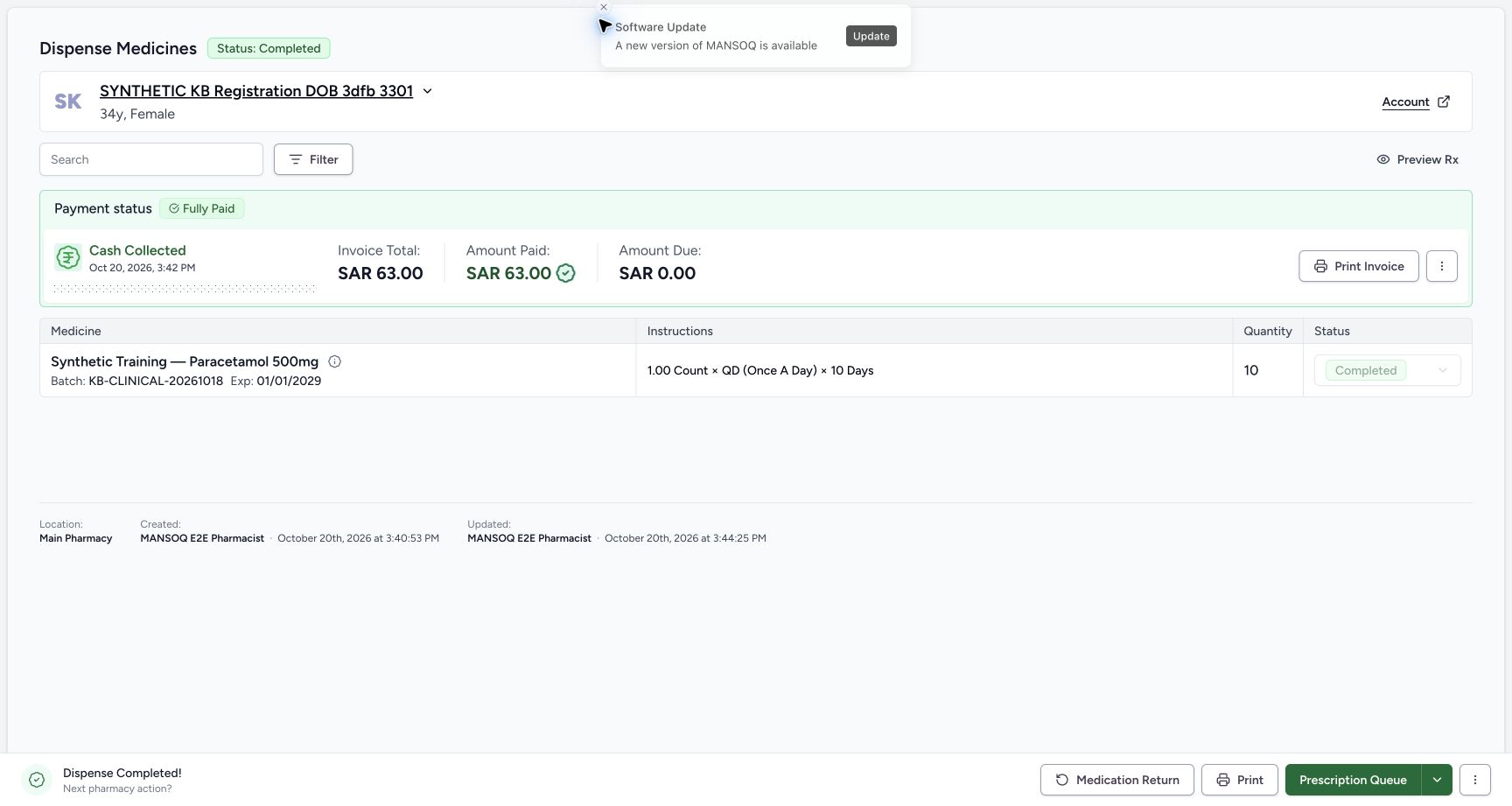
Use the creation, one-unit Save and row-abandonment controls in Abandon an unreceived return item and keep the parent Draft as the shared prerequisite. Resume this separate saved Draft rather than changing the earlier exercise. Confirm the readable patient subtitle, one Abandoned unit and batch KB-CLINICAL-20261018. Normal is retained condition metadata; it does not establish receipt. Patient and Return To overlap in this layout, so use the readable subtitle for identity.
123456Start with one unreceived Abandoned item
Capture details
Isolated synthetic software exercise at MANSOQ Demo Polyclinic/Main Pharmacy. No physical medicine, clinical treatment, cash movement or external exchange is involved.
Image SHA-256 b7e781d12f01f37011e5086eca5183d5e240725d60d965a9e36694c529bc0f16
- Match the patient subtitle: Use the named synthetic patient and the separate no-received-items exercise.
- Verify Draft parent: This return has not been approved or completed.
- Verify the item is Abandoned: The unit remains unreceived.
- Verify quantity one: Keep the saved one-unit history.
- Read retained Normal condition: This label does not mean the unit was received.
- Choose Mark as Approved once: Move this reviewed Draft to Pending without receiving stock.
2. Approve and recognise why completion remains unavailable
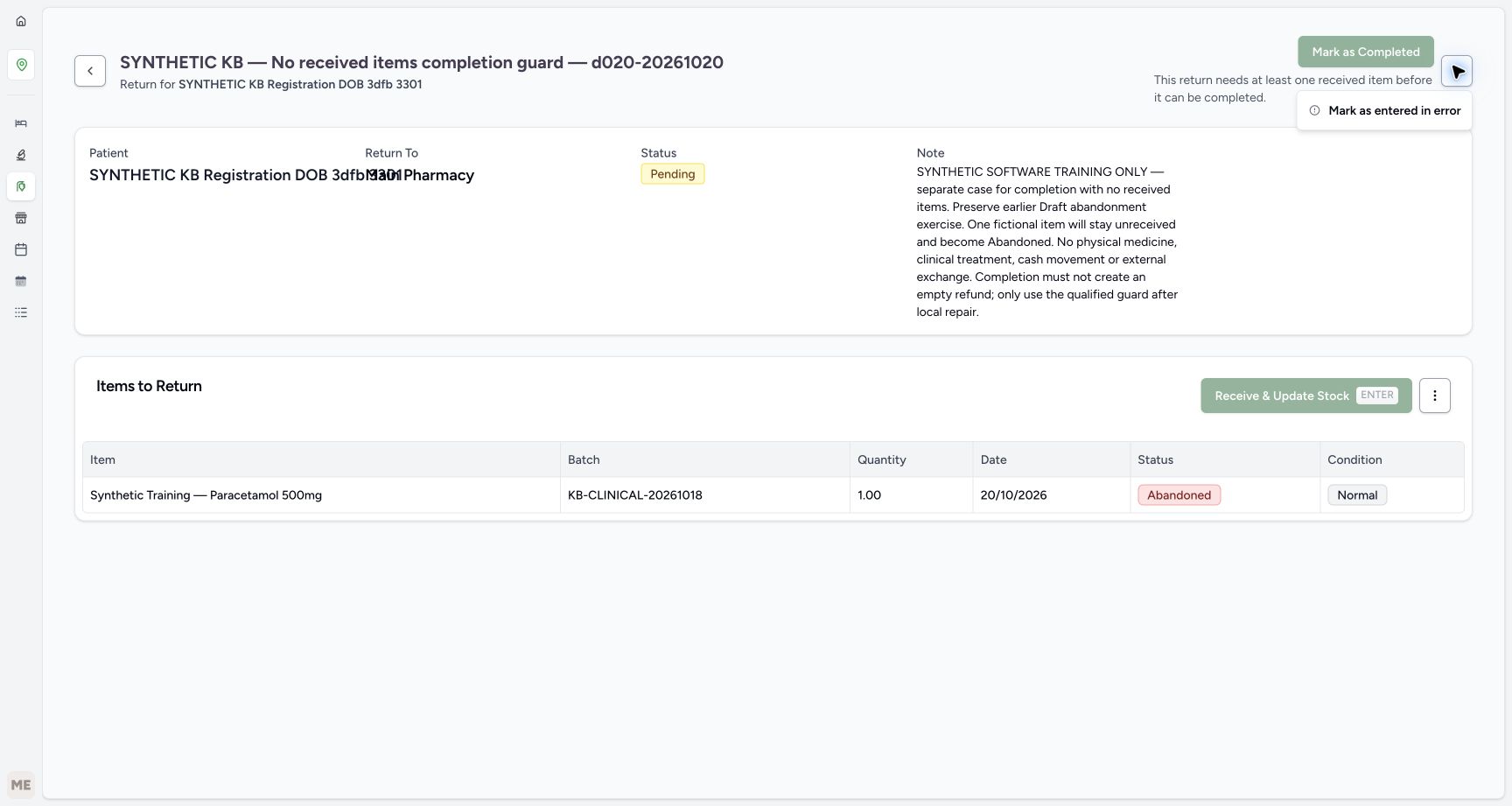
Choose Mark as Approved once. The parent becomes Pending, while its only item remains Abandoned and unreceived. Read the message: “This return needs at least one received item before it can be completed.” Mark as Completed stays disabled, and no View Invoice link appears. No completion request or receiving action is performed. Leave a valid unfinished return Pending; approval and the Normal label do not create returned goods or a refund.
123456Start with one unreceived Abandoned item
Capture details
Isolated synthetic software exercise at MANSOQ Demo Polyclinic/Main Pharmacy. No physical medicine, clinical treatment, cash movement or external exchange is involved.
Image SHA-256 b7e781d12f01f37011e5086eca5183d5e240725d60d965a9e36694c529bc0f16
- Match the patient subtitle: Use the named synthetic patient and the separate no-received-items exercise.
- Verify Draft parent: This return has not been approved or completed.
- Verify the item is Abandoned: The unit remains unreceived.
- Verify quantity one: Keep the saved one-unit history.
- Read retained Normal condition: This label does not mean the unit was received.
- Choose Mark as Approved once: Move this reviewed Draft to Pending without receiving stock.
123456Read the completion requirement
Capture details
Isolated synthetic software exercise at MANSOQ Demo Polyclinic/Main Pharmacy. No physical medicine, clinical treatment, cash movement or external exchange is involved.
Image SHA-256 0672c7bd7a4b6e5639f2bc527d6d63243d6dc7c1d53c8a0d09d8b14eca490df7
- Verify Pending: Approval has not received the unit.
- Recognise disabled completion: No completion request is sent from this disabled action.
- Read the received-item requirement: This return needs at least one received item before it can be completed.
- Verify the only item is Abandoned: There is no Completed receipt in this return.
- Read Normal without inferring receipt: The historical condition is separate from receiving status.
- Recognise disabled receiving: There is no selected receivable In Progress row here.
3. Optional: correct only this deliberately mistaken entry
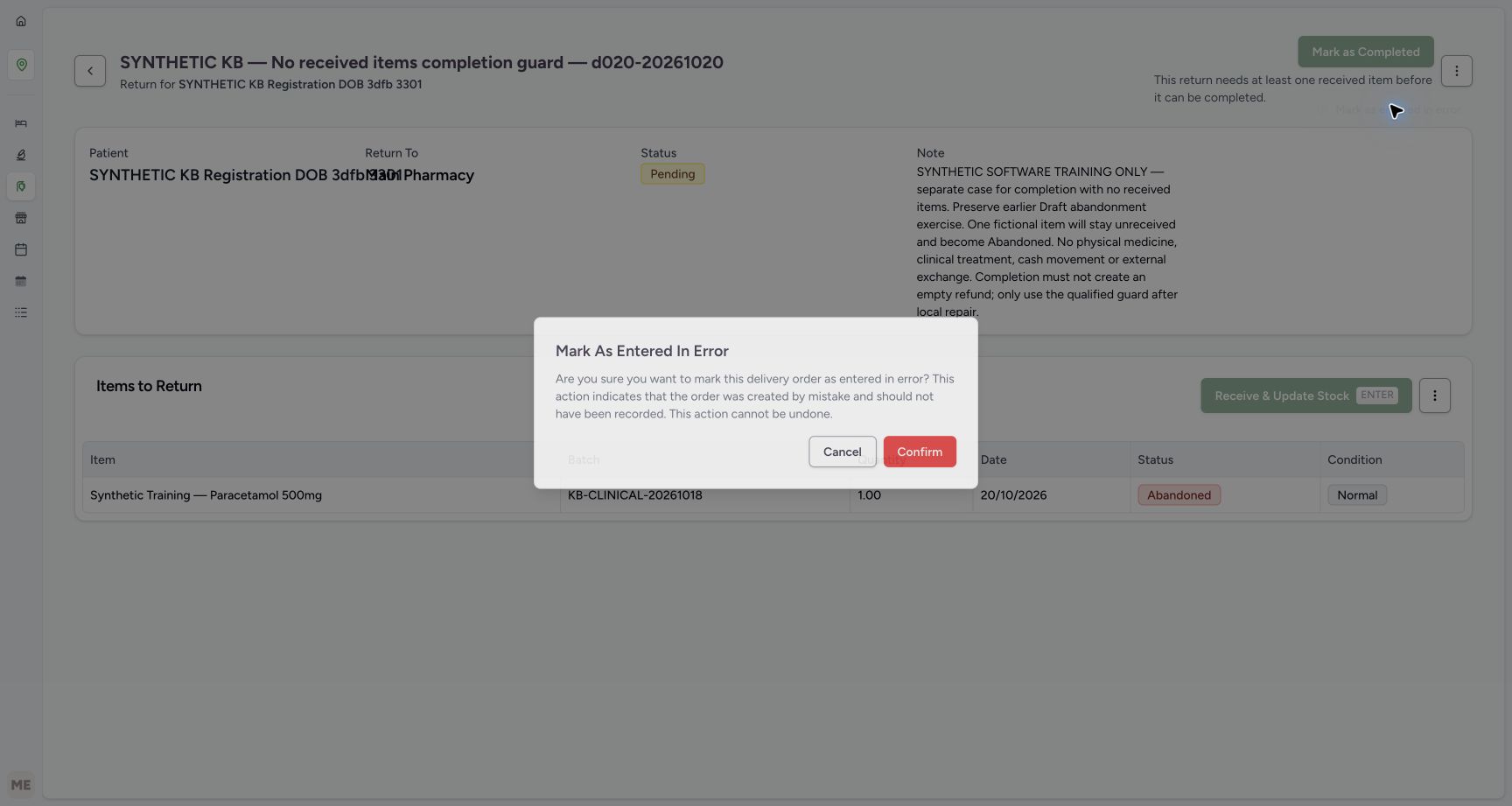
This separate staged exercise treats the whole return as entered by mistake. It is not a way to complete a valid return or bypass the received-item requirement. On the Pending parent, open Actions → Mark as entered in error. Read the warning that the order should not have been recorded and the action cannot be undone. Choose Cancel for a valid entry. Only for this deliberately staged, authorised mistake, confirm once.
 12
12Optional: open the parent error action
Capture details
Isolated synthetic software exercise at MANSOQ Demo Polyclinic/Main Pharmacy. No physical medicine, clinical treatment, cash movement or external exchange is involved.
Image SHA-256 661251140943eca049b64cf174dbe14430e9c276c8d6fbfd1c90735275ec4d11
- Open the parent Actions menu: Use this only for the deliberately staged mistaken entry.
- Choose Mark as entered in error: This is correction of a mistake, not valid return completion.
 123
123Review the irreversible correction warning
Capture details
Isolated synthetic software exercise at MANSOQ Demo Polyclinic/Main Pharmacy. No physical medicine, clinical treatment, cash movement or external exchange is involved.
Image SHA-256 e3c28b53f7493abf3ef430b2e23b8fe89b3124e03781c681ab0ad7e4943e3111
- Read the error-only warning: Do not correct a valid return merely because completion is unavailable.
- Cancel for a valid entry: Leave its unfinished history intact.
- Confirm only the staged mistake: This fictional exercise deliberately confirms an authorised correction.
4. Verify the retained correction after reload
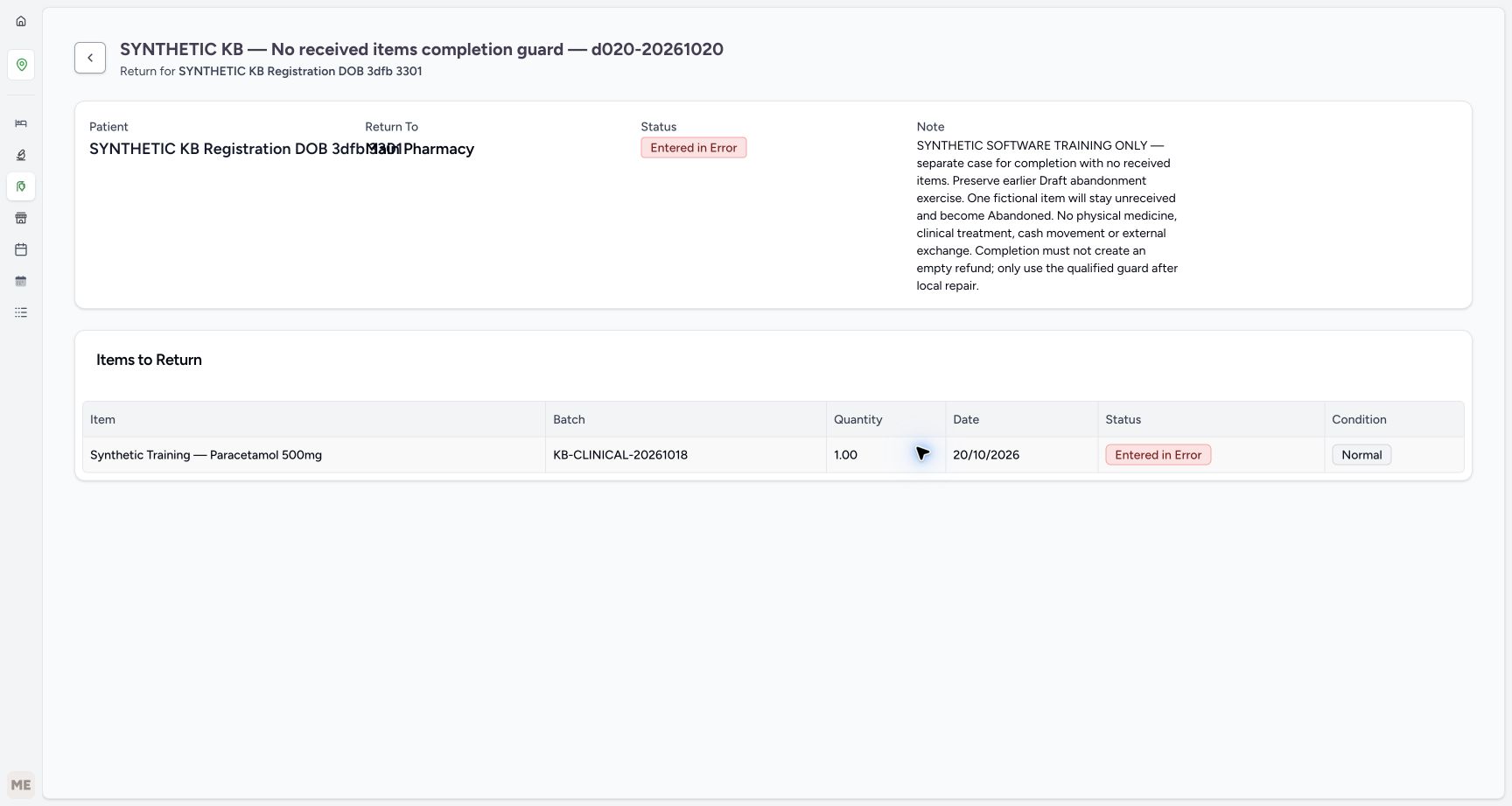
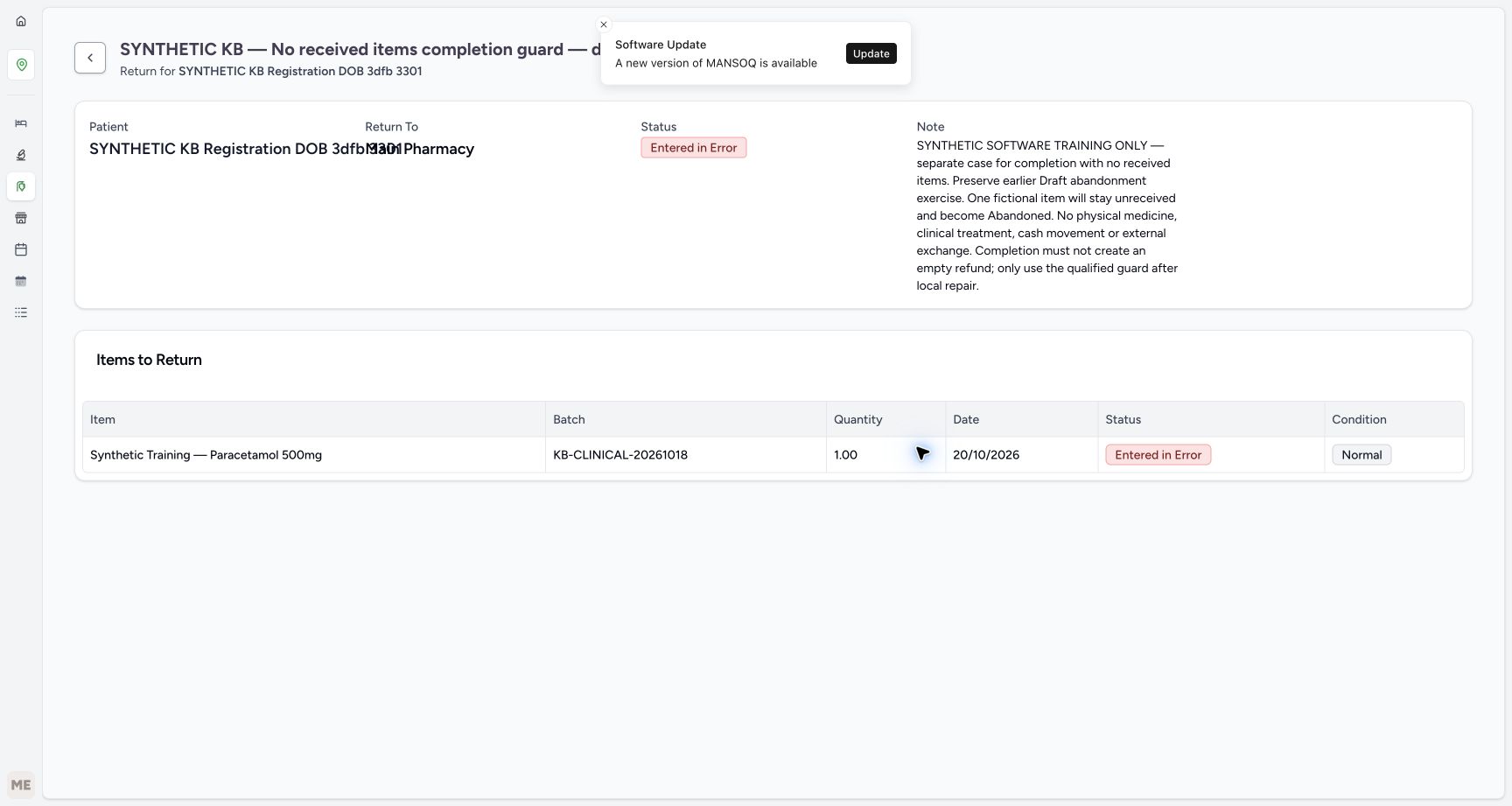
After the optional confirmation, verify both the parent and the same one-unit item are Entered in Error, with Normal retained as historical condition. No invoice is linked to the return. Reload normally and verify the same statuses and quantity persist. This is retained correction history, not successful receipt or parent completion.
 1234
1234Verify the corrected history
Capture details
Isolated synthetic software exercise at MANSOQ Demo Polyclinic/Main Pharmacy. No physical medicine, clinical treatment, cash movement or external exchange is involved.
Image SHA-256 0f7a3a2c98e46d105214c8431cb49f86cc6f1114a16bfcf013eed329e62a7a62
- Verify parent Entered in Error: The mistaken parent is retained as corrected history.
- Verify item Entered in Error: The same unreceived item is retained.
- Verify saved quantity one: The correction does not add a receipt.
- Read retained Normal condition: The unit was not received.
 12345
12345Verify the same history after reload
Capture details
Isolated synthetic software exercise at MANSOQ Demo Polyclinic/Main Pharmacy. No physical medicine, clinical treatment, cash movement or external exchange is involved.
Image SHA-256 46abdfc21ceb19d3a43271655f2039f7c0898632ec9f6da27efdb1605602ba33
- Verify corrected parent after reload: The saved correction persists.
- Verify corrected item after reload: There is still no completed receipt.
- Verify the same quantity: The history still records one unit.
- Read retained condition: Normal remains historical metadata.
- Open Inventory: Use the Inventory menu to check the existing stock.
5. Read back the existing stock
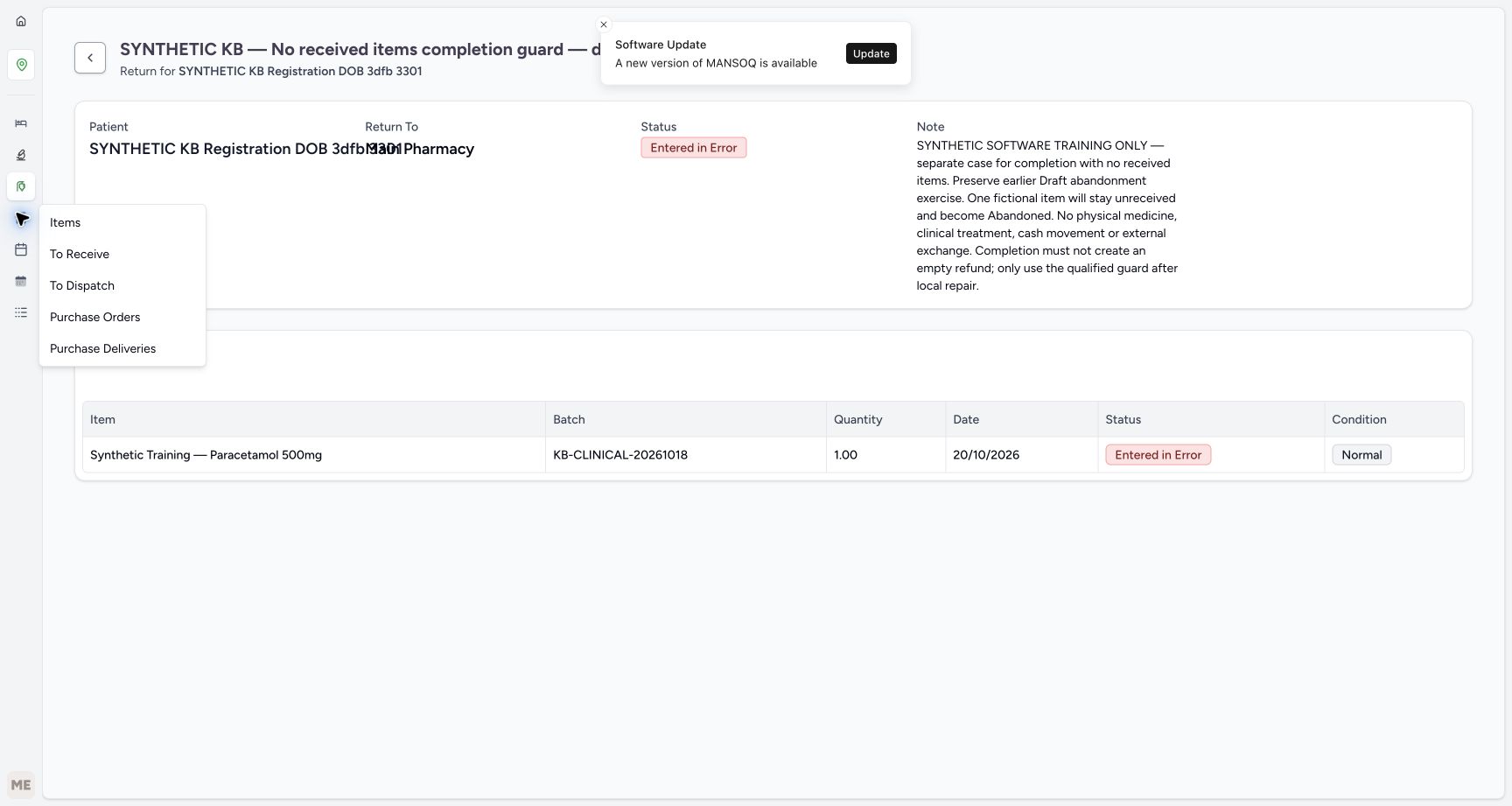
With collapsed navigation, open Inventory and choose Items in its flyout. If the sidebar is already expanded, Items appears under Inventory. Match the original Paracetamol batch KB-CLINICAL-20261018: usable stock remains 83. HYMOX A and B remain zero. Neither approval of this unreceived item nor the optional mistaken-entry correction adds usable stock. Keep receiving controls unused.
12345Verify the same history after reload
Capture details
Isolated synthetic software exercise at MANSOQ Demo Polyclinic/Main Pharmacy. No physical medicine, clinical treatment, cash movement or external exchange is involved.
Image SHA-256 46abdfc21ceb19d3a43271655f2039f7c0898632ec9f6da27efdb1605602ba33
- Verify corrected parent after reload: The saved correction persists.
- Verify corrected item after reload: There is still no completed receipt.
- Verify the same quantity: The history still records one unit.
- Read retained condition: Normal remains historical metadata.
- Open Inventory: Use the Inventory menu to check the existing stock.
 1
1Choose Items from collapsed Inventory
Capture details
Separate read-only navigation example from the same authorised synthetic exercise. No receipt, correction or financial action occurs.
Image SHA-256 9bf19e9f167bc51e5b334fa11f78a459331c020485ff6ece1c91fa248a68e9f9
- Choose Items in the Inventory flyout: Open the existing inventory list from collapsed navigation.
12345Read unchanged usable stock
Capture details
Isolated synthetic software exercise at MANSOQ Demo Polyclinic/Main Pharmacy. No physical medicine, clinical treatment, cash movement or external exchange is involved.
Image SHA-256 0ba0bdeabc560ae4136ccc336e61ad6404489401fd026a86d3db5205cc8f98c5
- Verify Inventory Items view: The selected Items page shows the inventory readback; use the flyout action when navigation is collapsed.
- Read Paracetamol stock eighty-three: No unreceived unit has been added.
- Read HYMOX A stock zero: The earlier A lot is unchanged.
- Read HYMOX B stock zero: The earlier B lot is unchanged.
- Match the original Paracetamol batch: Use KB-CLINICAL-20261018.
6. Use the verified original sale to open its Account
Reopen the verified original Paracetamol sale using the order-history and patient checks in the shared return workflow. Match the same patient, original batch, Completed ten-unit sale, SAR 63.00 paid and zero due. Choose its visible Account link directly. It opens the existing account in a new tab. Read SAR 68.00 gross, SAR 68.00 paid and zero due. The four earlier invoices remain: two Balanced sales and the two Cancelled refunds from prior exercises. This return has created no new invoice or credit.
1234567Use the original sale’s direct Account link
Capture details
Isolated synthetic software exercise at MANSOQ Demo Polyclinic/Main Pharmacy. No physical medicine, clinical treatment, cash movement or external exchange is involved.
Image SHA-256 aba5654cdcb5733e6a368e92498dcf98b2f9e67d7860d75adac18bb2d607b243
- Match the original sale patient: Use the verified named synthetic patient.
- Verify original Completed sale: Keep the sale separate from the unreceived return.
- Verify original quantity ten: The original sale has not been changed.
- Verify original paid SAR 63.00: No replacement payment was recorded.
- Verify original amount due zero: The original sale remains paid.
- Open Account directly: This link opens the existing account in a new tab.
- Match the original batch: The original sale still uses KB-CLINICAL-20261018.
12345678Read the existing account without a new credit
Capture details
Isolated synthetic software exercise at MANSOQ Demo Polyclinic/Main Pharmacy. No physical medicine, clinical treatment, cash movement or external exchange is involved.
Image SHA-256 0ce6b2258b3c7c581b30d8398bda4480562bed5829c09eb5835585d294fcad26
- Read zero account due: This branch has added no credit.
- Read paid SAR 68.00: The original payment total is unchanged.
- Read gross SAR 68.00: The original sales remain the gross.
- Identify earlier Cancelled INV-117-26: This belongs to the prior manual two-item correction.
- Identify earlier Cancelled INV-116-26: This belongs to the prior Damaged correction.
- Verify HYMOX sale Balanced: The earlier SAR 5.00 sale remains.
- Verify Paracetamol sale Balanced: The earlier SAR 63.00 sale remains.
- Choose Payments: Read the original cash entries without creating another.
7. Verify original payments and reload
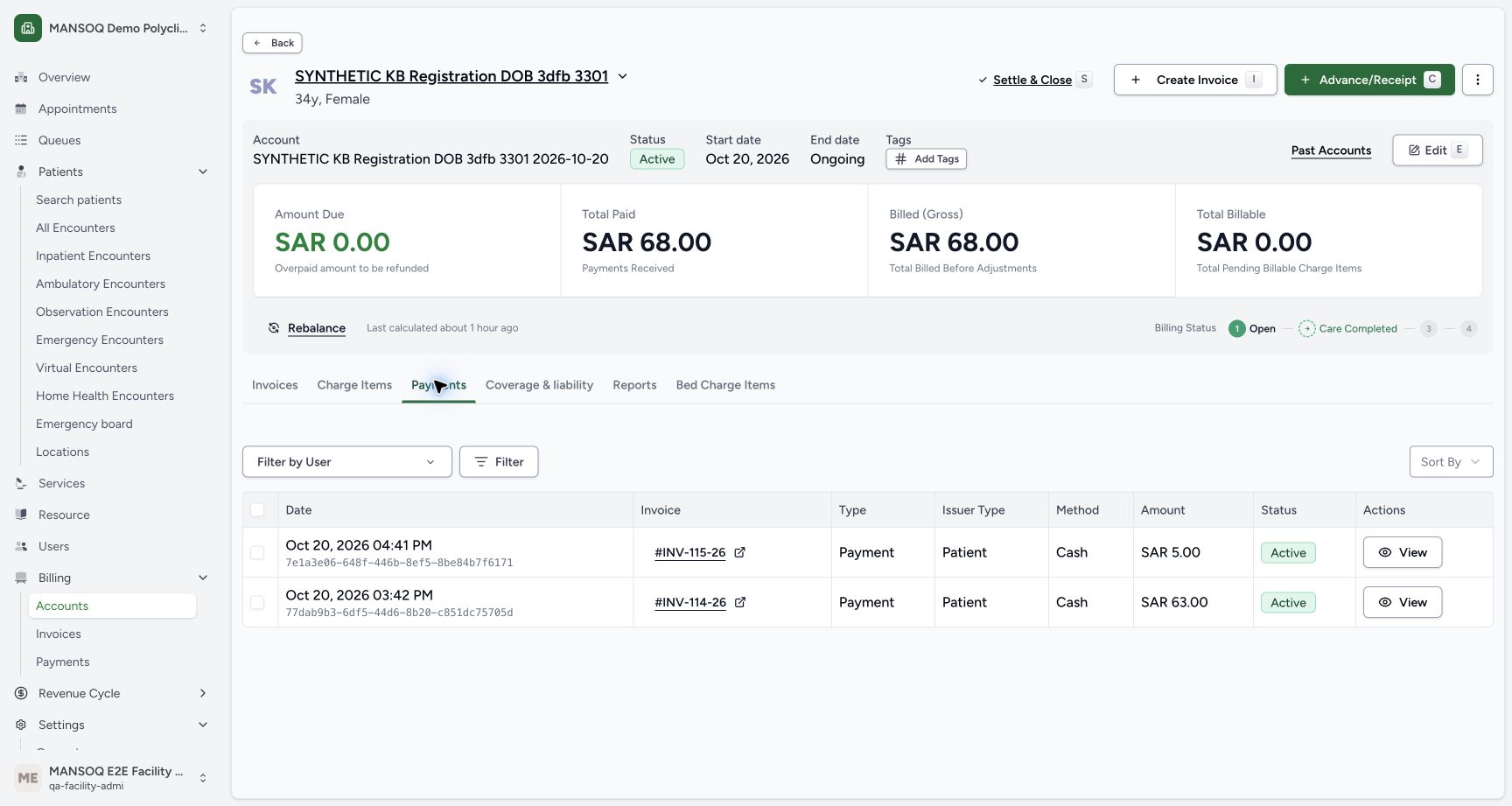
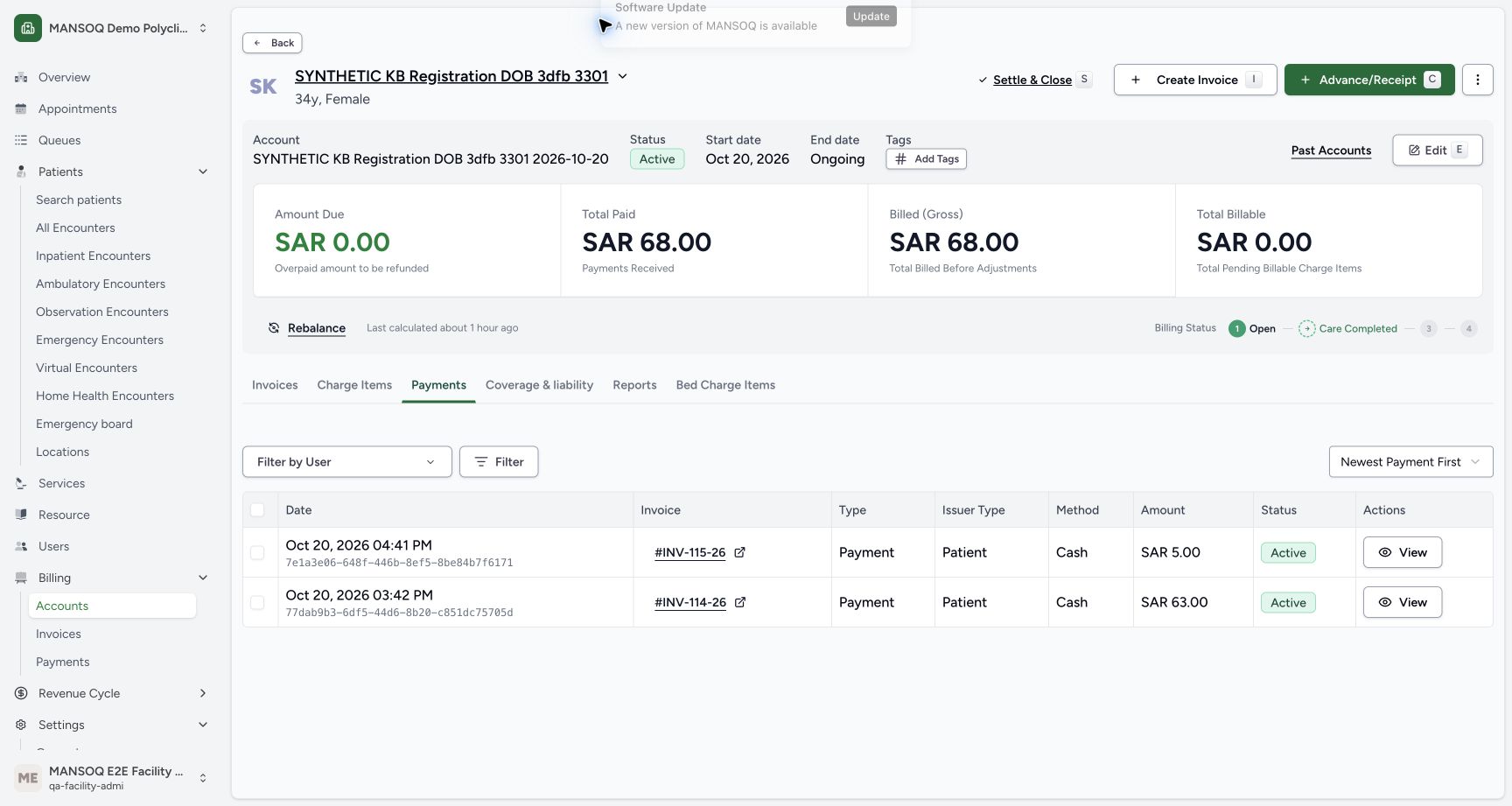
In that account tab, choose Payments. Verify only the original active cash entries of SAR 5.00 and SAR 63.00, with total paid SAR 68.00 and zero due. Reload normally and verify the same totals and entries remain. No new payment, refund payment, invoice, rebalance or account closure is needed for this branch.
12345678Read the existing account without a new credit
Capture details
Isolated synthetic software exercise at MANSOQ Demo Polyclinic/Main Pharmacy. No physical medicine, clinical treatment, cash movement or external exchange is involved.
Image SHA-256 0ce6b2258b3c7c581b30d8398bda4480562bed5829c09eb5835585d294fcad26
- Read zero account due: This branch has added no credit.
- Read paid SAR 68.00: The original payment total is unchanged.
- Read gross SAR 68.00: The original sales remain the gross.
- Identify earlier Cancelled INV-117-26: This belongs to the prior manual two-item correction.
- Identify earlier Cancelled INV-116-26: This belongs to the prior Damaged correction.
- Verify HYMOX sale Balanced: The earlier SAR 5.00 sale remains.
- Verify Paracetamol sale Balanced: The earlier SAR 63.00 sale remains.
- Choose Payments: Read the original cash entries without creating another.
 12345
12345Read the two original cash payments
Capture details
Isolated synthetic software exercise at MANSOQ Demo Polyclinic/Main Pharmacy. No physical medicine, clinical treatment, cash movement or external exchange is involved.
Image SHA-256 0e5e8628ee49839228af744a75c3ab1c43e131bd22eab58eabeb28ab1170f56f
- Read original SAR 5.00 payment: This is the earlier HYMOX sale payment.
- Read original SAR 63.00 payment: This is the earlier Paracetamol sale payment.
- Verify the existing payment is Active: No new refund payment was recorded.
- Verify paid SAR 68.00: The original cash total remains.
- Verify zero due: There is no new account credit from this branch.
 12345
12345Verify account and payments after reload
Capture details
Isolated synthetic software exercise at MANSOQ Demo Polyclinic/Main Pharmacy. No physical medicine, clinical treatment, cash movement or external exchange is involved.
Image SHA-256 1331923a741860a3e0d0a1df084e16ec92555df1ff21166fef0c56008a7adfaa
- Verify zero due after reload: The unchanged balance persists.
- Verify paid sixty-eight after reload: The original paid total persists.
- Verify gross sixty-eight after reload: The original sales remain.
- Verify the same SAR 5.00 entry: No new payment has appeared.
- Verify the same SAR 63.00 entry: The original payment history remains.
Keep unreceived history separate from a valid receipt
An Abandoned item remains unreceived and terminal. Approving its parent does not turn it into a receipt. With no received item, keep the return unfinished rather than creating an empty refund or treating Normal condition as stock. For the separate valid received-item workflow, use Manually receive two Normal return items and review the Draft refund. That lesson covers actual receiving before parent completion; do not substitute the optional mistake correction for valid return handling.
123456Start with one unreceived Abandoned item
Capture details
Isolated synthetic software exercise at MANSOQ Demo Polyclinic/Main Pharmacy. No physical medicine, clinical treatment, cash movement or external exchange is involved.
Image SHA-256 b7e781d12f01f37011e5086eca5183d5e240725d60d965a9e36694c529bc0f16
- Match the patient subtitle: Use the named synthetic patient and the separate no-received-items exercise.
- Verify Draft parent: This return has not been approved or completed.
- Verify the item is Abandoned: The unit remains unreceived.
- Verify quantity one: Keep the saved one-unit history.
- Read retained Normal condition: This label does not mean the unit was received.
- Choose Mark as Approved once: Move this reviewed Draft to Pending without receiving stock.
123456Read the completion requirement
Capture details
Isolated synthetic software exercise at MANSOQ Demo Polyclinic/Main Pharmacy. No physical medicine, clinical treatment, cash movement or external exchange is involved.
Image SHA-256 0672c7bd7a4b6e5639f2bc527d6d63243d6dc7c1d53c8a0d09d8b14eca490df7
- Verify Pending: Approval has not received the unit.
- Recognise disabled completion: No completion request is sent from this disabled action.
- Read the received-item requirement: This return needs at least one received item before it can be completed.
- Verify the only item is Abandoned: There is no Completed receipt in this return.
- Read Normal without inferring receipt: The historical condition is separate from receiving status.
- Recognise disabled receiving: There is no selected receivable In Progress row here.
1234Verify the corrected history
Capture details
Isolated synthetic software exercise at MANSOQ Demo Polyclinic/Main Pharmacy. No physical medicine, clinical treatment, cash movement or external exchange is involved.
Image SHA-256 0f7a3a2c98e46d105214c8431cb49f86cc6f1114a16bfcf013eed329e62a7a62
- Verify parent Entered in Error: The mistaken parent is retained as corrected history.
- Verify item Entered in Error: The same unreceived item is retained.
- Verify saved quantity one: The correction does not add a receipt.
- Read retained Normal condition: The unit was not received.
12345Read unchanged usable stock
Capture details
Isolated synthetic software exercise at MANSOQ Demo Polyclinic/Main Pharmacy. No physical medicine, clinical treatment, cash movement or external exchange is involved.
Image SHA-256 0ba0bdeabc560ae4136ccc336e61ad6404489401fd026a86d3db5205cc8f98c5
- Verify Inventory Items view: The selected Items page shows the inventory readback; use the flyout action when navigation is collapsed.
- Read Paracetamol stock eighty-three: No unreceived unit has been added.
- Read HYMOX A stock zero: The earlier A lot is unchanged.
- Read HYMOX B stock zero: The earlier B lot is unchanged.
- Match the original Paracetamol batch: Use KB-CLINICAL-20261018.
Keep the original financial history intact
The original Paracetamol sale remains Completed for ten units and paid SAR 63.00. The account’s SAR 68.00 paid total includes that earlier payment and the HYMOX SAR 5.00 payment. Existing Cancelled INV-117-26 and INV-116-26 belong to earlier correction exercises. Their presence is not a new refund from this unreceived return. Approval, the disabled completion state and this optional correction create no invoice or cash entry.
1234567Use the original sale’s direct Account link
Capture details
Isolated synthetic software exercise at MANSOQ Demo Polyclinic/Main Pharmacy. No physical medicine, clinical treatment, cash movement or external exchange is involved.
Image SHA-256 aba5654cdcb5733e6a368e92498dcf98b2f9e67d7860d75adac18bb2d607b243
- Match the original sale patient: Use the verified named synthetic patient.
- Verify original Completed sale: Keep the sale separate from the unreceived return.
- Verify original quantity ten: The original sale has not been changed.
- Verify original paid SAR 63.00: No replacement payment was recorded.
- Verify original amount due zero: The original sale remains paid.
- Open Account directly: This link opens the existing account in a new tab.
- Match the original batch: The original sale still uses KB-CLINICAL-20261018.
12345678Read the existing account without a new credit
Capture details
Isolated synthetic software exercise at MANSOQ Demo Polyclinic/Main Pharmacy. No physical medicine, clinical treatment, cash movement or external exchange is involved.
Image SHA-256 0ce6b2258b3c7c581b30d8398bda4480562bed5829c09eb5835585d294fcad26
- Read zero account due: This branch has added no credit.
- Read paid SAR 68.00: The original payment total is unchanged.
- Read gross SAR 68.00: The original sales remain the gross.
- Identify earlier Cancelled INV-117-26: This belongs to the prior manual two-item correction.
- Identify earlier Cancelled INV-116-26: This belongs to the prior Damaged correction.
- Verify HYMOX sale Balanced: The earlier SAR 5.00 sale remains.
- Verify Paracetamol sale Balanced: The earlier SAR 63.00 sale remains.
- Choose Payments: Read the original cash entries without creating another.
12345Read the two original cash payments
Capture details
Isolated synthetic software exercise at MANSOQ Demo Polyclinic/Main Pharmacy. No physical medicine, clinical treatment, cash movement or external exchange is involved.
Image SHA-256 0e5e8628ee49839228af744a75c3ab1c43e131bd22eab58eabeb28ab1170f56f
- Read original SAR 5.00 payment: This is the earlier HYMOX sale payment.
- Read original SAR 63.00 payment: This is the earlier Paracetamol sale payment.
- Verify the existing payment is Active: No new refund payment was recorded.
- Verify paid SAR 68.00: The original cash total remains.
- Verify zero due: There is no new account credit from this branch.
12345Verify account and payments after reload
Capture details
Isolated synthetic software exercise at MANSOQ Demo Polyclinic/Main Pharmacy. No physical medicine, clinical treatment, cash movement or external exchange is involved.
Image SHA-256 1331923a741860a3e0d0a1df084e16ec92555df1ff21166fef0c56008a7adfaa
- Verify zero due after reload: The unchanged balance persists.
- Verify paid sixty-eight after reload: The original paid total persists.
- Verify gross sixty-eight after reload: The original sales remain.
- Verify the same SAR 5.00 entry: No new payment has appeared.
- Verify the same SAR 63.00 entry: The original payment history remains.
Troubleshooting
Mark as Completed stays disabled after approval
Check the received-item message and the saved row status. Here the only row is Abandoned, so there is no completed receipt. Leave a valid return Pending. Do not mark a valid entry as an error merely to remove it, or treat its retained Normal label as proof that stock was received.
123456Read the completion requirement
Capture details
Isolated synthetic software exercise at MANSOQ Demo Polyclinic/Main Pharmacy. No physical medicine, clinical treatment, cash movement or external exchange is involved.
Image SHA-256 0672c7bd7a4b6e5639f2bc527d6d63243d6dc7c1d53c8a0d09d8b14eca490df7
- Verify Pending: Approval has not received the unit.
- Recognise disabled completion: No completion request is sent from this disabled action.
- Read the received-item requirement: This return needs at least one received item before it can be completed.
- Verify the only item is Abandoned: There is no Completed receipt in this return.
- Read Normal without inferring receipt: The historical condition is separate from receiving status.
- Recognise disabled receiving: There is no selected receivable In Progress row here.
12Optional: open the parent error action
Capture details
Isolated synthetic software exercise at MANSOQ Demo Polyclinic/Main Pharmacy. No physical medicine, clinical treatment, cash movement or external exchange is involved.
Image SHA-256 661251140943eca049b64cf174dbe14430e9c276c8d6fbfd1c90735275ec4d11
- Open the parent Actions menu: Use this only for the deliberately staged mistaken entry.
- Choose Mark as entered in error: This is correction of a mistake, not valid return completion.
123Review the irreversible correction warning
Capture details
Isolated synthetic software exercise at MANSOQ Demo Polyclinic/Main Pharmacy. No physical medicine, clinical treatment, cash movement or external exchange is involved.
Image SHA-256 e3c28b53f7493abf3ef430b2e23b8fe89b3124e03781c681ab0ad7e4943e3111
- Read the error-only warning: Do not correct a valid return merely because completion is unavailable.
- Cancel for a valid entry: Leave its unfinished history intact.
- Confirm only the staged mistake: This fictional exercise deliberately confirms an authorised correction.
An update notice or earlier refund is visible
Software Update notices are unrelated to the return and may recur; no Update action forms part of this lesson. Read the saved parent/item status and account values. The two Cancelled refunds shown on the account belong to earlier exercises; this branch adds no invoice, credit or payment. Use the original sale’s direct Account link and read its existing invoices and payments.
123456Read the completion requirement
Capture details
Isolated synthetic software exercise at MANSOQ Demo Polyclinic/Main Pharmacy. No physical medicine, clinical treatment, cash movement or external exchange is involved.
Image SHA-256 0672c7bd7a4b6e5639f2bc527d6d63243d6dc7c1d53c8a0d09d8b14eca490df7
- Verify Pending: Approval has not received the unit.
- Recognise disabled completion: No completion request is sent from this disabled action.
- Read the received-item requirement: This return needs at least one received item before it can be completed.
- Verify the only item is Abandoned: There is no Completed receipt in this return.
- Read Normal without inferring receipt: The historical condition is separate from receiving status.
- Recognise disabled receiving: There is no selected receivable In Progress row here.
12345Verify the same history after reload
Capture details
Isolated synthetic software exercise at MANSOQ Demo Polyclinic/Main Pharmacy. No physical medicine, clinical treatment, cash movement or external exchange is involved.
Image SHA-256 46abdfc21ceb19d3a43271655f2039f7c0898632ec9f6da27efdb1605602ba33
- Verify corrected parent after reload: The saved correction persists.
- Verify corrected item after reload: There is still no completed receipt.
- Verify the same quantity: The history still records one unit.
- Read retained condition: Normal remains historical metadata.
- Open Inventory: Use the Inventory menu to check the existing stock.
1234567Use the original sale’s direct Account link
Capture details
Isolated synthetic software exercise at MANSOQ Demo Polyclinic/Main Pharmacy. No physical medicine, clinical treatment, cash movement or external exchange is involved.
Image SHA-256 aba5654cdcb5733e6a368e92498dcf98b2f9e67d7860d75adac18bb2d607b243
- Match the original sale patient: Use the verified named synthetic patient.
- Verify original Completed sale: Keep the sale separate from the unreceived return.
- Verify original quantity ten: The original sale has not been changed.
- Verify original paid SAR 63.00: No replacement payment was recorded.
- Verify original amount due zero: The original sale remains paid.
- Open Account directly: This link opens the existing account in a new tab.
- Match the original batch: The original sale still uses KB-CLINICAL-20261018.
12345678Read the existing account without a new credit
Capture details
Isolated synthetic software exercise at MANSOQ Demo Polyclinic/Main Pharmacy. No physical medicine, clinical treatment, cash movement or external exchange is involved.
Image SHA-256 0ce6b2258b3c7c581b30d8398bda4480562bed5829c09eb5835585d294fcad26
- Read zero account due: This branch has added no credit.
- Read paid SAR 68.00: The original payment total is unchanged.
- Read gross SAR 68.00: The original sales remain the gross.
- Identify earlier Cancelled INV-117-26: This belongs to the prior manual two-item correction.
- Identify earlier Cancelled INV-116-26: This belongs to the prior Damaged correction.
- Verify HYMOX sale Balanced: The earlier SAR 5.00 sale remains.
- Verify Paracetamol sale Balanced: The earlier SAR 63.00 sale remains.
- Choose Payments: Read the original cash entries without creating another.
12345Verify account and payments after reload
Capture details
Isolated synthetic software exercise at MANSOQ Demo Polyclinic/Main Pharmacy. No physical medicine, clinical treatment, cash movement or external exchange is involved.
Image SHA-256 1331923a741860a3e0d0a1df084e16ec92555df1ff21166fef0c56008a7adfaa
- Verify zero due after reload: The unchanged balance persists.
- Verify paid sixty-eight after reload: The original paid total persists.
- Verify gross sixty-eight after reload: The original sales remain.
- Verify the same SAR 5.00 entry: No new payment has appeared.
- Verify the same SAR 63.00 entry: The original payment history remains.
Source evidence
Every citation uses this exact committed version. The private source repository requires access.
- repositories/platform/mansoq-core/mansoq/emr/api/viewsets/inventory/delivery_order.py:126 ·
460538ee7089a098affbea46de6a365430f608b9Source file checksum
d18ed0813750bf23a1da2a7553880bb340724b8c63396e0a2e045c0b66843063 - repositories/platform/mansoq-core/mansoq/emr/resources/inventory/inventory_item/sync_inventory_item.py:47 ·
460538ee7089a098affbea46de6a365430f608b9Source file checksum
a6f8395ab8059b937700d212bbbcce46c1fc633848c38026c4c8ee9bc2e4c573 - repositories/platform/mansoq-core/mansoq/emr/resources/invoice/return_items_invoice.py:35 ·
460538ee7089a098affbea46de6a365430f608b9Source file checksum
d5667f0da3428d4223da2d2a5d1ae91a0c9924c5a79be298df61d7b6efa993ba - repositories/platform/mansoq-web/public/locale/en.json:3665 ·
460538ee7089a098affbea46de6a365430f608b9Source file checksum
328e5ae5f7a92eeec2532d0619fdd3da9cb4f070964a6404c61eea3a0702b0f4 - repositories/platform/mansoq-web/src/pages/Facility/services/pharmacy/DispenseOrderView.tsx:482 ·
460538ee7089a098affbea46de6a365430f608b9Source file checksum
59bebd01a2422d3b62d5e57b0f3a9211d5eb03ddd94f81704e3dbecd47cd197d - repositories/platform/mansoq-web/src/pages/Facility/services/pharmacy/MedicationReturnShow.tsx:325 ·
460538ee7089a098affbea46de6a365430f608b9Source file checksum
a261f3259c204106ae04f38271be2ce29ef8d532b9aa9664e4c44df3dab97565